Models are advancing quickly. GPT-5, Claude Sonnet, Gemini. Each release gives us more capabilities. But most real work isn’t solved by a single model.
Developers are realizing they need a system of agents: different types of agents working together to accomplish more complex tasks. For example, a researcher to find information, a writer to summarize, a planner to coordinate, and a reviewer to check accuracy.
The challenge is that today, building a multi-agent system is harder than it should be. Context doesn’t flow cleanly between agents. Tools require custom integration. Sharing with a teammate means sending instructions and hoping they can re-create your setup.
That’s the problem cagent solves.
In this blog, we’ll walk you through the basics, how to create a multi-agent AI system in minutes, and how cagent makes this possible.
A multi-agent system is a coordinated group of AI agents that collaborate to complete complex tasks. Using cagent, you can build and run these systems declaratively, no complex wiring or reconfiguration needed.
Meet cagent: The best (and open source) way to build multi-agent systems
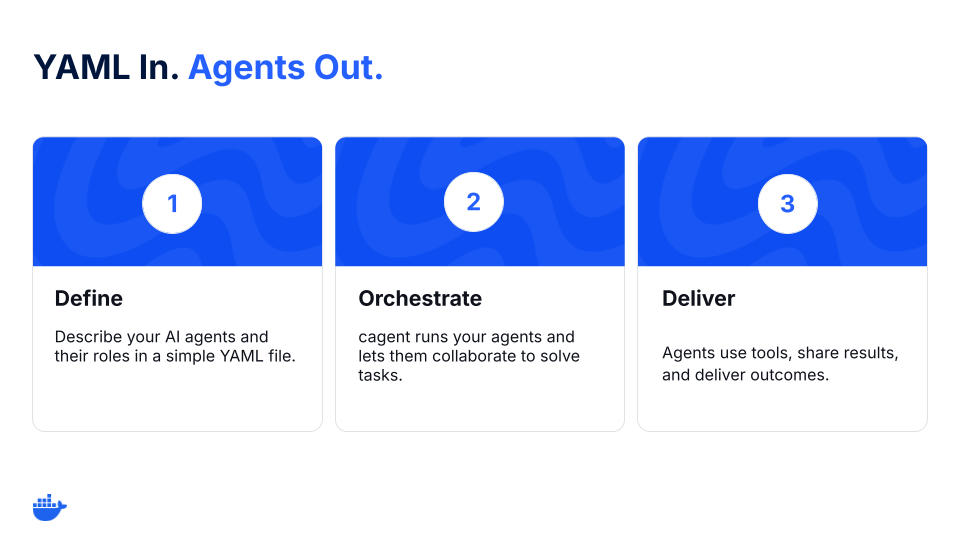
Figure 1: cagent workflow for multi-agent orchestration.
cagent is an open-source tool for building agents and a part of Docker’s growing ecosystem of AI tools.
Instead of writing glue code to wire up models, tools, and workflows, describe an agent (or a team of agents) in a single YAML file:
Which model the agent uses (OpenAI, Anthropic, Gemini, or a local one)
What its role or instructions are
Which tools it can use (like GitHub, search, or the filesystem)
And, if needed, which sub-agents it delegates to
This turns agents into portable, reproducible artifacts you can run anywhere and share with anyone.
Multi-agent challenges that cagent is solving
Create, run, and share multi-agent AI systems more easily with cagent.
Orchestrate agents (and sub-agents) more easily – Define roles and delegation (sub-agents). cagent manages calls and context.
Let agents use tools with guardrails – Grant capabilities with MCP: search, GitHub, files, databases. Each agent gets only the tools you list and is auditable.
Use (and swap) models – OpenAI, Anthropic, Gemini, or local models through Docker Model Runner. Swap providers without rewriting your system.
Treat agents like artifacts – Package, version, and share agents like containers.
How to build a multi-agent system with Docker cagent
Here’s what that looks like in practice.
Step 1: Define your multi-agent system
version: "2"
agents:
root:
model: anthropic/claude-sonnet-4-0
instruction: |
Break down a user request.
Ask the researcher to gather facts, then pass them to the writer.
sub_agents: ["researcher", "writer"]
researcher:
model: openai/gpt-5-mini
description: Agent to research and gather information.
instruction: Collect sources and return bullet points with links.
toolsets:
– type: mcp
ref: docker:duckduckgo
writer:
model: dmr/ai/qwen3
description: Agent to summarize notes.
instruction: Write a concise, clear summary from the researcher’s notes.
The coordinator delegates, the researcher gathers, and the writer drafts. You now have a functioning team of agents.
Step 3: Share it on Docker Hub
cagent push ./team.yaml org/research-writer
Now, anyone on your team can run the exact same setup with:
cagent run docker.io/org/research-writer
That’s a full multi-agent workflow, built and shared in under 5 minutes.
First principles: Why cagent works
These principles keep cagent an easy-to-use and customizable multi-agent runtime to orchestrate AI agents.
Declarative > imperative. Multi-agent systems are mostly wiring: roles, tools, and topology. YAML keeps that wiring declarative, making it easy to define, read, and review.
Agents as artifacts. Agents become portable artifacts you can pull, pin, and trust.
Small surface area. A thin runtime that does one job well: coordinate agents.
What developers are building with cagent
Developers are already exploring different multi-agent use cases with cagent. Here are some examples:
Collector reads PRs/issues, labels, failing checks
Writer drafts comments or changelogs
Coordinator enforces rules, routes edge cases
Researcher finds and cites sources
Writer produces a clean summary
Reviewer checks for hallucinations and tone
KB agent queries internal docs
Redactor strips PII before escalation
Each one starts the same way: a YAML file and an idea. And they can be pushed to a registry and run by anyone.
cagent gives you the fastest path forward to build multi-agent systems. It’s open-source, easy to use, and built for the way developers already work. Define your agents, run them locally, and share them, all in a few lines of YAML.
Run the following to get started:
brew install cagent
cagent new
cagent run agent.yaml
Learn more
Get the technical details from our cagent documentation.
We’d love to hear what you think. Join us in the Docker Community Slack.
Dive into more topics about AI and Docker.
Subscribe to the Docker Navigator Newsletter.
Quelle: https://blog.docker.com/feed/








Published by