Join us at Google Cloud Next ‘20: April 6-8 in San Francisco

Mark your calendars for Google’s largest event, Google Cloud Next ’20, happening April 6-8, 2020 at the Moscone Center in San Francisco. Register by February 29, 2020 with the code GRPABLOG2020 and you will receive $500 USD off a full-price ticket. Google Cloud Next brings together a global cloud community of leaders, developers, influencers, and more to help you get inspired and solve your most pressing business challenges, including: What are the latest security strategies to help me keep pace with evolving threats? How can I improve my data analytics strategies with new AI or ML technologies?How and when should I migrate my VMs?How can I develop apps once and deploy on any cloud?How can I increase productivity and collaboration inside my organization?Solutions to these challenges, and many more, will be showcased over the course of three days through more than 500 sessions, labs, and training opportunities at Google Cloud Next.Explore dynamic content across all learning levels. Dive deep into technologies and solutions spanning the Google Cloud portfolio through breakout sessions, our Dev Zone, code labs, demos, hands-on training, and more. Plus, you’ll be able to meet more than 370 ecosystem partners to see how they’re innovating on Google Cloud with their customers.Last year at Next ’19, we were grateful that so many of you joined us at our sold out event. Take a look at our recap posts (Day 1, Day 2, and Day 3) for a preview of what you can expect in April. Since our 122+ announcements at Next ’19, we’ve been hard at work on more product announcements, customer success stories, and news announcements to share with you this April.If you’re a partner or at premier level in Partner Advantage, and interested in becoming a sponsor Next ‘20, please contact us.We’re committed to creating an accessible, scalable, and socially responsible cloud together, and would be thrilled to have you at this year’s event.
Quelle: Google Cloud Platform

Exploratory data analysis, feature selection for better ML models

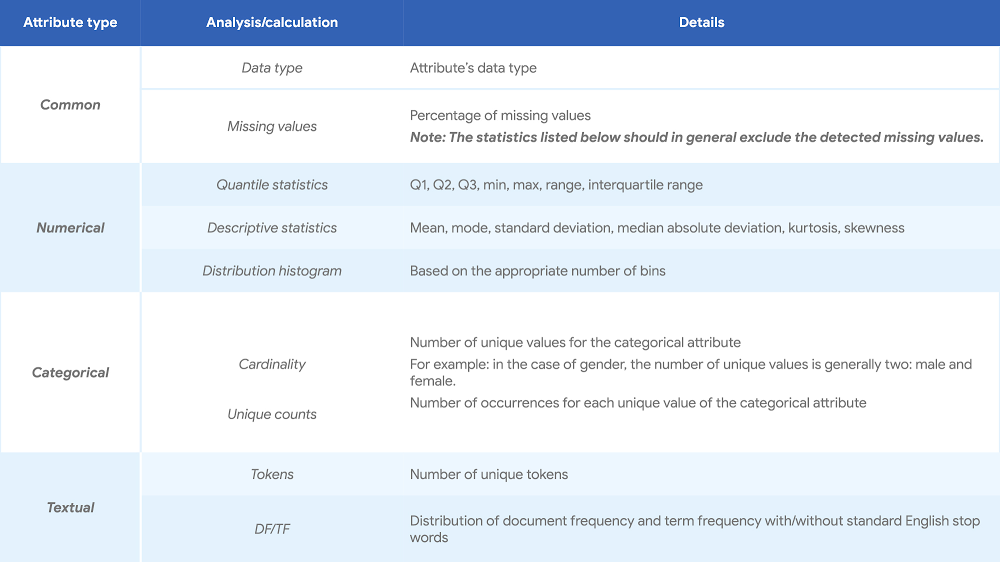
When you’re getting started with a machine learning (ML) project, one critical principle to keep in mind is that data is everything. It is often said that if ML is the rocket engine, then the fuel is the (high-quality) data fed to ML algorithms. However, deriving truth and insight from a pile of data can be a complicated and error-prone job. To have a solid start for your ML project, it always helps to analyze the data up front, a practice that describes the data by means of statistical and visualization techniques to bring important aspects of that data into focus for further analysis. During that process, it’s important that you get a deep understanding of: The properties of the data, such as schema and statistical properties;The quality of the data, like missing values and inconsistent data types;The predictive power of the data, such as correlation of features against target.This process lays the groundwork for the subsequent feature selection and engineering steps, and it provides a solid foundation for building good ML models. There are many different approaches to conducting exploratory data analysis (EDA) out there, so it can be hard to know what analysis to perform and how to do it properly. To consolidate the recommendations on conducting proper EDA, data cleaning, and feature selection in ML projects, we’ll summarize and provide concise guidance from both intuitive (visualization) and rigorous (statistical) perspectives. Based on the results of the analysis, you can then determine corresponding feature selection and engineering recommendations. You can also get more comprehensive instructions in this white paper.You can also check out the Auto Data Exploration and Feature Recommendation Tool we developed to help you automate the recommended analysis, regardless of the scale of the data, then generate a well-organized report to present the findings. EDA, feature selection, and feature engineering are often tied together and are important steps in the ML journey. With the complexity of data and business problems that exist today (such as credit scoring in finance and demand forecasting in retail), how the results of proper EDA can influence your subsequent decisions is a big question. In this post, we will walk you through some of the decisions you’ll need to make about your data for a particular project, and choosing which type of analysis to use, along with visualizations, tools, and feature processing.Let’s start exploring the types of analysis you can choose from. Statistical data analysisWith this type of analysis, data exploration can be conducted from three different angles: descriptive, correlation, and contextual. Each type introduces complementary information on the properties and predictive power of the data, helping you make an informed decision based on the outcome of the analysis.1. Descriptive analysis (univariate analysis)Descriptive analysis, or univariate analysis, provides an understanding of the characteristics of each attribute of the dataset. It also offers important evidence for feature preprocessing and selection in a later stage. The following table lists the suggested analysis for attributes that are common, numerical, categorical and textual.Click to enlarge2. Correlation analysis (bivariate analysis)Correlation analysis (or bivariate analysis) examines the relationship between two attributes, say X and Y, and examines whether X and Y are correlated. This analysis can be done from two perspectives to get various possible combinations:Qualitative analysis. This performs computation of the descriptive statistics of dependent numerical/categorical attributes against each unique value of the independent categorical attribute. This perspective helps intuitively understand the relationship between X and Y. Visualizations are often used together with qualitative analysis as a more intuitive way of presenting the result.Click to enlargeQuantitative analysis. This is a quantitative test of the relationship between X and Y, based on hypothesis testing framework. This perspective provides a formal and mathematical methodology to quantitatively determine the existence and/or strength of the relationship.Click to enlarge3. Contextual analysisDescriptive analysis and correlation analysis are both generic enough to be performed on any structured dataset, neither of which requires context information. To further understand or profile the given dataset and to gain more domain-specific insights, you can use one of two common contextual information-based analyses: Time-based analysis: In many real-world datasets, the timestamp (or a similar time-related attribute) is one of the key pieces of contextual information. Observing and/or understanding the characteristics of the data along the time dimension, with various granularities, is essential to understanding the data generation process and ensuring data qualityAgent-based analysis: As an alternative to the time, the other common attribute is the unique identification (ID, such as user ID) of each record. Analyzing the dataset by aggregating along the agent dimension, i.e., histogram of number of records per agent, can further help improve your understanding of the dataset. Example of time-based analysis:The following figure displays the average number of train trips per hour originating from and ending at one particular location based on a simulated dataset.From this, we can conclude that peak times are around 8:30am and 5:30pm, which is consistent with the intuition that these are the times when people would typically leave home in the morning and return after a day of work.Feature selection and engineeringThe ultimate goal of EDA (whether rigorous or through visualization) is to provide insights on the dataset you’re studying. This can inspire your subsequent feature selection, engineering, and model-building process. Descriptive analysis provides the basic statistics of each attribute of the dataset. Those statistics can help you identify the following issues: High percentage of missing valuesLow variance of numeric attributesLow entropy of categorical attributesImbalance of categorical target (class imbalance)Skew distribution of numeric attributesHigh cardinality of categorical attributesThe correlation analysis examines the relationship between two attributes. There are two typical action points triggered by the correlation analysis in the context of feature selection or feature engineering:Low correlation between feature and targetHigh correlation between featuresOnce you’ve identified issues, the next task is to make a sound decision on how to properly mitigate these issues. One such example is for “High percentage of missing values.” The identified problem is that the attribute is missing in a significant proportion of the data points. The threshold or definition of “significant” can be set based on domain knowledge. There are two options to handle this, depending on the business scenario:Assign a unique value to the missing value records, if the missing value, in certain contexts, is actually meaningful. For example, a missing value could indicate that a monitored, underlying process was not functioning properly. Discard the feature if the values are missing due to misconfiguration, issues with data collection or untraceable random reasons, and the historic data can’t be reconstituted. You can check out the whitepaper to learn more about the proper ways of addressing the above issues, recommended visualization of each analysis and a survey of the existing tools that are most suitable.A tool that helps you automateTo further help you speed up the process of preparing data for machine learning, you can use our Auto Data Exploration and Feature Recommendation Tool to automate the recommended analysis regardless of the scale of the data, and generate a well-organized report to present the findings and recommendations. The tool’s automated EDA includes:Descriptive analysis of each attribute in a dataset for numerical, categorical; Correlation analysis of two attributes (numerical vs. numerical, numerical vs. categorical, and categorical vs. categorical) through qualitative and/or quantitative analysis.Based on the EDA performed, the tool makes feature recommendations and generates a summary report, which looks something like this:We look forward to your feedback as we continue adding features to the tool.Thanks to additional contributors to this work: Dan Anghel, cloud machine learning engineer and Barbara Fusinska, cloud machine learning engineer
Quelle: Google Cloud Platform

Trying cloud on for size: URBN’s Nuuly builds from scratch with Google Cloud

Editor’s note: Today we’re hearing from Nuuly, the subscription-based clothing business of URBN. As a new brand within an established company, their small technology team had the opportunity to build their infrastructure from scratch. Here’s how they did it.At URBN, we’re a retail company that includes several well-known U.S. retail brands: Urban Outfitters, Anthropologie, and Free People. When we decided to move into the subscription model space last year, our goal was to let our customers try out new styles by renting clothing. They can subscribe monthly and pick six items per month from our e-commerce site to wear as much as they like, then return them back to us. This brand-new service, called Nuuly, launched in mid-2019 after just 10 months from conceiving the idea to offering the service to customers. In that 10 months, we built an entire technology platform using Google Cloud from the ground up, choosing the right tools to power this new business—without any legacy apps. From a technology perspective, we had different challenges and goals as a subscription provider than URBN does as an online and in-person retailer. We decided to put a team together to totally focus on this new retail rental model and its unique requirements. That meant we could make our own decisions about the platform and frameworks we’d use. We first had to think about the business model we were building, then assess what technology would best fit with that model.  Signing up for cloud    The overarching challenge we faced was creating the best solution for the job within a tight timeframe. Instead of just shopping for products, we went a layer deeper and looked at all aspects of this new market we were entering. The recurring revenue model is different from a typical retail revenue model, and so is managing inventory at the individual garment level, rather than the typical SKU level. But in the retail market, a lot of legacy tools were built for that model. Our existing enterprise system wasn’t able to support these new requirements, and it would have been much harder to retrofit than to build from the ground up. We knew we wanted a cloud platform so we could take advantage of provider infrastructure instead of ours for hosting.When we started exploring the cloud technology options to power Nuuly, we had a few parameters established: We wanted a secure platform that would let us grow as the business grows, and since we’re not cloud experts, we wanted to have the option of using managed services. Because we were in a brand-new space, we wanted to be able to start small, but not be restricted when we did want to scale out. Another important aspect for us was that our technology would let us easily use data science and machine learning to do extensive personalization. As the engineering lead, I did a lot of up-front analysis to figure out which would be the best cloud partner for us. Google checked off a lot of boxes, and we knew the data management platform would support our needs, so we chose Google Cloud. Our 15-person team was able to build the entire new platform in the 10-month timeframe because we chose Google—we didn’t have to hire an operations team to solve the problem. Using Google Cloud services let us bootstrap quickly and build our business on top of that. That platform includes an entire warehouse management system, and the software powering the brand-new distribution center.Powering our subscribers with dataWith Google Cloud, we’ve built a data backbone that lets us integrate data from different sources, messaging, stream processing and ETL jobs. We chose Google Kubernetes Engine (GKE) and multiple Google Cloud managed data offerings, including BigQuery, Data Studio, Cloud Storage, TensorFlow, and more. We use an event-driven architecture with Kafka as the main event manager. We run a Confluent cluster on Google Cloud, which helps us meet our strict event data ordering requirement. The biggest competitive advantage we get using Google Cloud is the managed services. There are so many capabilities built in to Google Cloud, so it’s easy for us to adopt new features as quickly as possible to stay competitive. For example, we can capture all events streaming into BigQuery, then add a reporting dashboard easily for our business partners on the brand side. They can then make informed decisions on what to buy based on updated user information. Using Google Cloud’s many features also means we can offer our customers more cool features so they can try new styles and new ways of expressing themselves. We can offer different channels to different customers based on age group, for example, to recommend new styles to try without having to buy them.We also had strict scalability criteria when we set out to deploy cloud and build our new business. Our cloud platform with Google has scaled along with the business, so as we acquire new subscribers, we’re not increasing our operational costs at the same time like we would be with a more traditional on-prem system. With cloud, we can pay for resources as we use them, so cost savings and efficiency is also an important metric to track. And the cloud lets us scale without customer downtime, so that translates into another key metric for us.Our business is still evolving, so we’re just scratching the surface in terms of all we can offer our customers. What’s great is that with managed cloud services, we’re able to focus on the business side of things, rather than the technology side. Since we don’t have to manage resources, we can provision resources up front and use the utilization model. Learn more about URBN and about Nuuly.
Quelle: Google Cloud Platform

Put your archive data on ice with new storage offering

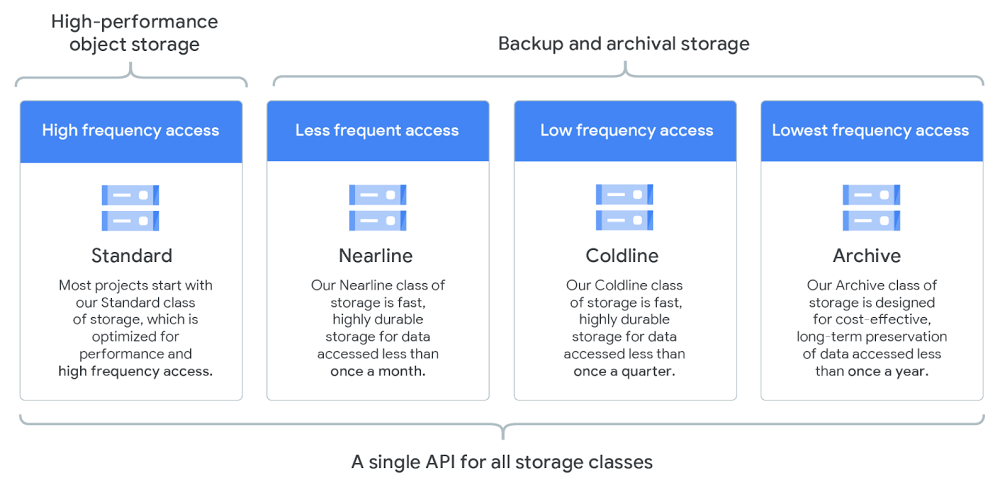
Data storage provides a key part of the foundation for enterprise data infrastructure, including cloud-based workloads. At Google Cloud, we think that you should have a range of straightforward storage options that allow you to more securely and reliably access your data when and where you need it, without performance bottlenecks or delays to your users. Having flexible storage options allows you to optimize your total cost of ownership while meeting your business needs. With Cloud Storage, this is accomplished with multiple storage classes. One of the fastest-growing business requirements is the need to affordably retain large, rarely accessed data sets for multiple years, while ensuring very high durability and security. To meet this need, we’re announcing the general availability of a new storage class called Archive, our coldest Cloud Storage offering yet. Introducing the Archive classThe new Archive class of Cloud Storage is designed for long-term data retention at price points starting from $0.0012 per GB per month—only $1.23 per TB per month. Relative to existing storage classes, Archive is best suited for data that is stored for more than a year and accessed less than once a year. Tape replacement and archiving data under regulatory retention requirements are two of the most common use cases. Other examples include long-term backups and original master copies of videos and images.This new storage class is designed to meet enterprise needs. “The Archive class of Cloud Storage raises the bar on functionality while lowering the cost of long-term data retention,“ says Scott Sinclair, senior analyst at ESG. “With exponential data growth, the enterprises we talk with are looking for ways to better leverage the cloud for tape replacement and other archival needs so they can reduce spend without compromising security and durability. Google Cloud has delivered on that. When enterprises have flexible, cost-effective storage choices, they’re able to manage data efficiently and use resources wisely.”Unlike tape and first-generation cloud archive solutions, our approach eliminates the need for a separate retrieval process. Instead of waiting hours or days, the Archive class provides almost instantaneous (milliseconds) access to your data when needed. Access and management is performed through the same consistent set of APIs used by our other Cloud Storage classes, with full integration into Object Lifecycle Management. You get the same experience as our hot storage options and can tier content down throughout its lifecycle without adding complexity or giving up direct access to your data. Here’s an overview of how Archive fits into Cloud Storage classes:Click to enlargeArchive advantages include:Cost-effective: Low cost, starting at $0.0012 per GB per month.Secure: All data is encrypted at rest and in transit by default.Durable: 11 9’s of durability. Optional geo-redundancy helps protect against regional failure and increases availability.Instant Access: Like all Cloud Storage classes, accessible with millisecond latency.Open: Suitable for Google-specific and multi-cloud architectures alike.Scalable: Start with as little data as you want and grow to beyond exabytes.Simple: Same API across all storage classes for access and management consistency. Fully integrated with Object Lifecycle Management, as reducing your storage TCO never goes out of fashion.Immutable: Applying Bucket Lock to a storage bucket in the Archive class can help you achieve WORM compliance for long-term data storage.Using Archive to protect your dataWe often hear that customers have large amounts of bulk data that needs to be retained due to regulatory compliance, as well as for data protection. Use the Archive class in conjunction with Bucket Lock to ensure that objects will be retained without modification for a period of time that you can choose. This is helpful to meet legal retention requirements in many industries, especially in healthcare and financial services. If maximizing availability and durability is a top requirement, consider Archive in multi-region or dual-region locations so that your data is stored geo-redundantly. In all locations and storage classes, we do checksum verifications at rest and in transit to ensure that a minimum of 11 9’s durability will be met. Industries that can benefit from Archive include:Education and science for research dataEnergy for seismic data setsFinancial services for transaction archives, audit logs, and regulatory dataGovernment for long-term data archivesHealthcare for electronic medical records and medical imagingInsurance for claims, billing, and inspection archive dataLife sciences for genomic and imaging data archives Manufacturing for design data setsMedia and entertainment for media archives and raw production footagePhysical security for video surveillance dataTelecommunications for call detail records, billing, and customer service archivesTransportation for satellite imagery and vehicle telemetry dataGetting started with ArchiveOne of the easiest ways to get started with Archive is to create a new bucket that defaults to the Archive storage class:From the “Create a bucket” page, select “Create bucket”Add a bucket nameExpand “Choose a default storage class for your data” and select “Archive”Click “Create”You can then upload your data using gsutil or Cloud Data Transfer Service.Alternatively, for existing buckets you can use Object Lifecycle Management to downgrade your oldest objects in Standard, Nearline, and Coldline to the Archive class.Cloud Storage is part of an even larger set of storage services. Whatever your workload, from backing up an image archive to crunching a genome, we’ve got you covered with a powerful range of storage solutions that help make it easy to migrate and run on Google Cloud. Contact sales to plan and enable your migration to Cloud Storage, or give it a try yourself here.
Quelle: Google Cloud Platform

Google Cloud and FDA MyStudies: Harnessing real-world data for medical research

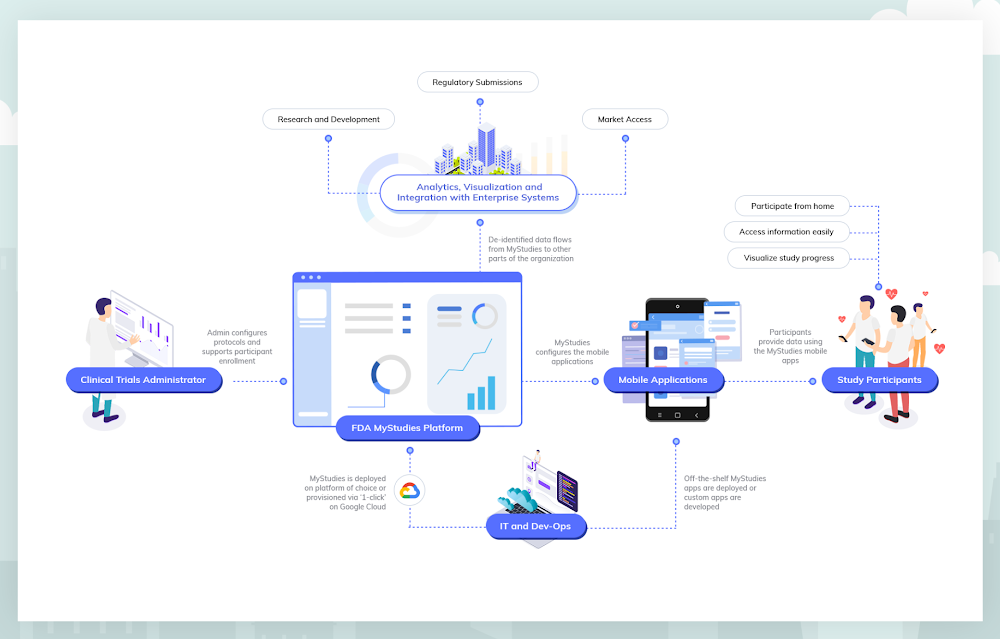
Google Cloud is committed to helping customers conduct life-saving research that results in new medications, devices and therapeutics by unlocking the knowledge hidden in real-world data. That’s why we’re supporting the goals of the U.S. Food & Drug Administration, by making the FDA’s open-source MyStudies platform available on Google Cloud Platform. By building on the platform developed by the FDA, we hope to stimulate an open ecosystem that will improve the ability of organizations to perform research that leads to better patient outcomes. This collaboration continues our long history of open-source work, and our commitment to producing easy-to-use tools that serve the healthcare and life sciences community.Because of the FDA’s focus on real-world evidence, drug and device organizations are increasingly looking to incorporate patient-generated data into regulatory submissions for new products and treatment indications. But until recently, there haven’t been mobile technologies or methodologies to help collect, store and submit this kind of data in a regulatory compliant manner. In order to address this gap, the FDA developed MyStudies, an open-source technology platform that supports drug, biologic and device organizations as they collect and report real-world data for regulatory submissions.Google Cloud is now working to expand the FDA’s MyStudies platform with built-in security and configurable privacy controls, and the ability for research organizations to automatically detect and protect personally identifying information. When an organization deploys FDA MyStudies on Google Cloud, a unique and logically isolated instance of the platform is created that only that organization and its delegates are authorized to access. These technologies will allow a research organization to select which of its researchers and clinicians are able to access what data, and to help optimize the use of that data as directed by participants. By leveraging Google Cloud as the underlying infrastructure for their FDA MyStudies deployments, organizations will have more safeguards in the ownership and management of data in their studies.Further, Google Cloud is providing sponsorship to bring Stanford University’s MyHeart Counts cardiovascular research study onto the FDA MyStudies platform, enabling this groundbreaking virtual clinical study to begin enrolling users of both Android and iOS devices. Since it launched as one of the initial iOS research applications, MyHeart Counts has enrolled more than 60,000 participants and driven significant understanding of the feasibility of conducting large-scale, smartphone-based clinical trials. Enabling patient-reported data with MyStudiesThe FDA relies on clinical trials and studies submitted by study sponsors to determine whether to approve, license or clear a drug, biologic or device for marketing in the United States. Historically, this information has been obtained almost exclusively through traditional clinical trials conducted under tightly controlled conditions. However, the increased digitalization of patient healthcare data may help to improve health with high-quality real-world evidence and more efficient clinical trials.The FDA has recognized this opportunity. For example, the agency’s Patient Engagement Advisory Committee is now helping assure the experiences of patients are included as part of the FDA’s deliberations on complex issues involving the regulation of medical devices. And, in 2017, the FDA Center for Devices and Radiological Health released a guidance document addressing real-world evidence generation for medical devices. The FDA has also released several draft Patient-Focused Drug Development guidance documents addressing how stakeholders can collect and submit patient experience data to support regulatory decision-making. Finally, in 2018, the FDA also released a Real-World Evidence Framework which details the agency’s efforts to evaluate real-world evidence for drugs and biologics as mandated by the 21st Century Cures Act.Originally launched as a publicly available resource in November of 2018, FDA’s MyStudies platform includes important features supporting patient accessibility and privacy. The patient-facing mobile application was built for Android using the open-source ResearchStack framework, and for iOS using Apple’s ResearchKit framework. By using these frameworks, developers can expand the capabilities of open-source mobile applications or create their own proprietary and branded applications. MyStudies mobile applications are configurable for different therapeutic areas and health outcomes through a web-based interface that reduces the need for custom software development. The overall platform has been designed to support auditing requirements for compliance with 21 CFR Part 11, allowing the platform to be used for trials under Investigational New Drug (IND) oversight.Study sponsors have already leveraged the FDA’s existing MyStudies platform to build branded and customized mobile applications to administer questionnaires that assess patient-reported outcomes, patient reports of prescription and over-the-counter medication use, trial medication diaries and other patient experience data. Supporting MyStudies on Google Cloud will make it even easier for new study sponsors to benefit from the MyStudies platform.New platform, new opportunitiesNow, Google Cloud is equipping the FDA’s MyStudies platform with an additional set of capabilities that reduce complexity and overhead, allowing pharma and medtech organizations to get up and running fast. For study designers who do not want to configure a compliant environment from scratch, a ‘click-to-deploy’ option will be available in the Google Cloud Marketplace later this year. When deploying FDA MyStudies on Google Cloud using this option, a private MyStudies instance is built from the open-source repository. That instance is then configured following best practices to operate with selected Google Cloud services. This allows research groups to establish their own, preconfigured instance of the FDA’s MyStudies platform in minutes.“Consistent with our obligations under the 21st Century Cures Act, FDA engages in public-private demonstration projects to advance the regulatory science around real-world evidence. The Patient Centered Outcomes Research Trust Fund investment that launched FDA MyStudies is a step toward this goal,” said David Martin, MD, associate director for Real-World Evidence Analytics, Office of Medical Policy, FDA Center for Drug Evaluation and Research. “FDA MyStudies is publicly available, but it requires professional expertise and time to progress from open-source resources to deployment of a new re-branded platform. As a company may do, Google Cloud is taking these resources and creating a click-to-deploy option linked to additional health data management and analytics.”Besides streamlined deployment of the open-source software, drug and device companies running FDA MyStudies on Google Cloud can benefit from integration with other Google Cloud offerings, such as managed services that support HIPAA compliance like the Healthcare API and our serverless data warehouse, BigQuery. More information about compliance on Google Cloud and an up-to-date list of products covered by our BAA can be found here.In addition to HIPAA compliance, Google Cloud can support customer compliance with CFR 21 Part 11 regulations when using Google Cloud in a prescribed manner to handle related data and workloads. While Google has a cloud technology stack that is ready for many CFR 21 Part 11 compliant workloads, the ultimate compliance determination depends on configuration choices made by the customer.MyHeart Counts + FDA MyStudies on Google CloudStanford University made mobile health history when it launched MyHeart Counts in 2015 as part of the inaugural cohort of iOS research applications. As an open enrollment study, any eligible individual who downloads the MyHeart Counts app may consent to participate in cardiovascular research. Once enrolled, participants are asked survey questions related to their health and physical activity. Participants may allow MyHeart Counts to collect physical activity data from their phone and other wearable devices. If participants are physically able, they will be asked to perform a 6-minute walk test, then enter information about risk factors and blood tests, which is used to determine a cardiovascular risk score.The current version of MyHeart Counts is only available on iOS devices. By using FDA MyStudies on Google Cloud, the Stanford researchers behind MyHeart Counts will conduct a multi-arm, randomized controlled trial that runs on both Android and iOS devices—the first of its kind. Additional improvements to the FDA MyStudies platform will allow researchers like those conducting MyHeart Counts to configure and deploy studies in days rather than months, without needing to develop any software.The study is being overseen by Professor Euan Ashley, MBChB, DPhil, professor of medicine, of genetics and of biomedical data science at Stanford. “In this digital era where everyone uses a smartphone, hosting a trial on an app lets us tap into a huge population. We are grateful for Google’s support because it enables us to expand our reach to include Android participants in addition to iOS, and incorporate an open-enrollment randomized controlled trial into a mobile application for the first time,” Prof. Ashley said.“MyHeart Counts and digital apps like it allow experts to connect directly to patients in a way that’s more immediate and more extensive, through direct, sensor-based measurement collection. Google Cloud’s support of these efforts not only helps researchers organize and deploy important research programs faster and more reliably, but ultimately will help patients and doctors notice health issues early, so they can address them sooner,” said Prof. Ashley.What’s next?In the spirit of our commitment to healthcare and open-source, Google Cloud will continue investing in MyStudies to bring general improvements to the platform, expand the number of supported assessments and enable integration with downstream analytics and visualization tools.Get in touch to learn more and be notified when FDA MyStudies becomes available on the Google Cloud Marketplace.Click to enlarge
Quelle: Google Cloud Platform

Your guide to Kubernetes best practices

Kubernetes made a splash when it brought containerized app management to the world a few years back. Now, many of us are using it in production to deploy and manage apps at scale. Along the way, we’ve gathered tips and best practices on using Kubernetes and Google Kubernetes Engine (GKE) to your best advantage. Here are some of the most popular posts on our site about deploying and using Kubernetes. Use Kubernetes Namespaces for easier resource management. Simple tasks get more complicated as you build services on Kubernetes. Using Namespaces, a sort of virtual cluster, can help with organization, security, and performance. This post shares tips on which Namespaces to use (and not to use), how to set them up, view them, and create resources within a Namespace. You’ll also see how to manage Namespaces easily and let them communicate.Use readiness and liveness probes for health checks. Managing large, distributed systems can be complicated, especially when something goes wrong. Kubernetes health checks are an easy way to make sure app instances are working. Creating custom health checks lets you tailor them to your environment. This blog post walks you through how and when to use readiness and liveness probes.Keep control of your deployment with requests and limits. There’s a lot to love about the scalability of Kubernetes. However, you do still have to keep an eye on resources to make sure containers have enough to actually run. It’s easy for teams to spin up more replicas than they need or make a configuration change that affects CPU and memory. Learn more in this post about using requests and limits to stay firmly in charge of your Kubernetes resources.  Discover services running outside the cluster. There are probably services living outside your Kubernetes cluster that you’ll want to access regularly. And there are a few different ways to connect to these services, like external service endpoints or ConfigMaps. Those have some downsides, though, so in this blog post you’ll learn how best to use the built-in service discovery mechanisms for external services, just like you do for internal services.Decide whether to run databases on Kubernetes. Speaking of external services: there are a lot of considerations when you’re thinking about running databases on Kubernetes. It can make life easier to use the same tools for databases and apps, and get the same benefits of repeatability and rapid spin-up. This post explains which databases are best run on Kubernetes, and how to get started when you decide to deploy.Understand Kubernetes termination practices. All good things have to come to an end, even Kubernetes containers. The key to Kubernetes terminations, though, is that your application can handle them gracefully. This post walks through the steps of Kubernetes terminations and what you need to know to avoid any excessive downtime.For even more on using GKE, check out our latest Containers and Kubernetes blog posts. Want a refresher? Get certified with the one month promo for the Architecting with GKE, Coursera specialization at http://goo.gle/k8s5. Offer valid until 01/31/2020, while supplies last.
Quelle: Google Cloud Platform

BPAY: Uncovering new business opportunities with APIs

Editor’s note: Today we hear from Jon White and Angela Donohoe from BPAY Group. BPAY Group is best known for BPAY, the leading electronic bill payment system in Australia, handling one-third of the market. Learn how BPAY Group is positioning the organization for the future by using APIs to streamline workflows for existing customers and new businesses.BPAY has been a leader in the bill payment industry in Australia for 22 years and provides a secure, fast, and convenient way to connect individuals, businesses, and banks to help people stay on top of their bills.One of the reasons that BPAY is the preferred bill payment service for so many Australians is our commitment to human-centered design. We’re continuously talking with customers and looking at ways that we can deliver better experiences, products, and services, such as peer-to-peer payments. During these conversations, we noticed some ways that our processes were causing friction for existing or potential customers.For example, we traditionally used a batch processing system to handle requests between billing companies and banks. But that could cause headaches for some customers, as an error in even one request could cause the whole batch to be rejected. Plus, many “neobanks” (new types of digital-only banks) wanted to work with real-time transactions instead of batch processes, which take longer to complete.We realized that APIs had the potential to solve many of the challenges impacting customers while opening the doors for future product and business development. We developed a few customer-facing APIs and tested them in closed betas. This experiment went far better than we expected, and we realized that there was a huge appetite for APIs among our biller customers.While we had developed many APIs for internal systems, developing APIs that were easy to consume by our customers was a new challenge. We needed to move away from our home-grown API development approach and make our API environment more powerful, versatile, and easier to use. The API experts at The Singularity worked with us to develop a strong API strategy. We decided that we would need to support our new strategy with a scalable API management platform.After a rigorous search, we landed on the Apigee API Management Platform. Apigee was the only solution that met all our technology and business requirements. With Apigee, we have a solid foundation for APIs that will help us deliver more value for all customers.Creating a custom development environmentBPAY is a trusted brand in Australia, so it was very important to us that we maintain our reputation for excellent customer experiences. When setting up our developer portal, we started with a closed pilot and used developer feedback to make the portal as convenient and simple to use as possible. The Apigee developer portal has many built-in features to help us customize experiences, and if we run into roadblocks, the Apigee team at Google listens and helps us create the custom experience we want.The developer portal has already proven to be extremely popular. In its first month live, we registered 104 developers in the sandbox environment and 10 developers in the production environment. That was before we even started marketing our developer portal, so we expect those numbers to rise quickly.Breaking new ground with APIsWe’ve already released four foundational APIs, with a goal of eventually releasing dozens. Our APIs are helping us create smoother experiences for customers. We mentioned that when processing a batch of payment files, one mistake could cause the entire batch to get rejected. Our APIs now enable businesses to validate all payment information before submitting a batch file, dramatically reducing the chances of errors. They can even use our APIs to automatically generate batch files in the right format for different banks.While APIs improve service for current customers, they also open the doors for new areas of business. Buy now, pay later (BNPL) services, which enable customers to spread out payments across weeks or months, are already popular in retail spaces. After releasing our first APIs, we connected with two BNPL billing services. These companies use our APIs to validate customers’ bill payment information and then pay the bill in full on behalf of customers. This was a completely new use case for us, one that could not have been implemented without our APIs.The payment service NoahPay also adopted our APIs to validate payment information and let customers pay bills using funds from their WeChat accounts. This is an exciting new market for us, as it’s one of the first examples of how we can connect to international digital wallets through our new APIs. It’s also a great way to introduce users of WeChat, a messaging app used by more than 1 billion people in China, to the BPAY brand.Planning for the future of bill payWe have big plans for APIs in the future, and Apigee helps make these plans a reality. We plan to establish a generous freemium monetization model that will allow customers to make up to 200,000 API calls for free each month with tiered payment plans above that. This will enable us to open the doors for smaller organizations while providing optimal support for larger businesses and banks that might need to make millions of calls. Having powerful end-to-end monetization features built in to Apigee means that we can process monetized transactions with ease.Built-in reporting functionality will also help us make sure that we’re understanding the market’s need for APIs and always providing our customers with valuable services and support.Apigee greatly streamlines creating self-service API environments. Even as we grow our business, our internal teams will be able to continue providing excellent customer service without needing extra staff to answer questions, help with integration support, and constantly check API security. APIs are the way of the future, and Apigee prepares us meet the challenges that come along with it.
Quelle: Google Cloud Platform

Connect to your VPC and managed Redis from App Engine and Cloud Functions

Do you wish you could access resources in your Virtual Private Cloud (VPC) with serverless applications running on App Engine or Cloud Functions? Now you can, with the new Serverless VPC Access service.Available now, Serverless VPC access lets you access virtual machines, Cloud Memorystore Redis instances, and other VPC resources from both Cloud Functions and App Engine (standard environments), with support for Cloud Run coming soon.How it worksApp Engine and Cloud Functions services exist on a different logical network from Compute Engine, where VPCs run. Under the covers, Serverless VPC Access connectors bridge these networks. These resources are fully managed by Google Cloud, requiring no management on your part. The connectors also provide complete customer and project-level isolation for consistent bandwidth and security. Serverless VPC Access connectors allow you to choose a minimum and maximum bandwidth for the connection, ranging from 200–1,000 Mbps. The capacity of the connector is scaled to meet the needs of your service, up to the maximum configured (please note that you can obtain higher maximum throughput if you need by reaching out to your account representative).While Serverless VPC Access allows connections to resources in a VPC, it does not place your App Engine service or Cloud Functions inside the VPC. You should still shield App Engine services from public internet access via firewall rules, and secure Cloud Functions via IAM. Also note that a Serverless VPC Access connector can only operate with a single VPC network; support for Shared VPCs is coming in 2020.You can however share a single connector between multiple apps and functions, provided that they are in the same region, and that the Serverless VPC Access connectors were created in the same region as the app or function that uses them. Using Serverless VPC AccessYou can provision and use a Serverless VPC Access connector alongside an existing VPC network by using the Cloud SDK command line. Here’s how to enable it with an existing VPC network:Then, for App Engine, modify the App.yaml and redeploy your application:To use Serverless VPC Access with Cloud Functions functions, first set the appropriate permissions then redeploy the function with the vpc- connector flag:Once you’ve created and configured a VPC connector for an app or function, you can access VMs and Redis instances via their private network IP address (e.g. 10.0.0.123). Get startedServerless VPC Access is currently available in Iowa, South Carolina, Belgium, London, and Tokyo, with more regions in the works. To learn more about using Serverless VPC Access connectors, check out the documentation and the usage guides for Cloud Functions and App Engine.
Quelle: Google Cloud Platform

Getting started with new table formats on Dataproc

At Google Cloud, we’re always looking for ways to help you connect data sources and get the most out of the big data that your business gathers. Dataproc is a fully managed service for running Apache Hadoop ecosystem software such as Apache Hive, Apache Spark, and many more in the cloud. We’re announcing that table format projects Delta Lake and Apache Iceberg (Incubating) are now available in the latest version of Cloud Dataproc (version 1.5 Preview). You can start using them today with either Spark or Presto. Apache Hudi is also available on Dataproc 1.3.With these table formats, you can now use Dataproc for workloads that need: ACID transactionData versioning (a.k.a. time travel)Schema enforcementSchema evolution and moreIn this blog, we will walk you through what table formats are, why they are useful, and how to use them on Dataproc with some examples.Benefits of table formatsACID transaction capability is very important to business operations. In the data warehouse, it is very common that users generate reports based on a common set of data. While building reports, there are other applications and users that might write to the same set of tables. Because Hadoop Distributed File System (HDFS) and object stores are designed to be like file systems, they are not providing transactional support. Implementing transactions in distributed processing environments is a challenging problem. For example, implementation typically has to consider locking access to the storage system, which comes at the cost of overall throughput performance. Table formats such as Apache Iceberg and Delta Lake solve these ACID requirements efficiently by pushing these transactional semantics and rules into the file formats themselves. Another benefit of table formats is data versioning. This provides a snapshot of your data in history. You can look up data history and even roll back to the data at a certain time or version in history. It makes debugging and maintaining your data system much easier when there are mistakes or bad data.Getting to know table formatsMost big data platforms store data as files or objects on the underlying storage systems. These files have certain structures and access protocols to represent a table of data (think of the Parquet file format, for example). As the size of these tables grow, they are divided up into multiple files. That allows tables that are bigger than the storage system limitations on a single file or object. This also allows you to filter unnecessary files based on data value (partitioning). And, you can have multiple writers at once. The way of organizing these files into tables is known as a table format. Table formats on Google CloudAs the modern data lake has started to merge with the modern data warehouse, the data lake has taken on responsibility for features previously reserved for the data warehouse.A common scenario when building big data processing pipelines is to structure the unstructured data (log files, database backups, clickstream, etc.) into tables that can be used by the data analyst or data scientist. In the past, this often involved using a tool like Apache Sqoop to export the results of big data processing into a data warehouse or relational database system (RDBMS) to make it easier for data to be interpreted by the business. However, as tools like Spark and Presto have grown in terms of both features and adoption, the same data users now prefer the functionality offered by these data lake tools over the traditional data warehouse or SQL-only interface. However, because this data is necessary to the business, the storage expectations related to ACID transactions, schema evolution, etc. became a missing link. In Google Cloud, BigQuery storage solves these problems and needs. You can access BigQuery storage with Spark using the Spark-BigQuery connector, and BigQuery storage is fully managed, with the maintenance and operations overhead taken care of by the Google engineering team.   In addition to BigQuery storage, Dataproc customers using Cloud Storage have had many of these same table-like features that solve for some of the basic warehousing use cases. For example, Cloud Storage is strongly consistent at the object level. And starting with version 2.0 of the Cloud Storage Connector for Hadoop, cooperative locking is supported for directory modification operations performed though the Hadoop file system shell (hadoop fs command) and other HCFS API interfaces to Cloud Storage. However, in the open source community, Delta Lake and Apache Iceberg (Incubating) are two solutions that approximate traditional data warehouses in functionality. Apache Hudi (Incubating) is another solution to this problem that also provides a way to accommodate incremental data. While these file formats will involve some do-it-yourself operations, you can gain a lot of flexibility and portability using these open source file formats.  The start of table formats in OSS Big Data: Apache HiveAn intuitive way of organizing files as a table is using a directory structure. For example, a directory represents a table. Each of its subdirectories can be named based on partition values. Each of these subdirectories contains other subpartitions or data files. This is basically how Apache Hive manages data. A component separate but related to Hive, the Hive Metastore keeps track of this table and partition information. However, as Hive data warehouses increased in data size and moved to the cloud, the Hive approach to table formats started to expose its limitations. To name just a few:Hive requires a listing operation to find its data. It is expensive on object stores.The structure of Hive data storage is against the best practices of object store structure, which prefers data evenly distributed to avoid hot-spotting.Reading a table that is being written to can lead to the wrong result.Adding and dropping partitions directly on HDFS breaks atomicity and table statistics, which could lead to wrong results. Users have to know a table’s physical layout (partition columns) to write efficient queries. Changes to layout break user queries.To solve the limitations of existing table formats, the open source community has come up with table formats. Let’s see how to run them on Google Cloud. Running Apache Iceberg on Google CloudApache Iceberg is an open table format for huge analytic datasets. Iceberg adds tables to Presto and Spark that use a high-performance format that works just like a SQL table. In addition to the new features listed above, Iceberg also added hidden partitioning. It abstracts the partitioning of a table by defining the relationship between the partition column and actual partition value. So changing table partitioning will not break user queries. Iceberg also provides a series of optimizations such as advanced filtering based on column statistics and other metrics, avoiding listing and renaming files, isolation and concurrent writing. Iceberg works very well with Dataproc. Iceberg uses a pointer to the latest version of a snapshot and needs a mechanism to ensure the atomicity when switching versions. Iceberg provides two options to track tables: Hive catalog—uses the Hive catalog and Hive Metastore to keep track of tablesHadoop tables—tracks tables by maintaining a pointer on Cloud StorageHive catalog tables rely on Hive Metastore to provide atomicity when switching pointers. Hadoop tables rely on a file system such as HDFS that provides atomic renaming operation. When using in Cloud Dataproc, Iceberg can utilize the Hive Metastore, which is backed by the Cloud SQL database. Using Iceberg with SparkTo get started, create a Cloud Dataproc cluster with the newest 1.5 image. After the cluster is created, SSH to the cluster and run Apache Spark.Now, you can get started by creating an Iceberg table on Cloud Storage using Hive Catalog. First, start spark-shell and tell it to use a Cloud Storage bucket to store data:Use the Hive catalog to create a table and write some data:Now, change the table schema by adding another column named “count”:Let’s add more data and see how it handles schema evolution:You can look at the table history:You can also look into the valid snapshots, manifest files, and data files:Let’s say we made a mistake by adding the row with value of id=6 and want to go back to see a correct version of the table using time travel:Running Delta Lake on Google CloudDelta Lake focuses on bringing RDBMS-like features to Spark. In addition to the features such as ACID transactions, time travel, and schema evolution, Delta Lake also provides the ability to delete, update, and upsert data.Delta Lake writes data files in the Parquet format on the storage system. Tables can be registered either using path or using Hive Metastore. On the metadata side, similar to Iceberg, Delta Lake manages table metadata in files on the storage system. Delta Lake uses a transaction log mechanism to make sure that there is a single source of truth for the system and to implement atomicity. Delta Lake breaks down user operations such as DELETE into a few actions such as add file or update metadata. Delta Lake then writes these actions into the transaction log in order as commits. Each commit will result in a JSON file under the _delta_log subdirectory under the table directory. Working with Cloud StorageDelta Lake stores transaction logs on object store when running on cloud. To ensure atomicity of the commit, writing to the transaction log needs to be atomic. Delta Lake relies on the storage system to provide that. In fact, it requires a few characteristics from storage:Atomic visibility of files: Any file written through this store must be made visible atomically. In other words, this should not generate partial files.Mutual exclusion: Only one writer must be able to create (or rename) a file at the final destination.Consistent listing: Once a file has been written in a directory, all future listings for that directory must return that file.Some object stores on other cloud providers do not provide a consistent listing, which could lead to data loss. So, in some cases Delta Lake only allows one single Spark session to write to the transaction log on the object store at a time. For the same reason, Delta Lake also disallows multiple writers, further limiting the concurrency and throughput of Delta Lake.Cloud Storage allows multiple writers to the transaction log and guarantees consistency , allowing you to use Delta Lake to its full potential. Delta Lake by default uses HDFS as the transaction log store. You can easily use Cloud Storage to store your transaction log by pointing your table to a location on Cloud Storage using the format of gs://<bucket-name>/<your-table>. Use Delta Lake with SparkTo get started, create a Dataproc cluster with the newest 1.5 image. After the cluster is created, SSH to the cluster and run Apache Spark.Now, you can get started by creating a Delta Lake table on Cloud Storage. First, start spark-shell and tell it to use a Cloud Storage bucket to store data:Let’s create a Delta Lake table on Cloud Storage:Next, overwrite the original data. Then, use time travel to see the earlier version:Inspect table history:Update:Vacuum/delete older snapshots:Running Apache Hudi on Google CloudAt the moment, Hudi can only run on Dataproc 1.3 version because of open issues like supporting Scala 2.12 and upgrading Avro library. You can get started with Apache Hudi using the following steps:After the Spark shell starts, use the quick start tutorial from Hudi. The example inside the quick start uses the file system. But you can simply point the file system to use Cloud Storage by starting with the following code:Get in touch with the Dataproc team anytime. Special thanks to Ryan Blue, who led the development of Apache Iceberg, for reviewing this blog.
Quelle: Google Cloud Platform
Start 2020 off right with these New Year’s tech resolutions

You may have already set some goals for yourself for 2020, but what about for your cloud architecture? We’ve assembled some New Year’s resolutions to guide the way toward operating a faster, more efficient cloud infrastructure, and making your role more valuable to the business, too.1. Lose some data weightThis will be more fun than cutting out carbs, we promise. It’s data weight that lots of cloud and data center operators have to lose. For example, you might have unaccounted-for VMs or Compute Engine backups you don’t need anymore, or files stored in old formats to modernize. Consider taking inventory and finding workload owners to reclaim capacity and save costs.2. Exercise your data moreThe cloud is opening up lots of new avenues to explore all the data you collect. BigQuery is our serverless alternative to on-premises data warehousing and analytics, and its interface will be familiar to anyone who knows SQL. Try it out with our no-cost BigQuery sandbox, and explore publicly available datasets.3. Save money to stretch your IT budgetThe pricing model for cloud is a lot different from on-premises, and it can involve a learning curve when you’re getting started. Our GCP pricing calculator can help guide you through estimated costs for our range of products, so you can understand how pay-as-you-go works, then start budgeting for the year ahead. And check out our cost optimization guides for BigQuery, Cloud Storage, and networking.4. Learn a new technology skillIf you want to hone your cloud technology skills, there are some pretty intriguing areas to explore right now. See how AutoML works, experiment with AI, or check out our hybrid cloud platform.5. Make new friends, online and in-personLots of cloud tools entering the mainstream are largely based on the concept of openness and a community-driven mindset. Open-source tools mean your fellow developers are building the product in real time, and you can contribute code and improve products too. You can be part of a Google Cloud community, whether it means contributing on Github or becoming cloud certified with your peers.6. Get more sleep while monitoring watches your cloudWith a cloud foundation in place, your next step is managing all these instances and applications. Google Cloud’s monitoring and logging tools lets you set up alerts and use collected data to make changes and improvements to your GCP systems. To keep making your infrastructure more reliable, learn more about what SRE is and how you can implement its principles.Have a great 2020, and let us know about your resolutions on Twitter.
Quelle: Google Cloud Platform