Opening doors, embracing change with cloud data warehouses

Moving from a traditional on-prem data warehouse platform to a cloud data warehouse, such as Google Cloud’s BigQuery, is about more than just adopting new technology. It also provides an opportunity to revisit existing practices and adopt new ways of working. We’ve noted some typical changes that teams undergo to support data warehouse migration to the cloud. To get a framework for change management and best practices for moving to the cloud, you can find more details in the Managing Change in the Cloud whitepaper.People form the core of any change management initiative. For a data warehouse migration initiative, we’ll focus on three key stakeholders who are involved in day-to-day usage and management (though there may be other ancillary roles involved): Data consumer—typically a data analyst, data scientist, or business user Data enabler—typically a data engineer or ETL developer Data administrator—typically a database/data warehouse administratorClick to enlargeLet’s take a look at each stakeholder and see how their responsibilities change as their organization transitions from on-prem to cloud. Data consumer Data analysts and data scientists have a lot to gain from migrating to a cloud data warehouse— easier availability of new datasets, new algorithms to play with, and lower-latency access options in the cloud. Most often, during the migration, existing reporting applications and BI tools are initially kept as is to ensure minimal business disruption—making it relatively easy for data consumers to adopt the changes. Data consumers, however, will likely want to ensure that their existing reports and use cases are tested on the new platform. It is, therefore, advisable to require their participation in any data validation efforts. You might create a data validation team, for example. Post-migration, data consumers can find new ways of working once they have access to new datasets, like converting batch reporting into real-time dashboards, and finding ways to make machine learning a reality for the organization. New platform capabilities end up becoming the most important catalyst for change in this role. The more ambitious the data consumers are, the greater the change will be for other roles in the organization.  Data enablerThe technical abilities of the data enabler are vital to how successfully cloud is adopted into the organization. These individuals own the data pipelines and are deeply involved in any reengineering efforts needed to migrate workloads to the cloud. The learning curve can be steep depending on the technology stack that’s adopted; proper resource planning will be crucial for these data enablers. Migration to the cloud in and of itself could be a long-term undertaking, so it’s worth considering taking the time to plan, re-tool and automate the migration. As data enablers are refactoring and redesigning data pipelines and working together with data consumers, they have plenty of opportunities to rethink how business processes should change to take advantage of real-time data ingestion, new data modeling techniques, or new persistent stores that cloud technologies offer. Data enablers might also revisit old asks that were not possible to deliver due to scale, data format complexity, or ETL complexity. Cloud technologies can be better suited to overcoming such challenges through capabilities such as storage and compute resource elasticity, support for numerous data format and storage options, as well as a wide variety of tools and libraries to process data. Beyond that, adopting a DevOps model, application containerization, or a serverless compute model are avenues that data enablers (along with data administrators) can explore to improve the speed with which changes are applied and new insights are delivered to users.Data administrator Database administrators continue to play a vital role even if the enterprise data warehouse is hosted in the cloud. As owners of the platform, administrators must get acquainted with cloud technology capabilities at the earliest and drive the enterprise transformation with key stakeholders. As database administrators move data workloads into the cloud, there continue to be important focus areas: governance overview during and post migration, data integrity, and SLAs such as RPOs and RTOs. If the organization adopts a vendor-managed cloud data warehouse, database administrators will have fewer platform procurement and database-tuning tasks. But cost vs. performance optimization is still a critical area for administrators to be fully involved in. (Check out ESG’s report on how migrating to BigQuery can lower your three-year TCO up to 52%.) Database administrators are also freed up to gain a deeper understanding of the storage, network, and compute options that cloud offers and look for ways to optimize enterprise workloads in the cloud. Administrators can adopt new ways of working with machine learning notebook environments, new query tools, containerization, hybrid cloud, and more—there’s plenty to learn and optimize for! Organizations that adopt these new skills and processes have a greater chance of success in delivering business results in the cloud. For more information on how to streamline your enterprise migration path, check out our data warehouse migration guide and framework. You can also apply for our data warehouse migration offer for help with the full migration process.
Quelle: Google Cloud Platform

Kubernetes Podcast in 2019: year-end recap

At the Kubernetes Podcast, we bring you a weekly round-up of cloud-native news, accompanied by an in-depth interview with a community member. As we publish our 50th and final episode for 2019, it’s time to look back on some of our favorite moments from the year.This year, we stepped out of the studio. We hosted a live recording at Google Cloud Next in San Francisco, as well as listener meetups at KubeCon EU in Barcelona and KubeCon NA in San Diego. There’s nothing more gratifying to us than having someone come up to you at a conference and tell you that they enjoy your show, or even ask after the family of foxes you mentioned were living in your backyard.  Our heartfelt thanks to everyone who came by, or stopped us in the hallways.Open source reaches all corners of the world, and we’ve been amazed at all the listeners who have joined the podcast community from around the globe. Every now and then we send out stickers by post: they’ve gone to dozens of countries on almost every continent. (We’re still waiting for a listener to reach out from Antarctica!) Thank you to our wonderful audience, who has let us know how much we’re helping them connect with and learn about the Kubernetes community. We are truly grateful to you for listening.Serious dedication tweeted to us from one podcast listenerWe would like to share some of our most popular episodes from 2019:Kubernetes Failure Stories, with Henning Jacobs (episode 38): To have the best chance for success, it helps to learn from failures. After experiencing some of his own, Henning was inspired to start collecting the failure stories of others.Ingress, with Tim Hockin (episode 41): A proud parent of the Kubernetes project, Tim is a 15-year Googler and designer of large parts of the Kubernetes networking and storage stack—an obvious extension of his years of work on the Linux kernel.Live at Google Cloud Next, with Eric Brewer (episode 49): In our first live show, Eric joined us to talk about his history in building infrastructure for search, the CAP theorem, and announcing Kubernetes to the world.KeyBank, with Gabe Jaynes (episode 51): Banks aren’t always terminals and mainframes. The smart ones, like KeyBank, are Kubernetes and mainframes! Gabe’s team worked with Google Cloud as a design partner.Istio 1.2, with Louis Ryan (episode 58): Louis has been working on API infrastructure and service mesh at Google for 10 years. He talked about the history of Istio, its design decisions, and its future goals.Attacking and Defending Kubernetes, with Ian Coldwater (episode 65): Learn how to protect your container infrastructure from Ian: they are paid to attack it, and a popular conference speaker on the topic.CRDs, API Machinery and Extensibility, with Daniel Smith (episode 73): Another long-time Kubernetes contributor, Daniel joined the project before it was open-sourced, and leads both the open-source and Google teams who build CRDs and other extensibility features.Kubernetes 1.17, with Guinevere Saenger (episode 83): Our penultimate episode for the year is an interview with the Release Team lead for the new Kubernetes 1.17. Learn how Guinevere went from being a concert pianist to a software engineer and leading a team of over 30 to produce the final Kubernetes release of 2019.If you have a break over the holidays, why not subscribe and enjoy one episode or many?  For those who can’t listen, or prefer not to, we also offer a transcript of each episode on its page at kubernetespodcast.com.We’re going to take a two-week break over the holiday period, but we’ll be back in your ears in January!
Quelle: Google Cloud Platform

Google Cloud: Supporting our customers with the California Consumer Privacy Act (CCPA)

The California Consumer Privacy Act (CCPA) is a data privacy law that imposes new requirements on businesses and gives consumers in California the right to access, delete, and opt-out of the “sale” of their personal information. Businesses that collect California residents’ personal information and meet certain thresholds (for example, revenue) will need to comply with these obligations. You can count on the fact that Google Cloud is committed to supporting CCPA compliance across G Suite and Google Cloud products when it takes effect on January 1, 2020. Google Cloud will support you in meeting your CCPA obligations by offering convenient tools alongside the robust data privacy and security protections in our services and contracts. How does Google Cloud support CCPA compliance?The security and privacy of customer data is our highest priority, and we’re committed to supporting your efforts to comply with the CCPA by: Providing tools and support to enable you to comply with CCPA requirements around your consumers’ rights. You can use G Suite and Google Cloud’s administrative consoles and services to help access, export, or delete data that you and your users put into our systems. This functionality will help you fulfill your obligations to respond to requests from consumers who exercise their rights under CCPA.Offering security products and features that will help you to protect personal data. Google operates global infrastructure engineered for security from the start. You can rest assured knowing that we have designed for the secure deployment of services and data storage. We’ve implemented end-user privacy safeguards, secure communications between services, secure and private communication with customers over the Internet, and granular operational controls by administrators. Google Cloud runs on this infrastructure, and our products and features provide capabilities for data governance, access control, export, encryption, and security management that can help organizations with their CCPA readiness.Providing documentation and resources to assist you in your privacy assessment of our services. We want to ensure that Google Cloud customers can confidently use our services in light of the CCPA. When you use Google Cloud, we support your efforts by providing detailed documentation and resources, such as our new Google Cloud and the CCPA whitepaper. Continuing to monitor the regulatory landscape, and evolving as needed. Our cross-functional teams of privacy advocates, user experience researchers, public policy, and privacy legal experts regularly engage with customers, industry stakeholders, and supervisory authorities to shape our Google Cloud services in order to help customers meet their compliance needs. As the regulatory landscape shifts, we evolve to support our customers’ changing compliance needs. Offering a team dedicated to addressing Google Cloud customers’ data protection-related inquiries. For more information, refer to Google’s Businesses and Data website or visit our support pages for Google Cloud and G Suite. Where do you stand?As a current or future customer of Google Cloud, there are many ways to begin preparing for the CCPA. Consider these tips:Familiarize yourself with the text of the CCPAand its regulations. Create a data inventory that describes how your business collects, uses, and shares personal information. We have tools such as Cloud Data Loss Prevention and Data Catalog that can help identify and classify data.Review the current controls, policies, and processes that govern your use of personal information to assess whether they meet CCPA requirements, and build a plan to address any gaps.Consider the best process for your business to accept and verify a California consumer request.Review our Google Cloud third-party audit and certification materials, as well as our guidance documents and mappings, to see how they may help with this exercise. Consider how you can leverage existing data protection features on Google Cloud to support your CCPA compliance.Monitor the latest regulatory guidance as it becomes available, and consult a lawyer to obtain legal advice tailored to your business’s circumstances.   What’s next?We’re carefully monitoring developments around this new legislation, and constructively engaging with our customers and partners throughout this process. We’ve also created this CCPA Compliance pageon our Compliance resource center to assist with your efforts as you prepare for CCPA.For information on Google Cloud privacy practices, please visit our Google Cloud Trust Principles. This blog post is intended to be for informational purposes only. You should seek independent legal advice relating to your status and obligations under the CCPA, as only a lawyer can provide you with tailored legal advice for your situation. Nothing in this blog post is intended to provide you with or should be used as a substitute for legal advice.
Quelle: Google Cloud Platform

Accelerate GCP Foundation Buildout with automation

We know from working with customers that starting your cloud journey can be daunting. Fortunately, there are a variety of formal options to help you on your way, such as engaging trusted advisors in the Google Cloud Professional Services Organization or one of the many partners in the Google Cloud universe.To further accelerate your cloud journey, we recently released the Cloud Foundation Toolkit, templates that will help you rapidly build a strong cloud foundation according to best practices.The Cloud Foundation Toolkit provides a series of reference templates built by the Google Cloud Professional Services team with help from partners, and with a focus on foundational elements of Google Cloud Platform. These modules are available for both the popular Terraform infrastructure-as-code framework, as well as our own Cloud Deployment Manager: The Deployment Manager Cloud Foundation Toolkit repository is a monorepo with a large number of templates available for developer reference.Cloud Foundation Toolkit Terraform modules are available on a dedicated GitHub organization and also available through the Terraform module registry. The modules can be used together or independently.The templates themselves are entirely open source and available freely on GitHub. Top Cloud Foundation Toolkit modulesThe Cloud Foundation Toolkit already includes about 60+ Terraform modules and 50+ Deployment Manager modules (and counting). Below are some of the most popular and fundamental GCP components according to GitHub repo stars and watches to get you started:Project Factory for Deployment Manager or Terraform: Create opinionated GCP projects with Shared VPC, IAM, API enablement, etc.IAM for Deployment Manager or Terraform: Manage IAM roles non-destructively across multiple resourcesNetworks for Deployment Manager or Terraform: Declaratively create and manage VPC networking in GCPGKE for Deployment Manager or Terraform: Create secure and well-configured Kubernetes clusters.Getting startedTo get started with using the Cloud Foundations Toolkit, first you need to understand Terraform or Deployment Manager. Then, to start using the toolkit itself, check out the Project Factory and GCP Folders modules. Please watch this quick demo to learn more about the Deployment Manager integration, or this video to learn how to use Cloud Foundations Toolkit with Terraform. Be sure to watch/star your favorite Cloud Foundation Toolkit repos and provide feedback by raising issues in their respective repositories.
Quelle: Google Cloud Platform

Big data, big world: new NOAA datasets available on Google Cloud

Our natural world is full of wonders, and full of data about those wonders. The U.S. National Oceanic and Atmospheric Administration (NOAA) documents the world and its changes by gathering and distributing scientific data. Its goal is to keep citizens informed about what’s going on in the world around them—from the ocean to the sun. Their mission includes understanding and predicting changes in climate, weather, oceans, and coasts, and conserving and managing coastal and marine ecosystems and resources. We’re pleased to continue our partnership and expand our collaboration with NOAA to share its valuable data. A vast trove of NOAA’s environmental data is now available on Google Cloud as part of the Google Cloud Public Datasets Program and NOAA’s Big Data Project, opening up possibilities for scientific and economic advances. We are thrilled to make this valuable data available for your exploration. Google Cloud will host 5 PB of this data across our products, including BigQuery, Cloud Storage, Google Earth Engine, and Kaggle. The stored data is available at no cost, though usual charges may still apply (processing, egress of user-owned data, for example).The agency is providing public access to its environmental datasets in the cloud in accordance with its open data policies. NOAA generates tens of terabytes of data every day from satellites, radars, ships, weather models, and other sources. All that data is directly available to the public, but its availability on public cloud platforms makes the data a lot easier to explore and avoids the costs and risks involved with federal data access services.NOAA’s data holds plenty of possibilities. “The NOAA Big Data Project is focused on improving the accessibility of data while also maintaining a fair and level playing field for everyone—with free, full, and open access to the original NOAA data,” says Ed Kearns, Ph.D., acting chief data officer at the Department of Commerce, the parent organization of NOAA. “This approach will help spur new lines of business and economic growth while making NOAA’s data more easily accessible to the American public.” What will you discover?You can explore lots of fascinating datasets without leaving your computer, including real-time satellite imagery, more than 20 years’ worth of the National Water Model, historic storm event data, aggregated lighting strike data, precipitation data back to the 1700s, and data on shipping patterns dating back to the 1600s. Some of the potential use cases for these datasets include:Earlier detection of wildfiresRetail sales forecastingLogistics planning (fleet management)Automated marine mammal species identificationSolar forecastingReal-time and near real-time disaster information servicesDisaster response preparednessAvian migration analysisImpacts of weather-related events on deliveriesMaking these datasets available means there are now lots of new avenues for finding and solving environmental impact issues. “Technology is transforming how we understand our ever-changing world,” said Kate Brandt, Google Sustainability Officer. “Through the NOAA Big Data Project, Google Cloud can help researchers, innovators, and organizations analyze data to tackle a range of environmental challenges—regardless of their size or computing power.”The sky’s the limit for analyzing NOAA’s datasets and adding in other data to find interesting and useful results. To spark your imagination, check out how a team at Google used NOAA data to identify humpback whale calls.Happy exploring on your data travels! And learn more about how weather and climate data can support your analysis on our weather and climate page.
Quelle: Google Cloud Platform

Last year today: Top Google Cloud posts in 2019

As the end of this busy year approaches, we’re stopping to take a look back at this year in Google Cloud technology. From hybrid cloud and serverless development to databases and analytics, there were lots of new solutions to help move your business forward. Check out these most-read posts from 2019. Making cloud infrastructure and application decisionsThe cloud architecture your business builds will be the one that works best for your internal teams and customers. This year, you had questions about your infrastructure modernization and development options, and we had answers, along with new tools so you create the cloud you want. Here were some of the popular infrastructure and application modernization posts in 2019.5 principles for cloud-native architecture—what it is and how to master itMaking hybrid and multi-cloud computing a realityCloud Services Platform—bringing hybrid cloud to youAnnouncing Cloud Run, the newest member of our serverless compute stackAPI design: Why you should use links, not keys, to represent relationships in APIsTaming your business’s data, and making it work for youA successful cloud infrastructure needs good data coming in, and lots of easy ways to manage, use, and share it. Here were this year’s most popular posts around data management and analytics.Bringing the best of open source to Google Cloud customersFrom data ingestion to insight prediction: Google Cloud smart analytics accelerates your business transformationGoogle to Acquire LookerQuery without a credit card: introducing BigQuery sandboxConnecting BigQuery and Google Sheets to help with hefty data analysisCloud inspiration is all aroundLots of the highlights of 2019 were stories from customers about how they’re using Google Cloud to power their great work—plus one from a Googler.Pi in the sky: Calculating a record-breaking 31.4 trillion digits of Archimedes’ constant on Google CloudHow Google and Mayo Clinic will transform the future of healthcareUPS uses Google Cloud to build the global smart logistics network of the futureHow 20th Century Fox uses ML to predict a movie audienceTurning data into NCAA March Madness insightsFinally, get inspired—and start thinking about your New Year’s resolutions—with details on earning Google Cloud certifications to advance your career and add expertise to your team at work. What were the tech highlights for you this year? Let us know on Twitter.
Quelle: Google Cloud Platform

Year in review: smart analytics makes leaps and bounds

2019 was an incredible year for us, and I had the opportunity to meet so many of our customers, partners, industry analysts, and our users. It’s truly overwhelming to witness how our customers and partners are developing analytics solutions, and solving some of the most complex business challenges with data insights. We were inspired by HSBC tackling their fast-growing volumes of data, and Otto Group migrating their on-premises Hadoop data lake to Google Cloud. MoneySuperMarket shifted their on-prem analytics to cloud to run bigger tasks faster, and serve customers even better. And S4 Agtech described how they’re using smart cloud analytics to de-risk crop production for farmers and innovate faster. We’ve learned a lot about what’s important to you, and we put that information to good use as we continue investing in our smart analytics platform. Our years working with distributed computing and data analytics at Google have led us to consider a lot of factors when we design and build our cloud products. We are investing in building a radically simple, serverless data analytics platform that offers any user the ability to perform real-time and predictive analytics on any data without breaking the bank. The platform is open and multi-cloud by design, and it’s letting enterprises and cloud-native organizations to accelerate their digital transformations with the flexibility and the choice that they need. We launched more than 100 new capabilities for smart analytics in 2019. Here are the highlights from our 2019 launches! Data Warehousing Our customers are building highly scalable enterprise data warehouses on the smart analytics platform. This year, we focused on three major areas for the data warehousing solution:Seamless modernization: One of our main focus areas was to make sure that you can apply Google Cloud’s step-by-step migration framework and modernize legacy data warehouses in a frictionless manner. We launched the BigQuery Data Transfer Service for Teradata andAWS Redshift to help organizations like John Lewis Partnership seamlessly move their data, schema and workloads to BigQuery. Recently, Enterprise Strategy Group released a reportrevealing that BigQuery can provide3-year TCO that is 26% to 34% lower than cloud data warehouse alternatives. We also added capabilities so it’s easier for you to operationalize stored procedures and scripting. Plus, you can take advantage of the data warehouse migration offer to accelerate your migration process. Ease of use: We also launched 100+ partner SaaS connectors for BigQuery, making it easy for business analysts to move data from business applications into the warehouse for analysis. The new BigQuery user-interface and the new query federation functionality makes it even easier for you to analyze data in Bigtable, Cloud Storage, Cloud SQL and Google Sheets. Additionally, we announced BigQuery Reservations, an easy and flexible self-service way to take advantage of BigQuery flat-rate pricing. Reservations makes it even simpler to plan your spending and add flexibility and visibility to your data analytics use cases.Intelligent insights: Our continued investments in BigQuery ML and BigQuery GIS capabilities mean that data analysts and data scientists can do advanced machine learning and geospatial analytics right within the warehouse. This year, we announced BigQuery ML support for clustering and classification models and, native support for importing Tensorflow models. We were also excited that analyst firm Gartner recognized BigQuery as a leader in their 2019 Data Management Solutions for Analytics (DMSA) Magic Quadrant.Streaming analytics In 2019, we invested in making streaming data analytics simpler for you to use, highly scalable and intelligent. Our customers are using Dataflow, Pub/Sub and BigQuery to build real-time analytics solutions on large-scale streaming data. Gaming companies like Unity Technologies are able to personalize their user experience in real time, and financial services companies like Dow Jones can do real-time financial assessments and data aggregations using Google Cloud’s stream analytics solution. With the Dataflow SQL launch, we opened up real-time streaming data analytics to millions of data analysts and developers, and now anyone can easily analyze large-scale streaming data with simple SQL. With the GA of Dataflow Streaming Engine, the architectural benefit of separating compute from state storage means you can deploy more responsive, efficient, and supportable streaming pipelines. Additionally, The BigQuery team has completely redesigned the streaming back end to increase the default Streaming API quota by a factor of 10, from 100,000 to 1,000,000 rows per second per project, so you can build massively scalable streaming analytics solutions. And analyst firm Forrester recognized Google Cloud as a leader in their 2019 streaming data analytics wave evaluation. Data lakeEnterprises around the world from Twitter and Pandora to Vodafone Group are moving their data lakes to Google Cloud to lower TCO, unlock scale, and open up new analytics possibilities. In 2019, we continued to blend the best of open source and Google Cloud to securely modernize data lakes across industries. This year, we made significant investments and launched a ton of new features, with highlights particularly for hybrid and multi-cloud, security, and user access.Hybrid and multi-cloud: We launched Dataproc on Kubernetes (in alpha), so those of you using Apache Spark can build Spark jobs and deploy them on Google Kubernetes Engine (GKE), wherever GKE might live. By deploying new Spark-based analytics and data pipelines on Kubernetes, Dataproc users can now build once and deploy anywhere without worrying about downstream tech stack dependencies. Security: In 2019, we launched multiple security improvements, including Kerberos and Hadoop secure mode (GA). This improves the overall security of Google’s data lake solution while making it easier for enterprises to migrate existing security controls from on-prem Hadoop-based data lakes to the cloud. User access: SQL continues to be the language of choice for data analysts looking to access and analyze data lake information. By extending BigQuery federated queries to include open file formats like Parquet and ORC, you can now access the data lake from BigQuery and downstream BI applications. The new BigQuery Storage API breaks down data silos by making it easy for Dataproc users to run blazing fast Spark jobs against BigQuery data. 2019 represented the onset of a new era, where the data warehouses and data lakes truly start converging. Business intelligenceA key part of our vision in smart analytics is to enable analysts to perform enterprise-class, interactive analytics at scale without compromising data freshness or speed. In this regard, 2019 was a monumental year for BI at Google Cloud. Early in the year at Next, we launched BigQuery BI Engine, a new column-oriented, in-memory feature of BigQuery that’s helping customers like AirAsia, Vendasta, Zalando and many more democratize insights. The new feature enables high concurrency and subsecond responsiveness for interactive dashboarding and reporting for data in BigQuery. Earlier this year, we also announced our intent to acquire Looker to round out our already powerful smart analytics portfolio with a platform for enterprise BI, tailored data applications, and embedded analytics. Finally, when it comes to democratizing data and insights there is no more ubiquitous an interface for playing with data than a spreadsheet. Just last month at Next UK, we announced beta availability of a new feature in Sheets, called connected sheets, that lets you analyze and collaborate on billions of rows of BigQuery data right from within Sheets (without needing SQL!) with standard pivot tables, charts, and functions. In addition to the scalability and performance of BigQuery, connected sheets was one of the key reasons why HSBC chose to migrate their analytics workloads to Google Cloud.Data governance and security2019 demonstrated how we are deeply investing in the areas of data governance, data discovery and data security. First, we announcedCloud Data Catalog at Next, which takes design inspiration from how we catalog data internally at Google. Customers likeGo-Jek, Sky, and many other customers are using Data Catalog’s API and UI to enable governed data discovery and metadata management across their organizations. Taking a few pages from Google’s two decades of data governance, we published a new whitepaperPrinciples and Best Practices for Data Governance in the Cloud to help you on your secure cloud journey. We also announcedstrategic partnerships with Collibra and Informatica to bring unified data discovery experiences for hybrid and multi-cloud scenarios, as well as Data Catalog integrations with Tableau, and Looker. Finally, we’re continually investing in simple to use, robustdata security and privacy controls to thwart the increasingly sophisticated cyber attacks many organizations contend with every day. Data integrationAs our customers continue to operate in a multi-cloud world, it’s a priority for us to make sure that data engineers and data analysts are able to bring data from a variety of applications and systems in a simpler manner. In April this year, we announced Data Fusion, a fully managed, code-free data integration service. The service is now generally available. Data Fusion equips developers, data engineers, and business analysts to easily build and manage data pipelines to cleanse, transform, and blend data from a broad range of sources. Data Fusion shifts an organization’s focus away from code and integration to insights and action. Built on the open source project CDAP, the product’s open core ensures portability for users across hybrid and multi-cloud environments. CDAP’s broad integration with on-premises and public cloud platforms gives Data Fusion users like Vodafone Group the ability to break down silos and deliver more value than ever through Google’s industry-leading big data tools.Learn more about all of the solutions that make up smart analytics at Google Cloud. We can’t wait to see what you build next with our smart analytics platform in 2020.
Quelle: Google Cloud Platform

5 best practices for Compute Engine Cost Optimization

When customers migrate to Google Cloud Platform (GCP), their first step is often to adopt Compute Engine, which makes it easy to procure and set up virtual machines (VMs) in the cloud that provide large amounts of computing power. Launched in 2012, Compute Engine offers multiple machine types, many innovative features, and is available in 20 regions and 61 zones! Compute Engine’s predefined and custom machine types make it easy to choose VMs closest to your on-premises infrastructure, accelerating the workload migration process cost effectively. Cloud allows you the pricing advantage of ‘pay as you go’ and also provides significant savings as you use more compute with Sustained Use Discounts. As Technical Account Managers, we work with large enterprise customers to analyze their monthly spend and recommend optimization opportunities. In this blog, we will share the top recommendations that we’ve developed based on our collective experience working with GCP customers. Getting ready to saveBefore you get started, be sure to familiarize yourself with the VM instance pricing page—required reading for anyone who needs to understand the Compute Engine billing model and resource-based pricing. In addition to those topics, you’ll also find information about the various Compute Engine machine types, committed use discounts and how to view your usage, among other things. Another important step to gain visibility into your Compute Engine cost is using Billing reports in the Google Cloud Console and customizing your views based on filtering and grouping by projects, labels and more. From there you can export Compute Engine usage details to BigQuery for more granular analysis. This allows you to query the datastore to understand your project’s vCPU usage trends and how many vCPUs can be reclaimed. If you have defined thresholds for the number of cores per project, usage trends can help you spot anomalies and take proactive actions. These actions could be rightsizing the VMs or reclaiming idle VMs.Now, with these things under your belt, let’s go over the five ways you can optimize your Compute Engine resources that we believe will give you the most immediate benefit. 1. Apply Compute Engine rightsizing recommendationsCompute Engine’s rightsizing recommendations feature provides machine type recommendations that are generated automatically based on system metrics gathered by Stackdriver Monitoring over the past eight days. Use these recommendations to resize your instance’s machine type to more efficiently use the instance’s resources. It also recommends custom machine types when appropropriate. Compute Engine makes viewing, resizing and other actions easier right from the Cloud Console as shown below. Recently, we expanded Compute Engine rightsizing capabilities from just individual instances to managed instance groups as well. Check out the documentation for more details.For more precise recommendations, you can install the Stackdriver Monitoring agent which collects additional disk, CPU, network, and process metrics from your VM instances to better estimate your resource requirements. You can also leverage the Recommender API for managing recommendations at scale.2. Purchase CommitmentsOur customers have diverse workloads running on Google Cloud with differing availability requirements. Many customers follow a 70/30 rule when it comes to managing their VM fleet—they have constant year-round usage of ~70%, and a seasonal burst of ~30% during holidays or special events. If this sounds like you, you are probably provisioning resources for peak capacity. However, after migrating to Google Cloud, you can baseline your usage and take advantage of deeper discounts for Compute workloads. Committed Use Discounts are ideal if you have a predictable steady-state workload as you can purchase a one or three year commitment in exchange for a substantial discount on your VM usage.We recently released a Committed Use Discount analysis report in the Cloud Console that helps you understand and analyze the effectiveness of the commitments you’ve purchased. In addition to this, large enterprise customers can work with their Technical Account Managers who can help manage their commitment purchases and work proactively with them to increase Committed Use Discount coverage and utilization to maximize their savings.3. Automate cost optimizationsThe best way to make sure that your team is always following cost-optimization best practices is to automate them, reducing manual intervention.Automation is greatly simplified using a label—a key-value pair applied to various Google Cloud services. For example, you could label instances that only developers use during business hours with “env: development.” You could then use Cloud Scheduler to schedule a serverless Cloud Function to shut them down over the weekend or after business hours and then restart them when needed. Here is an architecture diagram and code samples that you can use to do this yourself. Using Cloud Functions to automate the cleanup of other Compute Engine resources can also save you a lot of time and money. For example, customers often forget about unattached (orphaned) persistent disk, or unused IP addresses. These accrue costs, even if they are not attached to a virtual machine instance. VMs with the “deletion rule” option set to “keep disk” retain persistent disks even after the VM is deleted. That’s great if you need to save the data on that disk for a later time, but those orphaned persistent disks can add up quickly and are often forgotten! There is a Google Cloud Solutions article that describes the architecture and sample code for using Cloud Functions, Cloud Scheduler, and Stackdriver to automatically look for these orphaned disks, take a snapshot of them, and remove them. This solution can be used as a blueprint for other cost automations such as cleaning up unused IP addresses, or stopping idle VMs. 4. Use preemptible VMsIf you have workloads that are fault tolerant, like HPC, big data, media transcoding, CI/CD pipelines or stateless web applications, using preemptible VMs to batch-process them can provide massive cost savings. In fact, customer Descartes Labs reduced their analysis costs by more than 70% by using preemptible VMs to process satellite imagery and help businesses and governments predict global food supplies.Preemptible VMs are short lived— they can only run a maximum of 24 hours, and they may be shut down before the 24 hour mark as well. A 30-second preemption notice is sent to the instance when a VM needs to be reclaimed, and you can use a shutdown script to clean up in that 30-second period. Be sure to fully review the full list of stipulations when considering preemptible VMs for your workload. All machine types are available as preemptible VMs, and you can launch one simply by adding “-preemptible” to the gcloud command line or selecting the option from the Cloud Console. Using preemptible VMs in your architecture is a great way to scale compute at a discounted rate, but you need to be sure that the workload can handle the potential interruptions if the VM needs to be reclaimed. One way to handle this is to ensure your application is checkpointing as it processes data, i.e., that it’s writing to storage outside the VM itself, like Google Cloud Storage or a database. As an example, we have sample code for using a shutdown script to write a checkpoint file into a Cloud Storage bucket. For web applications behind a load balancer, consider using the 30-second preemption notice to drain connections to that VM so the traffic can be shifted to another VM. Some customers also choose to automate the shutdown of preemptible VMs on a rolling basis before the 24-hour period is over, to avoid having multiple VMs shut down at the same time if they were launched together. 5. Try autoscaling Another great way to save on costs is to run only as much capacity as you need, when you need it. As we mentioned earlier, typically around 70% of capacity is needed for steady-state usage, but when you need extra capacity, it’s critical to have it available. In an on-prem environment, you need to purchase that extra capacity ahead of time. In the cloud, you can leverage autoscaling to automatically flex to increased capacity only when you need it. Compute Engine managed instance groups are what give you this autoscaling capability in Google Cloud. You can scale up gracefully to handle an increase in traffic, and then automatically scale down again when the need for instances is lowered (downscaling). You can scale based on CPU utilization, HTTP load balancing capacity, or Stackdriver Monitoring metrics. This gives you the flexibility to scale based on what matters most to your application. High costs do not computeAs we’ve shown above, there are many ways to optimize your Compute Engine costs. Monitoring your environment and understanding your usage patterns is key to understanding the best options to start with, taking the time to model your baseline costs up front. Then, there are a wide variety of strategies to implement depending on your workload and current operating model. For more on cost management, check out our cost management video playlist. And for more tips and tricks on saving money on other GCP services, check out our blog posts on Cloud Storage, Networking and BigQuery cost optimization strategies. We have additional blog posts coming soon, so stay tuned!
Quelle: Google Cloud Platform

Introducing more maintenance controls for Cloud SQL

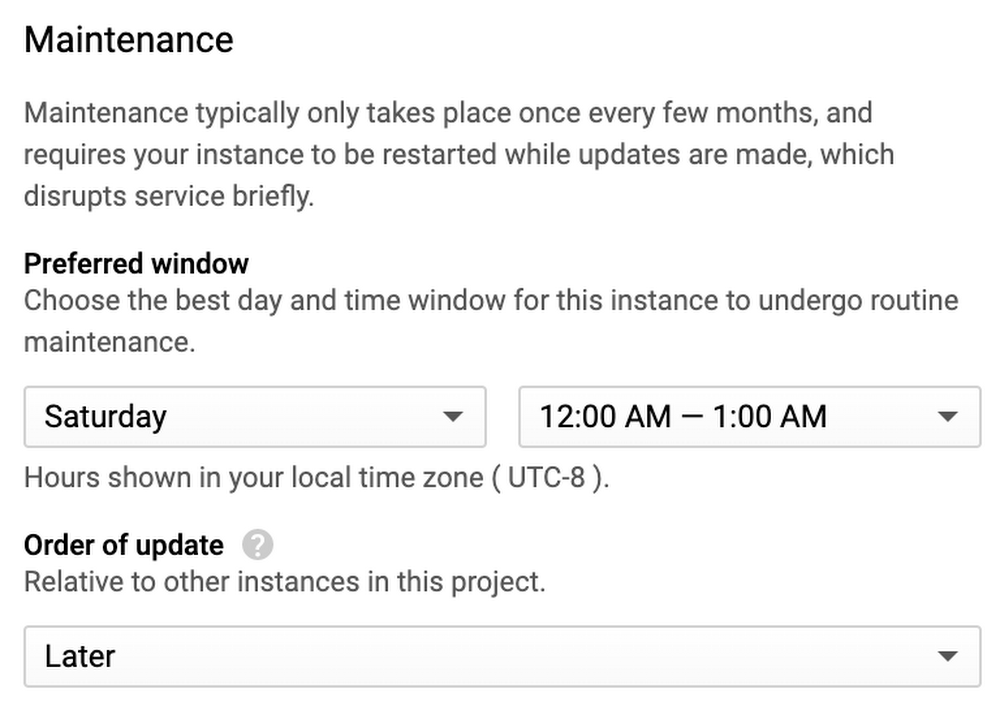
Routine maintenance is a part of every database user experience—it’s how we ensure you get the performance improvements and new feature updates that keep your business running smoothly and securely. But we get it: Nobody likes downtime, no matter how brief. That’s why we’re pleased to announce that Cloud SQL, our fully managed database service for MySQL, PostgreSQL, and SQL Server, now lets you have more control over when your instances undergo routine maintenance. This includes two top-requested features: advanced notification and maintenance rescheduling.Understanding Cloud SQL maintenanceBefore describing these new controls, let’s answer a few questions we often hear about the maintenance that Cloud SQL performs.What is maintenance?To keep your databases stable and secure, Cloud SQL automatically patches and updates your database instance (MySQL, Postgres, and SQL Server), including the underlying operating system. To perform maintenance, Cloud SQL must temporarily take your instances offline.What is a maintenance window?Cloud SQL offers maintenance windows to minimize the impact of planned maintenance downtime to your applications and your business. Maintenance windows allow you to control when maintenance occurs.Cloud SQL’s maintenance windows are entirely optional. They are applied per instance, which means you can choose to enforce maintenance windows on some of your instances, but not on others. We hear that users often find maintenance windows most valuable for production instances and less valuable, or even unneeded, for test and development instances. With Cloud SQL, you’re in control.Are maintenance windows used for anything else?Cloud SQL also uses maintenance windows to deliver new functionality, including performance improvements, that requires us to temporarily take your instances offline. When new functionality and performance improvements are released, they are documented in our release notes.When does maintenance occur?The maintenance window you set defines the hour and day when an update occurs. Define your preferred maintenance window so that those updates will only happen when database activity is low, for example, on Saturday at midnight. Additionally, you can specify the order of update for your instance relative to other instances in the same project (“Earlier” or “Later”). Earlier timing is useful for test instances, allowing you to see the effects of an update the week before it reaches your production instances. What are the new controls?You can now receive notifications one week in advance of incoming maintenance activities, helping you prepare for upcoming maintenance. If needed, you can choose to reschedule maintenance after being notified. For example, you can delay maintenance up to one week, or you can apply it immediately.Getting started with Cloud SQL’s new maintenance controlsYou’ll start by setting up maintenance notifications in your project.If you haven’t already, set a maintenance window for your instance: On the Cloud SQL Instance details page, click Edit maintenance preferences, as shown here:Next, opt in to notifications: Set the Cloud SQL Maintenance Window option in the Cloud Console Communications page, and select ON under Email. When notifications are enabled, you’ll get an email seven days in advance of the maintenance event.Now, you can view upcoming maintenance for all of your instances at a glance. On the Instances page, you can add a column for maintenance. When an instance is scheduled for maintenance, the date is listed in the maintenance column.If needed, reschedule maintenance. You can choose to reschedule maintenance after being notified.For more, find a detailed overview of maintenance and setup steps in our online documentation.What’s next for Cloud SQLSupport for additional maintenance controls has been a top request from users and its launch is an important milestone for Cloud SQL. You can look forward to additional notification types, like machine-readable notifications, in the future. Have more ideas? Let us know what other features and capabilities you need with our Issue Tracker and by joining the Cloud SQL discussion group. We’re glad you’re along for the ride, and we look forward to your feedback!
Quelle: Google Cloud Platform

File storage made easier with NetApp Cloud Volumes, now GA

At both NetApp and Google Cloud, we share a mission to offer our users a top-notch file service in Google Cloud. Whether you’re moving workloads to cloud or deploying net-new applications in cloud that need file interfaces, our aim is to offer a highly available, feature-rich, and high-performing file service. We recently announced two major milestones toward our mission: the general availability of Cloud Volumes Service for Google Cloud, and the availability of this service in the Google Cloud region in London. Cloud Volumes Service for Google Cloud is a fully managed service that lets you run enterprise apps in the cloud without compromising performance or flexibility. This has helped businesses move high-performance file workloads to cloud without refactoring apps, and unlock the power of their data with tightly integrated data solutions that are optimized and validated for Google Cloud. We’ve heard how useful this service is for enterprises to add flexibility for users. “We’ve been searching for a suitable replacement for CephFS and to do away with the headaches of maintaining our own internal Ceph stack,” said Aleem Shah, senior operations engineer, Prowler.io. “We tried many alternatives, with NetApp Cloud Volumes Service coming out on top in terms of its ever-expanding feature set, reliability, and pricing. The service support provided by NetApp was unmatched in all categories.”Here are some details on new service features included in these announcements.A new regionWith the added support for Cloud Volumes Service in the UK, the service is now available in five regions: three in the U.S., one in the U.K., and one in Germany.An availability SLA of 99.9% monthly uptimeA key requirement of running enterprise applications on cloud is ensuring reliability and availability of the infrastructure services. Cloud Volumes Service now offers a monthly uptime guarantee of 99.9% for your cloud volumes within a given region. This is the culmination of foundational hardening and scale testing accomplished by the joint teams of NetApp and Google SRE. The uptime guarantee is backed by a service-level agreement (SLA). You can confidently deploy production and business-critical workloads on Cloud Volumes Service. Support through Google Cloud SupportTo streamline customer experience and reduce time to resolution, you can now initiate support cases directly through Google Cloud Support, just like you do for any other Google Cloud service. With the general availability, we now have the cross-organization support framework with systems, telemetry, and enablement components in place. This means we can offer more efficient triaging and timely resolution of issues—essential for resolving problems in business-critical applications. Volume latency metrics in Stackdriver For enterprise workloads that support business processes, web content, batch runs, and so on, storage latency has significant implications on user experience, application efficacy, and job runtimes. Access to the right storage monitoring metrics can make the debugging process a lot easier for issues related to user experience or job runtimes. In addition to IOPS and storage throughput per cloud volume, you can now view both read and write latency metrics (in milliseconds) per cloud volume in Stackdriver. Latency metrics can help solve issues and understand the performance profile of the storage infrastructure for longer term planning. Find more details in the Monitoring Cloud Volumes section of the documentation.IAM controls in the Cloud ConsoleSecuring access to services within projects is a requirement for general enterprise and security-sensitive workloads. In addition to using gcloud commands, you can now assign the predefined cloud volume roles of admin and viewer to users, service accounts, and groups directly in Cloud Console, in the IAM section. For details about these roles, check out the Permissions for Cloud Volumes Service section in the documentation. Here’s what that looks like:We’re excited to bring this general availability and new features to help you get better outcomes with your production applications and workloads running on Cloud Volumes Service. Log in to Cloud Console and discover Cloud Volumes Service for yourself!
Quelle: Google Cloud Platform