BeyondProd: How Google moved from perimeter-based to cloud-native security

At Google, our infrastructure runs on containers, using a container orchestration system Borg, the precursor to Kubernetes. Google’s architecture is the inspiration and template for what’s widely known as “cloud-native” today—using microservices and containers to enable workloads to be split into smaller, more manageable units for maintenance and discovery.Google’s cloud-native architecture was developed prioritizing security as part of every evolution in our architecture. Today, we’re introducing a whitepaper about BeyondProd, which explains the model for how we implement cloud-native security at Google. As many organizations seek to adopt cloud-native architectures, we hope security teams can learn how Google has been securing its own architecture, and simplify their adoption of a similar security model.BeyondProd: A new approach to cloud-native securityModern security approaches have moved beyond a traditional perimeter-based security model, where a wall protects the perimeter and any users or services on the inside are fully trusted. In a cloud-native environment, the network perimeter still needs to be protected, but this security model is not enough—if a firewall can’t fully protect a corporate network, it can’t fully protect a production network either. In the same way that users aren’t all in the same physical location or using the same device, developers don’t all deploy code to the same environment. In 2014, Google introduced BeyondCorp, a network security model for users accessing the corporate network. BeyondCorp applied zero-trust principles to define corporate network access. At the same time, we also applied these principles to how we connect machines, workloads, and services. The result is BeyondProd.In BeyondProd, we developed and optimized for the following security principles:Protection of the network at the edgeNo inherent mutual trust between servicesTrusted machines running code with known provenanceChoke points for consistent policy enforcement across services, for example, ensuring authorized data accessSimple, automated, and standardized change rollout, andIsolation between workloadsBeyondProd applies concepts like: mutually authenticated service endpoints, transport security, edge termination with global load balancing and denial of service protection, end-to-end code provenance, and runtime sandboxing.Altogether, these controls mean that containers and the microservices running inside them can be deployed, communicate with one another, and run next to each other, securely, without burdening individual microservice developers with the security and implementation details of the underlying infrastructure.Applying BeyondProdOver the years we designed and developed internal tools and services to protect our infrastructure that follows these BeyondProd security principles. That transition to cloud-native security required changes to both our infrastructure and our development process. Our goal is to address security issues as early in the development and deployment lifecycle as possible—when addressing security issues can be less costly—and do so in a way that is standardized and consistent. It was critical to build shared components, so that the burden was not on individual developers to meet common security requirements. Rather, security functionality requires little to no integration into each individual application, and is instead provided as a fabric that envelops and connects all microservices. The end result is that developers spend less time on security while achieving more secure outcomes.If you’re looking to apply the principles of BeyondProd in your own environment, there are many components, through Google Kubernetes Engine, Anthos, and open source, that you can leverage to achieve a similar architecture:Envoy or Traffic Director, for managing TLS termination and policies for incoming trafficMutual TLS, as part of Istio or Istio on GKE, for RPC authentication, integrity, encryption, and service identitiesKubernetes admission controllers, Kritis, and OPA Gatekeeper, or Binary Authorization, for deploy-time enforcement checks such as code provenanceShielded GKE Nodes, for secure boot and integrity verification, andgVisor or GKE Sandbox, for workload isolationFor more information on Anthos’ security model, see Anthos: An Opportunity to Modernize Application Security.In the same way that BeyondCorp helped us to evolve beyond a perimeter-based security model, BeyondProd represents a similar leap forward in our approach to production security. By applying the security principles in the BeyondProd model to your own cloud-native infrastructure, you can benefit from our experience, strengthen the deployment of your workloads, know how your communications are secured, and how they affect other workloads.To learn more about BeyondProd, as well as Binary Authorization for Borg, one of the controls we use in the BeyondProd model, head on over to the Google security blog.
Quelle: Google Cloud Platform

Enabling a more secure cloud with our partners

Security is top of mind for every organization, at every stage of your cloud journey, whether you’re just beginning to migrate a few applications or running entire stacks of mission-critical workloads in the cloud.At Google Cloud, we think of security through three lenses: Security of the cloud—Providing a highly secure foundation to build on. Security in the cloud—Helping to make sure your apps and data are better protected against threats with advanced and easy to use tools. Security beyond our cloud—Using solutions like Chronicle powered by Google Cloud infrastructure to help you protect your systems wherever they may reside, be that on-premises or in other clouds.We understand that many customers have dedicated tools and strategic relationships with the industry’s leading security vendors. We want to meet you where you are, allowing you to preserve your investments, as well as benefit from functionality you can’t get on other clouds. That’s why we work closely with partners in the security industry to help you better secure your applications and information.Today, we are excited to announce more than a dozen new solutions and security partner integrations with Google Cloud that further advance our capabilities. These include:Launching a new solution to help customers manage the deployment of agent-based endpoint security and vulnerability management solutions, automatically and at scale, with McAfee, Palo Alto Networks, and Qualys on Google Cloud.Growing our strategic partnership with Palo Alto Networks to expand its usage of services on Google Cloud and to jointly develop new solutions for Anthos and threat detection.Announcing a new strategic partnership with McAfee to integrate its MVISION Cloud solution for data security, threat prevention, governance, and compliance capabilities for container workloads with Google Cloud, as well as its endpoint security solution for Linux and Windows based workloads.The availability of Citrix Workspace for customers on Google Cloud. This includes integration with G Suite that provides a single sign-on experience, multi-factor authentication, enhanced security policies for G Suite, web filtering policies for G Suite, and end-to-end visibility and analytics. Also, users will be able to seamlessly authenticate using G Suite credentials early next year to provide simple, secure access to the apps and information they need to do their jobs anywhere, on any device.Exabeam, a leading SIEM vendor, will expand its SaaS Cloud security management platform on Google Cloud, helping customers bring the scale and speed of the cloud to their existing, trusted SIEM platform.A new strategic partnership with ForgeRock to deliver its Digital Identity Platform on Google Cloud. ForgeRock’s platform helps customers build and maintain cloud-ready architecture to automate multi-cloud deployments. ForgeRock joins Google Cloud as a Premier Partner in the identity space and has named Google Cloud as its primary cloud provider for its cloud-native suite of identity products.Expanding our work with Fortinet to provide a new reference architecture for customers to connect facilities to Google Cloud with secure SD-WAN solutions, to make its FortiWeb Cloud WAF-as-a-Service available on Google Cloud, and to integrate its FortiCWP service with Google Cloud Security Command Center.New support from Semperis and STEALTHbits to enable customers to manage, audit, and protect their Microsoft Active Directory-dependent apps and workloads running on Google Cloud from service outages, data breaches, and cyberattacks.A new integration between Tanium’s endpoint security telemetry and Chronicle’s Backstory platform to provide full visibility into endpoint events across an enterprise.Many customers today also work with security service providers to help them implement the right solutions for their businesses. To help simplify implementation and management, we are expanding our work with leading systems integrators and managed services providers, including:Deloitte is expanding its work with Google Cloud to provide customers with end-to-end risk mitigation services and solutions to combat cyber threats across their cloud services. New offerings include security monitoring and threat response solutions to detect and respond to unauthorized activity before it can adversely affect a customer’s network; “zero trust” solutions to provide around-the-clock risk assessments of users; identity and access management services; and data security solutions to help organizations assess potential risks and develop a data risk governance program.IBM Security will provide consulting and managed services for Google Cloud customers to help develop, enforce, and manage security and compliance policies across public-, hybrid-, and multi-cloud environments.Wipro, the global IT consulting firm, will deliver new security services for Google Cloud customers, including consulting, digital transformation, architecture design, security controls configuration, and continuous controls management.Arctic Wolf, a leading security operations center-as-a-service provider, will make their managed detection and response services available for Google Cloud customers to provide centralized and continuous monitoring of user and application activity across a customer’s entire cloud deployment.Comm-IT, a leading security systems integrator, will extend support to Google Cloud customers, providing a single, unified view of security risks across cloud deployments.Cyderes, a managed security service provider, is adding full support for Chronicle Backstory to analyze massive amounts of security telemetry without the need for additional hardware, maintenance, tuning, or ongoing management. Optiv will partner with Google Cloud to deliver new solutions to reduce security risks as customers move to the cloud. Optiv will expand the availability of its Security Architecture Assessment Services for Google Cloud to global customers, and will bring new services to Google Cloud for identity management, device management, and data management.In addition, we are excited to recognize several partners who partnered with Google Cloud to build specialized security solutions and demonstrated high levels of success in meeting customer needs. This first set of partners includes Aqua, Cavirin, Check Point Software Technologies, Fortinet, McAfee, Palo Alto Networks, and Qualys.At Google Cloud, we’re committed to providing customers with high levels of security and data protection. It’s why leading security companies chose to run their own products on our cloud. Today’s announcements further build on this commitment to our customers, and we look forward to continued collaboration with our partner ecosystem to enable advanced security capabilities. Learn more about security on Google Cloud.
Quelle: Google Cloud Platform

Availability, scale, and ease of management with new Layer-4 Internal Load Balancing features

Like many Google Cloud customers, you probably have workloads that need to be private without access to and from the public internet. For scaling and resilience of  those workloads, we offer regional layer-4 Internal Load Balancing (L4 ILB), and we’ve recently added two new L4 ILB features –  ILB global access and  ILB as next-hop with multi-NIC support for third-party appliance integration that  deliver greater availability, scale and ease of management. L4 ILB global access We have added a new global access feature for our L4 Internal load-balancer. While your L4 load-balancer’s backend instances are still in the same region as the L4 ILB, your clients can now access the L4 ILB from any region. This also allows your on-prem clients to access the load balancer, from any region via VPN or a Cloud Interconnect. By multi-homing via VPN or an interconnect to multiple regions, you now have highly available access to the services front-ended by your internal load balancer. As illustrated above, if you lose VPN connectivity from your on-premises network in, say, Boston to Google Cloud region US East, you can still access the L4 ILB in US East via the backup VPN connection from Boston to Europe West. We’re actively working on integrating L4 ILB global access into multiple services: Support for Kubernetes is available in 1.16 release, and Cloud SQL will also support L4 ILB to allow global access to a Cloud SQL database from within the Google Cloud network.A key enabler for the global access feature was incorporating Hoverboard into L4 ILB, which increased the number of L4 ILB Forwarding Rules supported and enables rapid provisioning of these load-balancers. L4 ILB global access was an oft-requested feature by our customers, many of whom beta-tested the feature. CoreLogic, a leading global property information services company, has this to share about L4 ILB global access: “With our deep data, analytics and data-enabled solutions spread across multiple GCP regions in Europe, Australia, and the United States, we leveraged the reach, scale and simplicity of Google’s global network and Internal Load Balancer’s global access to deliver unique insights to our users.” – Steven Myers, Cloud Platform Services and Infrastructure Build Leader, CoreLogic Third-party multi-NIC appliance integrationYou currently need to set up high availability for third-party appliances using the mechanism of routing, which is both complicated and limited in its high-availability capabilities. You have to stitch individual appliance-instances via a route, monitor them and withdraw each route as the instance goes away. We are excited to announce the availability of ILB as next-hop, making it easy to integrate these appliances with high availability and scale out. Simply configure a static route in Google Cloud that sets the next-hop to an Internal Load Balancer, which load-balances traffic to a pool of health-checked third-party VM appliances. The destination IP range can be a default route 0/0, an RFC 1918 prefix, or a non-GCP public IP range owned by you.  In addition, we removed the constraint for L4 ILBh which restricted you to only load-balance to primary NIC0 interface of a VM instance. You can now incorporate multi-NIC VM appliances, with high availability.Several customers are using next-hop support with ILB to easily incorporate third-party appliances, such as those from Palo Alto Networks, into their deployments in Google Cloud. Here is what Palo Alto Networks shared:  “Our customers are able to improve the scalability and availability of their inline threat prevention and network security protections by using Google Cloud’s ILB as next-hop with multi-NIC support to distribute the load across their VM-Series Virtual Next-Generation Firewalls. This helps customers protect outbound and east-west traffic, as well as enabling consistent security for hybrid cloud environments.”  – Mukesh Gupta, VP VM-Series, Palo Alto Networks We brought you ILB global access and ILB as next-hop to offer greater availability, scale and ease of management of your services and virtual appliances. We hope you give these features a try. Start with the documentation on global access, read an overview on L4 ILB as next-hop, walk through a multi-nic configuration, and deploy it in Google Cloud. We look forward to your feedback!
Quelle: Google Cloud Platform

Using HLL++ to speed up count-distinct in massive datasets

If you’re working in modern data analytics, you likely have some go-to tools. One of the most useful tools in a data analyst’s toolbox is the count-distinct function, which lets you count the number of unique values in a column in a data set. (Think of this as counting distinct elements in a data stream where there are repeated elements.) This can come in handy when gathering all types of business data—for example:How many unique visitors came to our website last yearHow many users got to a certain level of our online game todayHow many different IP addresses did a slice of network traffic come from How many unique visitors searched for a particular news event in a single dayHow many unique IoT devices started to report error codes after the code rollout However, as the number of unique items gets larger, the calculation to obtain this number exactly requires memory in proportion to the number of unique items. Another problem is that computing the values for unique visitors per day doesn’t mean you can simply add seven days of results together to get the unique count for the week, because that would overcount visitors seen on multiple days. A simple solution to do an exact count-distinct is to create a set structure. Then, as you process elements in the input, add them to the set if they are not in it yet, while also incrementing a set size counter. That looks something like this:The set will continue to grow in direct proportion to the cardinality of the dataset (the number of unique elements in the set), using large amounts of memory for large input cardinalities. You’ll have to consider the memory space needed for the set, as well as how to deal with this when using distributed processing, where data is spread across many machines for its processing. Count distinct functions from several machines cannot just be summed up, as the set objects from different machines will overlap (unless we repartitioned the data, such as with a hash partition). To deduplicate the sets in order to obtain an exact count, the entire leaf set needs to be sent to the root machine and merged (requiring huge amounts of I/O).Performing count-distinct, faster and cheaperSo how do you avoid massive memory costs for count distinct, or make the computation feasible in the first place? Data analysts will often require only an approximate count, with a small error margin being acceptable. Allowing for a small error in the result opens the door for massively cheaper computations: Approximate algorithms can compute count distinct with a fraction of the memory and I/O of an exact solution, at the price of results which are, for example, within 0.5% of the exact solution. A widely used approximate algorithm is HyperLogLog. Google’s implementation of and improvements to this algorithm are discussed in detail in this paper on HyperLogLog in practice. This implementation is known as HyperLogLog++ (we’ll refer to it as HLL++ for the rest of this post).The HLL++ algorithm makes it possible to store the intermediate state of an aggregation in a very compact form, called a sketch. These sketches are constant in size, as opposed to growing linearly, as our earlier set objects. These sketches lend themselves well to distributed processing frameworks, since you can efficiently transfer aggregation states over the wire.A further important benefit of sketches is that you can reuse and merge results for different time periods without needing to go back to the raw data. In our example counting unique visitors, a sketch can be produced and stored, summarizing the data for each day. To compute sliding window stats like seven-day active users, you can just reuse and merge the sketches for the relevant seven days instead of computing everything from scratch!  The Google implementation of HyperLogLog includes several improvements to the original algorithm: a compact and standardized sketch format, and a special higher accuracy mode for small cardinalities. This implementation was added to BigQuery in 2017 and has recently been open sourced and made directly available in Apache Beam as of version 2.16. That means it’s available for use in Cloud Dataflow, our fully managed service for transforming and enriching data in stream (real-time) and batch (historical) modes with equal reliability and expressiveness.Let’s explore the use of the HLL++ across several pipelines, using data coming from a streaming source:Outputting the approximate count distinct directly Output sketches to BigQuery, allowing for interoperability between BigQuery and Cloud Dataflow.Using BigQuery to run analytics queries against the sketches stored in step 2Outputting the sketches and metadata to Cloud StorageMerging and extracting results from files stored on Cloud StorageWe’ll show you how to use the transform directly to output results as well as store the aggregated sketches in BigQuery and, along with metadata, as Avro files in Cloud Storage. Building HLL++-enabled pipelines Apache Beam lets you process and analyze data as a stream, so making use of the Beam API with real-time data is simply a matter of adding it to a pipeline. The following operations, added in Beam 2.16, will reappear throughout the examples below: HllCount.Init—aggregates data into a sketch; HllCount.MergePartial—combines multiple sketches into one; HllCount.Extract—Extracts the estimated count of distinct elements from a sketch.Check out more details in the HllCount transform catalog entry. With these building blocks, we can now go ahead and explore a few use cases: 1. Compute approximate count of unique visitors to a website  Note: When testing, you can easily create a stream of values using the GenerateSequence utility class in Beam, which generates a sequence of data for you in stream mode. The pipeline below will process the IDs of everyone visiting our website and compute the approximate count based on the durationOfWindow.2. Generate unique visitors per page countThe example above used a PCollection of anonymized IDs visiting our website, but what if we wanted a count based on specific pages? For that we can make use of the transforms’ ability to work with key-value pairs. In the example below, the key is the webpage identifier and the value is visitor IDs.3. Storing the sketches in BigQueryBigQuery supports HLL++ via the HLL_COUNT functions, and BigQuery’s sketches are fully compatible with Beam’s, so it’s easy to interoperate with sketch objects across both systems. This use case mirrors usage of HLL++ within Google with Flume and BigQuery. Even when using approximate algorithms, Google-order-of-magnitude data sets can still be too large for analysts to query at interactive/”online” speeds (especially for expensive statistics like count distinct). The remedy is to pre-aggregate data into cubes using Google Flume pipelines, the internal version of Cloud Dataflow. End-user queries just filter and merge (roll up) over dozens of rows in the cube.  For functions like sum or count, the rollup is trivial, but what about count distinct? As you will recall from earlier, it is not possible to simply sum up count distinct values corresponding to a small time interval (day) into larger time intervals (week or month). With sketches, this becomes possible as the values can simply be merged.In the example below we will:Pre-aggregate data into sketches in Beam; Store the sketches in BigQuery as byte[] columns along with some metadata about the time interval. Run a rollup query in BigQuery, which can extract the results at interactive speed, thanks to the sketches that were pre-computed in Beam.With the bytes stored in BigQuery we can use the BigQuery HLL_COUNT.* functions to merge the sketches and extract the counts, with the following SQL query:Note: If you have sketches with different intervals in the same table, then you will need to use Window_Start and Window_End time in the WHERE clause.4. Storing the sketches externally Now, let’s output the results of the sketches to a file system. This is useful is when generating feature files ready for machine learning, where Cloud Dataflow is being used to enrich multiple sources of data before the modeling phase. The sketches’ ability to merge together means there’s no need to reprocess all of the data again. You just have to gather the files that correspond to the relevant time interval.There are many Apache Beam SinkIOs that can be used to create and store files. We will explore three of the common ones: FileIO, TextIO, AvroIO.TextIOTextIO will write out a PCollection<String> to a text file, with each element delimited by a new line character. Since a sketch is a byte array (byte[]), you need to first Base64-encode the bytes before writing them to TextIO. This is a nice straightforward approach which has a small processing overhead.FileIOFileIO lets you create a file, then you need to write a custom writer/reader to output the byte[] into a file, including any mechanisms to deal with multiple sketch objects in a single file, like value separators.AvroIOUsing a format like AVRO lets you store the sketches (as bytes) together with metadata. AVRO is also a widely used serialization format, with connectors available for many systems. Due to its convenience, we’ll use AvroIO for this example.First, create an object type that supports some extra metadata about the sketch. The @DefaultCoder annotation lets you use the AvroCoder coder in the pipeline.Using this class, you can write a pipeline that turns our stream of key-value sketches into our custom HLLAvroContainer objects, ready for output to a file. For extra optimization, let’s add the start and end time as metadata to the filename as well. This lets you easily use a glob pattern when reading the files to process only items you’re interested in, as opposed to having to read all files and apply a filter. The code snippet below will generate files to GS_FOLDER with a file name format of “2019-10-22T08:33:00.000Z-2019-10-22T16:33:00.000Z-pane-0-last-00000-of-00001″. You can use AvroIO’s more advanced options to write your own filenames to act as additional metadata (not shown).It’s also possible to push sketch objects from many windows into a single file. In order to do this, you would need to apply a larger window after the creation of the HLLAvroContainer but before the AvroIO write, such as Window.into(FixedWindows.of(<1 week>)). 5. Reading the sketches from external storageWith the output files in a folder, you can now read and then merge all of the individual files together from November 2019 for the approximate count distinct of that month.This will result in an output line per key, since all the results have been merged into a single result.HLL++ efficiently solves the count-distinct problem for large data sets with a small error margin, solving for the large majority of data analysts’ needs around count distinct. By its incorporation within Apache Beam, Cloud Dataflow offers you this algorithm for both streaming and batch processing pipelines. You can switch between the two easily, depending on your needs, and also move the intermediate aggregation state seamlessly back and forth between Beam and BigQuery.Note: As of version 2.16, there are several implementations of approximate count algorithms. We recommend the use of HllCount.java, especially if you need sketches and/or need compatibility with Google Cloud BigQuery.Among the other implementations, ApproximateUnique.java does not expose its intermediate aggregation state in the form of sketches and has lower accuracy; ApproximateDistinct.java is a reimplementation of the algorithm described in the HLL++ paper, but its sketch format is not compatible with BigQuery.
Quelle: Google Cloud Platform

Introducing Storage Transfer Service for on-premises data

There’s an enormous amount of data in the world today, and your company likely operates its own storage infrastructure to store this data. Running your business in the cloud can generate more value from your data and facilitate collaboration across your organization, all while optimizing for infrastructure costs. Before you can take advantage of all that cloud offers, though, you have to actually get your data to the cloud. That’s why we’ve developed a new software service that helps you accomplish large-scale, online data transfers: Transfer Service for on-premises data. This can help take the complexity out of data transfers and move data faster than existing online tools like gsutil.Transfer Service for on-premises data is a managed solution that lets you move your data without needing to engineer your own custom software or invest in an off-the-shelf solution. Now, you can complete large-scale data transfers online, which scale to high-speed network connections—up to billions of files, multiple PB of data, and tens of Gbps. Transfer Service for on-premises data validates data integrity, so you can transfer with confidence. It’s also designed to be reliable and secure, so that if agent failures occur, in-progress transfers will not be impacted. And with performance optimizations included from the application to the transport layer, the service can use your available bandwidth to minimize transfer times. Plus, this service requires no code or maintenance, allowing your organization to focus on innovation, not operations. On-premises data transfers can be complex. “I see enterprises default to making their own custom solutions, which is a slippery slope as they can’t anticipate the costs and long-term resourcing,” says Scott Sinclair, senior analyst at ESG. “With Transfer Service for on-premises data (beta), enterprises can optimize for TCO and reduce the friction that often comes with data transfers. This solution is a great fit for enterprises moving data for business-critical use cases like archive and disaster recovery, lift and shift, and analytics and machine learning.”Getting started with Transfer Service for on-premises dataHere’s how it works. First, install and start the on-premises software (the agent), then go to the Cloud Console and submit directories to transfer to Cloud Storage. When transferring data, the service will parallelize your transfer across many agents, and then coordinate these agents to transfer your data over a secure internet connection to Cloud Storage. Transfer Service for on-premises data also features a fully self-service GUI with detailed transfer logs so that you can create, monitor, and manage transfer jobs with confidence.Click to enlargeTransfer Service for on-premises data is now available in beta for you to try. Learn more about how the service works and how to get started today.
Quelle: Google Cloud Platform

Discover insights from text with AutoML Natural Language, now generally available

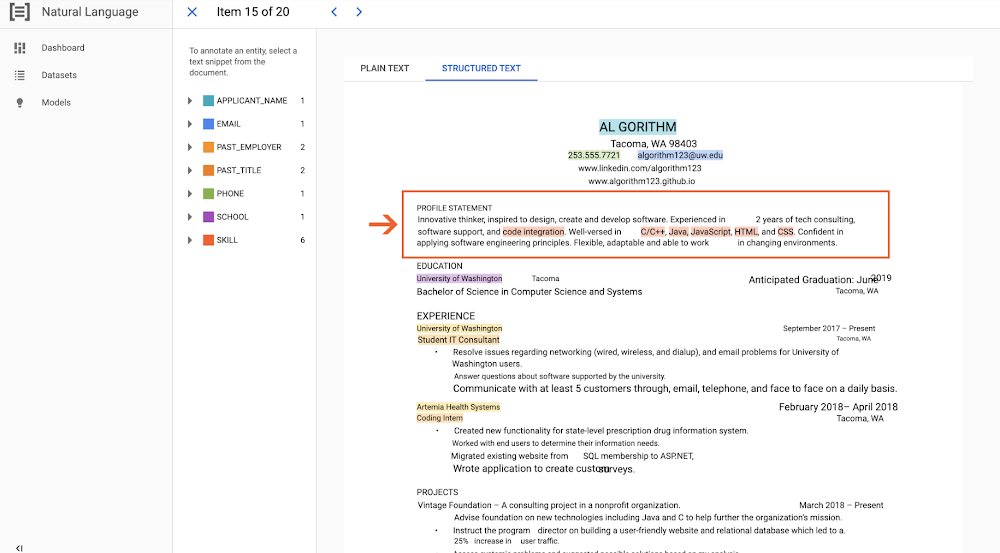
Organizations are managing and processing greater volumes of text-heavy, unstructured data than ever before. To manage this information more efficiently, organizations are looking to machine learning to help with the complex sorting, processing, and analysis this content needs. In particular, natural language processing is a valuable tool used to reveal the structure and meaning of text, and today we’re excited to announce that AutoML Natural Language is generally available. AutoML Natural Language has many features that make it a great match for these data processing challenges. It includes common machine learning tasks like classification, sentiment analysis, and entity extraction, which have a wide variety of applications, such as: Categorizing digital content, including news, blogs, and tweets, in real time to allow content creators to see patterns and insights—a great example is Meredith, which is categorizing text content across its entire portfolio of media properties in months instead of yearsIdentifying sentiment in customer feedbackTurning dark, unstructured scanned data into classified and searchable content We’re also introducing support for PDFs, including native PDFs and PDFs of scanned images. To further unlock the most complex and challenging use cases—such as understanding legal documents or document classification for organizations with large and complex content taxonomies—AutoML Natural Language now supports 5,000 classification labels, training up to 1 million documents, and document size up to 10 MB. One customer using this new functionality is Chicory, which develops custom digital shopping and marketing solutions for the grocery industry. “AutoML Natural Language allows us to solve complex classification problems at scale. We are using AutoML to classify and translate recipe ingredient data across a network of 1,300 recipe websites into actual grocery products that consumers can purchase seamlessly through our partnerships with dozens of leading grocery retailers like Kroger, Amazon, and Instacart,” Asaf Klibansky, Director of Engineering at Chicory explains. “With the expansion of the max classification label size to the thousands, we can expand our label/ingredient taxonomy to be more detailed than ever, providing our shoppers with better matches during their grocery shopping experience—a business challenge we have been trying to perfect since Chicory began. “Also, we see better model performance than we were able to achieve using open source libraries, and we have increased visibility into the individual label performance that we did not have before,” Klibanky continues. “This has allowed us to identify insufficient or poor quality training data per label quickly and reduce the time and cost between model iterations.” We’re continuously improving the quality of our models in partnership with Google AI research through better fine-tuning techniques, and larger model search spaces. We’re also introducing more advanced features to help AutoML Natural Language understand documents better. For example, AutoML Text & Document Entity Extraction will now look at more than just text to incorporate the spatial structure and layout information of a document for model training and prediction. This spatial awareness leads to better understanding of the entire document, and is especially valuable in cases where both the text and its location on the “page” are important, such as invoices, receipts, resumes, and contracts.Identifying applicant skills by location on the document.We also launched preferences for enterprise data residency for AutoML Natural Language customers in Europe and across the globe to better serve organizations in regulated industries. Many customers are already taking advantage of this functionality, which allows you to create a dataset, train a model, and make predictions while keeping your data and related machine learning processing within the EU or any other applicable region. Finally, AutoML Natural Language is FedRAMP-authorized at the Moderate level, making it easier for federal agencies to benefit from Google AI technology.To learn more about AutoML Natural Language and the Natural Language API, check out our website. We can’t wait to hear what you discover with your data.
Quelle: Google Cloud Platform

What’s new in Cloud Run for Anthos

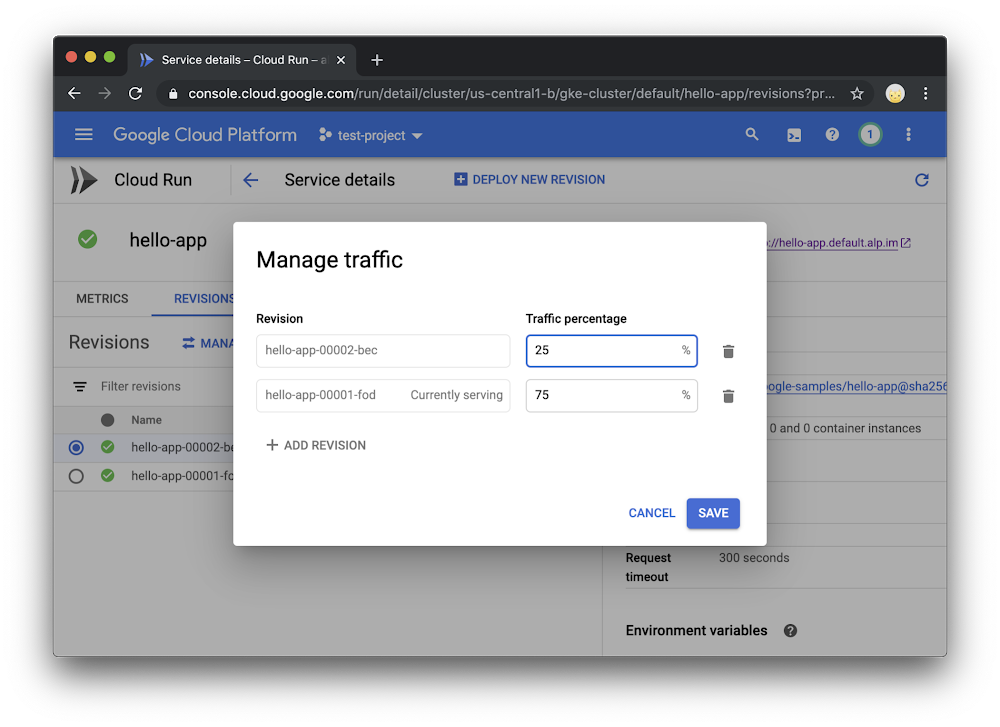
Earlier this year, we announced Cloud Run, our newest compute platform for serverless containers, which runs either on Google’s fully managed infrastructure–or on your Google Kubernetes Engine (GKE) clusters with Cloud Run for Anthos. This portability is achieved with Knative open-source APIs.With Cloud Run for Anthos, we deliver and manage everything you need to support serverless containers on your GKE clusters, for example Knative and a service mesh, and it’s now generally available. Let’s take a look at some of the new features and improvements, including better networking and autoscaling capabilities, that make it easier to deploy and operate microservices in a serverless way on your Anthos GKE clusters. (Also make sure to check out what’s new in Cloud Run fully managed.) Traffic managementCloud Run for Anthos can now route each request or RPC randomly between multiple revisions of a service with the traffic percentages you configure. You can use this feature to perform canary deployments of a newer version of your application, sending a small percentage of the traffic and validating if it is performing correctly, before gradually increasing the traffic.Similarly, these new traffic management capabilities make it possible to roll back to an older version of your application quickly. You can manage traffic to your service on the Cloud Console, as well as the gcloud command-line tool.Bringing Cloud Run to your on-prem clustersThe beta of Cloud Run for Anthos only supported GKE clusters running on Google Cloud Platform (GCP). With the general availability of Cloud Run for Anthos, you can now deploy Cloud Run to your on-premises clusters deployed on VMware.With this, you can have the same serverless developer and operator experience across both environments. You can use either gcloud or the Cloud Console to deploy to your Anthos clusters and monitor them, regardless of whether they are running on-prem, or on GCP.Support for Kubernetes Secrets and ConfigMapsYou can now mount existing Kubernetes Secret and ConfigMap resources in your cluster to Cloud Run services using the Cloud Console interface or gcloud. This lets you deploy services without crafting lengthy Kubernetes manifest files.Fine tune network and autoscaling parametersWith the new improvements in the Cloud Console and gcloud, you can now further tune the autoscaling and networking parameters of your application at per-revision level.–min-instances / –max-instances let you specify the scaling boundaries of your application. For example, setting –min-instances to greater than 0 prevents your service from scaling down to zero in case of inactivity to prevent cold starts.–timeout allows you to specify a custom request timeout for your service.–port allows you to customize and specify on which port number your containerized application is listening. This allows you to bring your apps to Cloud Run without having to modify the application server’s port number.Some of these options are currently in beta, however soon these and many other configuration options will be available to you in the command-line and the Cloud Console.Making your services more observableOut of the box, Cloud Run for Anthos integrates with Stackdriver Monitoring to expose metrics from the services you have deployed. With general availability, you can find these metrics on Stackdriver Metrics, or directly on the “Metrics” tab of the service’s Cloud Run page.These metrics include some golden signals: request latencies, error rates, CPU and memory usage, and container instance count. You can further use these metrics to drill down by revision of your application, and create alerts and SLOs using Stackdriver Monitoring.It’s also worth noting that you get the same set of metrics even if your Anthos cluster is running on-premises, for example on VMware.Smaller cluster footprintThe Istio add-on is now optional for Cloud Run for Anthos, as Cloud Run now includes select components of Istio. The full version of Istio is still a great complement to Cloud Run if you want to have cluster-wide traffic policies and use Anthos Service Mesh dashboard to have single pane of glass visibility to services in your cluster. The Istio community has recently made several improvements to Istio, including reductions in its resource footprint.Partner ecosystemWe’re working with a wide variety of ISVs in the areas of CI/CD, security and observability so that you can continue to use your favorite tools with applications running on Cloud Run for Anthos. Click here for a recent list of Cloud Run partners and integrations. Try it today!Both Cloud Run fully managed and Cloud Run for Anthos are available for you to try out for your applications today. You can try out Cloud Run on your Anthos GKE clusters by following the quickstart guide for free until May 2020. You can also use the 12-month GCP free trial to get $300 in credit and create a cluster with Cloud Run for Anthos. And if you’re already running Anthos on-premises, try this quickstart guide to deploy Cloud Run to your VMware environment.
Quelle: Google Cloud Platform

Exploring container security: Performing forensics on your GKE environment

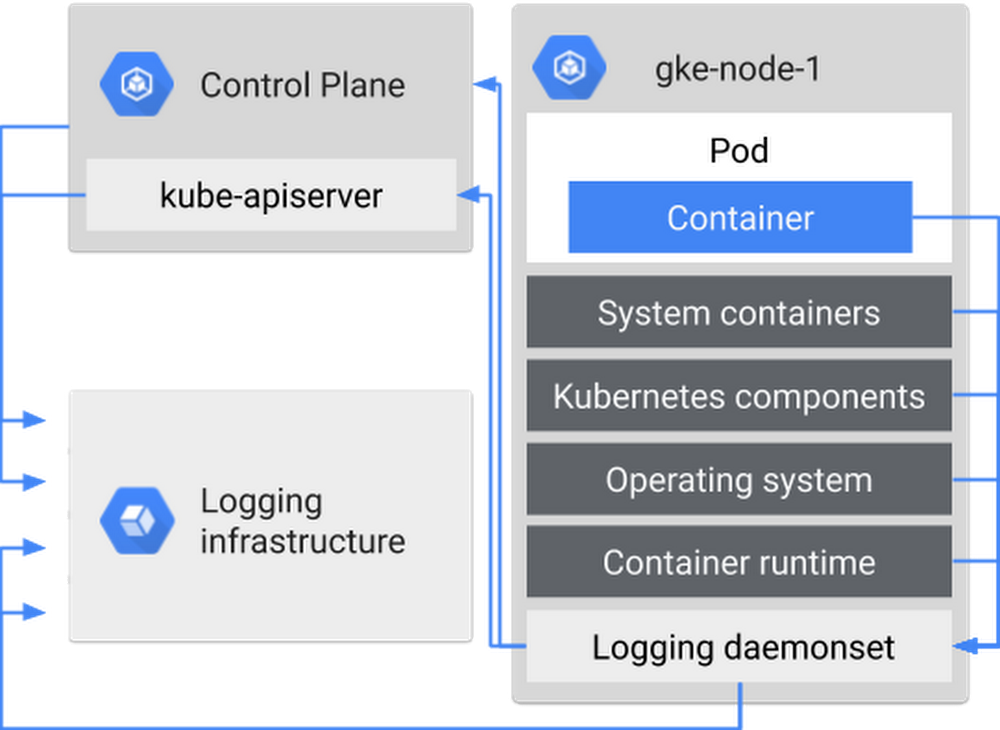
Running workloads in containers can be much easier to manage and more flexible for developers than running them in VMs, but what happens if a container gets attacked? It can be bad news. We recently published some guidance for how to collect and analyze forensic data in Google Kubernetes Engine (GKE), and how best to investigate and respond to an incident.When performing forensics on your workload, you need to perform a structured investigation, and keep a documented chain of evidence to know exactly what happened in your environment, and who was responsible for it. In that respect, performing forensics and mounting an incident response is the same for containers as it is for other environments—have an incident response plan, collect data ahead of time, and know when to call in the experts. What’s different with containers is (1) what data you can collect and how, and (2) how to react.Get planningEven before an incident occurs, make the time to put together an incident response plan. This typically includes: who to contact, what actions to take, how to start collecting information and how to communicate what’s going on, both internally and externally. Incident response plans are critical, so if panic does start to set in you’ll know what steps to follow.Other information that’s helpful to decide ahead of time, and list in your response plan, is external contacts or resources, and how your response changes based on severity of the incident. Severity levels and planned actions should be business-specific and dependent on your risks—for example, a data leak is likely more severe than an abuse of resources, and you may have different parties that need to be involved. This way, you’re not hunting around for—or debating—this information during an incident. If you don’t get the severity levels right the first time, in terms of categorization, speed of response, speed of communications, or something else, surface this in an incident post-mortem, and adjust as needed.Collect logs now, you’ll be thankful laterTo put yourself in the best possible position for responding to an incident, you want data! Artifacts such as logs, disks, and live recorded info are how you’re going to figure out what’s happening in your environment. Most of these you can get in the heat of the moment, but you need to set up logs ahead of time.There are several kinds of logs in a containerized environment that you can set up to capture: Cloud Audit Logs for GKE and Compute Engine nodes, including Kubernetes audit logs; OS specific logs; and your own application logs.There are several kinds of logs you can collect from a containerized environment.You should begin by collecting logs as soon as you deploy an app or set up a GCP project, to ensure they’re available if you need them for analysis in case of an incident. For more guidance on which logs to collect for further analysis for your containers, see our new solution Security controls and forensic analysis for GKE apps.Stay coolWhat should you do if you suspect an incident in your environment? Don’t panic! You may be tempted to terminate your pods, or restart the nodes, but try to resist the urge. Sure, that will stop the problem at hand, but it also alerts a potential attacker that you know that they’re there, depriving you of the ability to do forensics!So, what should you do? Put your incident response plan into action. Of course, what this means depends on the severity of the incident, and your certainty that you have correctly identified the issue. Your first step might be to ask your security team to further investigate the incident. The next step might be to snapshot the disk of the node that was running the container. You might then move other workloads off and quarantine the node to run additional analysis. For more ideas, check out the new documentation on mitigation options for container incidents next time you’re in such a situation (hopefully never!).To learn more about container forensics and incident response, check out our talk from KubeCon EU 2019, Container forensics: what to do when your cluster is a cluster (slides). But as always, the most important thing you can do is prevention and preparation—be sure to follow the GKE hardening guide, and set up those logs for later!
Quelle: Google Cloud Platform

Performance-driven dynamic resource management in E2 VMs

Editor’s note: This is the second post in a two-post series. Click here for part 1: E2 introduction.As one of the most avid users of compute in the world, Google has invested heavily in making compute infrastructure that is cost effective, reliable and performant. The new E2 VMs are the result of innovations Google developed to run its latency-sensitive, user-facing services efficiently. In this post, we dive into the technologies that enable E2 VMs to meet rigorous performance, security, and reliability requirements while also reducing costs.In particular, the consistent performance delivered by E2 VMs is enabled by:An evolution toward large, efficient physical serversIntelligent VM placementPerformance-aware live migrationA new hypervisor CPU schedulerTogether we call these technologies dynamic resource management. Just as Google’s Search, Ads, YouTube, and Maps services benefited from earlier versions of this technology, we believe Google Cloud customers will find the value, performance, and flexibility offered by E2 VMs improves the vast majority of their workloads.Introducing dynamic resource managementBehind the scenes, Google’s hypervisor dynamically maps E2 virtual CPU and memory to physical CPU and memory on demand. This dynamic management drives cost efficiency in E2 VMs by making better use of the physical resources.Concretely, virtual CPUs (vCPUs) are implemented as threads that are scheduled to run on demand like any other thread on the host—when the vCPU has work to do, it is assigned an available physical CPU on which to run until it goes to sleep again. Similarly, virtual RAM is mapped to physical host pages via page tables that are populated when a guest-physical page is first accessed. This mapping remains fixed until the VM indicates that a guest-physical page is no longer needed.The image below shows vCPU work coming and going over the span of a single millisecond. Empty space indicates a given CPU is free to run any vCPU that needs it.A trace of 1 millisecond of CPU scheduler execution. Each row represents a CPU over time and each blue bar represents a vCPU running for a time span. Empty regions indicate the CPU is available to run the next vCPU that needs it.Notice two things: there is a lot of empty space, but few physical CPUs are continuously empty. Our goal is to better utilize this empty space by scheduling VMs to machines and scheduling vCPU threads to physical CPUs such that wait time is minimized. In most cases, we are able to do this extremely well. As a result, we can run more VMs on fewer servers, allowing us to offer E2 VMs for significantly less than other VM types.For most workloads, the majority of which are only moderately performance sensitive, E2 performance is almost indistinguishable from that of traditional VMs. Where dynamic resource management can differ in performance is in the long tail—the worst 1% or 0.1% of events. For example, a web serving application might see marginally increased response times once per 1,000 requests. For the vast majority of applications, including Google’s own latency-sensitive services, this difference is lost in the noise of other performance variations such as Java garbage collection events, I/O latencies and thread synchronization.The reason behind the difference in tail performance is statistical. Under dynamic resource management, virtual resources only consume physical resources when they are in use, enabling the host to accommodate more virtual resources than it could otherwise. However, occasionally, resource assignment needs to wait several microseconds for a physical resource to become free. This wait time can be monitored in Stackdriver and in guest programs like vmstat and top. We closely track this metric and optimize it in four ways that we detail below.1. An evolution toward large, efficient physical serversOver the past decade, core count and RAM density has steadily increased such that now our servers have far more resources than any individual E2 VM. For example, Google Cloud servers can have over 200 hardware threads available to serve vCPUs yet an E2 VM has at most 16 vCPUs. This ensures that a single VM cannot cause an unmanageable increase in load.We continually benchmark new hardware and look for platforms that are cost-effective and perform well for the widest variety of cloud workloads and services. The best ones become the “machines of the day” and we deploy them broadly. E2 VMs automatically take advantage of these continual improvements by flexibly scheduling across the zone’s available CPU platforms. As hardware upgrades land, we live-migrate E2 VMs to newer and faster hardware, allowing you to automatically take advantage of these new resources.2. Intelligent VM placementGoogle’s cluster management system, Borg, has a decade of experience scheduling billions of diverse compute tasks across diverse hardware, from TensorFlow training jobs to Search front- and back-ends. Scheduling a VM begins by understanding the resource requirements of the VM based on static creation-time characteristics.By observing the CPU, RAM, memory bandwidth, and other resource demands of VMs running on a physical server, Borg is able to predict how a newly added VM will perform on that server. It then searches across thousands of servers to find the best location to add a VM.These observations ensure that when a new VM is placed, it is compatible with its neighbors and unlikely to experience interference from those instances.3. Performance-aware live migrationAfter VMs are placed on a host, we continuously monitor VM performance and wait times so that if the resource demands of the VMs increase, we can use live migration to transparently shift E2 load to other hosts in the data center.The policy is guided by a predictive approach that gives us time to shift load, often before any wait time is encountered.VM live migration is a tried-and-true part of Compute Engine that we introduced six years ago. Over time, its performance has continually improved to the point where its impact on most workloads is negligible.4. A new hypervisor CPU schedulerIn order to meet E2 VMs performance goals, we built a custom CPU scheduler with significantly better latency guarantees and co-scheduling behavior than Linux’s default scheduler. It was purpose-built not just to improve scheduling latency, but also to handle hyperthreading vulnerabilities such as L1TF that we disclosed last year, and to eliminate much of the overhead associated with other vulnerability mitigations. The graph below shows how TCP-RR benchmark performance improves under the new scheduler.The new scheduler provides sub-microsecond average wake-up latencies and extremely fast context switching. This means that, with the exception of microsecond-sensitive workloads like high-frequency trading or gaming, the overhead of dynamic resource management is negligible for nearly all workloads.Get startedE2 VMs were designed to provide sustained performance and the lowest TCO of any VM family in Google Cloud. Together, our unique approach to fleet management, live-migration at scale, and E2’s custom CPU scheduler work behind the scenes to help you maximize your infrastructure investments and lower costs.E2 complements the other VM families we announced earlier this year—general-purpose (N2) and compute-optimized (C2) VMs. If your applications require high CPU performance for use-cases like gaming, HPC or single-threaded applications, these VM types offer great per-core performance and larger machine sizes.Delivering performant and cost-efficient compute is our bread and butter. The E2 machine types are now in beta. If you’re ready to get started, check out the E2 docs page and try them out for yourself!
Quelle: Google Cloud Platform

Introducing E2, new cost-optimized general purpose VMs for Google Compute Engine

General-purpose virtual machines are the workhorses of cloud applications. Today, we’re excited to announce our E2 family of VMs for Google Compute Engine featuring dynamic resource management to deliver reliable and sustained performance, flexible configurations, and the best total cost of ownership of any of our VMs.  Now in beta, E2 VMs offer similar performance to comparable N1 configurations, providing:Lower TCO: 31% savings compared to N1, offering the lowest total cost of ownership of any VM in Google Cloud.Consistent performance: Your VMs get reliable and sustained performance at a consistent low price point. Unlike comparable options from other cloud providers, E2 VMs can sustain high CPU load without artificial throttling or complicated pricing. Flexibility: You can tailor your E2 instance with up to 16 vCPUs and 128 GB of memory. At the same time, you only pay for the resources that you need with 15 new predefined configurations or the ability to use custom machine types. Since E2 VMs are based on industry-standard x86 chips from Intel and AMD, you don’t need to change your code or recompile to take advantage of this price-performance. E2 VMs are a great fit for a broad range of workloads including web servers, business-critical applications, small-to-medium sized databases and development environments. If you have workloads that run well on N1, but don’t require large instance sizes, GPUs or local SSD, consider moving them to E2. For all but the most demanding workloads, we expect E2 to deliver similar performance to N1, at a significantly lower cost. Dynamic resource managementUsing resource balancing technologies developed for Google’s own latency-critical services, E2 VMs make better use of hardware resources to drive costs down and pass the savings on to you. E2 VMs place an emphasis on performance and protect your workloads from the type of issues associated with resource-sharing thanks to our custom-built CPU scheduler and performance-aware live migration.You can learn more about how dynamic resource management works by reading the technical blog on E2 VMs.E2 machine typesAt launch, we’re offering E2 machine types as custom VM shapes or predefined configurations:We’re also introducing new shared-core instances, similar to our popular f1-micro and g1-small machine types. These are a great fit for smaller workloads like micro-services or development environments that don’t require the full vCPU.E2 VMs can be launched on-demand or as preemptible VMs. They are also eligible forcommitted use discounts, bringing additional savings up to 55% for 3 year commitments. E2 VMs are powered by Intel Xeon and AMD EPYC processors, which are selected automatically based on availability. Get startedE2 VMs are rolling out this week to eight regions: Iowa, South Carolina, Oregon, Northern Virginia, Belgium, Netherlands, Taiwan and Singapore; with more regions in the works. To learn more about E2 VMs or other GCE VM options, check out our machine types page and our pricing page.
Quelle: Google Cloud Platform