Announcing the launch of Premium Support for your enterprise and mission-critical needs

We’re proud to announce the launch of Google Cloud Premium Support, which includes a robust set of services and systems to serve the enterprise and mission-critical needs of Google Cloud customers. We know that our customers need Google Cloud Support to be available in seamless, simple, and straightforward ways. We’re building upon our current technical account manager (TAM) service and 15-minute SLOs to add a more proactive approach and an improved overall experience.Premium Support has been designed to better meet the needs of our customers running modern cloud technology. And we’ve made investments to improve the customer experience, with an updated support model that is proactive, unified, centered around the customer, and flexible to meet the differing needs of their businesses. As a Premium Support customer, you’ll have your cases handled directly by context-aware experts who understand your unique application stack, architecture, and implementation details. This team will work hand-in-hand with your Technical Account Manager to deliver a customer-centric support experience with faster case resolution, more personalized service, and higher customer satisfaction. Premium Support helps bring consistency between the support plans for Google Cloud Platform and G Suite; a more competitive set of features and services; simplified pricing compared to the previous Google Cloud support offerings; intelligent systems (like third-party technology support, Support API and Recommenders); enterprise-class services; and as mentioned, customer context-aware interactions to help optimize the customer experience in Google Cloud. Here’s an overview of the Premium Support benefits:Click to enlargeWe know that our customers are running dynamic businesses and might have special projects and needs that are emerging. So, in addition to the new Premium Support, we have designed advanced services to be purchased as add-ons when needed:Advanced event management service—For deeper architecture review and increased readiness for peak events, we offer advanced event management that can be purchased separately.Expanded TAM coverage—For companies with global operations that need TAM guidance in multiple time zones, you can purchase additional TAM support during business hours in other regions.Mission-critical support—In pilot with customers and available later this year, this service offers an SRE (site reliability engineering) engagement, which evaluates and helps the customer design a wrapper of supportability around the Google Cloud customer projects that have the highest sensitivity to downtime. The process interlocks that we build with the customer allow us to jointly respond to major incidents using predefined war rooms.Premium Support is being launched now, and we’ll continue to roll out additional features and support plans through 2020. You can stay up to date on our new Cloud Customer Care portfolio.
Quelle: Google Cloud Platform

Using deemed SLIs to measure customer reliability

Do you own and operate a software service? If so, is your service a ”platform”? In other words, does it run and manage applications of a wide range of users and/or companies? There are both simple and complex types of platforms, all of which serve customers. One example could be Google Cloud, which provides, among other things, relatively low-level infrastructure for starting and running VM images. A higher-level example of a platform might be a blogging service that allows any customer to create and contribute to a blog, design and sell merchandise featuring pithy blog quotes, and allow readers to send tips to the blog author.If you do run a platform, it’s going to break sooner or later. Some breakages are large and easy to understand, such as no one being able to reach websites hosted on your platform while your company’s failure is frequently mentioned on social media. However, other kinds of breakage may be less obvious to you—but not to your customers. What if you’ve accidentally dropped all inbound network traffic from Kansas, for example?At Google Cloud, we follow SRE principles to ensure reliability for our systems and also customers partnered with the Customer Reliability Engineering (CRE) team. A core SRE operating principle is the use of service-level indicators (SLIs) to detect when your users start having a bad time. In this blog post, we’ll look at how to measure your platform customers’ approximate reliability using approximate SLIs, which we term “deemed SLIs.” We use these to detect low-level outages and drive the operational response.Why use deemed SLIs?CRE founder Dave Rensin noted in his SRECon 2017 talk, Reliability When Everything Is A Platform, that as a platform operator, your monitoring doesn’t decide your reliability—your customers do! The best way to get direct visibility into your customers’ reliability experience is to get them to define their own SLIs, and share those signals directly with you. That level of transparency is wonderful, but it requires active and ongoing participation from your customers. What if your customers can’t currently prioritize the time to do this?As a platform provider, you might use any number of internal monitoring metrics related to what’s happening with customer traffic. For instance, say you’re providing an API to a storage service:You may be measuring the total number of queries and number of successful responses as cumulative numeric metrics, grouped by each API function.You may also be recording the 95th percentile response latency with the same grouping, and get a good idea of how your service is doing overall by looking at the ratio of successful queries and the response latency values. If your success ratio suddenly drops from its normal value of 99% to 75%, you likely have many customers experiencing errors. Similarly, if the 95th percentile latency rises from 600ms to 1400ms, your customers are waiting much longer than normal for responses.The key insight to motivate the use of “deemed SLIs” is that metrics aggregated across all customers will miss edge cases—and your top customers are very likely to depend on those edge cases. Your top customers need to know about outages as soon as, or even before, they happen. Therefore, you most likely want to know when any of your top customers is likely to experience a problem, even if most of your customers are fine. Suppose FooCorp, one of your biggest customers, uses your storage service API to store virtual machine images:They build and write three different images every 15 minutes.The VM images are much larger than most blobs in your service. Every time one of their 10,000 virtual machines is restarted, it reads an image from the API. Therefore, their traffic rate is one write per five minutes and assuming a daily VM restart, one read per 8.6 seconds. Your overall API traffic rate is one write per second and 100 reads per second.Let’s say you roll out to your service a change that has a bug, causing very large image reads and writes, which are likely to time out and not complete. You initially don’t see any noticeable effect on your API’s overall success rate and think your platform is running just fine. FooCorp, however, is furious. Wouldn’t you like to know what just happened?Implementation of deemed SLIsThe first and foremost step is to see key metrics at the granularity of a single customer. This requires careful assessment and trade-offs. For our storage API, assuming we were originally storing two cumulative measures (success, total) and one gauge (latency) at one-minute intervals, we can measure and store three data points per minute with no problem at all. However, if we have 20,000 customers, then storing 60,000 points per minute is a very different problem. Therefore, we need to be careful in the selection of metrics for which we provide the per-customer breakdown. In some cases, it may be sensible to have per-customer breakdowns only for a subset of customers, such as those contracting for a certain level of paid support.Next, identify your top customers. “Top” could mean:invests the most money on your platform;is expected to invest the most money on your platform in the next two years;is strategic from the point of view of partnerships or publicity; or evenraises the most support cases and hence causes the greatest operational load on your team.As we mentioned, customers use your platform in different ways and as a result, have different expectations of it. To find out what your customer might regard as an outage, you need to understand in some depth what their workload really does. In some cases, the customer’s clients might automatically read data from your API every 30 minutes, and update their state if new information is available. However, even if the API is completely broken for an hour, very few customers might actually notice. To determine your deemed SLIs, consider applying your understanding of the customer’s workload from the limited selection of metrics per customer.  Think about your observation of the volatility of the metrics over time, and if possible, observation of the metrics during a known customer outage. From this, pick the subset of metrics which you think best represent customer happiness. Identify the normal ranges of those metrics, and aggregate them into a dashboard view for that customer.This is why we call these metrics “deemed SLIs”—you deem them to be representative of your particular customer’s happiness, in the absence of better information. Some of the metrics you look at for your deemed SLIs of the storage service might include:Overall API success rate and latencyRead and write success rate for large objects (i.e., FooCorp’s main use case)Read latency for objects below a certain size (i.e., excluding large image read bursts so there’s a clear view of API performance for its more common read use case).The main challenges are:Lack of technical transparency into the customer’s key considerations. For instance, if you only provide TCP load balancing to your customer, you can’t observe HTTP response codes. Lack of organizational transparency—you don’t have enough understanding of the customer’s workload to be able to identify what SLIs are meaningful to them.Missing per-customer metrics. You might find that you need to know whether an API call is made internally or externally because the latter is the key representative of availability. However, this distinction isn’t captured in the existing metrics.It’s important to remember that we don’t expect these metrics to be perfect at first— these metrics are often quite inconsistent with the customer’s experience in the beginning. So how do we fix this? Simple—we iterate.Iteration when choosing deemed SLIsNow sit back and wait for a significant outage of your platform. There’s a good chance that you won’t have to wait too long, particularly if you deploy configuration changes or binary releases often.When your outage happens:Do an initial impact analysis. Look at each of your deemed SLIs, see if they indicate an outage for that customer, and feed that information to your platform leadership.Feed quantitative data into the postmortem being written for the incident. For example, “Top customer X first showed impact at 10:30 EST, reached a maximum of 30% outage at 10:50 EST, and had effectively recovered by 11:10 EST.”Reach out to those customers via your account management teams, to discover what their actual impact was.Here’s a quick reference table for what you need to do for each customer:As you gain confidence in some of the deemed SLIs, you may start to set alerts for your platform’s on-call engineers based on those SLIs going out of bounds. For each such alert, see whether it represents a material customer outage, and adjust the bounds accordingly. It’s important to note that customers can also shoot themselves in the foot and cause SLIs to go out of bounds. For example, they might cause themselves a high error rate in the API by providing an out-of-date decryption key for the blob. In this case, it’s a real outage, and your on-caller might want to know about it. There’s nothing for the on-caller to do, however—the customer has to fix it themselves. At a higher level, your product team may also be interested in these signals because there may be opportunities to design the product to guard against customers making such mistakes—or at least advise the customer when they are about to do so.If a top customer has too many “it was us, not the platform” alerts, that’s a signal to turn off the alerts until things improve. This may also indicate that your engineers should collaborate with the customer to improve their reliability on your platform.When your on-call engineer gets deemed SLI alerts from multiple customers, on the other hand, they can have a high confidence that the proximate cause is likely on the platform side.Getting started with your own deemed SLIsIn Google Cloud, some of these metrics are exposed to customers directly through project-related, Transparent SLIs.If you run a platform, you need to know what your customers are experiencing.Knowing that a top customer has started having a problem before they phone your support hotline shrinks incident detection by many minutes, reduces the overall impact of the outage, and improves relationships with that customer. Knowing that several top customers have started to have problems can even be used to signal that a recent deployment should presumptively be rolled back, just in case.Knowing roughly how many customers are affected by an outage is a very helpful signal for incident triage—is this outage minor, significant, or huge? Whatever your business, you know who your most important customers are. This week, go and look at the monitoring of your top three customers. Identify a “deemed SLI” for each of them, measure it in your monitoring system, and set up an automated alert for when those SLIs go squirrelly. You can tune your SLI selection and alert thresholds over the next few weeks, but right now, you are in tune with your top three customers’ experience on your platform. Isn’t that great? Learn more about SLIs and other SRE practices from previous blog posts and the online Site Reliability Workbook.Thanks to additional contributions from Anna Emmerson, Matt Brown, Christine Cignoli and Jessie Yang.
Quelle: Google Cloud Platform

Exploring container security: Announcing the CIS Google Kubernetes Engine Benchmark

If you’re serious about the security of your Kubernetes operating environment, you need to build on a strong foundation. The Center for Internet Security’s (CIS) Kubernetes Benchmark give you just that: a set of Kubernetes security best practices that will help you build an operating environment that meets the approval of both regulators and customers. The CIS Kubernetes Benchmark v1.5.0 was recently released, covering environments up to Kubernetes v1.15. Written as a series of recommendations rather than as a must-do checklist, the Benchmarks follows the upstream version of Kubernetes. But for users running managed distributions such as our own Google Kubernetes Engine (GKE), not all of its recommendations are applicable. To help, we’ve released in conjunction with CIS, a new CIS Google Kubernetes Engine (GKE) Benchmark, available under the CIS Kubernetes Benchmark, which takes the guesswork out of figuring out which CIS Benchmark recommendations you need to implement, and which ones Google Cloud handles as part of the GKE shared responsibility model.Read on to find out what’s new in the v1.5.0 CIS Kubernetes Benchmark, how to use the CIS GKE Benchmark, and how you can test if you’re following recommended best practices.Exploring the CIS Kubernetes Benchmark v1.5.0The CIS Kubernetes Benchmark v1.5.0 was published in mid October, and has a significantly different structure than the previous version. Whereas the previous version split up master and worker node configurations at a high level, the new version separates controls by the components to which they apply: control plane components, etcd, control plane configuration, worker nodes, and policies. This should help make it easier for you to apply the guidance to a particular distribution, as you may not be able to control some components, nor is it your responsibility.In terms of specific controls, you’ll see additional recommendations for: Secret management. New recommendations include Minimize access to secrets (5.1.2), Prefer using secrets as files over secrets as environment variables (5.4.1), and Consider external secret storage (5.4.2).Audit logging. In addition to an existing recommendation on how to ensure audit logging is configured properly with the control plane’s audit log flags, there are new recommendations to Ensure that a minimal audit policy is created (3.2.1), and Ensure that the audit policy covers key security concerns (3.2.2).Preventing unnecessary access, by locking down permissions in Kubernetes following the principle of least privilege. Specifically, you should Minimize wildcard use in Roles and ClusterRoles (5.1.3).Introducing the new CIS GKE BenchmarkWhat does this mean if you’re using a managed distribution like GKE? As we mentioned earlier, the CIS Kubernetes Benchmark is written for the open-source Kubernetes distribution. And while it’s intended to be as universally applicable as possible, it doesn’t fully apply to hosted distributions like GKE.The new CIS GKE Benchmark is a child of the CIS Kubernetes Benchmark specifically designed for the GKE distribution. This is the first distribution-specific CIS Benchmark to draw from the existing benchmark, but removing items that can’t be configured or managed by the user. The CIS GKE Benchmark also includes additional controls that are Google Cloud-specific, and that we recommend you apply to your clusters, for example, as defined in the GKE hardening guide. Altogether, it means that you have a single set of controls for security best practice on GKE.There are two kinds of recommendations in the GKE CIS Benchmark. Level 1 recommendations are meant to be widely applicable—you should really be following these, for example enabling Stackdriver Kubernetes Logging and Monitoring. Level 2 recommendations, meanwhile, result in a more stringent security environment, but are not necessarily applicable to all cases. These recommendations should be implemented with more care to avoid potential conflicts in more complicated environments. For example, Level 2 recommendations may be more relevant to multi-tenant workloads than single-tenant, like using GKE Sandbox to run untrusted workloads. The CIS GKE Benchmark recommendations are listed as “Scored” when they can be easily tested using an automated method (like an API call or the gcloud CLI), and the setting has a value that can be definitively evaluated, for example, ensuring node auto-upgrade is enabled. Recommendations are listed as “Not Scored” when a setting cannot be easily assessed using automation or the exact implementation is specific to your workload—for example, using firewall rules to restrict ingress and egress traffic to your nodes—or they use a beta feature that you might not want to use in production.If you want to suggest a new recommendation or a change to an existing one, please contribute directly to the CIS Benchmark in the CIS Workbench community.Applying and testing the CIS BenchmarksThere are actually several CIS Benchmarks that are relevant to GKE, and there are tools available to help you test whether you’re following their recommendations. For the CIS Kubernetes Benchmark, you can use a tool like kube-bench to test your existing configuration; for the CIS GKE Benchmark, there’s Security Health Analytics, a security product that integrates into Security Command Center and that has built-in checks for several CIS GCP and GKE Benchmark items. By enabling Security Health Analytics, you’ll be able to discover, review, and remediate any cluster configurations you have that aren’t up to par with best practices from the CIS Benchmarks in the Security Command Center vulnerabilities dashboard.Security Health Analytics scan results for CIS BenchmarksDocumenting GKE control plane configurationsThe new CIS GKE Benchmark should help make it easier for you to implement and adhere to Kubernetes security best practices. And for components that they don’t cover, we’ve documented where the GKE control plane implements the new Kubernetes CIS Benchmark, where we are working to improve our posture, and the existing mitigating controls we have in place. We hope this helps you make an informed decision on what controls to put in place yourself, and better understand your existing threat model.Check out the new CIS GKE Benchmark, the updated CIS Kubernetes Benchmark, and understand how GKE performs according to the CIS Kubernetes Benchmark. If you’re already using the GKE hardening guide, we’ve added references to the corresponding CIS Benchmark recommendations so you can easily demonstrate that your hardened clusters meets your requirements.The CIS GKE Benchmark were developed in concert with Control Plane and the Center for Internet Security (CIS) Kubernetes community.
Quelle: Google Cloud Platform

How Google Cloud helped Phoenix Labs meet demand spikes with ease for its hit multiplayer game Dauntless

In the role-playing video game Dauntless, players work in groups to battle monsters and protect the city-island of Ramsgate. Commitment reaps big rewards: with every beast slayed, you earn new weapons and armor made of the same materials as the Behemoth you took down, strengthening your arsenal for the next battle. And when creating Dauntless, game studio Phoenix Labs channeled these same values of resourcefulness, teamwork, and persistence. But instead of using war pikes and swords, it wielded the power of the cloud to achieve its goals.  Preparing for unknown battles with containers and the cloudFor the gaming industry, launches bring unique technological challenges. It’s impossible to predict if a game will go viral, and developers like Phoenix Labs need to plan for a number of scenarios without knowing exactly how many players will show up and how much server capacity will ultimately be needed. In addition, since Dauntless was the first game in the industry to launch cross-platform—available on PlayStation 4, Xbox One, and PCs—it would be critical for all the underlying cloud-based services to work together flawlessly and provide an uninterrupted, real-time and consistent experience for players around the globe.As part of staying agile to meet player needs, Phoenix Labs runs all its game servers in containers on Google Cloud Platform (GCP). The studio has a custom Google Kubernetes Engine (GKE) cluster in each region where Dauntless is available, across five continents (North America, Australia, Europe and Asia). When a player loads the game, Dauntless matches him or her with up to three other players, forming a virtual team that is taken to a neighboring island to hunt a Behemoth monster together. Each “group hunt” runs on an ephemeral pod on GKE, lasting for about 15 minutes before the players complete their assignment and return to Ramsgate to polish their weapons and prepare for the next battle. “Containerizing servers isn’t very common in the gaming industry, especially for larger games,” said Simon Beaumont, VP Technology at Phoenix Labs. “Google Cloud spearheaded this effort with their leadership and unique technology expertise, and their platform gave us the flexibility to use Kubernetes-as-a-service in production.”Addressing player and customer needs at launch and beyondWhen Dauntless launched out of beta earlier this year, the required amount of server capacity turned out to be a lot. Within the first week, player count quickly climbed to 4 million—rapid growth that was no small feat to accommodate.Continuously addressing Reddit and Twitter feedback from players, Phoenix Labs’ lean team worked side by side with Google Cloud Professional Services to execute over 1,700 deployments to its production platform during the week of the launch alone. “Google Cloud’s laser focus on customers reaches a level I’ve never seen before,” said Jesse Houston, CEO and co-founder at Phoenix Labs. “They care just as much about our experience as a GCP customer as they do about our players. Without their ‘let’s go’ attitude, Dauntless would have been a giant game over.”“Behemoth” growth, one platform at a time Now that Dauntless has surpassed 16 million unique players and launched on Nintendo Switch, Phoenix Labs is preparing to expand to new regions such as Russia and Poland (they recently launched in Japan) and take advantage of other capabilities across Google. For example, by leveraging Google Ads and YouTube as part of its digital strategy for Dauntless, 5 million new gamers were onboarded in the first week of launch; using YouTube Masthead ads also increased exposure to its audience. Phoenix Labs has migrated to Google Cloud’s data warehouse BigQuery for its ease of use and speed, returning queries in seconds based on trillions of rows of data. They’re even beginning to use the Google Sheets data connector for BigQuery to simplify reporting and ensure every decision is data informed. At Google Cloud, we’re undaunted by behemoth monsters—and the task of making our platform a great place to launch and run your multiplayer game. Learn more about how game developers of all sizes work with Google Cloud to take their games to the next level here.
Quelle: Google Cloud Platform

Google acquires AppSheet to help businesses create and extend applications—without coding

Today, Google is excited to announce that it has acquired AppSheet, a leading no-code application development platform used by a number of enterprises across a variety of industries. The demand for faster processes and automation in today’s competitive landscape requires more business applications to be built with greater speed and efficiency. However, many companies lack the resources to address these challenges. This acquisition helps enterprises empower millions of citizen developers to more easily create and extend applications without the need for professional coding skills. According to “The Forrester Wave™: Low-Code Platforms For Business Developers,” Q2 2019, “AppSheet has the most aggressive strategy and roadmap for empowering business people as developers. The platform had the highest score possible in the commercial model criterion and it shows in a stellar experience along with strong features for mobile app development, data design, application scaling, and documentation generation.”AppSheet complements Google Cloud’s strategy to reimagine the application development space with a platform that helps enterprises innovate with no-code development, workflow automation, application integration and API management as they modernize their business processes in the cloud. AppSheet’s ability to power a range of applications—from CRM to field inspections and personalized reporting—combined with Google Cloud’s deep expertise in key verticals, will further enable digital transformation across industries like financial services, manufacturing, retail, healthcare, communication and media & entertainment. With this acquisition, customers will be able to develop richer applications at scale that leverage not only Google Sheets and Forms which are already popular with customers, but other top Google technologies like Android, Maps and Google Analytics. In addition, AppSheet customers can continue to integrate with a number of cloud-hosted data sources including Salesforce, Dropbox, AWS DynamoDB and MySQL.For more information, you can read AppSheet CEO, Praveen Seshadri’s blog post. We look forward to sharing more with you soon!
Quelle: Google Cloud Platform

IBM Power Systems now available on Google Cloud

Enterprises looking to the cloud to modernize their existing infrastructure and streamline their business processes have many options. At one end of the spectrum, some organizations are replatforming entire legacy systems to adopt the cloud. Many others, however, want to continue leveraging their existing infrastructure while still benefiting from the cloud’s flexible consumption model, scalability, and new advancements in areas like artificial intelligence, machine learning, and analytics.To help you meet your cloud goals, whatever they may be, Google Cloud now offers IBM Power Systems as part of our cloud solutions. Today, customers can run IBM Power Systems as a service on Google Cloud—whether you’re using AIX, IBM i, or Linux on IBM Power. For organizations using a hybrid cloud strategy, especially, IBM Power Systems are an important tool. Because of their performance and ability to support mission critical workloads—such as SAP applications and Oracle databases—enterprise customers have been consistently looking for options to run IBM Power Systems in the cloud. IBM Power Systems for Google Cloud offers a path to do just that, providing the best of both the cloud and on-premise worlds. You can run enterprise workloads like SAP and Oracle on the IBM Power servers that you’ve come to trust, while starting to take advantage of all the technical capabilities and favorable economics that Google Cloud offers. IBM Power Systems on Google Cloud offers many other benefits, as well, including:Integrated billing: You can deploy the solution through the Google Cloud Marketplace and take advantage of integrated Google Cloud billing. This means you can take advantage of this offering just like any other Google Cloud service and get a unified bill from Google Cloud. Private API access: Google Cloud’s Private API Access technology lets you access Google Cloud resources privately, while enabling all IBM Power Systems resources (LPARs) to use private IP spaces that you choose. It’s secure by design and enables ultra low latency between the IBM Power servers and Google Compute Engine virtual machines.Integrated customer support: Google Cloud manages customer support, giving you one point of contact for any issues.Rapid deployment: An intuitive new management console enables quick ramp and rapid deployment of the solution.Many enterprise customers, including leaders in energy and retail, have already begun modernizing their infrastructure with this new offering. To learn more about how you can use IBM Power Systems on Google Cloud contact your Google Cloud sales representative, or email us at IBMPowerForGoogleCloud@google.com.
Quelle: Google Cloud Platform

Performance art: Making cloud network performance benchmarking faster and easier

Before you migrate workloads to the cloud, you need to benchmark network performance in order to understand how that performance affects your business applications. Unfortunately, the cloud hasn’t offered the standards, tools, and methods to do the benchmark testing you need. As a result, you’re forced to make deployment decisions without comprehensively understanding the implications of network performance for your use case.Today, we’re excited to make a few announcements that will help you understand cloud network performance more quickly and easily:We are investing in performance benchmarking tools. To begin with, we merged new contributions to PerfKit Benchmarker, an open-source tool created inside Google that makes network performance benchmarking faster and easier by automating network setup, provisioning of VMs, and test runs. With the updates, PerfKit Benchmarker now supports a broader range of network performance tests for VM-to-VM latency, throughput, packets-per-second for multiple clouds (inter-region, inter-zone, intra-zone, and on-prem to cloud), and lets you view the results in Google Data Studio (free to use). With this information, you can more accurately predict the performance impact of moving workloads to/across different clouds.The publication of a new benchmarking methodology for using PerfKit Benchmarker continuously and consistently. This methodology, co-developed with performance engineering researchers at Southern Methodist University’s AT&T Center for Virtualization, is based on Google’s own internal best practices. “Continuous performance measurement and benchmarking are essential for understanding trends and patterns in large-scale cloud deployments,” said Suku Nair, director of SMU AT&T Center for Virtualization. “PerfKit Benchmarker, which wraps over 100 industry standard benchmark testing tools in an easy-to-use and extensible manner, is a key enabler in automating this process.”Read on for an overview of how to use PerfKit Benchmarker to take advantage of its new features, such as support for additional performance metrics (e.g., packets per second) and deployment use cases  (e.g., VPN). Using PerfKit BenchmarkerPerfKit Benchmarker automates the setup and teardown of all the resources you need to run tests on (or between) most major public cloud providers, as well as on-premises deployments like Docker and OpenStack. Specifically, it automates the setup and provisioning of networks, subnets, firewalls and firewall rules, virtual machines, and drives required to run a large variety of benchmarks, as well as running the benchmarks themselves and tearing down the infrastructure afterwards. Along with installing and running the actual benchmark tests, PerfKit Benchmarker packages the test results in an easy-to-consume JSON format and offers hooks into backend storage providers like Google BigQuery, Elasticsearch, and InfluxDB to automate publishing results, making reporting and analytics a breeze.When performing network tests, the critical metrics you need to understand include throughput, latency, jitter, and packets per second. To find the values of these metrics across various configurations, you can use PerfKit Benchmarker to draw upon a number of testing tools, including iperf2, iperf3, ping, netperf, nuttcp, nttcp and NTttcp, just to name a few.Once PerfKit Benchmarker has been installed, running a single benchmark is simple: Specify the test you want to run and where you want to run it. As a basic example, here is a ping benchmark between two VMs that are located in zone us-east1-b of Google’s cloud:./pkb.py –benchmarks=ping –zones=us-east1-b –cloud=GCPThis command creates a new Virtual Private Cloud (VPC) and two new VMs in zone us-east1-b of Google Cloud, configures them for a ping test (including setting the appropriate firewall rules), runs the test, and then deletes the VMs and the VPC. Finally, it outputs the results to the console and stores them in a file in the /tmp directory. You can also store results in BigQuery or Elasticsearch when appropriate flags have been set. Measuring Google Cloud inter-region latency with PerfKit BenchmarkerWhen designing your environment, it’s important to understand the latency between components in different Google Cloud regions. As an example, here are the results of our own all-region to all-region round trip latency tests using n1-standard-2 machine types and internal IP addresses. The daily benchmark tests ran over the course of the last month. The statistics were all collected using PerfKit Benchmarker to run ping benchmarks between VMs in each pair of regions.To reproduce this chart, you can run the following command with the following config file. To run a smaller subset of regions, just remove the regions you don’t want included from the zones and extra_zones lists.You can also add the –run_processes=<# of processes> flag to tell it to run multiple benchmarks in parallel. Furthermore, you can add the –gce_network_name=<network name> flag to have each benchmark use a Cloud VPC you have already created so each benchmark doesn’t make its own VPC../pkb.py –benchmarks=ping  –benchmark_config_file=/pat /to/all_region_latency.yamlMore benchmarks using PerfKit BenchmarkerOther examples of network performance benchmark tests you can run using PerfKit Benchmarker include:Inter-region, inter-zone, and intra-zone network performance testsOn-premises to cloud and cross-cloud performance benchmarks between a VM in one cloud, and a VM on-premises or in another cloudPerformance benchmarks using various network tiersBenchmarking across various guest OSes (e.g., Linux vs Windows) and machine types (e.g., general purpose, compute-optimized)For complete details about the methodology for running more of these benchmarks, read the “Measuring cloud network performance with PerfKit Benchmarker” methodology white paper.More good stuff on the wayBy using PerfKit Benchmarker, you can make better decisions about where to put workloads, and improve the experience of your end-users. As time goes on, we’ll continue to add coverage for new performance benchmarking use cases, publish additional guidelines for cloud performance benchmarking, and report on the experiences of cloud adopters. In the meantime, we welcome and encourage new contributions to the PerfKit Benchmarker codebase, and look forward to seeing the community grow!
Quelle: Google Cloud Platform

Google Cloud Helps Retailers Win the Digital Race

As I attend NRF 2020, retail’s biggest annual event today and speak with a number of leading retailers, one thing is clear: digital transformation is more than just a requirement. It’s a race. Retailers that transform the fastest are the most successful. We see this with retail leaders like Kohl’s and Lowe’s, who continue to innovate and reinvent themselves, and also with digital natives like Zulily and Stitch Fix, who have come up with entirely new ways to deliver great customer experiences.Technology is the fulcrum for this transformation, and Google Cloud is working with retailers in three important ways: We’re helping retailers accelerate digital and omnichannel revenue growth;We’re helping them become more customer-centric and data-driven; andWe’re providing solutions that help drive operational improvement. Capturing digital and omnichannel growth—and eliminating interruptions In a recentsurvey, one in 10 retail executives said their company’s website experienced an outage during Black Friday and Cyber Monday last year, and 72 percent said they experienced an outage within the past five years. We all know even a second in lag time can mean the difference between a sale and an abandoned cart, so uptime and speed are critical when shoppers are spending billions of dollars in a single day. That’s why we’re excited to expand our Retail Acceleration Program (RAP) to a broader set of customers in 2020. RAP is a services offering that helps retailers optimize their websites, build a unified view of customer data, and drive increased foot traffic. Today, we’re also expanding the availability of Customer Reliability Engineering, a white-glove service that helps retailers plan and execute flawlessly during their peak shopping seasons. Customers such as Kohl’s, Wayfair, and Shopify have already turned to Google Cloud to help them stay worry-free during Black Friday and Cyber Monday. Capturing omnichannel growth ultimately means creating better online experiences. Google Cloud offers several tools for retailers interested in providing more intuitive product discovery for consumers. We’re currently piloting one of these new tools—Google Cloud Search for Retail—and will bring it to the broader retail market in 2020. Powered by Google Search algorithms and leveraging state-of-the-art cloud AI technologies, Google Cloud Search for Retail provides retailers with high-quality product search results for their websites and mobile applications—giving them the ability to surface the right products, to the right customers, at just the right time.  Retailers today are increasingly centralizing their user data in Google’s BigQuery data analytics platform, and then building personalization and recommendation models on top of this data. Today, we’re announcing Google Cloud 1:1 Engagement for Retail, a blueprint and best-practice guide on how to build these types of data-driven solutions effectively and with less up-front cost. Delivered by Google Cloud and our ecosystem of partners, 1:1 Engagement for Retail helps retailers create hyper-personalization at scale.Helping retailers become more customer-centric and data-driven Google is the first place that shoppers go to discover new brands and products. Hundreds of millions of people shop each day across Google properties including Search, YouTube, Shopping, Google Assistant and Maps. We help retailers expand their reach with Google Ads, as well as empower them to better understand their shoppers with advanced analytics, so that they can optimize their spend across channels.As digital influence on sales continues to increase—and newer fulfillment options such as “buy online, pick up in store” or “ship from store” continue to become popular—there’s even more pressure on retailers’ supply chains. Being accurate with inventory planning and operating a more streamlined supply chain can be the difference between success and failure. Google Cloud’s new Buy Optimization and Demand Forecasting service offering allows retailers to plan inventory and manage their supply chains to deliver the right products to the right channels.One retailer using these solutions is Carrefour, one of the largest grocery retailers in France. Carrefour needed to ensure it had the right products, in front of the right shoppers, at the right store location. With Google Cloud, Carrefour developed an assortment recommendation tool that helped the chain support a more personalized selection at the store level, giving store directors the autonomy to influence inventory needs. The tool also gives Carrefour headquarters visibility into the merchandising decisions by each of their franchise stores. Driving operational improvement by merging online and offlineRetail customers are becoming more and more “channel-less” in their shopping. It’s imperative, then, to provide a consistent experience for customers as they move between channels in their shopping journeys. Our Google Cloud API Management for Retail solution, powered by Apigee, allows retailers to easily integrate the systems that power different sales channels, providing a more unified shopping experience for customers.Retailers struggle with the real estate that bulky computer servers take up in their stock rooms, and also face challenges in centrally managing all of their server applications. Today, we’re piloting Google Cloud Anthos for Retail, which helps retailers streamline and modernize their store operations. Rolling out more broadly in 2020, Anthos for Retail enables retailers to consistently deploy, configure, and manage applications across their fleet of stores at scale—without sacrificing performance or reliability. Speaking of stores, nothing is more critical for retailers than ensuring their frontline workforce is able to collaborate efficiently and effectively. The demographics of frontline retail workers are changing rapidly. Even as a more tech-savvy workforce comes online, many retailers still lag in putting cutting-edge tools in the hands of their employees—and this translates to delivering poor customer experiences. In fact, according to one Google study, more than 50 percent of frontline workers say that technology at their workplace has not changed in the last five years. With G Suite, Chrome Enterprise, and Android, we can help drive this transformation. G Suite enables retailers to improve productivity with easy-to-use tools that foster collaboration across the organization. Chrome Enterprise allows retailers to deploy shared, cloud-native devices that are secure, mobile and allow any employee to sign in and pick up where they left off. And Android devices can power dynamic store associate apps that digitize processes like stock checking and reordering to both collect signals from your store and make information available in real time to your store associates allowing them to proactively service your customers better.One example of this is Lowe’s. Using Android-based mobile devices and Google Cloud technology, the home improvement store, is giving its store associates the ability to view and update pricing and inventory on-the-fly. In fact, the company has recently rolled out 88,000 SMART Mobile devices to allow its associates to efficiently access real-time data without leaving the sales floor or losing engagement with a customer. Staying viable in the retail market today means using technology to solve big problems. Google continues to innovate and provide industry-specific tools that help retailers not just keep up with the competition, but also to win the ever-changing race.Here’s where you can learn more on Google Cloud for retail.
Quelle: Google Cloud Platform

Exploring container security: Navigate the security seas with ease in GKE v1.15

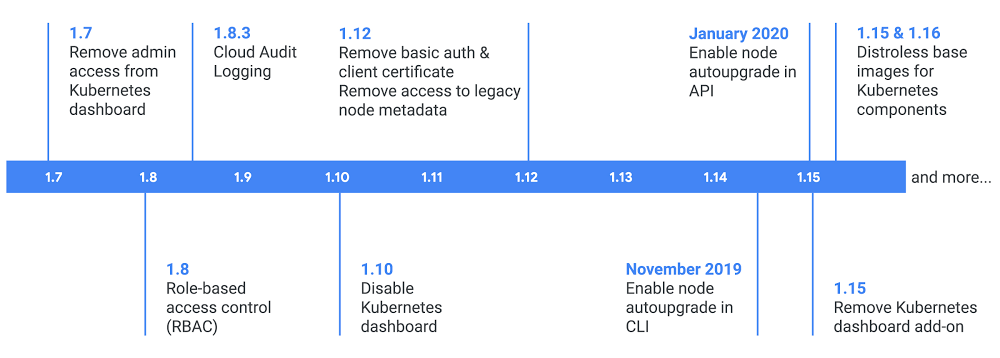
Your container fleet, like a flotilla, needs ongoing maintenance and attention to stay afloat—and stay secure. In the olden days of seafaring, you grounded your ship at high tide and turned it on its side to clean and repair the hull, essentially taking it “offline.” We know that isn’t practical for your container environment however, as uptime is as important as security for most applications. Here on the Google Kubernetes Engine (GKE) team, we’re always hard at work behind the scenes to provide you with the latest security patches and features, so you can keep your fleet safe while retaining control and anticipating disruptions.As GKE moved from v1.12 to v1.15 over the past year, here’s an overview of what security changes we’ve made to the platform, to improve security behind the scenes, and with stronger defaults, as well as advice we added to the GKE hardening guide.Behind-the-scenes hardening in GKEA lot of our security recommendations come down to a simple principle: implement and expose fewer items in your infrastructure, so there’s less for you to secure, maintain, and patch. In GKE, this means paring down controls to only what your application actually needs and removing older implementations or defaults. Let’s take a deeper look at the changes we made this year.Distroless imagesBehind the scenes, we’re continually hardening and improving GKE. A major undertaking in the past several months has been rebasing GKE master and daemonset containers on top of distroless base images. Distroless images are limited to only the application and its runtime dependencies—they’re not a full Linux distribution, so there are no shells or package managers. And because these images are smaller, they’re faster to load, and have a smaller attack surface. By moving almost all Kubernetes components to distroless images in Kubernetes 1.15 and 1.16, this helps to reduce the signal-to-noise ratio in vulnerability scanning, and makes it simpler to maintain Kubernetes components. By the way, you should also consider moving your container application images to distroless images!Locking down system:unauthenticated access to clustersKubernetes authentication allows certain cluster roles to have access to cluster information by default, for example, to gather metrics about cluster performance. This specifically allows unauthenticated users (who could be from anywhere on the public internet!) to read some unintended information if they gain access to the cluster API server. We worked in open-source to change this in Kubernetes 1.14, and introduced a new discovery role system:public-info-viewer explicitly meant for unauthenticated users. We also removed system:unauthenticated access to other API server information. Ongoing patching and vulnerability responseOur security experts are part of the Kubernetes Product Security Committee, and help manage, develop patches for, and address newly discovered Kubernetes vulnerabilities. On GKE, in addition to Kubernetes vulnerabilities, we handle other security patches—in the past year, these included critical patches to the Linux kernel, runc, and the Go programming language—and when appropriate, publishing a security bulletin detailing the changes.Better defaults in GKEAmong the more visible changes, we’ve also changed the defaults for new clusters in GKE to more secure options, to allow newer clusters to more easily adopt these best practices. In the past several releases, this has included enabling node auto-upgrade by default, removing the Kubernetes dashboard add-on, removing basic authentication and client certs, and removing access to legacy node metadata endpoints. These changes apply to any new GKE clusters you create, and you can still opt to use another option if you prefer.Defaults for new clusters in GKE have been improving over releases in the past several years, to improve securityEnabling node auto-upgradeKeeping the version of Kubernetes up-to-date is one of the simplest things you can do to improve your security. According to the shared responsibility model, we patch and upgrade GKE masters for you, but upgrading the nodes remains your responsibility. Node auto-upgrade automatically provides security patches, bug fixes and other upgrades to your node pools, and ensures alignment with your master version to avoid unsupported version skew. As of November, node auto-upgrade is enabled by default for new clusters. Nothing has changed for pre-existing clusters though, so please consider enabling node auto-upgrade manually or upgrading yourself regularly and watching the Security Bulletins for information on recommended security patches. With release channels, you can subscribe your cluster to a channel that meets your business needs, and infrastructure requirement. Release channels take care of both the masters and nodes, and ensures your cluster is up to date with the latest patch version available in the chosen channel.Locking down the Kubernetes DashboardThe open-source Kubernetes web UI (Dashboard) is an add-on which provides a web-based interface to interact with your Kubernetes deployment, including information on the state of your clusters and errors that may have occurred. Unfortunately, it is sometimes left publicly accessible or granted sensitive credentials, making it susceptible to attack. Since the Google Cloud Console provides much of the same functionality for GKE, we’ve further locked down the Dashboard to better protect your clusters. For new clusters created with:GKE v1.7, the Dashboard does not have admin access by default.GKE v1.10, the Dashboard is disabled by default.GKE v1.15 and higher, the Kubernetes web UI add-on Dashboard is no longer available in new GKE clusters.You can still run the dashboard if you wish, following the Kubernetes web UI documentation to install it yourself.Improving authenticationThere are several methods of authenticating to the Kubernetes API server. In GKE, the supported methods are OAuth tokens, x509 client certificates, and static passwords (basic authentication). GKE manages authentication via gcloud for you using the OAuth token method, setting up the Kubernetes configuration, getting an access token, and keeping it up to date. Enabling additional authentication methods, unless your application is using them, presents a wider surface of attack. Starting in GKE v1.12, we disabled basic authentication and legacy client certificates by default for new clusters, so that these credentials are not created for your cluster. For older clusters, make sure to remove the static password if you aren’t using it.Disabling metadata server endpointsSome attacks against Kubernetes use access to the VM’s metadata server to extract the node’s credentials; this can be particularly true for legacy metadata server endpoints. For new clusters starting with GKE v1.12, we disabled these endpoints by default. Note that Compute Engine is in the process of turning down these legacy endpoints. If you haven’t already, you may use the check-legacy-endpoint-access tool to help discover if your apps should be updated and migrated to the GA v1 metadata endpoints, which include an added layer of security that can help customers protect against vulnerabilities .Our latest and greatest hardening guideEven though we keep making more and more of our security recommendations the default in GKE, they primarily apply to new clusters. This means that even if you’ve been continuously updating an older cluster, you’re not necessarily benefitting from these best practices. To lock down your workloads as best as possible, make sure to follow the GKE hardening guide. We’ve recently updated this with the latest features, and made it more practical, with recommendations for new clusters, as well as recommendations for GKE On-Prem. It’s worth highlighting some of the newer recommendations in the hardening guide for Workload Identity and Shielded GKE Nodes.Workload IdentityWorkload Identity is a new way to manage credentials for workloads you run in Kubernetes, automating best practices for workload authentication, and removing the need for service account private keys or node credential workarounds. We recommend you use Workload Identity over other options, as it replaces the need to use metadata concealment, and protects sensitive node metadata.Shielded GKE NodesShielded GKE Nodes is built upon Shielded VMs and further protects node metadata, providing strong, verifiable node identity and integrity for all the GKE nodes in your cluster. If you’re not using third-party kernel modules, we also recommend you enable secure boot to verify the validity of components running on your nodes and get enhanced rootkit and bootkit protections.The most secure GKE yetWe’ve been working hard on hardening, updating defaults, and delivering new security features to help protect your GKE environment. For the latest and greatest guidance on how to bolster the security of your clusters, we’re always updating the GKE hardening guide.
Quelle: Google Cloud Platform

A home away from home: Wayfair goes hybrid on Google Cloud with 100 Gbps Dedicated Interconnect

Whatever the requirement—everything from enterprise-readiness fundamentals like reliability, performance, and security, to innovations for enabling microservices architecture or hybrid/multi-cloud deployments—the Google Cloud networking portfolio has something to offer.  For Wayfair Inc., an American e-commerce company and one of the world’s largest online sellers of home goods, globally resilient connectivity was the key to streamlining its move to the cloud. Formerly known as CSN Stores, the company was founded in 2002 and now sells over 14 million home furnishing and décor items from over 11,000 suppliers.In early 2018, Wayfair was thinking about the best way to run and scale its on-prem server fleet to support its largest sales event of the year—Way Day. With existing data centers and compute capacity around the globe, Wayfair decided to explore a hybrid architecture in Google Cloud that would let them burst their capacity during events like Way Day and Black Friday.Google Cloud’s hybrid connectivity networking products provide a fast and reliable connection between customers’ infrastructure to our cloud. Using Google Cloud’s 100 Gbps Dedicated Interconnect helped Wayfair minimize the risk of running out of network capacity during peak hours as well as keeping the data analysis going in order to deliver the products their customers need. The large pipe also allowed Wayfair to control their capacity and have better troubleshooting, capacity planning, and forecasting capabilities. “As we evolve our public cloud strategy, our customers depend on secure, high performance, and reliable connectivity from our data centers to Google Cloud. We turned to Google as our cloud provider because Google’s network has the throughput, bandwidth, and latency required for our business applications.” – Steve Crusenberry, Vice President, Infrastructure and Platform Engineering, Wayfair
Quelle: Google Cloud Platform