Subnetwork expansion adds even more flexibility to your Google Cloud Platform private networks

Posted by Ines Envid, Product Manager

The promise of public cloud networking is about securely meeting the demand of customers even if your needs grow more quickly than expected.

To address this challenge, today we’re introducing expandable subnetworks, a new capability that lets you quickly and efficiently expand your subnetwork IP space without disrupting running services. This enables more efficient control of your network as the compute resources and number of users on your network grow.

In addition, you can extend your Google Cloud Platform subnetwork both geographically (diagram 2 below: growing across new regions) and within an existing region (diagram 3 below). You don’t have to make irreversible IP allocation planning decisions up front.

Our existing subnetwork capabilities already allow you to extend your private space across additional regions as needed. Now, with the introduction of expandable subnetworks, you can also extend the IP ranges of pre-configured subnetworks without any impact to existing instances and workloads. That means you can accommodate additional compute capacity within your existing subnet simply by expanding your IP ranges — without the need to reconfigure or recreate your existing workloads.

To illustrate the power of subnetworks, let’s consider three situations.

Specify deployment regions while enjoying a global private space

Consider an initial deployment that requires your application to run only in the US West and US Central regions. It’s possible to decide based on your requirements to host your applications exclusively in those specific regions.

Further, you can now customize the IP ranges of networks with regional subnetworks. The IP range configuration model provides maximum flexibility by allowing several subnetworks within the network to be configured with IP ranges that don’t need to be aggregated at the network level. Each subnetworks is configured regionally, covering between two and four different availability zones, depending on the region, allowing workload mobility across zones keeping a persistent IP address.

(click to enlarge)

Grow your Virtual Private Cloud with subnetworks in new regions 

Assume that customer demand now requires you to grow in the US East and Europe West regions. You can easily add new subnetworks in those regions within the same network by configuring a new IP range that’s non-contiguous with IP ranges in other regions.

(click to enlarge)

Expand the size of your subnetworks in existing regions non-disruptively

You can now resize your subnetworks without disruption as demand for your application grows. No need to delete existing instances or services configured in that subnetwork. Simply grow in each region as your business grows without additional planning.

In the example below, the IP ranges in US West and US Central are experiencing additional growth and require additional compute capacity. In order to accommodate that additional capacity, the IP range can be expanded from a subnetwork with a prefix mask of /20 to a prefix max of /16 without having to reconfigure existing workloads. Machines using the same subnet in a region can be configured in any of the availability zones in that region. In this case, two machines in 10.132/16 in us-central1 are configured in two availability zones (A and B). This network flexibility is the byproduct of Google’s SDN. 

(click to enlarge)

Google Cloud Virtual Network allows you to have complete control over your virtual networking environment, including selection of your own IP address range, creation of subnets and expansion of those subnets across regions and within region.

GCP provides you with the elasticity to expand your network in the regions where your applications grow. These new features are available now and you can start using them today. And if you’re not already running on GCP, be sure to sign up for a free trial.

Quelle: Google Cloud Platform

gRPC: a true internet-scale RPC framework is now 1.0 and ready for production deployments

Posted by Varun Talwar, Product Manager

Building highly scalable, loosely coupled systems has always been tough. With the proliferation of mobile and IoT devices, burgeoning data volumes and increasing customer expectations, it’s critical to be able to develop and run systems efficiently and reliably at internet scale.

In these kinds of environments, developers often work with multiple languages, frameworks, technologies, as well as multiple first- and third-party services. This makes it hard to to define and enforce service contracts and to have consistency across cross-cutting features such as authentication and authorization, health checking, load balancing, logging and monitoring and tracing, all the while maintaining efficiency of teams and underlying resources. It becomes especially challenging in today’s cloud-native world, where new services need to be added very quickly and the expectation from each service is to be agile, elastic, resilient, highly available and composable.

For the past 15 years, Google has solved these problems internally with Stubby, an RPC framework that consists of a core RPC layer that can handle internet-scale of tens of billions of requests per second (yes, billions!). Now, this technology is available for anyone as part of the open-source project called gRPC. It’s intended to provide the same scalability, performance and functionality that we enjoy at Google to the community at large.

gRPC can help make connecting, operating and debugging distributed systems as easy as making local function calls; the framework handles all the complexities normally associated with enforcing strict service contracts, data serialization, efficient network communication, authentications and access control, distributed tracing and so on. gRPC along with protocol buffers enables loose coupling, engineering velocity, higher reliability and ease of operations. Also, gRPC allows developers to write service definitions in a language-agnostic spec and generate clients and servers in multiple languages. Generated code is idiomatic to languages and hence feels native to the language you work on.

Today, the gRPC project has reached a significant milestone with its 1.0 release and is now ready for production deployments. As a high performance, open-source RPC framework, gRPC features multiple language bindings (C++, Java, Go, Node, Ruby, Python and C# across Linux, Windows and Mac). It supports iOS and Android via Objective-C and Android Java libraries, enabling mobile apps to connect to backend services more efficiently. Today’s release offers ease-of-use with single-line installation in most languages, API stability, improved and transparent performance with open dashboard, backwards compatibility and production readiness. More details on gRPC 1.0 release are available here.

Community interest in gRPC has seen tremendous pick-up from beta to 1.0, and it’s been adopted enthusiastically by companies like Netflix to connect microservices at scale.

With our initial use of gRPC, we’ve been able to extend it easily to live within our opinionated ecosystem. Further, we’ve had great success making improvements directly to gRPC through pull requests and interactions with the Google team that manages the project. We expect to see many improvements to developer productivity, and the ability to allow development in non-JVM languages as a result of adopting gRPC.                                                                                            – Timothy Bozarth, engineering manager at Netflix

CoreOS, Vendasta and Cockroachdb use gRPC to connect internal services and APIs. Cisco, Juniper, Arista and Ciena rely on gRPC to get streaming telemetry from network devices.

At CoreOS, we’re excited by the gRPC v1.0 release and the opportunities it opens up for people consuming and building what we like to call GIFEE — Google’s Infrastructure for Everyone Else. Today, gRPC is in use in a number of our critical open-source projects such as the etcd consensus database and the rkt container engine.                                                                                                                                                  – Brandon Philips, CTO of CoreOS

And Square, which has been working with Google on gRPC since the very early days, is connecting polyglot microservices within its infrastructure.

As a financial service company, Square requires a robust, high-performance RPC framework with end-to-end encryption. It chose gRPC for its open support of multiple platforms, demonstrated performance, the ability to customize and adapt it to its codebase, and most of all, to collaborate with a wider community of engineers working on a generic RPC framework.

You can see more details of the implementation on Square’s blog. You can also watch this video about gRPC at Square, or read more customer testimonials.

With gRPC 1.0, the next generation of Stubby is now available in the open for everyone and ready for production deployments. Get started with gRPC at grpc.io and provide feedback on the gRPC mailing list.
Quelle: Google Cloud Platform

SQL Server images on Google Compute Engine

Posted by Amruta Gulanikar, Product Manager

Enterprise customers are often surprised to learn that Google Cloud Platform is a great environment to run their Windows workloads. Thanks to GCP’s dramatic price-to-performance advantages, customizable virtual machines and state-of-the-art networking and security, customers can migrate key workloads, retire legacy hardware and focus on building and running great applications rather than on maintaining costly infrastructure.

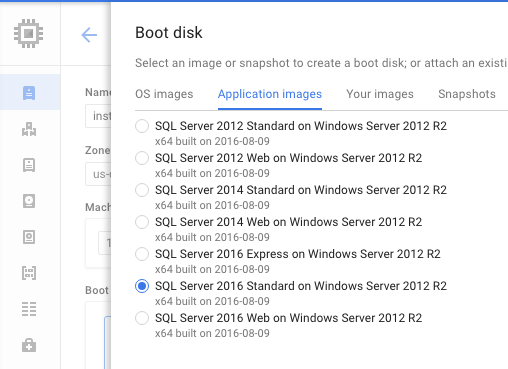
Our goal is to make GCP the best place to run Windows workloads. Starting this week, you can launch Google Compute Engine VM images preinstalled with Microsoft SQL Server, with the full range of licensing options and administrative control. Specifically, we now have beta support for these SQL Server versions:

SQL Server Express (2016)
SQL Server Standard (2012, 2014, 2016)
SQL Server Web (2012, 2014, 2016)
and coming soon, SQL Server Enterprise (2012, 2014, 2016)

Why Google Compute Engine for SQL Server

Google Compute Engine on GCP has key advantages for running SQL Server. Custom Machine Types let you tailor CPU core and memory configurations on VMs, allowing enterprises to fine-tune configurations that can reduce the licensing cost of running Microsoft SQL Server compared to other cloud environments. Add in automatic sustained use discounts, including the long-term prospect of retiring hardware and associated maintenance, and customers can arrive at total costs lower than many other cloud alternatives.

Regarding speed, Compute Engine VMs’ fast startup times shorten the time it takes to boot up operating systems, and Windows is no exception. On the I/O front, standard and solid-state persistent disks associated with Microsoft SQL Server VMs deliver a blazing 20,000 IOPS on 16-core machines and up to 25,000 IOPS on 32-core machines — at no additional cost.

Licensing

Compute Engine VMs preinstalled with Microsoft SQL Server allow customers to spin up new databases on-demand without the need to purchase licenses separately. Enterprise customers can pay for premium software the same way they pay for cloud infrastructure: pay as you go, only for what you use. For customers with Software Assurance from Microsoft, your existing Microsoft SQL Server licenses transfer directly to GCP. In addition, support is available to customers from both Microsoft and from Google.

Learn more on our web page.

Getting started

It’s easy to get started with $300 in free trial credit using any of our supported versions of Microsoft SQL Server. Create a boot disk from ready-to-deploy images directly from the Cloud Console. Here’s detailed documentation around how to create Microsoft Windows Server and SQL Server instances on GCP.

Enterprise migration
Customers can get help today with a range of partner-led and self-service migration options. For instance, our partner CloudEndure replicates Windows and Linux machines at the block level, so that all of your apps, data and configuration come along with your migration.

Contact the GCP team for a consultation around your Windows and enterprise workloads. Our team is committed to helping support your workloads today, paving the way to build what’s next tomorrow.
Quelle: Google Cloud Platform

Never leave your Java IDE with Google Cloud Tools for IntelliJ plugin

Posted by Amir Rouzrokh, Product Manager

Java Integrated Development Environment (IDE) users prefer to stay in the same environment to develop and test their applications. Now, users of JetBrain’s popular IntelliJ IDEA can do this when they deploy to Google App Engine.

Starting today, IntelliJ IDEA users can use the new Google Cloud Tools for IntelliJ plugin to deploy their application in App Engine standard and App Engine flexible, and use Google Stackdriver Debugger and Google Cloud Source Repositories without leaving the IDE.

Stackdriver Debugger captures and inspects the call stack and local variables of a live cloud-based application without stopping the app or slowing it down, while Google Cloud Source Repositories are fully-featured, private Git repositories hosted on GCP. The plugin is available on IntelliJ versions 15.0.6 and above and can be installed through the intelliJ IDEA’s built-in plugin manager. It can also be downloaded as a binary from the Jetbrains plugin repository, as described in the installation documentation. The entire plugin source code is available on GitHub, and we welcome contributions and issue reporting from the wider community.

To install the plugin, start IntelliJ IDEA, head to File > Settings (on Mac OS X, open IntelliJ IDEA > Preferences), select Plugins, click Browse repositories, search and select Google Cloud Tools and click Install (you may also be asked to install an additional Google plugin for authorization purposes).

Once installed, make sure you have a billing-enabled project on GCP under your Google account (new users can sign up for free credits here). Open any of your Java web apps that listens on port 8080 and Choose Tools > Deploy to App Engine, where you’ll see a deployment dialog. Below is an example based on Maven (full quickstart instructions can be found here):

Once you click Run, the Google Cloud Tools for IntelliJ plugin deploys your application to App Engine flexible in to the cloud (if this is the first deploy, this can take a few minutes). The deployment output in the IntelliJ shell will show the URL of the application to point to in your browser.

You can also deploy a JAR or WAR file using the same process, instead choosing the Filesystem JAR or WAR file on the Deployment dropdown, as shown below.

You can check the status of your application in the Google Cloud Platform Console by heading to the App Engine tab and clicking on Instances to see the underlying infrastructure of your application in action.

We’ll continue adding support for more GCP services to the plugin, so stay tuned for update notifications in the IDE. If you have specific feature requests, please submit them on the GitHub repository.

To learn more about Java on GCP, visit the GCP Java developers portal, where you can find all the information you need to get started and running your Java applications on GCP.

Happy Coding!
Quelle: Google Cloud Platform

Making ASP.NET apps first-class citizens on Google Cloud Platform

Posted by Chris Sells, Product Manager, Google Cloud Developer Tools

Google Cloud Platform is known for many things: big data, machine learning and the global infrastructure that powers Google. What you might not know is how well we support applications built on ASP.NET, the open-source web application framework developed by Microsoft. Let’s change that right now.

Windows Server on Google Compute Engine
To run ASP.NET 4.x, you need a Windows Server running IIS and ASP.NET. To do that, we support creating new Google Compute Engine VMs from both Windows Server Data Center 2008R2 and 2012R2 base images.

(click to enlarge)

Once you have your Windows Server image of choice, which should only take minutes to create and boot, you can establish user credentials, open up the appropriate ports with firewall rules, use RDP to connect to the machine and install whatever software you’d like.

If that software is comprised of the Microsoft IIS web server and ASP.NET, along with the appropriate firewall rules, you should definitely consider using the ASP.NET image in the Cloud Launcher.

(click to enlarge)

Not only does it create a Windows Server instance for you, but it installs SQL Server 2008 Express, IIS, ASP.NET 4.5.2 and opens the standard firewall ports to enable HTTP, HTTPs, WebDeploy and RDP.

SQL Server images on Compute Engine
The SQL Server Express that comes out of the box with the ASP.NET image in Cloud Launcher is useful for development, but when it comes to production workloads, you’re going to want production versions of SQL Server. For that, we’re happy to announce the following versions of SQL Server on Google Compute Engine:

SQL Server Standard (2012, 2014, 2016)
SQL Server Web (2012, 2014, 2016)
SQL Server Enterprise coming soon (2012, 2014, 2016)

As of this week, these editions of SQL Server are available on Google Compute Engine as base images alongside Windows Server. This is the first time we’ve offered production editions of SQL Server, so we’re excited to hear your feedback! Stay tuned next week for an in-depth post about SQL Server on Google Cloud Platform.

Google service libraries in NuGet
With Windows Server, ASP.NET and SQL Server, you’ve got everything you need to bring your ASP.NET 4.x sites and services to Google Cloud Platform, and we think you’re going to be happy that you did.

Further, we’ve heard from our customers how much they love the services provided across more than 100 Google APIs, all of which are available for a variety of languages and platforms, including .NET, in NuGet. Further, we’ve been working hard to ensure that our cloud-specific APIs are easy for .NET developers to understand. To that end, we’re pleased to announce that the vast majority of our Cloud API client library reference documentation has per-language examples, including for .NET.

To further improve usability of these libraries, we’ve created wrapper libraries for each of the Cloud APIs that are specific to each language. These libraries are in beta today, and include wrappers for Google BigQuery, Google Cloud Storage, Google Cloud Pub/Sub and Google Cloud Datastore, with more on the way. Google StackDriver Logging now also supports the log4net library, providing simplified logging for your apps, with all the goodness of StackDriver’s multi-machine, multi-app filtering and querying. These libraries are available in NuGet, as well as on GitHub, where you can log a bug, make a feature request or contribute back to the code!

These .NET library efforts are being led by none other than Jon Skeet, widely known for his C# books and for helping .NET developers on Stack Overflow. We’re very happy to have him helping us make sure that Google’s Cloud APIs are are good as they can be for .NET developers.

Cloud Tools for Visual Studio
One of the major reasons that we’ve made all of our libraries available via NuGet is so that you can bring them into your projects easily from inside Visual Studio. However, we know that you want to do more with your cloud projects than just write code — you also want to manage resources like VMs and storage buckets, and you want to deploy. That’s where Google Cloud Tools for Visual Studio comes in, available as of today in the Visual Studio Gallery.

It’s also possible to deploy the ASP.NET 4.x app to Google Compute Engine via Visual Studio’s built-in Publish dialog, but with the Cloud Tools extension, we’ve also made it easy to administer the credentials associated with your VMs and to generate their publish settings files from within Visual Studio.

This functionality is available inside the Google Cloud Explorer, which allows you to browse and manage your Compute Engine, Cloud Storage and Google Cloud SQL resources.

This is just the beginning. We’ve got lots of plans for integrating Cloud Platform deeper into Visual Studio. If you’ve got suggestions, bug reports or if you’d like to help, Cloud Tools for Visual Studio is hosted on GitHub. We’d love to hear from you!

Cloud Tools for PowerShell
Visual Studio is a great way to interactively manage your cloud project resources, but it’s not great for automation. That’s why we’re announcing Google’s first PowerShell extensions, Cloud Tools for PowerShell. With our Google Cloud PowerShell cmdlets, you can manage your Compute Engine and Cloud Storage resources.

(click to enlarge)

We started with cmdlets for the two most popular Cloud Platform products, Compute Engine and Cloud Storage, but we’re quickly expanding support to cover other products as well. If you’ve got suggestions about what we should do next, bug reports for what we’ve already got or if you’d like to help, the Google Cloud PowerShell cmdlets are being developed on GitHub.

Migrating existing VMs
Compute Engine’s support for Windows Server and SQL Server, along with our integration with Visual Studio and PowerShell, help you bring your .NET apps and SQL Server data to the Google Cloud Platform. But what if you need more? What if you’d rather not set up new machines, configure them and migrate your apps and data? Sometimes, you just want to bring an entire machine over as it is in your data center and run it on the cloud as if nothing had changed.

A new partnership with CloudEndure does just that.

CloudEndure replicates Windows and Linux machines at the block level, so that all of your apps, data and configuration comes along with your migration. To learn more about migration options for Windows workloads, or for help planning and executing a migration, check out these Google Cloud Platform migration resources.

Coming soon: support for ASP.NET Core
Many developers are exploring ASP.NET Core for their next-generation workloads. Because ASP.NET Core is fully supported on Linux, you can wrap it in a Docker container and deploy it via App Engine Flexible or Kubernetes running on Google Container Engine. ASP.NET is not fully supported on either of these platforms yet, but to give you a taste of where we’re headed, we’ve enabled all of the Google API Client Libraries to work on .NET Core (with the exception of our hand-crafted libraries — we’re still working on those). For example, here’s some ASP.NET Core code that pulls a random JPEG image from a Google Cloud Storage bucket:

public IActionResult Index() {
var service = new StorageService(new BaseClientService.Initializer() {
HttpClientInitializer =
GoogleCredential.GetApplicationDefaultAsync().Result
});

// find all of the public JPGs in the project buckets
var request = service.Objects.List(“YOUR-GCS-BUCKET”);
request.Projection = ObjectsResource.ListRequest.ProjectionEnum.Full;
var items = request.Execute().Items;
var jpgs = items.Where(o => o.Name.EndsWith(“.jpg”) &&
o.Acl.Any(o2 => o2.Entity == “allUsers”));

// pick a random jpg to show
ViewData[“jpg”] =
jpgs.ElementAt((new Random()).Next(0, jpgs.Count())).MediaLink;
return View();
}

We’re working to enable first-class support for containers-based deployment as well as Linux-based ASP.NET Core. Until then, check out this sample code for running simple .NET apps on Cloud Platform.

We’re just getting started
First and foremost, we’re serious about supporting Windows and .NET workloads on Google Cloud Platform. Second, we’re just getting started. We have big plans across all areas of Windows/.NET support and we’d love your feedback — whether it’s to report a bug, make a suggestion or contribute some code!

We’ll leave you with one more resource: .NET on Google Cloud Platform lists everything a developer needs to know to be successful with .NET on Cloud Platform. If there’s something you need that you can’t find, drop a note to the Google Cloud Developers group!
Quelle: Google Cloud Platform

Google Cloud Datastore serves over 15 trillion queries per month and is ready for more

Posted by Dan McGrath, Product Manager for Cloud Datastore

Cloud Datastore is a highly available and durable fully managed NoSQL database service for serving data to your applications. This schema-less document database is geo-replicated and ideal for fast, flexible development of mobile and web applications. It automatically scales as your data and traffic grows—so you’ll never again worry about provisioning enough resources to handle your peak load. It already handles over 15 trillion queries per month.

The Cloud Datastore v1 API is now generally available for all customers, and the Cloud Datastore Software License Agreement (SLA) now covers access both from App Engine and the v1 API and provides high confidence in the scalability and availability of the service for your toughest web and mobile workloads. Already, customers like Snapchat, Workiva, and Khan Academy have built amazing mobile and web applications with Cloud Datastore. Khan Academy, for instance, uses Datastore for user data — from user progress tracking to content management.

“It’s our primary database,” said Ben Kraft, Infrastructure Engineer at Khan Academy. “We depend on it being fast and reliable for everything we do.”

Now that the v1 API is generally available, we have deprecated the v1beta3 API with a twelve-month grace period before we decommission it fully on August 17th, 2017. Changes between v1beta 3 and v1 are minor, so transitioning to the new version is quick and straightforward.

Cross-platform access

The v1 API for Cloud Datastore allows you to access your database for Google Compute Engine, Google Container Engine, or any other server via our RESTful or gRPC endpoints. You can access your existing App Engine data now from different compute environments, enabling you to select the best mix for your needs.

You can use the v1 API via the idiomatic Google Cloud Client Libraries (in Node.js, Python, Java, Go, and Ruby), or alternatively via the low-level native client libraries for JSON and Protocol Buffers over gRPC. You can learn more about the various client libraries in our documentation.

Along with this cross-platform access, you can use Google Cloud Dataflow to execute a wide range of data processing patterns against Cloud Datastore, including batch and streaming computation. Take a look in the GitHub repository for examples of using the Dataflow SDK with Cloud Datastore.

New resources
We’ve also been busy making new resources available to enable you to make more effective use of Cloud Datastore.

Best Practices: The down-low on the best practices on topics ranging from transactions to strongly consistent queries.
Storage Size Calculations: A new transparent method of calculating the size of your database as announced as part of our simplified pricing.
Limits: Information about production limits for Datastore, for example the maximum size of a transaction.
Multitenancy: Guidance on how you can use namespaces for multitenancy in your application.

Cloud Console
Lastly, we’ve made numerous improvements to our Cloud Console interface. If you haven’t used it before, get to know it by reading a new article on editing entities in the console. Some highlights:

App Engine Python users will be delighted to know that URL-Safe Keys are supported in the Key Filter field on the Entities page.
The entity editor supports properties with complex types such as Array and Embedded entity.

To learn more about Cloud Datastore, check out our getting started guide.
Quelle: Google Cloud Platform

Google Cloud Bigtable is generally available for petabyte-scale NoSQL workloads

Posted by Misha Brukman, Product Manager for Google Cloud Bigtable

In early 2000s, Google developed Bigtable, a petabyte-scale NoSQL database, to handle use cases ranging from low-latency real-time data serving to high-throughput web indexing and analytics. Since then, Bigtable has had a significant impact on the NoSQL storage ecosystem, inspiring the design and development of Apache HBase, Apache Cassandra, Apache Accumulo and several other databases.

Google Cloud Bigtable, a fully-managed database service built on Google’s internal Bigtable service, is now generally available. Enterprises of all sizes can build scalable production applications on top of the same managed NoSQL database service that powers Google Search, Google Analytics, Google Maps, Gmail and other Google products, several of which serve over a billion users. Cloud Bigtable is now available in four Google Cloud Platform regions: us-central1, us-east1, europe-west1 and asia-east1, with more to come.

Cloud Bigtable is available via a high-performance gRPC API, supported by native clients in Java, Go and Python. An open-source, HBase-compatible Java client is also available, allowing for easy portability of workloads between HBase and Cloud Bigtable.

Companies such as Spotify, FIS, Energyworx and others are using Cloud Bigtable to address a wide array of use cases, for example:

Spotify has migrated its production monitoring system, Heroic, from storing time series in Apache Cassandra to Cloud Bigtable and is writing over 360K data points per second.
FIS is working on a bid for the SEC Consolidated Audit Trail (CAT) project, and was able to achieve 34 million reads/sec and 23 million writes/sec on Cloud Bigtable as part of its market data processing pipeline.
Energyworx is building an IoT solution for the energy industry on Google Cloud Platform, using Cloud Bigtable to store smart meter data. This allows it to scale without building a large DevOps team to manage its storage backend.

Cloud Platform partners and customers enjoy the scalability, low latency and high throughput of Cloud Bigtable, without worrying about overhead of server management, upgrades, or manual resharding. Cloud Bigtable is well-integrated with Cloud Platform services such as Google Cloud Dataflow and Google Cloud Dataproc as well as open-source projects such as Apache Hadoop, Apache Spark and OpenTSDB. Cloud Bigtable can also be used together with other services such as Google Cloud Pub/Sub and Google BigQuery as part of a real-time streaming IoT solution.

To get acquainted with Cloud Bigtable, take a look at documentation and try the quickstart. We look forward to seeing you build what’s next!

Quelle: Google Cloud Platform

Cloud SQL Second Generation performance and feature deep dive

Posted by Brett Hesterberg, Product Manager, Google Cloud Platform

Five years ago, we launched the First Generation of Google Cloud SQL and have helped thousands of companies build applications on top of it.

In that time, Google Cloud Platform’s innovations on Persistent Disk dramatically increased IOPS for Google Compute Engine, so we built Second Generation on Persistent Disk, allowing us to offer a far more performant MySQL solution at a fraction of the cost. Cloud SQL Second Generation now runs 7X faster and has 20X more storage capacity than its predecessor — with lower costs, higher scalability, automated backups that can restore your database from any point in time and 99.95% availability, anywhere in the world. This way you can focus on your application, not your IT solution.

Cloud SQL Second Generation performance gains are dramatic: up to 10TB of data, 20,000 IOPS, and 104GB of RAM per instance.

Cloud SQL Second Generation vs. the competition
So we know Cloud SQL Second Generation is a major advance from First Generation. But how does it compare with database services from Amazon Web Services?
Test: We used sysbench to simulate the same workload on three different services: Cloud SQL Second Generation, Amazon RDS for MySQL and Amazon Aurora.
Result: Cloud SQL Second Generation outperformed RDS for MySQL and performed better than Aurora when active thread count is low, as is typical for many web applications.

Cloud SQL sustains higher TPS (transactions per second) per thread than RDS for MySQL. It outperforms Aurora in configurations of up to 16 threads.
Details
The workload compares multi-zone (highly available) instances of Cloud SQL Second Generation, Amazon RDS for MySQL and Amazon Aurora running the latest offered MySQL version. The replication technology used by these three services differs significantly, and has a big impact on performance and latency. Cloud SQL Second Generation uses MySQL’s semi-synchronous replication, RDS for MySQL uses block-level synchronous replication and Aurora uses a proprietary replication technology.

To determine throughput, a Sysbench OLTP workload was generated from a MySQL client in the same zone as the primary database instance. The workload is a set of step load tests that double the number of threads (connections) with each run. The dataset used is five times larger than total memory of the database instance to ensure that reads go to disk.

Transaction per second (TPS) results show that Cloud SQL and Aurora are faster than RDS for MySQL. Cloud SQL’s TPS is higher than Aurora at up to 16 threads. At 32 threads, variance and the potential for replication lag increase, causing Aurora’s peak TPS to exceed Cloud SQL’s at higher thread counts. The workload illustrates the differences in replication technology between the three services. Aurora exhibits minimal performance variance and consistent replication lag. Cloud SQL emphasizes performance, allowing for replication lag, which can increase failover times, but without putting data at risk.
Latency
We measured average end-to-end latency with a single client thread (i.e., “pure” latency measurement).
The latency comparison changes as additional threads are added. Cloud SQL exhibits lower latency than RDS for MySQL across all tests. Compared to Aurora, Cloud SQL’s latency is lower until 32 or more threads are used to generate load.
Running the benchmark

Environment configuration and sysbench parameters for our testing.

We used the following environment configuration and sysbench parameters for our testing.

Test instances:

Google Cloud SQL v2, db-n1-highmem-16 (16 CPU, 104 GB RAM), MySQL 5.7.11, 1000 GB PD SSD + Failover Replica
Amazon RDS Multi-AZ, db.r3.4xlarge (16 CPU, 122 GB RAM), MySQL 5.7.11, 1000 GB SSD, 10k Provisioned IOPS + Multi-AZ Replica
Amazon RDS Aurora, db.r3.4xlarge (16 CPU, 122 GB RAM), MySQL 5.6 (newest) + Replica

Test overview:
Sysbench runs were 100 tables of 20M rows each, for a total of 2B rows. In order to ensure that the data set doesn’t fit in memory, it was set to a multiple of the ~100 GB memory per instance, allowing sufficient space for binary logs used for replication. With 100x20M rows, the data set size as loaded is ~500 GB. Each step run was 30 minutes with a one minute “cool down” period in between, producing one report line per second of the runtime.

Load the data:

Ubuntu setupsudo apt-get updatesudo apt-get install  git automake autoconf libtool make gcc  Libmysqlclient-dev mysql-client-5.6git clone https://github.com/akopytov/sysbench.git(apply patch)./autogen.sh ./configuremake -j8Test variablesexport test_system=<test name>export mysql_host=<mysql host>export mysql_user=<mysql user>export mysql_password=<mysql password>export test_path=~/oltp_${test_system}_1export test_name=01_baselinePrepare test datasysbench/sysbench  –mysql-host=${mysql_host}  –mysql-user=${mysql_user}  –mysql-password=${mysql_password}  –mysql-db=”sbtest”  –test=sysbench/tests/db/parallel_prepare.lua  –oltp_tables_count=100  –oltp-table-size=20000000  –rand-init=on  –num-threads=16  runRun the benchmark:mkdir -p ${test_path}for threads in 1 2 4 8 16 32 64 128 256 512 1024do sysbench/sysbench  –mysql-host=${mysql_host}  –mysql-user=${mysql_user}  –mysql-password=${mysql_password}  –mysql-db=”sbtest”  –db-ps-mode=disable  –rand-init=on  –test=sysbench/tests/db/oltp.lua  –oltp-read-only=off  –oltp_tables_count=100  –oltp-table-size=20000000  –oltp-dist-type=uniform  –percentile=99  –report-interval=1  –max-requests=0  –max-time=1800  –num-threads=${threads}  runFormat the results:Capture results in CSV formatgrep “^[” ${test_path}/${test_name}_*.out  | cut -d] -f2  | sed -e ‘s/[a-z ]*://g’ -e ‘s/ms//’ -e ‘s/(99%)//’ -e ‘s/[ ]//g’  > ${test_path}/${test_name}_all.csvPlot the results in Rstatus <- NULL # or e.g. “[DRAFT]”config <- “Amazon RDS (MySQL Multi-AZ, Aurora) vs. Google Cloud SQL Second Generationnsysbench 0.5, 100 x 20M rows (2B rows total), 30 minutes per step”steps <- c(1, 2, 4, 8, 16, 32, 64, 128, 256, 512)time_per_step <- 1800output_path <- “~/oltp_results/”test_name <- “01_baseline”results <- data.frame(  stringsAsFactors = FALSE,  row.names = c(    “amazon_rds_multi_az”,    “amazon_rds_aurora”,    “google_cloud_sql”  ),  file = c(    “~/amazon_rds_multi_az_1/01_baseline_all.csv”,    “~/amazon_rds_aurora_1/01_baseline_all.csv”,    “~/google_cloud_sql_1/01_baseline_all.csv”  ),  name = c(    “Amazon RDS MySQL Multi-AZ”,    “Amazon RDS Aurora”,    “Google Cloud SQL 2nd Gen.”  ),  color = c(    “darkgreen”,    “red”,    “blue”  ))results$data <- lapply(results$file, read.csv, header=FALSE, sep=”,”, col.names=c(“threads”, “tps”, “reads”, “writes”, “latency”, “errors”, “reconnects”))# TPSpdf(paste(output_path, test_name, “_tps.pdf”, sep=””), width=12, height=8)plot(0, 0,  pch=”.”, col=”white”, xaxt=”n”, ylim=c(0,2000), xlim=c(0,length(steps)),  main=paste(status, “Transaction Rate by Concurrent Sysbench Threads”, status, “nn”),  xlab=”Concurrent Sysbench Threads”,  ylab=”Transaction Rate (tps)”)for(result in rownames(results)) {  tps <- as.data.frame(results[result,]$data)$tps  points(1:length(tps) / time_per_step, tps, pch=”.”, col=results[result,]$color, xaxt=”n”, new=FALSE)}title(main=paste(“nn”, config, sep=””), font.main=3, cex.main=0.7)axis(1, 0:(length(steps)-1), steps)legend(“topleft”, results$name, bg=”white”, col=results$color, pch=15, horiz=FALSE)dev.off()# Latencypdf(paste(output_path, test_name, “_latency.pdf”, sep=””), width=12, height=8)plot(0, 0,  pch=”.”, col=”white”, xaxt=”n”, ylim=c(0,2000), xlim=c(0,length(steps)),  main=paste(status, “Latency by Concurrent Sysbench Threads”, status, “nn”),  xlab=”Concurrent Sysbench Threads”,  ylab=”Latency (ms)”)for(result in rownames(results)) {  latency <- as.data.frame(results[result,]$data)$latency  points(1:length(latency) / time_per_step, latency, pch=”.”, col=results[result,]$color, xaxt=”n”, new=FALSE)}title(main=paste(“nn”, config, sep=””), font.main=3, cex.main=0.7)axis(1, 0:(length(steps)-1), steps)legend(“topleft”, results$name, bg=”white”, col=results$color, pch=15, horiz=FALSE)dev.off()# TPS per Threadpdf(paste(output_path, test_name, “_tps_per_thread.pdf”, sep=””), width=12, height=8)plot(0, 0,  pch=”.”, col=”white”, xaxt=”n”, ylim=c(0,60), xlim=c(0,length(steps)),  main=paste(status, “Transaction Rate per Thread by Concurrent Sysbench Threads”, status, “nn”),  xlab=”Concurrent Sysbench Threads”,  ylab=”Transactions per thread (tps/thread)”)for(result in rownames(results)) {  tps <- as.data.frame(results[result,]$data)$tps  threads <- as.data.frame(results[result,]$data)$threads  points(1:length(tps) / time_per_step, tps / threads, pch=”.”, col=results[result,]$color, xaxt=”n”, new=FALSE)}title(main=paste(“nn”, config, sep=””), font.main=3, cex.main=0.7)axis(1, 0:(length(steps)-1), steps)legend(“topleft”, results$name, bg=”white”, col=results$color, pch=15, horiz=FALSE)dev.off()

Cloud SQL Second Generation features
But performance is only half the story. We believe a fully managed service should be as convenient as it is powerful. So we added new features to help you easily store, protect and manage your data.

Store and protect data
Flexible backups: Schedule automatic daily backups or run them on-demand. Backups are designed not to affect performance
Precise recovery: Recover your instance to a specific point in time using point-in-time recovery
Easy clones: Clone your instance so you can test changes on a copy before introducing them to your production environment. Clones are exact copies of your databases, but they’re completely independent from the source. Cloud SQL offers a streamlined cloning workflow.
Automatic storage increase: Enable automatic storage increase and Cloud SQL will add storage capacity whenever you approach your limit

Connect and Manage
Open standards: We embrace the MySQL wire protocol, the standard connection protocol for MySQL databases, so you can access your database from nearly any application, running anywhere.
Secure connections: Our new Cloud SQL Proxy creates a local socket and uses OAuth to help establish a secure connection with your application or MySQL tool. This makes secure connections easier for both dynamic and static IP addresses. For dynamic IP addresses, such as a developer’s laptop, you can help secure connectivity using service accounts, rather than modifying your firewall settings. For static IP addresses, you no longer have to set up SSL.

We’re obviously very proud of Cloud SQL, but don’t just take our word for it. Here’s what a couple of customers have had to say about Cloud SQL Second Generation:

As a SaaS Company, we manage hundreds of instances for our customers. Cloud SQL is a major component of our stack and when we beta tested Cloud SQL, we were able to see fantastic performance over our large volume customers. We immediately migrated a few of our major customers as we saw 7x performance improvements of their queries.                                                                                     – Rajesh Manickadas, Director of Engineering, Orangescape As a mobile application company, data management is essential to delivering the best product for our clients. Google Cloud SQL enables us to manage databases that grow at rates such as 120 – 150 million data points every month. In fact, for one of our clients, a $6B Telecommunications Provider, their database adds ~15 GB of data every month. At peak time, we hit around 400 write operations/second and yet our API calls average return time is still under 73ms.                                                                                                                                                   – Andrea Michaud, Head of Client Services, www.TeamTracking.us
Next stepsWhat’s next for Cloud SQL? You can look forward to continued Persistent Disk performance improvements, added virtual networking enhancements and streamlined migration tools to help First Generation users upgrade to Second Generation.

Until then, we urge you to sign up for a $300 credit to try Cloud SQL and the rest of GCP. Start with inexpensive micro instances for testing and development. When you’re ready, you can easily scale them up to serve performance-intensive applications.

You can also take advantage of our partner ecosystem to help you get started. To streamline data transfer, reach out to Talend, Attunity, Dbvisit and xPlenty. For help with visualizing analytics data, try Tableau, Looker, YellowFin and Bime by Zendesk. If you need to manage and monitor databases, ScaleArc and WebYog good bets, while Pythian and Percona are at the ready if you simply need extra support.

Tableau customers continue to adopt Cloud SQL at a growing rate as they experience the benefits of rapid fire analytics in the cloud. With the significant performance improvements in Cloud SQL Second Generation, it’s likely that that adoption will grow even faster.                                                                            – Dan Kogan, Director of Product Marketing & Technology Partners, Tableau Looker is excited to support a Tier 1 integration for the Google’s Cloud SQL Second Generation as it goes into General Availability. When you combine the Looker Data Platform’s in-database analytics approach with Cloud SQL’s fully-managed database offering, customers get a real-time analytics and visualization environment in the cloud, enabling anyone in the organization to make data-driven decisions.                                                                                                                                           – Keenan Rice, VP Strategic Alliances, Looker Migrating database applications to the cloud is a priority for many customers and we facilitate that process with Attunity Replicate by simplifying migrations to Google Cloud SQL while enabling zero downtime. Cloud SQL Second Generation delivers even better performance, reliability and security which are key for expanding deployments for enterprise customers. Customers can benefit from these enhanced abilities and we look forward to working with them helping to remove any data transfer hurdles.                                                                                                  – Itamar Ankorion, Chief Marketing Officer, Attunity 
Things are really heating up for Cloud SQL, and we hope you’ll come along for the ride.

Quelle: Google Cloud Platform

Advancing enterprise database workloads on Google Cloud Platform

Posted by Dominic Preuss, Lead Product Manager for Storage and Databases

We are committed to making Google Cloud Platform the best public cloud for your database workloads. From our managed database services to self-managed versions of your favorite relational or NoSQL database, we want enterprises with databases of all sizes and types to experience the best price-performance with the least amount of friction.

Today, we’re excited to announce that all of our database storage products are generally available and covered by corresponding Service Level Agreements (SLAs). We’re also releasing new performance and security support for Google Compute Engine. Whether you’re running a WordPress application with a Cloud SQL backend or building a petabyte-scale monitoring system, Cloud Platform is secure, reliable and able to store databases of all types.

Cloud SQL, Cloud Bigtable and Cloud Datastore are now generally available
Cloud SQL Second Generation, our fully-managed database service offering easy-to-use MySQL instances, has completed a successful beta and is now generally available. Since beta, we’ve added a number of enterprise features such as support for MySQL 5.7, point-in-time-recovery (PITR), automatic storage re-sizing and setting up failover replicas with a single click.

Performance is key to enterprise database workloads, and Cloud SQL is delivering industry-leading throughput.
Cloud Bigtable is our scalable, fully-managed NoSQL wide-column database service with Apache HBase client compatibility, and is now generally available. Since beta, many of our customers such as Spotify, Energyworx and FIS (formerly Sungard) have built scalable applications on top of Cloud Bigtable for workloads such as monitoring, financial and geospatial data analysis.

Cloud Datastore, our scalable, fully-managed NoSQL document database serves 15 trillion requests a month, and its v1 API for applications outside of Google App Engine has reached general availability. The Cloud Datastore SLA of 99.95% monthly uptime demonstrates high confidence in the scalability and availability of this cross-region, replicated service for your toughest web and mobile workloads. Customers like Snapchat, Workiva and Khan Academy have built amazing web and mobile applications with Cloud Datastore.

Improved performance, security and platform support for databases
For enterprises looking to manage their own databases on Google Compute Engine (GCE), we’re also offering the following improvements:

Microsoft SQL Server images available on Google Compute Engine – Our top enterprise customers emphasize the importance of continuity for their mission-critical applications. The unique strengths of Google Compute Engine make it the best environment to run Microsoft SQL Server featuring images with built-in licenses (in beta), as well as the ability to bring your existing application licenses. Stay tuned for a post covering the details of running SQL Server and other key Windows workloads on Google Cloud Platform.
Increased IOPS for Persistent Disk volumes – Database workloads are dependent on great block storage performance, so we’re increasing the maximum read and write IOPS for SSD-backed Persistent Disk volumes from 15,000 to 25,000 at no additional cost, servicing the needs of the most demanding databases. This continues Google’s history of delivering greater price-performance over time with no action on the part of our customers.
Custom encryption for Google Cloud Storage – When you need to store your database backups, you now have the added option of using customer-supplied encryption keys (CSEK). This feature allows Cloud Storage to be a zero-knowledge system without access to the keys and is now generally available.
Low-latency for Google Cloud Storage Nearline storage – If you want a cost-effective way to store your database backups, Google Cloud Storage Nearline offers object storage at costs less than tape. Prior to today, retrieving data from Nearline incurred 3 to 5 seconds of latency per object. We’ve been continuously improving Nearline performance, and now it enables access times and throughput similar to Standard class objects. These faster access times and throughput give customers the ability to leverage big data tools such as Google BigQuery to run federated queries across your stored data.

Today marks a major milestone in our tremendous momentum and commitment to making Google Cloud Platform the best public cloud for your enterprise database workloads. We look forward to the journey ahead and helping enterprises of all sizes be successful with Cloud Platform.

Quelle: Google Cloud Platform

Stackdriver Error Reporting: there’s a mobile app for that

Posted by Steren Giannini, Product Manager, Google Cloud Platform

Ever wish you could receive notifications on production errors of your cloud app, triage them, perform preliminary diagnosis and share them with others from anywhere? Now you can. We’re pleased to announce that all the key functionality of Stackdriver Error Reporting is now available on the Google Cloud Console app, today on Android and very soon on iOS.

Receive mobile push notifications on new error with detailed error information

We thoroughly redesigned the Error Reporting UI to be suited for mobile devices, enabling you to perform the same actions you can perform on the desktop version, including exploring service errors and their stack traces, filtering them based on a time range, service and version and sorting them by number of occurrences, affected user counts or first-seen and last-seen dates.

Take action from your phone by linking an error to an issue in your favorite issue tracker, by muting it or sharing it with your teammates.

See the top of your cloud services from the Cloud Console mobile app

Error Reporting for mobile integrates nicely with the other features of the Cloud Console mobile app — for example, you can jump from an error to the latest request log where it occurred, or from the error that just occured to review details of the faulty version of your Google App Engine service, right from your phone. Download the app today on Android and very soon on iOS. And don’t forget to send us your feedback at mailto:error-reporting-feedback@google.com.
Quelle: Google Cloud Platform