The dragon days of summer: this week on Google Cloud Platform

Posted by Alex Barrett, Editor, Google Cloud Platform Blog

Ah, summer! The time for relaxing, taking the kids to a matinee, and . . . using machine learning to recognize everyday objects using the Cloud Vision API!

That’s what the fine folks at Disney and Google Zoo are doing to promote their new movie Pete’s Dragon: Accessing the Cloud Vision RESTful API, Disney has created a mobile website that allows your mobile device to recognize objects in your field of vision and display Elliot the Dragon in and around those objects in Augmented Reality (AR). Try it out from your mobile device at Dragonspotting.com.

But in Google Cloud Platform circles, that’s been the extent of the relaxing. In the past week, the GCP team has been exceptionally busy, releasing new versions of Google Cloud Dataflow and Google Cloud Datalab, adding support for Python 3 in Google App Engine flexible environment, acquiring Orbitera, partnering with Facebook on a new DC 48V power standard and dropping prices on Preemptible VMs!

Other community members chimed in on how to perform rolling updates on managed GCP databases, analyzing residential construction trends using Google BigQuery, exploring the performance model of Cloud DataFlow and analyzing GitHub pull requests using BigQuery.

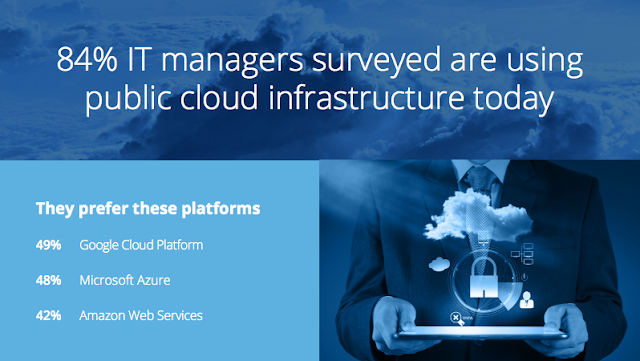
Maybe all this hard work is paying off. A recent survey of 200 IT professionals found that 84% of them are using public cloud services, and that GCP beats out the other major providers as their preferred platform.

A survey by SADA Systems, a Google for Work Premier Partner, of 200+ IT managers about their use of public cloud services

OK, so maybe we’ll take a vacation next week . . .

Quelle: Google Cloud Platform

Finding Pete’s Dragon with Google Cloud Vision API

Posted by Ram Ramanathan, Product Manager and Michael Yapp, Director of Google ZOO

In a world where seeing is believing, people of all ages are looking for new ways to interact with their favorite stories and characters. And machine learning presents an opportunity to make this a reality.

Disney’s “Pete’s Dragon” arrives in U.S. theaters in 3D this Friday. To promote the film, Disney collaborated with Google and MediaMonks to create “Dragon Spotting,” a digital experience that uses Google Cloud Vision API to bring the magic of “Pete’s Dragon” to life.

Via dragonspotting.com, people set out on a quest to find Elliot using their smartphones. They’re prompted to seek common items, such as couches, bicycles or trees, near their homes or around the neighborhood. Once they find the quest object, they can view Elliot in augmented reality through the lens of their Android mobile device. Users with iOS devices can have the same kind of experience by taking and uploading images of items prompted on the site to see if Elliot is hiding nearby.

To work, the mobile website needed to recognize everyday objects from a mobile camera with a high degree of accuracy. Accessing a simple REST API, the game uses Cloud Vision API’s Label Detection feature to identify objects in the user’s field of vision, dubbed “entities.” The API returns the list of entities identified within the image. The website then checks if the desired object is in the list of entities returned from the API. For example, if the user needs to identify “couch,” the website checks against a list of possible responses: “chair, futon, couch, sofa.” As soon as the recognized entity matches the desired object, Elliot is revealed!

Disney’s creative application of Google’s Cloud Vision API shows how machine learning can enable developers to build innovative and engaging experiences for marketing campaigns.

Don’t miss your chance to see Elliot and check out the site! You can also click here to learn more about Cloud Vision API and test it for yourself. We look forward to seeing how you build the next generation of applications that can see, hear and understand the world.
Quelle: Google Cloud Platform

Python 3 on Google App Engine flexible environment now in beta

Posted by Amir Rouzrokh, Product Manager

Developers running Python on Google App Engine have long asked for support for Python 3 and third-party Python packages. Today we’re excited to announce the beta release of the Python runtime on App Engine Flexible Environment with support for Python 3.4 and 2.7. You can now develop applications in the Python version you prefer and create performant mobile and web backends using the frameworks and libraries of your choice. Meanwhile, developers benefit from App Engine’s built-in services, such as autoscaling, load balancing, microservices support and traffic splitting and hence can focus on their code and not worry about infrastructure maintenance.

Here at Google, we’re committed to the open-source model and strive for product designs that promote choice for developers. App Engine Flexible Environment runtimes are simple and lean, distributed on github, and can access services from any cloud platform provider, including Google Cloud Platform using the Python Client Libraries. Because of containerization, you can run your application on App Engine Flexible, Google Container Engine, Google Compute Engine, locally (for example by using minikube), and on any cloud provider that supports containers.

Getting started with Python on App Engine is easy. The best place to start is the Python developer hub, where we’ve gathered everything Python in one place. If you’re new to App Engine, we recommend trying out this Quickstart to get a sense of how App Engine Flexible works. Here’s a quick video of the quickstart experience for you to watch.

For more experienced users and those who wish to learn more about Python on Google Cloud Platform, we recommend completing the bookshelf tutorial.

When running a Python application on App Engine, you can use the tools and databases you already know and love. Use Flask, Django, Pyramid, Falcon, Tornado or any other framework to build your app. You can also check out samples on how to use MongoDB, MySQL or Google Cloud Datastore.

Using the Google cloud client library, you can take advantage of Google’s advanced APIs and services, including Google BigQuery, Google Cloud Pub/Sub, and Google Cloud Storage using simple and easy-to-understand API formatting:

from gcloud import storage

client = storage.Client(‘<your-project-id>’)bucket = client.get_bucket(‘<your-bucket-name>’)blob = bucket.blob(‘my-test-file.txt’)blob.upload_from_string(‘this is test content!’)

We’re thrilled to welcome Python 3 developers to Google Cloud Platform and are committed to making further investments in App Engine Standard and Flexible to help make you as productive as possible.

Feel free to reach out to us on Twitter using the handle @googlecloud. We’re also on the Google Cloud Slack community. To get in touch, request an invite to join the Slack Python channel.

Quelle: Google Cloud Platform

Preemptible VMs now up to 33% cheaper

Posted by Michael Basilyan, Product Manager

We’re happy to announce that we’ve lowered the price of Preemptible VMs by up to 33%! Since launching Preemptible VMs last year, we’ve tuned our algorithms, improved their efficiency and analyzed usage patterns. Our experience, combined with the growth of Google Cloud Platform, allows us to offer deeper discounts. For example, the price of an n1-standard-1 Preemptible VM instance is now just one cent per hour. That’s 80% cheaper than the equivalent, non-preemptible instance, with no bidding or guesswork. The new pricing is already in effect.

Preemptible VMs are just like any other Google Compute Engine VM, with the caveat that they cannot run for more than 24 hours and that we can preempt (shut down) the VM earlier if we need the capacity for other purposes. This allows us to use our data center capacity more efficiently and share the savings with you.

Over the last year, Google Cloud Platform customers, such as Citadel, have used Preemptible VMs to greatly reduce their compute costs, and have come up with lots of interesting use cases along the way. Our customers are using Preemptible VMs to analyze data, render movies, process satellite imagery, analyze genomic data, transcode media and complete a variety of business and engineering tasks, using thousands of Preemptible VM cores in a single job. We believe that the price reduction for Preemptible VMs will unlock even more computing opportunities and enable you to tackle interesting science and business problems.

Here are some ways you can launch a Preemptible VM right now:

Add just a single flag (–preemptible) in the gcloud compute instances create command, or by using one of our libraries
Check a single box in the Developer Console create instance page
Launch a quick and easy-to-use Spark/Hadoop cluster with Cloud Dataproc
Autoscale Preemptible VMs with managed instance groups
Render a movie with Zync and choose Preemptible VMs, which is now also up to 15% cheaper!

Here are some tips and tricks to help you get the most out of Preemptible VMs:

Resources for Preemptible VMs come out of excess Google Cloud Platform capacity. The load on our Cloud Platform data centers varies with location and time of day, but is generally lowest on nights and weekends — the best time to run large Preemptible VM clusters.
We avoid preempting too many VMs from a single customer and, given the choice, preempt VMs that were launched most recently. This might be a bit frustrating at first, but in the long run, this strategy helps minimize lost work across your cluster. And because we don’t bill for VMs preempted in the first 10 minutes, it saves on costs too.
It’s a good idea to retry once or twice, even if you’ve been preempted early. Combining regular and Preemptible VMs in your clusters will ensure that tasks proceed at an adequate pace.
Manage shutdown and preemption notices with a shutdown script that saves a job’s progress so that it can pick up where it left off, rather than start over from scratch.

For more details on Preemptible VMs, please check out the documentation. For more pricing information, take a look at our Compute Engine pricing page or try out our pricing calculator. If you have questions or feedback, go to the Getting Help page.

We’re excited to see what you build with our products. If you want to share stories and demos of the cool things you have built with Preemptible VMs, send us an email or reach out on Twitter, Facebook, or G+.
Quelle: Google Cloud Platform

Google teams up with Stanford Medicine for Clinical Genomics innovation

Posted by Sam Schillace, VP of Engineering, Industry Solutions

Google Cloud Platform has teamed up with Stanford Medicine to help clinicians and scientists securely store and analyze massive genomic datasets with the ultimate goal of transforming patient care and medical research.

Stanford Medicine ranks as one of the country’s best academic medical centers, and we’re eager to see what can happen when we work together. We anticipate that our contributions of HIPAA-compliant cloud computing, machine learning and data science — combined with Stanford’s expertise in genomics and healthcare — could lead to important advances in precision health, a predictive and preventive approach to healthcare.

This is a great opportunity to bring data science to patient care by combining genomics and traditional health records. Our collaboration is in support of the new Clinical Genomics Service at Stanford Health Care, which aims to sequence and analyze thousands of patients’ genomes. Cloud Platform will allow Stanford scientists and clinicians to securely analyze these massive datasets immediately and scale up painlessly as clinical genomics becomes more commonplace.

As genome sequencing becomes affordable, more and more patients will be able to benefit from it. Modern cloud technology and data science tools can vastly improve analysis methods for genomic data. Working with the team at Stanford, we expect to build a new generation of platforms and tools that will facilitate genome analysis at massive scale, providing actionable answers about gene variants from each person’s genome in a fraction of the time it takes now, and use that information to make better medical decisions.

Stanford researchers already have some cool ideas in mind for expanding beyond genome data, such as using machine-learning techniques to train computers to read pathology or X-ray images and identify tumors or other medical problems. They’ve also amassed years of anonymized patient data that could be used to teach algorithms to distinguish false signals from real ones, such as hospital alarms that go off when nothing is wrong with a patient.

Together, we believe these efforts will pay off in new insights into human health and better care for patients at Stanford and other institutions.
Quelle: Google Cloud Platform

Orbitera joins the Google Cloud Platform team

Posted by Nan Boden, Head of Global Technology Partners

Today we’re excited to announce that Google has acquired Orbitera!

Orbitera provides a commerce platform that makes buying and selling software in the cloud simple, seamless and scalable for all kinds of businesses, including independent software vendors, service providers and IT channel organizations.

The current model for the deploying, managing and billing of cloud-based software does not easily fit the way today’s modern enterprises operate. Orbitera automates many of the processes associated with billing, packaging and pricing optimization for leading businesses and ISVs (Independent Software Vendors) supporting customers running in the cloud. More than 60, enterprise stacks have been launched on Orbitera.

At Google, we partner closely with our enterprise customers and software providers to ensure their transition to the cloud is as simple and seamless as possible. We recognize that both enterprise customers and ISVs want to be able to use more than one cloud provider and have a way to conduct product trials and proofs of concept before building a full production deployment, all using their trusted SIs (System Integrators), resellers and normal sales cycles.

Orbitera has built a strong ecosystem of enterprise software vendors delivering software to multiple clouds. This acquisition will not only improve the support of software vendors on Google Cloud Platform, but reinforces Google’s support for the multi-cloud world. We’re providing customers with more choice and flexibility when it comes to running their cloud environment.

Looking to the future, we’re committed to maintaining Orbitera’s neutrality as a platform supporting multi-cloud commerce. We look forward to helping the modern enterprise thrive in a multi-cloud world.
Quelle: Google Cloud Platform

Running the same, everywhere part 2: getting started

Posted by Miles Ward, Global Head of Solutions

In part one of this post, we looked at how to avoid lock-in with your cloud provider by selecting open-source software (OSS) that can run on a variety of clouds. Sounds good in theory, but I can hear engineers and operators out there saying, “OK, really, how do I do it?”

Moving from closed to open isn’t just about knowing the names of the various OSS piece-parts and then POOF! — you’re magically relieved of having to make tech choices for the next hundred years. It’s a process, where you choose more and more open systems and gradually gain more power.

Let’s assume that you’re not starting from scratch (if you are, please! Use the open tools we’ve described here as opposed to more proprietary options). If you’ve already built an application that consumes some proprietary components, the first step is to prioritize migration from those components to open alternatives. Of course, this starts with knowing about those alternatives (check!) and then following a given product’s documentation for initialization, migration and operations.

But before we dive into specific OSS components, let’s put forth a few high-level principles.

Applications that are uniformly distributed across distinct cloud providers can be complex to manage. It’s often substantially simpler and more robust to load-balance entirely separate application systems than it is to have one globally conjoined infrastructure. This is particularly true for any services that store state, such as storage and database tools; in many cases, setting up replication across providers for HA is the most direct path to value.
The more you can minimize the manual work required to relocate services from one system to another, the better. This of course can require very nuanced orchestration and automation, and its own sets of skills. Your level of automated distribution may vary between different layers of your stack; most companies today can get to “apps = automated” and “data = instrumented” procedures relatively easily, but “infra = automated” might take more effort.
No matter how well you think migrating these systems will work, you won’t know for sure until you try. Further, migration flexibility atrophies without regular exercise. Consider performing regular test migrations and failovers to prove that you’ve retained flexibility.
Lock-in at your “edges” is easier to route around or resolve than lock-in at your “core.” Consider open versions of services like queues, workflow automation, authentication, identity and key management as particularly critical.
Consider the difference in kind between “operational lock-in” versus “developer lock-in.” The former is painful, but the latter can be lethal. Consider especially carefully the software environments you leverage to ensure that you avoid repetitive work.

Getting started
With that said, let’s get down to specifics and look at the various OSS services that we recommend when building this kind of multi-cloud environment.

If you choose Kubernetes for container orchestration, start off with a Hello World example, take an online training course, follow setup guides for Google Container Engine and Elastic Compute Cloud (EC2), familiarize yourself with the UI, or take the docker image of an existing application and launch it. Perhaps you have applications that require communications between all hosts? If you’re distributed across two cloud providers, that means you’re distributed across two networks, and you’ll likely want to set up VPN between the two environments to keep traffic moving. If it’s a large number of hosts or a high-bandwidth interaction, you can use Google Cloud Interconnect.

If you’re using Google App Engine and AppScale for platform-as-a-service, the process is very similar. To run on the Google side, follow App Engine documentation, and for AppScale in another environment, follow their getting started guide. If you need cross-system networking, you can use VPN or for scaled systems — Cloud Interconnect.

For shops running HBase and Google Cloud BigTable as their big data store, follow the Cloud Bigtable cluster creation guide for the Cloud Platform side, and the HBase quickstart (as well as longer form not-so-quick-start guides). There’s some complexity in importing data from other sources into an HBase-compatible system; there’s a manual for that here.

The Vitess NoSQL database is an interesting example, in that the easiest way to get started with this is to run it inside of the Kubernetes system we built above. Instructions for that are here, the output of which is a scalable MySQL system.

For Apache Beam/Cloud Dataflow batch and stream data processing, take a look at the GCP documentation to learn about the service, and then follow it up with some practical exercises in the How-to guides and Quickstarts. You can also learn more about the open source Apache Beam project on the project website.

For TensorFlow, things couldn’t be simpler. This OSS machine learning library is available via Pip and Docker, and plays nicely with Virtualenv and Anaconda. Once you’ve installed it, you can get started with Hello TensorFlow, or other tutorials such as MNIST For ML Beginners, or this one about state of the art translation with Recurrent Neural Nets.

The Minio object storage server is written in Golang, and as such, is portable across a wide variety of target platforms, including Linux, Windows, OS X and FreeBSD. To get started, head over to their Quickstart Guide.

Spinnaker is an open-source continuous delivery engine that allows you to build complex pipelines that take your code from a source repository to production through a series of stages —  for example, waiting for code to go through unit testing and integration phases in parallel before pushing it to staging and production. In order to get started with continuous deployment with Spinnaker, have a look at their deployment guide.

But launching and configuring these open systems is really just the beginning; you’ll also need to think about operations, maintenance and security management, whether they run in a single- or multi-cloud configuration. Multi-cloud systems are inherently more complex, and the operational workflow will take more time.

Still, compared to doing this at any previous point in history, these open-source tools radically improve businesses’ capacity to operate free of lock-in. We hear from customers every day that OSS tools are an easy choice, particularly for scaled, production workloads. Our goal is to partner with customers, consultancies and the OSS community of developers to extend this framework and ensure this approach succeeds. Let us know if we can help you!

Quelle: Google Cloud Platform

Cloud Shell now GA, and still free

Posted by Cody Bratt, Product Manager

Google Cloud Shell is a command line interface that allows you to manage your Google Cloud Platform infrastructure from any computer with an internet connection. Last year we extended the free beta period through the end of 2016 so you could try it out longer. Now, we’re excited to announce that Cloud Shell is generally available and free to use.

For those of you who haven’t tried it yet, Cloud Shell offers quick access to a temporary VM that’s hosted and managed by Google and includes all the popular tools that you need to manage your GCP environment. For example, you can use the Cloud SDK to manage Cloud Storage data or run and deploy an App Engine application. You can keep files between sessions using a personal 5GB of storage space.

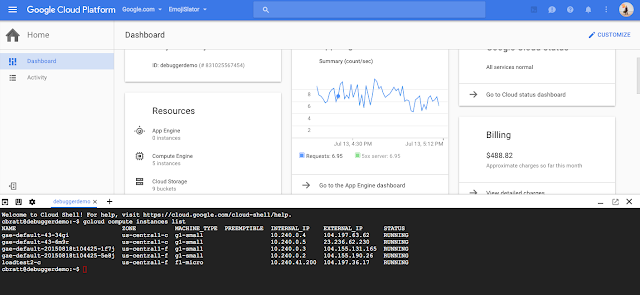
Cloud Shell provides a resizable window inside of the Cloud Console (click to enlarge)

To open Cloud Shell from the Cloud Console, simply click on the Cloud Shell icon in the top-right corner.

The Cloud Shell documentation has a variety of tutorials to help you get started. In addition, here are a few pro-tips:

To switch to a light theme, look under the gear icon
Cloud Shell supports the terminal multiplexer tmux. Toggle it on or off from Cloud Shell to use different options in various Cloud Console tabs.
To pop out the entire console window, click the pop out icon

As always, send us feedback using the “Send Feedback” link in the top right of the Cloud Console or within Cloud Shell under the gear icon. We’re excited to see how you use Cloud Shell and how we can make it even more useful.
Quelle: Google Cloud Platform

Building immutable entities into Google Cloud Datastore

Posted by Aleem Mawani, Co-Founder, Streak.com

Editor’s note: Today, we hear from Aleem Mawani, co-founder of Streak.com, a Google Cloud Platform customer whose customer relationship management (CRM) for Google Apps is built entirely on top of Google products: Gmail, Google App Engine and Google Cloud Datastore. Read on to learn how Streak added advanced functionality to the Cloud Datastore object storage system

Streak is a full blown CRM built directly into Gmail. We’re built on Google Cloud Platform (most heavily on Google App Engine) and we store terabytes of user data in Google Cloud Datastore. It’s our primary database, and we’ve been happy with its scalability, consistent performance and zero-ops management. However, we did want more functionality in a few areas. Instead of overwriting database entities with their new content whenever a user updated their data, we wanted to store every version of those entities and make them easy to access. Specifically, we wanted a way to make all of our data immutable.

In this post, I’ll go over why you might want to use immutable entities, and our approach for implementing them on top of Cloud Datastore.

There are a few reasons why we thought immutable entities were important.

We wanted an easy way to implement a newsfeed-style UI. Typical newsfeeds show how an entity has changed over time in a graphical format to users. Traditionally we stored separate side entities to record the deltas between different versions of a single entity. Then we’d query for those side entities to render a newsfeed. Designing these side entities was error prone and not easily maintainable. For example, if you added a new property to your entity, you would need to remember to also add that to the side entities. And if you forgot to add certain data to the side entities, there was no way to reconstruct that later down the line when you did need it — the data was gone forever.

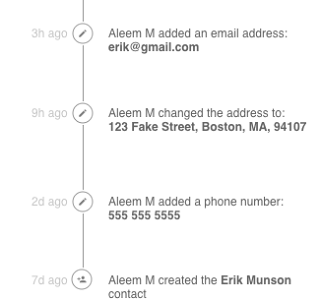
The “Contact” entity stores data about users’ contacts. Because it’s implemented as an immutable entity, it’s easy to generate a historical record of how that contact has changed over time.
Having immutable entities allows us to recover from user errors very easily. Users can rollback their data to earlier versions or even recover data they may have accidentally deleted (see how we implemented deletion below)1.
Potentially easier debugging. It’s often useful to see how an entity changed over time and got into its current state. We can also run historical queries on the number of changes to an entity – useful for user behaviour analysis or performance optimization.

Some contextBefore we go into our implementation of immutable entities on the Cloud Datastore, we need to understand some of the basics of how the datastore operates. If you’re already familiar with the Cloud Datastore, feel free to skip this section.

You can think of the Cloud Datastore as a key-value store. A value, called an entity in the datastore, is identified by its key, and the entity itself is just a bag of properties. There’s no enforcement of a schema on all entities in a table so the properties of two entities need not be the same.

The database also supports basic queries on a single table — there are no joins or aggregation, just simple table scans for which an index can be built. While this may seem limiting, it enables fast and consistent query performance because you will typically denormalize your data.

The most important property of Cloud Datastore for our implementation of immutable entities is “entity groups.” Entity groups are groups of entities for which you get two guarantees:
Queries that are restricted to a single entity group get consistent results. This means that a write immediately followed by a query will have results that are guaranteed to reflect the changes made by the write. Conversely, if your query is not limited to a single entity group you may not get consistent results (stale data).
Multi-entity transactions can only be applied within a single entity group (this was recently improved — Cloud Datastore now supports cross entity group transactions but limits the number of entity groups involved to 25).
Both of these facts will be important in our implementation. For more details on how the Cloud Datastore itself works, see the documentation.

How we implemented immutable entitiesWe needed a way to store every change we made to a single entity while supporting common operations for entities: get, delete, update, create and query. The overall strategy we took was to utilize two levels of abstraction — a “datastore entity” and a “logical entity.” We used individual “datastore entities” to represent individual versions of a “logical entity.” Users of our API would only interact with logical entities and each logical entity would have a key to identify it and support the common get, create, update, delete and query operations. These logical entities would be backed by actual datastore entities comprising the different versions of that logical entity. The most recent, or tip, version of the datastore entities represented the current value of the logical entity. First let’s start with what the data model looks like. Here’s how we designed our entity:

(click to enlarge)
The way this works is that we always store a new datastore entity every time the user would like to make a change to the entity. The most recent datastore entity has the isTip value set to true and the rest don’t. We’ll use this field later to query for a particular logical entity by getting the tip data store entity. This query is fast in the data store because all queries are required to have indexes. We also store the timestamp for when each datastore entity was created.

The versionId field is a globally unique identifier for each datastore entity. These IDs are automatically assigned by Cloud Datastore when we store the entity.

The consistentId identifies a logical entity — it’s the ID we can give to users of this API. All of the datastore entities in a logical entity have the same consistent ID. We picked the consistent ID of the logical entity to be equal to the ID of the first datastore entity in the chain. This is somewhat arbitrary, and we could have picked any unique identifier, but since the low level Cloud Datastore API gives us a unique ID for every datastore entity, we decided to use the first one as our consistent ID.

The other interesting part of this data model is the firstEntityInChain field. What’s not shown in the diagram is that every datastore entity has its parent (the parent determines the entity group) set to the first datastore entity in the chain. It’s important that all the datastore entities in the chain (including the first one) have the same parent and are thus in the same entity group so that we can perform consistent queries. You’ll see why these are needed below.

Here’s the same immutable entity defined in code. We use the awesome Objectify library with the Cloud Datastore and these snippets do make use of it.

public class ImmutableDatastoreEntity {@IdLong versionId;@ParentKey<T> firstEntityInChain;protected Long consistentId;protected boolean isTip;Key<User> savedByUser;}
So how do we perform common operations on logical entities given that they are backed by datastore entities?

Performing createsWhen creating a logical entity, we just need to create a single new datastore entity and use the Cloud Datastore’s ID allocation to set the versionId field and the consistentId field to the same value. We also set the parent key (firstEntityInChain) to point to itself. We also have to set isTip to true so we can query for this entity later. Finally we set the timestamp and the creator of the datastore entity and persist the entity to Cloud Datastore.

ImmutableDatastoreEntity entity = new ImmutableDatastoreEntity();entity.setVersionId(DAO.allocateId(this.getClass()));entity.setConsistentId(entity.getVersionId());entity.setFirstEntityInChain((Key<T>) Key.create(entity.getClass(), entity.versionId));entity.setTip(true);
Performing updates To update a logical entity with new data, we first need to fetch the most recent datastore entity in the chain (we describe how in the “get” section below). We then create a new datastore entity and set the consistentId and firstEntityInChain to that of the previous datastore entity in the chain. We set isTip to true on the new datastore entity and set it to false on the old datastore entity (note this is the only instance in which we modify an existing entity so we aren’t 100% immutable). 

We finally fill in the timestamp and user keys fields, and we’re ready to store the new datastore entity. Two important points on this: for the new datastore entity, we can let the datastore automatically allocate the ID when storing the entity (because we don’t need to use it anywhere else). Second, it’s incredibly important that we fetch the existing datastore entity and store both the new and old datastore entity in the same transaction. Without this, our data could become internally inconsistent.

// start transactionImmutableDatastoreEntity oldVersion = getImmutableEntity(immutableId)

oldVersion.setTip(false);ImmutableDatastoreEntity newVersion = oldVersion.clone();

// make the user edits needed

newVersion.setVersionId(null);newVersion.setConsistentId(this.getConsistentId());newVersion.setFirstEntityInChain(oldVersion.getFirstEntityInChain());

// .clone also performs the last two lines but just to be explicit this, just fyi

newVersion.setTip(true);
ofy().save(oldVersion, newVersion).now();

// end transaction
Performing gets Performing a get actually requires us to do a query operation to the datastore because we need to find the datastore entity that has a certain consistentId AND has isTip set to true. This entity will represent the logical entity. Because we want the query to be consistent, we must perform an ancestor query (i.e., tell Cloud Datastore to limit the query to a certain entity group). This only works because we ensured that all datastore entities for a particular logical entity are part of the same entity group.

This query should only ever return one result — the datastore entity that represents the logical entity.

Key ancestorKey = KeyFactory.createKey(ImmutableDatastoreEntity.class, consistentId);ImmutableDatastoreEntity e = ofy().load().kind(ImmutableDatastoreEntity.class).filter(“consistentId”, consistentId).filter(“isTip”, true).ancestor(ancestorKey) // this limits our query to just the 1 entity group.list() .first();

Performing deletes In order to delete logical entities, all we need to do is set the isTip of the most recent datastore entity to false. By doing this we ensure that the “get” operation described above no longer returns a result, and similarly, queries such as those described below continue to operate.

// wrap block in transactionImmutableDatastoreEntity oldVersion = getImmutableEntity(immutableId);oldVersion.setTip(false);ofy().save(oldVersion, newVersion).now(); Performing queries We need to be able to perform queries across all logical entities. However, when querying every datastore entity, we need to modify our queries so that they only consider the tip datastore entity of each logical entity (unless you explicitly want to find old versions of the data). To do this, we need to add an extra filter to our queries to just consider tip entities. One important thing to note is that we cannot do consistent queries in this case because we cannot guarantee that all the results will be in the same entity group (in fact we know for certain they are not if there are multiple results)

List<ImmutableDatastoreEntity> results = ofy().load().kind(ImmutableDatastoreEntity.class).filter(“isTip”, true).filter(/** apply other filters here */) .list();Performing newsfeed queriesOne of our goals was to be able to show how a logical entity has changed over time, so we must be able to query for all datastore entities in a chain. Again, this is a fairly straightforward query — we can just query by the consistentId and order by the timestamp. This will give us all versions of the logical entity. We can diff each datastore entity against the previous datastore entity to generate the data needed for a newsfeed.

Key ancestorKey = KeyFactory.createKey(ImmutableDatastoreEntity.class, consistentId);List<ImmutableDatastoreEntity> versions = ofy().load().kind(ImmutableDatastoreEntity.class).filter(“consistentId”, consistentId).ancestor(ancestorKey) .list();Downsides Using the design described above, we were able to achieve our goal of having roughly immutable entities that are easy to debug and make it easy to build newsfeed-like features. However, there are some drawbacks to this method:
We need to do a query any time we need to get an entity. In order to get a specific logical entity, we actually need to perform a query as described above. On Cloud Datastore, this is a slower operation than a traditional “get” by key. Additionally, Objectify offers built-in caching, which also can’t be used when trying to get one of our immutable entities (because Objectify can’t cache queries). To address this, we’ll need to implement our own caching in memcache if performance becomes an issue.
There’s no method to do a batch get of entities. Because each query must be restricted to a single entity group for consistency, we can’t fetch the tip datastore entity for multiple logical entities with just one datastore operation. To address this, we perform multiple asynchronous queries and wait for all to finish. This isn’t ideal or clean, but it works fairly well in practice. Remember that on App Engine there’s a limit of 30 outstanding RPCs when making concurrent RPC calls, so this only takes you so far.
High implementation cost for the first entity. We abstracted most of the design described above so that future immutable entities would be cheap for us to implement, however, the first entity wasn’t trivial to implement. It took us some time to iron out all the kinks, so it’s definitely only worth doing this if you very much need immutability or if you’ll be spreading the implementation cost across many use cases.
Entities are never actually deleted. By design, we don’t delete immutable entities. However, from a user perspective, they may have the expectation that once they delete something in our app,  we actually delete the data. This also might be the expectation in some regulated industries (i.e., healthcare). For our use case, it wasn’t necessary, but you may want to develop a system that maps over your dataset and finds fully deleted logical entities and deletes all of the datastore entities representing them in some batch task periodically. 
Next stepsWe’ve only been running with immutable entities in production for a little while, and it remains to be seen what problems we’ll face. And as we implement a few more of our datasets as immutable entities, it will become clear whether the implementation costs were worth the effort. Subscribe to our blog to get updates.

If this sort of data infrastructure floats your boat, definitely reach out to us as we have several openings on our backend team. Check out our job postings for more info.

Discuss on Hacker News

1This is very similar to the idea of MVCC (https://en.wikipedia.org/wiki/Multiversion_concurrency_control) which is how many modern databases implement transactions and rollback.

Quelle: Google Cloud Platform
Google and Facebook share proposed new Open Rack Standard with 48-volt power architecture

Posted by Debosmita Das, Technical Program Manager and Mike Lau, Technical Lead Manager

Since joining OCP earlier this year, Google has been actively collaborating with Facebook around the new Open Rack Standard. Together we’ve been working with the Open Compute Project through the OCP Incubation Committee, and today we’re pleased to share our Open Rack v2.0 Standard. The proposed v2.0 standard will specify a 48V power architecture with a modular, shallow-depth form factor that enables high-density deployment of OCP racks into data centers with limited space.

Google developed a 48V ecosystem with payloads utilizing 48V to Point-of-Load technology and has extensively deployed these high-efficiency, high-availability systems since 2010. We have seen significant reduction in losses and increased efficiency compared to 12V solutions. The improved SPUE with 48V has saved Google millions of dollars and kilowatt hours.

Our contributions to the Open Rack Standard are based on our experiences advancing the 48V architecture both with our internal teams as well as industry partners, incorporating the design expertise we’ve gained over the years.

In addition to the mechanical and electrical specifications, the proposed new Open Rack Standard V2.0 builds on the previous 12V design. It takes a holistic approach including details for the design of 48V power shelves, high-efficiency rectifiers, rack management controllers and rack-level battery backup units.

We’ve shared these designs with the OCP community for feedback, and will submit them to the OCP Foundation later this year for review. We’re looking forward to presenting the proposed standard to the OCP Engineering Workshop, August 10 at the University of New Hampshire.

If accepted, these standards will be Google’s first contributions to the OCP community, with the goal of bridging the transition from 12V to 48V architecture with ready-to-use deployment solutions for 48V payloads. We look forward to continued collaboration with adopters and contributors as we continue to develop new technologies and opportunities.
Quelle: Google Cloud Platform