New Application Manager brings GitOps to Google Kubernetes Engine

Kubernetes is the de facto standard for managing containerized applications, but developers and app operators often struggle with end-to-end Kubernetes lifecycle management—things like authoring, releasing and managing Kubernetes applications. To simplify the management of application lifecycle and configuration, today we are launching Application Manager, an application delivery solution delivered as an add-on to Google Kubernetes Engine (GKE). Now available in beta, Application Manager allows developers to easily create a dev-to-production application delivery flow, while incorporating Google’s best practices for managing release configurations. Application Manager lets you get your applications running in GKE efficiently, securely and in line with company policy, so you can succeed with your application modernization goals. Addressing the Kubernetes application lifecycleThe Kubernetes application lifecycle consists of three main stages: authoring, releasing and managing. Authoring includes writing the application source code and app-specific Kubernetes configuration. Releasing includes making changes to code and/or config, then safely deploying those changes to different release environments. The managing phase includes operationalizing applications at scale and in production. Currently, there are no well defined standards for these stages and users often ask us for best practices and recommendations to help them get started.Lifecycle of Kubernetes applicationIn addition, Kubernetes application configurations can be too long and complex to manage at scale. In particular, an application that is deployed across test, staging and production release environments might have duplicate configurations stored in multiple Git repositories. Any change to one config needs to be replicated to the others, creating the potential for human error. Application Manager embraces GitOps principles, leveraging Git repositories to enable declarative configuration management. It allows you to audit and review changes before they are deployed to environments. It also automatically scaffolds and enforces recommended Git repository structures, and allows you to perform template-free customization for configurations with Kustomize, a Kubernetes-native configuration management tool.Application Manager runs inside your GKE cluster as a cluster add-on, and performs the following tasks: It pulls Kubernetes manifests from a Git repository (within a git branch, tag or commit) and deploys the manifests as an application in the cluster. It reports metadata about deployed applications (e.g. version, revision history, health, etc.) and visualizes the applications in Google Cloud Console.Releasing an application with Application ManagerNow, let’s dive into more details on how to use Application Manager to release or deploy an application, from scaffolding Git repositories, defining application release environments, to deploying it in clusters. You can do all those tasks by executing simple commands in appctl, Application Manager’s command line interface. Here’s an example workflow of how you can release a “bookstore” app to both staging and production environments. First, initialize it by running appctl init bookstore –app-config-repo=github.com/$USER_OR_ORG/bookstore. This creates two remote Git repositories: 1) an application repository, for storing application configuration files in kustomize format (for easier configuration management), and 2) a deployment repository, for storing auto-generated, fully-rendered configuration files as the source of truth of what’s deployed in the cluster. After the Git repositories are initialized, you can add a staging environment to the bookstore app by running appctl env add staging –cluster=$MY_STAGING_CLUSTER, and do the same for prod environment. At this point, the application repository looks like this: Here, we are using kustomize to manage environment-specific differences in the configuration. With kustomize, you can declaratively manage distinctly customized Kubernetes configurations for different environments using only Kubernetes API resource files, by patching overlays on top of the base configuration.When you’re ready to release the application to the staging environment, simply create an application version with git tag in the application repository, and then run appctl prepare staging. This automatically generates hydrated configurations from the tagged version in the application repository, and pushes them to the staging branch of the deployment repository for an administrator to review. With this Google-recommended repository structure, Application Manager provides a clean separation between the easy-to-maintain kustomize configurations in the application repository, and the auto-generated deployment repository—an easy-to-review single source of truth; it also prevents these two repositories from diverging. Once the commits to hydrated configurations are reviewed and merged into the deployment repository, run appctl apply staging to deploy this application to the staging cluster. Promotion from staging to prod is as easy as appctl apply prod –from-env staging. To do rollback in case of failure, simply run appctl apply staging –from-tag=OLD_VERSION_TAG. What’s more, this appctl workflow can be automated and streamlined by executing it in scripts or pipelines. Application Manager for all your Kubernetes apps Now, with Application Manager, it’s easy to create a dev-to-production application delivery flow with a simple and declarative approach that’s recommended by Google. We are also working with our partners on the Google Cloud Marketplace to enable seamless updates of the Kubernetes applications you procure there, so you get automated updates and rollbacks of your partner applications. You can find more information here. For a detailed overview of Application Manager, please see this demo video. When you’re ready to get started, follow the steps in this tutorial.
Quelle: Google Cloud Platform

Womply: Helping small businesses compete through API management

Editor’s note: Today we hear from Brad Plothow and Mihir Sambhus from Womply, a software-as-a-service company that makes CRM, email marketing, and reputation management software for small businesses. The company recently developed APIs to help small businesses use data to gain a clearer picture of their markets—and how to compete in them.Small businesses today have a lot of opportunities to expand services and improve everyday operations. With access to the right data and resources, they can take advantage of digital advertising, reviews sites, and customer insights. These can help them attract customers and foster long-term customer relationships, so they can better compete with large corporations and native e-commerce businesses.Our mission at Womply is to help small businesses thrive in a digital world. Since 2011, we’ve offered software-as-a-service solutions for small businesses, serving more than 450,000 businesses every day with our software. This system includes a treasure trove of data about the relationship between local businesses and their customers. We started wondering if there was a way that we could open up our data platform to help small businesses gain new insights through their other applications.To do that, we decided to create APIs, which would give developers and businesses a secure and controlled way to access our data platform. While we have a microservice architecture that we use for internal systems, we had never before created a scalable API program. When we looked into API solutions, we found that the Apigee API Management Platform had everything that we needed to bring security, speed, and self-service to our new API program.Cultivating relationships with developersIf we want our data platform to improve local commerce for businesses and consumers, the first step is to win over developers. They’re the ones who will be building the apps, services, and integrations with our APIs, after all. It was very important to us that we create a developer portal that was scalable and extremely easy to use.The Apigee developer portal provides simple and secure access to all of the information that developers need, from signing up for the portal, to reading documentation about how to use the APIs, to a sandbox environment for experimentation. The portal encourages self-service, so we don’t need a support team to walk developers through the development process.We also wanted to boost the profile of our API program by announcing our developer portal at Money20/20 USA, an annual conference for fintech and finance companies. It would have taken us at least three months to build a developer portal on our own, and we would have missed this important deadline. Taking advantage of the built-in Apigee developer portal, we were ready to go live during the conference. In addition, since our team didn’t need to worry about building the portal, we could spend more time creating a bigger library of APIs and proxies for developers.Fast time-to-market with ApigeeApigee makes it very easy for our team to develop and release APIs. It only takes one person to launch each new API, which means that we can release more features quickly. We’ve released four APIs so far, and plan to make quite a few more available through our developer portal this year.One of the first APIs we released is a benchmarking API, which lets businesses compare their own financial performance to average performance of comparable businesses in their geography. For example, someone running a restaurant in downtown San Francisco could compare their nightly revenue with similar restaurants in the same area. Are they struggling compared to their competition, or are they leading the pack? Are they stagnating, or improving relative to the market? Using this API, any developer can easily add benchmarking capabilities to their apps or services.Going forward, developers could also use APIs to connect our sales transaction data to online marketing data. This would enable small businesses to attribute offline sales to online marketing and determine whether their Google ads or Facebook banners are paying off. Offline attributions are challenging, but APIs make it possible.While we have planned a roadmap for APIs and proxies, the reality is that developers will probably surprise us with use cases that no one has even thought of yet. We have a waitlist of developers eager to sign up to our developer portal, but we’re onboarding developers slowly so that we can make sure that we’re releasing the right APIs for people’s needs.Ready for any challengesMonetization is another important part of our API roadmap, to increase our revenue streams. We are considering both an à la carte model, where developers can subscribe to one or two APIs, and a tiered package model, where developers get access to multiple APIs but pay different amounts depending on the number of API calls made. Because Apigee offers flexible monetization, we can implement any type of monetization system and adjust our strategy based on the analytics reports provided by the platform.We hope that by sharing access to our data through APIs, local businesses will gain new insights and efficiencies that will help them thrive. Along the way, we’re confident that Apigee will handle any future API use cases that we want to explore.
Quelle: Google Cloud Platform

New Dialogflow Mega Agent for Contact Center AI increases intents by 10 times to 20,000

Contact centers are one of the most important ways that businesses interact with customers. But, consistently providing great customer interactions over the range of potential conversations presents a number of complex challenges, challenges that businesses are increasingly turning to artificial intelligence (AI) and the cloud to help solve.We recently announced Contact Center AI as GA, with Virtual Agent and Agent Assist to help businesses consistently deliver great customer experiences. To help improve your customer interactions even further, today we’re announcing significant updates to Dialogflow, the core technology of Contact Center AI, including increasing the number of intents available to your virtual agents by 10 times to 20,000. Dialogflow is an industry-leading platform for building chatbots and interactive voice responses (IVR), and powering contact centers globally with natural and rich conversational experiences. Increasing the number of intents means more training phrases, actions, parameters, and responses to help your Virtual Agent interact with customers and get their issues resolved more efficiently. In addition to added intents, we’ve made some other updates to Dialogflow to help you deliver the experience that your customers expect, while making it easier than ever to scale your Contact Center implementation. Here’s an overview of the updates we’re sharing today: Dialogflow Mega Agent (Beta): Get better customer conversations with up to 20,000 intents  Dialogflow Agent Validation (GA): Identify agent design errors in real time for faster deployment and higher quality agents Dialogflow Versions and Environments (GA): Create multiple versions of agents and publish them to different environments Dialogflow Webhook Management API (GA): Create and manage your queries more quickly and easilyLet’s take a closer look at each feature.Mega Agent: Answer 10x more customer questionsWhen your customer says or writes something, Dialogflow captures their request and matches it to the best intent in the agent. More intents lead to better customer conversations. A regular Dialogflow agent comes with a limit of 2,000 intents—which is the most intents available in the market, based on public information. With Dialogflow Mega Agent, now in beta, you can combine multiple Dialogflow agents into a single agent, and expand your intent limit by 10 times to 20,000 intents. With increased intents, customers can have more natural, seamless conversations, pivot intents and questions when they want, and get their questions covered. This greatly increases scale and your ability to tackle more use cases, to better serve your customers’ needs and solve their problems. Dialogflow Mega Agent also makes it easier for developers to create and manage their Dialogflow experience. If you have multiple teams building an agent, each team can now be responsible for one sub-agent, simplifying change conflicts and creating better governance across teams.Companies are already using Dialogflow Mega Agent to provide a more seamless and integrated customer experience: “At KLM we are building multiple (chat)bot services using Dialogflow,” said Joost Oremus, Head of Social Technology at KLM Royal Dutch Airlines. “As travel is a complex product, making sure that our customers are guided towards the right agent (both human agent and multiple automated agents) can be challenging. Our first trial experience with Mega Agent shows promising results in solving this challenge for us.”Agent Validation: Better conversations lead to better customer experiences Frustrating interactions with your contact center is a sure way to lose customers. Yet, an internal study showed that 80% of Dialogflow agents had easy-to-fix quality issues. Dialogflow’s Agent Validation helps eliminate these negative interactions by helping designers identify errors to create high-quality agents and improve customer experiences.It does this by highlighting quality issues in the Dialogflow agent design—such as overlapping training phrases, wrong entity annotations, and other issues—and giving developers real-time updates on issues that can be corrected. Reducing errors leads to faster bot deployment, and ultimately, higher quality Dialogflow agents in production. Contact Center AI is designed to make implementation as easy as possible. The following two features simplify the deployment stage even further, so your developers can spend their time on testing and reiterating on products. Versions & Environments: Create, test, and deploy your agent, all in one placeVersions and Environments, now GA, lets you create multiple versions of your agent and publish them to a variety of custom environments, including testing, development, staging, production, and so on. This means that developers can now test different agent versions, track changes, and manage the entire deployment process in the Dialogflow agent itself. Webhook Management API: Reduce webhook response time and save developer resourcesWith Webhook Management API, you can now create and manage webhooks, making it easier for enterprises to programatically fulfill their queries. As Dialogflow processes and fulfills millions of queries daily with webhook, this new API—which was previously limited to the Dialogflow console—will help enterprises speed up their agent design process. A great customer experience builds loyalty and leads to repeat business. With these updates to Dialogflow, we aim to make developing a great customer experience easier than ever before (Dialogflow pricing is available here). You can access all these features today through your Dialogflow console or API, which are all available for your Contact Center AI integrations.
Quelle: Google Cloud Platform

Here to serve Korea’s businesses with a new GCP region in Seoul

한국어 버전South Korea is a digital powerhouse—a manufacturing giant with an emphasis on robotics and AI, a massive gaming market, and a leader in smartphone penetration. To better help our customers deliver digital services closer to this engaged market, we’re happy to announce that our new Google Cloud Platform (GCP) region in Seoul is officially open for business.Designed to support Korean customers, the Seoul region is our first GCP region in South Korea and eighth in Asia Pacific. With this region, Google Cloud now offers 21 regions and 64 zones across 16 countries worldwide.A cloud made for KoreaThe launch of our new Seoul region (asia-northeast3) brings lower latency access to data and applications for both local and global companies doing business in South Korea. The new Seoul region is comprised of three zones from the start, enabling Google Cloud customers and partners to run high availability workloads and store their data locally.The Seoul region launches with our standard set of services, including Compute Engine, Google Kubernetes Engine, Bigtable, Spanner, and BigQuery. Hybrid cloud customers can seamlessly integrate new and existing deployments with help from our regional partner ecosystem, and via multiple Dedicated Interconnect locations.Visit our cloud locations page for a complete list of services available in the Seoul region.What customers and partners are sayingThe presence of the new Seoul region lets new and existing customers in South Korea leverage advanced Google Cloud technologies to drive innovation.“Google Cloud’s flexibility and extensibility help us provide various services more reliably and economically. And now with Seoul as a region, we can have an even bigger impact.” – Soobaek Jang, VP, AI Server Development,  Samsung Electronics“As South Korea’s largest gaming company, we’re partnering with Google Cloud for game development, infrastructure management, and to infuse our operations with business intelligence. Google Cloud’s region in Seoul reinforces its commitment to the region and we welcome the opportunities this initiative offers our business.” – Chang-Whan Sul, CTO, Netmarble“SK Telecom uses Google Cloud to establish a data pipeline to support data processing and modeling, and unlock the potential of AI and machine learning. We look forward to exploring the opportunities presented by the new region in Seoul.” – Yoo-sun Jeong, Head of AI Product Engineering, SK Telecom“We’re providing unmanned consultation service in 53 contact centers worldwide using Dialogflow on Google Cloud, reducing consultation time per case and increasing customer satisfaction. We look forward to working with Google Cloud further with the opening of the Seoul region.” – Hyekyung Pak, Principal, CS Information Strategy Team, LG Electronics“We use Google Cloud AI and analytics to reduce dropout rates and increase advertising exposure for our flagship mobile puzzle game Anipang. The Google Cloud region in Seoul will provide new opportunities for developers in Korea to create and monetize games while supporting rapid growth in users.” – Changmyoung Lee, CTO, SundayToz“At Bespin Global, we hold 100+ Google Cloud certifications in Korea and China and are the first Asia-Pacific-headquartered partner to achieve the status of Premier Partner and Managed Services Provider with Google Cloud. This means the number of customers successfully introduced to Google Cloud through Bespin Global and the number of future customers that want to be introduced to Google Cloud have both increased. We expect even more activity with the launch of the Google Cloud Seoul region.”  – Hanjoo Lee, Co-founder and CEO, Bespin GlobalWhat’s next2020 will be a tremendous year for Google Cloud as we continue to expand our global infrastructure. Visit our Seoul region page for more details about the region, and our cloud locations page for updates on the availability of additional services and regions. Then, stay tuned as we launch more zones and regions throughout the year, including locations in Salt Lake City, Las Vegas, and Jakarta.
Quelle: Google Cloud Platform

Your cloud, your infrastructure: Announcing Anthos Ready Storage

We launched Anthos to provide customers with a platform to deliver and manage applications across all types of environments and infrastructure—most commonly, hybrid and multi-cloud environments—leveraging containers and Kubernetes.To date, we have seen an extremely enthusiastic response from customers who want to run key workloads on Anthos. Our partners are enabling customers to deliver solutions that leverage Anthos in new and exciting ways. This includes storage, which is a key consideration as organizations look to manage their data across hybrid or multi-cloud deployments in containerized environments.Today, we’re excited to announce a new qualification for partner storage solutions:Anthos Ready Storage. This qualification recognizes partner solutions that have met a core set of requirements to run optimally with Anthos running on-premises, and helps organizations select storage solutions that are deployed with Anthos.The first set of partners to achieve the Anthos Ready Storage qualification for Anthos on-premise are Dell EMC, HP Enterprise, NetApp, Portworx, Pure Storage, and Robin.io. All Anthos Ready Storage partners have met multiple criteria, including:Demonstrated core Kubernetes functionality including dynamic provisioning of volumes via open and portable Kubernetes-native storage APIs.A proven ability to automatically manage storage across cluster scale-up and scale-down scenarios.A simplified deployment experience following Kubernetes practices.“Speed is the new scale in the world upset by digital transformation, the complex reality is that data and resources live anywhere and everywhere.” said Anthony Lye, senior vice president and general manager, Cloud Data Services at NetApp. “We’re excited to expand our support for customers on Anthos in the hybrid multicloud as a part of the Anthos Ready Storage initiative. Together, Google Cloud’s Anthos and NetApp Trident and Kubernetes-ready storage offer a proven solution that helps customers manage their data on public cloud, on premises and hybrid cloud environments.”“Speed to market is a key differentiator as companies develop next generation, cloud-native applications. The emergence of Kubernetes is driven by that need for agility,” said Jay Snyder, SVP Global Alliances, Dell Technologies. “We’re pleased to participate in this program, as Dell EMC PowerMax and VxFlex are ideal infrastructure options when paired with Google Cloud Anthos to deploy Kubernetes in multi-cloud environments.”“Businesses are moving rapidly to modernize their applications using container based architectures,” said Omer Asad, VP and GM Primary Storage & Data Services at HP Enterprise. “We’re excited to expand our work with Google Cloud to qualify our fully-managed, container-based storage solutions such as HPE Nimble Storage for the Anthos platform.”We’re committed to meeting customers where they are, and providing them with the ability to run key workloads and applications in the environment best suited for their business. To learn more about the Anthos Ready Storage program, please visit here. To get started with Anthos, contact us.
Quelle: Google Cloud Platform

Introducing the Cloud Monitoring dashboards API

Using dashboards in Cloud Monitoring makes it easy to track critical metrics across time. Dashboards can, for example, provide visualizations to help debug high latency in your application or track key metrics for your applications. Creating dashboards by hand in the Monitoring UI can be a time-consuming process, which may require many iterations. Once dashboards are created, you can save time by using them in multiple Workspaces within your organization. Today, we’re pleased to announce that the Cloud Monitoring dashboards API is generally available from Google Cloud. The dashboards API lets you read the configuration for existing dashboards, create new dashboards, update existing dashboards and delete dashboards that you no longer use. These methods follow the REST and gRPC semantics and are consistent with other Google Cloud APIs. A common use case for the dashboards API is to deploy a dashboard developed in one Monitoring Workspace into one or more additional Workspaces. For example, you may have a separate Workspace for your development, QA and production environments (learn more on selecting Workspace structures). In one of the environments, you may have developed a standard operational dashboard that you’d like to use across all your Workspaces. By first reading the dashboard configuration via the projects.dashboards.get method, you can save the dashboard configuration and then use the projects.dashboards.create method to create the same dashboard across the other environments.How the dashboard API works When creating a dashboard, you have to specify the layout and the widgets that go inside that layout. A dashboard must use one of three layout types: GridLayout, RowLayout or ColumnLayout. GridLayout divides the available space into vertical columns of equal width and arranges a set of widgets using a row-first strategy.RowLayout divides the available space into rows and arranges a set of widgets horizontally in each row.ColumnLayout divides the available space into vertical columns and arranges a set of widgets vertically in each column.The widgets available to place inside the layouts include an XyChart, Scorecard and Text object.XyChart: displays data using X and Y axes. Charts created through the Google Cloud Console are instances of this widget.Scorecard: displays the latest value of a metric, and how this value relates to one or more thresholds. Text: displays textual content, either as raw text or a markdown string. Here’s an example of the JSON dashboard configuration, which specifies a GridLayout with a single XyChart widget. You can see other examples in our sample dashboards and layouts documentation.Dashboard configuration as a templateA simple approach to building a dashboard configuration is to first create a dashboard in the Cloud Monitoring console, then use the dashboards API projects.dashboards.get method to export the JSON configuration. Then, you can share that configuration as a template either via source control or however you normally share files with your colleagues.You can try out the dashboard API in the Try this API section of the API documentation, and learn more about managing dashboards by reading the Managing Dashboards documentation. We’re working on features to make the API even more useful, including through the gcloud command line. Also, contributors are discussing and planning the Terraform module for the Monitoring Dashboard API in github.A special thanks to our colleagues David Batelu, Technical Lead and Joy Wang, Product Manager, Cloud Monitoring, for their contributions to this post.
Quelle: Google Cloud Platform

New AMD EPYC-based Compute Engine family, now in beta

At Google Cloud, we want you to be able to choose the best VMs for your workloads. Today, we’re excited to announce a new addition to our general purpose VMs: the N2D family, built atop 2nd Gen AMD EPYC™ Processors. N2D VMs are a great option for both general-purpose workloads and workloads that require high memory bandwidth.General-purpose workloads that require a balance of compute and memory, like web applications and databases, can benefit from N2D’s performance,  price, and features. N2D VMs are designed to provide you with the same features as N2 VMs including local SSD, custom machine types, and transparent maintenance through live migration, while features like large machine types with up to an industry-leading 224 vCPUs, the largest general purpose VM on Compute Engine. At the same time, N2D instances provide savings of up to 13% over comparable N-series instances, and up to a 39% performance improvement on the Coremark benchmark compared to comparable N1 instances1.HPC workloads such as crash analysis, financial modeling, rendering and reservoir analysis, will benefit from the N2D machine types configured with 128 and 224 vCPUs, which offer up to 70% higher platform memory bandwidth than comparable N1 instances. This, combined with higher core counts, provides over a 100% performance improvement on a variety of representative benchmarks, including Gromacs and NAMD, compared to n1-standard-96 vCPUs. N2D machine type detailsN2D VMs are now available in beta from us-central1, asia-southeast1, and europe-west4, with more regions on the way! You can launch them on-demand or as preemptible VMs.When you sign up for committed use discounts, you can save up to 55% for three-year commitments versus on-demand pricing. Long-running N2D VMs can take advantage of sustained use discounts, and automatically save up to 20%. You can also configure N2D VMs as predefined machine types with vCPU to memory ratios of 1:1, 1:4, and 1:8,  up to 224 vCPUs. You can also create custom machine types with N2Ds, helping you meet the needs of diverse workloads.Get startedIt’s easy to get started with N2D VMs—simply visit the Google Cloud Console and launch one! To learn more about N2D VMs or other Compute Engine VM options, check out our machine types and our pricing pages.1. N2D-standard-32 performed 39% better than N1-standard-32 when evaluated using Coremark.
Quelle: Google Cloud Platform

Showing the C++ developer love with new client libraries

We use a lot of C++ at Google, and we’ve heard that many of you do as well. So whether you’re using C++ for your next amazing game, your high-frequency trading platform, your massively parallel scientific computations, or any of a variety of other applications, we want Google Cloud to be an excellent platform for you.To that end, we are happy to say that we’re now building open-source C++ client libraries to help you access Google Cloud services. These are idiomatic C++ libraries that we intend to work well with your application and development workflow. Already, hundreds of GCP projects use generally available C++ libraries every day, including Google Cloud Storage (example code) and Cloud Bigtable (example code). We also have a beta release of our Cloud Spanner C++ library (example code), and we expect it to become generally available very soon. And we’re actively working on open-source client libraries for all the remaining cloud services. Several of these libraries are already being used by important Google services handling $IMPRESSIVE_NUMBER of data per $TIME_UNIT.If you’re looking for more C++ client libraries, please let us know how we can help. You can contact your sales rep, or even feel free to directly contact the engineers by filing issues on our GitHub project page. We look forward to hearing from you and helping you get the most out of Google Cloud with your C++ application!
Quelle: Google Cloud Platform

Logging + Trace: love at first insight

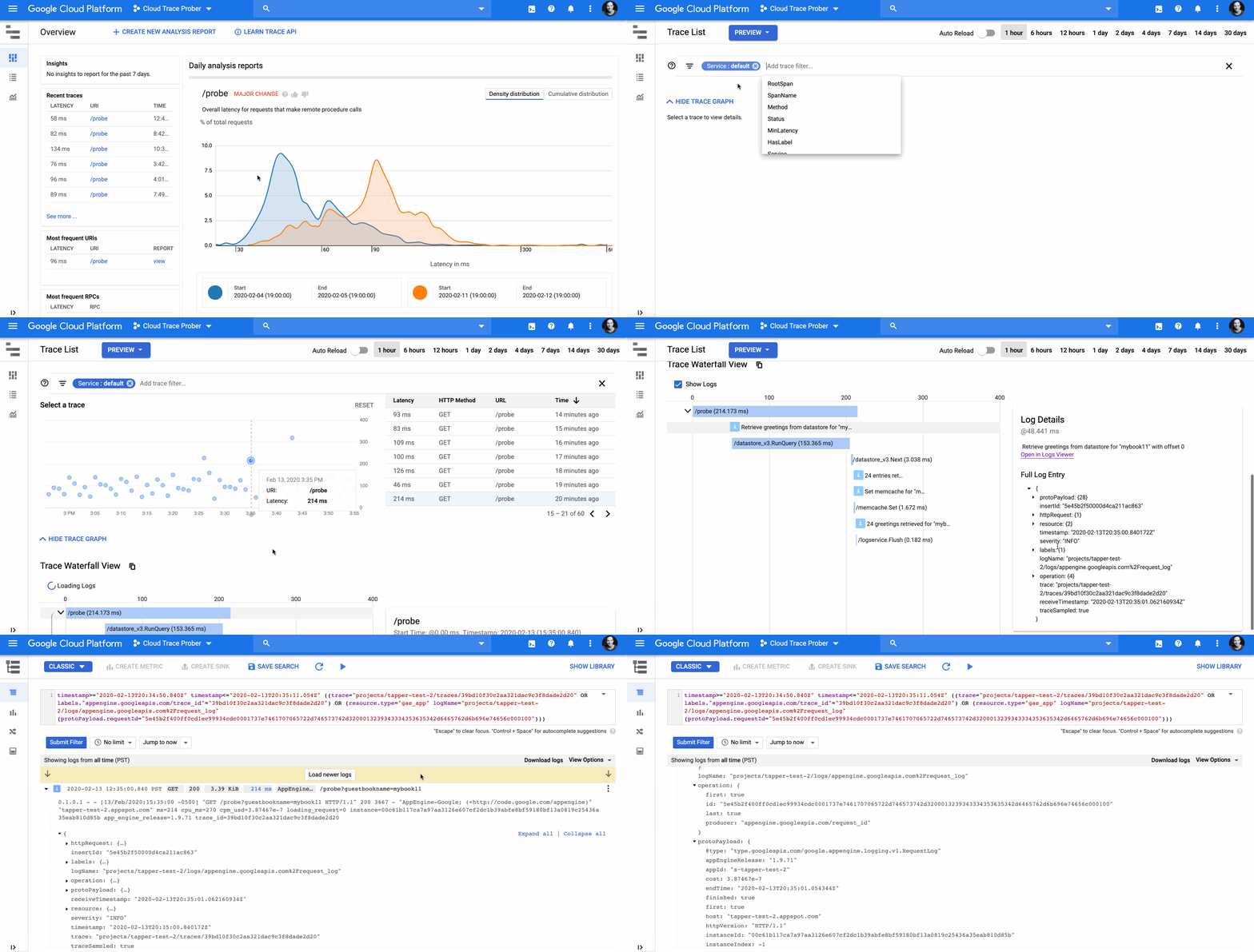
Meet Stackdriver Logging, a gregarious individual who loves large-scale data and is openly friendly to structured and unstructured data alike. Although they grew up at Google, Stackdriver Logging welcomes data from any cloud or even on-prem. Logging has many close friends, including Monitoring, BigQuery, Pub/Sub, Cloud Storage and all the other Google Cloud services that integrate with them. However, recently, they are looking for a deeper relationship to find insight.Now meet Stackdriver Trace, a brilliant and organized being. Trace also grew up at Google and is a bit more particular about data, making sense out of the chaos of distributed systems. Logging and Trace were brought together by mutual friends, such as Alex Van Boxel, cloud architect at Veepee. “Tracking down performance issues is like solving a murder mystery, having tracing and logging linked together is a big help for the forensics team,” he says. With a strong union, Trace and Logging are a match made in heaven: Developers are able to see exactly what is happening with their code, and how it fits within other services in the ecosystem. By embedding logs, Trace is able to show detail of what happened during a particular service call. Added to Trace’s ability to show the complete request, the user has full stack observability. By adding Trace IDs to logs, Logging is able to filter for logs within a trace, and link into end-to-end Traces. You can see not only how your code functions, but the context in which it does.  What Trace loves most about Logging“Logging, you complete me“  — Trace Complete your workflow by showing logs inline for each service call. In the Trace UI, you can understand logs in context by showing logs in line as events for each service call.Drill into the logs that relate to a particular service in the logs view. You can understand how your code is operating at a deeper level by linking from the Trace UI right into the relevant log entry in Stackdriver Logging.Search across the entire request. In the Trace UI, you can filter for labels on any service in the trace, showing logs for a downstream service when an upstream condition is true.What Logging loves most about Trace“Trace, you help me be a better platform.”  — LoggingSee logs from the entire request. In the logs viewer, filtering by Trace ID shows you all logs for that specific request.Drill into a trace of the complete request. In the logs viewer, you can drill into the trace of the complete request right from the log entry of interest, which helps understand richer and more complete context. Diagnose the root cause of errors. In the Trace UI, you can search for error traces, and easily see which downstream service is responsible for the error.Here’s how you can share the happy couple’s love: Explore the hidden superpowers of Stackdriver LoggingGet started with Stackdriver TraceGet started with LoggingAdd log Trace IDs to your application logs
Quelle: Google Cloud Platform

Taking a practical approach to BigQuery slot usage analysis

Google BigQuery is a fully managed serverless solution for your enterprise data warehouse workloads. Nothing could be easier than that: Just upload your data via batch or streaming and start running your queries. The underlying system will seamlessly take care of providing the infrastructural resources needed to complete your different jobs. It seems like magic, right? Especially when you think about the fact that, behind the scenes, there is a large-scale distributed system with a multitude of parallel tasks executed by dozens of microservices spread across several availability zones across your selected Google Cloud region (find more details about BigQuery technology).  But what if you want more visibility into the power under the hood? In this blog post, we’ll dive into all the currently available options to monitor and analyze resource usage. We’ll also describe the newly available extension to INFORMATION_SCHEMA views, now in beta, that offers you practical access to the underlying data. Let’s start by exploring the computational capacity unit we use to understand the load of the system.BigQuery’s computational capacity unit: the slotEvery time you perform a query, there are several back-end tasks that need to be completed (such as reading data from tables, pruning data that is not useful anymore, performing eventual aggregations, etc.). Each task, executed on an ad-hoc microservice, requires an adequate amount of computational power in order to be fulfilled. The slot is the computational capacity unit to measure that power. The BigQuery engine dynamically identifies the amount of slots needed to perform a single query, and background processes will transparently allocate the adequate computation power needed to accomplish the task.So, it’s essential to understand how to monitor and analyze slot usage, because that lets your technical team understand if there are any bottlenecks, then allows the business to choose the best pricing model (on-demand vs. flat-rate).We’ll now analyze three different strategies to gain better visibility of slot usage and see how you can get started using them:Slot usage analysis with system tablesReal-time usage monitoring with StackdriverSlot usage analysis with BigQuery audit logs Slot usage analysis with system tablesWe’re announcing an extended version of INFORMATION_SCHEMA views that contain real-time information about BigQuery jobs. This is part of our internal series of views, called INFORMATION_SCHEMA, that lets you extract useful information related to datasets, routines, tables and views. With a simple query, you can access a series of metadata that facilitate the analysis of the current data warehouse definition (i.e., tables list, descriptions of the fields, etc).This new extended version makes it easier to analyze slot usage (and other resources as well) because all the jobs information needed is just a query away.Here’s an example. Let’s assume that you want to understand last month’s daily consumption of slots split by users (all together with other information) within a single project. The query you have to write is really simple:The pivotal element here is total_slot_ms field, which contains the total amount of slots per millisecond used by a query. That’s the total number of slots consumed by the query over its entire execution time, considered in milliseconds. If you want to compute the average slot usage of the query, divide the value by the milliseconds duration of the query. You can do that by subtracting the value of endTime field from creationTime field. For example, if you have a 10-second query that used 20,000 totalSlotMs, it means that the average slot usage is 2: 20.000/10*1000.If you continue digging into the column definitions of the views, you will find a lot of information that will enable you to implement different kinds of analysis. You can, for example, easily compute the most expensive queries within your organization, find users who are heavily issuing queries, understand what the most expensive projects are, and also perform deep analysis on single queries by studying their query stages. Since details are available within one second of the job completion, you can use that information to implement your own triggers (e.g., once a load job has been successfully completed, launch the query to clean and transform the data for production usage).Note that the data is typically available within seconds, and jobs data is retained for a period of 180 days. If you want to maintain a backup of the data for historical reasons or to perform analysis later, use scheduled queries to automate the export of the data in an ad-hoc (partitioned) table. And keep in mind that real-time slot usage can fluctuate over the runtime of a query. To get deeper into the details, try this open-source solution to visualize slots consumption.Real-time slot usage monitoring with StackdriverIf you want instead to monitor in real time the slot usage of your project, Stackdriver is the place to go. It lets you: Have an immediate overview of the project slot usage, thanks to the native slot utilization chartCreate ad-hoc charts using several available metrics (i.e., slots allocated or slots allocated per job type)Create ad-hoc alerts to receive notifications when a certain event occurs (i.e., when the number of available slots is under a certain threshold for more than five minutes)Check out this guide on implementing monitoring for BigQueryhttps://cloud.google.com/bigquery/docs/monitoring.Slot usage analysis with BigQuery audit logsAnother possible option to get access to the underlying information is exploring BigQuery audit logs. These logs contain a multitude of information, including slot usage. You have two ways to query the data:Stackdriver Logging, if you want to perform a quick search of a precise value of interest BigQuery, if you want to perform a more in-depth analysisStackdriver LoggingFrom the Stackdriver Logging page;Select BigQuery as resourceSelect the desired time frame (such as last hour or no limit) Filter for all the INFO entries Search for the ones containing getQueryResult method nameOnce you’ve found the query you were looking for, expand its payload and look for the entry of interest. For example,  protoPaylod.serviceData.jobGetQueryResultResponse.jobStatistics.totalSlotMs represents the total amount of slots-ms as described earlier.If you want to perform more in-depth analysis, you can use BigQuery. First, create a sink to transfer the data from Stackdriver Logging to BigQuery. Then you can perform more complex queries to analyze the slot usage of your project. For example, if you use the same query as above, this will be the outcome:We’re excited to see how you’ll use these tools to build your customized solution. Learn more here about organizing slots. And your next step might be to use Data Studio to generate custom dashboards to be shared within your organization.
Quelle: Google Cloud Platform




