How Udacity students succeed with Google Cloud

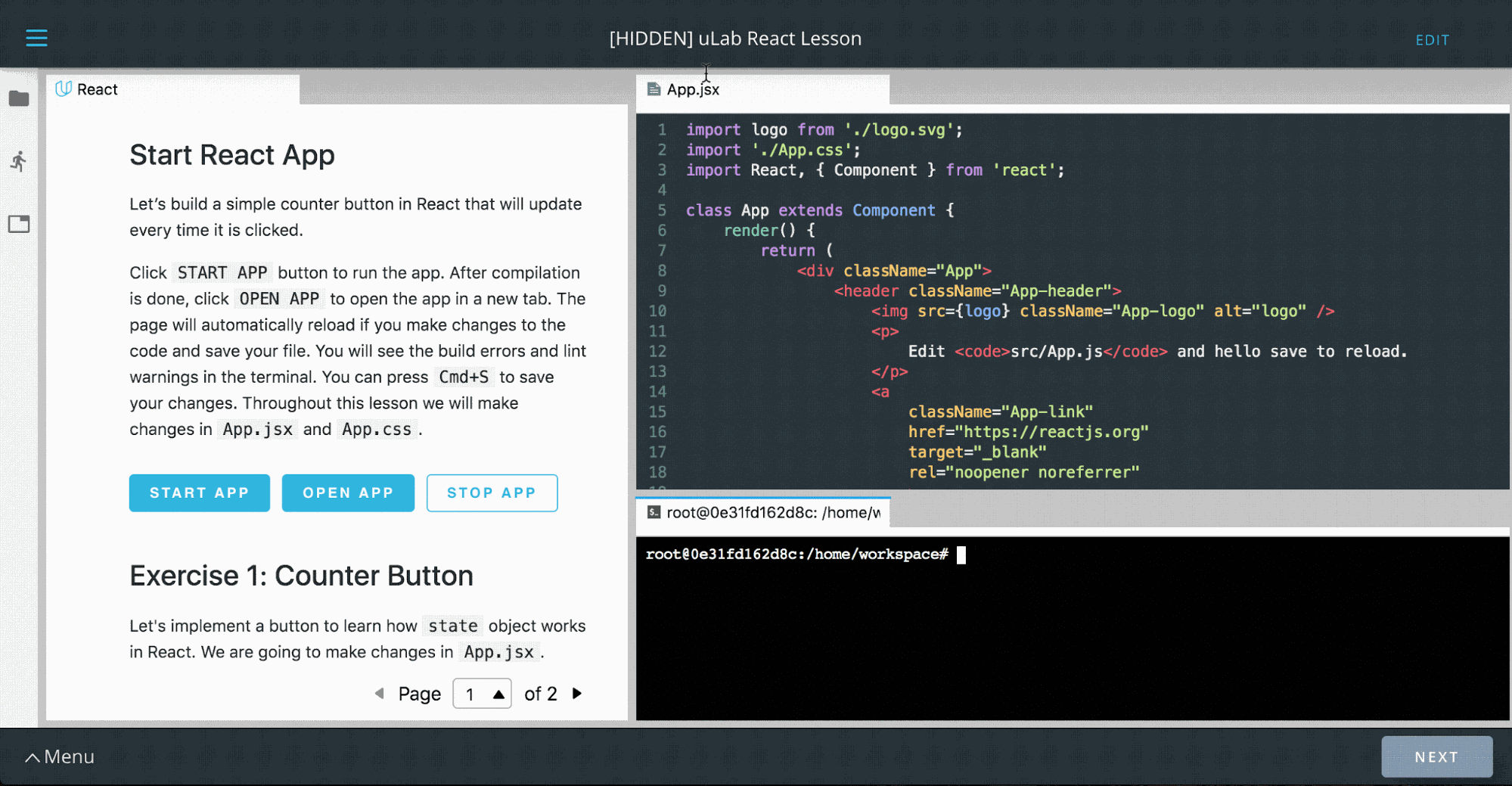
Editor’s note: Today we hear from Udacity, which uses a variety of Google Cloud technologies for its online learning platform. Read on to learn how they built online workspaces that give students immediate access to fast, isolated compute resources and private data sets. At Udacity, we use advanced technologies to teach about technology. One example is our  interactive “Workspaces,” which students use to gain hands-on experience with a variety of advanced topics like artificial intelligence, data science, programming and cloud. These online environments comprise everything from SQL interpreters to coding integrated development environments (IDEs), Jupyter Notebooks and even fully functional 3D graphical desktops—all accessible via an everyday browser.Udacity’s latest IDE environment, “uLab,” where “Learning Guides” can demonstrate skills interactively.To build these Workspaces, we relied heavily on Google Cloud Platform (GCP) in numerous interesting and novel ways. This article details our implementation and where we hope to take it in the future. Workspaces design goalsUdacity customers are smart, busy learners from all over the world, who access our courses remotely. To meet their needs, we designed Udacity Workspaces to:Be ready to use in under 15 secondsOffer advanced functionality directly inside the browser-based Udacity ClassroomInstantly furnish starter and example files to students in a new Workspace, and automatically save all student work and progress for the next sessionProvide quick access to large external datasetsFunction well with any session duration… from two minutes to four hours, or moreProvide reliable compute availability and GPU power wherever neededWe chose GCP for its ease of use, reliability, and cost-effectiveness. Let’s see how we used different GCP offerings to meet these goals.Fast, personalized access to Workspaces Students demand immediate access to their Workspaces, but booting up a full GCP host from an image can take awhile. That’s OK if a student plans on using their Workspace for an hour, but not if they’re using it for a two minute Workspace coding challenge.To address this, we built a custom server management tool (“Nebula”) that maintains pools of ready servers to assign to students immediately. To control costs, the pools are sized by a custom usage-pressure measurement algorithm to be fairly surge ready, but which also reduces the pools to as small as a single instance during idle periods. Pools are maintained in multiple data centers, to maximize access to GPUs.GCP’s by-the-second pricing and flexible reservations policy served us well here. Given the short usage windows of some student exercises, hourly billing or bulk billing might have proved cost prohibitive.Having ready-to-go server pools minimizes startup time, but we also needed to place “starter files,” or later on, the student’s own work from a previous session, onto the hosts as quickly as possible. After experimenting with several approaches, we decided to store these files as tarballs in Cloud Storage. We found that we can copy up to 3GB to and from Cloud Storage within our SLA time window, so we set a hard limit of 3GB for student drives.Every time a student’s session goes idle for half an hour, we deallocate the host, compress and copy the student’s files to Cloud Storage, then delete the host. In this manner we make time-stamped backups of each session’s files, that students can opt to restore any time they need to (via the Workspaces GUI). An alternative approach could be to leverage Cloud Storage’s version control, which provides access to GCP’slifecycle controls as well. However, at the time we built the student files storage system, this GCP feature was still in beta, so we opted for a home-grown facility.In addition, we take advantage of Cloud Functions to duplicate the student files in a second region to ensure against regional outages. Side note: if we were to build this feature today, we could take advantage of dual-region buckets to automatically save student files in two regions.Access to large datasetsFrom time to time, students need to access large datasets, e.g., in our machine learning courses. Rather than writing these datasets on server images, we mount read-only drives to share a single dataset across multiple student hosts. We can update these datasets on new shared drives, and Nebula can point new sessions at these new drives without interrupting existing session mounts. To date, we’ve never run into a concurrent read-only mount limit for these drives. However, we do see a need for quick-mount read-write dataset drives. One example could be a large SQL database that a student is expected to learn to modify in bulk. Duplicating a large drive on-the-fly isn’t feasible, so one approach could be to manage a pool of writeable drive copies to mount just-in-time, or to leverage Google Cloud’s Filestore. With the Filestore approach, you’d pre-create many copies of data drives in a folder tree, and mount a particular folder on the Filestore to a specific student’s container when access is needed; that copy would then never be assigned to anybody else, and asynchronously deleted/replaced with a fresh, unaltered copy when the student’s work is finished.Consistent compute powerIn a shared environment (e.g. Google Kubernetes Engine ), one student’s runaway process could affect the compute performance of another student’s entire container (on the same metal). To avoid that, we decided on a “one-server-per-student” model, where each students gets access to a single Compute Engine VM, running several Docker containers—one container for the student’s server, another for an auto-grading system, and yet another for handling file backups and restores. In addition to providing consistent compute power, this approach also has a security advantage: it allows us to run containers in privileged mode, say, to use specialized tools, without risking a breach beyond the single VM allocated to any one student.This architecture also ensures that GPU-equipped hosts aren’t shared either, so students benefit from all available performance. This is especially important as students fire up long-running, compute intensive jobs such as performing image recognition. As a cost control measure, we meter GPU host usage and display available remaining GPU time to students, so they  switch their GPUs on and off. This “switching” actually allocates a new host from our pools to the student (either GPU-enabled or not). Because we can do the switch in under 15 seconds, it feels approximately like a toggle switch, but some aspects of the session (such as open files) may be reset (e.g., in an IDE configuration). We encourage students to ration their GPU time and perform simpler tasks such as editing or file management in “CPU mode.”One of our GPU host configurations provides an in-browser Ubuntu desktop with pass-through Nvidia K80 GPUs for high-performance compute and graphics. This configuration is heavily employed by our Autonomous Systems students, who run graphics-intensive programs like Gazebo (shown), and run robot environment simulations. You can read more about this configuration here.Wanted: flexible and isolated imagesThis configuration has hit all our goals except for true image flexibility. For our large variety of courses we require many variations of software installations. Normally such needs would be satisfied with containers, but the requirement of isolated compute environments eliminates that as an option. In the past two years, we’ve empowered hundreds of thousands of Udacity students to advance their careers and learn new skills with powerful learning environments called Workspaces, built on top of GCP. Throughout, GCP has proven itself to be a robust platform and a supportive partner, and we look forward to future product launches on top of Google Cloud. If you’d like to learn more about the solutions we’ve built, feel free to reach out to me on Twitter, @Atlas3650.
Quelle: Google Cloud Platform
Low code programming with Node-RED comes to GCP

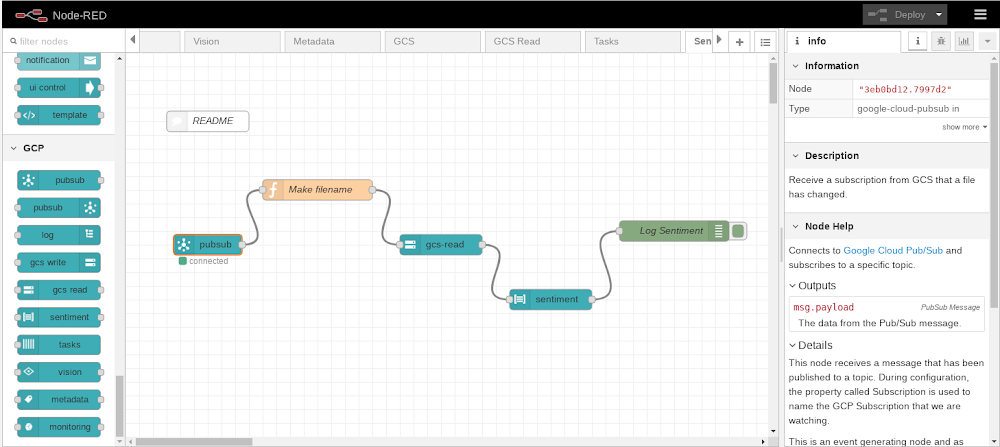
Wouldn’t it be great if building a new application were as easy as performing some drag and drop operations within your web browser? This article will demonstrate how we can achieve exactly that for applications hosted on Google Cloud Platform (GCP) with Node-RED, a popular open-source development and execution platform that lets you build a wide range of solutions using a visual programming style, while still leveraging GCP services.Through Node-RED, you create a program (called a flow) using supplied building blocks (called nodes). Within the browser, Node-RED presents a canvas area alongside a palette of available nodes. You then drag and drop nodes from the palette onto the canvas and link those nodes together by drawing connecting wires. The flow describes the desired logic to be performed by specifying the steps and their execution order, and can then be deployed to the Node-RED execution engine.One of the key features that has made Node-RED successful is its ability to be easily extended with additional custom nodes. Whenever a new API or technology becomes available, it can be encapsulated as a new Node-RED node and added to the list of available nodes found in the palette. From the palette, it can then be added into a flow for use in exactly the same way that the base supplied nodes are used. These additional nodes can then be published by their authors as contributions to the Node-RED community and made available for use in other  projects. There is a searchable and indexed catalog of contributed Node-RED nodes.A node hides how it internally operates and exposes a clean consumable interface allowing the new function to be used faster. Now, let’s take a look at how to run Node-RED on GCP and use it with GCP services.Installing Node-REDYou can use the Node Package Manager (npm) to install Node-RED on any environment that has a Node.JS runtime. For GCP, this includes Compute Engine, Google Kubernetes Engine (GKE), Cloud Run, Cloud Shell as well as other GCP environments. There’s also a publically available Docker image, which is what we’ll use for this example.Now, let’s create a Compute Engine instance using the Google Cloud Console and specify the public Node-RED docker image for execution.Visit the Cloud Console and navigate to Compute Engine. Create a new Compute Engine instance. Check the box labeled “Deploy a container image to this VM instance”.  Enter “nodered/node-red” for the name of the container image:You can leave all the other settings as their defaults and proceed to completing the VM creation.Once the VM has started, Node-RED is running. To work with Node-RED, you must connect to it from a browser. Node-RED listens on port 1880. The default VPC network firewall deliberately restricts incoming requests which means that requests to port 1880 will be denied. The next step will be to allow a connection into our network at the Node-RED port. We strongly discourage you from opening up Node-RED for development for unrestricted access. Instead, define the firewall rule to only allow ingress from the IP address that your browser presents. You can find your own browser address by performing a Google search on “my ip address”.Connecting to Node-REDNow that Node-RED is running on GCP, you can connect to it from a browser, by passing the external public IP address of the VM at port 1880.  For example:http://35.192.185.114:1880You can now see the Node-RED development environment within your browser:Working with GCP nodesAt this point, you have Node-RED running on GCP and can start constructing flows by dragging and dropping nodes from the palette onto the canvas and wiring them together. The nodes that come pre-supplied are merely a starter set—there are many more available that you can install and use in future flows. At Google, we’ve built a set of GCP nodes to illustrate how to extend Node-RED to interact with GCP functions. To install these nodes, navigate to the Node-RED system menu and select “Manage palette”:Switch to the Palette tab and then switch to the Install tab within Palette. Search for the node set called “node-red-contrib-google-cloud” and then click install.Once installed, scroll down through the list of available palette nodes and you’ll find a GCP section containing the currently available GCP building blocks.Here’s a list of currently available GCP nodes:PubSub in – The flow is triggered by the arrival of a new message associated with a named subscriptionPubSub out – A new message is published to a named topicGCS read – Reads the content of a Cloud Storage objectGCS write – Writes to a new Cloud Storage objectLanguage sentiment – Performs sentiment analysis on a piece of textVision – Analyzes an image for distinct attributesLog – Writes a log message to Stackdriver LoggingTasks – Initiates a Cloud Tasks instanceMonitoring – Writes a new monitoring record to StackdriverSpeech to Text – Converts audio input to a textual data representationTranslate – Converts textual data from one language to anotherDLP – Performs Data Loss Prevention processing on input dataBigQuery – Interacts with Google’s BigQuery databaseFireStore – Interacts with Google’s Firestore databaseMetadata – Retrieves the metadata for the Compute Engine upon which Node-RED is runningGoing forward, we hope to make additional GCP nodes available. It’s also not hard to create a custom node yourself—check out the public Github repository to see how easy it is to create one.A sample Node-RED flowHere is an example flow:At a high level, this flow listens on incoming REST requests and creates a new Google Cloud Storage object for each request received.This flow starts with an HTTP input node which causes Node-RED to listen on the /test URL path for an HTTP GET request. When an incoming REST request arrives, the incoming data undergoes some manipulations:Specifically, two fields are set: one called msg.filename, which is the name of a file to create in Cloud Storage, and the other called msg.payload, which is the content of the new file we are creating. In this example, the query parameters passed in the HTTP request are being logged.The next node in the flow is a GCP node that performs a Cloud Storage object write that writes/creates a new file. The final node sends a response back concluding the original HTTP request that triggered the flow.Securing Node-REDNode-RED is designed to get you up and running as quickly as possible. To that end, the default environment isn’t configured for security. We don’t recommend this. Fortunately, Node-RED provides security features that can be quickly enabled.  These features include authorization to be able to make flow changes and enablement of SSL/TLS for encryption of incoming and outgoing data. When initially studying Node-RED, define a firewall rule that only permits ingress from your browser’s IP address.Visual programming on GCP the Node-RED wayNode-RED has proven itself as a data flow and event processor for many years. Its extremely simple architectural model and low barrier to entry means that even a novice user can get value from it in a very short period of time. A quick Internet search reveals many tutorials on YouTube, the documentation is mature and polished, and the community active and vibrant. With the addition of the rich set of GCP nodes that we’ve contributed to the community, you can now incorporate GCP services into Node-Red whether it’s hosted on GCP, on another public cloud, or on-premises. ReferencesNode-RED – The Node-RED home pageGithub: Google Cloud Node-RED repositorySecuring Node-RED
Quelle: Google Cloud Platform

Plan your Next ‘20 journey: Session guide available now

Get ready to make the most of Google Cloud Next ‘20: our session guide is now available.At Google Cloud Next, our aim is to give you the tools you need to sharpen your technical skills, expand your network, and accelerate personal development. Across our hundreds of breakout sessions you’ll get the chance to connect and learn about all aspects of Google Cloud—from multi-cloud deployments, to application modernization, to next-level collaboration and productivity. Developers, practitioners, and operators from all over the world will come together at Next, and we hope you’ll join them.This year we’re going deep on the skills and knowledge enterprises need to be successful in the cloud. Our catalog of technical content keeps growing, and this year we’re offering more than 500 breakout sessions, panels, bootcamps, and hands-on labs. These sessions will give you in-depth knowledge in seven core areas: Infrastructure—Migrate and modernize applications and systems on premises and in the cloud.Application modernization—Develop, deploy, integrate, and manage both your existing apps and new cloud-native applications.Data management and analytics—Take advantage of highly available and scalable tools to store and manage your structured and unstructured data, then derive meaningful insights from that data.Cloud AI and machine learning—Leverage your data by applying artificial intelligence and machine learning to transform your business.Business application development—Reimagine app development by helping you innovate with no-code development, workflow automation, app integration, and API management. Cloud security—Keep your systems, apps, and users better protected with world-class security tools.Productivity and collaboration—Transform the ways teams grow, share, and work together.This means you can troubleshoot and debug microservices in Kubernetes, get a primer on big data and machine learning fundamentals, then finish up your day by learning to build, deploy, modernize and manage apps using Anthos. Or pick from hundreds of other topics. Want to learn which sessions you don’t want to miss? Beginning in March, we’ll be publishing guides to Next from Google experts. Keep an eye on our blog.
Quelle: Google Cloud Platform

Google completes Looker acquisition

I’m pleased to announce that Google has completed its acquisition of Looker. Together, we’re excited to offer customers a comprehensive analytics solution that integrates and visualizes insights at every layer of their business.  Today, hundreds of joint customers already rely on Google Cloud and Looker to make smarter business decisions. And by joining together, we believe we will be uniquely positioned to address the data analytics and business intelligence demands of even more enterprises globally, across all industries. Looker will strengthen Google Cloud’s analytics and data warehouse capabilities, including BigQuery, enabling our customers to address some of their toughest business challenges, faster—all while maintaining complete control of their data. Google Cloud and Looker share a common philosophy around delivering open solutions and supporting customers wherever they are—be it on Google Cloud, in other public clouds, or on premises. As more organizations adopt a multi-cloud strategy, Looker customers and partners can expect continued support of all cloud data management systems like Amazon Redshift, Azure SQL, Snowflake, Oracle, Microsoft SQL Server and Teradata.We’re thrilled to officially welcome the Looker team to Google Cloud. For more on what this means for Looker and its community of customers and partners, please read the blog from Looker CEO, Frank Bien.Comments on the news:“Companies across the globe are migrating to the cloud and adopting a multi-cloud strategy. For leading technology providers, it’s critical that we put customers first to help them achieve their digital transformation goals,” says Frank Slootman, CEO of Snowflake. “The combination of Google Cloud and Looker and their commitment to multi-cloud support will help deliver more value to customers faster. We look forward to our continued partnership with both companies.”“There is no slowing in the data analytics and business intelligence market, in fact, it’s only growing as more and more data is created and enterprises across all industries look to use data to be better informed, make smarter decisions and digitally transform their organizations,” said Howard Dresner, Chief Research Officer, Dresner Advisory Services. “Our research derived directly from customer feedback shows Google Cloud as a Leader in Analytical Data Infrastructure, and Looker as a Leader in enterprise business intelligence. We see synergy and nominal overlap between their solutions, and believe this acquisition should strengthen their ability to serve enterprise customers together.
Quelle: Google Cloud Platform

Google Cloud named a Leader in the Forrester Wave: Data Management for Analytics

We’re pleased to announce that Forrester has named Google Cloud a Leader in its report, The Forrester Wave™: Data Management for Analytics (DMA) Q1, 2020. This is the first DMA Wave Forrester is publishing and it assesses Google Cloud’s broader data analytics portfolio, with BigQuery at the heart. In this report, Google Cloud received the highest score possible in the categories of: roadmap, performance, high availability, scalability, data ingestion, data storage, data security, and customer use cases. This evaluation validates for us Google Cloud’s data analytics strategy, and we believe echoes the feedback we’re hearing from customers who are now able to process huge amounts of data quickly and efficiently.Enterprise customers are betting big on BigQueryThe need to digitally transform their businesses means that organizations are looking for solutions that can seamlessly scale with their growing data needs. Providing simplicity and speedWe build our data analytics products to be easy to use, and tightly integrated with the rest of Google Cloud’s ecosystem. BigQuery is built for speed, letting you analyze gigabytes to petabytes of data using ANSI SQL with no operational overhead. BigQuery’s serverless model means that resource provisioning happens behind the scenes, so you can focus on analytics instead of managing infrastructure. Customers can now run analytics at scale with a 26% to 34% lower three-year TCO than cloud data warehouse alternatives.S4 Agtech, which offers risk management solutions for agriculture companies, migrated to Google Cloud to save money and time, as well as, scale databases and machine learning models faster. The company uses BigQuery as its data warehouse, and has dramatically reduced storage and processing costs by 80%, while providing customers their analytics results 25% faster. S4 has also gained more time for innovation in helping its customers de-risk crop production, including updating and improving algorithms.And our broader data analytics platform extends to streaming analytics, with options for both batch and streaming data. Customers can query data in real time  and know what is happening right now in order to drive fast and informed business decisions. Ensuring security and trustWith a secure, trusted data analytics platform, it becomes easier to let users access the data they need to run their businesses. BigQuery provides strong security and governance controls with Cloud Data Loss Prevention (DLP) and Cloud Identity and Access Management (IAM). Data is encrypted at rest and in transit by default ensuring that customer data is protected.We are honored to be a leader in this Forrester Wave™, and look forward to continuing to innovate and partner with you on your digital transformation journey. Download the full Forrester Wave™: Data Management for Analytics Q1, 2020 report.And check out how UPS uses our smart analytics platform. To learn more about BigQuery, visit our website, and get started immediately with the free BigQuery Sandbox.
Quelle: Google Cloud Platform

Running workloads on dedicated hardware just got better

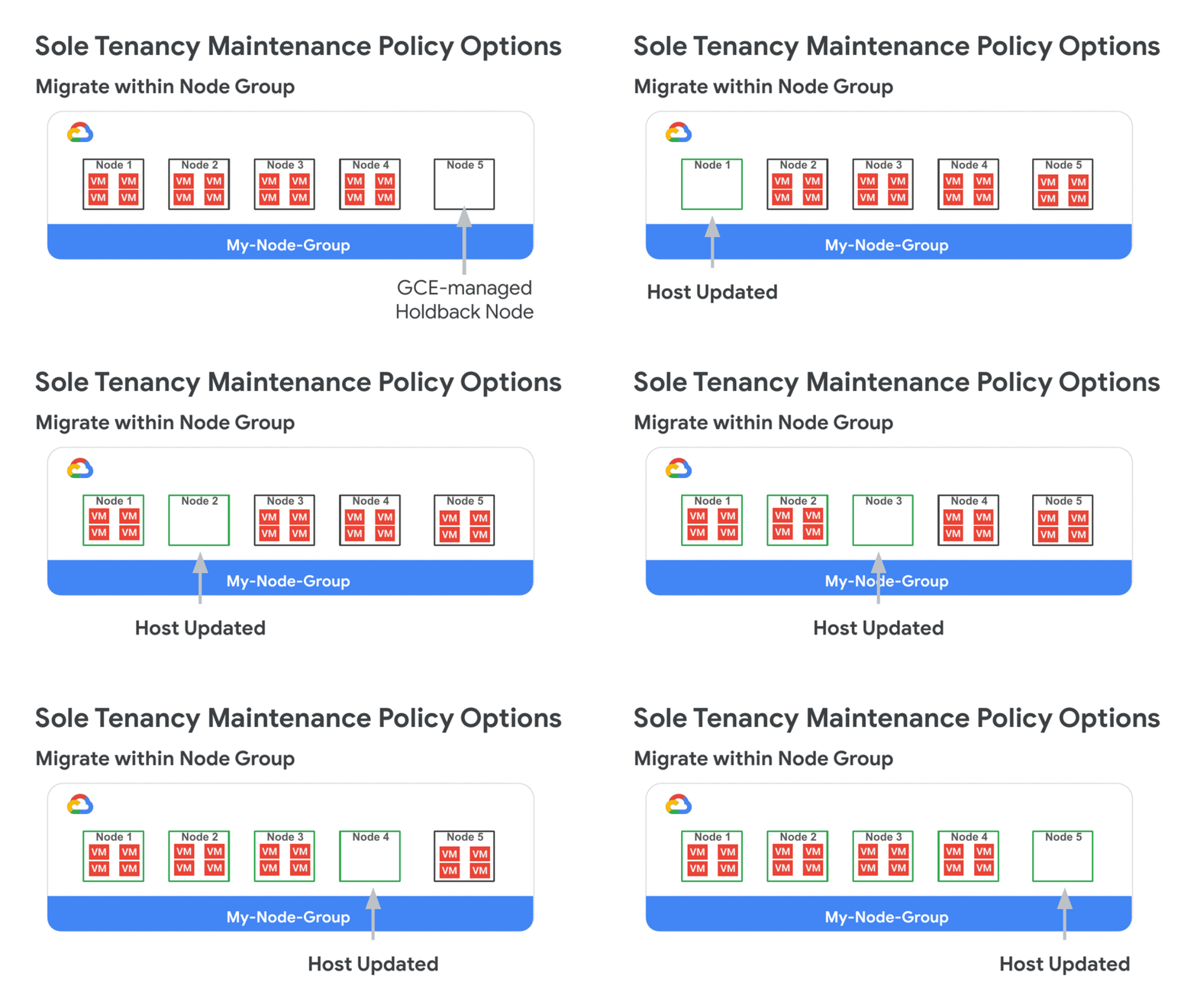
At Google Cloud, we repeatedly hear how important flexibility, openness, and choice are for your cloud migration and modernization journey. For enterprise customers that require dedicated hardware due to requirements such as performance isolation (for gaming), physical separation (for finance or healthcare), or license compliance (Windows workloads), we’ve improved the flexibility of our sole-tenant nodes to better meet your isolation, security, and compliance needs. Sole-tenant nodes already let you mix, match, and right-size different VM shapes on each node, take advantage of live migration for maintenance events, as well as auto-schedule your instances onto a specific node, node group, or group of nodes using node affinity labels. Today, we are excited to announce the availability of three new features on sole-tenant nodes: Live migration within a fixed node pool for bring your own license (BYOL) (beta)Node group autoscaler (beta)Migrate between sole- and multi-tenant nodes (GA) These new features make it easier and more cost-effective to deploy, manage, and run workloads on dedicated Google Cloud hardware.More refined maintenance controls for Windows BYOLThere are several ways to license Windows workloads to run on Google Cloud: you can purchase on-demand licenses, use License Mobility for Microsoft applications, or bring existing eligible server-bound licenses onto sole-tenant nodes. Sole-tenant nodes let you launch your instances onto physical Compute Engine servers that are dedicated exclusively to your workloads to comply with dedicated hardware requirements. At the same time, sole-tenant nodes also provide visibility into the underlying host hardware and support your license reporting through integration with BigQuery.Now, sole-tenant nodes offer you extended control over your dedicated machines with a new node group maintenance policy. This setting allows you to specify the behavior of the instances on your sole-tenant node group during host maintenance events. To avoid additional licensing costs and provide you with the latest kernel and security updates while supporting your per-core or per-processor licenses, the new ‘Migrate Within Node Group’ maintenance policy setting enables transparent installation of kernel updates, without VM downtime, and while keeping your unique physical core usage to a minimum.Node groups configured with this setting live migrate instances within a fixed pool of sole-tenant nodes (dedicated servers) during host maintenance events. By limiting migrations to that fixed pool of hosts, you are able to dynamically move your virtual machines between already licensed servers and avoid license pollution. It also helps us keep you running on the newest kernel updates for better performance and security, and enables continuous uptime through automatic migrations. Now your server-bound bring-your-own-license workloads can strike a better balance between licensing cost, workload uptime, and platform security.In addition to the ‘Migrate Within Node Group’ setting, you can also choose to configure your node group to the ‘Default’ setting, which moves instances to a new host during maintenance events (recommended for workloads without server affinity requirements), or to the ‘Restart In Place” setting which terminates the instances and restarts them on the same physical server following host maintenance events.For more information on node-group maintenance policies visit the bring your own license documentation.Node group autoscalerIf you have dynamic capacity requirements, autoscaler for sole-tenant node groups automatically manages your pool of sole-tenant nodes, allowing you to scale your workloads without worrying about independently scaling your node group. Autoscaler for sole-tenant node groups increases the size of your node group when there is insufficient capacity to accommodate a new instance, and automatically decreases the size of a node group when it detects the presence of an empty node. This reduces scheduling overhead, increases resource utilization, and drives down your infrastructure costs.Autoscaler allows you to set the minimum and maximum boundaries for your node group size and scales behind the scenes to accommodate your changing workload. For additional flexibility, autoscaling also supports a scale-out (increase-only) mode to support monotonically increasing workloads or workloads whose licenses are tied to a physical cores or processors. Migrating into sole tenancyFinally, if you need additional agility for your workloads, you can now move instances into, between, and out of sole-tenant nodes. This allows you to achieve hardware isolation for existing VM instances based on your changing security, compliance, or performance isolation needs. You might want to move an instance into a sole-tenant node for special events like a big online shopping day, game launch, or any moment that requires peak performance and the highest level of control. The example below illustrates the steps for migrating an instance onto a sole-tenant node:For details on rescheduling your instances onto dedicated hardware, see the documentation.Pricing and availabilityPricing for sole-tenant nodes remains simple: pay only for the nodes you use on a per-second basis, with a one-minute minimum charge.  Sustained use discounts automatically apply, as do any new or existing committed use discounts. Visit the pricing page to learn more about sole-tenant nodes, as well as the regional availability page to find out if they are available in your region.
Quelle: Google Cloud Platform

BigQuery under the hood: How zone assignments work

BigQuery is a serverless, highly scalable, and cost-effective cloud data warehouse. It’s designed to be flexible and easy to use. There are lots of interesting features and design decisions made when creating BigQuery, and we’ll dive into how zone assignments work in this post. Like other Google Cloud services, BigQuery takes advantage of our global cloud regions to make sure your data is available when you need it.One key aspect of BigQuery’s architecture is that it is multi-tenant; it runs workloads from different customers on compute and storage infrastructure that does not require any customer involvement in capacity planning. When loading data into BigQuery, customers choose a region to load the data and, optionally, purchase a compute reservation. Then, the service takes care of provisioning.Zone assignments keep your data flowingEach BigQuery region is internally deployed in multiple availability zones. Customer data is replicated between these zones, and there is fast automatic failover to the secondary zone if the primary zone is experiencing issues. The failover is designed to be transparent to customers and have no downtime. We’re always expanding our capacity footprint to support customer growth and onboard new customers. To make sure that each customer gets to think of storage as infinite, and gets sufficient compute resources to load and analyze their data, we continuously recompute the best placement for the primary and secondary zones in the region.To ensure the best primary and secondary zone assignments, the assignment algorithm takes into account the storage and compute usage of each customer and the available capacity in each zone. Then it makes sure that the usage will fit in the currently assigned zones. If it doesn’t, it finds another suitable zone for that customer and orchestrates a move from their current zone to a new zone. All of this happens in the background without causing any disruptions to your workload.Any datasets that share the same region can be joined together in a single query. To ensure good query performance, we attempt to colocate compute and storage so that I/O is within the same zone in order to take advantage of high-throughput networking within the zone. I/O bandwidth within a zone is very high (Google’s Jupiter network fabric can sustain more than 1 petabit/second of total bisection bandwidth), but network capacity between zones is much more constrained. Our assignment algorithm makes sure that Google Cloud projects within the same Google Cloud organization are assigned to the same subset of zones in every region. To support very large orgs, we compute project cliques based on cross-project query patterns within the organization. That breaks it up into more manageable chunks that can be placed separately. To handle cross-org reads, the algorithm also looks into past query patterns to discover relationships between organizations and make an effort to have at least one common zone between orgs that are related. The query engine also allows reading small amounts of data not being colocated by either reading remotely or copying some data to the compute zone before running the query. In rare cases, when the algorithm cannot ensure this or there is a new cross-org query pattern, queries that read large amounts of data may fail.Best practices for organizing and moving your dataTo get the best performance for workloads that read/write data in datasets belonging to different projects, ensure that the projects are in the same Google Cloud org.If you want to make your data available to other BigQuery users in your Google Cloud organization, you can use IAM permissions to grant access. If you wish to share data with BigQuery users outside your organization, use Table Copy to move data to the target project. From there, they can do any subsequent analysis in that project. Table Copy is supported via asynchronous replication and can support cross-zone data moves. You can move data across regions using the dataset copy feature.Learn more about regions and zones in Google Cloud services, and find more details on how Compute Engine handles zones.
Quelle: Google Cloud Platform

Exploring Container Security: Run what you trust; isolate what you don’t

From vulnerabilities to cryptojacking to well, more cryptojacking, there were plenty of security events to keep container users on their toes throughout 2019. With Kubernetes being used to manage most container-based environments (and increasingly hybrid ones too), it’s no surprise that Forrester Research, in their 2020 predictions, called out the need for “securing apps and data in an increasingly hybrid cloud world.” On the Google Cloud container security team, we want your containers to be well protected, whether you’re running in the cloud with Google Kubernetes Engine or hybrid with Anthos, and for you to be in-the-know about container security. As we kick off 2020, here’s some advice on how to protect your Kubernetes environment, plus a breakdown of recent GKE features and resources.Run only what you trust, from hardware to servicesMany of the vulnerabilities we saw in 2019 compromised the container supply chain or escalated privileges through another overly-trusted component. It’s important that you trust what you run, and that you apply defense-in-depth principles to your containers. To help you do this, Shielded GKE Nodes is now generally available, and will be followed shortly by the general availability of Workload Identity–a way to authenticate your GKE applications to other Google Cloud services that follows best practice security principles like defense-in-depth.Let’s take a deeper look at these features.Shielded GKE NodesShielded GKE Nodes ensures that a node running in your cluster is a verified node in a Google data center. By extending the concept of Shielded VMs to GKE nodes, Shielded GKE Nodes improves baseline GKE security in two respects:Node OS provenance check: A cryptographically verifiable check to make sure the node OS is running on a virtual machine in Google data centerEnhanced rootkit and bootkit protection: Secure and measured boot, virtual trusted platform module (vTPM), UEFI firmware, and integrity monitoringYou can now turn on these Shielded GKE Nodes protections when creating a new cluster or upgrading an existing cluster. For more information, read the documentation.Workload IdentityYour GKE applications probably use another service–like a data warehouse–to do their job. For example, in the vein of “running only what you trust,” when an application interacts with a data warehouse, that warehouse will require your application to be authenticated. Historically the approaches to doing this haven’t been in line with security principles—they were overly permissive, or had the potential for a large blast radius if they were compromised. Workload Identity helps you follow the principle of least privilege and reduce that blast radius potential by automating workload authentication through a Google-managed service account, with short-lived credentials. Learn more about Workload Identity in the beta launch blog and the documentation. We will soon be launching general availability of Workload Identity.Stronger security for the workloads you don’t trustBut sometimes, you can’t confidently vouch for the workloads you’re running. For example, an application might use code that originated outside your organization, or it might be a  software-as-a-service (SaaS) application that ingests input from an unknown user. In the case of these untrusted workloads, a second layer of isolation between the workload and the host resources is part of following the defense-in-depth security principle. To help you do this, we’re releasing the general availability of GKE Sandbox.  GKE SandboxGKE Sandbox uses the open source container runtime gVisor to run your containers with an extra layer of isolation, without requiring you to change your application or how you interact with the container. gVisor uses a user space kernel to intercept and handle syscalls, reducing the direct interaction between the container and the host, and thereby reducing the attack surface. However, as a managed service, GKE Sandbox abstracts away these internals, giving you  single-step simplicity for multiple layers of protection. Get started with GKE Sandbox. Up your container security knowledgeAs more companies use containers and Kubernetes to modernize their applications, decision makers and business leaders need to understand how they apply to their business—and how they will help keep them secure.  Core concepts in container securityWritten specifically for readers who are new to containers and Kubernetes, Why Container Security Matters to Your Business takes you through the core concepts of container security, for example supply chain and runtime security. Whether you’re running Kubernetes yourself or through a managed service like GKE or Anthos, this white paper will help you connect the dots between how open-source software like Kubernetes responds to vulnerabilities and what that means for your organization.  New GKE multi-tenancy best practices guideMulti-tenancy, when one or more clusters are shared between tenants, is often implemented as a cost-saving or productivity mechanism. However, incorrectly configuring the clusters to have multiple tenants, or the corresponding compute or storage resources, can not only deny these cost-savings, but open organizations to a variety of attack vectors. We’ve just released a new guide, GKE Enterprise Multi-tenancy Best Practices, that takes you through setting up multi-tenant clusters with an eye towards reliability, security, and monitoring. Read the new guide, see the corresponding Terraform modules, and improve your multi-tenancy security.Learn how Google approaches cloud-native security internallyJust as the industry is transitioning from an architecture based on monolithic applications to distributed “cloud-native” microservices, Google has also been on a journey from perimeter-based security to cloud-native security.In two new whitepapers, we released details about how we did this internally, including the security principles behind cloud-native security. Learn more about BeyondProd, Google’s model for cloud-native security; and about Binary Authorization for Borg, which discusses how we ensure code provenance and use code identity.Let 2020 be your year for container securitySecurity is a continuous journey. Whether you’re just getting started with GKE or are already running clusters across clouds with Anthos, stay up to date with the latest in Google’s container security features and see how to implement them in the cluster hardening guide.
Quelle: Google Cloud Platform

Now updated: Our Data Engineering Learning Path

With the market for artificial intelligence and machine learning-powered solutions projected to grow to $1.2B by 2023, it’s important to consider business needs now and in the future. We’ve heard from our customers and have witnessed internally that the data engineering role has evolved and now requires a larger set of skills. In the past, data engineers worked with distributed systems and Java programming to use Hadoop MapReduce in the data center but now, they need to leverage AI, machine learning, and business intelligence skills to efficiently manage and analyze data. To address the new skills data engineers now need, we updated our Data Engineering on Google Cloud learning path.We’ve added new course content to this learning path like introductions to Data Fusion and Cloud Composer. We also added more labs on advanced BigQuery, BigQuery ML, and Bigtable streaming to help you get more hands-on practice.This learning path covers the primary responsibilities of data engineers and consists of five courses: Google Cloud Big Data and Machine Learning Fundamentals – Start off by learning the important GCP big data and machine learning concepts and terminologies. Modernizing Data Lakes and Data Warehouse with Google Cloud – Understand the responsibilities of data engineers, the business need for effective data pipelines, and the benefits of data engineering in the cloud. This course will also dig deeper into the use cases and available GCP solutions for data lakes and warehouses, the key components of data pipelines. Building Batch Data Pipelines on Google Cloud – Discover which paradigm to use for different batch data as this course walks you through the main data pipeline paradigms: extra-load, extract-load-transform or extract-transform-load. You’ll also learn more about data transformation technologies such as how to use BigQuery, execute Spark on Dataproc, pipeline graphs in Data Fusion, and do serverless data processing with Dataflow. Building Resilient Streaming Analytics Systems on Google Cloud – Learn how to build streaming data pipelines on Google Cloud, apply aggregations and transformations to streaming data using Dataflow, and store processed records to BigQuery or Bigtable for analysis in order to get real-time metrics on business operations. Smart Analytics, Machine Learning, and AI on Google Cloud –  Extract more insights from your  data by learning how to customize machine learning in data pipelines on Google Cloud in this course. You will learn how to use AutoML for when you need little to no customization and how to use AI Platform Notebooks and BigQuery ML for more tailored machine learning capabilities. You will also be taught how to productionalize machine learning solutions using Kubeflow Pipelines. Want to learn more? Join us for a special webinar Data Engineering, Big Data, and Machine Learning 2.0, on Feb 21 at 9:00 AM PST with Lak Lakshmanan, Head of Google Cloud Data Analytics and AI Solutions. We will go over what this learning path has to offer, demonstrate hands-on labs, and answer any questions you have. Also, just for attending the webinar, we will give you special discounts on training. Register today!
Quelle: Google Cloud Platform

Bring 20/20 vision to your pipelines with enhanced monitoring

Stream analytics is bringing data to life in a way that was previously unimaginable, unlocking new use cases, from connected medical devices in healthcare to predictive maintenance on the factory floor. But with new uses comes new challenges that, if left unaddressed, can lead to unintended behaviors for end-user applications. Before the days of modern stream analytics, you could guarantee the reliability of your batch data processing by re-executing your data workflows. Plus, since batch processing latency was a lesser concern, ensuring that your data was delivered within your SLOs was a manageable task. Stream processing is a different beast, however. Stream analytics shrinks the time horizon between a user event and an application action, which means it is more important than ever to quickly respond to performance degradations in your data pipelines. To that end, Dataflow, Google Cloud’s fully managed batch and stream data processing service, now includes new observability features that will allow you to identify, diagnose, and remediate your pipelines faster than ever. With better observability, you can spend less time fixing problems and more time getting value out of your data.Introducing Dataflow observabilityWith this launch, we are introducing new charts into the Dataflow monitoring UI and streamlined workflows with the Cloud Monitoring interface. You will find these charts in the new “Job metrics” tab located at the top of the screen when you navigate to the job details page within Dataflow.In addition to the data freshness, system latency, and autoscaling graphs that have historically been a part of the Dataflow monitoring experience, you’ll now also see throughput and CPU utilization charts. Throughput charts, shown below, show how many elements (or bytes) are flowing through your pipeline. The time-series graph contains a line for each step of your pipeline, which can quickly illustrate which step(s) of your pipeline could be slowing down the overall processing of your job. Our new time selector tool allows you to drag your cursor over interesting points in the graph to zoom in for higher fidelity.CPU utilization charts the utilization of your workers over time. These charts can indicate whether you have allocated the appropriate amount of cores for your workers or if you have selected the appropriate amount of workers for your job (assuming you have disabled autoscaling). You can toggle between multiple views, including an all-worker view, stats view, four top-utilized machines, and four least-utilized machines, as shown here:Developers can create alerts with just a few clicks by using the “Create alerting policy” link in the top right corner of the chart card. You can find job and worker logs in an expandable panel at the bottom of your screen, giving you all of the tools to debug your stuck pipelines.Dataflow observability in the real worldWe’ve heard from customers about how useful this new feature has been already. “We are loving the new UI! In the last day we’ve already been using it to track throughput of our pipelines and diagnose issues,” said Vinay Mayar, senior software engineer at Expanse.It’s been helpful for Ocado too. “The killer feature of the page is the ability to see the throughput for each processing step,” says Mateusz Juraszek, software engineer at Ocado Technology. “It’s great that all the statistics are gathered in one place on the JOB METRICS page. Displaying data freshness and system latency enables us to quickly and preemptively detect anything that might affect reliability, and then use other charts or logs to investigate and address what we discover.”What’s next for pipeline observabilityThe general availability of these observability charts is our first step toward making Dataflow monitoring the best in class for data engineers. Over the coming months, we plan to add new features including memory and disk usage charts, I/O metrics such as response latencies and error rates for Pub/Sub calls, and visualizers that will significantly enhance the explainability of Dataflow jobs. By spending less time managing reliability and performance and more time extracting value from your data, you can spend your time laying the foundation for tomorrow’s cutting-edge streaming analytics applications.Learn more about these new Dataflow features.
Quelle: Google Cloud Platform




