BigQuery leads the way toward modern data analytics

At Google, we think you should have the right tools and support to let you embrace data growth. Enterprises and digital-native organizations are generating incredible value from their data using Google Cloud’s smart analytics platform. At the heart of the platform is BigQuery, a cloud-native enterprise data warehouse. BigQuery helps organizations develop and operationalize massively scalable, data-driven intelligent applications for digital transformation.   Enterprises are modernizing with BigQuery to unlock blazing-fast business insights Businesses are using BigQuery to run mission-critical applications at scale in order to optimize operations, improve customer experiences, and lower total cost of ownership (TCO). We have customers running queries on massive datasets, as large as 100 trillion rows, and others running more than 10,000 concurrent queries across their organization. We’re seeing adoption across regions and industry verticals including retail, telecommunications, financial services, and more.Wayfair is one example of a retailer that was looking to scale its growing $8 billion global business while providing a richer experience for its 19 million active customers, 6,000 employees, and 11,000 suppliers. By moving to BigQuery, Wayfair can now make real-time decisions, from merchandising and personalized customer experiences to marketing and promotional campaigns. Wayfair’s data-driven approach provides the company with valuable and actionable insights across every part of the business. And they’re now able to seamlessly fulfill millions of transactions during peak shopping seasons. Financial services company KeyBank is migrating to BigQuery for scalability and reduced costs as compared to their on-prem data warehouse. “We are modernizing our data analytics strategy by migrating from an on-premises data warehouse to Google’s cloud-native data warehouse, BigQuery,” says Michael Onders, chief data officer at Keybank. “This transformation will help us scale our compute and storage needs seamlessly and lower our overall total cost of ownership. Google Cloud’s smart analytics platform will give us access to a broad ecosystem of data transformation tools and advanced machine learning tools so that we can easily generate predictive insights and unlock new findings from our data.” Other customers finding success with our smart analytics tools are Lowe’s, Sabre, and Lufthansa. They’re all modernizing their data analytics strategies and transforming their businesses to remain competitive in a changing data landscape.Product innovation is simplifying migrations and improving price predictabilityWe are continuing to make it easy to modernize your data warehouse with BigQuery. The new product capabilities we’re announcing are helping customers democratize advanced analytics, be assured of price predictability, and simplify migrations at scale.Simplifying migrations at scale: We’re helping customers fast-track data warehouse migrations to BigQuery with the general availability of RedShift and S3 migration tools. Customers can now seamlessly migrate from Amazon Redshift and Amazon S3 right into BigQuery with BigQuery Data Transfer Service. Customers such as John Lewis Partnership, Home Depot, Reddit, and Discord have all accelerated business insights with BigQuery by freeing themselves of the performance and analytics limitations of their Teradata and Redshift environments. ”Migrating from Redshift to BigQuery has been game-changing for our organization,” says Spencer Aiello, tech lead and manager, machine learning at Discord. “We’ve been able to overcome performance bottlenecks and capacity constraints as well as fearlessly unlock actionable insights for our business.” Offering enterprise readiness and price predictability: Enterprise customers need price predictability to do accurate forecasting and planning. We recently launched Reservations for workload management, and today, we’re pre-announcing beta availability of BigQuery Flex Slots, which enable customers to instantly scale up and down their BigQuery data warehouse to meet analytics demands without sacrificing price predictability. With Flex Slots, you can now purchase BigQuery commitments for short durations—as little as seconds at a time. This lets organizations instantly respond to rapid demand for analytics and plan for major business events, such as retail holidays and game launches. Learn more about Flex Slots here. We’re also pre-announcing the beta availability of column-level access controls in BigQuery. With BigQuery column-level security, you can now have access policies applied not just at the data container level, but also to the meaning and/or content of the data in your columns across your enterprise data warehouse. Finally, we now support unlimited DML/DDL statements on a table in BigQuery—find more details here.Democratizing advanced analytics: We’re making advanced analytics even more accessible to users across an organization. We’re excited to announce that BigQuery BI Engine is becoming generally available. Customers can analyze large and complex datasets interactively with sub-second query response time and high concurrency for interactive dashboarding and reporting. One Fortune 500 global media outlet using BI Engine summarized it well: “To deliver timely insights to our editors, journalists and management, it’s important we answer questions quickly. Once we started using BigQuery BI Engine, we saw an immediate performance boost with our existing Data Studio dashboards—everyone’s drilling down, filtering, and exploring data at so much faster a pace.” Learn more here.All these product innovations and more are helping customers jump-start their digital transformation journeys with ease. Our cohesive partner ecosystem creates a strong foundationWe’re making deep investments in our partner ecosystem and working with global and regional system integrators (GSIs) and other tech partners to simplify migrations across the planning phase, offer expertise, and make go-to-market delivery easier. GSI partners such as Wipro, Infosys, Accenture, Deloitte, Capgemini, Cognizant, and more have dedicated centers of excellence and Google Cloud partner teams. These teams are committed to defining and executing on a joint business plan, and have built end-to-end migration programs, accelerators, and services that are streamlining the modernization path to BigQuery. The Accenture Data Studio, Infosys Migration Workbench (MWB), and Wipro’s GCP Data and Insights Migration Studio are all examples of partner solutions that can help modernize your analytics landscape by supporting migrations at scale.Partners are essential for many cloud migration journeys. “Enterprises today are seeking to be data-driven as they navigate their digital journey,” says Satish H.C., EVP, data analytics at Infosys. “For our clients, we enable this transformation with our solutions like Digital Brain, Information Grid, Data Marketplace and Next Gen Analytics platform, powered by Google-native technologies like BigQuery, BigQuery ML, AI Platform and Cloud Functions.”“We are excited to be partnering with Google Cloud to help streamline data warehouse migrations to BigQuery so that organizations can unlock the full potential of their data,” says – Sriram Anand, Managing Director, North America Lead for Data Engineering at Accenture. “As our clients are managing increasingly fast-changing business needs, they are looking for ways to scale up to petabytes of data on-demand without performance disruptions and run blazing-fast queries to drive business innovation.”Tech partners are also core to our data warehouse modernization solution. With Informatica, customers can easily and securely migrate data and its schema from their on-prem applications and systems into BigQuery. Datometry and CompilerWorks both help customers migrate workloads without having to rewrite queries. Datometry eliminates the need to rewrite queries and instead converts the incoming request into target dialect on the fly, while CompilerWorks converts queries’ source dialect SQL into target dialect SQL. Along with their core offerings, these tech partners have also developed additional migration accelerators.We’re also happy to announce that SADA, a leading global business and technology consultancy managed service provider, just announced a multi-year agreement with Google Cloud. They will be introducing new solutions to help organizations modernize data analytics and data warehousing with Google Cloud, including support for Netezza, Teradata, and Hadoop migrations to BigQuery. These solutions offer a shorter time to value on new releases, expedite decision making with data-driven insights, and allow customers to focus more on innovation. Learn more here.Making the BigQuery moveWe’re seeing this momentum across our smart analytics portfolio as industry analysts such as Gartner and Forrester have recognized Google Cloud as a Leader in five new analyst reports over the past year, including the new Forrester Wave™: Data Management for Analytics, Q1 2020. These launches, updates, and new migration options are all designed to help businesses digitally transform their operations. Try the BigQuery sandbox to get started with BigQuery right away. Jumpstart your modernization journey with the data warehouse migration offer, and get expert design guidance and tools, partner solutions, and funding support to expedite your cloud migration.
Quelle: Google Cloud Platform
Now, you can explore Google Cloud APIs with Cloud Code

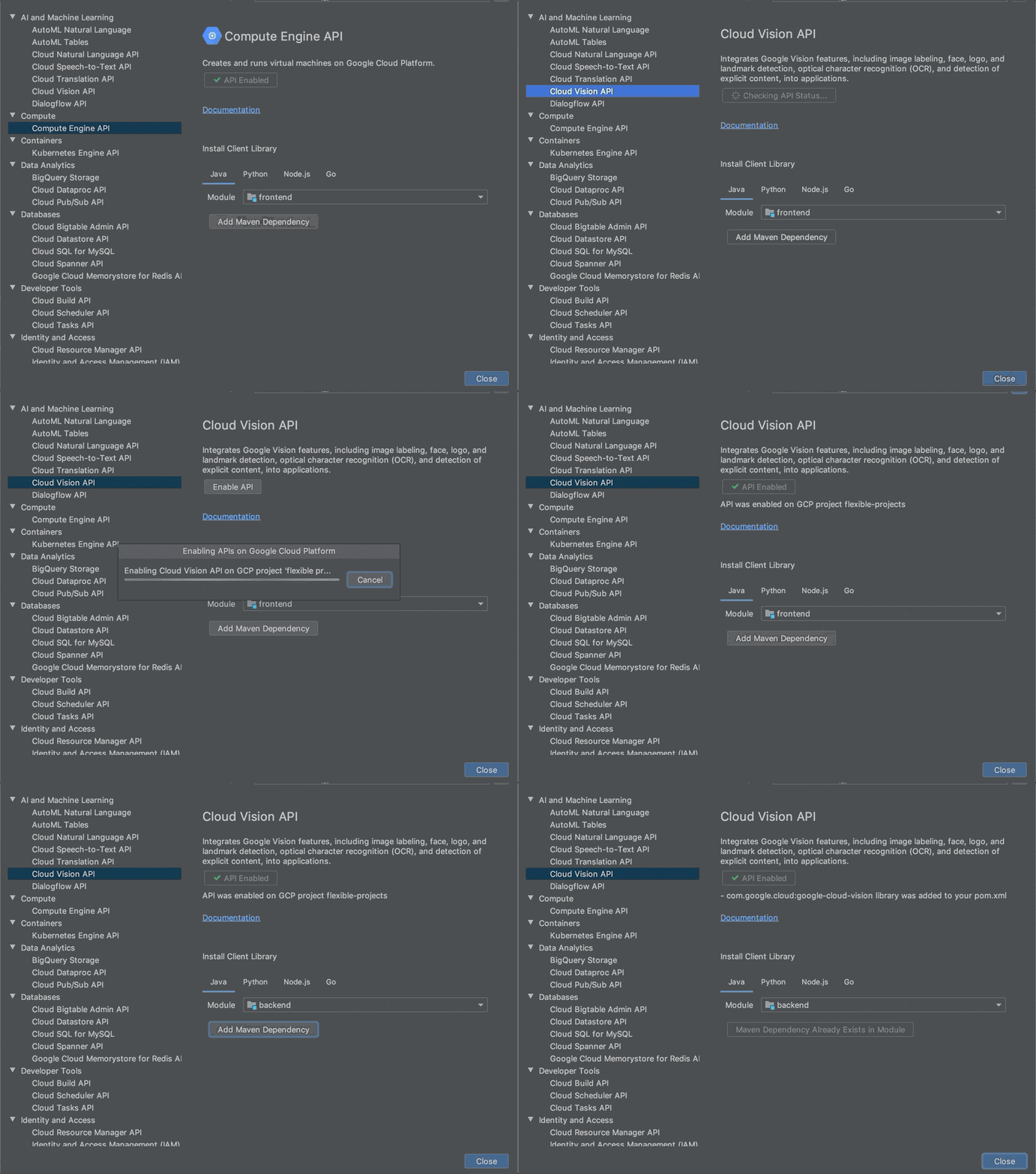
Applications often rely on external services to provide capabilities such as data storage, messaging and networking with the help of APIs. Google Cloud offers a wide array of such APIs—covering everything from translating text, building AI/ML models, managing database operations, through to secret management and storage. But adding an APIs to your application often means performing a number of somewhat repetitive steps outside of the integrated development environment (IDE), across different websites. We are pleased to announce that we have streamlined this process and made it easy to add Google Cloud APIs to your project and start using them without leaving the IDE, with the help of a new API manager in Cloud Code.Cloud Code is our set of extensions for VS Code and the JetBrains family of integrated development environments (IDEs). With extensions to VSCode, IntelliJ, Goland, PyCharm, and WebStorm, Cloud Code can help you develop, deploy, and debug Kubernetes applications.The Cloud Code API manager further enhances the existing Cloud Code feature set by providing several features directly within your favorite IDE that you can use to Google Cloud APIs to your application, whether it runs on Kubernetes or otherwise: Browse and enable Google Cloud APIsInstall corresponding client libraries, with support for Java, NodeJS, Python and GoAccess detailed API documentationEach of these reduces the amount of “context switching” that you need to do and let’s you spend more time focused on writing code. Let’s look at each of these Cloud Code features in a little more depth. Browse and enable Google Cloud APIsFinding the right API to add to your application can take time. For example, even if you develop a simple app like “bookshelf” getting started app, you need to enable Cloud Storage, Logging and Error Reporting APIs. For more complex applications that use more services, it’s even more difficult. The API browser in Cloud Code lets you browse all the Google Cloud APIs, which have been categorized into logical groups and provided in an easy to view format, from within the IDE. You can sort and search for your favorite Google Cloud API and click on it to view more details. In the details page, you can also view the status of a Google Cloud API and enable it for a GCP project.Here, you can see how to navigate between various Google Cloud APIs, view the status of an API, enable an API and automatically add Maven dependency for Java Maven projects in the IntelliJ IDEA.Install client librariesIn addition to showing the information about Google Cloud API in the details page, Cloud Code provides instructions for installing client libraries. Client libraries allow  you to consume your preferred Cloud API in the programming language of your choice, instead of directly consuming low-level REST APIs or protobufs. Currently, installation instructions are available for Java, NodeJS, Python and Go. If you are using Java, diamond dependencies are handled automatically through libraries bom.With Cloud Code, you can now browse the Google Cloud APIs, view documentation for and the status of an API, and copy installation instructionsAccess detailed documentationSo far, the API manager has made it easy to discover and add an API into your code base. When it comes to using the API, you may also often need to refer to the reference documentation. Cloud Code’s API manager brings all of the critical links right into context inside the IDE so that you can easily find examples, review the structure of the overall API and discover details about pricing and additional detailed use cases.Get startedCloud Code helps you get started on various Google Cloud APIs in a seamless manner from within your favorite IDE. To learn more, check out the documentation for Cloud Code for VS Code and JetBrains IDEs. If you are new to Cloud Code, start by learning how to install Cloud Code.
Quelle: Google Cloud Platform

Charting a lifetime of learning and love for technology

Editor’s note: In honor of Black History Month, we’re talking to Cloud Googlers about the people and moments that inspire them and share how they’re shaping a more inclusive vision of technology.From his Senegalese childhood to his European education to his work running the global solutions engineering organization in Google Cloud, Hamidou Dia has always had a passion for education. We talked with him to learn more about his passion and how he applies it to work.Tell us about what you do at Google.I’m the solutions engineering lead here at Google Cloud. That means that my team and I focus on helping customers solve their most complex business problems using our technology. We have amazing technology here, and we want to make sure we’re connecting that technology to the business challenges our customers are facing today. We work closely with our customers to understand their business issues, and then build solutions that help them. The issues we help customers solve for are phenomenal—in industries from retail, financial services to healthcare to the public sector, and more—so I’m continually learning new things. In my team, we conduct design thinking workshops with our customers to help uncover their business challenges and co-create solutions. This is what it means to be “Googley” – being helpful and solving together! In any sales organization, you are constantly articulating your value proposition to customers. Customers constantly ask me why they should choose Google Cloud. One of our key differentiators is the Google culture. Customers are intrigued by our culture of innovation and collaboration and they want to be associated with that.As we celebrate BHM, who inspires youSomeone who I’ve always admired is Léopold Senghor, the first president of Senegal after the country gained its independence in 1960. It’s an 80% Muslim country and he was Catholic, yet he was able to relate to many different people and bring them together. He laid out a vision for education and for building a peaceful, secular society. He’s one of the greatest African leaders, and I talk about him often. He was a poet and teacher as well as a leader, and he really understood how important education is to a society.  What’s your passion in life?Education is my passion. I first learned that passion from my mom – even though she couldn’t read or write, she knew how valuable education was. She told me that I was smart and I could succeed. I loved playing soccer, but she constantly told me I needed to balance schoolwork and soccer. I’m glad now that I spent more time on math and physics! I had a middle school teacher in Senegal who really believed I deserved to go to high school. There were only five high schools in the whole country. That teacher fought to get me into high school, and that acceptance opened so many doors for me. I had to leave home to go to high school since the nearest school was 140 kilometers away. After high school, I went to college in France on a scholarship. Very few students across the country each year went to college on an academic scholarship. I thought I would study business. But the very first time I interacted with a PC, it totally changed my path. I wrote my first program and knew I had to study engineering, then got a master’s degree in computer science. I love technology and how it can be so helpful in everyday life, and I knew right away it was the field for me.  I’m fortunate enough that I also get to live my passion working at Google. Every day I get to help educate our customers and find the best solution for their needs.What does Black History Month mean to you?I’ve lived in the U.S. for over 20 years. My five children were all educated here and they were often in the minority at school — which was very different from my childhood in Senegal. We’ve had many family discussions on race and identity. My advice to my children has always been to embrace their heritage and stay true to themselves. Don’t let others tell you what you can and can’t do. Carve your own path.As for my own experience, moving from Senegal to Europe and then the United States, I appreciated meeting people from so many different backgrounds and experiences. You can learn so much by talking to someone who is different from you. Black History Month is a wonderful opportunity to elevate those voices we don’t hear from enough and learn from their experiences.What advice do you give to students or those new to the workforce?You always have to have a drive, a passion for learning and growing all the time, no matter where you are in your career. I always refer back to the principles I was raised with in West Africa. Number one is character. It’s having integrity in everything you do. Second is that it’s all about hard work. In the technology industry, finding your area of expertise, and always continuing to learn more, is how you can stay on top of your game. And finally, don’t be afraid. Don’t fear the unknown, or fear a challenge. The greatest challenges are often where the greatest opportunities lie.
Quelle: Google Cloud Platform

All together now: our operations products in one place

Our suite of operations products has come a long way since the acquisition of Stackdriver back in 2014. The suite has constantly evolved with significant new capabilities since then, and today we reach another important milestone with complete integration into the Google Cloud Console. We’re now saying goodbye to the Stackdriver brand, and announcing an operations suite of products, which includes Cloud Logging, Cloud Monitoring, Cloud Trace, Cloud Debugger, and Cloud Profiler. The Stackdriver functionality you’ve come to depend on isn’t changing. Over the years, these operations products have seen a strong growth in usage by not just application developers and DevOps teams, but also IT operators and security teams. Complete integration of the products into the Cloud Console, along with in-context presence within the key service pages themselves—like the integrations into Compute Engine, Google Kubernetes Engine, Cloud SQL, and Dataflow management consoles—brings a great experience to all users. Putting operations tasks a quick click away, without users losing context of the activities they had been performing, shows how seamless an operations journey can be. In addition to this console integration, we’re very happy to share some of the progress in our products, with lots of exciting features launching today. Cloud LoggingContinuing with our goal to build easy-to-use products, we have completely overhauled the Logs Viewer and will be rolling this out to everyone over the next week. This makes it even easier for you to quickly identify and troubleshoot issues. We’re also pleased to announce that the ability to customize how long logs are retained is now available in beta. With both the new Cloud Logging user interface and the new 10-year log retention feature, you can search logs quickly and identify trends and correlations. We also understand that in some cases, it is very useful to export logs from Cloud Logging to other locations like BigQuery, Cloud Storage, or even third-party log management systems. To make this easier, we are making Logs Router generally available. Similarly, data from Cloud Trace can also be exported to BigQuery. Log Router’s support for customer management encryption keys (CMEK) also makes this a good solution for environments needing to meet that security need for compliance and other purposes. Cloud MonitoringOur biggest change of all that you’ll see in the console is Cloud Monitoring, as this was the last Stackdriver product to migrate over to our Google Cloud Console. You’ll now find a better designed, easy-to-navigate site, and important new features targeted to make your life easier. We are increasing our metrics retention to 24 months and writing metrics at up to 10-second granularity. The increased granularity is especially useful when making quick operational decisions like load balancing, scaling, etc. Like Cloud Logging, you can now access what you need more quickly, as well as prepare for future troubleshooting with longer retention. An additional key launch is Dashboards API, which lets you develop a dashboard once and share it multiple times in other workspaces and environments. Users might also notice better metrics recommendations by surfacing to the top of the selection list the most popular metrics for a given resource type. This is a great example of understanding the preferred metric by the millions of users on Google Cloud, and surfacing them quickly in other situations.This release makes it possible to route alerts to independent systems with Pub/Sub support, continuing with the ability to connect a broad variety of operational tools with Cloud Monitoring. To keep up with the needs of some of our largest users, we are also expanding support for hundreds of projects within a Workspace—providing a single point of control and management interface for multiple projects. Stay tuned for more details about all of these new capabilities in a series of blog posts over the next few weeks. 2020 will continue to see momentum for our operations suite of products, and we’re looking forward to the road ahead as we continue to help developers and operators across the world to manage and troubleshoot issues quickly and keep their systems up and running.Learn more about the operations suite here.
Quelle: Google Cloud Platform

Google Cloud Security – continuing to give good the advantage

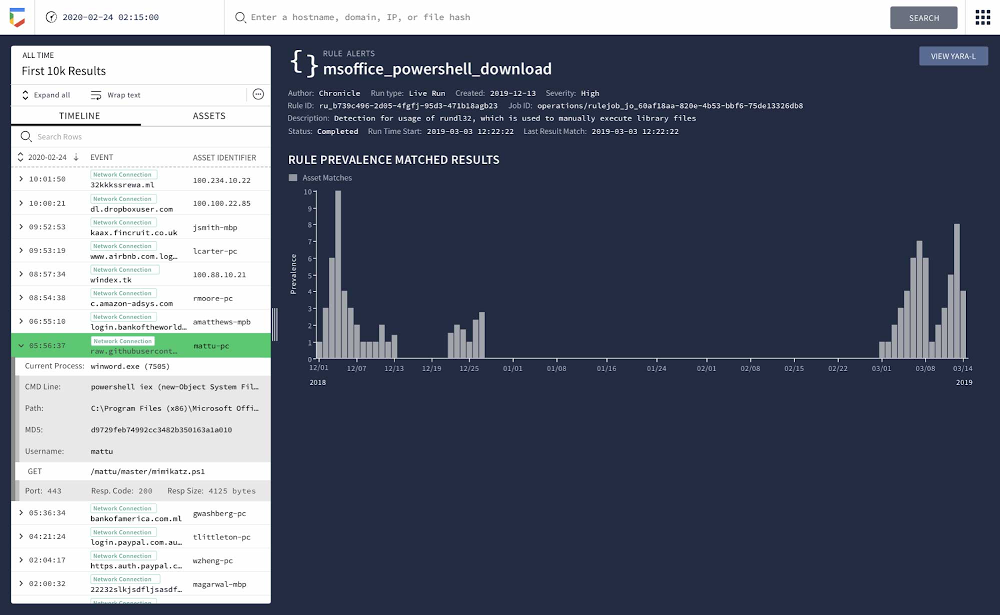
Cloud security is a top enterprise IT priority as organizations modernize their critical business systems both in-place and in the cloud. Our mission is to provide advanced security solutions that help give good the advantage, starting from building the most secure cloud platform to products that bring the power of Google’s global infrastructure and threat intelligence directly to your data centers.Today at the RSA Conference we’re introducing new capabilities that offer security wherever our customers’ systems and data may reside, including threat detection and timeline capabilities in Chronicle, threat response integration between Chronicle and Palo Alto Networks’ Cortex XSOAR, and online fraud prevention services. New advanced threat detection and automatic timelines in ChronicleDetection rule to find a PowerShell downloadChronicle launched its security analytics platform in 2019 to help change the way any business could quickly, efficiently, and affordably investigate alerts and threats in their organization. At RSA this year, as part of Google Cloud, we’ll show how customers can detect threats using YARA-L, a new rules language built specifically for modern threats and behaviors, including types described in Mitre ATT&CK. This advanced threat detection provides massively scalable, real-time and retroactive rule execution.We’re also introducing Chronicle’s intelligent data fusion, a combination of a new data model and the ability to automatically link multiple events into a single timeline. Palo Alto Networks, with Cortex XSOAR, is our first partner to integrate with this new data structure to enable even more powerful threat response. We’ll be demonstrating this integrated capability in the Google Cloud/Chronicle booth at RSA.“Cortex XSOAR offers automated enrichment, response and case management to enterprise-wide threats,” said Rishi Bhargava, VP, Product Strategy at Palo Alto Networks. “The integration with Chronicle’s new detection capabilities and event timelines, across months or years’ of data, enhances that response and enables comprehensive threat management for our mutual customers.”Prevent fraud and abuse with reCAPTCHA Enterprise and Web RiskTo protect your business, you need to protect your users. To help, we’re announcing the general availability of reCAPTCHA Enterprise and Web Risk API. These products are underpinned by two Google security technologies that have been protecting billions of web users and millions of websites for more than a decade—reCAPTCHA and Google Safe Browsing. reCAPTCHA Enterprise helps protect websites from fraudulent activities like scraping, credential misuse, and automated account creation. Protecting the web from bots has become increasingly important with the rise of threats like credential stuffing attacks, where malicious actors can test large volumes of breached passwords against legitimate sites. reCAPTCHA Enterprise recently added a new wave of commercial-grade bot defense capabilities to help ensure that a login attempt is being made by a legitimate user and not a bot. Google Nest is using reCAPTCHA Enterprise to help prevent automated attacks by actors seeking to obtain unauthorized access to accounts and devices.Overview of reCAPTCHA Enterprise protectionsUsing Web Risk API, enterprise customers can enable client applications to check URLs against Google’s constantly updated lists of unsafe web resources to prevent access to or inclusion of malicious content. Web Risk API alerts on, and includes information about, more than a million unsafe URLs that we keep up-to-date by examining billions of URLs each day in Google Safe Browsing.Web Risk API and reCAPTCHA Enterprise are now both globally generally available and can be purchased separately. Google Cloud security in 2020 and beyondWhen it comes to security, our work will never be finished. In addition to the capabilities announced today, we’ll continue to empower our customers with products that help organizations modernize their security capabilities in the cloud or in-place. To learn more about our entire portfolio of security capabilities, visit us at booth #2233 Moscone South, and check out our Trust & Security Center.
Quelle: Google Cloud Platform

Migrate your Microsoft SQL Server workloads to Google Cloud

Enterprise database workloads are the backbone of many of your applications and ecosystems. Also, guaranteed availability is critical when choosing a cloud provider. Many enterprises built their mission-critical applications on Microsoft SQL Server 2008, and it’s common still to run into older versions of SQL Server as you’re working toward modernizing your on-prem environments. According to Business insider, 60% of Microsoft users still use SQL Server 2008, which reached its end of life in July 2019. This provides the opportunity for many of you to find a place to host your SQL Server 2008 instances on newer technology with less operational burden. We’re announcing that Cloud SQL for SQL Server is generally available globally. This means that Cloud SQL now helps you keep your SQL Server workloads running by providing a 99.95% uptime service-level agreement (SLA), which is consistent with the other Cloud SQL database engines. Cloud SQL for SQL Server is fully managed and compatible with SQL Server 2017. Now you can migrate your critical production SQL Server workloads to Google Cloud and rely on the service’s stability and reliability.  We hear from enterprise companies how important the ability to migrate to Cloud SQL for SQL Server is to their larger goals of infrastructure modernization and a multi-cloud strategy. On-premises applications like HR, finance, and payroll often depend on these legacy databases to keep running. Customers often cite the challenge of wanting to maintain compatibility with these existing systems and datasets, while also streamlining deployments and scale-out at a fraction of the overhead. Migrating these instances to Cloud SQL for SQL Server can save costs and maintenance time and improve efficiency and speed. Getting started migrating SQL Server 2008The migration for Microsoft SQL Server 2008 to Cloud SQL for SQL Server can be achieved in a simple five steps. For details, check out the full migration guide: SQL Server 2008 R2 server to Cloud SQL for SQL Server. 1. Create a Cloud SQL for SQL Server instance2. Create a Cloud Storage bucket3. Back up your Microsoft SQL Server 2008 database4. Import the database into Cloud SQL for SQL Server5. Validate the imported dataIf you’re working with newer versions of SQL Server, check out the SQL Server 2017 to Cloud SQL for SQL Server migration guide.Since the launch of Cloud SQL for SQL Server, we’ve heard your feedback and have continued to improve the performance and durability of the service. We expect to continue our rapid pace of innovation and feature releases to meet our customers’ needs and address feedback. Cloud SQL for SQL Server has proven itself as a key component when migrating existing enterprise applications and infrastructure.We’re continuing to rapidly improve Cloud SQL for SQL Server to meet all of your cloud database needs. Stay tuned for features in development that can help with Active Directory integration, online migrations, and more options for replicas and machine types. See what Google Cloud can do for youSign up for a $300 credit to try Cloud SQL and the rest of Google Cloud. You can start with inexpensive micro instances for testing and development. When you’re ready, scale them up to serve performance-intensive applications. Enjoy your exploration of Google Cloud and Cloud SQL for SQL Server.
Quelle: Google Cloud Platform

Your ML workloads cheaper and faster with the latest GPUs

Running ML workloads more cost effectivelyGoogle Cloud wants to help you run your ML workloads as efficiently as possible. To do this, we offer many options for accelerating ML training and prediction, including many types of NVIDIA GPUs. This flexibility is designed to let you get the right tradeoff between cost and throughput during training or cost and latency for prediction.We recently reduced the price of NVIDIA T4 GPUs, making AI acceleration even more affordable. In this post, we’ll revisit some of the features of recent generation GPUs, like the NVIDIA T4, V100, and P100. We’ll also touch on native 16-bit (half-precision) arithmetics and Tensor Cores, both of which provide significant performance boosts and cost savings. We’ll show you how to use these features, and how the performance benefit of using 16-bit and automatic mixed-precision for training often outweighs the higher list price of NVIDIA’s newer GPUs.Half-precision (16-bit float)Half-precision floating point format (FP16) uses 16 bits, compared to 32 bits for single precision (FP32). Storing FP16 data reduces the neural network’s memory usage, which allows for training and deployment of larger networks, and faster data transfers than FP32 and FP64.32-bit Float structure (Source: Wikipedia)16-bit Float structure (Source: Wikipedia)Execution time of ML workloads can be sensitive to memory and/or arithmetic bandwidth. Half-precision halves the number of bytes accessed, reducing the time spent in memory-limited layers. Lowering the required memory lets you train larger models or train with larger mini-batches.The FP16 format is not new to GPUs. In fact, it has been supported as a storage format for many years on NVIDIA GPUs: High performance FP16 is supported at full speed on NVIDIA T4, NVIDIA V100, and P100 GPUs. 16-bit precision is a great option for running inference applications, however if you’re training a neural network entirely at this precision, the network may not converge to required accuracy levels without higher precision result accumulation.Automatic mixed precision mode in TensorFlowMixed precision uses both FP16 and FP32 data types when training a model. Mixed-precision training offers significant computational speedup by performing operations in half-precision format whenever it’s safe to do so, while storing minimal information in single precision to retain as much information as possible in critical parts of the network. Mixed-precision training usually achieves the same accuracy as single-precision training using the same hyper-parameters.NVIDIA T4 and NVIDIA V100 GPUs incorporate Tensor Cores, which accelerate certain types of FP16 matrix math, enabling faster and easier mixed-precision computation. NVIDIA has also added automatic mixed-precision capabilities to TensorFlow.To use Tensor Cores, FP32 models need to be converted to use a mix of FP32 and FP16. Performing arithmetic operations in FP16 takes advantage of the performance gains of using lower-precision hardware (such as Tensor Cores). Due to the smaller representable range of float16, though, performing the entire training with FP16 tensors can result in gradient underflow and overflow errors. However, performing only certain arithmetic operations in FP16 results in performance gains when using compatible hardware accelerators, decreasing training time and reducing memory usage, typically without sacrificing model performance.TensorFlow supports FP16 storage and Tensor Core math. Models that contain convolutions or matrix multiplication using the tf.float16 data type will automatically take advantage of Tensor Core hardware whenever possible.This process can be configured automatically using automatic mixed precision (AMP). This feature is available in V100 and T4 GPUs, and TensorFlow version 1.14 and newer supports AMP natively. Let’s see how to enable it.Manually: Enable automatic mixed precision via TensorFlow APIWrap your tf.train or tf.keras.optimizers Optimizer as follows:This change applies automatic loss scaling to your model and enables automatic casting to half precision.(Note: To enable mixed precision in a for TensorFlow 2 Keras you can use: tf.keras.mixed_precision.Policy.)Automatically: Enable automatic mixed precision via an environment variableWhen using the NVIDIA NGC TFDocker image, simply set one environment variable:As an alternative, the environment variable can be set inside the TensorFlow Python script:(Note: For a complete AMP example showing the speed-up on training an image classification task on CIFAR10, check out this notebook.)Please take a look at the Models that have been tested successfully using mixed-precision.Configure AI Platform to use acceleratorsIf you want to start taking advantage of the newer NVIDIA GPUs like the T4, V100, or P100 you need to use the customization options: Define a config.yaml file that describes the GPU options you want. The structure of the YAML file represents the Job resource.The first example shows a configuration file for a training job that uses Compute Engine machine types with a T4 GPU.(Note: For a P100 or V100 GPU, configuration is similar, just replace type with the correct GPU type—NVIDIA_TESLA_P100 or NVIDIA_TESLA_V100.)Use the gcloud* command to submit the job, including a –config argument pointing to your config.yaml file. This example assumes you’ve set up environment variables—indicated by a $ sign followed by capital letters—for the values of some arguments:The following example shows how to submit a job with a similar configuration (using Compute Engine machine types with GPUs attached), but without using a config.yaml file:(Note: Please verify you are running the latest Google Cloud SDK to get access to the different machine types.)Hidden cost of low-priced instancesThe conventional practice most organizations follow is to select lower-priced cloud instances to save on per-hour compute cost. However, the performance improvements of newer GPUs can significantly reduce costs for running compute-intensive workloads like AI.To validate the concept that modern GPUs reduce the total cost of some common training workloads, we trained Google’s Neural Machine Translation (GNMT) model—which is used for applications like real-time language translations—on several GPUs. In this particular example we tested the GNMTv2 model using AI Platform Training using Custom Containers. By simply using modern hardware like a T4, we are able to train the model at 7% of the cost while obtaining the result eight times faster, as shown in the table below. (For details about the setup please take a look at the NVIDIA site.)Each GPU Model was tested using three different runs and calculating the average numbers per section.Additional costs for storing data (GNMT input data was stored on GCS) are not included, since they are the same for all tests.A quick note: When calculating the cost of a training job using Consumed ML units use the following formula:The cost of a training job in all available Americas regions is $0.49 per hour, per Consumed ML units.The cost of a training job in all available Europe regions and Asia Pacific regions is $0.54 per hour, perConsumed ML units.In this case to calculate the cost for running the job in the K80 use the Consumed ML units * $0.49formula: 465 * $0.49 = $227.85.The Consumed ML units can be found on your Job details page (see below), and are equivalent to training units with the duration of the job factored in:Looking at the specific NVIDIA GPUs, we can get more granular on the performance-price proposition.NVIDIA T4 is well known for its low power consumption and great Inference performance for Image/Video Recognition, Natural Language Processing, and Recommendation Engines, just to name a few use cases. It supports half-precision (16-bit float) and automatic mixed precision for model training and gives a 8.1x speed boost over K80 at only 7% of the original cost.NVIDIA P100 introduced half-precision (16-bit float) arithmetic. Using it gives a 7.6x performance boost over K80, at 27% of the original cost.NVIDIA V100 introduced tensor cores that accelerate half-precision and automatic mixed precision. It provides an 18.7x speed boost over K80 at only 15% of the original cost. In terms of time savings, the time to solution (TTS) was reduced from 244 hours (about 10 days) to just 13 hours (an overnight run). What about model prediction?GPUs can also drastically lower latency for online prediction (inference). However, the high availability demands of online prediction often requires keeping machines alive 24/7 and provisioning sufficient capacity in case of failures or traffic spikes. This can potentially make low latency online prediction expensive.The latest price cuts to T4s, however, make low latency, high availability serving more affordable on the Google Cloud AI Platform. You can deploy your model on a T4 for about the same price as eight vCPUs, but with the low latency and high-throughput of a GPU.The following example shows how to deploy a TensorFlow model for Prediction using 1 NVIDIA T4 GPU:ConclusionModel training and serving on GPUs has never been more affordable. Price reductions, mixed precision, and Tensor Cores accelerate AI performance for training and prediction when compared to older GPUs such as K80s. As a result, you can complete your workloads much faster, saving both time and money. To leverage these capabilities and reduce your costs, we recommend the following rules of thumb:If your training job is short lived (under 20 minutes), use T4, since they are the cheapest per hour.If your model is relatively simple (fewer layers, smaller number of parameters, etc.), use T4, since they are the cheapest per hour.If you want the fastest possible runtime and have enough work to keep the GPU busy, use V100.To take full advantage of the newer NVIDIA GPUs use 16-bit precision in P100 and enable mixed precision mode when using T4 and V100.If you haven’t explored GPUs for model prediction or inference, take a look at our GPUs on Compute Engine page for more details. For more information on getting started, check out our blog post on the topic.ReferencesCheaper Cloud AI deployments with NVIDIA T4 GPU price cutEfficiently scale ML and other compute workloads on NVIDIA’s T4 GPU, now generally availableAcknowledgements: Special thanks to the following people who contributed to this post: NVIDIA: Alexander Tsado, Cloud Product Marketing ManagerGoogle: Henry Tappen, Product Manager; Robbie Haertel, Software Engineer; Viesturs Zarins, Software Engineer1. Price is calculated as described here. Consumed ML Units * Unit Cost (different per region).
Quelle: Google Cloud Platform

Explaining model predictions on structured data

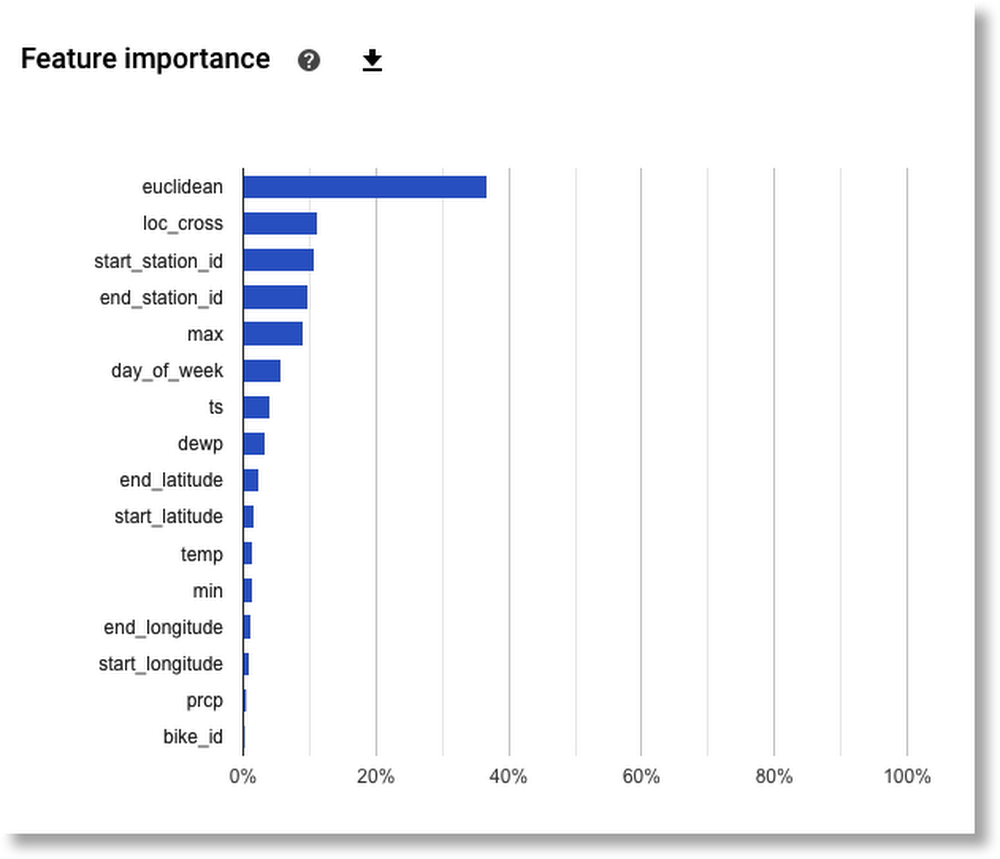
Machine learning technology continues to improve at a rapid pace, with increasingly accurate models being used to solve more complex problems. However, with this increased accuracy comes greater complexity. This complexity makes debugging models more challenging. To help with this, last November Google Cloud introduced Explainable AI, a tool designed to help data scientists improve their models and provide insights to make them more accessible to end users.We think that understanding how models work is crucial to both effective and responsible use of AI. With that in mind, over the next few months, we’ll share a series of blog posts that covers how to use AI Explanations with different data modalities, like tabular, image, and text data.In today’s post, we’ll take a detailed look at how you can use Explainable AI with tabular data, both with AutoML Tables and on Cloud AI Platform.What is Explainable AI?Explainable AI is a set of techniques that provides insights into your model’s predictions. For model builders, this means Explainable AI can help you debug your model while also letting you provide more transparency to model stakeholders so they can better understand why they received a particular prediction from your model. AI Explanations works by returning feature attribution values for each test example you send to your model. These attribution values tell you how much a particular feature affected the prediction relative to the prediction for a model’s baseline example. A typical baseline is the average value of all the features in the training dataset, and the attributions tell how much a certain feature affected a prediction relative to the average individual. AI Explanations offers two approximation methods: Integrated Gradients and Sampled Shapley. Both options are available in AI Platform, while AutoML Tables uses Sampled Shapley. Integrated Gradients, as the name suggests, uses the gradients—which show how a prediction is changing at each point—in its approximation. It requires a differentiable model implemented in TensorFlow, and is the natural choice for those models, for example neural networks. Sampled Shapley provides an approximation through sampling to the discrete Shapley value. While it doesn’t scale as well in the number of features, Sampled Shapely does work on non-differentiable models, like tree ensembles. Both methods allow for an assessment of how much each feature of a model led to a model prediction by comparing those against a baseline. You can learn more about them in our whitepaper.About our dataset and scenarioThe Cloud Public Datasets Programmakes available public datasets that are useful for experimenting with machine learning. For our examples, we’ll use data that is essentially a join of two public datasets stored in BigQuery: London Bike rentals and NOAA weather data, with some additional processing to clean up outliers and derive additional GIS and day-of-week fields. Using this dataset, we’ll build a regression model to predict the duration of a bike rental based on information about the start and end stations, the day of the week, the weather on that day, and other data. If we were running a bike rental company, we could use these predictions—and their explanations—to help us anticipate demand and even plan how to stock each location.While we’re using bike and weather data here, you can use AI Explanations for a wide variety of tabular models, taking on tasks as varied as asset valuations, fraud detection, credit risk analysis, customer retention prediction, analyzing item layouts in stores, and many more.AI Explanations for AutoML TablesAutoML Tables lets you automatically build, analyze, and deploy state-of-the-art machine learning models using your own structured data. Once your custom model is trained, you can view its evaluation metrics, inspect its structure, deploy the model in the cloud, or export it so that you can serve it anywhere a container runs. Of course, AutoML Tables can also explain your custom model’s prediction results. This is what we’ll look at in our example below. To do this, we’ll use the “bikes and weather” dataset that we described above, which we’ll ingest directly from a BigQuery table. This post walks through the data ingestion—which is made easy by AutoML—and training process using that dataset in the Cloud Console UI.Global feature importanceAutoML Tables automatically computes global feature importance for the trained model. This shows, across the evaluation set, the average absolute attribution each feature receives. Higher values mean the feature generally has greater influence on the model’s predictions.This information is extremely useful for debugging and improving your model. If a feature’s contribution is negligible—if it has a low value—you can simplify the model by excluding it from future training. Based on the diagram below, for our example, we might try training a model without including bike_id.Global feature importance results for a trained model.Explanations for local feature importanceYou can now also measure local feature importance: a score showing how much (and in which direction) each feature influenced the prediction for a single example.It’s easy to explore local feature importance through Cloud Console’s Tables UI. After you deploy your model, go to the TEST & USE tab of the Tables panel, select ONLINE PREDICTION, enter the field values for the prediction, and then check the Generate feature importance box at the bottom of the page. The result will now be the prediction, the Baseline prediction value, and the feature importance values.Let’s look at a few examples. For these examples, in lieu of real-time data, we’re using instances from the test dataset that the model did not see while training. AutoML tables allows you to export the test dataset to BigQuery after training, including the target column, which makes it easy to explore.One thing our bike rental business might want to investigate is why different trips between the same two stations are sometimes accurately predicted to have quite different durations. Let’s see if the prediction explanations give us any hints. The actual duration value (that we want our model to predict) is annotated in red in the screenshots below.Click to enlargeBoth of these trips are to and from the same locations, but the one on the left was correctly predicted to take longer. It looks like the day of week (7 is a weekend; 4 is a weekday) was an important contributor. When we explore the test dataset in BigQuery, confirm that the average duration of weekend rides is indeed higher than for weekdays.Let’s look at two more trips with the same qualities: to and from the same locations, yet the duration of one is accurately predicted to be longer.Click to enlargeIn this case, it looks like the weather, specifically max temperature, might have been an important factor. When we look at the average ride durations in the BigQuery test dataset for temps at the high and low end of the scale, our theory is supported.So these prediction explanations suggest that on the weekends, and in hot weather, bike trips will tend to take longer than they do otherwise. This is data our bike rental company can use to tweak bike stocking, or other processes, to improve business.  What about inaccurate predictions? Knowing why a prediction was wrong can also be extremely valuable, so let’s look at one more example: where the predicted trip duration is much longer than the actual trip duration, as shown below.Click to enlargeAgain, we can load an example with an incorrect prediction into Cloud Console. This time, the local feature importance values suggest that the starting station might have played a larger-than-usual role in the overly high prediction. Perhaps the trips from this station have more variability than the norm.After querying the test dataset on BigQuery, we can detect that this station is in the top three for standard deviation in prediction accuracy. This high variability of prediction results suggests that there might be some issues with the station or its rental setup, that the rental company might want to look into.Using the AutoML Tables client libraries to get local explanationsYou can also use the AutoML Tables client libraries to programmatically interact with the Tables API. That is, from a script or notebook, you can create a dataset, train your model, get evaluation results, deploy the model for serving, and then request local explanations for prediction results given the input data. For example, with the following “bikes and weather” model input instance:… you can request a prediction with local feature importance annotations like this:The response will return not only the prediction itself and the 95% prediction interval—the bounds that the true value of the prediction is likely to fall between with 95% probability—but also the local feature importance values for each input field. The prediction response should look something like this.This notebook walks through the steps in more detail, and shows how to parse and plot the prediction results.Explanations for AI PlatformYou can also get explanations for custom TensorFlow models deployed to AI Platform. Let’s show how using a model trained on a similar dataset to the one above. All of the code for deploying an AI Explanations model to AI Platform can be found in this notebook.Preparing a model for deploymentWhen we deploy AI Explanations models to AI Platform, we need to choose a baseline input for our model. When you choose a baseline for tabular models, think of it as helping you identify outliers in your dataset. For this example we’ve set the baseline to the median across all of our input values, computed using Pandas.Since we’re using a custom TensorFlow model with AI Platform, we also need to tell the explanations service which tensors we want to explain from our TensorFlow model’s graph. We provide both the baseline and this list of tensors to AI Explanations in an  explanation_metadata.json file, uploaded to the same GCS bucket as our SavedModel.Getting attribution values from AI PlatformOnce our model is deployed with explanations, we can get predictions and attribution values with the AI Platform Prediction API or gcloud. Here’s what an API request to our model would look like:For the example below, our model returns the following attribution values, which are all relative to our model’s baseline value. Here we can see that distance was the most important feature, since it pushed our model’s prediction down from the baseline by 2.4 minutes. It also shows that the start time of the trip (18:00, or 6:00 pm) caused the model to shorten its predicted trip duration by 1.2 minutes:Next, we’ll use the What-If Tool to see how our model is performing across a larger dataset of test examples and to visualize the attribution values.Visualizing tabular attributions with the What-If ToolThe What-If Tool is an open-source visualization tool for inspecting any machine learning model, and the latest release includes features intended specifically for AI Explanations models deployed on AI Platform. You can find the code for connecting the What-If Tool to your AI Platform model in this demo notebook.Here’s what you’ll see when you initialize the What-If Tool with a subset of our test dataset and model and click on a data point:Click to enlargeOn the right, we see the distribution of all 500 test data points we’ve passed the What-If Tool. The Y-axis indicates the model’s predicted trip duration for these values. When we click on an individual data point, we can see all of the feature values for that data point along with each feature’s attribution value. This part of the tool also lets you change feature values and re-run the prediction to see how the updated feature value affected the model’s prediction:Click to enlargeOne of our favorite What-If Tool features is the ability to create custom charts and scatter plots, and the attributions data returned from AI Platform makes this especially useful. For example, here we created a custom plot where the X-axis measures the attribution value for trip distance and the Y-axis measures the attribution value for max temperature:Click to enlargeThis can help us identify outliers. In this case, we show an example where the predicted trip duration was way off since the distance traveled was 0 but the bike was in use for 34 minutes.There are many possible exploration ideas with the What-If Tool and AI Platform attribution values, like analyzing our model from a fairness perspective, ensuring our dataset is balanced, and more. Next stepsReady to dive into the code? These resources will help you get started with AI Explanations on AutoML Tables and AI Platform:The AutoML Tables documentation and more detail on the local feature importance calculationsThe docs for Explanations on AI PlatformA sample notebook for building and deploying a tabular model to AI PlatformA blog post that also walks through using AutoML Tables from a notebookA notebook that shows how to use the AutoML Tables Python client library to get prediction explanationsA video series on the What-If ToolThe keynote announcement of AI ExplanationsIf you’d like to use the same datasets we did, here is the London bikeshare data in BigQuery. We joined this with part of the NOAA weather dataset, which was recently updated to include even more data. We’d love to hear what you thought of this post. You can find us on Twitter at @amygdala and @SRobTweets. If you have specific questions about using Explainable AI in your models, you can reach us here. And stay tuned for the next post in this series, which will cover explainability on image models.
Quelle: Google Cloud Platform

Making your monolith more reliable

In cloud operations, we often hear about the benefits of microservices over monolithic architecture. Indeed, microservices help manage hardware being abstracted away and push developers towards resilient, distributed designs. However, many enterprises still have monolithic architectures which they need to maintain. For this post, we’ll use Wikipedia’s definition of a monolith: “A single-tiered software application in which the user interface and data access code are combined into a single program from a single platform.”When and why to choose monolithic architecture is usually a matter of what works best for each business. Whatever the reason for using monolithic services, you still have to support them. They do, however, bring their own reliability and scaling challenges, and that’s what we’ll tackle in this post. At Google, we use site reliability engineering (SRE) principles to ensure that systems run smoothly, and these principles apply to monoliths as well as microservices. Common problems with monolithsWe’ve noticed some common problems that arise in the course of operating monoliths. Particularly, as monoliths grow (either scaling with increased usage, or growing more complex as they take on more functionality), there are several issues we commonly have to address:Code base complexity: Monoliths contain a broad range of functionality, meaning they often have a large amount of code and dependencies, as well as hard-to-follow code paths, including RPC calls that are not load-balanced. (These RPCs call to themselves or call between different instances of a binary if the data is sharded.)Release process difficulty: Frequently, monoliths consist of code submitted by contributors across many different teams. With more cooks in the kitchen and more code being cooked up every release cycle, the chances of failure increase. A release could fail QA or fail to deploy into production. These services often have difficulty reaching a mature state of automation where we can safely and continuously deploy to production, because the services require human decision-making to promote them into production. This puts additional burden on the monolith owners to detect and resolve bugs, and slows overall velocity.Capacity: Monolithic servers typically serve various types of requests, and that variation means that in order to complete the requests, differences in compute resources—CPU, memory, storage I/O, and so on—are required. For example, an RDBMS-backed server might handle view-only requests that read from the database and are reasonably cacheable, but may also serve RPCs that write to the database, which must be committed before returning to the user. The impact on CPU and memory consumption can vary greatly between these two. Let’s say you load-test and determine your deployment handles 100 queries per second (qps) of your typical traffic. What happens if usage or features change, resulting in a higher number of expensive write queries? It’s easy to introduce these changes—they happen organically when your users decide to do something different, and can threaten to overwhelm your system. If you don’t check your capacity regularly, you can end up being underprovisioned gradually over time.Operational difficulty: With so much functionality in one monolithic system, the ability to respond to operational incidents becomes more consequential. Business-critical code shares a failure domain with low-priority code and features. Our Google SRE guidelines require changes to our services to be safe to roll back. In a monolith with many stakeholders, we need to coordinate more carefully than with microservices, since the rollback may revert changes unrelated to the outage, slow development velocity, and potentially cause other issues.How does an SRE address the issues commonly found in monoliths? The rest of this post discusses some best practices, but these can be distilled down to a single idea: Treat your monolith as a platform. Doing so helps address the operational challenges inherent in this type of design. We’ll describe this monolith-as-a-platform concept to illustrate how you can build and maintain reliable monoliths in the cloud.Monolith as a platformA software platform is essentially a piece of software that provides an environment for other software to run. Taking this platform approach toward how you operate your monolith does a couple of things. First, it establishes responsibility for the service. The platform itself should have clear owners who define policy and ensure that the underlying functionality is available for the various use cases. Second, it helps frame decisions about how to deploy and run code in a way that balances reliability with development velocity. Having all the monolith code contributors share operational responsibility sets individuals against each other as they try to launch their particular changes. Instead of sharing operational responsibility, however, the goal should be to have a knowledgeable arbiter who ensures that the health of the monolith is represented when designing changes, and also during production incidents.Scaling your platformMonoliths that are run well converge on some common best practices. This is not meant to be a complete list and is in no particular order. We recommend considering these solutions individually to see if they might improve monolith reliability in your organization:Plug-in architecture: One way to manifest the platform mindset is to structure your code to be modular, in a way that supports the service’s functional requirements. Differentiate between core code needed by most/all features and dedicated feature code. The platform owners can be gatekeepers for changes to core code, while feature owners can change their code without owner oversight. Isolate different code paths so you can still build and run a working binary with some chosen features disabled.Policies for new code and backends: Platform owners should be clear with the requirements for adding new functionality to the monolith. For example, to be resilient to outages in downstream dependencies, you may set a latency requirement stating that new back-end calls are required to time out within a reasonable time span (milliseconds or seconds), and are only retried a limited number of times before returning an error. This prevents a serving thread from getting stuck, waiting indefinitely on an RPC call to a backend, and possibly exhausting CPU or memory.Similarly, you might require developers to load test their changes before committing or enabling a new feature in production, to ensure there are no performance or resource requirement regressions. You may want to restrict new endpoints from being added without your operation team’s knowledge.Bucket your SLOs: For a monolith serving many different types of requests, there’s a tendency to define a new SLI and SLO for each request. As the number of SLOs increases, however, it gets more confusing to track and harder to assess the impact of error budget burn for one SLO vs. all the others. To overcome this issue, try bucketing requests based on the similarity of the code path and performance characteristics. For example, we can often bucket latency for most “read” requests into one group (usually lower latency), and create a separate SLO bucket for “write” requests (usually higher latency). The idea is to create groupings that indicate when your users are suffering from reliability issues.Which team owns a particular SLO or deciding whether an SLO is even needed for each feature are important considerations. While you want your on-call engineer to respond to business-critical outages, it’s fine to decide that some parts of the service are lower-priority or best-effort, as long as they don’t threaten the overall stability of the platform.Set up traffic filtering: Make sure you have the ability to filter traffic by various characteristics, using a web application firewall (WAF) or similar method. If one RPC method experiences a Query of Death (QoD), you can temporarily block similar queries, thereby mitigating the situation and giving you time to fix the issue.Use feature flags: As described in the SRE book, giving specific features a knob to disable all or some percentage of traffic is a powerful tool for incident response. If a particular feature threatens the stability of the whole system, you can throttle it down or turn it off, and continue serving all your other traffic safely.Flavors of monoliths: This last practice is important, but should be carefully considered, depending on your situation. Once you have feature flags, it’s possible to run different pools of the same binary, with each pool configured to handle different types of requests. This helps tremendously when a reliability issue requires you to re-architect your service, which may take some time to develop. Within Google, we once ran different pools of the same web server binary to serve web search and image search traffic separately, because performance profiles were so different. It was challenging to support them in a single deployment but they all shared the same code, and each pool only handled its own type of request.There are downsides to this mode of operation, so it’s important to approach this thoughtfully. Separating services this way may tempt engineers to fork services, in spite of the large amount of shared code, and running separate deployments increases operational and cognitive load. Therefore, instead of indefinitely running different pools of the same binary, we suggest setting a limited timeframe for running the different pools, giving you time to fix the underlying reliability issue that caused the split in the first place. Then, once the issue is resolved, merge serving back to one deployment. Regardless of where your code sits on the monolith-microservice spectrum, your service’s reliability and users’ experience are what ultimately matters. At Google, we’ve learned—sometimes the hard way—from the challenges that various design patterns bring. In spite of these challenges, we continue to serve our users 24/7 by calling to mind SRE principles, and putting these principles into practice.
Quelle: Google Cloud Platform

Now generally available: Managed Service for Microsoft Active Directory (AD)

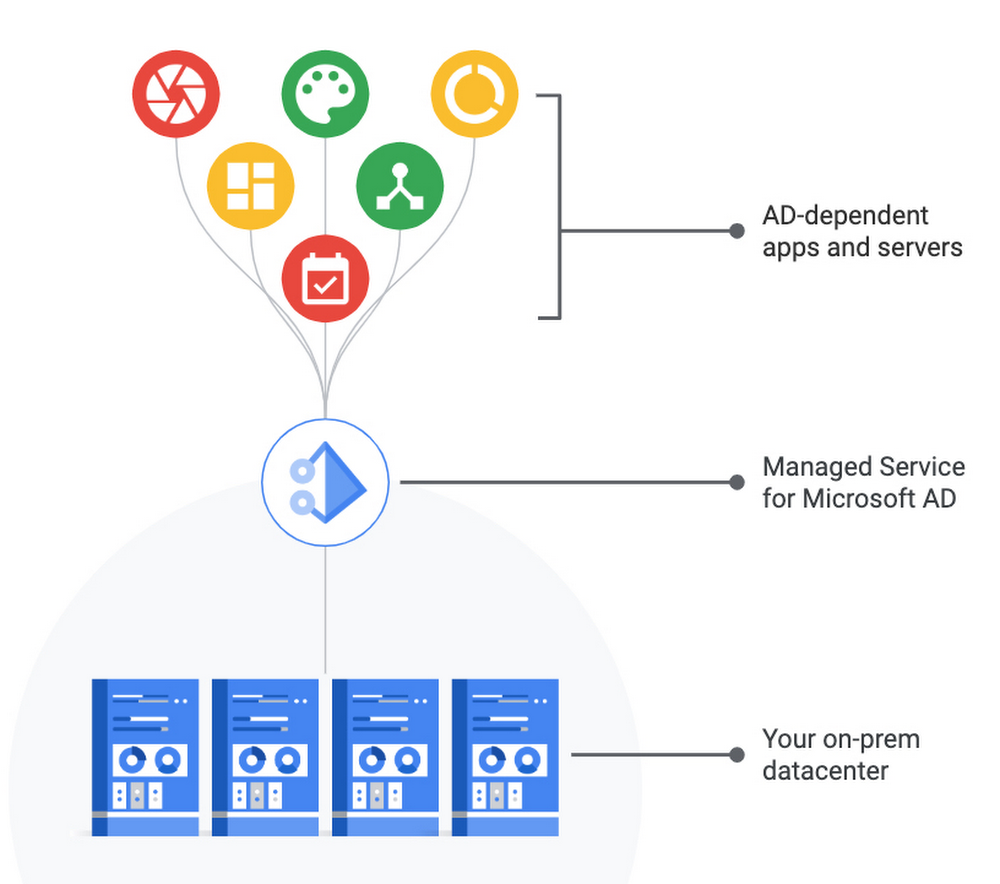
A few months ago, we launched Managed Service for Microsoft Active Directory (AD) in public beta. Since then, our customers have created more than a thousand domains to evaluate the service in their pre-production environments. We’ve used the feedback from these customers to further improve the service and are excited to announce that Managed Service for Microsoft AD is now generally available for everyone and ready for your production workloads.Simplifying Active Directory managementAs more AD-dependent apps and servers move to the cloud, you might face heightened challenges to meet latency and security goals, on top of the typical maintenance challenges of configuring and securing AD Domain Controllers. Managed Service for Microsoft AD can help you manage authentication and authorization for your AD-dependent workloads, automate AD server maintenance and security configuration, and connect your on-premises AD domain to the cloud. The service delivers many benefits, including:Compatibility with AD-dependent apps. The service runs real Microsoft AD Domain Controllers, so you don’t have to worry about application compatibility. You can use standard Active Directory features like Group Policy, and familiar administration tools such as Remote Server Administration Tools (RSAT), to manage the domain. Virtually maintenance-free. The service is highly available, automatically patched, configured with secure defaults, and protected by appropriate network firewall rules.Seamless multi-region deployment. You can deploy the service in a specific region to enable your apps and VMs in the same or other regions to access the domain over a low-latency Virtual Private Cloud (VPC). As your infrastructure needs grow, you can simply expand the service to additional regions while continuing to use the same managed AD domain.Hybrid identity support. You can connect your on-premises AD domain to Google Cloud or deploy a standalone domain for your cloud-based workloads.You can use the service to simplify and automate familiar AD tasks like automatically “domain joining” new Windows VMs by integrating the service with Cloud DNS, hardening Windows VMs by applying Group Policy Objects (GPOs), controlling Remote Desktop Protocol (RDP) access through GPOs, and more. For example, one of our customers, OpenX, has been using the service to reduce their infrastructure management work:”Google Cloud’s Managed AD service is exactly what we were hoping it would be. It gives us the flexibility to manage our Active Directory without the burden of having to manage the infrastructure,” said Aaron Finney, Infrastructure Architecture, OpenX. “By using the service, we are able to solve for efficiency, reduce costs, and enable our highly-skilled engineers to focus on strategic business objectives instead of tactical systems administration tasks.”And our partner, itopia, has been leveraging Managed AD to make the lives of their customers easier: “itopia makes it easy to migrate VDI workloads to Google Cloud and deliver multi-session Windows desktops and apps to users on any device. Until now, the customer was responsible for managing and patching AD. With Google Cloud’s Managed AD service, itopia can deploy cloud environments more comprehensively and take away one more piece of the IT burden from enterprise IT staff,” said Jonathan Lieberman, CEO, itopia. “Managed AD gives our customers even more incentive to move workloads to the cloud along with the peace of mind afforded by a Google Cloud managed service.”Getting startedTo learn more about getting started with Managed Service for Microsoft AD now that it’s generally available, check out the quickstart, read the documentation, review pricing, and watch the webinar.
Quelle: Google Cloud Platform