Use the Dashboard API to build your own monitoring dashboard

Using dashboards in Cloud Monitoring makes it easy for you to track important system metrics. Creating dashboards by hand in the Monitoring UI can be a time-consuming process, especially if you want to use them in multiple different Monitoring Workspaces. With the recent GA announcement for the Cloud Monitoring dashboards API, you now have a way to programmatically create dashboards. You can create a dashboard in the Monitoring UI, use the dashboards API to download the JSON configuration, then use the dashboards API to create a dashboard in a separate Workspace using the JSON configuration.The Monitoring dashboards APIThe Cloud Monitoring API provides a resource called projects.dashboards which offers a familiar set of methods: create, delete, get, list, and patch. The REST API accepts JSON payloads, which you can use to create dashboards, update existing dashboards or delete dashboards. Using the API requires a basic understanding of Cloud Monitoring dashboards. For details about creating dashboards in the Monitoring console, you can read the Creating charts section in the docs to find all the details.The dashboard JSON payloadIn order to create a dashboard via the dashboards API, you need to define several objects in the JSON payload data. This part is easy if you call the API to export the JSON configuration from an existing dashboard.Here’s an example JSON payload:There are several structures in the dashboard data model to understand:displayName—the human-readable name of the dashboardgridLayout, rowLayout, columnLayout—the container for the widgetswidgets—the container for the chart itemsxyCharts—a chart model that displays data on a 2D (X and Y axes) planedataSets—data for the chart object, which includes the details used to gather the specific data in a timeSeriesFilter object, including the metric name, metric filters and how the metric is aggregated.xAxis, yAxis—definitions affecting the presentation of the axeschartOptions—definitions affecting the mode of the chartBuilding the dashboard JSON payload the easy wayA simple approach to building a dashboard configuration is to first create a dashboard in the Cloud Monitoring console, then use the dashboards API to export the JSON configuration. Once exported, you can share that configuration as a template, either via source control or however you normally share files with your colleagues.The Dashboards API provides both a create and a get method. Building a dashboard in JSON from scratch requires detailed knowledge of the API data model and corresponding JSON syntax. A far simpler approach is to build the dashboard JSON configuration in the Dashboards section of Cloud Monitoring UI, then use the API to export the JSON representation of the dashboard. Once you have the JSON, you can use the create method to create another dashboard based on the JSON.Creating an example dashboardThere are many ways to call the Cloud Monitoring API. One easy way to test out API calls is to use the “Try this API” functionality directly in the projects.dashboards.create method. Note that you’ll need to have a Cloud Monitoring Workspace defined and the GCP project ID for the project that contains the Workspace.We created a sample JSON dashboard that includes six different charts, monitoring a data pipeline with Pub/Sub, Dataflow, and BigQuery components. You can use this JSON payload as a template for your own dashboard.1. Create the dashboard, click the blue “TRY IT!” button to open the “Try this API” feature on the right-hand side of the projects.dashboards.create method.2. Enter a value for the parent input form in the pattern “projects/YOUR_PROJECT_ID,” replacing your own GCP project ID that contains the Cloud Workspace where you want to create the dashboard for the “YOUR_PROJECT_ID” string value.3. Highlight the default values in the “Request Body” input form, then copy/paste the JSON configuration for the dashboard.4. Click the “EXECUTE” button at the bottom of the page. If all goes well, you should see a green HTTP “200” response code, along with the JSON description of the dashboard you just created.5. Open the Dashboards section in the Cloud Monitoring console to review your newly created dashboard. Find the “Data Processing Dashboard Template” and click the name to open the dashboard.If you have already deployed Pub/Sub, Dataflow, and BigQuery resources, you should see values in the dashboard.Exporting an existing dashboardA common use case for this API is to export existing dashboard configurations, which can then be used to create a dashboard in another Workspace. You can export the configuration by calling the projects.dashboards.get method with the name of the dashboard. 1. Open the projects.dashboards.get API documentation and click the blue “TRY IT!” button, which opens the “Try this API” feature on the right-hand side of the page.  2. Enter a value for the parent input form in the pattern “projects/YOUR_PROJECT_ID/dashboards/YOUR_DASHBOARD_ID” replacing the host project id of the Workspace where you want to create the dashboard for the “YOUR_PROJECT_ID” string value and your dashboard ID for the “YOUR_DASHBOARD_ID” string value. Note that you can find your dashboard ID from the URL when viewing your dashboard in the Monitoring UI. Here’s an example. https://console.cloud.google.com/monitoring/dashboards/custom/e6ee2110-efc0-431e-bc1a-ce2600a207bc?project=YOUR_PROJECT_IDIf you don’t have your dashboard ID, you can instead call the projects.dashboards.list method, which will return a list of all your dashboards. The dashboard configuration can then be extracted from the list by finding the corresponding “Data Processing Dashboard” value in the displayName in the JSON configuration.  3. Click the “EXECUTE” button at the bottom of the page. If all goes well, you should see a green HTTP “200” response code along with the JSON description of the dashboard that you just created. The JSON snippet below shows the name of the dashboard, which you’ll need for the next API call.4. Save this JSON configuration as a file. To use it to create a new dashboard, you have to make three changes to the JSON configuration:a. Remove the “name” key/value pairb. Remove the “etag” key/value pairc. Update the “displayName” key/value to reflect the name for your new dashboard5. Open the projects.dashboards.create API documentation and click the blue “TRY IT!” button which opens the “Try this API” feature on the right-hand side of the page.  6. Enter a value for the parent input form in the pattern “projects/YOUR_PROJECT_ID,” replacing your own GCP project ID that contains the Cloud Workspace where you want to create the dashboard for the “YOUR_PROJECT_ID” string value. 7. Click the “EXECUTE” button at the bottom of the page. If all goes well, you should see a green HTTP “200” response code along with the JSON description of the dashboard that you just created. The JSON snippet below shows the name of the dashboard which you’ll need for the next API call.Making the API even more usefulTry other sample dashboard configurations and read more about the API via the Managing Dashboards documentation. We’re working on features to make the API even more useful, including through the gcloud command line. Also, contributors are discussing and planning the Terraform module for the Monitoring Dashboard API in github. As always, we’d love to hear your feedback through the Cloud Console feedback form.
Quelle: Google Cloud Platform

Architecting multi-region database disaster recovery for MySQL

Enterprises expect extreme reliability of the database infrastructure that’s accessed by their applications. Despite your best intentions and careful engineering, database errors happen, whether that’s machine crashes or network partitioning. Good planning can help you stay ahead of problems and recover more quickly when issues do occur.This blog shows one approach of deploying a database architecture that implements high availability and disaster recovery for MySQL on Compute Engine, using regional disks as well as load balancers.Any database architecture must provide approaches to tolerate errors and recover from those errors quickly without losing data. These approaches are expressed in RTO (recovery time objective) and RPO (recovery point objective), which offer ways to set and then measure how long a service can be unavailable, and how far back data should be saved.After a database error, a database must recover as fast as possible with an RTO as small as possible, ideally in seconds. There must be as little data loss as possible—ideally, none at all. The desired RPO is the last consistent database state.From a database architecture and deployment viewpoint, this can be accomplished with two distinct concepts: high availability and disaster recovery. Use both at the same time in order to achieve an architecture that’s prepared for the widest range of errors or incidents.Creating a resilient database architectureA high-availability database architecture has database instances in two or more zones. If a server on a zone fails, or the zone becomes inaccessible, the instances in other zones are available to continue the processing. The figure below shows two instances, one in zone zn1, and one in zone zn2. The load balancer in front supports directing traffic to a healthy database instance available for read and write queries.A disaster recovery architecture adds a second high-availability database setup in a second region. If one of the regions becomes inaccessible or fails, the other region takes over. The figure below shows two regions, primary and DR. Data is replicated from the primary to the DR region so that the DR region can take over from the latest consistent database state. The load balancer in front of the regions directs traffic to the region in charge of the read and write traffic. Here’s how this architecture looks:In addition to the database instance setup, a regional disk is deployed so that data is written simultaneously in two zones, proving fail-safe in the event of zone failure. This is a huge advantage of Google Cloud, allowing you to skip MySQL-level replication within a region. Each write operation to disk is done in two zones synchronously. When the primary instance fails, a standby instance is mounted with regional persistent disk(s), and the database service (MySQL) is then started using the same. This brings the peace of mind of not worrying about replication lag or database state for high availability.From a disaster recovery process view, the following happens over time during a failure situation:Normal steady state database operationA failure happens and a region becomes unavailable or the database instance inaccessibleA decision must be made to fail over or not (in case there is the expectation that the region becomes available soon enough or the instance becomes responsive again)DNS is updated manually, therefore it redirects application traffic to a second regionFallback to the primary region after it becomes available again is optional, as the second region is a fully built-out deploymentFrom a high-availability process view, the following happens over time during a failure situation:Normal steady state database operationDatabase instance fails or becomes unavailableLaunch the standby instanceMount regional SSD and start databaseAutomatic redirection of application traffic to the standby via load balancerAfter the failed or unavailable instance becomes available again, a fallback can take place or notThe database architecture shown demonstrates a highly available architecture supporting disaster recovery. With regional disks and load balancers, it is straightforward to provide a resilient database deployment.Find out more about load balancers and regional disks. Check out general HA and DR processes and detailed steps in the initial part of the reference guide. Try it out to become familiar with the architecture as well as the two major failover processes.
Quelle: Google Cloud Platform

Create deployment pipelines for your GKE workloads in a few clicks

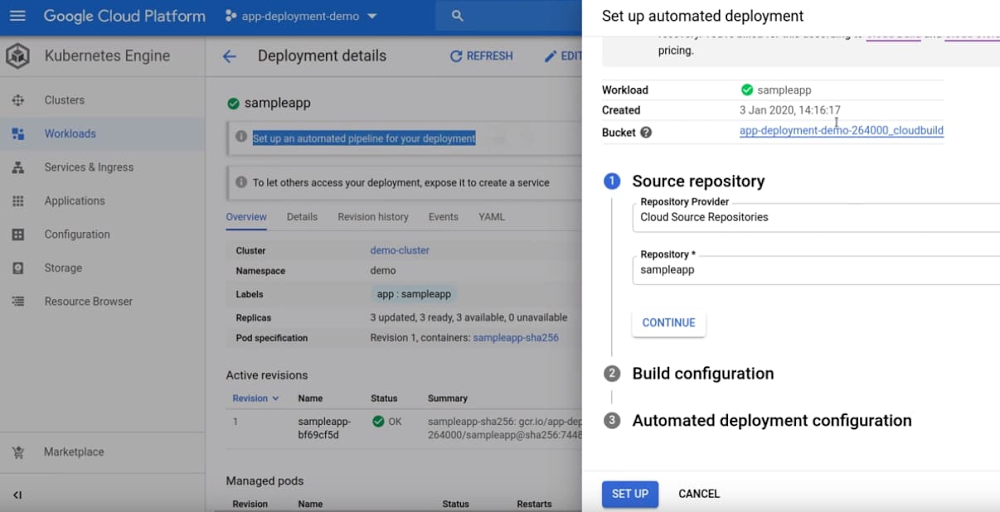
With Kubernetes becoming the de facto standard for container orchestration, many development teams are looking to build, test, and deploy code quickly in a frictionless manner to Kubernetes. Traditional continuous integration and continuous delivery (CI/CD) tools not designed for cloud-native environments often fall short as developers spend many hours looking for best practices to automate deployments, scaling pipelines, and worrying about other implementation details. For teams just getting started with Kubernetes, a bunch of time-consuming error-prone chores further complicate these efforts. These steps include creating configuration files for the application, setting up a CI/CD server, ensuring configuration files are updated, or deploying images with correct credentials to a Kubernetes cluster. Not surprisingly, it’s easy to get frustrated. You’d rather spend time writing code, than worrying about these steps or what the right pipeline looks like for a specific environment. And even when CI/CD pipelines are set up, they are way too complex, and scripts keep being added over time. To help you overcome these problems with continuous delivery, we’re pleased to announce an automated deployment feature that lets you create continuous delivery pipelines for Google Kubernetes Engine (GKE) in a few clicks. Without worrying about implementation details, you can now deploy changes to GKE faster and hassle-free. These pipelines implement out-of-the-box best practices that we’ve  learned at Google for handling Kubernetes deployments, thereby further reducing the overhead of setting up and managing pipelines. Automated deployment for GKE is powered by Cloud Build, an industry-leading cloud-native CI/CD platform that allows pipelines to scale up and down without having to pre-provision servers or pay in advance for additional capacity. Cloud Build also provides pipelines with baked-in security and compliance enhancements to meet specific workflow and policy needs. And unlike with continuous delivery features that you’ll find in traditional CI/CD tools, with automated deployment for GKE, you no longer have to manage, update, or improve the pipeline. All changes and updates are handled automatically in the background. The pipelines run automatically whenever changes are made to the source code, allowing you to deploy new features and fixes quickly and reliably. And with preview deployments, whenever you open or update a pull request, a version of the application with the suggested code change is deployed, so you can quickly validate if the change behaves as expected. Unused preview deployments are automatically cleaned up, freeing up resources.Create your first first pipeline in a few clicksTo get started with automated deployment, simply choose the source repository, build configuration, and YAML file specifying Kubernetes configuration. You can either use your own existing YAML or leverage Google recommended YAML.  1. Select the source2. Select the build configuration3. Choose the Kubernetes YAML—bring your own YAML or use the one Google Cloud provides4. Link workload revisions to Cloud Build for traceability and debuggingHow automated deployment can helpHere are some other benefits that you get from automated deployments:Recommended Kubernetes configuration: Automated deployment suggests the Kubernetes YAML to be used to deploy your application. You no longer have to fine-tune the configuration by hand.Hassle-free continuous delivery setup: Configure all the steps required for an automated deployment pipeline—a connection to your source code repository, the conditions under which to trigger the pipeline, and the steps to build and deploy your containerized application—with a couple of clicks in a single flow.Reduced CI/CD maintenance: Because continuous delivery pipelines run in Cloud Build, you don’t have to spend time installing and maintaining your own CI/CD system.End-to-end traceability: Workloads deployed using automated deployment can be linked to the pipeline and source code commit that created them. Using Binary Authorization, you can create secure software supply-chain policies that only allow workloads deployed using continuous delivery pipelines.“Shift left” with preview deployments: Quickly test whether your application is working as intended before merging code changes, to ensure issues are identified as early as possible in the development process.You can start using automated deployment feature today in the Google Cloud Console. To learn more about how to set up your first automated deployment pipeline and deploy it  to GKE, check out the documentation, or watch the video below:
Quelle: Google Cloud Platform

Expanding our footprint to support global customers in 2020

Google Cloud Platform (GCP) regions are the cornerstone of our cloud infrastructure, and over the past four years, have grown in number to 22, with 67 zones across 16 countries, delivering high-performance, low latency, zero emissions, cloud-based services to users throughout the world.Introducing our newest regionsAs previously announced, over the next year we’ll open regions in Jakarta, Las Vegas, Salt Lake City, Seoul, and Warsaw. And today we’re announcing that we will launch additional cloud regions in Delhi (India), Doha (Qatar), Melbourne (Australia) and Toronto (Canada). When launched, each region will have three zones to protect against service disruptions, launch with a portfolio of key GCP products, and offer lower latency to nearby users. Delhi, Melbourne and Toronto are the second regions within those markets enabling in-country disaster recovery for mission critical applications.As our customers in India grow and diversify, we continue to advance and invest in our cloud infrastructure to help industries such as commerce, healthcare and financial services, as well as public sector organizations across India achieve their goals. “Buyers and suppliers can already access our marketplace much faster than previously with Google Cloud, and this has a positive impact on customer engagement, time spent and the entire user journey. We are extremely excited about the potential of a second GCP region in India to help us provide an even better experience to the businesses that use IndiaMART,” said Amarinder S Dhaliwal, Chief Product Officer, IndiaMART. We’re also pleased to announce that we’ve signed our first strategic collaboration agreement to launch a region in the Middle East with the Qatar Free Zones Authority (QFZA). The region will launch in Doha, Qatar, allowing new and existing customers, as well as partners, to run their workloads locally. We see substantial interest from many customers in the Middle East and Africa, including Bespin Global, one of Asia’s leading cloud managed service providers. “We work with some of the largest Korean enterprises, helping to drive their digital transformation initiatives. One of the key requirements that we have is that we need to deliver the same quality of service to all of our customers around the globe,” said John Lee, CEO, Bespin Global. “Google Cloud’s continuous investments in expanding their own infrastructure to areas like the Middle East make it possible for us to meet our customers where they are.” Through our new Toronto region, we’re able to expand our collaboration with customers like Hopper, the popular travel booking app across 120 countries. The region will support Hopper’s growth not only domestically and across North America, but around the globe. “Having already collaborated closely with the Google Cloud team in Montréal, where we’re headquartered, we look forward to their Toronto expansion. Google Cloud services allow us to bring a lower-latency travel planning and booking service to our customers, and the second Canada region will allow us to extend that experience to more people around the world,” said Ken Pickering, CTO at Hopper. The opening of the Melbourne region strengthens our investment in Australia and commitment to supporting our expanding customer base, all in a secure and sustainable way. A great example of this is the work we’re doing with financial services institutions in Australia, like ANZ Bank, to advance their multi-cloud strategy. “We aim to shape a world where people and communities thrive and Google Cloud is key to the transformation that enables us to achieve this purpose. Google Cloud’s Melbourne region presents opportunities to further enhance a cloud-based technology environment that incorporates integrated governance controls and service management, as well as consistent security controls,” said Gerard Florian, Group Executive, Technology, ANZ Bank.Beyond capacity and scale We’re constantly investing in our global technology infrastructure to make sure we have the capacity you need to run mission-critical services, with the latency that your users expect. In addition, we’re working hard to build regional capacity that meets your availability, data residency, and sustainability needs. Here are some of our other priorities when considering new regions:Provide multiple in-country disaster recovery options: Having multiple regions in the same country gives you a secondary site for disaster recovery that lets you meet your business continuity requirements. Last year we launched Osaka, which, when paired with our Tokyo region, provides customers with an in-country disaster recovery solution. Customers in Canada, India, and Australia will be able to leverage the Toronto, Delhi, and Melbourne cloud regions in the same manner.Give you control of your data: We understand our cloud services need to support the regulatory, security, and compliance requirements of global enterprises. Last year, we shared how to control where you put your data and who can access it, and we continue to invest in data privacy, transparency, and security.Build with sustainability in mind: As more and more enterprises transition to the cloud, sustainable operations are seen as strategic to their business and they select partners who hold the same values. At Google we match 100% of the energy we use with renewable energy. This commitment to sustainability enables our customers to meet their own cloud computing needs with zero net carbon emissions. Delivering the best experience is our priority, and as our customer base expands around the world, we’ll also look to add other regions in new markets across the Middle East, Asia, Europe and the Americas to provide all of our users with reliable performance, security and leading sustainability. You can find more about our global infrastructure here.
Quelle: Google Cloud Platform

Anthos: one multi-cloud management layer for all your applications

When we first introduced Anthos in 2018, some observers described it as a way to modernize legacy applications. Simply drop your legacy on-prem application into a container, and you were on your way to cloud! But since becoming generally available last April, our customers tell us Anthos is how they want to deploy, manage and optimize all their applications—legacy as well as cloud-native. It doesn’t matter who wrote the applications or where they run, applications managed by Anthos run on an infrastructure layer that’s been abstracted, and have access to high value services that let them run efficiently and securely, without fear of lock-in or needless complexity.  Anthos, in other words, is about much more than one-off application modernization; it’s about how you can build, deploy and operate applications efficiently in an increasingly hybrid and multi-cloud world. Along the way, Anthos lets you automate your infrastructure and save money by optimizing your cloud costs and reducing management overhead—wherever your applications may be.  Multi-cloud made possibleMulti-cloud, our customers tell us, is the world they want to live in. Today, enterprises have applications in a variety of locations, and they want the freedom to keep them there—or move them in the future—in response to any number of factors. Those factors can include cost, uptime, compliance requirements, latency considerations, or proximity to other services, just to name a few. Taken together, these are ways to reduce business risk—but it’s only possible if applications are portable.But before Anthos, multi-cloud was complicated and expensive. You had to find and train technical staff knowledgeable about your different cloud APIs and services, and applications that you designed for one environment didn’t easily translate or port to another, creating silos and limiting multi-cloud’s impact. Multi-cloud also frees customers to future-proof the the applications they build. They don’t necessarily know where they’ll build their next app, just that they will. In other words, they want to be able to build anywhere, and for the applications they create to be portable, so they can avoid being locked in.Consistency as the greatest common denominatorAnthos makes multi-cloud easy thanks to its foundation of Kubernetes—specifically the Kubernetes-style API. Using the latest upstream version as a starting point, Anthos can see, orchestrate and manage any workload that talks to the Kubernetes API—the lingua franca of modern application development, and an interface that supports more and more traditional workloads.Then, Anthos goes on to empower developers with the latest cloud technologies. Integrations with offerings like Cloud Code let developers automate the test and release software faster, and with a higher degree of quality. Cloud Run for Anthos lets them build elastic services that run anywhere, and Config Connector lets them natively access any cloud resource including VMs—all in a uniform way. Whatever technology it was that brought them to Anthos, the systems they build on Anthos today will be consistent across whatever environments they deploy to tomorrow, all while reducing costs and improving developer velocity.  Security, visibility and scaleAnd while this Kubernetes consistency may be what makes multi-cloud possible, Anthos’ benefits don’t end there. Other Anthos components deliver capabilities that other platform providers simply don’t offer. Customers tell us they want to set up security policies that they can automatically enforce across all their environments, so they can audit and govern their environment, and demonstrate compliance with policy-driven controls. Leveraging the Anthos outcome-focused configuration model, for example, Anthos Config Manager allows you to define policies about how and where a workload can run—and ensure that it continues to run in that way—across all your Anthos deployments.They also want better visibility into their applications. Anthos Service Mesh is a managed service that provides security and observability for applications running in an Anthos-managed system—the performance, service level objectives, the events, the network traffic—helping you exert fine-grained control of that traffic while removing some of the difficult and undifferentiated work of upgrades and patching.Finally, customers want to do this without spending more money. In fact, they’re looking to Anthos to help them save money. As a managed, programmatically-addressed software layer, Anthos reduces operational overhead with its built-in state automation, and increases developer productivity by optimizing the developer tool chain. And going forward, it will accelerate savings even more, by freeing organizations from legacy software license costs.Toward Anthos everywhereWith this visibility into the actual and desired states of your multi-cloud infrastructure—and the ability to enforce the desired state—Anthos lets you optimize your environment, helping you meet your cost, uptime, performance and security goals. Armed with the operational data that Anthos provides, you can decide how to manage applications based on things like performance and latency needs, or perhaps an outage at one of your locations. This is the promise of multi-cloud, and one of Anthos’ many unique benefits. Customers tell us that what Anthos can do is so transformational, that they want us to extend Anthos to more kinds of applications. Why limit modern application deployment, management, and control to new applications? We agree and we’re working hard to help bring Anthos to every application running everywhere. Until then, you can learn more about how Anthos can positively impact your bottom line by reading the latest Total Economic Impact report written by Forrester Research.
Quelle: Google Cloud Platform

Enhanced models and features now available in new languages on Speech-to-Text

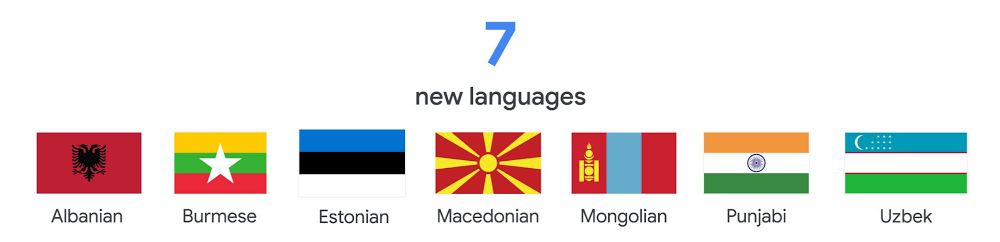
From call analytics to automated video subtitles, speech interfaces are changing the way people interact with their surroundings and enabling new business opportunities. Speech recognition technology is at the heart of these transformations and is bringing these ideas to life. At Google Cloud, we’re committed to ensuring that this exciting technology is as inclusive as possible. With that in mind, we’re announcing new features, models, and languages for our speech-to-text system as we strive to make our products and features more widely available and useful for more organizations across the globe.Google Cloud Speech-to-Text is an API that allows users to submit short, long, or streaming audio that contains speech and receive back the transcription. We have long been recognized for our industry-leading speech recognition quality, and our capabilities power thousands of different solutions, including Contact Center AI and Video Transcription.Our updates include seven brand new languages, expansion of the enhanced telephony model to three new locales, speech adaptation for 68 new locales, speaker diarization to 10 new locales, and automatic punctuation to 18 new locales. These advancements bring our speech technology to over 200 million speakers for the first time, and unlock additional features and improve accuracy for more than 3 billion speakers globally.Expanding language supportSince introducing Speech-to-Text, we have continuously strived to bring high-quality speech recognition to more languages. Today, we are expanding the wide array of supported languages from 64 to 71 (120 to 127 in total locales) with seven new languages: Burmese, Estonian, Uzbek, Punjabi, Albanian, Macedonian, and Mongolian.Sourcenext, the maker of portable voice translator Pocketalk, is one of the organizations taking advantage of Google Cloud Speech-to-Text’s comprehensive language support.“The extensive language capabilities of Google Cloud Speech-to-Text has made our product, Pocketalk, possible,” said Hajime Kawatake, Operating Officer, Technology Strategy, Sourcenext Corporation. “The sheer breadth of languages offered increases the quality of product as our customers are able to receive the highly accurate and reliable speech to speech translations anywhere in the world.” Enhanced telephony modelsIn April 2018, Google launched the enhanced telephony model for US English to provide the highest quality transcription for customers with less than pristine audio data from phone and video calls. At the time, it performed 62% better on telephony than our base models, and now it’s helping Contact Center AI transform call center experiences for customers and agents. Today, Speech-to-Text is releasing support for three new locales: UK English, Russian, and US Spanish.One of the first users of these features is Voximplant, a cloud communications platform with a number of enterprise customers in Russia, that instantly realized the exceptional accuracy of the new telephony models.“We partnered with Google Cloud because we wanted to innovate our voice platform with Google’s AI technology,” said Alexey Aylarov, CEO, Voximplant. “Since we often receive audio from low bandwidth telephone networks, the enhanced telephony models have been a game-changer, delivering increased accuracy in both person-to-person and person-to-virtual agent conversations. We are delighted to see Google Cloud’s commitment to bringing high-quality models to even more users and locales.” Speech adaptationSpeech adaptation allows users to customize Google’s powerful pre-built speech models in real time. With speech adaptation, you can do things like recognize proper nouns or specific product names. You can also give the API hints about how it wants information returned, greatly improving the quality of speech recognition for their specific use cases.Today we’re making our latest evolution of this technology, boost based speech adaptation, available in 68 new locales. Boosting gives users granular control over how much to influence the speech model towards their most important terms. We’re also adding more of our popular numeric classes in a number of new languages. To see what classes are supported in each language, take a look at our class support documentation. Boost based adaptation is available in 68 new locales:FrenchGermanSpanishJapaneseMandarinSee the full listSpeaker diarizationDiarization is the ability to automatically attribute individual words and sentences to different speakers in an audio file, allowing users to understand not just what was said but who said it. This helps our users easily add subtitles or captions to audio or video, in addition to many other use cases. Today users can do this in 10 new locales:UK EnglishSpanishJapaneseMandarinSee the full listAutomatic punctuationPunctuation is a key enabler for accurate transcription, helping users increase the accuracy of speech translation in both languages. Automatic punctuation provides users with transcripts that attempt to mimic how a given user might have written down what they said. This helps improve transcript readability and can make dictation a breeze. We’re announcing support in 18 new locales:GermanFrenchJapaneseSwedishSee the full listThese new languages and features will help billions of speakers across the world use our voice-based interfaces and high-quality speech recognition. Are you ready to innovate in how you manage speech and transform your organization with Speech-to-Text? Check out our product page or contact sales today.
Quelle: Google Cloud Platform

Last month today: February in Google Cloud

February on Google Cloud brought a bevy of news and tips, covering cloud migrations, hardware, certifications and more. Here’s what was most popular last month. New tools, use cases in cloudHedera’s Hashgraph is a public distributed ledger technology (DLT) optimized for high volume transactions. In a fast-moving industry, Hedera developed a DLT designed to bring fast, inexpensive transactions for enterprise use. To do so, the company uses Google Cloud’s premium network tier, our low-latency global fiber network. Developers can then build decentralized apps on Hedera. Last month, Hedera chose Google Cloud as a preferred cloud provider for its public testnets and Hedera Consensus Service ecosystem. Google Cloud’s acquisition of Looker became final last month, as we join together to bring customers a comprehensive analytics solution that integrates and visualizes insights at every layer of their business. Google Cloud and Looker together can help address the data analytics and business intelligence of enterprises. In addition, Google Cloud and Looker share a common philosophy around delivering open solutions and supporting customers wherever they are—be it on Google Cloud, in other public clouds, or on-premises. A new addition to our general purpose VMs became available last month: The N2D family, built atop 2nd Gen AMD EPYC™ Processors, are a great option for both general-purpose workloads and those that need high memory bandwidth. Workloads that need a balance of compute and memory, like web apps and databases, can benefit from the performance, price, and features of N2D.Cloud school is in sessionThe Data Engineering on Google Cloud learning path is newly updated, reflecting the need for deeper training and skills in this evolving discipline. You’ll find new course content including introductions to Data Fusion and Cloud Composer, plus more labs on BigQuery and Bigtable streaming. Other courses round out this new path, which covers the primary responsibilities of a data engineer.Supporting systems betterThough there’s a trend toward microservices these days, plenty of businesses still run monolithic—single-tiered—software applications that they need to maintain. Google’s site reliability engineering (SRE) team offered tips on scaling these apps and maintaining their reliability for users. You’ll find notes on typical challenges, plus some common best practices to keep in mind.There are also still plenty of mainframe systems running these days. Google Cloud acquired Cornerstone Technology last month to better help customers migrate those workloads. Mainframe architectures have helped companies run mission-critical workloads for decades, but they can hold developers back from using new technologies to innovate. Cornerstone’s experience and capabilities can make the mainframe-to-Google Cloud move easier.That’s a wrap for February. Till next time, stay up to date on our Twitter feed.
Quelle: Google Cloud Platform

Google Cloud unveils strategy for telecommunications industry

We know that telecommunications companies continue to face pressures to digitally transform. Not only are rapid technology advancements disrupting the industry—the rise of 5G and network-centric business models, for example—but also new connected devices and applications have dramatically raised consumer expectations. Many of these disruptors also offer significant possibilities for business transformation, so I’d like to share how Google Cloud is partnering with telecommunications companies to tap into these opportunities.Google Cloud is focusing on three strategic areas to support telecommunications companies:Helping telecommunications companies monetize 5G as a business services platform.Empowering them to better engage their customers through data-driven experiences.Assisting them in improving operational efficiencies across core telecom systems.Monetizing 5G as a business services platformTelecommunications companies have enormous potential to harness the power of 5G not only as a connectivity solution, but also as a business services platform. To help them do this, today we’re unveiling our Global Mobile Edge Cloud (GMEC) strategy, which will deliver a portfolio and marketplace of 5G solutions built jointly with telecommunications companies; an open cloud platform for developing these network-centric applications; and a global distributed edge for optimally deploying these solutions. Today, we’re announcing a collaboration with AT&T to help enterprises take advantage of Google Cloud’s technologies and capabilities using AT&T network connectivity at the edge, including 5G. We’re testing a portfolio of 5G edge computing solutions for industries like retail, manufacturing, transportation that bring together AT&T’s network, Google Cloud’s leading technologies, including AI/ML and Kubernetes, and edge computing to help enterprises address real business challenges. “We’re working with Google Cloud to deliver the next generation of cloud services,” said Mo Katibeh, EVP and CMO, AT&T Business. “Combining 5G with Google Cloud’s edge compute technologies can unlock the cloud’s true potential. This work is bringing us closer to a reality where cloud and edge technologies give businesses the tools to create a whole new world of experiences for their customers.”We’re also announcing Anthos for Telecom, which will bring its Anthos cloud application platform to the network edge, allowing telecommunications companies to run their applications wherever it makes the most sense. Much like Android provided an open platform for mobile-centric applications, Anthos for Telecom—based on open-source Kubernetes—will provide a similar open platform for network-centric applications.Finally, Google Cloud can partner with telecommunications companies to rapidly enable a global distributed edge by lighting up thousands of edge locations that are already deployed in these telecom networks.Transforming customer experiences with AI/ML and data-driven insightsImagine providing tailored recommendations for consumers based on their content habits, or proactively suggesting the best mobile and cable bundles based on cellular consumption patterns. We’re empowering telecommunications companies to transform their customer experiences through data- and AI-driven technologies. Our BigQuery platform provides a scalable data analytics solution—with machine learning built-in—so telecommunications companies can store, process, and analyze data in real time, and build personalization models on top of this data.“The collaboration with Google Cloud has been invaluable for our business as we use data to become more customer-centric,” said Simon Harris, Group Head of Big Data Delivery at Vodafone. “Not only are we able to gain analytics capabilities across Vodafone products and services, but also we arrive at insights faster, which can then be used to offer more personalized product offerings to customers and to raise the bar on service.”“We’re leveraging Google Cloud’s data analytics capabilities to deliver customized marketing campaigns, real-time personalization, and talent acquisition for our customers,” said Robert Visser, CIO at Wind Tre, an Italian telecom operator with more than 30 million mobile customers.In addition, our Contact Center AI solution is helping telecommunications companies significantly improve customer service, while decreasing their costs. Contact Center AI gives companies 24/7 access to immediate conversational self-service, with seamless handoffs to human agents for more complex issues. It also empowers human agents with continuous support during their calls by identifying intent and providing real-time, step-by-step assistance. Finally, our AI and retail solutions are also being used by communications companies to transform the retail experience for customers, including omni-channel marketing, sales and service, personalization and recommendations, and virtual-agent presence in stores.Improving operational efficiency to telecom IT, network, and core systemsTelecommunications companies are increasingly adopting cloud technologies to transform their IT and network systems. As a part of this transformation, many of the applications, like OSS (Operations Support Systems), BSS (Business Support Systems), and network functions that once resided in telecom environments, are now moving to our platform. This will provide customers with a cloud-based platform that reduces costs and improves IT efficiency, while also virtualizing network functions for their core communications networks. As part of this effort, we’re announcing today a partnership with Amdocs to enable communications service providers to run Amdocs’ market leading portfolio on Google Cloud, and to deliver new data analytics, site reliability engineering, and 5G edge solutions to enterprise customers.“Service providers worldwide are embarking on transformation journeys centered on the cloud in order to drive new services, revenue opportunities and experiences,” said Gary Miles, chief marketing officer, Amdocs. “By combining our cloud-native, open and modular solutions with the fully managed, high performing Google Cloud, we can accelerate this journey.”As part of the Amdocs and Google Cloud joint go-to-market initiative announced today, Amdocs is also proud to announce that Altice USA has gone live with Amdocs data and intelligence systems on the Google Cloud. Altice USA is an early mover in driving better intelligence into their core operations for enhanced customer insights and experiences.We’re also announcing a new partnership with Netcracker to deploy its entire Digital BSS/OSS and Orchestration stack on Google Cloud. Service providers can now scale and purchase their mission-critical IT applications on demand, with access to unlimited Google Cloud resources, reducing the total cost of ownership and accelerating the availability of new services.“Netcracker is delighted to offer service providers a choice of cloud platforms with the availability of our digital portfolio on Google Cloud,” said Bob Titus, CTO, Netcracker. “Together with Google Cloud, we are helping our customers on the next phase of their digital transformation with a clear focus on service innovation and a superior customer experience.”We’re committed to partnering with the telecommunications industry, providing partners, solutions, and cloud and open source technologies to accelerate digital transformation. For more information on our work in telecommunications, visit https://cloud.google.com/solutions/telecommunications/.
Quelle: Google Cloud Platform

Discord's migration from Redshift to BigQuery: lessons learned

Editor’s note: We’re hearing today from Discord, maker of a popular voice, video, and text chat app for gaming. They have to bring a great experience to millions of customers concurrently, and keep up with demand. Here’s how they moved from Redshift to Google Cloud’s BigQuery to support their growth. At Discord, our chat app supports more than 50 million monthly users. We had been using Amazon Redshift as our data warehouse solution for several years, but due to both technical and business reasons, we migrated completely to BigQuery. Since migrating, we’ve been able to serve users faster, incorporate AI and ML capabilities, ensure compliance, and explore usage analytics.At Discord, our chat app supports more than 50 million monthly users. We had been using Amazon Redshift as our data warehouse solution for several years, but due to both technical and business reasons, we migrated completely to BigQuery. Since migrating, we’ve been able to serve users faster, incorporate AI and ML capabilities and ensure compliance.The challenges that led us to migrateOur team here at Discord began to consider alternative solutions once we realized we were encountering technical and cost limitations on Redshift. We knew that if we wanted our data warehouse to scale with our business, we had to find a new solution. On the technical side, we realized we were going to hit the maximum cluster size (128 compute nodes) for DC2 type nodes in six months, given our growing usage patterns. The cost for using Redshift was also becoming a challenge. We had been paying hundreds of thousands of dollars  a month, not including storage and the cost of network ingress/egress between Google Cloud and AWS. (We’d been using Google Cloud for our chat application already.)We looked at some Google Cloud-native solutions and identified that BigQuery would be a natural solution for us, given its large scale (with known customers that were larger than Discord), proximity to where our data resides, and the fact that Google Cloud already had pipelines in place for loading data. Another major reason for our choice of BigQuery was that it is completely serverless, so it wouldn’t require any upfront hardware provisioning and management. We were also able to take advantage of a brand-new feature called BigQuery Reservations to gain significant savings with fixed slot usage.Migration tradeoffs and challengesWe had some preparation to do ahead of and during the migration. One initial challenge was that while both Redshift and BigQuery are designed to handle analytical workloads, they are very different. As an example, in Redshift we had a denormalized set of tables where each of our application events ended up in its own table, and most of our analytics queries need to be joined together. Running an analytics query on user retention involved analyzing data across different events and tables. So running this kind of JOIN-heavy workload resulted in performance differences out of the box. We relied on order by and row number of large swaths of data previously, but that method is supported by BigQuery with limitations. Redshift and BigQuery do partitioning differently, so joining on something like user ID isn’t as fast, because the data layout is different. So we used timestamp partitioning and clustering on JOIN fields, which increased performance in BigQuery. Other aspects of BigQuery brought significant advantages right away, making the migration worthwhile. Those include ease of management (one provider vs. multiple, no maintenance windows, no VACUUM/ANALYZE); scalability; and price for performance.There were some other considerations we took into account when undertaking this migration. We had to convert more than a hundred thousand lines of SQL into BigQuery syntax, so we used the ZetaSQL library and PostgreSQL parser to implement a conversion tool. To do this, we forked an open source parser and made modifications to the grammar so it could parse all of our existing Redshift SQL. Building this was a non-trivial part of the migration. The tool can walk an abstract syntax tree (also known as a parse tree) from templated Redshift and output the equivalent templated for BigQuery. In addition, we re-architected the way we built our pre-aggregated views of data to support BigQuery. Moving to a fixed slot model using BigQuery Reservations allowed for workload isolation, consistent performance, and predictable costs. The last migration step was getting used to the new paradigm post-migration and educating stakeholders on the new operating model. Migrating from Redshift to BigQuery has been game-changing for our organization. We’ve been able to overcome performance bottlenecks and capacity constraints as well as fearlessly unlock actionable insights for our business. Spencer Aiello Tech Lead and Manager, machine learning at DiscordUsing BigQuery as our data foundationSince completing our migration, BigQuery has helped us accomplish our goals around scale, user privacy, and GDPR compliance. BigQuery now supports all of our reporting, dashboarding, machine learning, and data exploratory use cases at Discord. Thousands of queries run against our data stores every day. We wouldn’t have been able to scale our queries on Redshift like we can with BigQuery. With BigQuery, we are able to keep our operations running smoothly without disruptions to our business. This was a breath of fresh air for us because at the end of our Redshift usage, we were having over 12-hour downtimes just to conduct nightly maintenance. These vacuum operations could fail and cause us to slip on internal SLAs beyond 24 hours before we could ingest data. To address this challenge in the past, we had to start actively deleting and truncating tables in Redshift, which led to incomplete and less accurate insights. We’ve also seen other benefits in the move to BigQuery: User data requests have become cheaper and faster to service; BigQuery streaming inserts let us observe machine learning experiments and model results from AI Platform in real time; and we can easily support new use cases for trust and safety, finance, and Discord usage analytics. It’s safe to say that BigQuery is the bedrock for all analysis at Discord. It’s a huge benefit that we’re now able to offer consistent performance to users without worrying about resource constraints. We can now support thousands of queries over hundreds of terabytes of data every day without having to think too much about resources. We can share access to analytics insights across teams, and we’re well-prepared for the next step of using BigQuery’s AI and ML capabilities. Learn more about Discord and about BigQuery.
Quelle: Google Cloud Platform

Learning Custom TF-Hub Embeddings with Swivel and Kubeflow Pipeline

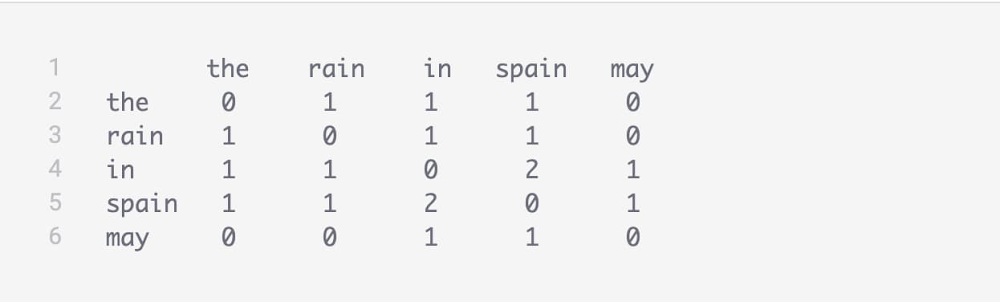
The goal of machine learning (ML) is to extract patterns from existing data to make predictions on new data. Embeddings are an important tool for creating useful representations for input features in ML, and are fundamental to search and retrieval, recommendation systems, and other use cases. In this blog, we’ll demonstrate a composable, extensible, and reusable implementation of Kubeflow Pipelines to prepare and learn item embeddings for structured data (item2hub pipeline), as well as custom word embeddings from a specialized text corpus (text2hub pipeline). These pipelines export the embeddings as TensorFlow Hub (TF-Hub) models, to be used as representations in various machine learning downstream tasks. The end-to-end KFP pipelines we’ll show here, and their individual components are available in Google Cloud AI Hub. You can go through this tutorial that executes the text2hub pipeline using Manual of the Operations of Surgery by Joseph Bell text corpus to learn specialized word embedding in the medical domain.Before we go into detail on these pipelines, let’s step back and get some background on the goals of ML, the types of data we can use, what exactly embeddings are, and how they are utilized in various ML tasks.Machine learning fundamentalsAs mentioned above, we use ML to discover patterns in existing data and use them to make predictions on new data. The patterns an ML algorithm discovers represent the relationships between the features of the input data and the output target that will be predicted. Typically, you expect that instances with similar feature values will lead to similar predicted output. Therefore, the representation of these input features and the objective against which the model is trained directly affect the nature and quality of the learned patterns. Input features are typically represented as real (numeric) values and models are typically trained against a label—or set of existing output data. For some datasets, it may be straightforward to determine how to represent the input features and train the model. For example, if you’re estimating the price of a house, property size in square meters, age of the building in years, and number of rooms might be useful features, while historical housing prices could make good labels to train the model from.Other cases are more complicated. How do you represent text data as vectors—or lists—of numbers? And what if you don’t have labeled data? For example, can you learn anything useful about how similar two songs are if you only have data about playlists that users create? There are two ideas that can help us use more complex types of data for ML tasks:Embeddings, which map discrete values (such as words or product IDs) to vectors of numbersSelf-supervised training, where we define a made-up objective instead of using a label. For example, we may not have any data that says that song_1 and song_2 are similar, but we can say that two songs are similar if they appear together in many users’ playlists.What is an embedding?As mentioned above, an embedding is a way to represent discrete items (such as words, song titles, etc.) as vectors of floating point numbers. Embeddings usually capture the semantics of an item by placing similar items close together in the embedding space. Take the following two pieces of text, for example: “The squad is ready to win the football match,” and, “The team is prepared to achieve victory in the soccer game.” They share almost none of the same words, but they should be close to one another in the embedding space because their meaning is very similar.Embeddings can be generated for items such as words, sentences, images, or entities like song_ids, product_ids, customer_ids, and URLs, among others. Generally, we understand that two items are similar if they share the same context, i.e., if they occur with similar items. For example, words that occur in the same textual context seem to be similar, movies watched by the same users are assumed to be similar, and products appearing in shopping baskets tend to be similar. Therefore, a sensible way to learn item embeddings is based on how frequently two items co-occur in a dataset.Because item similarity from co-occurrence is independent of a given learning task (such as classifying the songs into categories, or tagging words with POS), embeddings can be learned in a self-supervised fashion: directly from a text corpus or song playlists without needing any special labelling. Then, the learned embedding can be re-used in downstream tasks (classification, regression, recommendation, generation, forecasting, etc.) through transfer learning. A typical use of an item embedding is to search and retrieve the items that are the most similar to a given query item. For example, This can be used to recommend similar and relevant products, services, games, songs, movies, and so on. Pre-trained vs. custom embeddings TensorFlow Hub is a library for reusable ML and a repository of reusable, pre-trained models. These reusable models can be text embeddings trained from the web or image feature extractors trained from image classification tasks.More precisely, a pre-trained model shared on TensorFlow Hub is a self-contained piece of a TensorFlow graph, along with its weights and assets, that can be reused across different tasks. By reusing a pre-trained model, you can train a downstream model using a smaller amount of data, improve generalization, or simply speed up training. Each model from TF-Hub provides an interface to the underlying TensorFlow graph so it can be used with little or no knowledge of its internals. Models sharing the same interface can be switched very easily, speeding up experimentation. For example, you can use the Universal Sentence Encoder model to produce the embedding for a given input text as follows:Although pre-trained TF-Hub models are a great tool for building ML models with rich embeddings, there are cases where you want to train your own custom embeddings. For example, many TF-Hub text embeddings were trained on vast but generic text corpora like Wikipedia or Google News. This means that they are usually very good at representing generic text, but may not do a great job embedding text in a very specialized domain with a unique vocabulary, such as in the medical field.One problem in particular that arises when applying a generic model that was pre-trained on a generic corpus to a specialized corpus is that all the unique, domain-specific words will be mapped to the same “out-of-vocabulary” (OOV) vector. This means we lose a very valuable part of the text information, because for specialized texts the most informative words are often the words that are specific to that domain. In this blog post, we’ll take a detailed look at how to create custom embedding models, for text and structured data, using ready-to-use and easy-to-configure KFP pipelines hosted on AI Hub.Learning embeddings from co-occurrence dataMany algorithms have been introduced in the literature to learn custom embeddings for items given their co-occurrence data. Submatrix-wise Vector Embedding Learner (Swivel), introduced by Google AI, is a method for generating low dimensional feature embeddings from a feature co-occurrence matrix. For structured data, let’s say purchase orders, the co-occurrence matrix of different items can be computed by counting the number of purchase orders which contain both product A and product B. In summary, the Swivel algorithm works as follows:It performs approximate factorization of the Pointwise Mutual Information (PMI) matrix. It uses Stochastic Gradient Descent, or any of its variations, as an optimizer to minimize the cost function described below (the original implementation of the algorithm uses AdaGrad as an optimizer).It uses all the information in the matrix—observed and unobserved co-occurrences—which results in creating good embeddings for both common and rare items in the dataset.It utilizes a weighted piecewise loss with special handling for unobserved co-occurrences. It runs efficiently by grouping embedding vectors into blocks, each of which defines a submatrix, then performing submatrix-wise factorization. Each block includes a mix of embeddings for common and rare items.You can find the original TensorFlow implementation of the Swivel algorithm along with utilities for text preparation and embedding nearest neighbours matching, in the TensorFlow Research Models repository.Training your own embeddings Training embeddings for your items—whether they’re products, songs, movies, webpages or domain-specific text—involves more than just running an algorithm like Swivel. You also need to extract the data from its source, compute the co-occurrence matrix from the data, and export the embeddings produced by the algorithm as a TF-Hub model that can be used in downstream ML tasks. Then, to operationalize this process, you need to orchestrate these steps in a pipeline that can be automatically executed end-to-end.Kubeflow Pipelines is a platform for composing, orchestrating, and automating components of ML workflows where each of the components can run on a Kubeflow cluster, deployed either on Google Cloud, on other cloud platforms, or on-premise.A pipeline is a description of an ML workflow, that details the components of the workflow and the order in which they should be executed. A component is self-contained user code for an ML task that is packaged as a Docker container. A pipeline accepts a set of input parameters, whose values are passed to its components. You can share and discover KFP components and entire ready-to-use pipelines in Cloud AI Hub. For more information, see the KFP documentation, and Architecture for MLOps using TFX, Kubeflow Pipelines, and Cloud Build.The following four Kubeflow Pipelines components can help you build a custom embedding training pipeline for items in tabular data and words in specialised text corpora. These components can be found in AI Hub:text2cooc prepares the co-occurrence data from text files in the format expected by the Swivel algorithm. It accepts the location of the text corpus as an input, and outputs the co-occurrence counts as TFRecord files. tabular2cooc prepares the co-occurrence data from tabular and comma-separated data files in the format expected by the Swivel algorithm. It accepts the location of CSV files, including context ID and item ID as inputs, and outputs the co-occurrence counts as TFRecord files.cooc2emb runs the Swivel algorithm, which trains embeddings for items given their co-occurrence counts. The component accepts the location of the co-occurrence data, and produces embeddings for (row and column) items as TSV files.  emb2hub creates a TensorFlow Hub model for the trained embedding, so that it can be used in ML tasks. The component accepts the location of the TSV embedding files as input, and outputs a TF-Hub model.The following is a high-level example of how these components can work together to learn word embeddings from a text corpus. Let’s say that you have a text file including the following sentences:The first step is to use the text2cooc component to generate co-occurrence data from the unstructured text data. The co-occurrence matrix looks like this:The second step is to use the cooc2emb component to generate embeddings using Swivel. If the specified embedding dimensions is two, the generated embeddings would look like this:The last step is to use emb2hub to export the embeddings as a Hub model. Then you can use this model to lookup embeddings for input text:These components can be integrated together to compose complete pipelines, and can be reused individually in other pipelines. Next, let’s look at text2hub and item2hub, two end-to-end pipelines that compose these components to train text and structured data embeddings. These pipelines can also be found in AI Hub.Text2Hub: A pipeline for custom text embeddingstext2hub is an end-to-end pipeline that uses the text2cooc, cooc2emb, and emb2hub components to train custom text embeddings and generate a TF-Hub model for using the embeddings downstream. To run the pipeline on your text data and train your custom text embeddings, you need only to set the gcs-path-to-the-text-corpus parameter to point to your text files in GCS.The text2cooc component of the pipeline lets you visualize the embedding space using TensorBoard, allowing for a quick inspection of the embedding quality. For example, in this tutorial, we fed the pipeline with the Manual of the Operations of Surgery by Joseph Bell from Project Gutenberg and produced the word embedding visualization below.Looking at the domain-specific word “ilium” (the superior and largest part of the hip bone) in the embedding space, we see that its closest neighbors (“spine”, “symphysis”, etc.) are very similar in meaning.Item2Hub: A pipeline for custom embeddings from tabular dataitem2hub is another end-to-end KFP pipeline that learns embeddings for song IDs given playlist data. To train embeddings from tabular data, you can just swap out the text2cooc component for tabular2cooc, which creates the co-occurrence data from tabular CSV files rather than from text. For example, we can use a publicly-available playlist dataset in BigQuery to generate embeddings for song tracks based on their co-occurrences in the playlists.The generated embeddings for songs allows you to find similar songs for search and recommendation. You can learn about how you can build an Approximate Nearest Neighbor (ANN) Index for efficient embedding similarity matching using this Colab. You can even try to extend this pipeline by creating a component that extracts the embeddings from the TF-Hub model (created in emb2hub) and builds an ANN index to be used for efficient matching.Getting startedTo learn more about how to get started, check out our page on setting up a Kubeflow Cluster on Google Cloud. For quick reference, here are some of the links included in the text above:Tutorial on text2hubhttps://github.com/GoogleCloudPlatform/training-data-analyst/blob/master/courses/machine_learning/deepdive2/text_classification/solutions/custom_tf_hub_word_embedding.ipynbAI Hub product pagePipelines pages: text2hub, item2hub Reusable components pages: text2cooc, abular2cooc, ooc2emb, emb2hubAcknowledgmentsKhalid Salama, Machine Learning Solutions Architect, Google Cloud
Quelle: Google Cloud Platform