How GKE surge upgrades improve operational efficiency

A big part of keeping a Kubernetes environment healthy is performing regular upgrades. At Google Cloud, we automatically upgrade the cluster control plane for Google Kubernetes Engine (GKE) users, but you’re responsible for upgrading the cluster’s individual nodes, as well as any additional software installed on the nodes. And while you can choose to enable node auto-upgrade to perform these updates behind the scenes, we recently introduced a ‘surge nodes upgrade’ feature that gives you fine-grained control over the upgrade process, to minimize the risk of disruption to your GKE environment, as well as to expedite the upgrade process. This is particularly important at a time when external forces are pushing many organizations to transition to a digital-only business model, where availability is key for business continuity. Surge upgrade reduces disruption to existing workloads while keeping clusters up-to-date with the latest version, security patches, and bug fixes.The importance of node upgradesNodes are where your Kubernetes workloads run. Open-source Kubernetes releases a new minor version approximately every three months, and patches more frequently. GKE follows this same release schedule, providing regular security patches and bug fixes, so you can reduce your exposure to security vulnerabilities, bugs, and version skew between control plane and nodes.Enabling node auto-upgrade is a popular choice for performing this important task. The node pool upgrade process recreates every VM in the node pool with a new (upgraded) VM image in a rolling update fashion. To do so, it shuts down all the pods running on the given node. And while most customers run workloads with sufficient redundancy and Kubernetes helps with the process of moving and restarting pods, in practice, the temporarily reduced number of replicas may not be sufficient to serve all your traffic, resulting in production incidents.Simply enabling node auto-upgrade isn’t enough for some GKE users. FACEIT provides an independent online competitive gaming platform that lets players create communities and compete in tournaments, leagues, and matches. With over a million monthly active users, FACEIT relies on GKE, benefitting from the platform’s agility and simple and automated scalability. But to eliminate the chance of downtime, FACEIT wasn’t using the node auto-upgrade feature. Instead, it used the following manual process:Create a new identical node pool, running on the new versionCordon off the nodes in the old node poolStart evicting pods by draining the nodes, causing Kubernetes to reschedule the pods on nodes in the new node poolFinally, remove the old node pool once all the nodes were drainedWith this manual process, FACEIT was able to balance upgrade speed and avoid disruptions. Introducing surge upgradesTo help ensure that all node upgrades complete successfully and in a timely fashion, we’re excited to offer surge upgrades for GKE. Surge upgrades reduces the potential for disruption by starting up new nodes before it drains the old ones, and supports upgrading multiple nodes concurrently. Upgrades are only initiated after all the required resources (VMs) are secured, ensuring that surge upgrades can complete successfully. Surge upgrades will be enabled by default on April 20, 2020, and we will also migrate existing node pools later in the quarter.The new surge upgrades feature helps to reduce workload disruption in two key ways.1. No decreased capacity during node upgradesThanks to surge upgrades, a node pool cannot transition into a state where it has less capacity than it had at the start of the upgrade process (assuming maxUnavailable is set to 0).In contrast, without surge upgrades, the node upgrade happens by recreating the node. This means there is a period during the upgrade process when the node is not available to the cluster. If there is sufficient redundancy in the cluster, this in itself may not cause any disruption to the workloads. However, any other failure with the workloads or with the infrastructure—for example, an unrelated node failure—may result in disruption.2. No evicted pod will remain unscheduled due to a lack of capacityThis feature of surge upgrades is a consequence of the above. Since there is equivalent additional capacity available (i.e., the surge node), it is always possible to schedule the evicted pod.As mentioned before, node upgrades happen by recreating Compute Engine instances with a new instance template, then evicting the pods and rescheduling them—assuming there’s the capacity to schedule them. Whenever one or more pods remain unscheduled, that means one or more workloads are running a lower number of replicas than desired. This may impact workload health (i.e., the system may not be able to tolerate the loss of the replica). Regardless, to ensure high availability, the time a workload is running with a reduced number of replicas should be shortened.The lack of surge nodes during an upgrade does not necessarily result in pods becoming unschedulable; If the node pool has sufficient available capacity, it will use it. In the picture below, the left node pool has enough capacity to be able to reschedule all the evicted pods immediately when the first node is drained. The right node pool has some available capacity, but not enough, so only two of the three evicted pods can be rescheduled immediately; Pod3 will need to wait for the node upgrade to complete, then it will be scheduled again.Let’s see how the presence of a surge node changes the situation. In the case of the less utilized node pool, the surge node does not help with pod scheduling, since the pods already had enough capacity. But in the case of the more utilized node pool, the extra capacity is necessary to be able to schedule the evicted pods right away.It’s worth noting that surge capacity can be useful for more than just upgrades; it can also be ‘spent’ on other demands like scaling up an application faster in case of a spike in load during the upgrade. Control how you upgrade, not just whenGKE’s node auto-upgrade feature helps administrators ensure that their environment stays up-to-date with the latest patches and updates. Now, with surge upgrades, you can know those upgrades will occur successfully, and without impacting production workloads. Early adopters like FACEIT report that this enhanced upgrade process is not only more reliable, but that it’s also faster, as it allows concurrent node upgrades. “Before surge upgrades, an upgrade of one environment required around seven hours to complete, multiplied by the number of environments. We used to spend roughly two weeks upgrading all of FACEIT’s environments,” said Emanuele Massara, VP Engineering, FACEIT. “With surge upgrades, the entire process takes less than a day, freeing up the team to focus on other tasks.” FACEIT has since turned down its manual upgrade process.Using surge upgrades in conjunction with correctly configured PDB (Pod Disruption Budget) can also help ensure the availability of applications during the upgrade process, said Bradley Wilson-Hunt, DevOps & Service Delivery Manager. “Without a PDB in place, Kubernetes can reschedule the pods of a deployment without waiting for the new pod to be ready, which could lead to a service disruption.”To learn more about using surge upgrades, read these guidelines on how to determine the parameters to configure your upgrades. You can also try surge upgrades yourself, using a demo application that follows this tutorial.
Quelle: Google Cloud Platform

Protect your running VMs with new OS patch management service

Managing patches effectively is a great way to keep your infrastructure up-to-date and reduce the risk of security vulnerabilities. But without the right tools, patching can be daunting and labor intensive.Today, we are announcing the general availability of Google Cloud’s OS patch management service to protect your running VMs against defects and vulnerabilities. The service works on Google Compute Engine and across OS environments (Windows, Linux).Automate OS security and complianceWith OS patch management, you can apply OS patches across a set of VMs, receive patch compliance data across your environments, and automate installation of OS patches across VMs—all from one centralized location. The OS patch management service has two main components:Compliance reporting, which provides detailed compliance reports and insights on the patch status of your VM instances across Windows and Linux distributions. Patch deployment, which automates the installation of OS patches across your VM fleet, with flexible scheduling and advanced patch configuration controls. For added convenience, you can set up flexible schedules and still keep systems up-to-date by running your patch updates within designated maintenance windows.Managing patches for your applications doesn’t have to be a time-consuming exercise. OS patch management’s automated compliance reporting feature helps your systems stay up-to-date against vulnerabilities, reducing the risk of downtime for your business and the productivity of your internal users. IT administrators now can also focus on other business critical tasks, not on manual patch update processes.Get started todayThe current release of OS patch management is available at no cost from now through December 31, 2020. You can start using OS patch management in the Google Cloud Console today. To learn more about how to set up the service, check out the documentation.
Quelle: Google Cloud Platform

Protecting businesses against cyber threats during COVID-19 and beyond

No matter the size of your business, IT teams are facing increased pressure to navigate the challenges of COVID-19. At the same time, some things remain constant: Security is at the top of the priority list, and phishing is still one of the most effective methods that attackers use to compromise accounts and gain access to company data and resources. In fact, bad actors are creating new attacks and scams every day that attempt to take advantage of the fear and uncertainty surrounding the pandemic. It’s our job to constantly stay ahead of these threats to help you protect your organization. In February, we talked about a new generation of document malware scanners that rely on deep learning to improve our detection capabilities across over 300 billion attachments we scan for malware every week. These capabilities help us maintain a high rate of detection even though 63% of the malicious docs blocked by Gmail are different from day to day. To further help you defend against these attacks, today we’re highlighting some examples of COVID-19-related phishing and malware threats we’re blocking in Gmail, sharing steps for admins to effectively deal with them, and detailing best practices for users to avoid threats.The attacks we’re seeing (and blocking)Every day, Gmail blocks more than 100 million phishing emails. During the last week, we saw 18 million daily malware and phishing emails related to COVID-19. This is in addition to more than 240 million COVID-related daily spam messages. Our ML models have evolved to understand and filter these threats, and we continue to block more than 99.9% of spam, phishing, and malware from reaching our users. The phishing attacks and scams we’re seeing use both fear and financial incentives to create urgency to try to prompt users to respond. Here are some examples:Impersonating authoritative government organizations like the World Health Organization (WHO) to solicit fraudulent donations or distribute malware. This includes mechanisms to distribute downloadable files that can install backdoors. In addition to blocking these emails, we worked with the WHO to clarify the importance of an accelerated implementation of DMARC (Domain-based Message Authentication, Reporting, and Conformance) and highlighted the necessity of email authentication to improve security. DMARC makes it harder for bad actors to impersonate the who.int domain, thereby preventing malicious emails from reaching the recipient’s inbox, while making sure legitimate communication gets through.This example shows increased phishing attempts of employees operating in a work-from-home setting.This example attempts to capitalize on government stimulus packages and imitates government institutions to phish small businesses.This attempt targets organizations impacted by stay-at-home orders.Improving security with proactive capabilities We have put proactive monitoring in place for COVID-19-related malware and phishing across our systems and workflows. In many cases, these threats are not new—rather, they’re existing malware campaigns that have simply been updated to exploit the heightened attention on COVID-19. As soon as we identify a threat, we add it to the Safe Browsing API, which protects users in Chrome, Gmail, and all other integrated products. Safe Browsing helps protect over four billion devices every day by showing warnings to users when they attempt to navigate to dangerous sites or download dangerous files. In G Suite, advanced phishing and malware controls are turned on by default, ensuring that all G Suite users automatically have these proactive protections in place.These controls can: Route emails that match phishing and malware controls to a new or existing quarantineIdentify emails with unusual attachment types and choose to automatically display a warning banner, send them to spam, or quarantine the messages Identify unauthenticated emails trying to spoof your domain and automatically display a warning banner, send them to spam, or quarantine the messages Protect against documents that contain malicious scripts that can harm your devices Protect against attachment file types that are uncommon for your domainScan linked images and identify links behind shortened URLsProtect against messages where the sender’s name is a name in your G Suite directory, but the email isn’t from your company domain or domain aliasesBest practices for organizations and usersAdmins can look at Google-recommended defenses on our advanced phishing and malware protection page, and may choose to enable the security sandbox. Users should: Complete a Security Checkup to improve your account securityAvoid downloading files that you don’t recognize; instead, use Gmail’s built-in document previewCheck the integrity of URLs before providing login credentials or clicking a link—fake URLs generally imitate real URLs and include additional words or domainsAvoid and report phishing emails Consider enrolling in Google’s Advanced Protection Program (APP)—we’ve yet to see anyone that participates in the program be successfully phished, even if they’re repeatedly targeted At Google Cloud, we’re committed to protecting our customers from security threats of all types. We’ll keep innovating to make our security tools more helpful for users and admins and more difficult for malicious actors to circumvent.
Quelle: Google Cloud Platform

Find and fix issues faster with our new Logs Viewer

Monitoring your cloud infrastructure is an essential part of making sure your operations are running smoothly. Since announcing the new Cloud Logging interface in February, we’ve heard from users that the new interface is making it faster and easier to meet logging needs, including troubleshooting issues, verifying deployments, and ensuring compliance. One of those users, Arne Claus, is a site reliability engineer at trivago, and has taken advantage of the new interface already. “We’re very happy with the new Cloud Logs Viewer,” he says. “The newer version is a lot faster and easier to use. The new histogram feature allows us to identify and drill down into issues quickly, so we can keep our systems healthy and performant.” Cloud Logging was built from the ground up with a focus on speed. Some features were available in the classic UI, while others are totally new. Let’s take a closer look.Improved performance and responsivenessOne of the main themes that we kept in mind as we rebuilt the Logs Viewer was performance and responsiveness. We created a new architecture to retrieve information from the back end, which has increased overall efficiency, performance, and responsiveness. You’ll likely notice these improvements when you start exploring the interface. By processing more on the server side, we can bring you new features and visualizations such as histograms.Find spikes and anomalies more quickly with logs histogramsWe’ve heard your feedback that you love logs-based metrics to explore the frequency of logs, but often don’t have a relevant metric when troubleshooting an incident that’s slowing down your troubleshooting flows. Based on your requests, we’ve added logs histograms to quickly show counts for matching log entries as you’re exploring your logs. You can turn histograms on and off via Page Layout in the Preview Logs Viewer, as shown here:A more powerful way to build a query One of the most common Cloud Logging tasks is building a query to retrieve the set of logs you’re interested in. The basic editor previously lacked the ability to use advanced features including operators, boolean expressions, or functions, like these:    jsonPayload.cat = (“longhair” OR “shorthair”)    jsonPayload.animal : (“nice” AND “pet”)This Logs Viewer introduces a new experience to build these queries: You can use drop-down menus to add elements, see autocomplete options while editing the query, easily select a time range, and more, like this:As in the classic UI, you can still modify your query directly from the log entries by clicking on the field and selecting “show” or “hide” matching entries, shown below. You can also change which fields are displayed in the summary line by selecting “Manage Summary Fields” from the Configure menu.New experience to analyze your logs Once you run a query, the typical next step in the process is to analyze the results. We know you spend most of your monitoring time analyzing those results, so offering a great experience performing this task was a top priority in the new Logs Viewer. The new look is designed to improve the process of browsing through the logs and make log data more readable and consumable, as shown here: Get started with the new Logs ViewerThis is the first of several major improvements planned for the Logs Viewer experience. The new Logs Viewer is an evolving release, so it isn’t quite at full feature parity with the classic Logs Viewer. We’re adding new features and improving the user experience on a regular basis based on your feedback. We encourage you to try it out today and let us know what you think. Explore upcoming features and stay tuned for more as we continue to build and update the product.Enjoy the new experience, and send any questions through our discussion forum.
Quelle: Google Cloud Platform

How do I move data from MySQL to BigQuery?

In a market where streaming analytics is growing in popularity, it’s critical to optimize data processing so you can reduce costs and ensure data quality and integrity. One approach is to focus on working only with data that has changed instead of all available data. This is where change data capture (CDC) comes in handy. CDC is a technique that enables this optimized approach. Those of us working on Dataflow, Google Cloud’s streaming data processing service, developed a sample solution that lets you ingest a stream of changed data coming from any kind of MySQL database on versions 5.6 and above (self-managed, on-prem, etc.), and sync it to a dataset in BigQuery. We made this solution available within the public repository of Dataflow templates. You can find instructions on using the template in the README section of the GitHub repo. CDC provides a representation of data that has changed in a stream, allowing computations and processing to focus specifically on changed records. CDC can be applied for many use cases. Some examples include replication of a critical database, optimization of a real-time analytics job, cache invalidation, synchronization between a transactional data store and a data warehouse-type store, and more. How Dataflow’s CDC solution moves data from MySQL to BigQueryThe deployed solution, shown below, works with any MySQL database, which is monitored by a connector we developed based on Debezium. The connector stores table metadata using Data Catalog (Google Cloud’s scalable metadata management service) and pushes updates to Pub/Sub (Google Cloud-native stream ingestion and messaging technology). A Dataflow pipeline then takes those updates from Pub/Sub and syncs the MySQL database with a BigQuery dataset.This solution relies on Debezium, which is an excellent open source tool for CDC. We developed a configurable connector based on this technology that you can run locally or on your own Kubernetes environment to push change data to Pub/Sub.Click to enlargeUsing the Dataflow CDC solutionDeploying the solution consists of four steps:Deploy your database (nothing to do here if you already have a database)Create Pub/Sub topics for each of the tables you want to exportDeploy our Debezium-based connectorStart the Dataflow pipeline to consume data from Pub/Sub and synchronize to BigQueryLet’s suppose you have a MySQL database running in any environment. For each table in the database that you want to export, you must create a Pub/Sub topic and a corresponding subscription for that topic.Once the Pub/Sub topics and the database are in place, run the Debezium connector. The connector can run in many environments: locally built from source, via a Docker container, or on a Kubernetes cluster. For instructions on running the Debezium connector and the solution in general, check out the README for detailed instructions.Once the Debezium connector starts running and capturing changes from MySQL, it will push them to Pub/Sub. Using Data Catalog, it will also update schemas for the Pub/Sub topic that corresponds to each MySQL table.With all of these pieces in place, you can launch the Dataflow pipeline to consume the change data from Pub/Sub and synchronize it to BigQuery tables. The Dataflow job can be launched from the command line. Here’s what it looks like once you launch it:Once the connector and pipeline are running, you just need to monitor their progress, and make sure that it’s all going smoothly.Get started todayGot a use case that aligns with Dataflow’s CDC capabilities? For example, optimization of an existing real-time analytics job. If so, try it out! First, use this code to get started with building your first CDC pipeline in Dataflow today. And share your feedback with the Dataflow team in the GitHub issue tracker.At Google Cloud, we’re excited to bring CDC as an incredibly valuable technique to optimize streaming data analytics. We look forward to seeing both development and feedback with these new capabilities for Dataflow.
Quelle: Google Cloud Platform

Learn to build secure and reliable systems with a new book from Google

In the new “Building Secure and Reliable Systems: Best Practices for Designing, Implementing, and Maintaining Systems” book, engineers across Google’s security and SRE organizations share best practices to help you design scalable and reliable systems that are fundamentally secure. Reliability matters for businesses throughout all kinds of ups and downs. We’ve also heard that security is an essential tool for many of you building your own SRE practices, and we’re pleased to bring the followup “Building Secure and Reliable Systems” book to practitioners across industries. We think it will be an essential read for those of you tasked with ensuring the security and reliability of the systems you run. Just as the SRE Book quickly became foundational for practitioners across the industry, we think that the SRS Book will be an essential read for people responsible for the security and reliability of the systems they run. More than 150 contributors across dozens of offices and time zones present Google and industry stories, and share what we’ve learned over the years. We provide high-level principles and practical solutions that you can implement in a way that suits the unique environment specific to your product.What you’ll find in the SRS bookThis book was inspired by a couple of fundamental questions: Can a system be considered truly reliable if it isn’t fundamentally secure? Or can it be considered secure if it’s unreliable? At Google, we’ve spent a lot of time considering these concepts. When we published the SRE book (now inducted into a cybersecurity hall of fame!), security was one rather large topic that we didn’t have the bandwidth to delve into, given the already large scope of the book.Now, in the SRS book, we specifically explore how these concepts are intertwined. Because security and reliability are everyone’s responsibility, this book is relevant for anyone who designs, implements, or maintains systems. We’re challenging the dividing lines between the traditional professional roles of developers, SREs, and security engineers. We argue that everyone should be thinking about reliability and security from the very beginning of the development process, and should be integrating those principles as early as possible into the system life cycle. In the book, we examine security and reliability through multiple perspectives:Design strategies: For example, best practices to design for understandability, resilience, and recovery, as well as specific design principles such as least privilegeRecommendations for coding, testing, and debugging practicesStrategies to prepare for, respond to, and recover from incidentsCultural best practices to help teams across your organization collaborate effectively“Building Secure and Reliable Systems” is available now. You can find a freely downloadable copy on the Google SRE website. You can also purchase a physical copy from your preferred retailer.
Quelle: Google Cloud Platform

New AI-driven features in Dataprep enhance the wrangling experience

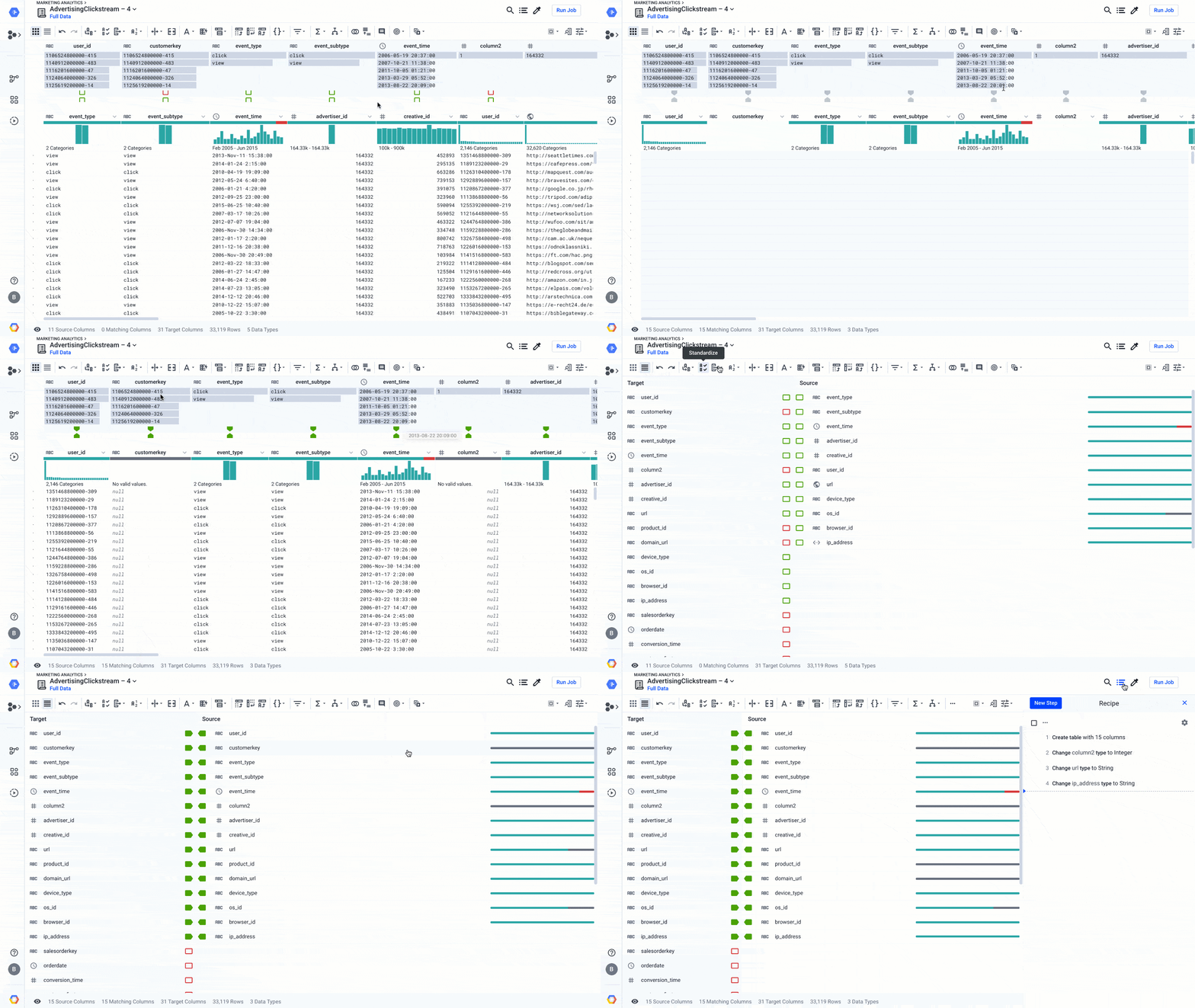
Since the inception of Cloud Dataprep by Trifacta, we’ve focused on making the data preparation work of data professionals more accessible and efficient, with a determined intention to make the work of preparing data more enjoyable (and even fun, in some cases!).The latest release of Dataprep brings new and enhanced AI-driven features to advance your wrangling experience a step further. We’ve improved the Dataprep core transformation experience, so it’s easier and faster to clean data and operationalize your wrangling recipes. We’ve been infusing AI-driven functions in many parts of Dataprep so it can suggest the best ways to transform data or figure out automatically how to clean the data, even for complex analytics cases. This effort has helped a broad set of business users access and leverage data in their transformational journey to become data-driven organizations. With data preparation fully integrated with our smart analytics portfolio, including ingestion, storage, processing, reporting, and machine learning, self-service analytics for everyone—not just data scientists and analysts—is becoming a reality.Let’s zoom in on a few new features and see how they can make data preparation easier.Improving fuzzy matching on rapid targetWhen you prepare your data using Dataprep, you can use the exploratory mode to figure out what the data is worth and how you might use it. You could also use exploratory mode to enhance an existing data warehouse or some production zones in a data lake.  For the latter, you can use Rapid Target to quickly map your wrangling recipe to an existing data schema in BigQuery or a file in Cloud Storage. Using Rapid Target means you don’t have to bother matching your data transformation rules to an existing database schema; Dataprep will figure it out for you using AI. With the new release, in addition to matching schemas by strict column name equality, we have added fuzzy-matching algorithms to auto-align columns with the target schema by column name similarities or column content. Here’s what that looks like:Dataprep suggests best matches between the columns of your recipe and an existing data schema. You can accept it, change it, or go back to your recipe to modify it so the data can match. This is yet another feature that helps load the data warehouse faster, so you can focus on analyzing your data.Adding local settings and improved date/time interface When you work on a new data set, the first thing that Dataprep will figure out is the data structure and the data type of each column. Doing so, with the help of some AI algorithms, Dataprep can more easily identify data errors based on expected types and how to clean those types. However, some data types, such as dates or currencies, may be more complicated to infer based on the region you’re located in or the region the data is sourced from. For this particular reason, we’ve added a local setting option (at the project level and user level) so that Dataprep can infer data types—in particular, date and time when there is ambiguity in the data.For example, in the image below, changing the local setting to France will tell Dataprep to assume the dates should be in a French format, such as dd/mm/yyyy or 10-Mars-2020. The inference algorithms will determine the quality score of the data and the suggestions rules to clean that particular date column in a French format. This makes your job a whole lot easier.As a bonus to the date type management, we’ve streamlined the date/time data type menu. This new menu makes it far easier to find the exact date/time format you are looking for, letting you search instead of look at a list of 100 values, as shown here:Increasing cross-project data consistency with macro import/export As you’re going through your data preparation recipes, you will necessarily surface data pattern issues, such as similar data quality issues and similar ways to resolve them. Sometimes cleaning just one column requires a dozen steps, and you don’t want to rewrite all these steps every time this data issue occurs. That’s what macros are for.A macro is a sequence of steps that you can use as a single, customizable step in other data preparation recipes. So once you have defined one particular macro to apply data transformations, you can reuse it in other recipes so all your colleagues can benefit from it. This is particularly handy when you open a data lake sandbox and give access to business users to discover and transform data. By providing a set of macros to clean data, you will bring consistency across users, and if the data evolves you can also evolve the macros accordingly.  With this new ability to import and export macros, you can maintain consistency across all of your Dataprep deployments across departments or stages of your projects (i.e., dev, test, production), create backups, and create an audit trail for your macros. You can also post or use existing macros from the Wrangler Exchange community, and build up a repository of commonly used macros, extending the flexibility of Dataprep’s Wrangle language.There are many more features that have been added to Dataprep, such as downloadable profile results, new trigonometry and statistical functions, shortcuts options, and many more. You can check them out in the release notes and learn more about Dataprep.Happy wrangling!
Quelle: Google Cloud Platform

Helping contact centers respond rapidly to customer concerns about COVID-19

As COVID-19 has spread globally, people are turning to governments, healthcare organizations, and other businesses with questions about their health and wellness, finances, and more. This sudden, unprecedented demand is putting strain on customer support resources, and many organizations are telling us that they’re struggling to respond to customers effectively during this critical time.If your organization is facing these challenges, you can respond to your customers’ questions related to COVID-19 and your business with Contact Center AI, which can provide a first line of response through 24/7 conversational self-service support via chat or over the phone. As speed is especially important, we’ve launched the Rapid Response Virtual Agent program, a quick way to get up and running with Contact Center AI.To learn how to launch a virtual agent (chat or voice) check out the documentation. It includes information on how to integrate Dialogflow Messenger, which provides a customizable chat dialog for your agent that can be embedded in your website so you can easily deploy your chatbot on the web and make it engaging with rich UI support.We’ve also made it easier to add COVID-19 content to your virtual agent with the ability to integrate open-source templates from organizations that have already launched similar initiatives. For example, Verily, in partnership with Google Cloud, has launched the Pathfinder virtual agent template for health systems and hospitals. It enables you to create chat or voice bots that answer questions about COVID-19 symptoms and provide the latest guidance from public health authorities like the Centers for Disease Control and Prevention and World Health Organization (WHO).Designed to help government agencies, healthcare and public health organizations, nonprofits, and businesses in other industries impacted by COVID-19, such as travel, financial services, and retail, Contact Center AI’s Rapid Response Virtual Agent program is available around the world in any of the 23 languages supported by Dialogflow. Because time is of the essence, we will be working with our contact center partners, as well with our various systems integrator and consulting partners, to help ensure these deployments and integrations happen quickly.Contact center partners include:8x8AvayaCiscoFive9GenesysMitelTwilioVonageSystem integrator partners include:AccentureDeloitte Consulting LLPInfosysKPMGHCLTCSWiproMaven WaveQuantiphiSADASpringMLSome organizations have already begun working to create a resource to help with customer needs:Oklahoma Employment Security Commission”The Oklahoma Employment Security Commission has been experiencing unprecedented call volumes (over 60,000 daily) as a result of unemployment claims related to the COVID-19 pandemic. Contact Center AI, integrated into the commission’s website, is aiding with call diversion, helping reduce wait times, and providing the commission with an additional channel for addressing unemployment related questions.” – David Ostrowe, Secretary of Digital Transformation and Administration, Oklahoma StateUniversity of Pennsylvania“It’s been an amazing, collaborative effort getting this quickly created and launched, and we are grateful to the Google Cloud/Verily teams for their efforts. We are seeing a lot of people looking for an authoritative source of information, and being able to scale to meet the demand helps us disseminate accurate information more quickly.”We will use this both to help answer common questions and to assess symptoms and help with triage to make sure people are routed to the most appropriate clinical intake level. As the number of patients with concerns grows, we expect that having an automated and validated way of addressing inquiries will be an important part of ensuring the highest possible quality of response to concerns of different individuals. We will route patients with concerning symptoms to confer directly with a member of our clinical team while addressing more routine or lower acuity questions through the bot.” – Kevin G. Volpp, MD, PhD, Director, Center for Health Incentives and Behavioral Economics (CHIBE), University of PennsylvaniaThe work we’re doing today is part of our focus on helping businesses and organizations most impacted by the COVID-19 pandemic. As Google CEO Sundar Pichai and Google Cloud CEO Thomas Kurian explained in recent blog posts, our goal is to help people stay safe, informed, and connected during these extraordinary times. For more information on the Rapid Response Virtual Agent program, please see our website and the documentation on how to deploy your own virtual agent. Existing customers can contact your Google Cloud account manager, your contact center, or systems integration partners for assistance.
Quelle: Google Cloud Platform

Last month today: March in Google Cloud

While many of us had plans for March—including simply carrying out our normal routines—life as we know it has been upended by the global coronavirus pandemic. In a time of social distancing, technology has played a greater role in bringing us together. Here’s a look at stories from March that explored how cloud technology is helping and how it works under the hood to keep us connected.Technology in a time of uncertaintyThere are a lot of moving pieces, and a lot of dedicated technical people, who keep Google Cloud running every day, even when traffic spikes or unexpected events happen. Take a look at some of what’s involved with keeping systems running smoothly at Google, including SRE principles, longstanding disaster recovery testing, proprietary hardware, and built-in reserve capacity to ensure infrastructure performance. Plus, support agents are now provisioned for remote access, and an enhanced support structure is available for high-traffic industries during this time. You can dig deeper in this post on Google’s network infrastructure to learn how it is performing even under pressure. Google’s dedicated network is a global system of high-capacity fiber optic cables under both land and sea, and connects to last-mile providers to deliver data locally.Data plays a huge role in public health, and access to data sets and tools are essential for researchers, data scientists, and analysts responding to COVID-19. There’s now a hosted repository of related public datasets available to explore and analyze for free in BigQuery. These include the Johns Hopkins Center for Systems Science and Engineering, Global Health Data from the World Bank, and more.Working at home, together As work-from-home situations became a necessity globally in March, video conferencing and live streaming became even more essential for daily communication at work, school, and home. With that in mind, we announced free access to our advanced Meet capabilities to G Suite and G Suite for Education customers, including room for up to 250 participants per call, live streaming for up to 100,000 viewers within a domain, and the ability to record meetings and save them to Google Drive. Plus, we added Meet improvements for remote learning, and use of Google Meet surged to 25 times what it was in January, with day-over-day growth surpassing 60%. Technology is an essential aspect of working from home, but so is finding ways to collaborate with teammates and stay focused and productive amid distractions. Check out these eight tips for working from home for ways you can be proactive, organized, and engaged with work.Supporting those at-home workersIn this time of added network load and many people getting acquainted with working from home for the first time, the G Suite Meet team shared some best practices for IT admins to support their teams. These include tips on managing device policies, communicating effectively at scale, and use analytics to improve or change employee experiences. Plus, find some best practices that developers using G Suite APIs can follow to stay ahead of new user demands and onboarding. That’s a wrap for March.
Quelle: Google Cloud Platform

Improved database performance data: Key Visualizer now in Cloud Bigtable console

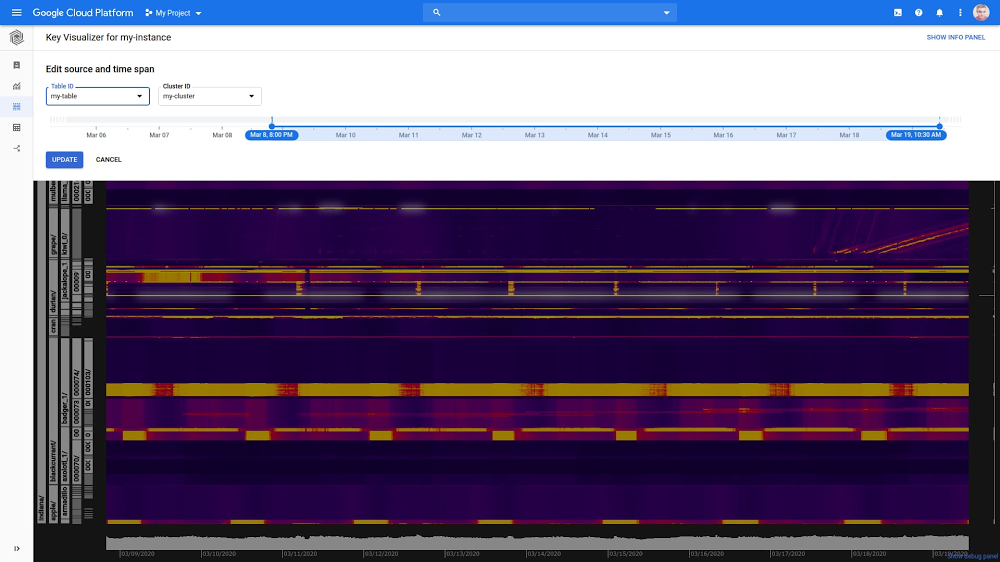
Cloud Bigtable is Google Cloud’s petabyte-scale NoSQL database service for demanding, data-driven workloads that need low latency, high throughput, and scale insurance. If you’ve been looking for more ways to monitor your Bigtable performance more easily, you’re in luck: Key Visualizer is now directly integrated into the Bigtable console. No need to switch to a Cloud Monitoring dashboard to see this data; you can now view your data usage patterns at scale in the same Bigtable experience. Best of all, we’re lowering the eligibility requirements for Key Visualizer usage, making it easier for customers to use this tool.If you aren’t yet familiar with Key Visualizer, it generates visual reports for your tables based on the row keys that you access. It’s especially helpful for iterating on the early designs of a schema before going to production. You can also troubleshoot performance issues, find hotspots, and get a holistic understanding of how you access the data that you store in Bigtable. Key Visualizer uses heatmaps to help you easily determine whether your reads or writes are creating hotspots on specific rows, find rows that contain too much data, or see whether your access patterns are balanced across all of the rows in a table. Here’s how the integration looks:Beyond bringing Key Visualizer into Bigtable, there are several other improvements to highlight: Fresher data. Where Key Visualizer used to serve data that was anywhere from seven to 70 minutes old, Key Visualizer in Bigtable can now show data that is approximately between four and 30 minutes old. To do that, Bigtable scans the data every quarter of the hour (10:00, 10:15, 10:30, 10:45), and then takes a few minutes to analyze and process that performance data.Better eligibility. We dropped the requirement on the number of reads or writes per second in order to make the eligibility criteria to scan data simpler: Now, you just need at least 30 GB of data in your table. This will lower the barrier for developers who want to fine-tune their data schema. Time range. It’s now easier to select the time range of interest with a sliding time range selector. Performance data will be retained for 14 days.The new version of Key Visualizer is available at no additional charge to Bigtable customers, and does not cause any additional stress on your application. If you’re ready to dig in, head over to Bigtable and choose “Key Visualizer” in the left navigation.For more ideas on how Key Visualizer can help you visualize and optimize your analytics data, read more about Key Visualizer in our user guide, or check out this brief overview video and this presentation on how Twitter uses Bigtable.
Quelle: Google Cloud Platform