Same Cloud Bigtable database, now for smaller workloads

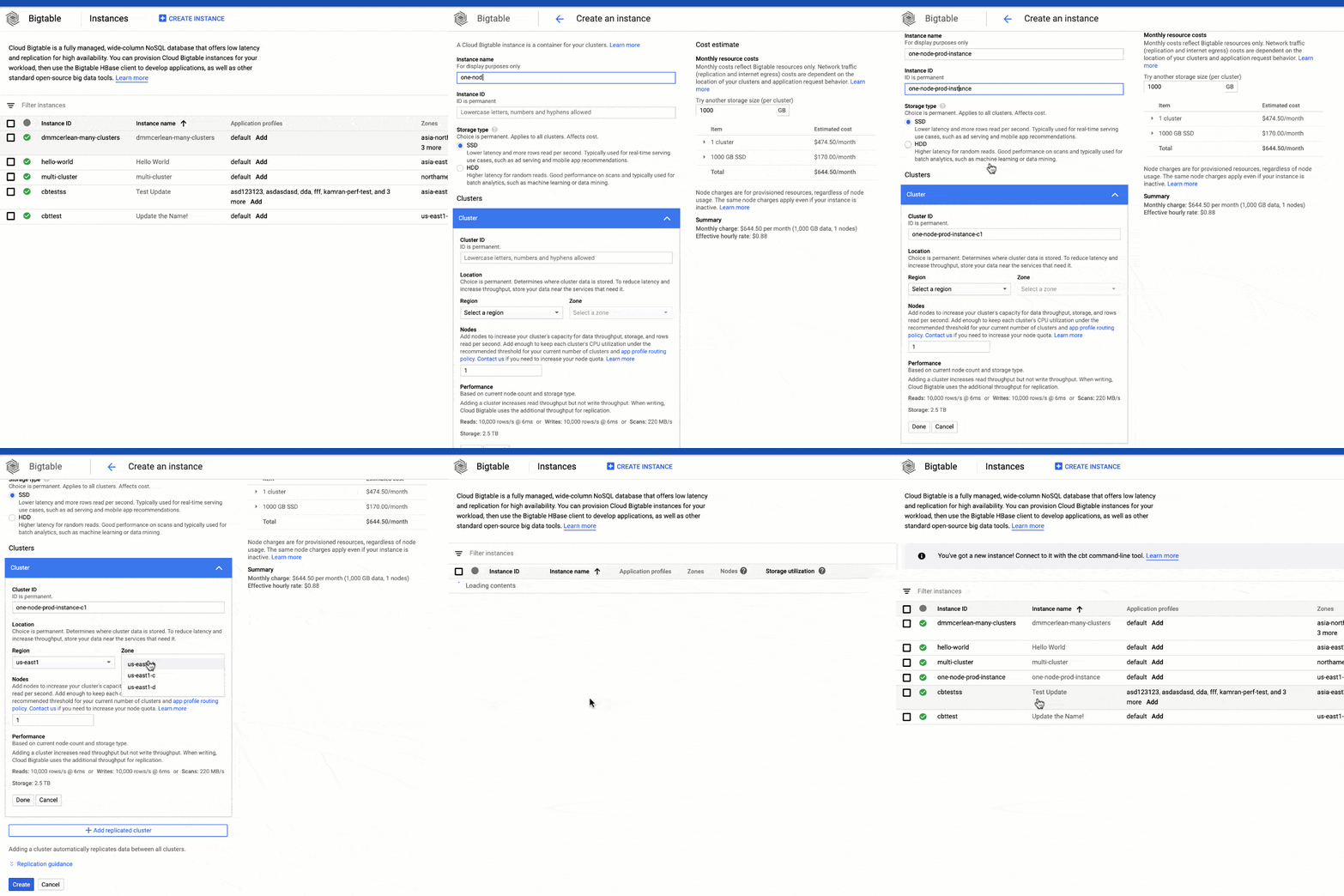
Cloud Bigtable is a fast, petabyte-scale NoSQL database service that has long supported massive workloads, both internally at Google and for Google Cloud customers. We are now announcing that Bigtable is expanding its support for smaller workloads.You can now create production instances with one or two nodes per cluster, down from the previous minimum of three nodes per cluster. We are also expanding our SLA to cover all Bigtable instances, regardless of type or size. This means that you can get started for as low as $0.65/hour to take advantage of Cloud Bigtable’s low-latency data access and seamless scalability. Cloud Bigtable performs exceptionally well for use cases like personalization, fraud detection, time series, and other workloads where performance and scalability are critical. Bigtable at any scaleYou don’t need a terabyte- or petabyte-scale workload to take advantage of Bigtable! We want Bigtable to be an excellent home for all of your key-value and wide-column use-cases, both large and small. That’s true whether you’re a developer just getting started, or an established enterprise looking for a landing place for your self-managed HBase or Cassandra clusters.Get started by creating a new Bigtable instance:Making replication more affordableWe’ve seen customers use replication to get better workload isolation, higher availability, and faster local access for global applications. By reducing our minimum cluster size, it’s now more affordable than ever to try replication. To enable replication, just add a new cluster to any existing instance.Easy management of development and staging environmentsFinally, we heard your feedback that development instances were missing features needed to more easily manage development and staging environments. We’re excited to offer one-node production instances at the same price point as development instances, but with the added ability to scale up and down to run tests. You can now upgrade your existing development instances to a one-node production instance at any time.Learn moreTo get started with Bigtable, create an instance or try it out with a Bigtable Qwiklab. Between now and April 30, 2020, Google Cloud is offering free access to training and certification, including access to Qwiklabs, for 30 days. Register before April 30, 2020 to get started for free.
Quelle: Google Cloud Platform

Machine learning with XGBoost gets faster with Dataproc on GPUs

Google Cloud’s Dataproc gives data scientists an easy, scalable, fully managed way to analyze data using Apache Spark. Apache Spark was built for high performance, but data scientists and other teams need an even higher level of performance as more questions and predictions need to be answered using datasets that are rapidly growing.With this in mind, Dataproc now lets you use NVIDIA GPUs to accelerate XGBoost, a common open source software library, in a Spark pipeline. This combination can speed up machine learning development and training up to 44x and reduce costs 14x when using XGBoost. With this kind of GPU acceleration for XGBoost, you can get better performance, speed, accuracy, and reduced TCO, plus an improved experience when deploying and training models. Spinning up elastic Spark and XGBoost clusters in Dataproc takes about 90 seconds. (We’ll describe this process in detail later in the post.)Most machine learning (ML) workloads today in Spark run on traditional CPUs, which can be sufficient for developing applications and pipelines or working with datasets and workflows that are not compute-intensive. But once developers add compute-intensive workflows or machine learning components to the applications and pipelines, processing times lengthen and more infrastructure is needed. Even with scale-out compute clusters and parallel processing, model training times still need to be reduced dramatically to accelerate innovation and iterative testing.This advancement to GPU acceleration with XGBoost and Spark on Dataproc is a big step forward to make distributed, end-to-end ML pipelines an easier process. We often hear that Spark XGBoost users run into some common challenges, not only in terms of costs and training time but also with installing different packages required to run a scale-out or distributed XGBoost package on a cloud environment. Even if the installation is successful, reading a large dataset into a distributed environment with optimized partitioning can require multiple iterations. The typical steps for an XGBoost training include reading data from storage, converting to DataFrame, then moving into XGBoost’s D-matrix form for training. Each of these steps depends on CPU compute power, which directly affects the daily productivity of a data scientist.See the cost savings for yourself with a sample XGBoost notebook You can use this three-step process to get started:Download the sample dataset and PySpark application filesCreate a Dataproc cluster with an initialization actionRun a sample notebook application as shown on the benchmark clustersBefore you start a Dataproc cluster, download the sample mortgage dataset and the PySpark XGBoost notebook that illustrates the benchmark shown below. The initialization action will ease the process of installation for both single-node and multi-node GPU-accelerated XGBoost training. The initialization step has two separate scripts. First, initialization script.sh will pre-install GPU software that includes CUDA drivers, NCCL for distributed training, and GPU primitives for XGBoost. Second, rapids.sh script will install Spark RAPIDS libraries and Spark XGBoost libraries on a Dataproc cluster. These steps will ensure you have a Dataproc cluster running and ready to experiment with a sample notebook.Saving time and reducing costs with GPUsHere’s the example that produced the numbers we noted above, where training time—and, as a result, costs—go down dramatically once XGBoost is accelerated:Click to enlargeHere are the high-level details of this GPU vs. CPU XGBoost training comparison on Dataproc:Once you’ve saved this time and cost, you can focus on making models even smarter by training them with more data. While being smarter, you can also be faster by progressing sooner to the next stage in the pipeline.Stay tuned for additional capabilities and innovations coming with the release of Spark 3.0 later in the year.For more on AI with NVIDIA GPUs, including edge computing and graphics visualization, check out these on-demand online sessions: Google Cloud AutoML Video and Edge Deployment and Building a Scalable Inferencing Platform in GCP.
Quelle: Google Cloud Platform

Announcing the winners of our Google Cloud 2019 Partner Awards

Day in and day out, our Google Cloud partners work tirelessly to help make our customers as successful as possible, and we want to share our gratitude. Today, we’re honored to recognize the hard work these partners do through our 2019 Partner Awards.Please join us in congratulating our 2019 winners.Click to enlargeWe’re so grateful for the ways our partners are supporting the needs of our customers, and we look forward to welcoming many new partners into our network in 2020. To learn more about our program, find a partner, or become one, visit our partner page.
Quelle: Google Cloud Platform

Connecting to Google Cloud: your networking options explained

So, your organization recently decided to adopt Google Cloud. Now you just need to decide how you’re going to connect your applications to it… Public IP addresses, or VPN? Via an interconnect or through peering? Should you want to go the interconnect route, should it be direct or through a partner? Likewise, for peering, should you go direct or through a carrier? When it comes to connecting to Google Cloud, there’s no lack of options. The answer to these questions, of course, lies in your applications and business requirements. Here on the Solutions Architecture team, we find that you can assess those requirements by answering three simple questions:Do any of your on-prem servers or user computers with private addressing need to connect to Google Cloud resources with private addressing? Do the bandwidth and performance of your current connection to Google services currently meet your business requirements? Do you already have, or are you willing to install and manage, access and routing equipment in one of Google’s point of presence (POP) locations?Depending on your answers, Google Cloud provides a wide assortment of network connectivity options to meet your needs, using either public networks, peering, or interconnect technologies. Here’s the decision flowchart that walks you through each of the three questions, and the best associated GCP connectivity option.Deciding how to connect to Google CloudPublic network connectivityBy far the simplest connectivity option to connect your environment to Google Cloud is simply to use a standard internet connection that you already have, assuming it meets your bandwidth needs. If so, you can connect to Google Cloud over the internet in two ways.    A: Cloud VPNIf you need private-to-private connectivity (Yes on 1) and your internet connection meets your business requirements (Yes on 2), then building a Cloud VPN is your best bet. This configuration allows users to access private RFC1918 addresses on resources in your VPC from on-prem computers also using private RFC1918 addresses. This traffic flows through the VPN tunnel. High availability VPN offers the best SLA in the industry, with a guaranteed uptime of 99.99%.A Cloud VPN connection setup between the example.com network and your VPC.B: Public IP addressesIf you don’t need private access (No on 1) and your Internet connection is meeting your business requirements (Yes on 2), then you can simply use public IP addresses to connect to Google services, including G Suite, Google APIs, and any Cloud resources you have deployed via their public IP address. Of course, regardless of the connectivity option you chose, it is a best practice to always encrypt your data at rest as well as in transit. You can also bring your own IP addresses to Google’s network across all regions to minimize downtime during migration and reduce your networking infrastructure cost. After you bring your own IPs, GCP advertises them globally to all peers.Peering If you don’t need RFC1918-to-RFC1918 private address connectivity and your current connection to Google Cloud isn’t performing well, then peering may be your best connectivity option. Conceptually, peering gets your network as close as possible to Google Cloud public IP addresses. Peering has several technical requirements that your company must meet to be considered for the program. If your company meets the requirements, you will first need to register your interest to peer and then choose between one of two options. C: Direct PeeringDirect Peering is a good option if you already have a footprint in one of Google’s POPs—or you’re willing to lease co-location space and install and support routing equipment. In this configuration, you run BGP over a link to exchange network routes. All traffic destined to Google rides over this new link, while traffic to other sites on the internet rides your regular internet connection.Direct Peering allows you to establish a direct peering connection between your business network and Google’s edge network and exchange high-throughput cloud traffic.D: Carrier PeeringIf installing equipment isn’t an option or you would prefer to work with a service provider partner as an intermediary to peer with Google, then Carrier Peering is the way to go. In this configuration, you connect to Google via a new link connection that you install to a partner carrier that is already connected to the Google network itself. You will run BGP or use static routing over that link. All traffic destined to Google rides over this new link. Traffic to other sites on the internet rides your regular internet connection. With carrier peering, traffic flows through an intermediary.InterconnectsInterconnects are similar to peering in that the connections get your network as close as possible to the Google network. Interconnects are different from peering in that they give you connectivity using private address space into your Google VPC. If you need RFC1918-to-RFC1918 private address connectivity then you’ll need to provision either a dedicated or partner interconnect.  E: Partner InterconnectIf you need private, high-performance connectivity to Google Cloud, but installing equipment isn’t an option—or you would prefer to work with a service provider partner as an intermediary,  then we recommend you go with a Partner Interconnect. You can find Google Cloud connectivity partners at Cloud Pathfinder by Cloudscene.Partner Interconnect provides connectivity between your on-premises network and your VPC network through a supported service provider.The Partner Interconnect option is similar to carrier peering in that you connect to a partner service provider that is directly connected to Google. But because this is an interconnect connection, you also are adding a virtual attachment circuit on top of the physical line to get you your required RFC1918-to-RFC1918 private address connectivity. All traffic destined to your Google VPC rides over this new link. Traffic to other sites on the internet rides your regular internet connection.F: Dedicated InterconnectLast but not least, there’s Dedicated Interconnect, which provides you with a private circuit direct to Google. This is a good option if you already have a footprint (or are willing to lease co-lo space and install and support routing equipment) in a Google POP. With Dedicated Interconnect, you install a link directly to Google by choosing a 10 Gbps or 100 Gbps pipe. In addition, you provision a virtual attachment circuit over the physical link. You run BGP or use static routing over that link to connect to your VPC. It is this attachment circuit that gives you the RFC1918-to-RFC1918 private address connectivity. All traffic destined to your Google Cloud VPC rides over this new link. Traffic to other sites on the internet rides your regular internet connection.Sanity checkNow that you have made a decision it’s good to sanity check it against some additional data. This following chart compares each of the six connectivity options against nine different connection characteristics. You can use the chart as a high level reference to understand your choice and compare it to the other options. You should feel comfortable with the service level that your option provides through the data points.Option comparison. (Click to enlarge)There are lots of different reasons to choose one connectivity option over another. For example, maybe today Cloud VPN would meet your needs today, but your business is growing fast, and an interconnect is in order. Use this chart as a starting point and then reach out to your Google Cloud sales representative, who can discuss your concerns in more detail, and can pull in network specialists and solution architects to help you make the right choice for your business.
Quelle: Google Cloud Platform

Powering up caching with Memorystore for Memcached

In-memory data stores are a fundamental infrastructure for building scalable, high-performance applications. Whether it is building a highly responsive ecommerce website, creating multiplayer games with thousands of users, or doing real-time analysis on data pipelines with millions of events, an in-memory store helps provide low latency and scale for millions of transactions. Redis is a popular in-memory data store for use cases like session stores, gaming leaderboards, stream analytics, API rate limiting, threat detection, and more. Another in-memory data store, open source Memcached, continues to be a very popular choice as a caching layer for databases and is used for its speed and simplicity.We’re announcing Memorystore for Memcached in beta, a fully managed, highly scalable service that’s compatible with the open source Memcached protocol. We launched Memorystore for Redis in 2018 to let you use the power of open source Redis easily without the burden of management. This announcement brings even more flexibility and choice for your caching layer. Highlights of Memorystore for MemcachedMemcached offers a simple but powerful in-memory key value store and is popular as a front-end cache for databases. Using Memcached as a front-end store not only provides an in-memory caching layer for faster query processing, but it can also help save costs by reducing the load on your back-end databases.Using Memorystore for Memcached provides several important benefits:Memorystore for Memcached is fully open source protocol compatible. If you are migrating applications using self-deployed Memcached or other cloud providers, you can simply migrate your application with zero code changes. Memorystore for Memcached is fully managed. All the common tasks that you spend time on, like deployment, scaling, managing node configuration on the client, setting up monitoring, and patching, are all taken care of. You can focus on building your applications.Right-sizing a cache is a common challenge with distributed caches. The scaling feature of Memorystore for Memcached, along with detailed open source Memcached monitoring metrics, allows you to scale your instance up and down easily to optimize for your cache-hit ratio and price. With Memorystore for Memcached, you can scale your cluster up to 5 TB per instance.Auto-discovery protocol lets clients adapt to changes programmatically, making it easy to deal with changes to the number of nodes during scaling. This drastically reduces manageability overhead and code complexity.You can monitor your Memorystore for Memcached instances with built-in dashboards in the Cloud Console and rich metrics in Cloud Monitoring. Memorystore for Memcached can be accessed from applications running on Compute Engine, Google Kubernetes Engine (GKE), App Engine Flex, App Engine Standard, and Cloud Functions.The beta launch is available in major regions across the U.S., Asia, and Europe, and will be available globally soon.Getting started with Memorystore for MemcachedTo get started with Memorystore for Memcached, check out the quick start guide. Sign up for a $300 credit to try Memorystore and the rest of Google Cloud. You can start with the smallest instance and when you’re ready, you can easily scale up to serve performance-intensive applications. Enjoy your exploration of Google Cloud and Memorystore for Memcached.
Quelle: Google Cloud Platform

Powering up caching with Memorystore for Memcached

In-memory data stores are a fundamental infrastructure for building scalable, high-performance applications. Whether it is building a highly responsive ecommerce website, creating multiplayer games with thousands of users, or doing real-time analysis on data pipelines with millions of events, an in-memory store helps provide low latency and scale for millions of transactions. Redis is a popular in-memory data store for use cases like session stores, gaming leaderboards, stream analytics, API rate limiting, threat detection, and more. Another in-memory data store, open source Memcached, continues to be a very popular choice as a caching layer for databases and is used for its speed and simplicity.We’re announcing Memorystore for Memcached in beta, a fully managed, highly scalable service that’s compatible with the open source Memcached protocol. We launched Memorystore for Redis in 2018 to let you use the power of open source Redis easily without the burden of management. This announcement brings even more flexibility and choice for your caching layer. Highlights of Memorystore for MemcachedMemcached offers a simple but powerful in-memory key value store and is popular as a front-end cache for databases. Using Memcached as a front-end store not only provides an in-memory caching layer for faster query processing, but it can also help save costs by reducing the load on your back-end databases.Using Memorystore for Memcached provides several important benefits:Memorystore for Memcached is fully open source protocol compatible. If you are migrating applications using self-deployed Memcached or other cloud providers, you can simply migrate your application with zero code changes. Memorystore for Memcached is fully managed. All the common tasks that you spend time on, like deployment, scaling, managing node configuration on the client, setting up monitoring, and patching, are all taken care of. You can focus on building your applications.Right-sizing a cache is a common challenge with distributed caches. The scaling feature of Memorystore for Memcached, along with detailed open source Memcached monitoring metrics, allows you to scale your instance up and down easily to optimize for your cache-hit ratio and price. With Memorystore for Memcached, you can scale your cluster up to 5 TB per instance.Auto-discovery protocol lets clients adapt to changes programmatically, making it easy to deal with changes to the number of nodes during scaling. This drastically reduces manageability overhead and code complexity.You can monitor your Memorystore for Memcached instances with built-in dashboards in the Cloud Console and rich metrics in Cloud Monitoring. Memorystore for Memcached can be accessed from applications running on Compute Engine, Google Kubernetes Engine (GKE), App Engine Flex, App Engine Standard, and Cloud Functions.The beta launch is available in major regions across the U.S., Asia, and Europe, and will be available globally soon.Getting started with Memorystore for MemcachedTo get started with Memorystore for Memcached, check out the quick start guide. Sign up for a $300 credit to try Memorystore and the rest of Google Cloud. You can start with the smallest instance and when you’re ready, you can easily scale up to serve performance-intensive applications. Enjoy your exploration of Google Cloud and Memorystore for Memcached.
Quelle: Google Cloud Platform

Filling the NCAA void: Using BigQuery to simulate March Madness

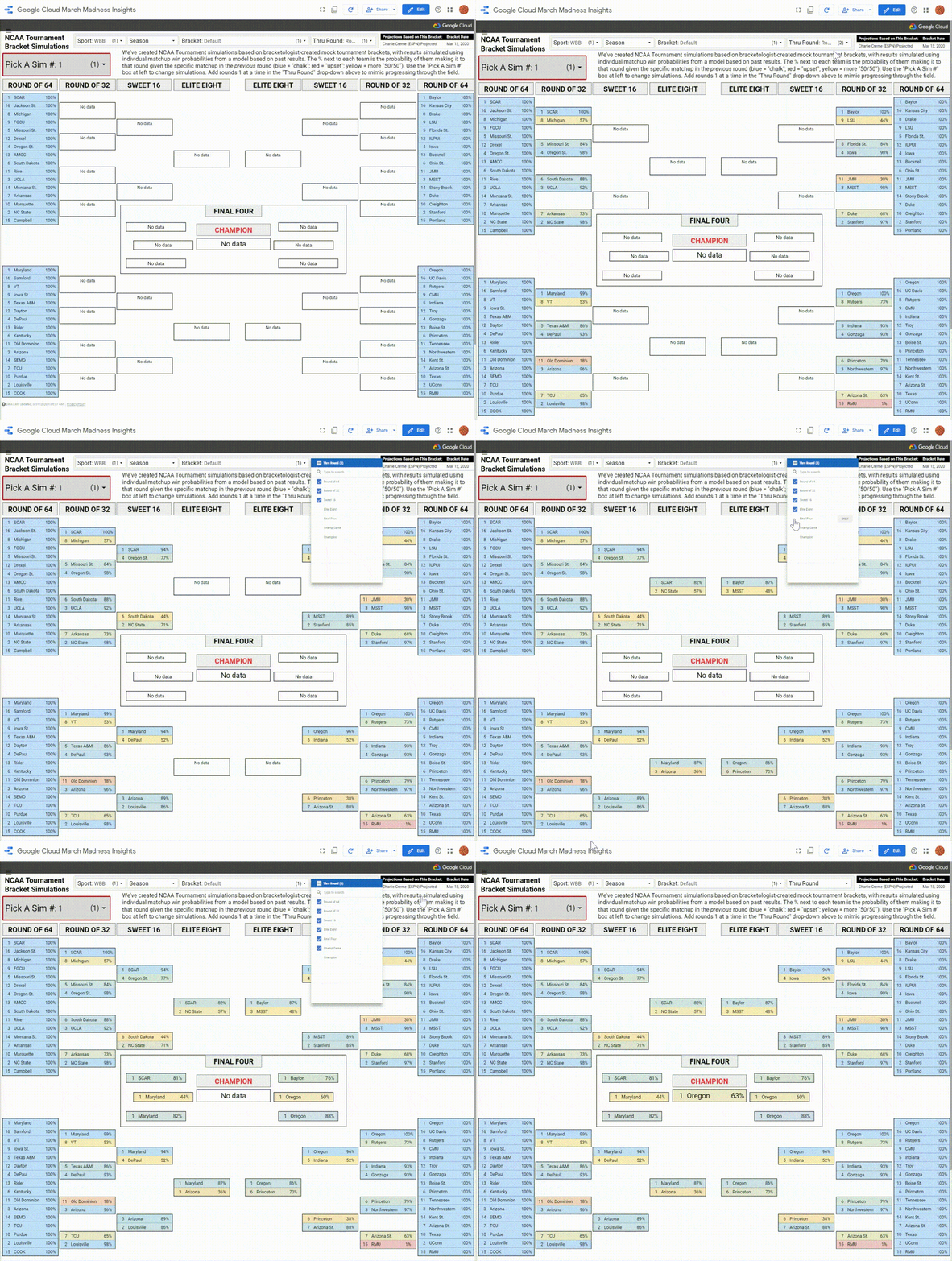
As COVID-19 continues to have enormous impact around the world, we’ve focused on supporting customers and making available public data to help research efforts, among various other initiatives. Beyond the essential issues at hand, it’s been a truly strange time for sports fans, with virtually every league shut down across the globe. Even though sports may be non-essential, they are one of our greatest distractions and forms of entertainment.In particular, the recent American sports calendar has been missing an annual tradition that excites millions: March Madness®. The moniker represents the exciting postseason of college basketball, with both men’s and women’s teams competing to be crowned champions in the annual NCAA® Tournaments. Along with watching these fun, high-stakes games, sports fans fill out brackets to predict who will win in each stage of the tournament.In our third year as partners with the NCAA, we had planned for a lot of data analysis related to men’s and women’s basketball before the cancellation of all remaining conference tournaments and both NCAA tournaments on March 12. It took us a few days to process a world with no tournament selections, no brackets, no upsets, and no shining moments, but we used Google Cloud tools and our data science skills to make the best of the situation by simulating March Madness.Simulation is a key tool in the data science toolkit for many forecasting problems. Using Monte Carlo methods, which rely on repeated random sampling from probability distributions, you can model real-world scenarios in science, engineering, finance, and of course, sports. In this post, we’ll demonstrate how to use BigQuery to set up, run, and explore tens of thousands of NCAA basketball bracket simulations. We hope the example code and explanation can serve as inspiration for your own analyses that could use similar techniques. (Or you can skip ahead to play around with thousands of simulated brackets right now on Data Studio.)Predicting a virtual tournamentIn the context of projecting any NCAA Tournament, the first piece necessary is a bracket, which includes which teams make the field and creates the structure for determining who could play whom in each tournament round. The NCAA basketball committees didn’t release 2020 brackets, but we felt pretty good about using the final “projected” brackets from well-known bracketologists as proxies, since games stopped only a couple days short of selections. Specifically, we used bracket projections from Joe Lunardi at ESPN and Jerry Palm at CBS for the men, and Charlie Creme at ESPN and Michelle Smith at the NCAA for the women. These take into account a lot of different factors related to selection, seeding, and bracketing, and are fairly representative of the type of fields we might have seen from the committees.The next step was finding a way to get win probabilities for any given matchup in a tournament field—i.e., if Team X played Team Y, how likely is it that Team X would win? To estimate these, we used past NCAA Tournament games for training data and created a logistic regression model that took into account three factors for each matchup:The difference between the teams’ seeds. 1-seeds are generally better than 2-seeds, which are better than 3-seeds, and so on, down to 16-seeds.The difference between the teams’ pre-tournament schedule-adjusted net efficiency. Think of these as team performance-based power ratings similar to the popular KenPom or Sagarin ratings, also applied to women’s teams (this post has further details on the calculations).Home-court advantage. This is applicable for early-round women’s games that are often held at a top seed’s home stadium; almost all men’s games are at “neutral” sites.BigQuery enables us to prepare our data so that each of those predictors is aligned with the results from past games. Then, we used BigQuery ML to create a logistic regression model with minimal code and without having to move our data outside the warehouse. Separate models were created for men’s and women’s tournament games, using the factors mentioned above. The code for the women’s tournament game model is shown here:Both models had solid accuracy and log loss metrics, with sensible weights on each of the factors. The models then had to be applied to all possible team matchups in the projected 2020 brackets, which were generated along with each team’s seed, adjusted net efficiency, and home-court advantage using BigQuery. Then, we generated predictions from our saved models with BigQuery ML, again with minimal code and from within the data warehouse, as shown here:The resulting table contains win probabilities for every potential tournament matchup, and sets us up for the real payoff: using the bracket structure to calculate advancement probabilities for each team getting to each round. For first-round matchups where matchups are already set— i.e., 1-seed South Carolina to face 16-seed Jackson State in Charlie Creme’s bracket—this is simply a lookup of the predicted win probability for the matchup in the table. But in later rounds, there’s more to consider: the probability that the team gets there at all, and if they do, that there is more than one possible opponent. For example, a 1-seed could face either the 8- or 9-seed in the Round of 32, the 4-, 5-, 12-, or 13-seed in the Sweet 16, and so on.So, a team’s chance of advancing out of a given round is the chance they get to that round in the first place, multiplied by a weighted average of win probabilities—their chances of beating each possible opponent they might face, weighted by how likely they are to face them. Consider the example of an 8-seed advancing to the Sweet 16:They are usually something like 50-50 to beat the 9-seed in the Round of 64They are likely a sizable underdog in a potential matchup against a 1-seedThey likely have a very good chance of beating the 16-seed if they play themBut the 1-seed is the much more likely opponent in the Round of 32, so the lower matchup win probability gets weighted much higher in the advance calculationPutting it all together, an 8-seed’s projected chance of making the Sweet 16 is usually well below 20%, since they have a (very likely) uphill battle against a top seed to get there.Running this type of calculation for the entire bracket is naturally iterative. First, we use matchup win probabilities for all possible matchups in a given round to calculate the chances of all teams making it to the next round. Then, we use those chances as weights for each team and possible opponent’s likelihood of meeting in that next round, then repeat the first step using matchup win probabilities for the possible matchups in that round.Doing this for all tournament rounds might typically be done using tools like Python or R, which requires moving data out of BigQuery and doing calculations in one of those languages, then perhaps writing results back to the database. But this particular problem is a great use case for BigQuery scripting, a feature that allows you to send multiple statements in one request, using variables and control statements (such as loops). This allows similar functionality for iterative scripts like in Python or R, but while still using SQL code and without having to leave the warehouse. In this case, as shown below, we’re using a WHILE loop cycling through each tournament round and outputting each team’s advance probabilities to a specific table that gets referenced back in the script (“[…]” represents code left out for clarity in this case):We collected the results and put them into this interactive Data Studio report, which lets you filter and sort every tournament team’s chances (in each projected bracket). Our results show Kansas would’ve been title favorites in the men’s bracket, with around a 15% to 16% chance to win it all. Oregon was the most likely women’s champion at either 27% or 31% (depending on projected bracket chosen). Keep in mind that this is NOT saying Kansas or Oregon was going to win—the probabilistic forecasts actually show a 5-in-6 chance of a champion other than the Jayhawks on the men’s side and a greater than 2-in-3 chance of the Ducks not winning the women’s title.While fun to play around with, these results are not particularly unique. Companies like ESPN, FiveThirtyEight, and TeamRankings have provided probabilistic NCAA Tournament forecasts for years. The probabilities are fairly accurate gauges of each specific team’s chances, but filling out a bracket using the most likely team in each slot ends up looking very chalky—the better seeds almost always advance. “Real” March Madness isn’t exactly like this—it’s only one tournament with 63 slots on the bracket that get filled in with a specific winner. While top seeds and better teams generally advance in aggregate, there are always upsets, Cinderella runs, and unexpected results. Simulating thousands of NCAA TournamentsFortunately, our procedure for the model and projections accounts for that randomness. To demonstrate this, we can simulate the actual bracket many times and actually look at results. The procedure is similar to the one we used to create the projections, using BigQuery scripting and the matchup win probabilities to loop round-by-round through the tournament. The differences are that we use random number generation to simulate an actual winner for each matchup (based on the win probability), and that we do so across many simulations to generate not just one possible bracket, but thousands of them—true Monte Carlo simulations. See the code below for details (again, “[…]” used as a placeholder for code removed to simplify presentation):Let this run for a few minutes and we wind up with not just one completed NCAA Tournament bracket per gender, but 20,000 brackets each for men and women (10,000 for each projected bracket we started with). We’ve made all of these brackets available in this interactive Data Studio dashboard, accelerated using BigQuery BI Engine. Use “Pick A Sim #” to flip through many of them, and use the dropdowns up top to filter by gender or starting bracket. Within the bracket, the percentage next to each team is the probability of them making it to that round, given the specific matchup in the previous round (blue represents an expected result, red an upset, and yellow a more 50/50 outcome). You can use “Thru Round” to mimic progressing through each round of the tournament, one at a time.Feel free to go through a few (dozen, hundred, …) simulations until you find the one you like the best…there are some wild ones in there. Check out Men’s Lunardi bracket simulation 108, where Boston University (the author’s alma mater) pulls three upsets and makes the Elite Eight as a 16-seed!Perhaps one upside of having no tournaments is that we can pick a favorable simulation and convince ourselves that if the tournament had taken place, this is how it would’ve turned out!Of course, these brackets aren’t just based on random coin flipping, where total chaos brackets are as likely as more plausible ones with fewer upsets. BU doesn’t get to the Final Four in any simulated bracket (though we could use the easy scalability of BigQuery to run more simulations), while the top seeds get there much more often. The simulations reflect accurate advancement chances for each matchup based on the modeling described above, so the resulting corpus of brackets reflect the proper amount of madness that typifies college basketball in March. Capturing the randomness appropriately is a good general point to keep in mind when creating these types of simulations to help solve non-basketball data science problems.With the lack of actual national semifinals and title games going on over the next couple days, we hope the ability to play with thousands of simulated Final Fours provides some small bit of consolation to those of you missing the NCAA basketball tournaments in 2020. And you can check out our Medium NCAA blog for all of our past basketball data analysis using Google Cloud. Here’s to hoping that we’ll be watching and celebrating the real March Madness in future years.
Quelle: Google Cloud Platform
Introducing BigQuery column-level security: new fine-grained access controls

We’re announcing a key capability to help organizations govern their data in Google Cloud. Our new BigQuery column-level security controls are an important step toward placing policies on data that differentiate between classes. This allows for compliance with regulations that mandate such distinction, such as GDPR or CCPA. BigQuery already lets organizations provide controls to data containers, satisfying the principle of “least privilege.” But there is a growing need to separate access to certain classes of data—for example, PHI (patient health information) and PII (personally identifiable information)—so that even if you have access to a table, you are still barred from seeing any sensitive data in that table. This is where column-level security can help. With column-level security, you can define the data classes used by your organization. BigQuery column-level security is available as a new policy tag applied to columns in the BigQuery schema pane, and managed in a hierarchical taxonomy in Data Catalog. The taxonomy is usually composed of two levels: A root node, where a data class is defined, and Leaf nodes, where the policy tag is descriptive of the data type (for example, phone number or mailing address).The aforementioned abstraction layer lets you manage policies at the root nodes, where the recommended practice is to use those nodes as data classes; and manage/tag individual columns via leaf nodes, where the policy tag is actually the meaning of the content of the column. Organizations and teams working in highly regulated industries need to be especially diligent with sensitive data. “BigQuery’s column-level security allows us to simplify sharing data and queries while giving us comfort that highly secure data is only available to those who truly need it,” says Ben Campbell, data architect at Prosper Marketplace.Here’s how column-level security looks in BigQuery:In the above example, the organization has three broad categories of data sensitivity: restricted, sensitive, and unrestricted. For this specific organization, both PHI and PII are highly restricted, while financial data is sensitive. You will notice that individual info types, such as the ones detectable by Google Cloud Data Loss Prevention (DLP), are in the leaf nodes. This allows you to move a leaf node (or an intermediate node) from a restricted data class to a less sensitive one. If you manage policies on the root nodes, you will not need to re-tag columns to change the policy applied to them. This allows you to reflect changes in regulations or compliance requirements by moving leaf nodes. For example, you can take “Zipcode” from “Unrestricted Data,” move it to “PII,” and immediately restrict access to such data.Learn more about BigQuery column-level securityYou’ll be able to see the relevant policies that are applied to BigQuery’s columns within the BigQuery schema pane. If attempting to query a column you do not have access to (which is clearly indicated by the banner notice as well as the grayed-out nature of the field), the access will be securely denied. Access control applies to every method used to access BigQuery data (API, Views, etc.). Here’s what that looks like:Schema of BigQuery table. All but the first two columns have policy tags imposing column-level access restrictions. This user does not have access to them.We’re always working to enhance BigQuery’s (and Google Cloud’s) data governance capabilities to provide more controls around access, on-access data transformation, and data retention, and provide a holistic view of your data governance across Google Cloud’s various storage systems. You can try the capability out now. 
Quelle: Google Cloud Platform

Achieving identity and access governance on Google Cloud

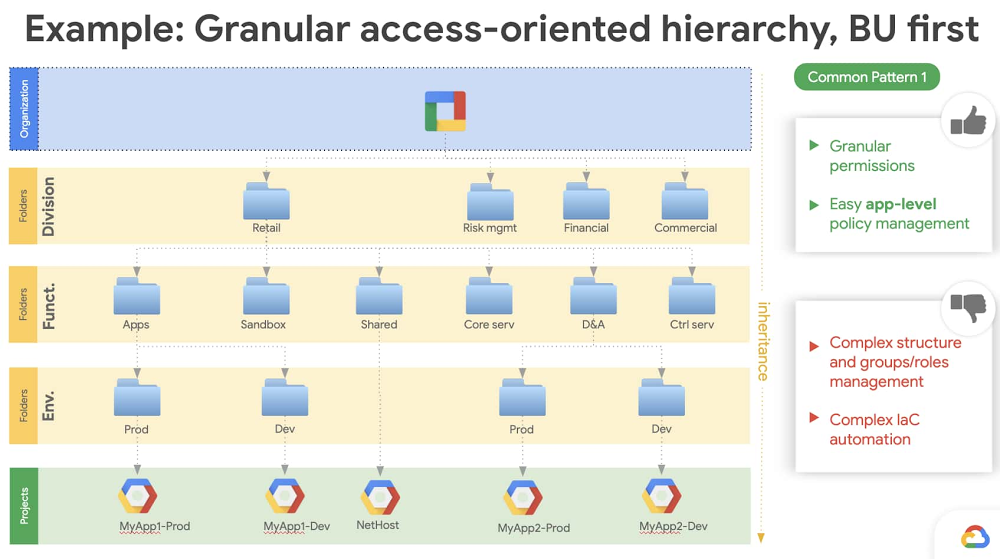
When businesses shift from solely on-premises deployments to using cloud-based services, identity management can become more complex. This is especially true when it comes to hybrid and multi-cloud identity management.Cloud Identity and Access Management (IAM) offers several ways to manage identities and roles in Google Cloud. One particularly important identity management task is identity and access governance (IAG): ensuring that your identity and access permissions are managed effectively, securely, and correctly. A major step in achieving IAG is designing an architecture that suits your business needs and also allows you to satisfy your compliance requirements. To manage the entire enterprise identity lifecycle you must consider the following core tasks: User provisioning and de-provisioningSingle sign-on (SSO)Access request and role-based access control (RBAC)Separation of duties (SoD)Reporting and access reviewsIn this post, we’ll discuss these tasks to show how you can achieve effective identity and access governance when using Google Cloud.User provisioning and deprovisioningLet’s start at the very beginning. Google Cloud offers several ways to onboard users. Cloud Identity is a centralized hub for Google Cloud and G Suite to define, setup, and manage users and groups—think of Cloud Identity as a provisioning and authentication solution, whereas Cloud IAM is principally an authorization solution. Once they’re onboarded, you’ll be able to assign permissions to these users and groups in Google Cloud IAM to allow them access to resources. Depending on your specific system of record, there are several scenarios to consider.If you’re using an on-premises Active Directory or LDAP directory as a centralized identity storeThis is the most common pattern for provisioning in enterprises. If your organization has a centralized directory server for provisioning all your users and groups, you can use that as a source of truth for Cloud Identity. Usually an enterprise provisioning solution connects the identities from the source of truth (HRMS or similar systems) to directories, so joiner, mover, and leaver workflows are already in place. To integrate an on-prem directory, Google offers a service called Google Cloud Directory Sync, which lets you synchronize users, groups, and other user data from your centralized directory service to Google Cloud domain directory (Cloud Identity uses Google Cloud domain directory). Cloud Directory Sync can synchronize user status, groups, and group memberships. If you do this, you can base your Google Cloud permissions on Active Directory (AD) groups.You can also run Active Directory in the cloud using a managed Active Directory service. You can use the managed AD service to deploy a standalone domain in multiple regions for your cloud-based workloads or connect your on-premises Active Directory domain to the cloud. This solution is recommended if: You have complex Windows workloads running in Google Cloud that need tight integration with Active Directory for user and access needs. You will eventually completely migrate to Google Cloud from your on-premises environment. In this case, this option will require minimal changes to how your existing AD dependencies are configured. If you primarily manage the user lifecycle with another identity management solutionIn this example, you don’t have a directory as a central hub. Instead you’re using a real-time provisioning solution like Okta, Ping, SailPoint, or others to manage the user lifecycle. These solutions provide a connector-based interface—usually referred to as an “application” or “app”—that uses Cloud Identity and User Management APIs to manage users and group memberships. Joiner, mover, and leaver workflows are managed directly from these solutions. The Cloud Identity account is disabled as soon as a termination event is processed by the leaver workflow, as is the user’s access to Google Cloud. In the case of a mover workflow, when users change job responsibility, the change is reflected in their Cloud Identity group membership which defines their new Google Cloud permissions.If you’re using a home-grown identity management systemCustom, home-grown identity systems are most commonly found when an organization’s complexity can’t be handled by an off-the-shelf product or when an organization wants greater flexibility than a commercial product can provide. In this case, the simplest option is to use a directory. You can interface with Cloud Identity using an LDAP compliant directory system. Users and groups provisioned via your custom identity management system can be synchronized to Cloud Identity using Cloud Directory Sync without having to write a custom provisioning solution for Cloud Identity.Single sign-onSingle sign-on (SSO) allows you to access applications without re-authenticating or maintaining separate passwords. Authorization usually comes in as a second layer to make sure authenticated users are permitted to access a given resource. As with user provisioning and de-provisioning, how you use SSO depends on your environment:SSO when using G Suite with Google Authentication. In this case, no special changes are required for Google Cloud sign-in. Google Cloud and G Suite both use the same sign-in, so as long as the right access is provisioned, users will be able to sign in to the Google Cloud console using their regular credentials.SSO when using G Suite with a third-party identity management solution. If G Suite sign-on has already been enabled, Google Cloud sign-on will also work. If a new G Suite and Google Cloud domain has been established, then you can create a new SAML 2.0-compliant integration using Cloud Identity with your identity management provider. For example, Okta and OneLogin provide a configurable SAML 2.0 integration using their out-of-the-box app. SSO when using an on-premises identity solution. Cloud Identity controls provisioning and authentication for Google Cloud, and provides a way to configure a SAML 2.0 compliant integration with your on-premises identity provider. SSO when using a multi-cloud model. When using multiple cloud service providers, you can use Cloud Identity or invest in a 3P identity provider to have a single source of truth for identities.Access request and role based access controlFor Google Cloud, “project” is the top level entity that hosts resources and workloads. Google Cloud relies on users/groups to define the role memberships that are used to provide access to projects. For easier organization and to maintain separation of control, projects can be grouped into folders and access can be granted at the folder level, but the principle remains the same. There are several roles within Google Cloud based on workloads. For example, if you’re using BigQuery, you’d assign predefined roles like BigQuery Admin, BigQuery Data Editor, or  BigQuery User to users. The best practice is to always assign a role to Google Groups.Google Groups are synchronized from your directory environment or from your identity management solution into Cloud Identity. Again, think of Cloud Identity as your authentication system and Cloud IAM as your authorization system. These groups can be modeled based on project requirements and then be exposed in your identity management system. They can then be requested by the end user or assigned automatically based on their job requirements using enterprise roles. One way to structure your Google Cloud organization to separate workloads is to set up folders that mirror your organization’s business structure and match them to how you grant access to different teams within your organization:A top level of folders reflects your lines of business (LOB)Under a LOB folder you would have folders for departmentsUnder departments you would have folders for teams Under team folders you would have folders for product environments (e.g., DEV, TEST, STAGING, and PROD)With this structure in place, you would model Active Directory or identity management provider groups for access control based on this hierarchy, assign them based on roles, or expose them for access request/approval. You should also have “break glass” account request procedures and the pre-approved roles a user could be granted to manage potential emergency situations. Organizations that have frequent reorganizations might want to limit folder nesting. Ultimately, you can go as abstract or as deep as you’d like to balance flexibility and security. Let’s look at two examples of how this balance can be achieved.The figure below shows an example of structuring your Google Cloud organization with a business-unit-based hierarchies approach. The advantage of this structure is that it lets you go as granular as you’d like, however it is  difficult to maintain since it doesn’t support organizational changes like reorganizations.Next we have an example of an environment-based hierarchies approach to your Google Cloud organization. This structure still lets you implement granular control over your workloads, and it’s also easier to implement using infrastructure-as-a-code (think Terraform).Separation of dutiesSeparation of duties (SoD) is a control that’s designed to prevent error or abuse by ensuring that at least two individuals are responsible for a task. Google Cloud provides several options to achieve SoD:As seen in the previous section, the Google Cloud resource hierarchy lets you create a structure that provides separation based on job responsibilities and organizational position. For example, an operational engineer working in one line of business usually wouldn’t have access to a project in another line of business, or a financial analyst wouldn’t have access to a project that deals with data analysis.Google Cloud lets you define IAM custom roles, which can simply be a collection of out-of-the-box roles. Google Cloud lets you bind roles to groups at various levels in your resource hierarchy. With this powerful feature, a group can be an organization level, a folder level, or a project level based on how the bindings are created.Here’s an example of how roles can be defined at an organizational level.In the next figure, we define a “Security admin group” and assign the appropriate IAM roles at the Org level.Then, along similar lines, you can think of groups that could be defined at a folder or project level.For example, below we define the “Site reliability engineers” group and assign the appropriate IAM roles at the folder or project level.Reporting and access reviewsUsers can gain access to a project either by having it directly granted to them or from organization- or folder-level inheritance. This can make it a bit unwieldy to meet compliance requirements that require you to have a report of “who has access to what” within Google Cloud. While you can get this “master” list using Cloud Asset Manager APIs or gcloud search-all-iam-policy commands, a better option is to export IAM policies to BigQuery using Asset Manager APIs’ export capabilities. Once this data is available in BigQuery, you can analyze it in Data Studio or import it into the tools of your choice.Putting it all togetherIdentity and access governance can be a challenging task. After reading this blog post, we hope that you have a clearer understanding of the options you have to address it on Google Cloud. To learn more about IAM, check out the technical documentation and our presentation at Cloud Next ‘19.
Quelle: Google Cloud Platform

Introducing Service Directory: Manage all your services in one place at scale

Enterprises rely on increasing numbers of heterogeneous services across cloud and on-premises environments. Google Cloud customers, for example, may use services like Cloud Storage alongside third-party partner services such as Snowflake, MongoDB, and Redis, as well as their own company-owned applications. Securely connecting to and managing these multi-cloud services can be challenging, especially as resources need to scale up and down to meet fast changing business needs.Customers want to be able to take a service- rather than infrastructure-centric approach to connecting to Google Cloud services, their own applications, and third-party partner services from GCP Marketplace. Service Directory is a new managed solution to help you publish, discover, and connect services in a consistent and reliable way, regardless of the environment and platform in which they are deployed. It provides real-time information about all your services in a single place, allowing you to perform service inventory management at scale, whether you have a few service endpoints or thousands.Simplify service management and operationsService Directory reduces the complexity of management and operations by providing unified visibility for all your services across cloud and on-premises environments. And because Service Directory is fully managed, you get enhanced service inventory management at scale with no operational overhead, increasing the productivity of your DevOps teams. At the same time, advanced permission capabilities let you ensure that only the correct principals (users and applications) are able to update this information or look up services, freeing service developers from worrying about accidentally impacting other services.Connecting hybrid and multi-cloud services at scaleWith Service Directory, you can easily understand all your services across multi-cloud environments. This includes workloads running in Compute Engine VMs, Google Kubernetes Engine (GKE), as well as external services running on-prem and third-party clouds. It increases application reachability by maintaining the endpoint information for all your services. Service Directory lets you define services with metadata, allowing you to group services, while making your endpoints easily understood by your consumers and applications. Customers can use Service Directory to register different types of services and resolve them securely over HTTP and gRPC. For DNS clients, customers can leverage Service Directory’s private DNS zones, a feature that automatically updates DNS records as services change. Let’s connectFor more on Service Directory, check out this video. Click here to learn more about GCP’s networking portfolio and reach out to us with feedback at gcp-networking@google.com.
Quelle: Google Cloud Platform