Explaining model predictions on image data

Editor’s note: This is the second blog post in a series covering how to use AI Explanations with different data types. The first post explained how to use Explainable AI with tabular data.As machine learning technology continues to improve and models become increasingly accurate, we’re using ML to solve more and more complex problems. As ML technology is improving, it’s also getting more complex. This is one of the reasons that late last year we launched Explainable AI—a set of tools for understanding how your machine learning models make predictions. In this post, the second in our series on Explainable AI, we’ll dive into how explanations work with image classification models, and how you can use AI Explanations to better understand your image models deployed on Cloud AI Platform. We’ll also show you a new image attribution method we recently launched called XRAI.XRAI is a new way of displaying attributions that highlights which salient features of an image most impacted the model, instead of just the individual pixels. You can see the effect below, showing which regions contributed to our model’s prediction of this image as a husky. As indicated in the scale, XRAI highlights the most influential regions in yellow, and the least influential in blue, based on the viridis color palette:You can find more information on XRAI in this paper by Google’s PAIR team. For a broader background on Explainable AI, check out the last post in this series and our whitepaper. Why use Explainable AI for image models?When debugging a mistaken classification from a model or deciding whether or not to trust its prediction, it’s helpful to understand why the model made the prediction it did. Explainability can show you which parts of an image caused your model to make a specific classification.Image explanations are useful for two groups of people: model builders and model stakeholders. For data scientists and ML engineers building models, explanations can help verify that our model is picking up on the right signals in an image. In an apparel classification model, for example, if the highlighted pixels show that the model is looking at unique characteristics of a piece of clothing, we can be more confident that it’s behaving correctly for a particular image. However, if the highlighted pixels are instead in the background of the image, the model might not be learning the right features from our training data. In this case, explanations can help us identify and correct for imbalances in our data.Let’s walk through an example of using explanations to debug model behavior. Take a look at the attributions for this image, which our model correctly classified as “canoe/kayak”:While it classified the picture correctly, the attributions show us that the paddle signaled our model’s prediction most, rather than the boat itself. In fact, if we crop the image to include only the paddle, our model still classifies it as “canoe/kayak” even though it shouldn’t, since there’s no kayak in the picture:With this knowledge, we can now go back and improve our training data to include more images of kayaks from different angles, both with and without paddles. We’d also want to improve our “paddle” label by adding more images to our training data that feature paddles in the foreground and background.We also often need to explain our model’s predictions to external stakeholders. For example, if a manufacturing company is using a model to identify defective products, they may not want to take its classification alone at face value before discarding a product labeled as defective by the model. In these cases, it’s especially useful to understand the regions in the image that caused the model to make a particular classification. If you saw our last post, you might wonder how explanations for tabular models relate to those for image models. The methods are actually the same, but we present the results differently. For tabular data, each feature is assigned an attribution value indicating how much that feature impacted the model’s prediction. With image models, you can think of each pixel as an individual feature, and the explanation method assigns an attribution value to every one. To make image attributions more understandable, we also add a layer of post-processing on top to make the insights really pop.Image explanations on Cloud AI PlatformAI Platform Explanations currently offers two methods for getting attributions on image models based on papers published by Google Research: Integrated Gradients (IG), and XRAI. IG returns the individual pixels that signaled a model’s prediction, whereas XRAI provides a heatmap of region-based attributions. Here’s a comparison of both techniques on the husky image shown above, with IG on the left:Each approach has specific strengths depending on the type of image data you’re working with. IG is optimal for images taken in non-natural environments like labs. XRAI currently performs best on natural images, like a picture of a house or an animal. IG provides more granularity, since it returns a different attribution value for each pixel in an image. XRAI, on the other hand, joins pixels into regions and shows the relative importance of different areas in an image. This is more effective for natural images, where it’s better to get a higher level summary with insights like “the shape of the dog’s face” rather than “the pixels on the top left below the dog’s eye.”When creating a model version in AI Platform, you can specify the attribution method you’d like to use with just one parameter, so it’s worth trying both IG and XRAI to see which one performs better on your image data. In the next section, we’ll show you how to deploy your image models with explanations.Preparing your image model for deploymentOnce you’ve trained a TensorFlow model for image classification, you need to create an explanation_metadata.json file to deploy it to AI Platform Explanations. This tells our explanations service which inputs in your model’s graph you want to explain, along with the baseline you want to use for your model. Just like tabular models provide a baseline value for each feature, for image models we’ll provide a baseline image. Typically image models use an uninformative baseline, or a baseline where no additional information is being presented. Common baselines for image models include solid black or white images, or images with random pixel values. To use both solid black and white images as your baseline in AI Explanations, you can pass [0,1] as the value for the input_baselines key in your metadata. To use a random image, pass a list of randomly generated pixel values in the same size that your model expects. For example, if your model accepts 192×192 pixel color images, this is how you’d use a random pixel baseline image in your explanation metadata:“input_baselines”: [np.random.rand(192,192,3).tolist()]Here is an example of a complete explanation_metadata.json file for image models. Once your metadata file is ready, upload it to the same Cloud Storage bucket as your SavedModel.When you deploy TensorFlow image models to AI Platform Explanations, make sure your model serving function is set up to take a string as input (i.e. the client sends a base64-encoded image string), which you’ll then convert to an array of pixels on the server before sending to your model for prediction. This is the approach used in our sample notebook.Deploying your image model to AI Platform ExplanationsYou can deploy your model to AI Platform Explanations using either the AI Platform API or gcloud, the Google Cloud CLI. Here we’ll show you an example using gcloud. Changing the explanation method is simply a matter of changing the –explanation-method flag below. In this example we’ll deploy a model with XRAI:The origin flag above should include the Cloud Storage path of your saved model assets and metadata file. The num-integral-steps flag determines how many steps are used along the gradients path to approximate the integral calculation in your model. You can learn more about this in the XRAI paper.When you run the command above, your model should deploy within 5-10 minutes. To get explanations, you can either use gcloud or the AI Platform Prediction API. Here’s what the explanation response looks like:Finally, we can visualize the image explanations that were returned with the following:Customizing your explanation visualizationsIn addition to adding XRAI as a new explanation method, we’ve recently added some additional configuration options to customize how your image explanations are visualized. Visualizations help highlight the predictive pixels or regions in the image, and your preferences may change depending on the type of images you’re working with. Where attributions previously returned images with the top 60% of the most important pixels highlighted, you can now specify the percentage of pixels returned, whether to show positive or negative pixels, the type of overlay, and more. To demonstrate changing visualization settings, we’ll look at predictions from a model we trained on a visual inspection dataset from Kaggle. This is a binary classification model that identifies defective metal casts used in manufacturing. The image below is an example of a defective cast, indicated by the circular dent on the right:To customize how your pixel attributions are visualized, the following parameters are available to set in the explanation_metadata.json:In addition to the pink_green option for color mapping, which is more colorblind friendly, we also offer red_green. More details on visualization config options can be found in the documentation.To show what’s possible with these customization options, next we’ll experiment with modifying the clip_below_percentile and visualization type parameters. clip_below_percentile dictates how many attributed pixels will be returned on the images you send for prediction. If you set this to 0, leaving clip_above_percentile to the default of 100 your entire image will be highlighted. Whereas if you set clip_below_percentile to 98 as we’ve done in the code snippet above, only the pixels with the top 2% of attribution values will be highlighted. Below, from left to right, are the IG explanations for the top 2%, 10%, and 30% of positive attributed pixels for this model’s prediction of “defective” on this image:The polarity parameter in the visualization config refers to the sign or directionality of the attribution value. For the images above, we used polarity: positive, which shows the pixels with the highest positive attribution values. Put another way, these were the pixels that were most influential in our model’s prediction of “defective” on this image. If we had instead set polarity to negative, the pixels highlighted would show areas that led our model to not associate the image with the label “defective.” Negative polarity attributions can help you debug images that your model predicted incorrectly by identifying false negative regions in the image.Low polarity pixels (those with an absolute attribution value close to 0), on the other hand, indicate pixels that were least important to our model for a given prediction. If our model is performing correctly, the least important pixels would be in the background of the image or on a smooth part of the cast.Sanity checking your image explanationsImage attributions can help you debug your model and ensure it’s picking up on the right signals, but it’s still important to do some sanity checks to ensure you can trust the explanations your model returns. To help you determine how accurate each explanation is, we recently added an approx_error field to the JSON response from explanations. In general, the lower the approx_error value, the more confidence you can have in your model’s explanations. When approx_error is higher than 5%, try increasing the number of steps for your explanation method or making sure you’ve chosen a non-informative baseline. For example, if you’ve chosen a solid white image as your baseline but many of your training images have white backgrounds, you may want to choose something different.You’ll also want to make sure you’re using the right baseline. Besides making sure it reflects the comparison you’re trying to make, you should make sure that it’s generally “non-informative.” This means that your model doesn’t really “see” anything in the baseline image. One simple check for this is to ensure that the score for each predicted class on the baseline is near 1/k, where k is the number of classes.While looking at approx_error and experimenting with different baselines can help you understand how much to trust your explanations, they should not be used as your only basis for evaluating the accuracy of your explanations. Many other factors affect explanation quality, including your training data and model architecture.Finally, it’s worthwhile to keep in mind the general caveats of any explanation method. Explanations reflect the patterns the model found in the data, but they don’t reveal any fundamental relationships in your data sample, population, or application.Next stepsWe’ve only scratched the surface on what’s possible with image explanations. Here are some additional resources if you’d like to learn more:For a full code sample of building and deploying an image model with explanations, check out this notebookIG paperIG visualization paperXRAI paperAI Platform Explanations documentationWe’d love to hear your thoughts and questions about this post, so please don’t hesitate to reach out. You can find me on Twitter at @SRobTweets. And stay tuned for the next post in this series, which will cover how to summarize and present model explanations to external stakeholders.
Quelle: Google Cloud Platform

How TELUS International got employees back to work with virtual desktops

Google Cloud CEO Thomas Kurian recently shared the many ways we’re helping people work remotely and remain productive, while ensuring the health and safety of employees around the world during the global COVID-19 pandemic. Along with internet connectivity, access to remote desktops is essential for many workloads. But not all applications are web-based, and not everyone has access to a local workstation to do their job effectively. One solution to this problem is to use virtual desktops, which can help organizations in a variety of industries securely connect their employees to the resources they need from any device with an internet connection, including mobile phones, tablets, and Chromebooks. From call center and support agents connecting with customers, to remote workstations for media editing and animation, to scientists collaborating on research, there are many scenarios that can benefit from virtual desktops. Helping our customers empower a work from home workforceOne Google Cloud customer using virtual desktops is TELUS International, a leading global customer experience provider and subsidiary of Canadian telecommunications company, TELUS. Due to the recent COVID-19 pandemic, the company had to quickly transition tens of thousands of its employees to a work-from-home model to protect their health and ensure business continuity due to partial and full site closures. TELUS International team members, who provide points of contact for leading brands all over the world, typically log into a Windows desktop to access company software to connect with customers over both voice and chat. Without access to TELUS International’s corporate software and the secure corporate network, its frontline team members would not be able to do their jobs.The solution came in the form of spinning up a remote desktop environment on Google Cloud. Working with Google Cloud Premier Partner itopia, which specializes in rapidly provisioning and orchestrating virtualized Windows desktops and applications hosted on Google Cloud, TELUS International deployed a fully-configured virtual desktop environment in just 24 hours. This included secure connections to TELUS International’s on-premises databases, software, security systems, and Active Directory services.”This unprecedented time brought the need to implement a rapid and reliable solution that could first and foremost ensure our team members remained safe and healthy, but would also simultaneously enable them to remain connected and provide much needed customer service support to our clients,” said Jim Radzicki, CTO, TELUS International. “Working with Google Cloud and itopia allowed us to transition our workforce—securely, globally and resiliently—all while keeping our team members engaged in what will certainly become part of the ‘new norm.’”Tens of thousands of TELUS International workers continue to have access to the same desktop environments as if they were in the office, so they can provide the same high quality service their customers are accustomed to.Running virtual desktops on Google Cloud Running virtual desktops on Google Cloud is a secure, scalable, cost-effective way for remote workers to access corporate desktop resources that won’t overload a VPN and doesn’t require enterprise connectivity. Running virtual desktops on Google Cloud lets users securely connect to cloud desktops or back to on-prem resources from anywhere with an internet connection, while protecting corporate applications and data. You can access remote desktops with user authentication and authorization through G Suite, IAP, your own Microsoft Active Directory or our managed AD service. Finally, adding encrypted desktop streaming software delivers a full desktop or application to your employees—wherever they may be.TELUS International’s use case is one example of how to deliver virtual desktops on Google Cloud, but the specific solution will vary depending on industry and business needs. Google Cloud has several offerings that can help build a high-performance virtual desktop environment:Virtual desktop partnerships: We work with leading software vendors such as Citrix, itopia, Nutanix Frame and VMware Horizon to provide virtual desktop solutions running on Google Cloud. We also partner with leading graphics visualization companies such as NVIDIA and Teradici.Compute Engine: Google Cloud virtual machines (VMs) are available in a wide variety of preconfigured sizes, or can be customized with the amount of CPU and RAM that you need.Google Kubernetes Engine: Run containerized VDI workloads using flexible GKE clusters to quickly deploy application and desktop streaming.GPUs: Attach one or more NVIDIA GPUs to VMs to deploy powerful graphics workstations or to support accelerated workloads such as real-time rendering or simulation.Storage: Attach shared storage to VMs or containers to share assets between users and systems. We offer a number of storage solutions, from globally available object storage to virtual file systems capable of serving entire enterprises, and everything in between.Network: Google’s global network connects to more than 140 local points of presence around the world for last-mile delivery close to your employees’ homes. This also means your entire global organization can run within a single VPC, connected across Google’s network backbone.Get started todayGoogle Cloud has the capacity, the global infrastructure, and the partners to get a virtual desktop environment ready and running, fast. Contact us to learn more about virtual desktops on Google Cloud.
Quelle: Google Cloud Platform

App modernization with Migrate for Anthos: now supporting day-two ops

Not all application modernization strategies are created equal. One of the simplest approaches is to take an existing virtual machine and save it as a container. But while the resulting container will work, it won’t give you the benefits of more sophisticated modernization techniques—both in terms of resource utilization, or the advanced “day-two operations” made possible by running on an advanced container management platform like Anthos GKE.Today we announced several new updates for Anthos including the latest release of Migrate for Anthos. Our automated containerization solution now includes enhanced VM-to-container conversion capabilities that can help you modernize your legacy workloads into Kubernetes and Anthos. It’s also tightly integrated with Anthos Service Mesh, supports Anthos running on-premises, and can convert legacy Windows Server applications into containers. Beyond lift and shift with imagesEarlier versions of Migrate for Anthos took a “lift and shift” approach to containerization. It extracted the workloads from the virtual machine (while leaving out the operating system kernel and VM-related components) and converted them into stateful containers. It also added a runtime layer that integrated the workloads with Kubernetes storage, networking and monitoring. With this new release, Migrate for Anthos now dissects the contents of a VM and generates a suggested breakdown of its content into image and data components. These can be reviewed and tested, and generates all the artifacts you need to perform container image-based management: Docker image, Dockerfile, Deployment YAMLs and a consolidated data volume, which can be any type of Kubernetes-supported storage. The modernization process itself is elegantly orchestrated by Kubernetes building blocks (CRDs, CLI) and mechanisms, as described in this video and diagram.This image-based approach allows you to harness the modern CI/CD pipeline tools to build, test, and deploy applications, as well as leverage Kubernetes for consistent and efficient deployment and roll out of new images across your Kubernetes deployments, including clusters, multi-clusters and multiple clouds. In addition to enabling a modern developer experience, the image-based solution unlocks the power of the Kubernetes control plane and its declarative API for further operational efficiencies. For instance, with application components that are stateless in nature, you can implement load balancing, dynamic scaling and self healing without having to re-write the application. This means that Migrate for Anthos is now tightly integrated with Anthos Service Mesh, bringing the benefits of enhanced observability, security, and automated network policy management to legacy applications—again, without changing the application code. The containerization technology in Migrate for Anthos 1.3 is GA for Anthos on Google Cloud. But, for organizations that want to modernize their workloads to Anthos, but aren’t ready to move these workloads to Google Cloud yet, Migrate for Anthos 1.3 also includes a preview that supports Anthos GKE running on-prem.One of our partners, Arctiq, is actively using Migrate for Anthos and says it is helping them transform their customers’ operations:”Migrate for Anthos is a uniquely powerful way to modernize your existing virtual machines into containers running in Google Kubernetes Engine,” said Kyle Bassett, Partner at Arctiq. “Traditionally, converting these VMs into containers was laborious and required a deep knowledge of Kubernetes, so most customers just left their VMs alone. But with Migrate for Anthos, you can extract workloads out of VMs and get them running on containers using a more automated and reliable workflow. Leveraging Migrate for Anthos, Arctiq is able to assist our customers increase their workloads’ performance while reducing their infrastructure and management costs.” Automated containerization for Windows serversEarlier this year, we announced you could now run Windows Server containers on GKE. However, because this is still an emerging technology, there aren’t many native Windows containers yet, and manually containerizing a Windows application can be challenging. With Migrate for Anthos, you can now convert legacy Windows server apps into Windows Server 2019 containers and run them on GKE in Google Cloud . This includes Windows 2008 R2, which recently reached end-of-support from Microsoft. This feature is available in preview and includes fully automated discovery and assessment tooling. This lets you automatically convert IIS, ASP.NET based apps running on Google Compute Engine VMs, which helps you reduce infrastructure and licensing costs. For IIS and ASP.NET apps that run on-premises or on other clouds, you can first use Migrate for Compute Engine to move them into Compute Engine VMs, then use Migrate for Anthos to convert them into containers. Support for non IIS and ASP.NET apps is forthcoming.Another alternative is to migrate only parts of an application stack to Windows containers. That way, elements that can’t easily be migrated to containers can run in Compute Engine VMs and still leverage VPC-level networking integration with containers on GKE.Accelerate your modernizationAlmost every customer we talk to tells us that they want to use more containers. Migrate for Anthos can help you  accelerate that process by reducing the time and effort that exist with alternative processes. If you’re interested in participating in these or upcoming Migrate for Anthos previews, please fill out this form and mention “Migrate for Anthos” in the ‘Your Project’ field.
Quelle: Google Cloud Platform

Anthos—driving business agility and efficiency

In business as in life, change is constant and unpredictable. When building the platforms to power your organization, you can’t be limited by yesterday’s technology decisions. Nor can the systems you create today constrain your ability to act tomorrow. In times of uncertainty, you need an architecture that gives you the agility and flexibility you need to help you weather change—or even take advantage of it.  Since first announcing Anthos, our multi-cloud and hybrid application platform, just under two years ago, we’ve been continuously delivering new capabilities to help organizations of all sizes develop, deploy, and manage applications more quickly and flexibly. Today, we are expanding Anthos to support more kinds of workloads, in more kinds of environments, in many more locations. With these announcements, we look forward to helping you build applications that can thrive in any environment. “When you’ve been around as long as KeyBank has – nearly 200 years – we know a thing or two about keeping up with the pace of change,” said Keith Silvestri, CTO, KeyBank. “Anthos is a true differentiator for us in terms of releases and a cornerstone to our agile methodology. With our ability to flex between on-prem and public clouds, our team can now spend less time managing the complex tasks of using multiple clouds and focus on ways we can serve our clients today.”More clouds, more optionsEnterprises know they need the cloud to help drive cost efficiency and digital transformation. Last year, we announced our multi-cloud vision, and previewed Anthos running and managing applications on AWS. Today, we are excited to announce that Anthos support for multi-cloud is generally available. Now, you can consolidate all your operations across on-premises, Google Cloud, and other clouds starting with AWS (support for Microsoft Azure is currently in preview). The flexibility to run applications where you need them without added complexity has been a key factor in choosing Anthos—many customers want to continue to use their existing investments both on-premises as well as in other clouds, and having a common management layer helps their teams deliver quality services with low overhead. Often our customers look to this flexibility for their teams to work across platforms and the freedom from lock in it provides. One such early adopter is Plaid, a Japanese tech company providing real-time visibility into user activity online. Plaid’s customers rely on their always-available analytics service to make changes in real-time and continuously improve the user experience.    “At Plaid we provide real-time data analysis of over 6.8 billion online users. Our customers rely on us to be always available and as a result we have very high reliability requirements,” said Naohiko Takemura, PLAID Inc., Head of Engineering. “We pursued a multi-cloud strategy to ensure redundancy for our critical KARTE service. Google Cloud’s Anthos works seamlessly across GCP and our other cloud providers preventing any business disruption. Thanks to Anthos, we prevent vendor lock-in, avoid managing cloud-specific infrastructure, and our developers are not constrained by cloud providers.” Indeed, adopting multi-cloud can be a particularly valuable strategy in times of uncertainty, analysts say. “In times of disruption, the effective use of and easy access to innovative, yet resilient, technology anywhere and everywhere is critical”, said Richard Villars, Vice President, Datacenter & Cloud, IDC. “While the initial goal may be to achieve short-term cost savings, the long term benefits of aligning technology adoption and IT operational governance with business outcomes will ultimately ensure ongoing success. Solutions like Google’s Anthos enable the cost effective extension of cloud capabilities across on-premises and cloud-based resources while also enabling organizations to tap into the new developer services that they’ll need to continue innovating in their businesses.” One management experience for all your applicationsWhether your organization is a born-in-the-cloud digital native or a traditional enterprise, it can be hard to manage workloads consistently, and at scale. This is especially true for traditional enterprises with lots of legacy workloads. With this latest release, we are making managing diverse environments easier than ever before, with deeper support for virtual machines, letting you extend Anthos’ management framework to the types of workloads that make up the vast majority of existing systems. Specifically, Anthos now lets you manage two of the most complex pieces of traditional workloads:Policy and configuration management – With Anthos Config Management, you can now use a programmatic and declarative approach to manage policies for your VMs on Google Cloud just as you do for your containers. This reduces the likelihood of configuration errors due to manual intervention while speeding up time to delivery. In the meantime, the platform ensures your applications are running with the desired state at all times. Managing services on heterogeneous deployments – Over the coming months Anthos Service Mesh will also include support for applications running in virtual machines, letting you consistently manage security and policy across different workloads in Google Cloud, on-premises and in other clouds. These are just two examples of how Anthos can help you reduce risk and complexity associated with managing traditional workloads. Stay tuned in the coming months as we discuss other ways you can use Anthos as a single management framework for your various virtual machines and cloud environments. Driving efficiency with AnthosIn addition to deployment flexibility, Anthos can also help you drive out costs and inefficiency from your environment. Later this year you’ll be able to run Anthos with no third-party hypervisor, delivering even better performance, further reducing costs and eliminating the management overhead of yet another vendor relationship. This is also great for demanding workloads that require bare metal for performance or regulatory reasons. Bare metal also powers Anthos at the edge, letting you deploy workloads beyond your data center and public cloud environments to wherever you need it. Whether it’s a retail store, branch office, or even remote sites, Anthos can help you bring your applications closer to your end users, for optimal performance. Finally, we are further simplifying application modernization with Migrate for Anthos, which lets you reduce costs and improve performance without having to rearchitect or replatform your workloads manually. With this latest release, you can simplify day-two operations and integrate migrated workloads with other Anthos services. You can learn more here.Building the future This is a time of great uncertainty. Enterprises need an application platform that embraces the technology choices they’ve already made, and gives them the flexibility they need to adapt to what comes next. Google Cloud and our partners are here to help you with your journey.“No customer I’ve ever talked to said ‘give me less flexibility.’ Being able to run Anthos on AWS gives customers even more options for designing a platform that’s right for their needs—especially in difficult times,” said Miles Ward, CTO, SADA. “No matter if you’re focused on keeping up with increasing demand, leveraging existing investments or getting closer to customers to reach them in new ways, this is a great step forward for the intercloud.” Whether you run your workloads in Google Cloud, on-prem, or in third-party cloud providers, Anthos provides a consistent platform on which your teams can build great applications that can thrive in a changing environment.You can learn more about how Anthos has been helping our customers gain flexibility while making a positive economic impact through application modernization, here.
Quelle: Google Cloud Platform

Modernize Enterprise Networking with Cisco SD-WAN and Google Cloud

Enterprises are increasingly adopting hybrid and multi-cloud to deliver the best experiences for their customers. The network is at the foundation of this transformation, but is getting exponentially more complex to manage, secure, and scale throughout an enterprise footprint that can include multiple clouds, SaaS applications, on-prem locations, and geographies.To help enterprise customers with these modern network challenges, we are expanding our partnership with Cisco to bring the best of both Cisco and Google Cloud technologies together, with a new turnkey networking solution: Cisco SD-WAN Cloud Hub with Google Cloud.With tighter integrations between Cisco and Google Cloud, this solution will bring an end-to-end network that adapts to application needs, and that enables secure and on-demand connectivity from a customer’s branch, to the edge of the cloud, through Google Cloud’s backbone, and to applications running in Google Cloud, a private data center, another cloud or a SaaS application.Google Cloud provides industry-leading hybrid and multi-cloud services, robust connectivity, and security solutions. We have developed technologies that give our customers the freedom to develop, deploy, and secure applications anywhere—including Anthos, which simplifies hybrid and multi-cloud deployments. The network that supports services like YouTube, Search, Maps and Gmail is the same infrastructure that provides connectivity to our Google Cloud customers and their users. It consists of a system of high-capacity fiber optic cables across the globe and peers with 3,000 internet service providers (ISPs) in 200+ countries and territories for “last mile” delivery. Our network is also completely software defined, which allows us to consistently select the best egress point to optimize performance and availability.Many customers rely on Cisco technologies to build and manage their enterprise networks. Cisco SD-WAN is an industry leading solution that provides enterprises with a single pane of glass to manage their entire WAN network, optimizes and secures connectivity between enterprise footprints, and simplifies IT operations by automating routine tasks. We believe by combining the core technology strengths of both Cisco and Google Cloud, we can provide best-in-class, cloud-delivered enterprise networking solutions that make network management easy for our customers and allow them to meet their business needs with agility.As Sachin Gupta, SVP, Product, Intent-Based Networking Group at Cisco said, “Cisco’s SD-WAN solution provides end-to-end automation, security, observability and application experience between users anywhere and a hybrid, multi-cloud environment. Cisco SD-WAN Cloud Hub will enable customers to seamlessly extend intent and policy to enterprise applications running natively in Google Cloud.”Cisco SD-WAN Cloud Hub with Google Cloud will bring a new set of capabilities to our customers to simplify enterprise networking and advance security capabilities, while helping IT teams minimize operational costs and meet application service-level objectives (SLOs):A flexible, on-demand network that allows customers to automatically provision a reliable, global network that grows with enterprises’ business needs. In most cases, customer traffic enters Google’s network directly from their last mile provider and stays on Google’s network while it traverses the globe. Combining Cisco’s advanced SD-WAN capabilities with Google’s software-defined backbone, customers get an end-to-end network that not only optimizes connectivity between branches, stores and to the cloud, but also provides telemetry for troubleshooting and diagnostic purposes. Automated application and path-aware routing takes the complexity out of mapping business services to the appropriate network. The Cisco SD-WAN Cloud Hub with Google Cloud solution allows customers to publish all of their services in a single place with the ability to define the intent of how the network should treat those services in an automated fashion, reducing time to onboard new services on to the network. With a combined view of network telemetry, this solution also provides the most optimized path to interconnect Anthos-based services hosted in hybrid/multi cloud environments. Stronger, smarter security thanks to Cisco SD-WAN Cloud Hub with Google Cloud’s end-to-end security, which seamlessly integrates network control and available application-layer security controls based on workload and user identities. With this rich set of controls, customers get security at multiple layers, resulting in stronger protection for their applications.WWT, the global technology and solutions provider, and a global strategic partner of both Google Cloud and Cisco, sees strong opportunities for businesses to accelerate their customers’ digital transformations with the Cisco SD-WAN Cloud Hub with Google Cloud.“Customers are looking at modernizing their network along with moving and containerizing applications with technologies like Google Cloud’s Anthos and placing those workloads in Multicloud Architectures,” said Derrick Monahan, WWT Cloud Networking Architect. “Due to the fluid nature of the where data, applications, and services reside, along with a need for a more integrated security strategy, Cisco SD-WAN Cloud Hub with Google Cloud Platform will be a key architectural step to accelerating our customers Digital Strategy.”Cisco and Google Cloud intend to invite select customers to participate in previews of this solution by the end of 2020. General availability is planned for the first half of 2021. To learn more, read Cisco’s blog and visit our partnership website.
Quelle: Google Cloud Platform

Back up on demand, emulate and develop with ease — new Spanner features

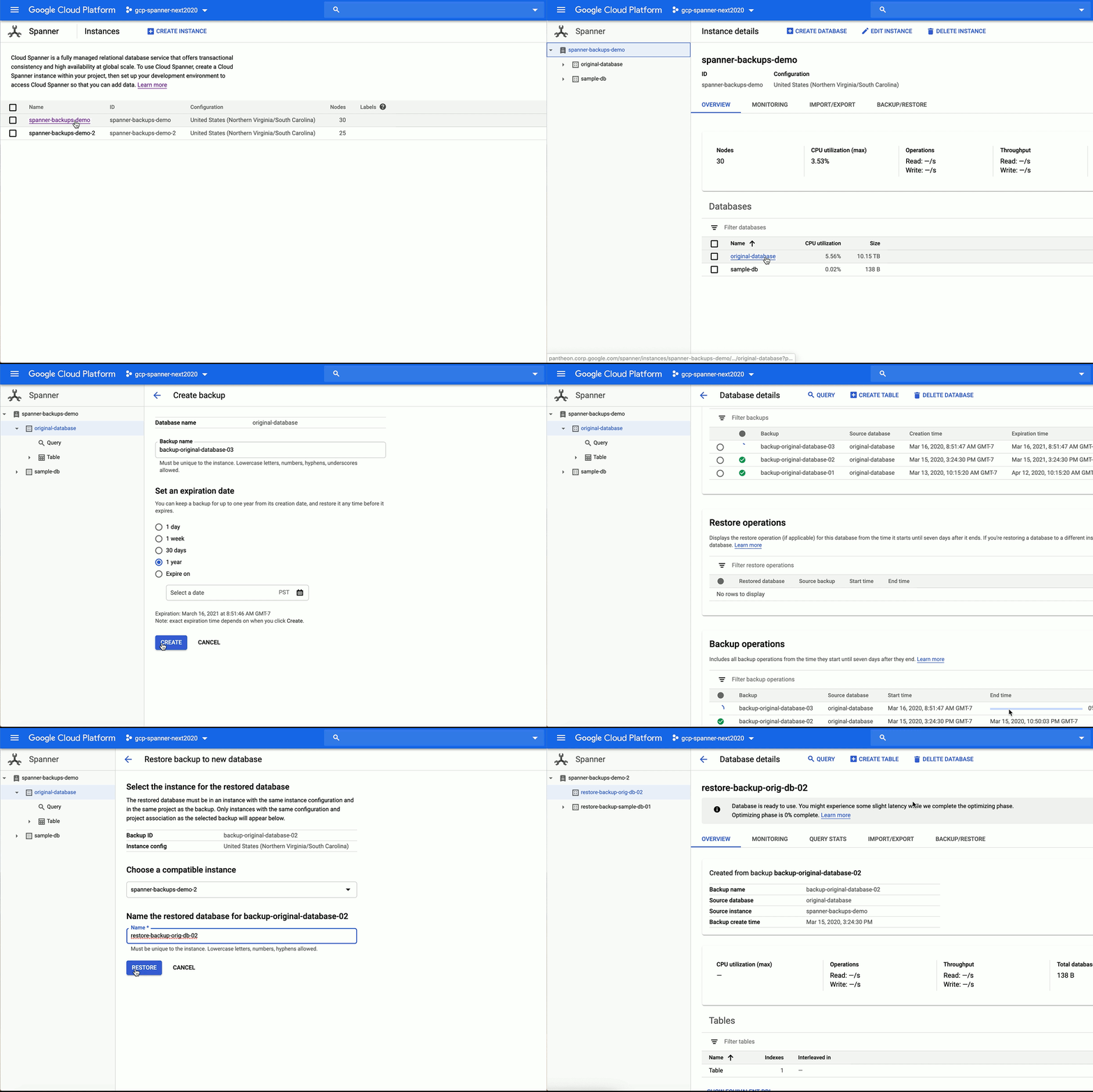
At Google, we built Cloud Spanner to support our need for a scalable, multi-version database with relational semantics. It’s become an important capability for teams that need a globally distributed, strongly consistent database service. Spanner continues to launch new enterprise capabilities, and we’re announcing the general availability of managed backup-restore. This can help you achieve high business continuity and add data protection without much management overhead. This feature provides you protection against user or application errors that result in logical data corruption. You can now take consistent, on-demand backup of databases in your regional or multi-regional configurations, and restore those backups onto the same or different instance with the same instance configuration. These restores are optimized to reduce the time to first byte access to the data in a backup. This means you can get access to terabytes of data being restored from a backup within minutes after a failure. Life sciences and healthcare organization Verily, an Alphabet company, launched the Project Baseline COVID-19 Testing Program to expand access to COVID-19 screening and testing. Verily is using Spanner to ensure the Project Baseline application is able to scale automatically to meet the demand and provide high availability. In addition to scale insurance, Spanner offers strong external consistency with a monthly uptime SLA of up to 99.999%. Google Cloud customers across industries, including financial services, retail, gaming and technology, use Spanner for workloads that must be able to scale quickly while not compromising on relational semantics, atomic transactions, and strong external consistency.This new managed backup-restore capability is available via client libraries, API, gcloud, and Cloud Console. You can use this feature to back up and restore your databases, whatever their size. Here’s what it looks like in practice:We’re also introducing new features to add even more reliability, flexibility, and ease of use to your experience developing applications with Spanner, including:Local emulator (in beta)Cloud Spanner Emulator can be used for correctness testing. Spanner Emulator runs in an offline environment and provides emulation of the Spanner API (both REST and gRPC) and SQL layer. It helps reduce application development costs and improve developer productivity. Query optimizer versioning (generally available)Spanner’s optimizer uses a combination of well-established heuristics and cost-based optimization to produce efficient plans for low-latency queries with optimal CPU utilization. Newly released Query Optimizer versions let Spanner generate even more efficient query execution plans. However, for a small subset of queries, this can result in varying performance profiles. With Query Optimizer versioning, you now have greater control and can run your database, application, and queries with specific optimizer versions that produce the best performance, and switch between the new version or prior versions at your convenience. Foreign keys (generally available)Foreign keys in Spanner allow you to define referential integrity constraints between columns in different tables. Spanner ensures referential integrity by rejecting attempts to add invalid data. The addition of foreign key support means Spanner now has two ways to relate table data: foreign keys and interleaving. Interleaving also provides referential integrity constraints, but it’s useful primarily in cases where physical co-location of data between parent-child tables can improve query performance.  C++ client library (generally available) If you use C++ for your application development, whether for building games, financial services, or any other high-performance need, you can now benefit from the idiomatic C++ client library for Spanner. This library implements best practices such as session pool management and retry logic so application developers don’t have to worry about those tasks.Learn moreTo get started with Spanner, create an instance or try it out with a Spanner Qwiklab. Google Cloud is currently offering free access to training and certification, including access to Qwiklabs, for 30 days. Register before April 30, 2020 to get started for free.
Quelle: Google Cloud Platform

Our Healthcare API and other solutions for supporting healthcare and life sciences organizations during the pandemic

Whether they’re caring for patients or advancing research towards a cure, healthcare and life sciences organizations are on the front lines in the fight against COVID-19. We know that the pandemic is impacting every aspect of the healthcare industry differently, and that the needs of organizations are rapidly evolving. Our goal is to bring our technology expertise to bear in helping your experts—so that healthcare organizations can focus on providing the best care to as many people as possible. To help tackle this challenge, we’re announcing today the general availability of our Cloud Healthcare API, and we’re also sharing a number of other industry-tailored solutions to support our customers and partners during this time.Announcing the general availability of the Google Cloud Healthcare APIHealthcare providers’ access to real-time, unified healthcare data is critical—and every second matters. As the industry is pushed to its limits in light of COVID-19, the need for increased data interoperability is more important than ever. In the last few months, the industry has laid the foundation for progress with final rules issued by CMS and ONC, implementing key provisions of the 21st Century Cures Act. Today, healthcare organizations are in dire need of easy-to-use technology that supports health information exchange.  To address this gap, we’ve made our Cloud Healthcare API generally available today to the industry at-large. The API allows healthcare organizations to ingest and manage key data from a range of inputs and systems—and then better understand that data through the application of analytics and machine learning in real time, at scale. It also enables providers to easily interact with that data using Web-friendly, REST-based endpoints and health plans to rapidly get up and running with a cloud based FHIR server providing the capabilities needed to implement, scale and support interoperability and patient access. Since launching our partnership last year, the Mayo Clinic has been relying on our Healthcare API to enable the storage and interoperability of its clinical data. “We’re in a time where technology needs to work fast, securely, and most importantly in a way that furthers our dedication to our patients,” said John Halamka, M.D., president of Mayo Clinic Platform. “Google Cloud’s Healthcare API accelerates data liquidity among stakeholders, and in-return, will help us better serve our patients.”For healthcare and life science organizations, gathering a unified view of FHIR, HL7v2 and DICOM data is often a herculean effort, due to complicated and siloed systems within their care environments. With the Cloud Healthcare API and our partner ecosystem, our goal is to make it as simple as possible for the industry to make informed, data-driven decisions, so that caregivers can focus on what matters most: saving lives. Additional solutions to support healthcare providers in the fight against COVID-19 In addition to the Cloud Healthcare API, we are highlighting a number of solutions this week to help healthcare organizations, researchers, and patients navigate the COVID-19 pandemic. Working in partnership with Google Search, YouTube, Google Maps Platform, and other groups across Alphabet, these solutions include:Virtual care and telehealth services—Healthcare providers can offer patients video appointments through Google Meet and leverage G Suite to keep patient information in Google Docs, Sheets or other files stored in Google Drive that can be accessed and updated from anywhere using laptops, tablets or smartphones, all while maintaining data security and HIPAA compliance. Collaboration capabilities for remote work—With G Suite and Google Meet, healthcare and life science organizations are able to virtually connect with colleagues to drive conversations and projects forward while dealing with the new norm of remote working mandates. And with Chrome Enterprise, healthcare providers, like Hackensack Meridian Health, are freed from fixed workstations with mobile access to the files and information they need on the go.24/7 conversational self-service support—Our new Rapid Response Virtual Agent, which launched last week, helps organizations like the University of Pennsylvania provide immediate responses to patients and disseminate accurate information quickly during this critical time—taking the burden off overworked health hotlines and call centers.High-demand public health datasets—We’re helping healthcare organizations study COVID-19 with a pre-hosted repository of public healthcare datasets. And local providers and emergency planners can also apply Looker’s pre-built analyses and dashboards to these datasets.Visualization of essential services—Using Google Maps Platform in conjunction with COVID-19 datasets, healthcare organizations can locate critical equipment, provide testing site locations, give patients directions, and route medical deliveries to recipients. Earlier this month, we announced a new initiative with HCA Healthcare and SADA, called the National Response Portal, to help U.S. hospital systems better track important data on ventilator utilization, ICU bed capacity, COVID-19 testing results and more.Google Cloud research credits—We’re also enabling researchers, educational institutions, non-profits, and pharma companies to advance their COVID-19 research by accessing scalable computing power. Eligible organizations can apply for research credits to receive funding for projects related to potential treatments, techniques, and datasets. See Eligibility and FAQs.Although we’re still in the early days of this fight, the stronger we work together as businesses, organizations, and communities, the better we’re able to secure positive outcomes. We’re here to help, and we have teams working closely with healthcare organizations across the country to support the unique needs that are emerging in response to COVID-19. We’re amazed by the global response we’ve seen to date, and are humbled by the opportunity to continue to play a key part in helping healthcare organizations deliver care during the pandemic. To learn more about what we are doing, and how we might be able to help, please visit: cloud.google.com/covid19-healthcare.
Quelle: Google Cloud Platform

Best practices for optimizing your cloud costs

One of the greatest benefits of running in the cloud is being able to scale up and down to meet demand and reduce operational expenditures. And that’s especially true when you’re experiencing unexpected changes in customer demand.Here at Google Cloud, we have an entire team of Solutions Architects dedicated to helping customers manage their cloud operating expenses. Over the years working with our largest customers, we’ve identified some common things people tend to miss when looking for ways to optimize costs, and compiled them here for you. We think that following these best practices will help you rightsize your cloud costs to the needs of your business, so you can get through these challenging, unpredictable times. 1. Get to know billing and cost management toolsDue to the on-demand, variable nature of cloud, costs have a way of creeping up on you if you’re not monitoring them closely. Once you understand your costs, you can start to put controls in place and optimize your spending. To help with this, Google Cloud provides a robust set of no-cost billing and cost management tools that can give you the visibility and insights you need to keep up with your cloud deployment.At a high level, learn to look for things like “which projects cost the most, and why?”  To start, organize and structure your costs in relation to your business needs. Then, drill down into the services using Billing reports to get an at-a-glance view of your costs. You should also learn how to attribute costs back to departments or teams using labels and build your own custom dashboards for more granular cost views. You can also use quotas, budgets, and alerts to closely monitor your current cost trends and forecast them over time, to reduce the risk of overspending. If you aren’t familiar with our billing and cost management tools, we are offering free training for a limited time to help you learn the fundamentals of understanding and optimizing your Google Cloud costs. For a comprehensive step by step guide, see our Guide to Cloud Billing and watch our Beyond Your Bill video series. Be sure to also check out these hands-on training courses: Understanding your Google Cloud Costs and Optimizing your GCP Costs.2. Only pay for the compute you needNow that you have better visibility in your cloud spend, it’s time to set your sights on your most expensive project(s) to identify compute resources that aren’t providing enough business value.Identify idle VMs (and disks): The easiest way to reduce your Google Cloud Platform (GCP) bill is to get rid of resources that are no longer being used. Think about those proof-of-concept projects that have since been deprioritized, or zombie instances that nobody bothered to delete. Google Cloud offers several Recommenders that can help you optimize these resources, including an idle VM recommender that identifies inactive virtual machines (VMs) and persistent disks based on usage metrics. Always tread carefully when deleting a VM, though. Before deleting a resource, ask yourself, “what potential impact will deleting this resource have and how can I recreate it, if necessary?”  Deleting instances gets rid of the underlying disk(s) and all of its data. One best practice is to take a snapshot of the instance before deleting it. Alternatively, you can choose to simply stop the VM, which terminates the instance, but keeps resources like disks or IP addresses until you detach or delete them. For more info, read therecommender documentation. And stay tuned as we add more usage-based recommenders to the portfolio. Schedule VMs to auto start and stop: The benefit of a platform like Compute Engineis that you only pay for the compute resources that you use. Production systems tend to run 24/7; however, VMs in development, test or personal environments tend to only be used during business hours, and turning them off can save you a lot of money! For example, a VM that runs for 10 hours per day, Monday through Friday costs 75% less to run per month compared to leaving it running. To get started, here’s a serverless solution that we developed to help you automate and manage automated VM shutdown at scale.Rightsize VMs: On Google Cloud, you can already realize significant savings by creating custom machine type with the right amount of CPU and RAM to meet your needs. But workload requirements can change over time. Instances that were once optimized may now be servicing fewer users and traffic. To help, our rightsizing recommendations can show you how to effectively downsize your machine type based on changes in vCPU and RAM usage. These rightsizing recommendations for your instance’s machine type (or managed instance group) are generated using system metrics gathered by Cloud Monitoring over the previous eight days.For organizations that use infrastructure as code to manage their environments, check out this guide, which will show you how to deploy VM rightsizing recommendations at scale. Leverage preemptible VMs: Preemptible VMs are highly affordable compute instances that live up to 24 hours and that are up to 80% cheaper than regular instances. Preemptible VMs are a great fit for fault tolerant workloads such as big data, genomics, media transcoding, financial modelling and simulation. You can also use a mix of regular and preemptible instances to finish compute-intensive workloads faster and cost-effectively, by setting up a specialized managed instance group. But why limit preemptible VMs to a Compute Engine environment? Did you know GPUs, GKE clusters and secondary instances in Dataproc can also use preemptible VMs? And now, you can also reduce your Cloud Dataflow streaming (and batch) analytics costs by using Flexible Resource Scheduling to supplement regular instances with preemptible VMs.3. Optimize Cloud Storage costs and performanceWhen you run in your own data center, storage tends to get lost in your overall infrastructure costs, making it harder to do proper cost management. But in the cloud, where storage is billed as a separate line item, paying attention to storage utilization and configuration can result in substantial cost savings. And storage needs, like compute, are always changing. It’s possible that the storage class you picked when you first set up your environment may no longer be appropriate for a given workload. Also, Cloud Storage has come a long way—it offers a lot of new features that weren’t there just a year ago.If you’re looking to save on storage, here are some good places to look. Storage classes: Cloud Storage offers a variety of storage classes—standard, nearline, coldline and archival, all with varying costs and their own best-fit use cases. If you only use the standard class, it might be time to take a look at your workloads and reevaluate how frequently your data is being accessed. In our experience, many companies use standard class storage for archival purposes, and could reduce their spend by taking advantage of nearline or coldline class storage. And in some cases, if you are holding onto objects for cold-storage use cases like legal discovery, the new archival class storage might offer even more savings.Lifecycle policies: Not only can you save money by using different storage classes, but you can make it happen automatically with object lifecycle management. By configuring a lifecycle policy, you can programmatically set an object to adjust its storage class based on a set of conditions—or even delete it entirely if it’s no longer needed. For example, imagine you and your team analyze data within the first month it’s created; beyond that, you only need it for regulatory purposes. In that case, simply set a policy that adjusts your storage to coldline or archive after your object reaches 31 days.Deduplication: Another common source of waste in storage environments is duplicate data. Of course, there are times when it’s necessary. For instance, you may want to duplicate a dataset across multiple geographic regions so that local teams can access it quickly. However, in our experience working with customers, a lot of duplicate data is the result of lax version control, and the resulting duplicates can be cumbersome and expensive to manage. Luckily, there are lots of ways to prevent duplicate data, as well as tools to prevent data from being deleted in error. Here are a few things to consider:If you’re trying to maintain resiliency with a single source of truth, it may make more sense to use a multi-region bucket rather than creating multiple copies in various buckets. With this feature, you will have geo redundancy enabled for objects stored. This will ensure your data is replicated asynchronously across two or more locations. This protects against regional failures in the event of a natural disaster.A lot of duplicate data comes from not properly using the Cloud Storage object versioning feature. Object versioning prevents data from being overwritten or accidentally deleted, but the duplicates it creates can really add up. Do you really need five copies of your data? One might be enough as long as it’s protected. Worried you won’t be able to roll back? You can set up object versioning policies to ensure you have an appropriate number of copies. Still worried about losing something accidentally? Consider using the bucket lock feature, which helps ensure that items aren’t deleted before a specific date or time. This is really useful for demonstrating compliance with several important regulations. In short, if you use object versioning, there are several features you can use to keep your data safe without wasting space unnecessarily. 4. Tune your data warehouseOrganizations of all sizes look to BigQuery for a modern approach to data analytics. However, some configurations are more expensive than others. Let’s do a quick check of your BigQuery environment and set up some guardrails to help you keep costs down. Enforce controls: The last thing you need is a long query to run forever and rack up costs. To limit query costs, use the maximum bytes billed setting. Going above the limit will cause the query to fail, but you also won’t get charged for it, as shown below.Along with enabling cost control on a query level, you can apply similar logic to users and projects as well.Use partitioning and clustering: Partitioning and clustering your tables, whenever possible, can help greatly reduce the cost of processing queries, as well as improve performance. Today, you can partition a table based on ingestion time, date, timestamp or integer range column. To make sure your queries and jobs are taking advantage of partitioned tables, we also recommend you enable the Require partition filter, which forces users to include the partition column in the WHERE clause. Another benefit of partitioning is that BigQuery automatically drops the price of data stored by 50% for each partition or table that hasn’t been edited in 90 days, by moving it into long-term storage. It is more cost-effective and convenient to keep your data in BigQuery rather than going through hassles of migrating it to lower tiered storage. There is no degradation of performance, durability, availability or any other functionality when a table or partition is moved to long-term storage.Check for streaming inserts: You can load data into BigQuery in two ways: as a batch load job, or with real-time streaming, using streaming inserts. When optimizing your BigQuery costs, the first thing to do is check your bill and see if you are being charged for streaming inserts. And if you are, ask yourself, “Do I need data to be immediately available (seconds instead of hours) in BigQuery?” and “Am I using this data for any real-time use case once the data is available in BigQuery?” If the answer to either of these questions is no, then we recommend you to switch to batch loading data, which is free.Use Flex Slots: By default, BigQuery charges you variable on-demand pricing based on bytes processed by your queries. If you are a high-volume customer with stable workloads, you may find it more cost effective to switch from on-demand to flat rate pricing, which gives you an ability to process unlimited bytes for a fixed predictable cost. Given rapidly changing business requirements, we recently introduced Flex Slots, a new way to purchase BigQuery slots for duration as short as 60 seconds, on top of monthly and annual flat-rate commitments. With this combination of on-demand and flat-rate pricing, you can respond quickly and cost-effectively to changing demand for analytics.5. Filter that network packetLogging and monitoring are the cornerstones of network and security operations. But with environments that span clouds and on-premises environments, getting clear and comprehensive visibility into your network usage can be as hard as identifying how much electricity your microwave used last month. In fact, Google Cloud comes with several tools that can give you visibility into your network traffic (and therefore costs). There are also some quick and dirty configuration changes you can make to bring your network costs down, fast. Let’s take a look.Identify your “top talkers”: Ever wonder which services are taking up your bandwidth? Cloud Platform SKUs is a quick way to identify how much you are spending on a given Google Cloud service. It’s also important to know your network layout and how traffic flows between your applications and users. Network Topology, a module of Network Intelligence Center, provides you comprehensive visibility into your global GCP deployment and its interaction with the public internet, including an organization-wide view of the topology, and associated network performance metrics. This allows you to identify inefficient deployments and take necessary actions to optimize your regional and intercontinental network egress cost. Checkout this brief video for an overview of Network Intelligence Center and Network Topology. Network Service Tiers: Google Cloud lets you choose between two network service tiers: premium and standard. For excellent performance around the globe, you can choose premium tier, which continues to be our tier of choice. Standard tier offers a lower performance, but may be a suitable alternative for some cost-sensitive workloads.  Cloud Logging: You may not know it, but you do have control over network traffic visibility by filtering out logs that you no longer need. Check out some common examples of logs that you can safely exclude.The same applies to Data Access audit logs, which can be quite large and incur additional costs. For example you probably don’t need to log them for development projects. For VPC Flow Logs and Cloud Load Balancing, you can also enable sampling, which can dramatically reduce the volume of log traffic being written into the database. You can set this from 1.0 (100% log entries are kept) to 0.0 (0%, no logs are kept). For troubleshooting or custom use cases, you can always choose to collect telemetry for a particular VPC network or subnet or drill down further to monitor a specific VM Instance or virtual interface.Want more?Whether you’re an early-stage startup or a large enterprise with a global footprint, everyone wants to be smart with their money right now. Following the tips in this blog post will get you on your way. For more on optimizing your Google Cloud costs, check out our Cost Management video playlist, as well as deeper dives into other Cloud Storage, BigQuery, Networking, Compute Engine, and Cloud Logging and Monitoring cost optimization strategies.
Quelle: Google Cloud Platform

Keep your teams working safely with BeyondCorp Remote Access

The COVID-19 pandemic is affecting organizations in different ways, whether it’s hospitals or governments directly impacted by the coronavirus or businesses that need to rapidly evolve to support new work-from-home scenarios. Over the last few weeks, we’ve had numerous conversations with customers about how we can help them adapt to new ways of working, while keeping their data protected. As the number of remote workers increases drastically in a short period of time, one thing we’ve heard repeatedly is that organizations need an easier way to provide access to key internal applications. Workers can’t get to customer service systems, call center applications, software bug trackers, project management dashboards, employee portals, and many other web apps that they can normally get to through a browser when they’re on the corporate network in an office.To help customers solve this problem and get their workers the access they need, today, we’re introducing BeyondCorp Remote Access. This cloud solution—based on the zero-trust approach we’ve used internally for almost a decade—lets your employees and extended workforce access internal web apps from virtually any device, anywhere, without a traditional remote-access VPN. Over time, we plan to offer the same capability, control, and additional protections for virtually any application or resource a user needs to access.BeyondCorp Remote Access’s high-level architecture.Let’s take a deeper look at today’s pressing remote access challenge and our solution.The VPN issueThe root problem lies with the remote-access VPNs organizations normally use. Traditional VPN infrastructure can be difficult for IT teams to deploy and manage for so many new users in a short period of time, and they’re struggling under the load. From the user perspective, VPNs can be complex, especially for those who haven’t used one before. These problems are exacerbated when organizations try to roll out VPN access to their extended workforce of contractors, temporary employees, and partners. VPNs can also increase risk since they extend the organization’s network perimeter, and many organizations assume that every user inside the perimeter is trusted.Our approach to remote accessWe believe there’s a better way. Recently, as we’ve asked most of our employees and extended workforce to work from home due to COVID-19, their ability to access apps and get work done has not been significantly affected. We didn’t just roll this new capability out. In 2011, we started our journey to implement a zero-trust access approach we called BeyondCorp. Our mission was to enable Google employees and our extended workforce to work successfully from untrusted networks on a variety of devices without using a client-side VPN.BeyondCorp’s high-level architecture.But BeyondCorp offers much more than a simpler, more modern VPN replacement. It helps ensure that only the right users access the right information in the right context. For example, you can enforce a policy that says: “My contract HR recruiters working from home on their own laptops can access our web-based document management system (and nothing else), but only if they are using the latest version of the OS, and are using phishing-resistant authentication like security keys.” Or: “My timecard application should be safely available to all hourly employees on any device, anywhere.”Defining access policies in BeyondCorp Remote Access.BeyondCorp delivers the familiar user experience that helps make our employees and extended workforce productive inside the office, along with the heightened security and control we require outside.Get started with a proven solutionWhile we’ve been big supporters of this zero-trust access approach for many years, we know it’s not something that most organizations will deploy overnight. However, you can get started today solving the pressing problem of remote access to internal web apps for a specific set of users. With BeyondCorp Remote Access, we can help you do this in days rather than the months that it might take to roll out a traditional VPN solution, whether your applications are hosted in the cloud or deployed in your datacenter. We are partnering with Deloitte’s industry-leading cyber practice to deliver end-to-end architecture, design, and deployment services to support your zero-trust journey. The components of the solution are based on Google’s own decade of experience implementing the BeyondCorp model and have been “battle-tested” in production by thousands of Google Cloud customers, including New York City Cyber Command:”We are responsible for leading the cyber defense of America’s largest city,” said Colin Ahern, Deputy CISO atNew York City Cyber Command. “It is vital that our Agency personnel are able to access critical applications no matter the situation or location. Google’s BeyondCorp has allowed us to build a zero-trust environment where our team can quickly and securely access essential resources from untrusted networks.”We’re committed to helping you meet the immediate need for rapid rollout of remote access today, while enabling you to build a more secure foundation for a modern, zero-trust access model tomorrow. If this is something that might be useful for your organization, get in touch, we’re eager to help.
Quelle: Google Cloud Platform

Introducing Dataflow template to stream data to Splunk

At Google Cloud, we’re focused on solving customer problems and meeting them where they are. Many of you use third-party monitoring solutions from Splunk to keep a tab on both on-prem and cloud environments. These use cases include IT ops, security, application development, and business analytics. In this blog post, we’ll show you how to set up a streaming pipeline to natively push your Google Cloud data to your Splunk Cloud or Splunk Enterprise instance using the recently released Pub/Sub to Splunk Dataflow template. Using this Dataflow template, you can export data from Pub/Sub to Splunk. So, any message that can be delivered to a Pub/Sub topic can now be forwarded to Splunk. That includes logs from Cloud Logging (formerly Stackdriver Logging), messages from IoT devices, or events such as security findings from Cloud Security Command Center. We hear that customers are using this template to meet the variety, velocity and volume of valuable data coming out of Google Cloud. “Google Cloud’s Pub/Sub to Splunk Dataflow template has been helpful for enabling Spotify Security to ingest highly variable log types into Splunk,” says Andy Gu, Security Engineer at Spotify. “Thanks to their efforts, we can leverage both Google’s Pub/Sub model and Splunk’s query capabilities to simplify the management of our detection and response infrastructure and process over eight million daily events.”The step-by-step walkthrough covers the entire setup, from configuring the originating log sinks in Cloud Logging to the final Splunk destination—the Splunk HTTP Event Collector (HEC) endpoint.Streaming vs. polling dataTraditionally, Splunk users have the option to pull logs from Google Cloud using Splunk Add-on for Google Cloud Platform as a data collector. Specifically, this add-on runs a Splunk modular input that periodically pulls logs from a Pub/Sub topic that’s configured as a log sink export. This documented solution works well, but it does include tradeoffs that need to be taken into account:Requires managing one or more data collectors (a.k.a., Splunk-heavy forwarders) with added operational complexity for high availability and scale-out with increased log volumeRequires external resource access to Google Cloud by giving permissions to aforementioned data collectors to establish subscription and pull data from Pub/Sub topic(s)We’ve heard from you that you need a more cloud-native approach that streams logs directly to a Splunk HTTP(S) endpoint, or Splunk HEC, without the need to manage an intermediary fleet of data collectors. This is where the managed Cloud Dataflow service comes into play: A Dataflow job can automatically pull logs from a Pub/Sub topic, parse and convert payloads into the Splunk HEC event format, apply an optional user-defined function (UDF) to transform or redact the logs, then finally forward to Splunk HEC. To facilitate this setup, Google released the Pub/Sub to Splunk Dataflow template with built-in capabilities like retry with exponential backoff (for resiliency to network failures or in case Splunk is down) and batch events and/or parallelize requests (for higher throughput) as detailed below. Set up logging export to SplunkThis is how the end-to-end logging export looks:Click to enlargeBelow are the steps that we’ll walk through:Set up Pub/Sub topics and subscriptionsSet up a log sinkSet IAM policy for Pub/Sub topicSet up Splunk HEC endpointSet up and deploy Pub/Sub to the Splunk Dataflow templateSet up Pub/Sub topics and subscriptionsFirst, set up a Pub/Sub topic that will receive your exported logs, and a Pub/Sub subscription that the Dataflow job can later pull logs from. You can do so via the Cloud Console or via CLI using gcloud. For example, using gcloud looks like this:Note: It is important to create the subscription before setting up the Cloud Logging sink to avoid losing any data added to the topic prior to the subscription getting created.Repeat the same steps for the Pub/Sub deadletter topic that holds any undeliverable message to Splunk HEC, due to misconfigurations such as an incorrect HEC token or any processing errors during execution of the optional UDF function (see more below) by Dataflow:Set up a Cloud Logging sinkCreate a log sink with the previously created Pub/Sub topic as destination. Again, you can do so via the Logs Viewer, or via CLI using gcloud logging. For example, to capture all logs in your current Google Cloud project (replace [MY_PROJECT]), use this code:Note: The Dataflow pipeline that we’ll be deploying will itself generate logs in Cloud Monitoring that will get pushed into Splunk, further generating logs and creating an exponential cycle. That’s why the log filter above explicitly excludes logs from a job named “pubsub2splunk” which is the arbitrary name of the Dataflow job we’ll use later on. Another way to avoid that cycle is to set up the logging export in a separate dedicated “logging” project—generally a best practice.Refer to sample queries for resource or service-specific logs to be used as the log-filter parameter value above. Similarly, refer to aggregated exports for examples of “gcloud logging sink” commands to export logs from all projects or folders in your Google Cloud organization, provided you have permissions. For example, you may choose to export the Cloud Audit Logs from all projects into one Pub/Sub topic to be later forwarded to Splunk.The output of this last command is similar to this:Take note of the service account [LOG_SINK_SERVICE_ACCOUNT] returned. It typically ends with @gcp-sa-logging.iam.gserviceaccount.com.Set IAM policy for Pub/Sub topicFor the sink export to work, you need to grant the returned sink service account a Cloud IAM role so it has permission to publish logs to the Pub/Sub topic:If you created the log sink using the Cloud Console, it will automatically grant the new service account permission to write to its export destinations, provided you own the destination. In this case, it’s Pub/Sub topic my-logs.Set up the Splunk HEC endpointIf you don’t already have an Splunk HEC endpoint, refer to the Splunk docs on how to configure Splunk HEC, whether it’s on your managed Splunk Cloud service or your own Splunk Enterprise instance. Take note of the newly created HEC token, which will be used below.Note: For high availability and to scale with high-volume traffic, refer to Splunk docs on how to scale by distributing load to multiple HEC nodes fronted by an HTTP(S) load balancer. Executing Pub/Sub to Splunk Dataflow templateThe Pub/Sub to Splunk pipeline can be executed from the UI, gcloud, or via a REST API call (more detail here). Below is an example form, populated in the Console after selecting “Cloud Pub/Sub to Splunk” template. Note the job name “pubsub2splunk” matches the name used in the log filter above, which excludes logs from this specific Dataflow job. Clicking on “Optional parameters” expands the form with more parameters to customize the pipeline, such as adding a user-defined function (UDF) to transform events (described in the next section), or configure the number of parallel requests or number of batched events per request. Refer to best practices below for more details on parameters related to scaling and sizing. Once parameters are set, click on “Run job” to deploy the continuous streaming pipeline.Add a UDF function to transform events (optional)As mentioned above, you can optionally specify a JavaScript UDF function to transform events before sending to Splunk. This is particularly helpful to enrich event data with additional fields, normalize or anonymize field values, or dynamically set event metadata like index, source, or sourcetype on an event basis.Here’s a JavaScript UDF function example that sets an additional new field inputSubscription to track the originating Pub/Sub subscription (in our case pubsub2splunk) and sets the event’s source to the value of logName from incoming log entry, and event sourcetype to payload or resource type programmatically, depending on incoming log entry:In order to use a UDF, you need to upload it to a Cloud Storage bucket and specify it in the template parameters before you click “Run job” in the previous step. Copy the above sample code into a new file called my-udf.js, then upload to a Cloud Storage bucket (replace [MY_BUCKET]) using this code:Go back to the template form in the Dataflow console, click and expand “Optional parameters,” and specify the two UDF parameters as follows:Once you click “Run job,” the pipeline starts streaming events to Splunk within minutes. You can visually check proper operation by clicking on the Dataflow job and selecting the “Job Graph” tab, which should look as below. In our test project, the Dataflow step WriteToSplunk is sending a little less than 1,000 elements/s to Splunk HEC, after applying the UDF function (via ApplyUDFTransformation step) and converting elements to Splunk HEC event format (via ConvertToSplunkEvent step). To make sure you are aware of any issues with the pipeline, we recommend setting up a Cloud Monitoring alert that will fire if the age of the oldest “unacknowledged”—or unprocessed—message in the input Pub/Sub subscription exceeds 10 minutes. An easy way to access graphs for this metric is in the Pub/Sub subscription details page in Pub/Sub’s Cloud Console UI.Click to enlargeView logs in SplunkYou can now search all Google Cloud logs and events from your Splunk Enterprise or Splunk Cloud search interface. Make sure to use the index you set when configuring your Splunk HEC token (we used index “test”). Here’s an example basic search to visualize the number of events per type of monitored resource:Tips and tricks for using the Splunk Dataflow templatePopulating Splunk event metadataSplunk HEC allows event data to be enhanced with a number of metadata fields that can be used for filtering and visualizing the data in Splunk. As mentioned above, the Pub/Sub to Splunk Dataflow pipeline allows you to set these metadata fields using an optional UDF function written in JavaScript. In order to enhance the event data with the additional metadata, the user-provided UDF can nest a JSON object tagged with the “_metadata” key in the event payload. This _metadata object can contain the supported fields (see table below) for Splunk metadata that will be automatically extracted and populated by the pipeline:The pipeline will also remove the “_metadata” field from the event data sent to Splunk. This is done to avoid duplication of data between the event payload and the event metadata.The following metadata fields are supported for extraction at this time:(see Splunk HEC metadata for more details)Note: For the “time” row, the pipeline will also attempt to extract time metadata from the event data in case there is a field named “timestamp” in the data payload. This is done to simplify extracting the time value from Cloud Logging’s LogEntry payload format. Note that any time value present in the “_metadata” object will always override the value extracted from the “timestamp” field.Batching writes to Splunk HECThe Pub/Sub to Splunk pipeline lets you combine multiple events into a single request. This allows for increased throughput and reduces the number of write requests made to the Splunk HEC endpoint. The default setting for batch is 1 (no batching). This can be changed by specifying a batchCount value greater than 1.  Note about balancing throughput and latency: The cost of batching is a slight latency for individual messages, which are queued in memory before being forwarded to Splunk in batches. The pipeline attempts to enforce an upper limit (two seconds) to the amount of time an event remains in the pipeline before it gets pushed to Splunk. This is done to minimize that latency and avoid having events waiting in the pipeline for too long, in case the user provides a very high batchCount. For use cases that do not tolerate any added latency to individual events, batching should be turned off (default setting).Increasing write parallelismThe Pub/Sub to Splunk pipeline allows you to increase the number of parallel requests that are made to Splunk HEC endpoint. The default setting is 1 (no parallelism). This can be changed by specifying a parallelism value greater than 1. Note that increased parallelism will lead to an increase in the number of requests sent to the Splunk HEC endpoint and might require scaling HEC downstream.SSL certificate validationIf the Splunk HEC endpoint is SSL-enabled (recommended!) but is using self-signed certificates,  you may want to disable the certificate validation. The default setting is to validate the SSL certificate. This can be changed by setting disableCertificateValidation to true.Autoscaling and parallelismIn addition to setting parallelism, the Pub/Sub to Splunk pipeline is autoscaling enabled with a maximum of 20 workers (default). The user can override this via the UI or via the –max-workers flag when executing the pipeline via gcloud CLI. It is recommended that the number of parallel requests (parallelism) should not exceed the number of max workers.What’s next?Refer to our user docs for the latest reference material, and to get started with the Pub/Sub to Splunk Dataflow template. We’d like to hear your feedback and feature requests. You can create an issue directly in the corresponding GitHub repo, or create a support case directly from your Cloud Console, or ask questions in our Stack Overflow forum.To get started with Splunk Enterprise on Google Cloud, check out the open-sourced Terraform scripts to deploy a cluster on Google Cloud within minutes. By default, the newly deployed Splunk Enterprise indexer cluster is distributed across multiple zones; it is pre-configured and ready to ingest data via both Splunk TCP and HEC inputs. The Terraform output returns an HEC token that you can readily use when creating your Dataflow job. Check out deploying Splunk Enterprise on GCP for general deployment guidelines.
Quelle: Google Cloud Platform