Open WebUI + Docker Model Runner: Self-Hosted Models, Zero Configuration

We’re excited to share a seamless new integration between Docker Model Runner (DMR) and Open WebUI, bringing together two open source projects to make working with self-hosted models easier than ever.

With this update, Open WebUI automatically detects and connects to Docker Model Runner running at localhost:12434. If Docker Model Runner is enabled, Open WebUI uses it out of the box, no additional configuration required.

The result: a fully Docker-managed, self-hosted model experience running in minutes.

Note for Docker Desktop users:If you are running Docker Model Runner via Docker Desktop, make sure TCP access is enabled. Open WebUI connects to Docker Model Runner over HTTP, which requires the TCP port to be exposed:

docker desktop enable model-runner –tcp

Better Together: Docker Model Runner and Open WebUI

Docker Model Runner and Open WebUI come from the same open source mindset. They’re built for developers who want control over where their models run and how their systems are put together, whether that’s on a laptop for quick experimentation or on a dedicated GPU host with more horsepower behind it.

Docker Model Runner focuses on the runtime layer: a Docker-native way to run and manage self-hosted models using the tooling developers already rely on. Open WebUI focuses on the experience: a clean, extensible interface that makes those models accessible and useful.

Now, the two connect automatically.

No manual endpoint configuration. No extra flags.

That’s the kind of integration open source does best, separate projects evolving independently, but designed well enough to fit together naturally.

Zero-Config Setup

If Docker Model Runner is enabled, getting started with Open WebUI is as simple as:

docker run -p 3000:8080 openwebui

That’s it.

Open WebUI will automatically connect to Docker Model Runner and begin using your self-hosted models, no environment variables, no manual endpoint configuration, no extra flags.

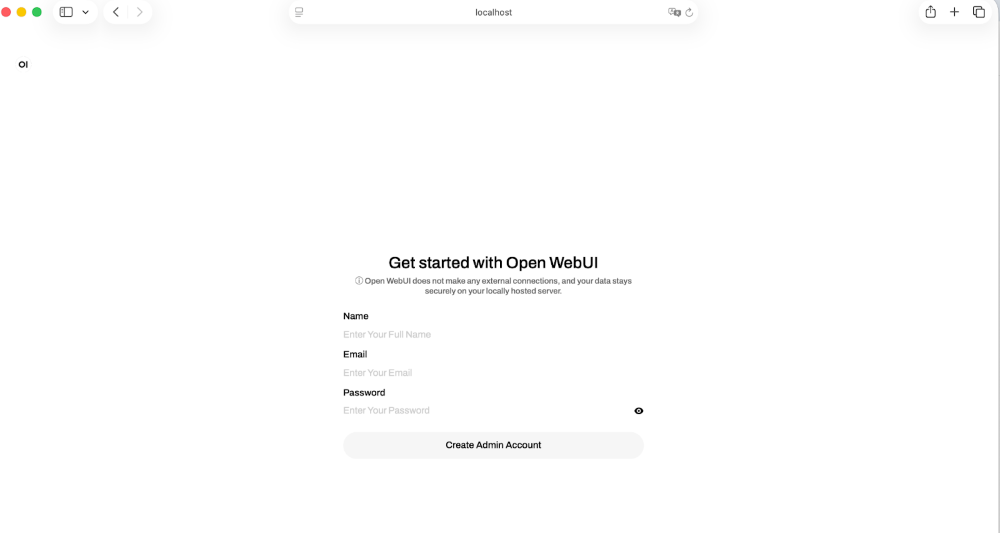
Visit: http://localhost:3000 and create your account:

And you’re ready to interact with your models through a modern web interface:

Open by design

One of the nice things about this integration is that it didn’t require special coordination or proprietary hooks. Docker Model Runner and Open WebUI are both open source projects with clear boundaries and well-defined interfaces. They were built independently, and they still fit together cleanly.

Docker Model Runner focuses on running and managing models in a way that feels natural to anyone already using Docker.

Open WebUI focuses on making those models usable. It provides the interface layer, conversation management, and extensibility you’d expect from a modern web UI.

Because both projects are open, there’s no hidden contract between them. You can see how the connection works. You can modify it if you need to. You can deploy the pieces separately or together. The integration isn’t a black box, it’s just software speaking a clear interface.

Works with Your Setup

One of the practical benefits of this approach is flexibility.

Docker Model Runner doesn’t dictate where your models run. They might live on your laptop during development, on a more powerful remote machine, or inside a controlled internal environment. As long as Docker Model Runner is reachable, Open WebUI can connect to it.

That separation between runtime and interface is intentional. The UI doesn’t need to know how the model is provisioned. The runtime doesn’t need to know how the UI is presented. Each layer does its job.

With this integration, that boundary becomes almost invisible. Start the container, open your browser, and everything lines up.

You decide where the models run. Open WebUI simply meets them there.

Summary

Open WebUI and Docker Model Runner make self-hosted AI simple, flexible and fully under your control. Docker powers the runtime. Open WebUI delivers a modern interface on top. 

With automatic detection and zero configuration, you can go from enabling Docker Model Runner to interact with your models in minutes. 

Both projects are open source and built with clear boundaries, so you can run models wherever you choose and deploy the pieces together or separately. We can’t wait to see what you build next! 

How You Can Get Involved

The strength of Docker Model Runner lies in its community and there’s always room to grow. We need your help to make this project the best it can be. To get involved, you can:

Star the repository: Show your support and help us gain visibility by starring the Docker Model Runner repo.

Contribute your ideas: Have an idea for a new feature or a bug fix? Create an issue to discuss it. Or fork the repository, make your changes, and submit a pull request. We’re excited to see what ideas you have!

Spread the word: Tell your friends, colleagues, and anyone else who might be interested in running AI models with Docker.

We’re incredibly excited about this new chapter for Docker Model Runner, and we can’t wait to see what we can build together. Let’s get to work!

Learn more

Check out the Docker Model Runner General Availability announcement

Visit our Model Runner GitHub repo! Docker Model Runner is open-source, and we welcome collaboration and contributions from the community!

Get started with Docker Model Runner with a simple hello GenAI application

Quelle: https://blog.docker.com/feed/

Announcing new metal sizes for Amazon EC2 M8gn and M8gb instances

Today, AWS announces the general availability of metal-24xl and metal-48xl sizes for Amazon Elastic Compute Cloud (Amazon EC2) M8gn and M8gb instances. These instances are powered by AWS Graviton4 processors to deliver up to 30% better compute performance than AWS Graviton3 processors. M8gn instances feature the latest 6th generation AWS Nitro Cards, and offer up to 600 Gbps network bandwidth, the highest network bandwidth among network optimized EC2 instances. M8gb offers up to 300 Gbps of EBS bandwidth to provide higher EBS performance compared to same-sized equivalent Graviton4-based instances.
M8gn and M8gb instances offer instance sizes up to 48xlarge and metal-48xl, with up to 768 GiB of memory. M8gn instances offer up to 600 Gbps of networking bandwidth, up to 60 Gbps of bandwidth to Amazon Elastic Block Store (EBS), and are ideal for network-intensive workloads such as high-performance file systems, distributed web scale in-memory caches, caching fleets, real-time big data analytics, Telco applications such as 5G User Plane Function (UPF). M8gb instances offer up to 300 Gbps of EBS bandwidth, up to 400 Gbps of networking bandwidth, and are ideal for workloads requiring high block storage performance such as high-performance databases and NoSQL databases.
M8gn and M8gb instances support Elastic Fabric Adapter (EFA) networking on 16xlarge, 24xlarge, 48xlarge, metal-24xl, and metal-48xl sizes. EFA networking enables lower latency and improved cluster performance for workloads deployed on tightly coupled clusters.
The new metal-24xl and metal-48xl sizes are available in the AWS US East (N. Virginia) region. 
To begin your Graviton journey, visit the Level up your compute with AWS Graviton page. To get started, see AWS Management Console, AWS Command Line Interface (AWS CLI), and AWS SDKs.
Quelle: aws.amazon.com

Amazon RDS Snapshot Export to S3 now available in AWS GovCloud (US) Regions

Amazon RDS Snapshot Export to S3 is now available in AWS GovCloud (US) regions, enabling you to export snapshot data in Apache Parquet format for analytics, data retention, and machine learning use cases. Snapshot export to S3 supports all DB snapshot types (manual, automated system, and AWS Backup snapshots) and runs directly on the snapshot without impacting database performance. The exported data in Apache Parquet format can be analyzed using other AWS services such as Amazon Athena, Amazon SageMaker, or Amazon Redshift Spectrum, or with big data processing frameworks such as Apache Spark. You can create a snapshot export with just a few clicks in the Amazon RDS Management Console or by using the AWS SDK or CLI. Snapshot Export to S3 is supported for Amazon Aurora PostgreSQL – Compatible Edition and Amazon Aurora MySQL, Amazon RDS for PostgreSQL, Amazon RDS for MySQL, and Amazon RDS for MariaDB snapshots. For more information, including instructions on getting started, read Aurora documentation or Amazon RDS documentation.
Quelle: aws.amazon.com

AWS Observability now available as a Kiro power

Today, AWS announces AWS Observability as a Kiro power, enabling developers and operators to investigate infrastructure and application health issues faster with AI agent-assisted workflows in Kiro. Kiro Powers is a repository of curated and pre-packaged Model Context Protocol (MCP) servers, steering files, and hooks validated by Kiro partners to accelerate specialized software development and deployment use cases. The AWS Observability power packages four specialized MCP servers with targeted observability guidance: the CloudWatch MCP server for observability data; the Application Signals MCP server for application performance monitoring; the CloudTrail MCP server for security analysis and compliance; and the AWS Documentation MCP server for contextual reference access. This unified platform gives Kiro agents instant context for comprehensive workflows including alarm response, anomaly detection, distributed tracing, SLO compliance monitoring, and security investigation. Additionally, the power includes automated gap analysis that helps you identify and fix missing instrumentation. With the AWS Observability power, developers can now accelerate troubleshooting their distributed applications and infrastructure in minutes, directly in their IDE. The power addresses two critical needs: reducing mean time to resolution (MTTR) for active incidents and proactively improving your observability stack. For faster incident response, when investigating an active alarm, the power dynamically loads relevant guidance and operational signals so AI agents receive only the context needed for the specific troubleshooting task at hand. For stack improvement, the automated gap analysis examines your code to identify missing instrumentation patterns—such as unlogged errors, missing correlation IDs, or absent distributed tracing—and provides actionable recommendations. The power includes eight comprehensive steering guides covering incident response, alerting, performance monitoring, security auditing, and gap analysis. The AWS Observability power is available for one-click installation within Kiro IDE and Kiro powers webpage in all AWS Regions, with each underlying MCP server functional based on regional support of the corresponding AWS service. To learn more about AWS observability MCP servers, visit our documentation. 
Quelle: aws.amazon.com

AWS Compute Optimizer now applies AWS-generated tags to EBS snapshots created during automation

AWS Compute Optimizer makes it easier to identify snapshots that are created when snapshotting and deleting unattached Amazon Elastic Block Store (EBS) volumes by automatically applying an AWS-generated tag during creation. This enhancement improves visibility and tracking of EBS snapshots created through Compute Optimizer Automation.
When Compute Optimizer creates a snapshot before deleting an unattached EBS volume—whether initiated through manual actions or automation rules—the snapshot now receives the tag aws:compute-optimizer:automation-event-id with a tag value that links the snapshot to the unique identifier of the automation event that created it. This allows you to easily identify, track, and manage snapshots created through the automated optimization process, helping you maintain better governance over your backup resources and understand the source of snapshots in your environment.
This is available in all AWS Regions where AWS Compute Optimizer Automation is available. To get started with automated optimization, go to the AWS Compute Optimizer console or visit the user guide documentation.
Quelle: aws.amazon.com






