The new era of Azure Ultra Disk: Experience the next generation of mission-critical block storage

Since its launch at Microsoft Ignite 2019, Azure Ultra Disk has powered some of the world’s most demanding applications and workloads: From real-time financial trading and electronic health records to high-performance gaming and AI/ML services. Ultra Disk was a breakthrough in cloud block storage innovation from the start, introducing independent configuration of capacity, IOPS, and throughput to deliver precise performance at scale. And we’ve continued to push boundaries ever since. Committing to a purposeful evolution, not just enhancing performance and resilience for mission-critical workloads but working to ensure every advancement addresses the real-world needs of our customers.

How to deploy and use an Ultra Disk?

These advancements are not just theoretical; they’re driving real impact for customers operating on a global scale. One example being BlackRock, a global asset manager and technology provider, who leverages Azure Ultra Disk in conjunction with M-series Virtual Machines to power their mission-critical investment platform, Aladdin. For BlackRock, delivering ultra-low latency and exceptional reliability is paramount to swiftly adapting to dynamic market conditions and managing portfolios with agility and confidence.

Now that we’re on Azure, we have a springboard to unlock adoption of cloud-managed services to be able to engineer and operate at greater scale and adopt innovative technologies.
Randall Fradin, Head of Cloud Managed Services and Platform Engineering, BlackRock

Read the full customer story here.

Stories like BlackRock’s illustrate the power of Ultra Disk in action and they inspire us to keep evolving. That’s why today, we are excited to unveil a transformative update to Ultra Disk, designed to deliver superior speed, resilience, and cost efficiency for your most sensitive workloads. This major refresh introduces higher performance, greater flexibility to optimize cost, and instant access snapshots to support business continuity. With these advancements, Ultra Disk empowers organizations to accelerate operations, restore data rapidly, and scale with confidence–no matter the level of demand or criticality.

What’s new with Ultra Disk?

Ultra Disk delivers reliable performance with improved average, P99.9, and outlier latency

For mission-critical workloads, even brief disruptions can have significant impacts. That is why we have prioritized reducing tail latency at P99.9 and above. Our platform enhancements have resulted in 80% reduction in both P99.9 and outlier latency, along with a 30% improvement in average latency. These advancements make Ultra Disk the best choice for highly I/O-intensive and latency-sensitive workloads, such as transaction logs for mission-critical applications.

If you are using local SSD or Write Accelerator to achieve lower latencies, we recommend exploring Ultra Disk as an alternative option for enhanced data persistency and greater flexibility for capacity and performance.

Optimize application cost without sacrificing performance

Our goal is to support workload in maximizing both efficiency and performance. Ultra Disk’s latest provisioning model now offers greater granular control over capacity and performance, enabling better cost management. Workloads on small disks can save up to 50% while large disks can save up to 25%. These updated features are now available for both new and existing Ultra Disks:

 Greater control Previous GiB capacity billing Billed at 1 GiB granularity Billed at tiers Maximum IOPS per GiB 1,000 IOPS per GiB 300 IOPS per GiB Minimum IOPS per disk 100 IOPS  Higher of 100 or 1 IOPS per GiB Minimum MB/s per disk 1 MB/s Higher of 1 MB/s or 4 KB/s per IOPS 

A financial application operates its core database on Ultra Disk to serve market trend insight. This database stores large amount of data but only require moderate IOPS and throughput at low latency when needed (no more than 12,500 GiB, 5000 IOPS and 200 MB/s). With more flexible control over capacity and performance, this deployment now saves 22% from its Ultra Disk spending, illustrated below using East US prices.

Cost per month Previous Improved flexibility Savings 12,500 GiB $1,594 for 13,312 GiB (rounded to next tier) $1,497 for 12,500 GiB -6% 5,000 IOPS $661 for 13,312 IOPS $248 for 5,000 IOPS -62% 200 MB/s $70 for 200 MB/s No change No change Ultra Disk Total$2,324 $1,815-22% 

Unlock high performance workloads on Azure Boost and Ultra Disk

Ultra Disk and Azure Boost now enable a new class of high-performance workloads: 

Memory Optimized Mbv3 VM – Standard_M416bs_v3 – GA, up to 550,000 IOPS and 10GB/s

Azure Boost Ebdsv5 VM – GA up to 400,000 IOPS and 10GB/s

Stay tuned for newest Azure Boost VM announcement at 2025 Ignite for unprecedented remote Block Storage performance

These innovations empower customers to confidently operate high-demand applications such as large-scale SQL databases, electronic health record systems, and mission-critical enterprise platforms. Ultra Disk is equipped to address rigorous performance requirements leveraging the latest advancements in Virtual Machine technology.

Instant Access Snapshot enables you to restore and run your business application immediately

We are thrilled to announce an exciting new experience: Instant Access Snapshot for Ultra and Premium SSD v2 disks, now available in public preview. With Instant Access, you can immediately use snapshots after creation to generate new disks, eliminating the wait time (often spanning numerous hours) traditionally required for background data copy before the snapshot is in a ready and usable state. Disks generated from these Instant Access Snapshots now hydrate up to 10x faster and experience minimal read latency impact during the hydration process. This advanced capability marks a significant leap forward in the public cloud market, enabling rapid recovery and replication scale-out for your organization in real time. No more lengthy restoration processes or costly downtime! Instant Access Snapshot empowers you to get back to business within moments, not hours.

Building on the foundation of security, flexibility, and efficiency for Ultra Disk

Let’s walk through a few other features recently released that will greatly enhance your high-performance workload experience on Ultra Disk.

Operate with cost-efficiency by expanding your Ultra Disk capacity live with the support of live resize and dynamically adjusting Ultra Disk performance to avoid over provisioning. 

Run your business application securely with encryption at host on Ultra Disk. Encryption at host will encrypt your data starting from the VM host and then store the encrypted data in Ultra Disk.

Azure Site Recovery – Recover your VM applications with Ultra Disk seamlessly in another Azure region when your primary region is down.

Azure VM Backup – Backup your VM applications equipped with Ultra Disk easily and securely.

Azure Disk Backup – Backup a specific Ultra Disk that is critical to your business operation to lower your backup cost and for more customized backup operations.

Third party backup and disaster recovery support: We understand that you may have preferred third party service for your backup and disaster recovery procedures. Check out the third-party services here that now support Ultra Disk.

Migrate your clustered application to Azure as-is that uses SCSI Persistent Reservations to Ultra Disk with shared disk capability. Shared disk capability unlocks easy migration and further cost optimization for your mission-critical clustered applications.

Getting started: Unlock new possibilities for your business

Join us on this journey to redefine what’s possible for your mission critical business applications. With Azure Ultra Disk, you can experience the future of high-performance storage today, empowering your organization to move faster, recover instantly, and scale with confidence.

New to Ultra Disk? Start with our comprehensive documentation and how to deploy an Ultra Disk.

Have questions or feedback? Reach out to our team at AzureDisks@microsoft.com.

Start using Azure Ultra Disk today

The post The new era of Azure Ultra Disk: Experience the next generation of mission-critical block storage appeared first on Microsoft Azure Blog.
Quelle: Azure
Securing our future: November 2025 progress report on Microsoft’s Secure Future Initiative

When we launched the Secure Future Initiative (SFI), our mission was clear: accelerate innovation, strengthen resilience, and lead the industry toward a safer digital future. Today, we’re sharing our latest progress report that reflects steady progress in every area and engineering pillar, underscoring our commitment to security above all else. We also highlight new innovations delivered to better protect customers, and share how we use some of those same capabilities to protect Microsoft. Through SFI, we have improved the security of our platforms and services and our ability to detect and respond to cyberthreats.

Read the latest Secure Future Initiative reportFostering a security-first mindsetEngineering sentiment around security has improved by nine points since early 2024. To increase security awareness, 95% of employees have completed the latest training on guarding against AI-powered cyberattacks, which remains one of our highest-rated courses. Finally, we developed resources for employees and made them available to customers for the first time to improve security awareness.

Governance that scales globallyThe Cybersecurity Governance Council now includes three additional Deputy Chief Information Security Officers (CISOs) functions covering European regulations, internal operations, and engagement with our ecosystem of partners and suppliers. We launched the Microsoft European Security Program to deepen partnerships and better inform European governments about the cyberthreat landscape and collaborating with industry partners to better align cybersecurity regulations, advance responsible state behavior in cyberspace, and build cybersecurity capacity through the Advancing Regional Cybersecurity Initiative in the global south. You can read more on our cybersecurity policy and diplomacy work.

Secure by Design, Secure by Default, Secure OperationsMicrosoft Azure, Microsoft 365, Windows, Microsoft Surface, and Microsoft Security engineering teams continue to deliver innovations to better protect customers. Azure enforced secure defaults, expanded hardware-based trust, and updated security benchmarks to improve cloud security. Microsoft 365 introduced a dedicated AI Administrator role, and enhanced agent lifecycle governance and data security transparency to give organizations more control and visibility. Windows and Surface advanced Zero Trust principles with expanded passkeys, automatic recovery capabilities, and memory-safe improvements to firmware and drivers. Microsoft Security introduced data security posture management for AI and evolved Microsoft Sentinel into an AI-first platform with data lake, graph, and Model Context Protocol capabilities.

Engineering progress that sets the benchmarkWe’re making steady progress across all engineering pillars. Key achievements include enforcing phishing-resistant multifactor authentication (MFA) for 99.6% of Microsoft employees and devices, migrating higher-risk users to locked-down Azure Virtual Desktop environments, completing network device inventory and lifecycle management, and achieving 99.5% detection and remediation of live secrets in code. We’ve also deployed more than 50 new detections across Microsoft infrastructure with applicable detections to be added to Microsoft Defender and awarded $17 million to promote responsible vulnerability disclosure.

Actionable guidanceTo help customers improve their security, we highlight 10 SFI patterns and practices customers can follow to reduce their risk. We also share additional best practices and guidance throughout the report. Customers can do a deeper assessment of their security posture by using our Zero Trust Workshops which incorporate SFI-based assessments and actionable learnings to help customers on their own security journeys.

Security as the foundation of trustCybersecurity is no longer a feature—it’s the foundation of trust in a connected world.

With the equivalent of 35,000 engineers working full time on security, SFI remains the largest cybersecurity effort in digital history. Looking ahead, we will continue to prioritize the highest risks, accelerate delivery of security innovations, and harness AI to increase engineering efficiency and enable rapid anomaly detection and automated remediation.

The cyberthreat landscape will continue to evolve. Technology will continue to advance. And Microsoft will continue to prioritize security above all else. Our progress reflects a simple truth: trust is earned through action and accountability.

We are grateful for the partnership of our customers, industry peers, and security researchers. Together, we will innovate for a safer future.

Read our November 2025 progress report​​Learn more with Microsoft SecurityTo learn more about Microsoft Security solutions, visit our website. Bookmark the Security blog to keep up with our expert coverage on security matters. Also, follow us on LinkedIn (Microsoft Security) and X (@MSFTSecurity) for the latest news and updates on cybersecurity.
The post Securing our future: November 2025 progress report on Microsoft’s Secure Future Initiative appeared first on Microsoft Azure Blog.
Quelle: Azure

6 Must-Have MCP Servers (and How to Use Them)

The era of AI agents has arrived, and with it, a new standard for how they connect to tools: the Model Context Protocol (MCP). MCP unlocks powerful, flexible workflows by letting agents tap into external tools and systems. But with thousands of MCP servers (including remote ones) now available, it’s easy to ask: Where do I even start?

I’m Oleg Šelajev, and I lead Developer Relations for AI products at Docker. I’ve been hands-on with MCP servers since the very beginning. In this post, we’ll cover what I consider to be the best MCP servers for boosting developer productivity, along with a simple, secure way to discover and run them using the Docker MCP Catalog and Toolkit.

Let’s get started.

Top MCP servers for developer productivity

Before we dive into specific servers, let’s first cover what developers should consider before incorporating these tools into their workflows. What makes a MCP server worth using? 

From our perspective, the best MCP servers (regardless of your use case) should:

Come from verified, trusted sources to reduce MCP security risk. 

Easily connect to existing tools and fit into your workflow.

Have real productivity payoff (whether it’s note-taking, fetching web content, or keeping your AI agents honest with additional context from trusted libraries). 

With that in mind, here are six MCP servers we’d consider must-haves for developers looking to boost their everyday productivity.

1. Context7 – Enhancing AI coding accuracy

What it is: Context7 is a powerful MCP tool specifically designed to make AI agents better at coding.

How it’s used with Docker: Add the Context7 MCP server by clicking on the tile in Docker Toolkit or use the CLI command docker mcp server enable context7.

Why we use it: It solves the “AI hallucination” problem. When an agent is working on code, Context7 injects up-to-date, version-specific documentation and code examples directly into the prompt. This means the agent gets accurate information from the actual libraries we’re using, not from stale training data.

2. Obsidian – Smarter note-taking and project management

What it is: Obsidian is a powerful, local-first knowledge base and note-taking app.

How it’s used with Docker: While Obsidian itself is a desktop app, install the community plugin that enables the local REST API. And then configure the MCP server to talk to that localhost endpoint. 

Why we use it: It gives us all the power of Obsidian to our AI assistants. Note-taking and accessing your prior memories has never been easier. 

Here’s a video on how you can use it.

3. DuckDuckGo – Bringing search capabilities to coding agents 

What it is: This is an MCP server for the DuckDuckGo search engine.

How it’s used with Docker: Simply enable the DuckDuckGo server in the MCP Toolkit or CLI.

Why we use it: It provides a secure and straightforward way for our AI agents to perform web searches and fetch content from URLs. If you’re using coding assistants like Claude Code or Gemini CLI, they know how to do it with built-in functionalities, but if your entry point is something more custom, like an application with an AI component, giving them access to a reliable search engine is fantastic. 

4. Docker Hub – Exploring the world’s largest artifact repository

What it is: An MCP server from Docker that allows your AI to fetch info from the largest artifact repository in the world! 

How it’s used with Docker: You need to provide the personal access token and the username that you use to connect to Docker Hub. But enabling this server in the MCP toolkit is as easy as just clicking some buttons.

Why we use it: From working with Docker Hardened Images to checking the repositories and which versions of Docker images you can use, accessing Docker Hub gives AI the power to tap into the largest artifact repository with ease. 

Here’s a video of updating a Docker Hub repository info automatically from the GitHub repo

The powerful duo: GitHub + Notion MCP servers – turning customer feedback into actionable dev tasks

Some tools are just better together. When it comes to empowering AI coding agents, GitHub and Notion make a particularly powerful pair. These two MCP servers unlock seamless access to your codebase and knowledge base, giving agents the ability to reason across both technical and product contexts.

Whether it’s triaging issues, scanning PRs, or turning customer feedback into dev tasks, this combo lets developer agents move fluidly between source code and team documentation, all with just a few simple setup steps in Docker’s MCP Toolkit.

Let’s break down how these two servers work, why we love them, and how you can start using them today.

5. GitHub-official

What it is: This refers to the official GitHub server, which allows AI agents to interact with GitHub repositories.

How it’s used with Docker: Enabled via the MCP Toolkit, this server connects your agent to GitHub for tasks like reading issues, checking PRs, or even writing code. Either use a personal access token or log in via OAuth. 

Why we use it: GitHub is an essential tool in almost any developer’s toolbelt. From surfing the issues in the repositories you work on to checking if the errors you see are documented in the repo. GitHub MCP server gives AI coding agents incredible power!

6. Notion

What it is: Notion actually has two MCP servers in the catalog. A remote MCP server hosted by Notion itself, and a containerized version. In any case, if you’re using Notion, enabling AI to access your knowledge base has never been easier. 

How it’s used with Docker: Enable the MCP server, provide an integration token, or log in via OAuth if you choose to use the remote server.

Why we use it: It provides an easy way to, for example, plow through the customer feedback and create issues for developers. In any case, plugging your knowledge base into AI leads to almost unlimited power. 

Here’s a video where you can see how Notion and GitHub MCP servers work perfectly together. 

Getting started with MCP servers made easy 

While MCP unlocks powerful new workflows, it also introduces new complexities and security risks. How do developers manage all these new MCP servers? How do they ensure they’re configured correctly and, most importantly, securely?

This focus on a trusted, secure foundation is precisely why partners like E2B chose the Docker MCP Catalog to be the provider for their secure AI agent sandboxes. The MCP Catalog now hosts over 270+ MCP servers, including popular remote servers. 

The security risks aren’t theoretical; our own “MCP Horror Stories” blog series documents the attacks that are already happening. The series, the latest episode of which, the “Local Host Breach” (CVE-2025-49596), details how vulnerabilities in this new ecosystem can lead to full system compromise. The MCP Toolkit directly combats these threats with features like container isolation, signed image verification from the catalog, and an intelligent gateway that can intercept and block malicious requests before they ever reach your tools.

This is where the Docker MCP Toolkit comes in. It provides a comprehensive solution that gives you:

Server Isolation: Each MCP server runs in its own sandboxed container, preventing a breach in one tool from compromising your host machine or other services.

Convenient Configuration: The ToolKit offers a central place to configure all your servers, manage tokens, and handle OAuth flows, dramatically simplifying setup and maintenance.

Advanced Security: It’s designed to overcome the most common and dangerous attacks against MCP.

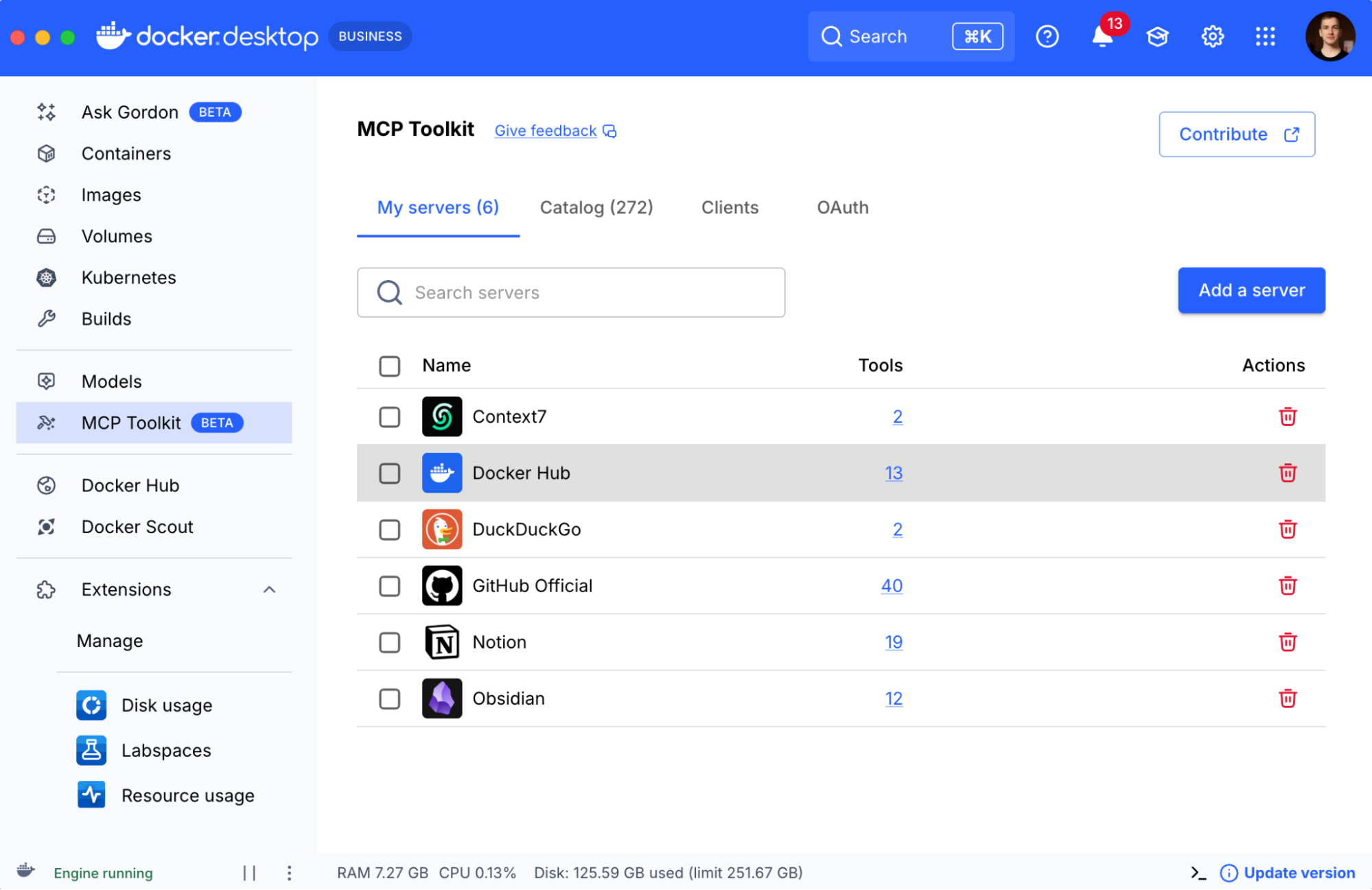
Figure 1: Docker Desktop UI showing MCP Toolkit with enabled servers (Context7, DuckDuckGo, GitHub, Notion, Docker Hub).

Find MCP servers that work best for you

This list, from private knowledge bases like Obsidian to global repositories like Docker Hub and essential tools like GitHub, is just a glimpse of what’s possible when you securely and reliably connect your AI agents to the tools you use every day.

The Docker MCP Toolkit is your central hub for this new ecosystem. It provides the essential isolation, configuration, and security to experiment and build with confidence, knowing you’re protected from the various real threats.

This is just our list of favorites, but the ecosystem is growing every day.

We invite you to explore the full Docker MCP Catalog to discover all the available servers that can supercharge your AI workflows. Get started with the Docker MCP Toolkit today and take control of your AI tool interactions.

We also want to hear from you: Explore the Docker MCP Catalog and tell us what are your must-have MCP servers? What amazing tool combinations have you built? Let us know in our community channel!

Learn more

Try MCP Toolkit by launching Docker Desktop (Requires version 4.48 or newer to launch the MCP Toolkit automatically)

Join our community Slack channel to let us know your must-have MCP servers. 

Discover how Docker is powering agentic development.

Quelle: https://blog.docker.com/feed/

Why I joined Docker: security at the center of the software supply chain

Mark Lechner, Docker’s CISO, shares his vision for a future where Docker not only powers the software supply chain, but actively safeguards it.

Cybersecurity has reached a turning point. The most significant threats no longer exploit isolated systems; they move through the connections between them. The modern attack surface includes every dependency, every container, and every human interaction that connects them. 

This interconnected reality is what drew me to Docker.

Over the past decade, I’ve defended banks, fintechs, crypto exchanges, and AI startups against increasingly sophisticated adversaries. Each showed how fragile trust becomes when a software supply chain spans thousands of components.

A significant portion of the world’s software now runs through Docker Hub. Containers have become the default unit of compute. And AI workloads are multiplying both innovation and risk at unprecedented speed.

This is a rare moment, one where getting security right at the foundation can change how the entire industry builds and deploys software.

Lessons from a decade on the supply chain frontline

The environments I worked in may seem unrelated (finance, fintech, crypto, AI) but together they trace how the software supply chain evolved and how security evolved with it.

In my time in neobanks/fintechs, control defined security. We protected finite, closed systems where every dependency was known and internally managed. It was a world built on ownership and predictability. There was a transition underway, and the internal walls between teams were being pulled down. Banking-as-a-Service meant inviting developers into what had always been a sealed environment. Suddenly, trust was not inherited, it had to be proven. That experience crystallized the idea that transparency and verifiability must replace assumptions.

Crypto transformed that lesson into urgency. In that world, the perimeter disappeared entirely. Dependencies, registries, and APIs became active battlefields, often targeted by nation-state actors. The pace of attack compressed from months to minutes.

The Shai Hulud worm that hit npm in September 2025 captures this new reality. It began with a single phishing email spoofing an npm alert. One compromised developer credential became a self-replicating worm spreading across 600+ package versions. The malware didn’t just steal tokens, it automated its own propagation, creating malicious GitHub Actions workflows, publishing private repositories, and moving laterally through the entire ecosystem at CI/CD speed.

Social engineering provided the entry point, and crucially, supply chain automation did the rest.

It was no longer enough to be secure; you had to be provably secure and capable of near-instant remediation.

AI has amplified that acceleration even further. Model supply chains, LLM agents, and the Model Context Protocol (MCP) have introduced entire new layers of exposure: model provenance, data lineage, and automated code generation at massive scale. Security practices are still catching up to the rate of change.

Across all these environments, one constant remained: everything ran in containers. Whether it was a financial risk engine, a crypto trading service, or an AI inference model, it was containerized.

That’s when it became clear to me that Docker isn’t simply part of the supply chain. Docker is the connective layer of modern software itself.

Why Docker is the right platform for this moment

There are three reasons why this moment matters for Docker and for security as a discipline:

Ubiquity with accountabilityEvery developer interacts with Docker. That ubiquity brings responsibility on a global scale. If Docker strengthens its security foundation, every connected system benefits. If we fall short, the consequences ripple worldwide. That scale is what makes this mission meaningful.

Our role extends beyond individual products. As steward of the container ecosystem, we have a responsibility to make it secure by default. That means setting clear expectations for how software is published, shared, and verified across Docker Hub and the Engine. Imagine a world where every image carries an SBOM and signed provenance by default, where digital signatures are standard, and where organizations can see and control the open source in their supply chain. The container ecosystem has matured, and Docker’s job now is to secure it for the next decade.

Security as a primitiveVirtualization, isolation, and portability are not just features; they are the security primitives of modern computing. Docker is embedding those primitives directly into the developer workflow.

This is reflected in Docker Hardened Images: secure, minimal containers with verifiable provenance and complete SBOMs that help organizations control supply chain risk. Through continuous review we scan, rebuild, and remediate these images at scale, raising the security baseline for the entire open-source ecosystem. Docker Scout complements that process by turning transparency into action, helping teams understand risk context and prioritize what matters most.

Christian Dupuis, lead engineer for Docker Hardened Images, defines the foundation for how Docker builds trust in his recent blog: minimal attack surface, verifiable SBOMs, secure build provenance, exploitability context, and cryptographic verification. Docker Hardened Images bring those pillars to life at scale.

Security is not confined to containers alone. The MCP Gateway enables containerised AI-tool orchestration with isolation, unified control, and observability, extending this same container-secure foundation into the AI era. By embedding policy as code into development, CI/CD, and runtime pipelines, governance becomes inherent; the same containers you trust also enforce the rules you need.

Together, these secure-by-default investments make security self-reinforcing, automated, and aligned with developer speed.

AI as the next frontier in the supply chainAI workloads are being containerized by default. As teams adopt MCP-based architectures and integrate AI agents into workflows, Docker’s role expands from developer enablement to securing AI infrastructure itself.

Everything we have built through Docker Hardened Images and Scout in the container domain now becomes foundational for this next chapter. The same principles of transparency, provenance, and continuous review will unlock a secure supply chain for AI workloads. Our goal is to provide a platform that scales with this new velocity, enabling innovation while keeping the risks contained.

My vision: From trust to proof

In thinking about the Docker opportunity, I kept returning to one phrase: Trust is not a control.

That is the essence of our approach here. In a modern software supply chain, you cannot simply trust components, you must prove their integrity. The future of security is built on proof: transparent, cryptographically verifiable, and automated.

Docker’s mission is to make that proof accessible to every developer and every organization, without slowing them down.

Here’s what that means in practice:

Every component should carry its own origin story. Provenance must be verifiable, traceable, and inseparable from the artifact itself. When the history of a component is transparent, trust becomes evidence, not assumption.

Transparency must be complete, not performative. An SBOM is more than a compliance record; it is a living map of dependencies that reveals how trust flows through a system.

Policy belongs in the pipeline. When governance is expressed as code, it becomes repeatable and portable, scaling from local development to production without friction. This approach lets each organization apply controls where they fit best, from pre-commit hooks and CI templates to runtime admission checks, so developers can move quickly within guardrails that stay with their work.

As AI reshapes development, isolation becomes the new perimeter. The ability to experiment safely, within bounded and observable environments, will define whether innovation can remain secure at scale.

These are the building blocks of a provable, scalable security model, one that developers can trust and auditors can verify.

Security should not slow development down. It should enable velocity by removing uncertainty. When the system itself provides proof, developers can build with confidence and organizations can deploy with clarity.

Building the standard for software trust

Eighteen months from now, I want “secure by Docker” to be a recognized assurance.When enterprises evaluate where to build their most sensitive workloads, Docker’s supply chain posture should be a differentiator, not a checkbox.

Docker Hardened Images will continue to evolve as the industry’s most transparent, source-built container foundation. Docker Scout will deepen visibility and context across dependencies. And our work on policy automation and AI sandboxing will extend those same assurances into new domains.

These aren’t incremental improvements. They are a shift toward verifiable, systemic security; security that is built in, measurable, and accessible to every developer.

If you are navigating supply chain risk, start with Docker Scout. If you want a trusted foundation, use Docker Hardened Images. And if you want to work on the problems that will define the next decade of software integrity, join us.

The world’s software supply chain runs through Docker.

Our mission is to ensure it is secured by Docker too.
Quelle: https://blog.docker.com/feed/

Amazon ECR introduces archive storage class for rarely accessed container images

Amazon ECR now offers a new archive storage class to reduce storage costs for large volumes of rarely accessed container images. The new archive storage class helps you meet your compliance and retention requirements while optimizing storage cost. As part of this launch, ECR lifecycle policies now support archiving images based on last pull time, allowing you to use lifecycle rules to automatically archive images based on usage patterns. To get started, you can archive images by configuring lifecycle rules to automatically archive images based on criteria such as image age, count, or last pull time, or using the ECR Console or API to archive images individually. You can archive an unlimited number of images. Archived images do not count against your image per repository limit. Once the images are archived, they are no longer accessible for pulls, but can be easily restored via ECR Console, CLI, or API within 20 minutes. Once restored, images can be pulled normally. All archival and restore operations are logged through CloudTrail for auditability. The new ECR archive storage class is available in all AWS Commercial and AWS GovCloud (US) Regions. For pricing, visit the pricing page. To learn more, visit the documentation.
Quelle: aws.amazon.com

Amazon OpenSearch Service launches Cluster Insights for improved operational visibility

Amazon OpenSearch Service now includes Cluster Insights, a monitoring solution that provides comprehensive operational visibility of your clusters through a single dashboard. This eliminates the complexity of having to analyze and correlate various logs and metrics to identify potential risks to cluster availability or performance. The solution automates the consolidation of critical operational data across nodes, indices, and shards, transforming complex troubleshooting into a streamlined process. When investigating performance issues like slow search queries, Cluster Insights displays relevant performance metrics, affected cluster resources, top-N query analysis, and specific remediation steps in one comprehensive view. The solution operates through OpenSearch UI’s resilient architecture, maintaining monitoring capabilities even during cluster unavailability. Users gain immediate access to account-level cluster summaries, enabling efficient management of multiple deployments. Cluster Insights is available at no additional cost for OpenSearch version 2.17 or later in all Regions where OpenSearch UI is available. View the complete list of supported Regions here. To learn more about Cluster Insights, refer to our technical documentation.
Quelle: aws.amazon.com

Amazon CloudWatch now supports scheduled queries in Logs Insights

Amazon CloudWatch Logs now supports automatically running Logs Insights queries on a recurring schedule for your log analysis needs. With scheduled queries, you can now automate log analysis tasks and deliver query results to Amazon S3 and Amazon EventBridge.
With today’s launch, you can track trends, monitor key operational metrics, and detect anomalies without needing to manually re-run queries or maintain custom automation. This feature makes it easier to maintain continuous visibility into your applications and infrastructure, streamline operational workflows, and ensure consistent insight generation at scale. For example, you can setup scheduled queries for your weekly audit reporting. The query results can also be stored in Amazon S3 for analysis, or trigger incident response workflows through Amazon EventBridge. The feature supports all CloudWatch Logs Insights query languages and helps teams improve operational efficiency by eliminating manual query executions.
Scheduled queries is available in US East (Ohio), US East (N. Virginia), US West (N. California), US West (Oregon), Asia Pacific (Mumbai), Asia Pacific (Osaka), Asia Pacific (Seoul), Asia Pacific (Singapore), Asia Pacific (Sydney), Asia Pacific (Tokyo), Canada (Central), Europe (Frankfurt), Europe (Ireland), Europe (London), Europe (Paris), Europe (Stockholm), and South America (São Paulo).
You can configure a scheduled query using the Amazon CloudWatch console, AWS Command Line Interface (AWS CLI), AWS Cloud Development Kit (AWS CDK), and AWS SDKs. For more information, visit the Amazon CloudWatch documentation.
Quelle: aws.amazon.com

Get Invoice PDF API is now generally available.

Today, AWS announces the general availability of the Get Invoice PDF API, enabling customers to programmatically download AWS invoices via SDK calls. Customers can retrieve individual invoice PDF artifacts by invoking API calls with AWS Invoice ID as input and receives pre-signed Amazon S3 URL for immediate download of AWS invoice and supplemental documents in PDF format. For bulk invoice retrieval, customers can first call the List Invoice Summaries API to get Invoice IDs for a specific billing period, then use the Invoice IDs as input to Get Invoice API to download each Invoice PDF artifact. The Get Invoice PDF API is available in the US East (N. Virginia) Region. Customers from any commercial regions (except China Regions) can use the service. To get started with Get Invoice PDF API please visit the API Documentation.
Quelle: aws.amazon.com






