Google Cloud VMware Engine is now generally available

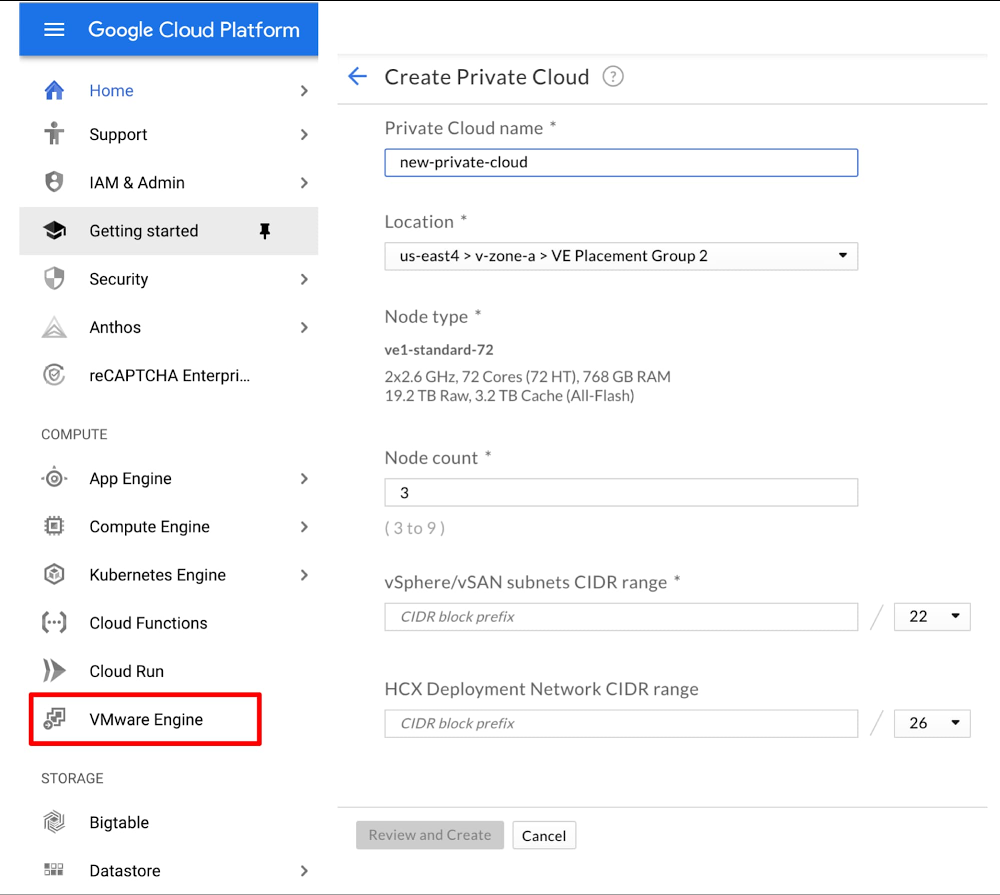
Let’s face it: bringing workloads to the public cloud isn’t always easy. And if you want to take full advantage of the elasticity, economics and innovation of the cloud, you usually have to write a new application. But that isn’t always an option, especially for existing applications, which may be from a third-party or written years ago. Compounding the challenge of rewriting those applications for the cloud is how you manage the application after you rebuild it—how you protect it from failures, monitor it, secure it, and so on. For many existing applications, this is done on a platform such as VMware®. So, the question becomes: how can these critical applications take advantage of the cloud when you don’t have a clear path to rearchitecting them outright? Google Cloud VMware Engine now generally availableToday, we’re happy to announce that Google Cloud VMware Engine is generally available, enabling you to seamlessly migrate your existing VMware-based applications to Google Cloud without refactoring or rewriting them. You can run the service in the us-east4 (Ashburn, Northern Virginia) & us-west2 (Los Angeles, California) regions, and we will  expand into other Google Cloud regions around the world in the second half of the year.Google Cloud VMware Engine provides everything you need to run your VMware environment natively in Google Cloud. The service delivers a fully managed VMware Cloud Foundation hybrid cloud platform, including VMware technologies vSphere, vCenter, vSAN, NSX-T, and HCX—in a dedicated environment on Google Cloud’s high performance and reliable infrastructure, to support your enterprise production workloads.With this service, you can extend or bring your on-premises workloads to Google Cloud in minutes—and without changes—by connecting to a dedicated VMware environment. Google Cloud VMware Engine is a first-party offering, fully owned, operated and supported by Google Cloud, that lets you seamlessly migrate to the cloud, without the cost or complexity of refactoring applications, and manage workloads consistently with your on-prem environment. You reduce your operational burden by moving to an on-demand, self-service model, while maintaining continuity with your existing tools, processes and skill sets, while also taking advantage of Google Cloud services to supercharge your VMware environment.Google Cloud VMware Engine is a unique solution for running VMware environments in the cloud, with four areas that provide a differentiated experience: a) user experience, b) enterprise-grade infrastructure, c) integrated networking and d) a rich services ecosystem. Let’s take a closer look.A simple user experienceLaunching a fully functional instance of Google Cloud VMware Engine is easy—all it takes is four clicks from the Google Cloud Console. Within a few minutes, you get a new environment, ready to consume. Compare that to the days and weeks it takes to design a new on-prem data center, ordering hardware and software, racking, stacking, cabling and infrastructure configuration. Not only that, but once the environment is live, you can expand or shrink it at the click of a button. To further simplify the experience, you can provision VMware environments using your existing Google Cloud identities. You also receive integrated support from Google Cloud—a one-stop shop for all support issues, whether in VMware or the rest of Google Cloud. The service is fully VMware certified and verified, and VMware’s support is fully integrated with Google Cloud support for a seamless experience. Consumption associated with the service is available in the standard billing views in the Google Cloud Console. And when you need to use native VMware tools, simply log into the familiar vCenter interface and manage and monitor VMware environment as you normally would.Dedicated, enterprise-grade infrastructureGoogle Cloud VMware Engine is built on high-performance, reliable and high-capacity infrastructure, giving you a fast and highly available VMware experience, at a low cost. The environment includes:Fully redundant and dedicated 100Gbps networking, providing 99.99% availability, low latency and high throughput to meet the needs of your most demanding enterprise workloads.Hyperconverged storage via the VMware vSAN stack on high-end, all-flash NVMe devices. This enables blazing fast performance with the scale, availability, reliability and redundancy of a distributed storage system.Recent generation CPUs (2nd Generation Intel Xeon Scalable Processors), delivering very high (2.6 GHz normal, 3.9 GHz burst) compute performance for your workloads. 768 GB of RAM, and 19.2TB of raw data capacity per node. Since VMware allows compute over-provisioning, many workloads in existing environments are often memory- or storage-constrained. The larger memory and storage capacity in Google Cloud VMware Engine nodes enables more workload VMs to be deployed per node, lowering your overall cost.The compute and storage infrastructure is single tenant—not shared by any other customer. The networking bandwidth to other hosts in a VMware vSphere cluster is also dedicated. This means that you get not only the privacy and security of a dedicated environment, but also highly predictable levels of performance. Integrated cloud networkingVMware environments in Google Cloud VMware Engine are configured directly on VPC subnets. This means you can use standard mechanisms such as Cloud Interconnect and Cloud VPN to connect to the service, as you would to any other service in Google Cloud. This eliminates the need to establish additional, expensive, bandwidth-limited connectivity.You also get direct, private, layer 3 networking access to workloads and services running on Google Cloud. You can connect between workloads in VMware and other services in Google Cloud with high-speed, low-latency connections, using private addresses. This provides faster access and higher levels of security for a wide variety of use cases such as hybrid applications, backup and centralized performance management. By eliminating a lot of networking complexity, you get a seamless, secure experience that is integrated with Google Cloud.A rich services ecosystemIn addition to its native capabilities, VMware users value the platform for its rich third-party ecosystem for disaster recovery, backup, monitoring, security—or any other imaginable IT need. Since the service provides a native VMware platform, you can continue to use those tools, with no changes.In Google Cloud VMware Engine, we have built unique capabilities to enable ecosystem tools. By elevating system privileges, you can install and configure third-party tools as you would on-prem. Third parties such as Zerto are taking advantage of this integration for mission-critical use cases such as disaster recovery.You can also benefit from native Google Cloud services and our ecosystem partners alongside your VMware-based applications. For instance, you can use Cloud Storage with a third-party data protection tool offered by companies such as Veeam, Dell, Cohesity, and Actifio to get a variety of availability and cost options for your backups. You can run third-party KMS tools externally and independently in your Compute Engine VMs to encrypt at-rest storage, making your environment even more secure.And then there are the native Google Cloud services. With your VMware-based databases and applications running inside Google Cloud VMware Engine, you can now manage them alongside your cloud-native workloads with our Operations family (formerly Stackdriver). You can interoperate VMware workloads with services such as Google Kubernetes Engine and Cloud Functions. You can use third-party solutions such as NetApp Cloud Volumes for extended VMware storage needs. And you can take advantage of the privacy and performance of Google Cloud VMware Engine to run cloud-native workloads directly next to your VMware workloads, with the help of Anthos deployed directly inside the service. Or supercharge analytics of your VMware data sources with BigQuery, and make it more intelligent with AI and machine learning services. Moving to the cloud doesn’t have to be hard. By migrating your VMware platform to Google Cloud, you can keep what you like about your on-prem application environment, and tap into next generation hardware and application services. To learn more about Google Cloud VMware Engine, check out our Getting Started guide, and be sure to watch our upcoming Google Cloud Next ‘20: OnAir session, Introducing Google Cloud VMware Engine during the week of July 27th.
Quelle: Google Cloud Platform

New IT Cost Assessment program: Unlock value to reinvest for growth

If you’re in IT, chances are you’re under pressure to prioritize investments and optimize costs in response to the current economic climate. According to a recent survey of our customers1, that situation describes 84% of IT decision makers. Likewise, Forrester Research has said CIOs could face a minimum of 5% budget cuts in 20202, and IDC is forecasting a 5.1% decline in worldwide IT spending3. These are sobering numbers. Here at Google Cloud, we understand the need for clear, actionable ways to optimize your IT costs—and the flexibility to adjust your IT spend to the most critical areas dynamically. To help, we developed a new IT Cost Assessment program that lets you understand how your company’s IT spend compares to your industry peers, so you can quickly identify key areas of opportunity to unlock value to reinvest for growth. Google Cloud has a proven and structured approach to validate these IT cost reduction opportunities. Every business is unique, but knowing where you stand relative to your industry peers is an invaluable piece of insight when strategizing how to survive in this new economic reality. The first thing we do with our IT cost assessment is analyze your individual IT spend and compare it to industry benchmark data derived from our extensive experience working with clients and trusted third-party research firms, providing you a view of cost optimization opportunities. Then, in a second phase, we propose Google Cloud solutions best aligned to helping you reap the benefits of IT cost reductions, reduce physical infrastructure complexity, leverage hybrid-cloud strategy and enhance security, compliance and flexibility. In addition, our differentiated capabilities across AI/ML & Big Data can help you identify opportunities to optimize processes and drive additional operational efficiencies. Once you have this baseline of your performance, we deliver a detailed TCO analysis, ROI projections, and an implementation plan, with Google Cloud solutions that will help you migrate and modernize your legacy environment and deliver a positive impact to your bottom line.We have partnered with leading enterprise companies in manufacturing, financial services, healthcare and life sciences, and insurance sectors, among others and delivered cost savings across their IT environments. In the aforementioned customer survey, three out of four respondents reported savings of up to 30% in the first 6 months of becoming a Google Cloud customer. And presented with the statement, “Google Cloud helped me increase our operational efficiency and optimize IT spend,” nine in ten agreed.Click here to learn more about the IT Cost Assessment program, and to request an engagement. We look forward to helping you navigate—and thrive—through these challenging times.1. TechValidate survey of 122 Google Cloud customers.2. Where To Adjust Tech Budgets In The Pandemic Recession, Forrester, May 19, 20203. International Data Corp., https://www.idc.com/getdoc.jsp?containerId=prUS46268520
Quelle: Google Cloud Platform

New Azure Firewall features in Q2 CY2020

We are pleased to announce several new Azure Firewall features that allow your organization to improve security, have more customization, and manage rules more easily. These new capabilities were added based on your top feedback:

Custom DNS support now in preview.
DNS Proxy support now in preview.
FQDN filtering in network rules now in preview.
IP Groups now generally available.
AKS FQDN tag now generally available.
Azure Firewall is now HIPAA compliant. 

In addition, in early June 2020, we announced Azure Firewall forced tunneling and SQL FQDN filtering are now generally available.

Azure Firewall is a cloud-native firewall as a service (FWaaS) offering that allows you to centrally govern and log all your traffic flows using a DevOps approach. The service supports both application and network-level filtering rules and is integrated with the Microsoft Threat Intelligence feed for filtering known malicious IP addresses and domains. Azure Firewall is highly available with built-in auto scaling.

Custom DNS support now in preview

Since its launch in September 2018, Azure Firewall has been hardcoded to use Azure DNS to ensure the service can reliably resolve its outbound dependencies. Custom DNS provides separation between customer and service name resolution. This allows you to configure Azure Firewall to use your own DNS server and ensures the firewall outbound dependencies are still resolved with Azure DNS. You may configure a single DNS server or multiple servers in Azure Firewall and Firewall Policy DNS settings.

Azure Firewall is also capable of name resolution using Azure Private DNS, as long as your private DNS zone is linked to the firewall virtual network.

DNS Proxy now in preview

With DNS proxy enabled, outbound DNS queries are processed by Azure Firewall, which initiates a new DNS resolution query to your custom DNS server or Azure DNS. This is crucial to have reliable FQDN filtering in network rules. You may configure DNS proxy in Azure Firewall and Firewall Policy DNS settings. 

DNS proxy configuration requires three steps:

Enable DNS proxy in Azure Firewall DNS settings.
Optionally configure your custom DNS server or use the provided default.
Finally, you must configure the Azure Firewall’s private IP address as a Custom DNS server in your virtual network DNS server settings. This ensures DNS traffic is directed to Azure Firewall.

 
Figure 1. Custom DNS and DNS Proxy settings on Azure Firewall.

FQDN filtering in network rules now in preview

You can now use fully qualified domain names (FQDN) in network rules based on DNS resolution in Azure Firewall and Firewall Policy. The specified FQDNs in your rule collections are translated to IP addresses based on your firewall DNS settings. This capability allows you to filter outbound traffic using FQDNs with any TCP/UDP protocol (including NTP, SSH, RDP, and more). As this capability is based on DNS resolution, it is highly recommended you enable the DNS proxy to ensure your protected virtual machines and firewall name resolution are consistent.

FQDN filtering in application rules for HTTP/S and MSSQL is based on application level transparent proxy. As such, it can discern between two FQDNs that are resolved to the same IP address. This is not the case with FQDN filtering in network rules, so it is always recommended you use application rules when possible.

 
Figure 2. FQDN filtering in network rules.

IP Groups now generally available

IP Groups is a new top-level Azure resource that allows you to group and manage IP addresses in Azure Firewall rules. You can give your IP group a name and create one by entering IP addresses or uploading a file. IP Groups eases your management experience and reduce time spent managing IP addresses by using them in a single firewall or across multiple firewalls. IP Groups is now generally available and supported within a standalone Azure Firewall configuration or as part of Azure Firewall Policy. For more information, see the IP Groups in Azure Firewall documentation.

Figure 3. Creating a new IP Group.

AKS FQDN tag now in generally available

An Azure Kubernetes Service (AKS) FQDN tag can now be used in Azure Firewall application rules to simplify your firewall configuration for AKS protection. Azure Kubernetes Service (AKS) offers managed Kubernetes cluster on Azure that reduces the complexity and operational overhead of managing Kubernetes by offloading much of that responsibility to Azure.

For management and operational purposes, nodes in an AKS cluster need to access certain ports and FQDNs. For more guidance on how to add protection for Azure Kubernetes cluster using Azure Firewall, see Use Azure Firewall to protect Azure Kubernetes Service (AKS) Deployments. 

  Figure 4. Configuring application rule with AKS FQDN tag.

Next steps

For more information on everything we covered here, see these additional resources:

Azure Firewall documentation.
Azure Firewall Forced Tunneling and SQL FQDN filtering now generally available.
Azure Firewall IP Groups.
Azure Firewall Custom DNS, DNS Proxy (preview).
Azure Firewall FQDN filtering in network rules (preview).
Use Azure Firewall to protect Azure Kubernetes Service (AKS) Deployments. 

Quelle: Azure

Azure Cost Management + Billing updates – June 2020

Whether you're a new student, thriving startup, or the largest enterprise, you have financial constraints and you need to know what you're spending, where, and how to plan for the future. Nobody wants a surprise when it comes to the bill, and this is where Azure Cost Management + Billing comes in.

We're always looking for ways to learn more about your challenges and how Azure Cost Management + Billing can help you better understand where you're accruing costs in the cloud, identify and prevent bad spending patterns, and optimize costs to empower you to do more with less. Here are a few of the latest improvements and updates based on your feedback:

More flexibility for budget notifications.
Subscribe to active cost recommendations with Advisor digests.
Automate subscription creation in Azure Government.
Subscription ownership transfer improvements.
New ways to save money with Azure.
New videos and learning opportunities.
Documentation updates.

Let's dig into the details.


More flexibility for budget notifications

You already know Azure Cost Management budgets keep you informed as your costs increase over time. We're introducing two changes to make it easier than ever to tune your budgets to suit your specific needs.

You can now specify a custom start month for your budget, allowing you to create a budget that starts in the future. This will allow you to plan ahead and pre-configure budgets to account for seasonal changes in usage patterns or simply preparing for the upcoming fiscal year, just to name a couple examples.

You can also add alert thresholds above 100 percent for even greater awareness about how far over budget you are. Not only can you send a separate email to a broader audience when you've hit, let's say 110 percent of your budget, you can also trigger more critical actions to be performed if costs continue to rise above 100 percent. This can be especially useful for organizations tracking internal margins.

We hope these changes help you plan ahead and take action on overages better. How will you use start dates and alert thresholds to better monitor and optimize costs?


Subscribe to active cost recommendations with Advisor digests

Running a truly optimized environment requires diligence. As your environment grows and usage patterns change, it's critical to stay on top of new opportunities to optimize costs. This is where Azure Advisor recommendation digests come in.

Recommendation digests provide an easy and proactive way to stay on top of your active recommendations. You can receive periodic notifications via email, SMS, or other channel by using action groups. Each digest notification includes a summary of your active recommendations and complements Advisor alerts to give you a more complete picture of your cost optimization opportunities.

Advisor alerts notify you about new recommendations as they become available, while recommendation digests summarize all available recommendations that you haven’t yet acted on. Together, Advisor recommendation digests and alerts help you stay current with Azure best practices.

Learn more about Advisor recommendation digests.


Automate subscription creation in Azure Government

Managing subscriptions efficiently at scale requires automation. Now, organizations with Azure Government accounts can automate the creation of subscriptions with the Microsoft.Subscription/createSubscription API. This expands on previous subscription management capabilities and brings API parity between Azure Global and Azure Government. What would you like to see next?


Subscription ownership transfer improvements

Whether you're restructuring your environment or simply expanding your scope, you may run into situations where you need to transfer ownership of your Azure subscriptions to another person or organization. And now, you can do that directly from within the Azure portal for even more subscription types. In addition to existing support for Pay-As-You-Go (PAYG) subscriptions, you can now transfer any of the following subscription types to a new owner from the Azure portal:

Microsoft Customer Agreement.
Visual Studio Enterprise.
Microsoft Partner Network (MPN).
Microsoft Azure Sponsorship.

The portal will also clarify and explain why certain subscriptions cannot be transferred and surface any potential issues and reservation warnings, helping you transfer with ease, avoiding any unintended consequences.

Learn more about subscription ownership transfers and let us know how we can improve your ownership transfer experience.


New ways to save money with Azure

We're always looking for ways to help you optimize costs. Here's what's new this month:

Save up to 70 percent on spiky and unpredictable workloads with Cosmos DB autoscale.
Save up to 61 percent on Azure Spring Cloud with the new Basic tier.
Azure Dedicated Hosts supports additional virtual machine sizes offering more opportunities to save.
Azure SQL database serverless auto-scaling limits increased from 16 to 40 vCores.
Azure DevTest Labs environments are now available in Azure Government.
Azure DevTest Labs is now available in Switzerland regions.


New videos and learning opportunities

For those visual learners out there, here's one new video you might be interested in:

Evaluate and optimize your costs using the Microsoft Azure Well-Architected Framework (29 minutes).

Follow the Azure Cost Management + Billing YouTube channel to stay in the loop with new videos as they're released and let us know what you'd like to see next.

Want a more guided experience? Start with Control Azure spending and manage bills with Azure Cost Management + Billing.


Documentation updates

Here are a couple documentation updates you might be interested in:

Moved group and filter options into its own document (with a video).
Updated the analyze and manage costs section of the Cost Management best practices.
Added note about using the Monitoring Reader role to analyze resource usage for RBAC scopes.
Clarified what subscriptions are supported by Cost Management within management groups.
Documented Invoices API support for Enterprise Agreement billing accounts.
Documented more Azure Advisor cost optimization recommendations.

Want to keep an eye on all of the documentation updates? Check out the Cost Management + Billing doc change history in the azure-docs repository on GitHub. If you see something missing, select Edit at the top of the document and submit a quick pull request.


What's next?

These are just a few of the big updates from last month. Don't forget to check out the previous Azure Cost Management + Billing updates. We're always listening and making constant improvements based on your feedback, so please keep the feedback coming.

Follow @AzureCostMgmt on Twitter and subscribe to the YouTube channel for updates, tips, and tricks. And, as always, share your ideas and vote up others in the Cost Management feedback forum.

We know these are trying times for everyone. Best wishes from the Azure Cost Management team. Stay safe and stay healthy!
Quelle: Azure





