Azure IaaS: Defense in depth built on secure-by-design principles

In this article

Defense in depth as a systemSecure by design: Engineering security into the platformHardware and host-level trustVirtual machine-layer trustSecure by default: Protection enabled without frictionSecure defaults across networkingEncryption and data protection by defaultCompute protection defaultsSecure in operation: Continuous protection at runtimeMonitoring, detection, and signal correlationIdentity-centric control and least privilegeBringing defense in depth and SFI together Security as an ongoing platform commitment

This blog post is the third part of a blog series called Azure IaaS which will share best practices and guidance to help you build a trusted infrastructure platform—from performance, resiliency, and security to scalability and cost efficiency.

​Security for cloud infrastructure is no longer defined by a single control, product, or boundary. Modern threats target identity, software supply chains, control planes, networks, and data simultaneously. Addressing this reality requires two things to work together: a layered defense-in-depth architecture and security principles that are enforced consistently across the platform.

In Azure Infrastructure as a Service (IaaS), security is built around these two reinforcing ideas. First, Azure implements defense in depth, applying multiple, independent layers of protection across compute, networking, storage, and operations so that no single control stands alone. Second, those protections are guided by Microsoft’s  Secure Future Initiative (SFI) principles: secure by design, secure by default, and secure in operation. Together, they define how Azure IaaS is engineered, configured, and operated at scale.

Explore Azure IaaS solutions

Defense in depth as a system

Defense in depth is not a checklist of features—it is a system-level security architecture. Each layer is designed with the assumption that another layer may fail, and that compromise at one point should not lead to platform-wide impact.

In Azure IaaS, defense in depth spans the full infrastructure stack:

Hardware and host integrity

Virtualized compute isolation

Network segmentation and traffic control

Data protection for storage

Continuous monitoring and response

These layers are intentionally independent. Hardware root-of-trust mechanisms validate host integrity before workloads ever start. Virtual machines (VM) run with strong isolation boundaries enforced by the hypervisor. Network controls limit lateral movement and restrict exposure. Storage services encrypt and protect data even if credentials are compromised. And telemetry and monitoring systems operate continuously, detecting and responding to anomalous behavior across the platform.

This layered approach ensures that Azure IaaS security does not rely on perimeter assumptions or a single “control plane defense,” but instead applies multiple mutually reinforcing controls that work together.

Build a stronger cloud infrastructure with Azure IaaS

Secure by design: Engineering security into the platform

“Secure by design” means security is architected into the platform from the beginning, not added after deployment. In Azure IaaS, this starts at the lowest layers of the stack.

Hardware and host-level trust

Azure servers are built with hardware roots of trust, measured boot, and secure firmware validation. Technologies such as Trusted Platform Modules (TPMs) and secure boot validate that host firmware, boot loaders, and operating systems have not been tampered with before the system joins the Azure fleet. These mechanisms reduce exposure to firmware-level and boot-chain attacks that traditional software-only defenses cannot address.

Azure also offloads critical infrastructure functions—such as storage, networking, and management operations—into dedicated, hardened components like Azure Boost, reducing the attack surface of the host operating system and improving isolation between customer workloads and platform services.

Virtual machine-layer trust

At the virtual machine layer, Azure enforces strong virtualization boundaries using a hardened hypervisor. Features like Trusted Launch for Azure VM combine secure boot, virtual TPMs, and integrity monitoring to protect VMs against low-level attacks such as bootkits and kernel rootkits.

For highly sensitive workloads,  Azure confidential computing extends defense in depth by using trusted execution environments (TEEs) backed by hardware-based memory encryption (such as AMD SEV‑SNP or Intel TDX). These technologies help ensure that data remains protected even while in use and inaccessible to the host or hypervisor.

Security here is not a bolt-on—it is a design property of how Azure compute infrastructure is built and operated.

Secure by default: Protection enabled without friction

Secure-by-default controls reduce risk by making the safest option the standard configuration, without requiring customers to assemble security from scratch.

Learn how to keep critical applications running with built-in resiliency at scale with Azure IaaS

Secure defaults across networking

In Azure IaaS, networking defaults are aligned with least-privilege and Zero Trust principles. Virtual networks are isolated by default. Inbound traffic to VM is blocked unless explicitly allowed. Network security groups (NSGs) enforce stateful filtering, while Azure Firewall provides centralized policy enforcement and traffic inspection when deployed.

Private connectivity options such as Azure Private Link and private endpoints allow services to be accessed without exposing them to the public internet. DDoS protection is automatically applied at the platform edge, helping protect workloads from volumetric attacks without additional configuration.

These defaults limit exposure by design, narrowing the attack surface before workload-specific rules are added.

Encryption and data protection by default

Azure IaaS storage services encrypt data at rest by default, using platform-managed keys, with options to use customer-managed keys via Azure Key Vault or Managed HSM. Disk encryption protects operating system and data disks for VM, and secure snapshots protect point-in-time copies of data.

Encryption in transit is enforced across Azure backbone networks, ensuring traffic between services within the platform is protected without requiring per-workload configuration.

Secure-by-default encryption ensures that data protections are always on, not optional.

Compute protection defaults

Signed and measured Azure host boot, secure host operating system (OS) hardening, host‑level monitoring and patching by Microsoft, and hypervisor-enforced isolation between tenants are all enabled by default and cannot be disabled by Azure tenants.

Trusted Launch is enabled by default for newly created Azure Gen2 VMs and VM scale sets, when using supported OS images, VM sizes, and deployment methods. Supported deployments methods include deployment via the Azure Portal, ARM templates, Bicep, Terraform, and Azure SDKs.

Secure in operation: Continuous protection at runtime

Security does not stop at deployment. The secure in operation principle focuses on maintaining protection continuously as threats evolve.

Monitoring, detection, and signal correlation

Azure integrates telemetry from compute, network, and storage layers into centralized monitoring systems such as Azure Monitor and Microsoft Defender for Cloud. These systems continuously analyze behavior to identify misconfigurations, detect threats, and surface actionable security recommendations.

For IaaS workloads, Defender for Cloud helps identify exposed management ports, missing disk encryption, and insecure network configurations, while also correlating threat signals across the environment.

Identity-centric control and least privilege

Operational security depends heavily on identity. Azure IaaS integrates with Microsoft Entra ID to enforce identity-based access controls, reduce standing privileges, and apply conditional access policies. Features like Just-In-Time (JIT) VM access limit administrative exposure by only opening management ports when needed and only for approved identities.

By minimizing persistent access and rotating privileges dynamically, Azure reduces the impact of credential compromise.

Bringing defense in depth and SFI together

Defense in depth provides the technical structure of Azure IaaS security. Secure by design, secure by default, and secure in operation provide the engineering and operational discipline that governs how those controls are built, deployed, and maintained.

Together, they ensure that Azure IaaS security is:

Layered: No single control is assumed to be sufficient.

Intrinsic: Security is part of the platform architecture, not an add-on.

Consistent: Defaults and policies reduce configuration drift.

Adaptive: Continuous monitoring and operational controls evolve with the threat landscape.

This combination allows Azure to protect IaaS workloads across compute, network, and storage while maintaining compatibility with diverse operating systems, workload types, and deployment models.

 Security as an ongoing platform commitment

Azure IaaS security is not defined by a static set of features. It is the result of ongoing engineering investment, guided by clear principles, and reinforced through layered technical controls.

Defense in depth ensures that failures are contained. Secure-by-design architecture reduces attack surfaces from the start. Secure-by-default configurations minimize exposure without adding friction. And secure-in-operation practices ensure the platform continues to adapt as threats evolve.

Together, these principles define how Azure IaaS delivers infrastructure security that is systematic, scalable, and aligned with modern threat realities.

To go deeper, explore the Azure IaaS Resource Center for tutorials, best practices, and guidance across compute, storage, and networking to help you design and operate resilient infrastructure with greater confidence.

Did you miss these posts in the Azure IaaS series?

Explore new resources for building a stronger, more efficient infrastructure

Keep critical applications running with built-in resiliency at scale

Create a resilient infrastructure with Azure
Visit the Azure IaaS Resource Center to start building a stronger, more efficient infrastructure today.

Get started with Azure

The post Azure IaaS: Defense in depth built on secure-by-design principles appeared first on Microsoft Azure Blog.
Quelle: Azure
Microsoft Sovereign Private Cloud scales to thousands of nodes with Azure Local

Today, I am pleased to announce that Azure Local now scales to support deployments of up to thousands of servers within a single sovereign environment, allowing organizations to run much larger workloads locally across large-footprint datacenters, industrial environments and edge locations while maintaining control within their sovereign boundary.

Organizations operating national infrastructure, regulated workloads or mission-critical services are navigating a fundamental shift in how cloud infrastructure must be deployed and managed. As digital sovereignty postures evolve and regulatory requirements tighten across regions, infrastructure strategies are increasingly shaped by the need to maintain jurisdictional control over data, operations and dependencies. At the same time, AI and data-intensive applications are moving closer to where data is generated, requiring infrastructure that can scale to support larger deployment footprints while maintaining operational control, compliance and data residency requirements within sovereign environments.

Azure Local is the foundation for Microsoft’s Sovereign Private Cloud, allowing organizations to run cloud-consistent infrastructure on hardware they own and operate within their sovereign boundary. It supports deployments across connected, intermittently connected or fully disconnected environments. With Azure Local disconnected operations, customers retain the ability to apply policy enforcement, role-based access control, auditing and compliance configuration locally, allowing them control over how infrastructure is configured, secured and updated regardless of public cloud connectivity.

Scaling Sovereign Private CloudSovereign Private Cloud deployments must scale to support not only larger workloads, but also the operational requirements of national infrastructure and regulated industries. Azure Local allows organizations to grow deployments from hundreds up to thousands of servers within a single sovereign boundary, allowing infrastructure to expand alongside demand without requiring architectural redesign.

As deployment footprints grow, resiliency becomes essential to maintaining continuous operations for mission critical services. Expanded fault domains and infrastructure pools help prevent hardware failures from resulting in service outages, ensuring critical workloads remain operational across environments with varying levels of cloud connectivity.

At these larger scale points, organizations can run data-intensive AI inference and analytics workloads entirely within their own environment. With support for high-performance graphics processing unit (GPU) infrastructure, sensitive models and operational data remain within customer-controlled infrastructure, while access management, auditing and compliance controls are maintained within the sovereign deployment.

Built for challenging workloadsIncreased deployment scale unlocks new workload placement opportunities, from large sovereign private cloud deployments to distributed AI workloads, allowing organizations to run more data intensive and latency sensitive applications entirely within their sovereign boundary.

AT&T, one of the world’s largest telecommunications operators, is deploying Azure Local to run mission-critical infrastructure on hardware they own in their environment. The goal: full operational control while running at the scale the business demands.

“Azure Local provides the infrastructure foundation we need to run critical operations at scale, while ensuring control and governance across our environment. The consistency of the Azure operating model, delivered on our own infrastructure, is key as we continue to modernize while delivering reliable services to our customers.”

— Sherry McCaughan, Vice President – Mobility Core Services, AT&T

Kadaster, the Netherlands’ official land registry and mapping agency, is running Azure Local to keep sovereign control over some of the country’s most sensitive public data.

“As a government agency responsible for some of the Netherlands’ most sensitive data, we need infrastructure that gives us full control over where our data lives and how it’s governed. Azure Local has been a consistent foundation for that — and as our workloads grow in scale and complexity, the platform has grown with us.”

— Maarten van der Tol, General Manager, Kadaster

FiberCop, Italy’s most advanced and extensive digital network operator is deploying Azure Local across its edge locations to bring sovereign cloud and AI services to organizations throughout the country. Fabio Veronese, Chief Information & Technology Officer commented:

“FiberCop is better positioned than any other player on the Italian market to drive innovation and deliver cloud as well as AI services at national scale. Azure Local supports our mission to drive Italy’s digital future and brings Microsoft’s cloud capabilities to edge workloads across the country while keeping data sovereignty and compliance where they matter most.”

The infrastructure behind Sovereign Private CloudAzure Local is available today with validated compute and enterprise storage platforms from partners including DataON, Dell Technologies, Everpure, Hitachi Vantara, HPE, Lenovo and NetApp, allowing organizations to integrate existing Storage Area Networks (SAN) and preserve prior investments while allowing compute and storage resources to scale independently within their sovereign environment.

At the silicon level, Intel®  Xeon® 6 processors provide the compute foundation for the platform. Built for the density and performance demands of modern enterprise workloads, Xeon 6 also brings built-in AI acceleration with Intel® AMX, meaning organizations running inference or generative AI workloads within their sovereign environment do not need to introduce separate, specialized infrastructure to do so.

Together, Azure Local, validated compute and enterprise storage platforms, accelerated computing platforms and underlying silicon can provide a datacenter-scale stack that supports sovereign infrastructure deployments while helping ensure data, models and execution remain within customer-controlled environments.

Sovereign infrastructure built for your requirementsAzure Local was built to meet customers where their requirements are whether that means strict data residency, disconnected operations, regulated workloads or AI running close to where data is generated. As these requirements evolve across regulated industries and governments worldwide, Sovereign Private Cloud deployments can expand from a single node at the edge to large enterprise-scale datacenter environments, running on hardware organizations own and operate, with consistent lifecycle management through Azure.

Resources:

Learn more about Azure LocalExplore Microsoft’s Sovereign CloudRead the Tech Community blogVisit the Azure Local solution catalogDouglas Phillips leads global engineering efforts for Microsoft’s specialized, sovereign and private clouds. He is responsible for Microsoft’s global strategy, products and operations that bring Microsoft’s industry-leading solutions, including Azure, our adaptive cloud portfolio and Microsoft 365 collaboration suite, to customers with additional sovereignty, security, edge and compliance requirements.
The post Microsoft Sovereign Private Cloud scales to thousands of nodes with Azure Local appeared first on Microsoft Azure Blog.
Quelle: Azure

Enforcing trust and transparency: Open-sourcing the Azure Integrated HSM

As cloud workloads become more agentic and AI systems increasingly handle mission‑critical data, trust must be engineered into the infrastructure at every layer. At Microsoft, security is designed into the foundation of our cloud infrastructure, from silicon to services. With the Azure Integrated Hardware Security Module (HSM), Microsoft is redefining how cryptographic trust is delivered in the cloud.

Azure Integrated HSM is a tamper‑resistant, Microsoft‑built hardware security module integrated into every new Azure server, extending existing key management services by bringing hardware enforced protection directly to where workloads execute. Rather than relying solely on centralized services, this approach makes hardware-backed security a native property of the compute platform itself.

Azure Integrated HSM is engineered to meet FIPS 140‑3 Level 3, the gold standard for hardware security modules used by governments and regulated industries worldwide. Level 3 requires strong tamper resistance, hardware-enforced isolation, and protection against physical and logical key extraction. By building these assurances directly into the platform, Azure makes the highest levels of compliance a default property of the cloud, rather than a specialized configuration or premium add‑on.

Learn more about Azure Security

Reinforcing transparency through trust with open-sourced designs

Our approach to hardware security is grounded in a simple belief: transparency builds trust, and industry collaboration strengthens security. Openness strengthens trust by allowing customers, partners, and regulators to validate design choices and security boundaries.

This week, at the Open Compute Project (OCP) EMEA Summit, we announced plans to open the Azure Integrated HSM hardware to the broader open hardware ecosystem. Through OCP, we plan to release the Azure Integrated HSM firmware, driver, and software stack as open source, and launch an OCP workgroup to guide ongoing development—spanning architectural design, protocol specifications, firmware, and hardware. The Azure Integrated HSM firmware is now available through the Azure Integrated HSM GitHub repository, alongside independent validation artifacts such as the OCP SAFE audit report.

This openness is particularly important for regulated industries and sovereign cloud scenarios, where independent validation of security controls is required. By making key components available for external review, Azure Integrated HSM enables customers, partners, and regulators to assess implementation details directly rather than relying solely on vendor assertions.

This approach strengthens confidence in the platform and helps establish a more transparent and verifiable foundation for cloud security, while reducing reliance on proprietary vendor specific protocols. At a time when cryptographic trust underpins everything from AI inference to national digital infrastructure, open sourcing the HSM is a practical step toward interoperability, auditability, and customer confidence.

A tiered approach to key management

This design complements services like Azure Key Vault and Azure Managed HSM, which continue to provide centralized key lifecycle management, governance, and policy enforcement. Azure Integrated HSM adds a new layer; one that brings cryptographic protection down to the individual server, so that keys are protected not just when they are stored but while they are actively being used by workloads. The Azure Integrated HSM also supports industry standards such as TDISP, enabling secure binding between the HSM and confidential computing environments.

In the coming weeks, Azure Integrated HSM will be available in Azure V7 virtual machines to all customers globally.

Setting a new standard for server-local key protection at scale

With Azure Integrated HSM, encryption keys are generated, stored, and used entirely within hardened hardware. Keys are designed to never appear in host memory, guest memory, or software processes even during active cryptographic operations. By keeping keys within the hardware boundary at all times, Azure Integrated HSM eliminates entire classes of key and credential exfiltration attacks that target memory or software layers.

The result is true customer control enforced by silicon, not policy. Security is no longer dependent on operational discipline or complex isolation assumptions; it is enforced by hardware.

Traditional cloud security models rely on centralized HSM services accessed over the network. While effective, these models introduce shared blast radius, scalability challenges, and performance constraints as workloads grow.

By anchoring cryptographic protection directly to the server, security scales naturally with compute. There are no shared bottlenecks, no added network hops, and no need to trade performance for protection. As Azure scales, security scales with it.

With hardware roots of trust, measured boot, and attestation, Azure Integrated HSM makes trust verifiable rather than contractual. Customers and regulators can cryptographically validate that approved hardware, firmware, and configurations are in place. This can be further verified by the open-source firmware. Trust is no longer something you accept; it is something you can prove.

Together, these capabilities establish a new baseline for cloud security, one in which hardware-enforced, verifiable trust is the default for modern workloads, from core infrastructure services to the next generation of AI. When combined with confidential computing, open silicon roots of trust, Azure Boost, and datacenter-level secure control modules, the Azure Integrated HSM helps establish a vertically integrated chain of trust, from silicon to software.

We invite customers, partners, and the broader open-source community to contribute to the architecture and help shape future standards. Together, we can build secure, sovereign, and open cloud infrastructure for the challenges ahead.

For additional information, read the announcement blog and learn more about Azure Security.

Azure Security
Get a comprehensive look at the security available with Azure.

Learn more

The post Enforcing trust and transparency: Open-sourcing the Azure Integrated HSM appeared first on Microsoft Azure Blog.
Quelle: Azure

Microsoft named a Leader in the IDC MarketScape: Worldwide API Management 2026 Vendor Assessment

In this article

Built on a proven foundation extending into AIOne platform to scale APIs and AIGovernance by design for AI at scaleTurning AI innovation into business impactExpanding the platform for what’s next

As AI moves into production, how systems interact is fundamentally changing. Organizations must now manage not just APIs, but how AI systems operate across the enterprise.

We’re proud to share that Microsoft has been named Leader in the IDC MarketScape: Worldwide API Management 2026 Vendor Assessment (#US52034025, March 2026). We believe this recognition reflects our focus on helping organizations securely scale APIs and AI together with the control, visibility, and reliability required for production.

Read why Microsoft was named a Leader in the IDC MarketScape: Worldwide API Management 2026 Vendor Assessment

Built on a proven foundation extending into AI

For more than a decade, Azure API Management has served as a trusted control plane for API governance, security, and observability at a global scale, supporting over 38,000 customers, nearly 3 million APIs, and more than 3 trillion API requests each month. That foundation is now extending to a new class of workloads.

As organizations bring AI into production, they must govern a growing mix of API traffic and AI-driven interactions, each with new governance needs, cost dynamics, and reliability requirements. What was once about connecting systems and exposing APIs is now an operational challenge at scale. Organizations must continuously manage how models, tools, and agents behave in production controlling cost, enforcing policies, and ensuring reliability across multi-provider AI traffic.

AI gateway capabilities in API Management build on this foundation, extending API Management’s proven API governance to AI workloads. Today, more than 2,000 enterprise customers are already using these capabilities to safely operationalize AI.

One platform to scale APIs and AI

To meet this shift, organizations need a simpler model, one platform that brings consistency across both APIs and AI.

Azure API Management provides a single, Azure-native platform to govern everything from traditional APIs to AI models, tools, and agents, built on a foundation proven at enterprise scale. This allows organizations to move faster with AI without losing control, visibility, or consistency as they scale. By standardizing how systems connect and interact, teams can reduce fragmentation, simplify operations, and create a trusted foundation for innovation across the business.

Learn more about Azure API Management

This approach is already delivering results on a global scale. Heineken uses Azure API Management as the backbone of its global API platform, enabling teams to build and scale digital experiences faster while maintaining a consistent, centrally governed foundation. In just five months, Heineken built and deployed a worldwide API platform now handling 50 million API calls per month, achieving 100% uptime since go-live, and reducing cost per API call by up to 75% through standardized governance and security at scale.

Governance by design for AI at scale

As AI adoption grows, the challenge shifts from building models to operating them reliably in production. Organizations need a consistent way to control how AI systems operate in production.

Azure API Management provides that governance layer, allowing organizations to define how AI systems access models, tools, and agents, while enforcing security policies, monitoring usage, and maintaining control over cost and behavior across environments. This ensures every interaction is secure, observable, and aligned with business and compliance requirements.

This approach is already proving essential in real-world deployments. Banco Bradesco uses Azure API Management to securely manage AI services and APIs across channels, applying centralized governance and end-to-end visibility. By standardizing how APIs and AI services are exposed and consumed, the bank ensures consistent security policies, improves monitoring across interactions, and supports high-scale digital banking experiences with strong data protection.

With Microsoft Azure API Management, we securely manage AI services and APIs across all channels. It’s the backbone of our architecture scaling with demand while maintaining strict governance and data protection.
 —Phelipi Dal’Olio, Bridge Manager, Banco Bradesco

Turning AI innovation into business impact

With governance in place, organizations can move beyond experimentation and focus on delivering real business value with AI.

Telefónica Brasil is using Azure OpenAI to enhance customer interactions across digital channels. This improves service experiences, accelerates response times, and enables more personalized engagement at scale.

At the same time, Access Group embedded AI directly into its product portfolio. Using Azure API Management as the foundation of its AI gateway, Access launched over 50 AI-powered products in a single year and scaled to 2.2 million users. The company also achieved ISO 42001 certification for responsible AI, demonstrating how governance can accelerate innovation.

Air India deployed a generative AI assistant at scale. It now handles up to 40,000 customer queries per day, has resolved over 13 million conversations, and operates with a 97% success rate. This allows the airline to scale customer support without increasing agent volume while saving millions annually.

Azure API Management supports this shift by providing a consistent way to expose, secure, and manage the APIs that power these AI-driven experiences, helping organizations move from isolated innovation to production-ready, enterprise-scale impact.

Expanding the platform for what’s next

As organizations adopt new interaction patterns across APIs and AI systems, the platform continues to evolve. Azure API Management is expanding to support emerging scenarios, including governed agent interactions, exposing APIs as reusable tools for AI systems, and enabling centralized discovery and policy enforcement across environments. This ensures organizations can adopt new capabilities without introducing fragmentation or losing control.

As organizations continue to invest in AI, the ability to govern how systems and AI interact at scale will become a defining capability. API management is evolving from connecting systems to enabling controlled, trusted interaction across the enterprise.

We’re honored to be named a Leader in the 2026 IDC MarketScape for Worldwide API Management Vendor Assessment, and we remain committed to helping organizations scale APIs and AI with confidence.

Explore Azure API Management

See more

The post Microsoft named a Leader in the IDC MarketScape: Worldwide API Management 2026 Vendor Assessment appeared first on Microsoft Azure Blog.
Quelle: Azure

OpenAI’s GPT-5.5 in Microsoft Foundry: Frontier intelligence on an enterprise ready platform

OpenAI’s GPT-5.5 will be generally available tomorrow in Microsoft Foundry, bringing OpenAI’s latest frontier model to Azure and the enterprise teams building agents for real production work.

GPT-5.5 continues a clear progression in the GPT-5 series. GPT-5 brought unified reasoning and speed into a single system. GPT-5.4 brought stronger multi-step reasoning and early agentic capabilities for enterprise use. GPT-5.5 advances this arc with deeper long-context reasoning, more reliable agentic execution, improved computer-use accuracy, and greater token efficiency—designed for sustained, high-stakes professional workflows.

Powerful models alone aren’t enough to operationalize agentic AI at scale. Microsoft Foundry provides the platform layer that turns frontier models into usable, governable systems that enable enterprises to apply security policy and management at the platform level. Foundry is a unified, interoperable environment to build, optimize, and deploy AI applications and agents with confidence. Customers benefit from broad model choice, open and flexible agent frameworks, native integration with enterprise systems and productivity tools, and enterprise-grade security, compliance, and governance. When new models like GPT-5.5 become available, Foundry makes it easy to evaluate, productionize, and scale them without friction.

Explore models in Microsoft Foundry

What’s new in GPT-5.5

GPT-5.5 is built for professional scenarios where precision, reliability, and persistence matter. GPT-5.5 Pro, a premium variant, extends reasoning depth and task complexity for the most demanding enterprise workloads.

Improved agentic coding and computer-use: Executes multi-step engineering tasks end-to-end—holding context across large systems, diagnosing the root cause of ambiguous failures at the architectural level, and reasoning through what else in the codebase a fix will affect before making a move. It anticipates downstream testing and review requirements without needing to be told, and navigates software interfaces with improved precision and more reliable recovery when execution takes an unexpected turn.

Autonomous execution and research depth: Goes beyond code to handle the full span of professional work—producing polished deliverables like documents, spreadsheets, and presentations. For research-intensive workflows, GPT-5.5 operates as an active collaborator across the entire arc from question to output: refining drafts across multiple passes, stress-testing analytical reasoning, proposing approaches, and synthesizing across documents, data, and code to drive work forward rather than just answering it.

Complex reasoning and long-context analysis: Handles extensive documents, codebases, and multi-session histories without losing the thread.

Token efficiency built for scale: GPT-5.5 reaches higher-quality outputs with fewer tokens and fewer retries—lowering cost and latency for production deployments at scale.

GPT-5.5 is particularly well suited for domains where the cost of imprecision is high—such as software engineering, DevOps, legal, health sciences, and professional services. With GPT-5.5 in Microsoft Foundry, customers can pair OpenAI’s latest frontier model with enterprise-grade infrastructure to put agentic AI into production.

Microsoft Foundry: The operating system for GPT-5.5 agents at scale

Access to a frontier model is just the starting point. What we see from customers is that the hard part isn’t building an agent: it’s running thousands of them in production, with real isolation, identity, and governance. That’s where Foundry Agent Service comes in.

A revolution is unfolding in the market. Now, a developer can reliably reason through a business problem with a coding agent—human’s interact with a model doing heavy thinking, research, asking questions — and the output is a production agent: a declarative workflow suitable for a specific task, and connected to your business systems.

These declarative agents can be defined in YAML or written in a harness like Microsoft Agent Framework, GitHub Copilot SDK, or virtually any library. With hosted agents in Foundry Agent Service, LangGraph, Claude Agent SDK, and OpenAI Agents SDKs all work the same way. Engineers can run a single command to land agents in an isolated sandbox with a persistent filesystem, a distinct Microsoft Entra identity, and scale-to-zero pricing. Enterprise ready agents, at scale, powered by GPT-5.5.

Learn more about Foundry Agent Service and Microsoft Agent Framework.

Pricing

ModelInput ($/M tokens)Cached Input ($/M tokens)Output ($/M tokens)GPT-5.5$5.00$0.50$30.00GPT-5.5 Pro$30.00$3.00$180.00

Get started with Microsoft Foundry

Stop experimenting and start building your next production AI workloads with GPT-5.5 in Microsoft Foundry.
The post OpenAI’s GPT-5.5 in Microsoft Foundry: Frontier intelligence on an enterprise ready platform appeared first on Microsoft Azure Blog.
Quelle: Azure
Introducing Azure Accelerate for Databases: Modernize your data for AI with experts and investments

In this article

Database modernization: Why now?Why Azure Accelerate for Databases? What you can do with Azure Accelerate for Databases Unlock savings and investments Get started with Azure Accelerate for Databases

Database modernization: Why now?

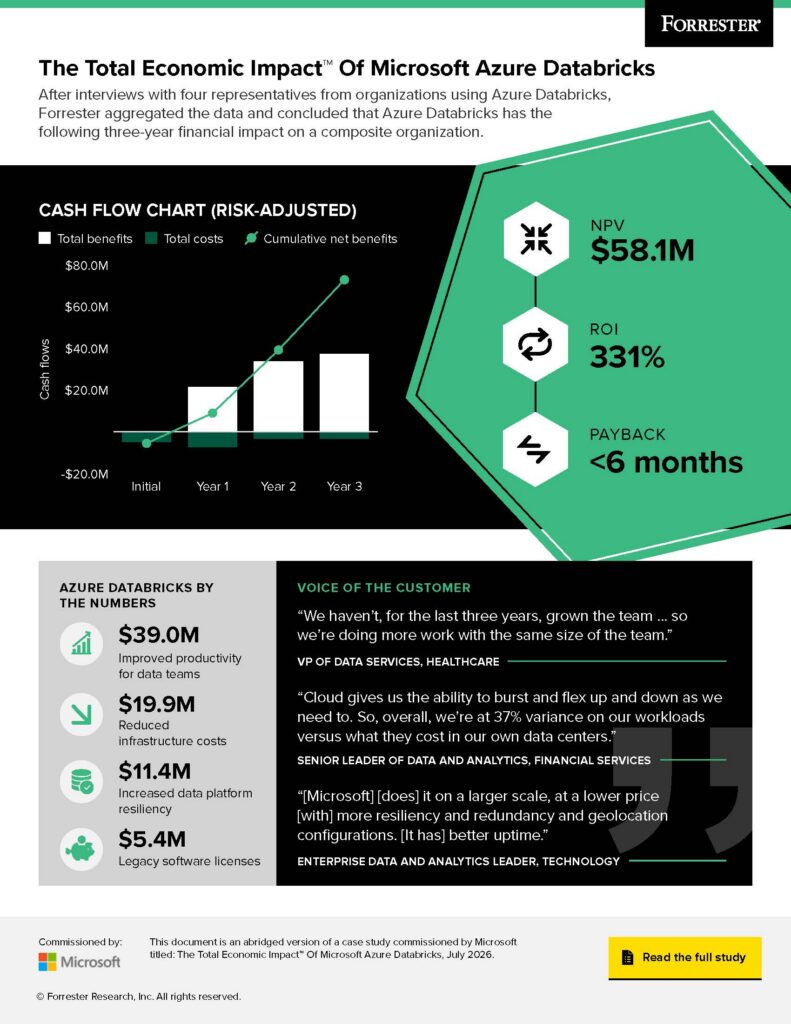
We consistently hear common realities from leaders: data infrastructure is a critical accelerator for AI adoption, and many organizations haven’t been able to fully realize the value of their data. 60% of AI projects unsupported by AI-ready data will be abandoned.1 Modernization is a key enabler of AI readiness, with 75% of organizations that migrated to Azure reporting significantly reduced barriers to AI and machine learning.2

This highlights a clear opportunity. Organizations that modernize with fully managed, AI-optimized databases can unlock faster performance, real-time insights, and the ability to build intelligent applications and agents at scale.

Today, I am excited to introduce Azure Accelerate for Databases—an offering designed to help organizations modernize their databases and build AI‑ready capabilities on Azure, faster and with greater confidence. Save up to 35% (vs. pay-as-you-go) with the savings plan for databases, receive delivery funding and Azure credits, and benefit from zero-cost delivery support. Azure Accelerate for Databases brings together expert guidance, investments, savings, and skilling into a single offering, helping teams move from legacy constraints to systems ready to support real-time, intelligent applications. 

Explore Azure Accelerate for Databases

Why Azure Accelerate for Databases?

Azure Accelerate for Databases is built for organizations modernizing at scale while preparing both their platforms and teams for what comes next. Modernization initiatives are often complex, requiring time, investment, and coordination across teams, while legacy environments can leave data fragmented and difficult to operationalize for AI.

Azure Accelerate for Databases is designed to simplify this journey. It brings together Microsoft Cloud Accelerate Factory delivery support, Azure specialized partner expertise, flexible savings and investments, AI-enhanced tooling and assessments, and role-based skilling into a cohesive experience.

The goal is straightforward: to help organizations move faster, reduce friction, and turn database modernization into a durable, AI-enabling strategy.

What you can do with Azure Accelerate for Databases

With Azure Accelerate for Databases, customers can:

Access trusted experts

Modernization outcomes depend on execution as much as strategy. With the right expertise in place, organizations can reduce risk and move forward with greater confidence.

Engage with Microsoft’s Cloud Accelerate Factory for zero-cost delivery support.3

Tap into Azure’s specialized partner ecosystem for deep technical and industry expertise.

Use assessments and AI-enhanced tooling to guide modernization and new development.

Unlock savings and investments

This removes financial barriers so customers can modernize faster, with more predictable economics and more flexibility to keep momentum as needs evolve.

Access savings up to 35% (vs. pay-as-you-go) with Savings Plan for Databases.

Advance your project with delivery funding.

Lower initial costs with Azure credits.4

How the Savings Plan for Databases works

The savings plan for databases5 offers a flexible, spend-based pricing model that adapts to evolving database needs. Customers commit to a fixed hourly spend, and savings are automatically applied to the most valuable usage each hour on select services. This helps reduce the complexity of managing multiple reservations and supports scaling without managing individual SKUs, regions, or configurations. When usage exceeds the commitment, pay-as-you-go pricing applies—helping costs remain predictable as usage grows.

Empower skilled teams

Modernization succeeds when teams can operate and innovate confidently. This helps organizations build durable capability—not just complete a project.

Build capable and confident teams with free, on-demand, self-paced skilling content.

Grow skills with on‑demand, expert‑led training.

Cultivate technical specialization with 50% discounts on certification exams.6

One example is Thomson Reuters, which modernized its tax preparation platform by migrating more than 18,000 databases, totaling over 500 terabytes of data, to Azure SQL Managed Instance. The goal was not only to address performance and scalability challenges during peak tax season, but to establish a more resilient and reliable data foundation for the future.

Running on Azure has helped improve application performance and scalability for 7,000 tax firms and 70,000 users. With a modern, fully-managed platform in place, Thomson Reuters is now better positioned to scale services and support continued innovation. The migration was accelerated through Microsoft’s Cloud Accelerate Factory, the zero-cost delivery benefit of Azure Accelerate, which provided hands-on engineering support, automation, and structured execution to help reduce risk and streamline the transition at scale.

Azure Accelerate for Databases is designed to support this kind of modernization progress, so they can build a stronger data foundation for AI.

Get started with Azure Accelerate for Databases

Modernizing your database estate is a critical step in preparing for AI. Azure Accelerate for Databases is designed to make that step more achievable by bringing together the resources, expertise, and investments needed to move forward with confidence.

To learn more, visit the Azure Accelerate for Databases page and explore savings, as well as access expert-led resources.

Join us at the Migrate & Modernize Summit (April 23 and on demand) to learn more about modernizing your database estate.

For more details, connect with your Microsoft account team.

Get expert-led resources for modernizing your database estate

1Lack of AI-Ready Data Puts AI Projects at Risk

2The Total Economic Impact™ Of Migrating To Microsoft Azure For AI-Readiness. Commissioned study.

3Zero‑cost delivery support for eligible customers through Microsoft‑funded programs. Availability and eligibility criteria apply.

4Eligible customers may receive delivery funding (for partner-led services) and Azure credits through approved Azure Accelerate programs. Funding is subject to application, project scope, and regional availability.

5Customers may see savings estimated to be between 0% and 35%. The 35% savings estimate is based on one Azure SQL Database serverless running for 12 months at a pay-as-you-go rate versus a reduced rate for a 1-year savings plan. Based on Azure pricing as of March 2026. Prices are subject to change. Actual savings may vary based on location, database service, and/or usage.

6Skilling benefits are subject to eligibility, approval, and availability.
The post Introducing Azure Accelerate for Databases: Modernize your data for AI with experts and investments appeared first on Microsoft Azure Blog.
Quelle: Azure

Microsoft Discovery: Advancing agentic R&D at scale

Transforming R&D with agentic AI: Introducing Microsoft Discovery

Read the blog

Over the past year, we’ve made significant progress with Microsoft Discovery by working closely with research and development (R&D) organizations. Today, we’re sharing how those efforts are translating into real momentum for customers and partners, while also expanding preview access to Microsoft Discovery. This next phase reflects what we’ve learned as we continue to broaden access to enterprise-grade, agentic AI capabilities for R&D. The Microsoft Discovery platform continues to evolve with new capabilities, expanded partner interoperability, and a growing set of results with real-world scientific outcomes and engineering transformation. We believe what comes next can meaningfully change how R&D teams operate and empower them to achieve more.

Learn how to get started with Microsoft Discovery

The era of agentic AI for research and development 

Agentic AI opens a new chapter for R&D where autonomous agent teams, guided by human expertise, perform the core research and engineering tasks in a redefined agentic loop. Specialized agents can reason on top of vast amounts of organizational and public-domain knowledge, create hypotheses on an expanded search space, test and validate those hypotheses at scale, analyze the results, and feed conclusions into iterative loops. Empowering science and engineering experts with agentic AI has the potential to reshape the future of science and engineering, enabling organizations to lead boldly in the new Frontier R&D era.

This fundamental shift requires a deep transformation that encompasses both technological and organizational challenges. Scientific discovery has always been defined by ambition and the relentless pursuit of what comes next—a more sustainable material, a cleaner source of energy, a more effective treatment. But for many R&D teams the hardest work can begin after an idea shows promise. Turning concepts into outcomes requires repeated development cycles that involve reformulating candidates as new datasets emerge, re-engineering existing materials to meet evolving regulatory and performance requirements, or adjusting designs when performance, yield, or manufacturability fall short. As R&D grows more complex, tooling must evolve to help close the distance between what researchers and engineers want to pursue and what they can practically deliver.

Earlier generations of AI offered incremental relief through faster search and better retrieval, but lacked the deeper reasoning that genuinely complex, multi-disciplinary science demands. Tradeoffs across cost, performance, yield, compliance, and timelines must be revisited repeatedly as development progresses. But the convergence of large-scale reasoning models, agentic AI architectures, and high-performance cloud infrastructure has created a genuine opportunity to rethink how R&D work gets done—not only to improve existing processes at the margins, but to help teams iterate faster and move from hypothesis to candidate development to outcome with greater confidence.

Figure 1

When Microsoft Discovery was introduced in private preview last year, it was an early expression of that possibility: an agentic AI platform purpose-built for R&D, bringing together the reasoning depth and collaborative intelligence that complex, real-world R&D requires. The response from engineers and researchers across life sciences, chemistry and materials science, physics, semiconductors, and other fields made clear that the need was real and the approach was right.

The Microsoft Discovery platform 

Microsoft Discovery is an extensible platform that brings together agentic orchestration, advanced reasoning, a graph-based knowledge foundation, and high-performance computing. It helps drive the three principles outlined in Figure 1 for effective agentic discovery—enabling agent empowerment, discovery loop automation, and quality at scale. Because it is built on Microsoft Azure’s enterprise cloud infrastructure, Microsoft Discovery is designed to operate within the security, compliance, transparency, and governance frameworks used to manage sensitive real-world R&D environments.

Figure 2

Agents are equipped with a broad range of digital, physical, and analytical tools used across R&D. This includes in silico experimentation environments such as high-performance compute (HPC) clusters, specialized large quantitative models (LQMs) and agents, and potential future integration with quantum capabilities as they become applicable to commercial R&D. It also allows interoperability with physical labs, facilitating the lab procedure generation and even direct operation with robotics, lab instrumentation, and Internet of Things (IoT)-enabled devices that agents can operate under human oversight.

At the heart of Microsoft Discovery is the Discovery Engine that mimics the scientific method where specialized agents reason over large amounts of knowledge, generate hypotheses, and validate them in a complex tree across a vast search space. The Discovery Engine connects proprietary research data with external scientific literature—not solely to retrieve isolated facts but to reason across conflicting theories, experimental results, and domain-specific assumptions in a way that reflects how science actually works. This contextual depth is what separates Microsoft Discovery from general-purpose AI tools and enables the platform to function as a genuine thinking partner across the full arc of a research program.

Built-in governance controls help ensure that agent driven research remains aligned with strategic priorities, security and compliance standards, and safety requirements. These systems provide centralized management, audit trails, and checkpoints that help maintain reliability as agentic throughput grows. The platform is extensible by design which enables integration with existing business tools and assets, partner solutions, and open-source models. Integration with Microsoft 365, Microsoft Foundry, and Microsoft Fabric enables organizations to interoperate across business agents, enterprise data, and institutional knowledge.

Real-world impact of Microsoft Discovery 

Previously we shared how a team of Microsoft researchers leveraged advanced AI models and HPC tools from Microsoft Discovery to identify a novel, non-PFAS, immersion datacenter coolant prototype in about 200 hours. We’re excited to share a few examples of how customers have been using the platform during preview.

Syensqo

A global leader in advanced materials and specialty chemicals, Syensqo is advancing a bold, multi-year transformation of its technology landscape to accelerate data-driven science, advanced simulation, and AI-enabled discovery. Building on early success with Microsoft Discovery, Syensqo is now scaling these capabilities enterprise-wide to unlock greater scientific and business impact. This next phase focuses on modernizing R&D knowledge foundations, expanding access to scalable, cost-efficient, cloud-based compute, and establishing a unified operating model that brings together data, high-performance computing, and emerging agentic AI to power the future of innovation.

As Microsoft Discovery workflows gained momentum, Syensqo expanded its ambition to scale these capabilities across both R&D and commercial organizations, unlocking new opportunities for end-to-end innovation. This evolution is enabling teams to unify scientific and business datasets, scale simulation environments in line with increasingly complex development needs, and integrate engineering workflows within a connected digital ecosystem. Together, these advancements are establishing a strong, future-ready foundation to accelerate innovation-led growth—from early-stage discovery through engineering and large-scale formulation. 

To realize this vision, Syensqo is advancing its science and commercial data and simulation platforms on Azure. By centralizing critical datasets within a governed, enterprise-grade data backbone and extending Microsoft Discovery workflows onto highly scalable cloud compute, the company is establishing a modern, standardized operating model for innovation. This shift enables more seamless collaboration, supports advanced analytics and simulation at scale, and lays the groundwork for next-generation, AI-powered workflows across priority research and innovation (R&I) domains.

We are entering a new phase of our partnership with Microsoft, focused on scaling AI agents across research, sales and marketing to drive near-term growth. By connecting customer demand to scientific development and back to market execution, agentic AI is enabling faster cycles, sharper prioritization, and tangible impact on revenue growth and business performance.” 

—Mike Radossich, Chief Executive Officer (CEO), Syensqo

GigaTIME  

Modern oncology increasingly depends on understanding tumors not only by appearance, but by the biological signals that shape cell behavior, immune response, and treatment outcomes. GigaTIME addresses this need by using AI to infer spatially resolved tumor microenvironment signals from routine hematoxylin and eosin (H&E) pathology slides. This approach makes insights such as immune infiltration, checkpoint context, and tumor proliferation more accessible at scale without the cost and throughput constraints of experimental assays. GigaTIME and its outputs within Microsoft Discovery are intended for research use only. They are not a medical device and are not intended for clinical diagnosis, treatment, prevention, or patient-management decisions. 

The impact of GigaTIME increases when its outputs are embedded into real research workflows. Within Microsoft Discovery, virtual multiplex immunofluorescence (mIF) predictions move beyond standalone visualizations and become inputs to ongoing scientific reasoning. Spatial phenotypes can be generated consistently across cohorts, localized to single cell context, and connected to supporting evidence such as literature, biomarkers, and downstream endpoints. This allows researchers to interpret results systematically, question assumptions, and refine biological hypotheses over time.

Microsoft Discovery supports this work in a way that is reproducible, scalable, and governed end to end. GigaTIME can be used alongside additional models, data sources, and tools within a shared environment that supports iteration, comparison, and validation. Rather than accelerating a single analytical step, Discovery supports a full discovery loop—where spatial biology informs hypotheses, hypotheses guide validation, and results feed the next cycle of learning with clarity and confidence.

Learn more about the GigaTIME and Microsoft Discovery integration to see how virtual mIF outputs are applied within Microsoft Discovery for oncology R&D.

PhysicsX

PhysicsX, a leader in physics AI for industrial engineering and manufacturing, is partnering with Microsoft to bring agentic engineering into production through Microsoft Discovery. At the core of this collaboration is the PhysicsX platform—combining Large Physics Models and AI-native workflows to deliver near-real-time simulation by inference across the full engineering lifecycle.

Integrated into Discovery’s agentic environment, the PhysicsX platform enables engineers to move beyond sequential, solver-driven workflows and explore significantly larger design spaces, evaluating thousands of manufacturable candidates in days, without compromising physical fidelity.

The collaboration is already delivering impact at Microsoft Surface. Faced with tightly coupled constraints across thermal performance, acoustics, and form factor, the Surface engineering team used the PhysicsX platform through Discovery to reimagine their cooling fan design process. What previously required weeks of simulation and manual setup is now compressed into days. Discovery agents orchestrate the generation, evaluation, and optimization of thousands of geometries, surfacing high-performing, production-ready designs for validation.

The result is a step change in engineering productivity: faster iteration, broader design-space coverage, and more confident decision-making. The approach is now being extended across additional components in the Surface portfolio.

Engineering is still constrained by workflows built for the pre-AI era. This partnership changes that. PhysicsX’s frontier physics AI models, combined with Microsoft Discovery’s agentic orchestration and Azure infrastructure, give engineers the ability to explore design spaces that were previously out of reach—at the speed and scale that modern industrial development demands.

—Jacomo Corbo, CEO, PhysicsX

Synopsys

Synopsys is a leader in electronic design automation (EDA), computer aided engineering (CAE) tools, and intellectual property (IP), and plays a central role in the design and development of the most complex chips and systems for the leading semiconductor and systems companies of the world.  

Synopsys and Microsoft have been partnering since 2019, helping pioneer software-as-a-service (SaaS) models on Microsoft Azure. Synopsys also launched the first Silicon Copilot in collaboration with Microsoft and is continuing that journey by leveraging Microsoft Discovery to roll out solutions for chip design.

The semiconductor industry is facing an unprecedented set of challenges—demand for high performance chips is growing exponentially, complexity of sustainable, power-efficient chip design, and a critical shortage of skilled engineering. Agentic systems can help mitigate these challenges while accelerating design cycles.

Synopsys agentic AI stack with multi-agent workflows built on AgentEngineer™ technology, supported by Microsoft Discovery, have defined a new paradigm for the industry.

Chip design sits at the intersection of extreme complexity and outsized impact—exactly where AI can make the biggest difference. By bringing together Synopsys’ AI‑driven design leadership with Microsoft Discovery, we are enabling agentic AI to redefine semiconductor engineering workflows, unlock step‑function productivity gains, and accelerate the next era of technology innovation.

—Ravi Subramanian, Chief Product Management Officer, Product Management & Markets Group, Synopsys

A growing ecosystem

Microsoft Discovery works with an expanding ecosystem of partners offering integrated tools and specialized expertise.

Expanding what is possible for R&D 

Expanding the preview marks an important step in making agentic AI available to a broader set of R&D organizations. Microsoft Discovery reflects our belief that the next generation of scientific progress can come from systems that combine human expertise with AI that can reason, plan, and act at scale. 

We look forward to partnering with organizations that want to rethink how discovery happens and to help shape the future of enterprise R&D. 

For organizations looking to get started with Microsoft Discovery be sure to review the technical documentation to understand requirements, onboarding prerequisites, and infrastructure considerations.

Get started with Microsoft Discovery
Learn how Microsoft Discovery enables agent‑driven discovery across complex, governed R&D environments.

Explore more

Microsoft Discovery is offered in preview. Features, availability, integrations, and performance characteristics described in this post may change prior to, or without, general availability and are not commitments. Statements about future capabilities (including any potential quantum integration) are forward-looking and subject to change. Customer and internal outcomes described reflect specific workflows and data; individual results will vary. 
The post Microsoft Discovery: Advancing agentic R&D at scale appeared first on Microsoft Azure Blog.
Quelle: Azure

Optimize object storage costs automatically with smart tier—now generally available

We are excited to announce the general availability (GA) of smart tier for Azure Blob and Data Lake Storage. Smart tier is a fully managed, automated tiering capability for Azure Blob Storage and Data Lake Storage that helps optimize storage costs without ongoing operational effort. By continuously optimizing data placement, smart tier ensures your storage costs are aligned with actual usage.

Get in-depth details about smart tier

As data estates expand and access patterns evolve, managing lifecycle rules at scale becomes complex. Customers need automated, continuous tiering to keep costs aligned with usage.

Smart tier continuously evaluates your data access patterns and automatically moves objects across the hot, cool, and cold tiers to keep your costs aligned with usage without manual configuration.

Since launching the public preview of smart tier at Ignite in November 2025, customers and partners have adopted it across a range of data estates and over 50% of smart-tier–managed capacity has automatically shifted to cooler tiers based on actual access patterns:

We see a significant and measurable benefit from adopting smart tier in Azure Storage for our Azure Data Explorer (ADX) clusters. By intelligently placing data in the most cost‑effective tier based on actual usage patterns, smart tier allows us to optimize storage spend without sacrificing performance. Hot data remains instantly accessible for query workloads, while cooler, less frequently accessed data is automatically shifted to lower‑cost tiers. Smart tier effectively removed the guesswork from storage optimization, enabling us to focus on delivering insights rather than managing data placement.
Brad Watts, Principal PM for Azure Data Explorer

The Azure Blob and Data Lake Storage partner ecosystem is also integrating smart tier into their solutions:

Smart Tier represents a major step forward in simplifying how enterprises optimize storage in the cloud. The ability to automate tiering while maintaining resilience and predictable economics is highly complementary to Qumulo’s data services on Azure. Together with Microsoft, we’re enabling customers to modernize file workloads on Azure while reducing operational complexity and improving long‑term cost efficiency.
Brandon Whitelaw, SVP and Head of Product at Qumulo

Smart tier is generally available today in nearly all zonal public cloud regions, supporting both Azure Blob and Data Lake Storage.

How smart tier makes tiering decisions

Smart tier continuously evaluates the last access time of each individual object on the storage account where smart tier is enabled.

Frequently accessed data stays in the hot tier to support performance and transaction efficiency; inactive data transitions to the cool tier after 30 days and to the cold tier after an additional 60 days. When data is accessed again, it is immediately promoted back to hot and the tiering cycle restarts. This means your datasets remain in the most cost-effective tier automatically, removing the need to predict access patterns.

Read and write operations against an object, i.e. Get Blob or Put Blob operations are restarting the tiering cycle. Metadata operations, i.e. Get Blob Properties, are not impacting transitions. These static tiering rules are part of the underlying service and ensure automatic optimizations without the need for manual maintenance.

Setting up smart tier

Enabling smart tier is straightforward and designed to minimize change management while delivering immediate cost-optimization benefits:

During storage account creation, just select smart tier as the default access tier through the storage account configuration for any storage account with zonal redundancy. This is supported both via API and the Azure portal.

Enable existing accounts with zonal redundancies by switching the blob access tier from default to smart through the same tooling.

Let Azure optimize automatically: Objects inheriting the default tier are continuously managed without manual interventions needed.

Please note: Smart tier doesn’t support legacy account types such as Standard general-purpose v1 (GPv1) and is not applicable on page or append blobs.

For objects managed by smart tier, you pay standard hot, cool, and cold capacity rates, without additional charges for tier transitions, early deletion, or data retrieval. Moving existing objects into smart tier does not incur tier-change fees; a monitoring fee covers the orchestration.

Over time, automated down-tiering of inactive data combined with smart tier’s simplified billing can translate into meaningful savings at scale.

Best practices for maximizing smart tier value

After enabling smart tier on the account level, you can explicitly pin objects that you don’t want to be managed by smart tier to other tiers. No monitoring fee will apply to those objects.

Don’t exclude small objects. Objects less than 128 KiB stay in hot, don’t tier down, and don’t incur the monitoring fee. If an object later grows to equal to or greater than 128 KiB, smart tier policies apply automatically.

Common pitfall: Avoid trying to influence tiering behavior using lifecycle rules or other tier optimization mechanisms for smart tier–managed objects.

Based on patterns observed across multiple large smart tier preview deployments, customers commonly see the following outcomes after enabling smart tier:

Smart tier adoption for a large analytics workload

During public preview, a large data analytics customer enabled smart tier across hundreds of tebibytes of telemetry and log data with mixed and evolving access patterns.

Before enabling smart tier, the team relied on custom lifecycle rules that required frequent retuning as access patterns evolved and often led to unexpected cost spikes after re-access.

After enabling smart tier:

More than half of this customer’s managed data footprint automatically transitioned to cooler tiers based on actual usage patterns.

The team eliminated lifecycle policy management entirely, freeing engineering time.

Storage costs became more predictable and resilient to re-access spikes, since rehydration occurred automatically without retrieval or early deletion charges.

While savings vary by workload, this pattern reflects how smart tier helps align object storage costs with real usage.

Who should use smart tier?

Smart tier is well suited for organizations that:

Manage large or fast-growing object data estates.

Have mixed, evolving, or unpredictable access patterns.

Want to optimize costs without maintaining lifecycle rules.

Need data to remain online and immediately accessible, even when infrequently used.

Want safeguards against billing spikes caused by unplanned rehydration of cooler-tier datasets.

This includes analytics pipelines, data lakes, logs, telemetry, and application data where usage naturally changes over time.

Why enable smart tier now?

Reduce operational overhead: No lifecycle rules to design, test, or maintain.

Align costs with real usage: Data continuously moves to the most appropriate tier based on access patterns.

Preserve performance: Frequently accessed data remains hot; re‑access is automatic.

Simplify billing: No tier transition, early deletion, or retrieval charges within smart tier; a monthly monitoring fee occurs for each object in scope.

Scale with confidence: Built for large, evolving data estates.

What’s next for smart tier?

Smart tier is designed as a foundational capability that will continue to evolve. Upcoming improvements focus on:

Broader regional availability, including additional public cloud regions as GA rollout progresses.

Client tooling support: Watch out for upcoming releases of our Storage SDKs and tooling supporting this new capability.

Get started with smart tier

Enable smart tier during storage account creation or update an existing zonal storage account by setting smart tier as the default access tier. Once enabled, Azure continuously optimizes data placement—no ongoing configuration required.

Optimize data placement with smart tier

The post Optimize object storage costs automatically with smart tier—now generally available appeared first on Microsoft Azure Blog.
Quelle: Azure

Cloud Cost Optimization: Principles that still matter

In this article

What is cloud cost optimization and why does it still matter?How AI workloads change traditional cost optimizationCloud cost optimization best practices for AI and modern workloadsCloud cost management versus cost optimizationMeasuring value alongside cloud cost optimizationNext steps for cloud cost optimization on Azure

This blog post is the second in a multi-part series called Cloud Cost Optimization. Throughout this series, we’ll share practical strategies, best practices, and actionable guidance to help you plan, design, and manage AI investments for sustainable value and efficiency.

Cloud cost optimization continues to be a top priority for organizations of every size. As cloud environments grow and workloads scale, leaders are under constant pressure to control spend, reduce waste, and ensure that resources are being used efficiently. What was once a secondary operational concern has become a strategic capability tied directly to business performance, resilience, and long‑term growth.

At the same time, the rapid growth of AI workloads is adding a new layer of complexity to managing cloud costs. AI‑powered workloads and evolving usage patterns are transforming how organizations approach cloud optimization and investment planning. However, these changes do not replace the need for strong cost optimization practices. Instead, they make cloud cost optimization and AI cost management more critical than ever.

Maximize the return on your AI investment with Azure

This article provides a practical, evergreen overview of cloud cost optimization, how AI changes the cost landscape, and the principles organizations can apply to optimize cloud and AI workloads over time.

What is cloud cost optimization and why does it still matter?

Cloud cost optimization refers to the ongoing practice of analyzing cloud usage and making informed decisions to reduce unnecessary spend while maintaining performance, reliability, and scalability. It is not about cutting costs indiscriminately, but about ensuring that cloud resources are aligned to real workload demand and business value.

Unlike traditional IT environments, cloud platforms operate on consumption‑based pricing models. This means costs are directly tied to how resources are used, not just what is deployed. As a result, cost optimization is not a one‑time exercise. It requires continuous attention as environments evolve, workloads change, and new services are introduced.

Organizations that invest in cloud cost optimization benefit from:

Improved visibility into where cloud spend is going.

Reduced waste from underutilized or idle resources.

Better alignment between cloud usage and business needs.

Greater confidence when scaling workloads.

As cloud environments grow more complex (spanning multiple services, regions, and architectures), the importance of structured cloud cost management and optimization only increases. For organizations operating in the cloud, this makes cost optimization a foundational capability rather than an operational afterthought.

How AI workloads change traditional cost optimization

AI workloads introduce new cost dynamics that can challenge traditional cloud cost optimization approaches. While many principles still apply, the pace and variability of AI usage amplify the need for strong cost governance.

AI consumption patterns are often less predictable. Training models, running inference, and experimenting with different architectures can cause rapid fluctuations in compute and storage usage. Costs may spike during experimentation phases and stabilize later in production or shift again as models evolve.

AI development typically involves a higher degree of iteration. Teams may test multiple models, datasets, or configurations before settling on a production approach. Without strong visibility and controls, these experiments can quietly drive significant cloud costs and complicate efforts to optimize cloud costs effectively.

AI workloads often rely on specialized infrastructure and services that increase cost sensitivity. As a result, maintaining visibility and control requires intentional AI cost optimization and disciplined cloud cost management practices.

This makes cloud cost optimization even more critical in AI‑powered environments, not optional.

Cloud cost optimization best practices for AI and modern workloads

While technologies change, many cloud cost optimization best practices remain consistent across traditional and AI workloads. The key is applying them continuously and adapting them to modern usage patterns.

Visibility and usage awareness

Effective cost optimization starts with understanding how resources are being consumed. Organizations need clear insight into usage patterns across environments, workloads, and services to identify inefficiencies and optimization opportunities. Visibility is the foundation of both cloud cost management and AI cost management.

Governance guardrails

Guardrails help prevent unnecessary spend before it occurs. These can include usage boundaries, policy‑driven controls, and standardized approaches that encourage efficient resource consumption without slowing innovation. Strong governance supports sustainable cost optimization as environments scale.

Rightsizing and lifecycle thinking

Workloads change over time. Resources that were appropriate during development may be inefficient in production, or vice versa. Rightsizing and lifecycle awareness help ensure resources match actual needs at every stage, which is essential to optimizing cloud costs over the long term.

Continuous review and iteration

Cloud cost optimization is not static. Regular review cycles allow teams to adapt to changing usage patterns, new workloads, and evolving priorities, especially as AI solutions move from experimentation to scale.

These cloud cost optimization best practices apply whether organizations are optimizing traditional applications, data platforms, or AI workloads running at scale.

Cloud cost management versus cost optimization

Cloud cost management and cost optimization are closely related, but not the same.

Cloud cost management focuses on tracking, reporting, and understanding cloud spend. It answers questions like:

Where is money being spent?

How is usage trending over time?

Which workloads or services are driving costs?

Cloud cost optimization, on the other hand, is about action and decision‑making. It builds on cost management insights to determine:

Where inefficiencies exist.

What changes can reduce waste.

How to improve efficiency without compromising outcomes.

Organizations need both. Cloud cost management provides visibility, while cost optimization turns that visibility into informed decisions that improve efficiency, scalability, and resiliency (especially in AI‑heavy environments).

Measuring value alongside cloud cost optimization

Reducing cloud costs alone is rarely the goal. The real objective is ensuring that cloud and AI investments deliver sustainable value over time.

Effective cost optimization balances efficiency with outcomes. This means considering how resources contribute to workload performance, reliability, and long‑term viability (not just minimizing spend). For AI workloads, this balance is particularly important, as experimentation and innovation are essential but must still be managed responsibly.

By measuring efficiency and aligning cloud cost optimization and AI cost optimization efforts with workload value, organizations can avoid short‑term savings that undermine long‑term success. This value‑driven approach to managing cloud costs ensures optimization supports growth rather than constraining it.

Explore how Azure can help maximize your AI return on investment

Next steps for cloud cost optimization on Azure

Azure provides a broad set of resources designed to help organizations manage and optimize cloud and AI costs over time.

To explore guidance, best practices, and curated resources that support cost optimization across cloud and AI workloads, visit the solutions pages:

Maximize ROI from AI.

FinOps on Azure.

For deeper perspectives on related topics, you may also find these resources helpful:

Defining roles and responsibilities for cloud cost optimization.

Optimize your Azure costs to help meet your financial objectives.

Cost optimization is a continuous journey, one that becomes even more important as AI adoption accelerates. By applying durable principles and maintaining ongoing visibility and control, organizations can scale cloud and AI investments responsibly while maximizing long‑term value.

To go deeper, explore the Cloud Cost Optimization series for best practices and guidance on optimizing cloud and AI investments for long-term business impact.

Did you miss these posts in the Cloud Cost Optimization series?

Cloud Cost Optimization: How to maximize ROI from AI, manage costs, and unlock real business value

The post Cloud Cost Optimization: Principles that still matter appeared first on Microsoft Azure Blog.
Quelle: Azure

How Drasi used GitHub Copilot to find documentation bugs

For early-stage open-source projects, the “Getting started” guide is often the first real interaction a developer has with the project. If a command fails, an output doesn’t match, or a step is unclear, most users won’t file a bug report—they will just move on.

Drasi, a CNCF sandbox project that detects changes in your data and triggers immediate reactions, is supported by our small team of four engineers in Microsoft Azure’s Office of the Chief Technology Officer, and we move fast. We have comprehensive tutorials, but we are shipping code faster than we can manually test them.

Detect and react to your first database change using DrasiThe team didn’t realize how big this gap was until late 2025, when GitHub updated its Dev Container infrastructure, bumping the minimum Docker version. The update broke the Docker daemon connection—and every single tutorial stopped working. Because we relied on manual testing, we didn’t immediately know the extent of the damage. Any developer trying Drasi during that window would have hit a wall.

This incident forced a realization: with advanced AI coding assistants, documentation testing can be converted to a monitoring problem.

The problem: Why does documentation break?Documentation usually breaks for two reasons:

The curse of knowledgeExperienced developers write documentation with implicit context. When we write “wait for the query to bootstrap,” we know to run drasi list query and watch for the Running status, or even better—run the drasi wait command. A new user has no such context. Neither does an AI agent. They read the instructions literally and don’t know what to do. They get stuck on the “how,” while we only document the “what.”

Silent driftDocumentation doesn’t fail loudly like code does. When you rename a configuration file in your codebase, the build fails immediately. But when your documentation still references the old filename, nothing happens. The drift accumulates silently until a user reports confusion.

This is compounded for tutorials like ours, which spin up sandbox environments with Docker, k3d, and sample databases. When any upstream dependency changes—a deprecated flag, a bumped version, or a new default—our tutorials can break silently.

The solution: Agents as synthetic usersTo solve this, we treated tutorial testing as a simulation problem. We built an AI agent that acts as a “synthetic new user.”

This agent has three critical characteristics:

It is naïve: It has no prior knowledge of Drasi—it knows only what is explicitly written in the tutorial.It is literal: It executes every command exactly as written. If a step is missing, it fails.It is unforgiving: It verifies every expected output. If the doc says, “You should see ‘Success’”, and the command line interface (CLI) just returns silently—the agent flags it and fails fast.The stack: GitHub Copilot CLI and Dev ContainersWe built a solution using GitHub Actions, Dev Containers, Playwright, and the GitHub Copilot CLI.

Our tutorials require heavy infrastructure:

A full Kubernetes cluster (k3d)Docker-in-DockerReal databases (such as PostgreSQL and MySQL)We needed an environment that exactly matches what our human users experience. If users run in a specific Dev Container on GitHub Codespaces, our test must run in that same Dev Container.

The architectureInside the container, we invoke the Copilot CLI with a specialized system prompt (view the full prompt here):

A screen shot of a computer terminal:

bash

copilot -p “$(cat prompt.md)” –allow-all-tools –allow-all-paths –deny-tool ‘fetch’ –deny-tool ‘websearch’ –deny-tool ‘githubRepo’ –deny-tool ‘shell(curl *)’

# … additional deny-tool flags

–allow-url localhost –allow-url 127.0.0.1This prompt using the prompt mode (-p) of the CLI agent gives us an agent that can execute terminal commands, write files, and run browser scripts—just like a human developer sitting at their terminal. For the agent to simulate a real user, it needs these capabilities.

To enable the agents to open webpages and interact with them as any human following the tutorial steps would, we also install Playwright on the Dev Container. The agent also takes screenshots which it then compares against those provided in the documentation.

Security modelOur security model is built around one principle: the container is the boundary.

Rather than trying to restrict individual commands (a losing game when the agent needs to run arbitrary node scripts for Playwright), we treat the entire Dev Container as an isolated sandbox and control what crosses its boundaries: no outbound network access beyond localhost, a Personal Access Token (PAT) with only “Copilot Requests” permission, ephemeral containers destroyed after each run, and a maintainer-approval gate for triggering workflows.

Dealing with non-determinismOne of the biggest challenges with AI-based testing is non-determinism. Large language models (LLMs) are probabilistic—sometimes the agent retries a command; other times it gives up.

We handled this with a three-stage retry with model escalation (start with Gemini-Pro, on failure try with Claude Opus), semantic comparison for screenshots instead of pixel-matching, and verification of core-data fields rather than volatile values.

We also have a list of tight constraints in our prompts that prevent the agent from going on a debugging journey, directives to control the structure of the final report, and also skip directives that tell the agent to bypass optional tutorial sections like setting up external services.

Artifacts for debuggingWhen a run fails, we need to know why. Since the agent is running in a transient container, we can’t just Secure Shell (SSH) in and look around.

So, our agent preserves evidence of every run—screenshots of web UIs, terminal output of critical commands, and a final markdown report detailing its reasoning like shown here:

Drasi Getting Started Tutorial Evaluation

Environment

Timestamp: 2026-02-20T13:32:07.998Z

Directory: /workspaces/learning/tutorial/getting-started

Step 1: Setup Drasi Environment

Skipped as per instructions (already in DevContainer).

Verified environment setup by checking resources folder existence.

Step 2: Create PostgreSQL Source

Command: drasi apply -f ./resources/hello-world-source.yaml

………………………………………… more steps ……….………………………………

Scenario 1: hello-world-from

Initial check: “Brian Kernighan” present. (Screenshot: 09_hello-world-from.png)

Action: Insert ‘Allen’, ‘Hello World’.

Verification: “Allen” appeared in UI. (Screenshot: 10_hello-world-from-updated.png)

Result: PASSED

……………………………………………………….. more validation by playwright taking screenshots …..……………………………………………………

Conclusion

The tutorial instructions were clear and the commands executed successfully. The expected behavior matches the actual behavior observed via the Debug Reaction UI.

STATUS: SUCCESS

These artifacts are uploaded to the GitHub Action run summary, allowing us to “time travel” back to the exact moment of failure and see what the agent saw.

Screenshot of Agents report output in a folder with other files.Parsing the agent’s reportWith LLMs, getting a definitive “Pass/Fail” signal that a machine can understand can be challenging. An agent might write a long, nuanced conclusion like:

To make this actionable in a CI/CD pipeline, we had to do some prompt engineering. We explicitly instructed the agent:

In our GitHub Action, we then simply grep for this specific string to set the exit code of the workflow.

Simple techniques like this bridge the gap between AI’s fuzzy, probabilistic outputs and CI’s binary pass/fail expectations.

AutomationWe now have an automated version of the workflow which runs weekly. This version evaluates all our tutorials every week in parallel—each tutorial gets its own sandbox container and a fresh perspective from the agent acting as a synthetic user. If any of the tutorial evaluation fails—the workflow is configured to file an issue on our GitHub repo.

This workflow can optionally also be run on pull-requests, but to prevent attacks we have added a maintainer-approval requirement and a pull_request_target trigger—which means that even on pull-requests by external contributors, the workflow that executes will be the one in our main branch.

Running the Copilot CLI requires a PAT token which is stored in the environment secrets for our repo. To make sure this does not leak, each run requires maintainer approval—except the automated weekly run which only runs on the main branch of our repo.

What we found: Bugs that matterSince implementing this system, we have run over 200 “synthetic user” sessions. The agent identified 18 distinct issues including some serious environment issues and other documentation issues like these. Fixing them improved the docs for everyone, not just the bot.

Implicit dependencies: In one tutorial, we instructed users to create a tunnel to a service. The agent ran the command, and then—following the next instruction—killed the process to run the next command.The fix: We realized we hadn’t told the user to keep that terminal open. We added a warning: “This command blocks. Open a new terminal for subsequent steps.”Missing verification steps: We wrote: “Verify the query is running.” The agent got stuck: “How, exactly?”The fix: We replaced the vague instruction with an explicit command: drasi wait -f query.yaml.Format drift: Our CLI output had evolved. New columns were added; older fields were deprecated. The documentation screenshots still showed the 2024 version of the interface. A human tester might gloss over this (“it looks mostly right”). The agent flagged every mismatch, forcing us to keep our examples up to date.AI as a force multiplierWe often hear about AI replacing humans, but in this case, the AI is providing us with a workforce we never had.

To replicate what our system does—running six tutorials across fresh environments every week—we would need a dedicated QA resource or a significant budget for manual testing. For a four-person team, that is impossible. By deploying these Synthetic Users, we have effectively hired a tireless QA engineer who works nights, weekends, and holidays.

Our tutorials are now validated weekly by synthetic users—try the Getting Started guide yourself and see the results firsthand. And if you’re facing the same documentation drift in your own project, consider GitHub Copilot CLI not just as a coding assistant, but as an agent—give it a prompt, a container, and a goal—and let it do the work a human doesn’t have time for.
The post How Drasi used GitHub Copilot to find documentation bugs appeared first on Microsoft Azure Blog.
Quelle: Azure




