Trivy, KICS, and the shape of supply chain attacks so far in 2026

Catching the KICS push: what happened, and the case for open, fast collaboration

In the past few weeks we’ve worked through two supply chain compromises on Docker Hub with a similar shape: first Trivy, now Checkmarx KICS. In both cases, stolen publisher credentials were used to push malicious images through legitimate publishing flows. In both cases, Docker’s infrastructure was not breached. And in both cases, the software supply chain of everyone who pulled the compromised tags was briefly exposed.

This is our account of what happened with KICS, what affected users should do, and what the pattern says about where defenders need to invest.

What happened

On April 22, 2026 at approximately 12:35 UTC, a threat actor authenticated to Docker Hub using valid Checkmarx publisher credentials and pushed malicious images to the checkmarx/kics repository. Five existing tags were overwritten to malicious digests (latest, v2.1.20, v2.1.20-debian, alpine, debian) and two new tags (v2.1.21, v2.1.21-debian) were created. The images were built from an attacker-controlled source repository, not from Checkmarx’s.

The poisoned binary kept the legitimate scanning surface intact and added a quiet exfiltration path. Scan output was collected, encrypted, and sent to attacker-controlled infrastructure at audit.checkmarx[.]cx, with the User-Agent KICS-Telemetry/2.0. Because KICS scans Terraform, CloudFormation, Kubernetes and similar configuration files, its output routinely contains secrets, credentials, cloud resource names, and internal topology. 

Affected malicious digests (any one of these in your pull history should be treated as malicious):

For alpine, v2.1.20, v2.1.21 -> Index manifest digest: sha256:2588a44890263a8185bd5d9fadb6bc9220b60245dbcbc4da35e1b62a6f8c230d

Image digest (amd64): sha256:d186161ae8e33cd7702dd2a6c0337deb14e2b178542d232129c0da64b1af06e4
Image digest (arm64): sha256:415610a42c5b51347709e315f5efb6fffa588b6ebc1b95b24abf28088347791b

For debian, v2.1.20-debian, v2.1.21-debian -> Index manifest digest: sha256:222e6bfed0f3bb1937bf5e719a2342871ccd683ff1c0cb967c8e31ea58beaf7b

Image digest (amd64): sha256:a6871deb0480e1205c1daff10cedf4e60ad951605fd1a4efaca0a9c54d56d1cb
Image digest (arm64): sha256:ff7b0f114f87c67402dfc2459bb3d8954dd88e537b0e459482c04cffa26c1f07

For latest -> Index manifest digest: sha256:a0d9366f6f0166dcbf92fcdc98e1a03d2e6210e8d7e8573f74d50849130651a0

Image digest (amd64): sha256:26e8e9c5e53c972997a278ca6e12708b8788b70575ca013fd30bfda34ab5f48f

Image digest (arm64): sha256:7391b531a07fccbbeaf59a488e1376cfe5b27aef757430a36d6d3a087c610322

If your CI ran kics against any repository with credentials in scope during the exposure window, rotate those credentials now. Re-pull checkmarx/kics by digest, not tag, and pin your CI to the digest so a future overwrite cannot silently affect you again. Purge the malicious digests from local caches, CI runners, pull-through registries, and mirrors: a clean pull won’t remove what’s already been cached. Check egress logs for connections to audit.checkmarx[.]cx, or outbound traffic with the KICS-Telemetry/2.0 User-Agent, which are strong indicators that exfiltration occurred on your infrastructure.

The affected digests are disabled, the repository has been restored to its last known-good state, and pulls of checkmarx/kics today return the legitimate March 3, 2026 image. The publisher account used to push the malicious images has been suspended, and we’ve notified the small number of users our telemetry shows pulled the compromised digests.Socket’s technical analysis of the issue is here. Their post also covers what appears to be a broader Checkmarx compromise, including recent VS Code extension releases, which is worth reading if your developers use those extensions.

How we caught this breach

Within about half an hour of the push, a new image on a repository we monitor triggered a review. A check against the upstream source found no matching release, and the provenance showed the image had been built from a different source repository created one day before the push. That was enough to quarantine the repository and start forensics with Socket and Checkmarx.

The defense is in correlation, not any single signal. In this episode, we found a new tag without an upstream release, provenance from an unfamiliar source, and a timing pattern that did not appear to match normal publishing behavior. Since we happened to see these signals together, they bought us a narrow window in which to act. It has to be noted that layered defense shortens the window between push and takedown, it does not prevent the push.

The bar for this kind of attack has collapsed

The uncomfortable thing about this incident, and Trivy before it, is how little sophistication incidents such as these require these days. A stolen credential from an IDE extension compromise, a target chosen from a public profile, a push through the normal publishing flow, and the attacker is inside the software supply chain of every organization that pulls that tag. Our assumption is this attack did not require any zero-days, novel tradecraft, or nation-state level budgets. The ingredients are stolen credentials and time, and both are abundant right now.

Every registry, every package manager, and every publisher of any consequence is in the firing line, including Docker. This isn’t a Checkmarx problem or a Hub problem or an npm problem. It’s the new baseline, and defenders who aren’t planning for it as the default case are already behind.

There are two implications for our ecosystem.

Credential hygiene at the publishing boundary matters more than it used to: fine-grained tokens scoped to a single registry, shorter credential lifetimes, clean separation between personal and publisher identities.

And that no single layer will catch all of this. Publishing-time verification, provenance, signatures, registry-side monitoring, deep package inspection (the kind Socket does to catch malicious behavior in dependencies), runtime egress controls, and cross-registry signal correlation each have to do some of the work, because any of them alone will miss cases the others catch.

A note on where this is structurally harder

In the Docker Hardened Images catalog, images are built by Docker from source, with verified provenance and signed releases produced through a hardened build pipeline. The class of attack described above, where a valid publisher credential pushes a tag that diverges from its upstream source, is structurally much harder to execute against an image built this way. There is no external credential that can substitute its way in; the provenance and the signatures have to match, or the image doesn’t ship. The DHI catalog is expanding, and we’re investing in this layer precisely because of the scenario and reasons explored in this blog. 

No one catches this alone

The reason this incident got caught quickly, the reason Socket was able to produce a technical analysis within hours, and the reason Checkmarx’s response could move in parallel with ours, is that all three teams shared signals and samples in real time. The Trivy response looked the same, as did the rapid notification to GitHub about the attacker-controlled source repository.

This is the posture the ecosystem needs more of, not less. Supply chain attackers are routing  across registries, IDE marketplaces, source hosts, and CI systems in hours. Defenders who don’t share signals across those same boundaries are operating from a point of disadvantage.  Formal standards for cross-registry coordination are still emerging, and they will matter eventually. What’s kept the windows short so far has been teams working with a spirit of openness, willingly sharing what they’re discovering, in real time.

Docker will keep investing in layered defenses on Hub, keep extending publishing-time verification to more of the catalog, and keep showing up to share signals, whether this is across a partner’s incident channel, a peer registry’s investigation, or the rooms where a more durable framework for coordination eventually takes shape.

We want to thank the Socket research team for fast, independent analysis, and to Checkmarx for moving alongside us on a tight timeline for this one.

Further reading

Socket blog: https://socket.dev/blog/checkmarx-supply-chain-compromise

Docker Hardened Images on Docker Hub: https://hub.docker.com/hardened-images/catalog

Quelle: https://blog.docker.com/feed/

Why MicroVMs: The Architecture Behind Docker Sandboxes

Last week, we launched Docker Sandboxes with a bold goal: to deliver the strongest agent isolation in the market.

This post unpacks that claim, how microVMs enable it, and some of the architectural choices we made in this approach.

The Problem With Every Other Approach

Every sandboxing model asks you to give something up. We looked at the top four approaches.

Full VMs offer strong isolation, but general-purpose VMs weren’t designed for ephemeral, session-heavy agent workflows. Some VMs built for specific workloads can spin up more effectively on modern hardware, but the general-purpose VM experience (slow cold starts, heavy resource overhead) pushes developers toward skipping isolation entirely.

Containers are fast and are the way modern applications are built. But for an autonomous agent that needs to build and run its own Docker containers, which coding agents routinely do, you hit Docker-in-Docker, which requires elevated privileges that undermine the isolation you set up in the first place. Agents need a real Docker environment to do development work, and containers alone don’t give you that cleanly.

WASM / V8 isolates are fast to spin up, but the isolation model is fundamentally different. You’re running isolates, not operating systems. Even providers of isolate-based sandboxes have acknowledged that hardening V8 is difficult, and that security bugs in the V8 engine surface more frequently than in mature hypervisors. Beyond the security model, there’s a practical gap: your agent can’t install system packages or run arbitrary shell commands. For a coding agent that needs a real development environment, WASM isn’t one.

Not using any sandboxing is fast, obviously. It’s also a liability. One rm -rf, one leaked .env, one rogue network call, and the blast radius is your entire machine.

Why MicroVMs

Docker Sandboxes run each agent session inside a dedicated microVM with a private Docker daemon isolated by the VM boundary, and no path back to the host.

That one sentence contains three architectural decisions worth unpacking.

Dedicated microVM. Each sandbox gets its own kernel. It’s hardware-boundary isolation, the same kind you get from a full VM. A compromised or runaway agent can’t reach the host, other sandboxes, or anything outside its environment. If it tries to escape, it hits a wall.

Private, VM-isolated Docker daemon. This is the key differentiator for coding agents. AI is going to result in more container workloads, not fewer. Containers are how applications are developed, and agents need a Docker environment to do that development. Docker Sandboxes give each agent its own Docker daemon running inside a microVM, fully isolated by the VM boundary. Your agent gets full docker build, docker run, and docker compose support with no socket mounting, no host-level privileges, none of the security compromises other approaches require. This means we treat agents as we would a human developer, giving them a true developer environment so they can actually complete tasks across the SDLC.

No path back to the host. File access, network policies, and secrets are defined before the agent runs, not enforced by the agent itself. This is an important distinction. An LLM deciding its own security boundaries is not a security model. The bounding box has to come from infrastructure, not from a system prompt.

Why We Built a New VMM

Choosing microVMs was the easy part. Running them where developers actually work was the hard part.

We looked hard at existing options, but none of them were designed for what we needed. Firecracker, the most well-known microVM runtime, was designed for cloud infrastructure, specifically Linux/KVM environments like AWS Lambda. It has no native support for macOS or Windows, full stop. That’s fine for server-side workloads, but coding agents don’t run in the cloud. They run on developer laptops, across macOS, Windows, and Linux. 

We could have shimmed an existing VMM into working across platforms, creating translation layers on macOS and workarounds on Windows, but bolting cross-platform support onto a Linux-first VMM means fighting abstractions that were never designed for it. That’s how you end up with fragile, layered workarounds that break the “it just works” promise and create the friction that makes developers skip sandboxing altogether.

So we built a new VMM, purpose-built for where coding agents actually run.

It runs natively on all three platforms using each OS’s native hypervisor: Apple’s Hypervisor.framework, Windows Hypervisor Platform, and Linux KVM. A single codebase for three platforms and zero translation layers.

This matters because it means agents get kernel-level isolation optimized for each specific OS. Cold starts are fast because there’s no abstraction tax. A developer on a MacBook gets the same isolation guarantees and startup performance as a developer on a Linux workstation or a Windows machine.

Building a VMM from scratch is not a small undertaking. But the alternative, asking developers to accept slower starts, degraded compatibility, or platform-specific caveats, is exactly the kind of asterisk that makes people run agents on the host instead. Our approach removes that asterisk at the hypervisor level.

Fast Cold Starts

We rebuilt the virtualization layer from scratch, optimizing for fast spin up and fast tear downs. Cold starts are fast. This matters for one reason: if the sandbox is slow, developers skip it. Every friction point between “start agent” and “agent is running” is a reason to run on the host instead. With near-instant starts, there is no performance reason to run outside it.

What This Means In Practice

Here’s the concrete version of what this architecture gives you:

Full development environment. Agents can clone repos, install dependencies, run test suites, build Docker images, spin up multi-container services, and open pull requests, all inside the sandbox. Nothing is stubbed out or simulated. Agents are treated as developers and given what they need to complete tasks end to end. 

Scoped access, not all-or-nothing. You define the boundary: exactly which files and directories the agent can see, which network endpoints it can reach, and which secrets it receives. Credentials are injected at runtime and outside the MicroVM boundary, never baked into the environment.

Disposable by design. If an agent goes off track, delete the sandbox and start fresh in seconds. There is no state to clean up and nothing to roll back on your host.

Works with every major agent. Claude Code, Codex, OpenCode, GitHub Copilot, Gemini CLI, Kiro, Docker Agent, and next-generation autonomous systems like OpenClaw and NanoClaw. Same isolation, same speed, one sandbox model across all of them.

For Teams

Individual developers can install and run Docker Sandboxes today, standalone, no Docker Desktop license required. 

For teams that want centralized filesystem and network policies that can be enforced across an organization and scale sandboxed execution, get in touch to learn about enterprise deployment.

The Tradeoff That Isn’t

The pitch for sandboxing has always come with an asterisk: yes, it’s safer, but you’ll pay for it in speed, compatibility, or workflow friction.

MicroVMs eliminate that asterisk. You get VM-grade isolation with cold starts fast enough that there’s no reason to skip it, and full Docker support inside the sandbox. There is no tradeoff.

Your agents should be running autonomously. They just shouldn’t be running without any guardrails.

Use Sandboxes in Seconds

Install Sandboxes with a single command.

macOSbrew install docker/tap/sbx   

Windows winget install Docker.sbx  

Read the docs to learn more.

Quelle: https://blog.docker.com/feed/
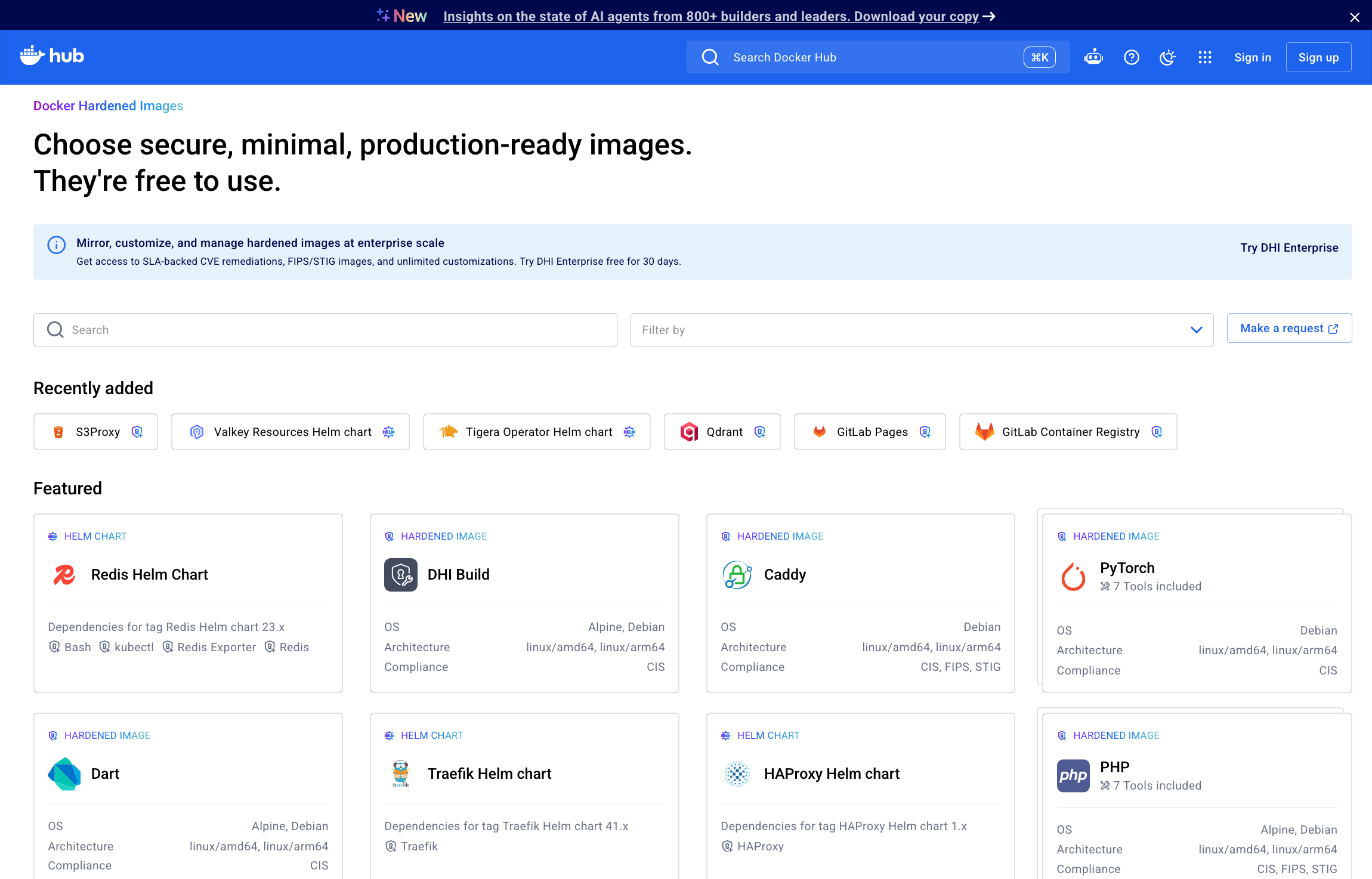
Why We Chose the Harder Path: Docker Hardened Images, One Year Later

We’re coming up on a year since launching Docker Hardened Images (DHI) this May, and crossing a milestone earlier this month made me stop and reflect on what we’ve actually been building.

Earlier this month, we crossed over 500k daily pulls of DHIs, and over 25k continuously patched OS level artifacts in our SLSA Level 3 pipeline. From the time we launched the free DHI Community tier at the end of last year, the catalog has now grown to 2,000+ hardened images, MCP servers, Helm charts, and ELS images. We continuously patch every artifact (across CVEs, distros, versions), so we’re now running over a million builds regularly, and just getting started. Catalog coverage will jump again soon, as more Debian packages, ELS images, and newer artifact types are added.

But the numbers aren’t the interesting part. What matters is how we got here.

We chose the harder path, on purpose. Every product and engineering decision we made was consistently harder to build and operate, but better for developers and for the security of the ecosystem. We made hardened images free and open source. We built a multi-distro product, so adoption doesn’t mean migrating to a vendor’s proprietary OS. We build every system package from source for distros you already run. We ship a huge range of signed attestations with every image because that’s what independent verifiability actually requires.

Along the way, we also looked closely at how the rest of the industry approaches the same problems, and found patterns in patching timelines, SBOM completeness, and advisory coverage that are worth understanding before you evaluate any hardened image provider.

We made hardened images widely accessible so every team could raise their security baseline

We wanted to make a real dent in the security posture of the internet, and that meant making hardened images widely accessible. That is why we did not put our catalog behind a gated paywall, as was the industry norm, but freely available to every developer.

Building and sustaining a hardened image pipeline at this scale isn’t trivial. We know because we’ve been doing this for over a decade with Docker Official Images, freely for the community.

With the release of DHI Community under a permissive Apache 2.0 license, we raised the baseline for security across the ecosystem. Security should not be a premium feature. That kind of impact, at scale, is only possible because the foundation is open.

We built multi-distro so adoption is drop-in, and does not impose a migration tax on you

Some vendors in this space created an entirely new Linux distribution and called it “distroless,” which is a remarkable piece of branding for what is, in practice, a proprietary OS that your teams have never run, tested, or audited. Established Linux distributions like Debian and Alpine have a name for a package repository that only tracks the latest upstream version: they call it “unstable” or “edge,” not stable.

Docker doesn’t ship its own distribution, we harden the ones you already trust. That decision optimizes for your engineering reality, not ours. The hardened image that never gets adopted provides zero security value, full stop. 

With the Docker “multi-distro” approach, we support both Debian and Alpine today, with support for more distros to come. This is actually hard to do: the Debian and Alpine ecosystems don’t just differ in packaging; they diverge in libc, dependency trees, CVE streams, patch timing, and tooling. You are effectively maintaining parallel supply chains, each with its own nuances and security posture. Every hardened image in the DHI catalog is available in both Alpine and Debian, across both amd64 and arm64 architectures, which means we build, patch, and attest each combination independently, taking on that operational burden so you don’t have to.

We regularly speak with engineering teams who evaluate proprietary distributions from other vendors and run into the same wall: your existing internal expertise, tools, tests, and pipelines are built around Alpine or Debian.

Migrating to an unfamiliar, vendor-owned OS isn’t a security upgrade, it’s an adoption project and a material line item of cost, alongside the sticker price of the hardened images subscription itself. The vendor lock-in aspect goes without saying.

The migration effort means revalidating CI pipelines, retraining platform teams, auditing an entirely new package ecosystem, and working through compatibility gaps that surface weeks into a rollout. Several teams tell us they bought the migration story, spent months on it, and are still paying for images their engineers haven’t adopted. With Docker, your teams stay on the distros they already run, which means the adoption cost is measured in hours, not quarters.

One of our customers at Attentive (Stephen Commisso, Principal Engineer) captured their experience in the phrase “200 services – zero drama”, when describing their DHI rollout:

“The rollout was completely transparent to product teams. We had zero issues across over 200 services, which was particularly impressive since we were simultaneously switching Linux distributions from Ubuntu to Debian. All the heavy lifting happened during POC.”

We build every system package from source, for the distros you already use

With the launch of Hardened System Packages, Docker builds tens of thousands of Alpine and Debian system packages from source in a SLSA Build Level 3 pipeline with cryptographic signed, full provenance. This fundamentally changes the CVE equation.

Other vendors also claim to build system packages from source. The difference is that they build them for proprietary Linux distributions that have not had the benefit of independent community scrutiny and that customers have never run in production.

Docker builds packages for Alpine and Debian, the distributions your teams already operate, already test against, and already trust. Alpine and Debian are vast ecosystems that have independent maintainers, public mailing lists, coordinated disclosure with upstream projects, and volunteer security teams that operate independently of any commercial interest. You get the security benefit of from-source patching without the compatibility cost of adopting an unfamiliar OS.

We didn’t stop at near-zero CVEs, we made every image independently verifiable

Docker’s approach to container security is built on five pillars: minimal attack surface, verifiable SBOMs, secure build provenance, exploitability context, and cryptographic verification. We distilled our product development philosophy to these ideas, because we think your security posture depends on it. Not every vendor in the hardened image market shares this philosophy.

Most vendors in this space optimize for one metric: a clean CVE scan result.

Docker obsesses over near-zero CVEs too, but we went further: we built an attestation infrastructure that gives your security team, auditors, SOC, and change advisory boards machine-readable, cryptographically signed evidence for every question they will ask about an image.

We add 17 signed attestations to every single one of our 2000+ images in the DHI catalog, because that is what it takes to give you independent verifiability:

Question

DHI included attestation(s)

What this attestation is

Why it matters to you

What’s in this image?

CycloneDX SBOM, SPDX SBOM

Machine-readable inventory of every package, version, and transitive dependency. 

First thing auditors request during compliance reviews. Both formats are included so you don’t have to convert for different toolchains.

How was it built, and can I prove it?

SLSA provenance v1, SLSA verification summary, Scout provenance, DHI Image Sources

Cryptographic proof linking every image to its exact source definition. 

Required by supply chain security policies. Used by incident responders during forensics to verify whether an image was legitimately built or injected.

What vulnerabilities exist, and what’s been assessed?

CVEs v0.1, CVEs v0.2, VEX, Scout health score

CVE scan results and per-CVE exploitability justifications attached to the image itself. 

When your GRC team prepares a FedRAMP POA&M or your security team triages a new advisory, the evidence is already on the artifact.

Is it compliant?

FIPS compliance, STIG scan

FIPS evidence and OpenSCAP-generated STIG results

Ready artifacts for FedRAMP, PCI DSS, and HIPAA audits. Typically the most expensive artifacts to produce manually. Docker generates them automatically.

Has it been checked for non-CVE risks?

Secrets scan, Virus scan, Tests

Confirms no leaked credentials, no known malware, and that the image functions as expected. 

These are the checks SOC teams and security review boards require before approving production deployment. Docker runs them on every build.

What changed?

Changelog

Signed record of what was added, removed, or patched between versions.

Change advisory boards need this to approve updates. Without it, your team is diffing images manually.

Attestations answer questions about the image, the next set of questions are about the vendor.

What to ask your vendor, and what we found when we asked ourselves the same questions

In a fast-moving ecosystem, CVEs will occasionally get missed, advisories will have gaps, and no vendor operating at scale will have a flawless record. What matters is whether the gaps reveal isolated incidents or a pattern. The following questions are worth asking every vendor, including Docker.

What is the extent of your vendor’s commitment to patching?

Ask your vendor how far they go to resolve vulnerabilities. Docker continuously patches CVEs across both Debian, Alpine, and several major OSS software projects, rebuilding tens of thousands of system packages and several thousand images from source. That is a significant engineering and operational investment that most vendors avoid, because it is easier to build images for a single proprietary OS.

Docker’s commitment doesn’t end at images in our catalog. When a fix doesn’t exist upstream, there are many examples of Docker’s security team creating one. For CVE-2025-12735, a 9.8 CRITICAL RCE in Kibana’s dependency chain, the affected library was unmaintained and had no patch. Docker created the fix, shipped it to customers, and contributed it to LangChain.js. The fix was released as a public npm package on November 17, 2025.

One vendor we looked at has a published CVE policy of 7-day remediation for critical CVEs, once a qualifying patch is publicly available. In this instance, their fix appeared several weeks after that qualifying patch was created by Docker and shipped by the upstream project.

This level of upstream commitment is built into how our security team operates. Docker has been a MITRE CVE Numbering Authority since 2022, part of a sustained investment in teams’ ability to identify, disclose, and fix vulnerabilities at the source.

What assurances do you have about the completeness of your SBOMs?

Ask whether your vendor’s SBOM includes compiled dependencies (Rust crates, Go modules, JavaScript packages), or just system-level packages. Ask whether you can independently verify SBOM completeness against the project’s actual dependency manifest. Docker’s SBOMs include every compiled dependency. We’ve examined images from other vendors, and as one example for Vector (observability pipeline compiled from hundreds of Rust crate dependencies) one vendor’s SBOM did not appear to include those dependencies.

If a dependency isn’t in the SBOM, vulnerabilities in that dependency are invisible to the customer’s scanner and unverifiable by the customer’s security team. When Docker’s security team identified a High-severity CVE in Vector’s Rust dependencies, it was patched and shipped the same evening.

Does your vendor’s advisory feed surface every known CVE for the packages it ships?

Ask whether you can scan the vendor’s images with a third-party scanner against public advisory data, without relying on the vendor’s own advisory feed, and still get consistent results.

Docker recommends validating with Grype, Trivy, Wiz, or Mend. When we examined a vendor’s node image: CVE-2025-9308 and CVE-2025-8262 (both affecting yarn 1.22.22) were present in the shipped image but neither appeared on the vendor’s vulnerability page or in their security advisory feed. Docker’s hardened system package for yarn 1.22.22 is built from source with patches applied for both CVEs.

If your vendor’s advisory feed has gaps, your scanner inherits those gaps, and your security team is making decisions based on incomplete data.

When a CVE is assessed as unexploitable, does your vendor provide an auditable justification?

Not every CVE warrants a patch, and every vendor makes that judgment call. The question is whether your team can see the reasoning. Docker’s security team evaluates exploitability in the context of each minimal container image and publishes every assessment transparently.

Some vendors may set advisory version ranges to values real packages never match, thereby making CVEs invisible to scanners, and not providing a justification or an audit trail.

Docker uses VEX, the CISA-backed standard for communicating exploitability, which provides a per-CVE, machine-readable justification that every customer can read and audit.

We took on the parts of supply chain security others leave behind

Beyond multi-distro support, from-source patching, and transparency, we made a set of choices that compound into a distinctive, secure, simple experience for you.

Most vendor guarantees stop at the edge of the base image. Docker takes full ownership of your customized images: you add what your environment needs, and when a CVE is patched upstream, Docker automatically rebuilds your customized image and our SLA propagates to every artifact we produce. Your customizations don’t void the security guarantee. We’ve also opened up our hardened systems packages repo so you can use those hardened packages in your own bespoke containers. 

We will be extending this same rigor to language libraries next. The dependencies your application pulls in through npm, pip, or Maven will carry the same provenance and patching guarantees as the OS layer beneath them.

And for organizations running software that upstream has stopped supporting, Extended Lifecycle Support continues delivering security patches for up to five years past end-of-life, so teams can maintain their security posture while upgrading on their own timeline.

Come join the movement

A year ago, 500k daily pulls of the DHI catalog and a million builds running regularly felt like a milestone. Today, this is the baseline.

None of this would have happened without the teams who trusted us early and pushed us hard, including Adobe, Crypto.com, Attentive, and many others. Projects like n8n.io helped us understand what it takes to operate at scale. Partners like Socket.dev, Snyk, and Mend.io are building security workflows on top of this foundation.

We are continuing to listen, iterate, and do the hard things that are better for you, because that matters. If you are thinking about supply chain security, especially given the quantity and intensity of supply chain risks AI agents bring to the mix, now is the time to raise your baseline with Docker.

Explore the Docker Hardened Images catalog and secure your supply chain here: https://www.docker.com/products/hardened-images/

For every team and developer, the open source DHI Community tier provides an immediately upgraded security posture. For businesses, we have a wide range of options that will work for your specific needs.

More resources:

DHI documentation: https://docs.docker.com/dhi/

Watch: Why n8n.io moved to DHI

Read: Medplum’s step-by-step DHI adoption playbook

Quelle: https://blog.docker.com/feed/
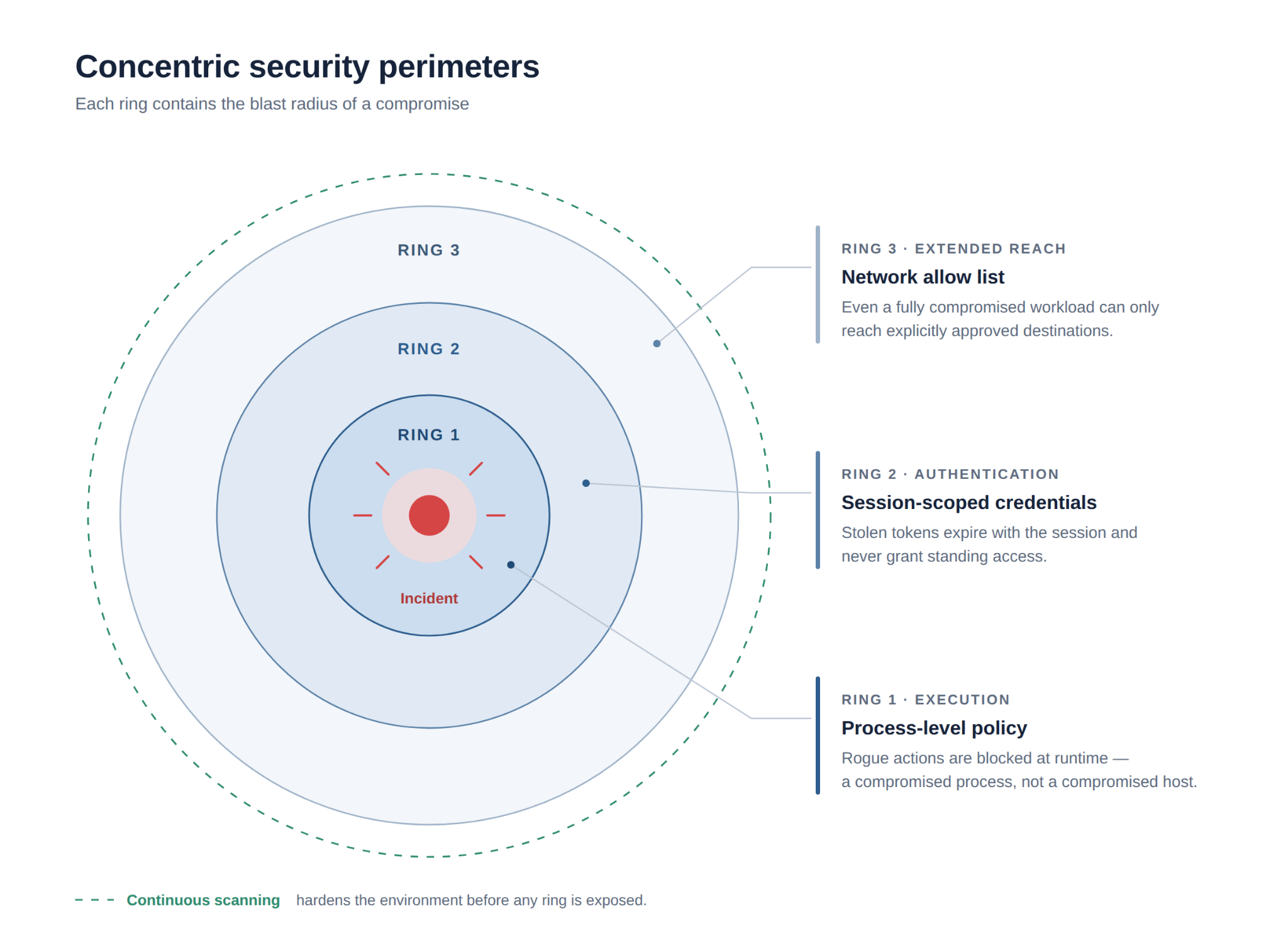
How to Analyze Hugging Face for Arm64 Readiness

This post is a collaboration between Docker and Arm, demonstrating how Docker MCP Toolkit and the Arm MCP Server work together to scan Hugging Face Spaces for Arm64 Readiness.

In our previous post, we walked through migrating a legacy C++ application with AVX2 intrinsics to Arm64 using Docker MCP Toolkit and the Arm MCP Server – code conversion, SIMD intrinsic rewrites, compiler flag changes, the full stack. This post is about a different and far more common failure mode.

When we tried to run ACE-Step v1.5, a 3.5B parameter music generation model from Hugging Face, on an Arm64 MacBook, the installation failed not with a cryptic kernel error but with a pip error. The flash-attn wheel in requirements.txt was hardcoded to a linux_x86_64 URL, no Arm64 wheel existed at that address, and the container would not build. It’s a deceptively simple problem that turns out to affect roughly 80% of Hugging Face Docker Spaces: not the code, not the Dockerfile, but a single hardcoded dependency URL that nobody noticed because nobody had tested on Arm.

To diagnose this systematically, we built a 7-tool MCP chain that can analyse any Hugging Face Space for Arm64 readiness in about 15 minutes. By the end of this guide you’ll understand exactly why ACE-Step v1.5 fails on Arm64, what the two specific blockers are, and how the chain surfaces them automatically.

Why Hugging Face Spaces Matter for Arm

Hugging Face hosts over one million Spaces, a significant portion of which use the Docker SDK meaning developers write a Dockerfile and HuggingFace builds and serves the container directly. The problem is that nearly all of those containers were built and tested exclusively on linux/amd64, which creates a deployment wall for three fast-growing Arm64 targets that are increasingly relevant for AI workloads.

Target

Hardware

Why it matters

Cloud

AWS Graviton, Azure Cobalt, Google Axion

20-40% cost reduction vs. x86

Edge/Robotics

NVIDIA Jetson Thor, DGX Spark

GR00T, LeRobot, Isaac all target Arm64

Local dev

Apple Silicon M1-M4

Most popular developer machine, zero cloud cost

The failure mode isn’t always obvious, and it tends to show up in one of two distinct patterns. The first is a missing container manifest – the image has no arm64 layer and Docker refuses to pull it, which is at least straightforward to diagnose. The second is harder to catch: the Dockerfile and base image are perfectly fine, but a dependency in requirements.txt points to a platform-specific wheel URL. The build starts, reaches pip install, and fails with a platform mismatch error that gives no clear indication of where to look. ACE-Step v1.5 is a textbook example of the second pattern, and the MCP chain catches both in minutes.

The 7-Tool MCP Chain

Docker MCP Toolkit orchestrates the analysis through a secure MCP Gateway. Each tool runs in an isolated Docker container. The seven tools in the chain are:

Caption: The 7-tool MCP chain architecture diagram

The tools:

Hugging Face MCP – Discovers the Space, identifies SDK type (Docker vs. Gradio)

Skopeo (via Arm MCP Server) – Inspects the container registry, reports supported architectures

migrate-ease (via Arm MCP Server) – Scans source code for x86-specific intrinsics, hardcoded paths, arch-locked libraries

GitHub MCP – Reads Dockerfile, pyproject.toml, requirements.txt from the repository

Arm Knowledge Base (via Arm MCP Server) – Searches learn.arm.com for build strategies and optimization guides

Sequential Thinking – Combines findings into a structured migration verdict

Docker MCP Gateway – Routes requests, manages container lifecycle

The natural question at this point is whether you could simply rebuild your Docker image for Arm64 and be done with it and for many applications, you could. But knowing in advance whether the rebuild will actually succeed is a different problem. Your Dockerfile might depend on a base image that doesn’t publish Arm64 builds. Your Python dependencies might not have aarch64 wheels. Your code might use x86-specific system calls. The MCP chain checks all of this automatically before you invest time in a build that may not work.

Setting Up Visual Studio Code with Docker MCP Toolkit

Prerequisites

Before you begin, make sure you have:

A machine with 8 GB RAM minimum (16GB recommended)

The latest Docker Desktop release

VS Code with GitHub Copilot extension

GitHub account with personal access token

Step 1. Enable Docker MCP Toolkit

Open Docker Desktop and enable the MCP Toolkit from Settings.

To enable:

Open Docker Desktop

Go to Settings > Beta Features

Caption: Enabling Docker MCP Toolkit under Docker Desktop

Toggle Docker MCP Toolkit ON

Click Apply

Step 2. Add Required MCP Servers from Catalog

Add the following four MCP Servers from the Catalog. You can find them by selecting “Catalog” in the Docker Desktop MCP Toolkit, or by following these links:

Arm MCP Server – Architecture analysis, migrate-ease scanning, skopeo inspection, and Arm knowledge base

GitHub MCP Server – Repository analysis, code reading, and pull request creation

Sequential Thinking MCP Server – Complex problem decomposition and planning

Hugging Face MCP Server – Space discovery and metadata retrieval

Caption: Searching for Arm MCP Server in the Docker MCP Catalog

Step 3. Configure the Servers

Configure the Arm MCP Server

To access your local code for the migrate-ease scan and MCA tools, the Arm MCP Server needs a directory configured to point to your local code.

Caption: Arm MCP Server configuration

Once you click ‘Save’, the Arm MCP Server will know where to look for your code. If you want to give a different directory access in the future, you’ll need to change this path.

Available Arm Migration Tools

Click Tools to view all six MCP tools available under Arm MCP Server:

Caption: List of MCP tools provided by the Arm MCP Server

knowledge_base_search – Semantic search of Arm learning resources, intrinsics documentation, and software compatibility

migrate_ease_scan – Code scanner supporting C++, Python, Go, JavaScript, and Java for Arm compatibility analysis

check_image – Docker image architecture verification (checks if images support Arm64)

skopeo – Remote container image inspection without downloading

mca – Machine Code Analyzer for assembly performance analysis and IPC predictions

sysreport_instructions – System architecture information gathering

Configure the GitHub MCP Server

The GitHub MCP Server lets GitHub Copilot read repositories, create pull requests, manage issues, and commit changes.

Caption: Steps to configure GitHub Official MCP Server

Configure Authentication:

Select GitHub official

Choose your preferred authentication method

For Personal Access Token, get the token from GitHub > Settings > Developer Settings

Caption: Setting up Personal Access Token in GitHub MCP Server

Configure the Sequential Thinking MCP Server

Click “Sequential Thinking”

No configuration needed

Caption: Sequential MCP Server requires zero configuration

This server helps GitHub Copilot break down complex migration decisions into logical steps.

Configure the Hugging Face MCP Server

The Hugging Face MCP Server provides access to Space metadata, model information, and repository contents directly from the Hugging Face Hub.

Click “Hugging Face”

No additional configuration needed for public Spaces

For private Spaces, add your HuggingFace API token

Step 4. Add the Servers to VS Code

The Docker MCP Toolkit makes it incredibly easy to configure MCP servers for clients like VS Code.

To configure, click “Clients” and scroll down to Visual Studio Code. Click the “Connect” button:

Caption: Setting up Visual Studio Code as MCP Client

Now open VS Code and click on the ‘Extensions’ icon in the left toolbar:

Caption: Configuring MCP_DOCKER under VS Code Extensions

Click the MCP_DOCKER gear, and click ‘Start Server’:

Caption: Starting MCP Server under VS Code

Step 5. Verify Connection

Open GitHub Copilot Chat in VS Code and ask:

What Arm migration and Hugging Face tools do you have access to?

You should see tools from all four servers listed. If you see them, your connection works. Let’s scan a Hugging Face Space.

Caption: Playing around with GitHub Copilot

Real-World Demo: Scanning ACE-Step v1.5

Now that you’ve connected GitHub Copilot to Docker MCP Toolkit, let’s scan a real Hugging Face Space for Arm64 readiness and uncover the exact Arm64 blocker we hit when trying to run it locally.

Target: ACE-Step v1.5 – a 3.5B parameter music generation model 

Time to scan: 15 minutes 

Infrastructure cost: $0 (all tools run locally in Docker containers) 

The Workflow

Docker MCP Toolkit orchestrates the scan through a secure MCP Gateway that routes requests to specialized tools: the Arm MCP Server inspects images and scans code, Hugging Face MCP discovers the Space, GitHub MCP reads the repository, and Sequential Thinking synthesizes the verdict. 

Step 1. Give GitHub Copilot Scan Instructions

Open your project in VS Code. In GitHub Copilot Chat, paste this prompt:

Your goal is to analyze the Hugging Face Space "ACE-Step/ACE-Step-v1.5" for Arm64 migration readiness. Use the MCP tools to help with this analysis.

Steps to follow:
1. Use Hugging Face MCP to discover the Space and identify its SDK type (Docker or Gradio)
2. Use skopeo to inspect the container image – check what architectures are currently supported
3. Use GitHub MCP to read the repository – examine pyproject.toml, Dockerfile, and requirements
4. Run migrate_ease_scan on the source code to find any x86-specific dependencies or intrinsics
5. Use knowledge_base_search to find Arm64 build strategies for any issues discovered
6. Use sequential thinking to synthesize all findings into a migration verdict

At the end, provide a clear GO / NO-GO verdict with a summary of required changes.

Step 2. Watch Docker MCP Toolkit Execute

GitHub Copilot orchestrates the scan using Docker MCP Toolkit. Here’s what happens:

Phase 1: Space Discovery

GitHub Copilot starts by querying the Hugging Face MCP server to retrieve Space metadata.

Caption: GitHub Copilot uses Hugging Face MCP to discover the Space and identify its SDK type.

The tool returns that ACE-Step v1.5 uses the Docker SDK – meaning Hugging Face serves it as a pre-built container image, not a Gradio app. This is critical: Docker SDK Spaces have Dockerfiles we can analyze and rebuild, while Gradio SDK Spaces are built by Hugging Face’s infrastructure we can’t control.

Phase 2: Container Image Inspection

Next, Copilot uses the Arm MCP Server’s skopeo tool to inspect the container image without downloading it.

Caption: The skopeo tool reports that the container image has no Arm64 build available. The container won’t start on Arm hardware.

Result: the manifest includes only linux/amd64. No Arm64 build exists. This is the first concrete data point  the container will fail on any Arm hardware. But this is not the full story.

Phase 3: Source Code Analysis

Copilot uses GitHub MCP to read the repository’s key files. Here is the actual Dockerfile from the Space:

FROM python:3.11-slim

ENV PYTHONDONTWRITEBYTECODE=1
PYTHONUNBUFFERED=1
DEBIAN_FRONTEND=noninteractive
TORCHAUDIO_USE_TORCHCODEC=0

RUN apt-get update &&
apt-get install -y –no-install-recommends git libsndfile1 build-essential &&
apt-get install -y ffmpeg libavcodec-dev libavformat-dev libavutil-dev libswresample-dev &&
rm -rf /var/lib/apt/lists/*

RUN useradd -m -u 1000 user
RUN mkdir -p /data && chown user:user /data && chmod 755 /data

ENV HOME=/home/user
PATH=/home/user/.local/bin:$PATH
GRADIO_SERVER_NAME=0.0.0.0
GRADIO_SERVER_PORT=7860

WORKDIR $HOME/app
COPY –chown=user:user requirements.txt .
COPY –chown=user:user acestep/third_parts/nano-vllm ./acestep/third_parts/nano-vllm
USER user

RUN pip install –no-cache-dir –user -r requirements.txt
RUN pip install –no-deps ./acestep/third_parts/nano-vllm

COPY –chown=user:user . .
EXPOSE 7860
CMD ["python", "app.py"]

The Dockerfile itself looks clean:

python:3.11-slim already publishes multi-arch builds including arm64

No -mavx2, no -march=x86-64 compiler flags

build-essential, ffmpeg, libsndfile1 are all available in Debian’s arm64 repositories

But the real problem is in requirements.txt. This is what I hit when I tried to install ACE-Step locally:

# nano-vllm dependencies
triton>=3.0.0; sys_platform != 'win32'

flash-attn @ https://github.com/mjun0812/flash-attention-prebuild-wheels/releases/
download/v0.7.12/flash_attn-2.8.3+cu128torch2.10-cp311-cp311-linux_x86_64.whl
; sys_platform == 'linux' and python_version == '3.11'

Two immediate blockers:

flash-attn is pinned to a hardcoded linux_x86_64 wheel URL. On an aarch64 system, pip downloads this wheel and immediately rejects it: “not a supported wheel on this platform.” This is the exact error I hit.

triton>=3.0.0 has no aarch64 wheel on PyPI for Linux. It will fail on Arm hardware.

Neither of these is a code problem. The Python source code is architecture-neutral. The fix is in the dependency declarations.

Phase 4: Architecture Compatibility Scan

Copilot runs the migrate_ease_scan tool with the Python scanner on the codebase.

Caption: The migrate_ease_scan tool analyzes the Python source code and finds zero x86-specific dependencies. No intrinsics, no hardcoded paths, no architecture-locked libraries.

The application source code itself returns 0 architecture issues — no x86 intrinsics, no platform-specific system calls. But the scan also flags the dependency manifest. Two blockers in requirements.txt:

Dependency

Issue

Arm64 Fix

flash-attn (linux wheel)

Hardcoded linux_x86_64 URL

Use flash-attn 2.7+ via PyPI — publishes aarch64 wheels natively

triton>=3.0.0

No aarch64 PyPI wheel for Linux

Exclude on aarch64 or use triton-nightly aarch64 build

Phase 5: Arm Knowledge Base Lookup

Copilot queries the Arm MCP Server’s knowledge base for solutions to the discovered issues.

Caption: GitHub Copilot uses the knowledge_base_search tool to find Docker buildx multi-arch strategies from learn.arm.com.

The knowledge base returns documentation on:

flash-attn aarch64 wheel availability from version 2.7+

PyTorch Arm64 optimization guides for Graviton and Apple Silicon

Best practices for CUDA 13.0 on aarch64 (Jetson Thor / DGX Spark)

triton alternatives for CPU inference paths on Arm

Phase 6: Synthesis and Verdict

Sequential Thinking combines all findings into a structured verdict:

Check

Result

Blocks?

Container manifest

amd64 only

Yes, needs rebuild

Base image python:3.11-slim

Multi-arch (arm64 available)

No

System packages (ffmpeg, libsndfile1)

Available in Debian arm64

No

torch==2.9.1

aarch64 wheels published

No

flash-attn linux wheel

Hardcoded linux_x86_64 URL

YES, add arm64 URL alongside

triton>=3.0.0

aarch64 wheels available from 3.5.0+

No, resolves automatically

Source code (migrate-ease)

0 architecture issues

No

Compiler flags in Dockerfile

None x86-specific

No

Verdict: CONDITIONAL GO. Zero code changes. Zero Dockerfile changes. One dependency fix is required.

Here are the exact changes needed in requirements.txt:

# BEFORE — only x86_64

flash-attn @ https://github.com/mjun0812/flash-attention-prebuild-wheels/releases/download/v0.7.12/flash_attn-2.8.3+cu128torch2.10-cp311-cp311-linux_aarch64.whl ; sys_platform == 'linux' and python_version == '3.11' and platform_machine == 'aarch64'

# AFTER — add arm64 line alongside x86_64
flash-attn @ https://github.com/mjun0812/flash-attention-prebuild-wheels/releases/download/v0.7.12/flash_attn-2.8.3+cu128torch2.10-cp311-cp311-linux_aarch64.whl ; sys_platform == 'linux' and python_version == '3.11' and platform_machine == 'aarch64'
flash-attn @ https://github.com/mjun0812/flash-attention-prebuild-wheels/releases/download/v0.7.12/flash_attn-2.8.3+cu128torch2.10-cp311-cp311-linux_x86_64.whl ; sys_platform == 'linux' and python_version == '3.11' and platform_machine != 'aarch64'

# triton — no change needed, 3.5.0+ has aarch64 wheels, resolves automatically
triton>=3.0.0; sys_platform != 'win32'

After those two fixes, the build command is:

docker buildx build –platform linux/arm64 -t ace-step:arm64 .

That single command unlocks three deployment paths:

NVIDIA Arm64 — Jetson Thor, DGX Spark (aarch64 + CUDA 13.0)

Cloud Arm64 — AWS Graviton, Azure Cobalt, Google Axion (20-40% cost savings)

Apple Silicon — M1-M4 Macs with MPS acceleration (local inference, $0 cloud cost)

Phase 7: Create the Pull Request

After completing the scan, Copilot uses GitHub MCP to propose the fix. Since the only blocker is the hardcoded linux_x86_64 wheel URL on line 32 of requirements.txt, the change is surgical: one line added, nothing removed.

The fix adds the equivalent linux_aarch64 wheel from the same release alongside the existing x86_64 entry, conditioned on platform_machine == ‘aarch64′:

# BEFORE — only x86_64, fails silently on Arm
flash-attn @ https://github.com/mjun0812/flash-attention-prebuild-wheels/releases/
download/v0.7.12/flash_attn-2.8.3+cu128torch2.10-cp311-cp311-linux_x86_64.whl
; sys_platform == 'linux' and python_version == '3.11'

# AFTER — add arm64 line alongside, conditioned by platform_machine
flash-attn @ https://github.com/mjun0812/flash-attention-prebuild-wheels/releases/
download/v0.7.12/flash_attn-2.8.3+cu128torch2.10-cp311-cp311-linux_x86_64.whl
; sys_platform == 'linux' and python_version == '3.11'
flash-attn @ https://github.com/mjun0812/flash-attention-prebuild-wheels/releases/
download/v0.7.12/flash_attn-2.8.3+cu128torch2.10-cp311-cp311-linux_aarch64.whl
; sys_platform == 'linux' and python_version == '3.11' and platform_machine == 'aarch64'

Caption: PR #14 on Hugging Face – Ready to merge

The key insight: the upstream maintainer already published the arm64 wheel in the same release. The fix wasn’t a rebuild or a code change – it was adding one line that references an artifact that already existed. The MCP chain found it in 15 minutes. Without it, a developer hitting this pip error would spend hours tracking it down.

PR: https://huggingface.co/spaces/ACE-Step/Ace-Step-v1.5/discussions/14

Without Arm MCP vs. With Arm MCP

Let’s be clear about what changes when you add the Arm MCP Server to Docker MCP Toolkit.

Without Arm MCP: You ask GitHub Copilot to check your Hugging Face Space for Arm64 compatibility. Copilot responds with general advice: “Check if your base image supports arm64”, “Look for x86-specific code”, “Try rebuilding with buildx”. You manually inspect Docker Hub, grep through the codebase, check each dependency on PyPI, and hit a pip install failure you cannot easily diagnose. The flash-attn URL issue alone can take an hour to track down.

With Arm MCP + Docker MCP Toolkit: You ask the same question. Within minutes, it uses skopeo to verify the base image, runs migrate_ease_scan on your actual codebase, flags the hardcoded linux_x86_64 wheel URLs in requirements.txt, queries knowledge_base_search for the correct fix, and synthesizes a structured CONDITIONAL GO verdict with every check documented.

Real images get inspected. Real code gets scanned. Real dependency files get analyzed. The difference is Docker MCP Toolkit gives GitHub Copilot access to actual Arm migration tooling, not just general knowledge.

Manual Process vs. MCP Chain

Manual process:

Clone the Hugging Face Space repository (10 minutes)

Inspect the container manifest for architecture support (5 minutes)

Read through pyproject.toml and requirements.txt (20 minutes)

Check PyPI for Arm64 wheel availability across all dependencies (30 minutes)

Analyze the Dockerfile for hardcoded architecture assumptions (10 minutes)

Research CUDA/cuDNN Arm64 support for the required versions (20 minutes)

Write up findings and recommended changes (15 minutes)

Total: 2-3 hours per Space

With Docker MCP Toolkit:

Give GitHub Copilot the scan instructions (5 minutes)

Review the migration report (5 minutes)

Submit a PR with changes (5 minutes)

Total: 15 minutes per Space

What This Suggests at Scale

ACE-Step is a standard Python AI application: PyTorch, Gradio, pip dependencies, a slim Dockerfile. This pattern covers the majority of Docker SDK Spaces on Hugging Face.

The Arm64 wall for these apps is not always visible. The Dockerfile looks clean. The base image supports arm64. The Python code has no intrinsics. But buried in requirements.txt is a hardcoded wheel URL pointing at a linux_x86_64 binary, and nobody finds it until they actually try to run the container on Arm hardware.

That is the 80% problem: 80% of Hugging Face Docker Spaces have never been tested on Arm. Not because the code will not work. but because nobody checked. The MCP chain is a systematic check that takes 15 minutes instead of an afternoon of debugging pip errors.

That has real cost implications:

Graviton inference runs 20-40% cheaper for the same workloads. Every amd64-only Space leaves that savings untouched.

NVIDIA Physical AI (GR00T, LeRobot, Isaac) deploys on Jetson Thor. Developers find models on Hugging Face, but the containers fail to build on target hardware.

Apple Silicon is the most common developer laptop. Local inference means faster iteration and no cloud bill.

How Docker MCP Toolkit Changes Development

Docker MCP Toolkit changes how developers interact with specialized knowledge and capabilities. Rather than learning new tools, installing dependencies, or managing credentials, developers connect their AI assistant once and immediately access containerized expertise.

The benefits extend beyond Hugging Face scanning:

Consistency — Same 7-tool chain produces the same structured analysis for any container

Security — Each tool runs in an isolated Docker container, preventing tool interference

Reproducibility — Scans behave identically across environments

Composability — Add or swap tools as the ecosystem evolves

Discoverability — Docker MCP Catalog makes finding the right server straightforward

Most importantly, developers remain in their existing workflow. VS Code. GitHub Copilot. Git. No context switching to external tools or dashboards.

Wrapping Up

You have just scanned a real Hugging Face Space for Arm64 readiness using Docker MCP Toolkit, the Arm MCP Server, and GitHub Copilot. What we found with ACE-Step v1.5 is representative of what you will find across Hugging Face: code that is architecture-neutral, a Dockerfile that is already clean, but a requirements.txt with hardcoded x86_64 wheel URLs that silently break Arm64 builds.

The MCP chain surfaces this in 15 minutes. Without it, you are staring at a pip error with no clear path to the cause.

Ready to try it? Open Docker Desktop and explore the MCP Catalog. Start with the Arm MCP Server, add GitHub,Sequential Thinking, and Hugging Face MCP. Point the chain at any Hugging Face Space you’re working with and see what comes back.

Learn More

New to Docker? Download Docker Desktop

Explore the MCP Catalog: Discover containerized, security-hardened MCP servers

Get Started with MCP Toolkit: Official Documentation

Arm MCP Server: Developer Documentation

Hugging Face MCP Server: Hub Documentation

ACE-Step v1.5: Hugging Face Space

Migration PR: GitHub Pull Request

Quelle: https://blog.docker.com/feed/
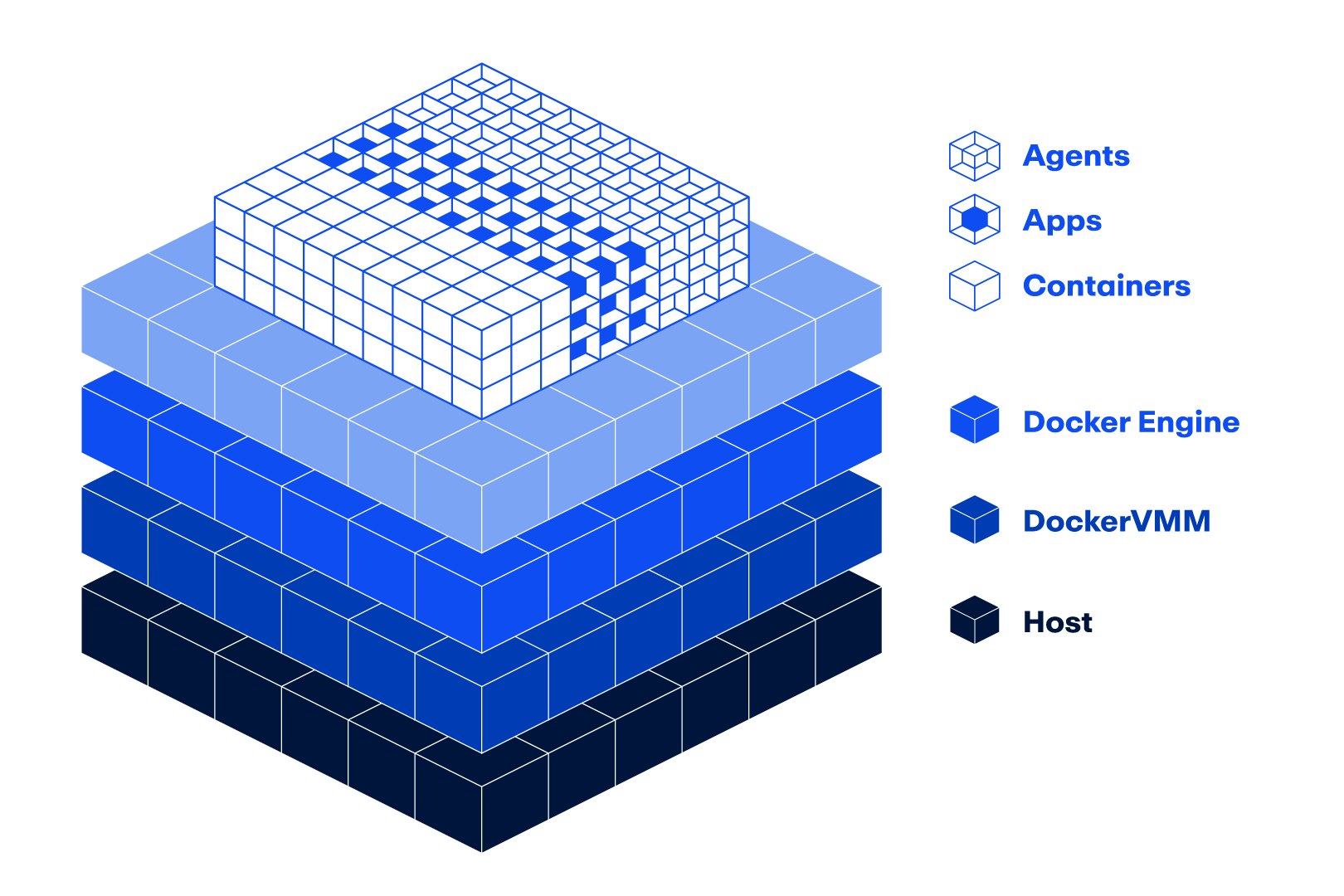
Reclaim Developer Hours through Smarter Vulnerability Prioritization with Docker and Mend.io

We recently announced the integration between Mend.io and Docker Hardened Images (DHI) provides a seamless framework for managing container security. By automatically distinguishing between base image vulnerabilities and application-layer risks, it uses VEX statements to differentiate between exploitable vulnerabilities and non-exploitable vulnerabilities, allowing your team to prioritize what really matters.

TL;DR: The Developer Value Proposition

The hallmark of this integration is its zero-configuration setup.

Automatic Detection: Mend.io identifies DHI base images automatically upon scanning. No manual tagging or configuration is required by the developer.

Visual Indicators: Within the Mend UI, DHI-protected packages are marked with a dedicated Docker icon and informative tooltips, providing immediate transparency into which components are managed by Docker’s hardened foundation.

Transparent Layers: Users can inspect findings by package, layer, and risk factor, ensuring a clear audit trail from the base OS to the custom application binaries.

Dynamic Risk Triage: VEX + Reachability

Standard scanners flag thousands of vulnerabilities that are present in the file system but never executed. This integration uses two layers of intelligence to filter the noise:

Risk Factor Integration: Mend.io incorporates Docker’s VEX (Vulnerability Exploitability eXchange) data as a primary source of “Risk Factor” identification.

The “Not Affected” Filter: If a CVE is marked as not_affected by Docker’s VEX data or determined to be Unreachable by Mend’s analysis, it is deprioritized.

Bulk Suppression: Developers can suppress non-functional risks in bulk—potentially clearing thousands of non-exploitable vulnerabilities with a single click—allowing teams to focus on the 1% of reachable, exploitable risks in their custom layers.

Operationalizing Security with Workflows

Mend.io allows organizations to move beyond simple scanning into automated governance:

SLA & Violation Management: Automatically trigger violations and set remediation deadlines (SLAs) based on vulnerability severity.

Custom Alerts: Configure workflows to receive instant notifications (via email or Jira) whenever a new DHI is added to the environment.

Pipeline Gating: Use Mend’s workflow engine to fail builds only when high-risk, reachable vulnerabilities are introduced in custom code, keeping the CI/CD pipeline moving.

Continuous Patching & AI-Assisted Migration

Automated Synchronization: For Enterprise DHI users, patched base images are automatically mirrored to Docker Hub private repositories. Mend.io verifies these updates, confirming that base-level risks have been mitigated without requiring a manual Pull Request.

Ask Gordon: Leverage Docker’s AI agent to analyze existing Dockerfiles and recommend the most suitable DHI foundation, reducing the friction of migrating legacy applications to a secure environment.

The Mend.io and Docker integration operationalizes this by providing an auditable trail of security declarations, ensuring compliance is a byproduct of the standard development workflow rather than a separate, manual task.

Learn more

Learn more about the integration and Docker’s VEX statements in the following links:

Check Docker Hardened Images documentation: https://docs.docker.com/dhi/ 

Start your free Docker Hardened Image trial: https://hub.docker.com/hardened-images/start-free-trial

Read Mend’s point of view on the benefits of VEX: https://www.mend.io/blog/benefits-of-vex-for-sboms/

Quelle: https://blog.docker.com/feed/
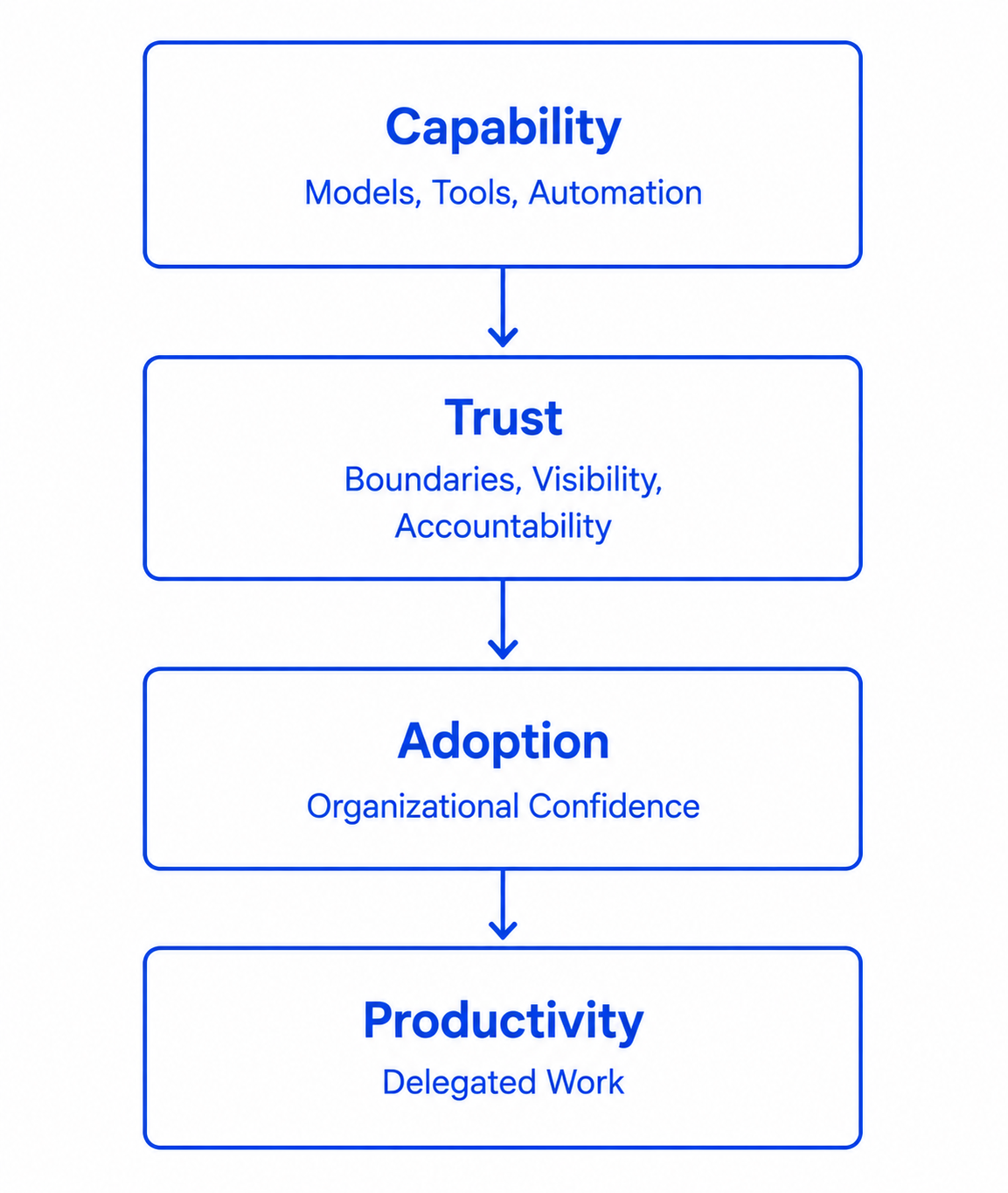
Docker Offload now Generally Available: The Full Power of Docker, for Every Developer, Everywhere.

Docker Desktop is one of the most widely used developer tools in the world, yet for millions of enterprise developers, running it simply hasn’t been an option. The environments they rely on, such as virtual desktop infrastructure (VDI) platforms and managed desktops, often lack the resources or capabilities needed to run Docker Desktop.

As enterprises scaled to support remote and contractor teams, these environments became the default, effectively blocking many developers from using Docker Desktop altogether. This slowed teams down and cut developers off from faster builds, the latest Docker features, and meaningful productivity gains. As a result, teams were forced into expensive workarounds that are difficult to secure and painful to maintain. 

Today, that changes.

Docker Offload is a fully managed cloud service that moves the container engine into Docker’s secure cloud, allowing developers to run Docker from any environment without changing their existing workflows. As of today, Docker Offload is generally available.

What this means in practice is simple. Developers keep using the same terminal, the same docker run commands, and the same Docker Desktop UI they are already familiar with. The only thing that has changed is where the engine runs, and by moving it to the cloud, Docker Desktop now works in every environment that once blocked it.

How It Works

When you run Docker Offload, it automatically routes the container engine to Docker’s secure cloud. The developer opens Docker Desktop exactly as they always have. No configuration. No retraining or reconfiguring applications for new tools. Containers run in Docker’s cloud infrastructure, and everything, including bind mounts, port forwarding, and Docker Compose, works identically to local.

Every connection runs over an encrypted tunnel on SOC 2 Certified infrastructure, and session activity is logged centrally, giving security teams the audit trail they already require without any changes to existing tooling, firewall rules, or endpoint policies. Every session runs in a temporary, isolated environment without data persistence, and closes cleanly.

What Can You Do With Docker Offload?

Run full Docker in any environment

Every Docker CLI command and every Docker Desktop feature works in VDI, locked-down laptops, remote workstations, and policy-restricted networks. Developers are productive from day one, using the exact CLI commands, workflows, and muscle memory they already have.

Same Infrastructure. New Capabilities. 

Offload deploys alongside your existing VDI infrastructure without touching a single piece of it. Infrastructure and platform teams get a clean drop-in: existing network segmentation, IAM boundaries, and access control policies all stay exactly in place. Centralized admin controls, SSO, and per-user access management are built in from day one. 

Keep security non-negotiable

Dedicated cloud sessions are destroyed at every session end, data stays clean, developer devices stay completely unaffected, and your security perimeter stays intact. Offload operates within your existing security architecture, not around it. SOC 2 Certified, with deployment options that scale from multi-tenant VM-level isolation up to a dedicated single-tenant VPC with private network connectivity for regulated environments.

Unblock developers in minutes

Offload detects constrained environments automatically and activates without developer configuration. Teams go from blocked to building without tickets, setup queues, or IT escalations. When nothing changes for the developer, adoption actually happens.

Current Deployment Options

Docker Offload is currently  available in two deployment methods.

Multi-Tenant provides VM-level isolation on Docker-managed infrastructure. It’s the fastest path for most enterprise teams: no ops overhead, no infrastructure to maintain, productive from the moment it’s enabled.

Single-Tenant provides a dedicated VPC and private network access available, important for organizations in Finance, Healthcare, Government, and other regulated industries. Traffic never traverses the public internet, meeting the network isolation requirements most regulated enterprises enforce as a baseline. For security architects evaluating data residency and compliance requirements, this is the deployment model built for you.

Docker Offload is an add-on to Docker Business. Available now, through Docker’s Sales Team.

Coming Soon

Today’s launch addresses the environment problem. Developers in managed and constrained environments can finally run Docker, without workarounds and without compromise. But we’re not stopping there. Also shipping this year:

Single-Tenant Bring-Your-Own-Cloud (BYOC): Compute runs in your cloud account, your data never leaves your environment, and SOC 2 Certified security stays intact. 

CI/CD Pipeline Integration:  Bring Offload to GitHub Actions, GitLab CI, and Jenkins to give every developer the same Docker experience in CI as locally, with cloud-based pipeline compute. 

GPU-backed instances: Unlocking AI/ML workloads in managed environments for the first time.

The Road Ahead

Development has outgrown the local machine. Docker Offload closes that gap. Infrastructure teams keep their architecture intact. Security teams get the compliance they require. Developers keep the workflows they know. The full power of Docker, for every developer, everywhere. 

This is just the beginning. Learn more about the power of Docker Offload , explore our Docker Offload Docs, and reach out to the Docker Sales Team to start your journey with Offload. 

Quelle: https://blog.docker.com/feed/
Gemma 4 is Here: Now Available on Docker Hub

Docker Hub is quickly becoming the home for AI models, serving millions of developers and bringing together a curated lineup that spans lightweight edge models to high-performance LLMs, all packaged as OCI artifacts.

Today, we’re excited to welcome Gemma 4, the latest generation of lightweight, state-of-the-art open models. Built on the same technology behind Gemini, Gemma 4 introduces three architectures that scale from low-power efficiency to high-end server performance.

By packaging models as OCI artifacts, models behave just like containers. They become versioned, shareable, and instantly deployable, with no custom toolchains required. You can pull ready-to-run models from Docker Hub, push your own, integrate with any OCI registry, and plug everything directly into your existing CI/CD pipelines using familiar tooling for security, access control, and automation.

And this is just the start. Over the next few weeks, Gemma 4 support is coming to Docker Model Runner, so you will not just discover models on Hub, you will be able to run, manage, and deploy them directly from Docker Desktop with the same simplicity you expect from Docker.

Docker Hub’s growing GenAI catalog already includes popular models like IBM Granite, Llama, Mistral, Phi, and SolarLLM, alongside apps like JupyterHub and H2O.ai, plus essential tools for inference, optimization, and orchestration.

What Docker Brings to Gemma 4

Gemma 4 expands what efficient, high-performance models can do. Docker makes them simple to run, share, and scale anywhere.

Run efficiently at the edge: Smaller Gemma 4 variants are optimized for on-device performance. Docker enables consistent deployment across laptops, edge devices, and local environments.

Scale performance with ease: From sparse to dense architectures, you can run any model like a container, making it easy to scale across cloud or on-prem infrastructure. 

One command to get started: Gemma 4 is just one command away:

docker model pull gemma4

No proprietary download tools. No custom authentication flows. Just the same pull, tag, push, and deploy workflow you already use.

By bringing Gemma 4 to Docker Hub, you get powerful models with a familiar, production-ready workflow.

What’s New in Gemma 4?

Gemma 4 redefines what “small” models can do, with architectures optimized across multiple sizes and use cases:

Small & Efficient (E2B, E4B): Built for on-device performance with high throughput and low memory use.

Sparsely Activated (26B A4B): Mixture-of-Experts design delivers large-model quality with smaller-model speed.

Flagship Dense (31B): High-performance model with a 256K context window for long-context reasoning.

Key capabilities include multimodal support (text, image, audio), advanced reasoning with “thinking” tokens, and strong coding plus function-calling abilities.

Technical Specifications

Model Name

Type

Total Params

Input Modalities

Context Window

Gemma 4 E2B

Dense (Small)

5.1B

Text, Vision, Audio

128K

Gemma 4 E4B

Dense (Small)

8.0B

Text, Vision, Audio

128K

Gemma 4 26B A4B

MoE

26.8B (3.8B active)

Text, Vision

256K – 512K

Gemma 4 31B

Dense

31.3B

Text, Vision

256K – 512K

Build the Future of AI with Docker Hub

The arrival of Gemma 4 on Docker Hub reinforces our commitment to making Docker Hub the best place to discover, share, and run AI models. Whether you are building a voice-activated mobile assistant or a large-scale document retrieval system, Docker Hub makes it simple to find the right model, pull it instantly, and run it anywhere.

Ready? Head over to Docker Hub to pull the modelsWant to join the Docker Model Runner community? Please star, fork and contribute to our GitHub repo

Quelle: https://blog.docker.com/feed/
Defending Your Software Supply Chain: What Every Engineering Team Should Do Now

The software supply chain is under sustained attack. Not from a single threat actor or a single incident, but from an ecosystem-wide campaign that has been escalating for months and shows no signs of slowing down.

This week, axios, the HTTP client library downloaded 83 million times per week and present in roughly 80% of cloud environments, was compromised via a hijacked maintainer account. Two backdoored versions deployed platform-specific RATs attributed with high confidence to North Korea’s Lazarus Group. The malicious versions were live for approximately three hours. That was enough.

This follows the TeamPCP campaign in March, which weaponized Aqua Security’s Trivy vulnerability scanner, a security tool trusted by thousands of organizations, and cascaded the compromise into Checkmarx KICS, LiteLLM, Telnyx, and 141 npm packages via a self-propagating worm. Before that, the Shai-Hulud worm tore through the npm ecosystem in late 2025, and GlassWorm infected 400+ VS Code extensions, GitHub repos, and npm packages using invisible Unicode payloads.

The pattern is consistent across all of these incidents: attackers steal developer credentials, use them to poison trusted packages, and the compromised packages steal more credentials. It is self-reinforcing, it is accelerating, and it now has ransomware monetization pipelines behind it.

The common thread is implicit trust

If you look at what actually failed in each of these compromises, the answer is the same every time: trust was assumed where it should have been verified. Organizations trusted a container tag because it had a familiar name. They trusted a GitHub Action because it had a version number. They trusted a CI/CD secret because the workflow was authored by someone on the team. In every case, the attacker exploited the gap between assumed trust and verified trust.

The organizations that came through these incidents with minimal damage had already begun replacing implicit trust with explicit verification at every layer of their stack: verified base images instead of community pulls, pinned references instead of mutable tags, scoped and short-lived credentials instead of long-lived tokens, and sandboxed execution environments instead of wide-open CI runners. None of these are new ideas, and none of them are difficult to implement. What they require is a shift in default posture, from “trust unless there’s a reason not to” to “verify before you trust, and limit the blast radius when verification fails.”

Here is what we recommend every engineering organization should do, and what we practice ourselves at Docker:

Secure your foundations

Start with trusted base images

Don’t build on artifacts you can’t verify. Docker Hardened Images (DHI) are rebuilt from source by Docker with SLSA Build Level 3 attestations, signed SBOMs, and VEX metadata, free and open source under Apache 2.0. DHI was not affected by TeamPCP because its controlled build pipeline and built-in cooldown periods mean short-lived supply chain exploits (typically 1 to 6 hours) are eradicated before they ever enter the image. There is no reason not to use these today.

Pin everything by digest or commit SHA

Mutable tags are not a security boundary. This is exactly how TeamPCP hijacked 75 of 76 trivy-action version tags. Pin GitHub Actions to full 40-character commit SHAs. Pin container images by sha256 digest. Pin package dependencies to exact versions and remove ^ and ~ ranges. If a reference can be overwritten without changing its name, it will be.  Inventory every third-party GitHub Action in use across your org and enforce an allowlist policy as you cannot pin what you haven’t cataloged. Enable two-factor authentication on every package registry account in your organization like npm, PyPI, RubyGems, Docker Hub as account takeover of a single maintainer is how most of these attacks begin. Commit your lock files and use npm ci (or the equivalent in your package manager) in all CI pipelines – this prevents builds from silently pulling new versions that aren’t in your lock file.

Use cooldown periods for dependency updates

Both npm and Renovate support minimum release age settings that delay adoption of new versions. Most supply chain attacks have a shelf life of hours, and a 3-day cooldown eliminates the vast majority of them. We maintain a collection of safe default configurations for common package managers and tooling. Use it. Contribute to it.

Generate SBOMs at build time

When an incident hits, the first question is always: “are we affected?” If you use docker buildx to build your images, you can generate and attach SBOMs and provenance attestations during the build. Sign them. Store them alongside your images. When the next axios or Trivy happens, you check the build metadata rather than having to exec into live Kubernetes pods to figure out what’s running. Docker Scout can then continuously monitor those SBOMs against known vulnerabilities and policy violations.

Secure your CI/CD

Treat every CI runner as a potential breach point

TeamPCP’s credential stealer ran inside CI/CD pipelines, dumping process memory and sweeping 50+ filesystem paths for secrets. Anything accessible to a workflow step is accessible to an attacker who compromises a dependency in that step. Avoid pull_request_targe triggers in GitHub Actions unless absolutely necessary and with explicit security checks as this is the exact mechanism TeamPCP used to execute code in the context of the base repository with access to its secrets.  Audit what secrets each workflow step can reach. If a scanning step has access to your deployment credentials, that is a blast radius problem, not a scanning problem.

Use short-lived, narrowly scoped credentials

The root cause of the Trivy breach was a single Personal Access Token with broad scope used across 33+ workflows. Use short-lived, narrowly-scoped credentials. No single token should grant cross-repository or organization-wide access. Use a secrets manager, not environment variables scattered across workflow files. This is an area where the ecosystem, including Docker Hub, needs to continue improving, and we are actively working on it.

Use an internal mirror or artifact proxy

Place Artifactory, CodeArtifact, or Nexus between your build systems and public registries. Scan and approve versions before they reach your pipelines. Docker Business customers can also use Registry Access Management and Image Access Management to restrict which registries and images developers can pull, providing a lighter-weight policy layer for teams that don’t run a full artifact proxy.

Test dependency updates where production secrets don’t exist

Evaluate updates in dev/staging environments that have no access to production credentials. If a malicious package runs in staging, it steals nothing of value.

Secure your endpoints

This is where most of these attacks actually start. TeamPCP, Shai-Hulud, and now axios all deploy infostealers that sweep developer machines for credentials stored in dotfiles, environment variables, SSH keys, browser sessions, and cloud configs. Protecting CI/CD pipelines matters, but if the developer machine that authors those pipelines is compromised, the attacker inherits whatever that developer can reach.

Deploy canary tokens

Place fake credentials across your fleet, AWS keys, API tokens, SSH keys, that serve no purpose other than to alert you when they’re exfiltrated. If an infostealer sweeps a machine, canary tokens fire before the real credentials are used. Tools like Tracebit and Canarytokens make this trivial. If you have an MDM solution (Jamf, Intune, Jumpcloud), push canaries to every managed device. We deployed this across our fleet in under a day.

Clean up credential sprawl

Audit ~/.ssh/, ~/.aws/credentials, ~/.docker/config.json, .env files, and shell histories for hardcoded secrets. Move everything to a password manager or secrets vault (1Password, HashiCorp Vault). Passphrase-protect all SSH keys. An infostealer that lands on a machine with no cleartext credentials gets nothing useful. Audit the extensions and plugins installed across your developer tools (IDE extensions, browser extensions, coding agent extensions like skills, plugins, MCP servers, etc…) as these tend to run with developer-level permissions and most marketplaces do not re-review updates after initial publication.

Deploy EDR with behavioral detection

Endpoint detection and response tools should cover developer machines and CI runners, with detections tuned for credential sweeping, persistence mechanisms, and unusual process behavior rather than just known malware signatures.

Secure your AI development

AI coding agents are compounding supply chain risk in ways the industry is only beginning to appreciate. Agents install packages, modify configs, make API calls, and spin up containers with developer-level access. A compromised dependency pulled by an agent has the same blast radius as a compromised developer machine, and the people using these agents now include non-developers who may not recognize suspicious behavior.

Run agents in sandboxed environments

Docker Sandboxes (sbx) run AI coding agents like Claude Code, Gemini CLI, Codex, and others inside isolated microVMs. Each sandbox gets its own kernel, filesystem, Docker Engine, and network, completely separated from your host. Credentials are injected into HTTP headers by the host proxy and never enter the VM directly. Network access is deny-by-default, with explicit allowlists. If a compromised dependency runs inside a sandbox, it cannot reach your host filesystem, your Docker daemon, your other containers, or any domain you haven’t explicitly approved.

Govern your MCP servers

Model Context Protocol servers are the new unvetted dependency. They run with broad permissions, connect AI agents to internal systems, and 43% of analyzed MCP servers have command injection flaws. Use signed, hardened images for MCP servers. Docker maintains 300+ verified MCP server images with the same SLSA/SBOM standards as DHI. Docker’s MCP Gateway provides centralized proxy, policy enforcement, secret blocking, and audit logging for all agent-to-tool traffic.

Standardize on fewer tools, governed centrally

It’s tempting to run every AI tool and model. Don’t. Consolidate on a trusted stack, push managed configurations via MDM, and use Docker Desktop’s administrative features (registry access management, proxy configuration, image access management) to control what agents can pull and where they can push.

Build muscle for incident response

Maintain SBOMs for everything in production

When the next compromise drops, you need to answer “are we affected?” in minutes, not days. Build-time SBOMs via docker buildx, combined with Docker Scout’s continuous monitoring, give you that capability. If you have to exec into running containers to determine exposure, you’re already behind.

Have playbooks ready

Know how to freeze your GitHub org, pause CI/CD without breaking everything, revoke credentials in bulk, and communicate to customers before you need to do it under pressure. The time to figure out your incident response workflow is not during the incident. If you haven’t already, audit your npm/PyPI/Docker, Hub accounts for unauthorized publishes, review recent CI logs for unexpected network calls or secret access, and rotate any long-lived tokens that were accessible to CI in the past 90 days.

Verify before you trust, slow down where it counts

Most supply chain attacks burn out within hours. A small delay in adopting new versions, whether via cooldown periods, manual review gates, or simply waiting 72 hours, eliminates the majority of the risk. Speed of adoption is not worth the cost of compromise.

The landscape has changed, your defaults should too

The supply chain attack wave is not a single incident to respond to. It is a permanent shift in the threat landscape. The attackers range from nation-state operators like Lazarus Group to opportunistic teenagers like TeamPCP and LAPSUS$ who are building the plane as it takes off, using AI to accelerate, and monetizing through ransomware partnerships. The ecosystem they are exploiting, npm, PyPI, GitHub Actions, container registries, has not fundamentally changed in its trust model.

What has changed is that defenders now have the tools to establish explicit trust boundaries where implicit trust used to be the only option. Hardened base images, build-time attestations, sandboxed execution, and canary-based detection did not exist at this maturity level two years ago. The gap between organizations that adopt these layers and those that don’t is going to widen fast.

Everything we’ve recommended here, we practice at Docker. We pull from public registries, we run CI/CD pipelines, we use AI agents, and we face the same threat actors you do. This is how we’re protecting ourselves.

Further reading:

Docker Hardened Images: free, signed, SLSA-compliant base images

Docker Scout: SBOM generation, vulnerability detection, and policy enforcement

Docker Sandboxes: isolated microVMs for AI coding agents

Safe Defaults: secure configurations for package managers and tooling

Building SBOMs with Docker Buildx: attach provenance and SBOMs at build time

Quelle: https://blog.docker.com/feed/
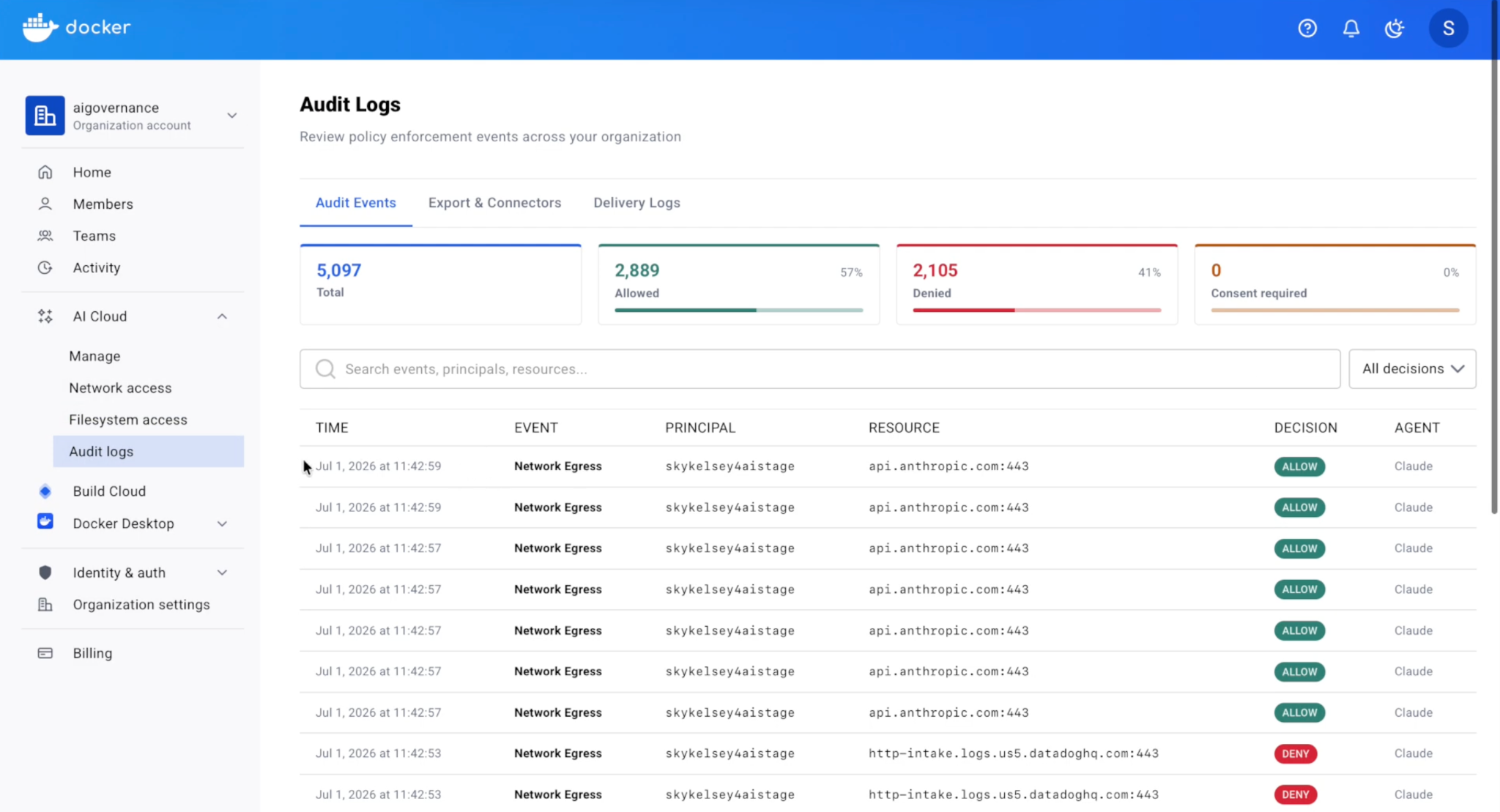
Docker Sandboxes: Run Agents in YOLO Mode, Safely

Agents have crossed a threshold.

Over a quarter of all production code is now AI-authored, and developers who use agents are merging roughly 60% more pull requests. But these gains only come when you let agents run autonomously. And to unlock that, you have to get out of the way.That means letting agents run without stopping to ask permission at every step, often called YOLO mode.

Doing that on your own machine is risky. An autonomous agent can access files or directories you did not intend for it to touch, read sensitive data, execute destructive commands, or make broad changes while trying to help.

So yes, guardrails matter, but only when they’re enforced outside the agent, not by it.  Agents need a true bounding box: constraints defined before execution and clear limits on what it can access and execute. Inside that box, the agent should be able to move fast.

That’s exactly what Docker Sandboxes provide.

They let you run agents in fully autonomous mode with a boundary you define. And Docker Sandboxes are standalone; you don’t need Docker Desktop. That dramatically expands who can use them. For the newest class of builder, whether you’re just getting started with agents or building advanced workflows, you can run them safely from day one.

Docker Sandboxes work out of the box with today’s coding agents like Claude Code, Github Copilot CLI, OpenCode, Gemini CLI, Codex, Docker Agent, and Kiro. They also make it practical to run next-generation autonomous systems like NanoClaw and OpenClaw locally, without needing dedicated hardware like a Mac mini.

Here’s what Docker Sandboxes unlock.

You Actually Get the Productivity Agents Promise

The difference between a cautious agent and a fully autonomous one isn’t just speed. The interaction model changes entirely. In a constrained setup, you become the bottleneck: approving actions instead of deciding what to build next. In a sandbox, you give direction, step away, and come back to a cloned repo, passing tests, and an open pull request. No interruptions. That’s what a real boundary makes possible.

You Stop Worrying About Damage

Running an agent directly on your machine exposes everything it can reach. Mistakes are not hypothetical. Commands like rm -rf, accidental exposure of environment variables, or unintended edits to directories like .ssh can all happen.

Docker Sandboxes offer the strongest isolation environments for autonomous agents. Under the hood, each sandbox runs in its own lightweight microVM, built for strong isolation without sacrificing speed. There is no shared state, no unintended access, and no bleed-through between environments. Environments spin up in seconds (now, even on Windows), run the task, and disappear just as quickly. 

Other approaches introduce tradeoffs. Mounting the Docker socket exposes the host daemon. Docker-in-Docker relies on privileged access. Running directly on the host provides almost no isolation. A microVM-based approach avoids these issues by design. 

Run Any Agent

Docker Sandboxes are fully standalone and work with the tools developers already use, including Claude Code, Codex, GitHub Copilot, Docker Agent, Gemini, and Kiro. They also support emerging autonomous systems like OpenClaw and NanoClaw. There is no new workflow to adopt. Agents continue to open ports, access secrets, and execute multi-step tasks. The only difference is the environment they run in. Each sandbox can be inspected and interacted with through a terminal interface, so you always have visibility into what the agent is doing.

What Teams Are Saying

“Every team is about to have their own team of AI agents doing real work for them. The question is whether it can happen safely. Sandboxes is what that looks like at the infrastructure level.” — Gavriel Cohen, Creator of NanoClaw

“Docker Sandboxes let agents have the autonomy to do long-running tasks without compromising safety.”— Ben Navetta, Engineering Lead, Warp

Start in Seconds

For macOS: brew install docker/tap/sbx

For Windows: winget install Docker.sbx

Read the docs to learn more, or get in touch if you’re deploying for a team. If you’re already using Docker Desktop, the new Sandboxes experience is coming there soon. Stay tuned.

What’s Next

You already trust Docker to build, ship, and run your software. Sandboxes extend that trust to agents, giving them room to operate without giving them access to everything.

Autonomous agents are becoming more capable. The limiting factor is no longer what they can do, but whether you can safely let them do it.

Sandboxes make that possible.
Quelle: https://blog.docker.com/feed/
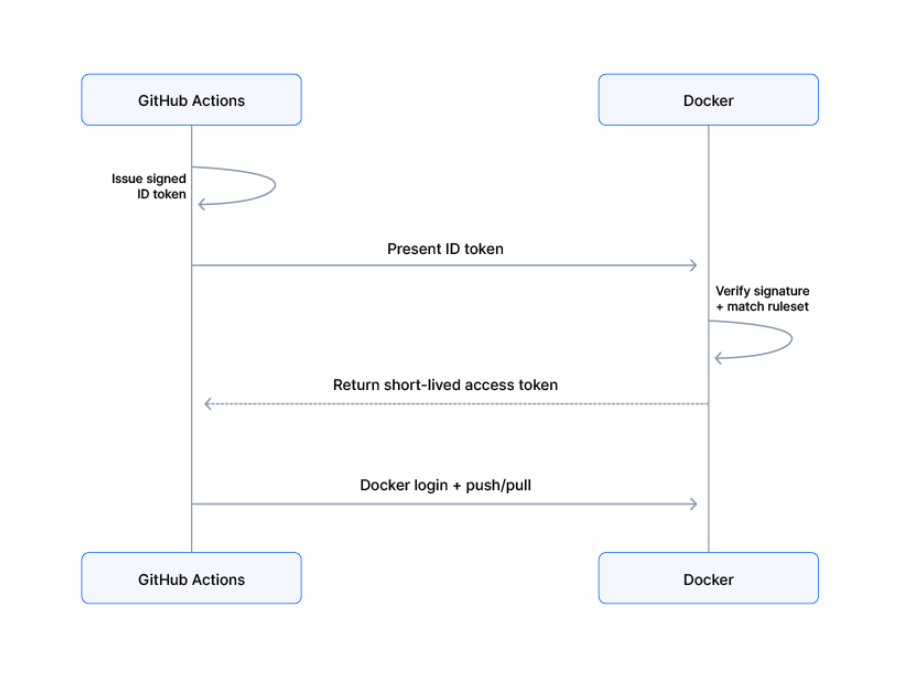
Run and Iterate on LLMs Faster with Docker Model Runner on DGX Station

Back in October, we showed how Docker Model Runner on the NVIDIA DGX Spark makes it remarkably easy to run large AI models locally with the same familiar Docker experience developers already trust. That post struck a chord: hundreds of developers discovered that a compact desktop system paired with Docker Model Runner could replace complex GPU setups and cloud API calls.

Recently at NVIDIA GTC 2026, NVIDIA is raising the bar with NVIDIA DGX Station and we’re excited to add support for it in Docker Model Runner!  The new DGX Station brings serious performance, and Model Runner helps make it practical to use day to day. With Model Runner, you can run and iterate on larger models on a DGX Station, using the same intuitive Docker experience you already know and trust.

From NVIDIA DGX Spark to DGX Station: What has changed and why does this matter?

NVIDIA DGX Spark, powered by the GB10 Grace Blackwell Superchip, gave developers 128GB of unified memory and petaflop-class AI performance in a compact form factor. A fantastic entry point for running models.

NVIDIA DGX Station is a different beast entirely. Built around the NVIDIA GB300 Grace Blackwell Ultra Desktop Superchip, it connects a 72-core NVIDIA Grace CPU and NVIDIA Blackwell Ultra GPU through NVIDIA NVLink-C2C, creating a unified, high-bandwidth architecture built for frontier AI workloads. It brings data-center-class performance to a deskside form factor. Here are the headline specs:

DGX Spark (GB10)

DGX Station (GB300)

GPU Memory

128 GB unified

252 GB

GPU Memory Bandwidth

273 GB/s

7.1 TB/s

Total Coherent Memory

128 GB

748 GB

Networking

200 Gb/s

800 Gb/s

GPU Architecture

Blackwell (5th-gen Tensor Cores, FP4)

Blackwell Ultra (5th-gen Tensor Cores, FP4)

With 252GB of GPU memory at 7.1 TB/s of bandwidth and a total of 748GB of coherent memory, the DGX Station doesn’t just let you run frontier models,  it lets you run trillion-parameter models, fine-tune massive architectures, and serve multiple models simultaneously, all from your desk.

Here’s what 748GB of coherent memory and 7.1 TB/s of bandwidth unlock in practice:

Run the largest open models without quantization. DGX Station can run the largest open 1T parameter models with quantization.

Serve a team, not just yourself. NVIDIA Multi-Instance GPU (MIG) technology lets you partition NVIDIA Blackwell Ultra GPUs into up to seven isolated instances. Combined with Docker Model Runner’s containerized architecture, a single DGX Station can serve as a shared AI development node for an entire team — each member getting their own sandboxed model endpoint.

Faster iteration on agentic workflows. Agentic AI pipelines often require multiple models running concurrently — a reasoning model, a code generation model, a vision model. With 7.1 TB/s of memory bandwidth, switching between and serving these models is dramatically faster than anything a desktop system has offered before.

Bottom line: The DGX Spark made that fast. The DGX Station makes it transformative. And raw hardware is only half the story. With Docker Model Runner, the setup stays effortless and the developer experience stays smooth, no matter how powerful the machine underneath becomes.

Getting Started: It’s the Same Docker Experience

For the full step-by-step walkthrough check out our guide for DGX Spark. Every instruction applies to the DGX Station as well.

NVIDIA’s new DGX Station puts data-center-class AI on your desk with 252GB of GPU memory, 7.1 TB/s bandwidth, and 748GB of total coherent memory. Docker Model Runner makes all of that power accessible with the same familiar commands developers already use on the DGX Spark. Pull a trillion-parameter model, serve a whole team, and iterate on agentic workflows. No cloud required, no new tools to learn.

How You Can Get Involved

The strength of Docker Model Runner lies in its community, and there’s always room to grow. To get involved:

Star the repository: Show your support by starring the Docker Model Runner repo.

Contribute your ideas: Create an issue or submit a pull request. We’re excited to see what ideas you have!

Spread the word: Tell your friends and colleagues who might be interested in running AI models with Docker.

Learn More

Read our original post on Docker Model Runner + DGX Spark 

Check out the Docker Model Runner General Availability announcement

Visit our Model Runner GitHub repo

Get started with a simple hello GenAI application

Quelle: https://blog.docker.com/feed/






