New to ML: Learning path on Vertex AI

At Google I/O this year, we announced Vertex AI: Google Cloud’s end-to-end ML platform. There’s a lot included here, as you can see from the diagram below. Figure 1. Vertex AI overviewIf you’re new to ML, or new to Vertex AI, this post will walk through a few example ML scenarios to help you understand when to use which tool, going from ML APIs all the way to custom models and MLOps for taking them into a production system. Our demo scenarioI moved recently, and as I was preparing boxes I started thinking about all the ways ML might streamline this process. What if I had an application that takes the measurements of a box and allows me to store the contents of each box virtually? Or have a service that automatically detects the type of room shown in an image and creates a digital inventory for me?Now imagine you are a data scientist at a moving company and the business team would like you to use machine learning to solve the following challenges:Recognizing items in pictures from customers’ homesClassifying items in two different categories based on some criteria (for example, location or fragility)Estimating box dimensions to save customer’s time during packagingFirst, you need to decide how to approach the problem. And then, which tool is right for you. Before we dive in, let’s discuss the ML tooling on Google Cloud we can use to solve this. Machine learning on Google CloudGoogle Cloud Platform provides several tools to support an entire machine learning workflow, across different model types and varying levels of ML expertise. When you start a machine learning project like the one we’re building, there are several factors to evaluate before choosing one of these tools as you can see in the diagram below.Figure 2. Choosing the right tool – DiagramFor instance, we have:Pre-trained APIs for access to machine learning models for common tasks like analyzing images, video and text via APIAutoML on Vertex AI for training, testing and deploying a machine learning model without codeCustom Model Tooling on Vertex AI for training, testing, optimizing and deploying models using a framework of your choice.These are the tools I’ll focus on today. And, at the end, I will show how MLOps fits in this process and allows you to create a reliable and reproducible machine learning pipeline that integrates all services needed to deploy your models. Before moving on, it is also important to say that, regardless of which approach you use, you can deploy your model to an endpoint and serve predictions to end users via SDK methods. And the following representation shows how Vertex AI fits into a typical application development workflow.Figure 3. Vertex AI and ApplicationWith that, we are now ready to solve our business challenge with Vertex AI. So let’s start! Pre-trained APIs for object classificationWhen applying the diagram in Figure 1 to our demo scenario, the first step is to determine whether we have enough images of common household objects to use for training. For this case, let’s assume we don’t yet have training data. This is where the Google Cloud Vision API comes in handy. Indeed, the Vision API can detect and extract multiple objects in an image using the Vision API’s Object Localization functionality. Also, Vision API can detect and extract information about entities in an image, across a broad group of categories (for example, a sofa could be classified as both furniture and living room item) and many others. Below you can see results of APIs with a kitchen’s cupboard.Figure 4. Pre-trained APIs for object classificationWith those capabilities, we can build an application that uses the extracted labels and create a virtual catalog of items and boxes  the customer needs to package.Of course, APIs are not just for images. On Google Cloud, there are also ML APIs that give you access to pre-trained machine learning models for common tasks like analyzing video, audio, and text.In general, we suggest using pre-trained APIs whenyou don’t have enough data your prediction task is general enough to fit into the type of labels provided by the service. you want to combine the pre-trained APIs with AutoML (and custom) models. Then, it is just a matter of integrating these APIs into your own application with a REST API request.Now we are able to recognize some items from pictures of customers’ homes and classify them in several categories. But what if we would like to have a higher level of detail with a model which is able to recognize items in images collected in various conditions? Or define our own labels? For example, in our case, we could decide to classify items based on their fragility. So, assuming that you have image data, it’s worth experimenting with a custom classifier to see if it fits your needs. In particular, if you’ve never trained a deep learning model yourself, you might prefer a no-code approach rather than building a custom model from scratch. Time is another important factor in evaluating different tooling.  For simplicity, let’s assume that in our scenario the business team wants to see results right away. In this case,  we’ll use AutoML in Vertex AI to build an initial model. AutoML for custom-label image classification modelWith AutoML, you can train models in Vertex AI on image, video, text, and tabular datasets without writing code. Vertex AI finds the optimal model architecture by searching state-of-the-art machine learning models. In our image scenario, all we need to do is supply labeled examples of images you would like to classify, and the labels you want the ML systems to predict. Then, we can start the model training. Once it finishes,  we can get access to detailed model evaluation metrics and feature attributions which are powered by Vertex Explainable AI. And if it is validated, you can deploy it using managed Vertex AI Prediction. Here’s what this would look like for our image dataset:Figure 5. Classifying a fragile item with AutoMLAs you can see, it seems that choosing AutoML was the right move. In the first example, I take a picture of coffee cups, it classifies them as fragile items with 92% of probability. But when I pass a picture of a stuffed animal, it is able to classify as a non-fragile item with no uncertainty. Just what we need!Figure 6. Classifying a non-fragile item with AutoMLNotice that, using images to solve this challenge requires strong assumptions such as geometric properties of items significantly affects item fragility. Consequently, we will face several corner cases. But, in the end, we would be able to manage by letting customers label them in the application. Again, as general criterias, consider using AutoML when: you don’t have specific requirements about your underlying model architectureyou want to develop a quick initial model to use as a baseline, which could end up being your production modelFinally the last task. We would build a model to estimate at least three dimensions of boxes (width x depth x height) moving jobs will require (the fourth would be the weight). There are several possible approaches for solving this challenge.  One of them could approximate the package’s size using 3D Object Detection. Below you can see the ML Pipeline.Figure 7. Network architecture and post=processing for 3D object detection.Based on the Google Research paper, you can build a single-stage model where the backbone model has an encoder-decoder architecture, built upon MobileNetv2. Then you can employ a multi-task learning approach, jointly predicting an object’s shape with detection and regression. In particular, It is possible to obtain the 3D coordinates for the item’s bounding box using a pose estimation algorithm (EPnP). Then, given the 3D bounding box, you can easily compute the size  (and the pose) of the object. I’m not going to cover the model in this article (because you need training data and, in that case, videos) but, as you can imagine, you will end up training a custom model, which you can do in Vertex AI. So, let me point out how. Custom model training on Vertex AIIn general, you get access to a series of services for custom model development in Vertex AI such as:Notebooks and Deep Learning VM Images with a preinstalled JupyterLab environment powered by most common deep learning frameworks and libraries and the best-in-class compute power (GPU, TPU)Vertex Experiments and Vertex Tensorboard, Vertex Training, Vertex Vizier to visualize model experiments, train your model in a managed and customizable fashion thanks to container technology and optimize hyperparameters for maximum predictive accuracy.Figure 8. Vertex Notebooks and Vertex Training UIsAs before, once you’ve trained your model, you can use managed Vertex AI Prediction to deploy it into production for online and batch serving scenarios when it is needed. Also, with Vertex AI Edge Manager, edge deployment is supported too. For example, suppose you need to deploy your model to customers who live in places with limited networks. With that service, you can serve and manage ML models on remote edge devices using Kubernetes. As a consequence, you will reduce response time and save bandwidth. Of course, wherever the case, you will track each model endpoint from a unified UI. So, you will be able to implement model maintenance like A/B tests or multi-armed bandits and, at the end, build a more solid backend logic compared to your moving app.We’ve covered many different products, so let’s do a recap. By now, you have models that are able to recognize items, classify them into categories and estimate box dimensions. And thanks to Vertex AI Endpoints, they are ready to be consumed by your end users. Are we missing something? Perhaps we are. Let me explain why. MLOps: Putting all together and make it replicableSo far, we focus on how you as a machine learning practitioner can use Vertex AI to build and deploy a model to solve a business challenge. But what happens when an entire team is working on the same project? How can you foster collaboration and guarantee reproducibility at the same time? Also, how can you automate tasks like training and deployment each time new training images are available?This is when MLOps comes into play. With MLOps, you can standardize your machine learning process and make it more reliable. And in Vertex AI you have all you need to embrace this productive paradigm. In fact, the platform provides a robust MLOps architecture using managed services such as Vertex Feature Store, Vertex Pipelines, Vertex ML Metadata and Vertex Model Monitoring.Figure 9. MLOps with Vertex AIWithout further ado, let’s conclude with how MLOps fits into our AutoML use case.One of my favorite enhancements of Vertex AI is the new  python SDK. With it, you can get access to all Vertex AI services programmatically which means that you can express each task of your machine learning process via code and make it shareable and reproducible using a DevOps framework. In our case, you could decide to automate the entire process, from the creation of the dataset to the model deployment, with a pipeline. In particular, with Vertex Pipelines, you can break your process into components. Each component can produce its own artifact and have other metadata (input and output) associated with it. These elements (artifacts, lineage, and execution tracking) can be easily accessible from the Vertex console and you can analyze all of them with the Vertex Metadata service.Below the Vertex Pipelines I created for our AutoML modelFigure 10. Vertex Pipeline for AutoML Image ModelNotice that you can also implement conditional logic in Vertex Pipelines. For example, in our case, we could set a threshold such that, when the model starts underperforming on new data, we would run a training job, check the new accuracy, and decide whether to redeploy it. And, if this is the case, as a data scientist or machine learning engineer you would like to be alerted when model performance falls below a certain threshold. That’s why Vertex AI Model Monitoring was introduced. It automates alerts when events like data drift, concept drift, or other model performance issues happen. So whoever is in charge of model maintenance can act quickly and assess the incidents. SummaryWe have reached the end of this journey in the new Vertex AI platform. I started writing this article with a question in mind: how can I help ML practitioners and developers who approach the Vertex AI platform today?  In order to answer the question, I went through a possible real life example where I imagined leveraging ML with a moving application. And I provided a quick overview of the ML toolbox in Vertex AI with some criterias about when to use which tool. You can find them summarized in the table below. Figure 11. Choosing the right tool – CriteriasIn the end, I also introduced you to MLOps and I showed how Vertex AI would help standardizing machine learning processes and putting them into production. If you want to know more about MLOps and the recommended capabilities based on your use cases, here is an article I recently collaborated on.At that point, you would get a better understanding of Vertex AI and how you can approach it. Then it’s your turn. While I’m thinking about the next blog post, check out our getting started guide and tutorials to start getting your hands dirty. And remember…Always have fun!Thanks to Sara Robinson for her support and all the other Googlers for great feedback on this post.Related ArticleGoogle Cloud unveils Vertex AI, one platform, every ML tool you needGoogle Cloud launches Vertex AI, a managed platform for experimentation, versioning and deploying ML models into production.Read Article
Quelle: Google Cloud Platform
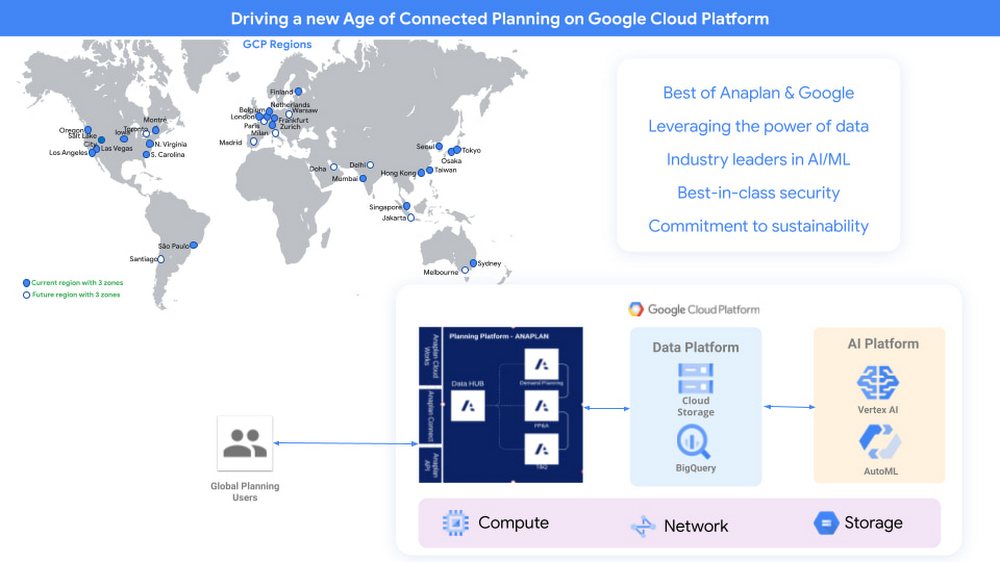
Easy data blending, intelligent reporting leveraging Google Cloud to extend Anaplan Planning

All around the globe, organizations have had to re-evaluate their enterprise planning needs to keep up with changing demands while dealing with point solutions and data scattered across disjointed systems and sources. This re-evaluation has become even more pressing with the unprecedented levels of disruption over the past 18 months.Connected planning makes enterprises agile and resilient by delivering continuous models and forecasts. Anaplan’s enterprise planning platform runs unlimited multi-dimensional scenarios to identify ideal plans of action that pivot business strategy from reactive to proactive. Any function within an organization can model the impact of change and easily visualize its effects. For example, identifying the impact of sales headcount on quota and compensation. In a nutshell enterprise planning allows enterprises to have a living shareable representation on how the business actually works.Google Cloud and Anaplan are redefining how planning practitioners will use Enterprise Planning within these organizations to unify and align planning across all departments, and address the following challenges: Predicting what customers will need, when and where requires planners to blend external data — such as search, POS, macroeconomic factors, and social indicators — with their internal data — such as volume forecast, shipments, and orders. This data blending can create, speed up reconciliations to increase velocity, decrease inventory days on hand and improve service levels. However, blending internal and external data across disparate data sources has been hard, especially in real time.In order for financial planners to capture monthly budgets, they need to submit vendor and spending plan information to their financial analyst as part of their financial planning and budgeting process. Having to manually copy and paste data into Anaplan, as opposed to seamlessly uploading information from familiar spreadsheet and productivity tools, introduces errors, challenges auditability, and reduces productivity.Anaplan Connected Planning Platform provides cloud-based technology that fundamentally transforms planning by connecting all the necessary people, data, and plans to accelerate business value through real-time planning and decision-making in rapidly changing environments. Google Cloud is extending the core capabilities of Anaplan Connected Platform to address these challenges for planners.Deeper integrations, greater capabilitiesSince announcing the partnership between Google Cloud and Anaplan, our two teams, including the ISV Center of Excellence, have successfully completed the implementation of Anaplan Connected Planning Platform on Google Cloud.In parallel, our product and technical teams have collaborated to deliver additional capabilities to extend Anaplan with Google Cloud, including:Google BigQuery integration with Anaplan CloudWorks Anaplan CloudWorks now provides a self-service capability for planning practitioners to easily import/export data into/from Google Cloud’s BigQuery to blend first-party data within Anaplan with third-party data outside Anaplan without needing technical expertise. BigQuery is a highly scalable and cost-effective multicloud data warehouse designed for business analysis. Enriching the Anaplan first-party data enables end-to-end visibility across critical business processes such as those in the supply chain.The BigQuery integration makes it easy to aggregate data from multiple sources and automate processes within a single source of truth. Analyzing data, modeling dynamic scenarios, and developing projections and forward-looking strategies with large amounts of data becomes faster and easier. BigQuery integration with CloudWorks connects to the customer’s BigQuery environment in their Google Cloud project to export/import data into their Anaplan Model. Customers configure a connection to their BigQuery environment by specifying service account details, Google Cloud project and BigQuery data set information.In addition, planners can easily leverage Google’s AI capabilities with their planning information in BigQuery. For example, companies in the consumer goods domain can reduce inventory and increase revenue by using Google Vertex AI to improve the accuracy of their demand forecasting at a more granular level by analyzing every SKU, combined with other data streams and demand signals (e.g. marketing and sales plans, consumer insights, weather, etc.). CloudWorks lets business planners schedule data-flows from BigQuery, amplifying the power of their forecasts across channels, geographies, and product lines. Customers can save time by scheduling import/export integrations to run hourly, daily, weekly, or monthly. The BigQuery integration with Anaplan CloudWorks will be available in Q3 CY 2021.Anaplan Add-on for Google Sheets within Google WorkspaceAnaplan users can avoid spending countless hours every month/quarter exporting Anaplan dashboards into Google Sheets by using the Anaplan Add-on for Google Sheets. This seamless connection between Google Sheets and Anaplan enables planners to keep Anaplan as the planning source of truth.Bidirectional integration of Anaplan and Google Sheets enables bringing source data from Anaplan into Google Sheets, and updating analysis from Google Sheets into Anaplan. In addition to enabling ad hoc analysis and executive reporting, this add-on also enables bulk data load and data reconciliation. It dynamically tracks inputs and adjustments, allowing quick, iterative analysis of planning data. Accuracy and auditability are systematic, rather than manual. During critical strategy meetings such as performance, headcount and financial planning, enterprises can extract high level summaries to make agile decisions. Planners can access this add-on via the Add-ons menu in Google Sheets. The add-on prompts users to sign-in using their Anaplan login details or Single Sign-on. Users can then choose to create a “read-only” or “read-write” connection to link data from an Anaplan module to a Google worksheet. This video provides a short demonstration of using the Anaplan Add-on for Google Sheets Add-on. Expanded reach and scale with global deployment. Anaplan’s Connected Planning platform is being deployed in additional regions across Google Cloud’s global network. Anaplan customers are benefiting from improved data proximity and in-country model data storage.Regional banks in countries with specific requirements for storing model data in-country can take advantage of Anaplan on Google Cloud for finance, human resources, and sales use cases while meeting requirements for storing model data in-country. Expanded partnership = Exceptional possibilities for planningOur expanded partnership brings exceptional possibilities for how Anaplan and Google Cloud customers can plan. Merging the enterprise planning capabilities of Anaplan with Google Cloud, and seamless integrations with BigQuery and AI/ML capabilities, gives business leaders more ways to blend their data sources for dynamic, highly informed, and real-time business insight. A fully managed SaaS service, Anaplan on Google Cloud enables elastic scale in new regions and drives greater productivity and performance by bringing data closer to where organizations reside. Anaplan on Google Cloud is now available for the United States region. Learn more about the technology partnership by visiting our Google Cloud partner page, reaching out to your Google Cloud and Anaplan account teams, or emailing GoogleCloudPartnership@anaplan.com.Related ArticleDeploying Anaplan at enterprise scale on Google CloudWe’re excited to partner with Anaplan to help more organizations scale Anaplan globally by running on Google Cloud’s hyperscale platform.Read Article
Quelle: Google Cloud Platform

AppLovin builds on Google Cloud to transform mobile marketing

Today’s fastest growing companies are building and scaling in the cloud. Turning to a modern cloud as a platform for growth not only enables easy access to capabilities in areas like artificial intelligence (AI) and machine learning (ML), but also a platform on which they can quickly scale an entire business and deliver products to fast-growing customer bases.The mobile app industry is a great example of this—the numbers in mobile apps are many and continue to grow: thousands of developers making millions of apps, downloaded billions of times around the world, to billions of users spending an increasing amount of time online through apps.AppLovin is a leading marketing software company that sits squarely in the middle of this fast-moving, engaging, and yes, challenging market. AppLovin’s technology platform enables developers to market, monetize, analyze and publish their apps. AppLovin’s ML engine makes three trillion daily predictions based on over 6.5 trillion events per day. In the past year alone, AppLovin has driven 7.5 billion downloads on its platform, helping app developers find over 3 billion new users.AppLovin and Google have a strategic partnership, prioritizing the enablement of AppLovin’s marketing, monetization, and app launch/distribution efforts. To bring it all together, and to power AppLovin’s massive growth, AppLovin needed a cloud platform on which it could easily scale its business, and they turned to Google Cloud.Initially, AppLovin delivered its services to customers using co-location, bare metal and cloud. As its growth accelerated and customers’ needs grew, they evaluated consolidating on the cloud as a platform on which to run and scale their business. Today, AppLovin is delivering its core services and applications to customers on Google Cloud’s low-latency, scalable infrastructure, ensuring that AppLovin customers can run campaigns and have access to the tools they need to grow their apps and that AppLovin has a cloud partner who will easily scale alongside them.Beginning their migration to the cloud in early 2021, AppLovin successfully migrated seven data centers to Google Cloud (including five in a single day) with no service disruption to its customers. AppLovin is also using other Google Cloud technologies like Dataproc, Google Kubernetes Engine, Cloud Storage and Google Network Load Balancing to grow its business.The impact was immediate. AppLovin saw latency on its bidding platform decrease by 25%, a material improvement to the customer experience. Network load balancers improved performance and provided ease of management. Savings like this, in money and brain power, mean AppLovin can continue to grow and scale. “Migrating to Google Cloud has been instrumental to our technology platform. The speed and strength of Google Cloud’s infrastructure and hardware has driven noticeable improvements across our business, and has given us a path to grow,” said Omer Hasan, VP of Operations at AppLovin.Like a good ML system, AppLovin’s technology continuously improves with more data. Its content investments mean even more of its first-party data will be coming onstream, increasing its data advantage, but underscoring the need for a strong and responsive compute infrastructure. ML can require an enormous amount of data across a system that is meant not just for scaling, but for changing—fast. This includes variable processing demands, rapid changes in values and configurations, and even automated system upgrades with minimal downtime or hassles. Speed. Power. Capability. Reliability. Partnering. Data insights, on an unmatched, secure network. If these are some of the things you’re looking for in a cloud, we’d love to see how we can help.Related ArticleRegistration is open for Google Cloud Next: October 12–14Register now for Google Cloud Next on October 12–14, 2021Read Article
Quelle: Google Cloud Platform

Bridge data silos with Data Fusion

A huge challenge with data analytics is that the data is all over the place and is in different formats . As a result, you often need to complete numerous integration activities before you can start to gain insights from your data. Data Fusion offers a one-stop-shop for all enterprise data integration activities including ingestion, ETL, ELT and Streaming and with an execution engine optimized for SLAs and cost. It is designed to make lives easier for ETL developers, data analysts, and data engineers on Google Cloud, Hybrid Cloud or Multi Cloud environments. Click to enlargeData Fusion is Google’s cloud native, fully managed, scalable  enterprise data integration platform. It enables bringing transactional, social or machine data in various formats from databases, applications, messaging systems, mainframes, files, SaaS and IoT devices, , offers an easy to use visual interface , and provides deployment capabilities to execute data pipelines on ephemeral or dedicated Dataproc clusters in Spark. Cloud Data Fusion is  powered by open source CDAP which makes the pipelines portable across Google Cloud or Hybrid or multi cloud environments.. Data integration capabilities Data integration for optimized analytics and accelerated data transformationsData Fusion supports a broad set of more than 200 connectors and formats, which enables you to extract and blend data You can develop data  pipelines in a  visual environment to improve productivity. . Data Fusion provides data wrangling capabilities to  prepare data and provides capabilities to operationalize the data wrangling to improve business IT collaboration You can leverage the extensive REST API to design, automate, orchestrate and manage the lifecycle of the pipelines .Data Fusion supports all data delivery modes including batch, streaming or  real-time making it a comprehensive platform to address both batch and streaming related use cases.It provides operational insights so that you can monitor data integration processes. Manage SLA’s and help optimize and fine tune integration jobs. Data Fusion provides capabilities to parse and enrich unstructured data using Cloud AI, for example, converting audio files to text, applying NLP to detect sentiment, or extracting features from images and documents or converting HL7 to FHIR formatsData consistencyData Fusion builds confidence in business decision-making with advanced data consistency features: Data Fusion minimizes the risk of mistakes by providing structured ways of specifying transformations, data quality checks with Wrangler, and predefined directives.Data Fusion helps identify quality issues by keeping track of profiles of the data being integrated and enabling you make decisions based on data observability.Data formats change over time, Data Fusion helps handle data drift with the ability to identify change and customize error handling.Metadata and modelingData Fusion makes it easy to gain insights with metadata:You can collect technical, business, and operational metadata for datasets and pipelines and easily discover metadata with a search.Data Fusion, provides end-to-end data view to understand the data model, and to profile data, flows, and relationships of datasets.It enables exchange of metadata between catalogs and integration with end-user workbenches using REST APIs.The Data Fusion data lineage feature enables you to understand the flow of your data and how it is prepared for business decisions.Click to enlargeOpen, hybrid, and multi-cloudData Fusion is cloud-native and powered by CDAP, a 100% open-source framework for building on-premises and cloud data analytics applications . This means you can  deploy and execute integration pipelines in different environments without any changes to suit business needs. Data protectionData Fusion ensures data security in the following ways:It provides secure access to on-premises data with private IP.It encrypts data at rest by default or with Customer Managed Encryption Keys (CMEK) to control across all user data in supported storage systems.It provides data exfiltration protection via VPC Service Controls,  a security perimeter around platform resources.You can store sensitive passwords, URLs, and JDBC strings in Cloud KMS, and integrate with external KMS systems.It integrates with Cloud DLP to mask, redact, and encrypt data in transit.ConclusionChances are that in your enterprise there is data siloed in various platforms.  If it’s your job to bring it together, apply transformations, create data pipelines, and make all your data teams happier and more productive then Cloud Data Fusion has what you need. And if you already use Google Cloud data tools for curating a data lake with Cloud Storage and Dataproc, moving data into BigQuery for data warehousing, or transforming data for a relational store like Cloud Spanner, then Data Fusion integrations make development and iteration fast and easy. For a more in-depth look into Data Fusion check out the documentation.For more #GCPSketchnote, follow the GitHub repo. For similar cloud content follow me on Twitter @pvergadia and keep an eye out on thecloudgirl.dev.Related ArticleBetter together: orchestrating your Data Fusion pipelines with Cloud ComposerSee how to orchestrate and manage ETL and ELT pipelines for data analytics in Cloud Composer using Data Fusion operators.Read Article
Quelle: Google Cloud Platform
How Cloud Bigtable helps Ravelin detect retail fraud with low latency

Editor’s note: Today we are hearing from Jono MacDougall , Principal Software Engineer at Ravelin. Ravelin delivers market-leading online fraud detection and payment acceptance solutions for online retailers. To help us meet the scaling, throughput, and latency demands of our growing roster of large-scale clients, we migrated to Google Cloud and its suite of managed services, including Cloud Bigtable, the scalable NoSQL database for large workloads.As a fraud detection company for online retailers, each new client brings new data that must be kept in a secure manner and new financial transactions to analyze. This means our data infrastructure must be highly scalable and constantly maintain low latency. Our goal is to bring these new organizations on quickly without interrupting their business. We help our clients with checkout flows, so we need latencies that won’t interrupt that process—a critical concern in the booming online retail sector. We like Cloud Bigtable because it can quickly and securely ingest and process a high volume of data. Our software accesses data in Bigtable every time it makes a fraud decision. When a client’s customer places an order, we need to process their full history and as much data as possible about that customer in order to detect fraud, all while keeping their data secure. Bigtable excels at accessing and processing that data in a short time window. With a customer key, we can quickly access data, bring it into our feature extraction process, and generate features for our models and rules. The data stays encrypted at rest in Bigtable, which keeps us and our customers safe.Bigtable also lets us present customer profiles in our dashboard to our client, so that if we make a fraud decision, our clients can confirm the fraud using the same data source we use.Retailers can use Ravelin’s dashboard to understand fraud decisionsWe have configured our bigtable clusters to only be accessible within our private network and have restricted our pods access to it using targeted service accounts. This way the majority of our code does not have access to bigtable and only the bits that do the reading and writing have those privileges.We also use Bigtable for debugging, logging, and tracing, because we have spare capacity and it’s a fast, convenient location. We conduct load testings against Bigtable.  We started at a low rate of ~10 Bigtable requests per second and we peaked at ~167000 mixed read and write requests per second  at absolute peak. The only intervention that was done to achieve this was pressing a single button to increase the number of nodes in the database. No other changes were made.In terms of real traffic to our production system, we have seen ~22,000 req/s (combined read/write) on Bigtable in our live environment as a peak within the last 6 weeks.Migrating seamlessly to Google Cloud Like many startups, we started with Postgres, since it was easy and it was what we knew, but we quickly realized that scaling would be a challenge, and we didn’t want to manage enormous Postgres instances. We looked for a kind of key value store, because we weren’t doing crazy JOINS or complex WHERE clauses. We wanted to provide a customer ID and get everything we knew about it, and that’s where key value really shines.  I used Cassandra at a previous company, but we had to hire several people just for that chore. At Ravelin we wanted to move to managed services and save ourselves that headache. We were already heavy users and fans of BigQuery, Google Cloud’s serverless, scalable data warehouse, and we also wanted to start using Kubernetes. This was five years ago, and though quite a few providers offer Kubernetes services now, we still see Google Cloud at the top of that stack with Google Kubernetes Engine (GKE). We also like Bigtable’s versioning capability that helped with a use case involving upserts. All of these features helped us choose Bigtable.Migrations can be intimidating, especially in retail where downtime isn’t an option. We were migrating not just from Postgres to Bigtable, but also from AWS to Google Cloud. To prepare, we ran in AWS like always, but at the same time we set up a queue at our API level to mirror every request over to Google Cloud. We looked at those requests to see if any were failing, and confirmed if the results and response times were the same as in AWS. We did that for a month, fine tuning along the way. Then we took the big step and flipped a config flag and it was 100% over to Google Cloud. At the exact same time, we flipped the queue over to AWS so that we could still send traffic into our legacy environment. That way, if anything went wrong, we could fail back without missing data. We ran like that for about a month, and we never had to fail back. In the end, we pulled off a seamless, issue-free online migration to Google Cloud.Flexing Bigtable’s featuresFor our database structure, we originally had everything spread across rows, and we’d use a hash of a customer ID as a prefix. Then we could scan each record of history, such as orders or transactions. But eventually we got customers that were too big, where the scanning wasn’t fast enough. So we switched and put all of the customer data into one row and the history into columns. Then each cell was a different record, order, payment method, or transaction. Now, we can quickly look up the one row and get all the necessary details of that customer. Some of our clients send us test customers who place an order, say, every minute, and that quickly becomes problematic if you want to pull out enormous amounts of data without any limits on your row size. The garbage collection feature makes it easy to clean up big customers.  We also use Bigtable replication to increase reliability, atomicity, and consistency. We need strong consistency guarantees within the context of a single request to our API since we make multiple bigtable requests within that scope. So within a request we always hit the same replica of Bigtable and if we have a failure, we retry the whole request. That allows us to make use of the replica and some of the consistency guarantees, a nice little trade-off where we can choose where we want our consistency to live.We also use BigQuery with Bigtable for training on customer records or queries with complicated WHERE clauses. We put the data in Bigtable, and also asynchronously in BigQuery using streaming inserts, which allows our data scientists to query it in every way you can imagine, build models, and investigate patterns and not worry about query engine limitations. Since our Bigtable production cluster is completely separate, doing a query on BigQuery has no impact on our response times. When we were on Postgres many years ago, it was used for both analysis and real time traffic and it was not the optimal solution for us. We also use Elasticsearch for powering text searches for our dashboard.If you’re using Bigtable, we recommend three features:Key visualizer. If we get latency or errors coming back from Bigtable, we look at the key visualizer first. We may have a hotkey or a wide row, and the visualizer will alert us and provide the exact key range where the key lives, or the row in question. Then we can go in and fix it at that level. It’s useful to know how your data is hitting Bigtable and if you’re using any anti-patterns or if your clients have changed their traffic pattern that exacerbated some issue.Garbage collection. We can prevent big row issues by putting size limits in place with the garbage collection policies.  Cell versioning. Bigtable has a 3d array, with rows, columns, and cells, which are all the different versions. You can make use of the versioning to get history of a particular value or to build a time series within one row. Getting a single row is very fast in Bigtable so as long as you can keep the data volume in check for that row, making use of cell versions is a very powerful and fast option. There are patterns in the docs that are quite useful and not immediately obvious. For example, one trick is to reverse your timestamps (MAXINT64 – now) so instead of the latest version, you can get the oldest version effectively reversing the cell version sorting if you need it.Google Cloud and Bigtable help us meet the low-latency demands of the growing online retail sector, with speed and easy integration with other Google Cloud services like BigQuery. With their managed services, we freed up time to focus on innovations and meet the needs of bigger and bigger customers. Learn more about Ravelin and Bigtable, and check out our recent blog, How BIG is Cloud Bigtable?Related ArticleCloud Bigtable brings database stability and performance to PrecognitiveUsing Google’s Cloud Bigtable database improved performance and cut latency and maintenance time for software developer Precognitive.Read Article
Quelle: Google Cloud Platform

Bringing Kubernetes’ goodness to Windows Server apps with Anthos

Today, many applications in organizations’ data centers run on Windows Server. Modernizing these traditional Windows apps onto Kubernetes promises a host of benefits: a consistent platform across environments, better portability, scalability, availability, simplified management and speed of deployment, just to name a few. But how? Rewriting traditional .NET applications to run on Linux with .NET Core can be challenging and time-consuming. There is, however, a lower-toil, more developer friendly option.Last year, we announced support for Windows Server containers running on Google Kubernetes Engine (GKE), our cloud-based managed Kubernetes service, which lets you take the advantage of containers without porting your apps to .NET core or rewriting them for Linux. Today, we’re going a step further with support for Windows Server containers on Anthos clusters on VMware in your on-premises environment. Now available in preview, you can consolidate all your Windows operations across on-prem and Google Cloud.Bringing Windows Server support to our family of Kubernetes-based services—GKE running on Google Cloud, and Anthos everywhere—with the same experience, lets you modernize apps faster and achieve a consistent development and deployment experience across hybrid and cloud environments. Further, by running Windows and Linux workloads side by side, you get operational consistency and efficiency—no need to have multiple teams specializing in different tooling or platforms to manage different workloads. The single-pane-of-glass view and the ability to manage policies from a central control plane simplifies the management experience, while bin packing multiple Windows applications drives better resource utilization, leading to infrastructure and license savings.Google Cloud Console provides a single pane of glass view for managing your clusters in different environmentsWith all these benefits, it’s no surprise that customers such as Thales, a French multinational firm specializing in aerospace and security services, have been able to reap significant benefits by moving Windows applications to GKE. “We moved our Windows applications from VMs to Windows containers on GKE and now have a unified mechanism for Linux and Windows-based application management, scaling, logging, and monitoring. Earlier, setting up these applications in VMs and configuring them for high availability used to take up to a week, and the applications were not easily scalable,”said Najam Siddiqui, Solutions Architect at Thales.“Now with GKE, the setup takes only a few minutes. GKE’s automatic scaling and built-in resiliency features make scaling and high-availability setup seamless. Also, manually maintaining the VMs and applying security patches used to be tedious, which is now handled by GKE.” Let’s take a deeper look at the architecture that lets you run your Windows container-based workloads on-prem. Windows Server running on-prem with Anthos The diagram below illustrates the high-level architecture of running Windows container-based workloads in an on-prem GKE cluster with Anthos. Windows server node-pools can be added to an existing or new Anthos cluster. Kubelet and Kube-proxy run natively on Windows nodes, allowing you to run mixed Windows and Linux containers in the same cluster. The admin cluster and the user cluster control plane continue to be Linux-based, providing you a consistent orchestration experience and management ease across Windows and Linux workloads.Windows Server and Linux containers running side-by-side in the same Anthos on-prem clusterGet started todayWhen considering modernizing your on-prem Windows estate, we recommend running Windows Server containers on Anthos in your own data center. If you are new to Anthos, the Anthos getting started page and the Coursera course on Architecting Hybrid Cloud with Anthos are good places to start. You can also find detailed documentation on our website, and our partners are eager to help you with any questions related to the published solutions, as is the GCP sales team. And as always, please don’t hesitate to reach out to us at anthos-onprem-windows@google.com if you have any feedback or need help unblocking your use case.Related ArticleWindows Server containers on GKE now GA, with ecosystem supportWindows Server containers are now GA on Google CloudRead Article
Quelle: Google Cloud Platform

GKE best practices: Create a cost-optimized cluster in just a few clicks

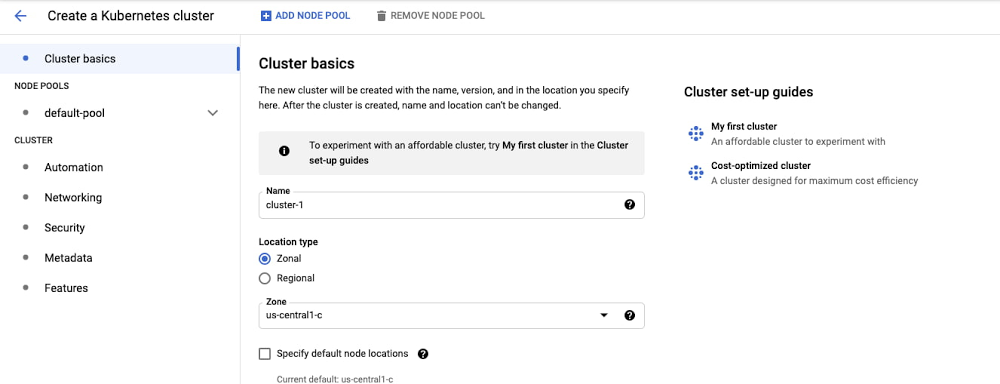
No one wants to spend more on compute infrastructure than they have to—and that includes your Kubernetes platform. With Google Kubernetes Engine (GKE), the easiest way to stand up a cost-optimized cluster is to choose GKE Autopilot. However, some organizations may not be ready to use Autopilot yet. For them, there’s our guide, Best practices for running cost-optimized Kubernetes applications on GKE, which details GKE’s core cost-optimization capabilities and organizational considerations for getting them implemented. And now, to make it much easier to apply those learnings, we’re introducing the built-in GKE cost-optimized cluster setup guide.With the new cluster setup guide, you can set up a cost-optimized Kubernetes cluster in a couple of clicks, and effortlessly learn about GKE’s top cost optimization capabilities without ever leaving your cluster creation workflow. This setup guide is a great resource for:The user that only wants to provide the size of the cluster, and let Google guide them through setting up the most cost optimal cluster The seasoned GKE operator who wants  a quick walkthrough of GKE’s latest cost-optimization featuresThe developer who wants an environment with a good balance between cost and performanceOr, those just getting started on their GKE journey.Behind the scenes, the setup guide suggests intelligent defaults for configuring your cluster. This will simplify the following decisions and bring your GKE Standard setup closer to the best practices implemented in GKE Autopilot.Choice of machine types and sizesWhether to enable cluster autoscalerHow many node pools of what machine sizes to configureHow to automate the configuration of appropriately sized nodes (check node auto-provisioning)Whether to enable vertical pod autoscalingThe right settings for tracking cluster costs out of the boxUsing the GKE cost-optimized setup guideYou can access the setup guide right out of the GKE cluster creation option in the Cloud Console.All you have to do is:Name your cluster, select your region and preferred release channelSpecify your desired cluster-size range, in number of CPUsPoint to your GKE usage metering data export location…and GKE does the rest for you. While you advance through the guide, we walk you through the exact settings of the cluster as it’s being configured. If all this sounds simple, it’s because it is!What’s going on under the hood?The setup guide makes it easy to set up a cost-optimized cluster, but behind the scenes, there’s a lot going on..The first step to a cost-optimal cluster is the cluster’s size. In this step, we enable node auto-provisioning. All you have to do is enter the minimum and maximum number of CPUs, and we’ll suggest the right memory ratio for your cluster.The next step lets you verify the machine type. This solves a very common question: “What machine size should I use for my default node pool?”Beyond your workloads, GKE runs components such as agents and proxies on a cluster’s nodes, so it’s important to strike the right balance between VM size for the best balance between cost and  performance. We achieve this by proposing a machine type and size based on the minimum and maximum size of the cluster that was specified in the previous step. Again—you retain full control over your final choice. By default, we select the cost-optimized general purpose machine type.The next step takes us to the advanced settings, where we preconfigure a number of important settings for you. We don’t expect you to change any of these (even though you can).For instance, we set the cluster autoscaling profile to optimize utilization—this optimizes for utilization over keeping spare resources in the cluster. When selected, the cluster autoscaler scales down the cluster more aggressively: it can remove more nodes, and remove nodes faster. Additionally, we enable cluster autoscaler just for the default pool, allowing you to keep the default node pool within the specified boundaries. We also activate vertical pod autoscaling by default, making sure the cluster is ready to provide recommendations for your workload if needed. This setting is non-disruptive to your cluster or workloads.Finally, you can’t optimize what you don’t measure. Observing and measuring your cluster usage is a core way to understand and improve your cluster utilization at any point in its life cycle. To help with that, we activate GKE usage metering by default. All you have to do is choose the BigQuery dataset to export the data to. As with everything in the setup guide, you can skip this step.That’s it—your new, cost optimized cluster is ready to go! Pro tip – select the “Make changes” option to apply the setup guide settings to the main cluster creation flow, and continue editing your cluster!While your cluster is spinning up, take some time and check the next steps you would want to take beyond infrastructure optimization.Our best practices guide will give you more insights on how to optimize beyond infrastructure, and how to approach workload-level optimization for when your cluster is up and running. You should also check out our collection of advanced GKE cost optimization materials and video series. Share them with your team and become a true GKE cost optimization hero!
Quelle: Google Cloud Platform

BigQuery Admin reference guide: Storage internals

So far on the BigQuery Admin Reference Guide series, we’ve talked about the different logical resources available inside of BigQuery. Now, we’re going to begin talking about BigQuery’s architecture. In this post we’re diving into how BigQuery stores your data in native storage, and what levers you can pull to optimize how your data is stored. Columnar storage formatBigQuery offers fully managed storage, meaning you don’t have to provision servers. Sizing is done automatically and you only pay for what you use. Because BigQuery was designed for large scale data analytics data is stored in columnar format.Traditional relational databases, like Postgres and MySQL, store data row-by-row in record-oriented storage. This makes them great for transactional updates and OLTP (Online Transaction Processing) use cases because they only need to open up a single row to read or write data. However, if you want to perform an aggregation like a sum of an entire column, you would need to read the entire table into memory.BigQuery uses columnar storage where each column is stored in a separate file block. This makes BigQuery an ideal solution for OLAP (Online Analytical Processing) use cases. When you want to perform aggregations you only need to read the column that you are aggregating over.Optimized storage formatInternally, BigQuery stores data in a proprietary columnar format called Capacitor. We know Capacitor is a column-oriented format as discussed above. This means that the values of each field, or column,  are stored separately so the  overhead of reading the file is proportional to the number of fields you actually read. This doesn’t necessarily mean that each column is in its own file, it just means that each column is stored in a file block, which is actually compressed independently for increased optimization.What’s really cool is that Capacitor builds an approximation model that takes in relevant factors like the type of data (e.g. a really long string vs. an integer) and usage of the data (e.g. some columns are more likely to be used as filters in WHERE clauses) in order to reshuffle rows and encode columns. While every column is being encoded, BigQuery also collects various statistics about the data — which are persisted and used later during query execution.If you want to learn more about Capacitor, check out this blog post from Google’s own Chief BigQuery Officer. Encryption and managed durabilityNow that we understand how the data is saved in specific files, we can talk about where these files actually live. BigQuery’s persistence layer is provided by Google’s distributed file system, Colossus, where data is automatically compressed, encrypted, replicated, and distributed.There are many levels of defense against unauthorized access in Google Cloud Platform, one of them being that 100% of data is encrypted at rest. Plus, if you want to control encryption yourself, you can use customer-managed encryption keys.Colossus also ensures durability by using something called erasure encoding – which breaks data into fragments and saves redundant pieces across a set of different disks.  However, to ensure the data is both durable and available, the data is also replicated to another availability zone within the same region that was designated when you created your dataset.This means data is saved in a different building that has a different power system and network. The chances of multiple availability zones going offline at once is very small. But if you use “Multi-Region” locations- like the US or EU – BigQuery stores another copy of the data in an off-region replica. That way, the data is recoverable in the event of a major disaster.This is all accomplished without impacting the compute resources available for your queries. Plus encoding, encryption and replication are included in the price of BigQuery storage – no hidden costs!Optimizing storage for query performanceBigQuery has a built-in storage optimizer that helps arrange data into the optimal shape for querying, by periodically rewriting files. Files may be written first in a format that is fast to write but later BigQuery will format them in a way that is fast to query. Aside from the optimization happening behind the scenes, there are also a few things you can do to further enhance storage.PartitioningA partitioned table is a special table that is divided into segments, called partitions. BigQuery leverages partitioning to minimize the amount of data that workers read from disk. Queries that contain filters on the partitioning column can dramatically reduce the overall data scanned, which can yield improved performance and reduced query cost for on-demand queries. New data written to a partitioned table is automatically delivered to the appropriate partition.BigQuery supports the following ways to create partitioned tables:Ingestion time partitioned tables: daily partitions reflecting the time the data was ingested into BigQuery. This option is useful if you’ll be filtering data based on when new data was added. For example, the new Google Trends Dataset is refreshed each day, you might only be interested in the latest trends. Time-unit column partitioned tables: BigQuery routes data to the appropriate partition based on date value in the partitioning column. You can create partitions with granularity starting from hourly partitioning. This option is useful if you’ll be filtering data based on the date value in the table, for example looking at the most recent transactions by including a WHERE clause for transaction_created_dateINTEGER range partitioned tables: Partitioned based on an integer column  that can be bucketed. This option is useful if you’ll be filtering data based on an integer column in the table, for example focusing on specific customers using customer_id. You can bucket the integer values to create appropriately sized partitions, like having all customers with IDs from 0-100 in the same partition. Partitioning is a great way to optimize query performance, especially for large tables that are often filtered down during analytics. When deciding on the appropriate partition key, make sure to consider how everyone in your organization is leveraging the table. For large tables that could cause some expensive queries, you might want to require partitions to be used.Partitions are designed for places where there is a large amount of data and a low number of distinct values. A good rule of thumb is making sure partitions are greater than 1 GB. If you over partition your tables, you’ll create a lot of metadata – which means that reading in lots of partitions may actually slow down your query. ClusteringWhen atable is clusteredin BigQuery, the data is automatically sorted based on the contents of one or more columns (up to 4, that you specify). Usually high cardinality and non-temporal columns are preferred for clustering, as opposed to partitioning which is better for fields with lower cardinality. You’re not limited to choosing just one, you can have a single table that is both partitioned and clustered!The order of clustered columns determines the sort order of the data. When new data is added to a table or a specific partition, BigQuery performs free, automatic re-clustering in the background. Specifically, clustering can improve the performance for queries:Containing where clauses with a clustered column: BigQuery uses the sorted blocks to eliminate scans of unnecessary data. The order of the filters in the where clause matters, so use filters that leverage clustering firstThat aggregate data based on values in a clustered column: performance is improved because the sorted blocks collocate rows with similar valuesWith joins where the join key is used to cluster the table: less data is scanned, for some queries this offers a performance boost over partitioning!Looking for some more information and example queries? Check out this blog post! DenormalizingIf you come from a traditional database background, you’re probably used to creating normalized schemas – where you optimize your structure so that data is not repeated. This is important for OLTP workloads (as we discussed earlier) because you’re often making updates to the data. If your customer’s address is stored every place they have made a purchase, then it might be cumbersome to update their address if it changes. However, when performing analytical operations on normalized schemas, usually multiple tables need to be joined together. If we instead denormalize our data, so that information (like the customer address) is repeated and stored in the same table, then we can eliminate the need to have a JOIN in our query. For BigQuery specifically, we can also take advantage of support for nested and repeated structures. Expressing records using STRUCTs and ARRAYs can not only provide a more natural representation of the underlying data, but in some cases it can also eliminate the need to use a GROUP BY statement. For example, using ARRAY_LENGTH instead of COUNT.Keep in mind that denormalization has some disadvantages. First off, they aren’t storage-optimal. Although, many times the low cost of BigQuery storage addresses this concern. Second, maintaining data integrity can require increased machine time and sometimes human time for testing and verification. We recommend that you prioritize partitioning and clustering before denormalization, and then focus on data that rarely requires updates. Optimizing for storage costsWhen it comes to optimizing storage costs in BigQuery, you may want to focus on removing unneeded tables and partitions. You can configure the default table expiration for your datasets, configure the expiration time for your tables, and configure the partition expiration for partitioned tables. This can be especially useful if you’re creating materialized views or tables for ad-hoc workflows, or if you only need access to the most recent data.Additionally, you can take advantage of BigQuery’s long term storage. If you have a table that is not used for 90 consecutive days, the price of storage for that table automatically drops by 50 percent to $0.01 per GB, per month. This is the same cost as Cloud Storage Nearline, so it might make sense to keep older, unused data in BigQuery as opposed to exporting it to Cloud Storage.Thanks for tuning in this week! Next week, we’re talking about query processing – a precursor to some query optimization techniques that will help you troubleshoot and cut costs.  Be sure to stay up-to-date on this series by following me on LinkedIn and Twitter!Related ArticleBigQuery Admin reference guide: Jobs & reservation modelLearn all about workload management in BigQuery by understanding what a job is and how slot reservations can be leveraged across your org…Read Article
Quelle: Google Cloud Platform

Give your data processing a boost with Dataflow GPU

We are excited to bring GPUs to the world of big data processing, in partnership with NVIDIA,  to unlock new possibilities for you. With Dataflow GPU, users can now leverage the power of NVIDIA GPUs in their data pipelines. This brings together the simplicity and richness of Apache Beam, serverless and no-ops benefits of Dataflow, and the power of GPU based computing.   Dataflow GPUs are provisioned on-demand and you only pay for the duration of your job. Businesses of all sizes and industries are going through hard data driven transformations today. A key element of that transformation is using data processing in conjunction with machine learning to analyze and make decisions about your systems, users, devices and the broader ecosystem that they operate in. Dataflow enables you to process vast amounts of data (including structured data, log data, sensor data, audio video files and other unstructured data) and use machine learning to make decisions that impact your business and users. For example, users are using Dataflow to solve problems such as detecting credit card fraud, physical intrusion detection by analyzing video streaming, and detecting network intrusion by analyzing network logs. Benefits of GPUsUnlike CPUs, which are optimized for general purpose computation, GPUs are optimized for parallel processing. GPUs implement an SIMD (single instruction, multiple data) architecture, which makes them more efficient for algorithms that process large blocks of data in parallel.  Applications that need to process media and apply machine learning typically benefit from the highly parallel nature of GPUs.Google Cloud customers can now use NVIDIA GPUs to accelerate data processing tasks as well as image processing and machine learning tasks such as predictions. To understand the potential benefits, NVIDIA ran tests to compare the performance of the Dataflow pipeline that uses a TensorRT optimized BERT (Bidirectional Encoder Representations from Transformers) ML model for natural language processing. The following table captures the results of the tests: using Dataflow GPU to accelerate the pipeline resulted in an order of magnitude reduction in CPU and memory usage for the pipeline.We recommend testing Dataflow GPU with your workloads since the extent of the benefit depends on the data and the type of computation that is performed.What customers are saying Cloud to Street, uses satellites and AI to track floods in near real-time anywhere on earth to insure risk and save lives. The company produces flood maps at scale for disaster analytics and response by using Dataflow pipelines to automate batch processing and downloading of satellite data at large scale.  Cloud to Street uses Dataflow GPU to not only process satellite imagery but also apply resource intensive machine learning tasks in the Dataflow pipeline itself. “GPU-enabled Dataflow pipelines asynchronously apply machine learning algorithms to satellite imagery. As a result, we are able to easily produce maps at scale without wasting time manually scaling machines, maintaining our own clusters, distributing workloads, or monitoring processes,” said Veda Sunkara, Machine Learning Engineer, Cloud to Street.Getting started with Dataflow GPUWith Dataflow GPU, customers have the choice and flexibility to use any of the following high performance NVIDIA GPUs: NVIDIA® T4 Tensor Core, NVIDIA® Tesla® P4, NVIDIA® V100 Tensor Core, NVIDIA® Tesla® P100, NVIDIA® Tesla® K80.Using Dataflow GPU is straightforward. Users can specify the type and number of GPUs to attach to Dataflow workers using the worker_accelerator parameter. We have also made it easy to install GPU drivers by automating the installation process. You instruct Dataflow to automatically install required GPU drivers by specifying the install-nvidia-driver parameter. Apache Beam notebooks with GPUApache Beam notebooks enable users to iteratively develop pipelines, inspect your pipeline graph interactively using JupyterLab notebooks. We have added support for GPU to Apache Beam notebooks which enables you to easily develop a new Apache Beam job that leverages GPU and test it iteratively before deploying the job to Dataflow. Follow the instructions at Apache Beam notebooks documentation to start a new notebooks instance to walk through a built in sample pipeline that uses Dataflow GPU.Integrated monitoringFurthermore, we have integrated monitoring of GPU into Cloud Monitoring. As a result you can easily monitor the performance and usage of GPU resources in your pipeline and optimize accordingly.Looking ahead: Right Fitting for GPUWe are also announcing a new breakthrough capability called Right Fitting as part of Dataflow Prime Preview. Right Fitting allows you to specify the stages of the pipeline that need GPU resources. That allows the Dataflow service to provision GPUs only for the stages of the pipeline that need it, thereby reducing the cost of your pipelines substantially.  You can learn more about the Right Fitting capability here. You can find more details about Dataflow GPU at Dataflow support for GPU. Dataflow GPU are priced on a usage basis. You can find pricing information at Dataflow Pricing.Related ArticleDataflow Prime: bring unparalleled efficiency and radical simplicity to big data processingCreate even better data pipelines with Dataflow Prime, coming to Preview in Q3 2021.Read Article
Quelle: Google Cloud Platform

Showcasing dynamic resource management in E2 VMs

Spending wisely is a top priority for many companies—especially when it comes to their cloud compute infrastructure. Last year, we introduced Compute Engine’s E2 VM family, which delivers cost-optimized performance for a wide variety of workloads. Our E2 machines provide up to 31% lower Total Cost Ownership (TCO) compared to our N1 machines, consistent performance across CPU platforms, and instances with up to 32 vCPUs and 128 GB of memory. This is thanks to Google’s dynamic resource management technology, which is enabled by large and efficient physical servers, intelligent VM placement, performance-aware live migration, and a specialized hypervisor CPU scheduler.This combination of performance and cost-efficiency is driving significant growth in E2 adoption amongst our customers. They are increasingly choosing E2 as an essential building block for their various types of workloads, including web serving applications, small / medium databases, microservices and development environments, among others.For example, Google Cloud security partner ForgeRock runs several of its identity-based solutions on E2.”As a global IAM software company, we are tasked with addressing the world’s greatest security challenges with speed and agility, at scale. With that in mind, we are constantly exploring ways to optimize our cloud infrastructure spend while at the same time delivering on performance and reliability. By moving compute workloads to E2 VMs we were able to satisfy all of our criteria. Across the board, E2 VMs have delivered greater infrastructure efficiency for our digital identity platform and we are able to invest in a more delightful customer experience with additional features for our enterprise customers.” —Simon Harding, Senior Staff Site Reliability Engineer at ForgeRockHands-on experience with E2 VMsThroughout this past year, we strengthened our investment in dynamic resource management, and improved the at-scale scheduling algorithms that govern E2 VM performance. Our telemetry shows that E2 VMs deliver steady performance across a variety of workloads, even for those that are CPU-intensive. As a result, Alphabet services such as Android and ChromeOS infrastructure are now successfully running on E2 VMs. Google Kubernetes Engine (GKE) control-plane nodes also work seamlessly with E2 VMs.To provide an illustrative example, we measured a latency-sensitive web application running on a replicated set of e2-standard-4 VMs actively serving requests for a time period of sixteen days. The application serves about ~247 QPS (queries-per-second) of CPU-intensive work per replica. All replicas reply within ±10% latency variation, at the median.In this particular example, E2’s Dynamic Resource Management relied on two Compute Engine technologies to provide sustained consistent performance. The first, our VM placement technology, makes scheduling decisions that leverage resource observations from various workloads in order to predict performance across different target hosts. The second, our custom hypervisor CPU scheduler, minimizes the noisy-neighbour effects from adjacent VMs by providing sub-microsecond average wake-up latencies and fast context switching. During our sixteen-day observation window, the application underwent a maintenance event that triggered live migration in one of the replicas. Compute Engine relies on its battle-tested and performance-aware live migration technology to keep your VMs running during maintenance events, moving them seamlessly to another host in the same zone instead of requiring them to be rebooted.The following chart shows that the performance impact of live migration remained negligible while the replica was relocated to a different host. The VM’s overhead averaged between 0.02% to 0.1% of CPU time per second during the event.The timeseries above depicts vCPU availability % in a web application replica that underwent a maintenance event. vCPU throughput was 99.90% right before migration, and stabilized at 99.98% The total VM wait time at the time of the migration was about 160 milliseconds.The clients connected to the replica during the maintenance event did not observe any connectivity loss or degradation; in fact, they noticed a 1 millisecond improvement in latency.The timeseries above depicts query latency in milliseconds in a web application replica that underwent a maintenance event. This resulted in a live migration between two different hosts. The total VM wait time at the time of the migration was about ~160 milliseconds.Another E2 VM benefit enabled by dynamic resource management is its access to the largest pool of compute resources available in Compute Engine to any VM Family. By leveraging dynamic resource management, E2 VMs are scheduled seamlessly across x86 platforms from a combined pool of Intel and AMD based servers. In fact, our application’s replicas were scheduled in a mix of hosts powered by CPUs from both vendors and ran smoothly without experiencing any host errors, without the need to be rebuilt for a specific CPU vendor. As designed, per-vendor overall performance remained comparable, within 0.1% difference in total QPS served, 10% difference in median latency and CPU utilization stable at 55% for Intel-based hosts and 60% for the AMD equivalent. Putting it all together, Compute Engine’s design of E2 VMs centered around running on a large multi-vendor x86 platform pool and powered by Google Cloud’s dynamic resource management, provides a consistently performant environment for your applications. Get startedIf you’re looking for cost-efficiency, E2 VMs are a great choice. Since E2’s initial launch, we’ve added several new features and capabilities to E2 VMs:Support for 32 vCPU instances – To meet the processing power required by a diverse range of workloads, we now support sizes up to 32 vCPU with the addition of  e2-standard-32 and e2-highcpu-32.Custom memory for E2 shared-core machine types – For small workloads, we’ve extended custom machine types to support e2-micro, e2-small, and e2-medium. These VMs range from 0.25 vCPU to 1.0 vCPU with the ability to burst up to 2 vCPU, and now support a customized amount of memory ranging from 1 to 8 GB.Stay tuned for updates to the Google Cloud Free Tier that will soon include one non-preemptible e2-micro instance for use each month for free. The e2-micro instance will provide you with two vCPUs, each for 12.5% of CPU uptime (0.25 vCPU), and 1 GB of memory.Enhancements to E2 are a part of a broader effort to meet your application needs with a diverse product portfolio that includes Tau VMs, our latest addition focused on industry leading price/performance. To learn more about E2 VMs and the complete portfolio of Compute Engine VM Families, visit the E2 and the VM Families documentation.Related ArticlePerformance-driven dynamic resource management in E2 VMsA technical look at dynamic resource management behind E2 VM machine typesRead Article
Quelle: Google Cloud Platform





