How to grow brands in times of rapid change

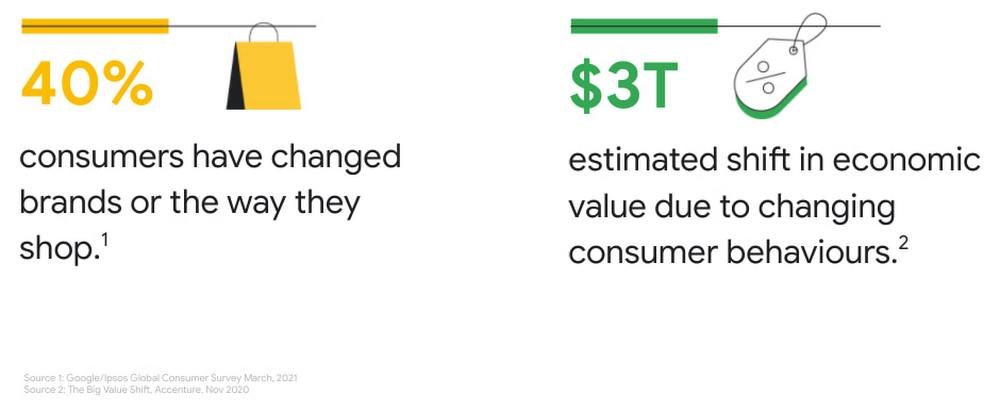
2020 saw an unprecedented change in consumer behaviour around the world, with shoppers finding new ways of discovering, evaluating and buying products. This has created fresh expectations for both brands and retailers to drive consumer closeness, embrace the digital moment and transform their operations to be more agile and sustainable. These themes have been top of mind in my conversations with our CPG customers, and set the tone at Google Cloud Summit for Retail and Consumer Goods, which concluded this week. I couldn’t be more proud of our team and thankful for our customers that supported us by participating in our sessions and attending the event.I joined Google Cloud in January 2021 after a long career in the CPG industry, and as I shared in my CPG keynote at the summit, I am thrilled to be helping bring the power of Google to drive industry innovation in CPG. At Google we call this ‘new normal’ the transformation cloud era, where we’re working with customers who want to not just save money on storage or compute, but to use cloud and digital technologies to drive agility across their business. I also call it the era of ‘consumer switching’, because Covid-19 has accelerated the likelihood of consumers to switch brands or the way they shop. Some of these changes are still happening; over 40% shoppers in a recent Google survey reported that in March 2021 they changed brands or shopped online for something they were previously buying in store.At Google, we have an amazing team of strategists who have been researching, observing, and analyzing the many facets of consumer behavior over the last few years. In the opening keynote at the Summit Capturing the Hearts and Minds of Today’s Consumers, Google’s Human Truths Team kicked off the Retail & Consumer Goods summit by sharing some of their consumer insights, including what behavior patterns they think will “stick” as we move into a post-pandemic world.  I think these insights are especially relevant for brands, as they speak to some of our latest findings on the CPG shopper’s mindset.Accenture estimates that there could be a 3 trillion dollar shift in value between companies as a result of consumers shifting brands and behaviours. While it is not known who the winners of the shift will be, one thing is certain – those who will be able to leverage data and analytics fastest will benefit the most from these times of rapid change. I shared some of the implications for the CPG industry in my keynote How to grow brands in times of rapid change along with the three key areas in which Google cloud is helping CPG companies drive brand success: Unlocking consumer growth with data powered insights Transforming go-to-market in the omnichannel ecosystemDriving connected, efficient, and sustainable operationsLet’s take a quick look at each of them:Unlocking consumer growth with data-powered insightsThe digital marketing ecosystem is transforming for a privacy centric world, and brands are seeing a direct impact in marketing effectiveness. As the CPG industry becomes more consumer-centric and shifts more toward direct-to-consumer (D2C) business models, acquiring and activating consented first-party consumer data presents a clear opportunity to capitalize on new consumer demands. As a result, CPGs are turning to consumer data platforms (CDPs) to help them unify, manage, enrich, and secure all of their disparate data from different marketing tools, website analytics, email campaigns, loyalty programs, and more. Google Cloud and our ecosystem of partners can help CPGs build a privacy-centric CDP which brings together all their customer and marketing data into a modern data warehouse, with built-in predictive data visualization tools and models. With a CDP built on Google Cloud, you can integrate data from Google Marketing Platform to drive predictive marketing and media effectiveness. And with pre-built connectors you can also easily integrate non-Google media and data from other enterprise platforms like SAP and Oracle to leverage consumer data for more integrated decision making. Democratize access to data across the organization with our Business Intelligence tool Looker to enable faster decisions in real-time from marketing to supply chain to product innovation.At the Retail & CPG Summit we shared how retailers and brands can drive consumer closeness in a privacy-centric world featuring Procter & Gamble’s experience building and activating consumer data in a privacy-safe way to serve consumers better and maximize marketing effectiveness and drive growth across their business. And in a demo, Constellation Brandsshared how they’re leveraging real-time data from several commercial sources using Looker to unpack insights and develop action plans.Transforming go-to-market in the omnichannel ecosystemAmidst COVID-19 restrictions and rolling lockdowns, ecommerce activity has surged past a point of no return. Direct to consumer (D2C)  or digitally native brands were able to minimize consumers switching during the pandemic  by offering a great online experience. While in-person shopping remains important, consumers are expecting more digital and omnichannel experiences and many will continue to explore new brands and purchase online. CPGs that want to maintain their market leadership can no longer afford to ignore the key role omnichannel capabilities will play in capturing the attention of both retailers and consumers.  Even if D2C sales are not a big portion of your business, you will benefit from first-party data that can help you drive insights and product innovation. CPG brands want to transform their older, clunky ordering processes into modern digital shopping experiences. Re-platforming legacy solutions on Google Cloud not only accelerates application innovation, but also makes it easier to quickly launch new features and products. At Google Cloud we have transformed ecommerce for large D2C brands and traditional retailers, so we know what a best in class D2C experience looks like. And we can bring it to your brands. We already help some of the biggest brands in retail modernize ecommerce and enhance product discovery with solutions like Visual Search and Recommendations AI. All of these can help you build a best in class omni channel presence for your brands.We had several sessions on improving your omni channel experience, including Why search abandonment is the metric that matters featuring Macy’s and Conversational Commerce with Google with Albertsons, where we shared how Google’s conversational experiences can help consumers message businesses from wherever they are, and whenever they need them.Driving connected, efficient, and sustainable operationsThe superpowers of  AI/ML are not just for marketing.  Did you know that research from MIT and Google Cloud has found companies that use AI/ML can drive 2x more data-driven decisions, 5x faster decision making, and 3x faster execution? By connecting your operations in real time with demand signals like search, trends, weather, mobility and supercharging this data with AI and ML, you can make smarter and quicker business decisions. For example, you can use search trends to drive demand forecasting and ramp up manufacturing for popular products.Google Cloud can help you modernize legacy business applications by migrating them to the cloud and using AI/ML and smart analytics to drive business outcomes. Take SAP for example – a Forrester study found that modernizing SAP with Google not only resulted in 56% more efficient IT teams – it also generated 160% 3-year ROI. SAP data on Google Cloud breaks down silos across SAP, marketing, manufacturing systems, and external data sources for next-level intelligent operations. For example, with SAP and Google Cloud, you can combine product, media, CRM, digital commerce and site data from SAP and non-SAP sources to uncover stronger consumer insights and fuel product discovery along the path to purchase. You can merge SAP product and sales data with consumer,  market data and Google geo trends to drive targeted promotion outcomes, maximizing the ROI of promotional dollars across retail channels. You can also integrate supply chain and manufacturing data from SAP systems with consumer, marketing and Google geo market data to improve demand forecasting and optimize supply chain logistics. The possibilities are endless. This is why we describe SAP modernization as The Gift That Keeps On Giving.Check out the session on SAP from the Summit and hear from Rodan + Fields on their experience of modernizing SAP on Google Cloud. Another solution that excites me is Vertex AI, which transforms the demand forecasting process. Traditional demand forecasting accuracy is a challenge for most CPGs. Current forecasting methods do not take into account granular factors that impact demand, like local weather, demographics, or unforeseen events. With our recently launched Vertex Forecast, Google is making it much easier to start using cutting-edge machine learning models for demand forecasting. In our session Demand Forecasting: Time for Intelligence, Not Intuition featuring American Eagle Outfitters, we share how you can adopt a data science approach to demand forecasting that’s customized to your unique needs.CPG organizations come to Google for help solving their toughest problems, whether it be driving new consumer growth, unlocking new routes to market, or building connected, sustainable operations. And we bring the best of Google: innovation, culture, infrastructure, AI/ML, and a deep understanding of consumer behaviour to help them build best-in-class brands. I’d like to end with a topic that’s very close to my heart. This is around Solving for Sustainability in Retail and Consumer Goods. Our research shows that 62% of shoppers cared about at least one sustainability aspect when purchasing online in 2020. In addition, the events of the past year have triggered consumers to re-evaluate their relationships with brands and prioritize those that are more sustainable in the context of the pandemic. Watch this session to learn more about how retailers and consumer goods companies can leverage technology, data, and machine learning to help make sustainability a core part of the recovery.All our session content is available on demand. Ready to learn more about how we’re helping CPG brands and manufacturers drive results? Learn more about Google Cloud’s consumer packaged good solutions and reach out to your Google Cloud sales executive to set up a deeper conversation on how we can help you grow your brands today and in the future.Related ArticleRead Article
Quelle: Google Cloud Platform

Data protection in transit, in storage, and in use

In our first episode of the Cloud Security Podcast, we had the pleasure to talk to Nelly Porter, Group Product Manager for the Cloud Security team.In this interview Anton, Tim, and Nelly examine a critical question about data security: how can we process extremely sensitive data in the cloud while also keeping it protected against insider access? Turns out it’s easier than it sounds on Google Cloud.Some customers using public cloud worry about their data in many different ways. And they have all sorts of sensitive data, from healthcare records, to credit card numbers, to corporate secrets, and more. For some organizations, it is seen as a risk to entrust that data to a public cloud provider. Or, some organizations may have the data that is extremely sensitive, or highly damaging, if lost or stolen.In the past most companies would collect data, process it themselves, and do any transformation or aggregation on-premise. They knew who was using the data, how, and when. That made roles and responsibilities really clear.With the cloud everything has changed. The storage and usage capabilities are much better, but it also moves some of the data management out of the company’s hands. Cloud security is a shared responsibility model: some handled by the customer, some handled by the provider.For example, let’s say you have gathered a bunch of customer behavior data, buying patterns and purchase history. You’ve got it all uploaded to Cloud Storage – it’s encrypted, and you can hold on to the keys (such as via Google Cloud EKM); you are safe. This will work for many types of sensitive and regulated data. Right?Next up you start doing data analysis, maybe even training an AI model on your data. Now that you’re using the data, it’s no longer protected by the same encryption. You still get the advantage of reserved memory, but the data is not scrambled, as desired by some clients for some use cases.We solve this tricky problem with confidential computing, which lets you complete the cycle and keep the data protected in transit, in storage and in use. While it starts with CPUs, we’re also extending the service to include GPUs and Accelerators, so your data enjoys protection wherever it goes.Confidential computing becomes possible with the right CPU hardware, allowing encryption of data while it’s loaded and used. And because this is a hardware upgrade, there’s nothing that needs to change with your code to take advantage of it.The alternative for most companies would be to handle and process such ultra-sensitive data on-premise only, which means missing out on the scale, functionality and reliability of public cloud infrastructure. With this improved cryptographic isolation, companies of all types can now use sensitive data across services and tools. The only downside is a slight latency gain and cost increase.Whether you’re handling highly regulated financial services data, or sensitive pictures from your customers, or need to protect high-value intellectual property, check out confidential computing and hear more about how it works on this episode of Cloud Security Podcast.Related ArticleStay in control of your security with new product enhancements in Google CloudStay in control of your Google Cloud security posture with enhanced built-in capabilities for Cloud Security Command CenterRead Article
Quelle: Google Cloud Platform

Let's migrate: why lifting and shifting is simply too easy to ignore

Enterprises across all verticals are choosing Google Cloud as their preferred partner for digital transformation. Taking such a transformational approach to cloud adoption, and building modern, cloud-native services brings the largest impact to an organisation – in terms of business agility, return on investment, time to market and more. The cloud’s scale and flexibility enables an organisation to build services that just wouldn’t have been possible in an on-premises data centre. When our Professional Services teams engage with customers, we adopt a holistic approach to cloud migration, and generally examine the complete technology landscape in an organisation before embarking on the cloud journey. We recommend that you focus efforts on modernizing high-value workloads that create business-differentiating value; and our experience shows that this is likely in many cases easier than you think. This approach results either in greenfield software development, or in a “modernization factory”; we’ve described these outcomes in a previous blog post.  However, this sort of transformation, or even incremental modernization of workloads to take advantage of platform-as-a-service services like Google Kubernetes Engine and Cloud SQL takes time and effort. This is an effort that may not be justified for legacy workloads. We also often encounter customers who have a strong desire to modernise their applications but can’t because of one or more of the following challenges:Scaling infrastructure on premises can be hard – but you might not have the time or resources to modernise the application. Moving the applications to the cloud as a first step can give you flexibility and breathing room whilst you begin the modernizationOff-the-shelf applications can’t be rearchitected, so moving them to the cloud can allow you to reduce operational toilYou need less-costly, more-scalable backup and recovery.  Transitioning backups from on-premises to the cloud is a common use case in all but the most heavily regulated industries or for applications with the tightest RPOs/RTOs (recovery point objectives/recovery time objectives).Whatever your reason for not modernizing workloads for the cloud,  it might then seem an unnecessary hurdle to move these applications to cloud as-is – surely this is just shifting from hardware you own, to hardware you rent? In fact, this isn’t the case at all. There are many benefits you can gain in moving these legacy applications to cloud:Using a migration factory approach to move applications as-is to cloud can give you immediate financial benefits. In the absence of costly and time-consuming application changes, you can quickly realise savings from hardware and operations.The cloud can offer easy access to specialised hardware – custom machine sizes for SAP workloads or GPUs for high-performance computing needs. This hardware can be provided on-demand, and is regularly upgraded, meaning you avoid costly purchases in your data centres.Legacy workloads can be managed separately to cloud-native workloads, using your existing tooling and operational processes. This means that security and compliance works in almost the same way you’re used to. This gives a simple stepping stone to modernisation – starting with what you have, but gradually adopting cloud-native tooling. This ‘migration factory’ approach allows you to maximise velocity of migrations, and gives you a ‘best of both worlds’ first step into the cloud. You start with minimal change to your infrastructure, but can quickly benefit from Google Cloud capabilities that reduce cost and toil, allowing you to invest in the next step, modernizing your workloads. Let’s look at three categories of features in Google Cloud that bring you these benefits:Active AssistGoogle Cloud offers a series of features and tools built on top of our deep AI capabilities, that all work together to bring intelligence to your cloud environment. We call these services Active Assist. For example, you can automatically act on rightsizing recommendations to shut down or reduce the size of idle machines, disks, or even IP addresses to reduce costs. You will also receive  recommendations for subscribing to committed use discounts for long-running resources.Alternatively, you can receive notifications, and configure automated size increases and scale-up of VM groups for spikes in load, avoiding downtime or issues with application performance. Similarly, you can configure auto-healing for failed instances, based on health checks.Meanwhile, Policy Analyser highlights user and service account issues – showing outliers in access and allowing troubleshooting of permissions. Likewise, IAM recommendations will highlight unused, or rarely used permissions that can be removed, with a simulator to preview the impact of any change. You’ll find these services and more across key GCP services, and combined together in the Recommendation Hub.Network intelligenceWhen hosting your workloads in Google Cloud, you share the same network infrastructure as Google’s own services, where we host billions of users of YouTube, Google Workspace and Search. This means you gain the benefits of global scale and proximity to your users; you also gain access to a series of tools that make a real difference to your legacy workloads. These network intelligence tools include the ability to visualise network traffic flows, network routing and latency across your GCP resources, and your connectivity to on-premises infrastructure or elsewhere. You’re able to track topology changes and network health during migration of workloads to Google Cloud. This is particularly relevant during migration, as it is simple to troubleshoot firewall issues or configuration that prevents your application components from talking to each other – connectivity tests allow you to diagnose issues and also to preview the impact of pending configuration changes on network traffic before they’re made. When planning a migration, you can extend your L2/L3 network into GCP so you can seamlessly move virtual machines (VMs) without even changing IP addresses. This drastically reduces the testing burden, and with Migrate for Compute Engine, you can have VMs up and running in the cloud in minutes. We often find that on-premises networks adopt a perimeter security approach, with very little firewall control between machine instances. By moving machines to the cloud, you can benefit from network telemetry to understand traffic patterns – VPC flow logs can record network flows between VM instances, including those used as Kubernetes nodes, without adding latency or having any impact to the VMs themselves. Combined with IAM controls and instance tagging, this makes it easy to define firewall rules that segregate traffic and protect your applications. Meanwhile, Firewall Insights provides visibility into firewall usage, detecting configuration issues such as redundant rules, or recommending updates to firewall rules to refine permissions. VM ManagerAlthough large enterprises will typically have asset management tooling and a process for patch management, these are often expensive tools from a multitude of vendors, designed to support a collection of operating systems and hardware platforms that have grown over time. Customers often describe to us the effort that maintaining their on-premises infrastructure requires, and we routinely discover VMs that haven’t been patched or upgraded in many years.To address this need, Google Cloud VM Manager is a suite of tools designed to automate the maintenance of large fleets of VMs hosted in Google Compute Engine. These tools include:Patch management – providing insights on patch status of VM instances, both Windows and Linux; highlighting recommendations and automated deployment of patches. You can create flexible patching schedules and observe patch status across your entire fleet. In combination with Google Cloud Monitoring, you’re able to troubleshoot any issues with the patch management and detect and resolve issues easily.Configuration management – maintain consistent configuration across your VMs, complete with automated remediation features. You can deploy configuration, or push software packages to machines using simple policies and recipes.Inventory management – collect operating system and software / package information. Also integrated with Cloud Asset Inventory to simplify the management of your complete cloud environment. Based on experience of managing a fleet of Windows infrastructure within Google, we’ve also recently open-sourced our own Windows fleet management tooling, bringing a cloud-native approach to Windows imaging, Active Directory management and software package distribution / deployment. Getting startedIn combination, when moving applications from your on-premises data centre to Google Cloud, these features support customers to significantly reduce the burden of infrastructure management, lower the cost of hosting cloud infrastructure, and can improve the security and reliability of your applications.  As outlined earlier, we would encourage this kind of migration as a first step towards broader transformation – through effort and cost reduction you’ll be able to take bolder steps towards that goal. What’s the best way to get started on your migration journey? We recommend first, you make sure to document your long-term goals for cloud adoption, and consider your current cloud maturity. We use the Google Cloud Adoption Framework to help determine whether your cloud migration needs to be tactical, strategic, or transformational, and to help you understand your future cloud operating model.  Then, you should establish an initial landing zone ready to receive your apps running on VMs. Migrate for Compute Engine  enables simple, frictionless, and large-scale enterprise migrations of virtual machines to Google Compute Engine with minimal downtime and risk.  If you’re planning a large-scale migration, our Professional Services team can help you assess the benefits and build a migration plan, often at no cost. Reach out to your Google Cloud sales contact, fill out this quick form for more information, or sign up for a free discovery and assessment of your current IT landscape – a great way to get started!Related ArticleRegistration is open for Google Cloud Next: October 12–14Register now for Google Cloud Next on October 12–14, 2021Read Article
Quelle: Google Cloud Platform

The new Google Cloud region in Melbourne is now open

We opened our Sydney cloud region in 2017 and, since then, we have continued to invest and expand across Australia and New Zealand to support the digital future of organizations of all sizes. In Australia, Google Cloud supports almost A$3.2 billion in annual gross benefits to businesses and consumers. This includes A$686 million to businesses using Google Workspace and Google Cloud Platform, another A$698 million to Google Cloud partners, and A$1.8 billion to consumers.1 For customers in Australia, New Zealand and across Asia Pacific, we’re excited to announce that our new Google Cloud region in Melbourne is now open. Designed to help businesses build highly available applications for their customers, the Melbourne region is our second Google Cloud region in Australia and 11th to open in Asia Pacific. We’re celebrating the occasion with a digital event where federal minister for the Digital Economy, Jane Hume, and customers Australia Post, Trade Me, Bendigo and Adelaide Bank, The Australian Football League and Macquarie Bank will share their perspectives. Come join us!A global network of regionsMelbourne joins the existing 26 Google Cloud regions connected via our high-performance network, helping customers better serve their users and customers throughout the globe. With this our second region in Australia, customers benefit from improved business continuity planning with distributed, secure infrastructure needed to meet IT and business requirements for disaster recovery, all the while maintaining data sovereignty in-country.With this new region, Google Cloud customers operating in Australia and New Zealand will benefit from low latency and high performance of their cloud-based workloads and data. Designed for high availability, the region opens with three zones to protect against service disruptions, and offers a portfolio of key products, including Compute Engine, Google Kubernetes Engine, Cloud Bigtable, Cloud Spanner, and BigQuery. We also continue to invest in expanding connectivity across the Australia and New Zealand region by working with partners to establish subsea cables and new Dedicated Cloud Interconnect locations and points of presence in major cities including Sydney, Melbourne, Perth, Canberra, Brisbane and Auckland.Collectively, this will deliver geographically distributed and secure infrastructure to customers across Australia and New Zealand – which is especially important for those in regulated industries such as Financial Services and the Public Sector.  What customers and partners are sayingNavigating this past year has been a challenge for companies as they grapple with changing customers demands and greater economic uncertainty. Technology has played a critical role, and we’ve been fortunate to partner with and serve people, companies, and government institutions around the world to help them adapt. The Google Cloud region in Melbourne will help our customers adapt to new requirements, new opportunities and new ways of working.  “We moved to Google Cloud to improve the stability and resilience of our infrastructure and become more cloud-native as part of a digital transformation program that keeps the customer at the heart of our business. We welcome Google Cloud’s investment in ANZ and the opportunities the Google Cloud Melbourne region presents to improve Trade Me’s agility and performance. – Paolo Ragone, Chief Technology Officer, Trade Me     “We initially turned to Google Cloud to help us process parcels faster and gain deeper insights into our business and its processes. The relationship has continued to deliver benefits to our customers and our organization and we welcome Google Cloud’s opening of the Melbourne region as presenting even more opportunities for businesses to innovate and generate efficiencies.” – Munro Farmer, Chief Information Officer,Australia Post.“We are well progressed with our multi-year strategy to grow and transform our organization to be Australia’s bank of choice. Google Cloud’s advanced data capabilities and renowned culture of innovation are strongly aligned to this strategy and will allow us to become even more innovative and agile in responding to our customers’ ever-changing needs. We were quick to run our workloads out of the Melbourne cloud region and we believe Google Cloud’s expanded investment in local infrastructure will further assist us on our business transformation journey.” – Andrew Cresp, Chief Information Officer, Bendigo and Adelaide Bank.“We have a clear vision when it comes to innovating to deliver world-class service to our customers, and our partnership with Google Cloud is core to that strategy. The company’s continued investments in local infrastructure and technology present new opportunities for us as we advance our transformation journey in this digital-first era.” – Chris Smith, Vice President, Digital Service, OptusOur global ecosystem of channel partners has expanded by more than 400% in the last two years, and we look forward to continuing our close relationships with partners  in Australia and New Zealand as we help customers modernize, innovate, scale and grow.“Australian companies are increasingly realising the benefits of their cloud investments and are now looking to transform their organisations at scale. We are excited about the potential and new value that the Google Melbourne Cloud region will bring to our clients as we continue to work together on delivering intelligent and innovative solutions to Australian organisations.” – Tara Brady, CEO of Accenture Australia and New Zealand“Google Cloud has always been there for its customers for the long haul and the opening of the new Melbourne Cloud region is great news. This increased resilience and scale will empower companies of all sizes to be bold in accelerating their digital transformation plans.” – Tony Nicol,  CEO of Servian”We’re excited about the launch of the Melbourne Cloud region. It will cater to the needs of industries we work closely with including healthcare and financial services, and will further enhance how we jointly deliver on the compliance, privacy and security requirements of companies as they advance their digital transformation.” – Simon Poulton, CEO of Kasna“The opening of the new Google Cloud region in Melbourne is fantastic news as it now enables DXC customers access to enhanced services for their mission critical application and data solutions across two regions within Australia.  As our customers modernise their application estate, many are seeking dual region cloud services, and DXC is excited to partner with Google Cloud to deliver these services to customers in Australia and New Zealand.” – Tim Fraser, Google Practice Lead ANZ at DXC TechnologyHelping customers build their transformation cloudsGoogle Cloud is here to support businesses, helping them get smarter with data, deploy faster, connect more easily with people and customers throughout the globe, and protect everything that matters to their businesses. The cloud region in Melbourne offers new technology and tools that can be a catalyst for this change.  Click here to learn more about all our Google Cloud locations.1. AlphaBeta, The Economic Impact of Google Cloud to Australia, July 2021Related ArticleRegistration is open for Google Cloud Next: October 12–14Register now for Google Cloud Next on October 12–14, 2021Read Article
Quelle: Google Cloud Platform
Best practices for dependency management

This article describes a set of best practices for managing dependencies of your application, including vulnerability monitoring, artifact verification, and steps to reduce your dependency footprint and make it reproducible.The specifics of each of these practices may vary depending on the specifics of your language ecosystem and the tooling you use, but general principles apply.Dependency management is only one aspect of creating a secure and reliable software supply chain. For information about other best practices, see the following resources:Best practices for building containersShifting left on securitySupply chain Levels for Software Artifacts (SLSA)DevOps capabilities from DevOps Research & AssessmentVersion pinningIn short, version pinning means restricting the version of a dependency of your application to a very specific version—ideally, a single version.Pinning versions for your dependencies has a side effect of freezing your application in time. While this is good practice for reproducibility, it has the downside of preventing you from receiving updates as the dependency makes new releases, either for security fixes, bug fixes, or general improvements.This can be mitigated by applying automated dependency management tools to your source control repositories. These tools monitor your dependencies for new releases, and make updates to your requirements files to upgrade you to those new releases as necessary, often including changelog information or additional details.Signature and hash verificationTo ensure that a given artifact for a given release of a package is actually what you intend to install, there are a number of methods that allow you to verify the authenticity of the artifact with varying levels of security.Hash verification allows you to compare the hash of a given artifact with a known hash provided by the artifact repository. Enabling hash verification ensures that your dependencies cannot be surreptitiously replaced by different files, either through a man-in-the-middle attack or a compromise of the artifact repository. This requires trusting that the hash you receive from the artifact repository at the time of verification (or at the time of first retrieval) is not compromised as well.Signature verification adds additional security to the verification process. Artifacts may be signed by the artifact repository, by the maintainers of the software, or both. New services like sigstore seek to make it easy for maintainers to sign software artifacts and for consumers to verify those signatures.Lockfiles and compiled dependenciesLockfiles are fully resolved requirements files, specifying exactly what version of a dependency should be installed for an application. Usually produced automatically by installation tools, lockfiles combine version pinning and signature or hash verification with a full dependency tree for your application.Full dependency trees are produced by ‘compiling’ or fully resolving all dependencies that will be installed for your top-level dependencies. A full dependency tree means that all dependencies of your application, including all sub-dependencies, their dependencies, and onwards down the stack, are included in your lockfile. It also means that only these dependencies can be installed, so builds can be considered more reproducible and consistent between multiple installs. Mixing private and public dependenciesModern cloud-native applications often depend on both open source, third-party code, as well as closed-source, internal libraries. The latter can be especially useful if you need to share your business logic across multiple applications, and when you want to reuse the same tooling to install both external and internal libraries, using private repositories like Artifact Registry make it easy.However, when mixing private and public dependencies, be aware of the “dependency confusion” attack: by publishing projects with the same name as your internal project to open-source repositories, attackers may be able to take advantage of misconfigured installers to surreptitiously install their malicious libraries over your internal package.To avoid a “dependency confusion” attack, you can take a number of steps:Verify the signature or hashes of your dependencies by including them in a lockfileSeparate the installation of third-party dependencies and internal dependencies into two distinct stepsExplicitly mirror the third-party dependencies you need into your private repository, either manually or with a pull-through proxyRemoving unused dependenciesRefactoring happens: sometimes a dependency you need one day is no longer necessary the next day. Continuing to install dependencies along with your application when they’re no longer being used increases your dependency footprint as well as the potential for you to be compromised by a vulnerability in those dependencies.A common practice is to get your application working locally, copy every dependency you installed during the development process into the requirements file for your application, and then deploy that. It’s guaranteed to work, but it’s also likely to introduce dependencies you don’t need in production.Generally, be cautious when adding new dependencies to your application: each one has the potential to introduce more code that you don’t have complete control over. Using tools to audit your requirements files to determine if your dependencies are actually being used or imported allows you to integrate this into your regular linting and testing pipeline.Vulnerability scanningHow will you be notified if a vulnerability is identified in one of your dependencies? Chances are, you aren’t actively monitoring all vulnerability databases for the third-party software you depend on, and most likely you may not be able to reliably audit what third-party software you depend on at all.Vulnerability scanning allows you to automatically and consistently assess whether your dependencies are introducing vulnerabilities into your application. Vulnerability scanning tools consume lockfiles to determine exactly what artifacts you depend on, and notify you when new vulnerabilities surface, sometimes even with suggested upgrade paths.Tools like Container Analysis can provide a wide array of vulnerability scanning for container images, as well as language artifacts like Java package scanning. When enabled, this feature identifies package vulnerabilities in your container images. Images are scanned when they are uploaded to Artifact Registry and the data is continuously monitored to find new vulnerabilities for up to 30 days after pushing the image.Related ArticleDefining SLOs for services with dependencies—CRE life lessonsLearn how to define and manage SLOs for services with dependencies, each of which may have their own SLOs.Read Article
Quelle: Google Cloud Platform

Hey Google, show me the future of retail

Today we’re hosting our Retail & Consumer Goods Summit, a digital event dedicated to helping leading retailers and brands digitally transform their business. For me, this is a personally exciting moment, as I see tremendous opportunities for those companies that choose to focus on their customers and leverage technology to elevate experiences.Our event includes breakout sessions to help retailers and brands become customer centric, embrace the digital moment and transform their operations. Some of my favorite sessions include: Why Search Abandonment is the metric that matters, highlighting Retail Search, and featuring a conversation with Macy’sDriving Consumer Closeness in a Privacy-Centric World, discussing how retailers and brands can create a successful first party data strategy, featuring a conversation with P&GThe Modern Store: 7 Innovation Hotspots, sharing how retailers and brands can approach store transformation to unlock the most value from technology, featuring a conversation with The Home Depot.   I’ll be speaking in our Retail Spotlight session, discussing the current retail landscape and our industry approach, followed by conversations with Albert Bertilsson, Head of Engineering – Edge at IKEA Retail (Indga Group) and Neelima Sharma, Senior Vice President, Technology Ecommerce, Marketing and Merchandising at Lowe’s. Let me share a bit more about the topics we’ll discuss in that session.In retail specifically, digital-first shopping journeys are blurring the lines between the physical and digital brand experience. Shoppers want to know what’s available before they visit your stores, and they expect fulfillment options like curbside pickup. We see this when tracking trends for interest in curbside pickup or in-stock items.This has left many retailers asking how they can get smarter with their data, tackle the $300 billion dollar problem of “search abandonment,” move faster to create new customer experiences, and do a better job of connecting their employees and customers – with confidence.Our team has been spending time thinking about how we can rise and succeed in this new era together. We continue to focus on areas where we can bring the best of our capabilities to our retail customers around the world. And we’re focused on ways we can bring the best of what Google has to offer through cloud integrations.Our goal is to help retailers become customer-centric and data-driven, capture digital and omni-channel revenue growth, create the modern store and drive operational improvement.Let’s dig into each of these strategic pillars in a bit more detail. Become customer centric and data drivenCustomers today expect experiences that are timely, targeted, and tailored for them and their needs, and reject experiences that can’t deliver these features. Data modeling, legacy technology, and siloed systems often prevent retailers from providing that level of personalized experience. At Google Cloud, we work with global retailers and our ecosystem partners to activate and bring value from first-party data, particularly in the field of customer data platforms (CDPs). This includes integrations from Google Cloud, such as our business intelligence platform Looker and other popular platforms to power one source of customer data through the organization. We also help retailers modernize their data warehouse with Looker for gathering business intelligence across their organization. This is important not just for consumer data, but inventory, supply chain, and store operations as well. Capture Digital and Omnichannel Growth We power some of the largest e-commerce sites in the world, helping them scale for Black Friday, Cyber Monday, and other holiday events. While scale is critically important, it’s also important to consider the quality of the online experience. How do your customers find products? How can you help deliver seamless online and omnichannel experiences? To help, we’re building product discovery solutions that bring together the best of our technologies that help retailers drive engagement with their consumers. Retail Search, for example, gives retailers the ability to provide Google-quality search on their own digital properties – search that is customizable for their unique business needs and built upon Google’s advanced understanding of user intent & context. The imperative is clear. Recent research found that retailers lose more than $300 billion to search abandonment — when purchase intent is not converted into a sale due to bad search results — every year in the US alone. Today, we announced that Retail Search is available to a larger set of retailers. If you are interested in learning more about Retail Search you can contact your sales representative for additional details.Create the modern store  With the rise of buying trends like curbside pickup and proximity-based search, our Google Maps Platform team is working on new products and features to help raise inventory awareness for your shoppers. We want to help you make it easier for them to understand what’s available to purchase in their channel of choice.With Product Locator, each product page connects customers with information they need for local pickup and delivery options. This ensures customers are aware of pickup and delivery options throughout the buying journey—not just checkout. Awareness of local inventory can boost a wide range of key metrics for your business. Shopify recently shared that shoppers who opt for local pickup over delivery had a +13% higher conversion rate and that 45% of local pickup customers make an additional purchase upon arrival.This is just one quick example of how our Google Maps Platform team can improve experiences for your shoppers.Operational improvementIt can be challenging to operate in a world and at a time when consumer behavior and supply chains are so disrupted and volatile, and where entire retail teams had to go remote during the pandemic and beyond. We’re working with retailers to leverage artificial intelligence (AI) to improve consumer experience through chat bots or conversational commerce that solves problems for customers from anywhere. You can learn more about these offerings in our Conversational Commerce with Google breakout session, featuring Albertsons.As the need for digital transformation continues to accelerate, Google Cloud is helping retailers stay ahead of the curve with solutions for digital and omnichannel growth, data-driven and customer-focused experiences, and operational improvement. For every era of cloud technologies, from the past into the future, Google Cloud is committed to providing solutions to retailers.Read more about our solutions for retail, and check out additional sessions, including the CPG Industry Spotlight Session How To Grow Brands in Times of Rapid Change – Featuring L’Oréalat our Retail & Consumer Goods Summit.Related ArticleIKEA Retail (Ingka Group) increases Global Average Order Value for eCommerce by 2% with Recommendations AIIKEA uses Recommendations AI to provide customers with more relevant product information.Read Article
Quelle: Google Cloud Platform

With software supply chain security, developers have a big role to play

When it comes to security headlines, 2021 has unfortunately been one for the record books. Colonial Pipeline, which supplies nearly half the United States East Coast’s gasoline, was the victim of a ransomware attack that forced it to take down its systems. Several high-profile breaches, on Kaseya, SolarWinds, Codecov, and others, gained global attention. To strengthen the U.S.’s cybersecurity profile, President Biden signed an executive order mandating changes for companies that do business with the federal government about how to secure their software. While traditional security efforts have centered around securing the perimeter, the responsibility for security is increasingly falling to developers. Specifically, a key element of the executive order is focused on enhancing the security of the enterprise software supply chain. Securing the software supply chain entails knowing exactly what components are being used in your software products—everything that impacts your code as it goes from development to production. This  includes having visibility into even the code you didn’t write, like open-source or third-party dependencies, or any other artifacts, and being able to prove their provenance. In a number of the above-mentioned events, attackers were able to exploit vulnerabilities in the software supply chain, for example, leveraging a downstream vulnerability that had gone unnoticed; injecting bad code; or using leaked credentials to access a CI/CD pipeline. These are all things that can be prevented by implementing strong software supply chain best practices. At Google, securing the software supply chain is something to which we’ve given a lot of thought, for example, working with organizations like the National Institute of Standards and Technology (NIST) and the National Security Council (NSC) to develop guidelines. In the next couple of months, after consultation with the federal government, various private sector companies and academia, we plan to publish these guidelines together with NIST. In the meantime, we’re hosting Building trust in your software supply chain on July 29, an event designed to explore this topic in depth. To get us started, I’ll be talking with a panel of industry experts:Phil Venables, Chief Information Security Officer, Google Cloud, will talk about the White House executive order, what it means to enterprises, and how Google can help you follow it.Eric Brewer, VP, Google Fellow, Google Cloud, will talk about some recent attacks, how they could have been avoided, and the role of open-source software and standards bodies in the future of cybersecurity.  Aparna Sinha, Director, Product Management, Google Cloud will tell you about Google Cloud tools that leverage software supply chain best practices, and that you can use to make your builds more secure and compliant, simplify how you manage your open-source dependencies, and make policy management more scalable across your deployment.Shane Lawrence, Staff Infrastructure Security Engineer, Shopify, will share how his company approaches security, and how that focus actually helps them increase their development velocity.  In a series of breakout sessions, you’ll also learn about software supply chain best practices, and how to implement them in your own organization. I’m looking forward to seeing you all. If you haven’t already done so, register here.Related ArticleRead Article
Quelle: Google Cloud Platform

Design considerations for SAP data modeling in BigQuery

Over the past few years, many organizations have experienced the benefits of migrating their SAP solutions to Google Cloud. But this migration can do more than reduce IT maintenance costs and make data more secure. By leveraging BigQuery, SAP customers can complement their SAP investments and gain fresh insights by consolidating enterprise data and easily extending it with powerful datasets and machine learning from Google. BigQuery is a leading cloud data warehouse, fully managed and serverless, and allows for massive scale, supporting petabyte-scale queries at super-fast speeds. It can easily combine SAP data with additional data sources, such as Google Analytics or Salesforce, and its built-in machine learning lets users operationalize machine learning models using standard SQL — all at a comparatively low cost. If your SAP-powered organization is looking to supercharge its analytics with the strength of BigQuery, read on for considerations and recommendations for modeling with SAP data. These guidelines are based on our real-world implementation experience with customers and can serve as a roadmap to the analytics capabilities your business needs.Considerations for data replication Like most technology journeys, this one should start with a business objective. Keeping your intended business value and goals in mind is critical to making the right decisions in the early steps of the design process.When it comes to replicating the data from an SAP system into BigQuery, there are multiple ways to do it successfully. Decide which method will work best for your organization by answering these questions:Does your business need real-time data? Will you need to time travel into past data?Which external datasets will you need to join with the replicated data?Are the source structures or business logic likely to change? Will you be migrating the SAP source systems any time soon? For instance, will you be moving from SAP ECC to SAP S/4HANA?You’ll also need to determine whether replication should be done on a table-by-table basis or whether your team can source from pre-built logic. This decision, along with other considerations such as licensing, will influence which replication tool you should use.Replicating on a table-by-table basisReplicating tables, especially standard tables in their raw form, allows sources to be reused and ensures more stability of the source structure and functional output. For example, the SAP table for sales order headers (VBAK) is very unlikely to change its structure across different versions of SAP, and the logic that writes to it is also unlikely to change in a way that affects a replicated table. Something else to consider: Reconciliation between the source system and the landing table in BigQuery is linear when comparing raw tables, which helps avoid issues in consolidation exercises during critical business processes, such as period-end closing. Since replicated tables aren’t aggregated or subject to process-specific data transformation, the same replicated columns can be reused in different BigQuery views. You can, for instance, replicate the MARA table (the material master) once and use it in as many models as needed. Replicating pre-built logicIf you replicate pre-built models, such as those from SAP extractors or CDS views, you don’t need to build the logic in BigQuery, since you’re using existing logic. Some of these extraction objects have embedded delta mechanisms, which may complement a replication tool that can’t handle deltas. This will save initial development time, but it can also lead to challenges if you create new columns, or if customizations or upgrades change the logic behind the extraction. It’s also important to note that different extraction processes may transform and load the same source columns multiple times, which creates redundancy in BigQuery and can lead to higher maintenance needs and costs. However, replicating pre-built models may still be a good choice, since doing so can be especially useful for logic that tends to be immutable, such as flattening a hierarchy, or logic that is highly complex.How you approach replication will also depend on your long-term plans and other key factors — for example, the availability (and curiosity) of your developers, and the time or effort they can put into applying their SQL knowledge to a new data warehouse. With either replication approach, bear in mind when designing your replication process that BigQuery is meant to be an append-always database — so post-processing of data and changes will be required in both cases. Processing data changesThe replication tool you choose will also determine how data changes are captured (known as CDC – change data capture). If the replication tool allows for it (for example as SAP SLT does) the same patterns described in the CDC with BigQuery documentation also apply to SAP data. Because some data, like transactions, are known to be less static than others (e.g., master data), you need to decide what should be scanned in real time, what will require immediate consistency, and what can be processed in batches to manage costs. This decision will be based on the reporting needs from the business.Consider the SAP table BUT000, containing our example master data for business partners, where we have replicated changes from an SAP ERP system:In an append-always replication in BigQuery, all updates are received as new records. For example, deleting a record in the source will be represented as a new record in BigQuery with a deletion flag. This applies to whether the records are coming from raw tables like BUT000 itself or pre-aggregated data, as from a BW extractor or a CDS view.Let’s take a closer look at data coming particularly from the partners “LUCIA” and “RIZ”. The operation flag tells us whether the new record in BigQuery is an insert (I), update (U) or deletion (D), while the timestamps help us identify the latest version of our business partner.If we want to find the latest updated record for the partners LUCIA and RIZ, this is what the query would look like:With the following result:After identifying stale records for “LUCIA” and “RIZ” business partners, we can proceed to deleting all stale records for “LUCIA” if we do not want to retain the history. In this example, we are using a different table to which the same replication has been done, for the purpose of comparison and to check that all stale records have been deleted for the selection made and that we only kept last updated records. For example:You can also use the following query to retrieve stale records for “LUCIA” partner before moving forward with deletionWhich produces all of the records, except the latest update:Partitioning and clusteringTo limit the number of records scanned in a query, save on cost and achieve the best performance possible, you’ll need to take two important steps: determine partitions and create clusters. PartitioningA partitioned table is one that’s divided into segments, called partitions, which make it easier to manage and query your data. Dividing a large table into smaller partitions improves query performance and controls costs because it reduces the number of bytes read by a query.You can partition BigQuery tables by:Time-unit column: Tables are partitioned based on a “timestamp,” “date,” or “datetime” column in the table.Ingestion time: Tables are partitioned based on the timestamp recorded when BigQuery ingested the data.Integer range: Tables are partitioned based on an integer column.Partitions are enabled when the table is created, as in the example below.  A great tip is to always include the partition filter as shown on the left-hand side of the query.ClusteringClustering can be created on top of partitioned tables by applying the fields that are likely to be used for filtering. When you create a clustered table in BigQuery, the table data is automatically organized based on the contents of one or more of the columns in the table’s schema. The columns you specify are then used to colocate related data.Clustering can improve the performance of certain query types — for example, queries that use filter clauses or that aggregate data. It makes a lot of sense to use them for large tables such as ACDOCA, the table for accounting documents in SAP S/4HANA. In this case, the timestamp could be used for partitioning, and common filtering fields such as the ledger, company code, and fiscal year could be used to define the clusters.A great feature is that BigQuery will also periodically recluster the data automatically.Materialized viewsIn BigQuery, materialized views are precomputed views that periodically cache the results of a query for better performance and efficiency. BigQuery uses precomputed results from materialized views and, whenever possible, reads only the delta changes from the base table to compute up-to-date results quickly. Materialized views can be queried directly or can be used by the BigQuery optimizer to process queries to the base table.Queries that use materialized views are generally completed faster and consume fewer resources than queries that retrieve the same data only from the base table. If workload performance is an issue, materialized views can significantly improve the performance of workloads that have common and repeated queries. While materialized views currently only support single tables, they are very useful common and frequent aggregations like stock levels or order fulfillment.Further tips on performance optimization while creating select statements can be found in the documentation for optimizing query computation.Deployment pipeline and securityFor most of the work you’ll do in BigQuery, you’ll normally have at least two delivery pipelines running — one for the actual objects in BigQuery and the other to keep the data staging, transforming, and updated as intended within the change-data-capture flows. Note that you can use most existing tools for your Continuous Integration / Continuous Deployment (CI/CD) pipeline — one of the benefits of using an open system like BigQuery. But, if your organization is new to CI/CD pipelines, this is a great opportunity to gradually gain experience. A good place to start is to read our guide for setting up a CI/CD pipeline for your data-processing workflow.  When it comes to access and security, most end-users will only have access to the final version of the BigQuery views. While row and column-level security can be applied, as in the SAP source system, separation of concerns can be taken to the next level by splitting your data across different Google Cloud projects and BigQuery datasets. While it’s easy to replicate data and structures across your datasets, it’s a good idea to define the requirements and naming conventions early in the design process so you set it up properly from the start. Start driving faster and more insightful analyticsThe best piece of advice we can give you is this: Try it yourself. Anyone with SQL knowledge can get started using the free BigQuery tier. New customers get $300 in free credits to spend on Google Cloud during the first 90 days. All customers get 10 GB storage and up to 1 TB queries/month, completely free of charge. In addition to discovering the massive processing capabilities, embedded machine learning, multiple integration tools, and cost benefits, you’ll soon discover how BigQuery can simplify your analytics tasks. If you need additional assistance, our Google Cloud Professional Services Organization (PSO) and Customer Engineers will be happy to help show you the best path forward for your organization. For anything else, contact us at cloud.google.com/contact.Related ArticleATB Financial boosts SAP data insights and business outcomes with BigQueryATB Financial migrated its vast SAP landscape to Google Cloud to focus on customer service as opposed to IT infrastructure, realizing mor…Read Article
Quelle: Google Cloud Platform

A container story – Google Kubernetes Engine

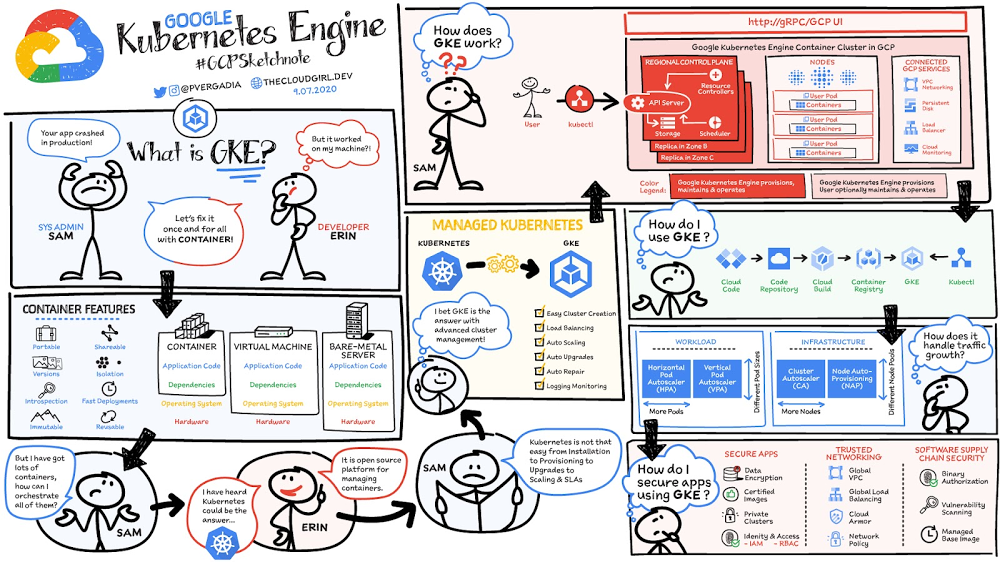
Sam (sysadmin) and Erin (developer) work at “Mindful Containers” , an imaginary company that sells sleeping pods for mindful breaks. One day, Sam calls Erin because her application has crashed during deployment, but it worked just fine on her workstation. They check logs, debug stuff, and eventually find version inconsistencies; the right dependencies were missing in production. Together, they perform a risky rollback. Later, they install the missing dependencies and hope nothing else breaks. Erin and Sam decide to fix the root problem once and for all using containers.Why containers?Containers are often compared with virtual machines (VMs). You might already be familiar with VMs: a guest operating system such as Linux or Windows runs on top of a host operating system with virtualized access to the underlying hardware. Like virtual machines, containers enable you to package your application together with libraries and other dependencies, providing isolated environments for running your software services. As you’ll see, however, the similarities end here as containers offer a far more lightweight unit for developers and IT Ops teams to work with, bringing a myriad of benefits.Instead of virtualizing the hardware stack as with the virtual machines approach, containers virtualize at the operating system level, with multiple containers running atop the OS kernel directly. This means that containers are far more lightweight: They share the OS kernel, start much faster, and use a fraction of the memory compared to booting an entire OS.Containers help improve portability, shareability, deployment speed, reusability, and more. More importantly to Erin and Sam,  containers made it possible to solve the ‘it worked on my machine’ problem.Click to enlargeWhy Kubernetes?Now, it turns out that Sam is responsible for more developers than just Erin.He struggles with rolling out software:Will it work on all the machines? If it doesn’t work, then what?What happens if traffic spikes? (Sam decides to over-provision just in case…)With lots of developers now containerizing their apps, Sam needs a better way to orchestrate all the containers that developers ship. The solution: Kubernetes!What is so cool about Kubernetes?The Mindful Container team had a bunch of servers, and used to make decisions on what ran on each manually based on what they knew would conflict if it were to run on the same machine. If they were lucky, they might have some sort of scripted system for rolling out software, but it usually involved SSHing into each machine. Now with containers—and the isolation they provide—they can trust that in most cases, any two applications can fairly share the resources of the same machine.With Kubernetes, the team can now introduce a control plane that makes decisions for them on where to run applications.  And even better, it doesn’t just statically place them; it can continually monitor the state of each machine, and make adjustments to the state to ensure that what is happening is what they’ve actually specified. Kubernetes runs with a control plane, and on a number of nodes. We install a piece of software called the kubelet on each node, which reports the state back to the master.Here is how it works:The master controls the clusterThe worker nodes run podsA pod holds a set of containersPods are bin-packed as efficiently as configuration and hardware allowsControllers provide safeguards so that pods run according to specification (reconciliation loops)All components can be deployed in high-availability mode and spread across zones or data centersKubernetes orchestrates containers across a fleet of machines, with support for:Automated deployment and replication of containersOnline scale-­in and scale-­out of container clustersLoad balancing over groups of containersRolling upgrades of application containersResiliency, with automated rescheduling of failed containers (i.e., self­-healing of container instances)Controlled exposure of network ports to systems outside of the clusterA few more things to know about Kubernetes:Instead of flying a plane, you program an autopilot: Declare a desired state, and Kubernetes will make it true – and continue to keep it true.It was inspired by Google’s tools for running data centers efficiently.It has seen unprecedented community activity and is today one of the largest projects on GitHub. Google remains the top contributor.The magic of Kubernetes starts happening when we don’t require a sysadmin to make the decisions. Instead, we enable a build and deployment pipeline. When a build succeeds, passes all tests and is signed off, it can automatically be deployed to the cluster gradually, blue/green, or immediately.Kubernetes the hard wayBy far, the single biggest obstacle to using Kubernetes (k8s) is learning how to install and manage your own cluster. Check out k8s the hard way as a step-by-step guide to install a k8s cluster. You have to think about tasks like:Choosing a cloud provider or bare metalProvisioning machinesPicking an OS and container runtimeConfiguring networking (e.g. P ranges for pods, SDNs, LBs)Setting up security (e.g. generating certs and configuring encryption) Starting up cluster services such as DNS, logging, and monitoringOnce you have all these pieces together, you can finally start to use k8s and deploy your first application. And you’re feeling great and happy and k8s is awesome! But then, you have to roll out an update…

How to lower costs and improve innovation with cloud computing

There is no one way to recover. The past year has seen unprecedented challenges for business across the world, with social distancing and quarantine measures forcing many organizations to quickly adapt to remote working. A new report from BCG Platinion, titled “Finding a New Normal in the Cloud”, points out that while companies have done well to survive so far, the overall business environment is still a tough one with contracted economies and lowered revenues. CIOs have to find the right balance between technological innovation and lowering their cash burn rate. The report identifies five key ways in which companies can use cloud computing to optimize their operations and reduce overall IT costs by as much as 10%. 1. Go beyond VPNThe BCG Platinion report states that companies need “rapid, efficient, highly scalable, and device agnostic solutions”. Traditionally, when employees had to work offsite, companies provided them with VPNs. But the sheer scale of the COVID-19 pandemic has shown these solutions to be expensive, slow, inconvenient, and hard to manage when entire workforces are working remotely.Instead, BCG Platinion emphasizes the need for cloud-based solutions such as BeyondCorp Enterprise for more secure, more effective, lower cost remote access at scale. BeyondCorp Enterprise offers customers a zero trust platform for simple and secure access with continuous end-to-end protection that can be used on any device at any time. Deliveroo, a global food delivery company headquartered in the UK, uses BeyondCorp Enterprise to bring the zero trust model to its distributed workforce. “Having secure access to applications and associated data is critical for our business,” says Vaughn Washington, VP of Engineering at Deliveroo. “With BeyondCorp Enterprise, we manage security at the app level, which removes the need for traditional VPNs and associated risks.”1With a low cost cloud subscription model, BeyondCorp Enterprise eliminates the need for hardware, operating, and maintenance costs that come with VPN solutions and can also enable organizations to offer protection to the extended workforce at a fraction of the cost. BCG Platinion estimates that solutions like BeyondCorp Enterprise can save companies as much as 50% versus the cost of a traditional VPN. 2. Use SaaS to keep productivity up With so much of the workforce fragmented due to social distancing measures, the need for seamless, efficient collaboration is greater than ever. According to BCG Platinion, a fully functional Software-as-a-Service productivity solution such as Google Workspace helps to “alleviate the traditional costs and burdens around availability, backup, and maintenance of on-premise collaboration infrastructure.” BCG Platinion analysts estimate that adopting a SaaS solution can lower computing costs for end users by up to 35%. But working in the cloud does more than lower costs. The BCG Platinion report cites a 2020 study from Forrester that found adopting Google Workspace boosted revenue growth by 1.5%, reduced the need for on-demand tech support by 20%, and cut the risk of data breaches by more than 95%. Over the last year, companies of all sizes have looked on the conditions of the pandemic as an opportunity to change the way they work. “Airbus has spent the past year thinking about what it actually means to return to work and we’re looking to support greater flexibility with Google Workspace in a leading role,” says Andrew Plunkett, Airbus Vice President Digital Workplace. “In 2020, we held 5.6M Google Meet sessions and we now have more than 70,000 shared Drives where people collaborate. Google Workspace has changed the way people work at Airbus and that will continue as the solution empowers the hybrid work reality.”23. Reduce IT overhead and management costs with cloud-first devicesWorking in the cloud can be made even more effective with devices specifically designed for the cloud, says the BCG Platinion report. “Cloud-native devices such as Google’s Chromebooks and Chromeboxes are cost-effective, easy to deploy, simple to use, and highly secure,” says BCG Platinion. Additionally, with “thin client” devices, companies can save on hardware costs compared with traditional laptops and desktops.The report suggests that a thin client approach can produce savings of up to 25% in end-user technology and support. Organizations and businesses of all sizes have found that Chrome OS and devices have greatly enhanced their capacity to work together in even the most challenging circumstances. Chrome OS provides employees with a modern experience and devices that stay fast, have built-in security, deploy quickly, and reduce the total cost of ownership. “Chromebooks are simple-to-use and cost-effective devices that do everything that our staff need them to do, which is mainly accessing Google Workspace online,” says Henry Lewis, Head of Platform for the London Borough of Hackney. “As soon as the Grab and Go Chromebooks were available, they were well used every day.”34. Lift and shift for easier transitionsWhile migrating to the cloud is a priority for many organizations to succeed, it does not have to happen all at once and in the same way. A total cloud migration can be a huge undertaking, involving redesigns of architecture and refactoring of applications. For many organizations, this process can take several months, even years. But in times like these, CIOs need to make decisions quickly and reduce cash burn as much as possible. When resources are stretched and time is tight, BCG Platinion recommends a “lift-and-shift” approach for minimal disruption. With Google Compute Engine, for example, organizations can simply rehost their existing workloads on virtual machines without transformation. BCG Platinion reports that moving non-critical workloads to the cloud with lift-and-shift approaches can reduce IT spend by as much as 4% in just three months. Additionally, a quick, effective migration paves the way for more advanced IT infrastructure changes, creating effects that ripple long into the future. 5. Make data work for you with the cloudData is central to any industry and making the most out of it is more important now than ever before. With business as usual upended by the pandemic, organizations have turned to data for urgent tasks like demand forecasting or predicting supply-chain disruptions. A McKinsey report from last year points out that while many organisations had already started to engage with analytics and AI technologies, their progress was dramatically accelerated by the urgency of the pandemic: “Analytics capabilities that once might have taken these organizations months or years to build came to life in a matter of weeks.”With the right setup a company can use data to drive efficiencies, respond quickly to its customers and open new markets. But big wins require huge amounts of information and powerful analytics, which means that effective data handling can be very difficult and expensive to do with on-premises architecture. Moving to a cloud-based infrastructure minimizes infrastructure costs while opening up cutting edge techniques like machine learning for greater insight. The BCG Platinion report found that using a cloud-based data platform was not only cheaper and more efficient for businesses, but could result in a 70% increase in “effectiveness” which it defined as increased sales, lower costs of procured goods, and reduced inventory holding costs. “Moving to cloud provides competitive advantage as you scale innovation, accelerating the creation of new services to keep ahead of the competition,” explains Norbert Faure, Managing Director, Platinion Western Europe at Boston Consulting Group (BCG).The key mission of any data platform is to make sure that the right people have access to the right information at the right time. Google Cloud helps to unify data across the entire business, increase agility, and innovate faster with a range of products. BigQuery runs complex analytics at infinite scale while helping organizations save up to 34% on the total cost of ownership compared with alternative cloud-based data warehouse solutions.4 Cloud Spanner provides a fully managed relational database that operates at 99.999% availability. Meanwhile, with Vertex AI, businesses can access the same groundbreaking machine learning tools that Google uses itself for unprecedented insight on a unified AI platform. “The whole Google Cloud suite of products accelerates the process of getting established and up and running, so we can perform the ‘bread-and-butter’ work of data science,” says David Herberich, VP, Head of Data at fintech startup Branch.5Minimize costs today, innovate for tomorrowAs the world recovers from the pandemic, continued success depends on staying nimble and adaptive, argues the BCG Platinion report. Cloud computing can make companies more resilient by helping them to keep costs low, reducing overall IT spend by as much as 10% overall according to BCG Platinion. “For CIOs, cloud migrations can offer important near-term savings and benefits, while also reinvigorating progress toward the long-term goal of digital transformation.“To learn more, read the full report from BCG Platinion.1. BeyondCorp Enterprise: Introducing a safer era of computing2. Building the future of work with Google Workspace3. Hackney Council: Empowering 4,000 staff to keep serving their community from home4. The Economic Advantages of Google BigQuery versus Alternative Cloud-based EDW Solutions5. Fintech startup, Branch makes data analytics easy with BigQueryRelated ArticleNew research on how COVID-19 changed the nature of ITTo learn more about the impact of COVID-19 and the resulting implications to IT, Google commissioned a study by IDG to better understand …Read Article
Quelle: Google Cloud Platform


