Compliance Engineering – From manual attestation to continuous compliance

Risk Management and Compliance is as important in the cloud as it is in conventional on-premises environments. To help organizations in regulated industries meet their compliance requirements, Google Cloud offers automated capabilities that ensure the effectiveness of productionalization processes. Continuous compliance in the banking industryBanks have a formidable responsibility in managing the world’s wealth, and are therefore champions in diligently managing risk. Financial regulators in turn publish banking regulations to ensure banks assess and manage their risks accurately. Since banks are heavily reliant on information technology (IT), these regulations also cover the use of IT within banks.Regulated industries typically have an extended governance framework to ensure their deployed IT assets comply with the regulations, have a managed security posture and meet corporate risk appetites. Before a new application can be deployed in production, IT application owners typically look at a historical duration of several months to complete the necessary regulatory evidence. Control questions are typically based on the architectures of conventional on-premises technologies, and often lack relevance to cloud-specific technologies and hence do not benefit from using cloud automation capabilities. For example, current IT models within many banks are built to have only a few changes per month, whereas the cloud is capable of rolling out hundreds of changes every day. Let’s hear from one of the top regulated financial institutions what their challenges were before starting the transformation:“It was not just some of the significantly different technologies we’d be operating on and within, it was the foundational approach of having strong controls and control solutions embedded within the cloud platform. The changes in operating model from adopting Google Cloud made it evident to us that we’d need to revisit each and every control within our current control set.”—Bill Walker – Head of Operational Readiness at Deutsche BankThe following sections will help chief security and compliance officers assess their current estate and start the transformation of their IT-related risks with a set of key recommendations. Transforming processes from On-Premises to CloudThe objectives behind existing controls may still be relevant, however the definition and attestation often need to evolve to accurately address the operational risk. The strict control environment in combination with the ability for speed and go-to-market emphasizes the importance of effective controls and automated attestation in a cloud-based environment. For a broader digital transformation in regulated environments please refer to the Google Cloud whitepaper “Risk Governance of Digital Transformation in the Cloud”.Before we deep dive into the topic, let’s define some terms in this context. A control in its core helps to manage different types of risks. Security controls focus on addressing the risk of lapses of confidentiality, integrity and availability of information. Compliance controls focus on addressing the risk of failure to act in accordance with industry laws, regulations and internal policies. The fulfilment of a control is often reached by evidencing one or multiple underlying control questions. Group the controlsThe highly integrated services of the cloud allow the application owner to focus on the application relevant controls, while underlying platform services should be already evidenced centrally for the entire workload landscape. The following proposed grouping of controls will result in a reduction of controls every single workload has to evidence. Control owners and engineering teams can focus on the group of controls within their specialization, in other words the corresponding application engineers may not need to have full awareness of the implementation on the platform layer.The group of enterprise-wide controls are part of a vendor risk assessment assessing the cloud provider and cloud services. The evidence for these controls is not influenced by how the services would be configured or used within the corporation. A practical example is the provider’s employee on- and off-boarding process.The group of platform-wide controls are automatically enforced in each workload running on top of this landing zone. Practical examples are audit logging (on Org and Folder level), privileged user access management (PUAM) or encryption type used for data at rest. The use of Organization Policies allow the definition of configurations across the whole GCP resource hierarchy. The group of workload specific controls are evidenced on application level and focus on the custom application architecture. The evidenced configurations are specific to the deployed application and can include the used authentication providers, user access management and disaster recovery setup. In large landscapes an additional group of workload class would allow for clustering application specific controls by commonalities like processed data confidentiality or internet facing networks.Figure 1 – Grouping of controlsThe grouping helps to place the automation in the right stage of the productionalization. Enterprise wide controls are often only assessed once, so there is no big return on investing in automation. Platform wide controls should be automated in the Security Posture Management system allowing for continuous and close to real-time compliance auditing across all applications. Workload or Workload class specific controls should find their automation as part of the Continuous Integration / Continuous Deployment (CICD) pipeline. Assess cloud adequacyCloud offers many capabilities to make IT more secure, however many companies see their Cloud adoption as an opportunity to address technical debt and decrease risk posture in one go. Moving workloads to the Cloud influences the types of risks which need to be managed but should not lead to a less secure environment. Therefore it is key to review the existing controls and control questions to be effective.Let me illustrate this in a practical example where an existing on-prem control would check for a manual or automated procedure to deploy an application release including roll-back section for the failure case. Infrastructure as Code automates the end-to-end deployment and roll-back of an application, this means a Terraform script should be sufficient to evidence this control. Another example in the same area would be the governance around production access for engineers (i.e. approval process, managing lists who has access) will change significantly when human access to production infrastructure is by exception only.In short the controls and control questions have to be assessed to be:Effective – Control accurately evidences the cloud environmentAdjustment required – Control is relevant but has to be adapted to reflect cloud technologyObsolete – Control is not effective for assessing the cloud environment, can be deprecatedPublicly available cloud control frameworks form a solid base to incorporate into your specific controls and assessing for cloud adequacy. Furthermore possible gaps in your control framework can be identified and new adequate cloud native controls being introduced. Move more ops into devThe transformation of the productionalization process is not only about technology and compliance frameworks but also about people. People who have been maintaining and strengthening the current process for a long time. The control owners ultimately responsible for their control area may not be fully versed in the new Cloud technology, therefore they might naturally be a little sceptical. The transformation stands and falls with their involvement.Make the control owners get confident with the technologies by allocating education time, make them part of the design and engineering process from the very beginning and turn them into advocates for the cloud transformation in their respective organization. This recommendation follows the Site Reliability Engineering practice to make operations part of the development team. The benefit is that control owners can get confident in the technology and are sure their control is properly assessed. As the controls stem from different organizations (Security, Business Continuity, Regulations, etc.) they in turn will advocate for the control change in their respective organization.Have traceability of the controls and clear pass/fail criteriaClear traceability of the control questions to controls, to policies and to regulations help to clean up interpretations and enable large-scale automation.This one may sound obvious, however productionalization processes have grown over the years and sometimes it’s not entirely clear what risk shall be assessed and how the provided evidence is being used. In order to allow the application owners to move to production as quickly as possible it’s inevitable that controls are automated. Automation is only possible with clear pass/fail criteria without any aspect of interpretation. Controls which existed due to historical reasons without any clear traceability can be filtered and potentially missing controls can be identified.Banks excel at managing their risk as they have the great responsibility in managing the world’s wealth. With their digital transformation into the cloud, banks are facing the challenge to adapt their existing controls processes and automate the attestation. The control has to be understood, made effective for the new IT delivery paradigm, automated to accelerate the migration and moved to a continuous compliance model. Subsequent articles in this series will explore the concrete automation case studies and show how “infrastructure as code” and “compliance as code” allow regulatory audits to move from a cyclical assessment to continuous posture management during the entire lifetime of an IT asset.Related ArticleNew Paper: Assuring Compliance in the CloudToday we are releasing the new paper by the Office of the CISO of Google Cloud. In the paper we reveal a new approach for modernizing you…Read Article
Quelle: Google Cloud Platform
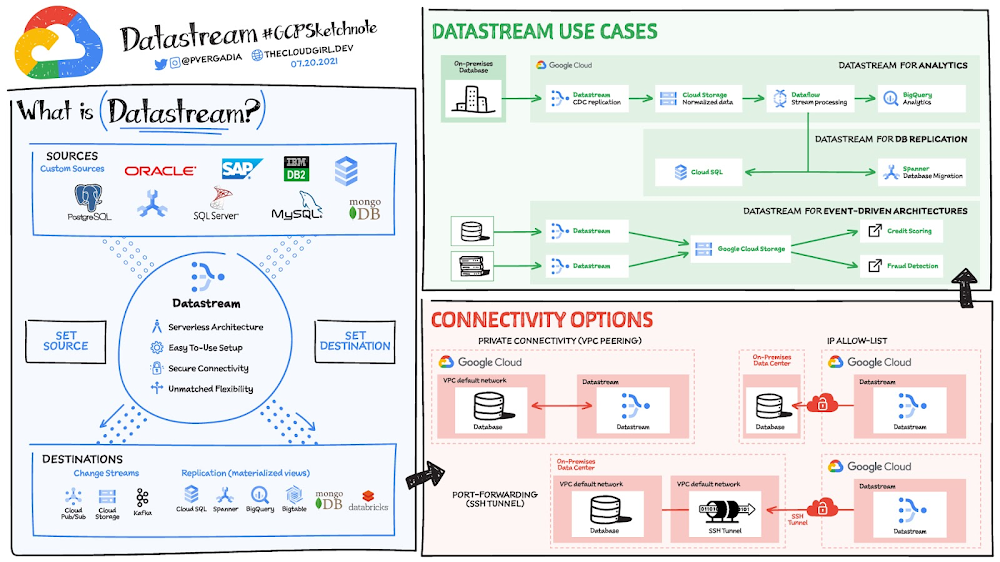
All you need to know about Datastream

With data volumes constantly growing, many companies find it difficult to use data effectively and gain insights from it. Often these organizations are burdened with cumbersome and difficult-to-maintain data architectures. One way that companies are addressing this challenge is with change streaming: the movement of data changes as they happen from a source (typically a database) to a destination. Powered by change data capture (CDC), change streaming has become a critical data architecture building block. We recently announced Datastream, a serverless change data capture and replication service. Datastream’s key capabilities include:Replicate and synchronize data across your organization with minimal latency. You can synchronize data across heterogeneous databases and applications reliably, with low latency, and with minimal impact to the performance of your source. Unlock the power of data streams for analytics, database replication, cloud migration, and event-driven architectures across hybrid environments.Scale up or down with a serverless architecture seamlessly. Get up and running fast with a serverless and easy-to-use service that scales seamlessly as your data volumes shift. Focus on deriving up-to-date insights from your data and responding to high-priority issues, instead of managing infrastructure, performance tuning, or resource provisioning.Integrate with the Google Cloud data integration suite. Connect data across your organization with Google Cloud data integration  products. Datastream leverages Dataflow templates to load data into BigQuery, Cloud Spanner, and Cloud SQL; it also powers Cloud Data Fusion’s CDC Replicator connectors for easier-than-ever data pipelining.Click to enlargeDatasteam use casesDatastream captures change streams from Oracle, MySQL, and other sources for destinations such as Cloud Storage, Pub/Sub, BigQuery, Spanner and more. Some use cases of Datastream:  For analytics use Datastream with a pre-built Dataflow template to create up-to-date replicated tables in BigQuery in a fully-managed way.For database replication use Datastream with pre-built Dataflow templates to continuously replicate and synchronize database data into Cloud SQL for PostgreSQL or Spanner to power low-downtime database migration or hybrid-cloud configuration.For building event-driven architectures use Datastream to ingest changes from multiple sources into object stores like Google Cloud Storage or, in the future, messaging services such as Pub/Sub or Kafka Streamline real-time data pipeline that continually streams data from legacy relational data stores (like Oracle and MySQL) using Datastream into MongoDB. How do you set up Datasteam?Create a source connection profile.Create a destination connection profile.Create a stream using the source and destination connection profiles, and define the objects to pull from the source.Validate and start the stream.Once started, a stream continuously streams data from the source to the destination. You can pause and then resume the stream. Connectivity optionsTo use Datastream to create a stream from the source database to the destination, you must establish connectivity to the source database. Datastream supports the IP allowlist, forward SSH tunnel, and VPC peering network connectivity methods.Private connectivity configurations enable Datastream to communicate with a data source over a private network (internally within Google Cloud, or with external sources connected over VPN or Interconnect). This communication happens through a Virtual Private Cloud (VPC) peering connection. For a more in-depth look into Datastream check out the documentation.For more #GCPSketchnote, follow the GitHub repo. For similar cloud content follow me on Twitter @pvergadia and keep an eye out on thecloudgirl.dev.
Quelle: Google Cloud Platform

Introducing improved maintenance policy for Cloud Memorystore

Maintenance is a critical component of every database user experience as it ensures that your database is staying up to date with security patches, receiving feature updates, and improving performance. However, maintenance downtime can be impactful, especially when it occurs at inopportune times. We are happy to announce that Cloud Memorystore now enables you to have more control over when your Cloud Memorystore for Redis instances undergo routine maintenance. What is Cloud Memorystore Maintenance? Cloud Memorystore instances undergo periodic maintenance to keep your database performant and secure. These may include operating system patches, minor version upgrades, new features, and more. When this happens, your instance will experience disruptions. The nature of the disruption will vary depending on how you are using the service: Cloud Memorystore for Redis Standard Tier users will experience a failover event where clients will need to reconnect to the new primary instance Cloud Memorystore Redis Basic Tier users will experience a full cache flush What maintenance controls are available? To control the impact of maintenance updates, Cloud Memorystore is offering both maintenance rescheduling and advanced notification for critical maintenance updates. If you are already a Cloud SQL user, you are most likely already familiar with these controls. These features are currently available in Preview for all Cloud Memorystore for Redis users. For each Cloud Memorystore instance, you may set an optional preferred maintenance window when updates are scheduled. Once an update is ready, it will automatically be scheduled to take place during your preferred maintenance window. We recommend choosing a period where application traffic has been historically low. For example, a food ordering application might select an overnight window when their application is unused due to restaurants being closed for the night. In addition to selecting the preferred maintenance window, users can subscribe to maintenance notifications for advanced notice when an update is scheduled. After an update is scheduled, subscribed users will receive an email notification with the date and time of the scheduled maintenance. At this point, you can begin to plan for the upcoming maintenance update, opt to undergo maintenance sooner than the scheduled date, or defer maintenance by up to one week after the originally scheduled time. Getting started with Cloud Memorystore’s new maintenance policy Let’s start by setting a preferred maintenance window for your instance. This can be done during instance creation or by editing your existing instance. On the Cloud Memorystore Instance create or edit page, find the “Maintenance” section and click “Edit”. You can then specify a preferred day and start hour as shown here:Next, we recommend opting in to email notifications. You’ll start by navigating to the Cloud Console Communications Page. Select “ON” under Email for Cloud Memorystore. When notifications are enabled, you’ll get an email at least seven days before a scheduled update. To receive notifications, you must specify a preferred maintenance window.After an update is scheduled, the email notification will contain details on rescheduling the update if the scheduled time is not acceptable. This information is also visible in your cloud console via the instance details page as shown here:To learn more, you can find a detailed overview of Cloud Memorystore’s maintenance policy and how-to steps in our documentation. What’s next for Cloud Memorystore Improving our maintenance policy has been a highly requested feature for Cloud Memorystore. Cloud Memorystore recommends that all users opt-into the feature to ensure the smoothest possible maintenance experience. You can look forward to Cloud Memorystore for Memcached support in the near future as well as more advanced notification. Let us know what other features and capabilities you need with our Issue Tracker. We look forward to your feedback!Related ArticleIntroducing more maintenance controls for Cloud SQLThe Cloud SQL fully managed database service now lets you control routine maintenance tasks with advanced notification and maintenance re…Read Article
Quelle: Google Cloud Platform

Monitor models for training-serving skew with Vertex AI

This blog post focuses on how Vertex AI enables one of the core aspects of MLOps: monitoring models deployed in production for training-serving skew.Vertex AI, a managed platform that allows companies to accelerate the deployment and maintenance of artificial intelligence (AI) models.Here we will describe how Vertex AI makes it easy to:Turn on skew detection for a model deployed in Vertex AI’s Online Prediction service. No prior pre-processing tasks are required. Just run a command with a few basic parameters to turn on monitoring.Get alerted when data skew is detected.Visualize the skew in a console UI to quickly diagnose the issue and determine the appropriate corrective action.Model Monitoring explained in one minute (Cartoons by courtesy of Google Comics Factory)What is training-serving skew and how does it impact models deployed in productionHere is a definition of training-serving skew (from Rules of Machine Learning: Best Practices for ML Engineering):Training-serving skew is a difference between model performance during training and performance during serving. This skew can be caused by:A discrepancy between how you handle data in the training and serving pipelines.A change in the data between when you train and when you serve.A feedback loop between your model and your algorithm.In this blog post we will focus on tooling to help you identify the issues described by the first two bullets above: any change in the data (feature values) between training and serving, also known as data drift or covariate shift. The feedback loop problem mentioned in the third bullet point has to be addressed by proper ML system design. Please refer to this blog post for a description of how the Vertex Feature Store can help avoid this feedback loop problem.Changes in the input data can occur for multiple reasons: a bug inadvertently introduced to the production data pipeline, a fundamental change in the concept the model is trained to predict, a malicious attack on your service, and so on.Let’s look at a few real-world examples that impacted Google applications in the past. This paper — Data Validation for Machine Learning — describes the following incident:A ML pipeline trains a new ML model every dayAn engineer does some refactoring of the serving stack, inadvertently introducing a bug that pins a specific feature to -1Because the ML model is robust to data changes, it doesn’t output any error and continues to generate predictions, albeit with lower accuracyThe serving data is reused for training the next model. Hence the problem persists and gets worse until it is discovered.As this scenario illustrates, training-serving skew can sometimes be as harmful as a P0 bug in your program code. To detect such issues faster, Google introduced a rigorous practice of training-serving data skew detection for all production ML applications. As stated in this TFX paper:Let’s look at how this practice helped Google Play improve app install rate:By comparing the statistics of serving logs and training data on the same day, Google Play discovered a few features that were always missing from the logs, but always present in training. The results of an online A/B experiment showed that removing this skew improved the app install rate on the main landing page of the app store by 2%. (from TFX: A TensorFlow-Based Production-Scale Machine Learning Platform)Thus, one of the most important MLOps lessons Google has learned is: continuously monitor model input data for changes. For a production ML application, this is just as important as writing unit tests.Let’s take a look at how skew detection works in Vertex AI. How is skew identifiedVertex AI enables skew detection for numerical and categorical features. For each feature that is monitored, first the statistical distribution of the feature’s values in the training data is computed. Let’s call this the “baseline” distribution.The production (i.e. serving) feature inputs are logged and analyzed at a user determined time interval. This time interval is set to 24 hours by default, and can be set to any value greater than 1 hour. For each time window, the statistical distributions of each monitored feature’s values are computed and compared against the aforementioned training baseline. A statistical distance score is computed between the serving feature distribution and training baseline distribution. JS divergence is used for numerical features and L-infinity distance is used for categorical features. When this distance score exceeds a user configurable threshold, it is indicative of skew between the training and production feature values.Measuring how much the data changedSetup monitoring by running one simple commandOur goal is to make it very easy to turn on monitoring for a model deployed on Vertex AI’s Prediction service; almost as easy as just flipping a switch. Once a prediction endpoint is up and running, one can turn on training-serving skew detection by running a single gcloud command (and soon via a few clicks in the UI); no need for any pre-processing or extra setup tasks.To setup skew detection for a prediction endpoint, simply run a gcloud command such as:Let’s look at some of the key parameters (full gcloud docs are available here):emails: The email addresses to which you would like monitoring alerts to be sentendpoint: the prediction endpoint ID to be monitoredprediction-sampling-rate: For cost efficiency, it is usually sufficient to monitor a subset of the production inputs to a model. This parameter controls the fraction of the incoming prediction requests that are logged and analyzed for monitoring purposesdataset: For calculating the baseline, you can specify the training dataset via one of four options: a BigQuery table, a CSV file on Cloud Storage, a TFRecord file on Cloud Storage, or a managed dataset on Vertex AI. Please review the gcloud docs for information about the parameters “bigquery-uri”, “dataset”, “data-format” and “gcs-uris”. target-field: This specifies the field or column in the training dataset (also sometimes referred to as the ‘label’), that the model is trained to predict. monitoring-frequency: The time interval at which production (i.e. serving) inputs should be analyzed for skew. This is an optional parameter. It is set to 24 hours by default.feature-thresholds: Specify which input features to monitor, along with the alerting threshold for each feature. The alerting threshold is used to determine when an alert should be thrown. This is an optional parameter. By default, a threshold of 0.3 is used for each feature.Get alerts and visualize data in the console UIWhen a skew is detected for a feature, an alert is sent via email. (More ways of receiving alerts will be added in the near future, including mechanisms to trigger a model retraining pipeline). Upon getting an alert, users can log into the console UI to visualize and analyze the feature value distributions. Users can perform side by side visualization of the production data distributions and training data distributions, to diagnose the issue.Next StepsNow Model Monitoring is available as Preview. Anyone can try it from the Model Monitoring document, and there is also a great instruction demo video and example notebook created by Marc Cohen that provides the end-to-end scenario from deploying a model to an Endpoint to monitor the model with Model Monitoring. Take the first step into the real-world MLOps with Google’s best practices for productionizing ML systems.Related ArticleKickstart your organization’s ML application development flywheel with the Vertex Feature StoreA Feature Store is a key ingredient for MLOps, helping accelerate development, deployment, and management of production ML applications. …Read Article
Quelle: Google Cloud Platform
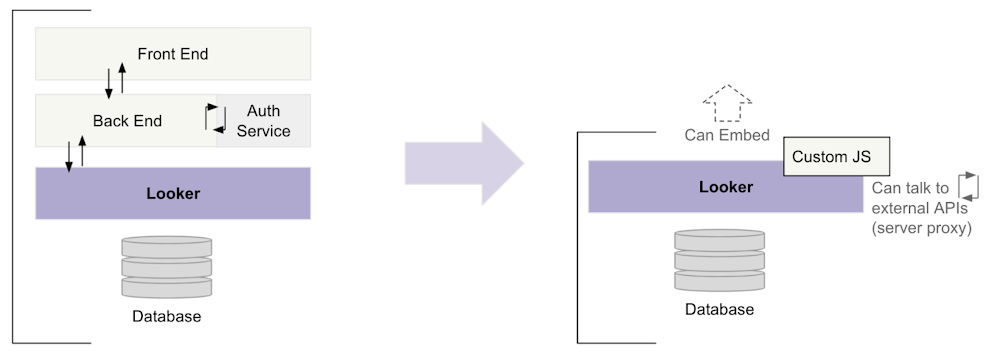
Building with Looker made easier with the Extension Framework

Our goal is to continue to improve our platform functionalities, and find new ways to empower Looker developers to build data experiences much faster and at a lower upfront cost.We’ve heard the developer community feedback and we’re excited to have announced the general availability of the Looker Extension Framework.The Extension Framework is a fully hosted development platform that enables developers to build any data-powered application, workflow or tool right in Looker. By eliminating the need to spin up and host infrastructure, the Extension Framework lets developers focus on building great experiences for their users. Traditionally, customers and partners who build custom applications with Looker, have to assemble an entire development infrastructure before they can proceed with implementation. For instance, they might need to stand up both a back end and front end and then implement services for hosting and authorization. This leads to additional time and cost spent.The Extension Framework eliminates all development inefficiency and helps significantly reduce friction in the setup and  development process, so developers can focus on starting development right away. Looker developers would no longer need DevOps or infrastructure to host their data applications and these applications (when built on the Extension Framework), can take full advantage of the power of Looker. To enable these efficiencies, the Looker Extension Framework includes a streamlined way to leverage the Looker APIs and SDKs, UI components for building the visual experience, as well as authentication, permission management and application access control. Streamlining the development process with the Extension FrameworkContent created via the Extension Framework can be built as a full-screen experience or embedded into an external website or application. We will soon be adding functionality to allow  for the embedding of extensions inside Looker (as a custom tile you plug into your dashboard, for example). Through our Public Preview period we have already seen over 150+ extensions deployed to production users, with an additional 200+ extensions currently in development. These extensions include solutions like: enhanced navigation tools, customized navigation and modified reporting applications, to name a few.Extension Framework Feature BreakdownThe Looker Extension Framework includes the following features:The Looker Extension SDK, which provides functions for Looker public API access and for interacting within the Looker environment.Looker components, a library of pre-built React UI components you can use in your extensions.The Embed SDK, a library you can use to embed dashboards, Looks, and Explores in your extension. The create-looker-extension utility, an extension starter kit that includes all the necessary extension files and dependencies.Our Looker extension framework examples repo, with templates and sample extensions to assist you in getting started quickly.The ability to access third-party API endpoints and add third-party data to your extension in building enhanced data experiences (e.g. Google Maps API).The ability to create full-screen extensions within Looker. Full-screen extensions can be used for internal or external platform applications.The ability to configure an access key for your extension so that users must enter a key to run the extension. Next StepsIf you haven’t yet tried the Looker Extension Framework, we think you’ll find it to be a major upgrade to your data app development experience. Over the next few months, we will continue to make enhancements to the Extension Framework with the goal of significantly reducing the amount of code required, and eventually empowering our developers with a low-code, no-code framework.Comprehensive details and examples that help you get started in developing with the Extension Framework are now available here. We hope that these new capabilities inspire your creativity and we’re super excited to see what you build with the Extension Framework!
Quelle: Google Cloud Platform

Introducing Cloud Build private pools: Secure CI/CD for private networks

A recent survey found that developers spend 39% of their time managing the DevOps infrastructure that powers their continuous integration (CI) and continuous delivery (CD) pipelines. Unreliable availability, manual provisioning, limited scaling, breaking upgrades, long queue times, and high fixed costs all slow down development and take valuable time and focus away from DevOps teams. And while cloud-based CI/CD solutions can solve many of these friction points, they largely only work with cloud-hosted resources. That’s why we’re excited to announce that starting today, you can take advantage of serverless build environments within your own private network, with new Cloud Build private pools. Launched in 2018, Cloud Build has helped thousands of customers modernize their CI/CD workloads to run on fully managed, secure, pay-as-you-go ‘workers’ with no infrastructure to manage. Cloud Build offers on-demand auto-scaling capabilities, active build minute billing, all with no infrastructure to manage. The new private pools feature augments Cloud Build with secure, fully managed CI/CD and DevOps workflow automation that uses network peering to connect into your private networks. Private pools also unlocks a host of new customization options such as new machine types, higher maximum concurrency, regional builds, and network configuration options.With Cloud Build private pools, you get the benefits of a cloud-hosted, fully managed CI/CD product while meeting enterprise security and compliance requirements—even for highly regulated industries like finance, healthcare, retail, and others. For instance, you can trigger fully managed DevOps workflows from source-code repositories hosted in private networks, including Github Enterprise.With private pools, Cloud Build now supports:VPC PeeringVPC-SCStatic IP rangesNo public IPsOrg policy enforcementCross-project buildsBuild from private source repositories with first class integrations, including Github EnterpriseRegionalization in 15 regions across the US, EU, Asia, Australia, and South AmericaHundreds of concurrent builds per pool15 machine typesAnd while designed primarily for private networking use cases, private pools work just as well with resources in Google Cloud, if you’re interested in trying out new features like higher concurrency or additional machine types.Same Cloud Build, new build environmentPrivate pools introduces a new build environment for executing your builds with Cloud Build while maintaining a consistent product and API experience. All the same great features of Cloud Build are available with private pools, including fully managed workers, pay-as-you-go pricing, Cloud Console UI, source repo integrations, IAM permissions, Secret Manager and Pub/Sub integrations, and native support for Google Cloud runtimes like Google Kubernetes Engine (GKE), Cloud Run, Cloud Functions, App Engine, and Firebase.Running builds on a private pool is as easy as creating the pool and setting it as your build environment in your cloudbuild.yaml config file. Private networking is optionally configured via Service Networking by peering your private pool to your customer-managed VPC and supports both peered and shared VPCs.Running your first build is easy:We’re excited to share private pools with you, so you can enjoy the secure, fully managed Cloud Build developer automation platform from your private network. The private pools feature is generally available today, and we look forward to introducing per-trigger service accounts and approval gates soon. To get started, try the quickstart or read the overview documentation for more details.Want to learn more about Cloud Build, and how to use it to improve the security of your software supply chain? On July 29 event Building trust in your software supply chain explores this topic in depth. Click here to register for the live event or to watch it on demand.Related ArticleDevOps on Google Cloud: tools to speed up software development velocityGoogle Cloud’s application development and continuous integration/continuous delivery (CI/CD) tools help ForgeRock developers stay produc…Read Article
Quelle: Google Cloud Platform

BigQuery Admin reference guide: Query processing

BigQuery is capable of some truly impressive feats, be it scanning billions of rows based on a regular expression, joining large tables, or completing complex ETL tasks with just a SQL query.  One advantage of BigQuery (and SQL in general), is it’s declarative nature. Your SQL indicates your requirements, but the system is responsible for figuring out how to satisfy that request.However, this approach also has its flaws – namely the problem of understanding intent. SQL represents a conversation between the author and the recipient (BigQuery, in this case). And factors such as fluency and translation can drastically affect how faithfully an author can encode their intent, and how effectively BigQuery can convert the query into a response.In this week’s BigQuery Admin Reference Guide post, we’ll be providing a more in depth view of query processing. Our hope is that this information will help developers integrating with BigQuery, practitioners looking to optimize queries, and administrators seeking guidance to understand how reservations and slots impact query performance. A refresher on architectureBefore we go into an overview of query processing. Let’s revisit BigQuery’s architecture. Last week, we spoke about BigQuery’s native storage on the left hand side. Today, we’ll be focusing on Dremel, BigQuery’s query engine. Note that today we’re talking about BigQuery’s standard execution engine, however BI Engine represents another query execution engine available for fast, in-memory analysis.As you can see from the diagram, dremel is made up of a cluster of workers.  Each one of these workers executes a part of a task independently and in parallel. BigQuery uses a distributed memory shuffle tier to store intermediate data produced from workers at various stages of execution. The shuffle leverages some fairly interesting Google technologies, such as our very fast petabit network technology, and RAM wherever possible. Each shuffled row can be consumed by workers as soon as it’s created by the producers.This makes it possible to execute distributed operations in a pipeline. Additionally, if a worker has partially written some of its output and then terminated (for example, the underlying hardware suffered a power event), that unit of work can simply be re-queued and sent to another worker.  A failure of a single worker in a stage doesn’t mean all the workers need to re-run. When a query is complete, the results are written out to persistent storage and returned to the user. This also enables us to serve up cached results the next time that query executes. Overview of query processingNow that you understand the query processing architecture, we’ll run through query execution at a high level, to see how each step comes together.  First Steps: API request managementBigQuery supports an asynchronous API for executing queries: callers can insert a query job request, and then poll it until complete -as we discussed a few weeks ago.  BigQuery supports a REST-based protocol for this, which accepts queries encoded via JSON.To proceed, there’s some level of API processing that must occur.  Some of things that must be done are authenticating and authorizing the request, plus building and tracking associated metadata such as the SQL statement, cloud project, and/or query parameters.Decoding the query text: Lexing and parsingLexing and parsing is a common task for programming languages, and SQL is no different.  Lexing refers to the process of scanning an array of bytes (the raw SQL statement) and converting that into a series of tokens. Parsing is the process of consuming those tokens to build up a syntactical representation of the query that can be validated and understood by BigQuery’s software architecture.If you’re super interested in this, we recommend checking out the ZetaSQL project, which includes the open source reference implementation of the SQL engine used by BigQuery and other GCP projects.Referencing resources: Catalog resolutionSQL commonly contains references to entities retained by the BigQuery system – such as tables, views, stored procedures and functions. For BigQuery to process these references, it must resolve them into something more comprehensible.  This stage helps the query processing system answer questions like:Is this a valid identifier?  What does it reference?Is this entity a managed table, or a logical view?What’s the SQL definition for this logical view?What columns and data types are present in this table?How do I read the data present in the table?  Is there a set of URIs I should consume?Resolutions are often interleaved through the parsing and planning phases of query execution.Building a blueprint: Query planningAs a more fully-formed picture of the request is exposed via parsing and resolution, a query plan begins to emerge.  Many techniques exist to refactor and improve a query plan to make it faster and more efficient.  Algebraization, for example, converts the parse tree into a form that makes it possible to refactor and simplify subqueries.  Other techniques can be used to optimize things further,  moving tasks like pruning data closer to data reads (reducing the overall work of the system).Another element is adapting it to run as a set of distributed execution tasks.  Like we mentioned in the beginning of this post, BigQuery leverages large pools of query computation nodes, or workers. So, it must coordinate how different stages of the query plan share data through reading and writing from storage, and how to stage temporary data within the shuffle system.Doing the work: Query executionQuery execution is simply the process of working through the query stages in the execution graph, towards completion.  A query stage may have a single unit of work, or it may be represented by many thousands of units of work, like when a query stage reads all the data in a large table composed of many separate columnar input files.Query management: scheduling and dynamic planningBesides the workers that perform the work of the query plan itself, additional workers monitor and direct the overall progress of work throughout the system. Scheduling is concerned with how aggressively work is queued, executed and completed.However, an interesting property of the BigQuery query engine is that it has dynamic planning capabilities.  A query plan often contains ambiguities, and as a query progresses it may need further adjustment to ensure success.  Repartitioning data as it flows through the system is one example of a plan adaptation that may be added, as it helps ensure that data is properly balanced and sized for subsequent stages to consume.Finishing up: finalizing resultsAs a query completes, it often yields output artifacts in the form of results, or changes to tables within the system.  Finalizing results includes the work to commit these changes back to the storage layer. BigQuery also needs to communicate back to you, the user, that the system is done processing the query. The metadata around the query is updated to note the work is done, or the error stream is attached to indicate where things went wrong.Understanding query executionArmed with our new understanding of the life of a query, we can dive more deeply into query plans.  First, let’s look at a simple plan. Here, we are running a query against a public BigQuery dataset to count the total number of citi bike trips that began at stations with “Broadway” in the name. SELECT COUNT(*)FROM `bigquery-public-data.new_york.citibike_trips`WHERE start_station_name LIKE “%Broadway%”Now let’s consider what is happening behind the scenes when BigQuery processes this query. First, a set of workers access the distributed storage to read the table, filter the data, and generate partial counts. Next, these workers send their counts to the shuffle.The second stage reads from those shuffle records as its input, and sums them together. It then writes the output file into a single file, which becomes accessible as the result of the query.You can clearly see that the workers don’t communicate directly with one another at all; they communicate through reading and writing data. After running the query in the BigQuery console, you can see the execution details and gather information about the query plan (note that the execution details shown below may be slightly different than what you see in the console since this data changes). Note that you can also get execution details from the information_schema tables or the Jobs API. For example, by running:SELECT*FROM`region-us`.INFORMATION_SCHEMA.JOBS_BY_PROJECTWHEREjob_id = “bquxjob_49c5bc47_17ad3d7778f”Interpreting the query statisticsQuery statistics include information about how many work units existed in a stage, as well as how many were completed.  For example, inspecting the result of the information schema query used earlier we can get the following:Input and outputUsing the parallel_inputs field, we can see how finely divided the input is. In the case of a table read, it indicates how many distinct file blocks were in the input.  In the case of a stage that reads from shuffle, the number of inputs tells us how many distinct data buckets are present.  Each of these represent a distinct unit of work that can be scheduled independently. So, in our case, there are 57 different columnar file blocks in the table. In this representation, we can also see the query scanned more than 33 million rows while processing the table.  The second stage read 57 rows, as the shuffle system contained one row for each input from the first stage. It’s also perfectly valid for a stage to finish with only a subset of the inputs processed.  Cases where this happens tend to be execution stages where not all the inputs need to be processed to satisfy what output is needed; a common example of this might be a query stage that consumes part of the input and uses a LIMIT clause to restrict the output to some smaller number of rows.It is also worth exploring the notion of parallelism.  Having 57 inputs for a stage doesn’t mean the stage won’t start until there’s 57 workers (slots) available.  It means that there’s a queue of work with 57 elements to work through.  You can process that queue with a single worker, in which case you’ve essentially got a serial execution.  If you have multiple workers, you can process it faster as they’re working independently to process the units.  However, more than 57 slots doesn’t do anything for you; the work cannot be more finely distributed.Aside from reading from native distributed storage, and from shuffle, it’s also possible for BigQuery to perform data reads and writes from external sources, such as Cloud Storage (as we discussed in our earlier post). In such cases the notion of parallel access still applies, but it’s typically less performant. Slot utilizationBigQuery communicates resource usage through a computational unit known as a slot. It’s simplest to think of it as similar to a virtual CPU and it’s a measure that represents the number of workers available / used. When we talk about slots, we’re talking about overall computational throughput, or rate of change.  For example, a single slot gives you the ability to make 1 slot-second of compute progress per second.  As we just mentioned, having fewer workers – or less slots – doesn’t mean that a job won’t run. It simply means that it may run slower. In the query statistics, we can see the amount of slot_ms (slot-milliseconds) consumed. If we divide this number by the amount of milliseconds it took for the query stage to execute, we can calculate how many fully saturated slots this stage represents. SELECT job_stages.name, job_stages.slot_ms/(job_stages.end_ms – job_stages.start_ms) as full_slotsFROM`region-us`.INFORMATION_SCHEMA.JOBS_BY_PROJECT, UNNEST(job_stages) as job_stagesWHEREjob_id = “bquxjob_49c5bc47_17ad3d7778f”This information is helpful, as it gives us a view of how many slots are being used on average across different workloads or projects – which can be helpful for sizing reservations (more on that soon). If you see areas where there is a higher number of parallel inputs compared to fully saturated slots, that may represent a query that will run faster if it had access to more slots. Time spent in phasesWe can also see the average and maximum time each of the workers spent in the wait, read, compute and write phase for each stage of the query execution:Wait Phase: the engine is waiting for either workers to become available or for a previous stage to start writing results that it can begin consuming. A lot of time spent in the wait phase may indicate that more slots would result in faster processing time. Read Phase: the slot is reading data either from distributed storage or from shuffle.  A lot of time spent here indicates that there might be an opportunity to limit the amount of data consumed by the query (by limiting the result set or filtering data). Compute Phase: where the actual processing takes place, such as evaluating SQL functions or expressions. A well-tuned query typically spends most of its time in the compute phase. Some ways to try and reduce time spent in the compute phase are to leverage approximation functions or investigate costly string manipulations like complex regexes. Write phase: where data is written, either to the next stage, shuffle, or final output returned to the user. A lot of time spent here indicates that there might be an opportunity to limit the results of the stage (by limiting the result set or filtering data)If you notice that the maximum time spent in each phase is much greater than the average time, there may be an uneven distribution of data coming out of the previous stage. One way to try and reduce data skew is by filtering early in the query.Large shufflesWhile many query patterns use reasonable volumes of shuffle, large queries may exhaust available shuffle resources. Particularly, if you see that a query stage is heavily attributing its time spent to writing out to shuffle, take a look at the shuffle statistics.  The shuffleOutputBytesSpilled tells us if the shuffle was forced to leverage disk resources beyond in-memory resources. SELECT job_stages.name, job_stages.shuffle_output_bytes_spilledFROM`region-us`.INFORMATION_SCHEMA.JOBS_BY_PROJECT, UNNEST(job_stages) as job_stagesWHEREjob_id = “bquxjob_49c5bc47_17ad3d7778f”Note that a disk-based write takes longer than an in-memory write. To prevent this from happening, you’ll want to filter or limit the data so that less information is passed to the shuffle. Tune in next weekNext week, we’ll be digging into more advanced queries and talking through tactical query optimization techniques so make sure to tune in! You can keep an eye out for more in this series by following Leigha on LinkedIn and Twitter.Related ArticleBigQuery Admin reference guide: Storage internalsLearn how BigQuery stores your data for optimal analysis, and what levers you can pull to further improve performance.Read Article
Quelle: Google Cloud Platform

Getting the most out of Cloud IDS for advanced network threat detection

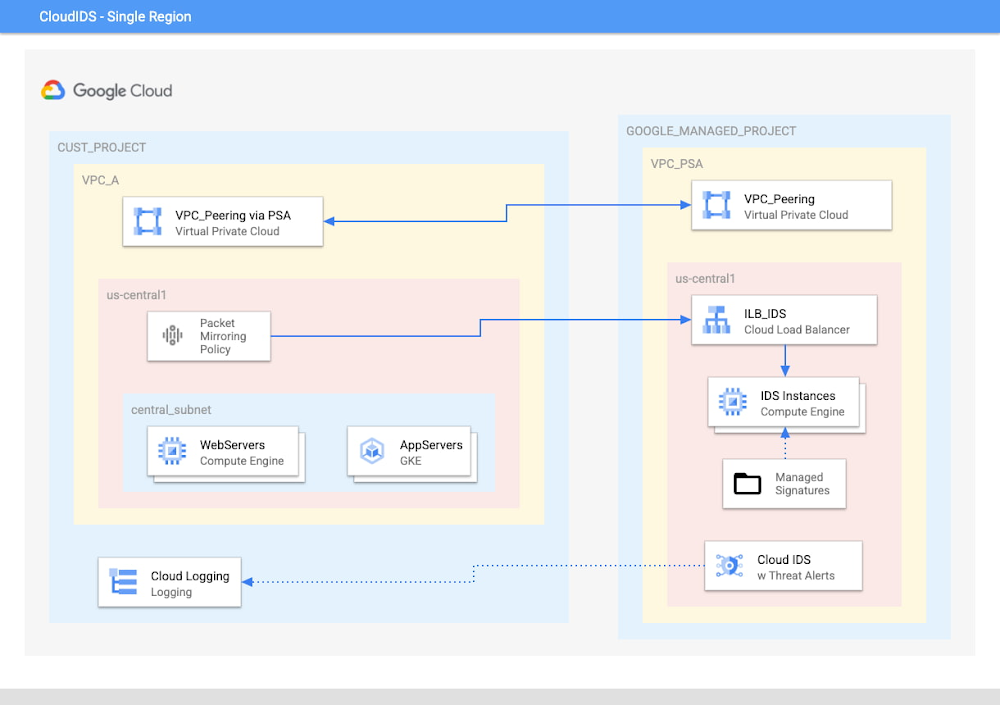
Google Cloud IDS, now available in preview, delivers cloud-native, managed, network-based threat detection, built with Palo Alto Networks’ industry-leading threat detection technologies to provide high levels of security efficacy. Cloud IDS can help customers gain deep insight into network-based threats and support industry-specific compliance goals that call for the use of an intrusion detection system. In this blog, we’re diving deeper into how Cloud IDS works to detect network-based threats and how you can get the most out of a Cloud IDS implementation. Getting the most out of Cloud IDSThe implementation of an Intrusion Detection System (IDS) into virtual cloud networks has been a requirement for many cloud customers as a key measure to help keep their networks safe.  The best practices and design strategies to integrate such a system have changed and matured with new technologies in cloud networking. Overcoming issues such as network bottlenecks and the inability to inspect intra-VPC (east/west) traffic has historically troubled network and security teams. Google Cloud IDS is deployed “out-of-path”, abating both of these concerns. Cloud IDS uses Packet Mirroring to copy and forward network traffic, and Private Service Access (PSA) to connect to a set of cloud-native IDS instances which exist in a Google managed project. This allows a Cloud IDS to be seamlessly integrated into an existing Google Cloud Platform (GCP) network without needing to change the VPC design.In order to provide visibility into threats and intrusions detected by IDS instances, Cloud IDS feeds Threat Logs and Security Alerts into Cloud Logging and the Cloud IDS user-interface in the customer project. This is all done under the hood, making it simple to deploy and manage Cloud IDS. Here are some finer points to know and consider when deploying Cloud IDS:Everything starts by creating a Cloud IDS Endpoint — a collector of connection flows — which, behind the scenes, deploys three Palo Alto VM-Series firewall virtual machines (VMs), which live in a Google Cloud managed project.During the IDS Endpoint creation process, the zone and VPC being analyzed must be specified. A specific Cloud IDS instance is capable of inspecting traffic within a region of a VPC.Updates from Palo Alto Networks are picked up weekly by Cloud IDS and pushed to all existing IDS endpointsDuring Endpoint creation, you’ll choose a minimum alert severity level from critical (least verbose) to informational (most verbose).  To feed traffic to the IDS, you will create and attach a Packet Mirroring Policy to the Endpoint.When creating the Packet Mirroring Policy to attach to your Cloud IDS, there are three options to select the mirrored sources: subnets, tags, individual instances.Subnets: Subnets are useful when every instance in a subnet needs to be analyzed. A policy can contain up to 5 subnets.Tags: Tags are useful when groups of instances in one or multiple subnets need to be analyzed. A policy can contain up to 5 tags.Individual instances: Use individual instances only when very select instances need to be analyzed. 50 instances are allowed per policy.Now that you are more familiar with some of the features and steps to create a Cloud IDS, let’s get into some key points that can help to get the most out of your deployment.Use the right mirrored sources and filters for Packet Mirroring for better control of inspected trafficInside a Packet Mirroring Policy, there is an option to filter traffic. It is important to understand that an IP based filter assumes that the address range specified is the remote subnet. In other words, for ingress traffic, the filter address range would be the source network and for egress traffic it would be the destination network. Do not use IP based filters in your packet mirroring policies if the remote network is unknown, such as general, Internet-based traffic. If you do choose to use filters, be aware that you might prevent the Packet Mirroring Policy from sending traffic to the IDS leaving more chances for false negatives. Also, if you choose to use filters, make sure to keep in mind the filter order for Packet Mirroring. A misconfigured filter strategy can mirror traffic away from your Cloud IDS. Lastly, always capture bidirectional traffic in the Traffic Direction filter option.There are some use cases, however, where filters may be quite useful. For example, consider the case where you want to have different alert severities for trusted and untrusted remote networks. In this case, you could create two IDS Endpoints with the same mirrored sources but different filters and “Minimum Alert Severity”. This configuration would push the more trusted remote network traffic to the IDS Endpoint with a more moderate Alert Severity Level and general Internet traffic to the IDS Endpoint with more verbose alerting.In this example, traffic sourced from trusted network 10.2.0.0/16 would be analyzed by ids-endpoint2 and alert on “Medium” level (and above) severity. However, traffic sourced from the untrusted Internet would be mirrored to ids-endpoint1 and alert on “Informational” (and above) level threats. Note that “Internet IP” in the following screenshot will actually show the source address as seen by the mirrored VM.Attach multiple Packet Mirroring Policies to the same IDS EndpointCloud IDS offers flexibility when attaching Packet Mirroring Policies. Multiple Packet Mirroring Policies can be attached to the same IDS Endpoint. For example, a Packet Mirroring Policy that mirrors traffic for “app1” tagged instances and a second policy that captures traffic for “app2” tagged instances can both be attached to “ids-endpoint-1”.  An alternative is a single policy that captures traffic for both network tags. Because a policy can only have up to 5 tags today, when you need to add a 6th tag to the policy, you would have to attach a 2nd policy to the IDS Endpoint.Once a policy is attached, it can be edited as with any other Packet Mirroring Policy. To remove the policy from the endpoint, simply delete the policy; it can always be recreated. There is currently no “detach” option.  Use Shared VPCs and a single Cloud IDS for multiple projectsIf your organization has a centralized networking and security team supporting various projects, and multiple projects require IDS coverage, consider using a Shared VPC. By using a Shared VPC, a single Cloud IDS can support multiple projects as these projects share network resources, including Cloud IDS. The IDS Endpoint must be created in the Host project where the shared VPC actually exists. Cloud IDS in a Shared VPC supports the same three types of mirrored sources as in a conventional VPC, including individual instances that exist in the service projects.Use HTTPS load balancers to offload SSLCloud IDS inspects not only the IP header of the packet, but also the payload. In the case where the payload is encrypted, such as with HTTPS/TLS/SSL traffic, consider placing the application behind a L7 Internal Load Balancer (ILB) or HTTP(S) External Load Balancer. By using these types of load balancers, SSL decryption can be addressed at a layer above the mirrored instances and Cloud IDS would see SSL decrypted traffic and thus be able to inspect and detect intrusions and threats. To learn more about encryption from Google Front Ends to the load balancer backends, see this document.Integrate with SIEM/SOAR solutions for additional analytics and actionLogs from Cloud IDS can be sent from Cloud Logging to 3rd-party tools (e.g., Security Information and Event Management (SIEM) systems and Security Orchestration Automation and Response (SOAR) systems) for further analysis and responsive mitigating action, as defined by your security operation teams. Third-party SIEM and SOAR systems can be configured to run playbooks that will automatically block an attacker’s IP address based on the information ingested from Cloud IDS. Whether using automation or manual efforts, be careful when blocking the recorded source IPs for targets behind proxy based External or Internal Load Balancers. Proxy based load balancers will translate the true source address with a proxy address and denying a perceived attacking address may result in also blocking legitimate traffic.  Consider using Cloud Armor for this level of security. The Web Application Firewall (WAF) and Layer 4 based access control features of Cloud Armor occur before the Cloud Load Balancer’s source NAT, making for a great combination in a security suite.Adding Cloud IDS to your security toolboxBeing cloud-native and Google Cloud integrated, Cloud IDS is simple to deploy, provides high performance and can be up and ready in just a few clicks. Adding Cloud IDS to your existing VPC is easy and requires little to no network redesign because it is placed “out-of-path”. It can be fully deployed, running and alerting quickly. It may also help satisfy your compliance requirements that mandate the use of an intrusion detection system. To help you get started with Cloud IDS, watch this video, and to sign up for access to the preview, visit our webpage.Related ArticleExtending our Trusted Cloud: Introducing Cloud IDS for Network-based Threat DetectionCloud IDS (Intrusion Detection System) helps detect malware, spyware, and command-and-control attacksRead Article
Quelle: Google Cloud Platform
Why retailers should run in our trusted cloud

Whether they were ready for it or not, the COVID-19 pandemic transformed many retailers into digital businesses. Retailers made huge investments into commerce technologies, customer experience tools, sales and fulfillment technology, and improving digital experiences to continue providing their goods and services to their customers. Now, more than a year into the COVID-19 pandemic, digital retail is the new normal. In fact, many retailers are planning on expanding their digital investments. However, as their digital footprint expands, so do their threats and security concerns. As a digital-focused retailer, your website is the most visible part of your attack surface. Your website is where your customers search for goods or services, make payments, or learn more about your brand. However, your website does not operate in isolation. There is an underlying infrastructure as well as the services that run on top of it that need protection from a wide array of attacks that may seek to compromise your data, internal employees, business, and customers. During this week’s Google Cloud Retail Summit, we’ve shared why Google Cloud is built to be the most trusted cloudfor retailers. From providing you with control over your data as you move from your own data centers to the public cloud to giving you built-in technology to protect your applications all the way to your end users, Google Cloud helps you safely migrate to and operate in our Trusted Cloud.Trusted Cloud Gives You Control, Transparency, and SovereigntyAccess Transparency: We offer the ability to monitor and approve access to your data or configurations by Google Cloud support and engineering based on specific justifications and context, so you have visibility and control over insider access. Certificate Authority Service (CAS): CAS is a highly scalable and available service that simplifies and automates the management and deployment of private CAs while meeting the needs of modern developers and applications. With CAS, you can offload to the cloud time-consuming tasks associated with operating a private CA, like hardware provisioning, infrastructure security, software deployment, high-availability configuration, disaster recovery, backups, and more, allowing you to stand up a private CA in minutes, rather than the months it might normally take to deploy.Confidential Computing: We already encrypt data at-rest and in-transit, but customer data needs to be decrypted for processing. Confidential Computing is a breakthrough technology which encrypts data in-use—while it’s being processed. Confidential VMs take this technology to the next level by offering memory encryption so that you can further isolate your workloads in the cloud. With the beta launch of Confidential VMs, we’re the first major cloud provider to offer this level of security and isolation while giving you a simple, easy-to-use option for your newly built and “lift and shift” applications.Cloud Key Management: We allow you to configure the locations where your data is stored, where your encryption keys are stored, and where your data can be accessed from. We give you the ability to manage your own encryption keys, even storing them outside Google’s infrastructure. Using our External Key Management service, you have the ability to deny any request by Google to access encryption keys necessary to decrypt customer data at rest for any reason.Trusted cloud Helps You Prevent, Detect, and Respond to ThreatsBeyondCorp Enterprise is Google’s comprehensive zero trust product offering. Google has over a decade of experience managing and securing cloud applications at a global scale, and this offering was developed based on learnings from our experience managing our own enterprise, feedback from customers and partners, as well as informed by leading engineering and security research. We understand that most customers host resources across different cloud providers. With this in mind, BeyondCorp Enterprise was purpose-built as a multicloud solution, enabling customers to securely access resources hosted not only on Google Cloud or on-premises, but also across other clouds such as Azure and Amazon Web Services (AWS).Cloud Armor: We’re simplifying how you can use Cloud Armor to help protect your websites and applications from exploit attempts, as well as Distributed Denial of Service (DDoS) attacks. With Cloud Armor Managed Protection Plus, you will get access to DDoS and WAF services, curated rule sets, and other services for a predictable monthly price.Chronicle: Chronicle is a threat detection solution that identifies threats, including ransomware, at unparalleled speed and scale. Google Cloud Threat Intelligence for Chronicle surfaces highly actionable threats based on Google’s collective insight and research into Internet-based threats. Threat Intel for Chronicle allows you to focus on real threats in the environment and accelerate your response time.Google Workspace Security: Used by more than five million organizations worldwide, from large banks and retailers with hundreds of thousands of people to fast-growing startups, Google Workspace and Google Workspace for Education include the collaboration and productivity tools found here. Google Workspace and Google Workspace for Education are designed to help teams work together securely in new, more efficient ways, no matter where members are located or what device they use. For instance, Gmail scans over 300 billion attachments for malware every week and prevents more than 99.9% of spam, phishing, and malware from reaching users. We’re committed to protecting against security 1 threats of all kinds, innovating new security tools for users and admins, and providing our customers with a secure cloud service.Identity & Access Management IAM: Identity and Access Management (IAM) lets administrators authorize who can take action on specific resources, giving you full control and visibility to manage Google Cloud resources centrally. For enterprises with complex organizational structures, hundreds of workgroups, and many projects, IAM provides a unified view into security policy across your entire organization, with built-in auditing to ease compliance processes.reCAPTCHA Enterprise: reCAPTCHA has over a decade of experience defending the internet and data for its network of more than 5 million sites. reCAPTCHA Enterprise builds on this technology with capabilities, such as two-factor authentication and mobile application support, designed specifically for enterprise security concerns. With reCAPTCHA Enterprise, you can defend your website against common web-based attacks like credential stuffing, account takeovers, and scraping and help prevent costly exploits from malicious human and automated actors. And, just like reCAPTCHA v3, reCAPTCHA Enterprise will never interrupt your users with a challenge, so you can run it on all webpages where your customers interact with your services.Security Command Center: With Security Command Center (SCC), our native posture management platform, you can prevent and detect abuse of your cloud resources, centralize security findings from Google Cloud services and partner products, and detect common misconfigurations, all in one easy-to-use platform. We have Premium tier for Security Command Center to provide even more tools to protect your cloud resources. It adds new capabilities that let you spot threats using Google intelligence for events in Google Cloud Platform (GCP) logs and containers, surface large sets of misconfigurations, perform automated compliance scanning and reporting. These features help you understand your risks on Google Cloud, verify that you’ve configured your resources properly and safely, and document it for anyone who asks.VirusTotal:VirusTotal inspects items with over 70 antivirus scanners and URL/domain blocklisting services, in addition to a myriad of tools to extract signals from the studied content. Any user can select a file from their computer using their browser and send it to VirusTotal.Web Risk API: With Web Risk, you can quickly identify known bad sites, warn users before they click infected links, and prevent users from posting links to known infected pages from your site. Web Risk includes data on more than a million unsafe URLs and stays up to date by examining billions of URLs each day.Trusted cloud Plays an Active Role in Our Shared Fate Our trusted cloud provides a shared-fate model for risk management. We stand with retailers from day one, helping them implement best practices for safely migrating to and operating in our trusted cloud.We hope you enjoy the sessions we’ve created for you with Google Cloud Retail Summit and that they help you understand the ways our trusted cloud can help secure retailers all over the world.Related ArticleHow to grow brands in times of rapid changeCatch up on all the best content from Google Cloud’s 2021 Retail & Consumer Packaged Goods summitRead Article
Quelle: Google Cloud Platform

What’s new with Google Cloud’s infrastructure – Q2 edition

What a difference a quarter makes. In the span of just three months, Google Cloud teams deliver a raft of new, innovative capabilities for compute, networking, storage, serverless and containers. In this quarterly bulletin, we’re highlighting the key updates that dropped in Q2 2021, for each of the product areas that make up our Infrastructure as a Service (IaaS) capabilities.Which of our Q2 updates were the most exciting? Depends on who you ask. We each had our favorites from our respective teams, as did our colleagues in compute, networking and storage. Below, you can find a longer list of our top updates.ComputeWe made a bunch of great additions to our compute portfolio this quarter, but at the top of the list is the launch of Tau VMs, a new family of virtual machines optimized for scale-out applications and that deliver the best price-performance among leading cloud vendors. The first instances in the Tau family are based on the AMD Milan processors and deliver leading price-performance without compromising x86 compatibility. We are currently registering customers for Preview with availability planned for late Q3.Here’s some other compute news of note: OS Configuration Management (Preview). Simplify compliance across large VM fleets with a new version of OS Configuration Manager.ML-BasedPredictive Autoscaling for Managed Instance Groups. Improve response times for applications with long initialization times and whose workloads vary predictably with daily or weekly cycles.We made several updates to Google Cloud VMware Engine in Q2. We are continuing to deliver innovative features making it easier to run your VMware workloads in the cloud, including autoscaling, Mumbai expansion, HIPAA Compliance, and more.Migrate for Compute Engine V5.0 (GA) – The first offering of Migrate for Compute Engine as a Google Cloud managed service, making it simple and easier to migrate your VMs to Google Cloud.Two new free white papers available for download. The first covers a simple framework — up, out, or both — for getting your cloud migration going. The second covers strategies on how to put your company on a path to successful cloud migration.Fantastic story on how ServiceNow and Google Cloud are partnered with Sabre to optimize and improve their cloud migrations and operations. Insightful story on how PayPal leverages Google Cloud to flawlessly manage surges in financial transactionsNetworkingOn the networking front, we announced Network Connectivity Center, which “provides a single management experience so customers can easily connect and manage on-prem and cloud networks such as VPNs, dedicated and partner interconnects, and SD-WANs,” said Wendy Cartee, Director of Outbound Product Management for Networking. We added high-bandwidth networking options with 50/75/100 Gbpsfor N2 and C2 VM families for high performance computing. And in the security space, we launched Firewall Insights and Cloud Armor Managed Protection Plus, providing increased firewall metrics and ML-powered DDoS protection.Here’s some other networking news to explore: Network Connectivity Center expanded its reach with new partners, Fortinet, Palo Alto Networks, Versa Networks and VMware, allowing enterprises to embrace the power of automation and simplify their networking deployments even further.High bandwidth networking with 100, 75, and 50 Gbps configurations for General Purpose N2 and Compute Optimized C2 Compute Engine VM families: You can now take advantage of these high-throughput VMs for tightly-coupled high performance computing (HPC), network appliances, financial risk modeling and simulation, and scale-out analytics. Firewall Insights provides metrics reports and insight reports on firewall rules to ensure they are being used appropriately and as intended. This report contains information on firewall usage and the impact of various firewall rules on your VPC network. Cloud Armor Managed Protection Plus is a managed application protection service that bundles advanced DDoS protection capabilities, WAF capabilities, ML-based Adaptive Protection, efficient pricing, bill protection and access to Google’s DDoS response support into a subscription.GKE Gateway Controller is Google’s implementation of the Gateway API defined by the K8s community and manages internal and external HTTP/S load balancing for a GKE cluster or a fleet of GKE clusters. Network Intelligence Center now has Dynamic Reachability within the Connectivity Tests module generally available. You can get VM level granularity for loss and latency measurements for network troubleshooting, Storage“For storage, the top-three most exciting things that happened in Q2 were around education, openness and innovation,” said Brian Schwarz, Director of Product Management for Storage. For education, we published a best practices blog for saving money with our Cloud Storage object store offering. We posted simple cheat sheets on block storage and transfer options and rounded it out with a peek inside our infrastructure (turns out we are really good at storage!). Later in Q2 we reaffirmed our commitment to an open ecosystem by announcing some enhancements with NetApp, and ended the quarter on a nice innovation note showcasing our new transfer appliance. Check out our other noteworthy Q2 storage news:Cloud Storage Assured Workloads are GA, your path to running compliant workloads on Google Cloud.Our latest Transfer Appliance is now available in 40TB and 300TB capacities, making it even easier for customers with limited connectivity or bandwidth constraints to transfer data into Google Cloud.We’re excited to report that CMEK support is now available for composite objects in Cloud Storage, adding to the security options available to our customers.For customers supporting performance-critical applications, our new Extreme Persistent Disk tier is GA. Achieve higher maximum IOPS and throughput, and provision IOPS and capacity separately so you can configure your storage to meet your exact needs.FIlestore Basic Backups is now GA. Filestore Backups serves customers employing a disaster recovery and long-term data retention strategy, where having copies in a separate storage system or a different geographical region is a requirement. Read our documentation to learn more.Our Storage Transfer Service has a number of new features, including support for hourly transfers and source/destination paths. Containers and serverlessFinally, in the container and serverless space, it was great to see some extra attention paid to cost optimization. Check out our recent blog post about it. Committed use discounts are a great deal for customers, and we added these for both GKE Autopilot and Cloud Run. We also delivered multi-instance GPUs that let you partition a given GPU across multiple containers. Instead of wasting a whole GPU if you only needed a fraction for a given workload, now you can efficiently distribute it across containers. Not only is Google Cloud the most innovative cloud, but we’re also the most cost-optimized option.Here’s a recap of other major container and serverless news:For GKE, we previewed and generally released key security and networking functionality including GKE Gateway controller, Seccomp, Dataplane v2, Networking Policy Logging, Container-native Cloud DNS, internal load balancer subsetting and Muti-cluster services. Anthos 1.8 is generally available. For vSphere clusters, you can see previews of cluster autoscaling, auto-sizing for user cluster control plan nodes, Windows container support, and admin cluster backup. Meanwhile, Workload Identity, an improved vSphere CSI driver, and more cluster authentication options are now all generally available.For bare metal clusters, there’s a new edge-based profile (2vCPU, 4GB RAM clusters), new audit log options, new networking capabilities, and Workload Identity is GA.Anthos Service Mesh now offers a Google-managed control plane. Move the Istio control plane to a service that we scale and secure on your behalf. Get the value of Istio, without the need to manage it.Migrate for Anthos 1.7.x and 1.8.0 added new discovery and assessment tooling, more control over VM migration plans, and new runtime support for GKE Autopilot and Cloud Run.Speaking of Cloud Run, we introduced a handful of powerful security features including Identity-aware Proxy support for Cloud Run, restriction of ingress for Cloud Run, Secrets Manager integration, Binary Authorization support, and customer-manage encryption keys.Google Cloud’s infrastructure is the launchpad for you to accelerate digital business models, achieve faster time to service, and integrate best-in-class tools for data-powered innovations. Whether you’re just getting started on your infrastructure modernization journey, or you’re looking to try the latest features and tools to advance your infrastructure, we have resources for you. In between quarterly updates on our blog, you can stay up to date on the latest product news and releases by subscribing to our newsletter, visiting our release notes page, or talking to one of our sales experts.Related ArticleRegistration is open for Google Cloud Next: October 12–14Register now for Google Cloud Next on October 12–14, 2021Read Article
Quelle: Google Cloud Platform





