How Digitec Galaxus delivers personalized newsletters with reinforcement learning and Google Cloud

Digitec Galaxus AG is the biggest online retailer in Switzerland, operating two online stores: Digitec, Switzerland’s online market leader for consumer electronics and media products, and Galaxus, the largest Swiss online shop with a steadily growing range of consistently low-priced products for almost all daily needs. Known for its efficient, personalized shopping experiences, it’s clear that Digitec Galaxus understands what it takes to deliver a platform that is interesting and relevant to customers every time they shop. The problem: Personalizing decisions for every situationDigitec Galaxus already had established an engine to help them personalize experiences for shoppers when they reached out to Google Cloud. They had multiple recommendation systems in place and were also extensive early adopters of Recommendations AI, which already enabled them to offer personalized content in places like their homepages, product detail pages, and their newsletter. But those same systems sometimes made it difficult to understand how best to combine and optimize to create the most personalized experiences for their shoppers. Their requirements were threefold:Personalization: They have over 12 recommenders they can display on the newsletter, however they would like to contextualize this and choose different recommenders (which in turn select the items) for different users. Furthermore they would like to exploit existing trends as well as experiment with new ones.Latency: They would like to ensure that the solution is architected so that the ranked list of recommenders can be retrieved with sub 50 ms latency.End-to-end easy to maintain & generalizable/modular architecture: Digitec Galaxus wanted the solution to be architected using an easy to maintain, open source stack, complete with all MLops capabilities required to train and use contextual bandits models. It was also important to them that it is built in a modular fashion such that it can be adapted easily to other use cases which have in mind such as recommendations on the homepage, Smartags and more . To improve, they asked us to help them implement a machine learning (ML) contextual bandit based recommender system on Google Cloud taking all the above factors into consideration to take their personalization to the next level. Contextual bandits algorithms are a simplified form of reinforcement learning and help aid real-world decision making by factoring in additional information about the visitor (context) to help learn what is most engaging for each individual. They also excel at exploiting trends which work well, as well as exploring new untested trends which can yield potentially even better results. For instance, imagine that you are personalizing a homepage image where you could show a comfy living room couch or pet supplies. Without a contextual bandit algorithm, one of these images would be shown to someone at random without considering information you may have observed about them during previous visits. Contextual bandits enable businesses to consider outside context, such as previously visited pages or other purchases, and then observe the final outcome (a click on the image) to help determine what works best. Creating a personalization system with contextual banditsWhile Digitec Galaxus heavily personalizes their website homepages, they are very very sensitive and also require more cross-team collaboration to update and make changes. Together with the Digitec Galaxus team, we decided to narrow the scope and focus on building a contextual bandit personalization system for the newsletter first. The Digitec Galaxus team has complete control over newsletter decisions and testing various ML experiments on a newsletter would have less chance of adverse revenue impact than a website homepage. The main goal was to architect a system that could be easily ported over to the homepage and other services offered by Digitec Galaxus with minimal adaptations. It would also need to satisfy the functional and non-functional requirements of the homepage as well as other internal use cases.Below is a diagram of how the newsletter’s personalization recommendation system works:Click to enlargeThe system is given some context features about the newsletter subscriber such as their purchase history and demographics. Features are sometimes referred to as variables or attributes, and can vary widely depending on what data is being analyzed. The contextual bandit model trains recommendations using those context features and 12 available recommenders (potential actions). The model then calculates which action is most likely to enhance the chance of reward (a user clicking in the newsletter) and also minimize the problem (an unsubscribe). It also ensures to exploit well known trends and explore new trends with potentially higher user engagement.Calculating whether a click was a newsletter or an unsubscribe enabled the system to optimize for increasing clicks and avoid showing non-relevant content to the user (click-bait). This enabled Digitec Galaxus to exploit popular trends while also exploring potentially better-performing trends. How Google Cloud helpsThe newsletter context-driven personalization system was built on Google Cloud architecture using the ML recommendation training and prediction solutions available within our ecosystem. Below is a diagram of the high-level architecture used:Click to enlargeThe architecture covers three phases of generating context-driven ML predictions, including: ML Development: Designing and building the ML models and pipeline Vertex Notebooks are used as data science environments for experimentation and prototyping. Notebooks are also used to implement model training, scoring components, and pipelines. The source code is version controlled in Github. A continuous integration (CI) pipeline is set up to automatically run unit tests, build pipeline components, and store the container images to Cloud Container Registry. ML Training: Large-scale training and storing of ML models The training pipeline is executed on Vertex Pipelines. In essence, the pipeline trains the model using new training data extracted from BigQuery and produces a trained, validated contextual bandit model stored in the model registry. In our system, the model registry is a curated Cloud Storage. The training pipeline uses Dataflow for large scale data extraction, validation, processing, and model evaluation, and Vertex Training for large-scale distributed training of the model. AI Platform Pipelines also stores artifacts, the output of training models, produced by the various pipeline steps to Cloud Storage. Information about these artifacts are then stored in an ML metadata database in Cloud SQL. To learn more about how to build a Continuous Training Pipeline, read the documentation guide.ML Serving: Deploying new algorithms and experiments in production The training pipeline uses batch prediction to generate many predictions at once using AI Platform Pipelines, allowing Digitec Galaxus to score large data sets. Once the predictions are produced, they are stored inCloud Datastore for consumption. The pipeline uses the most recent contextual bandit model in the model registry to evaluate the inference dataset in BigQuery and give a ranked list of the best newsletters for each user, and persist it in Datastore. A Cloud Function is provided as a REST/HTTP endpoint to retrieve the precomputed predictions from Datastore.All components of the code and architecture are modular and easy to use, which means they can be adapted and tweaked to several other use cases within the company as well.Better newsletter predictions for millionsThe newsletter prediction system was first deployed in production in February, and Digitec Galaxus has been using it to personalize millions of newsletters a week for subscribers. The results have been impressive, 50% higher than initial baseline. However, the collaboration is still ongoing to improve the results even more. “Working at this level in direct exchange with Google’s machine learning experts is a unique opportunity for us. The use of contextual bandits in the targeting of our recommendations enables us to pursue completely new approaches in personalization by also personalizing the delivery of the respective recommender to the user. We have already achieved good results in our newsletter in initial experiments and are now working on extending the approach to the entire newsletter by including more contextual data about the bandits arms. Furthermore, as a next step, we intend to apply the system to our online store as well, in order to provide our users with an even more personalized experience. To build this scalable solution, we are using Google’s open source tools such as TFX and TF Agents, as well as Google Cloud Services such as Compute Engine, Cloud Machine Learning Engine, Kubernetes Engine and Cloud Dataflow.”—Christian Sager, Product Owner, Personalization (Digitec Galaxus)Since the existing architecture and system is also dynamic, it will automatically adapt to new behaviours, trends, and users. As a result, Digitec Galaxus plans to re-use the same components and extend the existing system to help them improve the personalization of their homepage and other current use cases they have within the company. Beyond clicks and user engagement, the system’s flexibility also allows for future optimization of other criteria. It’s a very exciting time and we can’t wait to see what they build next!Related ArticleIKEA Retail (Ingka Group) increases Global Average Order Value for eCommerce by 2% with Recommendations AIIKEA uses Recommendations AI to provide customers with more relevant product information.Read Article
Quelle: Google Cloud Platform


Consume services faster, privately and securely – Private Service Connect now in GA

At Google Cloud, we believe in making it simple and secure to consume services whether they’re from Google, a third party or customer-owned. With Private Service Connect, we have adopted a service-centric approach to our network that abstracts the underlying networking infrastructure. And today, we are announcing Private Service Connect is generally available in all Google Cloud regions.Private Service Connect allows you to create private and secure connections from your cloud networks to services like Cloud Storage or Cloud Bigtable and third-party services like Elastic, MongoDB or Snowflake. It creates service endpoints in your VPCs that provide private connectivity and policy enforcement, allowing you to easily connect to services across different networks and organizations.Customers told us they want to consume services faster while making sure that the connectivity is private and secure. In the past, achieving this was a challenge: networking teams had to negotiate IP address blocks, mutually agree on policies and coordinate as applications evolved to newer versions. With Private Service Connect, you can delegate the consumption and delivery of services to different teams without having to coordinate between teams.How it worksPrivate Service Connect makes it easy to consume services by leveraging service endpoints that are locally managed. The services can be in different projects or managed by different organizations. Access to the service is controlled by strict governance and IAM policies. Application teams and developers can focus on delivering their services easily by exposing their ‘service attachment’. No more worrying about networking constructs—Private Service Connect takes care of connecting to the service on the Google backbone for them.  Benefits to our partnersBeing able to consume services from a variety of software vendors and service providers makes it possible for enterprises to innovate faster. For that, developers need to be able to compose services from third-party vendors, Google managed services, as well as their own services. To help, third-party partners can use Private Service Connect to deliver multi-tenant services securely and at massive scale, and make the connectivity to their services appear as if they are running on the enterprises’ network. Private Service Connect will also integrate with Service Directory to register many producer services, making service consumption even simpler. “In today’s environment, where seamless access to real-time market information and the ability to handle increasingly vast volumes of data is essential, our clients are demanding native connectivity in the cloud. Google’s Private Service Connect offers the performance and reliability required by the types of mission critical apps that rely on Bloomberg’s tick for tick market data feed, B-PIPE.” —Cory Albert, Global Head of Cloud Strategy, Enterprise Data at Bloomberg “One of the key goals for Elastic on Google Cloud is to monitor and protect our customers’ data. Google Cloud’s Private Service Connect with Elastic Cloud furthers our commitment to our customers that together we make it quick, easy and secure to gain insights and intelligence from their data.” —Uri Cohen, Product Lead for Elastic Cloud“MongoDB’s partnership with Google is an integral part of our strategy to support modern apps and mission-critical databases and to become a cloud data company. Private Service Connect allows our customers to connect to MongoDB Atlas on Google Cloud seamlessly and securely and we’re excited for customers to have this additional and important capability.”—Andrew Davidson, VP of Cloud Product, MongoDBCheck out the Google Cloud Console to try it today.Related ArticleRegistration is open for Google Cloud Next: October 12–14Register now for Google Cloud Next on October 12–14, 2021Read Article
Quelle: Google Cloud Platform

New histogram features in Cloud Logging to troubleshoot faster

Visualizing trends in your logs is critical when troubleshooting an issue with your application. Using the histogram in Logs Explorer, you can quickly visualize log volumes over time to help spot anomalies, detect when errors started and see a breakdown of log volumes. But static visualizations are not as helpful as having more options for customization during your investigations. That’s why we’re excited to announce that we recently added three new query controls along with separate colors for log severity to the histogram. These new features make it even easier to refine and analyze your logs by time range. The new histogram controls help find logs before or after the current period, jump to a specific time range represented in a histogram bar and zoom in/out of the current time window in the histogram.Histogram colorsThe histogram now makes it easier to view the breakdown of logs by severity with the introduction of color coding. For example, the severity colors make it easy to spot an increasing number of errors even when the volume of requests is relatively constant. Looking at the histogram below, the red vs blue shading makes it clear that there has been an increase in overall log volume and provides a visual breakdown of errors within that log volume.A screenshot of the new color coding for logs in the histogramPan left/right to scroll through timeSometimes in your troubleshooting journey, you may want to look at the logs directly before or after the current set of logs. Perhaps there was an unexpected spike in errors at the beginning of the time range and you need to see the logs in the time period directly preceding the current time range. Pressing the left arrow on the left side of the histogram shifts the time range earlier while the arrow on the right side of the histogram shifts the time range ahead. Either arrow will refine the time range in the query and rerun the query to return the logs in the new time range.An example of the right and left scrolling to adjust which time frame you are viewing in the histogram Zooming in or out Zooming in or out from a given time range may be useful to visualize fine-grained details or a broader trend Clicking the zoom in or out icons in the upper right corner of the histogram refines the time range in the query and then reruns the query, returning the logs in the newly defined time range.A view of the zoom in and zoom out feature to adjust the time scale of the histogramScrolling to time If you see a large spike in logs volume in the histogram, it’s useful to quickly review the logs generated during that spike. Clicking on the histogram bar that contains the spike now scrolls you to the logs generated during that time period.Click on the histogram bar to filter the logs viewWhere to find the histogram The histogram is a panel in Logs Explorer that can be displayed or hidden using the controls in the Page Layout menu. When you no longer want to display the histogram, click the “X” button in the upper right corner to quickly close it. To open it again, use the same Page Layout menu to enable the histogram display.A view of where to find the histogram in the Page Layout menu in Logs ExplorerGet started with the histogramThese improvements move the histogram from a utility for visualization to an integral part of the troubleshooting journey. We are continuously working to launch new features that make Cloud Logging the best place to troubleshoot your Google Cloud logs. If you are not already a Cloud Logging user, review this getting started documentation or watch a quick video ontroubleshooting services on Google Kubernetes Engine (GKE)to learn more. If you have specific questions or feedback, please join the discussion on our Google Cloud Community, Cloud Operations page.Related ArticleRead Article
Quelle: Google Cloud Platform

Google named a Leader in 2021 Gartner Magic Quadrant for Cloud Infrastructure and Platform Services again

For the fourth consecutive year, Gartner has positioned Google as a Leader in the 2021 Gartner Magic Quadrant for Cloud Infrastructure and Platform Services (formerly titled as Magic Quadrant for Cloud Infrastructure as a Service upto 2014 Infrastructure as a Service, or (IaaS).With our customers and communities adjusting to new ways of working and doing business, Google Cloud has remained focused on building services and platforms that help you be more resilient and derive even more value from your cloud infrastructure. We believe Gartner’s analysis and recognition gives our customers the confidence needed to choose Google as the platform for customer-centric innovation. Here are just a few recent examples.Ready for the most demanding, mission-critical workloadsOur enterprise-ready cloud provides you the uptime, performance, and scale to run even your most demanding workloads. Examples of recent launches: The largest single-node GPU-enabled VM in the industry with up to 16 NVIDIA A100 instances so that our customers can run their ML workloads The only cloud to support scale-out out 96TB SAP HANA so that customers can confidently bring their most critical workloads to GCPStrategic partnerships with leading partners like SAP Several regions and an expanded global network footprint including new subsea cables, Firmina, Dunant, Blue and RamanHigh bandwidth 50/75/100Gbps networking for VMsPersistent Disk Extreme (block storage) with 120K IOPS Filestore High Scale scale-out NFS for HPCSaves you moneySave money with a transparent and innovative approach to pricing and intelligent recommendations. In the past year, we’ve launched several innovations to help you save costs:Tau VMs, which offer the best price-performance among leading clouds for scale-out workloads Machine-learning-driven predictive auto-scaling for VMs and GKE Autopilot, enabling infrastructure to scale up and down as needed with minimal waste Standard network tier which routes traffic over the internet for cost optimization OpenWe have a long history of leadership in open technologies—from projects like Kubernetes, the industry standard in container orchestration and interoperability, to TensorFlow, a platform to help anyone develop and train machine learning models. Here are a few recent improvements we’ve made to ensure your cloud is an open cloud: Extended Anthos to bare metal and Microsoft Azure to support customers who want a multi-cloud and hybrid cloud posture. Announced a new network dataplane for Google Kubernetes Engine (GKE) and Anthos that supports eBPF, an open-source Linux kernel technology optimized for Kubernetes. Google Kubernetes Engine (based on the Kubernetes standard) received the top overall score based on 2021 Gartner Solution Scorecard for Google Kubernetes Engine.SecureGoogle Cloud’s trusted infrastructure uses layers of security to protect your data with advanced technologies and operations, keeping your organization secure and compliant. For example, we offer:Confidential VMs and Confidential GKE with in-memory encryption and encryption keys controlled by you, with a single checkboxEnhanced security for Cloud RunStrong support against DDoS attacks. In 2017, our infrastructure absorbed the largest-known DDoS attack at 2.5Tbps with no impact to customers. SustainableGoogle Cloud helps customers transform their business sustainably. We operate the cleanest cloud in the industry to make sure your digital footprint doesn’t leave a carbon one. Here are a few proof points:Google has been carbon neutral since 2007, and for the past four years has matched 100% of the electricity we consume globally with wind and solar purchases. Everything you run on Google Cloud is net carbon neutral. We continue to innovate towards greater energy efficiency in our data centers, and compared with five years ago, now deliver around seven times as much computing power with the same amount of electrical power.Recently we announced new features to help customers reduce the carbon footprint of their applications and infrastructure, including a region picker to help with architecture decisions, and low carbon indicators in the Google Cloud Console.  Supporting our customersMost importantly, our field organizations and partner organizations work with a singular focus to ensure customer success. This has made Google Cloud the fastest growing hyperscaler, with a rapidly expanding customer base across all geos and industries.Since launching Customer Care last year, we consolidated and simplified the post-sales engagement with customers, increased the support channels, created an API to allow programmatic case creation, and combined product specific support into a single package for all of Google Cloud. Enterprises with Customer Care continue to report high levels of satisfaction with their focused technical account managers (TAMs), helping them get the most business value out of Google Cloud.We are committed to sustaining and accelerating the pace of customer-centric innovation. You can download a complimentary copy of the 2021 Magic Quadrant for Cloud Infrastructure and Platform Services on our website. Join us to learn much more about Google Cloud at the upcoming Google Cloud Next ‘21digital conference.  Gartner, Magic Quadrant for Cloud Infrastructure and Platform Services,  Raj Bala | Bob Gill | Dennis Smith | Kevin Ji | David Wright, 27 July 2021Gartner, Solution Scorecard for Google Kubernetes Engine,  Tony Iams | Traverse Clayton | Megan Bain, 12 April 2021Gartner does not endorse any vendor, product or service depicted in its research publications, and does not advise technology users to select only those vendors with the highest ratings or other designation. Gartner research publications consist of the opinions of Gartner’s research organization and should not be construed as statements of fact. Gartner disclaims all warranties, expressed or implied, with respect to this research, including any warranties of merchantability or fitness for a particular purpose.Related ArticleRegistration is open for Google Cloud Next: October 12–14Register now for Google Cloud Next on October 12–14, 2021Read Article
Quelle: Google Cloud Platform

Distributed training and Hyperparameter tuning with TensorFlow on Vertex AI

The values you select for your model’s hyperparameters can make all the difference. If you’re only trying to tune a handful of hyperparameters, you might be able to run experiments manually. However, with deep learning models where you’re often juggling hyperparameters for the architecture, the optimizer, and finding the best batch size and learning rate, automating these experiments at scale quickly becomes a necessity. In this article, we’ll walk through an example of how to run a hyperparameter tuning job with Vertex Training to discover optimal hyperparameter values for an ML model. To speed up the training process, we’ll also leverage the tf.distribute Python module to distribute code across multiple GPUs on a single machine. All of the code for this tutorial can be found in this notebook.To use the hyperparameter tuning service, you’ll need to define the hyperparameters you want to tune in your training application code as well as your custom training job request. In your training application code, you’ll define a command-line argument for each hyperparameter, and use the value passed in those arguments to set the corresponding hyperparameter in your code. You’ll also need to report the metric you want to optimize to Vertex AI using thecloudml-hypertune Python package.The example provided uses TensorFlow, but you can use Vertex Training with a model written in PyTorch, XGBoost, or any other framework of your choice.Using the tf.distribute.Strategy APIIf you have a single GPU, TensorFlow will use this accelerator to speed up model training with no extra work on your part. However, if you want to get an additional boost from using multiple GPUs on a single machine or multiple machines (each with potentially multiple GPUs), then you’ll need to use tf.distribute, which is TensorFlow’s module for running a computation across multiple devices. The simplest way to get started with distributed training is a single machine with multiple GPU devices. A TensorFlow distribution strategy from the tf.distribute.Strategy API will manage the coordination of data distribution and gradient updates across all GPUs.tf.distribute.MirroredStrategy  is a synchronous data parallelism strategy that you can use with only a few code changes. This strategy creates a copy of the model on each GPU on your machine. The subsequent gradient updates will happen in a synchronous manner. This means that each worker device computes the forward and backward passes through the model on a different slice of the input data. The computed gradients from each of these slices are then aggregated across all of the GPUs and reduced in a process known as all-reduce. The optimizer then performs the parameter updates with these reduced gradients, thereby keeping the devices in sync.The first step in using the tf.distribute.Strategy API is to create the strategy object.strategy = tf.distribute.MirroredStrategy()Next, you need to wrap the creation of your model variables within the scope of the strategy. This step is crucial because it tells MirroredStrategy which variables to mirror across your GPU devices.Lastly, you’ll scale your batch size by the number of GPUs. When you do distributed training with thetf.distribute.Strategy API and tf.data, the batch size now refers to the global batch size. In other words, if you pass a batch size of 16, and you have two GPUs, then each machine will process 8 examples per step. In this case, 16 is known as the global batch size, and 8 as the per replica batch size. To make the most out of your GPUs, you’ll want to scale the batch size by the number of replicas.GLOBAL_BATCH_SIZE = PER_REPLICA_BATCH_SIZE * strategy.num_replicas_in_syncNote that distributing the code is optional. You can still use the hyperparameter tuning service by following the steps in the next section even if you do not want to use multiple GPUs.Update training code for hyperparameter tuningTo use hyperparameter tuning with Vertex Training, there are two changes you’ll need to make to your training code.First, you’ll need to define a command-line argument in your main training module for each hyperparameter you want to tune. You’ll then use the value passed in those arguments to set the corresponding hyperparameter in your application’s code.Let’s say we wanted to tune the learning rate, the optimizer momentum value, and the number of neurons in the model’s final hidden layer. You can use argparse to parse the command line arguments as shown in the function below.You can pick whatever names you like for these arguments, but you need to use the value passed in those arguments to set the corresponding hyperparameter in your application’s code. For example, your optimizer might look like:Now that we know what hyperparameters we want to tune, we need to determine the metric to optimize. After the hyperparameter tuning service runs multiple trials, the hyperparameter values we’ll pick for our model will be the combination that maximizes (or minimizes) the chosen metric.  We can report this metric with the help of the cloudml-hypertune library, which you can use with any framework.import hypertune In TensorFlow, the keras model.fit method returns a History object.The History.history attribute is a record of training loss values and metrics values at successive epochs. If you pass validation data to model.fit the History.history attribute will include validation loss and metrics values as well.For example, if you trained a model for three epochs with validation data and provided accuracy as a metric, the History.history attribute would look similar to the following dictionary.To select the values for learning rate, momentum, and number of units that maximize the validation accuracy, we’ll define our metric as the last entry (or NUM_EPOCS – 1) of the ‘val_accuracy’ list.Then, we pass this metric to an instance of HyperTune, which will report the value to Vertex AI at the end of each training run.And that’s it! With these two easy steps, your training application is ready.Launch hyperparameter tuning JobOnce you’ve modified your training application code, you can launch the hyperparameter tuning job. This example demonstrates how to launch the job with the Python SDK, but you can also use the Cloud console UI.You’ll need to make sure that your training application code is packaged up as a custom container. If you’re unfamiliar with how to do that, refer to this tutorial for detailed instructions.In a notebook, create a new Python 3 notebook from the launcher.In your notebook, run the following in a cell to install the Vertex AI SDK. Once the cell finishes, restart the kernel.!pip3 install google-cloud-aiplatform –upgrade –userAfter restarting the kernel, import the SDK:To launch the hyperparameter tuning job, you need to first define the worker_pool_specs, which specifies the machine type and Docker image. The following spec defines one machine with two NVIDIA T4 Tensor Core GPUs.Next, define the parameter_spec, which is a dictionary specifying the parameters you want to optimize. The dictionary key is the string you assigned to the command line argument for each hyperparameter, and the dictionary value is the parameter specification. For each hyperparameter, you need to define the Type as well as the bounds for the values that the tuning service will try. If you select the type Double or Integer, you’ll need to provide a minimum and maximum value. And if you select Categorical or Discrete you’ll need to provide the values. For the Double and Integer types, you’ll also need to provide the Scaling value. You can learn more about how to pick the best scale in this video.The final spec to define is metric_spec, which is a dictionary representing the metric to optimize. The dictionary key is the hyperparameter_metric_tag that you set in your training application code, and the value is the optimization goal.metric_spec={‘accuracy':’maximize’}Once the specs are defined, you’ll create a CustomJob, which is the common spec that will be used to run your job on each of the hyperparameter tuning trials. You’ll need to replace{YOUR_BUCKET}with a bucket in your project for staging.Lastly, create and run the HyperparameterTuningJob.There are a few arguments to note:max_trial_count: You’ll need to put an upper bound on the number of trials the service will run. More trials generally leads to better results, but there will be a point of diminishing returns, after which additional trials have little or no effect on the metric you’re trying to optimize. It is a best practice to start with a smaller number of trials and get a sense of how impactful your chosen hyperparameters are before scaling up.parallel_trial_count:  If you use parallel trials, the service provisions multiple training processing clusters. The worker pool spec that you specify when creating the job is used for each individual training cluster.  Increasing the number of parallel trials reduces the amount of time the hyperparameter tuning job takes to run; however, it can reduce the effectiveness of the job overall. This is because the default tuning strategy uses results of previous trials to inform the assignment of values in subsequent trials.search_algorithm: You can set the search algorithm to grid, random, or default (None). Grid search will exhaustively search through the hyperparameters, but is not feasible in high-dimensional space. Random search samples the search space randomly. The downside of random search is that it doesn’t use information from prior experiments to select the next setting. The default option applies Bayesian optimization to search the space of possible hyperparameter values and is the recommended algorithm. If you want to learn more about the details of how this Bayesian optimization works, check out this blog. Once the job kicks off, you’ll be able to track the status in the UI under the HYPERPARAMETER TUNING JOBS tab. When it’s finished, you’ll be able to click on the job name and see the results of the tuning trials.What’s nextYou now know the basics of how to use hyperparameter tuning with Vertex Training. If you want to try out a working example from start to finish, you can take a look at this tutorial. Or if you’d like to learn about multi-worker training on Vertex, see this tutorial. It’s time to run some experiments of your own!Related ArticleNew to ML: Learning path on Vertex AIIf you’re new to ML, or new to Vertex AI, this post will walk through a few example ML scenarios to help you understand when to use which…Read Article
Quelle: Google Cloud Platform

What is Cloud IoT Core?

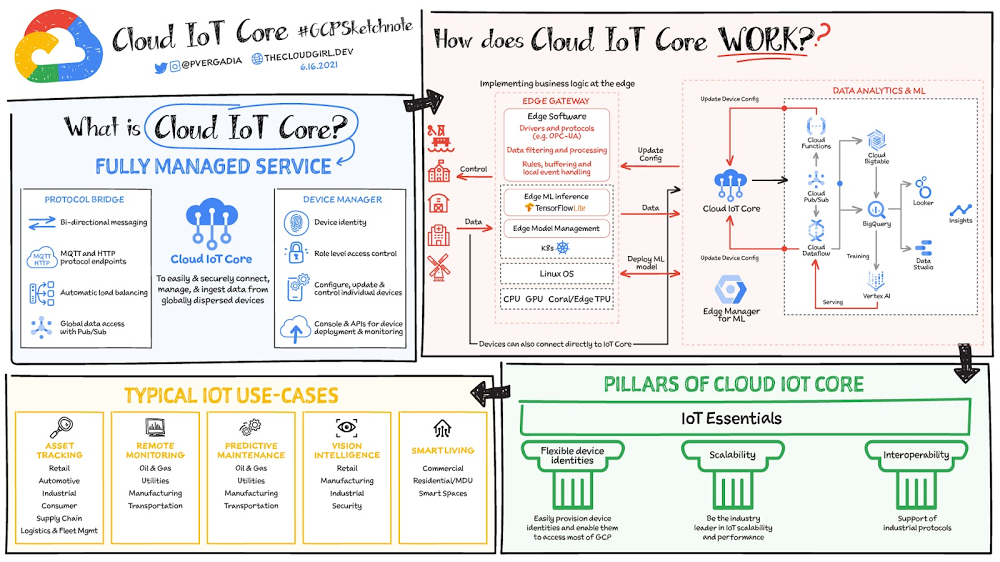
Click to enlargeThe ability to gain real-time insights from IoT data can redefine competitiveness for businesses. Intelligence allows connected devices and assets to interact efficiently with applications and with human beings in an intuitive and non-disruptive way. After your IoT project is up and running, many devices will be producing lots of data. You need an efficient, scalable, affordable way to both manage those devices and handle all that information. IoT Core is a fully managed service for managing IoT devices. It supports registration, authentication, and authorization inside the Google Cloud resource hierarchy as well as device metadata stored in the cloud, and the ability to send device configuration from other GCP or third-party services to devices. Main componentsThe main components of Cloud IoT Core are the device manager and the protocol bridges:The device manager  registers devices with the service, so you can then monitor and configure them. It provides:Device identity management Support for configuring, updating, and controlling individual devicesRole-level access controlConsole and APIs for device deployment and monitoringTwo protocol bridges (MQTT and HTTP) can be used by devices to connect to Google Cloud Platform for:Bi-directional messagingAutomatic load balancingGlobal data access with Pub/SubHow does Cloud IoT Core work?Device telemetry data is forwarded to a Cloud Pub/Subtopic, which can then be used to trigger Cloud Functions as well as other third-party apps to consume the data. You can also perform streaming analysis with Dataflow or custom analysis with your own subscribers.Cloud IoT Core supports direct device connections as well as gateway-based architectures. In both cases the real time state of the device and the operational data is ingested into Cloud IoT Core and the key and certificates at the edge are also managed by Cloud IoT Core. From Pub/Sub the raw input is fed into Dataflow for transformation, and the cleaned output is populated in Cloud Bigtable for real-time monitoring or BigQueryfor warehousing and machine learning. From BigQuery the data can be used for visualization in Looker orData Studio and it can be used in Vertex AI for creating machine learning models. The models created can be deployed at the edge using Edge Manager (in experimental phase). Device configuration updates or device commands can be triggered by Cloud Functions or Dataflow to Cloud IoT Core, which then updates the device.  Design principles of Cloud IoT CoreAs a managed service to securely connect, manage, and ingest data from global device fleets, Cloud IoT COre is designed to be:Flexible, providing easy provisioning of device identities and enabling devices to access most of Google CloudIThe industry leader in IoT scalability and performance Interoperable, with supports for the most common industry-standard IoT protocolsUse casesIoT use cases range across numerous industries. Some typical examples include:Asset tracking, visual inspection, and quality control in retail, automotive, industrial, supply chain and logisticsRemote monitoring and predictive maintenance in oil & gas, utilities, manufacturing, and transportationConnected homes and consumer technologies.Vision intelligence in retail, security, manufacturing, and industrial sectorsSmart living in commercial, residential, and smart spaces Smart factories with predictive maintenance and real-time plant floor analytics For a more in-depth look into Cloud IoT Core check out the documentation.  For more #GCPSketchnote, follow the GitHub repo. For similar cloud content follow me on Twitter @pvergadia and keep an eye out on thecloudgirl.dev.Related Article5 cheat sheets to help you get started on your Google Cloud journeyWhether you need to determine the best way to move to the cloud, or decide on the best storage option, we’ve built a number of cheat shee…Read Article
Quelle: Google Cloud Platform

Get in sync: Consistent Kubernetes with new Anthos Config Management features

From large digital-native powerhouses to midsized manufacturing firms, every company today is creating and deploying more software to more places more often. Anthos Config Management lets you set and enforce consistent configurations and policies for your Kubernetes resources—wherever you build and run them—and manage Google Cloud services the same way. Today, as a part of Anthos Config Management, we are introducing Config Controller, a hosted service to provision and orchestrate Google Cloud resources. This service offers an API endpoint that can provision, actuate, and orchestrate Google Cloud resources the same way it manages Kubernetes resources. You don’t have to install or manage the components—or be an expert in Kubernetes resource management or GitOps—because Google Cloud will manage them for you. Today, we’re also announcing that, in addition to using it for hybrid and multicloud use cases, Anthos Config Management is now available for Google Kubernetes Engine (GKE) as a standalone service. GKE customers can now take advantage of config and policy automation in Google Cloud at a low incremental per-cluster cost.These announcements deliver a whole new approach to config and policy management—one that’s descriptive or declarative, rather than procedural or imperative. Let’s take a closer look.  Let Kubernetes automate your configs and policies Development teams need stable and secure environments to build apps quickly and deploy them easily. Today, platform teams often scramble to provision and configure the necessary infrastructure components, apps, and cloud services the same way—in many different places—and keep them all up-to-date, patched, and secure. The struggle is real, and it’s not new. Platform administrators have been hand-crafting and partially automating configuration with new infrastructure-as-code languages and tools for years. We can spin up new containerized dev environments in minutes in the cloud and on-prem. We can push code to production hundreds of times a day with automated CI/CD processes. So why do configurations drift and fall out of sync with production? Because it takes time and toil to develop a consistent and automated way to describe what we want, create what we need, and repair what we break. The declarative Kubernetes Resource Model (KRM) reduces this toil with a consistent way to define and update resources: describe what you want and Kubernetes makes it happen. ACM makes it even easier by adding pre-built, opinionated config and policy automations, such as creating a secure landing zone and provisioning a GKE cluster from a blueprint. Blueprints help platform teams configure both Kubernetes and Google Cloud services the same way every time.Describe your intent with a single resource modelThe Kubernetes API server includes controllers that make sure your container infrastructure state always matches the state you declare in YAML. For example, Kubernetes can ensure that a load balancer and service proxy are always created, connected to the right pods, and configured properly. But KRM can manage more than just container infrastructure. You can use KRM to deploy and manage resources such as cloud databases, storage, and networks. It can also manage your custom-developed apps and services using custom resource definitions. Create what you need from a single source of truthWith Anthos Config Management, you declare and set configurations once and forget them. You don’t have to be an expert in KRM or GitOps-style configuration because the hosted Config Controller service takes care of it. Config Controller provisions infrastructure, apps, and cloud services; configures them to meet your desired intent; monitors them for configuration drift; and applies changes every time you push a new resource declaration to your Git repository. Config changes are as easy as a git push—and easily integrate with your development workflows. Anthos Config Management uses Config Sync to continuously reconcile the state of your registered clusters and resources—that means any GKE, Anthos, or other registered cluster—and makes sure unvetted changes are never pushed to live clusters. Anthos Config Management reduces the risk of dev or ops teams making any changes outside the Git source of truth by requiring code reviews and rolling back any breaking changes to a good working state. In short, using Anthos Config Management both encourages and enforces best practices.Repair what breaks for automated complianceAnthos Config Management’s Policy Controller makes it easier to create and enforce fully programmable policies across all connected clusters. Policies act as guardrails to prevent any changes to configuration from violating your custom security, operational, or compliance controls. For example, you can set policies to actively block any non-compliant API requests, require every namespace to have a label, prevent pods from running privileged containers, restrict the types of storage volumes a container can mount, and more.Policy Controller is based on the open source Open Policy Agent Gatekeeper project, augmented by Google Cloud with a ready-to-use library of pre-built policies for the most common security and compliance controls. Customers can establish a secure baseline easily without deep expertise and ACM applies policies to a single cluster (e.g. GKE) or to a distributed set of Anthos clusters on-prem or in other cloud platforms. You can audit and add your own custom policies by allowing your security-savvy experts to create constraint templates which anyone can invoke in different dev or production environments without learning how to write or manage policy code. The audit functionality included allows platform admins to audit all violations, simplifying compliance reviews.Configure and control every cluster consistentlyThe hosted service, Config Controller, which runs Config Connector, Config Sync, and Policy Controller for you, is available in Preview. Config Controller leverages Config Connector, which lets you manage Google Cloud resources the same way you manage other Kubernetes resources, with continuous monitoring and self-healing. For example, you can ask Config Connector to create a Cloud SQL instance and a database. Config Connector can manage more than 60 Google Cloud resources, including Bigtable, BigQuery, Pub/Sub, Spanner, Cloud Storage, and Cloud Load Balancer.Once you’ve embraced a consistent resource model, using ACM to enforce configuration and policy automatically for individual resources, take the next step with blueprints. A blueprint is a package of config and policy that documents an opinionated solution to deploy and manage multiple resources at once. Blueprints capture best practices and policy guardrails, package them together, and let you deploy them as a complete solution to any Kubernetes clusters using Config Controller. Use Blueprints to manage multiple resources at once, or to create customized landing zones—compliant, properly configured, and easily duplicated environments that meet your own best practice guidelines and that are properly networked and secured. The Vienna Insurance Group uses Anthos Config Management in its Viesure Innovation Center, which it credits with improving its compliance posture.”Google’s Landing Zones and Config Controller equipped us with an extensive set of tools to set up our Google Cloud infrastructure quickly and securely. Their policy controllers are a powerful instrument for ensuring compliance for all our Google Cloud resources.” —Rene Schakmann, Head of Technology at viesure innovation center GmbHGet started todayAnthos Config Management on GKE is generally available today. If you’re a GKE customer, you can also now use Anthos Config Management at a low incremental cost. By making it available to GKE customers, and offering it as a hosted, managed service for everyone, we’re making it easier than ever for you to leverage “KRM as a service” to simplify and secure Kubernetes resource management from the data center to the cloud.To learn more about the technical details behind ACM, check out this recent episode of the Kubernetes Podcast from Google with the TL for Policy Controller, Max Smythe.Related ArticleI do declare! Infrastructure automation with Configuration as DataConfiguration as Data enables operational consistency, security, and velocity on Google Cloud with products like Config Connector.Read Article
Quelle: Google Cloud Platform

How Digitec Galaxus delivers personalized newsletters with reinforcement learning and Google Cloud

Digitec Galaxus AG is the biggest online retailer in Switzerland, operating two online stores: Digitec, Switzerland’s online market leader for consumer electronics and media products, and Galaxus, the largest Swiss online shop with a steadily growing range of consistently low-priced products for almost all daily needs. Known for its efficient, personalized shopping experiences, it’s clear that Digitec Galaxus understands what it takes to deliver a platform that is interesting and relevant to customers every time they shop. The problem: Personalizing decisions for every situationDigitec Galaxus already had established an engine to help them personalize experiences for shoppers when they reached out to Google Cloud. They had multiple recommendation systems in place and were also extensive early adopters of Recommendations AI, which already enabled them to offer personalized content in places like their homepages, product detail pages, and their newsletter. But those same systems sometimes made it difficult to understand how best to combine and optimize to create the most personalized experiences for their shoppers. Their requirements were threefold:Personalization: They have over 12 recommenders they can display on the app, however they would like to contextualize this and choose different recommenders (which in turn select the items) for different users. Furthermore they would like to exploit existing trends as well as experiment with new ones.Latency: They would like to ensure that the solution is architected so that the ranked list of recommenders can be retrieved with sub 50 ms latency.End-to-end easy to maintain & generalizable/modular architecture: Digitec wanted the solution to be architected using an easy to maintain, open source stack, complete with all MLops capabilities required to train and use contextual bandits models. It was also important to them that it is built in a modular fashion such that it can be adapted easily to other use cases which have in mind such as recommendations on the homepage, Smartags and more . To improve, they asked us to help them implement a machine learning (ML) contextual bandit based recommender system on Google Cloud taking all the above factors into consideration to take their personalization to the next level. Contextual bandits algorithms are a simplified form of reinforcement learning and help aid real-world decision making by factoring in additional information about the visitor (context) to help learn what is most engaging for each individual. They also excel at exploiting trends which work well, as well as exploring new untested trends which can yield potentially even better results. For instance, imagine that you are personalizing a homepage image where you could show a comfy living room couch or pet supplies. Without a contextual bandit algorithm, one of these images would be shown to someone at random without considering information you may have observed about them during previous visits. Contextual bandits enable businesses to consider outside context, such as previously visited pages or other purchases, and then observe the final outcome (a click on the image) to help determine what works best. Creating a personalization system with contextual banditsWhile Digitec Galaxus heavily personalizes their website homepages, they are very very sensitive and also require more cross-team collaboration to update and make changes. Together with the Digitec Galaxus team, we decided to narrow the scope and focus on building a contextual bandit personalization system for the newsletter first. The digitec Galaxus team has complete control over newsletter decisions and testing various ML experiments on a newsletter would have less chance of adverse revenue impact than a website homepage. The main goal was to architect a system that could be easily ported over to the homepage and other services offered by Digitec with minimal adaptations. It would also need to satisfy the functional and non-functional requirements of the homepage as well as other internal use cases.Below is a diagram of how the newsletter’s personalization recommendation system works:The system is given some context features about the newsletter subscriber such as their purchase history and demographics. Features are sometimes referred to as variables or attributes, and can vary widely depending on what data is being analyzed. The contextual bandit model trains recommendations using those context features and 12 available recommenders (potential actions). The model then calculates which action is most likely to enhance the chance of reward (a user clicking in the newsletter) and also minimize the problem (an unsubscribe). Calculating whether a click was a newsletter or an unsubscribe enabled the system to optimize for increasing clicks and avoid showing non-relevant content to the user (click-bait). This enabled Digitec Galaxus to exploit popular trends while also exploring potentially better-performing trends. How Google Cloud helpsThe newsletter context-driven personalization system was built on Google Cloud architecture using the ML recommendation training and prediction solutions available within our ecosystem. Below is a diagram of the high-level architecture used:The architecture covers three phases of generating context-driven ML predictions, including: ML Development: Designing and building the ML models and pipeline Vertex Notebooks are used as data science environments for experimentation and prototyping. Notebooks are also used to implement model training, scoring components, and pipelines. The source code is version controlled in Github. A continuous integration (CI) pipeline is set up to automatically run unit tests, build pipeline components, and store the container images to Cloud Container Registry. ML Training: Large-scale training and storing of ML models The training pipeline is executed on Vertex Pipelines. In essence, the pipeline trains the model using new training data extracted from BigQuery and produces a trained, validated contextual bandit model stored in the model registry. In our system, the model registry is a curated Cloud Storage. The training pipeline uses Dataflow for large scale data extraction, validation, processing, and model evaluation, and Vertex Training for large-scale distributed training of the model. AI Platform Pipelines also stores artifacts, the output of training models, produced by the various pipeline steps to Cloud Storage. Information about these artifacts are then stored in an ML metadata database in Cloud SQL. To learn more about how to build a Continuous Training Pipeline, read the documentation guide.ML Serving: Deploying new algorithms and experiments in production The training pipeline uses batch prediction to generate many predictions at once using AI Platform Pipelines, allowing Digitec Galaxus to score large data sets. Once the predictions are produced, they are stored inCloud Datastore for consumption. The pipeline uses the most recent contextual bandit model in the model registry to evaluate the inference dataset in BigQuery and give a ranked list of the best newsletters for each user, and persist it in Datastore. A Cloud Function is provided as a REST/HTTP endpoint to retrieve the precomputed predictions from Datastore.All components of the code and architecture are modular and easy to use, which means they can be adapted and tweaked to several other use cases within the company as well.Better newsletter predictions for millionsThe newsletter prediction system was first deployed in production in February, and Digitec Galaxus has been using it to personalize over 2 million newsletters a week for subscribers. The results have been impressive, 50% higher than our baseline. However, the collaboration is still ongoing to improve the results even more. “Working at this level in direct exchange with Google’s machine learning experts is a unique opportunity for us. The use of contextual bandits in the targeting of our recommendations enables us to pursue completely new approaches in personalization by also personalizing the delivery of the respective recommender to the user. We have already achieved good results in our newsletter in initial experiments and are now working on extending the approach to the entire newsletter by including more contextual data about the bandits arms. Furthermore, as a next step, we intend to apply the system to our online store as well, in order to provide our users with an even more personalized experience. To build this scalable solution, we are using Google’s open source tools such as TFX and TF Agents, as well as Google Cloud Services such as Compute Engine, Cloud Machine Learning Engine, Kubernetes Engine and Cloud Dataflow.”—Christian Sager, Product Owner, Personalization ( Digitec Galaxus)Since the existing architecture and system is also dynamic, it will automatically adapt to new behaviours, trends, and users. As a result, Digitec Galaxus plans to re-use the same components and extend the existing system to help them improve the personalization of their homepage and other current use cases they have within the company. Beyond clicks and user engagement, the system’s flexibility also allows for future optimization of other criteria. It’s a very exciting time and we can’t wait to see what they build next!Related ArticleIKEA Retail (Ingka Group) increases Global Average Order Value for eCommerce by 2% with Recommendations AIIKEA uses Recommendations AI to provide customers with more relevant product information.Read Article
Quelle: Google Cloud Platform
Image search with natural language queries

Image search with natural language queries

This post shows how to build an image search utility using natural language queries. Our aim is to use different GCP services to demonstrate this. At the core of our project is OpenAI’s CLIP model. It makes use of two encoders – one for images and one for texts. Each encoder is trained to learn representations such that similar images and text embeddings are projected as close as possible.We will first create a Flask-based REST API capable of handling natural language queries and matching them against relevant images. We will then demonstrate the use of the API through a Flutter-based web and mobile application. Figure 1 shows how our final application would look like:Figure 1: Final application overview.All the code shown in this post is available as a GitHub repository. Let’s dive in. Application at a high-levelOur application will take two queries from the user:Tag or keyword query. This is needed in order to pull a set of images of interest from Pixabay. You can use any other image repositories for this purpose. But we found Pixabay’s API to be easier to work with. We will cache these images to optimize the user experience. Suppose we wanted to find images that are similar to this query: “horses amidst flowers”. For this, we’d first pull in a few “horse” images and then run another utility to find out the images that best match our query.  Longer or semantic query that we will use to retrieve the images from the pool created in the step above. These images should be semantically similar to this query. Note: Instead of two queries, we could have only taken a single long query and run named-entity extraction to determine the most likely important keywords to run the initial search with. For this post, we won’t be using this approach. Figure 2 below depicts the architecture design of our application and the technical stack used for each of the components.Figure 2: Architecture design and flow.Figure 2 also presents the core logic of the API we will develop in bits and pieces in this post. We will deploy this API on a Kubernetes cluster using the Google Kubernetes Engine (GKE). The following presents a brief directory structure of our application code-base:Next, we will walk through the code and other related components for building our image search API. For various machine learning-related utilities, we will be using PyTorch. Building the backend API with FlaskFirst, we’d need to fetch a set of images with respect to user-provided tags/keywords before performing the natural language image search. The utility below from the pixabay_utils.py script can do this for us:Note that all the API utilities are logging relevant information. But for brevity, we have omitted the lines of code responsible for that. Next, we will see how to invoke the CLIP model and select the images that would best match a given query semantically.  For this, we’ll be using Hugging Face, an easy-to-use Python library offering state-of-the-art NLP capabilities. We’ll collate all the logic related to this search inside a SimilarityUtil class:CLIP_MODEL uses a ViT-base model to encode the images for generating meaningful embeddings with respect to the provided query. The text-based query is also encoded using A Transformers-based model for generating the embeddings. These two embeddings are matched with one another during inference. To know more about the particular methods we are using for the CLIP model please refer to this documentation from Hugging Face. In the code above, we are first invoking the CLIP model with images and the natural language query. This gives us a vector (logits_per_image) that contains the similarity scores between each of the images and the query. We then sort the vector in a descending manner. Note that we are initializing the CLIP model while instantiating the SimilarityUtil to save us the model loading time. This is the meat of our application and we have tackled it already. If you want to interact with this utility in a live manner you can check out this Colab Notebook. Now, we need to collate our utilities for fetching images from Pixabay and for performing the natural language image search inside a single script – perform_search.py. Following is the main class of that script:Here, we are just calling the utilities we had previously developed to return the URLs of the most similar images and their scores. What is even more important here is the caching capability. For that, we combined GCP’s MemoryStore and a Python library called direct-redis. More on setting up MemoryStore later. MemoryStore provides a fully managed and low-cost platform for hosting Redis instances. Redis databases are in memory and light-weight making them an ideal candidate for caching. In the code above, we are caching the images fetched from Pixabay and their URLs. So, in the event of a cache hit, we won’t need to call the CLIP model and this will tremendously improve the response time of our API. Other options for cachingWe can cache other elements of our application. For example, the natural language query. When searching through the cached entries to determine if it’s a cache hit, we can compare two queries for semantic similarity and return results accordingly. Consider that a user had entered the following natural language query: “mountains with dark skies”. After performing the search, we’d cache the embeddings of this query. Now, consider that another user entered another query: “mountains with gloomy ambiance”. We’d compute its embeddings and run a similarity search with the cached embeddings. We’d then compare the similarity scores with respect to a threshold and parse the most similar queries and their corresponding results. In case of a cache miss, we’d just call the image search utilities we developed above. When working on real-time applications we often need to consider these different aspects and decide what enhances the user experience and maximizes business at the same time. All that’s left now for the backend is our Flask application – main.py:Here we are first parsing the query parameters from the request payload of our search API.  We are then just calling the appropriate function from perform_search.py to handle the request. This Flask application is also capable of handling CORS. We do this via the flask_cors library:And this is it! Our API is now ready for deployment. Deployment with Compute Engine and GKEThe reason why we wanted to deploy our API on Kubernetes is because of the flexibility Kubernetes offers for managing deployments. When operating at scale, auto scalability and load balancing are very important. With the comes the requirement of security — we’d not want to expose the utilities for interacting with any internal services such as databases. With Kubernetes, we can achieve all these easily and efficiently. GKE provides secured and fully managed functionalities for operationalizing Kubernetes clusters. Here are the steps to deploy the API on GKE at a glance:We first build a Docker image for our API and then push it to the Google Container Registry (GCR).We then create a Kubernetes cluster on GKE and initialize a deployment.We then add scalability options.If any public exposure is needed for the API, we then tackle it. We can assimilate all the above into a shell script – k8s_deploy.sh:These steps are well explained in this tutorial that you might want to refer to for more details. We can configure all the dependencies on our local machine and execute the shell script above. We can also use the GCP Console to execute it since a terminal on the GCP Console is pre-configured with the system-level dependencies we’d need. In reality, the Kubernetes cluster should only be created once and different deployment versions should be created under it. After the above shell script is run successfully, we can run kubectl get service to know the external IP address of the service we just deployed:We can now consume this API with the following base URI: http://203.0.113.0/. If we wanted to deal with only http-based API requests, then we are done here. But secured communication is often a requirement in order for applications to operate reliably. In the following section, we are to discuss how to configure the additional items to allow our Kubernetes cluster to allow https requests.  Configurations for handling https requests with GKEA secure connection is almost often a  must-have requirement in modern client/server applications. The front-end Flutter application would be hosted on GitHub Pages for this project, and it requires https-based connection as well. Even if configuring https connection particularly for a GKE-based cluster can be considered a chore, its setup might seem daunting at first.There are six steps to configure https connection in the GKE environment: You need to have a domain name, and there are a lot of inexpensive options that you can buy. For instance, mlgde.com domain for this project is acquired via Gabia which is a Korean service provider.A reserved (static) external IP address has to be acquired via gcloud command or GCP console. You need to bind the domain name with the acquired external IP address. This is a platform-specific configuration that issued the domain name to you. There is a special ManagedCertificate resource which is specific to the GKE environment. ManagedCertificate resource specifies the domain that the SSL certificate will be created for, so you need this. An Ingress resource should be created by listing the static external IP address, ManagedCertificate resource, and the service name and port which the incoming traffic will be routed to. The Service resource could remain the same as in the above section with only changes from LoadBalancer to ClusterIP. Last but not least, you need to modify the existing Flask application and Deployment resource to support liveness and readiness probes which are used to check the health status of the Deployment. The Flask application side can be simply modified with the flask-healthz Python package, and you only need to add livenessProbe and readinessProbe sections in the Deployment resource. In the code example below, the livenessProbe and readinessProbe are checked via /alive and /ready endpoints respectively.One thing to be careful of is the initialDelaySeconds attribute of the probes. It is uncommon to configure this attribute with a big number, but it could be bigger than 90 – 120 seconds depending on the size of the model to be used. For this project, it is configured in 90 seconds in order to wait until the CLIP model is fully loaded into memory (full YAML script here).Again, these steps may seem daunting at first, but it will become clear when you have done it once. Here is the official document for Using Google-managed SSL certificates You can find all the GKE-related resources used in this project here. Once every step is completed you should be able to see your server application running on the GKE environment. Please make sure to run kubectl apply command whenever you create Kubernetes resources such as Deployment, Service, Ingress, and ManagedCertificate, and it is important to wait for more than 10 minutes until the ManagedCertifcate provisioning is done. You can run gcloud compute addresses list command to find out the static external IP address that you have configured.Then, the IP address has to be mapped to the domain. Figure 3 is a screenshot of a dashboard from where we got the mlgde.com domain. It clearly shows mlgde.com is mapped to the static external IP address configured in GCP.Figure 3: API endpoints mapped to our custom domain.In case you’re wondering why we didn’t deploy this application on App Engine, well that is because of the compute needed to execute the CLIP model. App Engine instance won’t fit in that regime. We could have also incorporated compute-heavy capabilities via a VPC Connector. That is a design choice that you and your team would need to consider. In our experiments, we found the GKE deployment to be easier and suitable for our needs. Infrastructure for the CLIP modelAs mentioned earlier, at the core of our application is the CLIP model. It is computationally a bit more expensive than the regular deep learning models. This is why it makes sense to have the hardware infrastructure set up accordingly to execute it. We ran a small benchmark in order to see how a GPU-based environment could be beneficial here. We ran the CLIP on a Tesla P100-based machine and also on a standard CPU-only machine 1000 times. The code snippet below is the meat of what we executed:As somewhat expected, with the GPU, the code took 13 minutes to complete execution. With no GPU, it took about 157 minutes.It is uncommon to leverage GPUs for model prediction because of cost restrictions, but sometimes we have to access GPUs for deploying a big model like CLIP. We configured a GPU-based cluster on GKE and compared the performance differences with and without it. It took about 1 second to handle a request with GPU and MemoryStore cache while it took more than 4 seconds with MemoryStore only (without the GPUs). For the purposes of this post, we used a CPU-based cluster on Kubernetes. But It is easy to configure GPU usage in a GKE cluster. This document shows you how to do so. For a short summary, there are two steps. First, a node should be configured with GPUs when creating a GKE cluster. Second, GPU drivers should be installed in GKE nodes. You don’t need to visit and manually install GPU drivers for each node by yourself. Rather you can simply apply the DaemonSet resource to GKE as described here.Setting up MemoryStoreIn this project, we first query the general concept of images to Pixabay, then we filter the images with a semantic query using CLIP. It means we can cache the initially retrieved images from Pixabay for the next specific semantic query. For instance, you may want to search with “gentleman wearing tie” at first, then you may want to retry searching for “gentleman wearing glass”. In this case, the base images remain all the same, so they could be stored in a cache server like Redis. MemoryStore is a GCP service wrapping the Redis which is an in-memory data store, so you can simply use a standard Redis Python package for accessing it. The only thing to be careful about when provisioning a MemoryStore Redis instance is to make sure it is in the same region where your GKE cluster or Compute Engine instance is.Figure 4: MemoryStore setup.The code snippet below shows how to make a connection to the Redis instance in Python. Nothing specific to GCP, but you only need to be aware of the usage of the standard redis-py package. After creating a connection, you can store and retrieve data from MemoryStore. There are more advanced use cases of Redis, but we only used exists, get, and set methods for the demonstration purpose. These methods should be very familiar if you know maps, dictionaries, or other similar data structures. For the code portion that uses Redis-related utilities, please refer to the Searcher Python class we discussed in an earlier section. In the URLs below, you can find side-by-side comparisons of using MemoryStore:Without MemoryStore: https://youtu.be/7B88Eyrd-4sWith MemoryStore (1st try): https://youtu.be/LE6xeEIRuMMWith MemoryStore (2nd try): https://youtu.be/rRfK17sdk84 Putting everything togetherAll that’s left now is to collate the different components we developed in the sections above and deploy our application with a frontend. All the frontend-related code is present here. The front-end application is written in the Flutter development kit. The main screen contains two text fields for queries to Pixabay and CLIP model respectively. When you click the “Send Query” button, it will send out a RestAPI request to the server. After receiving the result back from the server, the retrieved images from the semantic query will be displayed at the bottom section of the screen. Please note that a Flutter application can be deployed to various environments including desktop, web, iOS, and Android. In order to keep as simple as possible, we chose to deploy the application to the GitHub Pages. Whenever there is any change to a client-side source directory, the GitHub Action will be triggered to build a web page and deploy the latest version to the GitHub Pages. Our final application is deployed here and it looks like so:Figure 5: Live application screen.Note that due to constraints, the above-mentioned URL will only be live for one or two months.  It is also possible to redeploy the back-end application with a GitHub Action. The very first step is to craft a Dockerfile like below. Since Python is a scripting language, and there are lots of heavy packages that the application is dependent on, it is important to cache the steps. For instance, installing the dependencies should be separated from other commands.With the Dockerfile defined, we can use a GitHub Action like this for automatic deployment. Edge casesSince the CLIP model is pre-trained on a large corpus of image and text pairs it’s likely that it may not generalize well to every natural language query we throw at it. Also, because we are limiting the number of images on which the CLIP model can operate, this somehow restricts the expressivity of the model.We may be able to improve the performance for the second situation by increasing the number of images to be pre-fetched and by indexing them into a low-cost and high-performance database like Datastore. CostsIn this section, we wanted to provide the readers a breakdown of the costs they might incur in order to consume the various services used throughout the application. Frontend hostingThe front-end application is hosted on GitHub Pages, so there is no expenditure for this.Compute EngineWith an e2-standard-2 instance type without GPUs, the cost is around $48.92 per month. In case you want to add a GPU (NVIDIA K80), the cost goes up to $229.95 per month.MemoryStoreThe cost for MemoryStore depends on the size. With 1GB of space, the cost is around $35.77 per month, and whenever you add more GBs the cost will be doubled.Google Kubernetes EngineThe monthly cost for a 3 node GKE cluster with n2-standard-2 (vCPUs: 2, RAM: 8GB without GPUs) is about $170.19. If you add one GPU (NVIDIA K80) to the cluster, the cost goes up to $835.48.While you may think that is a lot cost-wise, it is good to know that Google gives away free $300 credits when you create a new GCP account. It is still not enough for leveraging GPUs, but it is enough to learn and experiment with GKE and MemoryStore usage.ConclusionIn this post, we walked through the components needed to build a basic image search utility for natural language queries. We discussed how these different components are connected to each other. Our image search API is able to utilize caching and was deployed on a Kubernetes cluster using GKE. These elements are essential when building a similar service to cater to a much bigger workload. We hope this post will serve as a good starting point for that purpose. Below are some references on similar areas of work that you can explore:Building a real-time embeddings similarity matching systemDetecting image similarity using Spark, LSH and TensorFlowAcknowledgments: We are grateful to the Google Developers Experts program for supporting us with GCP credits. Thanks to Karl Weinmeister and Soonson Kwon of Google for reviewing the initial draft of this post. 
Quelle: Google Cloud Platform

8 ways Google Cloud elevates agility and security for financial services

The COVID-19 pandemic brought dramatic changes to the financial services industry. Already under pressure from nimble young fintechs to modernize, established banks and insurers were undergoing incremental digital transformation. But in 2020, they hit the gas pedal. Branches closed and remote work became the norm. Almost overnight, employees needed secure remote access to corporate systems, and customers expected to be able to complete even complex transactions whenever they wanted, on whatever device. Even as things return to normal, many of these shifts are likely to be permanent. According to Forrester Research, nearly 90% of global financial services CIOs and SVPs believe that improving their application portfolio is key to improving customer experience and driving revenue.1 The problem? Replacing legacy systems with cloud-based SaaS enterprise software is a massive, time- and resource-intensive process. IDG’s recently completed white paper, Financial Services Spotlight: Elevating agility and security in the cloud, highlights an alternative to the all-or-nothing approach to replatforming: “lifting and shifting” on-premises applications and workloads to the cloud without rewriting them. In this way, you keep your organization’s familiar architecture, but give it the scalability and cutting-edge technology of a modern cloud environment. That’s the promise of Google Cloud VMware Engine brings to the financial services industry.Here’s a quick overview of the insights that the IDG study uncovers. Download the complete white paper.Simpler migration, rich rewardsGoogle Cloud VMware Engine helps financial services companies seamlessly migrate and run VMware workloads natively on Google Cloud. Once in the cloud, firms can take advantage of Google Cloud services, access a robust third-party cloud ecosystem, and use the same VMware tools, processes, and policies their teams already know. The IDG study found that migrating to Google Cloud with Google Cloud VMware Engine offers multiple benefits:Create new customer experiences. Migrating to Google Cloud puts modern, cloud-native architectures and technologies — such as containers and microservices — easily within reach. These make it possible for financial institutions to quickly and securely launch new applications and update them on a continuous basis using DevOps pipelines. They also allow firms to craft more personalized customer experiences across channels using Google Cloud’s native AI and data analytics.Deliver new services. After migrating, financial services organizations can connect to multiple third-party service providers via cloud-based APIs to bring new, diverse services to their customers — without having to build from scratch. Make the best use of IT resources. When your data and applications reside in Google Cloud, you’re no longer constrained by the physical storage and compute limits of on-premises infrastructure. This means your company can match capacity to demand — even during unexpected peaks. You also gain more visibility into your hybrid cloud environment with Google Cloud’s operations suite, which offers intelligent analysis and easier troubleshooting for your platform and applications.Gain fresh insights. The key to understanding what customers need and when they need it resides within your data, and data analytics in the cloud help you uncover those insights. Your company can connect to Google Cloud’s serverless data warehouse, BigQuery, which leverages data to deliver valuable insights for personalized customer experiences, rich compliance reporting, new product development, intelligent fraud detection, and more. Choose what to move. Data governance regulations and requirements specific to the financial services industry mean that some data must remain on premises. Google Cloud VMware Engine lets you easily manage a hybrid cloud/on-premises environment to keep sensitive data fully under your control.Become more resilient. Google Cloud VMware Engine gives financial services firms a distributed architecture and centralized control for their applications to support vital business continuity functions, such as backup and disaster recovery. This is on top of the performance and availability of Google Cloud’s global infrastructure.Improve security. Using cloud-native application frameworks, administrators can issue patches and software updates centrally and automatically across their organizations. This reduces the risk of errors and security vulnerabilities. Firms also tap into the security features and capabilities of Google Cloud, including always-on encryption and AI-powered threat detection.Redirect IT resources. Migrating virtualized workloads to the cloud can free up talent and budget to develop new products and services — time that was previously spent on maintaining complex on-premises infrastructure. That means less effort spent keeping the lights on, and more resources directed toward creating innovative and differentiating customer experiences.IDG research concluded that migrating business applications to Google Cloud with Google Cloud VMware Engine can help financial services companies stay ahead of change without incurring further technical debt from their legacy IT systems. Working with cloud-based systems can give your financial services company much of the scale, speed, and agility of a startup while still enjoying the benefits of being an established organization. Read the complete white paper to learn more about the ways in which Google and VMware work together to accelerate digital transformation for financial services firms.1. Vmware-forrester-financial-services-modern-app-report.pdf, A commissioned study conducted by Forrester Consulting on behalf of VMware, 2020Related ArticleNew in Google Cloud VMware Engine: autoscaling, Mumbai expansion, etc.A review of the latest updates to Google Cloud VMware Engine.Read Article
Quelle: Google Cloud Platform