New Research: COVID-19 accelerates innovation in healthcare but tech adoption still lags

Since the start of the COVID-19 pandemic, there’s been a rapid acceleration of digital transformation across the entire healthcare industry. Telehealth has become a more mainstream and safe way for patients and caregivers to connect. Machine learning modeling has helped speed up innovation and drug discovery. And new levels of integration and data portability have helped enable greater vaccine availability and equitable access to those who need it.Data has been at the crux of this digital transformation — helping people stay healthy, accelerating life sciences research and delivering more personalized and equitable care. We recently unveiled partial results from our research with The Harris Poll, which revealed that nearly all physicians (95%) believe increased data interoperability will ultimately help improve patient outcomes. Today, we’re unveiling the second part of that research. In February 2020, we commissioned The Harris Poll to survey 300 physicians in the U.S. about their biggest pain points — this was just before the COVID-19 pandemic strained the entire healthcare system and made us all hyper-aware of the risks we take in going to the hospital. In June 2021, we followed-up with those same questions and more. What it unveiled was just how much COVID-19 reshaped technology’s role in the healthcare field and how it’s changing day-to-day operations for physicians. Here are some of the highlights: Healthcare organizations accelerated technological upgrades over the course of the pandemic. After a year shaped primarily by the COVID-19 pandemic, use of telehealth saw substantial YOY growth, jumping nearly threefold from 32% in February 2020 to 90% this year. Forty-five percent of physicians say the COVID-19 pandemic accelerated the pace of their organization’s adoption of technology. In fact, more than 3 in 5 physicians (62%) say the pandemic has forced their healthcare organization to make technology upgrades that normally would have taken years. For example, 48% of physicians would like to have access to telehealth capabilities in the next five years. Before the COVID-19 pandemic, about half of physicians (53%) say their healthcare organization’s approach to the adoption of technology would best be described as “neutral” (i.e., willing to try new technologies only if they have been in the market for awhile or others have tried and recommended them). Despite the technological leaps this year, most physicians still believe the industry lags behind in technology adoption but recognize the opportunity for technological support and advancement. The majority of physicians don’t view the healthcare industry as a leader when it comes to digital adoption. More than half of physicians describe the healthcare industry as lagging behind the gaming (64%), telecommunications (56%), and financial services industries (53%). However, the healthcare industry is not seen to be trailing as much as it was last year behind retail (54% in 2020; 44% in 2021); hospitality and travel (53% in 2020; 43% in 2021); and the public sector (39% in 2020; 26% in 2021). Better interoperability alleviates physician burnout, improves health outcomes and speeds up diagnoses. The majority of physicians say increased data interoperability will cut the time to diagnosis for patients significantly (86%) and will ultimately help improve patient outcomes (95%.) In addition to better patient experiences and outcomes, more than half of physicians (54%) believe increased access to data via technology has had a positive impact on their healthcare organization overall. A majority believe that technology can alleviate the likelihood of physician “burn-out” (57%) and that efficient tools help decrease friction and stress (84%). And, as a result, 6 in 10 physicians say access to better technology and clinical data systems would allow them to have better work/life balance (60%) and that better access to/more complete patient data would reduce administrative burdens (61%). It is therefore not surprising that nearly 9 in 10 physicians (89%) say they are increasingly looking for ways to bring together all patient data into a single place for a more complete view of health. Familiarity with new Department of Health and Human Services (DHHS) interoperability rules grows, and many physicians are in favor. Most physicians (74%) say they have at least heard of the new DHHS rules (launched in 2019) to improve the interoperability of electronic health information. This is a clear rise from 2020 (64%), but deeper knowledge is fairly low. Only 30% of physicians say they are somewhat or very familiar with the new rules (though, again, this is a rise from 2020, when only 18% said they were very/somewhat familiar). Similar to in 2020, among those who have heard of the new rules, nearly half are in favor (48% in 2021; 45% in 2020) but a similar proportion remain unsure (46% in 2021; 50% in 2020). And like in 2020, by far the top potential benefit of the rules is thought to be forcing EHRs to be more interoperable with other systems (70%).Google was founded on the idea that bringing more information to more people improves lives on a vast scale. In healthcare, that means creating tools and solutions that make data available in real time to help streamline operations and improve quality of care and patient outcomes. For example, our recently announced Healthcare Data Engine makes it easier for healthcare and life sciences leaders to make smart real-time decisions through clinical, operational, & groundbreaking scientific insights. To find out more about the Healthcare Data Engine, click here.Survey methodology: The 2021 survey was conducted online within the United States by The Harris Poll on behalf of Google Cloud from June 9 – 29, 2021 among 303 physicians who specialize in Family Practice, General Practice, or Internal Medicine, who treat patients, and are duly licensed in the state they practice. The 2020 survey was conducted from February 18 – 25, 2020 among 300 physicians who specialize in Family Practice, General Practice, or Internal Medicine, who treat patients, and are duly licensed in the state they practice. Physicians practicing in Vermont were excluded from the research. This online survey is not based on a probability sample and therefore no estimate of theoretical sampling error can be calculated. For complete survey methodology, including weighting variables and subgroup sample sizes, please contact press@google.com.Related ArticleAdvancing healthcare with the Healthcare Interoperability Readiness ProgramHow Google Cloud is helping healthcare organizations achieve interoperability.Read Article
Quelle: Google Cloud Platform

Use log buckets for data governance, now supported in 23 regions

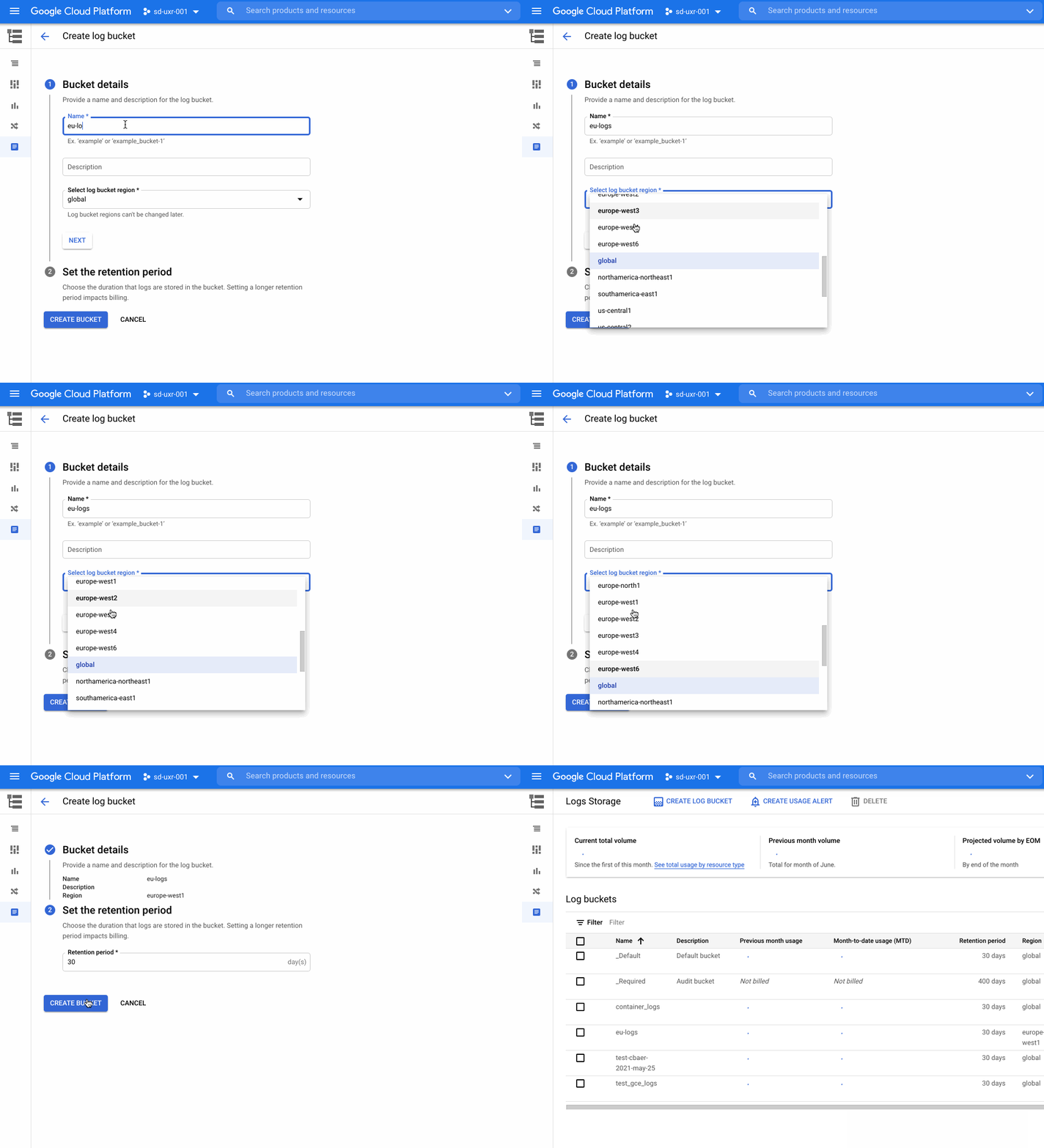
Logs are an essential part of troubleshooting applications and services. However, ensuring your developers, DevOps, ITOps, and SRE teams have access to the logs they need, while accounting for operational tasks such as scaling up, access control, updates, and keeping your data compliant, can be challenging. To help you offload these operational tasks associated with running your own logging stack, we offer Cloud Logging. If you don’t need to worry about data residency, Cloud Logging will pick a region to store and process your logs. If you do have data governance and compliance requirements, we’re excited to share that Cloud Logging now offers even more flexibility and control by providing you a choice of which region to store and process your logging data. In addition to the information below, we recently published a whitepaper that details compliance best practices for logs data.Choose from 23 regions to help keep your logs data compliantLog entries from apps and services running on Google Cloud will automatically be received by Cloud Logging within the region where the resource is running. From there, logs will be stored in log buckets. Log buckets have many attributes in common with Cloud Storage buckets, including the ability to:Set retention from 1 day to 10 yearsLock a log bucket to prevent anyone from deleting logs or reducing the retention period of the bucketChoose a region for your log bucket. We recently introduced support for 23 regions to host your log buckets:Europe – europe-central2, europe-north1, europe-west1, europe-west2, europe-west3, europe-west4, europe-west6Americas – us-central1, us-east1, us-east4, us-west1, us-west2, us-west3, northamerica-northeast1, southamerica-east1Asia Pacific – asia-east1, asia-east2, asia-northeast1, asia-northeast2, asia-northeast3, asia-south1, asia-southeast1, australia-southeast1    How to create a log bucketYou can get started with regionalized log storage in less than five minutes.Go to the Cloud Console and go to LoggingNavigate to Logs Storage and click on “Create logs bucket”Name the log bucket and choose the desired region. Note that the region cannot be changed later. Set the retention period and then click Create Bucket.Once you have created the bucket, you need to point the incoming logs to that bucket. To complete this:Go to the Logs Router section of the Cloud Console and click on the dots to the right of the _Default sink. Select “Edit Sink”Under Sink Destination, change the log bucket selected from “projects/…/_Default” to “projects/…/ (name of newly created bucket)”. Scroll to the bottom and select “Update sink” to save the changesIf you need more detailed information on this topic, please see our step by step getting started guide for overcoming common logs data compliance challenges. More about data residency in Cloud LoggingWe have covered a lot of information about logs in this blog. For more on this topic and other best practices for compliance with logs data, please download this whitepaper. We hope this helps you focus on managing your apps rather than your operations. If you would like to pose a question or join the conversation about Google Cloud operations with other professionals, please visit our new community page. Happy Logging!Related ArticleRead Article
Quelle: Google Cloud Platform

Let’s get it started! Triggering ML pipeline runs

ML pipelines are great at automating end-to-end ML workflows, but what if you want to go one step further and automate the execution of your pipeline? In this post I’ll show you how to do exactly that. You’ll learn how to trigger your Vertex Pipelines runs in response to data added to a BigQuery table.I’ll focus on automating pipeline executions rather than building pipelines from scratch. If you want to learn how to build ML pipelines, check out this codelab or this blog post.What are ML pipelines? A quick refresherIf the term ML pipeline is throwing you for a loop, you’re not alone! Let’s first understand what that means and the tools we’ll be using to implement it. ML pipelines are part of the larger practice of MLOps, which is concerned with productionizing ML workflows in a reproducible, reliable way. When you’re building out an ML system and have established steps for gathering and preprocessing data, and model training, deployment, and evaluation, you might start by building out these steps as ad-hoc, disparate processes. You may want to share the workflow you’ve developed with another team and ensure they get the same results as you when they go through the steps. This will be tricky if your ML steps aren’t connected, and that’s where pipelines can help. With pipelines, you define your ML workflow as a series of steps or components. Each step in a pipeline is embodied by a container, and the output of each step will be fed as input to the next step. How do you build a pipeline? There are open source libraries that do a lot of this heavy lifting by providing tooling for expressing and connecting pipeline steps and converting them to containers. Here I’ll be using Vertex Pipelines, a serverless tool for building, monitoring, and running ML pipelines. The best part? It supports pipelines built with two popular open source frameworks: Kubeflow Pipelines (which I’ll use here) and Tensorflow Extended (TFX).Compiling Vertex Pipelines with the Kubeflow Pipelines SDKThis post assumes you’ve already defined a pipeline that you’d like to automate. Let’s imagine you’ve done this using the Kubeflow Pipelines SDK. Once you’ve defined your pipeline, the next step is to compile it. This will generate a JSON file with your pipeline definition that you’ll use when running the pipeline.With your pipeline compiled, you’re ready to run it. If you’re curious what a pipeline definition looks like, check out this tutorial.Triggering a pipeline run from data added to BigQueryIn MLOps, it’s common to retrain your model when new data is available. Here, we’ll look specifically at how to trigger a pipeline run when more data is added to a table in BigQuery. This assumes your pipeline is using data from BigQuery to train a model, but you could use the same approach outlined below and replace BigQuery with a different data source. Here’s a diagram of what we’ll build:To implement this, we’ll use a Cloud Function to check for new data, and if there is we’ll execute our pipeline. The first step here is to determine how many new rows of data should trigger model retraining. In this example we’ll use 1000 as the threshold, but you can customize this value based on your use case. Inside the Cloud Function, we’ll compare the number of rows in our BigQuery table to the amount of data last used to train our model. If it exceeds our threshold, we’ll kick off a new pipeline run to retrain our model.There are a few types of Cloud Functions to choose from. For this we’ll use an HTTP function so that we can trigger it with Cloud Scheduler. The function will take two parameters: the name of the BigQuery dataset where you’re storing model training data, along with the table containing that data. The function then creates a table called count in that dataset, and uses it to keep a snapshot of the number of rows used last time you ran your retraining pipeline:If the current number of rows in the table exceeds the latest value in the count table by your predetermined threshold, it’ll kick off a pipeline run and update count to the new number of rows with the Kubeflow Pipelines SDK method create_run_from_job_spec:The resulting count table will show a running log of the size of your data table each time the function kicked off a pipeline run:You can see the full function code in this gist, where the check_table_size function is the Cloud Functions entrypoint. Note that you’ll want to add error handling based on your use case to catch scenarios where the pipeline run fails.When you deploy your function, include a requirements.txt file with both the kfp and google-cloud-bigquery libraries. You’ll also need your compiled pipeline JSON file. Once your function is deployed, it’s time to create a Cloud Scheduler job that will run this function on a recurring basis. You can do this right from the Cloud Scheduler section of your console. First, click Create job and give the job a name, frequency, and time zone. The frequency will largely depend on how often new data is added in your application. Setting this won’t necessarily run your pipeline with the frequency you specify, it’ll only be checking for new data in BigQuery[1]. In this example we’ll run this function weekly, on Mondays at 9:00am EST:Next, set HTTP as the target type and add the URL of the Cloud Function you deployed. In the body, add the JSON with the two parameters this function takes: your BigQuery dataset and table name:Then create a service account that has the Cloud Functions Invoker role. Under Auth header, select Add OIDC token and add the service account you just created:With that, you can create the Scheduler job, sit back, and relax with the comforting thought that your retraining pipeline will run when enough new data becomes available. Want to see everything working? Go to the Cloud Scheduler in your console to see the last time your job ran:You can also click the Run Now button on the right if you don’t want to wait for the next scheduled time. To test out the function directly, you can go to the Functions section of your console and test it right in the browser, passing in the two parameters the function expects:Finally, you can see the pipeline running in Vertex AI. Here’s an example of what a completed pipeline run looks like:What’s next?In this post I showed you how to trigger your pipeline when new data is added to a BigQuery table. To learn more about the different products I covered here, check out these resources:Vertex Pipelines intro codelabCloud Scheduler quickstartCloud Functions quickstartDo you have comments on this post or ideas for more ML content you’d like to see? Let me know on Twitter at @SRobTweets.[1] Note that if you’d like to run your pipeline on a recurring schedule you can use the create_schedule_from_job_spec method as described in the docs. This will create a Cloud Scheduler job that runs your pipeline at the specified frequency, rather than running it only in response to changes in your Cloud environment.Thank you to Marc Cohen and Polong Lin for their feedback on this post.Related ArticleUse Vertex Pipelines to build an AutoML classification end-to-end workflowHow you can use Vertex Pipelines to build an end-to-end ML workflow for training a custom model using AutoMLRead Article
Quelle: Google Cloud Platform

Introducing Unattended Project Recommender: discover, reclaim, or deprecate abandoned projects under your organization

In fast-moving organizations, it’s not uncommon for cloud resources, including entire projects, to occasionally be forgotten about. Not only such unattended resources can be difficult to identify, but they also tend to create a lot of headaches for product teams down the road, including unnecessary waste and security risks. To help you prune your idle cloud resources, we’re excited to introduce Unattended Project Recommender. It’s a new feature of Active Assist that provides you with a one-stop shop for discovering, reclaiming, and shutting down unattended projects. With actionable and automatic recommendations, you no longer have to worry about wasting money or mitigating security risks presented by your idle resources. Unattended Project Recommender uses machine learning to identify, with a high degree of confidence, projects that are likely abandoned based on API and networking activity, billing, usage of cloud services, and other signals. This feature is available via the Recommender API today, making it easy for you to integrate with your company’s existing workflow management and communication tools, or export results to a BigQuery table for custom analysis.Thousands of projects can be unattended in large organizations, presenting major security risksYour cloud projects can go abandoned or unattended for a number of reasons — ranging from a test environment that’s no longer needed, to project cancellation, to project owner switching jobs, and more. Not only can such projects contribute to your cloud bill (waste) but they may contain security issues such as open firewalls or privileged service account keys that attackers can exploit to get a hold of your cloud resources for cryptocurrency mining or, worse, compromise your company’s sensitive data. These security risks tend to grow over time because the latest best practices and patches are usually not applied to unattended projects. We experience this issue here at Google, too… In fact, it has been on Google’s internal security team’s radar for some time now, so we joined forces and looked into this problem together, starting with our very own “google.com”organization cloud projects. We quickly found some projects that were unattended, but remediating this issue was easier said than done due to challenges in several areas:Detection: With lots of signals available to you via sources like Cloud Monitoring, what are the right ones you should look at (e.g. API, networking, user activity)? How can you tell the difference between an unattended project and a project that has a low level of activity by design (e.g. a “shell” project that holds an auth token)?Remediation: Once you have identified a project that seems abandoned, how do you go about ensuring that it’s indeed an unattended project? How do you reduce the risk of deleting something that might be essential to a production workload, causing irreversible data loss? How do you solve this at the scale of your entire organization, beyond a one-time cleanup? Over the course of 2021 we built and tested a Google-internal prototype first, cleaning up many of our internal unattended projects, and then worked with a number of Google Cloud customers to build and tune this feature based on real-life data (thank you to all of our early adopters for working with us and your generous feedback that helped us shape this feature!) It was not uncommon for us to come across organizations with thousands of unattended projects, and we’re very excited to bring Unattended Project Recommender to all customers, in public preview.Discovering and acting on unattended project recommendationsUnattended Project Recommender analyzes usage activity across all projects under your organization, including the following data:API activity (e.g. service accounts with authentication activity, API calls consumed)Networking activity (ingress and egress)Billing activity (e.g. services with billable usage)User activity (e.g. active project owners)Cloud services usage (e.g. number of active VMs, BigQuery jobs, storage requests)Based on these signals, it can generate recommendations to clean up projects that have low usage activity (where “low usage” is defined using a machine learning model that ranks projects in your organization by level of usage), or recommendations to reclaim projects that have high usage activity but no active project owners. Here’s what an example post-processed summary list of recommendations can look like for the “foobar” organization that has 3 projects:In addition to the recommendations, you can also examine the underlying project activity insights that the recommendations are based upon. The insights provide additional information that can be useful for integration with your organization’s existing workflows and automation (e.g. send an auto-generated email or chat message to project owners based on the list provided by the owners field). Here’s an example insight payload:GCP projects are used in many different ways and for many different purposes. In case you get a recommendation to delete a project that’s being used in a way that’s out of the scope for this feature, you can dismiss the recommendation and it will stop showing up for the given project. Restoring deleted projectsWhen you choose to shut down a project using the projects.delete() method, it gets marked for deletion. After a project is marked for deletion, it becomes unusable, all resources within that project are shut down, and a 30-day wait period for the project and all of its data to get fully deleted begins.In case a useful project is accidentally shut down, you have the option to restore the project within that 30-day wait period. Since restoring allows you to recover most but not necessarily all of your project data and resources, we recommend carefully examining the utilization insights associated with a project and considering any additional utilization signals that may not be captured by the Unattended Project Recommender before taking the cleanup action.Early customer success storiesA number of enterprise customers are already using Unattended Project Recommender to keep their organizations clean of unattended projects and resources.Decathlon, a French sporting goods retailer, is excited for the insight Unattended Project Recommender will bring to their environment, and are already deploying it as a part of their latest cloud security initiatives.”After a thorough test of this feature and the validation of our CISO, we ended up deleting our first 775 projects, and no one complained! A great help to improve our security. The next step for us will be to operationalize it at scale, and implement a company wide policy for unattended resource management.” —Adeline Villette, Cloud Security OfficerFor Veolia, one of the world’s largest water, waste and energy management companies, not only does this feature reduce security risks and waste, but also helps drive cultural shift and alignment with its ecological transformation strategy.“This feature allows us to reduce our costs and security debt on assets that are no longer in use, and is also fully in line with Veolia’s philosophy of limiting its carbon footprint. After having tested Unattended Project Recommender on more than 3,000 projects throughout our organization, we are looking to bring it as proactive alerts to our project owners at scale.”—Thomas Meriadec, Product ManagerBox, a secure cloud content management provider, views it as a foundation for building a repeatable process to remediate unused resources.“Unattended Project Recommender is a great fit for us. It gives us a unified view of project usage across our entire organization and enables us to address security risks of legacy projects in a systematic and organized manner, ensuring an even safer environment.” —Matt Bowes, Staff Security EngineerGetting started with the Unattended Project RecommenderTo help you get started, we’ve prepared a Cloud Shell tutorial (source code) that you can use to find unattended project recommendations within your own Projects/Folders/Organization. Click this button to clone the tutorial from GitHub and run in your Cloud Shell environment:As you can see, listing recommendations for your projects only takes a few clicks with the tutorial (special thanks to Lanre Ogunmola, Security & Compliance Specialist, for making this look so easy)! For additional detail on using the gcloud CLI or API to discover unattended project recommendations, please refer to the documentation page.You can also automatically export all recommendations from your Organization to BigQuery and then investigate the recommendations with DataStudio or Looker, or use Connected Sheets that let you use Google Workspace Sheets to interact with the data stored in BigQuery without having to write SQL queries.As with any other Recommender, you can choose to opt out of data processing at any time by disabling the appropriate data groups in the Transparency & control tab under Privacy & Security settings.We hope that you can leverage Unattended Project Recommender to improve your cloud security posture and reduce cost, and can’t wait to hear your feedback and thoughts about this feature! Please feel free to reach us at active-assist-feedback@google.com and we also invite you to sign up for our Active Assist Trusted Tester Group if you would like to get early access to the newest features as they are developed.Related ArticleIntroducing Active Assist: Reduce complexity, maximize your cloud ROIIntroducing Active Assist, a family of tools to help you easily optimize your Google Cloud environment.Read Article
Quelle: Google Cloud Platform

Try a tutorial in the Google Cloud Console

When it comes to learning how to implement some technology, we all have our own version of what I call the “tab game”—that is, your setup for all the tabs and windows you need open at once. You may have several monitors so you can see documentation, your IDE, and terminal windows at the same time. You may have several guides and references open at once in one window to get all the information you need.Personally, I like to work just from my laptop because I like to move around and work from various comfy spots. I think my tab game would probably enrage most devs because it involves a lot of swiping back and forth between windows *and* toggling tabs. It’s not pretty. That is, it wasn’t pretty until I discovered tutorials in the Google Cloud Console!Jen really didn’t know about tutorials in the Google Cloud Console?Yes, I honestly didn’t know about them! I’m sharing about it because if I can work for Google and not know, then I can’t be the only one, and it would be a shame to miss out on this because it’s a brilliant idea. Also I wrote some pretty sweet tutorials for the console, but I swear that the main reason I’m telling you is because it’s a cool thing!There are several reasons that these tutorials are great:You can view the instructions and the console at the same time. No more playing the tab game!The tutorials include links and highlights, making it easy to find the screens and buttons you’re looking forYou can run code from Cloud Shell, so you don’t need a separate window for an IDEYou can use the demo data provided to try things out, or you can apply the steps to your existing projects using data that suits your app’s needsFirestore tutorialsI’m developing a series of tutorials in the Google Cloud Console designed to take you through everything you need to know about Firestore–from manually adding data in the Google Cloud Console to triggering Cloud Functions to make changes for you. Below are links and summaries for the currently available tutorials. Check back regularly to find the latest additions as they’re released!Add Data to FirestoreEnable Firestore on a projectLearn about the Firestore data modelAdd a collection of documentsAdd fields to a documentDelete documents and collectionsUpdating Data in Firestore using Node.js or using PythonAdd a collection of documentsExplore available data typesReplace the data of documentReplace fields in a documentHandle special cases: incrementing, timestamps, and arraysReading Data from Firestore using Node.js or using PythonAdd a collection of documentsExplore available data typesRead a collectionRead a single documentOrder documentsQuery documentsTransactions in Firestore using Node.jsAdd a collection of documentsUpdate data without a transaction to observe issueComplete a transactionComplete a batched writeBatched Writes in Firestore using Node.js or using PythonUse Cloud Shell and Cloud Shell Editor to write a Node.js or Python appComplete a batched writeFirestore triggers for Cloud FunctionsInitialize Cloud Functions using the Firebase CLIWrite a Cloud Function triggered by a new document write to FirestoreOffline Data in FirestoreAdd data to Firestore in the Cloud console Firestore dashboardCreate a web app that uses Firestore using the Firebase SDKDeploy Firestore security rules that enable access to the required dataEnable data persistence in the web appObserve app behavior with and without network connectionChime inIs there a particular action or concept in Firestore that you’d like to see a tutorial for? Is there another Google Cloud product that you want to learn more about? Tweet @ThatJenPerson and you may just see your suggestion come to life in the Google Cloud Console!Related ArticleBuilding scalable web applications with Firestore — new reference guideGoogle’s Firestore is a scalable, serverless document database that lets you build web or mobile apps. This new guide compares Firestore …Read Article
Quelle: Google Cloud Platform

MySQL major version upgrade using Database Migration Service

As hopefully you all know by now, migrating your SQL database got easier this past November when Google’s Database Migration Service went GA for MySQL. If you didn’t know, migrating your SQL database to Cloud SQL is now easier! Something you might have noticed, or I’ll happily point out if you haven’t noticed, is that Database Migration Service lets you pull from a number of different sources, including on premises, AWS, and even Cloud SQL for MySQL.Side plug – we just announced DMS supports Cloud SQL for PostgreSQL as a source, so you can use DMS for your PostgreSQL major version upgrades too. But THIS post is about MySQL…Because something ELSE I wanted to call out… notice this, it appears on the “Create a destination” page of the DMS process:So if you’re following along here, I’m telling you that you can ALSO use DMS to do major version upgrades on your MySQL database. We’ll all still wait with baited breath for in-place upgrades of course, but while we’re waiting this is a great option.There’s a catch, because of course there is. The key here is that because we’re using a migration tool to upgrade, there’s two dimensions of complications to deal with. We have the migration piece and the upgrade piece. DMS helps manage a good amount of this, but there’s still some things you need to consider. In this post, I’m going to pull together all the pieces you need to think about and link to everything you need to do a major version upgrade for MySQL using Database Migration Service.Why are we here?Just to cover why you might want to upgrade MySQL in the first place. Between performance upgrades and feature updates, there’s plenty of reasons to do it. If you need convincing, here’s a nice list of the enhancements in MySQL 8.0. There’s also the elephant in the room: officially 5.6 was deprecated this past February. You might have been on 5.6 for the last 8 years, saw it’s officially end-of-lifed this year and are panicking a little bit. The good news here is that Cloud SQL will support 5.6 for a while longer, but that doesn’t mean now isn’t a good time to upgrade.Version compatibilityThe first thing to look at is what versions you’re upgrading between. So 5.6 to 5.7 or 5.7 to 8.0. 5.6 to 8.0 is right out. MySQL has significant changes between major versions that are likely to break compatibility, so you need to triple check your database for some of these incompatible changes.For example, between 5.6 and 5.7 you need to keep an eye out for any system or status variables in the INFORMATION_SCHEMA tables in your 5.6 database. Those were all replaced by the Performance Schema tables in 5.7.6. There are also a lot of little things–like if you have a column with the YEAR(2) data type, you’ll need to update all those values to a 4-digit YEAR column before you’ll be able to use those columns again. If you’re going 5.6 to 5.7, you can go over the full list of changes here.Between 5.7 and 8.0 of course there are yet more changes to watch out for. Big ones for me are that default flags were changed quite a bit between the two. While a lot of them might not break things with a segmentation fault, they could lead to some unintended behavior in your application. Also, you might want to take a peek at your AUTO_INCREMENT columns. It’s been deprecated for FLOAT and DOUBLE types. For a full list of what changed between these two versions, check out here.Connecting the dotsIf you’re planning on doing the major version upgrade from one Cloud SQL instance to another, you can skip this section because you’ve already done what I’m going to talk about. If, however, you’re changing from an on premises database, or in some small edge cases, a GCE (virtual machine) instance to Cloud SQL, there’s a few extra things to watch out for.#1 thing is latency. If you’ve gotten comfortable having a near-instantaneous response from your database because it lived right next to your application, be prepared for a bit of a wakeup call. Unless your application also lives in the Cloud, there’s now some extra time that will pass between your application and your database. This might be totally fine! Or, it could introduce some really difficult-to-debug re-entrancy bugs into your application. A colleague of mine wrote a great post that covers all the things you need to watch out and potentially change for when moving your database to Cloud SQL from another source here.#2 is how do I even now get to my database?! Network connectivity can be really difficult. Firewalls, routing and DNS can all throw a wrench in the works. You had everything all nicely connected before you did this, and now all of a sudden your database lives (potentially) in an entirely different part of the internet with different requirements to connect to it. This particular rabbit hole I’ve gone very deep on already. I wrote an in-depth blog post on connecting source to destination instances with Database Migration Service here. If you run into problems with connectivity, that post should cover most situations.More migrating!DMS makes the moving your data piece of the process easy, but since we rely on the database engine’s native migration mechanisms, we’re also subject to its limitations. This means there’s some steps to complete once you’re done migrating your database regardless of where it came from. For example, you know, your IP address will change. Because we’re using a migration method to upgrade our version, we’re instantiating a new instance. Once we get in-place upgrades this is a non-issue, but in the meantime we have to remember to update any applications, load-balancers, etc that are pointing at the old IP address.Another thing is, don’t forget, your users are stored in system tables that aren’t migrated either. Those will need to be brought over once the DMS portion is complete. There’s a few more bits and bobs, and there’s a complete post here that lists the things you’ll need to finish off before your new instance is ready for use.What’s next?Now that you’ve got your newly upgraded instance all set, it’s time to get it ready for production. There are a few things that you’ll likely want that can’t be set up until the Cloud SQL instance is fully online.By default, for example, SSL-only connections are off by default and we know many organizations enforce SSL-only connections. This will need to be enabled on the server and certificates will need to be set up. This can be done after the data is migrated but before the DMS target instance is promoted.Disaster recovery is another must-have for production instances. It’s also a requirement for our SLA which guarantees uptime. Absolutely need to set this up. If you edit your instance it’ll be on the main Overview page:Setting to “Multiple zones” enables this feature.Also falling into this category are read replicas. Optimizing your data infrastructure to support your application is key and this is an integral part of that. If you have a read-heavy application, you’ll want to set up your read replicas at this stage of the game as well.Setting up high availability and the read replicas can only be done after you’ve promoted the instance at the end of the DMS process.One last bit before I leave you. You’ve done all this work to upgrade your instance to the next version. You’ve set up all the extra pieces you need. You’ve connected your application and it can totally talk to your database. Now is NOT the time to hit the push to prod button. This may absolutely come across as obvious to many of you reading this. But I’m going to say it anyway. TEST! Test all the things. Test all the edge cases you can think of. Test adding even more latency into your system arbitrarily to be sure that you can handle random internet lag spikes between application and database. The high availability feature once it’s on allows you to test automatic failover to simulate your primary instance going down and the fallback instance taking over. So test. Test all these scenarios to ensure that you have a smooth launch of your new major version SQL instance.Hopefully this all helped to guide you to successfully using Database Migration Service to upgrade your MySQL instance to a new version! If you have questions or comments, please feel free to reach out to me on Twitter, my DMs are open! Thanks for reading.Related ArticleClosing the gap: Migration completeness when using Database Migration ServiceLearn what is and isn’t included when migrating a MySQL database to Cloud SQL using Database Migration Service (DMS).Read Article
Quelle: Google Cloud Platform

Integrating Service Directory with GKE: one registry for all your services

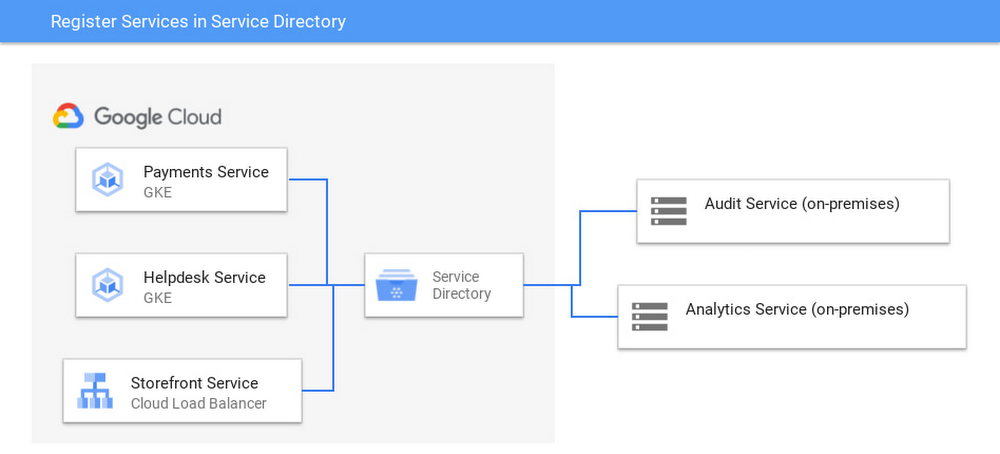
Kubernetes services often form part of a larger deployment. In addition to Google Kubernetes Engine (GKE), you might be running other services on different Google Cloud technologies, as well as services on external clouds and on-premises. Service Directory is a managed product that allows you to maintain an inventory of all these services in one place, so that services from different platforms can discover and connect to one another. Service Directory offers several core capabilities:A fully managed registry for your servicesStandardized service discovery across all environments, including GKE, other Google Cloud products, and external environmentsService annotations to add metadata to services, and filter services based on metadataIAM permissions on a logical, per-service levelAccess over HTTP, gRPC, and DNS. Service Directory is integrated with Cloud DNS, so services registered to Service Directory will automatically have the corresponding DNS records created in Cloud DNS.We’re now excited to announce that GKE services can automatically register to Service Directory. In this preview release, GKE services can register and unregister in Service Directory without having to write orchestration code. In Service Directory, services can advertise themselves to other services both within GKE and elsewhere, like in this simple online store:Architecture diagram of multiple services that make up an online store app running in Google Cloud connecting to Service Directory, which connects to on-premises audit and analytics services.Populating Service Directory with GKE servicesService Directory registration is available as a GKE Connect feature. In this example, we’ve created a new GKE service called payments as part of the backend of our online store, enabled the Service Directory GKE Connect feature, configured a registration policy, and apply the service YAML below to register to Service Directory:This payments service is made visible in Service Directory, along with the other services in our deployment.Services that are available in the Service Directory consoleOnboarding GKE services to Service Directory doesn’t require writing onboarding code to sync a service between GKE and Service Directory—instead, services can be automatically registered and deregistered into Service Directory.GKE services can be added on a per-service level. The automatic integration supports ClusterIP, Headless, LoadBalancer, and NodePort service types.Querying Services from Service DirectoryYou can access services in Service Directory over DNS, HTTP, and gRPC. Service Directory is integrated with Cloud DNS, and can automatically populate DNS records as services are added to it. Clients that already use DNS can continue to do so as they query services in Service Directory.You can also query services based on their annotations. You can form complex queries based on these annotations to help get specific views on services; for example, you can use Service Directory to find all services that are annotated as ‘experimental’ but that are not annotated with ‘needs-deprecation’. Since Service Directory is designed for services across multiple environments, both service lookups and annotation-based queries work the same for all services, regardless of the underlying infrastructure the service is built on.With support for GKE services in Service Directory, now you have one place to keep track of all the services you need to build robust, distributed applications. To start registering GKE services into Service Directory, visit the documentation.Related ArticleService Directory is generally available: Simplify your service inventoryService Directory is now generally available, and lets you automatically register your services without any additional orchestration code.Read Article
Quelle: Google Cloud Platform

30 ways to leave your data center: key migration guides, in one place

Getting started with your migrationOne of the challenges with cloud migration is that you’re solving a puzzle with multiple pieces. In addition to a number of workloads you could migrate, you’re also solving for challenges you’re facing, the use cases driving you to migrate, and the benefits you’re looking to gain. Each organization’s puzzle will likely get solved in their own unique way, but thankfully there is plenty of guidance on how you can migrate common workloads in successful ways. In addition to working directly with our Rapid Assessment and Migration Program (RAMP), we also offer a plethora of self-service guides to help you succeed! Some of these guides, which we’ll cover below, are designed to help you identify the best ways to migrate, which include meeting common organizational goals like minimizing time and risk during your migration, identifying the most enterprise-grade infrastructure for your workloads, picking a cloud that aligns with your organization’s sustainability goals, and more: Get started with this cloud migration guide and checklistKey considerations for building a migration factory to Google CloudUnderstanding the cloud migration strategies at your disposalUnderstanding how to migrate key enterprise workloads to Google CloudWhich workloads are you moving?In addition to the guides above which help you through your end-to-end migration, it’s also important to understand the specific workloads you’ve got on-premises (or in other clouds). Each workload has their own unique nuances — what works for one might not work perfectly for another. This is where leveraging the expertise of our RAMP team is crucial, and why we have lots of migration guides for specific workloads and end-states. For each workload, we’re highlighting a few guides that we think could be most helpful, but you can also click each topic to learn more or find more guides. MicrosoftModernization path for .NET applications on Google CloudManaged Service for Microsoft Active Directory is GAMigrating Microsoft workloads to Google Cloud yields resultsVMwareMigrate, scale, and innovate at speedBoost Retail Intelligence and Agility in the CloudRetire your tech debt: Move vSphere 5.5+ to Google Cloud VMware EngineFinancial Services Spotlight:  Elevating agility and security in the cloudOracleCurious about Google Cloud Bare Metal Solution? Start hereGetting Started with Google Cloud’s Bare Metal SolutionGuide – Bring new life to your databases with an Oracle migrationSAPSAP on Google Cloud: Migration strategiesRun your SAP workloads on Google Cloud Bare Metal SolutioneBook – Google Cloud for SAP: The enterprise cloud for business agility, insights, and innovationStorageHow to transfer your data to Google CloudAn Overview of the Transfer ApplianceMigration to Google Cloud: Transferring your large datasetsTransferring data from Amazon S3 to Cloud Storage using VPC Service Controls and Storage Transfer ServiceDatabasesOverview of Database Migration ServiceDatabase migration: Concepts and principles (Part 1)Database migration: Concepts and principles (Part 2)Database cloud migrations made easy for PostgreSQL, MySQLData WarehousesMigrating data warehouses to BigQuery: Introduction and overviewOracle to BigQuery migrationAmazon Redshift to BigQuery migration guideIBM Netezza to BigQuery migration guideTeradata to BigQuery migration guideTake the next stepWhen it comes to migration, we’re committed to meet every organization where they are. We fully understand the nuances and challenges of cloud migration, and at Google Cloud we have one singular goal: to help you realize true business value through your cloud migrations. Visit our Migration Architecture Center to find even more guides to use during your migration, or if you’re looking to dive a little deeper into planning, sign up for a free discovery and assessment of your existing IT landscape.Related ArticleGet ready to migrate your SAP, Windows and VMware workloads in 2021In 2020, Google Cloud became an even better place to run your legacy SAP, Windows and VMware workloads.Read Article
Quelle: Google Cloud Platform

BigQuery Admin reference guide: Query optimization

Last week in the BigQuery reference guide, we walked through query execution and how to leverage the query plan. This week, we’re going a bit deeper – covering more advanced queries and tactical optimization techniques.  Here, we’ll walk through some query concepts and describe techniques for optimizing related SQL. Filtering dataFrom last week’s post, you already know that the execution details for a query show us how much time is spent reading data (either from persistent storage, federated tables or from the memory shuffle) and writing data (either to the memory shuffle or to persistent storage). Limiting the amount of data that is used in the query, or returned to the next stage, can be instrumental in making the query faster and more efficient. Optimization techniques1. Necessary columns only: Only select the columns necessary, especially in inner queries. SELECT * is cost inefficient and may also hurt performance. If the number of columns to return is large, consider using SELECT * EXCEPT to exclude unneeded columns.2. Auto-pruning with partitions and clusters: Like we mentioned in our post on BigQuery storage, partitions and clusters are used to segment and order the data. Using a filter on columns that the data is partitioned or clustered on can drastically reduce the amount of data scanned. 3. Expression order matters: BigQuery assumes that the user has provided the best order of expressions in the WHERE clause, and does not attempt to reorder expressions. Expressions in your WHERE clauses should be ordered with the most selective expression first.  The optimized example below is faster because it doesn’t execute the expensive LIKE expression on the entire column content, but rather only on the content from user, ‘anon’.4. Order by with limit:Writing results for a query with an ORDER BY clause can result in Resources Exceeded errors. Since the final sorting must be done on a single worker, ordering a large result set can overwhelm the slot that is processing the data. If you are sorting a large number of values use a LIMIT clause, which will filter the amount of data passed onto the final slot. Understanding aggregationIn an aggregation query, GROUP BYs are done in individual workers and then shuffled such that key value pairs of the same key are then in the same worker. Further aggregation then occurs and is passed into a single worker and served.RepartitioningIf too much data ends up on a single worker, BigQuery may re-partition the data. Let’s consider the example below. The sources start writing to Sink 1 and 2 (partitions within the memory shuffle tier). Next, the shuffle Monitor detects Sink 2 is over the limit. Now, the partitioning scheme changes and the sources stop writing to Sink 2, and instead start writing to Sink 3 and 4. Optimizations1. Late aggregation: Aggregate as late and as seldom as possible, because aggregation is very costly. The exception is if a table can be reduced drastically by aggregation in preparation for a join – more on this below.For example, instead of a query like this, where you aggregate in both the subqueries and the final SELECT:You should only aggregate once, in the outer query:2. Nest repeated data: Let’s imagine you have a table showing retail transactions. If you model one order per row and nest line items in an ARRAY field – then you have cases where GROUP BY is no longer required. For example, looking at the total number of items in an order by using ARRAY_LENGTH.{order_id1, [ {item_id1}, {item_id2} ] }Understanding joinsOne powerful aspect of BigQuery is the ability to combine data, and understand relationships and correlation information from disparate sources. Much of the JOIN syntax is about expressing how that data should be combined, and how to handle data when information is mismatched. However, once that relationship is encoded, BigQuery still needs to execute it. Hash-based joinsLet’s jump straight into large scale join execution.  When joining two tables on a common key, BigQuery favors a technique called the hash-based join, or more simply a hash join. With this technique, we can process a table using multiple workers, rather than moving data through a coordinating node.  So what does hashing actually involve? When we hash values, we’re converting the input value into a number that falls in a known range. There’s many properties of hash functions we care about for hash joins, but the important ones are that our function is deterministic (the same input always yields the same output value) and has uniformity (our output values are evenly spread throughout the allowed range of values).With an appropriate hashing function, we can then use the output to bucket values.  For example, if our hash function yields an output floating point value between 0 and 1, we can bucket by dividing that key range into N parts, where N is the number of buckets we want.  Grouping data based on this hash value means our buckets should have roughly the same number of discrete values, but even more importantly, all duplicate values should end up in the same bucket. Now that you understand what hashing does, let’s talk through joining.To perform the hash join, we’re going to split up our work into three stages.Stage 1: Prepare the first tableIn BigQuery, data for a table is typically split into multiple columnar files, but within those files there’s no sorting guarantee that ensures that the columns that represent the join key are sorted and colocated.  So, what we do is apply our hashing function to the join key, and based on the buckets we desire we can write rows into different shuffle partitions. In the diagram above, we have three columnar files in the first table, and we’ve using our hashing technique to split the data into four buckets (color coded).  Once the first stage is complete, the rows of the first table are effectively split into four “file-like” partitions in shuffle, with duplicates co-located.Stage 2:  Prepare the second tableThis is effectively the same work as the first stage, but we’re processing the other table we’ll be joining data against. The important thing to note here is that we need to use the same hashing function and therefore the same bucket grouping, as we’re aligning data. In the diagram above, the second table had four input files (and thus four units of work), and the data was written into a second set of shuffle partitions.Stage 3: consume the aligned data and perform the joinAfter the first two stages are completed, we’ve aligned the data in the two tables using a common hash function and bucketing strategy.  What this means is that we have a set of paired shuffle partitions that correspond to the same hash range, which means that rather than scanning potentially large sets of data, we can execute the join in pieces, as each worker is provided only the relevant data for doing it’s subset of the join.It’s at this point that we care about the nature of the join operation again; depending on the desired join relationship we may yield no rows, a single row, or many rows for any particular input row from the original input tables.Now, you can also get a better sense of how important having a good hashing function may be:  if the output values are poorly distributed, we have problems because we’re much more likely to have a single worker that’s slower and forced to do the majority of the work.  Similarly, if we picked our number of buckets poorly, we may have issues due to having split the work too finely or too coarsely.  Fortunately, these are not insurmountable problems, as we can leverage dynamic planning to fix this: we simply insert query stages to adjust the shuffle partitions.Broadcast joinsHash-based joins are an incredibly powerful technique for joining lots of data, but your data isn’t always large enough to warrant it.  For cases where one of the tables is small, we can avoid all the alignment work altogether.Broadcast joins work in cases where one table is small.  In these instances, it’s easiest to replicate the small table into shuffle for faster access, and then simply provide a reference to that data for each worker that’s responsible for processing the other table’s input files.Optimization techniquesLargest table first:  BigQuery best practice is to manually place the largest table first, followed by the smallest, and then by decreasing size. Only under specific table conditions does BigQuery automatically reorder/optimize based on table size.Filter before joins: WHERE clauses should be executed as soon as possible, especially within joins, so the tables to be joined are as small as possible. We recommend reviewing the query execution details to see if filtering is happening as early as possible, and either fix the condition or use a subquery to filter in advance of a JOIN.Pre-aggregate to limit table size: As mentioned above, aggregating tables before they are joined can help improve performance – but only if the amount of data being joined is drastically reduced and tables are aggregated to the same level (i.e., if there is only one row for every join key value).Clustering on join keys: When you cluster a table based on the key that is used to join, the data is already co-located which makes it easier for workers to split the data into the necessary partitions within the memory shuffle. A detailed query: finding popular libraries in GithubNow that we understand some optimization techniques for filtering, aggregating and joining data – let’s look at a complex query with multiple SQL techniques. Walking through the execution details for this query should help you understand how data flows and mutates as it moves through the query plan – so that you can apply this knowledge and understand what’s happening behind the scenes in your own complex query.  Thepublic Githubdata has one table that contains information about source code filenames, while another contains the contents of these files.  By combining the two together, we can filter down to focus on interesting files and analyze them to understand which libraries are frequently used by developers. Here’s an example of a query that does this for developers using the Go programming language. It scans files having the appropriate (.go) extensions, and looks for statements in the source code for importing libraries, then counts how often those libraries are used and how many distinct code repositories use them.In SQL, it looks like this:We can see from a casual read that we’ve got lots of interesting bits here: subqueries, both a distributed join (the contents and files tables), array manipulation (cross join unnest), and powerful features such as regular expression filters and computing distinctness.Detailed stages and stepsFirst, let’s examine the full details of the plan in a graph format.  Here, we’re looking at the low level details of how this query is run, as a set of stages.  Let’s work through the query stages in detail.If you want a graphical representation similar to the one we’re showing here, check out this code sample!Stage S00-S01: Reading and filtering from the “files” tableThe initial stage (corresponding to the inner subquery of the SQL) begins by processing the “files” table.  We can see the first task is to read the input, and immediately filter that to only pass through files with the appropriate suffix.  We then group based on the id and and repo name, as we’re potentially working with many duplicates, and we only want to process each distinct pair once. In stage S01, we continue the GROUP BY operation; each worker in the first stage only deduplicated the repo/id pairs in their individual input file(s), the aggregate stage here is to combine those so that we’ve deduplicated across all input rows in the “files” table.Stage S02: Reading in the “contents” tableIn this stage, we begin reading the source code in the “contents” table, looking for “import” statements (the syntax for referencing libraries in the Go language).  We collect information about the id (which will become the join key), and the content which has matches. You can also see that in both this stage and the previous (S01), the output is split based on a BY HASH operation.  This is the first part of starting the hash join, where we begin to align join keys into distinct shuffle partitions.  However, anytime we’re dealing with data where we want to divide the work we’ll be splitting it into shuffle buckets with this operation.Stages S03 – S0A: RepartitioningThis query invoked several repartitioning stages.  This is an example of the dynamic planner rebalancing data as it’s working through the execution graph.  Much of the internals of picking appropriate bucketing is based on heuristics, as operations such as filtration can drastically change the amount of data flowing in and out of query stages. In this particular query, the query plan has chosen a non-optimal bucketing strategy, and is rebalancing the work as it goes.  Also note that this partitioning is happening on both sides of what will become the joined data, because we need to keep the partitioned data aligned as we enter the join.Stage S0B: Executing the joinHere’s where we begin correlating the data between the two inputs.  You can see in this stage we have two input reads (one for each side of the join), and start computing counts.  There’s also some overloaded work here; we consume the file contents to yield an array representing each individual library being imported, and make that available to future stages.Stages S0C – S0D: Partial AggregationsThese two stages are responsible for computing our top level statistics:  we wanted to count the total number of times each library was referenced, as well as the number of distinct repositories.  We end up splitting that into two stages.Stage S0E-S0F: Ordering and limitingOur query requested only the top 1000 libraries ordered first by distinct repository count, and then total frequency of use.  The last two stages are responsible for doing this sorting and reduction to yield the final result.Other optimization techniquesAs a final thought, we’ll leave you with a few more optimization techniques that could help improve the performance of your queries.Multiple WITH clauses: The WITH statement in BigQuery is like a Macro. At runtime the contents of the subquery will be inlined every place the alias is referenced. This can lead to query plan explosion as seen by the plan executing the same query stages multiple times. Instead, try using a TEMP table.String comparisons: REGEXP_CONTAINS can offer more functionality, but it has a slower execution time compare to LIKE. Make LIKE when the full power of regex is not needed (e.g. wildcard matching): regexp_contains(dim1, ‘.*test.*’) to dim1 like %test%First or last record: When trying to calculate the first or last record in a subset of your data, using the ROW_NUMBER() function can fail with Resources Exceeded errors if there are too many elements to ORDER BY in a single partition. Instead, try using ARRAY_AGG()- which runs more efficiently because the ORDER BY is allowed to drop everything except the top record on each GROUP BY. For example, this:Becomes this:See you next week!Thanks again for tuning in this week! Next up is data governance, so be sure to keep an eye out for more in this series by following Leigha on LinkedIn and Twitter.Related ArticleBigQuery Admin reference guide: Query processingBigQuery is capable of some truly impressive feats, be it scanning billions of rows based on a regular expression, joining large tables, …Read Article
Quelle: Google Cloud Platform

Beyond mainframe modernization: The art of possibilities

Mainframe modernization has been a hot topic over the past decade or so. Many people have predicted the demise of mainframe times. But the mainframe is standing tall, strong and growing. Over time, the term “modernization” itself is manifested in many ways. So to even begin the modernization conversation, we need to define what modernization is. As Henry Ford once said, “If I had asked people what they wanted, they would have said faster horses.” Instead, Ford invented an automobile for the masses to improve their lives. So modernization is akin to evolution, which in hindsight reflects the progress humanity made in lifestyle, resilience, knowledge, communication, and, in general, wisdom.Similarly, modernization in mobile phones meant lighter weight, wider screen, faster speed, and more storage. And then the iPhone was released in 2007, which showed innovation and changed the way humans interact with digital devices. Deciding on mainframe modernizationThe decision to embark on a mainframe modernization journey typically lies with three stakeholders: infrastructure owners, application owners, and business owners. For a long time, mainframe modernization has focused on solving infrastructure and application problems like higher cost, lack of skillset availability, locked-in data, and poor integration with modern tools and products.In other words, mainframe modernization has been only focused on the infrastructure and application layer. In this paper, we try to understand the importance of ‘business owner’, who is the most critical stakeholder and sponsor.Journey depends on disposition for data and applicationsClick to enlargeFor a long time, the mainframe modernization journey has been defined as just moving the workload off the mainframe, with little or no focus on business amplification. As a result, there has not been much success in either commencing projects like these or in completing them. But mainframe modernization should be looked at from a business imperative lens. You need to define a goal before embarking on the transformation path. This will help identify the right partner and trusted advisor, optimize the overall effort, and minimize the number of hops to get to that goal.Google’s approach to mainframe modernization revolves around bringing business needs to the forefront of modernization initiatives. Let’s look at these one by one:One Google: As part of the larger Google ecosystem, it’s quite easy and seamless for Google Cloud services to integrate with products like Maps, Search, and Ads and hence be able to provide a very personalized and enhanced user experience. Most enterprise customers are existing subscribers to one or more of these services, so it’s also easy for them to integrate Google Cloud services.Data-first modernization approach: Google offers a data-first approach to mainframe modernization that involves moving ‘system of records’ or ‘system of engagement’ from a mainframe to Google Cloud datastores. This approach enables you to leverage and unlock the data in many ways:Enabling business users, aka citizen developers, to build apps leveraging data and tools like AppSheet.Reducing mainframe consumption by routing web and mobile apps to data on Google Cloud.Including the data that was moved from the mainframe to Google Cloud in advanced analytics to understand customer behavior and come up with market-relevant products.AI/ML on Google Cloud: When it comes to extracting info and wisdom from raw data using artificial intelligence and machine learning, there’s no parallel to Google. And thereby our customers get a significant competitive advantage in understanding market trends and behavioral patterns. This enables them to meet and exceed customer requirements while providing a very personalized experience.  Industry-specific solutions: Google has been investing heavily in business-specific industry solutions. With innovation deep rooted in its DNA and culture, Google has always been looking at things, starting from search, outside the box. One example is AlphaFold, which is an artificial intelligence program created by Google’s DeepMind that performs predictions of protein structure. Another example is Verily, whose mission is to make the world’s health data useful so that people enjoy longer and healthier lives. Similarly, Waymo is focused on fully autonomous driving, Wing is focused on drone delivery, and Route4Me provides easy-to-use driving route optimization for businesses. In financial services, there are Google Pay, Lending DocAI, Procurement DocAI, Real-time credit card fraud detection, and so on.All these business amplifications and enhancements come with state-of-the-art cloud infrastructure:Hardware security: Google OpenTitan is the first open source project that builds a transparent, high-quality reference design and integration guidelines for silicon root of trust (RoT) chips.Data security: The user owns the data. They set the rules and decide who needs to access what. Google Cloud encrypts data not only at rest and in motion but also during processing.Latency: With an in-house network of optical fibers and undersea cables, there’s significantly less latency compared to others. Google search runs on the same platform.Scalability: Alphabet has 9 products—Android, Chrome, Gmail, Drive, Maps, Search, the Play Store, YouTube and Photos—with more than a billion users each. These run on Google Cloud providing an uninterrupted experience to all users. 100% carbon neutral footprint: Helps customers fulfill their obligations towards carbon neutrality and help save the planet earth.Many of the large deals like Sabre, Deutsche Bank, Albertsons Companies and Telus are testament of Google’s focus on amplifying and redefining business with our customers. With the advent of Google Cloud’s focus on mainframe modernization, business stakeholders are finding value in business transformation. Instead of looking at the modernization from an ‘IT lens’ and decommissioning the mainframe, they found a partner in Google who strives to not only solve the current problems but also define a ‘North Star’ for the enterprise and collaborate to achieve those goals. ConclusionWrapping the thought with automobiles—Tesla showed the possibility that an automobile can be software driven, independent of fossil fuel, and contribute to reducing carbon footprint at the same time. Having said that, this has only been possible with the revolutionary or evolutionary journey started by Mr. Ford.
Quelle: Google Cloud Platform