The Brexit vote: A case study in causal inference using machine learning

In this blog post, we’ll answer the question, “How did the Brexit vote impact exchange rates between the British Pound and US Dollar?” To do so, we’ll use causal inference techniques to estimate the impact of what statisticians call a “treatment,” in this case a policy decision.Please note that this is a technical blog post aimed at educating about concepts and tools with public data, not any political or economic implications. The techniques we’ll discuss here can apply to all kinds of scenarios, such as the impact of a marketing campaign or product introduction on sales.Causal inference is needed because we don’t have a controlled experiment for this scenario. An ideal experiment contains carefully matched groups, except for the explanatory variable being investigated. Many real-world situations in which we are trying to find meaning don’t meet those conditions.We’ll need to find another time series that closely follows the US Dollar : British Pound exchange rate, but was not impacted by the Brexit vote. From this other time series, we’ll derive the counterfactual: what was expected to happen, had the Brexit vote not occurred. We’ll estimate the effect as the difference between the counterfactual and actual time series.Our scenarioAfter the Brexit vote on June 23, 2016, the British Pound (GBP) dropped from 1.48 versus the US Dollar (USD) to 1.36 the following day, and continued to decline.In contrast, the Euro:USD exchange rate did not change much, despite being highly correlated to the GBP:USD exchange rate. The daily values of the two exchange rates had a Pearson correlation coefficient around 0.75 during the 5 year period prior to the event. So, we’ll use the Euro:USD exchange rate as a control.To estimate the effect, we’ll consider the following 4 weeks as the post-treatment period. We could extend this period out further to estimate the full effect. However, the longer of a window we use, other factors come into play, and it becomes more difficult to isolate the effect of the treatment alone.Below you can see a chart of both exchange rates, along with the shaded area indicating the post-treatment period:The data is available from FRED, the Federal Reserve Economic Data site (US/UK Exchange Rate,  US/Euro Exchange Rate).Effect estimation with statistical modelingGiven the stark change in USD:GBP, how can we determine if the Brexit vote was a factor, and how can we calculate the size of the effect?First, let’s use tfcausalimpact to estimate the effect. tfcausalimpact is a Python port of the R-based CausalImpact package. It is based on the TensorFlow Probability package and uses the Bayesian Structural Time Series method.After the data has been loaded into a dataframe, an analysis can be performed as follows:A summary report can be produced, indicating that the Average Treatment Effect during the post-treatment period (i.e. the 4 weeks following the Brexit vote) is a drop of about 9%:Also, you can visualize the findings in a plot:Effect estimation with machine learningWe’ll now explore an alternative machine learning approach using Vertex AI. Vertex AI is the unified platform for AI on Google Cloud, enables users to create AutoML or custom models for forecasting. We will create an AutoML forecasting model that allows you to build a time-series forecasting model without code.Over the past few years, there have been multiple studies comparing statistical vs machine learning approaches (e.g. Comparison of statistical and machine learning methods for daily SKU demand forecasting, Machine Learning vs Statistical Methods for Time Series Forecasting: Size Matters). It’s outside the scope of this article to discuss this topic in depth, but it’s worth noting that each approach has relative strengths, and it may be helpful to apply both in your analysis.This model will be used to derive the counterfactual time-series. In other words, the model will produce a time-series that aims to estimate “what would the USD:GBP exchange rate be had the Brexit event not happened”? The model will use patterns from the Euro exchange rate, as well as the pre-intervention data from the UK exchange rate, to derive the counterfactual.In this case, we’re actually generating a hypothetical, historical time series rather than forecasting a future time series. With a counterfactual time series like this, policy-makers or business leaders can consider the retrospective impact of decisions they’ve made.Let’s now explore how to implement the AutoML training process. Here is a code snippet, demonstrating how to create and run the training job from prepared training data:Vertex AI AutoML Forecasting estimated the counterfactual at a slightly higher level than tfcausalimpact, leading to a stronger treatment effect of -9.5% vs -9.3%.ConclusionIn this blog post, we’ve explored how to use causal inference to estimate the impact of an event. We’ve also looked at multiple approaches that can be used to perform this estimate. First, we used tfcausalimpact, which uses a Bayesian Structural Time Series approach, to generate the counterfactual. Then, we used the forecasting service from Vertex AI to use a Deep Learning based approach.If you’d like to try out this scenario yourself, all of the code is available in Github. From there, you can launch the notebook in GCP Notebooks or Colab. If you’d like to explore Vertex AI AutoML Forecasting in more depth, this codelab provides an end-to-end tutorial. Feel free to connect on LinkedIn or Twitter to continue the conversation!Related ArticleNew to ML: Learning path on Vertex AIIf you’re new to ML, or new to Vertex AI, this post will walk through a few example ML scenarios to help you understand when to use which…Read Article
Quelle: Google Cloud Platform

Monitor and troubleshoot your VMs in context for faster resolution

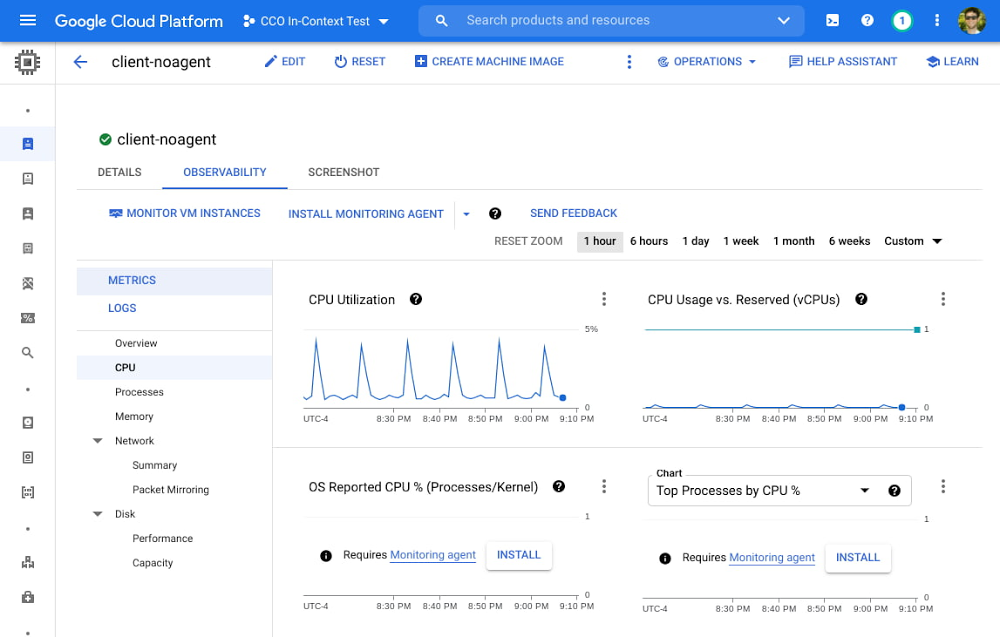
Troubleshooting production issues with virtual machines (VMs) can be complex and often requires correlating multiple data points and signals across infrastructure and application metrics, as well as raw logs. When your end users are experiencing latency, downtime, or errors, switching between different tools and UIs to perform a root cause analysis can slow your developers down. Saving time when accessing the necessary data, deploying fixes, and verifying those fixes can save your organization money and keep the confidence of your users.We are happy to announce the general availability of an enhanced “in-context” set of UI-based tools for Compute Engine users to help make the troubleshooting journey easier and more intuitive. From the Google Console, developers can click into any VM and access a rich set of pre-built visualizations designed to give insights into common scenarios and issues associated with CPU, Disk, Memory, Networking, and live processes. With access to all of this data in one location, you can easily correlate between signals over a given timeframe. Bringing more operations data to your VMsA collection of high-level metrics has always been available in the Compute Engine console page. However, your feedback let us know that you still had to navigate between different tools to perform a proper root cause analysis. For example, seeing that CPU utilization peaked during a certain time frame might be a helpful starting point, but resolving the issue will require a deeper understanding of what is driving the utilization. Furthermore, you will want to correlate this data with processes, and other signals such as I/O wait time versus user space versus kernel space. With this in mind, we added metrics, charts, and a variety of new visualizations to the Compute Engine page, many requiring zero setup time. Some of these new additions are populated with in-depth metrics provided by the Google Cloud Ops Agent (or legacy agents if you’re currently using them), which can easily be installed via Terraform, Puppet, Ansible or an install script.Some of the observability data available when you click into your VMNew charts that leverage the metrics from the Ops Agent include: CPU utilization as reported by the OS, Memory Utilization, Memory breakdown by User, Kernel, and Disk Cache, I/O Latency, Disk Utilization and Queue Length, Process Metrics, and many more.A more detailed look at the data available when you click into the VM, including metrics and logsWhile no single troubleshooting journey fits all needs, this enhanced set of observability tools should make the following scenarios faster and more intuitive:Identifying networking changes via metrics and logs. By comparing unexpected increases in network traffic, network packet size, or spikes in new network connections against logs by severity, developers might identify a correlation between this traffic increase and critical logs errors. By further navigating to the Logs section of the tools, one can quickly filter to critical logs only and expand sample log messages to discover detailed logs around timeout messages or errors caused by the increased load. Deep links to the Logs Explorer filtered to the VM of interest allows for fast and seamless navigation between Compute Engine and Cloud Logging.Determining the impact of specific processes on utilization. By comparing times of high CPU or memory utilization against top processes, operators can determine whether a specific process (as denoted by command line or PID) is over-consuming. They can then refactor or terminate a process altogether, or choose to run a process on a machine better suited for its compute and memory requirements. Alternatively, there may be many short-lived processes that do not show up in the processes snapshot, but are visible as a spike in the Process Creation Rate chart. This can lead to a decision to refactor so that process duration is distributed more efficiently.Choosing appropriate disk size for workloads. A developer may notice that the “Peak 1-second IOPS” have begun to hit a flat line, indicating the disk is hitting a performance limit. If the “I/O Latency Avg” also shows a corresponding increase, this could indicate that I/O throttling is occurring. Finally, breaking this down the Peak IOPS by Storage Type, one might see that Persistent Disk SSD is responsible for the majority of the peak IOPS, which could lead to a decision to increase the size of the disk to get a higher block storage performance limit.Security Operations and Data Sovereignty. Operators may be in charge of enforcing security protocols around external data access, or creating technical architecture for keeping data within specific regions for privacy and regulatory compliance. Using the Network Summary, operators can determine at a glance whether a VM is establishing connections and sending traffic primarily to VMs and Google services within the same project, or whether connections and traffic ingress / egress may be occurring externally. Likewise, operators can determine whether new connections are being established or traffic is being sent to different regions or zones, which may lead to new protocols to block inter-region data transfer. Cost optimization via networking changes. A developer may notice that the majority of VM to VM traffic is being sent inter-region, as opposed to traffic remaining in the same region. Because this inter-region traffic is slower and is charged at an inter-region rate, the developer can choose to reconfigure the VM to communicate instead with local replicas of the data it needs in its same region, thus reducing both latency and cost.Measuring and tuning memory performance. The Ops Agent is required for most VM families to collect memory utilization. By examining the memory usage by top processes, a developer may detect a memory leak, and reconfigure or terminate the offending process. Additionally, an operator may examine the breakdown of memory usage by type and notice that disk cache usage has hit the limit of using all memory not in use by applications, correlating with an increase in disk latency. They may choose to upsize to a memory-optimized VM to allow enough memory for both applications and disk caching.These are just a few of the use cases where your team may leverage these new capabilities to spend less time troubleshooting, optimize for costs, and improve your overall experience with Compute Engine. Get Started TodayTo get started, navigate to Compute Engine > VM Instances, click into a specific VM of interest, and navigate to the Observability tab. You can also check out our developer docs for additional guidance on how to use these tools to troubleshoot VM performance, and we recommend installing the Ops Agent on your Compute Engine VMs to get the most out of these new tools.  If you have specific questions or feedback, please join the discussion on our Google Cloud Community, Cloud Operations page.Related ArticleAgent installation options for Google Cloud VMsGoogle Cloud makes it easy to install agents on your single VMs or your whole fleet of VMs so you can collect data for monitoring and tro…Read Article
Quelle: Google Cloud Platform

Saving the day: How Cloud SQL makes data protection easy

If you’re managing a crucial application that has to be fully fault-tolerant, you need your system to be able to handle every fault, no matter the type and scope of failure, with minimal downtime and data loss. Protecting against these faults means juggling numerous variables that can impact performance as well as recovery time and cost.Today’s managed database services take over the operational complexity that used to exist for database administrators. Growing your organization’s tolerance required adding machines, compute, and storage, plus the operational costs of IT management: performing backups, writing scripts, creating dashboards, and carrying out testing to make sure your platform is ready when problems arise–all in a secure way.At Google, our Cloud SQL managed database service offers three fault tolerance mechanisms —backup, high availability, and replication—and there are three major factors to consider for each of them:RTO (recovery time objective): When a failure happens, how much time can be lost before significant harm occurs?RPO (recovery point objective): When a failure happens, how much data can be lost before significant harm occurs?Cost: How cost-effective is this solution?  We’ve heard from customers like Major League Baseball, HSBC, and Equifax that they have strict data-protection needs and require highly fault-tolerant multi-region applications—and they’ve all chosen Cloud SQL to meet those needs. Let’s take a closer look at how the decision-making process plays out for each recovery solution.  High availability (HA)If your application is business critical, you require minimum RTO and zero RPO— a high availability configuration ensures that you and your customers are protected. If the primary instance fails, there’s another standby instance ready to take over with no data loss. There’s an additional cost here, but doing this manually brings a great operational cost, since you have to detect and verify the fault, do the failover, and make sure it’s correct—you can’t have two primary instances or you risk data corruption—then finally connect the application to the new database.Cloud SQL removes all that complexity. Choose high availability for a given instance and we’ll replicate the data across multiple zones, synchronously, to each zone’s persistent disk. If an HA instance has a failure, you don’t have to think about when to fail over because Cloud SQL detects the failure and automatically initiates failover, for a full recovery and no data loss within minutes. Cloud SQL also moves the IP address during failover so your application can easily reconnect. MLB, for example, uses Cloud SQL high availability to serve prediction data to live games with minimal downtime. Dev/test instances don’t need those same guarantees, but can use local backups to recover from any potential failure.Cross-region replicaIf a whole Google Cloud region goes down you still need your business to continue to run. That’s where cross-region replication comes in, a hot standby replica in another Google Cloud region provides RTO of minutes and RPO typically less than a minute . If you create a read replica in a region separate from your primary instance and you get hit with a regional outage, your application and database can start serving customers from another region within minutes. But this solution can be complex and enabling it yourself can be difficult and time-consuming. Securing cross-geography traffic demands end-to-end encryption and can bring connectivity issues too. This is where the fully managed Cloud SQL solution shines. We offer MySQL, PostgreSQL and SQL Server database engines as a cross-region replication solution that’s easily configured and bolstered by Google’s interconnected global network. Just say, “I’m in U.S. East, I want to create a replica in U.S. West,” and it’s done, reliably and securely.BackupWhen you suffer data loss because of an operations error (for example, a bug in a script dropped your tables) or human error (for example, someone dropped the wrong table by accident), backups help you restore lost data to your Cloud SQL instance. Our low cost backup mechanism features point-in-time, granular recovery, meaning that if you accidentally delete data or something else goes wrong, you can ask for recovery of, for example, the state of that database down to the millisecond, such as Monday at 12:53pm. Your valuable data is replicated multiple times in multiple geographic locations automatically. This enables the automatic handling of failover in cases of major failure. You can always rest assured that your database is available and data is secure, even in the times of major failure crises. Cloud SQL provides automated and on-demand backups. With automated backups, Google manages the backups so that you can easily restore them when required. Also, the scheduled backing is automatically taken by default. With on-demand backup, you can create a backup at any time. This could be useful if you are about to perform a risky operation on your database, as Cloud SQL lets you select a custom location for your backup data. When the backup is stored in multiple regions, and there’s an outage in the region that contains the source instance, you can restore a backup to a new or existing instance in a different region. This is also useful if your organization needs to comply with data residency regulations that require you to keep your backups within a specific geographic boundary.Putting it all togetherFor critical workloads, MLB configures their Cloud SQL instances with backups, high availability, and cross-region replication. Doing so ensures they can recover from many failure types.To recover from human error (“Oops, I didn’t mean to delete that”), MLB uses backups and point-in-time recovery to recovery to a millisecond or specific database transactionTo automatically recover from primary instance failures and zonal outages, MLB uses Cloud SQL’s high availability configurationTo protect against regional outages, MLB uses cross-region replicationCreating a robust configuration, like MLB did, takes just a few minutes. Get started in our Console or review documentation.Related ArticleThe 5 benefits of Cloud SQL [infographic]Check out this infographic on the 5 benefits of Cloud SQL, Google Cloud’s managed database service for MySQL, PostgreSQL and SQL Server.Read Article
Quelle: Google Cloud Platform

BigQuery Admin reference guide: Data governance

Hopefully you’ve been following along with our BigQuery Admin series and are well on your way to getting ramped up with BigQuery. Now that you’re equipped with the fundamentals, let’s talk about something that’s relevant for all data professionals – data governance. What does data governance mean?Data governance is everything you do to ensure your data is secure, private, accurate, available, and usable inside of BigQuery. With good governance, everyone in your organization can easily find – and leverage – the data they need to make effective decisions. All while minimizing the overall risk of data leakage or misuse, and ensuring regulatory compliance. BigQuery security featuresBecause BigQuery is a fully-managed service, we take care of a lot of the hard stuff for you! Like we talked about in our post on BigQuery Storage Internals, BigQuery data is replicated across data centers to ensure reliability and availability. Plus data is always encrypted at rest. By default, we’ll manage encryption keys for you. However, you have the option to leverage customer managed encryption keys, by using Cloud KMS to automatically rotate and destroy encryption keys. You can also leverage Google Virtual Private Cloud (VPC) Service Controls to restrict traffic to BigQuery. When you correctly apply these controls, unauthorized networks can’t access BigQuery data, and data can’t be copied to unauthorized Google Cloud projects. Free communication can still occur within the perimeter, but communication is restricted across the perimeter.Aside from leveraging BigQuery’s out-of-the-box security features, there are also ways to improve governance from a process perspective. In this post, we’ll walk you through the different tactics to ensure data governance at your organization. Dataset onboarding: Understanding & classifying data Data governance starts with dataset onboarding. Let’s say you just received a request from someone on your eCommerce team to add a new dataset that contains customer transactions. The first thing you’ll need to do is understand the data. You might start by asking questions like these:What information does this contain?How will it be used to make business decisions?Who needs access to this data?Where does the data come from, and how will analysts get access to it in BigQuery?Understanding the data helps you make decisions on where the new table should live in BigQuery, who should have access to this data, and how you’ll plan to make the data accessible inside of BigQuery (e.g. leveraging an external table, batch loading data into native storage, etc.).  For this example, the transactions live in an OLTP database. Let’s take a look at what information is contained in the existing table in our database. Below, we can see that this table has information about the order (when it was placed, who purchased it, any additional comments for the order), and details on the items that were purchased (the item ID, cost, category, etc.).Click to enlargeNow that we have an idea of what data exists in the source, and what information is relevant for the business, we can determine which fields we need in our BigQuery table and what transformations are necessary to push the data into a production environment.Classifying informationData classification means that you are identifying the types of information contained in the data, and storing it as searchable metadata.  By properly classifying data you can make sure that it’s handled and shared appropriately, and that data is discoverable across your organization. Since we know what the production table should look like, we can go ahead and create an empty BigQuery table, with the appropriate schema, that will house the transactions. As far as storing metadata about this new table, we have two different options. Using labelsOn the one hand, we can leverage labels. Labels can be used on many BigQuery resourcesincluding Projects, Datasets and Tables. They are key:value pairs and can be used to filter data in Cloud Monitoring, or can be used in queries against the Information Schema to find data that pertains to specific use cases.Click to enlargeAlthough labels provide logical segregation and management of different business purposes in the Cloud ecosystem, they are not meant to be used in the context of data governance. Labels cannot specify a schema, and you can’t apply them to specific fields in your table.  Labels cannot be used to establish access policies or track resource hierarchy. It’s pretty clear that our transactions table may contain personally identifiable information (PII). Specifically, we may want to mark the email address column as “Has_PII” : True. Instead of using labels on our new table, we’ll leverage Data Catalog to establish a robust data governance policy, incorporating metadata tags on BigQuery resources and individual fields.Using data catalog tagsData Catalog is Google Cloud’s data discovery and metadata management service. As soon as you create a new table in BigQuery, it is automatically discoverable in Data Catalog. Data Catalog tracks all technical metadata related to a table, such as  name, description, time of creation, column names and datatypes, and others.In addition to the metadata that is captured through the BigQuery integration, you can create schematized tagsto track additional business information. For example, you may want to create a tag that tracks information about the source of the data, the analytics use case related to the data, or column-level information related to security and sharing. Going back to that email column we mentioned earlier, we can simply attach a column-level governance tag to the field and fill out the information by specifying that email_address is not encrypted, it does contain PII, and more specifically it contains an email address.While this may seem like a fairly manual process, Data Catalog has a fully equipped API which allows for tags to be created, attached and updated programmatically. With tags and technical metadata captured in a single location, data consumers can come to Data Catalog and search for what they need.Ingesting & staging dataWith metadata for the production table in place, we need to focus on  how to push data into this new table. As you probably know, there are lots of different ways to pre-process and ingest data into BigQuery. Often customers choose to stage data in Google Cloud Services to kick off transformation, classification or de-identification workflows. There are two pretty common paths for staging data for batch loading:Stage data in a Google Cloud storage bucket: Pushing data into a Google Cloud storage bucket before directly ingesting it into BigQuery offers flexibility in terms of data structure and may be less expensive for storing large amounts of information. Additionally, you can easily kick off workflows when new data lands in a bucket by using PubSub to trigger transformation jobs. However, since transformations will happen outside of the BigQuery service, data engineers will need familiarity with other tools or languages. Blob storage also makes it difficult to track column-level metadata.Stage data in a BigQuery staging container: Pushing data into BigQuery gives you the opportunity to track metadata for specific fields earlier in the funnel, through BigQuery’s integration with Data Catalog. When running scan jobs with Data Loss Prevention (we’ll cover this in the next section), you can leave out specific columns and store the results directly in the staging table’s metadata inside of Data Catalog. Additionally, transformations to prepare data for production can be done using SQL statements, which may make them easier to develop and manage. Identifying (and de-identifying) sensitive information One of the hardest problems related to data governance is identifying any sensitive information in new data. Earlier we talked through tracking known metadata in Data Catalog, but what happens if we don’t know if data contains any sensitive information? This might be especially useful for free-form text fields, like the comments field in our transactions. With the data staged in Google Cloud, there’s an opportunity to programmatically identify any PII, or even remove sensitive information from the data, using Data Loss Prevention (DLP). DLP can be used to scan data for different types of sensitive information such as names, email addresses, locations, credit card numbers and others. You can kick off a scan job directly from BigQuery, Data Catalog, or the DLP service or API. DLP can be used to scan data that is staged in BigQuery or in Google Cloud. Additionally, for data stored in BigQuery, you can have DLP push the results of the scan directly into Data Catalog.You can also use the DLP API to de-identify data. For example, we may want to replace any instances of names, email addresses and locations with an asterisk (“*”). In our case, we can leverage DLP specifically to scan the comments column from our staging table in BigQuery, save the results in Data Catalog, and, if there are instances of sensitive data, run a de-identification workflow before pushing the sanitized data into the production table. Note that building a pipeline like the one we’re describing does require the use of some other tools. We could use a Cloud Function to make the API call, and an orchestration tool like Cloud Composer to run each step in the workflow (trying to decide on the right orchestration tool? check out this post). You can walk through an example of running a de-identification workflow using DLP and composer in this post.Data sharingBigQuery Identity Access ManagementGoogle Cloud as a whole leverages Identity Access Management (IAM) to manage permissions across cloud resources. With IAM, you manage access control by defining who (identity) has what access (role) for which resource. BigQuery, like other Google Cloud resources, has several predefined roles. Or you can create custom roles based on more granular permissions.When it comes to granting access to BigQuery data, many administrators chose to grant Google Groups, representing your company’s different departments, access to specific datasets or projects – so policies are simple to manage. You can see some examples of different business scenarios and the recommended access policies here. In our retail use case, we have one project for each team. Each team’s Google Group would be granted the BigQuery Data Viewer role to access information stored in their team’s project. However, there may be cases where someone from the ecommerce team needs data from a different project – like the product development team project. One way to grant limited access to data is through the use of authorized views.Protecting data with authorized viewsGiving a view access to a dataset is also known as creating an authorized view in BigQuery. An authorized view allows you to share query results with particular users and groups without giving them access to the underlying source data. So in our case, we can simply write a query to grab the pieces of information the ecommerce team needs to effectively analyze the data and save that view into the existing ecommerce project that they already have access to.Column-level access policiesAside from controlling access to data using standard IAM roles, or granting access to query results through authorized views, you also can leverage BigQuery’s column-level access policies. For example, remember that email address column we marked as containing PII earlier in this post? We may want to ensure that only members with high-security level clearance have access to query those columns. We can do this by:First defining a taxonomy in Data Catalog, including a “High” policy tag for fields with high-security level clearanceNext, add our group of users who need access to highly sensitive data as Fine Grained Access Readers to the High resourceFinally, we can set a policy tag on the email columnYou can find some tips on creating column-level access policies in our documentation on best practices.Row-level access policiesAside from restricting access to certain fields in our new table, we may want to only grant users access to rows that are relevant to them. One example may be if analysts from different business units only get access to rows that represent transactions for that business unit. In this case, the Google Group that represents the Activewear Team should only have access to orders that were placed on items categorized as “Active”. In BigQuery, we can accomplish this by creating a row-level access policy on the transactions table.You can find some tips on creating row-level access policies in our documentation on best practices.When to use what for data sharingAt the end of the day, you can achieve your goal of securing data using one or more of the concepts we discussed earlier. Authorized Views add a layer of abstraction to sharing data by providing the necessary information to certain users without giving them direct access to the underlying dataset. For cases where you want to transform (e.g. pre-aggregate before sharing) – authorized views are ideal. While authorized views can be used for managing column-level access, it may be preferable to leverage Data Catalog as you can easily centralize access knowledge in a single table’s metadata and control access through hierarchical taxonomies. Similarly, leveraging row level access policies, instead of authorized views to filter out rows, may be preferable in cases where it is easier to manage a single table with multiple access policies instead of multiple authorized views in different places. Monitoring data qualityOne last element of data governance that we’ll discuss here is monitoring data quality. The quality of your BigQuery data can drop for many different reasons – maybe there was a problem in the data source, or an error in your transformation pipeline. Either way, you’ll want to know if something is amiss and have a way to inform data consumers at your organization. Just like we described earlier, you can leverage an orchestration tool like Cloud Composer to create pipelines for running different SQL validation tests.Validation tests can be created in a few different ways:One option is to leverage open source frameworks, like this one that our professional services team put together. Using frameworks like these, you can declare rules for when validation tests pass or failSimilarly, you can use a tool like Dataform – which offers the ability to leverage YAML files to declare validation rules. Dataform recently came under the Google Cloud umbrella and will be open to new customers soon, join the waitlist here!Alternatively, you could always roll your own solution by programmatically running queries using built in BigQuery functionality like ASSERT, if the assertion is not valid then BigQuery will return an error that can inform the next step in your pipelineBased on the outcome of the validation test, you can have Composer send you a notification using Slack or other built-in-notifiers. Finally, you can use Data Catalog’s API to update a tag that tracks the data quality for the given table.  Check out some example code here! With this information added to Data Catalog, it becomes searchable by data consumers at your organization so that they can stay informed on the quality of information they use in their analysis. What’s next?One thing that we didn’t mention in this post, but is certainly relevant to data governance, is ongoing monitoring around usage auditing and access policies. We’ll be going into more details on this in a few weeks when we cover BigQuery monitoring as a whole.  Be sure to keep an eye out for more in this series by following me on LinkedIn and Twitter!Related ArticleBigQuery Admin reference guide: Query processingBigQuery is capable of some truly impressive feats, be it scanning billions of rows based on a regular expression, joining large tables, …Read Article
Quelle: Google Cloud Platform

IT leaders are choosing a sustainable future

The global-wide interruptions of the coronavirus pandemic provided the opportunity for businesses to take a closer look at how we work, learn, live, and consume. With work stoppages and quarantine orders in place, carbon emissions and pollution levels saw significant reductions, highlighting how business and environmental sustainability are linked. As the world returns to work, businesses need to adjust to the new reality and make decisions that will ensure the continuing sustainability of our planet. Understanding the need for sustainabilityA recent Google-commissioned study by IDG, based on a global survey of more than 2,000 IT decision-makers, illustrated the importance of sustainability for organizations’ IT departments while also revealing that significant work is needed before businesses meet their sustainability goals. The good news is that ninety percent say that sustainability is a priority of their IT department and as more organizations consider the benefits of digital transformation and cloud migration, 75% report that sustainability is a “must-have” or “major consideration” when evaluating cloud providers.Related ArticleRead ArticleBusinesses face both internal and external pressures to reform their practices and processes to meet new targets around sustainability, and IT leaders have an important role to play in that effort. Specifically, 54% said sustainability initiatives were important to their companies because of corporate social responsibility, 46% said it was because of environmental regulations and mandates, and 40% said it was due to the climate change impacts.The research also examined the areas where IT leaders are looking to make positive changes for sustainability in their organizations. Not surprisingly, 62% said in their IT infrastructure and data centers, 53% their supply chain, and 46% in their facilities and building operations.Facing the obstacles to progressHowever, for many organizations, behaviors lag intent. Only 67% actually have environmental sustainability targets in place. The gap between behavior and intent widens when looking at digitally forward vs. digitally conservative organizations. For the purposes of the study, digitally forward companies were defined as either digital natives or those with a digital strategy and implementation in place. Digitally conservative organizations either have no strategy in place, or are in the process of considering or planning digital transformations, but haven’t reached the stage of implementation. The study revealed that digital natives embracing cloud solutions were more likely than more conservative organizations to demonstrate a commitment to sustainability. Twenty percent of digital natives are implementing IT initiatives to reduce emissions to become more environmentally sustainable, while only 10% of digitally conservative organizations have done so. When considering the effects of the COVID-10 pandemic, 20% of respondents from digital conservative organizations delayed or cancelled initiatives around reducing emissions to become more environmentally sustainable compared to only 12% for digitally forward respondents. Sustainability is in our DNASustainability has been a core value for Google since our inception. We were the first major company to become carbon neutral in 2007 and we were the first major company to match our energy use with 100 percent renewable energy in 2017 — and have continued to do so every year since. We are proud to operate the cleanest global cloud in the industry, and we’re the world’s largest corporate purchaser of renewable energy. It is this commitment that makes Google the leading choice for organizations with sustainability initiatives. To learn more about the IDG findings and how IT leaders are implementing sustainable solutions, download the full report.Interested in how Google Cloud’s commitment to providing sustainable solutions can help IT leaders and their organizations meet their own sustainability targets?Google is focused on enhancing our products to help billions of people take action to reduce their environmental footprint.Google creates tools and invests in technology that will foster a carbon-free future for everyone and reduce carbon footprints.Google Cloud is the only major cloud provider to purchase enough renewable energy to cover our entire operations, enabling us to operate the cleanest cloud in the industry.When running on Google Cloud, an organization’s usage is net carbon neutral, and the electricity used to power workloads is matched 100% with renewable energy.Looking for more? Check out our blog that introduces the Google Cloud Region Picker, which helps organizations choose a Google Cloud region based on carbon footprint, price, and latency.Related ArticleFaster, cheaper, greener? Pick the Google Cloud region that’s right for youNew Google Cloud region picker makes it easy for you to take advantage of our greenest data centers.Read Article
Quelle: Google Cloud Platform

Streaming VR and AR content from Google Cloud with NVIDIA CloudXR

The Opportunity for Streamed AR/VR Content What if you could get a high quality AR/VR experience without a dedicated physical computer—or even without a physical tether?  In the past, interacting with VR required a dedicated, high-end workstation and, depending on the headset, wall-mounted sensors and a dedicated physical space. Complex tasks in VR can push the limits of sensor reach, cable-length, and spatial boundaries, entangling the artist and restricting their movement. This solution was not scalable beyond a handful of advanced use cases.Recently, tetherless VR headsets from manufacturers such as HTC and Oculus have emerged that free the user from these odious restrictions, enabling a new freedom to experience VR and AR from just about anywhere. The enhanced portability and reduced cost has led to substantially increased adoption among consumers and opened up many new exploratory use cases in enterprise.However, while these headsets are more accessible and portable, a tradeoff in compute power was required in order to achieve these goals. The limited on-device compute power of this new generation of Head Mounted Displays (HMDs) is acceptable for many consumer applications such as casual gaming. However, advanced enterprise workloads with heavy graphics, compute, or memory requirements can be difficult or even impossible to run on these lightweight devices.By combining NVIDIA CloudXR with their powerful GPUs running NVIDIA RTX Virtual Workstations (vWS) in Google Cloud data centers, you can experience high-fidelity VR and AR applications from just about anywhere with a good internet connection. The heavy computations are performed in the cloud on a GPU-attached VM and the content streams to any CloudXR compatible headset. The combination of Google Cloud’s private fiber optic network — the same network we built for global delivery of YouTube content — and CloudXR’s QoS technologies provides the user with the highest possible quality of service. In fact, the streaming experience is comparable to that of a headset tethered to a powerful physical workstation, but without the friction of hardware and cables. This combination of power and portability sets the stage to unlock the potential of high-quality gaming and enterprise AR/VR experiences anywhere on Earth.Case Study: Creating a MasterpieceDigital character creation is a core skill for many 3D artists today. One of the preferred methods of 3D character creation is digital sculpting, which lets artists create both hard-surface and organic shapes with high levels of accuracy and control.Sculpting is one of the many tasks in the character designer’s skillset. Artists must also master the texturing, rigging, and posing of characters as part of the digital character creation pipeline. Mastering all these tasks can be challenging, and often, the technology gets in the way; working in multiple applications requires switching contexts and workflows, breaking the artist’s creative flow. The traditional user experience can also be unintuitive, forcing the creator to translate what they want to do with their hands and head into mouse movement and keyboard presses.Masterpiece Studio Pro revolutionizes this character creation workflow by giving artists the first fully immersive 3D creation pipeline. Artists work in VR, giving them a far more intuitive and seamless way to work which combines the best of the digital and physical worlds.In Masterpiece Studio Pro, the artist can work on the character or object at any scale, using familiar tools and hand gestures to sculpt a model, much as they would a real clay figure. Performing other tasks such as skeleton creation is simple, allowing the artist to work directly with the limbs of a character to place and adjust the joints.Bringing It All TogetherNVIDIA CloudXR streaming from the cloud provides tremendous opportunities for new creative use cases within gaming and across the enterprise. This solution joins Virtual Studio for Gaming as the latest in our series to help developers build better games.The Masterpiece Studio use case is a powerful demonstration of new modalities for content creation and collaboration. To try CloudXR with NVIDIA RTX vWS on Google Cloud for yourself, see this tutorial. Masterpiece Studio Pro also offers extensive learning materials and a free trial.Related ArticleNext-gen virtual automotive showrooms are here, thanks to Google Cloud, Unreal Engine, and NVIDIANext-gen virtual showrooms provide interactive 3D experiences, photorealistic materials and environments, and up to 4K cloud streaming on…Read Article
Quelle: Google Cloud Platform

Fuel your custom models with Vertex AI

In May we announced Vertex AI, our new unified AI platform which provides options for everything from using pre-trained models to building your models with a variety of frameworks. In this post we’ll do a deep dive on training and deploying a custom model on Vertex AI. There are many different tools provided in Vertex AI, as you can see in the diagram below. In this scenario we’ll be using the products highlighted in green:AutoML is a great choice if you don’t want to write your model code yourself, but many organizations have scenarios that require building custom models with open-source ML frameworks like TensorFlow, XGBoost, or PyTorch. In this example, we’ll build a custom TensorFlow model (built upon this tutorial) that predicts the fuel efficiency of a vehicle, using the Auto MPG dataset from Kaggle.If you’d prefer to dive right in, check out the codelab or watch the two minute video below for a quick overview of our demo scenario: Environment setup There are many options for setting up an environment to run these training and prediction steps. In the lab linked above, we use the IDE in Cloud Shell to build our model training application, and we pass our training code to Vertex AI as a Docker container. You can use whichever IDE you’re most comfortable working with, and if you’d prefer not to containerize your training code, you can create a Python package that runs on one of Vertex AI’s supported pre-built containers.If you would like to use Pandas or another data science library to do exploratory data analysis, you can use the hosted Jupyter notebooks in Vertex AI as your IDE. For example, here we wanted to inspect the correlation between fuel efficiency and one of our data attributes, cylinders. We used Pandas to plot this relationship directly in our notebook.To get started, you’ll want to make sure you have a Google Cloud project with the relevant services enabled. You can enable all the products we’ll be using in one command using the gcloud SDK:Then create a Cloud Storage bucket to store our saved model assets. With that, you’re ready to start developing your model training code.Containerizing training codeHere we’ll develop our training code as a Docker container, and deploy that container to Google Container Registry (GCR). To do that, create a directory with a Dockerfile at the root, along with a trainer subdirectory containing a train.py file. This is where you’ll write the bulk of your training code:To train this model, we’ll build a deep neural network using the Keras Sequential Model API:We won’t include the full model training code here, but you can find it in this step of the codelab. Once your training code is complete, you can build and test your container locally. The IMAGE_URI in the snippet below corresponds to the location where you’ll deploy your container image in GCR. Replace $GOOGLE_CLOUD_PROJECT below with the name of your Cloud project:All that’s left to do is push your container to GCR by running docker push $IMAGE_URI. In the GCR section of your console, you should see your newly deployed container:Running the training job Now you’re ready to train your model. You can select the container you created above in the models section of the platform. You can also specify key details like the training method, compute preferences (GPUs, RAM, etc.) and hyperparameter tuning if required.Now you can hand over training your model and let Vertex do the heavy lifting for you.Deploy to endpointNext, let’s get your new model incorporated into your app or service. Once your model is done training you will see an option to create a new endpoint. You can test out your endpoint in the console during your development process. Using the client libraries, you can easily create a reference to your endpoint and get a prediction with a single line of code:Start building todayReady to start using Vertex AI? We have you covered for all your use cases spanning from simply using pre-trained models to every step of the lifecycle of a custom model. Use Jupyter notebooks for a development experience that combines text, code and dataFewer lines of code required for custom modelingUse MLOps to manage your data with confidence and scaleGet started today by trying out this codelab yourself or watching this one hour workshop. Related ArticleGoogle Cloud unveils Vertex AI, one platform, every ML tool you needGoogle Cloud launches Vertex AI, a managed platform for experimentation, versioning and deploying ML models into production.Read Article
Quelle: Google Cloud Platform

Running Anthos inside Google

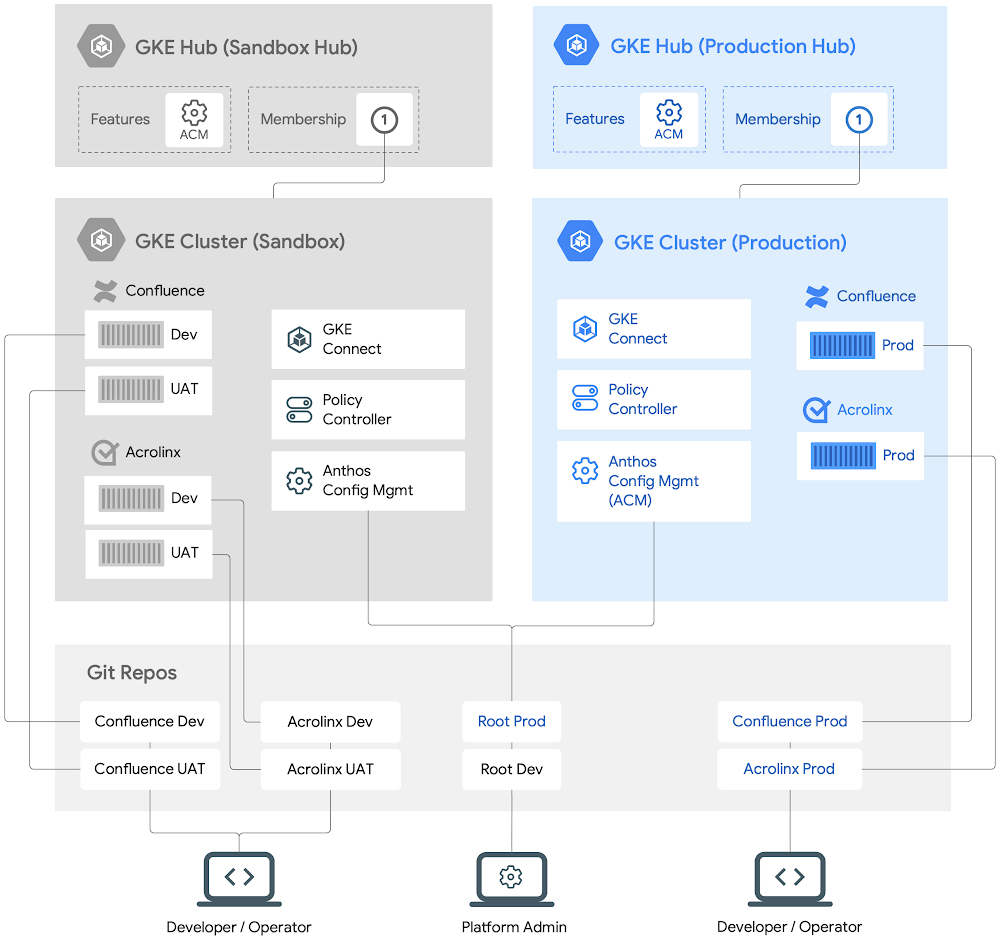
With everyone and their dog shifting to containers, and away from virtual machines (VMs), we realized that running vendor-provided software on VMs at Google was slowing us down. So we moved. Enter Anthos, Google Cloud’s managed application platform, and its associated developer tools. Today we’ll take you through our process of moving Confluence and Acrolinx from VMs running in our private data center environment over to a fully managed, containerized deployment for Google. Both Confluence and Acrolinx were deployed before on the Google Compute Engine platform and have been used within Google for content management. In the past, Google used internal systems for allocating application resources, automating replication and providing high availability for enterprise applications, but these systems relied on customized infrastructure and they were often incompatible with enterprise software. The many frustrations that came with running enterprise applications on VMs included:Service turnup times in the order of daysHard-to-manage infrastructure and workloads programmaticallyChallenges with VM monoliths management (as compared to microservices)Reliable rollback of application install/upgrade failuresChallenges with enforcing security policies at scale… and many othersTo mitigate these frustrations, we made the shift to an industry-standard, universally available managed platform: Kubernetes.Kubernetes and AnthosDeploying Kubernetes gave us the ability to configure, manage, and extend workloads running on containers rather than VMs. The good news was that it could handle the scale of our deployments with ease.Anthos is Google Cloud’s platform of tools and technologies designed to ease the management of containerized workloads, whether running on Google Cloud, other clouds, or on-premises. It brings configuration management, service management, telemetry, logging and cluster management tooling. In addition, it saves operational overhead for our application teams.As our vendor-provided software became compatible with containerization, we could build on 15 years of experience running containerized workloads and enjoy the perks of using a fully managed cloud service for our applications.Adopting Anthos gave us some big benefits right away:Automated resource provisioningApplication lifecycle managementSecurity Policies ManagementConfig-as-code for workload stateThis removed substantial manual toil from our team, freeing them up for more productive work. Using Anthos Config Connector we could express the compute, networking and storage needs through code, allowing Anthos to allocate them without manual interaction. We also relied on Anthos to administer creating Kubernetes clusters and manage a single admin cluster that would host the Config Connector. This gave us simpler orchestration when we needed to create new Kubernetes clusters to run our applications.How we modernized operationsOur continuous integration and continuous deployment process benefitted from Anthos as well. By using Anthos Config Management (Config Sync), a multi-repository configuration sync utility, we can automate the process of applying our desired configuration to the Kubernetes clusters that we would otherwise have applied manually before via kubectl. The multi-repo Config Sync provides a consistent experience when managing both the common security policies across clusters and the workload specific configs that are namespace-scoped.Config Sync is a Kubernetes Custom Resource Definition (CRD) resource which is installed on a user cluster by GKE Hub.GKE Hub provides networking assistance within Anthos, and lets you logically group together similar GKE clusters. Once the clusters are registered with a GKE Hub, the same security policies can be administered on all the registered clusters. Onboarding a new application then wouldn’t incur any additional overhead, because the same security policies would be applied automatically.The resulting clusters and administration of these applications looks like this:A high level view of Anthos-managed workloads running on GKE clustersOur updated deployment processWe’ve deployed a variety of third-party applications on Anthos. Today, we’ll walk you through how we set up Confluence and Acrolinx.To provision and deploy, we need to:Ensure that all the configs (both security policies and workload configs) are stored in a single source of truth (i.e Git repos). Any changes must be reviewed and approved by multiple parties to prevent unilateral changes.Deploy and enforce our required security policies.Express the desired state of workload configs in a Git repo.Deploy a Continuous Integration and Continuous Deployment pipeline to ensure that changes to the configs are tested before committing them to a Git repo. Such configs will then be applied to the target clusters to ensure the desired state of both the applications.Even though we’re running multiple segmented workloads, we can apply common security policies to them all. We also delegate application deployment to the developers while maintaining security guardrails to prevent mistakes.How we set up Anthos clustersWe know what we want to deploy, and how to protect them. Let’s dig into how we can set up those clusters with Terraform and then how to make sure all our security policies are applied. Once that is complete we can let the developer or operator manage any future changes to the application, while the cluster admin retains control of any cluster policy changes.We’ll register the cluster with the right GKE Hub, then apply our desired configuration to that cluster, and finally deploy the applications to their namespaces.Let’s start with the prod GKE cluster. We can create it using these Terraform templates,then cluster with GKE Hub using:Next, we will enable the ACM/Config Sync feature for the GKE Hub, hub-prod, using the gcloud command-line:Here, a ConfigManagement resource configures Config Sync on the prod GKE cluster with the relevant root Git repo (root-prod).After creating the GKE clusters, we will set up cluster namespaces to deploy Confluence and Acrolinx:Here’s one way the root and namespace repos can be organized in a root-prod structured repo.All the cluster-scoped resources will be kept in the cluster directory while all the namespace scoped resources for the given applications will be kept in each of the namespaces sub-directories. This separation allows us to define the common cluster scoped security policies at a higher level while still defining application configs at each application namespace level. The cluster admins can own the security policies while delegating namespace ownership to the developers. We now have a GKE cluster prod that is registered with a GKE Hub. Since the cluster is registered with the GKE Hub with Config Sync enabled, the security policies now can be applied on this cluster.Deploying changes to applicationsIn order for Config Sync to apply config changes to resources of Confluence and Acrolinx applications, each of the Namespace resources and Namespace repos must first be configured.Looking at an example of a root-prod Git repo as shown above and the respective Namespaces repos, RepoSync resources and how Confluence and Acrolinx application resources will be managed by Config Sync in the prod GKE cluster.The following is an example of a Namespace and RepoSync resource in the confluence-prod directory.Config Sync will read the Namespace config file and create confluence-prod Namespace in the same prod GKE cluster. The RepoSync resource sets up a process to connect to the Git repo to find configuration information that will be used by the Confluence application.We are now ready to create Kubernetes resources for Confluence from its namespace Git repo.Next, we can deploy a StatefulSet resource that defines the container’s spec (CPU, RAM, etc.) for running Confluence app in the confluence-prod namespace repo: After submission to the repo, Config Sync will read the StatefulSet and deploy the image based on the resources listed.Our security practiceEvery organization has a requirement to ensure that the workloads are made secure without any additional efforts from the developers and that there is a central governing process that enforces such security policies across all the workloads. Thisensures that everyone follows best practices when deploying workloads.  It also reduces much of the burden and cognitive load from the developers when ensuring that workloads follow such security principles and policies.Historically, when running applications on VMs, it has been traditionally difficult to micro-segment applications, apply a different set of policies to the micro-segmented applications and/or based on workload identities. Some examples of such policies are: whether an application is built and deployed in a verifiable manner; preventing privilege escalation (e.g setuid binaries) and applying that config for a group of workloads etc.With the advent of Kubernetes and standards such as OPA (Open Policy Agent), it is possible now to micro-segment workloads, define a set of policies that can enforce certain constraints and rules at the workload identity level for a group of similar workload resources. This is one such library of OPA Constraints that can be used to enforce policy across Cluster workloads.Policy Controller enables the enforcement of fully programmable policies. You can use these policies to actively block non-compliant API requests, or simply to audit the configuration of your clusters and report violations. Policy Controller is based on the open source Open Policy Agent Gatekeeper project and comes with a full library of pre-built policies for common security and compliance controls.This will allow the developers to focus on just the application lifecycle management while the platform admins will ensure that such security policies are enforced on all the registered clusters and workloads.ConclusionIn the end we got to a much better place by deploying our applications with Anthos, backed by Kubernetes.Our security policies were enforced automatically, we scale up and down with demand, and new versions could be deployed smoothly. Our developers enjoyed faster workflows, whether spinning up a new environment or testing out an update for stability. Provisioning got easier too, with less overhead for the team, especially as deployments grew to service the whole of Google.Overall we’re quite happy with how we improved developer productivity with faster application turnup times, going from days to just hours for a new application. At the same time we’re better able to reliably enforce policies that ensure that applications are hosted in a secure and reliable environment. We’re glad we can share some of our journey with you; if you want to try it out yourself, get started with Anthos today.Related ArticleAccelerating Government’s Zero Trust JourneyIn May, the White House issued an Executive Order aiming to improve the nation’s cybersecurity defenses and requiring US Federal agencies…Read Article
Quelle: Google Cloud Platform

Troubleshoot GKE apps faster with monitoring data in Cloud Logging

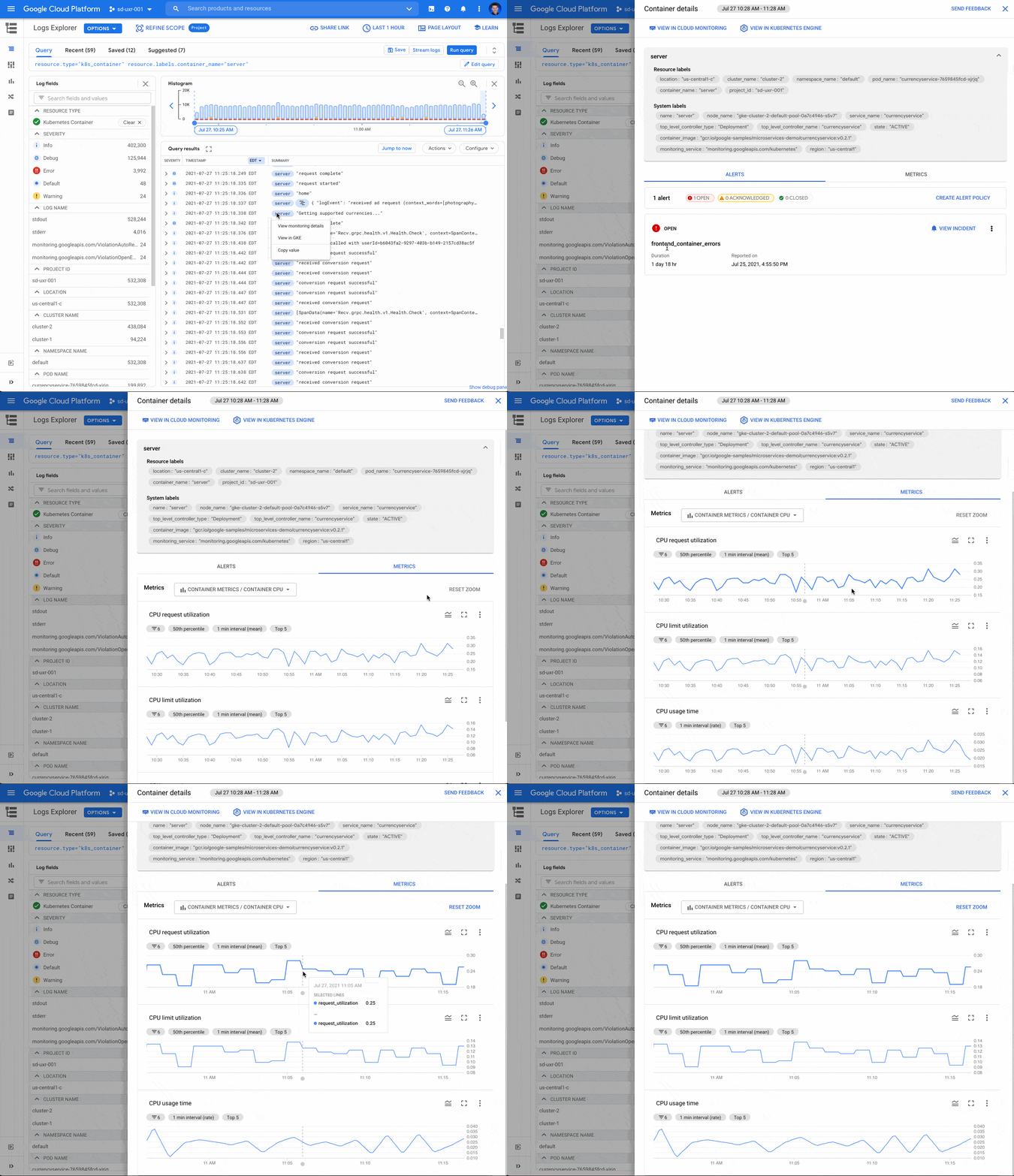
When you’re troubleshooting an application on Google Kubernetes Engine (GKE), the more context that you have on the issue, the faster you can resolve it. For example, did the pod exceed it’s memory allocation? Was there a permissions error reserving the storage volume? Did a rogue regex in the app pin the CPU? All of these questions require developers and operators to build a lot of troubleshooting context. Cloud Monitoring data for GKE in Cloud LoggingTo make it easier to troubleshoot GKE apps, we’ve added contextual Cloud Monitoring data accessible right from Cloud Logging. With this new feature, you can easily see the relevant pod, node and cluster events, metrics, alerts, and SLOs right from the log line itself. Additionally, the data loaded for a specific log entry is scoped to the Kubernetes resource, which saves you valuable time while investigating an app error.Today’s announcement builds on other recent integrations including the addition of a logs tab nested in the details page of each of your GKE resources and combining metrics and logs in the GKE Dashboard in Monitoring. Now, wherever you start your troubleshooting journey – in Monitoring, Logging or GKE – you have the observability data at your fingertips. For example, if you’re troubleshooting a GKE app error in Cloud Logging and looking at the app logs, you can now view the metric charts for container restarts, uptime, memory, CPU and storage without leaving the log entry. Active alerts are highlighted on the alerts tab, which can provide helpful context for troubleshooting. This unique and integrated experience brings together critical log and metric data for the specific Kubernetes resource where your app is running.Viewing Monitoring data for GKE from a log lineFrom a k8s_container, k8s_pod, k8s_node, or k8s_cluster log, select the blue chip with the resource.labels resource name and then select “View Monitoring details” to access an integrated metrics panel directly from the Logs Explorer. Selecting “View in GKE” opens the detailed view of the GKE resource in the Cloud Console on a new tab.The metrics panel provides a lot of contextual data including alerts, Kubernetes events and metrics related to the GKE resource.Alerts Alerts triggered by the GKE resource are displayed under the alerts tab. The color-coded alert status provides an easy way to see ongoing, acknowledged and closed incidents. Selecting “VIEW INCIDENT” opens the incident details in Cloud Monitoring. If you want to create a new alert, use the link to create a brand new alert policy.Kubernetes events for clusters and podsThe metrics panel provides select events for clusters and pods.  For each event, the name, associated resource and a link to view/copy the log message are displayed. Kubernetes events can provide important information to help determine the root cause of an issue. For example, if a FailedScheduling event is displayed, this can quickly guide troubleshooting to check the resources available to the Kubernetes resource.Metrics for containers, pods and nodesThe metrics tab contains metrics bundles for container (default), pod and node metrics collected from the GKE cluster and reported in Cloud Monitoring. Each metric bundle offers pre-built charts that can be selected to view the CPU, memory, storage and container restarts. For example, by looking at the CPU or memory, you can determine whether there were any spikes in the metrics for the Kubernetes resources.More to comeWe’re committed to making Google Cloud’s operations suite the best place to troubleshoot your GKE apps. We’ve integrated logs directly into GKE resource details pages and built a specialized integrated GKE Dashboard, all to make it easier to troubleshoot GKE apps. However, there is still more coming and we’re already working hard to add new features to the metrics panels to surface even more context for troubleshooting GKE apps.Get started todayIf you haven’t already, to get started with Cloud Logging and Cloud Monitoring on GKE, viewdocumentation, watch a quick video on troubleshooting services on GKE and join the discussion in our new Cloud Operations page on the Google Cloud Community site.Related ArticleGKE operations magic: From an alert to resolution in 5 stepsTeams operating microservices increasingly rely on metrics, logs, and traces to identify and troubleshoot problems. The GKE Dashboard bri…Read Article
Quelle: Google Cloud Platform
Zero trust with reverse proxy

A reverse proxy stands in front of your data, services, or virtual machines, catching requests from anywhere in the world and carefully checking each one to see if it is allowed.In order to decide (yes or no) the proxy will look at who and what.Who are you (the individual making the request)? What is your role? Do you have access permission (authorization)?What device are you using to make the request? How healthy is your device right now? Where are you located? At what time are you making the request?This issue of GCP Comics presents an example of accessing some rather confidential data from an airplane, and uses that airplane as a metaphor to explain what the proxy is doing.Click to enlargeReverse proxies work as part of the load balancing step when requests are made to web apps or services, and they can be thought of as another element of the network infrastructure that helps route requests to the right place. No one can access your resources unless they meet certain rules and conditions.If a request is invalid or doesn’t meet the necessary criteria set by your administrators, either because it is from an unauthorized person or an unsafe device, then the proxy will deny the request.Why might the proxy say no to my request? When assessing the user making the request, denial of access could be due to reasons such as:I’m in Engineering, but I am trying to access Finance data.I’m not even a part of the company.My job changed, and I lost access.Looking at the device originating the request, the proxy could deny access due to a number of factors, such as:Device operating system out of dateMalware detectedDevice is not reporting inDisk encryption missingDevice doesn’t have screen lockLeveraging identity and device information to secure access to your organization’s resources improves your security posture.ResourcesTo learn more about proxies and Zero Trust, check out the following resources:Overview of Identity-Aware ProxyExtending Zero Trust models to the webCreating a device-based access levelHow to set up a proxy for on-premises appsBeyondCorp Enterprise Quickstart GuideWant more GCP Comics? Visit gcpcomics.com & follow us on medium pvergadia & max-saltonstall, and on Twitter at @pvergadia and @maxsaltonstall. Be sure not to miss the next issue!Related ArticleWhat is zero trust identity security?A zero trust network is one in which no person, device, or network enjoys inherent trust. All trust, which allows access to information, …Read Article
Quelle: Google Cloud Platform