Access free training and learn how to automate hyperparameter tuning to find the best model

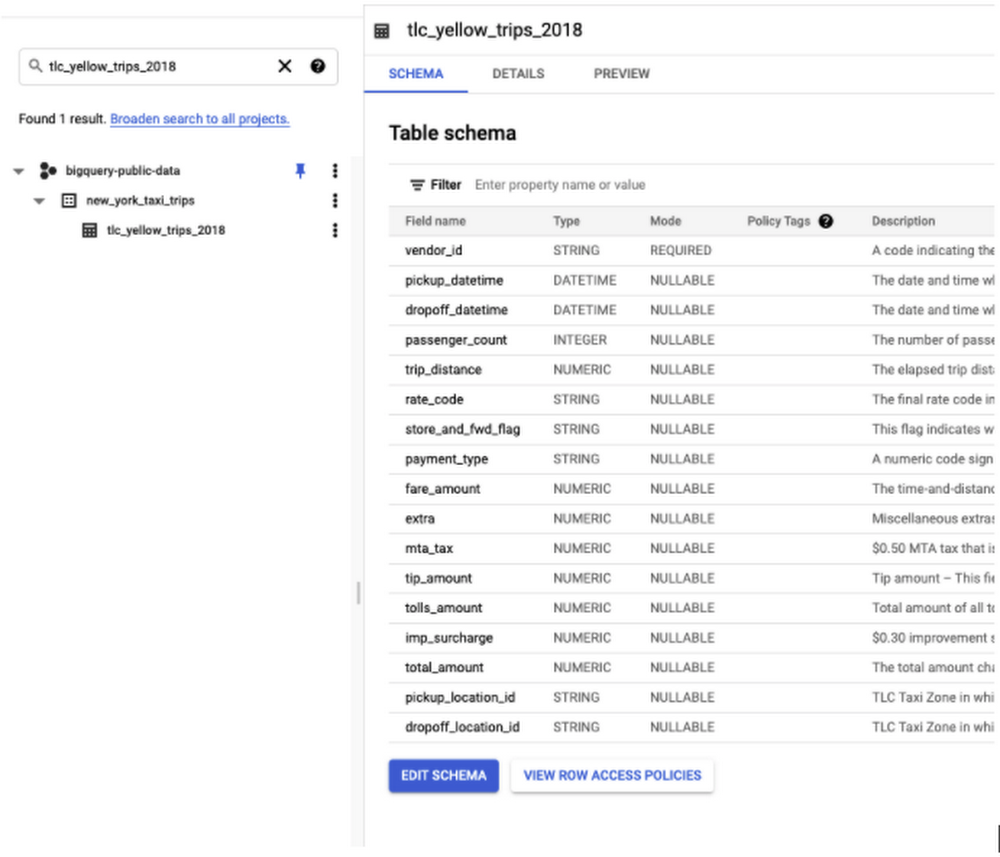
In today’s post, we’ll walk through how to easily create optimal machine learning models with BigQuery ML’s recently launched automated hyperparameter tuning. You can also register for our free training on August 19 to gain more experience with hyperparameter tuning and get your questions answered by Google experts. Can’t attend the training live? You can watch it on-demand after August 19.  Without this feature, users have to manually tune hyperparameters by running multiple training jobs and comparing the results. The efforts might not even work without knowing the good candidates to try out.With a single extra line of SQL code, users can tune a model and have BigQuery ML automatically find the optimal hyperparameters. This enables data scientists to spend less time manually iterating hyperparameters and more time focusing on unlocking insights from data. This hyperparameter tuning feature is made possible in BigQuery ML by using Vertex Vizier behind-the-scenes.  Vizier was created by Google research and is commonly used for hyperparameter tuning at Google.BigQuery ML hyperparameter tuning helps data practitioners by:Optimizing model performance with one extra line of code to automatically tune hyperparameters, as well as customizing the search spaceReducing manual time spent trying out different hyperparametersLeveraging transfer learning from past hyperparameter-tuned models to improve convergence of new modelsHow do you create a model using Hyperparameter Tuning?You can follow along in the code below by first bringing the relevant data to your BigQuery project. We’ll be using the first 100K rows of data from New York taxi trips that is part of the BigQuery public datasets to predict the tip amount based on various features, as shown in the schema below:First create a dataset, bqml_tutorial in the United States (US) multiregional location, then run:Without hyperparameter tuning, the model below uses the default hyperparameters, which may very likely not be ideal. The responsibility falls on data scientists to train multiple models with different hyperparameters, and compare evaluation metrics across all the models. This can be a time-consuming process and it can become difficult to manage all the models. In the example below, you can train a linear regression model, using the default hyperparameters, to try to predict taxi fares.With hyperparameter tuning (triggered by specifying NUM_TRIALS), BigQuery ML will automatically try to optimize the relevant hyperparameters across a user-specified number of trials (NUM_TRIALS). The hyperparameters that it will try to tune can be found in this helpful chart.In the example above, with NUM_TRIALS=20, starting with the default hyperparameters, BigQuery ML will try to train model after model while intelligently using different hyperparameter values — in this case, l1_reg and l2_reg as described here. Before training begins, the dataset will be split into three parts1: training/evaluation/test. The trial hyperparameter suggestions are calculated based upon the evaluation data metrics. At the end of each trial training, the test set is used to evaluate the trial and record its metrics in the model. Using an unseen test set ensures the objectivity of the test metric reported at the end of tuning.The dataset is split into 3-ways by default when hyperparameter tuning is enabled. The user can choose to split the data in other ways as described in the documentation here.We also set max_parallel_trials=2 in order to accelerate the tuning process. With 2 parallel trials running at any time, the whole tuning should take roughly as long as 10 serial training jobs instead of 20.Inspecting the trials How do you inspect the exact hyperparameters used at each trial? You can use ML.TRIAL_INFO to inspect each of the trials when training a model with hyperparameter tuning.Tip: You can use ML.TRIAL_INFO even while your models are still training.In the screenshot above, ML.TRIAL_INFO shows one trial per row, with the exact hyperparameter values used in each trial. The results of the query above indicate that the 14th trial is the optimal trial, as indicated by the is_optimal column. Trial 14 is optimal here because the hparam_tuning_evaluation_metrics.r2_score — which is R2 score for the evaluation set — is the highest. The R2 score improved impressively from 0.448 to 0.593 with hyperparameter tuning!Note that this model’s hyperparameters were tuned just by using num_trials and max_parallel_trials, and BigQuery ML searches through the default hyperparameters and default search spaces as described in the documentation here. When default hyperparameter search spaces are used to train the model, the first trial (TRIAL_ID=1) will always use default values for each of the default hyperparameters for the model type LINEAR_REG. This is to help ensure that the overall performance of the model is no worse than a non-hyperparameter tuned model.Evaluating your modelHow well does each trial perform on the test set? You can use ML.EVALUATE, which returns a row for every trial along with the corresponding evaluation metrics for that model.In the screenshot above, the columns “R squared” and “R squared (Eval)” correspond to the evaluation metrics for the test and evaluation set, respectively. For more details, see the data split documentation here.Making predictions with your hyperparameter-tuned modelHow does BigQuery ML select which trial to use to make predictions? ML.PREDICT will use the optimal trial by default and also returns which trial_id was used to make the prediction. You can also specify which trial to use by following the instructions.Customizing the search spaceThere may be times where you want to select certain hyperparameters to optimize or change the default search space per hyperparameter. To find the default range for each hyperparameter, you can explore the Hyperparameters and Objectives section of the documentation.For LINEAR_REG, you can see the feasible range  for each hyperparameter. Using the documentation as reference, you can create your own customized CREATE MODEL statement:Transfer learning from previous runsIf this isn’t enough, hyperparameter tuning in BigQuery with Vertex Vizier running behind the scenes means you also get the added benefit of transfer learning between models that you train, as described here. How many trials do I need to tune a model?The rule of thumb is at least 10 * the number of hyperparameters, as described here (assuming no parallel trials). For example, LINEAR_REG will tune 2 hyperparameters by default, and so we recommend using NUM_TRIALS=20.PricingThe cost of hyperparameter tuning training is the sum of all executed trials costs, which means that if you train a model with 20 trials, the billing would be equal to the total cost across all 20 trials. The pricing of each trial is consistent with the existing BigQuery ML pricing model.Note: Please be aware that the costs are likely going to be much higher than training one model at a time.Exporting hyperparameter-tuned models out of BigQuery MLIf you’re looking to use your hyperparameter-tuned model outside of BigQuery, you can export your model to Google Cloud Storage, which you can then use to, for example, host in a Vertex AI Endpoint for online predictions.SummaryWith automated hyperparameter tuning in BigQuery ML, it’s as simple as adding one extra line of code (NUM_TRIALS) to easily improve model performance! Ready to get more experience with hyperparameter tuning or have questions you’d like to ask? Sign up here for our no-cost August 19 training.Related ArticleDistributed training and Hyperparameter tuning with TensorFlow on Vertex AILearn how to configure and launch a distributed hyperparameter tuning job with Vertex Training using bayesian optimization.Read Article
Quelle: Google Cloud Platform


What is Memorystore?

Many of today’s applications ranging from gaming, cybersecurity, social media require processing data at sub-millisecond latency to deliver real-time experiences. To meet demands of low latency at increased scale and reduced cost you need an in-memory datastore. Redis and Memchaced are among the most popular. Memorystore is a fully managed in-memory data store service for Redis and Memcached at Google Cloud. Like any other Google Cloud service it is fast, scalable, highly available, and secure. It automates complex tasks of provisioning, replication, failover, and patching so you can spend more time on other activities!! It comes with a 99.9% SLA and integrates seamlessly with your apps within Google Cloud.  Memorystore is used for different types of in-memory caches and transient stores; and Memorystore for Redis is also used as a highly available key-value store. This serves multiple use cases including web content caches, session stores, distributed locks, stream processing, recommendations, capacity caches, gaming leaderboards, fraudthreat detection, personalization, and ad tech.Click to enlargeWhat’s your application’s availability needs?Memorystore for Redis offers Basic and Standard Tiers. The Basic Tier is best suited for applications that use Redis as a cache and can withstand a cold restart and full data flush. Standard Tier instances provide high availability using replication and automatic failover.Memorystore for Memcached instances are provisioned on a node basis with vCPU and memory per cores per node, which means you can select them based on your specific application requirements. Features and capabilitiesSecure: Memorystore is protected from the internet using VPC networks and private IPand comes with IAM integration to protect your data. Memorystore for Redis also offers instance level AUTH and in-transit encryption. It is also compliant with major certifications (e.g., HIPAA, FedRAMP, and SOC2)Observability: You can monitor your instance and set up custom alerts with Cloud Monitoring. You can also integrate with OpenCensus to get more insights into client-side metrics.Scalable: Start with the lowest tier and smallest size and then grow your instance as needed. Memorystore provides automated scaling using APIs, and optimized node placement across zones for redundancy. Memorystore for Memcached can support clusters as large as 5 TB, enabling millions of QPS at very low latency.Highly available: Memorystore for Redis instances are replicated across two zones and provide a 99.9% availability SLA. Instances are monitored constantly and with automatic failover—applications experience minimal disruption.Migrate with no code changes: Memorystore is open source software compliant, which makes it easy to switch your applications with no code changes. Backups: Memorystore for Redis offers an import/export feature to migrate Redis instances to Google Cloud using RDS snapshots.Use casesMemorystore is great for use cases that require fast, real-time processing of data. Simple caching, gaming leaderboards, and real-time analytics are just a few examples.Caching: Caches are an integral part of modern application architectures. Memorystore is used in caching use cases such as session management, frequently accessed queries, scripts, and pages.Gaming:  With data structures like Sorted Set, Memorystore makes it easy to maintain a sorted list of scores for a leaderboard while providing uniqueness of elements. Redis hash makes it fast and easy to store and access player profiles.Stream Processing: Whether processing a Twitter feed or stream of data from IoT devices, Memorystore is a perfect fit for streaming solutions combined with Dataflow and Pub/Sub.ConclusionIf your application needs to provide low latency to guarantee a great user experience check out Memorystore.  For a more in-depth look into Memorystore check out the documentation.For more #GCPSketchnote, follow the GitHub repo. For similar cloud content follow me on Twitter @pvergadia and keep an eye out on thecloudgirl.dev.Related ArticleWhat is Cloud IoT Core?Cloud IoT Core is a managed service to securely connect, manage, and ingest data from global device fleetsRead Article
Quelle: Google Cloud Platform

Unlocking Application Modernization with Microservices and APIs

If you build apps and services that your customers consume, two things are certain: You’re exposing APIs in some form or the other. Your apps are made by multiple functions working together to deliver products and services. As you scale up and grow, your enterprise architecture can benefit from a sound strategy for both API management and service management, both of which impact your customer and developer experience. In this article, we’ll explore how these two technologies fit into your application modernization strategy, including how we’re seeing our customers use Anthos Service Mesh and Apigee API Management together. How APIs, microservices, and a service mesh are relatedAPIs accelerate your modernization journey by unlocking and allowing legacy data and applications to be consumed by new cloud services. As a result, organizations can launch new mobile, web, and voice experiences for customers. The API layer acts as a buffer between legacy services and front-end systems and keeps the front-end systems up and running by routing requests as the legacy services are migrated or transformed into modern architectures.  In addition, an API management platform, like Apigee, manages the lifecycle of those APIs with design, publish, analyze, and governance capabilities.Once microservices architectures become prevalent in an organization, technical complexity increases and organizations find a need for deeper and more granular visibility into their applications and services. This is where a service mesh comes into play. A service mesh is not only an architecture that empowers managed, observable, and secure communication across an organization’s services, but also the tool that enables it. Anthos Service Mesh lets organizations build platform-scale microservices with requirements around standardized security, policies, and controls, and it provides teams with in-depth telemetry, consistent monitoring, and policies for properly setting and adhering to SLOs. How API management and a service mesh compliment one anotherMany organizations ask themselves, “Do I really need both an API management platform and a service mesh? How do I manage them together?” The answer to the first question is yes. These two technologies focus on different aspects of the technology stack and are complementary to each other. A service mesh modernizes your application networking stack by standardizing how you deal with network security, observability, and traffic management. An API management layer focuses on managing the lifecycle of APIs, including publishing, governance, and usage analytics. Most organizations draw a logical boundary at business units or technology groups. Sharing these microservices outside that boundary with other business units or with partners is where Apigee plays a significant role. You can drive and manage the consumption of those services through developer portals, monitoring API usage, providing authentication, and more, with Apigee. Google Cloud offers Anthos Service Mesh for service management and Apigee for API management. These two products work together to provide IT teams with a seamless experience throughout the application modernization journey. The Apigee Adapter for Envoy enables organizations that use Anthos Service Mesh to reap the benefits of Apigee by enforcing API management policies within a service mesh. Accelerate your application modernization journeyThough the journey to application modernization doesn’t always follow a clear-cut path, by adopting API management and a service mesh as part of a modernization journey, your organization can be better equipped to rapidly respond to changing markets securely and at scale. Wherever you are on your application modernization journey, Google Cloud can help. To learn more about how service management and API management can be part of your application modernization journey, read this whitepaper.Related ArticleAnnouncing API management for services that use EnvoyAmong forward-looking software developers, Envoy has become ubiquitous as a high-performance pluggable proxy, providing improved networki…Read Article
Quelle: Google Cloud Platform

Zero trust: Putting it all together with policy

If you’ve been following along, you see how Cloudy brought together a strong understanding of identity, phishing-resistant authentication, good rules for authorizing people and groups, and checks on device health — all to make sure the cloud environment, with its software, data and processes, is safe for employees and end users.  Want to go back and refresh your memory? See the whole series at gcpcomics.comThe last piece of the puzzle is the security policy that ties it all togetherUse your understanding about your systems, services and applications to set policies that make sense for your specific set of risks and goals. In this issue you can see how, and why, Cloudy and Dino pull it all together.Click to enlargeThis process of defining rules and policies involves collaboration between security and identity teams, application owners, compliance and other internal groups. Setting up the right policies means deciding exactly how and when people earn the appropriate levels of trust that your organization establishes for accessing internal services and corporate resources like SaaS applications. A framework for levels of trust can actually be pretty simple. For example:High: The most trusted, in line with all security policies and recommendations, and able to access the most secure servicesMedium: Limited trust when out of compliance for some policies.Low: Useful for devices that are in the inventory but not properly set up, or have had issues and need remediationNone: The default state for any unknown or unrecognized deviceWe want to keep things as simple as possible, without diluting them to be overly simplistic. So if you need more granular policies, or have specific regulatory requirements around roles, data stores or offices, you always have the flexibility to customize policies to suit your needs. Increase the security posture of your organization by implementing a modern security model to help ensure only authorized users from trusted devices can access specific resources. Protect your users and your applications and get started on your zero trust access journey with Google Cloud today!ResourcesTo learn more and see how you can set these up yourself, check out the following:BeyondCorp EnterpriseAccess Context Manager overviewManaging access levelsThreat and Data protection for ChromeRelated ArticleZero trust with reverse proxyA reverse proxy stands in front of your data, services, or virtual machines, catching requests from anywhere in the world and carefully c…Read Article
Quelle: Google Cloud Platform
New study available: Modernize with AIOps to maximize your impact

Organizations are currently modernizing their businesses in order to meet the increasing complexity of today’s business landscape. In effect, business leaders must evaluate the best way to mitigate the challenges which plague their cloud operations, all while meeting customers’ growing expectations around digital experience (DX) through agility, automation, and proactive incident avoidance. In this commissioned study, “Modernize With AIOps To Maximize Your Impact”, Forrester Consulting surveyed organizations worldwide to better understand how they’re approaching artificial intelligence for IT operations (AIOps) in their cloud environments, and what kind of benefits they’re seeing. Within this July 2021 study, you’ll see that AIOps systems and principles are here to help. It covers how AIOps increases efficiency and productivity across day-to-day operations, and how businesses are taking note. In fact, 91% of respondents have implemented AIOps to address at least one cloud operations issue, and expansion is set to skyrocket. Those that wait to act, risk losing out on the efficacy of their cloud investment and falling behind their more efficient competitors.As you can see in the image above, there is a plethora of great information in this complimentary study. So, if you’re looking to enhance your cloud operations and/or adopt AIOps within your organization, be sure to download this free study today.Related ArticleBoo! Fight off your scariest cloud monsters with Active AssistLearn how Active Assist can help you fix underused or misconfigured Google Cloud resources.Read Article
Quelle: Google Cloud Platform

Private Catalog: Enabling easier curation of Cloud Marketplace products

Google Cloud’s Private Catalog lets enterprise admins easily curate marketplace products and custom solutions for their users to consume. Today, we’re pleased to announce several improvements to the curation experience for software-as-a-service (SaaS) products that you procure from the Google Cloud Marketplace. With this release, admins can add these Marketplace products to the Private Catalog using a simplified click-through workflow. Product catalog managementAs an enterprise admin, you may want your users to access and deploy specific SaaS products from the Marketplace. After you procure a product from the Marketplace, you can add it to a catalog using the “Add to Private Catalog” button from the product’s Details page. You’re then presented with a list of catalogs to which you can add the product. Once you pick a catalog and proceed, the product is added to the solutions list for the Private Catalog. Post procurement, you can also add a product to a catalog at any point from the Marketplace product details page.Add to Private Catalog button in Marketplace product detail pageAdd product to Catalog(s)Confirmation message stating that product has been added to the selected CatalogEase of consumptionOnce you curate a product, a user who navigates to your organization’s Private Catalog page can view the SaaS product’s listing. On clicking into the Private Catalog solution detail page, users can view information about the product including information added by the admin regarding internal usage guidelines for the product. From the Catalog Details page, users can use the ‘View in Marketplace’ button to navigate to the Marketplace details page. On the Marketplace details page, the user can take other actions such as clicking on the “Manage on Provider” button to configure and use the SaaS product.Private Catalog solution detail pageGet started todayThese new features are available to all Private Catalog customers. To learn more about these features and how to get started, refer to our documentation for adding a product from the Marketplace.Related ArticleA look at the new Google Cloud Marketplace Private Catalog, now with Terraform supportThe latest version of Private Catalog simplifies management for the products you use from Google Cloud Marketplace.Read Article
Quelle: Google Cloud Platform

Foundational best practices for securing your cloud deployment

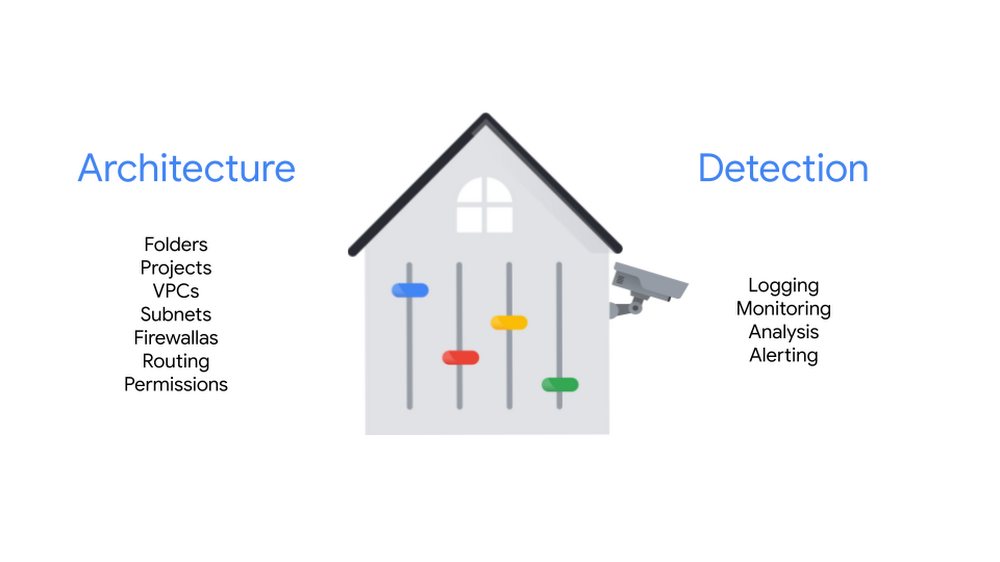
As covered in our recent blog posts, the security foundations blueprint is here to curate best practices for creating a secured Google Cloud deployment and provide a Terraform automation repo for adapting, adopting, and deploying those best practices in your environment. In today’s blog post, we’re diving a little deeper into the security foundations guide to highlight several best practices for security practitioners and platform teams to use with setting-up, configuring, deploying, and operating a security-centric infrastructure for their organization.The best practices described in the blueprint are a combination of both preventative controls and detective controls, and are organized as such in the step-by-step guide. The first topical sections cover preventative controls, which are implemented through architecture and policy decisions. The next set of topical sections cover detective controls, which use monitoring capabilities to look for drift, anomalous or malicious behavior as it happens.If you want to follow along in the full security foundations guide as you read this post, we are covering sections 4-11 of the Step-by-step guide (chapter II).Preventative controlsThe first several topics cover how to protect your organization and prevent potential breaches using both programmatic constraints (policies) and architecture design. Organization structureOne of the benefits of moving to Google Cloud is your ability to manage resources, their organization and hierarchy, in one place! The best practices in this section give you a resource hierarchy strategy that does just that. As implemented, it provides isolation and allows for segregation of policies, privileges, and access, which help reduce risk of malicious activity or error. And while this sounds like you might be doing more work, the capabilities in GCP make this possible while easing administrative overhead.The step-by-step guide’s recommended organization structureThe best practices include:using a single organization for top-level ownership of resources,implementing a folder hierarchy to group projects into related groups (prod, non-prod, dev, common, bootstrap) where you can create segmentation and isolation, and subsequently apply security policies and grant access permissions, andestablishing organizational policies that define resource configuration constraints across folders and projects.Resource deploymentWhether you are rolling out foundational or infrastructure resources, or deploying an application, the way you manage your deployment pipeline can provide extra security, or create extra risk. The best practices in this section show you how to set up review, approval, and rollback processes that are automated and standardized. They limit the amount of manual configuration, and therefore, reduce the possibility of human error, drive consistency, allow revision control, and enable scale. This allows for governance and policy controls to help you avoid exposing your organization to security or compliance risks. The best practices described include:codifying the Google Cloud infrastructure into Terraform modules which provides an automated way of deploying resources,using private Git repositories for the Terraform modules,initiating deployment pipeline actions with policy validation and approval stages built into the pipeline, anddeploying foundations, infrastructure, and workloads through separate pipelines and access patterns.Access patterns outlined in the security foundations blueprintAuthentication and authorizationMany data breaches come from incorrectly-scoped or over-granted privileges. Controlling access precisely allows you to keep your deployments secure by permitting only certain users access to your protected resources. This section delivers best practices for authentication (validating a user’s identity) and authorization (determining what that user can do) in your cloud deployment. Recommendations include managing user credentials in one place (for example, either Google Cloud Identity or Active Directory) and enabling syncs so that the removal of access and privileges for suspended or deleted user accounts are propagated appropriately.  This section also reinforces the importance of using multi-factor authentication (MFA) and phishing-resistant security keys (covered more in-depth in the Organization structure chapter).  Privileged identities especially should use multi-factor authentication and consider adding multi-party authorization as well since, due to their access, they are frequently targets and thus at higher risk.Throughout all the best practices in this section, the overarching theme is the principle of least privilege: only necessary permissions are to be granted. No more, no lessA few more of the best practices include:maintaining user identities automatically with Cloud Identity federated to your on-prem Active Directory (if applicable) as the single source of truth,using Single sign-on (SSO) for authentication,establishing privileged identities to provide elevated access in emergency situations, andusing Groups with a defined naming convention, rather than individual identities, to assign permissions with IAM.Additional video resource on how to use Groups with IAMNetworking As your network is the communication layer between your resources and to the internet, making sure it is secure is critical in preventing external (also known as north-south) and internal (east-west) attacks. This section of the step-by-step guide goes into how to secure and segment your network so that services that store highly sensitive data are protected. It also includes architecture alternatives based on your deployment patterns. The guide goes deeper to show how best to configure the networking of your cloud deployment so that resources can communicate with each other, with your on-prem environment, as well as the public internet. And it does all that while maintaining security and reliability. By keeping network policy and control centralized, implementing these best practices is easier to manage.This section is robust in providing detailed, opinionated guidance, so if you would like to dive in further to this topic, head to section 7 of the full step-by-step guide to learn more. A few of the high-level best practices in this section are:centralizing network policies and control through use of Shared VPC, or a hub-and-spoke architecture if this fits your use case,separating services that contain sensitive data in separate Shared VPC networks (base and restricted) and using separate projects, IAM, and a VPC-Service Control perimeter to limit data transfers in or out of the restricted network,using Dedicated Interconnect (or alternatives) to connect on-prem with Google Cloud and using Cloud DNS to communicate with on-prem DNS servers,accessing Google Cloud APIs from the cloud and from on-premises through private IP addresses, andestablishing tag-based firewall rules to control network traffic flows.Key and secret managementWhen you are trying to figure out where to store keys and credentials, it is often a trade-off between level of security and convenience. This section outlines a secure and convenient method for storing keys, passwords, certificates, and other sensitive data required for your cloud applications using Cloud Key Management Services and Secret Manager. Following these best practices ensure that storing secrets in code is avoided, the lifecycles of your keys and secrets are managed properly, and the principles of least privilege and separation of duties are adhered to.The best practices described include:creating, managing, and using cryptographic keys with Cloud Key Management Services,storing and retrieving all other general-purpose secrets using Secret Manager, andusing prescribed hierarchies to separate keys and secrets between the organization and folder levels.LoggingLogs are used by diverse teams across an organization. Developers use them to understand what is happening as they write code, security teams use them for investigations and root cause analysis, administrators use them to debug problems in production, and compliance teams use them to support regulatory requirements. The best practices in this section keep all those use cases in mind to ensure the diverse set of users are supported with the logs they need.The guide recommends a few best practices around logs including:centralizing your collection of logs in an organization-level log sink project,unifying monitoring data at the folder-level,ingesting, aggregating, and processing logs with the Cloud Logging API and Cloud Log Router, andFexporting logs from sinks to Cloud Storage for audit purposes, to BigQuery for analysis, and/or to a SIEM through Cloud Pub/Sub.Logging structure described in the step-by-step guideDetective controlsThe terminology “detective controls” might evoke the sense of catching drift and malicious actions as they take place or just after. But in fact, these latter sections of the step-by-step guide cover how to prevent attacks as well using monitoring capabilities to detect vulnerabilities and misconfigurations before they have an opportunity to be exploited.Detective controlsMuch like a detective trying to solve a crime may whiteboard a map of clues, suspects, and their connections, this section covers how to detect and bring together possible infrastructure misconfigurations, vulnerabilities, and active threat behavior into one pane of glass. This can be achieved through a few different options: using Google Cloud’s Security Command Center Premium; using native capabilities in security analytics leveraging BQ and Chronicle; as well as integrating with third-party SIEM tools, if applicable for your deployment.The guide lists several best practices including:aggregating and managing security findings with Security Command Center Premium to detect and alert on infrastructure misconfigurations, vulnerabilities, and active threat behavior,using logs in BigQuery to augment detection of anomalous behavior by Security Command Center Premium, andintegrating your enterprise SIEM product with Google Cloud Logging.Security Command Center in the Cloud ConsoleBilling setupSince your organization’s cloud usage flows through billing, setting up billing alerts and monitoring your billing records can work as an additional mechanism for enhancing governance and security by detecting unexpected consumption.The supporting best practices described include:setting up billing alerts are used on a per-project basis to warn at key thresholds (50%, 75%, 90%, and 95%), andexporting billing records to a BigQuery dataset in a Billing-specific project.If you want to learn more about how to set up billing alerts, export your billing records to BigQuery, and more, you can also check out the Beyond Your Bill video series.Bringing it all together and next stepsThis post focused on the best practices provided in the blueprint for building the foundational infrastructure for your cloud deployment, including preventative and detective controls. While the best practices are many, they can be adopted, adapted, and deployed efficiently using templates provided in the Terraform automation repository.  And of course, the non-abbreviated details of implementing these best practices is available in the security foundations guide itself. Go forth, deploy and stay safe out there.Related ArticleBuild security into Google Cloud deployments with our updated security foundations blueprintGet step by step guidance for creating a secured environment with Google Cloud with the security foundations guide and Terraform blueprin…Read Article
Quelle: Google Cloud Platform

Partner Advantage two-year read out!

Last month marked the two-year anniversary of Google Cloud Partner Advantage. I want to thank our fast-growing ecosystem of global partners for their hard work, imagination, and energized commitment, and to reflect on how much we’ve accomplished together. In 2019, we kicked off by building a multi-year action plan together with partners, added some innovative Googleyness, and have since remained laser focused on our core principles — ensuring simplicity, fostering collaboration, focusing on the customer, and sustaining a growth mindset. We also continue to measure partner success in three fundamental ways that set us apart in a highly competitive market: Ensuring that Google Cloud and our partners are each aligned to the same business goals and strategies, providing partners with the opportunities to earn and showcase their skills to the market, and empowering partners to demonstrate differentiated value through customer success stories, certifications, Net Promoter Score (newly added this year!) and more.I am very pleased to share that to-date the results have been fantastic–thanks to an ecosystem based on trust and collaboration:The average size of partner-involved deals more than doubled from 2019 to 2020.We onboarded almost 3x more indirect resellers in the first three quarters of 2020 compared to the same period in 2019.Partner-created pipeline in the mid-market segment grew more than 200% YoY from 2019 to 2020.Partners were involved in 3X more customer deals in 2020 than in 2018.The number of enterprise customer accounts with a partner attached increased by 50% from 2019 to 2020.Our partner ecosystem has grown by more than 400% in the last two years.We’ve rapidly expanded key programmatic elements of Partner Advantage, such as incentives and Differentiation; worked with analysts and partners to design the most compelling offerings, integrated closely with key teams across Google Cloud; advanced our technical infrastructure; and deployed new features and growth drivers, from our Partner Advisors, to more formal certification and training options, to portal features that bring greater control and transparency to partners. We’ve also focused on ensuring that partners are part of every deal. Resources such as the internal and external partner directories allow Google Cloud sales teams to match partners to deals, help customers easily connect with the best partners for their needs, and allow partners to showcase their expertise and knowledge depth.  We highlight partner accomplishments by showcasing customer success stories, expertise by industry or solution area, and specialization in a major practice area–all to make it easier for our customers to find the right partner at the right time with the right skills for innovation and confidence.Check out the items below to learn more about what Partner Advantage has fueled and accomplished with our valued partners in the past two years.Advancing the Partner Differentiation JourneyThe Google Cloud Partner Differentiation Journey has always been the heart and soul of Partner Advantage. By providing partners with the tools, training, and insights they need to differentiate their business in a rapidly shifting global marketplace, we help partners offer more value to customers. In the two years since we launched Partner Advantage, partners have looked to our Differentiation Journey to achieve their goals and win:The number of Customer Success Stories published by partners has increased 250% since 2019. More than 3,800 are now online and accessible by customers. The number ofpartners with Specializations grew 70% through 2020. Earning Specializations helps unlock additional benefits and incentives. Our managed partners more than doubled their Expertise designations in 2020 over the prior year.We’ve also partnered with Forrester to take a deeper look at thebusiness opportunity Google Cloud offers to partners1. I’d encourage you to read the report if you haven’t already as it contains some excellent data and insights you won’t find anywhere else.Reinventing Partner Incentives Incentives are one of the most important elements of Partner Advantage and a strong motivator for partner loyalty and investment. Since launch in 2019, our incentives portfolio has  expanded  significantly  to offer partners more opportunities to earn and grow their business , easier for partners to leverage, and more competitive. It’s all about winning business with our partners — together.  In fact, IDC is projecting2 that when you combine our incentives with other components of Partner Advantage, the future looks very profitable:The overall Google Cloud partner business opportunity is expected to increase by a factor of at least 3.6 by 2025.On a global basis, IDC expects partners to generate $5.32 USD in revenue for every $1 of Google Cloud revenue. Better still, they expect partner revenue to jump to $7.54 for every dollar Google takes in by 2025.For our part, the Google Cloud Partner Advantage incentives are an attractive, competitive and comprehensive portfolio of rewards across Sell, Service and Build partners. Our partner investments include:More than 10X increase in partner incentives and funds since launch : Google WorkspaceWe focused on rewarding  partners for new customer  acquisition and to protect partner investment, which have led to more than a 50% increase in win rate for partner registered deals, and a significant increase in partner sourced pipeline. In 2021, we expanded the incentive portfolio to boost partner profitability for expanding into new markets  and driving adoption leading to customer success.We launched incentives for Distributors to expand into new geographies and new segmentsGoogle CloudBeginning with the MSP Initiative, we’ve expanded the incentives portfolio in 2021 to offer attractive partner discounts,additional incentives for new customer acquisition and rewarding partners who help their customers grow consumption.We have seen 40% more partners utilizing the funding for pre-sales engagements  and deployments and for sales acceleration.And, in the summer of 2021, to expand our routes to market, we launched Distribution incentives for GCP.We’re thrilled that our evolving resources and initiatives are strengthening our collaborative relationships with partners and helping to better serve our customers. That relationship is the cornerstone to our strategy as we drive innovation and grow our businesses together. To learn more about Google Cloud’s partner program, click here.1.The Google Cloud Business Opportunity For Partners, a commissioned Total Economic Impact™ study conducted by Forrester Consulting, January 20202. IDC eBook, sponsored by Google Cloud, Partner Opportunity in a Cloud World, doc #US46702120BROI, August 2020
Quelle: Google Cloud Platform

Solving Banking challenges with highly personalized investment recommendations using AI

Data science is one of today’s key priorities for finance industry leaders. Data Scientists harness knowledge to draw meaning from data, to turn data into information, and to translate information into practical insights that will bring a better understanding of how to gain customer loyalty, minimize churn, and grow revenue. In this blog post we will look at a comprehensive investment banking solution that builds a bridge between retail investors and the complexity of the capital markets.Let’s explore how Google Cloud Data and Analytics services can be used to turn real-time insight into an automated process, creating frictionless digital experiences to help retail investors with little capital markets expertise. The solution developed by SoftServe provides users with personalized investment recommendations to help make better decisions. Called the Investment Products Recommendation Engine (IPRE), SoftServe designed this solution to recommend the most suitable investment product by balancing an individual’s risk preferences and expected return on investment.SoftServe’s IPRE collects and processes market data (e.g., quotes, daily or weekly open, high, low, close prices) on available investment products such as stocks, bonds, powered by BigQuery and Cloud Functions. The IPRE prepares the raw data via Dataflow and constructs an optimal mean-variance portfolio for a given level of risk. So, the investment portfolio is optimized to provide the highest expected return on investment for a given risk level.An investor’s risk appetite depends on various factors and may exhibit non-stationary evolution over time. To produce recommendations in accordance with the optimal risk level for an individual investor, SoftServe used an AutoML Tables model, based on a variety of customer characteristics: level of income, level of savings, level of education, employment, geography, etc. This approach provides more flexibility when compared to classical investment theory metrics such as Constant Relative Risk Aversion (“CRRA”), Constant Absolute Risk Aversion (“CARA”), etc., consequently enabling the IPRE to unlock new customer segments.Finally, after providing recommendations for a portfolio of optimal assets based on risk levels, the IPRE estimates the qualitative and quantitative characteristics of the portfolio. It computes sophisticated industry-grade investment metrics describing the marginal risks, Conditional Value at Risk (CVaR), diversification effects, Sharpe Ratio, sensitivity of the portfolio to market fluctuations, etc.Let’s take a look at a hypothetical user journey to better understand the purpose of the solution and the value it brings to market. Meet Felix, a 33-year old architect whose dream is to buy his own flat in the next five years. He realizes he must accumulate more savings. A few months ago, Felix opened an account in the For-the-Future bank because of the smart investment feature on their mobile app, where he receives investment recommendations and can make decisions on the go. Felix has set a financial goal and built up a portfolio of investment funds aligned with his risk tolerance and his investment goals.One day, on his way to work, Felix receives a personalized investment recommendation from the For-the-Future bank’s mobile app. The app is constantly working to help Felix reach his goal and does all the time-consuming work on collecting and processing market data. The machine learning model generates recommendations, such as expected rate of return, popularity of the asset among people with portfolios like Felix’s, and information about the risk level that matches Felix’s portfolio. Felix can use that information to make a decision.The process of using the app was quick and simple. Felix’s portfolio gets automatic updates with the total value of the portfolio and tracks its performance against his financial goals. Felix continues his way to work smiling to himself, knowing that he is a little bit closer to owning his dream home.The technical implementation of the solution in Google Cloud incorporates Dataflow batch processing pipelines as well as trained investment recommendation Big Query Machine Learning (“BQML”) models and data analytic services such as BigQuery, Cloud Storage, and Pub/Sub. The solution is described in the blog post How to implement an Investment Product Recommendation solution in GCP.In partnership with Google Cloud, SoftServe helps our clients solve complex problems with innovative solutions to achieve a faster time to market, increase ROI, and provide great user experiences.To gain a broader understanding of the solution and see how its architecture works in real life, watch SoftServe’s user journey presented at Google Southeast Asia Financial Services Cloud OnAir: Creating aha moments in Financial Services.Related ArticleA technical solution producing highly-personalized investment recommendations using MLThe implementation details behind Softserve’s use of Google Cloud to improve retail investing with the Investment Products Recommendation…Read Article
Quelle: Google Cloud Platform

A technical solution producing highly-personalized investment recommendations using ML

Developed by SoftServe with the use of Google Cloud, the Investment Products Recommendation Engine (IPRE) is a solution designed to tackle common retail banking customer investment challenges. In particular, it makes investment recommendations based on BigQuery ML model capabilities. Big data pipelines are utilized to process investment data. The environment setup is automated with the use of Terraform. In this blog post we will take a closer look at the technical implementation of the solution. Solution architectureLet’s dive deeper into the technical part of the solution and consider solution architecture.Components of the pattern architecture are split into three main areas, shown in Figure 1.Figure 1. Investment product recommendation engine solution architectureThe Web-UI area is indicated by the green color and corresponds to the web application (React.js application deployed in Cloud Run). The application demonstrates features of investment risk preferences and portfolio investment recommendations. The web application has its database to respond to users’ requests.The Data processing area is indicated by the beige color and corresponds to the Data Processing that performs data transformation, aggregation, and putting the data into a BigQuery data lake. That part includes fetching data from external sources (Yahoo Finance is used as sample data), storing raw data in Cloud Data Storage, transforming data with the use of Cloud Dataflow, and putting data into BigQuery. The data pipeline is orchestrated by Cloud Composer.The Recommendation Engine area is indicated by the pink color and corresponds to the Recommendation Engine (RE). The RE provides portfolio optimization data for incoming requests from the web application. AutoML Tables models are used to make two different predictions:Investor risk preferencesInvestment recommendationsThe solution is deployed on Google Cloud. Terraform is used to set up all required components and establish the right communications between them.IPRE workflowThe following steps are executed to provide users with investment recommendations based on their risk preferences:The Investor Risk Preference cloud function generates users’ synthetic data and their preferences.Capital Market Data is fetched from Yahoo Finance by the Cap Market cloud function and stored as raw data in Cloud Storage.When new raw data is available in the bucket, the Cloud Dataflow job orchestrated by Cloud Composer is triggered. Dataflow stores processed data in BigQuery.BigQuery Training AutoML jobs, which are orchestrated by Cloud Composer, are triggered after initial setup (or daily) and create the corresponding BigQuery ML Models.Based on available data, BigQuery AutoML generates potential Investor risk preference profiles and investment recommendations, and puts it into Cloud Storage.The risk preference profile is determined for the user that signed in to the Web Application. The recommendations are displayed based on the user’s investment profile. A separate UI Fulfillment backend service provides recommended data to the user.Each day, when new capital market data is available, investment portfolio recommendations are updated with the same flow.Data pipelinesThe IPRE service relies on multiple data sources, both internal and external. The solution implements scalable data pipelines with technologies, such as BigQuery, Cloud Storage, and Dataflow.All external raw data streams are aggregated in dedicated Cloud Storage buckets. The Cloud Functions trigger minor pre-processing scripts. Writing an object to the Cloud Storage bucket triggers a Dataflow job for adding new data to BigQuery.This type of architecture makes an ETL pipeline resilient to corrupt data and scalable to multiple data sources.The Cloud Functions provide a clean, cost-effective solution for migrating massive datasets from data lake to DWH.Capital markets dataHistorical market data is a crucial element for the recommendation service. A dedicated data pipeline job collects quotes of the selected securities from Yahoo Finance. All selected assets vary in return and risk. This allows IPRE to construct a wide range of portfolios to meet diverse investors’ preferences. After minor preprocessing, daily historical quotes (q) are turned into periodic returns.Returns of observations with a unique timestamp are written to Cloud Storage. It allows reducing egress and ensures that BigQuery does not receive duplicate data. During the first run of the script, all observations starting from 2017 will make it to BigQuery. Subsequent runs provide incremental observations of the ”unseen” data. In the final stage of ETL, the processed data is written to BigQuery. Aggregating data in BigQuery allows other services to retrieve the data in a cost-effective way.Investors risk preferencesThe investor risk preferences (IRP) are a synthetic dataset containing historical records of thousands of existing retail investors. This dataset is a crucial component for making personalized recommendations based on an individual’s investment preferences. The risk aversion is a target variable of interest. Average monthly income, education, loans, and deposits are among 15 independent variables. Investors’ attributes are generated using different continuous variable distribution functions: Gamma, Gumbel, Gaussian, R-distributed, and others. A script produces monthly snapshots of investors’ attributes, resulting in 48,000 data points. The Cloud Function triggers a generation of the dataset upon the first launch of IPRE. Dataflow migrates the generated dataset from Cloud Storage to BigQuery.Machine learning advanced analyticsThe machine learning (ML) workflow is as follows:Raw data is preprocessed and uploaded to GCS. A Dataflow job is registered through Google Composer. Processed data is uploaded to BigQuery with predefined data schema and data format.By the Pub/Sub trigger, training of AutoML and ARIMA models is triggered. The training is performed with the use of integrated BigQuery ML tools.When the training has completed, the system triggers the inference process. Individual risk preferences and ticker’s prices are predicted by taking the uploaded BigQuery data as an input.Predicted results are saved to Cloud Storage to cache the results and make the data reusable.Results are published through the recommendation engine, which is deployed on Cloud Run, and prediction results are sent to the end user.The workflow is shown in Figure 2.Figure 2. Machine learning workflowIPRE implementation featuresThe solution is designed to be highly reproducible, with the minimal manual effort required to set up all services.Users of the web application can create several wallets and switch among them. In addition to working with wallets, users can see investment recommendations and their portfolio with detailed statistics.https://storage.googleapis.com/gweb-cloudblog-publish/images/investment_advice.max-2800×2800.jpgThe application’s back end is a service developed using Django Framework. The service, which acts as a bridge between the IPRE and the web application, is responsible for working with wallets, managing transactions, showing user portfolio..The ML interface pipeline is designed with ease of deployment in mind, so that the solution can be deployed on Google Cloud with just one click.Better investing with IPREUsing Google Cloud Platform, SoftServe developed the IPRE solution, and within the solution implemented an end-to-end automated MLmodel that can be deployed in one click. SoftServe’s Investment Products Recommendation Engine serves as a pivotal point in increasing the cross-selling potential of investment products to retail banking customers. It establishes a bridge between retail banking investors, who are non-finance professionals, and the complexity of modern capital markets investment vehicles. The solution applies ML technology for micro-segmentation of user groups based on their risk preferences to provide highly personalized investment products selection to an individual user.The IPRE makes investment recommendations based on BigQuery ML Model capabilities and uses Big Data pipelines to process investment data. The environment setup is automated by Terraform. The solution incorporates a fully automated ML process. Extensive pattern automation will help developers easily switch to implementation and explore different configuration options.If you want to dive deeper into the solution or implement your own IPRE with the use of GCP, please check out the pattern details or reach out to the Google Cloud or SoftServe team to get more information.Related ArticleSolving Banking challenges with highly personalized investment recommendations using AIHow SoftServe used Google Cloud to make investing easier by creating a data-driven solution to balance risk and expected ROIRead Article
Quelle: Google Cloud Platform




