Artifact Registry: the next generation of Container Registry

Enterprise application teams need to manage more than just containers in their software supply chain. That’s why we created Artifact Registry, a fully-managed service with support for both container images and non-container artifacts.Artifact Registry improves and extends upon the existing capabilities of Container Registry, such as customer-managed encryption keys, VPC-SC support, Pub/Sub notifications, and more, providing a foundation for major upgrades in security, scalability and control. While Container Registry is still available and will continue to be supported as a Google Enterprise API, going forward new features will only be available in Artifact Registry, and Container Registry will only receive critical security fixes.Below, we’ll highlight the key improvements Artifact Registry provides over Container Registry, as well as the steps to start using it today.A unified control plane for container, OS and language repositoriesArtifact Registry includes more than just container images: as a developer, you can store multiple artifact formats, including OS packages for Debian and RPM, as well as language packages for popular languages like Python, Java, and Node. In addition, you can manage them all from a single, unified interface. A more granular permission model with Cloud IAMArtifact Registry comes with fine-grained access control via Cloud IAM. Unlike Container Registry, this allows you to control access on a per-repository basis, rather than all images stored in a project. This enables you to scope permissions as granularly as possible, for example to specific regions or environments as necessary.Repositories in the region of your choiceArtifact Registry supports the creation of regional repositories, which allows you to put your artifacts and data directly in the location that they’ll be used, allowing for higher availability and speed. In Container Registry, you’re limited to “multi-regions”: for example, the closest multi-region for Australia is Asia. However, with Artifact Registry’s regional support, you can create a repository directly in the Sydney data center.A pricing model that respects your regionWhile Artifact Registry’s pricing is still based on a combination of network egress and storage usage, support for regional repositories means that you can choose in what region to host your container repositories. Although per unit storage costs are higher for Artifact Registry, optimizing the locations of your repositories to be hosted in the same region where they are used can result in cost savings, because any network traffic within the same region is not considered egress and is thus free.Part of a secure supply chainArtifact Registry was designed from the ground up to integrate into our suite of secure supply chain products. This means that it can optionally use Container Analysis to scan your container images for vulnerabilities as they’re uploaded to Artifact Registry, and works directly with Binary Authorization to secure your deployments.We’re here to help you migrateIf you already use Container Registry, you can take advantage of all the current and upcoming features of container image storage with Artifact Registry by migrating to it. To help, we’ve prepared the following guides:Transitioning from Container Registry provides an overview of how to use Artifact Registry instead of Container Registry in a backwards-compatible wayCopying images from Container Registry guide you to move container images from an existing repository to an Artifact Registry repositoryIf you’re currently hosting your container images with a third party, you can begin using Artifact Registry directly, by following the instructions in our guide, Migrating containers from a third-party registry, which shows you how to avoid rate limits on image pulls or third-party outages which can disrupt your builds and deployments.And if you’re just getting started storing container images, you can begin using Artifact Registry as your image repository right away. To learn how, check out Artifact Registry quickstart for Docker, a guide to using Artifact Registry as a single location for managing private packages and Docker container images.Join our community Our Artifact Registry communities are also great resources to help answer your questions and for guidance on best practices: Ask questions on Stack Overflow using the google-artifact-registry tagVisit the Google Cloud Slack community and ask a question in the #artifact-registry channel. If you haven’t already joined the Slack community, use this form to sign up.Related ArticleNode, Python and Java repositories now available in Artifact RegistryExpanded language support lets you store Java, Node and Python artifacts in Artifact Registry, for a more secure software supply chain.Read Article
Quelle: Google Cloud Platform

BigQuery Admin reference guide: API landscape

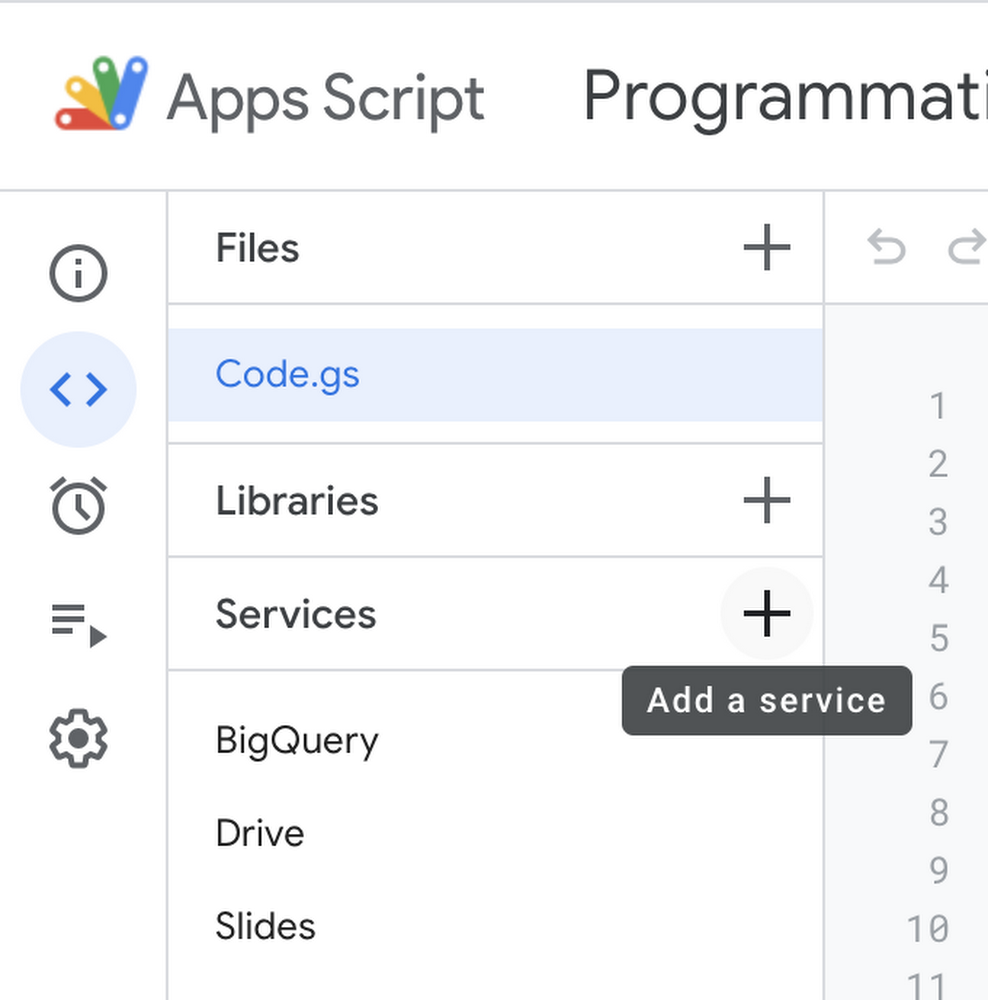
So far in this series, we’ve been focused on generic concepts and console-based workflows. However, when you’re working with huge amounts of data or surfacing information to lots of different stakeholders, leveraging BigQuery programmatically becomes essential. In today’s post, we’re going to take a tour of BigQuery’s API landscape – so you can better understand what each API does and what types of workflows you can automate with it.Leveraging Google Cloud APIsYou can access all the Google Cloud APIs from server applications with our client libraries in many popular programming languages, from mobile apps via the Firebase SDKs, or by using third-party clients. You can also access Cloud APIs with theGoogle Cloud SDK tools or Google Cloud Console. If you are new to Cloud APIs, see Getting Started on how to use Cloud APIs. All Cloud APIs provide a simple JSON HTTP interface that you can call directly or via Google API Client Libraries,Most Cloud APIs also provide a gRPC interface you can call via Google Cloud Client Libraries, which provide better performance and usability. For more information about our client libraries, checkout Client Libraries Explained.BigQuery v2 APIThe BigQuery v2 API is where you can interact with the “core” of BigQuery. This API gives you the ability to manage data warehousing resources like datasets, tables (including both external tables and views), and routines (functions and procedures). You can also leverage BigQuery’s machine learningcapabilities, and create or poll jobs for querying, loading, copying or extracting data. Programmatically getting query resultsOne common way to leverage this API is to programmatically get answers to business questions by running BigQuery queries and then doing something with the results. One example that quickly came to mind was automatically filling in a Google Slide template. This can be especially useful if you’re preparing slides for something like a quarterly business review – where each team may need a slide that shows their sales performance for the last quarter. Many times an analyst is forced to manually run queries and copy-paste the results into the slide deck. However, with the BigQuery API, Google Slides APIand a Google Apps Script we can automate this entire process!If you’ve never used Google Apps scripts before, you can use them to quickly build serverless functions that run inside of Google Drive. Google Apps Scripts already have the Google Workspace and Cloud Libraries available, so you simply need to add the Slides and BigQuery service into your script.In your script you can do something like loop through each team’s name and use it as a parameter to run a parameterized query. Finally, you can use that to replace a template in that team’s slide within the deck. Check out someexample code here, and look out for a future post on more details on the entire process!Loading in new dataAside from querying existing data available in BigQuery, you can also use the API to create and run a load job to add new data into BigQuery tables. This is a common scenario when building batch loading pipelines. One example might be if you’re transforming and bringing data into BigQuery from a transactional database each night. If you remember from our post on tables in BigQuery, you can actuallyrun an external query against a Cloud SQL database. This means that we can simply send a query job, through BigQuery’s API, to grab new data from the Cloud SQL table. Below, we’re using the magics command from the google.cloud.bigquery Python library to save the results into a pandas dataframe.Next, we may need to transform the results. For example, we can use the Google Maps GeoCoding API to get the latitude and longitude coordinates for each customer in our data. Finally, we can create a load job to add the data, along with the coordinates, into our existing native BigQuery table.You can access this code in our sample Jupyter Notebook. However, if you were using this in production you may want to leverage something like a Google Cloud Function.Reservations APIWhile the “core” of BigQuery is handled through the BigQuery v2 API, there are other APIs to manage tangential aspects of BigQuery. The Reservations API, for example, allows you to programmatically leverage workload management resources like capacity commitments, reservations and assignments as we discussed in a previous post. Workload managementLet’s imagine that we have an important dashboard loading at 8am on the first Monday of each month. You’ve decided that you want to leverageflex slotsto ensure that there are enough workers to make the dashboard load super fast for your CEO. So, you decide to write  a program that purchases a flex slot commitment, creates a new reservation for loading the dashboard and then assigns the project where the BI tool will run the dashboard to the new reservation. Check out the full sample code here!Storage APIAnother relevant API for working with BigQuery is theStorage API. The Storage API allows you to use BigQuery like a Data Warehouse and a Data Lake. It’s real-time so that you don’t have to wait for your data, it’s fast so that you don’t need to reduce or sample your data, and it’s efficient so that you should only read the data you want. It’s broken down into two components.The Read Client exposes a data-stream suitable for reading large volumes of data. It also provides features for parallelizing reads, performing partial projections, filtering data, and offering precise control over snapshot time.The Write Client (preview) is the successor to the streaming mechanism found in the BigQuery v2 API. It supports more advanced write patterns such as exactly one semantics. More on this soon!The Storage API was used to build a series of Hadoop connectors so that you can run your Spark workloads directly on your data in BigQuery. You can also build your own connectors using the Storage API!Connections APIThe BigQuery Connections API is used to create a connection to external storage systems, like Cloud SQL. This enables BigQuery users to issue live, federated, queries against other systems. It also supports BigQuery Omni to define multi-cloud data sources and structures.Programmatically Managing Federation ConnectionsLet’s imagine that you are embedding analytics for your customers. Your web application is structured such that each customer has a single-tenant Cloud SQL instance that houses their data. To perform analytics on top of this information, you may want to create connections to each Cloud SQL database. Instead of manually setting up each connection, one option could be using the Connections API to programmatically create new connections during the customer onboarding process.Data Transfer Service APIBigQuery data transfer serviceallows you to automate work to ingest data from known data sources, with standard scheduling. DTS offers support for migration workloads, such as specialized integrations that help with synchronizing changes from a legacy, on premise warehouse. Using the API you can do things likecheck credentials, trigger manual runs and get responses from prior transfers.Data QnA APIThe last API I’ll mention is one of my favorites—Data QnA which is currently in preview. Are business users at your organization always pinging you to query data on their behalf? Well, with the QnA API you can convert natural language text inquiries into SQL – meaning you can build a super powerful chatbot that fulfills those query requests, or even give your business users access to connected sheets so they can ask analytics questions directly in a spreadsheet. Check out this post to learn more about how customers are using this API today!Wrapping upHopefully this post gave you a good idea of how working with the BigQuery APIs can open up new doors for automating data-fueled workflows. Keep in mind that there are lots of more relevant APIs when working with BigQuery, like some of the platforms we discussedlast week in our post on Data Governance- including  IAM for managing access policies, DLP for managing sensitive data, andData Catalog for tracking and searching metadata. Next week is our last post for this season of ourBigQuery Spotlight YouTube series, and we’ll be walking through monitoring use cases. Remember to follow me on LinkedIn and Twitter!Related ArticleBigQuery Admin reference guide: Data governanceLearn how to ensure your data is discoverable, secure and usable inside of BigQuery.Read Article
Quelle: Google Cloud Platform
BigQuery workload management best practices

In the most recent season of  BigQuery Spotlight, we discussed key concepts like  the BigQuery Resource hierarchy, query processing, and the reservation model. This blog focuses on extending those concepts to operationalize workload management for various scenarios. We will discuss the following topics:BigQuery’s Flexible Query Cost OptionsWorkload Management Key ConceptsReservation Applications PatternsCapacity Planning Best PracticesAutomation TipsBigQuery’s flexible query cost optionsBigQuery provides predictable and flexible pricing models for workload management. There are mainly 2 types: On-demand pricing and Flat-rate pricing. You can easily mix and match these pricing models to get the best value for money. With on-demand pricing, you pay per query. This is suitable for initial experimentation or small workloads. Flat-rate pricing consists of short-term and long-term commitments. For short-term commitments or flex slots, you can buy slots for as little as 60 second durations. These enable burst use cases like seasonal spikes. With long-term commitments, you can buy slots per month or year. Monthly and annual commitments are the best choice for on-going or complex workloads that need dedicated resources with fixed costs.Workload managementIn this section we will cover three key concepts: Commitments, Reservations and Assignments With flat-rate pricing you purchase a commitment, where you purchase a dedicated number of BigQuery slots. The first time you buy a slot commitment, BigQuery creates a default reservation and assigns your entire Google Cloud Organization to it. Commitments are purchased in a dedicated administration project, which centralizes the billing and management of purchased slots. Slots are a regional resource, meaning they are purchased in a specific region or multi-region (e.g. US) and can only be used for jobs used on data stored in that region.A reservation is a pool of slots created from a commitment. An assignment is used to allocate slots within a reservation to a  project, folder or the entire organization. If you don’t create any assignment, BigQuery automatically shares the slots across your organization. You can specify which jobs should be using each reservation by indicating a job type of QUERY, PIPELINE (which includes LOAD, EXTRACT, and COPY jobs) or ML_EXTERNAL. You can also force a specific project to leverage on-demand slots by assigning it to a NONE reservation.Check the managing your workloads and reservations documentation to learn more about using these concepts. Resource HierarchyEach level in the GCP resource hierarchy inherits the assignment from the level above it, unless you override it. However, the lowest granularity of slot assignment always takes precedence. For example, let’s say the organization is assigned to the “default” reservation. Any folder or project (like Project F) in the org will use the corresponding 100 slots. However, the dedicated reservation assignments for Storage (300) and Compute (500) folders will take precedence over the “default” reservation. Similarly, Project E’s “compute-dev” assignment with 100 slots will take precedence.  In this case, precedence means that they will leverage the available slots from the “storage-prod” and “compute-prod” reservations before pulling from other reservations.Idle slot sharingBigQuery optimizes resource utilization with its unique idle slot sharing capability, not found in any other cloud based data warehouses, which allows any idle slots in a reservation to be available for other reservations to use. As soon as the reservation needs that capacity back, it gets it while queries consuming idle slots simply go back to using their resources as before. This happens in real-time for every slot. This means that all capacity in an organization is available to be used at any time.  Reservation applications patternsPriority based allocationOrganizations can leverage priority based slot consumption using reservations and idle slot sharing. Reservations with high-priority or low-priority can be used for frequent movement of jobs in and out of the critical and non-critical projects respectively. You can leverage reservations with a small number of slots, and with the idle slots sharing option disabled, to handle expensive queries or ad-hoc workloads. You can also disable the idle slot sharing option when you are looking to get slot estimates for proof-of-concept workloads. Finally, the default reservation, or reservations with no slots can be used for running jobs with lowest priority, projects assigned to these reservations will only use idle slots.For example, A company has a 5000 slot annual commitment for their organizationAll projects in the organization are sharing these 5000 slots (see BigQuery fair scheduling for more details)Without flat rate pricing, they have found that some critical business reports are delayed, or they are running after the non-critical onesAdditionally, some unapproved or ad-hoc workloads are consuming a lot of slotsInstead, we would recommend that they create 3 compute projectsCritical –  assigned to a reservation with 3000 slotsNon-critical – assigned to a reservation with 1500 slotsIdle slots are freely consumed by the above 2Ad-hoc – assigned to a reservation with 500 slots and idle slots sharing disabledWith this method, critical workloads are guaranteed at least 3000 slots, non-critical workloads are guaranteed at least 1500 slots, and ad-hoc workloads are guaranteed to consume no more than 500 slots Mixed-mode reservationOrganizations do not need to pick just one pricing method, instead they can leverage flat-rate for some use cases and on-demand for others. Many BigQuery administrators chose to use an on-demand project for loading data. However, if you need to guarantee that data is loaded using a certain number of slots (ensuring a faster turnaround time), then you can leverage assignments for LOAD jobs. Additionally, on-demand projects can be useful for predictable workloads that are cost effective. Below, we highlight an example of mixing and matching both pricing models in the same organization.Folder 1 projects have access to all the idle slots up from the  5k commitment. Project B has been explicitly assigned to the  ‘Executive BI’ reservation with 1000 slots – to make sure project B gets a minimum of 1000 slots for critical analytics workloads.Folder 2 projects also have access to all the idle slots from the 5k commitmentFolder 2 has also been assigned to the ‘ML Projects’ reservation – to make sure that projects within the folder have access to a minimum of 2k slots for ML activities However, project E has been explicitly assigned to the reservation called ‘none’ to have that project use on-demand slots instead of any slots from the commitment. This is because it is more cost effective for this team to run predictable transformation workloads for machine learning activity in this project, which will have access to a pool of 2k on-demand slots.Folder 3 has been assigned the reservation ‘Load Jobs’ for ingestion workloads. Therefore, project E would have access to minimum 500 slots for critical data load or streaming jobs with access to any additional idle slots from org level reservation.Capacity planning best practicesThe following are general guidelines for pricing options for  given workloads:For highly interactive compute projects, we recommend that you test performance and concurrency needs to assign the proper number of committed slots to the project (more on this below)For projects with a low interactivity i.e. mainly batch processes with high data processing needs benefit with use of on-demand slots as a better cost effective option.Dedicated and non-shareable needs for activities such as  ML model and query slots – use committed and assigned slotsProjects with predictable processing or queries that scan small amounts of data may benefit from  leveraging on-demand slotsDuring use case on-boarding, make sure to review the dataset sizes and understand the batch jobs, and potential load within the queries to determine the optimal pricing strategyActively monitor slot utilization to make sure your have purchased and assigned an optimal number of slots for given workloads Monthly retrospective review of slot utilizationScaling throughput with slotsBigQuery dynamically re-assesses how many slots should be used to execute each stage of a query,   which enables powerful performance with respect to throughput and run-time. The following chart displays how BigQuery scales for throughput with an increase in the number of available slots. The chart below highlights throughput test comparison against traditional databases (TD: black line). The test was done with more than 200 TB of data with various degrees of query complexity,  and the throughput was measured using number of queries completed within 20 min for the given slot capacity.These metrics show a few different things: Most frequently, an increase in the number of concurrent queries also increases BigQuery’s throughput. With simple queries, we see that going from 200 concurrent queries to 300 changes the throughput from 1000 to 1200. This is due to BigQuery’s fair resource sharing and dynamic optimization for each step of the query. However, each query is running with a reduced number of slots so runtimes may be slower. If you need the same or better runtime, and high throughput, for workloads with more concurrent queries then you would need more slots. The chart shows how providing more slots results in more throughput for the same number of concurrent queries. Scaling run-time with slotsBigQuery’s query runtime depends on the four main factors: the number of slots, the number of  concurrent queries, the amount of data scanned and the complexity of the query. Increasing the number of slots results in a faster runtime, so long as the query work can continue to be parallelized. Even if there are additional slots available, if a part of the query cannot be delegated to “free” slots then adding more slots will not make it run faster. In the chart below, you can see that for complex queries the runtime changes from 50 seconds to 20 seconds when you increase slot capacity from 20k to 30k (with 100 concurrent queries). However, additional slots do not do much to improve this query’s runtime, as it cannot be further broken up into parallel pieces.You can test out your own query runtime and throughput to determine the optimal number of slots to purchase and reserve for certain workloads. Some tips for running BigQuery performance testing are:Use large datasets, if possible > 50 TB for throughput testingUse queries of varying complexityRun jobs with a varying amount of available slots  Use Jmeter for automation (Resources at github)Create trend reports for:Avg slot time or query runtimesNumber of concurrent queriesThroughput (how many queries complete over X duration of time)Slot Utilization (total slot usage / Total available capacity for a given duration)Avg. Wait TimeLoad slots estimation workflowIf you are looking for guaranteed SLAs and better performance with your data ingestion, we recommend creating dedicated reservations for your load jobs. Estimating slots required for loading data is easy with this publicly available load slot calculator and the following estimation workflow.The following factors need to be considered to get load slot estimations:Dataset size Dataset Complexity: Number of fields | Number of nested/repeated fieldsData Format/ Conversion: Thrift LZO | Parquet LZO | AvroTable Schema: Is the table Partitioned or Clustered?Load frequency:  Hourly | Daily | Every n-hoursLoad SLA: 1 hour for hourly partition loads | 4 hours for daily/snapshot loadsHistorical Load Throughput: Estimated data size loaded per 2K slots per dayAutomation tipsOptimization with flex slotsConsider a scenario with a compute project that has spikes in analysis during the last five days of every month, something common in many financial use cases. This is a predictable compute resource needed for a short duration of time. In contrast, there could be spikes on completely ad-hoc and non-seasonal workloads. The following automation can be applied to optimize cost and resource utilization without paying for peak usage for the long commitment periods.At t0 to t1 everything is good. We are hitting SLAs, and we’re paying no more than we need. But from t1 to t3 is our peak load time. If we size to a steady state during peak demand, performance suffers, and SLAs are missed. If we size to peak, we can make SLAs, but we pay too much when off-peak.A better solution would be to monitor for a rise in slot consumption and purchase flex slots, either using the Reservation API or Data Control statements (DCL), then assign the slots to the necessary resources. You can actually use quota settings,  automate the end-to-end flex slots cycle with alerts that trigger the flex slot purchase. For more details, check out this Practical Example for leveraging alerts and an Example of putting everything together as a flow.Take actionBy default, BigQuery projects are assigned to the on-demand pricing model, where you pay for the amount of bytes scanned.. Using BigQuery Reservations, you can switch to flat-rate pricing by purchasing commitments. Commitments are purchased in units of BigQuery slots. The cost of all bytes processed is included in the flat-rate price. Key benefits of using BigQuery Reservations include:Predictability: Flat-rate pricing offers predictable and consistent costs. You know up-front what you are spending.Flexibility: You choose how much capacity to purchase. You are billed a flat rate for slots until you delete the capacity commitment. You can also combine both billing models!Commitment Discounts: BigQuery offers flat-rate pricing at a discounted rate if you purchase slots over a longer duration of time (monthly, annual). Workload management: Slot commitments can be further bucketed into reservations and assigned to BigQuery resources to provide dedicated capacity for various workloads, while allowing seamless sharing of any unused slots across workloads.Centralized purchasing: You can purchase and allocate slots for your entire organization. You don’t need to purchase slots for each project that uses BigQuery.Automation: By leveraging flex slots for seasonal spikes or ad-hoc demand rise, you can manage capacity to scale in need. Plus, you can automate the entire process!With capacity planning in the works, it is important that you also have a framework in place for on-going monitoring of slots for continuous optimization and efficiency improvements. Check out this blog for a deep-dive on leveraging the INFORMATION_SCHEMA and use this data studio dashboard, or this Looker block, as a monitoring template. Related ArticleBigQuery Admin reference guide: Data governanceLearn how to ensure your data is discoverable, secure and usable inside of BigQuery.Read Article
Quelle: Google Cloud Platform

Five do’s and don’ts of multicloud, according to the experts

Do you want to fire up a bunch of techies? Talk about multicloud! There is no shortage of opinions. I figured we should tackle this hot topic head-on, so I recently talked to four smart folks—Corey Quinn of Duckbill Group, Armon Dadgar of Hashicorp, Tammy Bryant Butowof Gremlin, and James Watters of VMware—about what multicloud is all about, key considerations, and why you should (or shouldn’t!) do it.Five important insights came out of these discussions. If you’re on a multicloud journey or considering one, keep reading.Do: Choose to do multicloud for the right reasonsDon’t do multicloud because Gartner says so, implores Corey Quinn. Before embarking on a multicloud, define a “why” focused on business value journey, says Armon Dadger. For example, you might want to use services from each public cloud because of their differentiated services, according to Tammy Bryant Butow. Armon also calls out regulatory reasons, existing business relationships, and accommodating mergers and acquisitions. On the topic of M&A, Corey points out that if you acquire a company that uses another cloud, it’s usually expensive and difficult to consolidate. It can be smarter to stay put.Don’t: Over-engineer for workload or data portabilityThinking that you’ll build a system that moves seamlessly among the various cloud providers? Hold up, says our group of experts. Armon points out that aspects of your toolchain or architecture may be multicloud—think of some of your workflows or global network routing—but that shifting workloads or data is far from simple. Corey says that trying to engineer for “write once, run anywhere” can slow you down, and ignores the inherent uniqueness that’s part of each platform. Specifically, Corey calls out the per-cloud stickiness of identity management, security features, and even network functionality. And data gravity is still a thing, says James, that causes some to dismiss multicloud outright.If you’re using multiple public clouds, you take advantage of the distinct value each offers, Armon says. Use native cloud services where possible so that you see the benefits from useful innovations, built-in resilience, and baked-in best practices. The value from that cloud-infused workload may outweigh the benefits of seamless portability.Do: Recognize different stakeholder interests and needsJames smartly points out that many multicloud debates happen because people are arguing from different perspectives. Context matters. If you’re an infrastructure engineer who invests heavily in a given cloud’s identity and access management model, multicloud looks tricky. Or if you’re a data engineer with petabytes of data homed in a particular cloud, multicloud may look unrealistic. James highlights that many developers default to multicloud because their local tools—where all the work happens—are multicloud. A developer’s IDE and preferred code framework(s) aren’t tied to any given cloud. Be aware that groups within your organization will come at multicloud from distinct directions. And this may impact your approach!Don’t: Go it aloneCorey talks about the importance of asking others what worked, and what didn’t. Tammy offers her best practices around sharing results from experiments. It’s about sharing knowledge and tapping into it for community benefit. Others have probably tried what you’re trying, and can help you avoid common pitfalls. If you’ve just made an architectural choice that didn’t work out, share it, and help others avoid the pain. Read research from analysts, go to conferences or watch videos to observe case studies, and join online communities that offer a safe place to share mistakes and learn from others.Do: Experiment first using techniques like multi-region deploymentsIf you think you can operate systems across clouds, how about you first try doing it across regions in a specific cloud, suggests Corey. Getting a system to properly work across cloud regions isn’t trivial, he says, and that experience can help you uncover where you have architectural or operational constraints that will be even worse across cloud providers.This is great guidance if your multicloud aspirations involve using multiple clouds to power one application—versus the more standard definition of multicloud where you use different clouds for different applications—but can also surface issues in your support process or toolchain that fail when faced with distributed systems. Start with muti-region deployments and chaos engineering experiments before aggressively jumping into multicloud architectures.The Google Cloud takeDo the things above. It’s great advice. I’ll add three more things that we’ve learned from our customers.Don’t fear multicloud. You’re already doing it. You don’t single-source everything. As Corey mentioned, you probably already have one cloud for productivity tools, another for source code, another for cloud infrastructure. You’ll use software and application services from a mix of providers for a single app. You have that experience in your team and have been doing that for decades. What people do rightly worry about is using more than one infrastructure service beneath an application, as that can introduce latency, security, and logistical hurdles. Make sure you know which model your team is considering.Embrace the right foundational components, including Kubernetes. Will everything run on Kubernetes? Of course not. Don’t try to do that. But it also represents the closest thing we have to a multicloud API. Companies are using Kubernetes to stripe a consistent experience across clouds. And this isn’t just to orchestrate containers, but also to manage infrastructure and cloud-native services. Also, consider where you need other fundamental consistency across clouds, including areas like provisioning and identity federation.Use Google Cloud as your anchor. Here’s a fundamental question you have to decide for yourself: Are you going to bring your on-premises technology and practices to the cloud, or bring cloud technology and practices on-prem? We sincerely believe in the latter. Anchor to where you’re trying to get to. We offer Anthos as a way to build and run distributed Kubernetes fleets in Google Cloud and across clouds. By using a cloud-based backplane instead of an on-prem one, you’re offloading toil, leveraging managed services for scale and security, and introducing modern practices to the rest of your team.We learned a lot about multicloud through these discussions, and it seems like others did too. That’s why we’re going to do a second round of interviews with a new crop of experts so that we can keep digging deeper into this topic. Stay tuned!Related ArticleRegistration is open for Google Cloud Next: October 12–14Register now for Google Cloud Next on October 12–14, 2021Read Article
Quelle: Google Cloud Platform
Use Process Metrics for troubleshooting and resource attribution

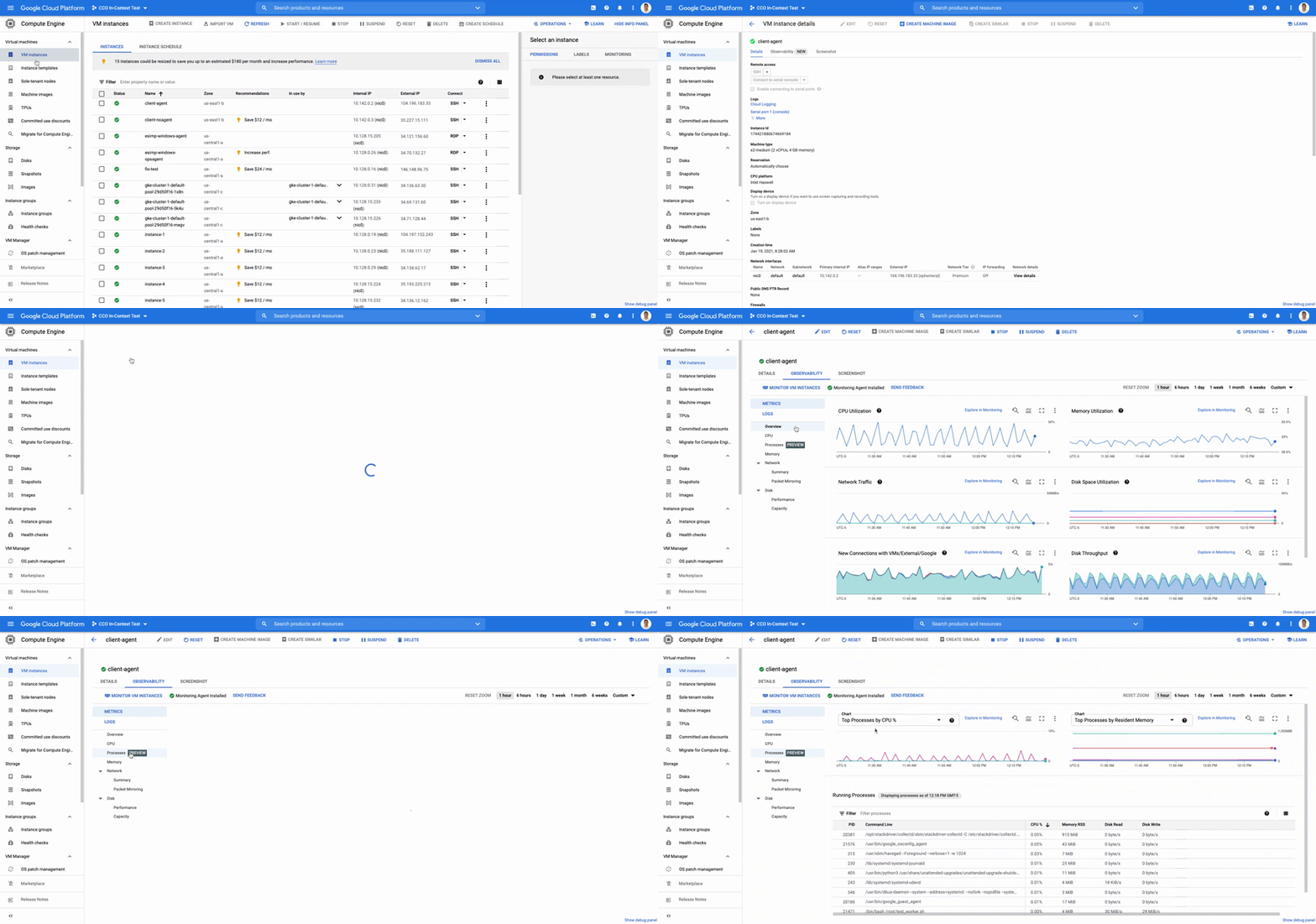
When you are experiencing an issue with your application or service, having deep visibility into both the infrastructure and the software powering your apps and services is critical. Most monitoring services provide insights at the Virtual Machine (VM) level, but few go further. To get a full picture of the state of your application or service, you need to know what processes are running on your infrastructure. That visibility into the processes running on your VMs is provided out of the box by the new Ops Agent and made available by default in Cloud Monitoring. Today we will cover how to access process metrics and why you should start monitoring them. Better visibility with process metricsThe data gathered by process metrics include CPU, memory, I/O, number of threads, and more, for any running processes and services on your VMs. When the Ops Agent or the Cloud Monitoring agent is installed, these metrics are captured at 60-second intervals and sent to Cloud Monitoring so you can visualize, analyze, track, and alert on them. A single VM may run tens or hundreds of processes, while you may have tens of thousands running across your fleet of VMs. As a developer, you may only care about seeing inside a single VM to troubleshoot and identify memory leaks or the source of performance issues.As an operator or IT Admin, you may be interested in aggregate resource consumption, building baseline views of compute, storage, and networking usage across your VM fleet. Then, when those baseline consumption levels break normal behaviors, you will know when to investigate your systems.Built for scale and ease of useCloud Monitoring is built on the same advanced backend that powers metrics across Google. This proven scalability means your metrics ingestion will be supported despite the extremely high cardinality. Additionally, our agents do not require any config file changes to turn on process metric monitoring.Lastly, our goal is to provide you the observability and telemetry data where, and when, you need it. So, like the rest of the operations suite, we deliver process metrics in the context of your infrastructure, directly in the VM admin console.Navigating to a single VM’s in-context process monitoring in GCEThe navigation is simple. Once you have the Ops Agent or the Cloud Monitoring agent installed in your VMs:Go to the Compute Engine console page and click on VM Instances Select the VM that you want to investigateIn the navigation menu on the top, click ObservabilityClick on MetricsLastly, click on ProcessesIn the window on the right you will see a chart and a table with all of the processes in your VM. You can also filter by time frame and sort by name or value. You do not need to do anything, other than have the agent installed, for the process to be detected and displayed.Fleet-wide metrics monitoringCloud Monitoring gives you a look across your fleet of VMs so you can identify the aggregated usage of resources by processes. This level of broad, yet granular, insight can drive your decisions around which software to run or how many VMs you need to optimally power your apps and services. Admins can perform a cost-savings analysis if they determine that certain processes are slowing down the work of a large number of VMs. The larger numbers of less powerful VMs can be replaced by fewer, more capable VMs.   To get this fleet-wide view:Navigate to Cloud Monitoring Click Dashboards in the left menuIn the All Dashboards list, click on VM InstancesTowards the top of the window, click on ProcessesThis provides many charts detailing the processes running across your fleet of VMs.The new Cloud Monitoring VM Fleet-wide Process view in the VM Instance DashboardGet started todayTo start identifying and monitoring your process metrics, you must first install the Ops Agent, or have installed the legacy Cloud Monitoring agent. Once that is complete, the process metrics data will automatically be ingested into Cloud Monitoring and the VM admin console.If you have any questions, or to join the conversation with other developers, operators, DevOps, and SREs, visit the Cloud Operations page in the Google Cloud Community.Related ArticleThe Ops Agent is now GA and it leverages OpenTelemetryToday, we’re happy to announce the General Availability of the new Ops Agent, which replaces both the Logging and Monitoring agents and s…Read Article
Quelle: Google Cloud Platform

Using Compute Engine: Users’ top questions answered

Compute Engine lets you create and run virtual machines (VMs) on Google’s infrastructure, allowing you to launch large compute clusters with ease. When it comes to getting started with Compute Engine, our customers have lots of questions—but some questions come up more often than others. We looked at an internal list of the most popular Compute Engine documentation pages over a 30-day period to find out what topics were explored by users again and again. Here are the top four questions users have about Compute Engine, in order.1. What are the different machine familiesCompute Engine lets you select the right machine for your needs. You can choose from a curated set of predefined virtual machine (VM) configurations optimized for specific workloads, ranging from small-level purpose to large-scale use cases or create a machine type customized to your needs with our custom machine type feature. Compute Engine machines are categorized by machine family, including: General-purpose: Best price-performance ratio for a variety of standard and cloud-native workloads Compute-optimized: Highest performance per core for compute-intensive workloads, such as ad serving or media transcoding  Memory-optimized: More compute and memory per core than any other family for memory-intensive workloads, such as SAP HANA or in-memory data analytics Accelerator-optimized: Designed for your most demanding workloads, such as machine learning (ML) or high performance computing (HPC)Read the documentation to learn more about each machine family category.2. How to connect to VMs using advanced methodsIn general, we recommend using the Google Cloud Console and the gcloud command-line tool to connect to Linux VM instances. However, some of our customers want to use third-party tools, or require alternative connection configurations. In these cases, there are several methods that might fit your needs better than the standard connection options:Connecting to instances using third-party tools (e.g. Windows PuTTY, Chrome OS Secure Shell app), or MacOS or Linux local terminal) Connecting to instances without external IP addressesConnecting to instances as the root user Manually connecting between instances and running commands as a service accountRead the documentation to learn about advanced methods for connecting Linux VMs.3. How to set up OS LoginOS Login lets you use IAM roles and permissions to manage access and permissions to VMs. OS Login is the recommended way to manage users across multiple instances or projects. OS Login provides:Automatic Linux account lifecycle managementFine-grained authorization using Google IAM without having to grant broader privilegesAutomatic permissions updates to prevent unwanted accessAbility to import existing Linux accounts from Active Directory (AD) and Lightweight Directory Access Protocol (LDAP)You can also add an extra layer of security by setting up OS Login with two-factor authentication or manage organization access by setting up organization policies.Read the documentation to learn how to configure OS login and connect to your instances.4. How to manage SSH keys in metadata Compute Engine allows you to manually manage SSH keys and local user accounts by editing public SSH key metadata.You can add  public SSH keys to instance and project metadata using: The Google Cloud Console The gcloud command-line tool API methods from the Google Cloud Client LibrariesRead the documentation to learn how to manually manage SSH keys and local user accounts in metadata.Don’t see your question here? Check out the Compute Engine documentation for all of our recommended guides, tutorials, and resources.Related ArticleWhere should I run my stuff? Choosing a Google Cloud compute optionWhere should you run your workload? It depends…Choosing the right infrastructure options to run your application is critical, both for …Read Article
Quelle: Google Cloud Platform
How to conduct live network forensics in GCP

Forensics is the application of science to criminal and civil laws. It is a proven approach for gathering and processing evidence at a crime scene. An integral step in the forensics process is the isolation of the scene without contaminating or modifying the evidence. The isolation step prevents any further contamination or tampering with possible evidence. The same philosophy can be applied to the investigation of digital events.In this post we will review methods, tactics and architecture designs to isolate an infected VM while still making it accessible to forensic tools. The goal is to allow access so that data and evidence can be captured while protecting other assets. There are many forensic tools for networking that can be used to analyze the captured traffic. This post does not cover these tools but rather how to configure GCP to capture live traffic in the most efficient and secured way. Once traffic is captured, customers can use whatever tools they prefer to run the analysis. More details about these tools and required agents can be found here and details about open source tooling that Google and others are developing are available here.In cloud security context, when a VM shows signs of compromise, the most common immediate reaction is to take a snapshot, shut down the instance and relocate the image snapshot to an isolated environment, a method known as “dead analysis”. However, shutting down the instance will impede an important step in the investigation and digital forensics, as some important information in a buffer or the RAM may be lost. The other forensic approach is “live analysis”, in which the VM is kept on and evidence is gathered from the VM directly. Live forensics enables the imaging of RAM, bypasses most hard drives and software encryption, determines the cause of abnormal traffic, and is extremely useful when dealing with active network intrusions. This process is usually performed by forensic analysts. For example, if there is a good chance the malware resides only in memory then live forensics is, in some cases, the only way to capture and analyze the malware. In this method, in addition to disk and memory evidence, a forensic analysis can also capture live-network from data sent over the compromised VM network interfaces. Some of the benefits of collecting live networks are reconstruction and visualizing traffic flow in real-time, in particular during active network intrusions or attacks. In the cloud, a VM must be isolated when it becomes apparent that an incident has happened, in order to protect other VMs from being infected. Our Cloud Forensics 101 session covers the process and required artifacts, such as logs, that need to be collected for cloud forensics. What happens when your image is compromisedLet’s now assume that one of the VMs in your infrastructure has been compromised and alarms are coming from products such as GCP’s Cloud Security and Command Center, Chronicle backstory or your SIEM. An incident response plan consists of 3 phases: preparation (actions taken before an attack), detection (actions taken during an attack) and response (actions taken after an attack). During the detection phase, the Computer Security Incident Response Team (CSIRT) or threat analysts decide whether live acquisition analysis is required. If live forensics is required, for example when it is vital to acquire a VM’s RAM, then one of the first courses of action is to isolate and contain the VM from the rest of the world and connect the Forensics VPC to the VM for investigation. The forensics VPC resides in a forensics GCP project, it includes digital forensics tools to capture evidence from the VM such as SANS Investigative Forensics Toolkit – SIFT, The Sleuth Kit, Autopsy, Encase, FTK and alike. These tools are already installed, configured, tested and ready to use. The forensics project will also save and preserve evidence such as disk and memory images for forensic review.We’ll cover two scenarios in this post, the first scenario is to isolate the image and connect the forensics VPC to the image for live acquisition. In the second scenario we will also capture live traffic from the isolated image for live network digital forensics. To capture live traffic from the infected VM, we will leverage the GCP Packet Mirroring service to duplicate all traffic going in and out of the VM and send it to a Forensics VPC for analysis. Network forensics analysis tools such as Palo Alto VM-Series for IDS, ExtraHop Reveal(x), CheckPoint CloudGuard, Arkime (formerly Moloch), Corelight are installed, configured and ready for deployment in the Forensics VPC, these tools will be used to analyze the duplicate network traffic. Isolating the infected VM from other resources and connecting the forensics VPCAs part of the Incident Response plan preparation phase, the CSIRT created a Google Cloud Forensics Project. Since the Forensics project will be used only when needed, it’s better to automate the creation of the project and its resources with a tool such as Terraform. It is important to grant access to this project only to individuals and groups who deal with incident response and forensics, such as CSIRT. As shown in figure 1, the Forensics project on the right includes its own VPC, non-overlapped subnet and VM images with pre-installed and pre-configured forensics tools. Internal load-balancer and instance-groups are also configured, we will use these resources to capture live traffic, as described later in this post.Click to enlargeIn order to contain the spread of any malware or network activity, such as data exfiltration, we’ll isolate the VM with VPC firewall rules. The GCP VPC firewall is a distributed firewall that always enforces its rules, protecting the instances regardless of their configuration and operating systems. In other words, the compromised VM cannot override the firewall enforcement if its policies follow the principle of least privilege . Rules can be applied to all instances in the network, target network tags or service accounts.Step 1 in the diagram above shows how an infected VM is isolated from the rest of the network by firewall rules that deny any ingress and egress traffic from any CIDR beside the forensics subnet CIDR. The infected VM is tagged with a unique network tag, for example “<image-name>_InfectedVM”, then firewalls rules are applied on the network tag. This ensures that the infected VM is isolated from the project and the Internet while enabling access to the VM via VPC peering which we’ll configure in step-2. You can learn more about VPC firewalls rules here.In step 2, the VPC from the forensics project is peered with the VPC in the production project. When VPC peering is established routes are exchanged between the VPCs. By default, VPC peering exchanges all subnet routes, however, custom routes can also be filtered if required. At this point, the VM from the forensics project can communicate with the infected VM and start the live forensics analysis job using the pre-installed and pre-configured forensics tools.Shared VPC is a network construct that allows you to connect resources from multiple projects, called service-projects, to a common VPC in a host-project. VPCs from different projects can securely communicate with each other via the hosted project network while centralizing the network administration. Figure 2 depicts Shared VPC topology, rather than using VPC peering, during step 2 the Forensics project is simply attached to the host project. After the attachment, the Shared VPC allows the forensics tools to communicate with the infected VMs.Click to enlargeCapturing live network traffic with Google Traffic MirroringIf live network forensics is required, for example during active network intrusions, then the incoming and outgoing traffic needs to be duplicated and captured. While VPC Flow logs capture the networking metadata telemetry, this is not enough for live network forensics analysis. GCP Packet Mirroring clones the traffic of a specified instance in a VPC and forwards it to a specified internal load balancer which collects the mirrored traffic and sends it to an attached instance group. Packet mirroring captures all the traffic from the specified subnet, network tags, or instance name. Figure 3 depicts the steps that allow the compromised VM to communicate with the rest of the world (for example beaconing with C&C) while capturing all traffic for investigation in a peered VPC deployment.Click to enlargeFigure 4 depicts the steps that allow the compromised VM to communicate with the rest of the world while capturing all traffic for investigation in a shared VPC deployment.Click to enlargeWe will use the Forensics’ project internal load balancer and the instance group VMs which include packet capture and analysis tools. Note that production and forensics networks must be in the same region. Detailed steps to configure packet mirroring are available on this page. If you are using a Shared VPC then check thePacket Mirroring configuration for Shared VPC for configuration details. Figure 4 depicts the packet mirroring flow in a shared VPC topology.It is recommended to automate and periodically test the process to make sure that in case of an incident, the entire setup and Forensics toolchain can be quickly deployed. If after initial investigation a suspicious destination, such as a Command and Control [C&C] Server, has been identified, then the Packet Mirroring policy can be adjusted with a policy filterthat only mirrors traffic from that C&C server IP address.An incident management plan must be in place for companies using cloud services, and this plan should also include the option of using live acquisition when necessary. design and preparation for forensics acquisition allows the company to build the infrastructure that can be deployed and connected to the appropriate VM automatically. The architectures described in this post can help the process of collecting and preserving vital evidence for the forensic process, while the incident response team resolves the incident.Related ArticleRegistration is open for Google Cloud Next: October 12–14Register now for Google Cloud Next on October 12–14, 2021Read Article
Quelle: Google Cloud Platform

Scalable tech support via AI-augmented chat

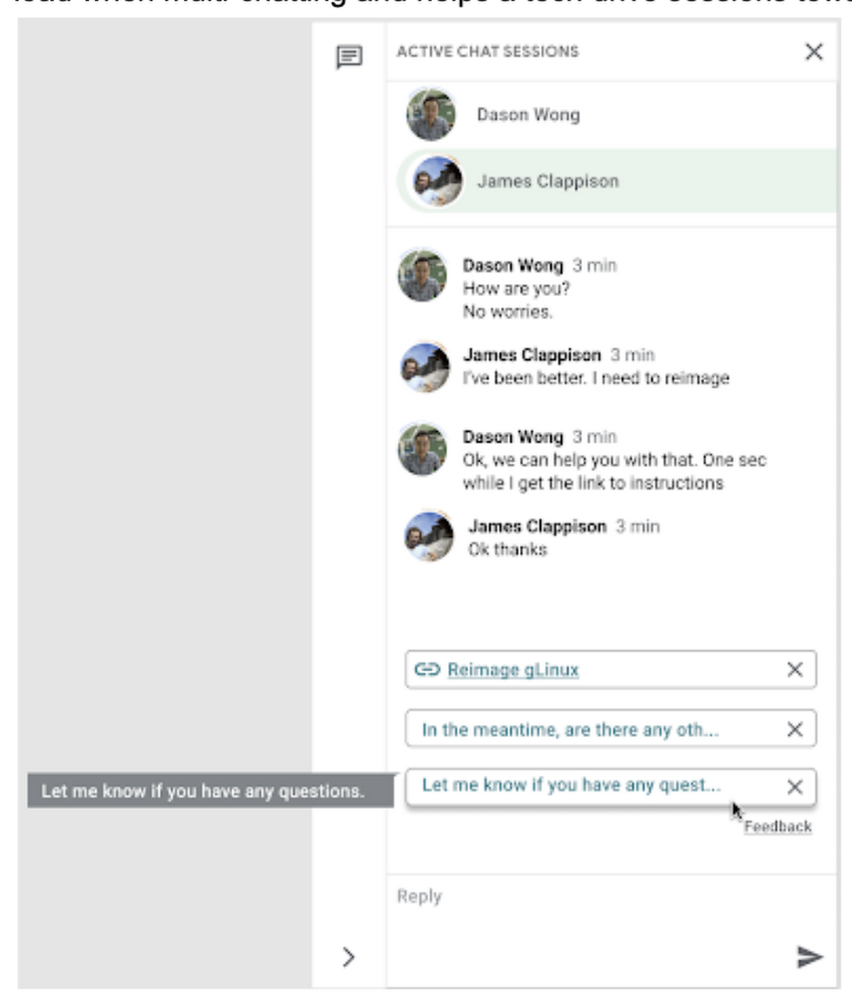
As Googlers transitioned to working from home during the pandemic, more and more turned to chat-based support to help them fix technical problems. Google’s IT support team looked at many options to help us meet the increased demand for tech support quickly and efficiently. More staff? Not easy during a pandemic. Let service levels drop? Definitely not. Outsource? Not possible with our IT requirements. Automation? Maybe, just maybe…How could we use AI to scale up our support operations, making our team more efficient?The answer: Smart Reply, a technology developed by a Google Research team with expertise in machine learning, natural language understanding, and conversation modeling. This product provided us with an opportunity to improve our agents’ ability to respond to queries from Googlers by using our corpus of chat data.  Smart Reply trains a model that provides suggestions to techs in real time. This reduces the cognitive load when multi-chatting and helps a tech drive sessions towards resolution.In the solution detailed below, our hope is that IT teams in a similar situation can find best practices and a few shortcuts to implementing the same kind of time saving solutions. Let’s get into it!Challenges in preparing our dataOur tech support service for Google employees—Techstop—provides a complex service, offering support for a range of products and technology stacks through chat, email, and other channels. Techstop has a lot of data. We receive hundreds of thousands of requests for help per year. As Google has evolved we’ve used a single database for all internal support data, storing it as text, rather than as protocol buffers. Not so good for model training. To protect user privacy, we want to ensure no PII (personal identifiable information – e.g. usernames, real names, addresses, or phone numbers) makes it into the model.To address these challenges we built a FlumeJava pipeline that takes our text and splits each message sent by agent and requester into individual lines, stored as repeated fields in a protocol buffer. As our pipe is executing this task, it also sends text to the Google Cloud DLP API, removing personal information from the session text, replacing it with a redaction that we can later use on our frontend. With the data prepared in the correct format, we are able to begin our model training. The model provides next message suggestions for techs based on the overall context of the conversation. To train the model we implemented tokenization, encoding, and dialogue attributes.Splitting it upThe messages between the agent and customer are tokenized: broken up into discrete chunks for easier use. This splitting of text into tokens must be carefully considered for several reasons:Tokenization determines the size of the vocabulary needed to cover the text.Tokens should attempt to split along logical boundaries, aiming to extract the meaning of the text.Tradeoffs can be made between the size of each token, with smaller tokens increasing processing requirements but enabling easier correlation between different spans of text.There are many ways to tokenize text (SAFT, splitting on white spaces, etc.), here we chose sentence piece tokenization, with each token referring to a word segment. Prediction with encodersTraining the neural network with tokenized values has gone through several iterations. The team used an Encoder-Decoder architecture that took a given vector along with a token and used a softmax function to predict the probability that the token was likely to be the next token in the sentence/conversation. Below, a diagram represents this method using LSTM-based recurrent networks. The power of this type of encoding comes from the ability of the encoder to effectively predict not just the next token, but the next series of tokens.This has proven very useful for Smart Reply. In order to find the optimal sequence, an exponential search over each tree of possible future tokens is required. For this we opted to use beam search over a fixed-size list of best candidates, aiming to avoid increasing the overall memory use and run time for returning a list of suggestions. To do this we arranged tokens in a trie, and used a number of post processing techniques, as well as calculating a heuristic max score for a given candidate, to reduce the time it takes to iterate through the entire token list. While this improves the run time, the model tends to prefer shorter sequences. In order to help reduce latency and improve control we decided to move to an Encoder-Encoder architecture. Instead of predicting a single next token and decoding a sequence of following predictions with multiple calls to the model, it instead encodes a candidate sequence with the neural network.In practice, the two vectors – the context encoding and the encoding of a single candidate output – are combined with dot product to arrive at a score for the given candidate. The goal of this network is to maximize the score for true candidates – e.g. candidates that did appear in the training set – and minimize false candidates.Choosing how to sample negatives affects the model training greatly. Below are some strategies that can be employed:Using positive labels from other training examples in the batch.Drawing randomly from a set of common messages. This assumes that the empirical probability of each message is sampled correctly. Using messages from context.Generating negatives from another model.As this encoding generates a fixed list of candidates that can be precomputed and stored, each time a prediction is needed, only the context encoding needs to be computed, then multiplied by the matrix of candidate embeddings. This reduces both the time from the beam search method and the inherent bias towards shorter responses.Dialogue AttributesConversations are more than simple text modeling. The overall flow of the conversation between participants provides important information, changing the attributes of each message. The context, such as who said what to whom and when, offers useful bits of input for the model when making a prediction. To that end the model uses the following attributes during its prediction:Local User ID’s – we set a finite number of participants for a given conversation to represent the turn taking between messages, assigning values to those participants. In most cases for support sessions there are 2 participants, requiring ID 0, and 1.Replies vs continuations – initially modeling focused only on replies. However, in practice conversations also include instances where participants are following up on the previously sent message. Given this, the model is trained for both same-user suggestions and “other” user suggestions.Timestamps  – gaps in conversation can indicate a number of different things. From a support perspective, gaps may indicate that the user has disconnected. The model takes this information and focuses on the time elapsed between messages, providing different predictions based on the values. Post processingSuggestions can then be manipulated to get a more desirable final ranking. Such post-processing includes:Preferring longer suggestions by adding a token factor, generated by multiplying the number of tokens in the current candidate.Demoting suggestions with a high level of overlap with previously sent messages.Promoting more diverse suggestions based on embedding distance similarities.To help us tune and focus on the best responses the team created a priority list. This gives us the opportunity to influence the model’s output, ensuring that responses that are incorrect can be de-prioritized. Abstractly it can be thought of as a filter that can be calibrated to best suit the client’s needs. Getting suggestions to agentsWith our model ready we now needed to get it in the hands of our techs. We wanted our solution to be as agnostic to our chat platform as possible, allowing us to be agile when facing tooling changes and speeding up our ability to deploy other efficiency features. To this end we wanted an API that we could query either via gRPC or via HTTPs. We designed a Google Cloud API, responsible for logging usage as well as acting as a bridge between our model and a Chrome Extension we would be using as a frontend.The hidden step, measurementOnce we had our model, infrastructure, and extension in place we were left with the big question for any IT project. What was our impact? One of the great things about working in IT at Google is that it’s never dull. We have constant changes, be it planned or unplanned. However, this does complicate measuring the success of a deployment like this. Did we improve our service or was it just a quiet month?In order to be satisfied with our results we conducted an A/B experiment, with some of our techs using our extension, and the others not. The groups were chosen at random with a distribution of techs across our global team, including a mix of techs with varying levels of experience ranging from 3 to 26 months. Our primary goal was to measure tech support efficiency when using the tool. We looked at two key metrics as proxies for tech efficiency: The overall length of the chat. The number of messages sent by the tech.Evaluating our experimentTo evaluate our data we used a two-sample permutation test. We had a null hypothesis that techs using the extension would not have a lower time-to-resolution, or be able to send more messages, than those without the extension. The alternative hypothesis was that techs using the extension would be able to resolve sessions quicker or send more messages in approximately the same time.We took the mid mean of our data, using pandas to trim outliers greater than 3 standard deviations away. As the distribution of our chat lengths is not normal, with significant right skew caused by a long tail of longer issues, we opted to measure the difference in means, relying on central limit theorem (CLT) to provide us with our significance values. Any result with a p-value between 1.0 and 9.0 would be rejected. Across the entire pool we saw a decrease in chat lengths of 36 seconds.In reference to the number of chat messages we saw techs on average being able to send 5-6 messages more in less time. In short, we saw techs were able to send more messages in a shorter period of time. Our results also showed that these improvements increased with support agent tenure, and our more senior techs were able to save an average of ~4 minutes per support interaction.Overall we were pleased with the results. While things weren’t perfect, it looked like we were onto a good thing.So what’s next for us?Like any ML project, the better the data the better the result. We’ll be spending time looking into how to provide canonical suggestions to our support agents by clustering results coming from our allow list. We also want to investigate ways of making improvements to the support articles provided by the model, as anything that helps our techs, particularly the junior ones, with discoverability will be a huge win for us.How can you do this?A successful applied AI project always starts with data. Begin by gathering the information you have, segmenting it up, and then starting to process it. The interaction data you feed in will determine the quality of the suggestions you get, so make sure you select for the patterns you want to reinforce.Our Contact Center AI allows tokenization, encoding and reporting, without you needing to design or train your own model, or create your own measurements. It handles all the training for you, once your data is formatted properly. You’ll still need to determine how best to integrate its suggestions to your support system’s front-end. We also recommend doing statistical modeling to find out if the suggestions are making your support experience better. As we gave our technicians ready-made replies to chat interactions, we saved time for our support team. We hope you’ll try using these methods to help your support team scale.Related ArticleRunning Anthos inside GoogleHow we run our third-party software on Anthos at GoogleRead Article
Quelle: Google Cloud Platform
Build a reinforcement learning recommendation application using Vertex AI

Reinforcement learning (RL) is a form of machine learning whereby an agent takes actions in an environment to maximize a given objective (a reward) over this sequence of steps. Applications of RL include learning-based robotics, autonomous vehicles and content serving. The fundamental RL system includes many states, corresponding actions, and rewards to those actions. Translate that into a movie recommender system: The ‘state’ is the user, the ‘action’ is the movie to recommend to the user, and the ‘reward’ is the user rating of the movie. RL is a great framework for optimizing ML models, as mentioned by Spotify in the keynote in the Applied ML Summit 2021.In this article, we’ll demonstrate an RL-based movie recommender system executed in Vertex AI and built with TF-Agents,a library for RL in TensorFlow. This demo has two parts: (1) a step-by-step guide leveraging Vertex Training, Hyperparameter Tuning, and Prediction services; (2) a MLOps guide to build end-to-end pipelines using Vertex Pipelines and other Vertex services.TF-Agents meets Vertex AIIn reinforcement learning (RL), an agent takes a sequence of actions in a given environment according to some policy, with the goal of maximizing a given reward over this sequence of actions. TF-Agents is a powerful and flexible library enabling you to easily design, implement and test RL applications. It provides you with a comprehensive set of logical modules that support easy customization:Policy: A mapping from an environment observation to an action or a distribution over actions. It is the artifact produced from training, and the equivalent of a “Model” in a supervised learning setup.Action: A move or behavior that is outputted by some policy, and chosen and taken by an agent.Agent: An entity that encapsulates an algorithm to use one or more policies to choose and take actions, and trains the policy.Observations: A characterization of the environment state.Environment: Definition of the RL problem to solve. At each time step, the environment generates an observation, bears the effect of the agent action, and then given the action taken and the observation, the environment responds with a reward as feedback.A typical RL training loop looks like the following:A typical process to build, evaluate, and deploy RL applications would be:Frame the problem: While this blog post introduces a movie recommendation system, you can use RL to solve a wide range of problems. For instance, you can easily solve a typical classification problem with RL, where you can frame predicted classes as actions. One example would be digit classification: observations are digit images, actions are 0-9 predictions and rewards indicate whether the predictions match the ground truth digits.Design and implement RL simulated experiments: We will go into detail on simulated training data and prediction requests in the end-to-end pipeline demo.Evaluate performance of the offline experiments.Launch end-to-end production pipeline by replacing the simulation constituents with real-world interactions.Now that you know how we’ll build a movie recommendation system with RL, let’s look at how we can use Vertex AI to run our RL application in the cloud. We’ll use the following Vertex AI products:Vertex AI training to train a RL policy (the counterpart of a model in supervised learning) at scaleVertex AI hyperparameter tuning to find the best hyperparametersVertex AI prediction to serve trained policies at endpointsVertex Pipelines to automate, monitor, and govern your RL systems by orchestrating your workflow in a serverless manner, and storing your workflow’s artifacts using Vertex ML Metadata.Step-by-step RL demoThis step-by-step demo showcases how to build the MovieLens recommendation system using TF-Agents and Vertex AI services, primarily custom training and hyperparameter tuning, custom prediction and endpoint deployment. This demo is available on Github, including a step-by-step notebook and Python modules.The demo first walks through the TF-Agents on-policy (which is covered in detail in the demo) training code of the RL system locally in the notebook environment. It then shows how to integrate the TF-Agents implementation with Vertex AI services: It packages the training (and hyperparameter tuning) logic in a custom training/hyperparameter tuning container and builds the container with Cloud Build. With this container, it executes remote training and hyperparameter tuning jobs using Vertex AI. It also illustrates how to utilize the best hyperparameters learned from the hyperparameter tuning job during training, as an optimization.The demo also defines the prediction logic, which takes in observations (user vectors) from prediction requests and outputs predicted actions (movie items to recommend), in a custom prediction container and builds the container with Cloud Build. It deploys the trained policy to a Vertex AI endpoint, and uses the prediction container as the serving container for the policy at the Vertex AI endpoint.End-to-end workflow with a closed feedback loop: Pipeline demoPipeline architectureBuilding upon our RL demo, we’ll now show you how to scale this workflow using Vertex Pipelines. This pipeline demo showcases how to build an end-to-end MLOps pipeline for the MovieLens recommendation system, using Kubeflow Pipelines (KFP) for authoring and Vertex Pipelines for orchestration.Highlights of this end-to-end demo include:RL-specific implementation that handles RL modules, training logic and trained policies as opposed to modelsSimulated training data, simulated environment for predictions and re-trainingClosing of the feedback loop from prediction results back to trainingCustomizable and reproducible KFP componentsAn illustration of the pipeline structure is shown in the figure below.The pipeline consists of the following components:Generator: to generate MovieLens simulation data as the initial training dataset using a random data-collecting policy, and store in BigQuery [executed only once]Ingester: to ingest training data in BigQuery and output TFRecord filesTrainer: to perform off-policy (which is covered in detail in the demo) training using the training dataset and output a trained RL policyDeployer: to upload the trained policy, create a Vertex AI endpoint and deploy the trained policy to the endpointIn addition to the above pipeline, there are three components which utilize other GCP services (Cloud Functions, Cloud Scheduler, Pub/Sub):Simulator: to send recurring simulated MovieLens prediction requests to the endpointLogger: to asynchronously log prediction inputs and results as new training data back to BigQuery, per prediction requestsTrigger: to recurrently execute re-training on new training dataPipeline construction with Kubeflow Pipelines (KFP)You can author the pipeline using the individual components mentioned above:The execution graph of the pipeline looks like the following:Refer to the GitHub repo for detailed instructions on how to implement and test KFP components, and how to run the pipeline with Vertex Pipelines.Applying this demo to your own RL projects and productionYou can replace the MovieLens simulation environment with a real-world environment where RL quantities like observations, actions and rewards capture relevant aspects of said real-world environment. Based on whether you can interact with the real world in real-time, you may choose either on-policy (showcased by the step-by-step demo) or off-policy (showcased by the pipeline demo) training and evaluation.If you were to implement a real-world recommendation system, here’s what you’d do:You would represent users as some user vectors. The individual entries in the user vectors may have actual meanings like age. Alternatively, they may be generated through a neural network as user embeddings. Similarly, you would define what an action is and what actions are possible, likely all items available on your platform; you would also define what the reward is, such as whether the user has tried the item, how long/much the user has spent on the item, user rating of the item, and so on. Again, you have the flexibility to decide on representations for framing the problem that maximize performance. During training or data pre-collection, you may randomly sample users (and build the corresponding user vectors) from the real world, use those vectors as observations to query some policy for items to recommend, and then apply that recommendation to users and obtain their feedback as rewards.This RL demo can also be extended to ML applications other than recommendation system. For instance, if your use case is to build an image classification system, then you can frame an environment, where observations are the image pixels or embeddings, actions are the predicted classes, and rewards are feedback on the predictions’ correctness.ConclusionCongratulations! You have learned how to build reinforcement learning solutions using Vertex AI in a fully managed, modularized and reproducible way. There is so much you can achieve with RL, and you now have many Vertex AI as well as Google Cloud services in your toolbox to support you in your RL endeavors, be it production systems, research or cool personal projects.Additional resources[Recap] step-by-step demo link: GitHub link[Recap] end-to-end pipeline demo: GitHub linkTF-Agents tutorial on bandits: Introduction to Multi-Armed BanditsVertex Pipelines tutorial: Intro to Vertex PipelinesRelated ArticleUse Vertex Pipelines to build an AutoML classification end-to-end workflowHow you can use Vertex Pipelines to build an end-to-end ML workflow for training a custom model using AutoMLRead Article
Quelle: Google Cloud Platform

Understanding Cloud SQL Maintenance: why is it needed?

Since I joined the Cloud SQL team, customers have asked me one question about our service more than any other: “What happens during Cloud SQL maintenance?” It’s a fair question–I’d want to know too if something was going to impact my database’s availability!In this blog series, I’ll take you through the ins and outs of Cloud SQL maintenance. In Part 1, I will share how maintenance and other system updates make database operations a whole lot simpler for our users. In Part 2, I’ll take you step-by-step through the maintenance process and offer a behind the scenes look at the engineering that has gone into minimizing database downtime. In Part 3, I will finish with an overview of how users use Cloud SQL maintenance settings and design their applications to optimize their scheduled maintenance experiences.Let’s get started!What comprises a Cloud SQL instance?We first need to cover the system components that comprise a Cloud SQL instance. Each Cloud SQL instance is powered by a virtual machine (VM) running on a host Google Cloud server. Each VM operates the database engine, such as MySQL,  PostgreSQL, or SQL Server, as well as service agents that provide supporting services like logging and monitoring. For users of our high availability option, we set up a standby VM in another zone in the same region with an identical configuration to the primary VM. Database data is stored on a scalable, durable network storage device called a persistent disk that attaches to the VM. Finally, a static IP address sits in front of each VM, which ensures that the IP address that an application connects to persists throughout the lifetime of the Cloud SQL instance, including through maintenance or automatic failover.What are the database updates that happen on a Cloud SQL instance?Over the life of a Cloud SQL instance, there are two types of updates. Updates that users perform, which are called configuration updates and updates that Cloud SQL performs, which are called system updates.As a database’s usage grows and new workloads are added, users may want to update their database configuration accordingly. These configuration updates include increasing compute resources, modifying a database flag, and enabling high availability. Although Cloud SQL makes these updates possible with the click of a button, configuration updates can require downtime. When thinking holistically about application availability, users need to plan ahead for these configuration updates.Keeping the database instance up and running requires operational effort beyond configuration updates. Servers and disks need to be replaced and upgraded. Operating systems need to be patched as new vulnerabilities are discovered. Database engines need to be upgraded as the database software provider releases new features and fixes new issues. Normally, a database administrator would need to perform each of these updates regularly in order to ensure their system stays reliable, protected, and up-to-date. Cloud SQL takes care of these system updates on behalf of our users, so that they can spend fewer cycles managing their database and more cycles developing great applications. In fact, managed system updates attract many users to our managed service.How does maintenance fit into system updates?In general, Cloud SQL system updates are divided into three categories: hardware updates, online updates, and maintenance.Hardware updates improve underlying physical infrastructure. These include swapping out a defective machine host or replacing an old disk. Google Cloud performs hardware updates without interruption to a user’s application. For example, when updating a database server, Google Cloud uses live migration, an advanced technology that reliably migrates a VM from the original host to a new one while the VM stays running.Online updates enhance the software of the supporting service agents that sit adjacent to the database engine. These updates are performed while the database is up and running, serving traffic. Online updates do not cause downtime for a user’s application.Maintenance updates the operating system and the database engine. Since these updates require that the instance be restarted, they incur some downtime. For this reason, Cloud SQL allows users to schedule maintenance to occur at the time that is least disruptive to a user’s application.As you can see, Cloud SQL performs most system updates without any application impact. We take care to only schedule maintenance when we need to update a part of the system that cannot be updated without interrupting the service. To moderate application impacts, we bundle critical updates together into maintenance events that are scheduled once every few months. We’ve gone further to design the maintenance workflow to complete quickly so that our users’ applications can get back up and running. We’ll discuss this further in Part 2. To make maintenance more manageable, we equip users with settings such as maintenance windows and deny periods, which we will cover in more detail in Part 3.If you’re interested in learning more about how maintenance fits together with all of the other benefits of Cloud SQL, read our blog about the value of managed database services.Stay tuned for Part 2, where we will talk more specifically about how long maintenance lasts, what kinds of updates come with maintenance, and how Cloud SQL conducts maintenance to ensure minimum impact to our users’ instances.Related ArticlePrevent planned downtime during the holiday shopping season with Cloud SQLNew maintenance deny periods for Cloud SQL let you choose when downtime occurs for database maintenance–especially useful for retailers …Read Article
Quelle: Google Cloud Platform





