The top 5 launches of 2021 (so far)

And just like that, seven months are under our belts. I’m guessing I’m not the only one who feels like 2021 is flying by. Even so, much has already happened at Google Cloud. We launched more products and features than I can count, hosted our first virtual Google I/O, and organized Cloud OnAir events each month, including our Applied ML Summit, Cloud Data Summit, and Security Summit. It’s not exactly easy to keep up with the milestones floating around press releases, blogs, and social media. So I’ll spare you the drudgery of a web hunt with a list of my top five product launches of 2021 (so far). Plus, I’ll throw in snippets of where I think these launches fit within the rest of our offerings and the industry at large.1. Vertex AIAt Google I/O in May, we announced the general availability of Vertex AI, a managed machine learning platform that enables companies to accelerate the deployment and maintenance of artificial intelligence models. You might remember that back in 2018 we released AI Platform, which included a training, prediction, and data labeling service, along with managed notebooks and more. It helped you handle all steps of the ML workflow, from sourcing data to managing models and versions. Alongside we had popular AutoML offerings, like AutoML’s Vision, Video Intelligence, and Natural Language APIs. The feedback we’ve gotten is that data scientists have grappled with the challenge of manually piecing together ML point solutions. This has increased lag time in model development and experimentation, and greatly reduced the number of models making it into production. Vertex AI brings together Google Cloud ML services under one unified UI and API to simplify the process of building, training, and deploying machine learning models at scale. AutoML and AI Platform share the same underlying infrastructure, data modeling, UX, and API layers. In this single environment, you can train and compare models using AutoML or custom code, and all your models are stored in one central model repository. These models can be deployed to the same endpoints on Vertex AI.You can think of it like a choose-your-own adventure book where you can decide whether to train custom models, use AutoML, or use BigQuery ML, yet still end up with a productionized model by the last chapter. Meanwhile, your hands never leave the same bound pages of the book, so you have a sense of familiarity and control, as well as the freedom to bounce around the pages. Some key features:Deep Learning VM imagesVertex NotebooksVertex Data LabelingVertex Explainable AIVertex PipelinesVertex PipelinesWhere does this fit into our product strategy?We’re funneling major tools to build, deploy, and manage ML applications into one toolbox, while integrating other analytics tools like BigQuery ML. Not only are we baking our long time investments of AI into Vertex, but we’re using it as a landing spot for ways we can simplify ML for novices and experts. Meanwhile, we’re continuing to build upon our industry-specific AI solutions like Contact Center AI to enhance customer service experiences, Document AI to make unstructured data available to business users, and our Healthcare API (which has prebuilt connectors to Vertex AI) to unlock ML in clinical workflows. Where does this fit into the broader industry?Now that we can safely say the field of ML is maturing, data science teams are looking beyond just building models to also maintaining them. Teams need to experiment with, evaluate, understand, and reproduce models. Collaboration between practitioners is a necessity, and responsible AI needs to be top of mind.As such, DevOps practices, like CI/CD for software development, have made their way into ML. MLOps emerged to similarly codify and automate the workflow to build and manage ML models. Just as tools like GitHub, Spinnaker, and Datadog emerged, many new tools are taking the stage to help with different parts of the ML lifecycle (tracking issues, managing version history, and monitoring and alerting when something goes wrong in production).But ML teams want a unified experience that includes pipelines, a feature store, labeling services, model stores, evaluation, and more. Vertex AI is our big attempt at giving teams just that. I see it as a way to promote the use of best practices, and help new practitioners learn. Even if you’re starting with AutoML, your projects can remain on the same infrastructure as you transition to building custom models on your own. Where can you get started?Start here:AI Simplified video seriesNew to ML: Learning path on Vertex AIVertex AI: How to create and manage data setsGCP Podcast episodeApplied ML SummitGet hands-on:Vertex AI tutorialsCodelab: Vertex AI: Building a fraud detection model with AutoMLCodelab: Building a financial ML model with the What-If Tool and Vertex AIServe a TensorFlow Hub model in Google Cloud with Vertex AIDistributed training and hyperparameter tuning with TensorFlow on Vertex AIMonitor models for training-serving skew with Vertex AI2. GKE AutopilotOne of our most revolutionary and exciting announcements of 2021 was GKE Autopilot, a new mode of operation for creating and managing Kubernetes clusters in Google Kubernetes Engine (GKE). In this mode, GKE configures and manages the underlying infrastructure, including nodes and node pools, enabling you to focus only on the target workloads and pay-per-pod resource requests (CPU, memory, and ephemeral storage). In addition to the GKE SLA on hosts and the control plane, Autopilot also includes an SLA on pods.We haven’t been shy about the fact that Kubernetes can take a fair bit of manual assembly and tinkering to optimize it for your needs. GKE was launched in 2015 as a container orchestration platform. You can create or resize Docker container clusters; create container pods, replication controllers, jobs, services or load balancers; resize application controllers; update and upgrade container clusters; and debug container clusters. But wait, you might be thinking, “Wasn’t GKE already fully managed?”GKE was indeed already a very hands-off Kubernetes platform because it managed cluster control planes, storage, and networking, while still giving you a high level of control over most aspects of cluster configurations. This is great for companies with operator teams who want to make their own decisions on node configuration, cluster size, cluster autoscaling, and maintenance windows. But for many, especially dev-focused teams who want to onboard quickly onto GKE, that level of control and sheer number of choices can be overwhelming or simply unnecessary for their requirements. GKE Autopilot was developed to give teams a straightforward way to build a more secure and consistent development platform. You can embrace Kubernetes and simplify operations because GKE Autopilot takes care of cluster infrastructure, control planes, and nodes. I think our VP of Infrastructure, Eric Brewer, said it best:Some key features:GKE Autopilot manages node and node pools.Autopilot clusters are preconfigured with an optimized cluster configuration.Autopilot comes with an SLA that covers both the control plane and your pods. Where does it fit into our product strategy?A question I frequently hear is, “Is this a serverless version of GKE?” A better way to think of Autopilot is that it’s “nodeless”. GKE is the industry’s first fully managed Kubernetes service that implements the full Kubernetes API. GKE Autopilot clusters offer the benefits of a serverless offering with full access to the Kubernetes API. Those who use Kubernetes are using it as a layer on top of IaaS to build their own application platforms. That doesn’t mean, however, it’s not meant for developers. On the contrary, it’s meant for developers who want an easier onboarding to Kubernetes. Where does it fit into the broader industry?Another question I often get is, “How does this differ from AWS Fargate?” GKE Autopilot is similar to Fargate for EKS with one major difference: Autopilot supports almost the entire Kubernetes API, including DaemonSets, jobs, CRDs, and admission controllers. One of the standout differences is that you can attach block storage to Autopilot (i.e. HDDs). Autopilot is still Kubernetes and designed that way from the ground up. Our goal from the outset was that Autopilot is GKE, and not a forked or separate product. This means that many of the improvements we make to autoscaling in GKE Autopilot will be shared back to GKE Standard and vice versa. In Autopilot, we’ve combined GKE automation and scaling and lots of great community enhancements.For developers running on GKE, nothing really changes. For developers interested in starting on Kubernetes, I have yet to see an offering like GKE Autopilot. With Autopilot, you still get the benefits of Kubernetes, but without all of the routine management and maintenance. That’s a trend I’ve been seeing as the Kubernetes ecosystem has evolved. Few companies, after all, see the ability to effectively manage Kubernetes as their real competitive differentiator.Where can you get started?Start here:Cloud OnAir eventGKE Standard vs AutopilotGCP Podcast episodeAhmet Alp Balkan’s blog post on stress testing Autopilot Get hands-on:In-console tutorial3. Tau VMsTau VMs were announced just this June. Tau VMs are a new Compute Engine family, optimized for cost-effective performance of scale-out workloads. T2D, the first instance type in the Tau VM family, is based on 3rd Gen AMD EPYCTM processors and leapfrogs the available VMs for scale-out workloads from any leading public cloud provider , both in terms of performance and workload total cost of ownership. Our Compute Engine offerings (like our general purpose, compute optimized, memory optimized, and accelerator optimized VMs) already cover a broad range of workload requirements from dev/test to enterprise apps, HPC, and large in-memory databases. There is, however, still a need for compute that supports scale-out enterprise workloads, including media transcoding, Java-based applications, containerized workloads, and web servers. Developers want focused VM features without breaking the bank or sacrificing their productivity. The purpose of our Tau VM family is to provide an intermediate path to the cloud that gives you those features.Some key features: T2D VMs will come in predefined VM shapes, with up to 60 vCPUs per VM, and 4 GB of memory per vCPU, and offer up to 32 Gbps networking.The AMD EPYC processor-based VMs also preserve x86 compatibility.AMD EPYC processors are built using the Zen 3 architecture, which reduces communication penalties during scale out.You can add T2D nodes to your GKE clusters.Where does it fit into our product strategy?We launched Tau VMs to complement our general purpose VMs and provide what enterprise data centers have always aimed for: the best performance for enterprise workloads at the best price. With T2D, we saw 56% better raw performance over key competitors.We derived findings from the SPECrate2017_int_base benchmark, which measures the integer performance of a CPU. We ran production VMs from other cloud providers and our preproduction Tau T2D instances using VMs with 32 vCPUs and 128GB RAM. Where does it fit into the broader industry?Looking at Tau in the bigger Google Cloud context, I think T2D delivers a VM instance type that teams want. For IT leaders, three things matter: performance, reliability, and cost. The majority of enterprise environments can live comfortably within the general purpose compute space, and don’t rise to the level of compute/memory/accelerator-optimized needs (nor their associated costs). At the same time, they want to reliably scale out nodes to support standard workloads while working within a strict budget. For those who can work with Tau predefined VM shapes, Tau VMs can step up to the plate given their competitive pricing and performance benefits; in other words, get your cake and eat it too. Where can you get started?Sign up to try them out this FallLearn about other Compute Engine families4. DataplexDataplex was announced in preview during our 2021 Data Cloud Summit this past May. Dataplex has been dubbed the “intelligent data fabric,” meaning you get unified data management for your data warehouses, data lakes, data marts, and databases. You can centrally manage, monitor, and govern your data across silos and make this data securely accessible to a variety of analytics and data science tools.  We’re all tired of hearing the words “data silos” when analytics comes up in a conversation. Yet, companies are still struggling to move data from various sources and extract metadata. Cleansing and preparing data is error-prone, while setting up security policies is laborious. Ensuring the interoperability of data warehouses, open source analytics engines, and SaaS platforms requires a deep understanding.You usually have to decide between moving and duplicating data across silos or leaving your data distributed and moving slower. Dataplex was developed as one experience to curate, integrate, and analyze data without duplicating data, moving it around, or building homegrown systems.Some key features:Dataplex’s interoperable storage layer enables logical constructs such as lakes, data zones, and assets. Dataplex uses Google AI to automatically harvest metadata for both structured and unstructured data.You can define and enforce consistent policies across your data and locations.Where does it fit into our product strategy?Dataplex is just one product alongside more than ten that were announced the same day, including Datastream, Analytics Hub, and BigQuery Omni for Azure. It’s part of a larger initiative to offer data governance across environments. Dataplex is built to integrate with Apache Kafka, Apache Spark, and Presto. We’re also partnering with Accenture, Collibra, Confluent, Informatica, HCL, Starburst, NVIDIA, Trifacta, and others.Where does it fit into the broader industry?With the adoption of SaaS and bespoke systems, data silos will continue to be reinvented. The industry is stepping away from closed data lake solutions and towards interoperable and open source compatible platforms. It took an interdisciplinary effort to design Dataplex’s control plane, data plane, security, metadata, catalog, integrations, and discovery enhancements. The result of that effort shows that there can be an out-of-the-box solution for teams building data lakes. Where can you get started?Watch the Cloud Data Summit session on DataplexSign up for the private previewQuick video on our other analytics launches5. WorkflowsWorkflows falls into our serverless category, and was announced in General Availability this January. Workflows lets you orchestrate and automate Google Cloud and HTTP-based API services with serverless workflows. In a nutshell, Workflows enables you to connect ‘things’ together. What kind of things? Pretty much anything that has a public API. You can connect multiple Cloud Functions together, or mix-and-match Cloud Functions with Cloud Run services, Google Cloud APIs or even external APIs.Example of an event-driven workflowAs you grow across the cloud, you’re inevitably going to face the issue of managing and connecting more services. Between more modular architectures and containers becoming the de facto way of deploying flexible services, your solutions get more complex and harder to develop, debug, and visualize. As API-driven architectures flourish, developers have commonly written custom services to manage integrations and host them in manually maintained virtual machines. Another option is to link them together with a carefully crafted, event-driven architecture. But observing the progress of workflow execution is nearly impossible, especially when a workflow might run for days. Implementing error handling can be difficult, and failures along a chain of events are burdensome to track down. Plus, changes to events for one workflow may break other workflows that also use those events. Without a central definition of the entire workflow, it can be difficult to see the full picture and make appropriate changes. Changes to events for one workflow may break other workflows also using those events.Workflows gives you that full picture of connected services and handles parsing and passing values among them. It has built-in error handling and retry policies. And it’s serverless, so it requires no infrastructure management and scales seamlessly with demand, including scaling down to zero. With its pay-per-use pricing model, you only pay for execution time.Some key features:Built-in error handlingPasses variable values between workflow stepsBuilt-in authentication for Google Cloud productsLow latency of executionWhere does it fit into our product strategy?Some have asked me when you’d want to use Workflows over our first general purpose workflow orchestration tool, Cloud Composer. To oversimplify, if you want to manage your data processing, ETL, or machine learning pipelines and integrate with data products like BigQuery or Dataflow, then Cloud Composer is the way to go. However, if you want to process events or chain APIs in a serverless way, with bursty traffic patterns, high execution volumes, or low latency, you likely need to look at Workflows first. Workflows scales out automatically with no “cold start” effect and with a fast transition between the steps. This makes Workflows a good fit for latency-sensitive applications. Where does it fit into the broader industry?Creating practical workflows for customer invoice processing or batch processes like querying a database for any incomplete orders has been a need for decades. Yet, there hasn’t been a great way to create workflows without writing lots of custom logic. There are solutions popping up for low-code workflow automation to enable business users like RPA and AppSheet Automation. However, when you’re dealing with microservices, enterprise ERP systems, external APIs, and IT infrastructure automation, you need advanced features like continuous tracking of executions, error handling, data conversions, and conditional jumps. Workflows hits that spot for developer-focused serverless orchestration of any HTTP-based API services.Where can you get started?Start here:Check out the videoGCP Podcast episodeMete Atamel’s first look at WorkflowsGet hands-on:Codelab: Introduction to serverless orchestration with WorkflowsTutorial: Loading data from Cloud Storage to BigQuery using WorkflowsPhew!You made it here. Thanks for sticking with me. I hope you found this list helpful to wrap your head around some of the big projects we’ve been working on over the past year. Though I didn’t purposely do this, I ended up with a list that crossed AI, container orchestration, compute, analytics, and serverless. And we have more in store coming up at Google Cloud Next ’21. We’re planning to announce a number of new products in these categories, so register for the virtual, three-day event.It’s clear we’re at a point where the cloud is now driving transformation more than it is driving efficiency. To me, these launches (among many more) are both efficient and transformational. Developers get the freedom to securely host apps and data where it makes the most sense, without sacrificing tooling, flexibility, or ease of use.  Got feedback or want to connect? Reach out to me @stephr_wong.Related ArticleWhat’s new with Google CloudFind our newest updates, announcements, resources, events, learning opportunities, and more in one handy location.Read Article
Quelle: Google Cloud Platform
One click deploy Triton Inference Server in Google Kubernetes Engine

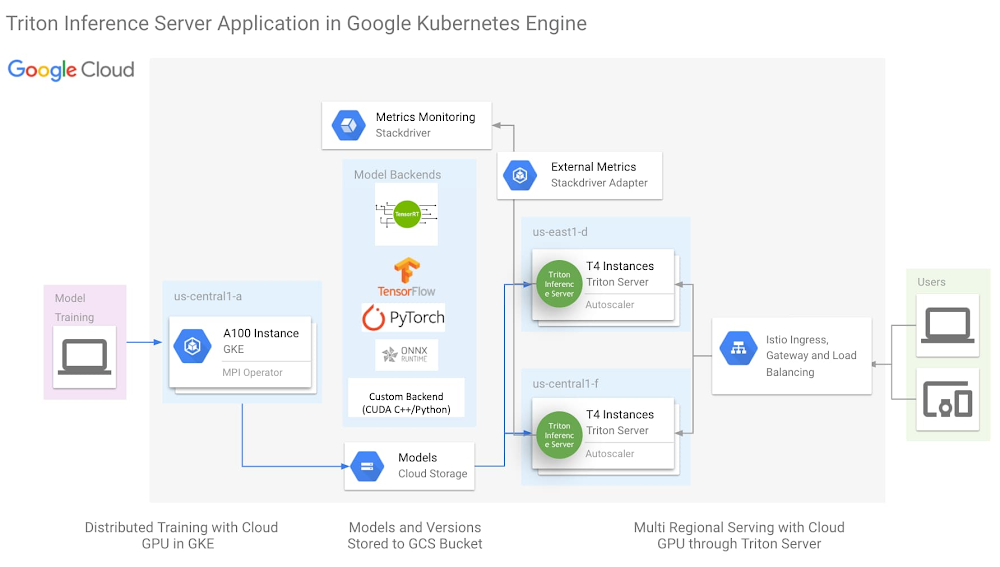
tl;dr: We introduce the One-Click Triton Inference Server in Google Kubernetes Engine (GKE) Marketplace solution (solution, readme) to help jumpstart NVIDIA GPU-enabled ML inference projects.Deep Learning research in the past decade has provided a number of exciting and useful models for a variety of different use cases. Less than 10 years ago, AlexNet was the state-of-the-art image classification model and brought the Imagenet moment marked as ground zero for deep learning explosion. Today, Bidirectional Encoder Representations from Transformers (BERT) and related family of models enable a variety of complex natural language use cases from Text Classification to Question and Answering (Q&A). While top researchers are creating bleeding edge models exceeding hundreds of millions of parameters, bringing these models to production in large-scale exposes additional challenges we have to solve.Scale Inference with NVIDIA Triton Inference Server on Google Kubernetes EngineWhile recent ML frameworks have made model training and experimentation more accessible, serving ML models, especially in a production environment, is still difficult. When building an inference environment, we commonly run into the following pain points:Complex dependencies and APIs of DL Frameworks backend Production workflow includes not just model inference but also preprocessing stepsHard to find nobs to maximize accelerator performanceToo much scripting and configurations about robust Ingress and load balancingIn this blog, we will introduce the One-Click Triton Inference Server in Google Kubernetes Engine (GKE), and how the solution scales these ML models, meet stringent latency budgets, and optimize operational costs.Click to enlargeThe architecture above is the One-Click NVIDIA Triton Inference Server solution (click here to try now), with the following key aspects:NVIDIA Triton Inference ServerIstio for simplified Ingress and Load BalancingHorizontal Pod Autoscaler(HPA) monitoring external metric through Stackdriver Triton Inference Server is an open source inference server from NVIDIA with backend support for most ML Frameworks, as well as custom backend for python and C++. This flexibility simplifies ML infrastructure by reducing the need to run different inference servers to serve different frameworks. While Triton was created to leverage all the advanced features of the GPU, it is also designed to be highly performant on the CPU. With this flexibility in ML framework and processing hardware support, Triton can reduce the complexity of model serving infrastructure.More detailed description of the One-Click Triton solution could be found here. NVIDIA Triton Inference Server for mission-critical ML model servingOrganizations today are looking to create a shared-service ML platform to help democratize ML across their business units. To be successful, a share-service ML serving platform must be reliable and cost effective. To address these requirements NVIDIA has created two capabilities that are unique to the Triton Inference Server:Model PriorityTensorRT Maximizing Utilization and ROI with Model PriorityWhen we build a shared-service inference platform, we will need to expect to support models for multiple use cases, each with different latency sensitivity, business criticality, and transient load fluctuations. At the same time, we also need to consider control costs through standardization and economy of scale. However, these requirements are often in conflict. For example, a business-critical, latency-sensitive model with a strict Service Level Objective (SLO) will present to us two choices: do we pre-provision compute resources in anticipation of transient load fluctuations and pay for the excess unused compute, or do we provision only the typical compute resources needed to save cost, and risk violating the latency SLO when transient loads spike?In the population of models we serve, we can usually find a subset that are both latency-sensitive and business critical. These can be treated as Tier-1 models, with the remaining as Tier-2.Click to enlargeWith Triton Inference Server, we have the ability to mark a model as PRIORITY_MAX. This means when we consolidate multiple models in the same Triton instance and there is a transient load spike, Triton will prioritize fulfilling requests from PRIORITY_MAX models (Tier-1) at the cost of other models (Tier-2).Below is an illustration of three common load spiking scenarios. In the first (1) scenario, load spikes but load is within the provisioned compute limit. Both models continue normally. In the second (2) scenario, the Tier-1 model spikes and the combined compute load exceeds the provisioned compute limit. Triton prioritizes the Tier-1 model by reducing compute on the Tier-2 model. In the third (3) scenario, the Tier-2 model spikes. Triton ensures the Tier-1 model will receive the compute resources it needs. In all three scenarios.Click to enlargeWhile GKE provides autoscaling, relying only on GKE to autoscale on transient load spikes can lead to SLO violation, as load spikes can appear in seconds, whereas GKE autoscales in minutes. Model priority provides a short window to buffer transient spikes to help maintain Tier-1 model SLO while GKE autoscales its nodepool. For a description of options to address transient load spikes, please refer to the reference guide Mitigating transient load effects on ML serving latency.Maximizing Performance and Cost Effectiveness with NVIDIA TensorRTWhile Triton offers a multitude of backend framework support and a highly pluggable architecture, the TensorRT backend offers the best performance benefits.NVIDIA TensorRT (TRT) is an SDK for high performance deep learning inference on NVIDIA GPU’s, leveraging out-of-box performance enhancements by applying optimization such as layer fusion, mixed precision and structured sparsity. With the latest NVIDIA A100 GPU as an example, TensorRT incorporates Tensor Cores, a region of the GPU optimized for FP16 and INT8 matrix math, with support for structured sparsity. For optimizations TensorRT applied to the BERT model, please visit the referenceblog.The following Triton configuration will help GPU inference performance and utilization when used with TensorRT:Concurrent execution: a separate copy of the model is run in its own separate CUDA stream, allowing for concurrent CUDA kernel executions simultaneously. This allows for increased parallelization.Dynamic batching: Triton will dynamically group together multiple inference requests on the server-side within the constraint of specified latency requirements.TensorRT Impact on BERT Inference Performance We deploy CPU BERT BASE and Distill BERT on n1-standard-96, and GPU BERT BASE, Distill BERT and BERT BASE with TRT optimization on n1-standard-4 with 1 T4 GPU, with sequence length of the BERT model being 384 token. We measure the latency and throughput with a concurrency sweep with Triton’s performance analyzer. The latency includes Istio ingress/load balancing and reflects the true end to end cost in the same GCP zone.Click to enlargeWith n1-standard-96 priced at $4.56/hr and n1-standard-4 at $0.19/hr and T4 at $0.35/hr totaling $0.54/hr. While achieving a much lower latency, the TCO of BERT inference with TensorRT on T4 is over 163 times that of Distill BERT inference on n1-standard-96.ConclusionNVIDIA Triton Inference Server, running on GKE with GPU and TensorRT, provides a cost-effective and high-performance foundation to build an enterprise-scale, shared-service ML inference platform. We also introduced the One-Click Triton Inference Server solution to help jumpstart ML inference projects. Finally, we provided a few recommendations that will help you get a GPU-enabled inference project off the ground:Use TensorRT to optimize Deep Learning model inference performance.Leverage concurrent serving and dynamic batching features in Triton.To take full advantage of the newer GPUs, use FP16 or INT8 precision for the TensorRT models. Use Model Priority to ensure latency SLO compliance for Tier-1 models.ReferencesCheaper Cloud AI deployments with NVIDIA T4 GPU price cutEfficiently scale ML and other compute workloads on NVIDIA’s T4 GPU, now generally availableNew Compute Engine A2 VMs—first NVIDIA Ampere A100 GPUs in the cloudTurbocharge workloads with new multi-instance NVIDIA GPUs on GKEMitigating transient load effects on ML serving latencyAcknowledgements: David Goodwin, Principal Software Engineer, NVIDIA; Mahan Salehi, Triton Product Manager, NVIDIA; Jill Milton, Senior Account Manager, NVIDIA; Dinesh Mudrakola, Technical Solution Consultant, GCP and GKE Marketplace Team
Quelle: Google Cloud Platform

Handling duplicate data in streaming pipelines using Dataflow and Pub/Sub

PurposeProcessing streaming data to extract insights and powering real time applications is becoming more and more critical. Google Cloud Dataflow and Pub/Sub provides a highly scalable, reliable and mature streaming analytics platform to run mission critical pipelines. One very common challenge that developers often face when designing such pipelines is how to handle duplicate data. In this blog, I want to give an overview of common places where duplicate data may originate in your streaming pipelines and discuss various options that are available to you to handle them. You can also check out this tech talk on the same topic.Origin of duplicates in streaming data pipelinesThis section gives an overview of the places where duplicate data may originate in your streaming pipelines. Numbers in red boxes in the following diagram indicate where this may happen.Some duplicates are automatically handled by Dataflow while for others developers may need to use some techniques to handle them. This is summarized in the following table.1. Source generated duplicateYour data source system may itself produce duplicate data. There could be several reasons like network failure, system errors etc that can produce duplicate data. Such duplicates are referred to as ‘source generated duplicates’.One example where this could happen is when you set trigger notifications from Google Cloud Storage to Pub/Sub in response to object changes to GCS buckets. This feature guarantees at-least-once delivery to Pub/Sub and can produce duplicate notifications.2. Publisher generated duplicates Your publisher when publishing messages to Pub/Sub can generate duplicates due to at-least-once publishing guarantees. Such duplicates are referred to as ‘publisher generated duplicates’. Pub/Sub automatically assigns a unique message_id to each message successfully published to a topic. Each message is considered successfully published by the publisher when Pub/Sub returns an acknowledgement to the publisher. Within a topic all messages have a unique message_id and no two messages have the same message_id. If success of the publish is not observed for some reason (network delays, interruptions etc) the same message payload may be retried by the publisher. If retries happen, we may end up with duplicate messages with different message_id in Pub/Sub. For Pub/Sub these are unique messages as they have different message_id.3. Reading from Pub/SubPub/Sub guarantees at least once delivery for every subscription. This means that a message may be delivered more than once by the same subscription if Pub/Sub doesn’t receive acknowledgement within the acknowledgement deadline. The subscriber may acknowledge after the acknowledgement deadline or the acknowledgement may be lost due to transient network issues. In such scenarios the same message would be redelivered and subscribers may see duplicate data. It is the responsibility of the subscribing system (for example Dataflow) to detect such duplicates and handle accordingly.When Dataflow receives messages from Pub/Sub subscription, messages are acknowledged after they are successfully processed by the first fused stage. Dataflow does optimization called fusion where multiple stages can be combined into a single fused stage. A break in fusion happens when there is a shuffle which happens if you have transforms like GROUP BY, COMBINE or I/O transforms like BigQueryIO. If a message has not been acknowledged within its acknowledgement deadline, Dataflow attempts to maintain the lease on the message by repeatedly extending the acknowledgement deadline to prevent redelivery from Pub/Sub. However this is best effort and there is a possibility that messages may be redelivered. This can be monitored using metrics listed here.However, because Pub/Sub provides each message with a unique message_id, Dataflow uses it to deduplicate messages by default if you use the built-in Apache Beam PubSubIO. Thus Dataflow filters out such duplicates originating from redelivery of the same message by Pub/Sub. You can read more about this topic on one of our earlier blog under the section “Example source: Cloud Pub/Sub”4. Processing data in DataflowDue to the distributed nature of processing in Dataflow each message may be retried multiple times on different Dataflow workers. However Dataflow ensures that only one of those tries wins and the processing from the other tries does not affect downstream fused stages. Dataflow does guarantee exactly once processing by leveraging checkpointing at each stage to ensure such duplicates are not reprocessed affecting state or output. You can read more about how this is achieved in this blog.5. Writing to a sinkEach element can be retried multiple times by Dataflow workers and may produce duplicate writes. It is the responsibility of the sink to detect these duplicates and handle them accordingly. Depending on the sink, duplicates may be filtered out, over-written or appear as duplicates.File systems as sinkIf you are writing files, exactly once is guaranteed as any retries by Dataflow workers in event of failure will overwrite the file. Beam provides several I/O connectors to write files, all of which guarantees exactly once processing.BigQuery as sinkIf you use the built-in Apache Beam BigQueryIO to write messages to BigQuery using streaming inserts, Dataflow provides a consistent insert_id (different from Pub/Sub message_id) for retries and this is used by BigQuery for deduplication. However, this deduplication is best effort and duplicate writes may appear. BigQuery provides other insert methods as well with different deduplication guarantees as listed below.You can read more about BigQuery insert methods at the BigQueryIO Javadoc. Additionally for more information on BigQuery as a sink check out the section “Example sink: Google BigQuery” in one of our earlier blog. For duplicates originating from places discussed in points 3), 4) and 5) there are built-in mechanisms in place to remove such duplicates as discussed above, assuming BigQuery is a sink. In the following section we will discuss deduplication options for ‘source generated duplicates’ and ‘publisher generated duplicates’. In both cases, we have duplicate messages with different message_id, which for Pub/Sub and downstream systems like Dataflow are two unique messages.Deduplication options for source generated duplicates and publisher generated duplicates1. Use Pub/Sub message attributesEach message published to a Pub/Sub topic can have some string key value pairs attached as metadata under the “attributes” field of PubsubMessage. These attributes are set when publishing to Pub/Sub. For example, if you are using the Python Pub/Sub Client Library, you can set the “attrs” parameter of the publish method when publishing messages. You can set the unique fields (e.g: event_id) from your message as attribute value and field name as attribute key.Dataflow can be configured to use these fields to deduplicate messages instead of the default deduplication using Pub/Sub message_id. You can do this by specifying the attribute key when reading from Pub/Sub using the built-in PubSubIO.For Java SDK, you can specify this attribute key in the withIdAttribute method of PubsubIO.Read() as shown below.In the Python SDK, you can specify this in the id_label parameter of the ReadFromPubSub PTransform as shown below.This deduplication using a Pub/Sub message attribute is only guaranteed to work for duplicate messages that are published to Pub/Sub within 10 minutes of each other.2. Use Apache Beam Deduplicate PTransformApache Beam provides deduplicate PTransforms which can deduplicate incoming messages  over a time duration. Deduplication can be based on the message or a key of a key value pair, where the key could be derived from the message fields. The deduplication window can be configured using the withDuration method, which can be based on processing time or event time (specified using the withTimeDomain method). This has a default value of 10 mins.You can read the Java documentation or the Python documentation of this PTransform for more details on how this works.This PTransform uses the Stateful API under the hood and maintains a state for each key observed. Any duplicate message with the same key that appears within the deduplication window is discarded by this PTransform.3. Do post-processing in sinkDeduplication can also be done in the sink. This could be done by running a scheduled job that periodically deduplicates rows using a unique identifier.BigQuery as a sinkIf BigQuery is the sink in your pipeline, scheduled query can be executed periodically that writes the deduplicated data to another table or updates the existing table. Depending on the complexity of the scheduling you may need orchestration tools like Cloud Composer or Dataform to schedule queries.Deduplication can be done using a DISTINCT statement or DML like MERGE. You can find sample queries about these methods on these blogs (blog 1, blog 2).Often in streaming pipelines you may need deduplicated data available in real time in BigQuery. You can achieve this by creating materialized views on top of underlying tables using a DISTINCT statement.Any new updates to the underlying tables will be updated in real time to the materialized view with zero maintenance or orchestration.Technical trade-offs of different deduplication optionsRelated ArticleAfter Lambda: Exactly-once processing in Google Cloud Dataflow, Part 1Learn the meaning of “exactly once” processing in Dataflow, its importance for stream processing overall and its implementation in stream…Read Article
Quelle: Google Cloud Platform

Zero effort performance insights for popular serverless offerings

Inevitably, in the lifetime of a service or application, developers, DevOps, and SREs will need to investigate the cause of latency. Usually you will start by determining whether it is the application or the underlying infrastructure causing the latency. You have to look for signals that indicate the performance of those resources when the issue occured. Using traces as your latency signalsIn most instances, the signals that provide the richest information for latency are traces. Traces represent the total time it takes for a request to propagate through every layer of a distributed system, including the load balancer, computes, databases and more during execution. The subset of traces used to represent each layer of the execution are referred to as spans.The difficulty of generating traces has prevented many users from accessing this useful troubleshooting resource. To make them more easily available to developers, we’ve started instrumenting our most popular serverless compute options, AppEngine, Cloud Run and Cloud Functions to generate traces by default. While this will not provide the full picture of what is going on in a complex distributed system, it will provide crucial pieces of information needed to decide which area to focus on during troubleshooting. What do I need to do to get this benefit today?The simple answer is, nothing!  Once your code is deployed in any serverless compute like AppEngine, Cloud Run or Cloud Functions, any ingress or egress traffic through the compute automatically generates spans that are captured and stored in Cloud Trace.  These spans are stored for 30 days at no additional cost.  See additional terms here. The resulting traces can be visualized as waterfall graphs with representative values of latency. In addition, we have extended this capability to Google Cloud databases, with Cloud SQL Insights generating traces representative of query plans for PostgreSQL and sending them to Cloud Trace. The screenshot below is a Day 1 trace captured from a simple “Helloworld” application deployed in Cloud Run. The load balancer span (i.e. root span) is indicative of the total time through Google Cloud’s infrastructure and the Cloud Run span is indicative of the time it took for the compute to execute and service the request. As you can see in the graphic below, the loadbalancer span is roughly equal to the Cloud Run span, so we can conclude that any observed latency is not being caused by Google’s infrastructure. At this point you can focus more on your code.This is awesome, how do I extend it?You must still instrument your application if you want it to generate more granular spans representative of the code’s execution. You can start here to pick the library that matches your development language and for instructions on how to instrument your code. Once this is done, your traces will get richer, encompassing more spans with information about both the performance of the infrastructure and application in one single waterfall view.  Cloud Trace – Google Cloud’s hub for Infrastructure tracesWe are excited about the future of telemetry in Google Cloud. Upcoming releases in the next six months will touch on infrastructure instrumentation and areas like trace analysis, metrics, integrations to other Google Cloud products and integrations with third party APM products. Next StepsExplore the traces from your infrastructure in your Cloud Trace console and explore the available libraries and procedures for application instrumentation. If you have questions or feedback about this new feature, head to the Cloud Operations Community page and let us know!
Quelle: Google Cloud Platform

Zero trust is a must: Supporting our customers with new BeyondCorp Enterprise features

Since launching BeyondCorp Enterprise in January, our team has been busy working with customers to understand how they are using the product and what we can do to better support their needs as they continue on their zero trust journey. We believe zero trust is an effective way to enhance overall security and provide a better user experience and BeyondCorp Enterprise can help make this possible. Today, we’re excited to announce three new BeyondCorp Enterprise features designed to help our customers provide their users simple and secure access to key applications.Certificate-based access via VPC-SCFirst, certificate-based access for GCP APIs via VPC Service Controls (VPC-SC) is now generally available. Using bearer credentials to authenticate access to Cloud Console and Google Cloud APIs is nothing new, but if these credentials are accidentally exposed, they will invariably be found and used by attackers for illegitimate access. Using certificate-based access protects against credential theft or accidental exposure by only granting access when credentials plus a verified device certificate are presented. We now offer native support for client certificates for eight types of VPC-SC resources: GCE, GKE, PubSub, Spanner, Cloud KMS, GCS, BigQuery, and Logging, with more to follow. To begin leveraging certificate-based access for these APIs, visit our documentation page and get started.On-prem connectorNext, we are giving customers a choice for how they connect to on-premises resources with our On-prem connector, which is also now generally available.  Customers can secure HTTP or HTTPS based on-premises applications (outside of Google Cloud) with Identity-Aware Proxy (IAP) by deploying a connector. When a request is made for an on-premises app, IAP authenticates and authorizes the user request and then routes the request to the connector. To deploy the connector for your on-premises applications, see our step-by-step guidance on the Identity-Aware Proxy documentation page.Easy to configure custom access policies Finally, we’re excited to announce the availability of even more zero trust access conditions in Access Context Manager, the zero trust policy engine behind BeyondCorp Enterprise. The ability to leverage new attributes gives administrators even more ways to build fine-grained access control policies to safeguard their applications and Google Cloud resources. Three new sets of attributes are now in public preview and customers can begin using these today:Time and dateWhen evaluating zero trust access, it is often necessary to restrict user access to resources to particular days and time (e.g. shift workers or temporary employees). The time and date restriction is a feature for enterprise customers to enable access controls based on specific times, dates, and/or ranges.Credential strengthConfiguring two-step verification is an important action to prevent security breaches. By leveraging credential strength as another condition in access control policies, enterprises can enforce access controls based on the usage of hardware security keys or other forms of multi-factor authentication. BeyondCorp Enterprise now supports push notifications, SMS codes, 2SV software and hardware keys, one-time passwords, or a general use of any form of MFA.Chrome BrowserTo ensure that users are accessing resources from secure environments, administrators can set zero trust policies that ensure the user’s browser environment has these threat and data protection capabilities turned on. The following are new access conditions that can be used in ACM’s custom access levels: management state, minimum version, real-time URL checks enabled, file upload/download analysis enabled, bulk text (paste) analysis enabled, and security event reporting enabled.We’re just getting startedWe’ll continue to make strides to help our customers. If you’d like to take a deeper look at BeyondCorp Enterprise, check out the BeyondCorp Enterprise Technical Validation report, recently released by the Enterprise Strategy Group. This report provides an assessment of the solution, stating: “ESG validated that configuring BeyondCorp Enterprise to provide secure access to on-premises, SaaS, and cloud applications was quick and easy.”To learn more about these new features and the other exciting work we’re doing in the zero trust space, be sure to register for Google Cloud Next ‘21. We have a great lineup of security sessions planned for you!Related ArticleRegistration is open for Google Cloud Next: October 12–14Register now for Google Cloud Next on October 12–14, 2021Read Article
Quelle: Google Cloud Platform

Manage data exfiltration risks in Cloud Run with VPC Service Controls

Enterprises looking to take advantage of the scalability and ease-of-use associated with cloud technology have often turned to serverless computing architectures. In these systems, a cloud provider allocates resources on-demand as required by a particular workload, and abstracts much of the management of an application or system for a customer. But to the most security-minded enterprises, a serverless architecture can sometimes be confusing due to the black box nature of the security of a fully-managed cloud deployment. An understanding of the underlying security systems within a serverless offering can alleviate those concerns. Many cloud services include identity and access management (IAM) to secure data at the application level. Google Cloud strives be the most trusted cloud, which is why continuously updating our protection capabilities. In addition to IAM, we now support VPC Service Controls for Cloud Run, which creates enterprise-grade security guard rails, protecting your data at the network level while delivering the ease of use and speed to market you expect from a fully-managed system, in a product optimized for container workloads. As organizations plan cloud migrations, they often find that familiar security strategies, such as using firewalls to segment applications aren’t applicable when those apps are re-architected to take advantage of managed cloud services like Cloud Run. With VPC Service Controls (VPC-SC), administrators can define a security perimeter around Google-managed services to control communication to and between those services. Using VPC-SC, you can isolate your production GCP resources from unauthorized VPC networks or the internet, and isolate both production GCP resources and production VPC networks from unauthorized GCP resources.VPC Service Controls (VPC SC) give you fine-grained control over how data moves into and out of a VPC SC service perimeter. VPC SC provides an additional layer of security defense for Google Cloud that is independent of Identity and Access Management (IAM). IAM currently enables granular identity based access control; VPC SC enables a security parameter that lets you secure your cloud resources and set up private connectivity to Google Cloud’s APIs and services.This helps protect against risks including:Data exfiltration from malicious insiders or compromised codeAccidental public exposure of private data, caused by misconfigured IAM policiesAccess from unauthorized networks using stolen credentialsUsing VPC Service Controls for Perimeter Security So how does this work? Let’s imagine you are using a Cloud Run service to do some data processing. When a push notification comes in from PubSub, your service reads data from Google Cloud Storage, performs data processing and writes the results back to Cloud Storage. In this example, access to both the dashboard and the data processing endpoint is protected by IAM.Here is what this system looks like:When this system is brought to production, it will be able to access sensitive data. While IAM protection is useful, it doesn’t completely protect against some avenues for data exfiltration. For example, malicious insiders could modify the service to write the output data to an unauthorized location on the internet via an HTTP call. We also don’t want to be in a position where one misconfigured permission can put our data at risk.To introduce a second layer of security, we put our Cloud Run service inside a VPC SC perimeter by following the VPC SC integration guide for Cloud Run. We also enforce VPC SC on all other APIs our developers have access to. Here is the modified system:The Cloud Run service as well as the Cloud Run Admin API (used for deploying and managing the service) are now protected by the VPC SC service perimeter. This means that any requests to the Cloud Run Admin API or the endpoint of the Cloud Run service itself are now checked against the VPC SC policy.This new setup helps prevent against more potential attacks. For example, a malicious insider with permissions on the Cloud Run service can no longer:Redirect output from the service to a Cloud Storage bucket in a project under their control, outside the perimeterChange the service to access or send data to arbitrary internet resources by altering the service’s egress settings to values incompatible with the Organization Policy. To allow services with legitimate requirements to communicate with the outside world, there are ways to give external resources access to resources inside the perimeter through auditable policies. Here are some examples:You can use VPC SC Ingress policies to allow admins access to the Cloud Run Admin API, so they can continue to manage and update the service from outside the perimeter (e.g. from their company-issued laptops). You can set up VPC Firewall rules to allow access from the Cloud Run service to specific resources outside the perimeter. This is useful if, for example, our service needs to access a resource outside GCP as an input for its data processing. If you  need to give someone outside of the parameter access to the service while ensuring protection,  you can set up Cloud Load Balancing for the service and then use Cloud Armor and Cloud IAP to selectively allow access to the service. This is useful, for example, to give developers access to a dashboard exported by your service.Enhanced enterprise securityVPC SC enhances the picture for your enterprise serverless needs. With Cloud Run, Google Cloud manages your server infrastructure for you. This enables you to benefit from Google’s sophisticated approach to multi-project API security perimeters for Google APIs. This extends existing serverless security benefits such as host level patches and network infrastructure security, freeing up your team’s time for strategic work. Earlier this year we announced four new features to secure your Cloud Run services, including Secret Manager integration, Binary Authorization, customer managed encryption keys, and recommendations for permissions based on the principle of least privilege in Recommendation Hub.Cloud Run also has a complete set of network ingress and egress controls.With the addition of VPC SC, Cloud Run now has a fully featured set of security controls, enabling easier network governance and greater peace of mind. Learn how to set up and use VPC SC for Cloud Run today.Related Article4 new features to secure your Cloud Run servicesWe’re improving the security of your Cloud Run environment with things like support for Secret Manager and Binary Authorization.Read Article
Quelle: Google Cloud Platform

How to get better retail recommendations with Recommendations AI

Time to go outside again, I guess. I’ll need a sun hat. Sunscreen. Maybe some new sandals? What else?With the Recommendations AI service, I might be reminded to grab a reusable water bottle and a swimsuit. Or some after-sun aloe lotion. Good thing, cause I’ll need it.Photo by Nawartha Nirmal on UnsplashRecommendations AI is a solution that uses machine learning to bring product recommendations to their shoppers across any catalog or client list. This service is part of our full suite of Retail solutions. When you integrate with the Retail API, you get the benefit of Google’s Product Discovery. Integrating once to reap the benefits over and over. Recommendations is the starting point, and you can easily extend into Retail Search and Vision Product Search in the upcoming future. The Recommendations solution is fully managed, global-scale and powered by deep learning, so you can focus on a great shopping experience and let someone else worry about the infrastructure.Compared to baseline recommendation systems used by customers, Recommendations AI showed double digit uplift in conversion and clickthrough rates in A/B experiments controlled by the customers. You can optimize for click-through, conversion or session revenue, and fine tune the models to make sure you omit out-of-stock items or duplicates, for example.So how does it work, and how do you get started? Read on, and we’ll walk you through the pipeline, starting with the data you already have to placement in your online store. Formula: Data -> Model -> PlacementYou start with your catalog, the list of all the things (postcards, movies, pie recipes) that you want to show your customers. Then you ingest your PII-redacted user events -this is the historic event data like home page views, add to cart events and more along with real time user events. This user event is joined with the product catalog and items that allows us to construct the sequence of shoppers’ activity, thus being able to predict what the shopper has a high propensity to purchase next. The user events can come from both online activity across devices or offline store purchasesThe recommendation model will return a list of products, which are the recommendations. The brains of the operation, if you will. This model is trained using all the data that you ingest, using the latest neural network models and techniques that Google has built expertise over the years in flagship products like Youtube and News, that allows us to uncover shopper intent,  so it can best predict the right recommendations to show to the right people.Every model outputs a list of product identifiers, but where do they go? They go into placements, the spots, panels, carousels on your customer’s journey interacting with your brand that you’ve set aside to highlight recommendations. A model can send recommendations to one or more placements, but each placement only receives information from one recommendation model. Your pages will then need to render the products with the right images, text or other metadata, using the product ID that is returned by the model.What do recommendations look like?Let’s start by browsing our postcard-selling website, where I’ve been buying some vintage California postcards already. The recommendations algorithm has caught on to my interest, showing me other potential cards to purchase based on my history:Put your data to workTo get started we need to bring your data into the recommendation model, so it can understand your customers, your inventory, and your sales patterns. The model takes in the product catalog you use, and metadata about those products to better understand nuances in assortment, pricing and variables like size and style. You might already have this data stored in BigQuery or Merchant Center, and hence we provide easy integrations that you can leverage to get started even faster.As for the user events, don’t worry if you already have systems in place to capture web and mobile activity. We make it easy to bring in your real time event logs by providing seamless integrations with Google Tag Manager, Javascript pixel, or even historic events from Cloud Storage, BigQuery or using inline API or JSON, so you can immediately train the models on this imported  data. All this allows you to kickstart integrating with Recommendations AI in a matter of days.The models then construct a sequence of activities that the user went through and joins with the products that the user engaged with. Once your data is ready to go, it takes a few days to train the model. Next onto making the data work for you.Quickly customize your modelSetting up your own recommendations project in the console gives you the ability to choose what sort of model to train (based on what recommendations you want to generate) and your objective. Are you optimizing for click-through rate–more people click on the recommendation links or products–or for conversion rate–more people choose or buy what was suggested or revenue ?Different models can be optimized for different optimization goals.; the GCP console explains what each one can do and how you can choose to optimize it.Let’s unpack some of this terminology real quick.We’ve got three model types:Recommended for you – Means we think these are items you’ll want to buy, based on your history; this is usually used on a home page to showcase items.Others you may like -Means if you’re browsing the page of a water bottle, we will recommend  alternative brands of water bottles that you may like as well as a backpack, based on your engagement  history.Frequently bought together -Means that when anyone buys sunscreen, we notice that they often also buy aloe lotion, so we will surface those items when someone adds any one of them to their cart.And then we have three business objectives that the models optimize for:Click-through rate – How frequently did somebody click on a recommended item?Conversion rate- How frequently did somebody add a recommended item to their cart?Revenue per session – How much money did the recommendations generate for you?Deliver anywhere along the journeyNow that you’re all set up in the Retail AI console, you can test out the recommendations in the console, even before you deploy to production.You can integrate Recommendations into your frontend by calling the Predict APIt. The placements of recommendations will report data back into the dashboard and you can analyze and measure success for future iterations. On top of that you can use the recommendations for other parts of your customer’s journey. Email promotions, storefront kiosks, display ads or follow-up notifications can include recommendations based on past activity and cart contents. The model gives you useful product recommendations for a wide variety of touchpoints and steps in the purchasing process.More best practices, and guides, are available inside our documentation.How to get startedTraining your own models can be tedious, time-consuming, and expensive. On top of that it requires deeper data science expertise to set up. Let us do it instead!You can see how IKEA Retail uses Recommendations AI in this recent talk and blog from the Google Cloud Retail Summit..To get started today you’ll need to make a Cloud project and enable the Retail API, which then allows you to access all the recommendation tools in one menu. Bring in your catalog and purchasing data, define a placement or two, and you can start putting recommendations on your site in a matter of days.Related ArticleIKEA Retail (Ingka Group) increases Global Average Order Value for eCommerce by 2% with Recommendations AIIKEA uses Recommendations AI to provide customers with more relevant product information.Read Article
Quelle: Google Cloud Platform

Rossi Residencial migrates SAP to the cloud with zero impact on operations

Rossi Residencial is one of Brazil’s largest construction companies and real estate developers, with more than 115,000 clients in residential and commercial properties. The company had successfully relied on a managed deployment of SAP for its financial operations since 1999, first on premises and later with a private cloud provider. But in 2017, Rossi began a strategic financial restructuring focused on improving its operating efficiency. To support its vision for the business, Rossi needed the flexibility to add or subtract SAP resources based not just on growth, but also on demand, which can vary considerably from year to year. The company decided that the best way to accomplish this would be to migrate its SAP environment to the public cloud.The original cloud provider Rossi chose had become extremely costly as the U.S. dollar rose against the Brazilian Real. What’s more, the Rossi team was less than satisfied with the provider’s service. So the search began for a cloud provider that could offer high availability and scalability, as well as an implementation partner familiar with the company’s previous cloud provider.After researching its options, the company chose Google Cloud as its provider and Sky.One as its implementation partner. “Out of the cloud options we researched, Google Cloud offered us the best financial conditions and a solution that truly catered to us,” says Eduardo Araújo, Rossi Residencial’s IT manager. “And out of the many partners we contacted, Sky.One offered the best work planning and service.”A delightfully uneventful move to Google CloudThe contract with the original cloud provider was nearing its end, which compressed the timeframe for the migration. Given the time constraints, Sky.One and Rossi determined that instead of migrating every app in Google Cloud from scratch, the best approach would be to mirror its architecture completely by migrating all of its virtual machines from the company’s four SAP environment servers directly to Google Cloud. To complete the operation, Sky.One used Google Migrate for Compute Engine, a tool designed to facilitate and streamline this type of migration while reducing risk.Working closely with the Rossi team, Sky.One mapped the source structure in detail to prepare the destination with the integrations and accesses it would need to support the SAP environment, which included ECC with four VM instances for DEV, QAS, PRD, and Legacy. The process took just a month to complete with zero impact on operations — something Rossi had never achieved over three previous cloud migrations. Given that history, the ease of integration between Google Cloud and SAP was a pleasant surprise. “We were worried about potential incompatibilities, and we didn’t know if we would be able to work like before,” Araújo says. “Sky.One spared no effort to make the cloud migration safe and without impacting our operation. Today, we can work even better than before.” Adds Ricardo Nunes, Sky.One’s Solution Expert, “Google Cloud’s solutions support all SAP migration steps, but after migrating, we noticed that daily operations had become even more tightly integrated.”              The company’s SAP environment now runs in Compute Engine, a service from Google Cloud for creating and running VMs. Rossi’s SAP data is stored in Google Cloud Storage. As a result, the company has a great deal more flexibility to maintain availability and performance even when resizing VMs. “If I need to open a new branch or break ground on a project, the entire system core is already in the cloud, and I don’t have to worry about local infrastructure,” Araújo explains. “Being in Google Cloud gives us the flexibility to increase or decrease our resources according to our needs. We also don’t worry about the local data center and its updating, generating a very important medium- to long-term saving for us.”Rossi also gained another, even more dramatic savings: Because Google Cloud bills in local currency at a fixed exchange rate with dollars, the company has experienced a 50% cost reduction versus its previous provider.New plans for even more operational improvementsWith the migration to Google Cloud complete, Rossi’s IT team has more time to focus on business needs instead of operational issues. Araújo says the company is now able to consider taking advantage of additional Google Cloud tools — including data analytics and AI — to make the most of its extensive data and improve operations and customer service even further. By moving its SAP environment to Google Cloud, Rossi has not only been able to spend less for better service. It has also gained a flexible, scalable platform upon which to build the efficiencies and customer experiences of its future.Learn more about Rossi Residential’s SAP migration to Google Cloud and hear from other  SAP customers about their experiences.Related ArticleCasa dos Ventos advances sustainability mission with SAP S/4HANA on Google CloudThanks to its new cloud infrastructure and scalable services with Google Cloud, Casa dos Ventos was also able to process 20 years of data…Read Article
Quelle: Google Cloud Platform

Scaling data access to 10Tbps (yes, terabits) with Lustre

Data growth is a massive challenge for all organizations, but just as important is ensuring access to the data doesn’t become a bottleneck. For high performance computing (HPC) and ML/AI applications, reducing time to insight is key, and so finding the right storage solution that can support low latency, high bandwidth data access at an affordable price is critical. Today, we are excited to announce that Google Cloud, working with its partners NAG and DDN, demonstrated the highest performing Lustre file system on the IO500 ranking of the fastest HPC storage systems. About the IO500 listIO500 is an HPC storage benchmark that seeks to capture the full picture of an HPC storage system by calculating a score based upon a wide range of storage characteristics. The IO500 website captures all of the technical details of each submission and allows users to understand the strengths and weaknesses of each storage system. For example, it is easy to see if a specific storage system excels at bandwidth, metadata operations, small files, or all of the above. This gives IT organizations access to realistic performance expectations and to help administrators select their next HPC storage system.At Google Cloud, we appreciate the openness of the IO500, since all configurations they evaluate are readily available to all organizations. Even though most users don’t need to deploy at extreme scale, by looking through the details of the Google Cloud submissions, users can see the potential of what is possible and feel confident that we can meet their needs over the long haul. Google Cloud first participated in 2019 in an earlier collaboration with DDN, and at that time the goal was to demonstrate the capabilities of a Lustre system using Persistent Disk Standard (HDD) and Persistent Disk SSD. Lustre on Persistent Disk is a great choice for a long term persistent storage system where data must be stored safely.Since 2019, Google Cloud has released numerous new HPC capabilities such as 100 Gbps networking, larger and faster Local SSD volumes, and pre-tuned HPC VM Images. Working with our partners at NAG, who provided Cloud HPC integration and benchmarking expertise, along with DDN’s storage specialists, we decided to resubmit to the IO500 this year to demonstrate how these new capabilities can help users deploy an extreme scale scratch storage system. When using scratch storage, the goal is to go fast for the entire runtime of an application, but initial data must first be copied into the system and the final results stored persistently elsewhere. For example, all data can start in Cloud Storage, be transferred into the Lustre storage system for the run of a job, and then the results can be copied back to Cloud Storage.We’re proud to report our latest submission ranked 8th and is currently the highest ranked Lustre storage system on the list—quite a feat considering Lustre is one of the most widely deployed HPC file systems in the world. Our submission deployed a 1.8PB Lustre file system on 200 N2 VM instances with Local-SSD for the storage servers (Lustre OSSs), 50 N2 VM instances with Local-SSD for the metadata servers (Lustre MDTs), and 1,000 C2 VM instances using the HPC Image for the compute nodes (Lustre clients). The storage servers utilized 75Gbps networking (to match the read bandwidth of the SSD).All of the performance details are on the IO500 website, but some key results include:On read bandwidth, this is a 12x improvement over our submission in 2019 using Persistent Disk, which really demonstrates the potential for deploying scratch file systems in the cloud. Further, Lustre on Google Cloud is one of only 3 systems demonstrating greater than 1TB/s, indicating that even high bandwidth (and not just IOPs) remains challenging for many HPC storage deployments.Each of our three IO500 submissions demonstrates that while it is possible to build a single monolithic extremely-fast Lustre file system on Google Cloud, it can be more cost effective to tailor the compute/networking/storage deployment aspects to the needs of your application. For example, different levels of price/performance can be achieved by leveraging the range of Persistent Disk options for long lasting persistent deployments and optimizing the ratio of Local-SSD capacity to the number of vCPUs for relatively short lived deployments that really need to go fast.Real-world applicationsFull automation of Lustre on Google Cloud enables HPC workloads such as data-intensive ML training using Compute Engine A2 instances, highly available and high bandwidth SAS Grid analytics, and other HPC applications that need either high-bandwidth access to large files or low latency access to millions to billions of small files.HPC in the cloud is growing faster than the HPC industry overall, which makes sense when you think about how easy it is to spin up very large compute and storage clusters in the cloud in mere minutes. Typically on-premises HPC deployments take many months to plan: procure hardware and software, install and configure the infrastructure, and optimize the application. Google has demonstrated the highest performing Lustre deployment that took a few minutes to deploy with a few keystrokes. Whether for born-in-the-cloud HPC applications, full migration of HPC applications in the cloud, hybrid and burst deployments, or simply for POC evaluations to improve on-prem supercomputers, the elasticity, pay per use, and the lower associated maintenance cost of HPC in the cloud has many of benefits.When deploying both new and existing high performance applications to the cloud, there are a number of decisions to consider, including rightsizing VMs, deployment and scheduling tools, monitoring frameworks and much more. One of the most significant decisions is the storage architecture, as there are many great options in Google Cloud. When high performance storage is done right, it’s magical, flowing data seamlessly to compute nodes at an astounding speed. But when HPC storage is done wrong, it can limit time to insight (and even grind all progress to a halt), cause many management headaches, and be unnecessarily expensive.The use of parallel file systems such as Lustre in Google Cloud fills a critical need for many HPC applications that balances many of the benefits of both Cloud Storage and cloud-based NAS solutions such as Filestore. Cloud Storage effortlessly scales beyond petabytes of data at very high bandwidth and at a very low cost per byte, but requires the use of Cloud Storage APIs and/or libraries, incurs extra operation charges, and has higher latency relative to on-prem storage systems. NAS filers like Filestore include robust enterprise security and data management features, have very low latency, no per-operation charges, all while enabling use of NFS/SMB that allows applications to be seamlessly deployed from laptops and on-premises to the cloud. But users must be mindful of the lack of parallel I/O (which can constrain maximum performance), relatively low capacity limits (currently up to 100TB per volume), and the relatively high cost as compared to Cloud Storage.DDN EXAScaler on Google Cloud, an enterprise version of Lustre by the Lustre open-source maintainers at DDN, delivers a balance of both Cloud Storage and NAS filer storage. EXAScaler enables full POSIX-based file APIs and low-latency access, but also scales to petabytes. As shown by our performance results on the IO500, using DDN EXAScaler on Google Cloud can scale to TB/s of bandwidth and millions of metadata operations per second. Because the features are balanced, the price also ends up being balanced and typically falls somewhere between the cost of using Cloud Storage and the cost of using NAS (although this is highly dependent on the type of storage).We would like to thank the Lustre experts at DDN and NAG for their incredibly valuable insights in tuning and tailoring Google Cloud and Lustre for the IO500. An easy way to get started using DDN’s EXAScaler on Google Cloud is by using the Marketplace console, or for more advanced users, get more control by using Terraform deployment scripts. There’s also an easy-to-follow demo, and if you continue to need some guidance, HPC experts here at Google as well as at NAG and DDN are here to help.Related ArticleRead Article
Quelle: Google Cloud Platform






