Save messages, money, and time with Pub/Sub topic retention

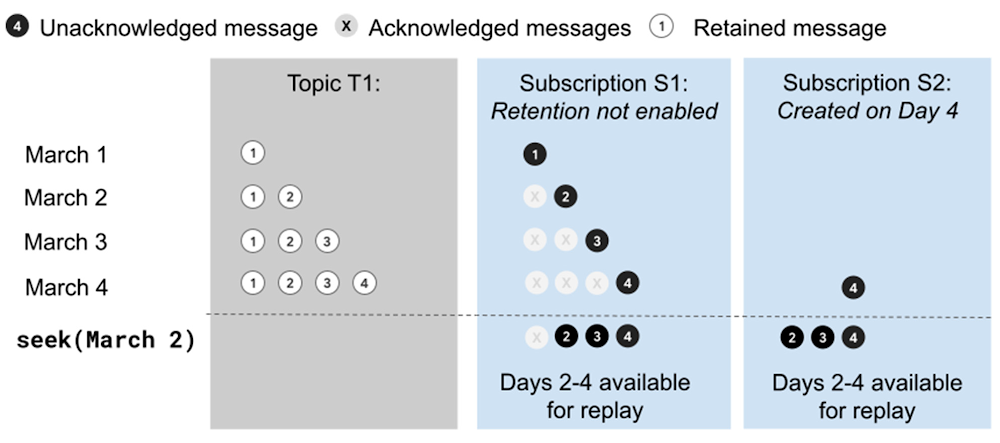
Starting today, there is a simpler, more useful way to save and replay messages that are published to Pub/Sub: topic retention. Prior to topic retention, you needed to individually configure and pay for message retention in each subscription. Now, when you enable topic retention, all messages sent to the topic within the chosen retention window are accessible to all the topic’s subscriptions, without increasing your storage costs when you add subscriptions. Additionally, messages will be retained and available for replay even if there are no subscriptions attached to the topic at the time the messages are published. Topic retention extends Pub/Sub’s existing seek functionality—message replay is no longer constrained to the subscription’s acknowledged messages. You can initialize new subscriptions with data retained by the topic, and any subscription can replay previously published messages. This makes it safer than ever to update stream processing code without fear of data processing errors, or to deploy new AI models and services built on a history of messages. Topic retention explainedWith topic retention, the topic is responsible for storing messages, independently of subscription retention settings. The topic owner has full control over the topic retention duration and pays the full cost associated with message storage by the topic. As a subscription owner, you can still configure subscription retention policies to meet your individual needs.Topic-retained messages are available even when the subscription is not configured to retain messagesInitializing data for new use casesAs organizations become more mature at using streaming data, they often want to apply new use cases to existing data streams that they’ve published to Pub/Sub topics. With topic retention, you can access the history of this data stream for new use cases by creating a new subscription and seeking back to a desired point in time.Using the GCloud CLI These two commands initialize a new subscription and replay data from two days in the past. Retained messages are available within a minute after the seek operation is performed.Choosing the retention option that’s right for youPub/Sub lets you choose between several different retention policies for your messages; here’s an overview of how we recommend you should use each type.Topic retention lets you pay just once for all attached subscriptions, regardless of when they were created, to replay all messages published within the retention window. We recommend topic retention in circumstances where it is desirable for the topic owner to manage shared storage.Subscription retention allows subscription owners, in a multi-tenant configuration, to guarantee their retention needs independently of the retention settings configured by the topic owner.Snapshots are best used to capture the state of a subscription at the time of an important event, e.g. an update to subscriber code when reading from the subscription.Transitioning from subscription retention to topic retentionYou can configure topic retention when creating a new topic or updating an existing topic via the Cloud Console or the gcloud CLI. In the CLI, the command would look like:gcloud alpha pubsub topics update myTopic –message-retention-duration 7d.If you are migrating to topic retention from subscription storage, subscription storage can be safely disabled after 7 days.What’s nextPub/Sub topic retention makes reprocessing data with Pub/Sub simpler and more useful. To get started, you can read more about the feature, visit the pricing documentation, or simply enable topic retention on a topic using Cloud Console or the gcloud CLI.Related ArticleHow to detect machine-learned anomalies in real-time foreign exchange dataModel the expected distribution of financial technical indicators to detect anomalies and show when the Relative Strength Indicator is un…Read Article
Quelle: Google Cloud Platform

Celebrating Women’s Equality Day with Google Cloud

Editor’s note: August 26th is Women’s Equality Day, a day celebrated in the United States to commemorate the 1920 adoption of the Nineteenth Amendment to the United States Constitution, which prohibits the states and the federal government from denying the right to vote on the basis of sex. This post celebrates this moment in U.S. history and all women globally.On this day, 101 years ago, the Nineteenth Amendment to the United States Constitution was adopted. This monumental amendment granted women the right to vote and protects U.S. citizens from being denied the right to vote on the basis of sex. Today, the Google Cloud community celebrates and remembers those who have fought and continue to fight for the voting rights of all people. While this day is officially celebrated in the U.S., we’re taking this time to celebrate all women globally. Women’s Equality Day is an important moment to recognize the powerful women and movements that have paved the way for us while continuing to work to break barriers for the next generation. As members of the Google Cloud team, we are passionate about seeking opportunities for women and underrepresented communities to have a voice and strive to reflect the diversity of our users and fellow Googlers in all that we do. We asked members of the Google Cloud team, “What does Women’s Equality Day mean to you?”. The responses were hopeful and passionate, calling for a celebration of the progress made while recognizing that there is still work to be done. The respondents highlighted areas where they are committed to doing the work now and in the future to make sure that equality is a reality for all women. We are inspired by the words of our peers and are honored to share them with you today. Alison Wagonfeld, VP Marketing, Google Cloud, thanks all the women before her that fought for our rights and pledges to women around the world that she will fight every day for global equality for women.Eva Tsai, Director, Marketing Strategy & Operations, Google Cloud, wisely proclaims that we do not have to choose between greatness and diversity. Without diversity, there’s no greatness.Allison Romano, Director, Digital Experience, Google Cloud, is calling to fix the wage gap to make sure women have pay equality and are treated, valued, and paid equally.Taylor Sterling, Director of Customer Marketing, Google Workspace, Google Cloud is proud to be a part of a company that shines a light on all opportunities to expand knowledge.Cynthia Hester, Director, Customer Programs, Google Cloud, is expanding the narrative of this day beyond women getting the right to vote and committed to contributing to making sure that equality is a reality for all women.Teena Piccione, Managing Director, US, TMEG Industry, asks us to join her as we celebrate today and continue to ensure that we are still shattering that glass ceiling, hacking that glass ceiling and making a difference for the generations to come.Patricia Hadden, Growth Marketing, Google Workspace, celebrates those women in her life that are symbols of strength in her life from  those who are incredibly well known to our mothers and our grandmothers.Kristi Berg, Director, Enterprise Customer Demand, reminds us that there are still barriers that keep women from living up to their potential and that the empowerment of girls is key to social, economic and political stability.Jeana Jorgensen, Senior Director, Product Marketing, Google Cloud, is reminding us of the power of encouragement and urging us to use our words for good and to build up our fellow women.Kady Dundas, Director of Product Marketing, Google Workspace, Google Cloud, is reflecting on the “journey of our trans sisters…and celebrating with them this year”.Visit Google’s Diversity, Equity & Inclusion site to learn more about Google’s commitment to continuing to make diversity, equity, and inclusion part of everything we do. Here you can read our 2021 Annual Diversity Report and check out Google’s approach to diversity, equity, and inclusion.Related ArticleRead Article
Quelle: Google Cloud Platform

BigQuery Admin reference guide: Monitoring

Last week, we shared information on BigQuery APIs and how to use them, along with another blog on workload management best practices. This blog focuses on effectively monitoring BigQuery usage and related metrics to operationalize workload management we discussed so far.Monitoring Options for BigQuery ResourceBigQuery Monitoring Best PracticesVisualization Options For Decision MakingTips on Key Monitoring Metrics Monitoring options for BigQueryAnalyzing and monitoring BigQuery usage is critical for businesses for overall cost optimization and performance reporting. BigQuery provides its native admin panel with overview metrics for monitoring. BigQuery is also well integrated with existing GCP services like Cloud Logging to provide detailed logs of individual events and Cloud Monitoring dashboards for analytics, reporting and alerting on BigQuery usage and events. BigQuery Admin PanelBigQuery natively provides an admin panel with overview metrics. This feature is currently in preview and only available for flat-rate customers within the Admin Project. This option is useful for organization administrators to analyze and monitor slot usage and overall performance at the organization, folder and project levels. Admin panel provides real time data for historical analysis and is recommended for capacity planning at the organization level. However, it only provides metrics for query jobs. Also, the history is only available for up to 14 days.Cloud MonitoringUsers can create custom monitoring dashboards for their projects using Cloud Monitoring. This provides high-level monitoring metrics, and options for alerting on key metrics and automated report exports. There is a subset of metrics that are particularly relevant to BigQuery including slots allocated, total slots available, slots available by job, etc. Cloud Monitoring also has a limit of 375 projects that can be monitored per workspace (as of August 2021). This limit can be increased upon request. Finally, there is limited information about reservations in this view and no side by side information about the current reservations and assignments.Audit logs Google Cloud Audit logs provide information regarding admin activities, system changes, data access and data updates to comply with security and compliance needs. The BigQuery data activities logs, provide the following key metrics:query – The BigQuery SQL executedstartTime – Time when the job startedendTime – Time when the job endedtotalProcessedBytes – Total bytes processed for a jobtotalBilledBytes – Processed bytes, adjusted by the job’s CPU usagetotalSlotMs – The total slot time consumed by the query jobreferencedFields – The columns of the underlying table that were accessedUsers can set up an aggregated logs sink at organization, folder or project level to get all the BigQuery related logs:Other Filters:Logs from Data Transfer ServiceprotoPayload.serviceName=bigquerydatatransfer.googleapis.comLogs from BigQuery Reservations APIprotoPayload.serviceName=bigqueryreservation.googleapis.comINFORMATION_SCHEMA VIEWSBigQuery provides a set of INFORMATION_SCHEMA views secured for different roles to quickly get access to BigQuery jobs stats and related metadata. These views (also known as system tables) are partitioned and clustered for faster extraction of metadata and are updated in real-time. With the right set of permission and access level a user can monitor/review jobs information at user, project, folder and organization level. These views allow users to:Create customized dashboards by connecting to any BI tool Quickly aggregate data across many dimensions such as user, project, reservation, etc.Drill down into jobs to analyze total cost and time spent per stageSee holistic view of the entire organizationFor example, the following query provides information about the top 2 jobs in the project with details on job id, user and bytes processed by each job.Data StudioLeverage these easy to set up public Data Studio dashboards for monitoring slot and reservation usages,  query troubleshooting, load slot estimations, error reporting, etc. Check out this blog for more details on performance troubleshooting using Data Studio.Looker Looker marketplace provides  BigQuery Performance Monitoring Block for monitoring BigQuery usage. Check out this blog for more details on performance monitoring using Looker. Monitoring best practicesKey metrics to monitorTypical questions administrator or workload owners would like to understand are:What is my slots utilization for a given project?How much data scan and processing takes place during a given day or an hour?How many users are running jobs concurrently?How is performance and throughout changing over the time?How can I appropriately perform cost analysis for showback and chargeback?One of the most demanding analyses is to understand how many slots are good for a given workload i.e. do we need more or less slots as workload patterns change? Below is a list of key metrics and trends to observe for better decision making on BigQuery resources:Monitor slot usage and performance trends (week over week, month over month). Correlate trends with any workload pattern changes, for example:Are more users being onboarded within the same slot allocation?Are new workloads being enabled with the same slot allocation?You may want to allocate more slots if you see:Concurrency – consistently increasingThroughput – consistently decreasingSlot Utilization – consistently increasing or keeping beyond 90%If slot utilization has spikes, are they on a regular frequency?In this case, you may want to leverage flex slots for predictable spikesCan some non-critical workloads be time shifted?For a given set of jobs with the same priority, e.g.  for a specific group of queries or users:Avg. Wait Time – consistently increasingAvg. query run-time – consistently increasingConcurrency and throughputConcurrency is the number of queries that can run in parallel with the desired level of performance, for a set of fixed resources. In contrast, throughput is the number of completed queries for a given time duration and a fixed set of resources.In the blog BigQuery workload management best practices, we discussed in detail on how BigQuery leverages dynamic slot allocation at each step of the query processing. The chart above reflects the slot replenishment process with respect to concurrency and throughput. More complex queries may require more number of slots, hence fewer available slots for other queries. If there is a requirement for a certain level of concurrency and minimum run-time, increased slot capacity may be required.  In contrast, simple and smaller queries gives you faster replenishment of slots, hence high throughput to start with for a given workload. Learn more about BiqQuery’s fair schedulingand query processing in detail.Slot utilization rateSlot utilization rate is a ratio of slots used over total available slots capacity for a given period of time. This provides a window of opportunities for workload optimization. So, you may want to dig into the utilization rate of available slots over a period. If you see that on an average a low percentage of available slots are being used during a certain hour, then you may add more scheduled jobs within that hour to further utilize your available capacity.  On the other hand, high utilization rate means that either you should move some scheduled workloads to different hours or purchase more slots.For example: Given a 500 slot reservation (capacity), the following query can be used to find total_slot_ms over a period of time:Lets say, we have the following results from the query above:sum(total_slot_ms) for a given second is 453,708 mssum(total_slot_ms) for a given hour is 1,350,964,880 mssum(total_slot_ms) for a given day is  27,110,589,760 msTherefore, slot utilization rate can be calculated  using the following formula: Slot Utilization = sum(total_slot_ms) / slot capacity available in msBy second: 453,708 / (500 * 1000) = 0.9074 => 90.74%By hour: 1,350,964,880/(500 * 1000 * 60 * 60) = 0.7505 => 75.05%By day: 27,110,589,760 / (500 * 1000 * 60 * 60 * 24) = 0.6276 => 62.76%Another common metric used to understand slot usage patterns is to look at the average slot time consumed over a period for a specific job or workloads tied to a specific reservation. Average slot usage over a period: Highly relevant for workload with consistent usageMetric:SUM(total_slot_ms) / {time duration in milliseconds} => custom durationDaily Average Usage: SUM(total_slot_ms) / (1000 * 60 * 60 * 24) => for a given dayExample Query:Average slot usage for an individual job: Job level statisticsAverage slot utilization over a specific time period is useful to monitor trends, help understand how slot usage patterns are changing or if there is a notable change in a workload. You can find more details about trends in the ‘Take Action’ section below. Average slot usage for an individual job is useful to understand query-run time estimates, to identify outlier queries and to estimate slots capacity during capacity planning.ChargebackAs more users and projects are onboarded with BigQuery, it is important for administrators to not only monitor and alert on resource utilization, but also help users and groups to efficiently manage cost+performance. Many organizations require that individual project owners be responsible for resource management and optimization. Hence, it is important to provide reporting at a project-level that summarizes costs and resources for the decision makers.Below is an example of a reference architecture that enables comprehensive reporting,  leveraging audit logs, INFORMATION_SCHEMA and billing data. The architecture highlights persona based reporting for admin and individual users or groups by leveraging authorized view based access to datasets within a monitoring project.Export audit log data to BigQuery with specific resources you need (in this example for the BigQuery). You can also export aggregated data at organization level.The INFORMATION_SCHEMA provides BigQuery metadata and job execution details for the last six months. You may want to persist relevant information for your reporting into a BigQuery dataset. Export billing data to BigQuery for cost analysis and spend optimization.With BigQuery, leverage security settings such as authorized views to provide separation of data access by project or by persona for admins vs. users.Analysis and reporting dashboards built with visual tools such as Looker represent the data from BigQuery dataset(s) created for monitoring. In the chart above, examples of dashboards include: Key KPIs for admins such as usage trend or spend trendsData governance and access reportsShowback/Chargeback by projectsJob level statistics User dashboards with relevant metrics such as query stats, data access stats and job performanceBilling monitoringTo operationalize showback or chargeback reporting, cost metrics are important to monitor and include in your reporting application. BigQuery billing is associated at project level as an accounting entity. Google Cloud billing reports help you understand trends and protect your resource costs and help answer questions such as:What is my BigQuery project cost this month?What is the cost trend for a resource with a specific label?What is my forecasted future cost based on historical trends for a BigQuery project?You can refer to these examples to get started with billing reports and understand what metrics to monitor. Additionally, you can export billing and audit metrics to BigQuery dataset for comprehensive analysis with resource monitoring.As a best practice, monitoring trends is important to optimize spend on cloud resources. This article provides a visualization option with Looker to monitor trends. You can take advantage of readily available Looker block to deploy spend analytics and block for audit data visualization for your projects and, today!When to useThe following tables provide guidance on using the right tool for monitoring based on the feature requirements and use cases.Following features can be considered in choosing the mechanism to use for BigQuery monitoring:Integration with BigQuery INFORMATION_SCHMA  – Leverage the data from information schema for monitoring Integration with other data sources – Join this data with other sources like business metadata, budgets stored in google sheets, etc.Monitoring at Org Level –  Monitor all the organization’s projects togetherData/Filter based Alerts – Alert on specific filters or data selection in the dashboard. For example, send alerts for a chart filtered by a specific project or reservation.User based Alerts – Alert for specific userOn-demand Report Exports – Export the report as PDF, CSV, etc.1 BigQuery Admin Panel uses INFORMATION SCHEMA under the hood.2 Cloud monitoring provides only limited integration as it surfaces only high-level metrics.3 You can monitor up to 375 projects at a time in a single Cloud Monitoring workspace.BigQuery monitoring is important across different use cases and personas in the organization. PersonasAdministrators – Primarily concerned with secure operations and health of the GCP fleet of resources. For example, SREsPlatform Operators – Often run the platform that serves internal customers. For example, Data Platform LeadsData Owners / Users – Develop and operate applications, and manage a system that generates source data. This persona is mostly concerned with their specific workloads. For example, DevelopersThe following table provides guidance on the right tool to use for your specific requirements:Take actionTo get started quickly with monitoring on BigQuery, you can leverage publicly available data studio dashboard and related github resources. Looker also provides BigQuery Performance Monitoring Block for monitoring BigQuery usage. To quickly deploy billing monitoring with GCP, see reference blog and related github resources. The key to successful monitoring is to enable proactive alerts. For example, setting up alerts when the reservation slot utilization rate crosses a predetermined threshold. Also, it’s important to enable the individual users and teams in the organization to monitor their workloads using a self-service analytics framework or dashboard. This allows the users to monitor trends for forecasting resource needs and troubleshoot overall performance.Below are additional examples of monitoring dashboards and metrics:Organization Admin Reporting (proactive monitoring)Alert based on thresholds like 90% slot utilization rate Regular reviews of consuming projectsMonitor for seasonal peaksReview jobs metadata from information schema for large queries using  total_bytes_processed and total_slot_ms metricsDevelop data slice and dice strategies in the dashboard for appropriate chargebackLeverage audit logs for data governance and access reportingSpecific Data Owner Reporting (self-service capabilities)Monitor for large queries executed in the last X hoursTroubleshoot job performance using concurrency, slots used and time spent per job stage, etc.Develop error reports and alert on critical job failuresUnderstand and leverage INFORMATION_SCHEMA for real-time reports and alerts. Review more examples on job stats and technical deep-dive INFORMATION_SCHEMA explained with this blog.Related ArticleBigQuery Admin reference guide: API landscapeExplore the different BigQuery APIs that can help you programmatically manage and leverage your data.Read Article
Quelle: Google Cloud Platform

Introducing Prediction Private Endpoints for fast and secure serving on Vertex AI

One of the biggest challenges when serving machine learning models is delivering predictions in near real-time. Whether you’re a retailer generating recommendations for users shopping on your site, or a food service company estimating delivery time, being able to serve results with low latency is crucial. That’s why we’re excited to announce Private Endpoints on Vertex AI, a new feature in Vertex Predictions. Through VPC Peering, you can set up a private connection to talk to your endpoint without your data ever traversing the public internet, resulting in increased security and lower latency for online predictions. Configuring VPC Network PeeringBefore you make use of a Private Endpoint, you’ll first need to create connections between your VPC (Virtual Private Cloud) network and Vertex AI.  A VPC network is a global resource that consists of regional virtual subnetworks, known as subnets, in data centers, all connected by a global network. You can think of a VPC network the same way you’d think of a physical network, except that it’s virtualized within GCP. If you’re new to cloud networking and would like to learn more, check out this introductory video on VPCs.With VPC Network Peering, you can connect internal IP addresses across two VPC networks, regardless of whether they belong to the same project or the same organization. As a result, all traffic stays within Google’s network.Deploying Models with Vertex PredictionsVertex Predictions is a serverless way to serve machine learning models. You can host your model in the cloud and make predictions through a REST API. If your use case requires online predictions, you’ll need to deploy your model to an endpoint. Deploying a model to an endpoint associates physical resources with the model so it can serve predictions with low latency. When deploying a model to an endpoint, you can specify details such as the machine type, and parameters for autoscaling. Additionally, you now have the option to create a Private Endpoint. Because your data never traverses the public internet, Private Endpoints offer security benefits in addition to reducing the time your system takes to serve the prediction when it receives the request. The overhead introduced by Private Endpoints is minimal, achieving performance nearly identical to DIY serving on GKE or GCE.  There is also no payload size limit for models deployed on the private endpoint.Creating a Private Endpoint on Vertex AI is simple.In the Models section of the Cloud console, select the model resource you want to deploy.Next, select DEPLOY TO ENDPOINTIn the window on the right hand side of the console, navigate to the Access section and select Private. You’ll need to add the full name of the VPC network for which your deployment should be peered.Note that many other managed services on GCP support VPC peering, such as Vertex Training, Cloud SQL, and Firestore. Endpoints is the latest to join that list.What’s Next?Now you know the basics of VPC Peering and how to use Private Endpoints on Vertex AI. If you want to learn more about configuring VPCs, check out this overview guide. And if you’re interested to learn more about how to use Vertex AI to support your ML workflow, check out this introductory video. Now it’s time for you to deploy your own ML model to a Private Endpoint for super speedy predictions!Related ArticleWhat is Vertex AI? Developer advocates share moreDeveloper Advocates Priyanka Vergadia and Sara Robinson explain how Vertex AI supports your entire ML workflow—from data management all t…Read Article
Quelle: Google Cloud Platform

Shift security left with on-demand vulnerability scanning

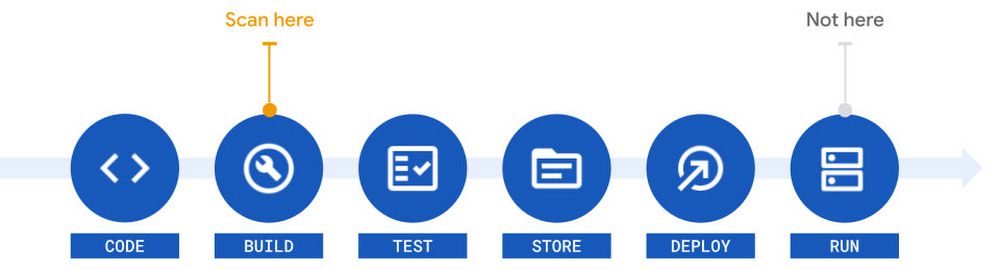
Detection and remediation of security vulnerabilities before they reach deployment is critical in a cloud-native world. This makes scanning for vulnerabilities early and often an important part of continuous integration and delivery (CI/CD) processes. The earlier a problem is detected, the fewer downstream issues will occur. The process of checking for vulnerabilities earlier in development is called “shifting left”. In fact, building security into software development also  speeds up  software delivery and performance. Thanks to shift-left, research from DevOps Research and Assessment (DORA) shows high-performing teams spend 50 percent less time remediating security issues than low-performing teams. To help companies accomplish a leftward shift in their security, Google Cloud recently launched On-Demand Scanning to general availability.  This new feature checks for vulnerabilities both in locally stored container images and images stored within GCP registries. With On-Demand Scanning, vulnerabilities can be surfaced as soon as  an image is built, well before the image is pushed to a registry. This early visibility makes it possible to automate decisions and determine whether a container image should be promoted for broad use. Thus, vulnerable images surfaced within a CI pipeline can be fixed before delivery. Additionally, developers can use On-Demand Scanning as part of their local workflows via a simple gcloud command. You can learn more about this and how to build trust in your software delivery pipeline by checking out our recent secure software supply chain event.Previously, we wrote about the benefits of Google Cloud’s vulnerability scanning in the software supply chain, right from build to deploy. Those key benefits still apply, and are strengthened with the addition of On-Demand Scanning. For instance, you can continue to monitor images stored in Artifact Registry (via automated scanning) in addition to On-Demand Scanning at build time. By using On-Demand Scanning at this earlier stage, vulnerabilities can be detected before an image is stored. This way you can reduce the number of vulnerable images pushed and ensure any newly discovered vulnerabilities are caught well before deployment. The data sources for vulnerabilities come directly from the industry-standard distros (e.g. Debian, RHEL, Ubuntu) and the National Vulnerabilities Database (NVD). Aggregating these sources allows you to see results that include the CVSS score assigned by NVD, and the severity assigned by the distro. Once you’ve identified a potential vulnerability, you can make decisions based on your own security policies and needs.Results returned by On-Demand Scanning are formatted to the open-source Grafeas standard, and can be parsed in the same way as vulnerability scanning in Artifact Registry. Thus, any existing tooling that consumes the Grafeas format (including Artifact Registry and Container Registry) can be used with On-Demand Scanning. To get started today, all you need to do is enable the On-Demand Scanning API and connect it to your container. For guidance, take a look at our quickstart guide to run On-Demand Scanning on any local machine or try the tutorial that describes how to use On-Demand Scanning with Cloud Build.Related ArticleGuard against security vulnerabilities in your software supply chain with Container Registry vulnerability scanningGoogle Cloud is announcing Container Registry vulnerability scanning in beta, helping to automatically detect known security vulnerabilit…Read Article
Quelle: Google Cloud Platform

Converging architectures: Bringing data lakes and data warehouses together

Historically, data warehouses have been painful to manage. The legacy, on-premises systems that worked well for the past 40 years have proved to be expensive and they had many challenges around data freshness, scaling, and high costs. Furthermore, they cannot easily provide AI or real-time capabilities that are needed by modern businesses. We even see this with the cloud newly created data warehouses as well. They do not have AI capabilities still, despite showing that or arguing that they are the modern data warehouses. They are really like the lift and shift version of the legacy on-premises environments over to cloud. At the same time, on-premises data lakes have other challenges. They promised a lot, looked really good on paper,  promised low cost and ability to scale. However, in reality this did not capitalize for many organizations. This was  mainly because they were not easily operationalized, productionized, or utilized. This in return increased the overall total cost of ownership. There are also significant data governance challenges created by the data lakes. They did not work well with the existing IAM and security models. Furthermore, they ended up creating data silos because data is not easily shared across through the hadoop environment.With varying choices, customers would choose the environment that made sense, perhaps a pure data warehouse, or perhaps a pure data lake, or a combination. This leads to a set of tradeoffs for nearly any real-world customer working with real-world data and use cases. Therefore, this past approach has naturally set up a model where we see different and often disconnected teams setting up shop within organizations. Resulting in users split between their use of the data warehouse and the data lake. Data warehouse users tend to be closer to the business, and have ideas about how to improve analysis, often without the ability to explore the business to drive a deeper understanding. On the contrary, data lake users are closer to the raw data and have the tools and capabilities to explore the data. Since they spend so much time doing this, they are focused on the data itself, and less focused on the business. This disconnect robs the business of the opportunity to find insights that would drive the business forward to higher revenues, lower costs, lower risk, and new opportunities.Since then the two systems co-existed and complemented each other as the two main data analytics systems of enterprises, residing side by side in the shared IT sphere. These are also the data systems at the heart of any digital transformation of the business and the move to a full data-driven culture. As more organizations are migrating their traditional on-premises systems to the cloud and SaaS solutions, this is a period during which enterprises are rethinking the boundaries of these systems toward a more converged analytics platform.This rethinking has led to convergence of data lakes and warehouses, as well as data teams across organizations. The cloud offers managed services that help expedite the convergence so that any data person could start to get insight and value out of the data, regardless of the system. The benefits of the converged data lake and data warehouse environment present itself in several ways. Most of these are driven by the ability to provide managed, scalable, and serverless technologies. As a result, the notion of storage and computation is blurred. Now it is no longer important to explicitly manage where data is stored or what format it is stored. Users are democratized, they should be able to access the data regardless of the infrastructure limitations. From a data user perspective, it doesn’t really matter whether the data resides in a data lake or a data warehouse. They do not look into which system the data is coming from. They really care about what data that they have, and whether they can trust it. The volume of the data that they can ingest and whether it is real time or not. They are also discovering and managing data across varied datastores and taking them away from the siloed world into an integrated data ecosystem. Most importantly, analyze and process data with any person or tool.At Google Cloud, we provide a cloud native, highly scalable and secure, converged solution that delivers choice and interoperability to customers. Our cloud native architecture reduces cost and improves efficiency for organizations. For example, BigQuery’s full separation of storage and compute allows for BigQuery compute to be brought to other storage mechanisms through federated queries. BigQuery storage API allows treating a data warehouse like a data lake. It allows you to access the data residing in BigQuery. For example, you can use Spark to access data resigning in Data Warehouse without it affecting performance of any other  jobs accessing it. On top of this, Dataplex, our intelligent data fabric service, provides data governance and security capabilities across various storage tiers built on GCS and BigQuery.There are many benefits achieved by the convergence of the data warehouses and data lakes and if you would like to find more, here’s the full paper.Related ArticleRegistration is open for Google Cloud Next: October 12–14Register now for Google Cloud Next on October 12–14, 2021Read Article
Quelle: Google Cloud Platform

Optimize training performance with Reduction Server on Vertex AI

As deep learning models become more complex and the size of training datasets keeps increasing, training time has become one of the key bottlenecks in the development and deployment of ML systems. Even if you have access to a GPU, with a large dataset it can take days or weeks for a deep learning model to converge. Using the right hardware configuration can reduce training time to hours, or even minutes. And a shorter training time makes for faster iteration to reach your modeling goals. To speed up training of large models, many engineering teams are adopting distributed training using scale-out clusters of ML accelerators. However, distributed training at scale brings its own set of challenges. Specifically, limited network bandwidth between nodes makes optimizing performance of distributed training inherently difficult, particularly for large cluster configurations.In this article, we introduce Reduction Server, a new Vertex AI feature that optimizes bandwidth and latency of multi-node distributed training on NVIDIA GPUs for synchronous data parallel algorithms. Synchronous data parallelism is the foundation of many widely adopted distributed training frameworks, including TensorFlow’s MultiWorkerMirroredStrategy, Horovod, andPyTorch Distributed. By optimizing bandwidth usage and latency of the all-reduce collective operation used by these frameworks, Reduction Server can decrease both the time and cost of large training jobs. This article covers key terminology in the field of distributed training, such as data parallelism, synchronous training, and all-reduce, and shows how to configure and submit Vertex Training jobs that utilize Reduction Server. Additionally, we provide sample code for using Reduction Server to tune a BERT model on the MNLI dataset.Overview of distributed data parallel training on GPUs Imagine you have a simple linear model, which you can think of in terms of its computational graph. In the image below, the matmul op takes in the XandW tensors, which are the training batch and weights respectively. The resulting tensor is then passed to the add op with the tensor b, which is the model’s bias terms. The result of this op is Ypred, which is the model’s predictions.We want a way of executing this computational graph such that we can leverage multiple workers. One option would be putting different layers of your model on different machines or devices, which is a type of model parallelism. Alternatively, you could distribute your dataset such that each worker processes a different portion of the input batch on each training step with the same model, which is known as data parallelism. Or you might do a combination of both. Generally, model parallelism works best for models where there are independent parts of computation that can run in parallel. Data parallelism works with any model architecture, which makes it more widely adopted for distributed training.The following image shows an example of data parallelism. The input batch X is split in half, and one slice is sent to GPU 0 and the other to GPU 1. In this case, each GPU calculates the same ops but on different slices of the data.The subsequent gradient updates will happen in a synchronous manner:Each worker device performs the forward pass on a different slice of the input data to compute the loss.Each worker device computes the gradients based on the loss function.These gradients are aggregated (reduced) across all of the devices.The optimizer updates the weights using the reduced gradients, thereby keeping the devices in sync.  You can use data parallelism to speed up training for a single machine with multiple GPUs, or for multiple machines, each with potentially multiple GPUs. For the rest of this discussion we assume that compute workers map to GPU devices one-to-one. For example, a single compute node with two GPU devices has two workers. And a four node cluster where each node has two GPU devices manages eight workers.A key aspect of data parallel distributed training is the gradient aggregation. Because each worker cannot proceed to the next training step until all the other workers have finished the current step, this gradient calculation becomes the main overhead in distributed training for synchronous strategies. To perform this gradient aggregation, most widely adopted distributed training frameworks leverage a synchronous all-reduce collective communication operation.All-reduce is a collective communication operation that reduces a set of arrays on distributed workers to a single array that is then re-distributed back to each worker. In gradient aggregation the reduction operation is a summation.The diagram above shows 4 GPU workers. Before the all-reduce operation, each worker has an array of gradients that were calculated on its batch of training data. Because each worker received a different batch of training data, the subsequent gradient arrays (g0, g1, g2, g3) are all different. After the all-reduce operation is completed, each worker will have the same array. This array is computed by aggregating (a summation) gradient arrays across all workers. There are many different algorithms for efficiently implementing this aggregation. In general, workers communicate and exchange gradients with each other over a topology of communication links. The choice of the topology and the gradient exchange pattern impacts the bandwidth required by the algorithm and its latency. One simple example of an all-reduce implementation is called Ring All-reduce, where the workers form a logical ring and communicate only with their immediate neighbors.The algorithm can be logically divided into two phases: Reduce-scatter phaseAll-gather phaseAt the start of the Reduce-scatter phase the gradient array on each worker is divided into N equal size blocks, where N is the number of workers, which in this case is 4.In the next step, each worker simultaneously sends one of these blocks to one neighbor and receives a different block from the other neighbor.Worker-0 sends the a0 block to Worker-1.  Worker-1 sends the b1  block to Worker-2. Worker-2 sends the c2 block to Worker-3. And finally, Worker-3 sends the d3 block to Worker-0. As noted earlier, all send and receive operations in the ring are simultaneous.  When this step completes, each worker can perform a partial reduction using the block received from its neighbor. After the partial reduction, workers exchange partially reduced blocks. Worker-1 sends the reduced a1+a0 block to Worker-2. Worker-2 sends the reduced b2+b1 block to Worker-3. And so on.At the end of the Reduce-scatter phase, each worker will have one fully reduced block of the original arrays.At this point, the All-gather phase of the algorithm starts.Worker-0 sends the fully reduced  b0+b3+b2+b1 block to Worker-1. Worker-1 sends the c1+c0+c3+c4 block to Worker-2 and so on.At the end of the All-gather phase all workers have the same fully reduced array.During the Reduce-scatter phase, each worker sends and receives N-1 blocks of data, where N is the number of workers. The same number of blocks are exchanged during the All-gather phase. In total, 2(N-1) blocks of data are sent and received by each worker during the Ring All-reduce algorithm. If the size of the gradient array is K bytes then the number of bytes sent and received during the all-reduce operation is (2(N-1)/N)*K.The downside of the Ring All-reduce is that the latency of the algorithm scales linearly with the number of workers, effectively preventing scaling to larger clusters. Other implementations of all-reduce based on tree topologies can achieve logarithmic scaling.The Reduction Server algorithmThe Vertex Reduction Server uses a distinctive communication link topology by introducing an additional worker role, a reducer. Reducers are dedicated to one function only: aggregating gradients from workers. Reducers don’t calculate gradients or maintain model parameters. Because of their limited functionality, reducers don’t require a lot of computational power and can run on relatively inexpensive compute nodes.The following diagram shows a cluster with four GPU workers and five reducers. GPU workers maintain model replicas, calculate gradients, and update parameters. Reducers receive blocks of gradients from the GPU workers, reduce the blocks and redistribute the reduced blocks back to the GPU workers.To perform the all-reduce operation, the gradient array on each GPU worker is first partitioned into M blocks, where M is the number of reducers. A given reducer processes the same partition of the gradient from all GPU workers. For example, as shown on the above diagram, the first reducer reduces the blocks a0 through a3 and the second reducer reduces the blocks b0 through b3. After reducing the received blocks, a reducer sends back the reduced partition to all GPU workers.Assuming that the size of a gradient array is K bytes, each node in the topology sends and receives K bytes of data. That is almost half the data that the Ring and Tree based all-reduce implementations exchange. An additional advantage of Reduction Server is that its latency does not depend on the number of workers. The below table compares data transfer and latency characteristics of Reduction Server compared to Ring and Tree based all-reduce algorithms. Recall that N is the number of workers, and K is the size of the gradient array (bytes).Using Reduction Server with Vertex TrainingReduction Server can be used with any distributed training framework that uses the NVIDIA NCCL library for the all-reduce collective operation. You do not need to change or recompile your training application. To use Reduction Server with Vertex Training custom jobs you need to:Choose a topology of Vertex Training worker pools.Install the Reduction Server NVIDIA NCCL transport plugging in your training container image.Configure and submit a Vertex Training custom job that includes a Reduction Server worker pool.Each of these steps is discussed in detail in the following sections.Choosing a topology of Vertex Training worker poolsTo run a multi-worker training job with Vertex AI, you specify multiple machines (nodes) in a training cluster. The training service allocates the resources for the machine types you specify. Your running job on a given node is called a replica. A group of replicas with the same configuration is called a worker pool. Vertex AI provides up to 4 worker pools to cover the different types of machine tasks. When using Reduction Server the first three worker pools are used.Worker pool 0 configures the Primary, chief, scheduler, or “master”.  This worker generally takes on some extra work such as saving checkpoints and writing summary files. There is only ever one chief worker in a cluster, so your worker count for worker pool 0 will always be 1.Worker pool 1 is where you configure the rest of the workers for your cluster. Worker pool 2 manages Reduction Server reducers. When choosing the number and type of reducers, you should consider the network bandwidth supported by a reducer replica’s machine type. In GCP, a VM’s machine type defines its maximum possible egress bandwidth. For example, the egress bandwidth of the n1-highcpu-16 machine type is limited at 32 Gbps. Because reducers perform a very limited function, aggregating blocks of gradients, they can run on relatively low-powered and cost effective machines. Even with a large number of gradients this computation does not require accelerated hardware or high CPU or memory resources. However, to avoid network bottlenecks, the total aggregate bandwidth of all replicas in the reducer worker pool must be greater or equal to the total aggregate bandwidth of all replicas in worker pools 0 and 1, which host the GPU workers.For example, if you run your distributed training job on eight GPU equipped replicas that have an aggregate maximum bandwidth of 800 Gbps (GPU equipped VMs can support up to 100 Gbps egress bandwidth) and you use a reducer with 32 Gbps egress bandwidth, you will need at least 25 reducers.To maintain the size of the reducer worker pool at a reasonable level it’s recommended that you use machine types with 32 Gbps egress bandwidth, which is the highest bandwidth available to CPU only machines in Vertex Training. Based on the testing performed on a number of mainstream Deep Learning models in Computer Vision and NLP domains, we recommend using the reducers with 16-32 vCPUs and 16-32 GBs of RAM. A good starting configuration that should be optimal for a large spectrum of distributed training scenarios is the n1-highcpu-16 machine type.Installing the Reduction Server NVIDIA NCCL transport pluginReduction Server is implemented as an NVIDIA NCCL transport plugin. This plugin must be installed on the container image that is used to run your training application. The code accompanying this article includes a sample Dockerfile that uses the Vertex pre-built TensorFlow 2.5 GPU Docker image as a base image, which comes with the plugin pre-installed. You can also install the plugin directly by including the following in your Dockerfile:Configuring Vertex Training jobs using Reduction ServerFirst, import and initialize the Vertex SDK.Next, you’ll specify the configuration for your custom job. In the following spec, there are three worker pools defined:Worker pool 0 has one worker with 4 NVIDIA A100 Tensor Core GPUs. Worker pool 1 defines an additional 7 GPU workers, resulting in 8 GPU workers overall. Worker pool 2 specifies 14 reducers of machine type n1-highcpu-16. Note that worker pools 0 and 1 run your training application in a container image configured with the Reduction Server NCCL transport plugin. Worker pool 2 uses the Reduction Server container image provided by Vertex AI.Next, create and run a CustomJob. In the Training section of your cloud console under the CUSTOM JOBS tab you’ll see your training job:Analyzing performance and cost benefits of Reduction ServerThe impact Reduction Server has on the elapsed time of your training job and the potential resulting cost savings depend on the characteristics of your training workload.In general, computationally intensive workloads that require a large number of GPUs to complete training in a reasonable amount of time, and where the trained model has a large number of parameters, will benefit the most. This is because the latency for standard ring and tree based all-reduce collectives is proportional to both the number of GPU workers and the size of the gradient array. Reduction Server optimizes both: latency does not depend on the number of GPU workers, and the quantity of data transferred during the all-reduce operation is lower than ring and tree based implementations.One example of a workload that fits this category is pre-training or fine-tuning large language models like BERT. Based on exploratory experiments, you can expect a 30%-40% reduction in training time for this type of workload.The diagram below shows the results of fine tuning a BERT model from the TensorFlow Model Garden on the MNLI dataset using eight GPU worker nodes each equipped with 8 NVIDIA A100 Tensor Core GPUs.In this experiment, adding 20 reducer nodes increased the training throughput from around 0.4 steps per second to 0.7 steps per second.A reduction in training time can also translate into a reduction in training costs. However, in many mission critical scenarios the shortened training cycle carries a much higher business value than raw savings in the usage of compute resources. For example, it allows you to train a model with higher predictive performance within the constraints of a deployment window. The table below reports the per step training costs for the above experiment. These cost estimates are based on Vertex AI pricing for custom-trained models in the Americas region.What’s nextIn this article you learned how the Vertex Reduction Server architecture provides a novel all-reduce implementation that minimizes latency and data transferred by utilizing a specialized worker type that is dedicated to gradient aggregation. If you’d like to try out a working example from start to finish, you can take a look at this notebook. It’s time to use Reduction Server and run some experiments of your own. Happy distributed training!Related ArticleBuild a reinforcement learning recommendation application using Vertex AIIn this article, we’ll demonstrate an RL-based movie recommender system, including a MLOps pipeline, built with Vertex AI and TF-Agents.Read Article
Quelle: Google Cloud Platform
What's the key to a more secure Cloud Function? It's a secret!

Google Cloud Functions provides a simple and intuitive developer experience to execute code from Google Cloud, Firebase, Google Assistant, or any web, mobile, or backend application. Oftentimes that code needs secrets—like API keys, passwords, or certificates—to authenticate to or invoke upstream APIs and services.While Google Secret Manager is a fully-managed, secure, and convenient storage system for such secrets, developers have historically leveraged environment variables or the filesystem for managing secrets in Cloud Functions. This was largely because integrating with Secret Manager required developers to write custom code… until now. We listened to customer feedback and today we are announcing Cloud Functions has a native integration with Secret Manager!This native integration has many key benefits including:Zero required code changes. Cloud functions that already consume secrets via environment variables or files bundled with the source upload simply require an additional flag during deployment. The Cloud Functions service resolves and injects the secrets at runtime and the plaintext values are only visible inside the process.Easy environment separation. It’s easy to use the same codebase across multiple environments, e.g., dev, staging, and prod, because the secrets are decoupled from the code and are resolved at runtime.Supports the 12-factor app pattern. Because secrets can be injected into environment variables at runtime, the native integration supports the 12-factor pattern while providing stronger security guarantees.Centralized secret storage, access, and auditing. Leveraging Secret Manager as the centralized secrets management solution enables easy management of access controls, auditing, and access logs.Cloud Functions’ native integration with Secret Manager is available in preview to all Google Cloud customers today. Let’s take a deeper dive into this new integration.ExampleSuppose the following cloud function invoked via HTTP uses a secret token to invoke an upstream API:Without Cloud Functions’ native integration with Secret Manager, this function is deployed via:This approach has a number of drawbacks, the biggest of which being that anyone with viewer permissions on the Google Cloud project can see the environment variables set on a cloud function.To improve the security of this code, migrate the secret to Secret Manager in the same project:Finally, without changing any code in the function re-deploy with slightly different flags:It’s truly that easy to migrate from hard-coded secrets to using secure secret storage with Secret Manager! To add even more layers of security, consider running each cloud function with a dedicated service account and practice the principle of least privilege. Learn more in the Secret Manager Best Practices guide.Making security easySecurity and proper secrets management are core pillars of modern software development, and we’re excited to provide customers a way to improve the security of their cloud functions. To learn more about the new native integration, check out the Cloud Functions documentation. You can also learn more about Cloud Functions or learn more about Secret Manager.Related Article4 new features to secure your Cloud Run servicesWe’re improving the security of your Cloud Run environment with things like support for Secret Manager and Binary Authorization.Read Article
Quelle: Google Cloud Platform

Best practices using Web Risk API to help stop phishing and more

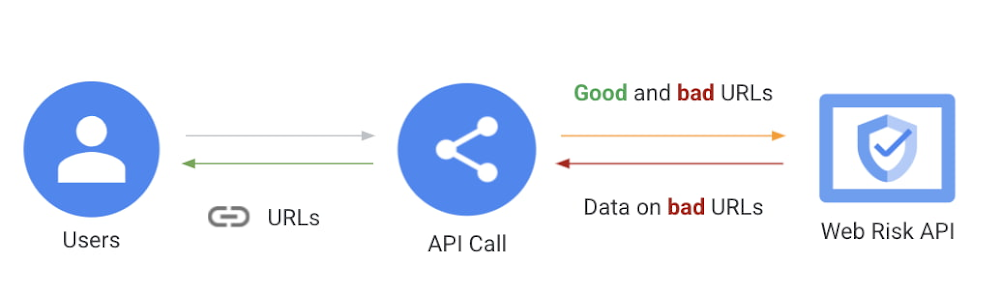
Whether you are a social media site, security company, or enterprise email manager, keeping users safe is always the goal. However, the top two threats to users’ security, phishing and malware, can make that challenging. The Safe Browsing teamat Google has been dedicated to defending the web from malware, phishing, and more threats for more than a decade. Google scans more than a billion links on a daily basis to produce a list of over one million malicious URLs related to phishing, social engineering, malware, and unwanted software.Over the last couple years, we’ve introduced an enterprise-ready tool that builds on the technology used in Safe Browsing and adds new features to make the Web Risk API. Web Risk API enables any enterprise to have access to Google’s phishing and malware data to confirm if a URL is malicious. Today, we are going to share with you our best practices for how to use all of Web Risk APIs together to protect your business from web-based attacks. How Web Risk API WorksUsers can submit a URL to the Web Risk API to see if it is safe or unsafe. The URLs that Web Risk can assess can be submitted from any platform or device in your company that connects to the internet. A few common sources for potentially malicious URLs are: User Generated Content: For large social media sites, it’s common for attackers to directly post or social engineer other users to share viral malicious links. Emails: Internally or externally sourced emails are the primary entry vector for spreading phishing and malwareUser Reports: Enterprises will often have a pishing@yourcompany.com reporting address or form to enable users to report phishing either sent from your infrastructure or attempting to present using your brand identity (logos, messaging, login details)Enterprise user activity observed via a firewall or CASBReferral Links: Attackers often link directly to a real customer site to source content/images. Looking at traffic to these resources can often expose this type of early fraud.Once you have the results back from the Web Risk API, your security team or automated system will be able to quickly take action to block the content and run remedial analysis to understand any action a compromised user may have taken. If a user is compromised by phishing, their account should be reset and the user notified that any data in the account has been exposed. If a user is compromised by malware, the user’s device and software will often need to be reset to ensure the malware has been fully removed. Additionally, any user accounts accessed since the time of the malware compromise should be considered at risk. How Web Risk API’s 4 APIs WorkDue to the variety of fraudulent URLs, Web Risk provides you with a few different URLs to help you detect spam and abuse.Lookup API: Submit a URL and see if the URL is good or bad.Update API: Store a list of partial hashes of malicious URLs. We recommend you do a local comparison and send any matches to the Web Risk API which will return a full hash. This method requires more implementation than the Lookup API, but primarily uses calls to a local database and does not require transmission of a full URL.Evaluate API : Submit a URL and receive a risk type and confidence score assessment. While the Update and Lookup APIs are a result of confirmed malicious behavior, the Evaluate API relies on the URL’s reputation. This has the advantages of not requiring a crawl of the URL and also it is not as vulnerable to URL spoofing or cloaking. Submissions API: Enables companies to submit URLs directly to the Safe Browsing blocklist. Any URLs found to be on the violating policy list will be added to the Safe Browsing blocklist, which is consumed by more than 4 Billion devices worldwide (including many non-Google platforms). This broad scope enables us to help defend customers from virtual phishing, brand impersonation phishing, and other types of user attacks that are being distributed outside the control of a company’s own infrastructure.How to Use All the Web Risk APIs Together To Protect Your End UsersWe recommend that these URLs be used together and as follows: An initial call to the Update API can be made to determine if a URL is known to be malicious .  This is the best first call due to the speed of response (local hash comparison). If the Update API doesn’t return a malicious verdict, the next call can be made to the Evaluate API (server call) to determine if the URL contains any other signals of risk.Finally, if you would like Google to crawl the URL or know the URL to be bad, you can submit to the Submissions API. This API will do a full crawl of the URL and add it to the Safe Browsing Blocklist if found to be malicious.These calls can be made in this prescribed order or parallel. Also, if you have an internal risk model or analyst team you can combine these signals as input to your own detection models.Once a malicious URL has been found, the action that you need to take depends on the channel the URL exists in.Emails: Block access via web proxy, log to SIEM, follow up on exposed users/devicesUser Reports: Submit URL to Safe Browsing, block malicious link on all company control platformsUser Generated Content: Remove link from user-facing content.  Investigate the user who posted.  Note – many users propagate malicious content unknowingly. Enterprise user activity observed via a firewall or CASB: Block access via web proxy, log to SIEM, follow up on exposed users/devicesReferral Links: Attackers often link directly to a real customer site to source content/images.  Submit URL to Safe Browsing, block malicious link on all company control platformsDefending against phishing and malware to prevent account compromise is a never ending battle. The Web Risk API team is dedicated to providing tools to keep your users safe. To get started with Web Risk API, contact our sales team.Related ArticleRegistration is open for Google Cloud Next: October 12–14Register now for Google Cloud Next on October 12–14, 2021Read Article
Quelle: Google Cloud Platform

Your Google Cloud database options, explained

Picking the right database for your application is not easy. The choice depends heavily on your use case—transactional processing, analytical processing, in-memory database, and so on—but it also depends on other factors. This post covers the different database options available within Google Cloud across relational (SQL) and non-relational (NoSQL) databases and explains which use cases are best suited for each database option. Click to enlargeRelational databases In relational databases information is stored in tables, rows and columns, which typically works best for structured data. As a result they are used for applications in which the structure of the data does not change often. SQL (Structured Query Language) is used when interacting with most relational databases. They offer ACID consistency mode for the data, which means:Atomic: All operations in a transaction succeed or the operation is rolled back.Consistent: On the completion of a transaction, the database is structurally sound.Isolated: Transactions do not contend with one another. Contentious access to data is moderated by the database so that transactions appear to run sequentially.Durable: The results of applying a transaction are permanent, even in the presence of failures.Because of these properties, relational databases are used in applications that require high accuracy and for transactional queries such as financial and retail transactions. For example: In banking when a customer makes a funds transfer request, you want to make sure the transaction is possible and it actually happens on the most up-to-date account balance, in this case an error or resubmit request is likely fine.There are three relational database options in Google Cloud: Cloud SQL, Cloud Spanner, and Bare Metal Solution.Cloud SQL: Provides managed MySQL, PostgreSQL and SQL Server databases on Google Cloud. It reduces maintenance cost and automates database provisioning, storage capacity management, back ups, and out-of-the-box high availability and disaster recovery/failover. For these reasons it is best for general-purpose web frameworks, CRM, ERP, SaaS and e-commerce applications.Cloud Spanner: Cloud Spanner is an enterprise-grade, globally-distributed, and strongly-consistent database that offers up to 99.999% availability, built specifically to combine the benefits of relational database structure with non-relational horizontal scale. It is a unique database that combines ACID transactions, SQL queries, and relational structure with the scalability that you typically associate with non-relational or NoSQL databases. As a result, Spanner is best used for applications such as gaming, payment solutions, global financial ledgers, retail banking and inventory management that require ability to scale limitlessly with strong-consistency and high-availability. Bare Metal Solution: Provides hardware to run specialized workloads with low latency on Google Cloud. This is specifically useful if there is an Oracle database that you want to lift and shift into Google Cloud. This enables data center retirements and paves a path to modernize legacy applications. Non-relational databasesNon-relational databases (or NoSQL databases) store compex, unstructured data in a non-tabular form such as documents. Non-relational databases are often used when large quantities of complex and diverse data need to be organized. Unlike relational databases, they perform faster because a query doesn’t have to access several tables to deliver an answer, making them ideal for storing data that may change frequently or for applications that handle many different kinds of data. For example, an apparel store might have a database in which shirts have their own document containing all of their information, including size, brand, and color with room for adding more parameters later such as sleeve size, collars, and so on.Qualities that make NoSQL databases fast:Eventual consistency: stores usually exhibit consistency at some later point (e.g., lazily at read time)Horizontal scaling, usually using hashed distributionsTypically, they are optimized for a specific workload pattern (i.e., key-value, graph, wide-column)Typically, they don’t support cross shard transactions or flexible isolation modes.Because of these properties, non-relational databases are used in applications that require large scale, reliability, availability, and frequent data changes.They can easily scale horizontally by adding more servers, unlike some relational databases, which scale vertically by increasing the machine size as the data grows. Although, some relations databases such as Cloud Spanner support scale-out and strict consistency.Non-relational databases can store a variety of unstructured data such as documents, key-value, graphs, wide columns, and more. Here are your non-relational database options in Google Cloud: Document databases: Store information as documents (in formats such as JSON and XML). For example: FirestoreKey-value stores: Group associated data in collections with records that are identified with unique keys for easy retrieval. Key-value stores have just enough structure to mirror the value of relational databases while still preserving the benefits of NoSQL. For example: Datastore, Bigtable, MemorystoreIn-memory database: Purpose-built database that relies primarily on memory for data storage. These are designed to attain minimal response time by eliminating the need to access disks. They are ideal for applications that require microsecond response times and can have large spikes in traffic. For example: MemorystoreWide-column databases: Use the tabular format but allow a wide variance in how data is named and formatted in each row, even in the same table. They have some basic structure while preserving a lot of flexibility. For example: BigtableGraph databases: Use graph structures to define the relationships between stored data points; useful for identifying patterns in unstructured and semi-structured information. For example: JanusGraphThere are three non-relational databases in Google Cloud:Firestore: Is a serverless document database which scales on demand and acts as a backend-as-a-service. It is DBaaS that increases the speed of building applications. It is perfect for all general purpose uses cases such as ecommerce, gaming, IoT and real time dashboards. With Firestore users can interact with and collaborate on live and offline data making it great for real-time application and mobile apps.  Cloud Bigtable: Cloud Bigtable is a sparsely populated table that can scale to billions of rows and thousands of columns, enabling you to store terabytes or even petabytes of data. It is ideal for storing very large amounts of single-keyed data with very low latency. It supports high read and write throughput at sub-millisecond latency, and it is an ideal data source for MapReduce operations. It also supports the open-source HBase API standard to easily integrate with the Apache ecosystem including HBase, Beam, Hadoop and Spark along with Google Cloud ecosystem.Memorystore: Memorystore is a fully managed in-memory data store service for Redis and Memcached at Google Cloud. It is best for in-memory and transient data stores and automates the complex tasks of provisioning, replication, failover, and patching so you can spend more time coding. Because it offers extremely low latency and high performance, Memorystore is great for web and mobile, gaming, leaderboard, social, chat, and news feed applications.ConclusionChoosing a relational or a non-relational database largely depends on the use case. Broadly, if your application requires ACID transactions and your data structure is not going to change much, select a relational database. In Google Cloud use Cloud SQL for any general-purpose SQL database and Cloud Spanner for large-scale globally scalable, strongly consistent use cases. In general, if your data structure may change later and if scale and availability is a bigger requirement than consistency then a non-relational database is a preferable choice.  Google Cloud offers Firestore, Memorystore, and Cloud Bigtable to support a variety of use cases across the document, key-value, and wide column database spectrum.For more comparison resources on each database check out the overview. For more hands-on experience with Bigtable, check out our on-demand training here and learn about migrating databases to managed services check out this whitepaper.  For more #GCPSketchnote, follow the GitHub repo. For similar cloud content follow me on Twitter @pvergadia and keep an eye out on thecloudgirl.dev.Related ArticleWhat is Cloud Spanner?Want a relational database that scales globally? Learn all about Cloud Spanner.Read Article
Quelle: Google Cloud Platform