Google Container Engine fires up Kubernetes 1.6

By David Aronchick, Product Manager

Today we started to make Kubernetes 1.6 available to Google Container Engine customers. This release emphasizes significant scale improvements and additional scheduling and security options, making the running of a Kubernetes clusters on Container Engine easier than ever before.

There were over 5,000 commits in Kubernetes 1.6 with dozens of major updates that are now available to Container Engine customers. Here are just a few highlights from this release:

Increase in number of supported nodes by 2.5 times: We’ve made great effort to support your workload no matter how large your needs. Container Engine now supports cluster sizes of up to 5,000 nodes, up from 2,000, while still maintaining our strict SLO for cluster performance. We’ve already had some of the world’s most popular apps hosted on Container Engine (such as Pokémon GO) and the increase in scale can handle more of the largest workloads.

Fully Managed Nodes: Container Engine has always helped keep your Kubernetes master in a healthy state; we’re now adding the option to fully manage your Kubernetes nodes as well. With Node Auto-Upgrade and Node Auto-Repair, you can optionally have Google automatically update your cluster to the latest version, and ensure your cluster’s nodes are always operating correctly. You can read more about both features here.

General Availability of Container-Optimized OS: Container Engine was designed to be a secure and reliable way to run Kubernetes. By using Container-Optimized OS, a locked down operating system specifically designed for running containers on Google Cloud, we provide a default experience that’s more secure, highly performant and reliable, helping ensure your containerized workloads can run great. Read more details about Container-Optimized OS in this in-depth post here.

Over the past year, Kubernetes adoption has accelerated and we could not be more proud to host so many mission critical applications on the platform for our customers. Some recent highlights include:

Customers

eBay uses Google Cloud technologies including Container Engine, Cloud Machine Learning and AI for its ShopBot, a personal shopping bot on Facebook Messenger.
Smyte participated in the Google Cloud startup program and protects millions of actions a day on websites and mobile applications. Smyte recently moved from self-hosted Kubernetes to Container Engine.
Poki, a game publisher startup, moved to Google Cloud Platform (GCP) for greater flexibility, empowered by the openness of Kubernetes. A theme we covered at our Google Cloud Next conference, showing that open source technology gives customers the freedom to come and go as they choose. Read more about their decision to switch here.

“While Kubernetes did nudge us in the direction of GCP, we’re more cloud agnostic than ever because Kubernetes can live anywhere.”  — Bas Moeys, Co-founder and Head of Technology at Poki

To help shape the future of Kubernetes — the core technology Container Engine is built on — join the open Kubernetes community and participate via the kubernetes-users-mailing list or chat with us on the kubernetes-users Slack channel.

We’re the first cloud to offer users the newest Kubernetes release, and with our generous 12 month free trial of $300 credits, it’s never been simpler to get started, try the latest release today.

Quelle: Google Cloud Platform

Google Cloud IAM for AWS users

By Rae Wang, Product Manager

Many businesses want to use multiple cloud providers as part of their IT strategy. This allows them to leverage unique services from different cloud vendors and protect app availability in disaster and recovery scenarios. However, running across multiple providers requires more sophisticated planning and management, for example, managing the different Identity and Access Management (IAM) policies from their providers. Setting the right IAM policies is key to securing your resources and data on the different platforms.

If you have experience with Amazon Web Services (AWS) IAM, we recently published a guide on how to think about IAM policies on Google Cloud Platform (GCP). The two platforms offer different frameworks for resources and policies. It’s important to understand these concepts during planning, as it may not be possible to translate directly from a feature in one service to a feature in the other.

One key concept in Google Cloud IAM is policy inheritance. GCP resources can be organized into hierarchies with projects, folders and organizations. Policies are inherited down the hierarchy. For example, if you’re granted the “log viewer” role in an organization, you’ll automatically be able to read logs in projects and resources created under that organization. When using GCP IAM, you’ll want to leverage this capability by planning the hierarchies you create to map to your company and team structures. This will allow for simpler policy management.

AWS policies used to be managed at the granularity of individual resources. Recently with the addition of AWS Organization, you can start to apply the same hierarchical model to AWS resources as well. A remaining difference is the concept of a GCP Project, which is a resource encapsulation that creates a trust boundary for a team, an app or a development environment.

Another difference with AWS is how GCP uses IAM roles to provide groups of permissions that map to meaningful aspects of people’s job functions. These roles allow you to grant the same access to different resources without having to list all the permissions every time, which makes your policies simpler to read and understand. GCP provides many pre-defined roles and will soon support custom roles.

The guide discusses these concepts in detail, and also compares GCP and AWS IAM capabilities in other areas, such as identity management and automation. We hope it helps you manage policies and permissions across multiple providers.

Quelle: Google Cloud Platform

Google Cloud Platform expands to Mars

By Google Cloud Storage and Google Geo teams

Google Cloud Platform (GCP) is committed to meeting our customers needs—no matter where they are. Amidst our growing list of new regions, today we’re pleased to announce our expansion to Mars. In addition to supporting some of the most demanding disaster recovery and data sovereignty needs of our Earth-based customers, we’re looking to the future cloud infrastructure needed for the exploration and ultimate colonization of the Red Planet.

Visit Mars with Google Street View
Mars has long captured the imagination as the most hospitable planet for future colonization, and expanding to Mars has been a top priority for Google. By opening a dedicated extraterrestrial cloud region, we’re bringing the power of Google’s compute, network, and storage to the rest of the solar system, unlocking a plethora of possibilities for astronomy research, exploration of Martian natural resources and interplanetary life sciences. This region will also serve as an important node in an extensive network throughout the solar system.

Our first interplanetary data center—affectionately nicknamed “Ziggy Stardust”—will open in 2018. Our Mars exploration started as a 20% project with the Google Planets team, which mapped Mars and other bodies in space and found a suitable location in Gale Crater, near the landing site of NASA’s Curiosity rover.

Explore more of Mars in Google Maps
In order to ease the transition for our Earthling customers, Google Cloud Storage (GCS) is launching a new Earth-Mars Multi-Regional location. Users can store planet-redundant data across Earth and Mars, which means even if Earth experiences another asteroid strike like the one that wiped out the dinosaurs, your cat videos, selfies and other data will still be safe. Of course, we’ll also store all public domain scientific data, history and arts free of charge so that the next global catastrophe doesn’t send humanity back into the dark ages.

Customers can choose to store data exclusively in the new Mars region, outside of any controlled jurisdictions on Earth, ensuring that they’re both compliant with and benefit from the terms of the Outer Space Treaty. The ability to store and process data on Mars enables low-latency data analysis pipelines and consumer apps to serve the expected influx of Mars explorers and colonists. How exciting would it be to stream movies of potatoes growing right from the craters and dunes of our new frontier?

One of our early access customers says “This will be a game changer for us. With GCS, we can store all the data collected from our rovers right on Mars and run big data analytics to query exabyte-scale datasets all in a matter of seconds. Our dream of colonizing Mars by 2020 can now become a reality.”

Walk inside our new data center in Google Street View
The Martian data center will become Google’s greenest facility yet by taking full advantage of its new location. The cold weather enables natural, unpowered cooling throughout the year, while the thin atmosphere and high winds allow the entire facility to be redundantly powered by entirely renewable sources.

But why stop at Mars? We’re taking a moonshot at N+42 redundancy with galaxy-scale computing. While GCP is optimized for faster-than-light data coordination for databases, the Google Planets team is already hard at work mapping the rest of our solar system for future data center locations. Stay tuned and join our journey! We can’t wait to see the problems you solve and the breakthroughs you achieve.

P.S. Check out Curiosity’s journey across the Red Planet on Mars Street View.

Quelle: Google Cloud Platform

How release canaries can save your bacon – CRE life lessons

By Adrian Hilton, Customer Reliability Engineer

The first part of any reliable software release is being able to roll back if something goes wrong; we discussed how we do this at Google in last week’s post, Reliable releases and rollbacks. Once you have that under your belt, you’ll want to understand how to detect that things are starting to go wrong in the first place, with canarying.

Photo taken by David Carroll

The concept of canarying first emerged in 1913 when physiologist John Scott Haldane took the caged bird down into a coal mine, to detect for carbon monoxide. This fragile bird is more susceptible to the odorless gas than humans, and quickly falls off its perch in its presence — signaling to the miners that it’s time to get out!

In software, a canary process is usually the first instance that receives live production traffic about a new configuration update, either a binary or configuration rollout. The new release only goes to the canary at first. The fact that the canary handles real user traffic is key: if it breaks, real users get affected, so canarying should be the first step in your deployment process, as opposed to the last step in testing.

The first step in implementing canarying is a manual process where release engineers trigger the new binary release to the canary instance(s). They then monitor the canary for any signs of increased errors, latency and load. If everything looks good, they then trigger a release to the rest of the production instances.

We here on Google’s SRE teams have found over time that manual inspection of monitoring graphs isn’t sufficiently reliable to detect performance problems or rises in error rates of a new release. When most releases work well, the release engineer gets used to seeing no problems and so, when a low-level problem appears, tends to implicitly rationalize the monitoring anomalies as “noise.” We have several internal postmortems on bad releases whose root cause boils down to “the canary graph wasn’t wiggly enough to make the release engineer concerned.”

We’ve moved towards automated analysis, where our canary rollout service measures the canary tasks to detect elevated errors, latency and load automatically — and roll back automatically. (Of course, this only works if rollbacks are safe!)

Likewise, if you implement canaries as part of your releases, take care to make it easy to see problems with a release. Consider very carefully how you implement fault tolerance in your canary tasks; it’s fine for the canary to do the best it can with a query, but if it starts to see errors either internally or from its dependency services then it should “squawk loudly” by manifesting those problems in your monitoring. (There’s a good reason why the Welsh miners didn’t breed canaries to be resistant to toxic gases, or put little gas masks on them.)

Client canarying
If you’re doing releases of client software, you should have a mechanism for canarying new versions of the client, and you’ll need to answer the following questions:

How will you deploy the new version to only a small percentage of users?
How will you detect if the new version is crash-looping, dropping traffic or showing users errors? (“What’s the monitoring sound of no queries happening?”)

A solution for question 2 is for clients to identify themselves to your backend service — ideally, by including information in each request about the client’s operating system and application version ID — and for the server to log this information. If you can make the clients identify themselves specifically as canaries, so much the better; this lets you export their stats to a different set of monitoring metrics. To detect that clients are failing to send queries, you’ll generally need to know what the lowest plausible amount of incoming traffic is at any given time of the day or week, and trigger an alert if inbound traffic drops below that amount.

Typically, alerting rules for canaries for high-availability systems use a longer evaluation duration (how long you listen to the monitoring signals before deciding you have a problem) than for the main system because the much smaller traffic amount makes the standard signal much noisier; a relatively innocuous problem such as a few service instances being restarted can briefly push the canary error rate above the regular alarm threshold.

Your release should normally aim to cover a wide range of user types but a small fraction of active users. For Android clients, the Google Play Store allows you to deploy a new version of your application package file (APK) to an (essentially random) fraction of users; you can do this on a country-by-country basis. However, see the discussion on Android APK releases below for the limitations and risks in this approach.

Web clients
If your end users access your service via desktop or mobile web rather than an application, you tend to have better control of what’s being executed.

Regular web clients whose UI is managed by JavaScript are fairly easy to control in that you have the potential to deliver updated JavaScript resources to them every time a page loads. However, if you cache JavaScript and similar resources client-side — which is useful in reducing service load and user latency+bandwidth consumption — it’s hard to roll back a bad change. As we discussed in our last post, anything that gets in the way of easy and quick rollbacks is going to be a problem.

One solution is to version your JavaScript files (first release in a /v1/ directory, second in a /v2/ etc.). Then the rollout simply consists of changing the resource links in your root pages to reference the new (or old) versions.

Android APK releases
New versions of an Android app can be rolled out to a % of current users using staged rollouts in the Play Store. This lets you try out a new release of an app on a small subset of your current users; once you have confidence in that release, you can roll it out to more users, and so on.

The % release mechanism marks a percent of users that are eligible to pick up the new release. When their mobile device next checks into the Play Store for updates, it will see an available update for the app and start the update process.

There can be problems with this approach though:

You have no control over when eligible-for-update users will actually check in; normally it’ll be within 24 hours, assuming they have adequate connectivity, but this may not be true for users in countries where cellular and Wi-Fi data services are slow and expensive per-byte.
You have no control over whether users will accept your update on their mobile device, which can be a particular issue if the new release requires additional permissions.

Following the canarying process described above, you can determine whether your new client release has a problem once your active user base of the canary grows enough for the characteristics of the new traffic become clear: Is there a higher error rate? Is the latency rising? Has traffic to your server mysteriously increased sharply?

If you have a known bad release of your app at version v, the most expedient fix (given the inability to roll back) might be to build your version v-1 code branch into release v+1 and release that, stepping up quickly to 100%. That removes the time pressure to fix the problems detected in code.

Release percentage steps
When you perform a gradual release of a new binary or app, you need to decide in what percentage increments to release your application, and when to trigger the next step in a release. Consider:

The first (canary) step should generate enough traffic for any problems to be clear in your monitoring or logging; normally somewhere between 1% and 10% depending on the size of your user base.
Each step involves significant manual work and delays the overall release. If you step by 3% per day, it will take you a month to do a complete release.
Going up by a single large increment (say, 10% to 100%) can reveal dramatic traffic problems that weren’t apparent at much smaller traffic levels: try not to increase your upgraded user base by more than 2x per step if this is a risk.
If a new version is good, you generally want most of your users to pick it up quickly. If you’re doing a rollback, you want to ramp up to 100% much faster than for a new release.
Traffic patterns are often diurnal — typically, highest during the daytime — so you may need at least 24 hours to see the peak traffic load after a release.
In the case of mobile apps, you’ll also need to allow time for the users to pick up and start using the new release after they’ve been enabled for it.

If you’re looking to roll out an Android app update to most of your users within a few days, you might choose to use a Play Store staged update starting with a 10% rollout that then increases to 50% and finally 100%. Plan for at least 24 hours between release stages and check your monitoring and logging before the next step. This way, a large fraction of your user base picks up the new release within 72 hours of the initial release, and it’s possible to detect most problems before they become too big to handle. For launches where you know there’s a risk of significant traffic increase to a service, choose to use steps of 10%, 25%, 50% and 100% — or even more fine-grained increases.

For internal binary releases where you update your service instances directly, you might instead choose to use steps of 1%, 10% then 100%. The 1% release lets you see if there’s any gross error in the new release, e.g., if 90% of responses are errors. The 10% release lets you pick up errors or latency increases that are one order of magnitude smaller, and detect any gross performance differences. The third step is normally a complete release. For performance-sensitive systems — generally, those operating at 75%+ of capacity — consider adding a 50% step to catch more subtle performance regressions. The higher the target reliability of a system, the longer you should let each step “bake” to detect problems.

If an ideal marketing launch sequence is 0-100 (everyone gets the new features at once), and the ideal reliability engineer launch sequence is 0-0 (no change means no problems), the “right” launch sequence for an app is inevitably a matter of negotiation. Hopefully the considerations described here give you a principled way to determine a mutually acceptable rollout. The graph below shows you how these various strategies might play out over an 8-day release window.

Summary
In short, we here at Google have developed a software release philosophy that works well for us, for a variety of scenarios:

“Rollback early, rollback often.” Try to move your service towards this philosophy, and you’ll reduce the Mean Time To Recover of your service.
“Canary your rollouts.” No matter how good your testing and QA, you’ll find that your binary releases occasionally have problems with live traffic. An effective canarying strategy and good monitoring can reduce the Mean Time To Detect these problems, and dramatically reduce the number of affected users.

At the end of the day, though, perhaps the best kind of launch is one where the features launched can be enabled independent of the binary rollout. That’s a blog post for another day.
Quelle: Google Cloud Platform


Google App Engine flexible environment now available from europe-west region

By Justin Beckwith, Product Manager

A few weeks ago we shared some big news on the Google App Engine flexible environment. Today, we’re excited to announce our first new region since going GA: App Engine flexible environment is now available in the europe-west region. This release makes it easier than ever for App Engine developers to reach customers all around the world.

To get started, simply open up the Developers Console and create a new project, and select App Engine. After choosing a language, you can now specify the location as europe-west. Note that once a project is created, its region cannot be changed.

You can also create your application from the command line using the latest version of the Cloud SDK:

gcloud app create –region europe-west

To learn more about the services offered in each location, as well as best practices for deploying your applications and saving your data across different regions and zones, check out our Cloud Locations and Geography and Regions pages.
Quelle: Google Cloud Platform

Solution guide: Archive your cold data to Google Cloud Storage with Komprise

More than 56% of enterprises have more than half a petabyte of inactive data but this “cold” data often lives on expensive primary storage platforms. Google Cloud Storage provides an opportunity to store this data cost-effectively and achieve significant savings, but storage and IT admins often face the challenge of how to identify cold data and move it non-disruptively.

Komprise, a Google Cloud technology partner, provides software that analyzes data across NFS and SMB/CIFS storage to identify inactive/cold data, and moves the data transparently to Cloud Storage, which can help to cut costs significantly. Working with Komprise, we’ve prepared a full tutorial guide that describes how customers can understand data usage and growth in their storage environment, get a customized ROI analysis and move this data to Cloud Storage based on specific policies.

Cloud Storage provides excellent options to customers looking to store infrequently accessed data at low cost using Nearline or Coldline storage tiers. If and when access to this data is needed, there are no access time penalties; the data is available almost immediately. In addition, built-in object-level lifecycle management in Cloud Storage reduces the burden for admins by enabling policy-based movement of data across storage classes. With Komprise, customers can bring lifecycle management to their on-premise primary storage platforms and seamlessly move this data to the Cloud. Komprise deploys in under 15 minutes, works across NFS, SMB/CIFS and object storage without any storage agents, adapts to file-system and network loads to run non-intrusively in the background and scales out on-demand.

Teams can get started through this self-service tutorial or watch this on-demand webinar featuring Komprise’ COO Krishna Subramanian and Google Cloud Storage Product Manager Ben Chong. As always, don’t hesitate to reach out to us to explore which enterprise workloads make the most sense for your cloud initiatives.
Quelle: Google Cloud Platform

Enterprise Slack apps on Google Cloud–now easier than ever

By Tim Swast, Developer Programs Engineer, Google Cloud

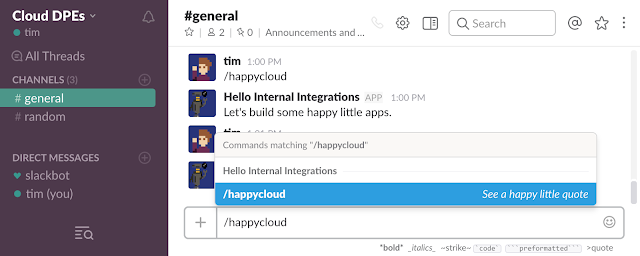
Slack recently announced a new, streamlined path to building apps, opening the door to corporate engineers to build fully featured internal integrations for companies of all sizes.

You can now make an app that supports any Slack API feature such as message buttons, threads and the Events API without having to enable app distribution. This means you can keep the app private to your team as an internal integration.

With support for the Events API in internal integrations, you can now use platforms like Google App Engine or Cloud Functions to host a Slack bot or app just for your team. Even if you’re building an app for multiple teams, internal integrations let you focus on developing your app logic first and wait to implement the OAuth2 flow for distribution until you’re ready.

We’ve updated the Google Cloud Platform samples for Slack to use this new flow. With samples for multiple programming languages, including Node.js, Java, and Go, it’s easier than ever to get started building Slack apps on Google Cloud Platform (GCP).

Slack also made an appearance at Google Cloud Next ’17. Check out the video for best practices for building bots for the enterprise from Amir Shevat, head of developer relations at Slack, and Alan Ho from Google Cloud.

Questions? Comments? Come chat with us on the bots channel in the Google Cloud Platform Slack community.
Quelle: Google Cloud Platform

Reliable releases and rollbacks – CRE life lessons

By Adrian Hilton, Customer Reliability Engineer

Editor’s note: One of the most common causes of service outages is releasing a new version of the service binaries; no matter how good your testing and QA might be, some bugs only surface when the affected code is running in production. Over the years, Google Site Reliability Engineering has seen many outages caused by releases, and now assumes that every new release may contain one or more bugs.

As software engineers, we all like to add new features to our services; but every release comes with the risk of something breaking. Even assuming that we are appropriately diligent in adding unit and functional tests to cover our changes, and undertaking load testing to determine if there are any material effects on system performance, live traffic has a way of surprising us. These are rarely pleasant surprises.

The release of a new binary is a common source of outages. From the point of view of the engineers responsible for the system’s reliability, that translates to three basic tasks:

Detecting when a new release is actually broken;
Moving users safely from a bad release to a “hopefully” fixed release; and
Preventing too many clients from suffering through a bad release in the first place (“canarying”).

For the purpose of this analysis, we’ll assume that you are running many instances of your service on machines or VMs behind a load balancer such as nginx, and that upgrading your service to use a new binary will involve stopping and starting each service instance.

We’ll also assume that you monitor your system with something like Stackdriver, measuring internal traffic and error rates. If you don’t have this kind of monitoring in place, then it’s difficult to meaningfully discuss reliability; per the Hierarchy of Reliability described in the SRE Book, monitoring is the most fundamental requirement for a reliable system).

Detection
The best case for a bad release is that when a service instance is restarted with the bad release, a major fraction of improperly handled requests generate errors such as HTTP 502, or much higher response latencies than normal. In this case, your overall service error rate rises quickly as the rollout progresses through your service instances, and you realize that your release has a problem.

A more subtle case is when the new binary returns errors on a relatively small fraction of queries – say, a user setting change request, or only for users whose name contains an apostrophe for good or bad reasons. With this failure mode, the problem may only become manifest in your overall monitoring once the majority of your service instances are upgraded. For this reason, it can be useful to have error and latency summaries for your service instance broken down by binary release version.

Rollbacks
Before you plan to roll out a new binary or image to your service, you should ask yourself, “What will I do if I discover a catastrophic / debilitating / annoying bug in this release?” Not because it might happen, but because sooner or later it is going to happen and it is better to have a well-thought out plan in place instead of trying to make one up when your service is on fire.

The temptation for many bugs, particularly if they are not show-stoppers, is to build a quick patch and then “roll forward,” i.e., make a new release that consists of the original release plus the minimal code change necessary to fix the bug (a “cherry-pick” of the fix). We don’t generally recommend this though, especially if the bug in question is user-visible or causing significant problems internally (e.g., doubling the resource cost of queries).

What’s wrong with rolling forward? Put yourself in the shoes of the software developer: your manager is bouncing up and down next to your desk, blood pressure visibly climbing, demanding to know when your fix is going to be released because she has your company’s product director bending her ear about all the negative user feedback he’s getting. You’re coding the fix as fast as humanly possible, because for every minute it’s down another thousand users will see errors in the service. Under this kind of pressure, coding, testing or deployment mistakes are almost inevitable.

We have seen this at Google any number of times, where a hastily deployed roll-forward fix either fails to fix the original problem, or indeed makes things worse. Even if it fixes the problem it may then uncover other latent bugs in the system; you’re taking yourself further from a known-good state, into the wilds of a release that hasn’t been subject to the regular strenuous QA testing.

At Google, our philosophy is that “rollbacks are normal.” When an error is found or reasonably suspected in a new release, the releasing team rolls back first and investigates the problem second. A request for a rollback is not interpreted as an attack on the releasing team, or even the person who wrote the code containing the bug; rather, it is understood as The Right Thing To Do to make the system as reliable as possible for the user. No-one will ask “why did you roll back this change?” as long as the rollback changelist describes the problem that was seen.

Thus, for rollbacks to work, the implicit assumption is that they are:

easy to perform; and
trusted to be low-risk.

How do we make the latter true?

Testing rollbacks
If you haven’t rolled back in a few weeks, you should do a rollback “just because”; aim to find any traps with incompatible versions, broken automation/testing etc. If the rollback works, just roll forward again once you’ve checked out all your logs and monitoring. If it breaks, roll forward to remove the breakage and then focus all your efforts on diagnosing the cause of the rollback breakage. It is better by far to detect this when your new release is working well, rather than being forced off a release that is on fire and having to fight to get back to your known-good original release.

Incompatible changes
Inevitably, there are going to be times when a rollback is not straightforward. One example is when the new release requires a schema change to an in-app database (such as a new column). The danger is that you release the new binary, upgrade the database schema, and then find a problem with the binary that necessitates rollback. This leaves you with a binary that doesn’t expect the new schema, and hasn’t been tested with it.

The approach we recommend here is a feature-free release; starting from version v of your binary, build a new version v+1 which is identical to v except that it can safely handle the new database schema. The new features that make use of the new schema are in version v+2. Your rollout plan is now:

Release binary v+1
Upgrade database schema
Release binary v+2

Now, if there are any problems with either of the new binaries then you can roll back to a previous version without having to also roll back the schema.

This is a special case of a more general problem. When you build the dependency graph of your service and identify all its direct dependencies, you need to plan for the situation where any one of your dependencies is suddenly rolled back by its owners. If your launch is waiting for a dependency service S to move from release r to r+1, you have to be sure that S is going to “stick” at r+1. One approach here is to make an ecosystem assumption that any service could be rolled back by one version, in which case your service would wait for S to reach version r+2 before your service moved to a version depending on a feature in r+1.

Summary
We’ve learned that there’s no good rollout unless you have a corresponding rollback ready to do, but how can we know when to rollback without having our entire service burned to the ground by a bad release?

In part 2 we’ll look at the strategy of “canarying” to detect real production problems without risking the bulk of your production traffic on a new release.
Quelle: Google Cloud Platform

Solution guide: backing up Windows files using CloudBerry Backup with Google Cloud Storage

By Brad Svee, Head of Solutions, Google Cloud Platform

Modern businesses increasingly depend on their data as a foundation for their operation. The more critical the reliance is on that data, the more important it is to ensure that data is protected with backups. Unfortunately, even by taking regular backups, you’re still susceptible to data loss from a local disaster or human error. Thus, many companies entrust their data to geographically distributed cloud storage providers like Google Cloud Platform (GCP). And when they do, they want convenient cloud backup automation tools that offer flexible backup options and quick on-demand restores.

One such tool is CloudBerry Backup (CBB), and has the following capabilities:

Creating incremental data copies with low impact on production workloads
Data encryption on all transferring paths
Flexible retention policy, allowing you to balance the volume of data stored and storage space used
Ability to carry out hybrid restores with the use of local and cloud storage resources

CBB includes a broad range of features out of the box, allowing you to address most of your cloud backup needs, and is designed to have low impact on production servers and applications.

CBB has a low-footprint backup client that you install on the desired server. After you provision a Google Cloud Storage bucket, attach it to CBB and create a backup plan to immediately start protecting your files in the cloud.

To simplify your cloud backup onboarding, check out the step-by-step tutorial on how to use CloudBerry Backup with Google Cloud Storage and easily restore any files.
Quelle: Google Cloud Platform

Cloud SQL for PostgreSQL: Managed PostgreSQL for your mobile and geospatial applications in Google Cloud

By Brett Hesterberg, Product Manager, Google Cloud Platform

At Google Cloud Next ‘17, we announced support for PostgreSQL as part of Google Cloud SQL, our managed database service. With its extensibility, strong standards compliance and support from a vibrant open-source community, Postgres is the database of choice for many developers, especially for powering geospatial and mobile applications. Cloud SQL already supports MySQL, and now, PostgreSQL users can also let Google take care of mundane database administration tasks like applying patches and managing backups and storage capacity, and focus on developing great applications.
Feature highlightsStorage and data protection
Flexible backups: Schedule automatic daily backups or run them on-demand.
Automatic storage increase: Enable automatic storage increase and Cloud SQL will add storage capacity whenever you approach your limit.

Connections
Open standards: We embrace the PostgreSQL wire protocol (the standard connection protocol for PostgreSQL databases) and SSL, so you can access your database from nearly any application, running anywhere.
Security features: Our Cloud SQL Proxy creates a local socket and uses OAuth to help establish a secure connection with your application or PostgreSQL tool. It automatically creates the SSL certificate and makes more secure connections easier for both dynamic and static IP addresses.

Extensibility
Geospatial support: Easily enable the popular PostGIS extension for geospatial objects in Postgres.
Custom instance sizes: Create your Postgres instances with the optimal amount of CPU and memory for your workloads

Create Cloud SQL for PostgreSQL instances customized to your needs.

More features coming soonWe’re continuing to improve Cloud SQL for PostgreSQL during beta. Watch for the following:

Automatic failover for high availability
Read replicas
Additional extensions
Precise restores with point-in-time recovery
Compliance certification as part of Google’s Cloud Platform BAA

Case study: Descartes Labs delves into Earth’s resources with Cloud SQL for PostgreSQLUsing deep-learning to make sense of vast amounts of image data from Google Earth Engine, NASA, and other satellites, Descartes Labs delivers invaluable insights about natural resources and human population. They provide timely and accurate forecasts on such things as the growth and health of crops, urban development, the spread of forest fires and the availability of safe drinking water across the globe.

Cloud SQL for PostgreSQL integrates seamlessly with the open-source components that make up Descartes Labs’ environment. Google Earth Engine combines a multi-petabyte catalog of satellite imagery and geospatial datasets with planetary-scale analysis capabilities and makes it available for scientists, researchers and developers to detect changes, map trends and quantify differences on the Earth’s surface. With ready-to-use data sets and an API, Earth Engine data is core to Descartes Labs’ product. Combining this with NASA data and the popular OpenStreetMap data, Descartes Labs takes full advantage of the open source community.

Descartes Labs’ first application tracks corn crops based on a 13-year historical backtest. It predicts the U.S. corn yield faster and more accurately than the U.S. Department of Agriculture.

Descartes adopted Cloud SQL for PostgreSQL early on because it allowed them to focus on developing applications rather than on mundane database management tasks. “Cloud SQL gives us more time to work on products that provide value to our customers,” said Tim Kelton, Descartes Labs Co-founder and Cloud Architect. “Our individual teams, who are building micro services, can quickly provision a database on Cloud SQL. They don’t need to bother compiling Geos, Proj4, GDAL, and Lib2xml to leverage PostGIS. And when PostGIS isn’t needed, our teams use PostgreSQL without extensions or MySQL, also supported by Cloud SQL.”

According to Descartes Labs, Google Cloud Platform (GCP) is like having a virtual supercomputer on demand, without all the usual space, power, cooling and networking issues. Cloud SQL for PostgreSQL is a key piece of the architecture that backs the company’s satellite image analysis applications.
In developing their newest application, GeoVisual Search, the team benefited greatly from automatic storage increases in Cloud SQL for PostgreSQL. “Ever tried to estimate how a compressed 54GB XML file will expand in PostGIS?” Tim Kelton asked. “It’s not easy. We enabled Cloud SQL’s automatic storage increase, which allows the disk to start at 10GB and, in our case, automatically expanded to 387GB. With this feature, we don’t waste money or time by under- or over-allocating disk capacity as we would on a VM.”

Because the team was able to focus on data models rather than on database management, development of the GeoVisual Search application proceeded smoothly. Descartes’ customers can now find the geospatial equivalent of a needle in a haystack: specific objects of interest in map images.

The screenshot below shows a search through two billion map tiles to find wind turbines.
Tim’s parting advice for startups evaluating cloud solutions: “Make sure the solution you choose gives you the freedom to experiment, lets your team focus on product development rather than IT management and aligns with your company’s budget.”

See what GCP can do for you
Sign up for a $300 credit to try Cloud SQL and the rest of GCP. Start with inexpensive micro instances for testing and development. When you’re ready, you can easily scale them up to serve performance-intensive applications. As a bonus, everyone gets the 100% sustained use discount during beta, regardless of usage.

Our partner ecosystem can help you get started with Cloud SQL for PostgreSQL. To streamline data transfer, reach out to Alooma, Informatica, Segment, Stitch, Talend and Xplenty. For help with visualizing analytics data, try ChartIO, iCharts, Looker, Metabase and Zoomdata.
“PostgreSQL is one of Segment’s most popular database targets for our Warehouses product. Analysts and administrators appreciate its rich set of OLAP features and the portability they’re ensured by it being open source. In an increasingly “serverless” world, Google’s Cloud SQL for PostgreSQL offering allows our customers to eschew costly management and operations of their PostgreSQL instance in favor of effortless setup, and the NoOps cost and scaling model that GCP is known for across their product line.”  — Chris Sperandio, Product Lead, Segment”At Xplenty, we see steady growth of prospects and customers seeking to establish their data and analytics infrastructure on Google Cloud Platform. Data integration is always a key challenge, and we’re excited to support both Google Cloud Spanner and Cloud SQL for PostgreSQL both as data sources as well as targets, to continue helping companies integrate and prepare their data for analytics. With the robustness of Cloud Spanner and the popularity of PostgreSQL, Google continues to innovate and prove it is a world leader in .”  — Saggi Neumann, CTO, Xplenty
No matter how far we take Cloud SQL, we still feel like we’re just getting started. We hope you’ll come along for the ride.

Quelle: Google Cloud Platform