Cloud Identity-Aware Proxy: Protect application access on the cloud

By Ameet Jani, Product Manager

Whether your application is lift-and-shift or cloud-native, administrators and developers want to provide simple protected application access for only those corporate users that should have access to it.

At Google Cloud Next ’17 last month, we launched Cloud Identity-Aware Proxy (Cloud IAP), which controls access to cloud applications running on Google Cloud Platform by verifying a user’s identity and determining whether that user is allowed to access the application.

Cloud IAP acts as the internet front end for your application, and you gain the benefits of group-based access control to your application and TLS termination and DoS protections from Google Cloud Load Balancer, which underlies Cloud IAP. Users and developers access the application as a public internet URL — no VPN clients to start up or manage.

With Cloud IAP, your developers can focus on writing custom code for their applications and deploy it to the internet with more protection from unauthorized access simply by selecting the application and adding users and groups to an access list. Google takes care of the rest.

How Cloud IAP works
As an administrator, you enable Cloud IAP protections by synchronizing your end-users’ identities to Google’s Cloud Identity Solution. You then define simple access policies for HTTPs web applications by selecting the users and groups who should be able to access them. Your developers, meanwhile, write and deploy HTTPs web applications to the internet behind Cloud Load Balancer, which passes incoming requests to Cloud IAP to perform identity checks and apply access policies. If the user is not yet signed-in, they’re prompted to do so before the policy is applied.

Cloud IAP is ideal if you need a fast and reliable way to access your applications more securely. No more hiding behind walled gardens of VPNs. Take advantage of Cloud IAP and let developers do what they’re good at, while giving security teams the peace of mind of increased protection of valuable enterprise data.

Cloud IAP is one of the suite of tools that enables you to implement the context-aware secure access described by Google’s BeyondCorp. You should also consider complementing Cloud IAP access control with phishing protection provided by our Security Key Management feature.

Cloud IAP pricing
Cloud IAP user- and group-based access control is available today at no cost. In the future, look for us to add features above and beyond controlling access based on users and groups. And stay tuned for further posts on getting started with Cloud IAP.
Quelle: Google Cloud Platform

Automating project creation with Google Cloud Deployment Manager

By Chris Crall, Product Manager

Do you need to create a lot of Google Cloud Platform (GCP) projects for your company? Maybe the sheer volume or the need to standardize project creation is making you look for a way to automate project creation. We now have a tool to simplify this process for you.

Google Cloud Deployment Manager is the native GCP tool you can use to create and manage GCP resources, including Compute Engine (i.e., virtual machines), Container Engine, Cloud SQL, BigQuery and Cloud Storage. Now, you can use Deployment Manager to create and manage projects as well.

Whether you have ten or ten thousand projects, automating the creation and configuration of your projects with Deployment Manager allows you to manage projects consistently. We have a set of templates that handle:

Project Creation – create the new project with the name you provide
Billing – set the billing account for the new project
Permissions – set the IAM policy on the project
Service Accounts – optionally create service accounts for the applications or services to run in this project
APIs – turn on compatible Google APIs that the services or applications in a project may need

Getting started
Managing project creation with Deployment Manager is simple. Here are few steps to get you started:
Download the templates from our github samples.

The project creation samples are available in the Deployment Manager github repo under the project_creation directory. Or clone the whole DM github repo:

git clone

https://github.com/GoogleCloudPlatform/deploymentmanager-samples.git

Then copy the templates under the examples/v2/project_creation directory.

Follow the steps in the Readme in the project_creation directory. The readme includes detailed instructions, but there is one point to emphasize. You should create a new project using the Cloud Console that will be used as your “Project Creation” project. The service account under which Deployment Manager runs needs powerful IAM permissions to create projects and manage billing accounts, hence the recommendation to create this special project and use it only for creation of other projects.

Customize your deployments.

At a minimum, you’ll need to change the config.yaml file to add the name of the project you want to create, your billing account, the APIs you want, the IAM permissions you choose to use and the APIs to enable.
Advanced customization — you can do as little or as much as you want here. Let’s assume that your company typically has three types of projects: production service projects, test service projects and developer sandbox projects. These projects require vastly different IAM permissions, different types of service accounts and may also need different APIs. You could add a new top level template with a parameter for “project-type”. That parameter takes a string as input (such as “prodservice”, “testservice” or “developer”) and uses that value to customize the project for your needs. Alternatively, you can make three copies of the .yaml file — one for each project type with the correct settings for your three project types.

Create your project.
From the directory where you stored your templates, use the command line interface to run Deployment Manager:
gcloud deployment-manager deployments create
<newproject_deployment> –config config.yaml –project <Project
Creation project>

Where <newproject_deployment> is the name you want to give the deployment. This is not the new project name, that comes from the value in the config.yaml file. But you may want to use the same name for the deployment, or something similar so you know how they match up once you’ve stamped out a few hundred projects.

Now you know how to use Deployment Manager to automatically create and manage projects, not just GCP resources. Watch this space to learn more about how to use Deployment Manager, and let us know what you think of the feature. You can also send mail to dep-mgr-feedback@google.com.
Quelle: Google Cloud Platform

The state of Ruby on Google Cloud Platform

By Aja Hammerly, Developer Advocate

At Google Cloud Next ’17 last month we announced that App Engine flexible environment is now generally available. This brings the convenience of App Engine to Rubyists running Rails, Sinatra or other Rack based web frameworks.

One question we frequently get is, “Can I run gems like nokogiri or database adapters that have C extensions on App Engine?” and the answer is yes. We tested the top 1000 Ruby libraries, a.k.a., gems, to ensure that the necessary dependencies are available. We also tested common tools like paperclip that don’t build against C libraries but require them at runtime. And we know that people are using different versions of Ruby and Rails; App Engine obeys .ruby-version and we support all currently supported versions of MRI. We’ve also tested the gems with Rails 3, Rails 4 and Rails 5. At Next we also announced that Postgres on Cloud SQL is in beta. All of these things should make it easier to move your Rails and Sinatra applications to App Engine. More info on using Ruby on Google Cloud Platform (GCP) is available at http://cloud.google.com/ruby.

New gems on tap
We also have three gems that have reached general availability for the following products: Stackdriver Logging, Google Cloud Datastore and Google Cloud Storage. In addition there are three gems currently in beta for Google BigQuery, Google Cloud Translation API and Google Cloud Vision API. Our philosophy when working on the gems has been to embrace the Ruby ethos that programming should be fun. We try to make our gems idiomatic and make sense to Rubyists. For example, our logging library provides a drop-in replacement for the standard Ruby logger:

require “google/cloud/logging”

logging = Google::Cloud::Logging.new
logger = logging.logger “my_app_log”, resource, env: :production

logger.info “Job started”
logger.info { “Job started” }
logger.debug?

With the Cloud Datastore gem, creating entities is similar to creating tables using ActiveRecord. And with Cloud Storage, you can upload files or you can upload Ruby IO Objects. Using our products should not add significant cognitive load to your development tasks. And having a philosophy of “By Rubyists for Rubyists” makes that easier to do.

RailsConf
If you want to try out some of these libraries or spin up an application on App Engine, come find us at RailsConf 2017 in Phoenix, Arizona later this month. We’re proud to be a Gold sponsor again this year. Based on feedback from last year, we’re making our booth more interactive with codelabs, demos and of course even more stickers.

We also have three folks from the Google Ruby team giving talks. Daniel Azuma’s talk, “What’s my app really doing in production” will show you tools and tricks to instrument and debug misbehaving apps. Remi Taylor’s talk, “Google Cloud >3 Ruby,” will teach you about all the different tools we have for Ruby developers. Finally, in my talk, “Syntax isn’t everything: NLP for Rubyists,” I use the Google Cloud Natural Language API library and some stupid Ruby tricks to introduce you to natural language processing. If you’ll be at RailsConf we really hope you’ll come say hi.
Quelle: Google Cloud Platform

Google Cloud Storage introduces Cloud Pub/Sub notifications

By Brandon Yarbrough, Software Engineer, Google Cloud Storage

Google Cloud Storage has always been a high-performance and cost-effective place to store data objects. Now it’s also easy to build workflows around those objects that are triggered by creating or deleting them, or changing their metadata.

Suppose you want to take some action every time a change occurs in one of your Cloud Storage buckets. You might want to automatically update sales projections every day when sales uploads its new daily totals. You might need to remove a resource from a search index when an object is deleted. Or perhaps you want to update the thumbnail when someone makes a change to an image. The ability to respond to changes in a Cloud Storage bucket gives you increased responsiveness, control and flexibility.

Cloud Pub/Sub Support

We’re pleased to announce that Cloud Storage can now register changes by sending change notifications to a Google Cloud Pub/Sub topic. Cloud Pub/Sub is a powerful messaging platform that allows you to build fast, reliable and more secure messaging solutions. Cloud Pub/Sub support introduces many new capabilities to Cloud Storage notifications, such as pulling from subscriptions instead of requiring users to configure webhooks, multiplexing copies of each message to many subscribers and filtering messages by event type or prefix.

You can get started sending Cloud Storage notifications to Cloud Pub/Sub by reading our getting started guide. Once you’ve enabled the Cloud Pub/Sub API and downloaded the latest version of the gcloud SDK, you can set up notification triggers from your Cloud Storage bucket to your Cloud Pub/Sub topic with the following command:

$> gsutil notification create -f json -t your-topic gs://your-bucket

From that point on, any changes to the contents of your Cloud Storage bucket trigger a message to your Cloud Pub/Sub topic. You can then create Cloud Pub/Sub subscriptions on that topic and pull messages from those subscriptions in your programs, like in this example Python app.

Cloud Functions

Cloud Pub/Sub is a powerful and flexible way to respond to changes in a bucket. However, for some tasks you may prefer the simplicity of deploying a small, serverless function that just describes the action you want to take in response to a change. For that, Google Cloud Functions supports Cloud Storage triggers.

Cloud Functions is a quick way to deploy cloud-based scripts in response to a wide variety of events, for example an HTTP request to a certain URL, or a new object in a Cloud Storage bucket.

Once you get started with Google Cloud Functions, you can learn about setting up a Cloud Storage Trigger for your function. It’s as simple as adding a “–trigger-bucket” parameter to your deploy function:

$> gcloud beta functions deploy helloWorld –stage-bucket cloud-functions –trigger-bucket your-bucket

It’s fun to think about what’s possible when Cloud Storage objects aren’t just static entities, but can trigger a wide variety of tasks. We hope you’re as excited as we are!
Quelle: Google Cloud Platform

Stay up to speed with Google Cloud Launcher: more production-grade solutions, same easy-to-use service

By Anil Dhawan, Product Manager, Google Cloud Launcher

We created Cloud Launcher to help make sure you can easily discover new software and services, whether it’s a small internal tool or a large-scale enterprise application. We’re excited to share several new additions to this catalog and introduce an even easier way to try them out.

Cloud Launcher Virtual Machine solutions are now a part of the new Always Free program. This allows you to test and develop with participating products at no cost up to this program’s limits. With sustained use discounts, free trial credits you can use for 12 months, custom machine shapes and now the Always Free program, there has never been a better time to try out Launcher solutions.

Here are a few areas where we’ve made updates to the Cloud Launcher catalog:

Expanded VM solutions library: We now have even more solutions running within virtual machines, ranging from big data analytics to databases.

Bring Your Own License (BYOL): You asked, we answered. Cloud Launcher now supports BYOL for many solutions, allowing you to use Cloud Launcher as a deployment vehicle for your existing licenses.

Standalone SaaS solutions: Now, you can sign up for services directly from our SaaS partner sites. Over 15 services are now available via Cloud Launcher, with many more on the horizon.

Missed us at Google Cloud Next ‘17? Learn how you can accelerate your application development with Cloud Launcher.

Read on to learn more about specific additions to the Cloud Launcher program, or try them out for yourself.

New VM solutions
Cloud Launcher VM solutions offer scale, performance and value that allow you to easily launch large compute clusters on Google’s infrastructure.

SAP HANA: in-memory Platform for Business Digital Transformation

NodeSource: monitoring Node.js at Scale

Check Point: confidently extend advanced security to the public cloud

AppScale: open source Google App Engine

DataStax Enterprise: distributed database based on Apache Cassandra

Looker: Looker for Big Data – 25 Users: Make every petabyte of data accessible to your company.

MongoDB with Replication: NoSQL document-oriented database for content-driven applications

SUREedge Migrator: any application, any data, any source to Google Cloud

Zoomdata: big data visual analytics

New BYOL solutions

BYOL (Bring Your Own License) solutions let you run software on Google Compute Engine, using licenses you’ve purchased directly from third-party providers.

Barracuda: next generation firewall for distributed enterprises

Check Point: confidently extend advanced security to the public cloud

CloudBolt: self-service multi-cloud VM provisioning for your developers

New SaaS solutions

Browse managed services in Cloud Launcher—then purchase the solution directly on the provider’s site.

Aiven.io Services: Aiven is a next-generation managed cloud service hosting for your software infrastructure services.

Apigee Edge: intelligent API management: manage, secure, scale and analyze APIs

AppDynamics: business and application performance monitoring

ClearDB: databases made easy

ClicData dashboards: dashboards made easy

Cloudflare: performance and security solution for websites and applications

CrowdStrike Falcon: next generation endpoint protection for Google Cloud Platform

Datadog: monitor your entire Google Cloud Infrastructure

Dome9: verifiable security and compliance features for every public cloud

Fastly: Fastly is a content delivery network (CDN) that focuses on helping companies deliver dynamic content to their users faster.

Imperva Incapsula: application delivery and enterprise grade security from the Cloud

JFrog Artifactory: universal artifact repository

Kinvey: Kinvey is a leading HIPAA compliant mobile Backend as a Service  (Kinvey BaaS).

NetSkope: understand activities, protect sensitive data and mitigate risk

NewRelic: get code-level visibility for all your production apps

Premium WordPress: WordPress digital experience platform

Reblaze: superior web security

Segment: collect all of your customer data and send it anywhere

xPlenty: data integration cloud service

Wix Media Platform: the smartest way to host and deliver your media worldwide

Quelle: Google Cloud Platform

Cloud Translation API adds more languages and Neural Machine Translation enters GA

By Apoorv Saxena, Product Manager, Cloud Machine Learning

For many years now Google has been successfully offering language translation to its users in 50+ languages. To bring this technology to businesses, Google Cloud introduced Cloud Translation API in 2011.

Since then, we’ve continuously invested in the API by improving service scalability and expanding it to cover 100+ languages today. As a result, the Cloud Translation API has been widely adopted and deployed in scaled production environments by thousands of customers in the travel, finance and gaming verticals.

As part of Google’s continued investment in machine translation, we recently announced the beta launch of our Google Neural Machine Translation system (GNMT) that uses state-of-the-art training techniques and runs on TPUs to achieve some of the largest improvements for machine translation of the past decade. We had over 1,000 customers sign up to test the API and provide us valuable feedback. For example, Grani VR Studio uses the high accuracy and low latency offered by neural machine translation to build interactive VR/AR experiences in different languages.

Today we’re pleased to announce the general availability of the neural machine translation system to all our customers under the Standard Edition. The Premium Edition beta is now closed for new sign-ups and will re-open in the coming months as we roll out new features.

Here’s what you get with Neural Machine Translation:

Access to the highest-quality translation model, reducing translation errors by 55%-85% on several generally available language pairs
Support for seven new languages: English to and from Russian, Hindi, Vietnamese, Polish, Arabic, Hebrew and Thai. This is in addition to eight existing languages (English to and from Chinese, French, German, Japanese, Korean, Portuguese, Spanish and Turkish)
More languages in coming weeks. Please visit this page to keep track of new language support.

Standard Edition customers paying the list online price can access the neural translation system at no additional charge. As part of the announcement, we’re also offering offline discounted pricing for usage of more than one billion characters per month. Please visit our pricing page for more information.

We look forward to working with you as we continue to invest in bringing the best of Google technology to serve your translation needs.

Quelle: Google Cloud Platform

Solution guide: Migrating your dedicated game servers to Google Cloud Platform

By Joseph Holley, Cloud Solutions Architect, Gaming

One of the greatest challenges for game developers is to accurately predict how many players will attempt to get online at the game’s launch. Over-estimate, and risk overspending on hardware or rental commitments. Under-estimate, and players leave in frustration, never to return. Google Cloud can help you mitigate this risk while giving you access to the latest cloud technologies. Per-minute billing and automatically applied sustained use discounts can take the pain out of up-front capital outlays or trying to play catch-up while your player base shrinks.

The advantages for handling spikey launch-day demand are clear, but Google Cloud Platform’s extensive network of regions also puts servers near high-latency customers. Game studios no longer need to do an expensive datacenter buildout to offer a best-in-class game experience — just request Google Compute Engine resources where they’re needed, when they’re needed. With new regions coming online every year, you can add game servers near your players with a couple of clicks.

We recently published our “Dedicated Game Server Migration Guide” that outlines Google Cloud Platform’s (GCP) many advantages and differentiators for gaming workloads, and best practices for running these processes that we’ve learned working with leading studios and publishers. It covers the whole pipeline, from creating projects and getting your builds to the cloud, to distributing them to your VMs and running them, to deleting environments wholesale when they’re no longer needed. Running game servers in Google Cloud has never been easier.
Quelle: Google Cloud Platform

Quantifying the performance of the TPU, our first machine learning chip

By Norm Jouppi, Distinguished Hardware Engineer, Google

We’ve been using compute-intensive machine learning in our products for the past 15 years. We use it so much that we even designed an entirely new class of custom machine learning accelerator, the Tensor Processing Unit.

Just how fast is the TPU, actually? Today, in conjunction with a TPU talk for a National Academy of Engineering meeting at the Computer History Museum in Silicon Valley, we’re releasing a study (this paper will be available from arXiv.org at 5pm PT today) that shares new details on these custom chips, which have been running machine learning applications in our data centers since 2015. This first generation of TPUs targeted inference (the use of an already trained model, as opposed to the training phase of a model, which has somewhat different characteristics), and here are some of the results we’ve seen:

On our production AI workloads that utilize neural network inference, the TPU is 15x to 30x faster than contemporary GPUs and CPUs.
The TPU also achieves much better energy efficiency than conventional chips, achieving 30x to 80x improvement in TOPS/Watt measure (tera-operations [trillion or 1012 operations] of computation per Watt of energy consumed).
The neural networks powering these applications require a surprisingly small amount of code: just 100 to 1500 lines. The code is based on TensorFlow, our popular open-source machine learning framework.
More than 70 authors contributed to this report. It really does take a village to design, verify, implement and deploy the hardware and software of a system like this.

The need for TPUs really emerged about six years ago, when we started using computationally expensive deep learning models in more and more places throughout our products. The computational expense of using these models had us worried. If we considered a scenario where people use Google voice search for just three minutes a day and we ran deep neural nets for our speech recognition system on the processing units we were using, we would have had to double the number of Google data centers!

TPUs allow us to make predictions very quickly, and enable products that respond in fractions of a second. TPUs are behind every search query; they power accurate vision models that underlie products like Google Image Search, Google Photos and the Google Cloud Vision API; they underpin the groundbreaking quality improvements that Google Translate rolled out last year; and they were instrumental in Google DeepMind’s victory over Lee Sedol, the first instance of a computer defeating a world champion in the ancient game of Go.

We’re committed to building the best infrastructure and sharing those benefits with everyone. We look forward to sharing more updates in the coming weeks and months.
Quelle: Google Cloud Platform

Container-Optimized OS from Google is generally available

By Saied Kazemi, Software Engineer

It’s not news to anyone in IT that container technology has become one of the fastest growing areas of innovation. We’re excited about this trend and are continuously enhancing Google Cloud Platform (GCP) to make it a great place to run containers.

There are many great OSes available today for hosting containers, and we’re happy that customers have so many choices. Many people have told us that they’re also interested in using the same image that Google uses, even when they’re launching their own VMs, so they can benefit from all the optimizations that Google services receive.

Last spring, we released the beta version of Container-Optimized OS (formerly Container-VM Image), optimized for running containers on GCP. We use Container-Optimized OS to run some of our own production services (such as Google Cloud SQL, Google Container Engine, etc.) on GCP.

Today, we’re announcing the general availability of Container-Optimized OS. This means that if you’re a Compute Engine user, you can now run your Docker containers “out of the box” when you create a VM instance with Container-Optimized OS (see the end of this post for examples).

Container-Optimized OS represents the best practices we’ve learned over the past decade running containers at scale:

Controlled build/test/release cycles: The key benefit of Container-Optimized OS is that we control the build, test and release cycles, providing GCP customers (including Google’s own services) enhanced kernel features and managed updates. Releases are available over three different release channels (dev, beta, stable), each with different levels of early access and stability, enabling rapid iterations and fast release cycles.
Container-ready: Container-Optimized OS comes pre-installed with the Docker container runtime and supports Kubernetes for large-scale deployment and management (also known as orchestration) of containers.
Secure by design: Container-Optimized OS was designed with security in mind. Its minimal read-only root file system reduces the attack surface, and includes file system integrity checks. We also include a locked-down firewall and audit logging.
Transactional updates: Container-Optimized OS uses an active/passive root partition scheme. This makes it possible to update the operating system image in its entirety as an atomic transaction, including the kernel, thereby significantly reducing update failure rate. Users can opt-in for automatic updates.

It’s easy to create a VM instance running Container-Optimized OS on Compute Engine. Either use the Google Cloud Console GUI or the gcloud command line tool as shown below:

gcloud compute instances create my-cos-instance
–image-family cos-stable
–image-project cos-cloud

Once the instance is created, you can run your container right away. For example, the following command runs an Nginx container in the instance just created:

gcloud compute ssh my-cos-instance — “sudo docker run -p 80:80 nginx”

You can also log into your instance with the command:

gcloud compute ssh my_cos_instance –project my_project –zone us-east1-d

Here’s another simple example that uses Container Engine (which uses Container-Optimized OS as its OS) to run your containers. This example comes from the Google Container Engine Quickstart page.

gcloud container clusters create example-cluster
kubectl run hello-node –image=gcr.io/google-samples/node-hello:1.0
–port=8080
kubectl expose deployment hello-node –type=”LoadBalancer”
kubectl get service hello-node
curl 104.196.176.115:8080

We invite you to setup your own Container-Optimized OS instance and run your containers on it. Documentation for Container-Optimized OS is available here, and you can find the source code on the Chromium OS repository. We’d love to hear about your experience with Container-Optimized OS; you can reach us at StackOverflow with questions tagged google-container-os.
Quelle: Google Cloud Platform

Toward better node management with Kubernetes and Google Container Engine

By Maisem Ali, Software Engineer

Using our Google Container Engine managed service is a great way to run a Kubernetes cluster with a minimum of management overhead. Now, we’re making it even easier to manage Kubernetes clusters running in Container Engine, with significant improvements to upgrading and maintaining your nodes.

Automated Node Management
In the past, while we made it easy to spin up a cluster, keeping nodes up-to-date and healthy were still the user’s responsibility. To ensure your cluster was in a healthy, current state, you needed to track Kubernetes releases, set up your own tooling and alerting to watch nodes that drifted into an unhealthy node, and then develop a process for repairing that node. While we take care of keeping the master healthy, with the nodes that make up a cluster (particularly large ones), this could be a significant amount of work. Our goal is to provide an end-to-end automated management experience that minimizes how much you need to worry about common management tasks. To that end, we’re proud to introduce two new features that help ease these management burdens.

Node Auto-Upgrades

Rather than having to manually execute node upgrades, you can choose to have the nodes automatically upgrade when the latest release has been tested and confirmed to be stable by Google engineers.

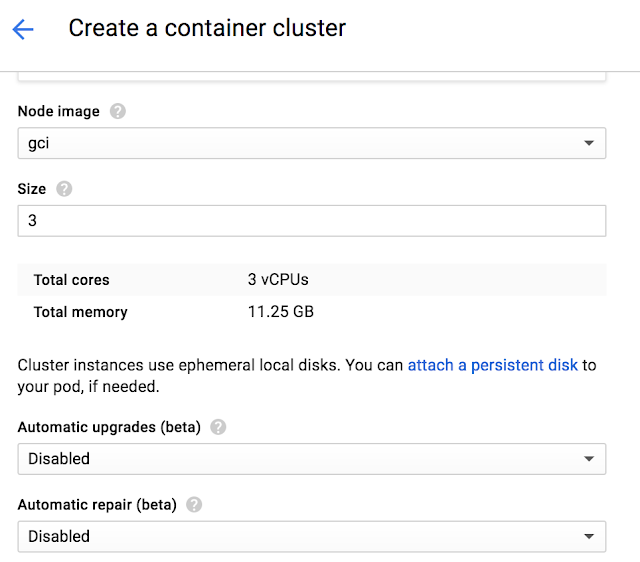
You can enable it in the UI during new Cluster and Node Pool creation by enabling the “Auto upgrades”.

To enable it in the CLI add the “–enable-autoupgrade” flag.

gcloud beta container clusters create CLUSTER –zone ZONE –enable-autoupgrade

gcloud beta container node-pools create NODEPOOL –cluster CLUSTER –zone ZONE –enable-autoupgrade

Once enabled, each node in the selected node pool will have its workloads gradually drained, shut down and a new node will be created and joined to the cluster. The node will be confirmed to be healthy before moving onto the next node.

To learn more see Node Auto-Upgrades on Container Engine.

Node Auto-Repairs
Like any production system, cluster resources must be monitored to detect issues (crashing Kubernetes binaries, workloads triggering kernel bugs and out-of-disk issues, etc.) and repair them if they’re out of specification. A node that goes unhealthy will decrease the scheduling capacity of your cluster and as the capacity reduces your workloads will stop getting scheduled.

Google already monitors and repairs your Kubernetes master in case of these issues. With our new Node-Auto Repair feature, we’ll also monitor to each node in the node pool.

You can enable Auto Repairs during new Cluster and Node Pool Creation.

To enable it in the UI:

To enable it in the CLI:

gcloud beta container clusters create CLUSTER –zone ZONE –enable-autorepair

gcloud beta container node-pools create NODEPOOL –cluster CLUSTER –zone ZONE –enable-autorepair

Once enabled, Container Engine will monitor several signals, including the node health status as seen by the cluster master and the VM state from the managed instance group backing the node. Too many consecutive health check failures (around 10 minutes) will trigger a re-creation of the node VM.

To learn more see Node Auto-Repair on Container Engine.

Improving Node Upgrades

In order to achieve both these features, we had to do some significant work under the hood. Previously, Container Engine node upgrades did not consider a node’s health status and did not ensure that it was ready to be upgraded. Ideally a node should be drained prior to taking it offline, and health-checked once the VM has successfully booted up. Without observing these signals, Container Engine could begin upgrading the next node in the cluster before the previous node was ready, potentially impacting workloads in smaller clusters.

In the process of building Auto Node Upgrades and Auto Node Repair, we’ve made several architectural improvements. We redesigned our entire upgrade logic with an emphasis on making upgrades as non-disruptive as possible. We also added proper support for cordoning and draining of nodes prior to taking them offline, controlled via podTerminationGracePeriod. If these pods are backed by a controller (e.g. ReplicaSet or Deployment) they’re automatically rescheduled onto other nodes (capacity permitting). Finally, we added additional steps after each node upgrade to verify that the node is healthy and can be scheduled, and we retry upgrades if a node is unhealthy. These improvements have significantly reduced the disruptive nature of upgrades.

Cancelling, Continuing and Rolling Back Upgrades
Additionally, we wanted to make upgrades more than a binary operation. Frequently, particularly with large clusters, upgrades need to be halted, paused or cancelled altogether (and rolled back). We’re pleased to announce that Container Engine now supports cancelling, rolling back and continuing upgrades.

If you cancel an upgrade, it impacts the process in the following way:

Nodes that have not been upgraded remain at their current version
Nodes that are in-flight proceed to completion
Nodes that have already been upgraded remain at the new version

An identical upgrade (roll-forward) issued after a cancellation or a failure will pick up the upgrade from where it left off. For example, if the initial upgrade completes three out of five nodes, the roll-forward will only upgrade the remaining two nodes; nodes that have been upgraded are not upgraded again.

Cancelled and failed node upgrades can also be rolled back to the previous state. Just like in a roll-forward, nodes that hadn’t been upgraded are not rolled-back. For example, if the initial upgrade completed three out of five nodes, a rollback is performed on the three nodes, and the remaining two nodes are not affected. This makes the upgrade significantly cleaner.

Note: A node upgrade still requires the VM to be recreated which destroys any locally stored data. Rolling back and rolling forward does not restore that local data.

Node ConditionAction

Cancellation

Rolling forward

Rolling back

In Progress

Proceed to completion

N/A

N/A

Upgraded

Untouched

Untouched

Rolled back

Not Upgraded

Untouched

Upgraded

Untouched

Try it
These improvements extend our commitment in making Container Engine the easiest way to use Kubernetes. With Container Engine you get pure open source Kubernetes experience along with the powerful benefits of Google Cloud Platform (GCP): friendly per-minute billing, a global load balancer, IAM integration, and all fully managed by Google reliability engineers ensuring your cluster is available and up-to-date.

With our new generous 12-month free trial that offers a $300 credit, it’s never been simpler to get started. Try Container Engine today.
Quelle: Google Cloud Platform