Otto Group CLASH: an open-source tool to run bash scripts directly on GCP

Editor’s note: Founded in Germany in 1949, today the Otto Group is a globally active retail and services group with around 51,800 employees and generated revenues of 13.7 billion euros. Today, business intelligence experts Dr. Mahmoud Reza Rahbar Azad and Mike Czech describe an open-source tool they built to run bash-based data processing scripts directly in Google Cloud. Read on to learn why they built it, how they built it, and how you can use it in your own environment.We here at Otto Group Business Intelligence build machine learning and data-driven products for online retailers such as otto.de or aboutyou.de, to enhance our customers’ user experience. A part of that is a big data lake that we recently migrated to Google Cloud Platform (GCP). As data engineers, we sometimes need to perform data processing jobs. Since these jobs can take a long time or require a lot of compute power, we didn’t want to perform these tasks on a local machine or via a web frontend: we wanted a tool that uses the full power of GCP.A few months back, we were at a point where we understood our requirements but couldn’t find a good tool to fulfill them. So we built it ourselves: During a recent internal hacking day, we wrote CLoud bASH, or CLASH, which takes a bash script as an input and simply runs it inside a cloud environment.Running scalable data processing scripts in the cloudBefore we dive into the nitty gritty details, let me give you a little bit of a background about what we do and why we built CLASH.As mentioned above, we needed a tool that takes a bash script as an input and simply runs it inside a cloud environment. The user should have the option to either wait for the result or to be notified asynchronously when the job is finished. If the user waits for the result, log messages from the script should be forwarded to the user console and the user can cancel the job execution. This feature comes in very handy during fast development iteration cycles.The following image illustrates what we roughly had in mind.How we built itWe quickly came up with two implementations built on GCP. The first one was based on Google Kubernetes Engine (GKE), the other on Google Compute Engine. We expected the GKE variant to be a simple ‘one size fits all’ solution, whereas Compute Engine to be more customizable, allowing us, for instance, to attach a GPU to the compute unit, for additional performance.Since Kubernetes already brings a lot of scheduling primitives to the table, it was very easy to get a prototype up and running quickly. The following image shows the CLASH architecture running on GKE:The user calls the CLASH CLI to submit the scripts.sh job. Internally, CLASH utilises the gcloud CLI to spin up a Kubernetes cluster and afterwards uses kubectl to deploy the contents of the script as a ConfigMap as well as a Kubernetes job. The container logs of the job are automatically saved to Stackdriver as well as forwarded to the user’s terminal via kubectl logs. For example, here is a  simple “hello world” example in the terminal:While this architecture fulfilled our requirements, it had some drawbacks. Not every user has a Kubernetes cluster lying around, so we had to spin up a cluster every time we wanted to run a job, which actually can take quite a while. Secondly, if a job only needs an individual node, we end up with a single-node node-pool. But what if a second job has different resource requirements? We would try to reuse the same cluster, but had to create again a second single-node node-pool. So while Kubernetes’ orchestration features are very nice, we switched gears and chose to go with the more straightforward Compute Engine approach.  Here is the CLASH architecture on Compute Engine.From the user perspective, the functionality of this approach is the same as before, but this time, instead of spinning up a Kubernetes node, it spawns a GCE instance. We take care that the VM has the Docker engine installed so that the bash script can run again inside a docker container—more on this later. Then, since doing SSH into a machine is considered undesired overhead, we also decided not to integrate CLASH with a PKI. Instead, we use Cloud Pub/Sub to get notified about the result of a job and Stackdriver for the job logs. After the job finishes we initiate an automatic VM shutdown.We also reused the clash init function that we developed for the GKE-based deployment. The init command creates a configuration file where you can tune a lot of aspects when executing a CLASH job. A basic configuration file looks like this:The most prominent configuration is the machine_type which lets you specify how much resources the Compute Engine instance should provide, as well as basic region and networking configurations. Because CLASH needs Docker as well as the gcloud CLI present on the target machine, the fields disk_image and container_image are pre-populated accordingly. The actual script can then be deployed via cloud-init without any SSH connection to the machine. Another feature we built early on in CLASH is templating support for the configuration file using Jinja2. With this feature you can reuse the same configuration and overwrite single fields via an environment variable as shown in the example configuration with MACHINE_TYPE and PROJECT_ID.Using this design led to good results. Altogether the time to provision the infrastructure is between three and five minutes, which is manageable. For repetitive jobs we added the option to reuse an instance by specifying an instance-id. We noticed that the implementation of a job scheduling feature in the way of Kubernetes cron jobs was quite a hassle, so we dropped it for now—especially given the fact that GCP offers great services like Cloud Scheduler and Cloud Tasks.Using CLASH in the wildNow let’s dive into some use cases.One of the early use cases for CLASH was to run data synchronization jobs for BigQuery, running a script to shovel data via the bq command-line tool from one source to another. Nowadays this use case is covered by BigQuery’s scheduling feature, but that wasn’t available to us at the time. Even though the bq command is quite simple, it can also take quite a long time to complete, making it a poor fit for using Cloud Functions.Another use case is importing compressed data from a Google Cloud Storage bucket. We have set up a data importing pipeline where a new archive in a bucket triggers a cloud function which then triggers CLASH in detached mode to call the actual importing script. The script then unpacks the archive, performs some consistency checks, potentially does some data filtering and cleaning, and finally archives the result back into the target bucket.Finally, yet another use case for CLASH is specific to data scientists, namely model training. When we push new code to a model repository, we want to be able to perform regression tests for different model versions, so we have to train the model against a dataset. For obvious reasons we don’t want to do this in our CI environment, so we use CLASH to spin up a high-mem instance, perform the model training and save the model in a bucket where we can pick it up later for further investigation. We built this workflow with Google Cloud Composer,  integrated CLASH via a ComputeEngineJobOperator into Airflow, and then used it in our Airflow pipelines.An example pipeline with the corresponding DAG definition looks like this:As mentioned, we use Cloud Pub/Sub to notify CLASH once a job has finished. Hence it is possible to subscribe a cloud function to the model training topic and on a successful event, trigger another CLASH job that does the regression test automatically. This is something we are currently thinking about. This also shows the potential of building workflows by combining CLASH with existing Google Cloud services.Wrap upWe wanted to share CLASH as open source because it’s a really useful and adaptive tool. We hope you can find other use cases for it in its current state. We do plan to improve CLASH and smooth out some rough edges in the future. As with any open-source software, contributions and discussions are always welcome, so please go ahead and give CLASH a try. You can find the CLASH source code here: https://github.com/ottogroup/clash.
Quelle: Google Cloud Platform

Google is named a leader in the 2019 Gartner Magic Quadrant for Data Management Solutions for Analytics

As organizations continue to produce vast quantities of data, they increasingly need platforms that allow them to analyze, store, and extract meaningful insights from that data. And research from analyst firms like Gartner offer an important way for organizations to evaluate and compare cloud data warehouse providers.Today, Gartner named Google a Leader in the 2019 Gartner Magic Quadrant for Data Management Solutions for Analytics (DMSA) (report available here). This evaluation covers Google Cloud’s core data analytics offerings, including BigQuery, a serverless, managed data warehouse, Cloud Dataproc, a managed Spark and Hadoop service, and Cloud Dataflow, which enables you to stream and batch-process your data. Here are a few takeaways:Simplicity and speedBigQuery’s performance permits complex queries on large-scale data sets to return in seconds, and a substantial number of BigQuery customers maintain data warehouses that store more than 50 terabytes (and a few customers now use more than 100 petabytes). More than half of these customers are loading data either continuously or many times per day. These customers value the ability to extract, transform, load, and analyze their data on a serverless platform, all without maintaining any underlying infrastructure.A versatile serverless data warehouseOne of BigQuery’s major advantages is its ability to allow customers to address a wide variety of use cases—from a traditional data warehouse to data science. Over the past year, we’ve worked hard to introduce new features in BigQuery like data types for financial and monetary uses, BigQuery GIS for geospatial data, and machine learning capabilities through BigQuery ML. BigQuery’s continuous ingest capabilities make it suitable for an operational—or a real-time—serverless data warehouse.An expanding ecosystemWith overall increased market adoption, our analytics offerings continue to benefit from a fast-growing partner ecosystem of service providers, and business intelligence (BI) and data integration vendors. In particular, in 2018 we expanded our partnerships with established industry providers, including Confluent, Dell Boomi, Informatica, Looker, Reltio, Tableau, and ThoughtSpot.More and more organizations are finding value in Google Cloud’s serverless data warehouse and analytics offerings. If you’d like to learn more, you can download a complimentary copy of the Gartner Magic Quadrant for Data Management Solutions for Analytics on our site.Gartner does not endorse any vendor, product or service depicted in its research publications, and does not advise technology users to select only those vendors with the highest ratings or other designation. Gartner research publications consist of the opinions of Gartner’s research organization and should not be construed as statements of fact. Gartner disclaims all warranties, expressed or implied, with respect to this research, including any warranties of merchantability or fitness for a particular purpose.
Quelle: Google Cloud Platform

Build an AI-powered, customer service virtual agent with Chatbase

These days, most people don’t tolerate more than one or two bad customer service experiences. For contact centers drowning in customer calls and live chats, an AI-powered customer service virtual agent can reduce that risk by complementing humans to provide personalized service 24/7, without queuing or waiting. But the status-quo approach to designing those solutions (i.e., intuition and brainstorming) is slow, based on guesswork, and just scratches the surface on functionality — usually, causing more harm than good because the customer experience is poor.Built within Google’s internal incubator called Area 120, Chatbase is a conversational AI platform that replaces the risky status quo approach with a data-driven one based on Google’s world-class machine learning and search capabilities. The results include faster development (by up to 10x) of a more helpful and versatile virtual agent, and happier customers!Lessons learned along the journeyInitially, Chatbase provided a free-to-use analytics service for measuring and optimizing any AI-powered chatbot. (That product is now called Chatbase Virtual Agent Analytics.) After analyzing hundreds of thousands of bots and billions of messages in our first 18 months of existence, we had two revelations about how to help bot builders in a more impactful way: one, that customer service virtual agents would become the primary use case for the technology; and two, that using ML to glean insights from live-chat transcripts at scale would drastically shorten development time for those agents while creating a better consumer experience. With those lessons learned, Chatbase Virtual Agent Modeling (currently available via an EAP) was born.Virtual Agent Modeling explainedVirtual Agent Modeling (a component in the Cloud Contact Center AI solution) uses Google’s core strengths in ML and search to analyze thousands of transcripts, categorizing customer issues into “drivers” and then digging deeper to find specific intents (aka customer requests) per driver. For complex intents, Chatbase models simple yet rich flows developers can use to build a voice or chat virtual agent that handles up to 99% of interactions, responds helpfully to follow-up questions, and knows exactly when to do a hand-off to a live agent.In addition, the semantic search tool finds potentially thousands of training phrases per intent. When this analysis is complete, developers can export results to their virtual agent (via Dialogflow) — cutting weeks, months, or even years from development time.Don’t settle for the slow status quoAccording to one Fortune 100 company upgrading its customer service virtual agent with Virtual Agent Modeling, “This new approach to virtual agent development moves at 200 mph, compared to 10-20 mph with current solutions.” Furthermore, it expects to nearly double the number of interactions its virtual agent can handle, from 53% of interactions to 92%.If you have at least 100,000 English-language live-chat transcripts available and plan to deploy or enhance either a voice or chat customer service virtual agent in 2019, Virtual Agent Modeling can help you get into that fast lane. Request your personal demo today!
Quelle: Google Cloud Platform

Announcing Spring Cloud GCP 1.1: deepening ties to Pivotal’s Spring Framework

Here at Google we have been working hard with Pivotal’s Spring team to integrate the Spring Framework and Google Cloud Platform (GCP). Last summer, we released the first official 1.0 version of the project, providing the general availability of idiomatic Spring support for Cloud Pub/Sub, Cloud SQL, Stackdriver Trace, Stackdriver Logging, and Cloud Storage.Since then, we’ve accelerated development of the integrations with help from the community. We’ve listened to your feedback on our GitHub issue tracker and at conferences like Google Cloud Next and Spring One Platform. As a result, we started tackling more complex integrations like Spring Data and Spring Security.Today, we’re announcing another major GA release 1.1 with many new integrations, bug fixes, and documentation updates. Despite the minor version increase from 1.0 to 1.1, it’s a big milestone for the project!What’s New in Spring Cloud GCP 1.1?Joining the Spring Cloud release trainThe project has recently joined the Spring Cloud release train, which means that it is completely aligned with the Spring Cloud schedule. In fact, Spring Cloud GCP is being released together with the rest of Spring Cloud projects today. Consequently, just like the rest of the Spring Cloud Greenwich release, Spring Cloud GCP 1.1 is compatible with Spring Boot 2.1 and Java 11, and it includes all of the goodness of the most recent Spring Boot version.Spring Data support for Cloud Spanner and Cloud DatastoreWe’re really excited to include Spring Data support for Cloud Spanner and Cloud Datastore in this release. We focused intensely on these integrations with the Spring Data team last year, and are excited to make them generally available via today’s release.In case you haven’t tried Spring Data before, it’s one of the best examples of how Spring can help you eliminate boilerplate code and let you focus on writing the business logic. No more having to write boring data persistence (CRUD) code! It does so using object-relational mapping and automatic query generation, while still giving you the flexibility to take advantage of the special features of each database.With Spring Data, Cloud Spanner and Cloud Datastore can accommodate a wide range of object and data relationships, but they have distinct specialities. Cloud Spanner supports composite keys and interleaved tables representing strict parent-child relationships. On the other hand, Cloud Datastore’s document-style entities support single-field IDs only but allow free-form relationships.Here’s a Spring Data Cloud Spanner example:A complete Spring Data Cloud Spanner sample application is available in our GitHub repository.Here’s a Spring Data Cloud Datastore example:Again, you can find a complete Spring Data Cloud Datastore sample application in our GitHub repository. You can also walk through a codelab for a hands-on experience.Spring Security for Cloud IAPCloud Identity-Aware Proxy (IAP) provides a security layer over applications deployed to Google Cloud. The proxy verifies user identity and includes it in the secure x-goog-iap-jwt-assertion HTTP header that is passed to your application. Our integration with Spring Security makes extracting identity from Cloud IAP as simple as pulling in a starter dependency:And since Cloud IAP integrates seamlessly with Spring Security, you can restrict actions within the application to specific users using Spring Security customizations.You can learn more about it by checking out our sample application.Kotlin supportKotlin is a general purpose programming language used primarily for mobile development. Last year, we started to hear increasing interest from the Java community in seeing Kotlin supported in Spring. We saw numerous well-attended Kotlin sessions at the SpringOne Platform conference and it came up more than once in informal conversations. We took notice and created a sample Spring Cloud GCP application in Kotlin to get you started with using Kotlin on GCP with Spring.The latest version of the Spring Framework (5.1) already has first-class Kotlin support along with new features like refinements to the Kotlin beans domain-specific language. We built on that support. In the process of creating the sample Kotlin application, we experienced how easy it is to start using Kotlin for Spring Boot applications. Check out the sample registration service application written in Kotlin, or try building it step-by-step in this codelab.Analyze images with Cloud VisionWe created a Spring Boot starter that makes it really easy to start analyzing images using Google’s pre-trained Cloud Vision machine learning model. You can identify objects in images and extract text with only a few lines of code in your Spring Boot applications. We introduced the VisionTemplate class to make the most common image analysis tasks even easier than by using the Cloud Vision API directly.What’s next?Community feedback is invaluable. Last year you told us you wanted more Spring Data integrations, Spring Security support, and Kotlin compatibility, and we included a lot of this in the 1.1 release. We’ll continue to bring more on these fronts and plan to provide more support for Reactive and Spring Data JPA with Hibernate in upcoming releases. toolkit. Brella GmsCore stores your training examples, communicates with Brella Server, and instantiates TensorFlow graphs on your behalf. In this codelab we will often siCommunity feedback is instrumental to informing new releases and our direction. Tell us what you want to see in the next version of Spring Cloud GCP.  We welcome feature requests and questions on our GitHub issue tracker, too.Learn moreJosh Long from the Spring team recently wrote an excellent 8-part tutorial series for Spring Cloud GCP. Our own Ray Tsang and Josh also gave a great talk at GCP Next ‘18 demonstrating many of the project’s features. You can also learn more in our reference documentation and connect with us on GitHub.This release would not have been possible without the Spring Team at Pivotal, the Cloud Java Frameworks team at Google, and numerous other contributors to the project on Github. A special thanks to Elena Felder, Dan Zou, Chengyuan Zhao, Dmitry Solomakha, Ray Tsang, Artem Bilan for being the core contributors to the project and helping to write this post.
Quelle: Google Cloud Platform

Welcome to the service mesh era: Introducing a new Istio blog post series

Adopting a microservices architecture brings a host of benefits, including increased autonomy, flexibility, and modularity. But the process of decoupling a single-tier monolithic application into smaller services introduces new obstacles: How do you know what’s running? How do you roll out new versions of your services? How do you secure and monitor all those containers?   To address these challenges, you can use a service mesh: software that helps you orchestrate, secure, and collect telemetry across distributed applications. A service mesh transparently oversees and monitors all traffic for your application, typically through a set of network proxies that sit alongside each microservice. Adopting a service mesh allows you to decouple your application from the network, and in turn, allows your operations and development teams to work independently.Alongside IBM, Lyft, and others, Google launched Istio in 2016 as an open-source service mesh solution. Built on the high-performance Envoy proxy, Istio provides a configurable overlay on your microservices running in Kubernetes. It supports end-to-end encryption between services, granular traffic and authorization policies, and unified metrics— all without any changes to your application code.  Istio’s architecture is based on trusted service mesh software used internally at Google for years. And much in the same way we brought Kubernetes into the world, we wanted to make this exciting technology available to as many users as possible. To that end, we recently announced the beta availability of Istio on GKE, an important milestone in our quest to deliver a managed, mature service mesh that you can deploy with one click. You also heard from us about our vision for a service mesh that spans both the Cloud and on-prem.To kick off 2019, we thought we’d take a step back and dive deep into how you can use Istio right now, in production. This is the first post in a practical blog series on Istio and service mesh, where we will cover all kinds of user perspectives, from developers and cluster operators to security administrators and SREs. Through real use cases, we will shed light on the “what” and “how” of service mesh— but most importantly, how Istio can help you deliver immediate business value to your customers.To start, let’s explore why Istio matters in the context of other ongoing shifts in the cloud-native ecosystem: towards abstraction from infrastructure, towards automation, and towards a hybrid cloud environment.Automate everything  The world of modern software moves quickly. Increasingly, organizations are looking for ways to automate the development process from source code to release, in order to address business demands and increase velocity in a competitive landscape. Continuous delivery is a pipeline-based approach for automating application deployments, and represents a key pillar in DevOps best practices.Istio’s declarative, CRD-based configuration model integrates seamlessly with continuous delivery systems, allowing you to incorporate Istio resources into your deployment pipelines. For example, you can configure your pipeline to automatically deploy Istio VirtualServices to manage traffic for a canary deployment. Doing so lets you leverage Istio’s powerful features—from granular traffic management to in-flight chaos testing—with zero manual intervention. With its declarative configuration model, Istio can also work with modern GitOps workflows, where source control serves as the central source of truth for your infrastructure and application configuration.Serverless, with Istio  Serverless computing, meanwhile, transforms source code into running workloads that execute only when called. Adopting a serverless pattern can help organizations reduce infrastructure costs, while allowing developers to focus on writing features and delivering business value.Serverless platforms work well because they decouple code and infrastructure. But most of the time, organizations aren’t only running serverless workloads— they also have stateful applications, including microservices apps on Kubernetes infrastructure. To address this, several open-source, Kubernetes-based serverless platforms have emerged in the open-source community. These platforms allow Kubernetes users to deploy both serverless functions and traditional Kubernetes applications onto the same cluster.Last year, we released Knative, a new project that provides a common set of building blocks for running serverless applications on Kubernetes. Knative includes components for serving requests, handling event triggers, and building containerized functions from source code. Knative Serving is built on Istio, and brings Istio’s telemetry aggregation and security-by-default to serverless functions.Knative aims to become the standard across Kubernetes-based serverless platforms. Further, the ability to treat serverless functions as services in the same way you treat traditional containers will help provide much-needed uniformity between the serverless and Kubernetes worlds. This standardization will allow you to use the same Istio traffic rules, authorization policies, and metrics pipelines across all your workloads.Build once, run anywhereAs Kubernetes matures, users are increasingly adopting more complex cluster configurations. Today, you might have several clusters, not one. And those clusters might span hybrid environments, whether in the public cloud, in multiple clouds, or on-prem. You might also have microservices that have to talk to single-tier applications running in virtual machines, or service endpoints to manage and secure, or functions to spin up across clusters.Driven by the need for lower latency, security, and cost savings, the era of multi-cloud is upon us, introducing the need for tools that span both cloud and on-prem environments.Released with 1.0, Istio Multicluster is a feature that allows you to manage a cross-cluster service mesh using a single Istio control plane, so you can take advantage of Istio’s features even with a complex, multicluster mesh topology. With Istio Multicluster, you can use the same security roles across clusters, aggregate metrics, and route traffic to a new version of an application. The multicluster story gets easier in 1.1, as the new Galley component helps synchronize service registries between clusters.Cloud Services Platform is another example of the push towards interoperable environments, combining solutions including Google Kubernetes Engine, GKE On-Prem, and Istio, towards the ultimate goal of creating a seamless Kubernetes experience across environments.What’s next?Subsequent posts in this series will cover Istio’s key features: traffic management, authentication, security, observability, IT administration, and infrastructure environments. Whether you’re just getting started with Istio, or working to move Istio into your production environment, we hope this blog post series will have something relevant and actionable for you.We’re excited to have you along for the ride on our service mesh journey. Stay tuned!
Quelle: Google Cloud Platform

Protecting your cloud VMs with Cloud IAP context-aware access controls

Organizations have increasing numbers of Internet-facing apps and infrastructure that they need to protect. Since 2011, Google has been leveraging the BeyondCorp security model to protect our internet-facing resources, and over the past few years we have made it easier for you to adopt the same model for your apps, APIs, and infrastructure through context-aware access capabilities in our cloud products. At Next ‘18 in London, we added context-aware access capabilities to Cloud Identity-Aware Proxy (IAP) to help protect web apps. Today, we are extending these capabilities to TCP services such as SSH and RDP, to help protect access to your cloud-based virtual machines (VMs).A zero trust security model for your apps and infrastructureContext-aware access allows you to define and enforce granular access to cloud resources based on a user’s identity and the context of their request. This can help increase your organization’s security posture while decreasing complexity for users, giving them the ability to access apps or infrastructure resources securely from virtually anywhere and any trusted device.Granular access controlsUnlike the all-or-nothing approach often used in the traditional network-based access model, context-aware access helps you ensure that access is restricted to the right people and only to the right resources. You can now determine who can access a VM based on unique security considerations such as location, device security status, and user’s identity. In addition, VMs protected by IAP require no changes—simply turn on IAP, and access to your VM instance is protected.Here’s how it worksLet’s say you’re an administrator who wants to allow SSH access to VMs for a group of DevOps users in GCP. You can now use Cloud IAP to enable access without exposing any services directly to the Internet. DevOps admin simply configures Cloud IAP’s TCP forwarding feature. Subsequently when a user performs SSH from the gCloud command tool, the SSH traffic is tunneled over a websocket connection to Cloud IAP which applies any relevant context-aware access policies. If access is allowed the tunneled SSH traffic is forwarded to the VM instance transparently. Remote Desktop Protocol (RDP) works similarly.  As an administrator, all you have to do is configure access to the VM instances from the Cloud IAP IP subnet; your VM instances don’t even need public IP addresses or dedicated bastion hosts.Getting startedContext-aware access for TCP services in Cloud IAP is now available in beta. To get started, navigate to the admin console and check out the documentation for step-by-step instructions.
Quelle: Google Cloud Platform

Introducing Feast: an open source feature store for machine learning

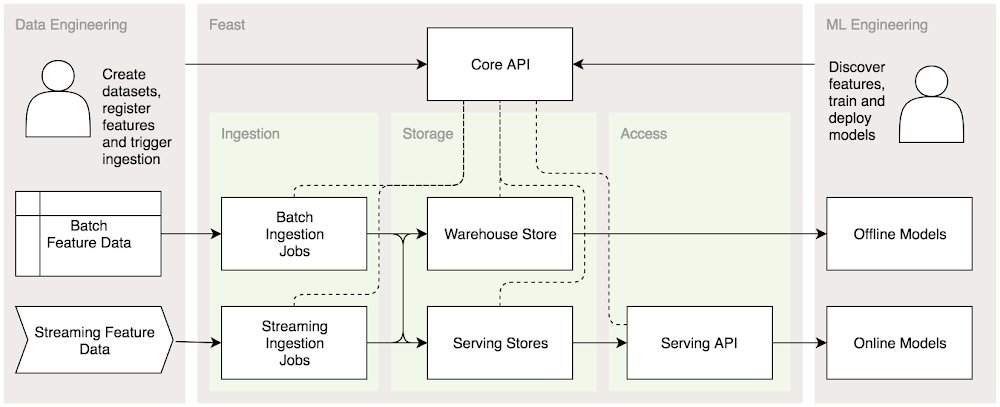
GO-JEK and Google Cloud are pleased to announce the release of Feast, an open source feature store that allows teams to manage, store, and discover features for use in machine learning projects.Feast solves the problem of making features accessible for machine learning across multiple teams. To operate machine learning systems at scale, teams need to have access to a wealth of feature data. Data which is crucial in being able to both train accurate models and serve them in production.Developed jointly by GO-JEK and Google Cloud, Feast aims to solve a set of common challenges facing data science teams by becoming an open, extensible, unified platform for feature storage. It gives teams the ability to define and publish features to this unified store, which in turn facilitates discovery and feature reuse across machine learning projects.“Feast is an essential component in building end-to-end machine learning systems at GO-JEK,” says Peter Richens, Senior Data Scientist at GO-JEK, “so we are very excited to release it to the open source community. We worked closely with Google Cloud in the design and development of the product,  and this has yielded a robust system for the management of machine learning features, all the way from idea to production. Feast not only abstracts away the data management challenges we had, but also greatly increases discovery and reuse of features in our ML projects. It allows us to build a foundation of features for our models to leverage, making models more accurate, and greatly reducing time to market.”Feast solves an important part of the machine learning lifecycle. Feast’s near term strategic goal is to integrate with and be installable within Kubeflow, completing an end-to-end machine learning process.MotivationFeatures are properties of an observed phenomenon that are at the root of what makes machine learning algorithms effective. Typically they come in the form of numeric values based on an organization’s users or systems. The more relevant the features are to the business problem, the more accurately a model will be able to optimize for a specific business outcome.Typically a team will create, store, and manage features based on the requirements of a specific machine learning project. These requirements drive the development of new pipelines for the creation of features, and for the deployment of new data stores used in model training and serving. However, managing features and infrastructure on a per project basis can present its own set of challenges:Engineering overhead: New projects may require different infrastructure to be provisioned to source, transform, and serve features. This is particularly true for real-time streaming data use cases. The engineering work involved in implementing these systems leads teams to limit the amount and complexity of features that they develop. This also leads to teams having to manage more infrastructure as they take on new projects.Keeping features up to date: Often features are engineered from batch data sources in order to avoid the complexities of creating features from event streams. The consequence is that models only have access to features as new as the most recently run feature creation pipeline.Inconsistency between training and serving: Machine learning models are generally first trained and evaluated on offline feature data. The feature transformations that produce these data sets are typically written in programming languages that make data manipulation easy, but do not meet the requirements of production serving systems. This leads to feature transformations being redeveloped for production use which can introduce data inconsistencies, leading to unpredictable model scores.Lack of visibility: The development of features often does not include documenting the intent of the feature creator, nor the steps involved in the creation of a feature. When this information does exist, the structure and focus typically is not consistent across teams or projects.Duplication of features and lack of reusability: Project teams are often faced with a difficult decision when engineering features for a new system. Given the lack of visibility into what other teams have done, when can they reuse existing features? Often the decision is made to redevelop features from scratch to ensure a project has no unstable dependencies.SolutionFeast solves these challenges by providing a platform on which to standardize the definition, storage and access of serving features for training and serving. It encourages sharing, discovery, and reuse of features amongst ML practitioners, acting as a bridge between data and machine learning engineering.Feast abstracts away the engineering overhead associated with managing data infrastructure. It handles the ingestion, storage, and serving of feature data in a scalable way, unifying batch and streaming feature data. The system updates storage backend schemas according to registered feature specifications, and ensures that there is a consistent view of features in both your historical and real-time data stores. End users can then access these features from their development environment, or from production systems at scale.The key attributes of Feast are that it is:Standardized: Feast presents a centralized platform on which teams can register features in a standardized way. The platform provides structure to the way features are defined and allows teams to reference features in discussions with a singly understood way.Accessible: By providing a unified serving API for feature stores, ML applications are able to easily access batch and real-time features opaquely. This greatly reduces the complexity of deploying applications that would often need to deploy and manage their own real-time stores or batch files. There is clear separation of responsibilities and new ML projects can easily leverage features that have been created by prior teams.Open source: The software is designed from the ground up to be open source and vendor agnostic. The design is modular and extensible, meaning new types of data stores and input sources can easily be added and combined. It can run locally or on Kubernetes. It leverages open source technology like Apache Beam, Redis and PostgreSQL, or managed services like BigQuery, Dataflow and BigTable.Developer focused: Feast does not just aim to be used for training and serving in production environments, but also as part of model prototyping and evaluation. A Python SDK will allow users to easily interact with Feast in interactive development environments like Jupyter notebooks.KubeflowThere is a growing ecosystem of tools trying to help productionize machine learning. A key open source ML platform in this space is Kubeflow, which has focussed on improving packaging, serving, training, evaluation and orchestration.Companies that have built successful internal ML platforms have identified that standardized feature definition, storage and access was critical to successful adoption and utility of their platforms.For this reason, Feast aims to be deployable on Kubeflow and integrate as seamlessly as possible with other Kubeflow components in the future, including a python SDK for use with Kubeflow’s Jupyter notebooks, and ML Pipelines.There is a Kubeflow GitHub issue here for discussion of future Feast integration.How you can contributeFeast provides a consistent way to access features that can be passed into serving models, and to access features in batch for training. We hope that Feast can act as a bridge between your data engineering and machine learning teams and would love to hear feedback via our GitHub project.Find the Feast project on GitHub repository hereJoin the Kubeflow community and find us on Slack
Quelle: Google Cloud Platform

A simple blueprint for building AI-powered customer service on GCP

As a Google Cloud customer engineer based in Amsterdam, I work with a lot of banks and insurance companies in the Netherlands. All of them have this common requirement: to help customer service agents (many of whom are poorly trained interns due to the expense of hiring) handle large numbers of customer calls, especially at the end of the year when many consumers want to change or update their insurance plan.Most of these requests are predictable and easily resolved with the exchange of a small amount of information, which is a perfect use case for an AI-powered customer service agent. Virtual agents can provide non-queued service around the clock, and can easily be programmed to handle simple requests as well as do a hand-off to well-trained live agents for more complicated issues. Furthermore, a well-designed solution can help ensure that consumer requests, regardless of the channel in which they are received (phone, chat, IoT), are routed to the correct resource. As a result, in addition to the obvious customer satisfaction benefits, research says that virtual agents could help businesses in banking and healthcare alone trim costs collectively by $11 billion a year.In this post, I’ll provide an overview of a simple solution blueprint I designed that may inspire you to meet these objectives using GCP. Similar solutions that integrate with existing call center systems can be obtained through Cloud Contact Center AI partners, as well.Requirements and solutionAll businesses have the goal of making customer service effortless. With an AI-powered approach, a system can be designed that can accommodate consumers however they choose to reach out, whether by telephone, web chat, social media, mobile apps, or smart speaker.The particular approach described here covers three channels: web chat, the Google Assistant (on a Google Home), and telephone (through a telephony gateway). It also meets a few other requirements:Ability to optimize over time. If you know what questions consumers ask and how their sentiment changes during a conversation, the virtual agent (and thus customer satisfaction) can be improved over time.Protection of consumer privacy. Per GDPR, sensitive personal information can’t be revealed or stored.An easy deployment and management experience. It goes without saying that any company adopting cloud wants to avoid maintaining VMs, networks, and operating systems, as well as monolithic architecture. Thus the solution should take advantage of the ability to easily/automatically build, deploy, and publish updates.With Google Cloud, meeting these requirements is as easy as stitching a few components together. Let’s have a closer look.Technology stackThe diagram below provides a high-level overview; I’ll explain each piece in turn.DialogflowDialogflow Enterprise Edition, an emerging standard for building AI-powered conversational experiences across multiple channels, is the “brains” of this solution. My customers love it because it doesn’t require special natural language understanding skills; a team of content experts and UX designers are all you need to build a robust virtual agent for a simple use case. It also integrates well with other Google Cloud components, offers error reporting and debug information out of the box, and is available along with Google Cloud Support and SLA.As you can see in the architectural diagram, Dialogflow is integrated with the website channel through the Dialogflow SDK. Integration with the Google Assistant or the Phone Gateway simply requires flipping a switch during configuration.ChannelsWebsite: The website front-end and back-end are split into two separate Kubernetes containers. The website front-end is build with Angular, and the back-end container is based on Node.js with Socket.io integration. Dialogflow has a Node.js client library, so text messages from the Angular app are passed to the Node.js server app via WebSocket in order to send it to the Dialogflow SDK.The Google Assistant: Actions on Google is a framework for creating software applications (a.k.a., “actions”) for the Google Assistant. Actions on Google is nicely integrated in Dialogflow: Just log in with your Google account and you can easily deploy your agent to the Google Assistant, enabling interactions on Android apps, via the Google Assistant app on iOS, or on Google Home.Phone: As mentioned in the introduction, if your plan is to integrate your virtual agent with an existing contact center call system, Google Cloud partners like Genesys, Twilio, and Avaya can help integrate Cloud Contact Center AI with their platforms. (For an overview, see this video from Genesys.) For startups and SMBs, the Dialogflow Phone Gateway feature (currently in beta) integrates a virtual agent with a Google Voice telephone number with just a few clicks, creating an “instant” customer service voice bot.AnalyticsWhether you’re building a full customer service AI system, a simple action for the Google Assistant, or anything in between, it’s important to know which questions/journeys are common, which responses are most satisfying, and if and when the virtual agent isn’t programmed to respond beyond a default “fallback” message. The diagram below shows the solution analytics architecture for addressing this need.Cloud Pub/Sub: Cloud Pub/Sub, a fully-managed, real-time publish/subscribe messaging service that sends and receives messages between independent applications, is the “glue” that holds the analytic components together. All transcripts (from voice calls or chats) are sent to Cloud Pub/Sub as a first step before analysis.Cloud Functions: Google Cloud Functions is a lightweight compute platform for creating single-purpose, standalone functions that respond to events without the need to manage a server or runtime environment. In this case, the event will be triggered by Cloud Pub/Sub: Every time a message arrives there through the subscriber endpoint, a cloud function will run the message through two Google Cloud services (see below) before storing it in Google BigQuery.Cloud Natural Language: This service reveals the structure of a text message; you can use it to extract information about people, places, or in this case, to detect the sentiment of a customer conversation. The API returns a sentiment level between 1 and -1.Cloud Data Loss Prevention: This service discovers and redacts any sensitive information such as addresses and telephone numbers remaining in transcripts before storage.BigQuery: BigQuery is Google Cloud’s serverless enterprise data warehouse, supporting super-fast SQL queries enabled by the massive processing power of Google’s infrastructure. Using BigQuery you could combine your website data together with your chat logs. Imagine you can see that your customer browsed through one of your product webpages, and then interacted with a chatbot. Now you can answer them proactively with targeted deals.. Naturally, this analysis can be done through a third-party business intelligence tool like Tableau, with Google Data Studio, or through a homegrown web dashboard like the one shown below.Another use case would be to write a query that returns all chat messages that have a negative sentiment score:SELECT * from `chatanalytics.chatmessages` where SCORE < 0 ORDER BY SCORE ASCThis query also returns the session ID,  so you could then write a query to get the full chat transcript and explore why this customer became unhappy:SELECT * from `chatanalytics.chatmessages` where SESSION = ‘6OVkcIQg7QFvdc5EAAAs’ ORDER BY POSTEDDeployment: Finally, you can use Cloud Build to easily build and deploy these containers to Google Kubernetes Engine with a single command in minutes. A simple YAML file in the project will specify how this all works. As a result, each component/container can be independently modified as needed.Chatbase (optional): It’s not included in this blueprint, but for a more robust approach, Chatbase Virtual Agent Analytics (which powers Dialogflow Analytics and is free to use) is also an option. In addition to tracking health KPIs, it provides deep insights into user messages and journeys through various reports combined with transcripts. Chatbase also lets you report across different channels/endpoints.ConclusionRecently, it took me just a couple of evenings to build a full demo of this solution.And going forward, I don’t need to worry about installing operating systems, patches, or software, nor about scaling for demand: whether I have 10 or hundreds of thousands of users talking to the bot, it will just work. If you’re exploring improving customer satisfaction with an AI-powered customer service virtual agent, hopefully this blueprint is a thought-provoking place to start!
Quelle: Google Cloud Platform

Getting started with Cloud TPUs: An overview of online resources

The foundation for machine learning is infrastructure that’s powerful enough to swiftly perform complex and intensive data computation. But for data scientists, ML practitioners, and researchers, building on-premises systems that enable this kind of work can be prohibitively costly and time-consuming. As a result, many turn to providers like Google Cloud because it’s simpler and more cost-effective to access that infrastructure in the cloud.The infrastructure that underpins Google Cloud was built to push the boundaries of what’s possible with machine learning—after all, we use it to apply ML to many of our own popular products, from Street View to Inbox Smart Reply to voice search. As a result, we’re always thinking of ways we can accelerate machine learning and make it more accessible and usable.One way we’ve done this is by designing our very own custom machine learning accelerators, ASIC chips we call tensor processing units, or TPUs. In 2017 we made TPUs available to our Google Cloud customers for their ML workloads, and since then, we’ve introduced preemptible pricing, made them available for services like Cloud Machine Learning Engine and Kubernetes Engine, and introduced our TPU Pods.While we’ve heard from many organizations that they’re excited by what’s possible with TPUs, we’ve also heard from some that are unsure of how to get started. Here’s an overview of everything you might want to know about TPUs—what they are, how you might apply them, and where to go to get started.I want a technical deep dive on TPUsTo give users a closer look inside our TPUs, we published an in-depth overview of our TPUs in 2017 based on our in-datacenter performance analysis whitepaper.At Next ‘18, “Programming ML Supercomputers: A Deep Dive on Cloud TPUs” covered the programming abstractions that allow you to run your models on CPUs, GPUs, and TPUs, from single devices up to entire Cloud TPU pods. “Accelerating machine learning with Google Cloud TPUs” from O’Reilly AI Conference in September, also takes you through a technical deep dive on TPUs, as well as how to program them.And finally, you can also learn more about what makes TPUs fine-tuned for deep learning and hyperparameter tuning using TPUs in Cloud ML Engine.I want to know how fast TPUs are, and what they might costIn December, we published the MLPerf 0.5 benchmark results which measure performance for training workloads across cloud providers and on-premise hardware platforms. The findings demonstrated that a full Cloud TPU v2 pod can deliver the same result in 7.9 minutes of training time that would take a single state-of-the-art GPU 26 hours.From a cost perspective, the results also revealed revealed a full Cloud TPU v2 Pod can cost 38% less, than training the same model to the same accuracy on an n1-standard-64 Google Cloud VM with eight V100 GPUs attached, and can complete the training task 27 times faster. We also shared more on why we think Google Cloud is the ideal platform to train machine learning models at any scale.I want to I want to understand the value of adopting TPUs for my businessThe Next ‘18 session Transforming Your Business with Cloud TPUs can help you identify business opportunities to pursue with Cloud TPUs across a variety of application domains, including image classification, object detection, machine translation, language modeling, speech recognition, and more.One example of a business already using TPUs is eBay. Visual search is an important way eBay customers quickly find what they’re looking for. But with more than a billion product listings, eBay has found training a large-scale visual search model is no easy task. As a result, they turned to Cloud TPUs. You can learn more by reading their blog or watching their presentation at Next ’18.I want to quickly get started with TPUsThe Cloud TPU Quickstart sets you up to start using TPUs to accelerate specific TensorFlow machine learning workloads on Compute Engine, GKE, and Cloud ML Engine. You can also take advantage of our open source reference models and tools for Cloud TPUs. Or you can try out this Cloud TPU self-paced lab.I want to meet up with Google engineers and others in the AI community to learn moreIf you’re located in the San Francisco Bay Area, our AI Huddles provide a monthly, in-person place where you can find talks, workshops, tutorials, and hands-on labs for applying ML on GCP. At our November AI Huddle, for example, ML technical lead Lak Lakshmanan shared how to train state-of-the-art image and text classification models on TPUs. You can see a list of our upcoming huddles here.Want to keep learning? Visit our website, read our documentation, or give us feedback.
Quelle: Google Cloud Platform

Get Go-ing with Cloud Functions: Go 1.11 is now a supported language

Since releasing Node.js and Python as supported languages for Google Cloud Functions this summer, our team has been hard at work. Today, we’re excited to announce support for Go on Cloud Functions.Now in beta, the runtime uses the latest version, Go 1.11, which includes new language features like modules for integrating third-party dependencies into your code. Starting today, you can write Go functions that scale dynamically in response to load and integrate seamlessly with Google Cloud events.Two ways to GoLet’s take a look at the two types of functions that you can use with Cloud Functions: HTTP functions and background functions.HTTP functions are what their name suggests: functions that are invoked by HTTP requests. They follow the http.HandlerFunc type from the standard library. For example, an HTTP function that returns a caller’s IP address might look like this:HTTP functions can be reached without an additional API gateway layer—Cloud Functions gives you an HTTPS URL. After the function is deployed, you can invoke the function by entering the URL into your browser.In contrast, background functions are triggered in response to an event. Your function might, for example, run every time the contents of a Cloud Storage bucket change. Let’s look at an example function that triggers when a file is added to a Cloud Storage bucket:When you deploy your function, you also indicate a specific Cloud Storage bucket. Every time a new file appears in that bucket, your function runs and logs the file’s name.These are just two small examples of what’s possible with Cloud Functions and Go. The runtime supports a rich ecosystem of Go packages via Go modules. For example, to use the Cloud Translation client library in your function, create a `go.mod` file by running the following commands:When you deploy your function, Cloud Functions fetches and installs the dependencies listed in your `go.mod` file.Using Cloud Functions, you can build serverless application backends, real-time data processing pipelines, chatbots, and video or image analysis tools, just to name a few. Now, you can also use the familiar building blocks of Go to build out your Cloud Functions.We’re continuously making improvements to Cloud Functions. For instance, environment variables are now generally available and we added new IAM security controls. We hope you’re excited to try the Go runtime. To get started, check out the Go quickstart.
Quelle: Google Cloud Platform