AI in Depth: Cloud Dataproc meets TensorFlow on YARN: Let TonY help you train right in your cluster

Apache Hadoop has become an established and long-running framework for distributed storage and data processing. Google’s Cloud Dataproc is a fast, easy-to-use, fully managed cloud service for running Apache Spark and Apache Hadoop clusters in a simple, cost-efficient way. With Cloud Dataproc, you can set up a distributed storage platform without worrying about the underlying infrastructure. But what if you want to train TensorFlow workloads directly on your distributed data store?This post will explain how to install a Hadoop cluster for LinkedIn open-source project TonY (TensorFlow on YARN). You will deploy a Hadoop cluster using Cloud Dataproc and TonY to launch a distributed machine learning job. We’ll explore how you can use two of the most popular machine learning frameworks: TensorFlow and PyTorch.TensorFlow supports distributed training, allowing portions of the model’s graph to be computed on different nodes. This distributed property can be used to split up computation to run on multiple servers in parallel. Orchestrating distributed TensorFlow is not a trivial task and not something that all data scientists and machine learning engineers have the expertise, or desire, to do—particularly since it must be done manually. TonY provides a flexible and sustainable way to bridge the gap between the analytics powers of distributed TensorFlow and the scaling powers of Hadoop. With TonY, you no longer need to configure your cluster specification manually, a task that can be tedious, especially for large clusters.The components of our system:First, Apache HadoopApache Hadoop is an open source software platform for distributed storage and distributed processing of very large data sets on computer clusters built from commodity hardware.  Hadoop services provides for data storage, data processing, data access, data governance, security, and operations.Next, Cloud DataprocCloud Dataproc is a managed Spark and Hadoop service that lets you take advantage of open source data tools for batch processing, querying, streaming, and machine learning. Cloud Dataproc’s automation capability helps you create clusters quickly, manage them easily, and save money by turning clusters off when you don’t need them. With less time and money spent on administration, you can focus on your jobs and your data.And now TonYTonY is a framework that enables you to natively run deep learning jobs on Apache Hadoop. It currently supports TensorFlow and PyTorch. TonY enables running either single node or distributed training as a Hadoop application. This native connector, together with other TonY features, runs machine learning jobs reliably and flexibly.InstallationSetup a Google Cloud Platform projectGet started on Google Cloud Platform (GCP) by creating a new project, using the instructions found here.Create a Cloud Storage bucketThen create a Cloud Storage bucket. Reference here.Create a Hadoop cluster via Cloud Dataproc using initialization actionsYou can create your Hadoop cluster directly from Cloud Console or via an appropriate `gcloud` command. The following command initializes a cluster that consists of 1 master and 2 workers:When creating a Cloud Dataproc cluster, you can specify in your TonY initialization actions script that Cloud Dataproc should run on all nodes in your Cloud Dataproc cluster immediately after the cluster is set up.Note: Use Cloud Dataproc version 1.3-deb9, which is supported for this deployment. Cloud Dataproc version 1.3-deb9 provides Hadoop version 2.9.0. Check this version list for details.Once your cluster is created. You can verify that under Cloud Console > Big Data > Cloud Dataproc > Clusters, that cluster installation is completed and your cluster’s status is Running.Go to  Cloud Console > Big Data > Cloud Dataproc > Clusters and select your new cluster:You will see the Master and Worker nodes.Connect to your Cloud Dataproc master server via SSHClick on SSH and connect remotely to Master server.Verify that your YARN nodes are activeExampleInstalling TonYTonY’s Cloud Dataproc initialization action will do the following:Install and build TonY from GitHub repository.Create a sample folder containing TonY examples, for the following frameworks:TensorFlowPyTorchThe following folders are created:TonY install folder (TONY_INSTALL_FOLDER) is located by default in:TonY samples folder (TONY_SAMPLES_FOLDER) is located by default in:The Tony samples folder will provide 2 examples to run distributed machine learning jobs using:TensorFlow MNIST examplePyTorch MNIST exampleRunning a TensorFlow distributed jobLaunch a TensorFlow training jobYou will be launching the Dataproc job using a `gcloud` command.The following folder structure was created during installation in `TONY_SAMPLES_FOLDER`, where you will find a sample Python script to run the distributed TensorFlow job.This is a basic MNIST model, but it serves as a good example of using TonY with distributed TensorFlow. This MNIST example uses “data parallelism,” by which you use the same model in every device, using different training samples to train the model in each device. There are many ways to specify this structure in TensorFlow, but in this case, we use “between-graph replication” using tf.train.replica_device_setter.DependenciesTensorFlow version 1.9Note: If you require a more recent TensorFlow and TensorBoard version, take a look at the progress of this issue to be able to upgrade to latest TensorFlow version.Connect to Cloud ShellOpen Cloud Shell via the console UI:Use the following gcloud command to create a new job. Once launched, you can monitor the job. (See the section below on where to find the job monitoring dashboard in Cloud Console.)Running a PyTorch distributed jobLaunch your PyTorch training jobFor PyTorch as well, you can launch your Cloud Dataproc job using gcloud command.The following folder structure was created during installation in the TONY_SAMPLES_FOLDER, where you will find an available sample script to run the TensorFlow distributed job:DependenciesPyTorch version 0.4Torch Vision 0.2.1Launch a PyTorch training jobVerify your job is running successfullyYou can track Job status from the Dataproc Jobs tab: navigate to Cloud Console > Big Data > Dataproc > Jobs.Access your Hadoop UILogging via web to Cloud Dataproc’s master node via web: http://<Node_IP>:8088 and track Job status. Please take a look at this section to see how to access the Cloud Dataproc UI.Cleanup resourcesDelete your Cloud Dataproc clusterConclusionDeploying TensorFlow on YARN enables you to train models straight from your data infrastructure that lives in HDFS and Cloud Storage. If you’d like to learn more about some of the related topics mentioned in this post, feel free to check out the following documentation links:Machine Learning with TensorFlow on GCPHyperparameter tuning on GCPHow to train ML models using GCPAcknowledgements: Anthony Hsu, LinkedIn Software Engineer; and Zhe Zhang, LinkedIn Core Big Data Infra team manager.
Quelle: Google Cloud Platform

Data analytics, meet containers: Kubernetes Operator for Apache Spark now in beta

Many organizations run Apache Spark, a widely-used data analytics engine for large-scale data processing, and are also eager to use Kubernetes and associated tools like kubectl. Today, we’re announcing the beta launch of the Kubernetes Operator for Apache Spark (referred to as Spark Operator, for short, from here on), which helps you easily manage your Spark applications natively from Kubernetes. It is available today in the GCP Marketplace for Kubernetes.Traditionally, large-scale data processing workloads—Spark jobs included—run on dedicated software stacks such as Yarn or Mesos. With the rising popularity of microservices and containers, organizations have demonstrated a need for first-class support for data processing and machine learning workloads in Kubernetes. One of the most important community efforts in this area is native Kubernetes integration, available in Spark since version 2.3.0. The diagram below illustrates how this integration works on a Kubernetes cluster.The Kubernetes Operator for Apache Spark runs, monitors and manages the lifecycle of Spark applications leveraging its native Kubernetes integration. Specifically, this operator is a Kubernetes custom controller that uses custom resources for declarative specification of Spark applications. The controller offers fine-grained lifecycle management of Spark applications, including support for automatic restart using a configurable restart policy, and for running cron-based, scheduled applications. It provides improved elasticity and integration with Kubernetes services such as logging and monitoring. With the Spark Operator, you can create a declarative specification that describes your Spark applications and use native Kubernetes tooling such as kubectl to manage your applications. As a result, you now have a common control plane for managing different kinds of workloads on Kubernetes, simplifying management and improving your cluster’s resource utilization.With this launch, the Spark Operator for Apache Spark is ready for use for large scale data transformation, analytics, and machine learning on Google Cloud Platform (GCP). It supports the new and improved Apache Spark 2.4, letting you run PySpark and SparkR applications on Kubernetes. It also includes many enhancements and fixes that improves its reliability and observability, and can be easily installed with Helm.Support for Spark 2.4Spark 2.4, released in October last year, features improved Kubernetes integration. First, it now supports Python and R Spark applications with Docker images tailored to the language bindings. Second, it provides support for client mode, allowing interactive applications such as the Spark Shell and data science tools like Jupyter and Apache Zeppelin notebooks to run computations natively on Kubernetes. Then, there’s support for certain types of Kubernetes data volumes. Combined with other enhancements and fixes that make native Kubernetes integration more reliable and usable, our Spark Operator is a cloud-native solution that makes it easy to run and manage Spark applications on Kubernetes.Integration with GCPThe Operator integrates with various GCP products and services, including Stackdriver for logging and monitoring, and Cloud Storage and BigQuery—for storage and analytics. Specifically, the operator exposes application-level metrics in the Prometheus data format and automatically configures Spark applications to expose driver- and executor-level metrics to Prometheus. With a Prometheus server with the Stackdriver sidecar, your cluster can automatically collect metrics and send them to Stackdriver Monitoring. Application driver and executor logs are automatically collected and pushed to Stackdriver when the application runs on Google Kubernetes Engine (GKE).The Spark Operator also includes a command-line tool named sparkctl that automatically detects an application’s dependencies on the user’s client machine and uploads them to a Cloud Storage bucket. It then substitutes the client-local dependencies with the ones stored in the Cloud Storage portion of the application specification, greatly simplifying the use of client-local application dependencies in a Kubernetes environment.The Spark Operator for Apache Spark ships with a custom Spark 2.4 Dockerfile that supports using Cloud Storage for input or output data in an application. This Dockerfile also includes the Prometheus JMX exporter, which exposes Spark metrics in the Prometheus data format. The Prometheus JMX exporter is Spark Operator’s default approach for using and configuring an application when Prometheus monitoring is enabled.The GCP Marketplace: a one stop shopGCP Marketplace for Kubernetes is a one-stop shop for major Kubernetes applications. The Spark Operator is available for quick installation on the Marketplace, including logging, monitoring, and integration with other GCP services out of the gate.An active communityThe Spark Operator for Apache Spark has an active community of contributors and users. The Spark Operator is currently deployed and used by several organizations for machine learning and analytics use cases, and has a dedicated Slack channel with over 170 members that engage in active daily discussions. Its GitHub repository has commits from over 20 contributors from a variety of organizations and has close to 300 stars—here’s a shout-out to all those who have made the project what it is today!Looking forwardWith a growing community around the project, we are constantly working on ideas and plans to improve it. Going into 2019, we’re working on the following features with the community:Running and managing applications of different Spark versions with the native Kubernetes integration. Currently, an Operator version only supports a specific Spark version. For example, an Operator version that is compatible with Spark 2.4 cannot be used to run Spark 2.3.x applications.Priority queues and basic priority-based scheduling. This will make the Operator better suited for running production batch processing workloads, e.g., ETL pipelines.Kerberos authentication, starting with  Spark 3.0.Using a Kubernetes Pod template to configure the Spark driver and/or executor Pods.Enhancements to the Operator’s sparkctl command-line tool, for example,  making it a kubectl plugin that you can manage with tools like krew.If you are interested in trying out the Kubernetes Operator, please install it directly from the GCP Marketplace, check out the documentation and let us know if you have any questions, feedback, or issues.
Quelle: Google Cloud Platform

Tune up your SLI metrics: CRE life lessons

The site reliability engineering (SRE) we practice here at Google comes to life in our customer reliability engineering (CRE) teams and practices. We support customers during their daily processes, as well as during peak events where traffic and customer expectations are high.CRE comes with some practical metrics to quantify service levels and expectations, namely SLOs, SLIs and SLAs. In previous CRE Life Lessons, we’ve talked about the importance of Service Level Indicators (SLIs) to measure an approximation of your customers’ experience. In this post, we’ll look at how you can tune your existing SLIs to be a better representation of what your customers are experiencing.If you’re just getting started with your own SRE practice, it’s important to remember that almost any SLI is better than no SLI. Putting numbers and concrete goals out there focuses the conversation between different parts of your org, even if you don’t use your fledgling SLIs to do things like page oncallers or freeze releases. Quantifying customer happiness metrics is usually a team journey, pretty much no one gets it right the first time..SLIs can help you understand and improve customer experience with your site or services. The cleaner your SLIs are, and the better they correlate with end-user problems, the more directly useful they will be to you. The ideal SLI to strive for (and perhaps never reach) is a near-real-time metric expressed as a percentage, which varies from 0%—all your customers are having a terrible time—to 100%, where all your customers feel your site is working perfectly.Once you have defined an SLI, you need to find the right target level for it. When the SLI is above the target, your customers are generally happy, and when the SLI is below the target, your customers are generally unhappy. This is the level for your Service Level Objective (SLO). As we have discussed in previous CRE Life Lessons, SLOs are the primary mechanism to balance reliability and innovation, and so improving the quality of your SLO lets you judge this balance better, guiding the strategy of your application development and operation.  There’s also a tactical purpose for SLIs: once you have a target level for them, you can start to use it to drive your response to outages. If your measured SLI is too far below your target level for too long, you have to assume that your customers are having a bad time and you need to start doing something about it. If you’re a bit below target, your on-call engineer might start investigating when they get into the office. If you’re critically below target, to the point where you’re in danger of overspending your error budget, then you should send a pager alert and get their immediate attention.But all this presumes that your SLIs represent customer experience. How do you know whether that’s true in the first place? Perhaps you’re wasting effort measuring and optimizing metrics that aren’t really that important? Let’s get into the details of how you can tune SLIs to better represent customer experience.In search of customer happinessFor the purposes of this blog post, let’s assume that you’ve defined—and measured—an initial set of SLIs for your service, but you don’t know yet what your SLO targets should be, or even whether your SLIs really do represent your customers’ experience. Let’s look at how to find out whether your SLIs need a tune-up.A good SLI will exhibit the following properties:It rises when your customers become happier;It falls when your customers become less happy;It shows materially different measurements during an outage as compared to normal operations;It oscillates within a narrow band (i.e., showing a low variance) during normal operations.The fourth property is fairly easy to observe in isolation, but to calibrate the other properties you need additional insights into your customers’ happiness. The real question is whether they think your service is having an outage.To get these “happiness” measurements, you might gauge:The rate at which customers get what they want from your site, such as commercial transaction completion rates (for an e-commerce application) or stream concurrent/total views (for streaming video);Support center complaints;Online support forum post rates; and perhaps evenTwitter mentions.Compile this information to build a picture of when your customers were experiencing pain. Start simple: you don’t need a “system” to do this, start with a spreadsheet lining up your SLIs’ data with, say, support center calls. This exercise is invaluable to cross-check your SLIs against “reality”. A correlation view might look like the following overlay on your SLI graph, where pink bars denote customer pain events:This example shows that your SLI is quite good but not perfect; big drops tend to correlate with customer pain, but there is an undetected pain event with no SLI drop and a couple of SLI drops without known pain.Testing customer SLIs during peak eventsOne good way to test your SLI against your customers’ experience is with data from a compelling event—a period of a few days when your service comes under unusually heavy scrutiny and load. For retailers, the Black Friday/Cyber Monday weekend at the end of November and Singles’ Day on November 11 are examples of this. During these events, customers are more likely to tell you—directly or indirectly—when they’re unhappy. They’re racing to take advantage of all the superb deals your site is offering, and if they can’t do so, they’ll tell you. In addition to those who complain, many more will have left your site in silent displeasure.Or suppose that your company’s service lets customers stream live sports matches. They care about reliability all the time, but really care about reliability during specific events such as the FIFA World Cup final, because nearly everyone is watching one specific stream and is hanging on every moment of the game. If they miss seeing the critical goal in the World Cup final because your streaming service died, they are going to be quite unhappy and they’re going to let you know about it.Be aware, however, that this isn’t the whole story; it tells you what “really bad” looks like to your customers, but there is generally not enough data to determine what “annoying” looks like. For the latter, you need to look at a much longer operational period for your service.Analyzing SLI dataSuppose you had a reasonably successful day, with no customer-perceived outages that you know about. So your customer happiness metric was flat, but your 24-hour SLI view looks like the diagram below.This presents you with a problem. You have three periods in the day where your failure rate is much higher than normal, for a significant amount of time (30-plus minutes). Your customers aren’t complaining, so either you’re not detecting customer complaints, or your SLI is showing errors that customers aren’t seeing. (See below for what to do in this situation.)On the other hand, if you see the following with the same lack of customer complaint history:Then this suggests you might have quite a good SLI. There are a couple of transient events that might relate to glitches in monitoring or infrastructure, but overall the SLI is low in volatility.Now let’s consider a day where you know you had a problem: Early in the day, you know that your users started to get very unhappy because your support call volume went through the roof around 9am, and stayed that way for several hours before tailing off. You look at your SLI for the day and you see the following:The SLI clearly supports the customer feedback in its general shape. You see a couple of hours when the error rate was more than 10x normal, a very brief recovery, another couple of hours of high error rate, then a gradual recovery. That’s a strong signal that the SLI is correlated with the happiness of your users.The most interesting point to investigate is the opening of the incident: Your SLI shows you a transient spike in errors (“First spike” in the diagram), followed by a sustained high error rate. How well did this capture when real users started to see problems? For this, you probably need to trawl through your server and client logs for the time in question. Is this when you start to see a dip in indicators such as transactions completed? Remember that support calls or forum posts will inevitably lag user-visible errors by many minutes—though sometimes you will get lucky and people will write things like “about 10 minutes ago I started seeing errors.”At least as important: Consider is how your failure rate scales compared to the percentage of users who can complete their transactions. Your SLI might be showing a 25% error rate, but that could make your system effectively unusable if users have to complete three actions in a series for a transaction to complete. That would mean the probability of success is 75% x 75% x 75%, i.e., only 42%, and so nearly 60% of transaction attempts would fail. (That is, the failure rate is cumulative because users can’t attempt action two before action one is complete).My customers are unhappy but my SLIs are fineIf this is your situation, have you considered acquiring customers who are more aligned with your existing SLIs?We’re kidding, of course—this turns out to be quite challenging, not to mention bad for business, and you may well end up believing that you have a real gap in your SLI monitoring. In this case, you need to go back and do an analysis of the event in question: Are there existing (non-SLI) monitoring signals that show the user impact starting to happen, such as a drop in completed payments on your site? If so, can you derive an additional SLI from them? If not, what else do you have to measure to be able to detect this problem?At Google, we have a specific tag: “Customer found it first” when we’re carrying out our postmortems. This denotes a situation when the monitoring signals driving engineer response didn’t clearly indicate a problem before the customers noticed, and no engineer could prove that an alert would have fired. Postmortems with this tag, where a critical mass of customers noticed the problem first, should always have action items addressing this gap. That may be either expanding the existing set of SLIs for the service to cover these situations, or tightening the thresholds of existing SLOs so that the violation gets flagged earlier.But wait: You already have some signals for “customer happiness,” as we’ve noted above. Why don’t you use one of them, such as support center call rates, as one of your SLIs? Well, the principle we recommend is that you should use reports of customers’ dissatisfaction as a signal to calibrate your SLIs, but ultimately you should rely on SLIs rather than customer reports to know how well your product behaves.Generally, the decision about using these as SLIs comes down to a combination of signal resolution and time lag. Any signal which relies on human action inevitably introduces lag; a human has to notice that there’s a problem, decide that it’s severe enough to act on, then find the right web page to report it. That will add up to tens of minutes before you start getting enough of a signal to alert your on-call. In addition, unless you have a huge user base, the very small fraction of users who care enough about your service to report problems will mean that user reports are an intrinsically noisy signal, and might well come from an unrepresentative subset of your users.There’s also the option of measuring your SLIs elsewhere. For instance, if you have a mobile application, you might measure your customers’ experience there and push that data back to your service. This can improve the quality of your SLI measurement, which we’d strongly encourage, providing a clearer picture of how bad an incident was – and how much error budget it spent. However, that can cause your data to take longer to arrive in your monitoring system than when you measure your service performance directly, so don’t rely on this as a timely source of alerts.My SLIs are unhappy but my customers are fineWe often think of this situation as one of “polluted” SLIs. As well as transient spikes of failures that users don’t notice, your SLI might show periodic peaks of errors from when a batch system sends a daily (or hourly) flurry of queries to your service, which do not have the same importance as queries from your customer. They might just be retried later if they fail, or maybe the data is not time-sensitive. Because you aren’t distinguishing errors served to your internal systems from errors served to your customers, you can’t determine whether the batch traffic is impacting your customer experience; the batch traffic is hiding what could otherwise be a perfectly good signal.When you later try to define an SLO in this unhappy situation, and set up alerts for when you spend too much of your error budget, you’ll be forced to either spend a significant amount of error budget during each peak, or set the SLO to be so loose that real users will endure a significant amount of pain before the error budget spend starts to show any impact.So you should figure out a way to exclude these batch queries from your SLI: they don’t deserve the same SLO as queries from real customers. Possible approaches include:Configure the batch queries to hit a different endpoint;Measure the SLI at a different point in the architecture where the batch queries don’t appear;Replace the SLI by measuring something at a higher level of abstraction (such as a complete user transaction);Tag each query with “batch,” “interactive,” or another category, and break down SLI reporting by these tags; orPost-process the logs to remove the batch queries from your accounting.In the above example, the problem is that the SLI doesn’t really describe user harm from the point of view of the batch system; we don’t know what the consequence of returning 10% errors to the batch queries might be. So we should remove the batch queries from the regular SLI accounting, and investigate if there’s a better high-level SLI to represent the batch user experience, such as “percentage of financial reports published by their due date”.Everything is awesome (for now)Congratulations! You’ve reviewed your SLIs and customer happiness, and things seem to match up. No, this is not the end. So far in this blog post we’ve focused on critical events as a driver for improving your service’s SLIs, but really this is an activity that you should be doing periodically for your service.We’d recommend that at least every few months you conduct a review of user happiness signals against your measured SLIs, and look in particular for times that users were more unhappy than usual but your SLIs didn’t really move. That’s a sign that you need to find a new SLI, or improve the quality of an existing SLI, in order to detect this unhappiness.Managing multiple SLIsYou might have several SLIs defined for your service, but you know that your users were having a bad time between 10am and 11:30am, and only one of your SLIs was out of bounds during that time. Is that a problem?It’s not a problem per se; you expect different SLIs to measure different aspects of the customer experience. That’s why you have them. At some point, there will be broad problems with your systems where all your SLIs plummet below their targets. An overloaded backend application might cause elevated levels of your latency SLI, but most transactions are still completing, so your availability SLI might show nearly normal levels despite a significant amount of customers experiencing pain.Still, you should expect each SLI to correspond to some kind of user-visible outage. If you’ve had several months of operations with several user-facing outages, and there’s one SLI which doesn’t budge from its normal range at all, you have to ask yourself why you’re monitoring it, alerting on it and acting on its variations. You might well have a good reason for hanging on to it—to capture a kind of problem that you haven’t seen yet, for example—but make sure that it’s not an emotional attachment. Every SLI is a tax on your team’s attention. Make sure it’s a tax worth paying.However, remember that nearly any SLI is better than no SLI. As long as you are aware of the limitations of the SLIs you’re using, they give you valuable information in detecting and evaluating user-facing outages.In a future post we’ll talk about the next step in complexity—deciding how to combine these SLIs into a useful SLO. (But we’ll save that for Future Us.) In the meantime, you can start learning about SRE SLOs in our Coursera course.Thanks to Alec Warner, Alex Bramley, Anton Tolchanov, Dave Rensin, David Ferguson, Gustavo Franco, Kristina Bennett, and Myk Taylor, among others, for their contributions to this post.
Quelle: Google Cloud Platform

Extending Stackdriver to on-prem with the newBindPlane integration

We introduced our partnership with Blue Medora last year, and explained in a blog post how it extends Stackdriver’s capabilities. We’re pleased to announce that you can now join our new offering for Blue Medora. If you’re using Stackdriver to monitor your Google Cloud Platform (GCP) or Amazon Web Services (AWS) resources, you can now extend your observability to on-prem infrastructure, Microsoft Azure, databases, hardware devices and more. The recently released BindPlane integration from BlueMedora lets you consolidate all your signals into Stackdriver, GCP’s monitoring tool. This integration connects health and performance signals from a wide variety of sources. Stackdriver and BindPlane together bring an in-depth, hybrid and multi-cloud view into one dashboard.In this post, we’ll show you how to get started adding the BindPlane dimensional data stream into Stackdriver. Questions or want to learn more? Sign up here and we’ll be in touch.Before you get started, you’ll need to have a GCP billing account and project already set up. Learn more here about setting up or modifying a billing account or creating a project.Here’s how to get started with BindPlane:Visit the BindPlane page in the Google Cloud MarketplaceBindPlane is free of charge to Stackdriver customers, but you must activate your service.Find BindPlane in the Google Cloud MarketplaceFrom the BindPlane marketplace listing, click “Start with the free plan” buttonThe BindPlane listing in the Google Cloud MarketplaceSelect your BindPlane planOn step 1, Subscribe, confirm that the “free” plan is selected from the drop-down menuAssign your preferred GCP billing account and click “Subscribe”On step 2, Activate, click “Register with Blue Medora”Confirm your BindPlane plan from the Google Cloud Marketplace before activating your account.Create your BindPlane accountFrom the BindPlane sign up page:Link the GCP project you created to BindPlane by using the project name in the “Company Name” field.Create your account using an email and passwordAccept the end-user licensing agreementClick “Sign up”Create your BindPlane account using your GCP project name as the company nameSign in to BindPlaneOnce you’ve done that, close the registration window and return to the BindPlane marketplace listing. Click the “Manage API keys on Blue Medora website” link to sign in and begin the configuration process.Install the smart collectorBindPlane’s intelligent collectors reside inside your network and send data back to Stackdriver. Unlike an agent, the BindPlane collector automatically updates as new versions become available.You’ll want to install the collector somewhere that has network access to the sources you’re planning to monitor. Don’t worry if you have multiple isolated networks. You can add as many collectors as needed for each network.While you can install a collector on your source’s host, we recommend installing it on its own VM. This limits your configuration effort and allows you to have one collector that monitors multiple sources or services.BindPlane configuration starts with a collectorFrom the BindPlane Getting Started dashboard, click “Add First Collector”Select the operating system on which your collector will be runningCopy the installation commandBindPlane provides a single-line command to install the collector on your system. Just copy the command and run it on your local server to get started.If you get stuck, check out the BlueMedora documentation for additional details on the collector requirements, installation process, how to set up a proxy, and how to test your connection.Success! Your new collector is up and running.Configure a source to monitorA source is any object you’d like to monitor. It could be a database, a web service, or even a hardware device in your data center. BindPlane currently includes more than 150 integration sources and is adding more all the time.From the BindPlane Getting Started screen or the collector success message, click “Add First Source.”The BindPlane source catalog continues to expand each month.Choose one source type from the BindPlane catalog. You can come back later and add others.Select a source type you know is available on the same network or region as your collectorWhen prompted, select your collectorEnter in your credentialsClick “Test Connection” to verify everything’s working correctlyClick “Add” to begin monitoringSetting up a PostgreSQL source for monitoringThe configuration process can vary slightly from source to source, so visit the BindPlane source documentation if you need more details.Connecting your data to StackdriverA destination is a monitoring analytics service like Stackdriver where you can view your collected data. Stackdriver customers are currently the only users who can access BindPlane’s full feature set without any licensing fees.In order to configure a Google Stackdriver destination, you will need to create an IAM service account with the monitoring admin role in GCP. For more information on this process, see IAM Service Account.Once you’ve done that, download the private key JSON file associated with that service account. (See this documentation on creating and managing service keys.)BindPlane connects to many destination platforms, but only Stackdriver customers have access to the service free of charge.Select “Google Stackdriver” as your destination typeName your destination as desiredPaste your JSON key into the “Application Credentials” fieldClick “Test Connection” to verify everything’s working correctlyClick “Add” to stream your data to StackdriverConfiguring Stackdriver as your destination platform requires you use the JSON key from your monitoring admin IAM account.Find your data in StackdriverYour BindPlane data moves into Stackdriver through the Google Cloud Custom Metric API.Within Stackdriver, all metrics will be associated with the Global Monitored Resource type. Use the Metrics Explorer to quickly locate a specific metric, as shown below. The namespace of each metric will be formatted as /{integration}/{resource}/{metric}.That’s it! You’ve now connected Blue Medora’s BindPlane to Stackdriver, so you can visualize and set up alerts on every metric in your environment. Ready to try it yourself? Get started now in the Google Cloud Marketplace. Questions or want to learn more? Sign up here and we’ll be in touch.That’s it! You’ve now connected Blue Medora’s BindPlane to Stackdriver, so you can visualize and set up alerts on every metric in your environment. Ready to try it yourself? Get started now in the Google Cloud Marketplace. Questions or want to learn more? Sign up here and we’ll be in touch.
Quelle: Google Cloud Platform

Building a serverless online game: Cloud Hero on Google Cloud Platform

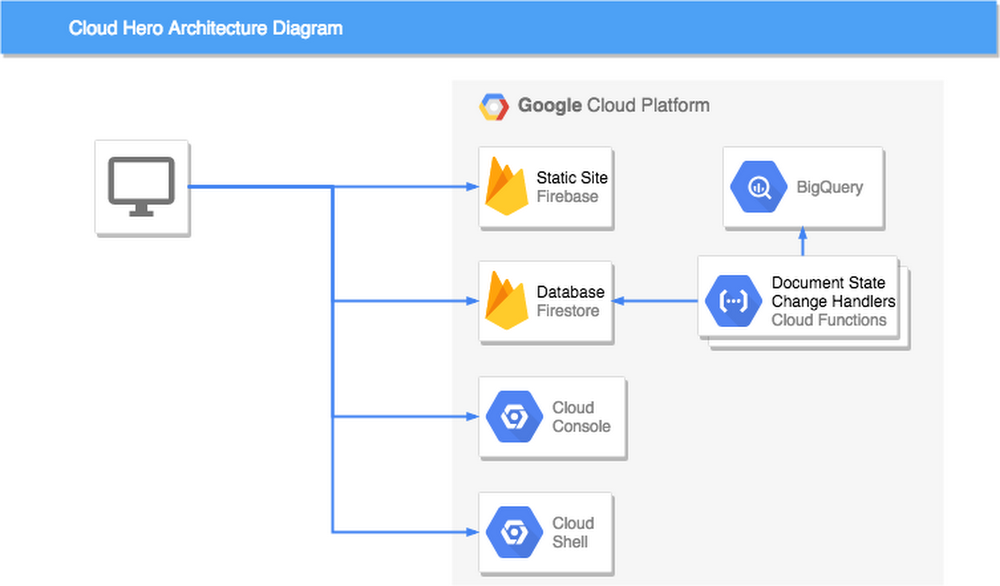
If you’ve ever been to one of our live events, you may have played Cloud Hero, a game we built with Launch Consulting to help you test your knowledge of Google Cloud through the use of timed challenges. Cloud Hero gets a room full of people competing head-to-head, with a live play-by-play leaderboard and lots of prizes. To date, over 1,000 players have played Cloud Hero at 12 public events like Google Cloud Next and Google Cloud Summits—with more venues on the way!When we set out to build Cloud Hero, we knew we wanted interactive and snappy game play, and an extensible and flexible game platform so that we could easily create new challenges and content. We also wanted to build the game quickly—and try out early versions with real players, without writing a lot of custom backend code. And with our event schedule, we also needed an architecture that would easily scale up and down on gameday, without having to run servers when it wasn’t in play.It goes without saying that Cloud Hero would run on Google Cloud. Beyond that though, we chose to architect the game play system as an entirely serverless system, using Angular, Cloud Firestore, and Cloud Functions. Participants complete challenges directly in the Cloud Console, while BigQuery aggregates data for analytics. There’s not a single stateful server to be found in this game engine.If you’re looking to test your Google Cloud skills, be sure to sign up for a round of Cloud Hero at one of our upcoming events. If you’re thinking about creating your next scalable, online, interactive game, read on to learn how we built Cloud Hero—we think it’s a winning architecture.Game setupWhen users play Cloud Hero, they are provided a game-specific project that is provisioned by script in a specific folder of a Resource Manager organization. Provisioning these projects enables certain APIs in advance which lets players focus on using the products, and less on setting up the project. Finally, the game system’s service account is given access to the project. This is key to the game design, which will become clear shortly.When a player registers and begins a game, documents are created in Firestore that represent the player and that player’s specific instance of the game. The player is added to one of the pre-provisioned projects, and it is also associated with the game. And then the timed game challenges begin.Game timeWhen a player starts a challenge, the game takes note of their start time. The challenge includes instructions to complete a variety of tasks in GCP. The more the player knows about GCP, the faster they are likely to complete the task, and the more points they will accrue. But players can also do well if they are good at finding the answers in docs and on the web—nobody knows everything, so navigating to the right information is a critical skill in cloud development.While the game’s front end keeps the gameplay feeling active with a running clock and animations, the serverless backend is idle—that is, until the user submits the challenge for verification, no compute is running. When a player completes a challenge, this changes the state of the challenge document in Firestore to ‘submitted’. The document change triggers a cloud function that runs using the game system’s authorized service account that was added earlier to the player’s game project. With this access, and the information from the submitted challenge, the function introspects the state of the player’s cloud resources to verify if the task was completed. Updating the result of this check in the Firestore document is immediately reflected to the player through Firestore’s real-time watch system and Angular’s reactive subscription model.Not only is the player notified of their update immediately, but so is the live projected leaderboard, which uses Firestore’s ability to update queries in real time as the documents change to match the query’s condition.Finally, data is pushed from Firestore into BigQuery, whose enhanced analytics feed a real-time game analytics console that lets event coordinators see where players may be getting stuck, and which challenges are taking the most time.Timed challenges FTWFrom the outset, we expected that a live game and real-time feedback would be well received by players. Further, we hoped that the immersive game experience and direct access to the player’s project Cloud Console would help players learn more about GCP products. What we didn’t expect is that even novice GCP users would enjoy the experience as much as GCP pros. In fact, the top spot in our first event was won by someone who had never signed into the Cloud Console before! We’ve even got great feedback from people who didn’t advance past the first stage of challenges—they might be the group who took the most away. Not everyone finishes the game, but they have fun learning and challenging themselves.In 2019 we are taking Cloud Hero in an exciting new direction: online! Early registrations for the new online version are now open. And if you’re interested in learning more about building serverless games, check out these guides and how-tos for Cloud Firestore and Cloud Functions.
Quelle: Google Cloud Platform

Build a custom data viz with Data Studio community visualizations

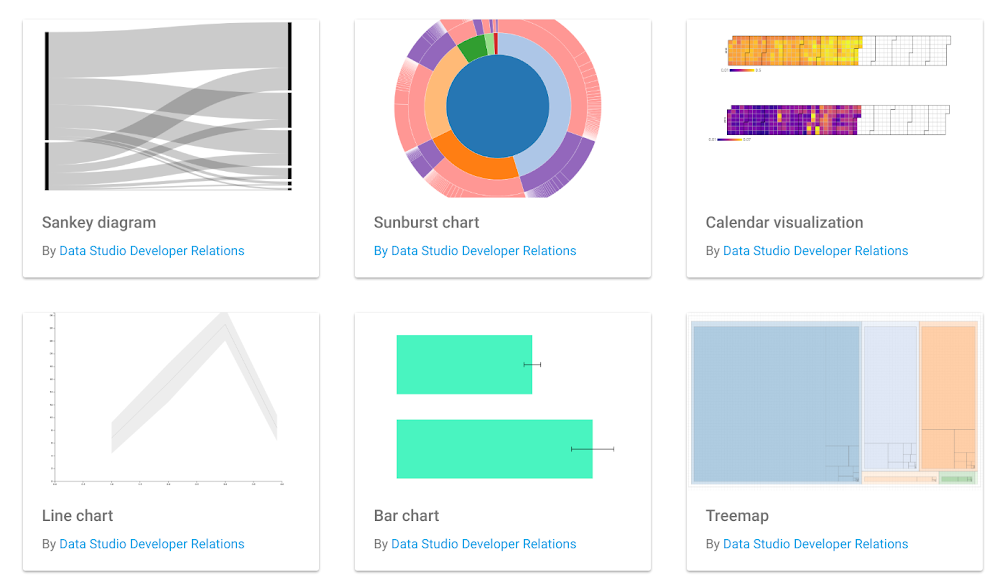
Data Studio, Google’s free data visualization and business intelligence product, lets you easily connect to and report on data from hundreds of data sources. Over the past year, we’ve added more than 75 new features to Data Studio. We’ve heard from users that you want more chart options and flexibility, so you can tell more compelling stories with your data.The new Data Studio community visualizations feature, now in developer preview, allows you to design your own custom visualizations and components for Data Studio. This is particularly useful for business intelligence teams who are building custom charts to improve business outcomes, whether it’s a funnel diagram to show conversions, or a network diagram to understand interconnected data. You can see a few sample custom visualizations here:The Data Studio community visualizations galleryUsing community visualizationsWith this new feature, you can go beyond the standard charts that come with Data Studio. Community visualizations allow you to render your own custom JavaScript and CSS into a component that integrates with the rest of your Data Studio dashboard.With community visualizations, you can:Create an endless variety of charts using JavaScript librariesVisualize any data that is already part of your dashboardDistribute these custom charts to users within your organization (or external stakeholders)Once you write a custom visualization, end users can interact with the chart through the Data Studio UI just like they would with any other chart. For example, they can change data fields and edit styling options without diving back into the code. You can see how this works below (click on the image below to explore a custom visualization, then copy the report):A custom-built timeline visualization of Data Studio release notes, highlighting the launch of community visualizations.ClickInsight, a Google Marketing Platform partner, has been experimenting with community visualizations.“Data Studio reports and dashboards have become indispensable to our clients, and community visualizations will enable us to more easily display the funnels, flows, and complex patterns that exist within their data,” says Marc Soares, Manager, Analytics Solutions at ClickInsight. “By combining community visualizations with the community connectors, we can develop fully customized, end-to-end reporting solutions for our clients. We can connect to any data source and visualize it exactly how we want, all while leveraging the powerful infrastructure of Data Studio.”You can see some of ClickInsight’s visualizations here:Building and sharing community visualizationsIf you’ve ever written a visualization in JavaScript, you can build a community visualization. You can write something from scratch, or from any JavaScript charting library, including D3.js and Chart.js. You can even use your organization’s internal visualization libraries and styling to create a unique visual identity.The reports you build using community visualizations can be shared, just like any other Data Studio report. Additionally, you can share your visualization, allowing others with the same needs to use the visualization.Getting started with community visualizationsA developer preview launch means that the API is stable, and the feature is ready for you to use. We also have a roadmap of features and improvements to extend the capabilities of community visualizations and create an even better experience for users and developers.To get started visit the Data Studio community visualization gallery, complete the codelab, or visit our documentation. Once you’ve built a visualization you’d like to share, submit a report to the showcase, or share the code. Happy custom charting!
Quelle: Google Cloud Platform

Speed up and organize your move to cloud with new migration waves from Velostrata

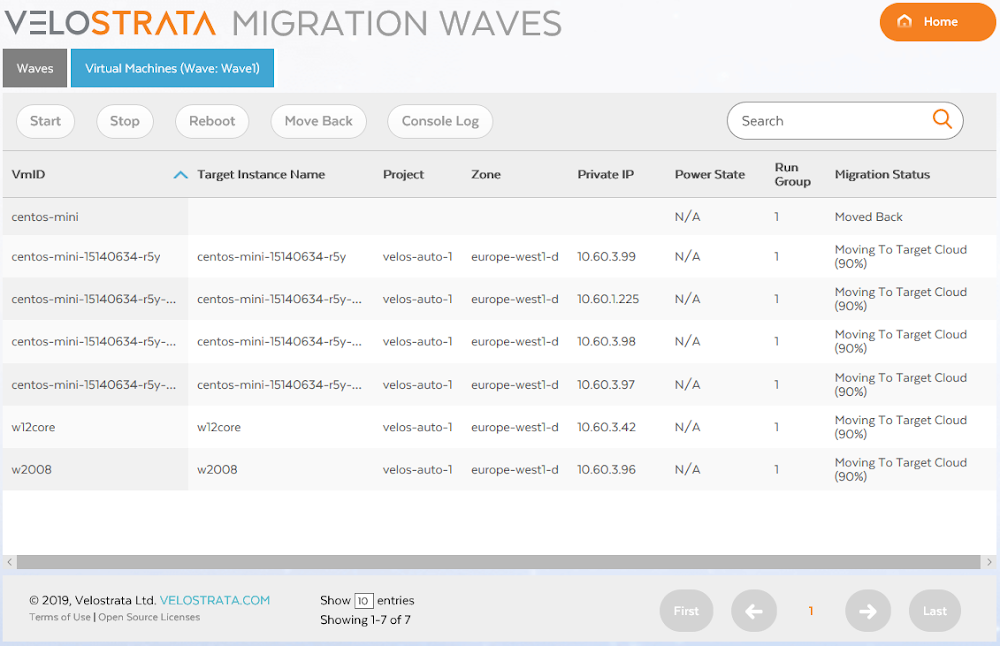
Enterprise cloud migration projects often include moving hundreds or thousands of application workloads from on-prem or other clouds into Google Cloud Platform (GCP). Migrating the entirety of your data center at once is challenging, if not impossible. The best practice we’ve seen is to assess your workloads and batch them into different migration groups based on factors like their production level, inter-application affinity and collaboration, size, importance to the business, performance needs, and more. To do that, it’s crucial to have a high-level view of the entire migration project, in addition to granular views and controls over when and how these batches are migrated.That’s why we’ve introduced migration waves in the latest release of Velostrata, GCP’s real-time enterprise migration tool. A migration wave is a way of organizing the systems you want to move into batches that make your migration strategy more manageable. Migration waves give you vantage points and controls to plan, execute, and monitor your migration to GCP at each step of the journey. You can see here what migration waves look like:Velostrata’s new user interface for migration wavesUsing migration waves makes the cloud migration process simpler. For example, you may choose to migrate all of the VMs in your data center that are associated with dev/test first, so you create a wave with the first 25 VMs, then another 25 VMs, and so on until your dev/test landscape is successfully in the cloud.In addition to that, with migration waves you are able to:Plan and prioritize specific groups of systems in the migration plan for a holistic view of how the project will proceed over time, while broken down into smaller, logical waves.Pre-validate migration waves to ensure that your VM and GCP configurations are correct before you begin migrating.Perform migration operations as needed on any given wave, giving you the power to control their pace and progress. For example, you can launch test instances in GCP for a particular migration wave and confirm that performance and SLAs are met before you migrate. Another example: with migration waves, you can perform dynamic instance right-sizing to optimize the post-migration cloud costs. You can perform as many operations as desired on any given wave.Monitor the progress of any wave operation down to each specific system in that wave. If something unplanned occurs, like a particular VM fails to migrate, you can restart the operation, but Velostrata will intelligently re-run it only on the systems needed. This gives you peace of mind that the systems that migrated successfully won’t be impacted by unexpected errors.Review historical migration wave logs and records any time, giving you an easy way to track and analyze progress against timelines and milestones.In addition to migration waves, Velostrata now includes other new capabilities that give you a smoother, faster path to GCP. These include:Velostrata can now be deployed directly using Google Click to Deploy, making it available to anyone with just a few clicks.We’ve right-sized support for instances migrating from Amazon EC2 to Google Compute Engine, helping you maintain cloud costs without accidentally over-provisioning. This complements the right-sizing support we’ve been offering for VMs migrating from VMware on-prem.Conversion to pay-as-you-go licenses: There is now an option for automatic conversion of existing (on-prem) Enterprise Linux licenses to GCP pay-as-you-go premium licenses. This makes it easier for you to reduce your license costs and management after you migrate, without having to rebuild your virtual machines.Along with all the new capabilities, we’re also thrilled to relay that all of the documentation forVelostrata 4.0 is officially a part of the GCP family, following our 2018 acquisition. You can also find support information for Velostrata here.If you’d like more information on cloud migration to GCP, get Velostrata details here or contact us for more information.
Quelle: Google Cloud Platform

GKE usage metering: Whose line item is it anyway?

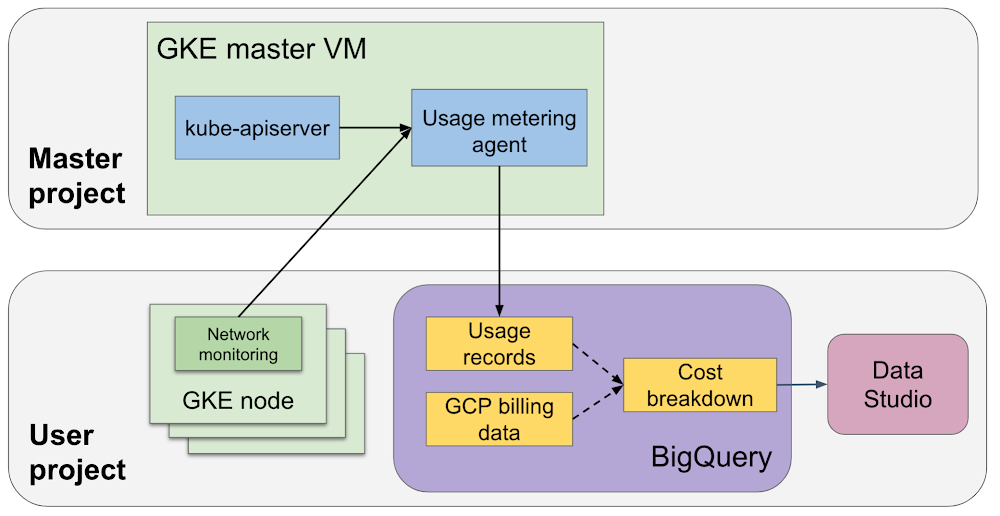
As Kubernetes gains widespread adoption, a growing number of enterprises and [P/S]aaS providers are using multi-tenant Kubernetes clusters for their workloads. These clusters could be running workloads that belong to different departments, customers, environments, etc. Multi-tenancy has a whole slew of advantages: better resource utilization, lower control plane overhead and management burden, reduced resource fragmentation, and reuse of extensions/CRDs, to name a few. However, the advantages do come at a cost. When running Kubernetes in a multi-tenant configuration, it can be hard to:estimate which tenant is consuming what portion of the cluster resourcesdetermine which tenant introduced a bug that led to a sudden usage spikeidentify the prodigal tenant(s) who may not be aware that they are wasting resourcesWe are pleased to announce the launch of Google Kubernetes Engine (GKE) usage metering in beta. The feature allows you to see your Google Cloud Platform (GCP) project’s resource usage broken down by Kubernetes namespaces and labels, and attribute it to meaningful entities (for example, department, customer, application, or environment.) This enables a number of enterprise use cases, such as approximating cost breakdown for departments/teams that are sharing a cluster, understanding the usage patterns of individual applications (or even components of a single application), helping cluster admins triage spikes in usage, and providing better capacity planning and budgeting. SaaS providers can also use it to estimate the cost of serving each consumer. How GKE usage metering worksWhen you enable GKE usage metering, resource usage records are written to a BigQuery table that you specify. Usage records can be grouped by namespace, labels, time period, or other dimensions to produce powerful insights. You can then visualize the data in BigQuery using tools such as Google Data Studio.Optionally, you can enable network egress metering. With it, a network metering agent (NMA) is deployed into the cluster as a DaemonSet (one NMA pod running on each cluster node). The NMA is designed to be pretty lightweight, however, it is important to note that an NMA runs as a privileged pod and consumes some resources on the node.High-level architecture of the usage metering agent.What customers are sayingEarly adopters of GKE usage metering tell us that the feature improves the operational efficiency and flexibility of their organizations.“We have found the usage metering feature very helpful as it lets us break down costs for each individual team using a multi-tenant cluster. Since the data is available directly in BigQuery, our finance team can easily access the data, without us as operators having to write any scripts or do calculations ourselves.” – Matthew Brown, Staff Software Engineer, Spotify“Descartes Labs’ multi-tenant platform is built on top of Kubernetes and GKE to allow many different types of use cases, such as wide-range geospatial ML modeling, but no two workloads have the exact same resource footprint. Being able to isolate each user’s workload in its own Kubernetes namespace, then having tooling natively built into GKE to measure resources being consumed per namespace, provides us great visibility into how our platform is being leveraged and works similarly to the GCP billing export we are already know well.” – Tim Kelton, Co-founder, head of SRE, Security, and Cloud Operations, Descartes LabsGetting startedYou can enable usage metering on a per-cluster basis (detailed instructions and relevant documentation can be found here). This enables one of GKE usage metering’s popular use cases: obtaining a cost breakdown of individual tenants. In the documentation, you’ll find some sample BigQuery queries and plug-and-play Google Data Studio templates to join GKE usage metering and GCP billing export data to estimate a cost breakdown by namespace and labels. They allow you to create dashboards like this:GKE users can visualize and dissect resource usage data to gain insights.GKE usage metering best practicesThe combination of namespaces and labels gives a lot of flexibility—users can segregate resource usage using namespaces, Kubernetes labels, or a combination of both. Taking the time to consciously plan the namespace/labeling strategy and standardizing it across your organization will make it easier to generate powerful insights down the road. The exact recommendations for setting namespaces and labels vary depending on factors such as the size of the company, the complexity of workloads, organizational structure, etc. Here are some general guidelines to keep in mind:While using too many namespaces can introduce complexity, using too few will make it hard to take advantage of multi-tenancy features. For a large company with multiple teams sharing the cluster, aim  to have at least one namespace per team. For more details and scenarios, see this short video.It is a good idea to define a required set of labels for the org and make sure the essential attributes are captured for every application/object. For example, you can require every Kubernetes application to define the application id, team name, and environment, and allow team members to customize additional labels as needed. However, keep in mind that taking this to the extreme and using too many labels may slow down some components.Enabling effective multi-tenancy on KubernetesEnterprises and resellers using GKE clusters in a multi-tenant environment need to understand resource consumption on a per-tenant basis. GKE usage metering provides a flexible mechanism to dissect and group GKE cluster usage based on namespaces and labels. You can find detailed documentation on our website. And please take a few minutes to give us your feedback and ideas, to help us shape upcoming releases.
Quelle: Google Cloud Platform

Cloud Bigtable brings database stability and performance to Precognitive

[Editor’s note: Today we’re hearing from Precognitive, which develops technology that interprets data to improve the accuracy of fraud detection and prevention, with the goals of reducing false positives and avoiding customer disruption. Their quest for the right database led them to Cloud Bigtable, and we’re bringing you their story here.]At Precognitive, we were able to start with a blank technology slate to support our fraud detection software products. When we started building the initial version of our platform in 2017, we had some decisions to make: What coding language to use? What cloud infrastructure provider to choose? What database to use? The majority of the decisions were straightforward, but we struggled to decide upon a database. We had plenty of collective experience with relational databases, but not with a wide-column database like Cloud Bigtable—which we knew we’d need to scale our behavior and device workloads. At launch, our products were supported by a self-managed database, but we quickly migrated to Cloud Bigtable, and we love it.  To efficiently support our bursty, real-time fraud detection workloads, we needed a cloud database that could satisfy the following key requirements:Stability to keep up with increased adoption of our productsIntelligent scaling that avoids bottlenecksNative integrations with BigQuery and Cloud DataprocManaged services that free up our engineers’ time to work on our productsAdding Cloud Bigtable as our performance databaseAs we scaled our services and added customers, our data collection services for our Device Intelligence and Behavioral Analytics products were seeing thousands of events per second. Cloud Bigtable provided a stable managed database that could handle the volume we were receiving during peak hours. We weren’t always able to handle this scale, as an early version of our product utilized a self-managed database.Every month, two or three engineers spent hours managing the database instances. Whenever the instances crashed, it would cost at least one engineer a day or two of productivity attempting to restore the instances and recovering any data from our backup database. Managing this database internally was taking precious time away from product development.We circled back to Cloud Bigtable. After two weeks of R&D, we decided to switch the Device Intelligence and Behavioral Analytics services to Cloud Bigtable.Cloud Bigtable solved our scaling issues. Cloud Bigtable had been attractive to us from the start because it was fully managed, and offered regional replication and other features we were lacking in our own managed instances. Cloud Bigtable provides horizontal scaling and automatically rebalances row keys (equivalent to a shard key) over time to prevent “hot” nodes. In addition, Cloud Bigtable provides a connector to BigQuery and Cloud Dataproc that allows us to analyze the terabytes of data we are processing and use that data for unsupervised machine learning.The perks of using Cloud BigtableAfter the migration to Cloud Bigtable, we noticed a number of additional benefits: improved I/O performance, a significant cost reduction, and a sizable decrease in hours spent on database maintenance.We measured some of our typical metrics before and after implementing Cloud Bigtable. Our request latency dropped by about 30 ms on average (to sub-10 ms) for API requests. Prior to the change, we were seeing latencies of 40+ ms on average. This latency drop on our Behavioral Analytics and Device Intelligence products allowed us to trim about an additional 10 to 15 ms off our average response time across all dependent services.Before we moved to Cloud Bigtable, we had to scale our database instances every time a new customer was onboarded. We were over-scaling in an attempt to avoid constantly resizing our database servers. By sunsetting our self-managed database and switching to Cloud Bigtable, we cut database infrastructure costs by approximately 35% and can now scale as needed, with a couple of clicks, during onboarding.We have spent zero hours managing a Cloud Bigtable database since launch, and we put the time we are saving every month toward product development.Moving forward with Cloud BigtableAs an engineering team, we love working with Cloud Bigtable. We are not only seeing improved developer experience and reduced latency, which keeps the engineers happy, but also reduced costs, which keeps the business happy. We’re able to build more product, too, with the time we’ve saved by switching to Cloud Bigtable. Stay tuned to our engineering blog for more on the lessons we’ve learned and our contributions to the wider Cloud Bigtable community.
Quelle: Google Cloud Platform

Do you have an SRE team yet? How to start and assess your journey

We’re pleased to announce that The Site Reliability Workbook is available in HTML now! Site Reliability Engineering (SRE), as it has come to be generally defined at Google, is what happens when you ask a software engineer to solve an operational problem. SRE is an essential part of engineering at Google. It’s a mindset, and a set of practices, metrics, and prescriptive ways to ensure systems reliability. The new workbook is designed to give you actionable tips on getting started with SRE and maturing your SRE practice. We’ve included links to specific chapters of the workbook that align with our tips throughout this post.We’re often asked what implementing SRE means in practice, since our customers face challenges quantifying their success when setting up their own SRE practices. In this post, we’re sharing a couple of checklists to be used by members of an organization responsible for any high-reliability services. These will be useful when you’re trying to move your team toward an SRE model. Implementing this model at your organization can benefit both your services and teams due to higher service reliability, lower operational cost, and higher-value work for the humans.But how can you tell how far you have progressed along this journey? While there is no simple or canonical answer, you can see below a non-exhaustive list to check your progress, organized as checklists by ascending order of maturity of a team. Within every checklist, the items are roughly in chronological order, but we do recognize that any given team’s actual needs and priorities may vary.If you’re part of a mature SRE team, these checklists can be useful as a form of industry benchmark, and we’d love to encourage others to publish theirs as well. Of course, SRE isn’t an exact science, and challenges arise along the way. You may not get to 100% completion of the items here, but we’ve learned at Google that SRE is an ongoing journey. SRE: Just getting startedThe following three practices are key principles of SRE, but can largely be adopted by any team responsible for production systems, regardless of its name, before and in parallel to staffing an SRE team.Some service-level objectives (SLOs) have been defined (jointly with developers and business owners, if you aren’t part of one of these groups) and are met most months.There’s a culture of authoring blameless postmortems.There’s a process to manage production incidents. It may be company-wide.Beginner SRE teamsMost, if not all, SRE teams at Google have established the following practices and characteristics. We generally view these as fundamental to an effective SRE team, unless there are good reasons why they aren’t feasible for a specific team’s circumstances.A staffing and hiring plan is in place and funding has been approved.Once staffed, the team may be on-call for some services while taking at least part of the operational load (toil).There is documentation for the release process, service setup, teardown (and failover, if applicable).A canary process for releases has been evaluated as a function of the SLO.A rollback mechanism is in place where it’s applicable (though it’s understood that this is a nontrivial exercise when mobile applications are involved, for example).An operational playbook/runbook should exist, even if not complete.Theoretical (role-playing) disaster recovery testing takes place, at least annually.SRE plans and executes project work, which may not be immediately visible by their developer counterparts, such as operational load reduction efforts that may not need developer buy-in.The following practices are also common for SRE teams starting out. If they don’t exist, that can be a sign of poor team health and sustainability issues:Enough on-call load to exercise incident response procedures on a regular (i.e., weekly) basis.An SRE team charter that’s been reviewed by the appropriate leadership beyond SRE (i.e., CTO).Periodic meetings between SRE and developer leadership to discuss issues and goals and share information.Project planning and execution is done jointly by developers and SRE. SRE work and positive impact is visible to developer leadership.Intermediate SRE teamsThese characteristics are common in mature teams and generally indicate that the team is taking a proactive approach to efficient management of its services.There are periodic reviews of SRE project work and impact with business leaders.There are periodic reviews of SLIs and SLOs with business leaders.There’s a low volume of toil overall; <=50% can be measured beyond “just” low on-call load. The team establishes an approach regarding configuration changes that takes reliability into account. SREs have established a plan to scale impact beyond adding scope or services to their on-call load.There’s a rollback mechanism in case of canary failures. It may be automated.There is periodic testing of incident management, using a combination of role-playing with some automation in place.There’s an escalation policy tied to SLO violations; this might be a release process freeze/unfreeze, or something else. Check out our previous post on the possible consequences of SLO violations.There are periodic reviews of postmortems and action items that are shared between developers and SRE.Disaster recovery is periodically tested against non-production environments.Teams measure demand vs. capacity and use active forecasting to determine when demand might exceed capacity.The SRE team may produce long-term plans (i.e., a yearly roadmap) jointly with devs.Advanced SRE teamsThese practices are common in more senior teams, or sometimes can be achieved when an organization or set of SRE teams share a broader charter.At least some individuals on the team can claim major positive impact on some aspect of the business beyond firefighting or ops.Project work can be and is often executed horizontally, positively impacting many services at once as opposed to linearly or worse per service.Most service alerts are based on SLO burn rate.Automated disaster recovery testing is in place and positive impact can be measured.Another set of SRE “features” which may be desirable but unlikely to be implemented by most companies are:SREs are not on-call 24×7. SRE teams are geographically distributed in two locations, such as U.S. and Europe. It’s worth pointing out that neither half is treated as secondary.SRE and developer organizations share common goals and may have separate reporting chains up to SVP level or higher. This arrangement helps to avoid conflicts of interest.What should I do next?Once you’ve looked through these checklists, your next step is to think about whether they match your company’s needs.For those without an SRE team where most of the beginner list is unfilled, we’d highly recommend reading the associated SRE Workbook chapters in the order they have been presented. If you happen to be a Google Cloud Platform (GCP) customer and would like to request CRE involvement, contact your account manager to apply for this program. But to be clear, SRE is a methodology that will work on a huge variety of infrastructures, and using Google Cloud is not a prerequisite for pursuing this set of engineering practices.We’d also recommend attending existing conferences and organizing summits with other companies in order to share best practices on how to solve some of the blockers, such as recruiting.We have also seen teams struggling to fill out the advanced list because of churn. The rate of systems and personnel changes may be a deterrent to get there. In order to avoid teams reverting to the beginner stage and other problems, our SRE leadership reviews key metrics per team every six months. The scope is more narrow than the checklists above because several of the items have now become standard.As you may have guessed by now, answering the central question in this article involves addressing and attempting to assess a given team’s impact, health, and most importantly, how the actual work is done. After all, as we wrote in our first book on SRE: “If we are engineering processes and solutions that are not automatable, we continue having to staff humans to maintain the system. If we have to staff humans to do the work, we are feeding the machines with the blood, sweat, and tears of human beings.”So yes, you might have an SRE team already. Is it effective? Is it scalable? Are people happy? Wherever you are in your SRE journey, you can likely continue to evolve, grow and hone your team’s work and your company’s services. Learn more here about getting started building an SRE team.Thanks to Adrian Hilton, Alec Warner, David Ferguson, Eric Harvieux, Matt Brown, Myk Taylor, Stephen Thorne, Todd Underwood and Vivek Rau among others for their contributions to this post.
Quelle: Google Cloud Platform