Let Deep Learning VMs and Jupyter notebooks burn the midnight oil for you: robust and automated training with Papermill

In the past several years, Jupyter notebooks have become a convenient way of experimenting with machine learning datasets and models, as well as sharing training processes with colleagues and collaborators. Often times your notebook will take a long time to complete its execution. An extended training session may cause you to incur charges even though you are no longer using Compute Engine resources.This post will explain how to execute a Jupyter Notebook in a simple and cost-efficient way.We’ll explain how to deploy a Deep Learning VM image using TensorFlow to launch a Jupyter notebook which will be executed using the Nteract Papermill open source project. Once the notebook has finished executing, the Compute Engine instance that hosts your Deep Learning VM image will automatically terminate.The components of our system:First, Jupyter NotebooksThe Jupyter Notebook is an open-source web-based, interactive environment for  creating and sharing IPython notebook (.ipynb) documents that contain live code, equations, visualizations and narrative text. This platform supports data cleaning and transformation, numerical simulation, statistical modeling, data visualization, machine learning, and much more.Next, Deep Learning Virtual Machine (VM) imagesThe Deep Learning Virtual Machine images are a set of Debian 9-based Compute Engine virtual machine disk images that are optimized for data science and machine learning tasks. All images include common ML frameworks and tools installed from first boot, and can be used out of the box on instances with GPUs to accelerate your data processing tasks. You can launch Compute Engine instances pre-installed with popular ML frameworks like TensorFlow, PyTorch, or scikit-learn, and even add Cloud TPU and GPU support with a single click.And now, PapermillPapermill is a library for parametrizing, executing, and analyzing Jupyter Notebooks. It lets you spawn multiple notebooks with different parameter sets and execute them concurrently. Papermill can also help collect and summarize metrics from a collection of notebooks.Papermill also permits you to read or write data from many different locations. Thus, you can store your output notebook on a different storage system that provides higher durability and easy access in order to establish a reliable pipeline. Papermill recently added support for Google Cloud Storage buckets, and in this post we will show you how to put this new functionality to use.InstallationSubmit a Jupyter notebook for executionThe following command starts execution of a Jupyter notebook stored in a Cloud Storage bucket:The above commands do the following:Create a Compute Engine instance using TensorFlow Deep Learning VM and 2 NVIDIA Tesla T4 GPUsInstall the latest NVIDIA GPU driversExecute the notebook using PapermillUpload notebook result (with all the cells pre-computed) to Cloud Storage bucket in this case: “gs://my-bucket/”Terminate the Compute Engine instanceAnd there you have it! You’ll no longer pay for resources you don’t use since after execution completes, your notebook, with populated cells, is uploaded to the specified Cloud Storage bucket. You can read more about it in the Cloud Storage documentation.Note: In case you are not using a Deep Learning VM, and you want to install Papermill library with Cloud Storage support, you only need to run:Note: Papermill version 0.18.2 supports Cloud Storage.And here is an even simpler set of bash commands:Execute a notebook using GPU resourcesExecute a notebook using CPU resourcesThe Deep Learning VM instance requires several permissions: read and write ability to Cloud Storage, and the ability to delete instances on Compute Engine. That is why our original command has the scope “https://www.googleapis.com/auth/cloud-platform” defined.Your submission process will look like this:Note: Verify that you have enough CPU or GPU resources available by checking your quota in the zone where your instance will be deployed.Executing a Jupyter notebookLet’s look into the following code:This command is the standard way to create a Deep Learning VM. But keep in mind, you’ll need to pick the VM that includes the core dependencies you need to execute your notebook. Do not try to use a TensorFlow image if your notebook needs PyTorch or vice versa.Note: if you do not see a dependency that is required for your notebook and you think should be in the image, please let us know on the forum (or with a comment to this article).The secret sauce here contains two following things:Papermill libraryStartup shell scriptPapermill is a tool for parameterizing, executing, and analyzing Jupyter Notebooks.Papermill lets you:Parameterize notebooks via command line arguments or a parameter file in YAML formatExecute and collect metrics across the notebooksSummarize collections of notebooksIn our case, we are just using its ability to execute notebooks and pass parameters if needed.Behind the scenesLet’s start with the startup shell script parameters:INPUT_NOTEBOOK_PATH: The input notebook located Cloud Storage bucket.Example: gs://my-bucket/input.ipynbOUTPUT_NOTEBOOK_PATH: The output notebook located Cloud Storage bucket.Example: gs://my-bucket/input.ipynb.PARAMETERS_FILE: Users can provide a YAML file where notebook parameter values should be read.Example: gs://my-bucket/params.yamlPARAMETERS: Pass parameters via -p key value for notebook execution.Example: -p batch_size 128 -p epochs 40.The two ways to execute the notebook with parameters are: (1) through the Python API and (2) through the command line interface. This sample script supports two different ways to pass parameters to Jupyter notebook, although Papermill supports other formats, so please consult Papermill’s documentation.The above script performs the following steps:Creates a Compute Engine instance using the TensorFlow Deep Learning VM and 2 NVIDIA Tesla T4 GPUsInstalls NVIDIA GPU driversExecutes the notebook using Papermill toolUploads notebook result (with all the cells pre-computed) to Cloud Storage bucket in this case: gs://my-bucket/Papermill emits a save after each cell executes, this could generate “429 Too Many Requests” errors, which are handled by the library itself.Terminates the Compute Engine instanceConclusionBy using the Deep Learning VM images, you can automate your notebook training, such that you no longer need to pay extra or manually manage your Cloud infrastructure. Take advantage of all the pre-installed ML software and Nteract’s Papermill project to help you solve your ML problems more quickly! Papermill will help you automate the execution of yourJupyter notebooks and in combination of Cloud Storage and Deep Learning VM images you can now set up this process in a very simple and cost efficient way.
Quelle: Google Cloud Platform

Get fast, reliable messaging with IBM MQ on Compute Engine

Moving data is one essential task for enterprises today, especially if you’re using lots of different systems across many locations. One product for this is IBM MQ, which helps you move data dependably with secure messaging. Deploying a highly available IBM MQ cluster in the cloud is not a straightforward task, and IBM provides many clustering configurations you can use and combine in various ways to achieve your high availability goals. It’s challenging to deploy a cluster like this in a way that takes advantage of cloud’s benefits, like multiple zone availability, load balancers and vertical scaling. But once you’ve got it set up, you can safely move, integrate and process data from within applications across your organization quickly and securely, with multiple petabytes of data processed.We’ve heard that you want to know how to use a tool like IBM MQ as part of your Google Cloud Platform (GCP) deployment, specifically Compute Engine. We’re pleased to introduce this guide to how to deploy a highly available IBM MQ Queue Manager Cluster on Compute Engine with GlusterFS. GlusterFS is an open-source, scale-out storage system that works well for this purpose because it is designed for high-throughput storage shared between instances and requires little effort to set up.Using queue managers to build the IBM MQ clusterIn this solution, we recommend combining queue manager clusters with multi-instance queue managers (instances of the same queue manager configured on different servers) to create a highly available, scalable IBM MQ deployment. Multi-instance queue managers run in an active/standby configuration, using a shared volume for configuration and state data. Clustered queue managers share configuration information using a network channel and can perform load balancing on incoming messages. However, the message state is not shared between the two queue managers.By using both IBM MQ cluster deployment models at once, you can achieve redundancy at the queue manager level and then scale by distributing the load of the IBM MQ cluster across one or more queue managers.You can see the architecture of the deployment in this diagram:There are two queue managers shown here, referred to in the diagram as A and B. For each queue manager, there is a primary node and standby node (mq-1 and mq-2 for queue manager A, and mq-3 and mq-4 for queue manager B). To route traffic to the primary instances, the solution leverages internal load balancers, one for each queue manager. Consumers and publishers end up at the load balancer addresses as if those were the direct queue managers’ addresses. The queue managers communicate with each other through the internal load balancers as well.IBM MQ multi-instance queue managers require shared storage. In this tutorial, we use GlusterFS, a distributed, scalable file system, as a shared file system between the nodes of each multi-instance queue manager. You may choose to use other shared storage systems, such as IBM Spectrum Scale File System (GPFS), NFS on Cloud Filestore, NFS with Elastifile, and more. For more details and to get started building a cluster for better messaging, visit the IBM MQ-Compute Engine solution page to take the tutorial.Thanks to additional contributions from Ben Good, Solutions Architect, Google Cloud Platform.
Quelle: Google Cloud Platform

Exploring container security: How DroneDeploy achieved ISO-27001 certification on GKE

Editor’s note: Aerial data mapping company DroneDeploy wanted to migrate its on-premises Kubernetes environment to Google Kubernetes Engine—but only if it would pass muster with auditors. Read on to learn how the firm leveraged GKE’s native security capabilities to smooth the path to ISO-27001 certification.At DroneDeploy, we put a lot of effort into securing our customers’ data. We’ve always been proud of our internal security efforts, and receiving compliance certifications validates these efforts, helping us formalize our information security program, and keeping us accountable to a high standard. Recently, we achieved ISO-27001 certification— all from taking advantage of the existing security practices in Google Cloud and Google Kubernetes Engine (GKE). Here’s how we did it.As a fast-paced, quickly growing B2B SaaS startup in San Francisco, our mission is to make aerial data accessible and productive for everyone. We do so by providing our users with image processing, automated mapping, 3D modeling, data sharing, and flight controls through iOS and Android applications. Our Enterprise Platform provides an admin console for role-based access and monitoring of flights, mapped routes, image capture, and sharing. We serve more than 4,000 customers across 180 countries in the construction, energy, insurance, and mining industries, and ingest more than 50 terabytes of image data from over 30,000 individual flights every month.Many of our customers and prospects are large enterprises that have strict security expectations of their third-party service providers. In an era of increased regulation (such as Europe’s GDPR law) and data security concerns, the scrutiny on information security management has never been higher.. Compliance initiatives are one piece of the overall security strategy that help us communicate our commitment to securing customer data. At DroneDeploy, we chose to start our compliance story with ISO-27001, an international information security standard that is for recognized across a variety of industries.DroneDeploy’s Architecture: Google Kubernetes Engine (GKE)DroneDeploy was an early adopter of Kubernetes, and we have long since migrated all our workloads from virtual machines to containers orchestrated by Kubernetes. We currently run more than 150,000 Kubernetes jobs each month with run times ranging from a few minutes to a few days. Our tooling for managing clusters evolved over time, starting with hand-crafted bash and Ansible scripts, to the now ubiquitous (and fantastic) kops. About 18 months ago, we decided to re-evaluate our hosting strategy given the decreased costs of compute in the cloud. We knew that managing our own Kubernetes clusters was not a competitive advantage for our business and that we would rather spend our energy elsewhere if we could.We investigated the managed Kubernetes offerings of the top cloud providers and did some technical due diligence before making our selection—comparing not only what was available at the time but also future roadmaps. We found that GKE had several key features that were missing in other providers such as robust Kubernetes-native autoscaling, a mature control plane, multi-availability zone masters, and extensive documentation. GKE’s ability to run on pre-emptible node pools for ephemeral workloads was also a huge plus.Proving our commitment to security hardeningBut if we were going to make the move, we needed to document our information security management policies and process and prove that we were following best practices for security hardening.Specifically, when it comes to ISO-27001 certification, we needed to follow the general process:Document the processes you perform to achieve complianceProve that the processes convincingly address the compliance objectivesProvide evidence that you are following the processDocument any deviations or exceptionsWhile Google Cloud offers hardening guidance for GKE and several GCP blogs to guide our approach, we still needed to prove that we had security best practices in place for our critical systems. With newer technologies, though, it can be difficult to provide clear evidence to an auditor that those best practices are in place; they often live in the form of blog posts by core contributors and community leaders versus official, documented best practices. Fortunately, standards have begun to emerge for Kubernetes. The Center for Internet Security (CIS) recently published an updated compliance benchmark for Kubernetes 1.11 that is quite comprehensive. You can even run automated checks against the CIS benchmark using the excellent open source project kube-bench. Ultimately though, it was the fact that Google manages the underlying GKE infrastructure that really helped speed up the certification process.  Compliance with less pain thanks to GKEAs mentioned, one of the main reasons we switched from running Kubernetes in-house to GKE was to reduce our investment in manually maintaining and upgrading our Kubernetes clusters— including our compliance initiatives. GKE reduces the overall footprint that our team has to manage since Google itself manages and documents much of the underlying infrastructure. We’re now able to focus on improving and documenting the parts of our security procedures that are unique to our company and industry, rather than having to meticulously document the foundational technologies of our infrastructure.For Kubernetes, here’s a snippet of how we documented our infrastructure using the four steps described above:We implemented security best practices within our Kubernetes clusters by ensuring all of them are benchmarked using the Kubernetes CIS guide. We use kube-bench for this process, which we run on our clusters once every quarter.A well respected third-party authority publishes this benchmark, which confirms that our process addresses best practices for using Kubernetes securely.We provided documentation that we assessed our Kubernetes clusters against the benchmark, including the tickets to track the tasks.We provided the results of our assessment and documented any policy exceptions and proof that we evaluated those exceptions against our risk management methodology.Similarly to the physical security sections of the ISO-27001 standard, the CIS benchmark has large sections dedicated to security settings for Kubernetes masters and nodes. Because we run on GKE, Google handled 95 of the 104 line items in the benchmark applicable to our infrastructure. For those items that could not be assessed against the benchmark (because GKE does not expose the masters), we provided links to Google’s security documentation on those features (see Cluster Trust and Control Plane Security). Some examples include:Connecting kubelets to the mastersHandling of config files on the masters (e.g. scheduler, controller manager, API server, etc.)Hardening the etcd databaseBeyond GKE, we were also able to take advantage of many other Google Cloud services that made it easier for us to secure our cloud footprint (although the shared responsibility model for security means we can’t rely on Google Cloud alone):For OS level security best practices, we we able to document strong security best practices for our OS security because we use Google’s Container-Optimized OS (COS), which provides many security best practices by default by using things such as a read-only file system. All that was left for us to do was was follow best practices to help secure our workloads.We use node auto-upgrade on our GKE nodes to handle patch management at the OS layer for our nodes. For the level of effort, we found that node auto-upgrade provides a good middle ground patching and stability. To date, we have not had any issues with our software as a result of node auto-upgrade.We use Container Analysis (which is built into Google Container Registry) to scan for known vulnerabilities in our Docker images.ISO-27001 requires that you demonstrate the physical security of your network infrastructure. Because we run our entire infrastructure in the cloud, we were able to directly rely on Google Cloud’s physical and network security for portions of the certification (Google Cloud is ISO-27001 certified amongst other certifications).DroneDeploy is dedicated to giving our customers access to aerial imaging and mapping technologies quickly and easily. We handles vast amounts of sensitive information on behalf of our customers, and we want them to know that we are following best security practices even when the underlying technology gets complicated, like in the case of Kubernetes. For DroneDeploy, switching to GKE and Google Cloud has helped us reduce our operational overhead and increased the velocity with which we achieve key compliance certifications. To learn more about DroneDeploy, and our experience using Google Cloud and GKE, feel free to reach out to us.
Quelle: Google Cloud Platform

Recursion Pharmaceuticals accelerates drug discovery with Google Cloud

Despite advances in scientific research and medical technology, the process of drug discovery has become increasingly slower and more expensive over the last decade. While the pharmaceutical industry has spent more money on research and development each year, this has not resulted in an increase in the number of FDA-approved new medicines. Recursion, headquartered in Salt Lake City, is looking to address this declining productivity by combining rich biological datasets with the latest in machine learning to reinvent the drug discovery and development process.Today, Recursion has selected Google Cloud as their primary public cloud provider as they build a drug discovery platform that combines chemistry, automated biology, and cloud computing to reveal new therapeutic candidates, potentially cutting the time to discover and develop a new medicine by a factor of 10.In order to fulfill their mission, Recursion developed a data pipeline that incorporates image processing, inference engines and deep learning modules, supporting bursts of computational power that weigh in at trillions of calculations per second. In just under two years, Recursion has created hundreds of disease models, generated a shortlist of drug candidates across several diseases, and advanced drug candidates into the human testing phase for two diseases.Starting with wet biology—plates of glass-bottom wells containing thousands of healthy and diseased human cells—biologists run experiments on the cells, applying stains that help characterize and quantify the features of the cellular samples: their roundness, the thickness of their membrane, the shape of their mitochondria, and other characteristics. Automated microscopes capture this data by snapping high-resolution photos of the cells at several different light wavelengths. The data pipeline, which sits on top ofGoogle Kubernetes Engine (GKE) and Confluent Kafka, all running on GCP, extracts and analyzes cellular features from the images. Then, data are processed by deep neural networks to find patterns, including those humans might not recognize. The neural nets are trained to compare healthy and diseased cell signatures with those of cells before and after a variety of drug treatments. This process yields promising new potential therapeutics.To train its deep learning models, Recursion uses on-premises GPUs, then they use GCP CPUs to perform inference on new images in the pipeline using these models. Recursion is currently evaluating cloud-based alternatives including using Cloud TPU technology to accelerate and automate image processing. Since Recursion is already using TensorFlow to train its neural networks in its proprietary biological domains, Cloud TPUs are a natural fit. Additionally, Recursion is exploring using GKE On-Prem, the foundation of Cloud Services Platform, to manage all of their Kubernetes clusters from a single, easy-to-use console.We’re thrilled to collaborate with Recursion in their quest to more rapidly and inexpensively discover new medicines for dozens of diseases, both rare and common. Learn more about how Recursion is using Google Cloud solutions to better execute its mission of “decoding biology to radically improve lives” here. You can also learn more about solutions for life sciences organizations and our Google Cloud for Startups Program.
Quelle: Google Cloud Platform

OpenVPN: Enabling access to the corporate network with Cloud Identity credentials

Editor’s note: Cloud Identity, Google Cloud’s identity as a service (IDaaS) platform, now offers secure LDAP functionality that enables authentication, authorization, and user/group lookups for LDAP-based apps and IT infrastructure. Today, we hear from OpenVPN, which has tested and integrated its OpenVPN Access Server with secure LDAP, enabling your employees and partners to use their Cloud Identity credentials to access applications through VPN. Read on to learn more.As IT organizations adopt more cloud-based IaaS and SaaS apps, they need a way to let users access them securely, while still being able to use legacy LDAP-based apps and infrastructure. The new secure LDAP capabilities in Cloud Identity provides both legacy LDAP platforms and cloud-native applications with a single authentication source, for a simple, effective solution to this problem.In fact, we here at OpenVPN have integrated our OpenVPN Access Server with Cloud Identity, allowing your remote users to connect to your corporate network and apps over VPN with their Cloud Identity (or G Suite) credentials. This helps keep your company secure, and ensures your entire team is following the protocol.This illustration demonstrates how Cloud Identity makes security accessible and efficient for any level of enterprise. The top-half of the illustration shows the deployment of OpenVPN Access Server in various cloud IaaS providers. As you can see, all instances of Access Server use Cloud Identity for authentication and authorization. The Access Servers are configured with a group called ‘IT Admin,’ which allows SSH access to all application servers on all the private networks. This allows any employee identity present in Cloud Identity that is a member of ‘IT Admin’ group to access any of the private networks via VPN and use SSH.Then, as you can see in the lower half of the illustration, remote employees use VPN to connect to your corporate network and apps with their Cloud Identity credentials.Using Cloud Identity for authenticationOpenVPN Access Server v2.6.1 and later supports secure LDAP and has been tested to work with Cloud Identity. You can find specific configuration instructions on our website.Using Cloud Identity groups for network access controlAs shown in the illustration below, Access Server’s administrative controls make it easy to configure groups. Administrators can configure access controls for these groups with fine granularity down to an individual IP address and port number.You can configure groups in Access Server that correspond to those stored in Cloud Identity and enforce access controls for the user based on that user’s group membership. You can do this kind of mapping by using a script on Access Server. Instructions to set up the script are available on our website. In addition, our support staff is also ready to help you.With OpenVPN Access Server, you can protect your cloud applications, connect your premise to the cloud, and provide simple and secure access for your remote employees in a way that scales with the tools you’re already using. Best of all, OpenVPN Access Server is available on GCP Marketplace. Try it out today!
Quelle: Google Cloud Platform

Running Redis on GCP: four deployment scenarios

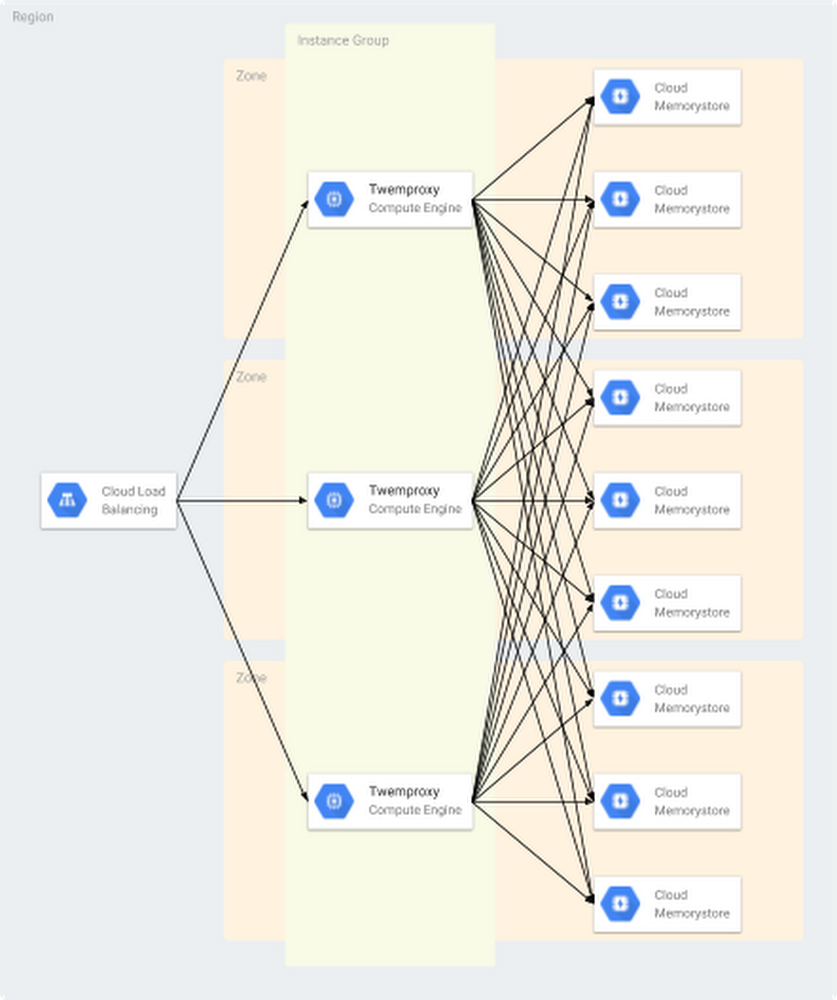
Redis is one of the most popular open source in-memory data stores, used as a database, cache and message broker. This post covers the major deployment scenarios for Redis on Google Cloud Platform (GCP). In the following post, we’ll go through the pros and cons of these deployment scenarios and the step-by-step approach, limitations and caveats for each.Deployment options for running Redis on GCPThere are four typical deployment scenarios we see for running Redis on GCP: Cloud Memorystore for Redis, Redis Labs Cloud and VPC, Redis on Google Kubernetes Engine (GKE), and Redis on Google Compute Engine. We’ll go through the considerations for each of them. It’s also important to have backup for production databases, so we’ll discuss backup and restore considerations for each deployment type.Cloud Memorystore for RedisCloud Memorystore for Redis, part of GCP, is a way to use Redis and get all its benefits without the cost of managing Redis. If you need data sharding, you can deploy open source Redis proxies such as Twemproxy and Codis with multiple Cloud Memorystore for Redis instances for scale until Redis Cluster becomes ready in GCP.TwemproxyTwemproxy, also known as the nutcracker, is an open source (under the Apache License) fast and lightweight Redis proxy developed by Twitter. The purpose of Twemproxy is to provide a proxy and data sharding solution for Redis and to reduce the number of client connections to the back-end Redis instances. You can set up multiple Redis instances behind Twemproxy. Clients only talk to the proxy and don’t need to know the details of back-end Redis instances, which simplifies management. You can also run multiple Twemproxy instances for the same group of back-end Redis servers to prevent having a single point of failure, as shown here:Note that Twemproxy does not support all Redis commands, such as pub/sub and transaction commands. In addition, it’s not convenient to add or remove back-end Redis nodes for Twemproxy. It requires you to restart Twemproxy for configurations to be effective, and data isn’t rebalanced automatically after adding or removing Redis nodes.CodisCodis is an open source (under the MIT License) proxy-based high-performance Redis cluster tool developed by CodisLabs. Codis offers another Redis data sharding proxy option to solve the horizontal scalability limitation and lack of administration dashboard. It’s fully compatible with Twemproxy and has a handy tool called redis-port that handles the migration from Redis Twemproxy to Codis.Pros of Cloud Memorystore for RedisIt’s fully managed. Google fully manages administrative tasks for Redis instances such as hardware provisioning, setup and configuration management, software patching, failover, monitoring and other nuances that require considerable effort for service owners who just want to use Redis as a memory store or a cache.It’s highly available. We provide a standard Cloud Memorystore tier, in which we fully manage replication and failover to provide high availability. In addition, you can keep the replica in a different zone.It’s scalable and performs well. You can easily scale memory that’s provisioned for Redis instances. We also provide high network throughput per instance, which can be scaled on demand.It’s updated and secure. We provide network isolation so that access to Redis is restricted to within a network via a private IP. Also, OSS compatibility is Redis 3.2.11, as of late 2018.Cons of Cloud Memorystore for RedisSome features are not yet available: Redis Cluster, backup and restore.It lacks replica options. Cloud Memorystore for Redis provides a master/replica configuration in the standard tier, and master and replica are spread across zones. There is only one replica per instance.There are some product constraints you should note.You can deploy OSS proxies such as Twemproxy and Codis with multiple Cloud Memorystore for Redis instances for scalability until Redis Cluster is ready in GCP. And note the caveat that basic-tier Cloud Memorystore for Redis instances are subject to a cold restart and full data flush during routine maintenance, scaling, or an instance failure. Choose the standard tier to prevent data loss during those events.How to get startedCheck out our Cloud Memorystore for Redis guide for the basics. You can see here how to configure multiple Cloud Memorystore for Redis instances using Twemproxy and an internal load balancer in front of them.1. Create nine new Cloud Memorystore for Redis instances in asia-northeast1 region2. Prepare a Twemproxy container for deployment3. Build a Twemproxy docker image* Please replace <your-project> with your GCP project ID.Note that a VM instance starts a container with –network=”host” flag of the Docker run command by default.4. Create an instance template based on the Docker image* Please replace <your-project> with your GCP project ID.5. Create a managed instance group using the template6. Create a health check for the internal load balancer7.Create a back-end service for the internal load balancer8. Add instance groups to the back-end service9. Create a forwarding rule for the internal load balancer10. Configure firewall rules to allow the internal load balancer access to Twemproxy instancesRedis Labs Cloud and VPCTo get managed Redis Clusters, you can use a partner solution from Redis Labs. Redis Labs has two managed-service options: Redis Enterprise Cloud (hosted) and Redis Enterprise VPC (managed).Redis Enterprise Cloud is a fully managed and hosted Redis Cluster on GCP.Redis Enterprise VPC is a fully managed Redis Cluster in your virtual private cloud (VPC) on GCP.Redis Labs Cloud and VPC protect your database by maintaining automated daily and on-demand backups to remote storage. You can back up your Redis Enterprise Cloud/VPC databases to Cloud Storage. Find instructions here.You can also import a data set from an RDB file using Redis Labs Cloud with VPC. Check out the official public document on Redis Labs site for instructions.Pros of Redis Labs Cloud and VPCIt’s fully managed. Redis Labs manages all administrative tasks.It’s highly available. These Redis Labs products include an SLA with 99.99% availability.It scales and performs well. It will automatically add new instances to your cluster according to your actual data set size without any interruption to your applications.It’s fully supported. Redis Labs supports Redis itself.Cons of Redis Labs Cloud and VPCThere’s a cost consideration. You’ll have to pay separately for Redis Labs’ service.How to get startedContact Redis Labs to discuss further steps.Redis on GKEIf you want to use Redis Cluster, or want to read from replicas, Redis on GKE is an option. Here’s what you should know.Pros of Redis on GKEYou have full control of the Redis instances. You can configure, manage and operate as you like.You can use Redis Cluster.You can read from replicas.Cons of Redis on GKEIt’s not managed. You’ll need to manage administrative tasks such as hardware provisioning, setup and configuration management, software patching, failover, backup and restore, configuration management, monitoring, etc.Availability, scalability and performance varies, depending on how you architect. Running a standalone instance of Redis on GKE is not ideal for production because it would be a single point of failure, so consider configuring master/slave replication to have redundant nodes with Sentinel, or set up a cluster.There’s a steeper learning curve. This option requires you to learn Redis itself in more detail. Kubernetes also requires some time to learn, and its deployment may introduce additional complexity to your design and operations.When using Redis on GKE, you’ll want to be aware of GKE cluster node maintenance; cluster nodes will need to be upgraded once every three months or so. To avoid unexpected disruption during the upgrade process, consider using PodDisruptionBudgets and configure parameters appropriately. And you’ll want to run containers in host networking mode to eliminate additional network overhead from Docker networking. Make sure that you run one Redis instance on each VM, otherwise it may cause port conflicts. This can be achieved with podAntiAffinity.How to get startedUse Kubernetes to deploy a container to run Redis on GKE. The example below shows the steps to deploy Redis Cluster on GKE.1. Provision a GKE cluster* If prompted, specify your preferred GCP project ID or zone.2. Clone an example git repository3. Create config maps4. Deploy Redis pods* Wait until it is completed.5. Prepare a list of Redis cache nodes6. Submit a job to configure Redis Cluster7. Confirm the job “redis-create-cluster-xxxxx” shows completed statusLimitations highly depend on how you design the cluster.Backing up and restoring manually built RedisBoth GKE and Compute Engine will follow the same method to back up and restore your databases. Basically, copying the RDB file is completely safe while the server is running, because the RDB is never modified once produced.To back up your data, copy the RDB file to somewhere safe, such as Cloud Storage.Create a cron job in your server to take hourly snapshots of the RDB files in one directory, and daily snapshots in a different directory.Every time the cron script runs, make sure to call the “find” command to make sure old snapshots are deleted: for instance, you can take hourly snapshots for the latest 48 hours, and daily snapshots for one or two months. Make sure to name the snapshots with data and time information.At least once a day, make sure to transfer an RDB snapshot outside your production environment. Cloud Storage is a good place to do so.To restore a data set from an RDB file, disable AOF and remove AOF and RDB before restoring data to Redis. Then you can copy RDB file from remote and simply restart redis-server to restore your data.Redis will try to restore data from the AOF file if AOF is enabled. If the AOF file cannot be found, Redis will start with an empty data set.Once the RDB snapshot is triggered due to the key changes, the original RDB file will be rewritten.Redis on Compute EngineYou can also deploy your own open source Redis Cluster on Google Compute Engine if you want to use Redis Cluster, or want to read from replicas. The possible deployment options are:Run Redis on a Compute Engine instance—this is the simplest way to run the Redis service processes directly.Run Redis containers on Docker on a Compute Engine instance.Pros of Redis on Compute EngineYou’ll have full control of Redis. You can configure, manage and operate as you like.Cons of Redis on Compute EngineIt’s not managed. You have to manage administrative tasks such as hardware provisioning, setup and configuration management, software patching, failover, backup and restore, configuration management, monitoring, etc.Availability, scalability and performance depend on how you architect. For example,  a standalone setup is not ideal for production because it would be a single point of failure, so consider configuring master/slave replication to have redundant nodes with Sentinel, or set up a cluster.There’s a steeper learning curve: This option requires you to learn Redis itself in more detail.For best results, run containers in host networking mode to eliminate additional network overhead from Docker networking. Make sure that you run one Redis container on each VM, otherwise it causes port conflicts. Limitations highly depend on how you design the cluster.How to get startedProvision Compute Engine instances by deploying containers on VMs and managed instance groups. Alternatively, you can run your container on Compute Engine instances using whatever container technologies and orchestration tools that you need. You can create an instance from a public VM image and then install the container technologies that you want, such as Docker. Package service-specific components into separate containers and upload to Cloud Repositories.The steps to configure Redis on Compute Engine instances are pretty basic if you’re already using Compute Engine, so we don’t describe them here. Check out the Compute Engine docs and open source Redis docs for more details.Redis performance testingIt’s always necessary to measure the performance of your system to identify any bottlenecks before you expose it in production. The key factors affecting the performance of Redis are CPU, network bandwidth and latency, the size of the data set, and the operations you perform. If the result of the benchmark test doesn’t meet your requirements, consider scaling your infrastructure up or out or adjust the way you use Redis. There are a few ways to do benchmark testing against multiple Cloud Memorystore for Redis instances deployed using Twemproxy with an internal load balancer in front.redis-benchmarkRedis-benchmark is an open source command line benchmark tool for Redis, which is included with the open source Redis package.memtier_benchmarkMemtier_benchmark is an open source command line benchmark tool for NoSQL key-value stores, developed by Redis Labs. It supports both Redis and Memcache protocols, and can generate various traffic patterns against instances.Migrating Redis to GCPThe most typical Redis customer journey to GCP we see is migration from other cloud providers. Here are a few options that can be used to perform data migration of Redis:Setting up the master/slave relationship to replicate the dataLoading persistence data files [Use append-only file (AOF) or Redis database (RDB) to restore the data]Use MIGRATE commandUse the redis-port tool developed by CodisLabsIf you would like to work with Google experts to migrate your Redis deployment onto GCP, get in touch and learn more here.
Quelle: Google Cloud Platform

Take control of your Kubernetes clusters with CSP Config Management

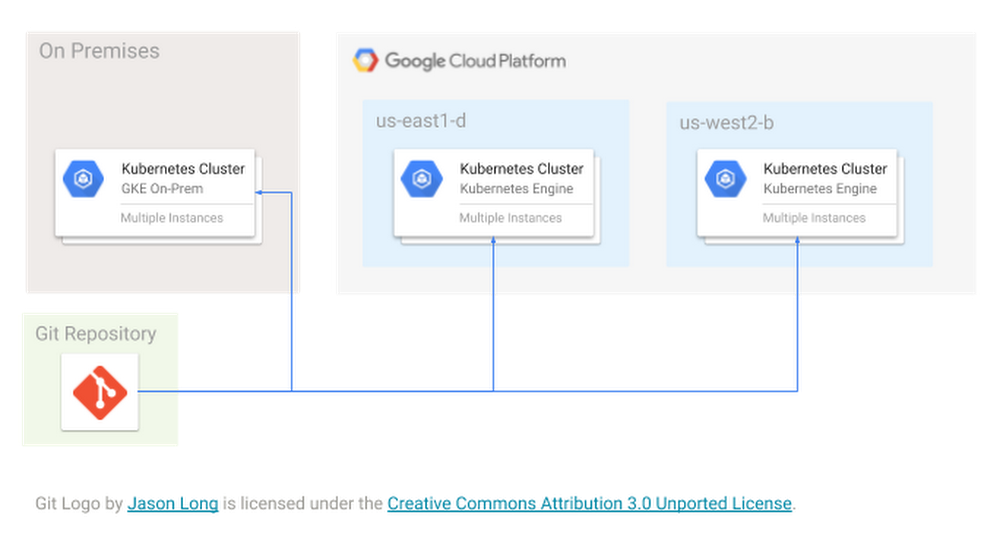
Kubernetes administrators know that with each new cluster comes new configurations—and the management overhead associated with them. It’s a headache, and one that only gets worse as you scramble to keep your growing fleet in line with ever-changing corporate policies.Last week, we announced the Cloud Services Platform (CSP) in beta, letting you modernize your applications on Google Cloud Platform (GCP) or with on-premises infrastructure. As part of CSP, we’re also making it easier for you to consistently implement policies across all your Kubernetes clusters, with CSP Config Management, also in beta. Now you can strengthen security and maintain compliance across all your clusters, while still helping developers move fast.CSP Config Management allows you to create a common configuration for all your administrative policies and apply it to all your clusters, at the same time. The clusters can be running in Google Kubernetes Engine (GKE) in the cloud or in your data center with GKE On-Prem or a combination of both. By integrating with the popular Git version control system, CSP Config Management evaluates each commit to the repository and rolls them out to clusters all over the globe, so that your cluster is always in the desired state.For example, you can have a set of Kubernetes Namespaces with policies like NetworkPolicies, ConfigMaps, or RBAC RoleBindings, and automatically create them across all your clusters.CSP Config Management uses the native Kubernetes configuration format (in YAML or JSON) to store multi-cluster policies, so migrating your existing definitions is a snap. You can configure different policies for groups of clusters or namespaces (for example, applying different quota levels to staging vs. production), making it easy to manage complex environments. And you don’t need to worry about pushing bad configurations—CSP Config Management includes a validator that looks at every line of code before pushing it to your repository.Then, once the desired state is achieved, CSP Config Management actively monitors the clusters to keep them that way.In short, CSP Config Management:Enables new teams to get up and running quickly by creating a multi-cluster namespace with common RBAC policies and other access control rulesEnforces states needed for compliance by preventing configuration drift through continuous monitoring of the cluster stateCentrally manages the configuration of your Istio service mesh, pod security policies, quota policies, and other sensitive guardrails to ensure comprehensive and consistent coverage for your fleetBrings the power of source control to your clusters: stage configuration changes in separate branches, collaborate in code reviews, or easily revert clusters to their last healthy state.CSP Config Management is available today with the beta release of CSP; use it to take control of cluster sprawl and increase the security of your Kubernetes clusters at scale. Sign up for CSP Config Management beta.
Quelle: Google Cloud Platform

Kickstart your cryptography with new Cloud KMS client libraries and samples

Cloud Key Management Service (KMS) is a fast, scalable, and automated cryptographic key management service that provides symmetric and asymmetric support for encryption and signing. It also provides fully automated and at-will key rotation, rich auditing and logging functionality, and deep integrations with Cloud Identity and Access Management (IAM), all backed by global high availability.Today we are pleased to announce our new client libraries and code samples for Cloud KMS. These new client libraries are available today and support full Cloud KMS API coverage in seven programming languages:  C#, Go, Java, Node, PHP, Python, and Ruby.In addition to the new client libraries, we are also releasing a revamped collection of code samples for interacting with Cloud KMS. These code samples showcase common Cloud KMS functionality using the official client library and the idiomatic patterns of the language, making it easy to start integrating Cloud KMS into applications and services.C# Cloud KMS code samplesGo Cloud KMS code samplesJava Cloud KMS code samplesNode.js Cloud KMS code samplesPHP Cloud KMS code samplesPython Cloud KMS code samplesRuby Cloud KMS code samplesWhat’s new?The new Cloud KMS client libraries offer new features and functionality including:gRPC for communication – gRPC is an open source Cloud Native Computing Foundation (CNCF) project that largely follows traditional HTTP semantics, but allows for full-duplex streaming and is used at companies like Square, Netflix, Docker, and Google. By switching to gRPC over HTTP/2, the new client libraries provide lower latency and higher scalability.Language-idiomatic – Partnering with Google’s internal language experts and external community members, we designed the new libraries follow the idiomatic patterns of their respective languages. The new libraries will feel more welcoming and natural to users.API parity – By leveraging code generation, the new client libraries offer more API parity for available Cloud KMS functions, fields, and parameters. As we add new fields or methods to the Cloud KMS API, these new client libraries are automatically regenerated with support for that functionality. This means you will be able to programatically adopt new features and functionality faster.Getting startedTo get started, install an official client library using your language’s preferred dependency management software. For example in the Go programming language:Then import the client library and call the functions as needed. Here is an example that encrypts the plaintext string “my secret” using a Cloud KMS key in the Go programming language:For more information about installation, usage, samples, or authentication, please see the Cloud KMS client libraries documentation.Choosing between new and existing Cloud KMS client librariesWe encourage you to adopt the new libraries as they are faster, more consistent, and more performant than their predecessors. At the same time, there are use cases where the new libraries are not a viable replacement, such as regulated environments that don’t permit HTTP/2. This is one of many reasons why we are not deprecating the old client libraries, and will continue to support them. We want you to be successful when using our Cloud KMS client libraries, regardless of which one you choose.We realize the decision to have two client libraries providing similar functionality may be confusing, but we feel this approach is less disruptive than removing an existing client library from an ecosystem. To aid in the transition, we have already updated the documentation and samples on cloud.google.com to reference the new libraries, and we will be marking the old libraries as “not recommended” and discourage their use in new projects.Toward a great, secure developer experienceThe Cloud KMS client libraries enable organizations to focus on building better and more secure applications by offloading key management to Cloud KMS while retaining full transparency and access over keys. These new libraries provide complete coverage of the Cloud KMS APIs and consistency across languages for polyglot organizations. We are excited to see how these new client libraries enable organizations to build great integrations on GCP. Be sure to follow us on Twitter to leave feedback and ask any questions.
Quelle: Google Cloud Platform

How Auto Trader UK, the UK’s largest automotive marketplace, uses Istio and Google Kubernetes Engine to drive change

Brand-new or second-hand? Diesel or electric? Convertible or SUV? Buying a car means choosing from a plethora of options, and that can be hard for some people to navigate. As a result, retailers are constantly rethinking their technology offerings—which means digital transformation must move just as fast.As the UK’s largest digital automotive marketplace and the country’s 16th largest website, Auto Trader UK prides itself on how simple it is for its consumers and retailers alike to buy and sell cars on their platform. To do it they rely on Google Kubernetes Engine (GKE) plus Istio, an open-source, transparent service mesh that is integrated into GKE. Istio has helped to enable visibility, increase agility and effectively secure their production environment, without sacrificing developer productivity.Improving security and agility with GKE and IstioSince 2013, Auto Trader has been a completely digital business, and they are now the UK’s market leader, with 55 million cross-platform visits every month and an audience four times larger than their nearest competitor. In total, they offer 300 applications including valuation tools, detailed reviews of dealerships and new cars, and integrations with car finance and insurance partners.Auto Trader’s journey began 17 years ago on-premises with its own data centers. Then in 2018, they decided to move to the public cloud as part of their digital transition to create a more agile architecture that enables faster innovation. Their first choice was Google Cloud Platform (GCP).As a part of this journey, Auto Trader moved their back-end applications to GKE and implemented Istio. They were looking for a trusted partner to off-load management of Kubernetes and they chose Google Cloud because, as Karl Stoney, Delivering Engineering Lead at Auto Trader put it: “Who could manage it better than the company that created it?” Many of the capabilities that Auto Trader were looking for come out-of-the-box with Istio, as it enables visibility into applications in terms of response times and other important service metrics.“Over the last 14 months we have worked directly with Google’s Kubernetes product managers with ongoing access to the Google Cloud Istio teams,” says Russell Warman, Head of Infrastructure at Auto Trader. “From a business perspective, migrating to Google Cloud Platform means we can get ideas up and running quickly, enabling us to build brilliant new products, helping us to continue to lead in this space.”Looking aheadSince adopting Kubernetes and Istio, Auto Trader has seen significant gains in efficiency. For example, they are 75 percent more efficient in terms of their compute resources, without impacting performance. Auto Trader has also lowered their monthly bill and can now predict future spending more accurately. Istio, meanwhile, has helped them improve security and visibility, with no extra developer effort or training needed.Auto Trader is now planning to complete its migration to the public cloud. With about a third of its services already running in production on GCP, they plan to migrate their remaining workloads over the next year to ensure everything is built, managed and monitored in the same way.Auto Trader are certainly in the driver seat when it comes to their Istio journey.To find out more about the other benefits of migrating to GCP,  both from an operational and development perspective, including improved security, see the Auto Trader UK case study.Learn more about Istio on Google Cloud here.
Quelle: Google Cloud Platform

Introducing the Cloud IoT Device SDK: a new way for embedded IoT devices to connect to Google Cloud IoT Core

Embedded processors—in particular, microcontrollers—are the fundamental building blocks of the internet of things (IoT), powering edge devices such as smart refrigerators, industrial motors, and energy monitors. With the Google Cloud IoT platform, you can now manage all of your devices, establish data streams with analytics tools such as BigQuery or Bigtable, monitor performance, and visualize data. But, how do you get microcontroller-class devices to connect directly to Google Cloud IoT? In collaboration with our silicon partners, today we are introducing our new Cloud IoT Device SDK (software development kit).  The Cloud IoT Device SDK consists of client libraries written in Embedded C that enable developers to securely connect, provision, and manage devices with Cloud IoT Core. The kit targets energy- and size-constrained applications, such as battery-powered cellular devices that act as asset trackers, or Wi-Fi smart home devices with limited flash ROM (read-only memory).In addition to partner platforms that are supported out of the gate, now you or your embedded systems engineering team can easily port the Cloud IoT Device SDK to a wide array of 32-bit microcontrollers (MCUs) and across various real-time operating systems such as Zephyr, ARM Mbed OS, FreeRTOS kernel, with more to come. The SDK also operates on POSIX-compliant operating systems like Linux, and can scale down to bare metal devices with the inclusion of its asynchronous API and event scheduler.Here are a few key features included in the SDK:A highly portable feature set paired with a lightweight BSP (Board Support Package) allowing for the deployment of new features with minimal engineering impactSingle-threaded operations with co-routines to support bi-directional messaging without interrupting device applicationsAll the necessary security requirements to connect to IoT Core via JSON Web Token (JWT) authentication, out-of-the-box integration with third party TLS stacks (wolfSSL, mbedTLS), including TLS 1.2 and support for various secure elementsIntegrated back-off logic that implements intelligent networking behavior to prevent self-inflicted DDoS (distributed denial of service) events after service outagesFuture support for Cloud IoT ProvisioningSupport for compute-, memory-, or space-constrained devices:Small memory footprint (estimated 25KB of flash memory depending on tool chain optimizations, 80kb with a TLS software solution) with optional feature modularity for size optimizationsAsynchronous API enabling no-OS operationLow power consumption via non-blocking socketsAn event scheduler and optional thread pool for user callbacksFrom a value perspective, this SDK allows embedded engineers to rapidly prototype, profile, and test in a standard desktop environment before porting to an embedded target, allowing for shorter time to market. Meanwhile, this SDK allows semiconductor companies to easily update  product lines with support for the latest features in Cloud IoT Core. For customers designing, building, or deploying IoT solutions, the SDK supports a wider array of MCU-class devices, opening up the opportunity to build systems for asset tracking, smart agriculture, and energy metering. Partners and developers can start building with the SDK today via our GitHub repository.We’re happy to engage in a broad collaboration with the following partners on our Cloud IoT Embedded SDK:ArmCypress SemiconductorNordic SemiconductorEspressif SystemsMicrochipNXP”Our collaboration with Google on Mbed OS support for the new Cloud IoT Device SDK furthers our commitment to providing partners with an open source platform OS that helps them scale their IoT solutions.” —Chris Porthouse, Vice President and General Manager of device services, IoT Services Group, Arm”Our collaboration allows for an easy integration of two of our most widely used products ESP32, and ESP8266. We are committed to working with Google Cloud to support updates to the SDK and enabling our customers to easily make use of current and future designs with Cloud IoT Core.” —Teo Swee Ann, CEO, Espressif SystemsThe Cloud IoT Device SDK is part of our broader Cloud IoT Edge platform, aimed at extending data processing and machine learning capabilities to billions of edge devices, such as cameras, industrial controllers, and wind turbines, so they can act on the data from their sensors in real time, and predict outcomes locally. Check out a few of the embedded platform offerings from our partners at Embedded World this week in Nuremberg, Germany, and don’t forget to join us in April at Google Next ‘19 in San Francisco to learn more about Cloud IoT Edge.
Quelle: Google Cloud Platform