Last month today: February on the Google Cloud blog

There’s never a dull moment in cloud technology, as cloud app development and infrastructure mature and there are more ways to manage and use cloud data. February’s highlights included plenty of news. Here’s what was popular last month on the Google Cloud Platform (GCP) blog.Bringing cloud homeHybrid cloud continues to grow, with the announcement last month of our Cloud Services Platform, a software-based approach to incorporate GCP services into your on-premises infrastructure. CSP is built on top of open-source technologies like Kubernetes and Istio, and deploys Google Kubernetes Engine (GKE) On-Prem to remotely manage on-prem clusters. The bottom line: With CSP, you can build and manage a less disruptive, more flexible hybrid cloud.More ways to containerize and build appsOpen-source tool Jib became generally available last month, making it easier to containerize Java applications. Previously, developers dealt with slow build times and too-large containers when containerizing these apps. Besides the ability to dockerize Maven and Gradle projects, Jib 1.0 adds the ability to dockerize WAR projects, integration with Skaffold for Kubernetes development, and Jib Core, a container library for Java.Cloud Firestore is now generally available, too, bringing a NoSQL database that’s ideal for use with web, mobile and IoT applications. Though Cloud Firestore is part of GCP’s database family, it’s really a data back end that includes edge storage, security and synchronization features, among other things. Developers using Cloud Firestore can build apps that update quickly, even if connectivity is spotty.Play with your dataWe released six new cryptocurrency blockchain data sets last month as part of our BigQuery public data sets. Making this data publicly available means you can access and explore this data to better understand blockchain and to integrate it into your applications—for example, to compare the ways in which these different blockchains query payments and receipts.And finally, there’s a new way to explore BigQuery without entering credit card information. The new BigQuery sandbox makes it easy to explore this serverless data warehouse to run SQL queries over both large and small data sets. As a BigQuery sandbox user, you can access the same compute power as paying users, and just like paying users, you get to use new capabilities like BigQuery Machine Learning and BigQuery Geospatial Information Systems. BigQuery sandbox provides you with up to 1 terabyte per month of query capacity and 10GB of free storage.Till next month, we wish you happy data integration and fruitful cloud building. Don’t forget to check out our Next ‘19 site to register and see the session listings.
Quelle: Google Cloud Platform

Modernizing financial risk computation with Hitachi Consulting and GCP

Editor’s note:Hitachi Consulting is the digital solutions and professional services organization within Hitachi Ltd., and a strategic partnerof Google Cloud. Hitachi Consulting has deep experience in the financial services industry, and they work with many large banks on moving to using digital solutions. Today we’ll hear how they used Google Cloud Platform (GCP) to build a proof-of-concept platform to move traditional financial risk computation tasks from on-premises to cloud, gaining flexibility, scalability and cost savings.  At Hitachi Consulting, we’ve found that GCP’s high-performance infrastructure and big data analysis tools are ideal for financial applications and data. We wanted to explore using GCP to help modernize the financial applications common to many of our banking customers. In this post, we’ll describe our experience building a proof-of-concept market risk computation solution.Financial services companies need flexible infrastructureRisk management is a core activity for financial services organizations. These organizations often have extensive hardware and software investments, typically in the form of high-performance computing (HPC) grids, to help with risk computations. Increasing regulation and the need for access to timely risk exposure calculations places great demands on this computing infrastructure. So financial services organizations have to increase the flexibility, scalability and cost-effectiveness of their risk infrastructure and applications to meet this growing demand.We set out to build a proof-of-concept risk analytics platform that could tackle the downsides of traditional approaches to market risk exposure applications, such as:Managing large amounts of compute nodes within an on-premises grid architectureDependency on expensive third-party orchestration softwareLack of flexibility and scalability to meet growing demandModernizing risk applications with cloud-native toolsThe cloud presents many opportunities for modernizing risk applications. A traditional lift-and-shift approach, where existing applications are moved to the cloud with minimum modification, can increase scalability and reduce costs. At the other end of the scale, applications can be fully redesigned to use streaming pipeline architectures to help meet demands for results in near real-time. However, we think there’s a place for a middle path that lets financial institutions take advantage of cloud-native services to get cost and flexibility benefits, while continuing to use the risk models they’re used to.Our approach uses a few key technology components:Containers as lightweight alternatives to traditional virtual machines to perform typical Value at Risk (VaR) calculations using the open-source QuantLib librariesGoogle Kubernetes Engine (GKE) as a managed container platform and replacement for the on-premises compute gridCloud Pub/Sub and Cloud Dataflow for orchestration of the risk calculation pipelineCloud Datastore as intermediate storage for checkpointingBigQuery for data warehousing and analyticsHere’s a look at how these pieces come together for risk calculation:IngestionThe first step is to ingest data into the pipeline. Here, the inputs take the form of aggregated portfolio and trade data. One key design goal was the ability to handle both batch and stream inputs. In the batch case, CSV files are uploaded to Google Cloud Storage, and the file upload triggers a message onto a Cloud Pub/Sub topic. For the streaming case, information is published directly onto a Cloud Pub/Sub topic. Cloud Pub/Sub is a fully managed service that provides scalable, reliable, at-least-once delivery of messages for event-driven architectures. Cloud Pub/Sub enables loose coupling of application components and supports both push and pull message delivery.PreprocessingThose Cloud Pub/Sub messages feed a Cloud Dataflow pipeline for trade data preprocessing. Cloud Dataflow is a fully managed, auto-scaling service for transforming and enriching data in both stream and batch modes, based on open-source Apache Beam. The portfolio inputs are cleansed and split into individual trade elements, at which point the required risk calculations are determined. The individual trade elements are published to downstream Cloud Pub/Sub topics to be consumed by the risk calculation engine.Intermediate results from the preprocessing steps are persisted to Cloud Datastore, a fully managed, serverless NoSQL document database. This pattern of checkpointing intermediate results to Cloud Datastore is repeated throughout the architecture. We chose Cloud Datastore for its flexibility, as it brings the scalability and availability of a NoSQL database alongside capabilities such as ACID transactions, indexes and SQL-like queries.CalculationAt the heart of the architecture sits the risk calculation engine, deployed on GKE. GKE is a managed, production-ready environment for deploying containerized applications. We knew we wanted to evaluate GKE, and Kubernetes more broadly, as a platform for risk computation for the following reasons:Existing risk models can often be containerized without significant refactoringKubernetes is open source, minimizing vendor lock-inKubernetes abstracts away the underlying compute infrastructure, promoting portabilityKubernetes provides sophisticated orchestration capabilities, reducing dependency on expensive third-party toolsGKE is a fully managed service, freeing operations teams to focus on managing applications rather than infrastructureThe risk engine is a set of Kubernetes services designed to handle data enrichment, perform the required calculations, and output results. Pods are independently auto-scaled via Stackdriver metrics on Cloud Pub/Sub queue depths, and the cluster itself is scaled based on the overall CPU load. As in the preprocessing step, intermediate results are persisted to Cloud Datastore and pods publish messages to Cloud Pub/Sub to move data through the pipeline. The pods can run inside a private cluster that is isolated from the internet but can still interact with other GCP services via private Google access.OutputFinal calculation results output by the risk engine are published to a Cloud Pub/Sub topic, which feeds a Cloud Dataflow pipeline. Cloud Dataflow enriches the results with the portfolio and market data used for the calculations, creating full-featured snapshots. These snapshots are persisted to BigQuery, GCP’s serverless, highly scalable enterprise data warehouse. BigQuery allows analysis of the risk exposures at scale, using SQL and industry-standard tooling, driving customer use cases like regulatory reporting.Lessons learned building a proof-of-concept data platformWe learned some valuable lessons while building out this platform:Choosing managed and serverless options greatly improved team velocityBe aware of quotas and limits; during testing we encountered BigQuery streaming-insert limits. We worked around that using a blended streaming and micro-batch strategy with Cloud Dataflow.We had to do some testing and investigation to get optimum auto-scaling of the Kubernetes pods.The system scaled well under load without warm-up or additional configurationWhat’s next for our risk solutionWe built a modernized, cloud-native risk computation platform that offers several advantages over traditional grid-based architectures. The architecture is largely serverless, using managed services such as Cloud Dataflow, Cloud Pub/Sub and Cloud Datastore. The solution is open-source at its core, using Kubernetes and Apache Beam via GKE and Cloud Dataflow, respectively. BigQuery provides an easy way to store and analyze financial data at scale. The architecture has the ability to handle both batch and stream inputs, and scales up and down to match load.Using GCP, we addressed some of the key challenges associated with traditional risk approaches, namely inflexibility, high management overhead and reliance on expensive third-party tools. As our VP of financial services, Suranjan Som, put it: “The GCP risk analytics solution provides a scalable, open and cost-efficient platform to meet increasing risk and regulatory requirements.” We’re now planning further work to test the solution at production scale.Read more about financial services solutions on GCP, and learn about Hitachi Consulting’s financial services solutions.
Quelle: Google Cloud Platform

Leading security companies use Google Cloud to deliver Security-as-a-Service

This week, innovation in the security industry is on display as more than 700 security vendors exhibit at RSA Conference. There is no shortage of vendor solutions attempting to help organizations address the business imperative of securing users, applications, and data in today’s challenging threat and regulatory environment.In much the way organizations have embraced cloud-delivered solutions for collaboration, data analytics, CRM and ERP, they are also turning to cloud-delivered security solutions. Many organizations have found the challenges of deploying and operating on-premises security solutions are reduced when they delivered in the cloud. These challenges are particularly acute with many next-generation security tools that require highly skilled operators, rely on large volumes of data, use high-speed analytics, and depend on continuous updates.It’s no surprise then that many security companies have turned to public cloud providers to help deliver their newest products and services to customers. But the choice of cloud provider is a high-stakes one: finding a provider that offers reliability, performance, functionality, and above-all, foundational security, is essential. In addition to these various considerations, security companies must build and maintain trust with their provider, as they rely on protecting their reputations as “secure.”At Google Cloud, we are proud to help numerous security companies deliver services to protect organizations around the world. Here are a few examples:Palo Alto Networks is a global cybersecurity leader which safely enables tens of thousands of organizations and their customers, and in December 2018, we expanded our partnership. Palo Alto Networks will run Cortex on Google Cloud to take advantage of Google Cloud Platform’s secure, durable cloud storage and highly-scalable AI and analytics tools. Services such as BigQuery will help Cortex customers accelerate time-to-insight as they work to detect and respond to security threats. Palo Alto Networks will also run their GlobalProtect cloud service on Google Cloud Platform. Google Cloud’s reliable, performant, and secure global-scale network and infrastructure offer many advantages for a service to help protect branch and mobile workforces.“Being a Google Cloud customer allows us to run important cloud-delivered security services at scale with the benefits of Google’s AI and analytics expertise,” said Varun Badhwar, SVP Products & Engineering for Public Cloud Security at Palo Alto Networks.Shape Security helps organizations stop imitation attacks and ensure that only genuine customers use their websites and mobile apps. The company was looking for a scalable platform that could keep pace with the level of innovation required to stay ahead of attackers and fraudsters. Their deployment model, with appliances deployed in customer data centers, was difficult to scale and operate as their customer base grew. The answer was to transition to cloud-based service delivery.GCP’s intuitive user management allowed them rapidly on-board users and appropriately manage permissions for developers and admins. They take advantage of GCP’s modern microservices support to provide customized, isolated environments for each customer and, similar to Palo Alto Networks, leverage GCP’s advanced data analytics services like BigQuery and support for machine learning.“GCP’s robust support for Kubernetes and Spinnaker has made deployments significantly easier and more scalable. With Google Cloud, we have modernized our infrastructure so we can keep pace with our rapid growth.” said Andy Mayhew, Senior Director of Infrastructure Engineering at Shape Security.Area 1 Security is a performance-based cybersecurity company changing how businesses protect against phishing attacks. The company, through the Area 1 Horizon anti-phishing service, analyzes a vast amount of information daily using sensors across the internet, a high-speed web crawler that spiders up to eight billion URLs every few weeks, and a distributed sensor network that gathers billions of network events in a day. It sends that information to a massive data warehouse for analysis where it is processed to discover emerging and ongoing cyberattacks and then uses that insight to block phish before customers are breached. The company turned to Google Cloud Platform for its scalability, performance, and sophisticated data analytics tools.“With Google Cloud Platform, Area 1 Security has been able to identify millions of phishing attacks and malicious campaign events,” says Blake Darché, Chief Security Officer at Area 1 Security. “From reconnaissance through exfiltration, Google Cloud Platform provides us with unparalleled capabilities to discover attacks in their earliest formative stages and protect our customers.”As a security company, Area 1 Security demanded a public cloud provider that could provide a highly secure infrastructure foundation:“Google Cloud Platform has its own purpose-built chips, servers, storage, network, and data centers” says Phil Syme, Chief Technology Officer at Area 1 Security. “Google’s dedication to hardened security across the entire infrastructure means that Area 1 Security can trust the software that we run in Google Cloud Platform to be secure.”BlueVoyant helps defend businesses around the world against agile and well-financed cyber attackers by providing unparalleled visibility, insight and responsiveness. Time to market is essential for providers like BlueVoyant, and Google Cloud helps them innovate quickly without compromising on security or reliability.  “BlueVoyant chose to partner with Google Cloud because it is consistent with our security first philosophy, but also didn’t compromise on flexibility, allowing us bring our services to market faster.” said Milan Patel, COO Managed Security Services, BlueVoyant.As more security functionality is delivered through cloud-based services, Google Cloud remains deeply committed to serving this industry through a highly secure platform for security application development and delivery. To learn more, visit our Security page for Google Cloud.
Quelle: Google Cloud Platform

HPC made easy: Announcing new features for Slurm on GCP

Now we’re sharing a new set of features for Slurm running on Google Cloud Platform (GCP) including support for preemptible VMs, custom machine types, image-based instance scaling, attachable GPUs, and customizable NFS mounts. In addition, this release features improved deployment scalability and resilience.Slurm is one of the leading open-source HPC workload managers used in TOP500 supercomputers around the world. Last year, we worked with SchedMD, the core company behind Slurm, to make it easier to launch Slurm on Compute Engine.Here’s more information about these new features:Support for preemptible VMs and custom machine typesYou can now scale up a Compute Engine cluster with Slurm and preemptible VMs, while support for custom machine types lets you  run your workloads on instances with an optimal amount of CPU and memory. Both features help you achieve much lower costs for your HPC workloads: Preemptible VMs can be up to 80% cheaper than regular instances and custom machine types can generate savings of 50% or more compared to predefined types.Image-based instance scalingRather than installing packages from the internet and applying script configurations, now you can create Slurm compute instances based on a Google-provided disk image. This feature significantly shortens the time required to provision each node and increases deployment resilience. Images are automatically made by provisioning an image creation node, which are then used as the basis of all other auto-scaled compute instances.  This can yield a net-new cluster of 5000 nodes in under 7 minutes.Optional, attachable GPUsCompute Engine supports a wide variety of GPUs (e.g. NVIDIA V100, K80, T4, P4 and P100, with others on the horizon), which you can attach to your instances based on region and zone availability. Now, Slurm will automatically install the appropriate NVIDIA/CUDA drivers and software according to GPU model and compatibility, making it easy to scale up your GPU workloads on Compute Engine using Slurm.Customizable NFS mounts and VPC flexibilityFinally, you can now set the NFS hosts of your choice for storage. Cloud Filestore is a great option if you want a fully managed NFS experience. You can also specify a pre-existing VPC or Shared VPC to host your cluster.Getting startedThis new release was built by the Slurm experts at SchedMD. You can download this release in SchedMD’s GitHub repository. For more information, check out the included README. And if you need help getting started with Slurm check out the quick start guide, and for help with the Slurm features for GCP check out the Slurm Auto-Scaling Cluster and Slurm Cluster Federation codelabs. If you have further questions, you can post on the Slurm on GCP Google discussion group, or contact SchedMD directly.
Quelle: Google Cloud Platform

The service mesh era: Using Istio and Stackdriver to build an SRE service

Just to recap, so far our ongoing series about the Istio service mesh we’ve talked about the benefits of using a service mesh, using Istio for application deployments and traffic management, and how Istio helps you achieve your security goals. In today’s installment, we’re going to dig further into monitoring, tracing, and service-level objectives. The goal of this post is to demonstrate how you can use Istio to level up your own Site Reliability Engineering (SRE) practices for workloads running in Kubernetes. You can follow along in this post with the step-by-step tutorial here.The pillars of SREAt Google, we literally wrote the book on SRE, and it has now become an industry term; but let’s quickly review what the term really means to us at Google. The goal of SRE is to improve service reliability and performance and, in turn, the end-user experience. Conceptually, that means proactively managing and incorporating three main components: service level objectives (SLOs), service level agreements (SLAs), and service level indicators (SLIs). We can summarize these as follows:SLOs: targets you set for overall service healthSLAs: promises you make about your service’s health (so, they often include specific SLOs)SLIs: metrics that you use to define the SLO targetsHow do we take these ideas from conceptual to practical? To provide guarantees about your service (SLAs), you need to set targets (SLOs) that incorporate several key service metrics (SLIs). That’s where Istio and Stackdriver come in.Surfacing application metrics with Stackdriver MonitoringIn our second post, we talked about how Google Kubernetes Engine (GKE), Istio, and Stackdriver are integrated right out of the box. This means that Stackdriver Monitoring gives you the ability to monitor a dozen Istio-specific metrics without any special configuration or setup. These include metrics for bytes sent and received, request counts, and roundtrip latencies, for both clients and servers. Once you create a Stackdriver Workspace, you can immediately head to the Metrics Explorer and start visualizing those metrics from Istio. Without any manual instrumentation, Istio provides a significant amount of telemetry information for your workloads—enough to begin thinking about which of those metrics (Istio-provided or GCP-provided) could make for useful SLIs.Which SLIs make the most sense will depend on your application and deployments, but for Istio-enabled workloads we typically recommend creating Dashboards that include some combination of GKE cluster resource monitoring (node availability, CPU, RAM) along with service request counts and service request/response latency, broken out by Kubernetes Namespaces and/or Pods. The example Dashboard below provides a combined overview of cluster and service health (see the tutorial here for steps to set up your own Dashboard).After identifying the appropriate SLIs for your deployment, the next step is to create alerting policies that notify you or your team about any problems in your deployment. Alerting policies in Stackdriver are driven by metrics-based conditions that you define as part of the policy. In addition, you can combine multiple metrics-based conditions to trigger alerts when any or all of the conditions are met.With a working metrics dashboard and alerting policies in place, you’re now at a point where you can keep track of the health of each of your services. But what happens when you see an alert? What if it turns out that one of your services has a server response latency that’s much higher than expected—and that it’s happening on a pretty regular basis? The good news is that now you know there’s a problem; but now the challenge is tracking it down.Digging into requests using Stackdriver TraceSo far we’ve been talking about monitoring, but Istio’s telemetry support also includes the ability to capture distributed tracing spans directly from individual services. Distributed tracing allows you to track the progression of a single user-driven request, and follow along as it is handled by other services in your deployment.Once the Stackdriver Trace API is enabled in your GCP project, Istio’s telemetry capture components start sending trace data to Stackdriver, where you can view it in the trace viewer. Without instrumenting any of your services or workloads, Istio captures basic span information, like HTTP requests or RPCs.This is a good start, but to truly diagnose our example (higher than expected server response latency) we’ll need more than just the time it takes to execute a single service call. To get that next level of information, you need to instrument your individual services so that Istio (and by extension, Stackdriver) can show you the complete code path taken by the service called. Using OpenCensus tracing libraries, you can add tracing statements to your application code.  We recommend instrumenting tracing for critical code paths that could affect latency, for example, calls to databases, caches, or internal/external services. The following is a Python example of tracing within a Flask application:We instrumented our sample microservices demo using OpenCensus libraries. Once you’ve deployed that app and the built-in load generator has had a chance to generate some requests, you can head over to Stackdriver Trace to examine one of the higher latency service calls.As you can see in the diagram above, Stackdriver Trace lets you examine the complete code path and determine the root of the high latency call.Examining application output using Stackdriver LoggingThe final telemetry component that Istio provides is the ability to direct logs to Stackdriver Logging. By themselves, logs are useful for examining application status or debugging individual functions and processes. And with Istio’s telemetry components sending metrics, trace data, and logging output to Stackdriver, you can tie all of your application’s events together. Istio’s Stackdriver integration allows you to quickly navigate between monitoring dashboards, request traces, and application logs. Taken together, this information gives you a more complete picture of what your app is doing at all times, which is especially useful when an incident or policy violation occurs.Stackdriver Logging’s integration comes full circle with Stackdriver Monitoring by giving you the ability to create metrics based on structured log messages. That means you can create specific log-based metrics, then add them to your monitoring dashboards right alongside your other application monitoring metrics. And Stackdriver Logging also provides additional integrations with other parts of Google Cloud—specifically, the ability to automatically export logs to Cloud Storage or BigQuery for retention and follow-on ad-hoc analysis, respectively. Stackdriver Logging also supports integration with Cloud Pub/Sub where each output log entry is exported as an individual pub/sub message, which can then be analyzed in real-time using Cloud Dataflow or Cloud Dataproc.Coming soon: SLOs and service monitoring using StackdriverSo far we’ve reviewed the various mechanisms Stackdriver provides to assess your application’s SLIs; and now available for early access, Stackdriver will provide native support for setting SLOs against your specific service metrics. That means you will be able to set specific SLO targets for the metrics you care about, and Stackdriver will automatically generate SLI graphs, and track your target compliance over time. If any part of your workload violates your SLOs, you are immediately alerted to take action.Interested in learning more? Take a deep dive into Stackdriver Service Monitoring and sign up for early access.SRE isn’t about tools; it’s a lifestyleThink of SRE as a set of practices, and not as a specific set of tools or processes. It’s a principled approach to managing software reliability and availability, through the constant awareness of key metrics (SLIs) and how those metrics are measured against your own targets (SLOs)—which you might use to provide guarantees to your customers (via SLAs). When you combine the power of Istio and Stackdriver and apply it to your own Kubernetes-based workloads, you end up with an in-depth view of your services and the ability to diagnose and debug problems before they become outages.As you can see, Istio provides a number of telemetry features for your deployments. And when combined with deep Stackdriver integration, you can develop and implement your own SRE practices.What’s nextWe haven’t even begun to scratch the surface on defining SRE and these terms so we’d recommend taking a look at SRE Fundamentals: SLIs, SLAs, and SLOs as well as SLOs, SLIs, SLAs, oh my – CRE life lessons for more background.To try out the Istio and Stackdriver integration features we discussed here, check out the tutorial here. In our next post in the Service Mesh era series, we’ll take a deep-dive into Istio from an IT perspective and talk about some practical operator scenarios, like maintenance, upgrades, and debugging Istio itself.Learn more:Istio and Stackdriver tutorialAdvanced application deployments and traffic management with Istio on GKESRE fundamentals: SLIs, SLAs, and SLOsDrilling down into Stackdriver Service Monitoring
Quelle: Google Cloud Platform

Simplify enterprise threat detection and protection with new Google Cloud security services

Today’s enterprises face a complex threat environment. Attacks targeting users, networks, sensitive information and communications are increasing in sophistication and scale. Organizations of all sizes need advanced security capabilities that are easy to deploy and manage to help defend against these threats. At Google Cloud, we are constantly looking to bring innovative capabilities to users of our platform, and now, even to organizations who may not be running workloads on our platform.Introducing the Web Risk APIToday, we’re excited to announce the beta release of Web Risk API, a new Google Cloud service designed to keep your users safe on the web. With a simple API call, client applications can check URLs against Google’s lists of unsafe web resources, including social engineering sites such as phishing and deceptive sites, and sites that host malware or unwanted software. With the Web Risk API, you can quickly identify known bad sites, warn users before they click links in your site that may lead to infected pages, and prevent users from posting links to known malicious pages (for example, adding a malicious URL into a comment) from your site.The Web Risk API includes data on more than a million unsafe URLs that we keep up-to-date by examining billions of URLs each day, and is powered by the same technology that underpins Google Safe Browsing. Safe Browsing protections work across Google products to help protect over three billion devices every day across the Internet. Our Safe Browsing engineering, product, and operations teams work at the forefront of security research and technology to build systems that protect people from harm, and now, the Web Risk API lets enterprises use this same technology to protect their users.Protect against DDoS and targeted attacks with Cloud ArmorIf you run internet-facing services or apps, you have a tough job: you have to quickly and responsively serve traffic to your end users, while simultaneously protecting against malicious attacks trying to take your services down. Cloud Armor is a Distributed Denial of Service (DDoS) defense and Web Application Firewall (WAF) service for Google Cloud Platform (GCP), and it’s based on the same technologies and global infrastructure that we use to protect services like Search, Gmail and YouTube. Today, we are pleased to announce that Cloud Armor is now generally available, offering L3/L4 DDoS defense as well as IP Allow/Deny capabilities for applications or services behind the Cloud HTTP/S Load Balancer.The GA release includes a new Cloud Armor dashboard that is available in Stackdriver Monitoring. This flexible dashboard makes it easy to monitor and analyze traffic subject to Cloud Armor protection and lets network admins or Security Operations teams understand the effectiveness of Cloud Armor security policies. Additionally, users can now evaluate and validate the potential impact of proposed rules in preview mode across their whole project or drill down into individual security policies or backend services.With Cloud Armor, you can quickly visualize your application traffic and see which requests are allowed and blocked.Easily use HSM keys to protect your data in the cloudProtecting sensitive data is a top priority for organizations, especially for those in highly-regulated industries like financial services. Encryption is a core way to help with this challenge, and many security-sensitive organizations deploy hardware security modules (HSMs) to add extra layers of security to their crypto operations. But deploying, configuring and running HSMs can be hard.To help, today, we’re also announcing the general availability of Cloud HSM, our managed cloud-hosted hardware security module (HSM) service on GCP. Cloud HSM allows you to protect encryption keys and perform cryptographic operations in FIPS 140-2 Level 3 certified HSMs (see image below). With this fully managed service, you can protect your most sensitive workloads without needing to worry about the operational overhead of managing an HSM cluster. Many large companies have moved workloads to GCP with the knowledge that they can very easily and quickly use HSM keys to help protect their data.Cloud HSM brings hassle-free hardware cryptography and key management to your GCP deploymentCloud HSM has been available in several locations across the US and is now available for GCP customers in multiple locations in Europe as well, with more to come.With these three capabilities, we continue to empower Google Cloud customers with advanced security functionality that is easy to deploy and use. Learn more about our entire portfolio of security capabilities on our Trust & Security Center.
Quelle: Google Cloud Platform

New file checksum feature lets you validate data transfers between HDFS and Cloud Storage

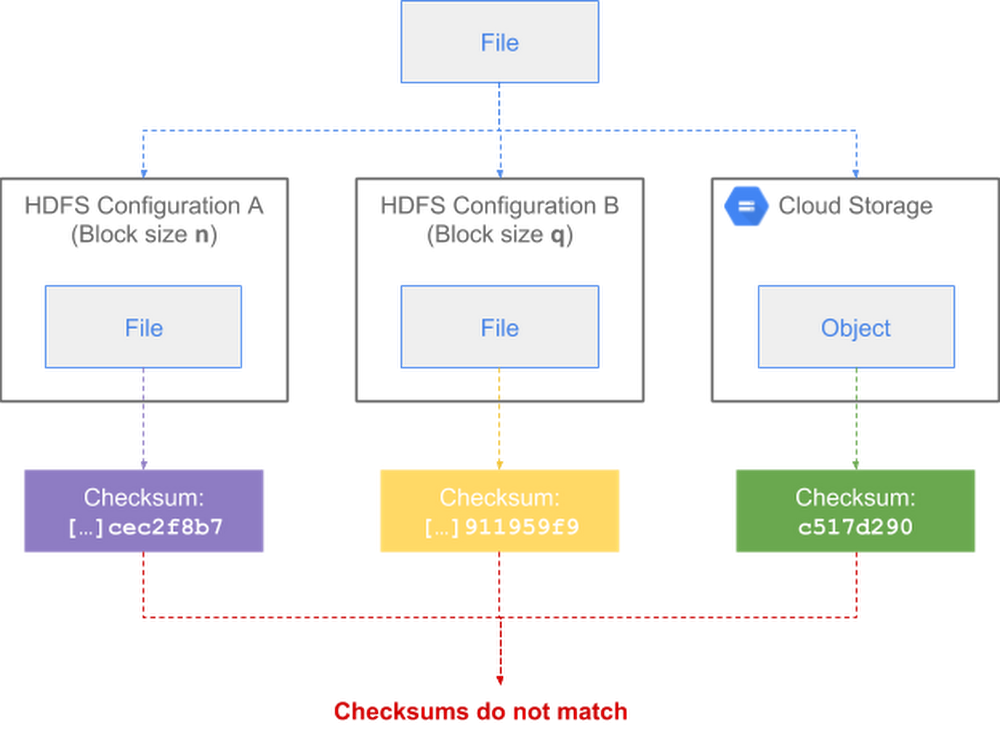
When you’re copying or moving data between distinct storage systems such as multiple Apache Hadoop Distributed File System (HDFS) clusters or between HDFS and Cloud Storage, it’s a good idea to perform some type of validation to guarantee data integrity. This validation is essential to be sure data wasn’t altered during transfer.For Cloud Storage, this validation happens automatically client-side with commands like gsutil cp and rsync. Those commands compute local file checksums, which are then validated against the checksums computed by Cloud Storage at the end of each operation. If the checksums do not match, gsutil deletes the invalid copies and prints a warning message. This mismatch rarely happens, and if it does, you can retry the operation.Now, there’s also a way to automatically perform end-to-end, client-side validation in Apache Hadoop across heterogeneous Hadoop-compatible file systems like HDFS and Cloud Storage. Our Google engineers recently added the feature to Apache Hadoop, in collaboration with Twitter and members of the Apache Hadoop open-source community.While various mechanisms already ensure point-to-point data integrity in transit (such as TLS for all communication with Cloud Storage), explicit end-to-end data integrity validation adds protection for cases that may go undetected by typical in-transit mechanisms. This can help you detect potential data corruption caused, for example, by noisy network links, memory errors on server computers and routers along the path, or software bugs (such as in a library that customers use).In this post, we’ll describe how this new feature lets you efficiently and accurately compare file checksums.How HDFS performs file checksumsHDFS uses CRC32C, a 32-bit Cyclic Redundancy Check (CRC) based on the Castagnoli polynomial, to maintain data integrity in several different contexts:At rest, Hadoop DataNodes continuously verify data against stored CRCs to detect and repair bit-rot.In transit, the DataNodes send known CRCs along with the corresponding bulk data, and HDFS client libraries cooperatively compute per-chunk CRCs to compare against the CRCs received from the DataNodes.For HDFS administrative purposes, block-level checksums are used for low-level manual integrity checks of individual block files on DataNodes.For arbitrary application-layer use cases, the FileSystem interface defines getFileChecksum, and the HDFS implementation uses its stored fine-grained CRCs to define such a file-level checksum.For most day-to-day uses, the CRCs are used transparently with respect to the application layer, and the only CRCs used are the per-chunk CRC32Cs, which are already precomputed and stored in metadata files alongside block data. The chunk size is defined by dfs.bytes-per-checksum and has a default value of 512 bytes.Shortcomings of Hadoop’s default file checksum typeBy default when using Hadoop, all API-exposed checksums take the form of an MD5 (a message-digest algorithm that produces hash values) of a concatenation of chunk CRC32Cs, either at the block level through the low-level DataTransferProtocol, or at the file level through the top-level FileSystem interface. The latter is defined as the MD5 of the concatenation of all the block checksums, each of which is an MD5 of a concatenation of chunk CRCs, and is therefore referred to as an MD5MD5CRC32FileChecksum. This is effectively an on-demand, three-layer Merkle tree.This definition of the file-level checksum is sensitive to the implementation and data-layout details of HDFS, namely the chunk size (default 512 bytes) and the block size (default 128MB). So this default file checksum isn’t suitable in any of the following situations:Two different copies of the same files in HDFS, but with different per-file block sizes configured.Two different instances of HDFS with different block or chunk sizes configured.Copying across non-HDFS Hadoop-compatible file systemshttps://wiki.apache.org/hadoop/HCFS(HCFS) such as Cloud Storage.You can see here how the same file can end up with three checksums depending on the file system’s configuration:For example, below is the default checksum for a file in an HDFS cluster with a block size of 64MB (dfs.block.size=67108864):And below, the default checksum for the same file in an HDFS cluster with a block size of 128MB (dfs.block.size=134217728):You can see in the above examples that the two checksums differ for the same file.Because of these shortcomings, it can be challenging for Hadoop users to reliably copy data from HDFS to the cloud using the typical Apache Hadoop Distributed Copy (DistCp) method. As a workaround for Twitter’s data migration to Google Cloud, Twitter engineers initially modified DistCp jobs to recalculate checksums on the fly. While the workaround provided the desired end-to-end validation, the on-the-fly recalculation could cause a non-negligible performance strain at scale. So Joep Rottinghuis, leading the @TwitterHadoop team, requested that Google help implement a new comprehensive solution in Hadoop itself to eliminate the recalculation overhead. With this solution, there’s now an easier, more efficient way to perform this validation.How Hadoop’s new composite CRC file checksum worksOur Google engineers collaborated with Twitter engineers and other members of the Hadoop open-source community to create a new checksum type, tracked in HDFS-13056 and released in Apache Hadoop 3.1.1, to address the above shortcomings. The new type, configured by dfs.checksum.combine.mode=COMPOSITE_CRC, defines new composite block CRCs and composite file CRCs as the mathematically composed CRC across the stored chunk CRCs. This replaces using MD5 of the component CRCs in order to calculate a single CRC that represents the entire block or file and is independent of the lower-level granularity of chunk CRCs.CRC composition is efficient, allows the resulting checksums to be completely chunk/block agnostic, and allows comparison between striped and replicated files, between different HDFS instances, and between HDFS and other external storage systems. (You can learn more details about the CRC algorithm in this PDF download.)Here’s a look at how a file’s checksum is consistent after transfer across heterogenous file system configurations:This feature is minimally invasive: it can be added in place to be compatible with existing block metadata, and doesn’t need to change the normal path of chunk verification. This also means even large preexisting HDFS deployments can adopt this feature to retroactively sync data. For more details, you can download the full design PDF document.Using the new composite CRC checksum typeTo use the new composite CRC checksum type within Hadoop, simply set the dfs.checksum.combine.mode property to COMPOSITE_CRC (instead of the default value MD5MD5CRC). When a file is copied from one location to another, the chunk-level checksum type (i.e., the property dfs.checksum.type that defaults to CRC32C) must also match in both locations.For example, below is the composite CRC checksum for a file in an HDFS cluster with a block size of 64MB (dfs.block.size=67108864):And below, for the same file in an HDFS cluster with a block size of 128MB (dfs.block.size=134217728):And below, for the same file in Cloud Storage:When using the Cloud Storage connector to access Cloud Storage, as shown in the above example, you must explicitly set the fs.gs.checksum.type property to CRC32C. This property otherwise defaults to NONE, causing file checksums to be disabled by default. This default behavior by the Cloud Storage connector is a preventive measure to avoid an issue with DistCp, where an exception is raised if the checksum types mismatch instead of failing gracefully.You can see that the composite CRC checksums returned by the above three commands all match, regardless of block size, as well as between HDFS and Cloud Storage. By using composite CRC checksums, you can now guarantee that data integrity is preserved when transferring files between all types of Hadoop cluster configurations.Last, the validation is performed automatically by the hadoop distcp command:If the above command detects a file checksum mismatch between the source and destination during the copy, then the operation will fail and return a warning.Accessing the feature and migrating HadoopThe new composite CRC checksum feature is available in Apache Hadoop 3.1.1 (see release notes) and backports to versions 2.7, 2.8 and 2.9 are in the works. It is included by default in sub-minor versions of Cloud Dataproc 1.3 since late 2018.For more details about Hadoop migration, check out our guide on Migrating On-Premises Hadoop Infrastructure to Google Cloud Platform.Thanks to contributors to the design and development of this feature, in no particular order: Joep Rottinghuis, Vrushali Channapattan, Lohit Vijayarenu, and Zhenzhao Wang from the Twitter engineering team; Xiao Chen, Steve Loughran, Ajay Kumar, and Aprith Agarwal from the Hadoop open-source community; Anil Sadineni and Yan Zhou, partner engineers from the Google Cloud Professional Services.
Quelle: Google Cloud Platform

Building a render farm in GCP using OpenCue—new guide available

From rendering photorealistic humans and fantastical worlds which blend seamlessly with live action photography, to creating stylized characters and environments for animated features, we are in a golden age of computer-generated imagery. It’s no wonder that this work requires more and more processing power, faster networks, and more capable storage to complete each frame of these projects.As the work necessary to complete each frame in a movie grows in complexity, so does the number of scenes requiring visual effects (VFX) or animation. A blockbuster film’s shot count is now in the thousands, and for an animated feature, every shot requires a multitude of different rendering tasks. In addition, visual content created for streaming services, television, advertisements, and game cinematics increasingly call for visual effects and animation augmentation—much of it at the same level of quality as feature films. The number of projects requiring VFX and animation work is growing rapidly and pushing render requirements to new heights.Google Cloud Platform (GCP) can help by providing resources to get this work done efficiently and in a cost effective manner. By using Instance Templates to tailor a Virtual Machine (VM) in size to fit the resource requirements of each individual frame or task, you optimize your spend by right sizing your VMs. Managed Instance Groups (MIGs) can be used to scale the number of resources in these templates to the amount of tasks you need to render. When processing is complete for each of these, simply shut down the associated resources so you only pay for what you use, when you use it.But how does one orchestrate the distribution of the multitude of rendering tasks required for an individual film, much less the group of films larger studios work on concurrently?For a long time, studios have carried the cost of building their own render management tools, or used a third party software provider to help solve this problem. There is now another option. In collaboration with Sony Pictures Imageworks, Google recently released OpenCue, an open source, high-performance render manager built specifically for the needs of the visual effects and animation industry. OpenCue can be run in a variety of ways, and it’s capable of managing resources that are exclusively on-premise, entirely in the cloud, or spanning both in a hybrid environment.Today, we’re announcing a new solution: Building a render farm in GCP using OpenCue. This tutorial guides you through deploying OpenCue, and all the resources required, to build a render farm in GCP. It explores a workflow for creating and deploying all prerequisite software as Docker images, as well as managing the size and scale of compute resources through Instance Templates and MIGs. It also provides an overview of the OpenCue interface as you manage rendering an animation scene from start to finish.We hope you find this guide useful. Please tell us what you think and be sure to sign up for a trial at no cost to explore building a render farm in GCP using OpenCue.
Quelle: Google Cloud Platform

How does your cloud storage grow? With a scalable plan and a price drop

Consolidating storage into a centrally managed infrastructure resource can make life as a storage architect much easier. But the path to consolidation is fraught with complexity. Data is flowing into your organization constantly from live sources, whether from your company’s customers, employees, partners or the devices and hardware you maintain. All this data sits at different locations owned by different business units, inside various types of storage technologies that aren’t necessarily available the moment you need them for your data storage needs.But one thing is a constant for most businesses today: The amount of data to be stored just keeps growing. Today we’re announcing the Storage Growth Plan for Google Cloud Storage, a way to provide flexible, ready-when-you-need-it data storage that won’t result in unexpected bills.Cloud Storage is great at solving the consolidation and the capacity problem of data storage today. It is the unified object storage that powers many Google Cloud Platform (GCP) customers, letting you store and move data as needed. You can use Transfer Appliance to get petabytes into Cloud Storage quickly, you can stream data into Cloud Storage with Dataflow, you can even move data from AWS S3 to Cloud Storage with Storage Transfer Service. You pay by the gigabyte-month for the data you are storing in Cloud Storage, and you can store petabytes, exabytes or more. And once it’s in Cloud Storage, integrations across the platform make it easy to expose your data to services like BigQuery, Dataproc and CloudML.It’s easy to store and use the data in Cloud Storage—but it’s still being created at an astonishing and unpredictable rate. And creation unpredictability means cost unpredictability. We’ve developed the Storage Growth Plan to help enterprise customers manage storage costs and meet the forecasting and predictability that is often asked of IT organizations. It’s a new way to commit to Cloud Storage that protects you from the cost volatility associated with your data storage behavior. Here’s how it works:You commit to at least $10,000 spending per month for 12 months of Cloud Storage usage. This is a fixed amount you will pay each month.You can grow stored data, with no extra charges for usage over your commitment, during those 12 months.At the end of 12 months, you have two choices for renewal.Commit to the next 12 months at whatever your peak usage was. If that is within 30% of your original commitment, all of your previous year’s overage is free. If it is more than 30%, you repay that remainder over the next year.Or,  leave the plan and pay for the past year’s overage.Repeat 12 months at a time for as long as you like.We heard from customers that data growth can be unpredictable, but costs can’t be. We’ve also heard that data can have unpredictable life cycles. A legacy image archive might become relevant again as a Cloud Vision API training set, or an analytics workload might only sit in hot storage for a month. Storage Growth Plan applies to any storage class, enabling you to move your data freely between hot and cold classes of storage and maintain cost predictability.Storage Growth Plan helps companies like Recursion set storage costs as they build the world’s largest biological image dataset. Recursion currently manages a data set growing by more than 2 million new images a week. “This dataset enables the company to train neural networks and use other sophisticated computational techniques to identify changes in thousands of cellular and subcellular features in response to various tests,” says Ben Mabey, Vice President of Engineering at Recursion. “This approach, which we call ‘Phenomics,’ helps us pursue novel biology, drug targets, or drug candidates with more data and less bias.”  You can take advantage of this new commitment structure today by contacting sales.Adding geo-redundancy and price drops for Cloud StorageWe’re also passing on continued technical innovation to our customers in the form of price drops, in addition to introducing this new way to buy Cloud Storage. We recently announced that Cloud Storage Coldline in multi-regional locations is now geo-redundant. This means that Coldline data–the lowest-access tier of Cloud Storage—is protected from regional failure by storing another copy of your data at least 100 miles away in a different region. This image illustrates how your data is stored in different types of locations:We’ve added this redundancy to Coldline storage, but haven’t raised the price. Instead, we’re dropping prices for our Coldline class of storage in regional locations by 42%. Data stored in Coldline in regional locations is now as low as $0.004 per GB. As with all Cloud Storage classes, the data is still accessible to users in milliseconds.We often hear from customers that they take advantage of all of our classes of storage as their data ages. What starts in the Standard class of storage when it’s accessed frequently eventually moves to Nearline and then Coldline as it’s accessed less frequently. You can turn on object lifecycle management to move data among storage classes automatically based on a policy you set. Or, for use cases like digital archives, backups or content under a retention requirement where you won’t be accessing the data, you can start in a colder class. Regardless of which class you start with, Cloud Storage will maintain the redundancy of that data per the location of the bucket as it is tiered. And you’ll have a consistent experience across tiers no matter how often data is being accessed. Take advantage of these new features and options to create the flexible storage infrastructure to support your cloud. Learn more about GCP storage here.Thanks to contributions from Chris Talbott.
Quelle: Google Cloud Platform

Go global with Cloud Bigtable

Today, we’re announcing the expansion of Cloud Bigtable’s replication capabilities, giving you the flexibility to make your data available across a region or worldwide. Now in beta, this enhancement allows customers to create a replicated cluster in any zone at any time.Cloud Bigtable is a fast, globally distributed wide-column NoSQL database service. It can seamlessly scale from gigabytes to petabytes, while maintaining high-performance throughput and low-latency response times to meet your application’s goals. This is the same functionality that is proven in a number of Google products, including Google Search, Google Maps, and YouTube, as well as used by Google Cloud customers in industries and workloads including Internet of Things (IoT), finance, ad tech, gaming, and more, to deliver personalization and analytics features to users worldwide. Apps using Cloud Bigtable can serve data quickly to users, and can now do that even when the data has been created thousands of miles away.Cloud Bigtable now makes it easy to globally distribute data, so you can:Serve global audiences with lower latency by bringing data that’s generated in any region, such as personalized recommendations, closer to the users wherever they areAggregate data ingested from worldwide sources (such as IoT sensor data) to a single location for aggregation, analytics, and machine learningIncrease the availability and durability of your data beyond the scope of a single regionIsolate batch and serving workloadsEvery cluster in a replicated instance accepts both reads and writes, providing multi-primary replication (sometimes referred to as “multi-master”) with eventual consistency. You can set up replication by adding one or more Cloud Bigtable clusters, whether on the same continent or halfway around the world.In the example below, let’s say you have customers in North America, Europe, Asia, and Australia. With this new enhancement, you can deploy a globally replicated Cloud Bigtable instance with a cluster in each region to provide low-latency access to your end users.Cloud Bigtable customer Oden Technologies was keen to boost the availability and durability of their service for their worldwide industrial automation customers.“Google Cloud Bigtable is an essential component of Oden Technologies’ real-time analytics,” says James Maidment, Director of Infrastructure. “Our analytics enable our customers in manufacturing to eliminate waste and quality defects in their production process. In order for Oden to be a truly mission-critical tool and competitive with existing solutions, our customers need to trust that our service will be online when they need it most. The Cloud Bigtable multi-region replication allows us to guarantee and deliver the availability and durability our customers expect from Oden.”You can configure a replication topology using any zones where Cloud Bigtable is available, or add clusters in additional regions to an existing instance without any downtime. Additionally, the flexible replication model provided by Cloud Bigtable lets you reconfigure your instance’s replication topology at any time by allowing you to add or remove clusters for any existing instance, even if you are currently writing data to that instance.Here’s what happens when you add a cluster to an existing instance:First, all existing data will be bulk-replicated from the existing cluster to the new oneThen, all future writes to any cluster will be replicated to all other clusters in the instanceAll tables within an instance are replicated to all clusters, and you can monitor replication progress for each table via the Tables list in the GCP Console.Moving data between regions in Cloud BigtableTo move data from one region to another, just add a new cluster in the desired location, and then remove the old cluster. The old cluster remains available until data has been replicated to the new cluster, so you don’t have to worry about losing any writes. You can continue writing to Cloud Bigtable, since it takes care of replicating data automatically.Cloud Bigtable in more GCP regionsWe are also happy to announce the latest regional launch of Cloud Bigtable in São Paulo, Brazil, as we continue to deploy Cloud Bigtable in more locations to bring the performance and reliability of the popular wide-column database service to more customers.Additionally, we’ve recently added Cloud Bigtable in Mumbai, India; Hong Kong; and Sydney, Australia, making Cloud Bigtable available in 17 total regions. Here are all the current Cloud Bigtable regions, with more coming in the near future:Google’s global network powers Cloud BigtableCloud Bigtable’s high-performance global replication is enabled by Google’s global private network, which spans the globe and provides high-throughput, low-latency connections around the world to support large-scale database workloads.Next stepsIf you’re interested in learning more about Google’s global network and how it enables replication across regions and continents in Cloud Bigtable, be sure to sign up for the session at Google Cloud NEXT in San Francisco in April. We look forward to seeing you there.To get started with Cloud Bigtable replication, create an instance and configure one or more application profiles to use in your distributed application, or try it out with a Cloud Bigtable lab. Use code 1j-bigtable-719 to explore the Qwiklab at no cost through March 31, 2019.
Quelle: Google Cloud Platform