Train fast on TPU, serve flexibly on GPU: switch your ML infrastructure to suit your needs

When developing machine learning models, fast iteration and short training times are of utmost importance. In order for you or your data science team to reach higher levels of accuracy, you may need to run tens or hundreds of training iterations in order to explore different options.A growing number of organizations use Tensor Processing Units (Cloud TPUs) to train complex models due to their ability to reduce the training time from days to hours (roughly a 10X reduction) and the training costs from thousands of dollars to tens of dollars (roughly a 100X reduction). You can then deploy your trained models to CPUs, GPUs, or TPUs to make predictions at serving time. In some applications for which response latency is critical—e.g., robotics or self-driving cars—you might need to make additional optimizations. For example, many data scientists frequently use NVIDIA’s TensorRT to improve inference speed on GPUs. In this post, we walk through training and serving an object detection model and demonstrate how TensorFlow’s comprehensive and flexible feature set can be used to perform each step, regardless of which hardware platform you choose.A TensorFlow model consists of many operations (ops) that are responsible for training and making predictions, for example, telling us whether a person is crossing the street. Most of TensorFlow ops are platform-agnostic and can run on CPU, GPU, or TPU. In fact, if you implement your model using TPUEstimator, you can run it on a Cloud TPU by just setting the use_tpu flag to True, and run it on a CPU or GPU by setting the flag to False.NVIDIA has developed TensorRT (an inference optimization library) for high-performance inference on GPUs. TensorFlow (TF) now includes TensorRT integration (TF-TRT) module that can convert TensorFlow ops in your model to TensorRT ops. With this integration, you can train your model on TPUs and then use TF-TRT to convert the trained model to a GPU-optimized one for serving. In the following example we will train a state-of-the-art object detection model, RetinaNet, on a Cloud TPU, convert it to a TensorRT-optimized version, and run predictions on a GPU.Train and save a modelYou can use the following instructions for any TPU model, but in this guide, we choose as our example the TensorFlow TPU RetinaNet model. Accordingly, you can start by following this tutorial to train a RetinaNet model on Cloud TPU. Feel free to skip the section titled “Evaluate the model while you train (optional)”1.For the RetinaNet model that you just trained, if you look inside the model directory (${MODEL_DIR} in the tutorial) in Cloud Storage you’ll see multiple model checkpoints. Note that checkpoints may be dependent on the architecture used to train a model and are not suitable for porting the model to a different architecture.TensorFlow offers another model format, SavedModel, that you can use to save and restore your model independent of the code that generated it. A SavedModel is language-neutral and contains everything you need (graph, variables, and metadata) to port your model from TPU to GPU or CPU.Inside the model directory, you should find a timestamped subdirectory (in Unix epoch time format, for example, 1546300800 for 2019-01-01-12:00:00 GMT) that contains the exported SavedModel. Specifically, your subdirectory contains the following files:saved_model.pbvariables/variables.data-00000-of-00001variables/variables.indexThe training script stores your model graph as saved_model.pb in a protocol buffer (protobuf) format, and stores in the variables in the aptly named variables subdirectory. Generating a SavedModel involves two steps—first, to define a serving_input_receiver_fn and then, to export a SavedModel.At serving time, the serving input receiver function ingests inference requests and prepares them for the model, just as at training time the input function input_fn ingests the training data and prepares them for the model. In the case of RetinaNet, the following code defines the serving input receiver function:The  serving_input_receiver_fn returns a tf.estimator.export.ServingInputReceiver object that takes the inference requests as arguments in the form of receiver_tensors and the features used by model as features. When the script returns a ServingInputReceiver, it’s telling TensorFlow everything it needs to know in order to construct a server. The features arguments describe the features that will be fed to our model. In this case, features is simply the set of images to run our detector on. receiver_tensors specifies the inputs to our server. Since we want our server to take JPEG encoded images, there will be a tf.placeholder for an array of strings. We decode each string into an image, crop it to the correct size and return the resulting image tensor.To export a SavedModel, call the export_saved_model method on your estimator shown in the following code snippet:Running export_saved_model generates a `SavedModel` directory in your FLAGS.model_dir directory. The SavedModel exported from TPUEstimator contains information on how to serve your model on CPU, GPU and TPU architectures.InferenceYou can take the SavedModel that you trained on a TPU and load it on a machine with CPU(s)—and optionally GPU(s)—to run predictions. The following lines of code restore the model and run inference.model_dir is your model directory where the SavedModel is stored. loader.load returns a MetaGraphDef protocol buffer loaded in the provided session. model_outputs is the list of model outputs you’d like to predict, model_input is the name of the placeholder that receives the input data, and input_image_batch is the input data directory2.With TensorFlow, you can very easily train and save a model on one platform (like TPU) and load and serve it on another platform (like GPU or CPU). You can choose from different Google Cloud Platform services such Cloud Machine Learning Engine, Kubernetes Engine, or Compute Engine to serve your models. In the remainder of this post you’ll learn how to optimize the SavedModel using TF-TRT, which is a common process if you plan to serve your model on one or more GPUs.TensorRT optimizationWhile you can use the SavedModel exported earlier to serve predictions on GPUs directly, NVIDIA’s TensorRT allows you to get improved performance from your model by using some advanced GPU features. To use TensorRT, you’ll need a virtual machine (VM) with a GPU and NVIDIA drivers. Google Cloud’s Deep Learning VMs are ideal for this case, because they have everything you need pre-installed.Follow these instructions to create a Deep Learning VM instance with one or more GPUs on Compute Engine. Select the checkbox “Install NVIDIA GPU driver automatically on first startup?” and choose a “Framework” (for example, “Intel optimized TensorFlow 1.12″ at the time of writing this post) that comes with the most recent version of CUDA and TensorRT that satisfy the dependencies for the TensorFlow with GPU support and TF-TRT modules. After your VM is initialized and booted, you can remotely log into it by clicking the SSH button next to its name on the Compute Engine page on Cloud Console or using the gcloud compute ssh command. Install the dependencies (recent versions of TensorFlow include TF-TRT by default) and clone the TensorFlow TPU GitHub repository3.Now run tpu/models/official/retinanet/retinanet_tensorrt.py and provide the location of the SavedModel as an argument:In the preceding code snippet, SAVED_MODEL_DIR is the path where SavedModel is stored (on Cloud Storage or local disk). This step converts the original SavedModel to a new GPU optimized SavedModel and prints out the prediction latency for the two models.If you look inside the model directory you can see that retinanet_tensorrt.py has converted the original SavedModel to a TensorRT-optimized SavedModel and stored it in a new folder ending in _trt. This step was done using the command.In the new SavedModel, the TensorFlow ops have been replaced by their GPU-optimized TensorRT implementations. During conversion, the script converts all variables to constants, and writes out to saved_model.pb, and therefore the variables folder is empty. TF-TRT module has an implementation for the majority of TensorFlow ops. For some ops, such as control flow ops such as Enter, Exit, Merge, and Switch, there are no TRT implementation, therefore they stay unchanged in the new SavedModel, but their effect on prediction latency is negligible.Another method to convert the SavedModel to its TensorRT inference graph is to use the saved_model_cli tool using the following command:In the preceding command MY_DIR is the shared filesystem directory and SAVED_MODEL_DIR is the directory inside the shared filesystem directory where the SavedModel is stored.retinanet_tensorrt.py also loads and runs two models before and after conversion and prints the prediction latency. As we expect, the converted model has lower latency. Note that for inference, the first prediction often takes longer than subsequent predictions. This is due to startup overhead and for TPUs, the time taken to compile the TPU program via XLA. In our example, we skip the time taken by the first inference step, and average the remaining steps from the second iteration onwards.You can apply these steps to other models to easily port them to a different architecture, and optimize their performance. The TensorFlow and TPU GitHub repositories contain a diverse collection of different models that you can try out for your application including another state of the art object detection model, Mask R-CNN. If you’re interested in trying out TPUs, to see what they can offer you in terms of training and serving times, try this Colab and quickstart.
Quelle: Google Cloud Platform

Enabling connected transformation with Apache Kafka and TensorFlow on Google Cloud Platform

Editor’s note: Many organizations depend on real-time data streams from a fleet of remote devices, and would benefit tremendously from machine learning-derived, automated insights based on that real-time data. Founded by the team that built Apache Kafka, Confluent offers a a streaming platform to help companies easily access data as real-time streams. Today, Confluent’s Kai Waehner describes an example describing a fleet of connected vehicles, represented by Internet of Things (IoT) devices, to explain how you can leverage the open source ecosystems of Apache Kafka and TensorFlow on Google Cloud Platform and in concert with different Google machine learning (ML) services.Imagine a global automotive company with a strategic initiative for digital transformation to improve customer experience, increase revenue, and reduce risk. Here is the initial project plan:The main goal of this transformation plan is to improve existing business processes, rather than to create new services. Therefore, cutting-edge ML use cases like sentiment analysis using Recurrent Neural Networks (RNN) or object detection (e.g. for self-driving cars) using Convolutional Neural Networks (CNN) are out of scope and covered by other teams with longer-term mandates.Instead, the goal of this initiative is to analyze and act on critical business events by improving existing business processes in the short term, meaning months, not years, to achieve some quick wins with machine learning:All these business processes are already in place, and the company depends on them. Our goal is to leverage ML to improve these processes in the near term. For example, payment fraud is a consistent problem in online platforms, and our automotive company can use a variety of data sources to successfully analyze and help identify fraud in this context. In this post, we’ll explain how the company can leverage an analytic model for continuous stream processing in real-time, and use IoT infrastructure to detect payment fraud and alert them in the case of risk.Building a scalable, mission-critical, and flexible ML infrastructureBut before we can do that, let’s talk about the infrastructure needed for this project.If you’ve spent some time with TensorFlow tutorials or its most popular wrapper framework, Keras, which is typically even easier to use, you might not think that building and deploying models is all that challenging. Today, a data scientist can build an analytic model with only a few lines of Python code that run predictions on new data with very good accuracy.However, data preparation and feature engineering can consume most of a data scientist’s time. This idea may seem to contradict what you experience when you follow tutorials, because these efforts are already completed by the tutorial’s designer. Unfortunately, there is a hidden technical debt inherent in typical machine learning systems:You can read an in-depth analysis of the hidden technical debt in ML systems here.Thus, we need to ask the fundamental question that addresses how you’ll add real business value to your big data initiatives: how can you build a scalable infrastructure for your analytics models? How will you preprocess and monitor incoming data feeds? How will you deploy the models in production, on real-time data streams, at scale, and with zero downtime?Many larger technology companies faced these challenges some years before the rest of the industry. Accordingly, they have already implemented their own solutions to many of these challenges. For example, consider:Netflix’ Meson: a scalable recommendation engineUber’s Michelangelo: a platform and technology independent ML frameworkPayPal’s real time ML pipeline for fraud detectionAll of these projects use Apache Kafka as their streaming platform. This blog post explains how to solve the above described challenges for your own use cases leveraging the open source ecosystem of Apache Kafka and a number of services on Google Cloud Platform (GCP).Apache Kafka: the rise of a streaming platformYou may already be familiar with Apache Kafka, a hugely successful open source project created at LinkedIn for big data log analytics. But today, this is just one of its many use cases. Kafka evolved from a data ingestion layer to a feature-rich event streaming platform for all the use cases discussed above. These days, many enterprise data-focused projects build mission-critical applications around Kafka. As such, it has to be available and responsive, round the clock. If Kafka is down, their business processes stop working.The practicality of keeping messaging, storage, and processing in one distributed, scalable, fault-tolerant, high volume, technology-independent streaming platform is the primary reason for the global success of Apache Kafka in many large enterprises, regardless of industry. For example, LinkedIn processes over 4.5 trillion messages per day1 and Netflix handles over 6 petabytes of data on peak days2.Apache Kafka also enjoys a robust open source ecosystem. Let’s look at its components:Kafka Connect is an integration framework for connecting external sources / destinations into Kafka.Kafka Streams is a simple library that enables streaming application development within the Kafka framework. There are also additional Clients available for non-Java programming languages, including C, C++, Python, .NET, Go, and several others.The REST Proxy provides universal access to Kafka from any network connected device via HTTP.The Schema Registry is a central registry for the format of Kafka data—it guarantees that all data is in the proper format and can survive a schema evolution. As such, the Registry guarantees that the data is always consumable.KSQL is a streaming SQL engine that enables stream processing against Apache Kafka without writing source code.All these open source components build on Apache Kafka’s core messaging and storage layers, leveraging its high scalability, high volume and throughput, and failover capabilities. Then, if you need coverage for your Kafka deployment, we here at Confluent offer round-the-clock support and enterprise tooling for end-to-end monitoring, management of Kafka clusters, multi-data center replication, and more, with Confluent Cloud on GCP. This  Kafka ecosystem as a fully managed service includes a 99.95% service level agreement (SLA), guaranteed throughput and latency, and commercial support, while out-of-the-box integration with GCP services like Cloud Storage enable you to build out your scalable, mission-critical ML infrastructure.Apache Kafka’s open-source ecosystem as infrastructure for Machine LearningThe following picture shows an architecture for your ML infrastructure leveraging Confluent Cloud for data ingestion, model training, deployment, and monitoring:Now, with that background, we’re ready to build scalable, mission-critical ML infrastructure. Where do we start?Replicating IoT data from on-premises data centers to Google CloudThe first step is to ingest the data from the remote end devices. In the case of our automotive company, the data is already stored and processed in local data centers in different regions. This happens by streaming all sensor data from the cars via MQTT to local Kafka Clusters that leverage Confluent’s MQTT Proxy. This integration from devices to a local Kafka cluster typically is its own standalone project, because you need to handle IoT-specific challenges like constrained devices and unreliable networks. The integration can be implemented with different technologies, including low-level clients in C for microcontrollers, a REST Proxy for HTTP(S) communication, or an integration framework like Kafka Connect or MQTT Proxy. All of these components integrate natively with the local Kafka cluster so that you can leverage Kafka’s features like high scalability, fault-tolerance and high throughput.The data from the different local clusters then needs to be replicated to a central Kafka Cluster in GCP for further processing and to train analytics models:Confluent Replicator is a tool based on Kafka Connect that replicates the data in a scalable and reliable way from any source Kafka cluster—regardless of whether it lives on premise or in the cloud—to the Confluent Cloud on GCP.GCP also offers scalable IoT infrastructure. If you want to ingest MQTT data directly into Cloud Pub/Sub from devices, you can also use GCP’s MQTT Bridge. Google provides open-source Kafka Connect connectors to get data from Cloud Pub/Sub into Kafka and Confluent Cloud so that you can make the most of KSQL with both first- and third-party logging integration.Data preprocessing with KSQLThe next step is to preprocess your data at scale. You likely want to do this in a reusable way, so that you can ingest the data into other pipelines, and to preprocess the real-time feeds for predictions in the same way once you’ve deployed the trained model.Our automotive company leverages KSQL, the open source streaming SQL engine for Apache Kafka, to do filtering, transformation, removal of personally identifiable information (PII), and feature extraction:This results in several tangible benefits:High throughput and scalability, failover, reliability, and infrastructure-independence, thanks to the core Kafka infrastructurePreprocessing data at scale with no codeUse SQL statements for interactive analysis and at-scale deployment to productionLeveraging Python using KSQL’s REST interfaceReusing preprocessed data for later deployment, even at the edge (outside of the cloud, possibly on embedded systems)Here’s what a continuous query looks like:You can then deploy this stream to one or more KSQL server instances to process all incoming sensor data in a continuous manner.Data ingestion with Kafka ConnectAfter preprocessing the data, you need to ingest it into a data store to train your models. Ideally, you should format and store in a flexible way, so that you can use it with multiple ML solutions and processes. But for today, the automotive company focuses on using TensorFlow to build neural networks that perform anomaly detection with autoencoders as a first use case. They use Cloud Storage as scalable, long-term data store for the historical data needed to train the models.In the future, the automotive company also plans to build other kinds of models using open source technologies like H2O.ai or for algorithms beyond neural networks. Deep Learning with TensorFlow is helpful, but it doesn’t fit every use case. In other scenarios, a random forest tree, clustering, or naïve Bayesian learning is much more appropriate due to simplicity, interpretability, or computing time.In other cases, you might be able to reduce efforts and costs a lot by using prebuilt and managed analytic models in Google’s API services like Cloud Vision for image recognition, Cloud Translate for translation between languages, or Cloud Text-to-Speech for speech synthesis. Or if you need to build custom models, Cloud AutoML might be the ideal solution to easily build out your deployment without the need for a data scientist.You can then use Kafka Connect as your ingestion layer because it provides several benefits:Kafka’s core infrastructure advantages: high throughput and scalability, fail-over, reliability, and infrastructure-independenceOut-of-the-box connectivity to various sources and sinks for different analytics and non-analytics use cases (for example, Cloud Storage, BigQuery, Elasticsearch, HDFS, MQTT)A set of out-of-the-box integration features, called Simple Message Transformation (SMT), for data (message) enrichment, format conversion, filtering, routing, and error-handlingModel training with Cloud ML Engine and TensorFlowAfter you’ve ingested your historical data into Cloud Storage, you’re now able to train your models at extreme scale using TensorFlow and TPUs on Google ML Engine. One major benefit of running your workload on a public cloud is that you can use powerful hardware in a flexible way. Spin it up for training and stop it when finished. The pay-as-you-go principle allows you to use cutting-edge hardware while still controlling your costs.In the case of our automotive company, it needs to train and deploy custom neural networks that include domain-specific knowledge and experience. Thus, they cannot use managed, pre-fabricated ML APIs or Cloud AutoML here. Cloud ML Engine provides powerful API and an easy-to-use web UI to train and evaluate different models:Although Cloud ML Engine supports other frameworks, TensorFlow is a great choice because it is open source and highly scalable, features out-of-the-box integration with GCP, offers a variety of tools (like TensorBoard for Keras), and has grown a sizable community.Replayability with Apache Kafka: a log never forgetsWith Apache Kafka as the streaming platform in your machine learning infrastructure, you can easily:Train different models on the same dataTry out different ML frameworksLeverage Cloud AutoML if and where appropriateDo A/B testing to evaluate different modelsThe architecture lets you leverage other frameworks besides TensorFlow later—if appropriate. Apache Kafka allows you to replay the data again and again over time to train different analytic models with the same dataset:In the above example, using TensorFlow, you can train multiple alternative models on historical data stored in Cloud Storage. In the future, you might want or need to use other machine learning techniques. For example, if you want to offer AutoML services to less experienced data scientists, you might train Google AutoML on Cloud Storage, or experiment with alternative, third party AutoML solutions like DataRobot or H2O Driverless, which leverage HDFS as storage on Cloud Dataproc, a managed service for Apache Hadoop and Spark.Alternative methods for model deployment and serving (inference)The automotive company is now ready to deploy its first models to do real-time predictions at scale. Two alternatives exist for model deployment:Option 1: RPC communication for model inference on your model serverCloud ML Engine allows you to deploy your trained models directly to a model server (based on TensorFlow Serving).Pros of using a model server:Simple integration with existing technologies and organizational processesEasier to understand if you come from the non-streaming (batch) worldAbility to migrate to true streaming down the roadModel management built-in for different models, versioning and A/B testingOption 2: Integrate model inference natively into your streaming applicationHere are some challenges you might encounter as you deploy your model natively in your streaming application:Worse latency: classification requires a remote call instead of local inferenceNo offline inference: on a remote or edge device, you might have limited or no connectivityCoupling the availability, scalability, and latency/throughput of your Kafka Streams application with the SLAs of the RPC interfaceOutliers or externalities (e.g., in case of failure) not covered by Kafka processingFor each use case, you have to assess the trade-offs and decide whether you want to deploy your model in a model server or natively in the application.Deployment and scalability of your client applicationsConfluent Cloud running in conjunction with GCP services ensures high availability and scalability for the machine learning infrastructure described above. You won’t need to worry about operations, just use the components to build your analytic models. However, what about the deployment and dynamic scalability of the Kafka clients, which use the analytic models to do predictions on new incoming events in real-time?You can write these clients using any programming language like (Java, Scala, .NET, Go, Python, JavaScript), Confluent REST Proxy, Kafka Streams or KSQL applications. Unlike on a Kafka server, clients need to scale dynamically to accommodate the load. Whichever option you choose for writing your Kafka clients, Kubernetes is a more and more widely adopted solution that handles deployment, dynamic scaling, and failover. Although it would be out of scope to introduce Kubernetes in this post, Google Kubernetes Engine Quickstart Guide can help you set up your own Kubernetes cluster on GCP in minutes. If you need to learn more details about the container orchestration engine itself, Kubernetes’ official website is a good starting point.The need for local data processing and model inferenceIf you’ve deployed analytics models on Google Cloud, you’ll have noticed that the service (and by extension, GCP) takes over most of the burden of deployment and operations. Unfortunately, migrating to the cloud is not always possible due to legal, compliance, security, or more technical reasons.Our automotive company is ready to use the models it built for predictions, but all the personally identifiable information (PII) data needs to be processed in its local data center. However, this demand creates a challenge, because the architecture (and some future planned integrations) would be simpler if everything were to run within one public cloud.Self-managed on-premise deployment for model serving and monitoring with KubernetesOn premises, you do not get all the advantages of GCP and Confluent Cloud—you need to operate the Apache Kafka cluster and its clients yourself.What about scaling brokers, external clients, persistent volumes, failover, and rolling upgrades? Confluent Operator takes over the challenge of operating Kafka and its ecosystem on Kubernetes, with automated provisioning, scaling, fail-over, partition rebalancing, rolling updates, and monitoring.For your clients, you face the same challenges as if you deploy in the cloud. What about dynamic load-balancing, scaling, and failover? In addition, if you use a model server on premise, you also need to manage its operations and scaling yourself.Kubernetes is an appropriate solution to solve these problems in an on-premises deployment. Using it both on-premises and on Google Cloud allows you to re-use past lessons learned and ongoing best practices.Confluent schema registry for message validation and data governanceHow can we ensure that every team in every data center gets the data they’re looking for, and that it’s consistent across the entire system?Kafka’s core infrastructure advantages: high throughput and scalability, fail-over, reliability, and infrastructure-independenceSchema definition and updatesForward- and backward-compatibilityMulti-region deploymentA mission-critical application: a payment fraud detection systemLet’s begin by reviewing the implementation of our first use case in more detail, including some code examples. We now plan to analyze historical data about payments for digital car services (perhaps for a car’s mobile entertainment system or paying for fuel at a gas station) to spot anomalies indicating possible fraudulent behavior. The model training happens in GCP, including preprocessing that anonymizes private user data. After building a good analytic model in the cloud, you can deploy it at the edge in a real-time streaming application, to analyze new transactions locally and in real time.Model training with TensorFlow on TPUsOur automotive company trained a model in Cloud ML Engine. They used Python and Keras to build an autoencoder (anomaly detection) for real-time sensor analytics, and then trained this model in TensorFlow on Cloud ML Engine leveraging Cloud TPUs (Tensor Processing Units):Google Cloud’s documentation has lots of information on how to train a model with Cloud ML Engine, including for different frameworks and use cases. If you are new to this topic, the Cloud ML Engine Getting Started guide is a good start to build your first model using TensorFlow. As a next step, you can walk through more sophisticated examples using Google ML Engine, TensorFlow and Keras for image recognition, object detection, text analysis, or a recommendation engine.The resulting, trained model is stored in Cloud Storage and thus can either deployed on a “serving” instance for live inference, or downloaded for edge deployment, as in our example above.Model deployment in KSQL streaming microservicesThere are different ways to build a real-time streaming application in the Kafka ecosystem. You can build your own application or microservice using any Kafka Client API (Java, Scala, .NET, Go, Python, node.js, or REST). Or you might want to leverage Kafka Streams (writing Java code) or KSQL (writing SQL statements)—two lightweight but powerful stream-processing frameworks that natively integrate with Apache Kafka to process high volumes of messages at scale, handle failover without data loss, and dynamically adjust scale without downtime.Here is an example of model inference in real-time. It is a continuous query that leverages the KSQL user-defined function (UDF) ‘applyFraudModel’, which embeds an autoencoder:You can deploy this KSQL statement as a microservice to one or more KSQL servers. The called model performs well and scales as needed, because it uses the same integration and processing pipeline for both training and deploying the model, leveraging Kafka Connect for real-time streaming ingestion of the sensor data, and KSQL (with Kafka Streams engine under the hood) for preprocessing and model deployment.You can build your own stateless or stateful UDFs for KSQL easily. You can find the above KSQL ML UDF and a step-by-step guide on using MQTT sensor data.If you’d prefer to leverage Kafka Streams to write your own Java application instead of writing KSQL, you might look at some code examples for deployment of a TensorFlow model in Kafka Streams.Monitoring your ML infrastructureOn GCP, you can leverage tools like Stackdriver, which allows monitoring and management for services, containers, applications, and infrastructure. Conventionally, organizations use Prometheus and JMX notifications for notifications and updates on their Kubernetes and Kafka integrations. Still, there is no silver bullet for monitoring your entire ML infrastructure, and adding an on-premises deployment creates additional challenges, since you have to set up your own monitoring tools instead of using GCP.Feel free to use the monitoring tools and frameworks you and your team already know and like. Ideally, you need to monitor your data ingestion, processing, training, deployment, accuracy, A/B testing workloads all in a scalable, reliable way. Thus, the Kafka ecosystem and GCP can provide the right foundation for your monitoring needs. Additional frameworks, services, or UIs can help your team to effectively monitor its infrastructure.Scalable, mission-critical machine learning infrastructure with GCP and Confluent CloudIn sum, we’ve shown you how you might build scalable, mission-critical, and even vendor-agnostic machine learning infrastructure. We’ve also shown you how you might leverage the open source Apache Kafka ecosystem to do data ingestion, processing, model inference, and monitoring. GCP offers all the compute power and extreme scale to run the Kafka infrastructure as a service, plus out-of-the-box integration with platform services such as Cloud Storage, Cloud ML Engine, GKE, and others. No matter where you want to deploy and run your models (in the cloud vs. on-premises; natively in-app vs. on a model server), GCP and Confluent Cloud are a great combination to set up your machine learning infrastructure.If you need coverage for your Kafka deployment, Confluent offers round-the-clock support and enterprise tooling for end-to-end monitoring, management of Kafka clusters, multi-data center replication, and more. If you’d like to learn more about Confluent Cloud, check out:The Confluent Cloud site, which provides more information about Confluent’s Enterprise and Professional offerings.The Confluent Cloud Professional getting started video.Our instructions to spin up your Kafka cloud instance on GCP here.Our community Slack group, where you can post questions in the #confluent-cloud channel.1. https://conferences.oreilly.com/strata/strata-ca/public/schedule/detail/639212. https://qconlondon.com/london2018/presentation/cloud-native-and-scalable-kafka-architecture
Quelle: Google Cloud Platform

The service mesh era: Securing your environment with Istio

Welcome to the third installment of our series on the Istio service mesh. So far, we’ve discussed the benefits of using a service mesh like Istio and also demonstrated how to deploy applications and manage traffic. In this post we’ll look at something that keeps IT professionals up at night: security.Not only are threats increasing and becoming more diverse, but microservices-based environments also introduce some unique challenges. These challenges include many points of entry, multiple protocols, and the fact that security vulnerabilities in one service tend to get replicated as code is reused.One of Istio’s more important value propositions, then, is how it can help ease the burden of securing your microservices environments, without sacrificing developer time.Istio on Google Kubernetes Engine (GKE) helps with these security goals in a few ways. First, it provides defense in depth; it integrates with your existing security systems to provide multiple layers of protection. Second, it’s the foundation for a zero-trust network, where trust and access are determined by identity and other controls rather than presence inside the network perimeter. Security experts agree that zero-trust environments are more secure than traditional “castle-and-moat” security models, so you can build secure applications on otherwise untrusted networks. Finally, it provides this security by default—you don’t need to change your application code or infrastructure to turn it on.The best way to demonstrate the value of the Istio security layer is to show it in action. Specifically, let’s look at Istio on GKE and how you can use authentication—who a service or user is, and whether we can trust that they are who they say they are—and authorization—what specific permissions this user or service has. Together, these protect your environment from security threats like “man-in-the-middle” attacks and keep your sensitive data safe. As you read, you can follow along with this hands-on demo.Authentication with Mutual TLSMan-in-the-middle attacks are an increasingly common way for bad actors to intercept, and potentially change, communications between two parties by rerouting these communications through their own system. These parties can be an end user, a device and a server, or almost any two systems. There are a couple things we can do to combat this riskMutual TLS authentication helps prevent man-in-the-middle attacks and other potential breaches, by securing service communication from end to end. As the name suggests, mutual TLS means that both communicating parties authenticate each other simultaneously, and can secure service-to-service and end-user-to-service communication. It also ensures that all communication is encrypted in transit. A service using mTLS detects and rejects any request that had been compromised.While mTLS is an important security tool, it’s often difficult and time consuming to manage. To start, you have to create, distribute, and rotate keys and certificates for each service. You then need to ensure you are properly implementing mTLS on all of your clients and servers. And when you adopt a microservices architecture, you have even more services, which means more and more keys and certificates to manage. Finally, rolling out your own public key infrastructure (PKI) can be time-consuming and risky.Istio on GKE supports mTLS and can help ease many of these challenges. Istio uses the Envoy sidecar proxy to enforce mTLS and requires no code changes to implement. Istio automates key and certificate management, including generation, distribution, and rotation, while allowing interoperability across clusters and clouds by giving each service a strong identity. You can easily enable Istio mTLS on GKE today, by choosing an mTLS option from a simple dropdown menu.Permissive mode is the default. It allows services in your mesh to accept both encrypted and unencrypted traffic. In this mode, all your services send unencrypted calls by default, but these defaults can be overridden for any specific services that you choose. This makes permissive mode a great option if you still have services that must accept unencrypted traffic.When you select strict mTLS mode, Istio on GKE enforces mTLS encryption between all the services and control plane components in your service mesh by default; all calls are encrypted and services won’t accept unencrypted traffic. This means that if you have services that still send or receive unencrypted traffic, installing strict mTLS may, in fact, break your application. As with permissive mode, you can override these defaults with destination-specific rules.Many organizations choose to first enable permissive mTLS for the entire namespace, and then transition to strict mode on a service-by-service basis. This is one of the major benefits of Istio—it lets you adopt mTLS service-by-service, or turn it on and off for your whole mesh. This incremental adoption model lets you implement the security features of mTLS without breaking anything.To enable mTLS incrementally you first need a Policy for inbound traffic, and a DestinationRule for outbound. The YAML and instructions you need to do it are here. To encrypt every service in your namespace is a very similar process. Just set up another policy and DestinationRule, this time for the full namespace, then execute it.It’s also easy to then add another level of security through end user authentication, a.k.a. origin authentication, using JSON web tokens in addition to mTLS. You can also see this in the demo.Authorization tools to protect your dataIn a world with increasing security threats, keeping your critical information—like private customer data—safe and secure is a mission-critical activity. A major step towards keeping this data secure is making sure that only the right people can access, change, delete, and add to it. This is easier said than done, and gets into the “what” side of the equation: what are users and services allowed to do?Istio Authorization—which is based on Kubernetes Role-based Access Control (RBAC)—provides access control for the services in your mesh with multiple levels of granularity.At its most basic, Istio RBAC maps subjects to roles. An Istio authorization policy involves groups of permissions for accessing services (the ServiceRole specification), and then determining which users, groups, and services gets those specific access permissions (ServiceRoleBinding). A ServiceRole contains a list of permissions, while a ServiceRoleBinding assigns a specific ServiceRole to a list of subjects.When you’re configuring Istio authorization policies, you can specify a wide range of different groups of permissions, and grant access to them at the level that makes sense, down to the user level. The demo shows how this structure makes it easy to enable authorization on an entire namespace by applying the RBAC resources to the cluster.Having a strict access policy for each role in your system helps ensure that only those that are supposed to access your critical data can do so.We hope this tour of Istio’s security features demonstrated how Istio makes it easier for you to  implement and manage a comprehensive microservices security strategy that makes sense for your organization.What’s nextTo try out the Istio security features we discussed here, head over to the demo. In our next post, we’ll take a deep dive into observability, tracing, and SLOs using Istio and Stackdriver.Learn More:Istio security overviewMutual TLS Deep DiveUsing Istio to Improve End-to-End SecurityMicro-Segmentation with Istio Authorization
Quelle: Google Cloud Platform

Real-time diagnostics from nanopore DNA sequencers on Google Cloud

In a healthcare setting, being able to access data quickly is vital. For example, a sepsis patient’s survival rate decreases by 6% for every hour we fail to diagnose the species causing the infection and its antibiotic resistance profile.Typical genomic analyses are too slow. You transport DNA samples from the collection point to a centralized facility to be sequenced and analyzed in a batch process, which can take weeks or even months. Recently, nanopore DNA sequencers have become commercially available that stream raw signal-level data as they are collected and provide immediate access to them. However, processing the data in real-time remains challenging, requiring substantial compute and storage resources, as well as a dedicated bioinformatician. Not only is the process still too slow, it’s also failure-prone, expensive, and doesn’t scale.We recently built out a proof of concept for genomics researchers and bioinformatics developers that highlights the breadth and depth of Google Cloud’s data processing tools. In this article we describe a scalable, reliable, and cost effective end-to-end pipeline for fast DNA sequence analysis built on Google Cloud and this new class of nanopore DNA sequencers.We envision four scenarios that can use this application, specifically to detect biocontaminants:Medical professionalsVeterinary clinicsAgronomistsBiosecurity professionalsIn all cases, analytical results are made available in a dynamic dashboard for immediate insight, decision-making, and action.Here’s a video of the University of Queensland’s application performing real-time analysis of DNA nanopore sequencer data:How the research team built itThe team’s primary concern while building this system was to shorten the time between when the data is uploaded from the sequencer and when results are available.To keep things fast on the client-side, the team implemented a dynamic dashboard with D3.js, which periodically polls a database for new data and updates the chart accordingly. More specifically, they based their visualization on Sunburst. Server-side, they used Firebase, a document-storage system that can represent hierarchical data (necessary to represent biological taxonomies) and that is designed with web and mobile developers in mind. You can find all the code in the GitHub nanostream-dataflow project.From a system architecture perspective, the team relied on a variety of Google Cloud Platform compute, storage and data processing tools. Data are collected from a nanopore DNA sequencer, and as data become available (New DNA read created), they are uploaded to a Cloud Storage bucket (Upload Bucket). As files are uploaded, they are ingested into a workflow that converts the input files into actionable reports (Dynamic D3 Visualization).The team made extensive use of the Apache Beam library to implement the data processing logic. Beam workflows can be run on Google Cloud Dataflow, which makes integration with other Google Cloud services easy. The team used Compute Engine to build the auto-scaling Alignment Cluster (here’s a codelab), and Firebase for visualization.Use casesThe possibilities for real-time DNA sequencing are endless. Here are a few that the team tested, and others that we imagine.1. Dog bite infection diagnosis from a blood sample: a clinical use case for taxonomical countingA patient with a recent history of a dog bite was admitted to the intensive care unit with severe sepsis, including multi-organ failure, severe acute kidney injury and haemolysis. After failing to grow on blood cultures for three days, a successful diagnosis was obtained after nineteen hours of nanopore sequencing.While the majority of nanopore reads mapped to the human genome, the team also observed the bacterial genomes Capnocytophaga canimorsus, a pathogenic species of gingival flora of canine and feline species that is sometimes transmitted through bites and licks.Bacterial cultures were obtained only after four days of growth, allowing for positive identification of C. canimorsus pathogen six days after the patient was admitted. The patient survived and is well. You can read a full clinical description of this case in Rapid Diagnosis of Capnocytophaga canimorsus Septic Shock in an Immunocompetent Individual Using Real-Time Nanopore Sequencing.The team also prepared an interactive data visualization of the breakdown of detected species. Here’s a static preview of the data visualization:The data used to prepare the figure are in gs://nanostream-dataflow-demo-data/2_Klebsiella. To preserve the privacy of the patient, the research team replaced all reads mapping to the human genome with sequences from human reference genome NA12889.2. Superbug monitoring: profiling and tracking the evolution of antibiotic resistance genes in a Klebsiella strainThe team sequenced DNA extracted from a clinical isolate of an extensively drug resistant “superbug” ST258 Klebsiella pneumoniae strain to characterize its antibiotic resistance profile. A full description is available in Multifactorial chromosomal variants regulate polymyxin resistance in extensively drug-resistant Klebsiella pneumoniae. The team presents the results for sample 2_GR_12 here. An interactive data visualization of the breakdown of detected resistance genes is the K. pneumoniae sample is available. Data used to prepare the figure are unavailable due to presence of reads mapping to the human genome.Here’s a static preview of the resistance genes identified, with arcs proportional to the number of times a gene was observed. The visualization demonstrates the presence of genes conferring resistance to multiple drug classes, consistent with phenotypic drug resistance testing results, which found this isolate to be resistant to all drugs tested. In a clinical setting, rapid identification of extensive drug resistance such as this can help prioritize use of the latest generation of antibiotics, or potentially suggest antibiotic drug combinations.3. Pathogen detection in sewage: a public health use caseThe previous examples demonstrate the utility of sequencing patient DNA. In an unpublished collaboration with Dr. Guangming Jiang from the Australian Water Management Centre, the team sequenced DNA obtained from sewage to identify bacterial species present.Environmental sensing and anomaly detection of air- and water-borne organisms is another promising use case for streaming DNA sequence analysis. This technique further generalizes to food safety and customs/border control applications.Interactive data visualizations of taxonomical proportions and resistance genes in the sample are available, and data used to prepare the figures are in gs://nanostream-dataflow-demo-data/4_Sewage.Here are static previews of the interactive data visualization that demonstrates the complexity of the sewage microbiome. Analysis of the acquired resistance genes present in this sample reveal a higher prevalence of beta-lactamase, aminoglycoside and macrolide resistance genes.4. Agricultural Use Case: identification of viruses in cassava crops in AfricaCassava is a major staple crop in Africa and is the third largest source of carbohydrates in the world. Cassava mosaic virus (CMV) causes cassava mosaic disease (CMD) which can cause crop yield losses of more than 80%.Cassava is vegetatively propagated, so it is vulnerable to viral infections and CMD is spread primarily via movement of cuttings from disease-affected cassava.Dr. Laura Boykin has been using nanopore sequencing plant material to identify viral plant infections in a variety of countries in sub-saharan Africa. The analysis performed here is based on data described in Real time portable genome sequencing for global food security. The visualization indicates that the plant sample processed is contaminated with CMV.Here’s an interactive data visualizations of taxonomical proportions in the sample are available, and data used to prepare the figure are in gs://nanostream-dataflow-demo-data/5_Cassava.Here’s a static previews of the interactive data visualization that clearly shows the sequenced sample is infected with CMV.ConclusionNanopore DNA sequencers reduce the time it takes to generate DNA sequence data from weeks to minutes by providing a portable, miniaturized sequencer which can be taken to the sample—the patient, sewage plant, or crop field—as well as providing access to sequence data as soon as it is generated. Google Cloud provides highly scalable computing resources, plus frameworks for processing data in a continuous stream. The application the team built is responsive—simply synchronize the data with a Cloud Storage bucket to automatically initialize the pipeline, and it scales automatically to keep pace with data generation, while continuously updating the data analysis in a browser-based visualization.Google Cloud strives to build tools essential to a variety of clinical, public health, agrarian, and security settings. You can learn more about genomics and data processing on Google Cloud.
Quelle: Google Cloud Platform

Re-thinking federated identity with the Continuous Access Evaluation Protocol

In today’s mobile and cloud-centric world, your typical enterprise user is logged in simultaneously to multiple cloud- and enterprise-hosted apps using federation protocols or certificates. These login sessions can last hours or even days—especially on mobile devices.Increasingly however, whether or not to authorize a user session needs to be based on dynamic data such as the device’s location, IP location, device and app health, and user privileges. Imagine, for example, a user in the U.S. who is logged in on their phone to a cloud-based CRM service, and they get on a plane to China. When they land, the CRM provider needs to detect that new location and change the user’s access accordingly.    Here are some other scenarios that could benefit from dynamic authorization decisions:A device connected into a corporate VPN needs to be disconnected after a malicious app is observed to be present on the device.A file sharing app discovers the user’s IP address has changed, and needs to re-evaluate the user’s access privilege given its new IP location.A user is added to a task group that requires access to a specific customer account. The CRM app must be notified of this change in order for the user to be able to access the required resources.Unfortunately, providing this kind of dynamic access authorization can be difficult. Today’s technology determines access authorization only at the time of authentication, typically with the help of a  federated identity provider—or in the case of TLS client-auth, by the server-side app itself. Even with enterprise infrastructure such as WiFi routers or VPN servers, it’s hard for cloud-based identity providers to signal a change in session authorization.Introducing the Continuous Access Evaluation ProtocolContinuous access evaluation is a new approach to access authorization that enables independent parties to control live user session properties. Sometimes referred to as “continuous authentication” by our industry peers, Google’s vision for a Continuous Access Evaluation Protocol (or CAEP) addresses the same concerns, but uses a standards-based approach.Our vision for continuous access evaluation is based on a publish-and-subscribe (“pub-sub”) approach. Pub-sub is a good model to convey updated information about a session between apps, infrastructure, identity providers, device management services and device security services—regardless of whether they’re in the cloud or on-premises. Specifically, a publish-and-subscribe model has the following advantages:It’s complementary to federated or cert-based authenticationIt’s not as chatty as WAMIt doesn’t impact latency for user accessUsing pub-sub, a server-side endpoint—either a cloud app or an identity provider—can convey updated information about a session to interested parties. If a user is logged into multiple apps or infrastructure endpoints, they’re all notified about the updated status.In contrast, federated identity, which is the most commonly used authentication system, is a “fire and forget” model—authorization decisions are only evaluated at login time. (Before the federated model was popular, enterprises used a chatty WAM model and evaluated every access to an app using a central access management server. This model, of course, isn’t viable with today’s traffic volumes and distributed environments.)CAEP publishers and subscribersIn a typical cloud environment, a service can function either as a publisher or subscriber for various events. For example, an identity provider service is the publisher for authorization decisions or user attributes, but a VPN server or a SaaS app may also be a publisher for client IP address within a session.On the flip side, a VPN server or SaaS app will typically subscribe to the identity provider’s authorization decisions or user attributes, and the identity provider may subscribe to information about a client IP from a VPN server or a SaaS app.In other words, with CAEP, a typical cloud session may have multiple publishers such as identity providers, device management services, and security services, etc. It may also have multiple subscribers, e.g., multiple cloud apps, enterprise apps, and VPN and WiFi routers, etc.Interacting with CAEPCAEP allows publishers and subscribers to communicate a wide range of information about their active user sessions. You can see the CAEP’s operational flows by the interactions below.In the diagram above, the interactions are:Service request: The device or app requests service from a relying party. This can happen multiple times during the life of an authenticated user session (e.g., each HTTP request is a service request.) The response can either be the successful completion of the request or a remediation response.Context update: If anything about a session is different from the previous access (e.g., first time access after authentication or a changed IP), the relying party publishes the updated context. This update message can also contain an interest or disinterest in receiving updates about the session. Subscribers to these messages may include policy servers such as identity providers.User, device or policy update: If a policy service learns about changes that impact a session (either from its own observations or after getting notified by a relying party), it processes and publishes updated information to all of that session’s subscribers.Remediation response: An update may result in the user, device, or app needing to be remediated. In this case, the relying party provides a response to a service request that specifies what went wrong and what remediation actions the user must take in order to resume services.Note that in the above flow diagram, only interactions #1 and #4 have a request / response semantic. Interactions #2 and #3 are asynchronous updates that may be triggered at any time.Establishing trust with CAEPEach party in this pub-sub model establishes point-to-point trust with other parties. Each party announces what information they are capable of publishing about a  user session, and the trusting party determines which information that a publisher announces may be trusted. These communication channels use peer-authenticated TLS to ensure authenticity, privacy and integrity.CAEP use casesHere are some ways in which CAEP can solve real-world issues:GeolocationA user of a file sharing service travels to a foreign country with weak IP protections.CAEP solutionThe file sharing service provider publishes an event that the user’s IP location has changed.The identity provider, which had expressed interest in the session by previously authorizing the service provider to allow access, is notified that the user’s IP location has changed.It then re-evaluates the user’s access privileges and publishes new user attributes (including authorization decisions specific to the service provider) for all sessions that the user had logged into.All service providers interested in that user’s sessions (including the file sharing service) obtain the new user attributes that include decisions on whether the user should continue to be allowed access to certain resources.The service provider disables access to the user for certain resources.App vulnerabilityA vulnerability is discovered in a popular mobile app.CAEP solutionThe policy server re-evaluates access decisions for all users based on updated information from its internal vulnerability assessment. It publishes a termination message for all sessions that it knows to be using the mobile app. Service providers subscribing to those sessions receive the new message and terminate the client-session.Suspicious user activityA mobile phone belonging to an authenticated user has just downloaded suspicious apps and visited untrusted websites.CAEP solutionAn endpoint security service monitoring the device obtains information about the suspicious activity. It publishes a message that invalidates all sessions from that device. All service providers subscribed to those sessions then invalidate their internal sessions from that device, and the user needs to re-authenticate from that device in order to proceed.Standardizing access authorizationWith the rise of mobile devices and cloud-based apps, the time has come to reevaluate  federated approaches to identity and authorization. Here at the Google Cloud Identity team, we intend to submit CAEP as an open standard that leverages existing standards such as SET. A related effortin Google aims to standardize consumer account related security events through the RISC working group in the OpenID foundation. CAEP could be implemented as an extension of the same RISC proposal.Can you think of more use cases where CAEP would be useful? Want to participate and keep up-to-date on CAEP? Provide your feedback here.
Quelle: Google Cloud Platform

Making AI-powered speech more accessible—now with more options, lower prices, and new languages and voices

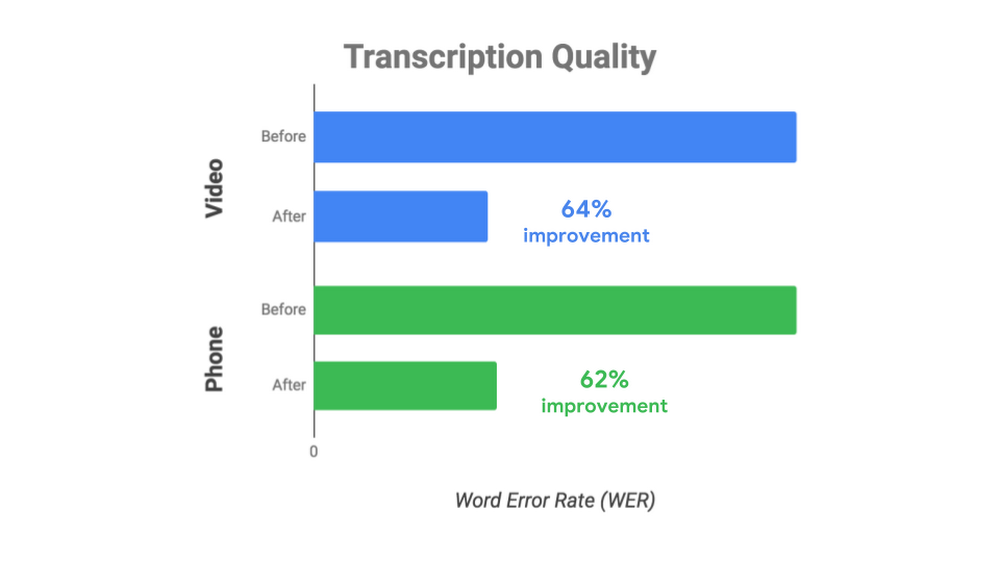
The ability to recognize and synthesize speech is critical for making human-machine interaction natural, easy, and commonplace, but it’s still too rare. Today we’re making our Cloud Speech-to-Text and Text-to-Speech products more accessible to companies around the world, with more features, more voices (roughly doubled), more languages in more countries (up 50+%), and at lower prices (by up to 50% in some cases).Making Cloud Speech-to-Text more accessible for enterprisesWhen creating intelligent voice applications, speech recognition accuracy is critical. Even at 90% accuracy, it’s hard to have a useful conversation. Unfortunately, many companies build speech applications that need to run on phone lines and that produce noisy results, and that data has historically been hard for AI-based speech technologies to interpret.For these situations with less than pristine data, we announced premium models for video and enhanced phone in beta last year, developed with customers who opted in to share usage data with us via data logging to help us refine model accuracy. We are excited to share today that the resulting enhanced phone model now has 62% fewer transcription errors (improved from 54% last year), while the video model, which is based on technology similar to what YouTube uses for automatic captioning, has 64% fewer errors. In addition, the video model also works great in settings with multiple speakers such as meetings or podcasts.The enhanced phone model was initially available only to customers participating in the opt-in data logging program announced last year. However, many large enterprises have been asking us for the option to use the enhanced model without opting into data logging. Starting today, anyone can access the enhanced phone model, and customers who choose the data logging option pay a lower rate, bringing the benefits of improved accuracy to more users.In addition to the general availability of both premium models, we’re also announcing the general availability of multi-channel recognition, which helps the Cloud Speech-to-Text API distinguish between multiple audio channels (e.g., different people in a conversation), which is very useful for doing call or meeting analytics and other use cases involving multiple participants. With general availability, all these features now qualify for an SLA and other enterprise-level guarantees.Cloud Speech-to-Text at LogMeInLogMeIn is an example of a customer that requires both accuracy and enterprise scale: Every day, millions of employees use its GoToMeeting product to attend an online meeting. Cloud Speech-to-Text lets LogMeIn automatically create transcripts for its enterprise GoToMeeting customers, enabling users to collaborate more effectively. “LogMeIn continues to be excited about our work with Google Cloud and its market-leading video and real-time speech to text technology. After an extensive market study for the best Speech-to-Text video partner, we found Google to be the highest quality and offered a useful array of related technologies. We continue to hear from our customers that the feature has been a way to add significant value by capturing in-meeting content and making it available and shareable post-meeting. Our work with Google Cloud affirms our commitment to making intelligent collaboration a fundamental part of our product offering to ultimately add more value for our global UCC customers.” – Mark Strassman, SVP and General Manager, Unified Communications and Collaboration (UCC) at LogMeIn.Making Cloud Speech-to-Text more accessible through lower pricing (up to 50% cheaper)Lowering prices is another way we are making Cloud Speech-to-Text more accessible. Starting now:For standard models and the premium video model, customers that opt-in to our data logging program will now pay 33% less for all usage that goes through the program.We’ve cut pricing for the premium video model by 25%, for a total savings of 50% for current video model customers who opt-in to data logging.Making Cloud Text-to-Speech accessible across more countriesWe’re also excited to help enterprises benefit from our research and experience in speech synthesis. Thanks to unique access to WaveNet technology powered by Google Cloud TPUs, we can build new voices and languages faster and easier than is typical in the industry: Since our update last August, we’ve made dramatic progress on Cloud Text-to-Speech, roughly doubling the number of overall voices, WaveNet voices, and WaveNet languages, and increasing the number of supported languages overall by ~50%, including:Support for seven new languages or variants, including Danish, Portuguese/Portugal, Russian, Polish, Slovakian, Ukrainian, and Norwegian Bokmål (all in beta). This update expands the list of supported languages to 21 and enables applications for millions of new end-users.31 new WaveNet voices (and 24 new standard voices) across those new languages. This gives more enterprises around the world access to our speech synthesis technology, which based on mean opinion score has already closed the quality gap with human speech by 70%. You can find the complete list of languages and voices here.20 languages and variants with WaveNet voices, up from nine last August–and up from just one a year ago when Cloud Text-to-Speech was introduced, marking a broad international expansion for WaveNet.In addition, the Cloud Text-to-Speech Device Profiles feature, which optimizes audio playback on different types of hardware, is now generally available. For example, some customers with call center applications optimize for interactive voice response (IVR), whereas others that focus on content and media (e.g., podcasts) optimize for headphones. In every case, the audio effects are customized for the hardware.Get started todayIt’s easy to give Cloud Speech products a try—check out the simple demos on the Cloud Speech-to-Text and Cloud Text-to-Speech landing pages. If you like what you see, you can use the $300 GCP credit to start testing. And as always, the first 60 minutes of audio you process every month with Cloud Speech-to-Text is free.
Quelle: Google Cloud Platform

Cloud Services Platform—bringing hybrid cloud to you

If you’ve ever thought about adopting a hybrid cloud, you know it usually means committing to a cloud vendor and purchasing new hardware—with no easy way of integrating your existing on-premises investments. At Google Cloud, we are taking a different approach, with a software-based, hybrid offering that brings Google Cloud services into your on-prem infrastructure using the power of Kubernetes and Istio to meet you where you are.At Google Cloud Next last year, we introduced our vision for Cloud Services Platform (CSP), and we are excited to announce it’s available in beta today. CSP is a modern platform that simplifies building, running, and managing services both on-prem and in the cloud. Built on open APIs, CSP is a less disruptive and more compliant approach than competing hybrid offerings. CSP gives you the freedom to modernize your applications at your own pace, innovate faster, and improve operational security and governance. Now that our customers have started to modernize their applications in their own data centers with CSP, we believe it will be the enterprise application deployment platform of choice for many years to come.Modernize in-place with GKE On-PremFor many of you, modernization means navigating existing on-prem investments as well as cloud infrastructure, while simultaneously adopting cloud-native tools and development practices.CSP is built on top of Google Kubernetes Engine (GKE), the industry’s leading managed Kubernetes service with advanced security and automation. CSP includes GKE On-Prem, a managed Kubernetes service providing remote lifecycle management of your on-prem clusters, keeping them updated and secure. GKE On-Prem brings Google’s expertise in Kubernetes and the thriving Kubernetes ecosystem to your data center and runs on your existing hardware, saving you time and money. You can write once and deploy to the cloud or on-prem, using a consistent platform that spans all your environments. Furthermore, CSP’s design allows you to integrate existing networking, storage, and identity capabilities that you already use, so you can move to the cloud when you are ready.Automate policy and security at scale with CSP Config ManagementEnsuring security and compliance to centralized policies is difficult in a hybrid environment. You need to be able to apply security policies and compliance rules at scale, deploying the right controls across your applications without hindering development speed.With today’s introduction of CSP Config Management you can create multi-cluster policies out of the box, that set and enforce role-based access controls, resource quotas, and create namespaces; all from a single source of truth. You can also rapidly deploy your configurations out across all your clusters—both on-prem and in the cloud. CSP Config Management automatically monitors your CSP environment for changes from your desired state, blocking unapproved changes, alerting you to unexpected variations and making policy deployment, security, management, and monitoring easy and universal.Beyond this, CSP works great with Istio. By adding a proxy in front of your services, it provides a scalable foundation for policy enforcement, helps services establish trust, and encrypts traffic without needing any code changes.Build once, manage and deploy anywhereAs we bring the benefits of the cloud to your on-prem deployments, having a consistent experience across all your environments can make your operations team much more efficient, freeing them up to focus on innovation.In addition to letting you run anywhere, CSP provides the visibility you need to see what is happening across those environments. Stackdriver Monitoring and Istio policy management capabilities give you a single management console spanning on-prem and the cloud, while GCP Marketplace gives you access to a variety of enterprise-ready, open-source, and commercial Kubernetes applications featuring prebuilt deployment templates, simple licensing, and consolidated billing. This consistent management console lets you embrace DevOps like never before, while SRE-focused monitoring tools bring you better visibility into service-level communications.CSP: your path to a more productive organizationCSP can make your organization more productive with add-on tools that improve the efficiency of your entire IT team: IT operators benefit from a single unified platform to manage applications and services that span multiple environments. Developers gain a secure foundation on which to build scalable, efficient applications based on containers and microservices. Additionally, security teams get consistent tooling to secure their software supply chain and improve run-time security. With CSP we are partnering with our customers to realize their modernization and hybrid goals.KeyBank, one of the largest banks in the U.S., chose CSP to bring the benefits of Kubernetes and Istio to its own data centers.“Google created Kubernetes and Istio so they were the obvious cloud to partner with as we look to bring containerized applications into our data centers. Put simply, the Cloud Services Platform provides us the security we need, the portability we want, and the productivity that our developers crave.”- Keith Silvestri, Chief Technology Officer for KeyBank.Partners like Arctiq, meanwhile, are using CSP to help customers modernize and  innovate rapidly.“We’re working with some of our largest customers to modernize their applications with CSP. For our customers in regulated industries and government agencies, the ability to run in their current data centers reduces risk and enables them to get many of the benefits of the cloud while still meeting their internal compliance and regulatory requirements. CSP gives us the flexibility to use GKE On-Prem for sensitive workloads and keep them on-prem while using GKE in the cloud for other strategic applications.” – Kyle Bassett, Partner at Arctiq.CSP represents a foundational element of our hybrid strategy, which integrates with our build, deployment, and monitoring tools to provide a modern DevOps environment that accelerates development velocity. We look forward to building on it in the coming months. To learn more about our vision for CSP, please see Application Modernization and the Decoupling of Infrastructure, Services and Teams, a white paper by distinguished Googlers Eric Brewer and Jennifer Lin.
Quelle: Google Cloud Platform

Analyze this—expanding the power of your API data with new Apigee analytics features

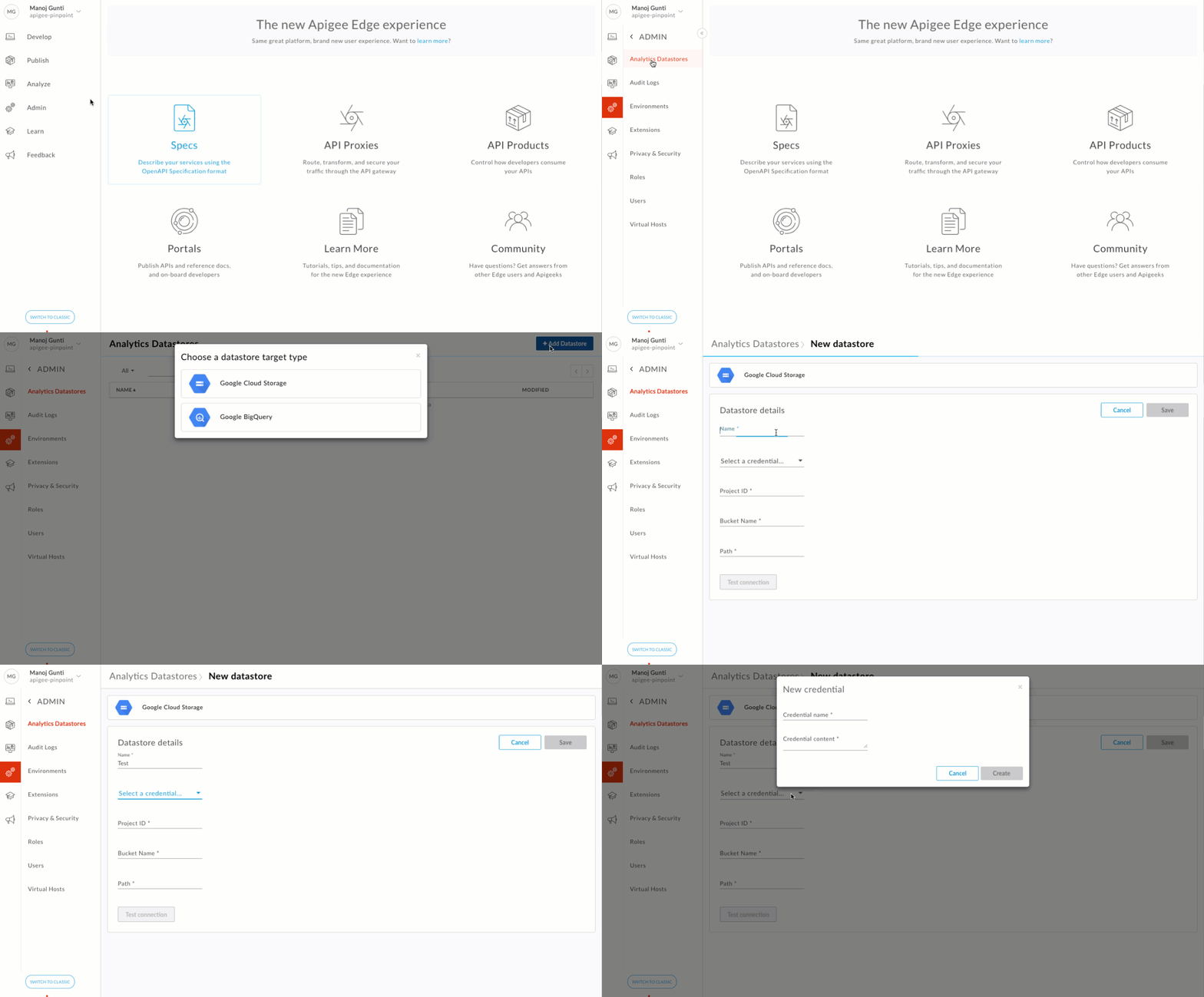
APIs securely expose key enterprise data and services to internal stakeholders and external developers. They can also generate a goldmine of data. As you grow your API programs to reinvent operations, build modern applications, and create ecosystems, you can also use key API data to answer some important questions: Which customers are using my APIs? How do I categorize my customers? Should I monetize my APIs? How should I build my API revenue model and rate plan?To help you harness your API programs’ data, Google Cloud’s Apigee team added new data export and asynchronous reporting features to the Apigee API management platform’s analytics capabilities. Now available in beta, these features let you segment, aggregate, and export critical API data to gain strategic insights into usage patterns and power decisions on market segmentation, business models and pricing patterns, etc.Specifically, asynchronous reporting helps you segment and aggregate complex sets of historical API data. You can now run custom reports asynchronously either from Apigee Edge UI or by using the Edge API.With the new data export functionality, you can extract large sets of API data into your own data repository. You can export either in CSV or JSON formats. The feature currently supports Google Cloud Storage and BigQuery repositories.Online business review platform Trustpilot uses Apigee to manage their API programs, and these new analytics capabilities are helping them innovate new business models:”As our API products gain traction, we want to be able to monetize our business assets, and have better visibility into the usage. Apigee’s data export and asynchronous reporting features help us slice and dice, aggregate, and extract critical API insights that can be combined with our proprietary data to analyze usage patterns, categorize customers, create revenue models, and build rate plans.”- Martin Andersen, VP of Engineering, TrustpilotGetting startedIf you’re already an Apigee Edge cloud customer, check out our latest documentation to get started. There you’ll find a complete feature overview, guided tutorials, FAQs, and more.If you’re not already an Apigee Edge customer, try it for free.Join us at Google Cloud Next ’19Hear from companies like HP Inc., Accuweather, DHL, Kaiser, Urban Science, Woolworths, and Telstra as they share transformation stories leveraging APIs. Join us at Google Cloud NEXT ’19, April 9-11 in San Francisco. Register now!
Quelle: Google Cloud Platform

Setting a course to the future of cloud computing

Good technologies solve problems. Great ones deliver new ways to think about ourselves and the future.Think of the rich worlds seen through the telescope and the microscope, or space explorations that have broadened the sense of our place in creation. There is that “bicycle for the mind,” as Steve Jobs called the personal computer. Romance, entertainment, and personal needs have been transformed by online life. In every case, the attributes of the machines fire and empower human imagination.  Cloud computing is another one of these great technologies. Today, we’re pleased to publish The Future of Cloud Computing, a look at some of the ways that the tools and attributes of cloud computing are transforming work, business, and markets.Cloud computing, which has become a standard at many of the world’s largest companies, is much more than just a cheaper and easier way to access computers, storage, networks and software. The power and ubiquity of the cloud mean easy two-way interactions of data and analysis from virtually any point on the planet. Software innovations enable companies to work at a scale we could not have imagined even a decade ago.The defaults of this computing architecture, particularly in public clouds like Google Cloud, are choice, flexibility, responsiveness, and a strong analytic capability. It’s notable that these are the same values that increasingly drive organizations, in everything from distributed teams, on-demand collaboration, and real-time customer service and product upgrades.To take one example: large-scale clouds like Google Cloud, and smaller private clouds inside companies, increasingly use management software like Kubernetes and Istio, which seek to observe and manage lots of workloads, moving them efficiently through lots of computing hardware in the most standardized and automated way possible.On one level, this is simply technology at its best, getting hassles out of the way so people can do more creative work. It’s no accident, though, that both products are open source, a transparent, collaborative, and high-velocity way of working that has come into its own in the cloud era.Other examples draw on existing trends. In global manufacturing, the collaboration of outsourcing, partnering, subcontracting, and alliances is supercharged by the cloud. The transformation of our workspaces, with expensive closed-door offices giving way to cubicles, then open-plan offices and telecommuting, can be effected in new and better ways when both work products and communications tools reside in the cloud, accessible anywhere.Mobility and the Internet of Things mean all kinds of sensors are capturing data, and products are better connected to the cloud, responding appropriately to new information. There are better forms of security and privacy protection. These are borderless values, designed for protection within the contexts of an overall systems, and not weaker localized computers.There’s much more in the report, and I hope you check it out.Where is this taking us? Our world has challenges and opportunities, but we have eliminated a few fatal diseases, educated people around the world with cloud-based remote learning, and look at videos from Mars. It’s possible to be quite an optimist, too.In that spirit, cloud computing is about discovering more of life, reacting to it, and building on our discoveries faster and better. It’s about making more dreams real.Click here to download the full report.
Quelle: Google Cloud Platform

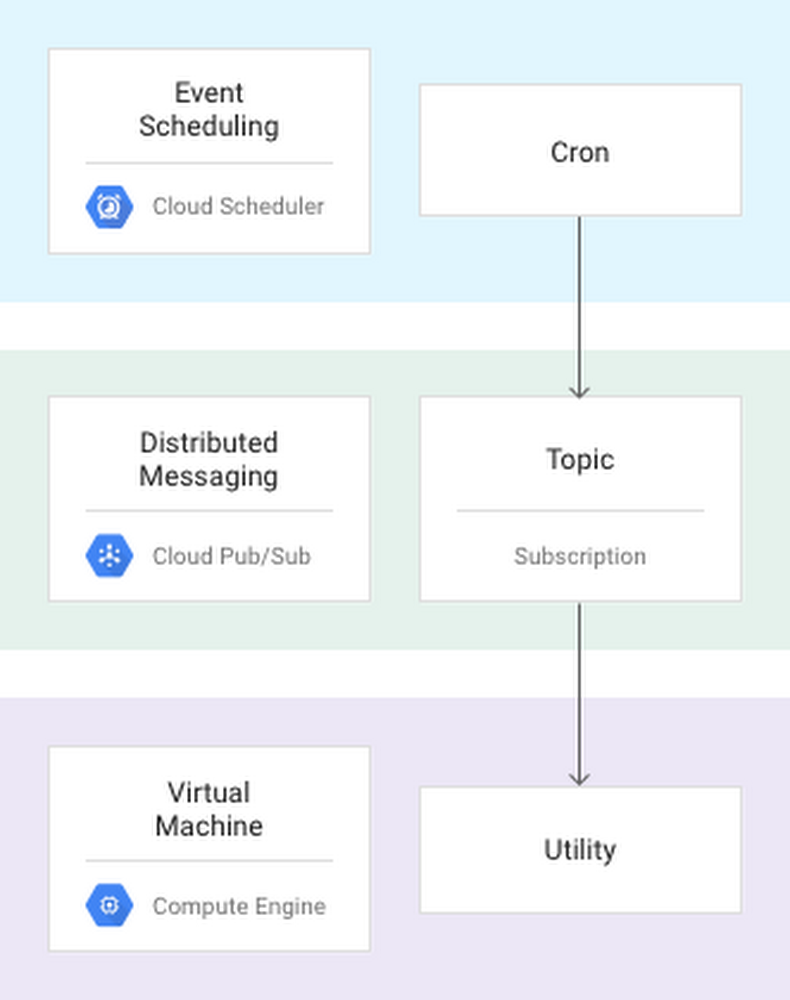
Run cron jobs reliably on Compute Engine with Cloud Scheduler

Many systems have regularly scheduled jobs, but getting those job to run reliably in a distributed environment can be surprisingly hard.Imagine trying to run the standard UNIX cron job scheduling service in a fleet of virtual machines. Many individual machines come and go due to autoscaling and network partitioning. As such, a critical task might never run because the instance it was scheduled on became unavailable. Alternately, a task that was meant to run only once might be duplicated by many servers as your autoscaler brings them online.Using Cloud Scheduler for scheduling andGoogle Cloud Pub/Sub for messaging, you can build a distributed and fault-tolerant scheduler for your virtual machines.  In this design pattern, you schedule your jobs in Cloud Scheduler. Cloud Scheduler uses Cloud Pub/Sub to relay the events to a utility running on each Compute Engine instance. When that utility receives a message, it runs a script corresponding to the Cloud Pub/Sub topic. The scripts run locally on the instance just as if they were run by cron. In fact, you can reuse existing cron scripts with this design pattern.Using Cloud Pub/Sub for distributed messaging means that you can schedule an event to only run on one of many servers, or to run the task on several servers concurrently. Using this topic and subscriber model (shown in the diagram below) allows you to control which instances receive and perform a given task.For a detailed explanation of this design pattern, check out ourReliable Task Scheduling for Google Compute Engine article, which includesa sample implementation on GitHub. Feel free to make pull requests or open issues directly on the open source sample.
Quelle: Google Cloud Platform