Shielded VM: Your ticket to guarding against rootkits and exfiltration

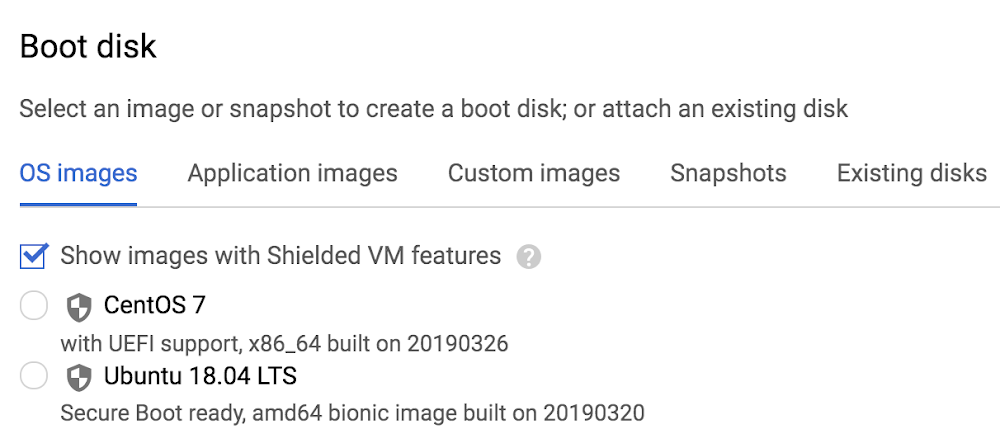
In the cloud, establishing trust in your environment is multifaceted, involving hardware and firmware, as well as host and guest operating systems. Unfortunately, threats like boot malware or firmware rootkits can stay undetected for a long time, and an infected virtual machine can continue to boot in a compromised state even after you’ve installed legitimate software.Last week at Google Cloud Next ’19, we announced the general availability of Shielded VM—virtual machine instances that are hardened with a set of easily configurable security features that assure you that when your VM boots, it’s running a verified bootloader and kernel.Shielded VM can help you protect your system from attack vectors like:Malicious guest OS firmware, including malicious UEFI extensionsBoot and kernel vulnerabilities in guest OSMalicious insiders within your organizationTo guard against these kinds of advanced persistent attacks, Shielded VM uses:Unified Extensible Firmware Interface (UEFI): Ensures that firmware is signed and verifiedSecure and Measured Boot: Help ensure that a VM boots an expected, healthy kernelVirtual Trusted Platform Module (vTPM): Establishes a root-of-trust, underpins Measured Boot, and prevents exfiltration of vTPM-sealed secretsIntegrity Monitoring: Provides tamper-evident logging, integrated with Stackdriver, to help you quickly identify and remediate changes to a known integrity stateGemalto, a global security company focused on financial services, enterprise, telecom, and public sectors, turned to Shielded VM for its SafeNet Data Protection On Demand Cloud HSM solution, which provides a wide range of cloud HSM and key management services through a simple online marketplace.”Shielded VM lets us better protect sensitive applications in the cloud,” said Raphaël de Cormis, VP Innovation at Gemalto. “Using Shielded VM, we envision our customers get increased protection from remote attacks and can meet strict regulatory requirements for data protection and encryption key ownership. And the point/click/deploy model of Shielded VM makes increasing security quick and simple.”Image availabilityShielded VM is available in all of the same regions as Google Compute Engine, and there is no separate charge for using it. Shielded VM is available for the following Google-curated images:CentOS 7Container-Optimized OS 69+Red Hat Enterprise Linux 7Ubuntu 16.04 LTS (coming soon)Ubuntu 18.04 LTSWindows Server 2012 R2 (Datacenter Core and Datacenter)Windows Server 2016 (Datacenter Core and Datacenter)Windows Server 2019 (Datacenter Core and Datacenter)Windows Server version 1709 Datacenter CoreWindows Server version 1803 Datacenter CoreWindows Server version 1809 Datacenter CoreYou can also find Shielded VM in the GCP Marketplace. These images, brought to you in collaboration with the Center for Internet Security (CIS), include:CIS CentOS Linux 7CIS Microsoft Windows Server 2012 R2CIS Microsoft Windows Server 2016CIS Red Hat Enterprise Linux 7CIS Ubuntu Linux 18.04″Bringing CIS Hardened Images to Shielded VM gives users a VM image that’s been both hardened to meet our CIS Benchmarks, and that’s verified to protect against rootkits,” said Curtis Dukes, Executive Vice President of Security Best Practices at CIS. “These additional layers of security give customers a platform they can trust to protect their critical applications.”And if you prefer to import a custom image, Shielded VM now lets you transform an existing VM into a Shielded VM that runs on GCP, bringing verifiable integrity and exfiltration resistance to your existing images.Getting startedIt’s easy to get started with Shielded VM. In the GCP Console, when you’re creating a new VM instance or instance template, simply check the “Show images with Shielded VM features” checkbox.Next, you can adjust your Shielded VM configuration options under the Security tab. Here you can gain more granular control over Shielded VM functionality, including the option to enable or disable Secure Boot, vTPM, and integrity monitoring. By default, vTPM and integrity monitoring are enabled; Secure Boot requires explicit opt-in.If you’re looking for additional centralized and programmatic control over your organization’s VM instances, we’ve also made a new organization policy available for Shielded VM. This constraint, when enabled, requires all new Compute Engine VM instances to use shielded disk images and to enable vTPM and integrity monitoring.All functionality exposed via the GCP Console is also available using gcloud.What’s next?As methods for attackers to persist on and exfiltrate from VM instances grow more sophisticated, so too must your defenses. Shielded VM allows you to stay one step ahead of the game by leveraging the security benefits of UEFI firmware, Secure Boot, and vTPM. To learn more, please check out the Shielded VM documentation.You can also join the conversation in the Shielded VM discussion group and make feature suggestions here. We look forward to hearing from you and helping you harden your cloud infrastructure!
Quelle: Google Cloud Platform

Getting started with Cloud Security Command Center

As you deploy Google Cloud Platform (GCP) services in Google Cloud, you need centralized visibility into what resources are running and their security state. You also need to know if there has been anomalous activity and how to take action against it.Last week at Google Cloud Next ‘19, we announced the general availability of Cloud Security Command Center (Cloud SCC), a security management and data risk tool for GCP resources that helps you prevent, detect, and respond to threats from a single pane of glass.Cloud SCC helps you identify misconfigured virtual machines, networks, applications, and storage and act on them before they damage your business. Cloud SCC has built-in threat detection services, including Event Threat Detection, that can quickly surface suspicious activity or compromised resources. You can also use it to reduce the amount of time it takes to respond to threats by following actionable recommendations or exporting data to your security information and event management (SIEM) system.Let’s take a deeper look at how to use Cloud SCC to prevent, detect, and respond to threats.Prevent threats with visibility and control over your cloud data and servicesThe cloud makes it easier for anyone in your IT department to create a service. However, if these services are not deployed through your central IT department, you may be unaware of what services are running in GCP and how they are protected. Cloud SCC gives you visibility into what GCP services you are running on Google Cloud, including App Engine, BigQuery, Cloud SQL, Cloud Storage, Compute Engine, Cloud Identity and Access Management (IAM) policies, Google Kubernetes Engine, and more.With this visibility, you can quickly understand how many projects you have, what resources are deployed, where sensitive data is located, which service accounts have been added or removed, and how firewall rules are configured. It’s also easy to see if users outside of your designated domain, or GCP organization, have access to your resources.Besides giving you visibility into your GCP assets, Cloud SCC tracks changes to your assets so you can quickly act on unauthorized modifications. You can also view new, deleted, and total assets for within a specific time period or view resources at an organizational or project level. Cloud SCC generates notifications when changes occur and trigger Cloud Functions from a Cloud SCC query.Oilfield services company Schlumberger uses Google Cloud to help them safely and efficiently manage hydrocarbon exploration and production data. “Adopting Google’s Cloud Security Command Center enables an automated inventory of our numerous assets in GCP,” said Jean-Loup Bevierre, Cyber Security Engineering Manager at Schlumberger. “It provides us with a comprehensive view of their rapidly evolving running status, configuration and external exposure. This is a key enabler for us to proactively secure these resources and engineer solutions for our next-gen SOC.”In addition to giving you visibility into your GCP assets in Google Cloud and when changes are made, Cloud SCC can help you see resources that have been misconfigured or have vulnerabilities—before an attacker can exploit them.Available today in alpha, Cloud SCC’s Security Health Analytics capability assesses the overall security state and activity of your virtual machines, network, and storage. You can see issues with public storage buckets, open firewall ports, stale encryption keys, or deactivated security logging. To learn more about this capability, visit our documentation. To get started with this new capability, sign up for the alpha program.Another native capability that helps you prevent threats is Cloud Security Scanner. This scanner can detect vulnerabilities such as cross-site-scripting (XSS), use of clear-text passwords, and outdated libraries in your App Engine apps. It is generally available for App Engine and now available in beta for Google Kubernetes Engine (GKE) and Compute Engine.Detect threats targeting your GCP assetsIt takes an enterprise 197 days, on average, to detect a threat, but it only takes an attacker hours to gain access to your environment, causing an average of $3.86 million dollars worth of damage, according to a Ponemon Institute study.This does not have to be your reality if you use Cloud SCC’s integrated threat detection services.Available today in beta, Event Threat Detection scans your Stackdriver security logs for high-profile indicators that your environment has been compromised. Event Threat Detection uses industry-leading threat intelligence, including Google Safe Browsing, to detect malware, cryptomining, unauthorized access to GCP resources, outgoing DDoS attacks, port scanning, and brute-force SSH. Event Threat Detection sorts through large quantities of logs to help you identify high-risk incidents and focus on remediation. For further analysis, you can send findings to a third-party solution, such as a SIEM, using Cloud Pub/Sub and Cloud Functions. Sign up for the beta program today.Cloud Anomaly Detection, another built-in Cloud SCC service, can detect leaked credentials, cryptomining, unusual activity, hijacked accounts, compromised machines used for botnets or DDoS attacks, and anomalous data activity. In just a few clicks, you can find out more information about the attack and follow actionable recommendations.Respond to threats targeting your GCP assetsWhen a threat is detected, we know that every second counts. Cloud SCC gives you several ways to respond to threats, including updating a configuration setting on a VM, changing your firewall rules, tracking an incident in Stackdriver Incident Response Management or pushing security logs to a SIEM for further analysis.Meet your security needs with a flexible platformWe understand that you have investments in security solutions for both on-premises and other cloud environments. Cloud SCC is a flexible platform that integrates with partner security solutions and Google security tools.Partner solutions surface vulnerabilities or threats directly into Cloud SCC. Now you can see findings from Google security tools and partner tools in one location and quickly take action. You can also move from the Cloud SCC dashboard into third-party consoles to remediate issues.We’re excited to share today that Acalvio, Capsule8, Cavirin, Chef, Check Point CloudGuard Dome 9, Cloudflare, CloudQuest, McAfee, Qualys, Reblaze, Redlock by Palo Alto Networks, StackRox, Tenable.io, and Twistlock are running their security services on Google Cloud and integrate into Cloud SCC. Find out more about how Capsule8, Cavirin, CloudQuest, McAfee, Reblaze, and Cloud SCC work together.Cloud SCC also integrates with GCP security tools, including Access Transparency, Binary Authorization, Cloud Data Loss Prevention (DLP) API, Enterprise Phishing Protection, and the open-source security toolkit Forseti, letting you view and take action on the information provided by these tools.Access Transparency gives you near real-time logs when GCP administrators access your content. Gain visibility into accessor location, access justification, or the action taken on a specific resource from Cloud SCC.Binary Authorization ensures only trusted container images are deployed on GKE. With Cloud SCC, it’s easy to see if you are running containers with trusted or untrusted images and take action.Cloud DLP API shows storage buckets that contain sensitive and regulated data. Cloud DLP API can help prevent you from unintentionally exposing sensitive data and ensure access is conditional.Forseti integrates with Cloud SCC to help you keep track of your environment, monitor and understand your policies, and provide correction.Enterprise Phishing Protection reports URLs directly to Google Safe Browsing and publishes phishing results in the Cloud SCC dashboard, making it your one-stop shop to see and respond to abnormal activity in your environment and respond.Cloud SCC pricingThere is no separate charge for Cloud SCC. However, you will be charged if you upload more than 1 GB per day of external findings into Cloud SCC. In addition, some detectors that are integrated into Cloud SCC, such as Cloud DLP API, charge by usage. Learn more on the DLP API pricing page.Get started todayThere are lots of ways to start taking advantage of Cloud SCC.Enable it from the GCP Marketplace and start using for free.Learn more about Cloud SCC by reading the documentation.Watch Cloud SCC in action in this session from Next ‘19.
Quelle: Google Cloud Platform

New open-source tools in Cloud Dataproc process data at cloud scale

Last week’s Google Cloud Next ‘19 conference highlighted a multitude of new products, services, and features. One product with no shortage of announcements was Cloud Dataproc, our fully managed Apache Hadoop and Apache Spark service. Designed to be fast, easy, and cost-efficient, Cloud Dataproc’s feature set is constantly growing. In 2018 alone, we released more than thirty new features with the goal of bringing Apache Hadoop and Apache Spark into the cloud era by evolving the open-source ecosystem to be more cloud-native.In this post, we’ll give you a whirlwind tour of the most recent Cloud Dataproc features announced last week. Everything listed here is publicly available today and ready for you to try.The best of open source softwareCloud Dataproc brings the best of open source technology available today into Google Cloud Platform (GCP) so our users can access it. Here are some of the new ways you can incorporate open source software with your cloud infrastructure.Cloud Dataproc version 1.4 now generally availableThis latest image of Cloud Dataproc brings several new open source packages, includingApache Spark 2.4Python 3 and Miniconda 3Support for Apache Flink 1.6 init actionThe version 1.4 image also now defaults to a 1TB disk size when using the CLI to ensure consistently high I/O performance.Support for Ubuntu 18Ubuntu 18.04 LTS-based images versions are now in preview. You can use Ubuntu with Cloud Dataproc versions 1.3 and 1.4.Kerberos security component in betaThe Kerberos security component for Cloud Dataproc is now in beta. While many customers have implemented robust security controls with Cloud Dataproc using GCP’s native identity and access management (IAM) capabilities, we know lots of you also want the option to incorporate the open source integrations that Kerberos provides. New functionality that the Kerberos security component unlocks includes the ability to:Directly tie back Cloud Dataproc logins to Microsoft Active DirectoryPrevent everything from running as root on the Cloud Dataproc instancesEnable Hadoop secure mode with a single checkbox actionEncrypt data in flightPrevent users on the same cluster from interfering with other users’ jobsNew initialization actionsWhen creating a Cloud Dataproc cluster, you can specify initialization actions in executables or scripts that Cloud Dataproc will then run on all nodes in your cluster immediately after cluster setup. Initialization actions let you customize a cluster with everything you need for job dependencies (e.g., Apache Flink, Apache Ranger, etc.) so that you can submit jobs to the cluster without any need to manually install software.The Cloud Dataproc team provides sample initialization action scripts in a GitHub repository for commonly installed OSS software. Some recently added initialization actions include:Apache Beam lets you do your own advanced tuning of Apache Beam jobs on Cloud Dataproc.Dr. Elephant helps with flow-level performance monitoring and tuning for Apache Hadoop and Apache Spark.Apache Gobblin simplifies common data integration tasks.While many Google Cloud customers use Cloud Bigtable for a NoSQL database with an HBase API, others prefer to use Apache HBase when they need co-processors or SQL functionality with Apache Phoenix.The Cloud Dataproc Jobs API is a way to provide controlled job submission through a secure perimeter. Apache Livy can help extend this to other cluster types or applications as well.Apache Prometheus is an open source monitoring and alerting toolkit that customers have used in conjunction with Stackdriver. Among various features, Prometheus provides a functional query language called PromQL (Prometheus Query Language) that lets you select and aggregate time series data in real time, which you may find useful for advanced time series analysis of your Cloud Dataproc logging.Many customers start their cloud journeys by first offloading batch and ETL jobs that might be slowing down or interfering with ad hoc analysis performed on their on-prem clusters. The Apache Ranger initialization action makes it possible to keep all your security policies in place when you start shifting data workloads to the cloud.Apache Solr is an open source enterprise search platform that allows sophisticated and customized search queries. If you have invested heavily in the Solr infrastructure, Cloud Dataproc offers an easy way to migrate to the cloud while keeping your Solr investments intact.Tensorflow on YARN (TonY) is a framework that lets you natively run deep learning jobs on Apache Hadoop. It currently supports TensorFlow and PyTorch. TonY makes it possible to run either single node or distributed training as a Hadoop application. This native connector, together with other TonY features, runs machine learning jobs reliably and flexibly.New optional components for Cloud DataprocWhen you create a Cloud Dataproc cluster, standard Apache Hadoop ecosystem components are automatically installed on the cluster. You can install additional components, called “optional components,” on the cluster when you create it. We’re excited to add a number of new optional components to Cloud Dataproc that provide fully pre-configured and supported open source tools as part of the Cloud Dataproc image.In addition to updating the product launch stage of many optional components (updated list here), these components can now be installed with a single click in the Google Cloud Console as well, as shown here:Druid alpha now publicly availableApache Druid is a new public alpha component that you can use with Cloud Dataproc. This component provides an open-source, high-performance, distributed OLAP data store that is well-integrated with the rest of the big data OSS ecosystem. The Druid component installs Druid services on the Cloud Dataproc cluster master (Coordinator, Broker, and Overlord) and worker (Historical, Realtime and MiddleManager) nodes.New Cloud Dataproc jobs in betaThere are also some new job types for Cloud Dataproc available now. You can submit a job to an existing Cloud Dataproc cluster via a Cloud Dataproc API jobs.submit HTTP or programmatic request, using the Cloud SDK gcloud command-line tool in a local terminal window. You can also use Cloud Shell or use the Cloud Console opened in a local browser.Two new Cloud Dataproc job types are now in beta: Presto and SparkR.Open, high-performing connectors                          Our Cloud Dataproc team is directly involved in building the open source connectors alongside other Google Cloud engineering teams. That ensures that the Cloud Dataproc connectors open sourced to the community are optimized for working in Google Cloud. Here are some new features and improvements to our connectors:Google Cloud Storage ConnectorImprovements to the Cloud Storage Connector (starting in version 1.9.5) bring several enhancements, including:Fadvise modes (sequential, random, auto)Adaptive HTTP range requests (fadvise random and auto mode)Lazy metadata initialization from HTTP headersMetadata caching with list requestsLazy footer prefetchingConsistent generation reads (latest, best effort, strict)Multithreaded batch requests (copy, move, rename, delete operations)Support for HDFS metadata attributes (allowing direct HDFS backups to GCS)Cloud Spanner Connector in the worksWork on a Cloud Spanner Connector is underway. Cloud Spanner Connector for Apache Spark is a library that will support Apache Spark to access Cloud Spanner as an external data source or sink.Apache Spark SQL Connector for BigQuery in betaThere’s a new Apache Spark SQL Connector for Google BigQuery. It has a number of advantages over using the previous export-based read flow that should lead to better read performance:Direct streaming via the Storage API. This new connector streams data in parallel directly from BigQuery via gRPC without using Cloud Storage as an intermediaryColumn and predicate filtering to reduce the data returned from BigQuery storageDynamic sharding, which rebalances records between readers so map phases will finish nearly concurrently.Auto-awesomenessIn addition to providing big data open source software support, management, and integration, Cloud Dataproc also offers new capabilities that let you automate your data workloads and modernize your Apache stack as you move to the cloud.Here are some of the latest innovations coming out of Cloud Dataproc that you can try for yourself.Component Gateway in alpha: Automatic access to web interfacesSome of the core open-source components included with Cloud Dataproc clusters, such as Apache Hadoop and Apache Spark, provide web interfaces. These interfaces can be used to manage and monitor cluster resources and facilities, such as the YARN resource manager, the Hadoop Distributed File System (HDFS), MapReduce, and Spark. Component Gateway provides secure access to web endpoints for Cloud Dataproc core and optional components.Clusters created with Cloud Dataproc image version 1.3 and later can enable access to component web interfaces without relying on SSH tunnels or modifying firewall rules to allow inbound traffic.Component Gateway automates an installation of Apache Knox and configures a reverse proxy for your components, making the web interfaces easily accessible only to those users who have dataproc.clusters.use IAM permission. You can opt in to the gateway in Cloud Console, like this:Workflow templates, now in Cloud Console: Auto-configuring frequent effortsThe Cloud Dataproc WorkflowTemplates API provides a flexible and easy-to-use mechanism for managing and executing workflows. A Workflow Template is a reusable workflow configuration. It defines a graph of jobs with information on where to run those jobs. You can now view these workflows and workflow templates in the Cloud Console, as shown here:Autoscaling clusters, now in betaEstimating the right number of cluster workers (nodes) for a workload is difficult, and a single cluster size for an entire pipeline is often not ideal. User-initiated cluster scaling partially addresses this challenge, but requires monitoring cluster utilization and manual intervention.The Cloud Dataproc AutoscalingPolicies API provides a mechanism for automating cluster resource management and enables cluster autoscaling. An autoscaling policy is a reusable configuration that describes how clusters using the autoscaling policy should scale. It defines scaling boundaries, frequency, and aggressiveness to provide fine-grained control over cluster resources throughout the cluster’s lifetime.Enhanced Flexibility Mode in alphaCloud Dataproc Enhanced Flexibility Mode is for clusters that use preemptible VMs or autoscaling. When a Cloud Dataproc node becomes unusable due to a node loss, the stateful data that was produced is persevered. This can minimize disruptions to running jobs while still allowing for rapid scale down.It is often cost-effective to use preemptible VMs, which have lower per-hour compute costs, for long-running workloads or large clusters. However, VM preemptions can be disruptive to applications, causing jobs to be delayed or fail entirely. Autoscaling clusters can run into similar issues. Enhanced flexibility mode mitigates these issues by saving intermediate data to a distributed file system.Improved Stackdriver integrationStackdriver Monitoring provides visibility into the performance, uptime, and overall health of cloud-powered applications. Stackdriver collects and ingests metrics, events, and metadata from Cloud Dataproc clusters to generate insights via dashboards and charts. You can use Stackdriver to understand the performance and health of your Cloud Dataproc clusters and examine HDFS, YARN, and Cloud Dataproc job and operation metrics.Recent improvements to this Stackdriver integration include more Cloud Dataproc information:Job logs in StackdriverJob driver informationLinked directly to container logsAdditional metrics available in Cloud ConsoleGetting started with new Cloud Dataproc featuresCloud Dataproc already offers many core features that enhance running your familiar open-source tools, such asRapid cluster creationCustomizable machinesEphemeral clusters that can be created on demandTight integration with other GCP servicesCloud Dataproc also provides the ability to develop architectures that support both:job scoped clusterslong running clustersOne major advantage of open source software is its dynamic nature—an active development community can provide frequent updates, useful fixes, and innovative features. Coupling this with the knowledge that Google brings in supporting and managing big data workloads, along with unique and open cloud-native features, makes Cloud Dataproc an ideal engine for running and modernizing big data open source software.All the Cloud Dataproc features listed are ready for use today, to bring flexibility, predictability, and certainty to your data processing workloads. You can test out Cloud Dataproc with one of our Quickstarts or how-to guides.In case you missed them, here are some of the Cloud Dataproc breakout sessions from Cloud Next 2019 that are now available on YouTube.Cloud Dataproc’s Newest FeaturesData Science at Scale with R on GCPHow Customers Are Migrating Hadoop to Google Cloud PlatformData Processing in Google Cloud: Hadoop, Spark, and DataflowBuilding and Securing a Data lake on Google Cloud PlatformMachine Learning with Tensorflow and PyTorch on Apache Hadoop using Cloud Dataproc
Quelle: Google Cloud Platform

Traffic Director: global traffic management for open service mesh

At Next ’19 last week, we announced Traffic Directorfor service mesh, bringing global traffic management to your VM and container services. We also gave you a glimpse of Traffic Director’s capabilities in our blog. Today, we’ll take it a step further with a deep dive into its features and benefits.Traffic Director for service meshAt its core, a service mesh provides a foundation for independent microservices that are written in different languages and maintained by separate teams. A service mesh helps to decouple development from operations. Developers no longer need to write and maintain policies and networking code inside their applications, they move into service proxies, such as Envoy, and to a service-mesh control plane that provisions and dynamically manages the proxies.“Traffic Director makes it easier to bring the benefits of service mesh and Envoy to production environments,” said Matt Klein, creator of Envoy Proxy.Traffic Director is Google Cloud’s fully managed traffic control plane for service mesh. Traffic Director works out of the box for both VMs and containers. It uses the open source xDS APIs to communicate with the service proxies in the data plane, ensuring that you’re never locked into a proprietary interface.Traffic Director capabilitiesGlobal load balancingMany of you use Google’s global load balancing for your internet-facing services. Traffic Director brings global load balancing to internal microservices in a service mesh. With global load balancing, you can provision your service instances in Google Cloud Platform (GCP) regions around the world. Traffic Director provides intelligence to the clients to send traffic to the closest service instance with available capacity. This optimizes global traffic distribution between services that originate traffic and those that consume it, with the shortest round-trip time (RTT) per request.If the instances closest to the client service are down or overloaded, Traffic Director provides intelligence to seamlessly shift the traffic to a healthy instance in the next closest region.Centralized health-checkingLarge service meshes can generate a large amount of health-checking traffic, since every sidecar proxy has to health-check all the service instances in the service mesh. As the mesh grows, having every client proxy health-check every server instance creates an n2 health-checking problem, which can become an obstacle to growing and scaling your deployments.Traffic Director solves this by centralizing health-checks, where a globally distributed, resilient system monitors all service instances. Traffic Director then distributes the aggregated health-check results to all the proxies in the worldwide mesh using the EDS API.Load-based autoscalingTraffic Director enables autoscaling based on the load signal that proxies report to it. Traffic Director notifies the Compute Engine autoscaler of any changes in traffic and lets autoscaler grow to the required size in one shot (instead of repeated steps as other autoscalers do), decreasing the time it takes for the autoscaler to react to traffic spikes.While the Compute Engine autoscaler is ramping up capacity where it’s needed, Traffic Director temporarily redirects traffic to other available instances—even in other regions as needed. Once the autoscaler grows enough capacity for the workload to sustain the spike, Traffic Director moves traffic back to the closest zone and region, once again optimizing traffic distribution to minimize per-request RTT.Built-in resiliencySince Traffic Director is a fully managed service from GCP, you don’t have to worry about its uptime, lifecycle management, scalability, or availability. Traffic Director infrastructure is globally distributed and resilient around the world, and uses the same battle-tested systems that serve Google’s user-facing services. Traffic Director will offer a 99.99% service level agreement (SLA) when it is generally available (GA).Traffic control capabilitiesTraffic Director lets you control traffic without having to modify the application code itself.You can create custom traffic control rules and policies by specifying:HTTP match rules: Specify parameters including host, path and headers to match in an incoming request.HTTP actions: Actions to be performed on request after a match. These include redirects, rewrites, header transforms, mirroring, fault injection and more.Per-service traffic policies: These specify load-balancing algorithms, circuit-breaking parameters, and other service-centric configurations.Configuration filtering: Capability to push configuration to a subset of clients.Using the above routing rules and traffic policies, you get sophisticated traffic control capabilities without the typical toil.Let’s look at an example of Traffic Director’s traffic control capabilities: traffic splitting. Traffic Director lets you easily configure scenarios such as rolling out a new version of a service, say a shopping cart, and gradually ramping up the traffic routed to it.You can also configure traffic steering to direct traffic based on HTTP headers, fault injection for testing resiliency of your service, mirroring so you can send a copy of the production traffic to a shadow service, and more.You can get access to these features by signing up for the traffic control alpha.Consistent traffic management for VM and container servicesTraffic Director allows you to seamlessly deploy and manage heterogeneous deployments comprised of container and VM services. The instances for each service can span multiple regions.With Traffic Director, the VM endpoints are configured using managed instance groups and container endpoints as standalone network endpoint groups. As described above, an open source service proxy like Envoy is injected into each of these instances. The rest of the data model and policies remain the same for both containers and VMs, as shown below:This model provides consistency when it comes to service deployment, and the ability to globally load balance, seamlessly, across VMs and container instances in a service.Try Traffic Director todayLearn more about Traffic Director online and watch the Next ’19 talks on Traffic Director and Service Mesh Networking. We’d love your feedback on Traffic Director and any new features you’d like to see—you can reach us at gcp-networking@google.com.
Quelle: Google Cloud Platform

Improve enterprise IT procurement with Private Catalog, now in beta

With the sheer number of applications in today’s enterprises, it can be hard for procurement departments and cloud administrators to maintain compliant and efficient procurement processes for their cloud development teams. Last week at Next we introduced you to Private Catalog, a new service from Google Cloud that lets you control the availability and distribution of IT solutions to maintain compliance and governance, simplify internal solution discovery, and ensure that only approved and compatible apps are available throughout your organization. Here’s a bit more color.Stay compliant, control accessPrivate Catalog helps you reduce complexity in regulated industries, or when handling sensitive data. Controlling which apps your developers use can help you avoid costly data loss, data leaks, or reliability issues from unverified code. You can ensure that only products that meet your compliance and governance rules are published to your catalog and available to your developer teams. For additional control, you can create hierarchies complete with access controls in the catalog, limiting who can deploy what within your organization.Create a collaborative environmentCentralizing your apps is not only good for compliance, it’s good for productivity. Distributed workforces often create technology silos, introducing redundancies across your teams. Private Catalog simplifies how users find sanctioned applications—they simply navigate to a single place to find all the approved internal apps available to them. And when central IT teams create a new solution, Private Catalog makes it easy to distribute it to the whole organization.Less failures, more efficiencyFailing to control how you deploy internal apps leads to inefficient resource usage and more support tickets. With Private Catalog, you can control how you distribute your software according to parameters in Cloud Deployment Manager templates, including regions, RAM, CPUs, and almost any other value. When you control the parameters, you ensure that apps have the correct amount of resources, in approved configurations.Management and reporting capabilitiesPrivate Catalog includes robust management, integration, and reporting capabilities. With the APIs available today, you can delete catalogs, hierarchies, and individual solutions that are no longer relevant for your teams. You can also customize the user interface, and integrate your Private Catalog solutions with your other enterprise service catalogs. To report on identity and access management, simply query which solutions users have access to within each organization’s hierarchy and catalog.Internal apps don’t have to be a source of compliance, support, and communication issues. With Private Catalog, you put controls in place that let your developers access the tools they need safely and efficiently. For more information, visit the Private Catalog homepage.
Quelle: Google Cloud Platform

Kohl's leverages Google Cloud Platform for omnichannel retail

hearing from customers about how they are digitizing their businesses using Google Cloud. I want to share some of their stories and news about some exciting new products we are introducing which is why I’ll be posting here regularly. So, let’s get started.How Kohl’s is leveraging Google Cloud Platform for omnichannel retailKohl’s is an omnichannel retailer focused on driving traffic, operational efficiency and delivering seamless omnichannel customer experiences. Ratnakar Lavu is Kohl’s Senior Executive Vice President and Chief Technology Officer. He, and Kohl’s, are at the forefront of retail technology innovation, focusing on a frictionless customer journey across digital, mobile and more than 1,150 stores. As part of this journey to more closely unify its online and offline experiences for customers, the company was looking for supporting cloud services that would continue to drive  best-in-class data center infrastructure; the ability to manage data at a very large scale; and industry leading analytics and machine learning tools to continually understand real time data streams and help personalize experiences for their customers.Kohl’s recognized the opportunity to take on a cloud partner to help drive the improvement of the speed and reliability of their operations, while they focused on a number of innovations to deepen customer experiences. “At the time, I was looking for an open and scalable platform to partner with our Kohl’s technology team as we transform our business by shifting to the cloud,” Ratnakar told me. “Google has great engineering talent as well as demonstrated experience solving stability and scale in its own Ads and Search business. At Kohl’s, we need to be bold and innovative in today’s retail environment, and therefore need partners who deeply understand how to manage risk.” Kohl’s leveraged several capabilities of Google Cloud. For example:They built applications to automate deployment, scaling and operations.They used monitoring capabilities to monitor for things like response time.Scalable technology provided an infrastructure to elastically scale to site traffic.They ran their infrastructure across multiple regions for high availability.In 2017 and 2018, record-setting numbers of customers visitedKohls.com during the Thanksgiving holiday weekend and the digital platform experienced high double-digit growth both years. The capabilities provided by Google Cloud Platform (GCP) and Google’s data center infrastructure supported Kohl’s servers and systems during these key timeframes.In addition, the Kohl’s team partnered together with Google’s core engineering team and services organization to optimize applications and make them more reliable. Our Customer Reliability Engineers (CREs) worked with them in advance of their peak time frames to test the infrastructure for performance, scaling, and fault tolerance. “Google CRE and services teams collaborated with us as we ran drills and exercises during each phase of preparation for peak time frames,” Ratnakar said. “As we continued to understand better how to scale, monitor, and support our applications in GCP and we are pleased that we worked with the CRE team as partners on monitoring services, alerting teams, and triaging work.”We are grateful for our partnership with Ratnakar and the Kohl’s organization and are so happy to see their success using Google Cloud. Many other retailers, be they among the top 10 globally or bringing their new perspective to retail experiences, are also transforming their digital business models to capture new opportunities using Google Cloud.You can learn more here.
Quelle: Google Cloud Platform

Introducing GKE Advanced— enhanced reliability, simplicity and scale for enterprise workloads

Editor’s note:This is the first of many posts on unique differentiated capabilities in Google Kubernetes Engine. Stay tuned in the coming weeks as we discuss GKE’s more advanced features.Kubernetes has come a long way since Google open-sourced it in 2014. Since then, the community has developed a robust suite of installation, management, and configuration tooling for a variety of use cases. But many organizations are overwhelmed by having to run  Kubernetes on their own, and instead adopt Google Kubernetes Engine (GKE), our managed service. Their concern isn’t the underlying infrastructure; they just want a strong foundation that lets them focus on their business.Today, we’re introducing you to GKE Advanced, which adds enterprise-grade controls, automation and flexibility, building on what we’ve learned managing our robust worldwide infrastructure. Going forward, we’ll refer to our existing GKE offering as GKE Standard.Here are the two GKE editions at a glance:GKE Advanced delivers advanced infrastructure automation, integrated software supply chain tooling for enhanced security, a commitment to reliability with a financially backed SLA, and support for running serverless workloads. These new, advanced GKE features and tooling help you operate in fast-moving environments to simplify the management of workloads and clusters, and scale hands-free. You still benefit from Kubernetes’ portability and third-party ecosystem, but with an enhanced feature set.  GKE Standard includes all the features and capabilities that are generally available today, providing a managed service for less complex projects. You can continue to take advantage of the rich ecosystem of first-party and third-party integrations in GCP, including those available in the GCP Marketplace.Let’s take a closer look at features GKE Advanced will include:Enhanced SLAGKE Advanced is financially backed by an SLA that guarantees availability of 99.95% for regional clusters, providing peace of mind for mission-critical workloads.Simplified automationManually scaling a Kubernetes cluster for availability and reliability can be complex and time consuming. GKE Advanced includes two new features to make it easier: Vertical Pod Autoscaler (VPA), which watches resource utilization of your deployments and adjusts requested CPU and RAM to stabilize the workloads; and Node Auto Provisioning, which optimizes cluster resources with an enhanced version of Cluster Autoscaling.Additional layer of defenseDevOps and system administrators often need to run third-party software in their Kubernetes cluster but still want to make sure that it’s isolated and secure. GKE Advanced includes GKE Sandbox, a lightweight container runtime based on gVisor that adds a second layer of defense at the pod layer, hardening your containerized applications without any code or config changes, or requiring you to learn a new set of controls.Software supply-chain securityMalicious or accidental changes during the software development lifecycle can lead to downtime or compromised data. With Binary Authorization, container images are signed by trusted authorities during the build and test process. By enforcing that only verified images are integrated into the build-and-release process, you can gain tighter control over your container environment.Serverless computingYou want to quickly develop and launch applications, without having to worry about the underlying infrastructure on which your code runs. Cloud Run on GKE provides a consistent developer experience for deploying and running stateless services, with automatic scaling (even to zero instances), networking and routing, logging, and monitoring; all based on Knative.Understand your infrastructure usageWhen multiple tenants share a GKE cluster, it can be hard to estimate which tenant is consuming what portion of resources. GKE usage metering allows you to see your cluster’s resource usage broken down by Kubernetes namespaces and labels, and attribute it to meaningful entities such as customers, departments and the like.With the addition of advanced autoscaling and security, support for serverless workloads, enhanced usage reporting—all backed financially by an SLA, GKE Advanced gives you the tools and confidence you need to build the most demanding production applications on top of our managed Kubernetes service. GKE Advanced will be released with a free trial later in Q2. Have questions about GKE Advanced? Contact your Google customer representative for more information, and sign up for our upcoming webcast, Your Kubernetes, Your Way Through GKE.
Quelle: Google Cloud Platform

Evaporating a data lake: Otto Group’s lessons learned migrating a Hadoop infrastructure to GCP

Editor’s note: Today we’re hearing from Google Cloud Platform (GCP) customer Otto Group data.works GmbH, a services organization holding one of the largest retail user data pools in the German-speaking area. They offer e-commerce and logistics SaaS solutions and conduct R&D with sophisticated AI applications for Otto Group subsidiaries and third parties. Read on to learn how Otto Group data.works GmbH recently migrated its on-premises big data Hadoop data lake to GCP and the lessons they learned along the way.At Otto Group, our business intelligence unit decided to migrate our on-premises Hadoop data lake to GCP. Using managed cloud services for application development, machine learning, data storage and transformation instead of hosting everything on-premises has become popular for tech-focused business intelligence teams like ours. But actually migrating existing on-premises data warehouses and surrounding team processes to managed cloud services brings serious technical and organizational challenges.The Hadoop data lake and included data warehouses are essential to our e-commerce business. Otto Group BI aggregates anonymized data like clickstreams, user interactions, product information, CRM data, and order transactions of more than 70 online shops of the Otto Group.On top of this unique data pool, our agile, autonomous, and interdisciplinary product teams—consisting of data engineers, software engineers, and data scientists—develop machine learning-based recommendations, product image recognition, and personalization services. The many online retailers of the Otto Group, such as otto.de and aboutyou.de, integrate our services into their shops to enhance customer experience.In this blog post, we’ll discuss the motivation that drove us to consider moving to a cloud provider, how we evaluated different cloud providers, why we decided on GCP, the strategy we use to move our on-premises Hadoop data lake and team processes to GCP, and what we have learned so far.Before the cloud: an on-premises Hadoop data lakeWe started with an on-premises infrastructure consisting of a Hadoop cluster-based data lake design, as shown below. We used the Hadoop distributed file system (HDFS) to stage click events, product information, transaction and customer data from those 70 online shops, never deleting raw data.Overview of the previous on-premises data lakeFrom there, pipelines of MapReduce jobs, Spark jobs, and Hive queries clean, filter, join, and aggregate the data into hundreds of relational Hive database tables at various levels of abstraction. That let us offer harmonized views of commonly used data items in a data hub to our product teams. On top of this data hub, the teams’ data engineers, scientists, and analysts independently performed further aggregations to produce their own application-specific data marts.Our purpose-built open-source Hadoop job orchestrator Schedoscope does the declarative, data-driven scheduling of these pipelines, as well as managing metadata and data lineage.In addition, this infrastructure used a Redis cache and an Exasol EXAsolution main-memory relational database cluster for key-based lookup in web services and fast analytical data access, respectively. Schedoscope seamlessly mirrors Hive tables to the Redis cache and the Exasol databases as Hadoop processing finishes.Our data scientists ran their iPython notebooks and trained their models on a cluster of GPU-adorned compute nodes. These models were then usually deployed as dockerized Python web services on virtual machines offered by a traditional hosting provider.What was good…This on-premises setup allowed us to quickly grow a large and unique data lake. With Schedoscope’s support for iterative, lean-ops rollout of new and modified data processing pipelines, we could operate this data lake with a small team. We developed sophisticated machine learning-driven web services for the Otto Group shops. The shops were able to cluster purchase and return history of customers for fit prediction; get improved search results through intelligent search term expansion; sort product lists in a revenue-optimizing way; filter product reviews by topic and sentiment; and more….And what wasn’tHowever, as the data volume, number of data sources, and services connected to our data lake grew, we ran into various pain points that were hampering our agility, including lack of team autonomy, operational complexity, technology limitations, costs, and more.Seeing the allure of the cloudLet’s go through each of those pain points, along with how cloud could help us solve them.Limited team autonomy: A central Hadoop cluster running dependent data pipelines does not lend itself well to multi-tenancy. Product teams constantly needed to coordinate—in particular with the infrastructure team responsible for operating the cluster. This not only created organizational bottlenecks that limited productivity; it also worked directly against the very autonomy our product teams are supposed to have. The need to share resources led to the situation that teams could not take full responsibility for their services and pipelines from development, to deployment, to monitoring. This created even more pressure on the infrastructure team. Cloud platforms, on the other hand, allow teams to autonomously launch and destroy infrastructure components via API calls, without affecting other teams and without having to pass through a dedicated team managing centrally shared infrastructure.Operational complexity: Operating Hadoop clusters and compute node clusters as well as external database systems and caches created significant operational complexity. We had to operate and monitor not only our products and data pipelines, but also the Hadoop cluster, operating system, and hardware. The cloud offers managed services for data pipelines, storing data, and web services, so we do not need to operate at the hardware, operating system, and cluster technology level.Limited tech stack: Technologically, we were limited with the Hadoop offering. While our teams could achieve a lot with Hive, MapReduce, and Spark jobs, we often felt that our teams couldn’t use the best technology for the product but had to fit a design into rigid organizational and technology constraints. The cloud offers a variety of managed data stores like BigQuery or Cloud Storage, data processing services like Cloud Dataflow and Cloud Composer, and application platforms like App Engine, plus it’s constantly adding new ones. Compared to the Hadoop stack, this could significantly expand the resources for our teams to design the right solution.Mismatched languages and frameworks: Python machine learning frameworks and web services are usually not run on YARN. Hive and HDFS are not well-suited for interactive or random data access. For a data scientist to reasonably work with data in a Hadoop cluster, Hive tables must be synced to external data stores, adding more complexity. By offering numerous kinds of data stores suitable for analytics, random access, and batch processing, as well as by separating data processing from data storage, cloud platforms make it easier to process and use data in different contexts with different frameworks.Emerging stream processing: We started tapping into more streaming data sources, but this was at odds with Hadoop’s batch-oriented approach. We had to deploy a clustered message broker—Kafka—for persisting data streams. While it is possible to run Spark streaming on YARN and connect to Kafka, we found Flink more suitable as a streaming-native processing framework, which only added another cluster and layer of complexity. Cloud platforms offer managed message brokers as well as managed stream processing frameworks.Expansion velocity: The traditional enterprise procurement process we had to follow made adding nodes to the cluster time- and resource-consuming. It was common that we had to wait three to four months from RFP and purchase order to delivery and operations. With a cloud platform, infrastructure can be added within minutes by API calls. The challenge with cloud is to set up enterprise billing processes so that varying invoices can be handled every month without the constant involvement of procurement departments. However, this challenge has to be solved only once.Expansion costs: A natural reaction to slow enterprise procurement processes is to avoid having to go through them too often. Slow processes mean that team members tend to wait and batch demand for new nodes into larger orders. Larger orders not only increase the corporate politics that come along with them, but also reduce the rate of innovation, as large-node order volumes discourage teams from building (and possibly later scratching) prototypes of new and intrinsically immature ideas. The cloud lets us avoid hanging on to infrastructure we no longer need, freeing us from such inhibitions. Moreover, many frameworks offered by cloud platforms support autoscaling and automating expansion, so expansion naturally follows as new use cases arise.Starting the cloud evaluation processGiven this potential, we started to evaluate the major cloud platforms in April 2017. We decided to move the Otto Group BI data lake to GCP about six months later. We effectively started the migration in January 2018, and finished migrating by February 2019.Our evaluation included three main areas of focus:1. Technology. We created a test use case to evaluate provider technology stacks: building customer segments based on streaming web analytics data using customer search terms.Our on-premises infrastructure team implemented this use case with the managed services of the cloud providers under evaluation (on top of doing its day-to-day business). Our product teams were involved, too, via three multi-day hackathons where they evaluated the tech stacks from their perspective and quickly developed an appetite for cloud technology.Additionally, the infrastructure team kept product teams updated regularly with technology demos and presentations.As the result of this evaluation, we favored GCP. In particular, we liked:The variety of managed data stores offered—especially BigQuery and Cloud Bigtable—and their simplicity of operation;Cloud Dataflow, a fully managed data processing framework that supports event time-driven stream processing as well as batch processing in a unified manner;Google Kubernetes Engine (GKE), a managed distributed container orchestration system, making deployment of Docker-based web services simple; andCloudML Engine as a managed Tensorflow runtime, and the various GPU and TPU options for machine learning.2. Privacy. We involved our legal department early to understand the ramifications of moving privacy-sensitive data from our data lake to the cloud.We now encrypt and anonymize more data fields than was needed on-premises. With the move to streaming data and increased encryption needs, we also ported the existing central encryption clearinghouse to a streaming architecture in the cloud. (The on-premises implementation of the clearinghouse had reached its scaling limit and needed a redesign anyway.)3. Cost. We did not focus on pricing between different cloud providers. Rather, we compared cloud cost estimates against our current on-premises costs. In this regard, we found it important to not just spec out a comparable Hadoop cluster with virtual machines in the cloud and then compare costs. We wanted managed services to reduce our many pain points, not just migrate these pain points to the cloud.We wanted managed services to reduce our many pain points, not just migrate these pain points to the cloud.Instead of comparing a Hadoop cluster against virtual machines in the cloud, we compared our on-premises cluster against native solution designs for the managed services. It was more difficult to come up with realistic cost estimates, since the designs hadn’t been implemented yet. But extrapolating from our experiences with our test use case, we were confident that cloud costs would not exceed our on-premises costs, even after applying solid risk margins.Now that we’ve finished the migration, we can say that this is exactly what happened: We are not exceeding on-premises costs. This we already consider a big win. We not only have development velocity, but the operational stability of the product teams has increased noticeably and so has the performance of their products. Also, the product teams have focused so far on migrating their products and not yet on optimizing costs, so we expect our cloud costs to go further below on-premises costs as time goes on.Going to the cloud: Moving the data lake to GCPThere were a few areas to tackle when we started moving our infrastructure to GCP.1. SecurityOne early goal was to establish a state-of-the-art security posture. We had to continue to fulfill the corporate security guidelines of Otto Group, while at the same time granting a large degree of autonomy to the product teams to create their own cloud infrastructure and eliminate the collaboration pain points.As a balance between a high security standard and the restrictiveness it implies and team autonomy, we came up with the motto of “access frugality.” Teams can work freely in their GCP projects. They can independently create infrastructure like GKE clusters or use managed services such as Cloud Dataflow or Cloud Functions as they like. But they are also expected to be restrictive about resources like IAM permissions, external load balancers and public buckets.In order to get the teams started with the cloud migration as soon as possible, we took a gradual approach to security. Building our entire security posture before teams could start with the actual migration was not an option. So we agreed on the most relevant security guidelines with the teams, then established the rest during migration. As the migration proceeded, we also started to deploy processes and tools to enforce these guidelines and provide guardrails for the teams.We came up with the following three main themes that our security tooling should address (see more in the image below):Cloud security monitoring: This theme is about transparency of cloud resources and configuration. The idea is to protect teams from security issues by detecting them early and, in the best-case scenario, preventing them entirely. At the same time, monitoring must allow for exceptions: teams might consciously want to expose resources such as API endpoints publicly without being bothered by security alerts all the time. The key objective of this theme is to instill a profound security awareness in every team member.Cloud cost controls: This theme covers financial aspects of the security posture. Misconfigurations can lead to significant unwanted costs, unintentionally—for example, by allowing BigQuery database queries going rogue over large datasets by not forcing the user to provide partition time restrictions, or because of external financial DDoS attacks in an autoscaling environment.Cloud resource policy enforcement: Security monitoring tools can detect security issues. A consequent next step is to automatically undo obvious misconfigurations as they are detected. As an example, tooling could automatically revert public access on a storage bucket. Again, such tooling must allow for exceptions.Main themes of our security posture.Since there are plenty of security-related features within Google Cloud products and there is a large variety of open-source cloud security tools available, we didn’t want to reinvent the wheel.We decided to make use of GCP’s inherent security policy configuration options and tooling where we could, such as organization policies, IAM conditions and Cloud Security Command Center.As a tool for cloud security monitoring, we evaluated Security Monkey, developed by Netflix. Security Monkey scans cloud resources periodically and alerts on insecure configurations. We chose it for its maturity and the simple extensibility of the framework with custom watchers, auditors and alerters. With these, we implemented security checks we didn’t find in GCP, mostly around the time-to-live (TTL) of Service Account Keys and setting organizational policies for disallowing public data either in BigQuery data sets or Cloud Storage buckets. We set up three different classes of issues: compliance, security, and cost optimization-related issues.Security Monkey is used by all product teams here. Team members use the Security Monkey UI to view the identified potential security issues and either justify them right there or resolve the issue in GCP. We also use a whitelisting feature to filter for known configurations, like default service account IAM bindings, to make sure we only see relevant issues. Excessive issues and alerts in a dynamic environment like GCP can be intimidating and have most certainly a negative overwhelming effect.To improve the transparency of cloud resources, we built several dashboards on top of the data gathered by Security Monkey to visualize the current and historical state of the cloud environment. While adapting Security Monkey to our needs, we found working with the Security Monkey project to be a great experience. We were able to submit several bug fixes and feature pull requests and get them into the master quickly.We are now shifting our focus from passive cloud resource monitoring towards active cloud resource policy enforcement where configuration is automatically changed based on detected security issues. Security Monkey as well as the availability of near real-time audit events on GCP offer a good foundation for this.We believe that cloud security cannot be considered a simple project with a deadline and a result; rather, it is an aspect that must be considered during each phase of development.2. Approaches to data lake migrationThere were a few possible approaches to migrating our Hadoop data lake to GCP. We considered lift-and-shift, simply redeploying our Hadoop cluster to the cloud as a first step. While this was probably the simplest approach, we wouldn’t get benefits with regards to the pain points we had identified. We’d have to get productivity gains later by rearchitecting yet again to improve team autonomy, operational complexity, and tech advancements.At the other end of the spectrum, we could port Hadoop data pipelines to GCP managed services, reading and storing data to and from GCP managed data stores and then turning off the on-premises cluster infrastructure after porting finished. But that would take much longer to see benefits, since the product teams would have to wait until porting ended and all historical data was processed before they could use the new cloud technology.3. Our approach: Mirror data first, then port pipelinesSo we decided on an incremental approach to porting our Hadoop data pipelines while embracing the existence of our on-premises cluster while it was still there.As a first step, we extended Schedoscope with a BigQuery exporter, which makes it easy to write a Hive table partition to BigQuery efficiently in parallel. We also added the capability to perform additional encryptions via the clearinghouse during export to satisfy the needs of our legal department. We then augmented our on-premises Hadoop data pipelines with additional export steps. In this way, our on-premises Hive data was encrypted and mirrored to BigQuery as soon as it had been computed with only a little delay.Second, we exported the historical Hive table partitions over the course of four weeks. As a result, we ended up with a continuously updated mirror of our on-premises data in BigQuery. By summer 2018, our product teams could start porting their web services and models to the cloud, even though the core data pipelines of the data lake were still running on-premises, as shown here:OttoGroup’s gradual data syncIn fact, product teams were able to finish migrating essential services—such as customer review sentiment analysis, intelligent product list sorting, and search term expansion—to GCP by the end of 2018, even before all on-premises data pipelines had been ported,Next, we ported the existing Hadoop data pipelines from Schedoscope to managed GCP services. We went through each data source and no longer staged it to Hadoop but to GCP, either to Cloud Storage for batch sources or to Cloud Pub/Sub for new streaming sources.We then redesigned the data pipelines originating from the data source with GCP managed services, usually Cloud Dataflow, to bring the data to BigQuery. Once the data was in BigQuery, we also used simple SQL transformations and views. Generally, we orchestrate batch pipelines using Cloud Composer, managed by Airflow. Streaming pipelines are mostly designed as chains of Cloud Dataflow jobs decoupled by Cloud Pub/Sub topics, as shown here:Migrating jobs into GCP managed servicesThere is the problem, however, that aggregations still performed on-premises were sometimes dependent on data from sources that already had been migrated. A temporary measure to address this was to create exports from the cloud back to on-premises in order to feed downstream pipelines with required data until these pipelines were migrated, as shown below:The on-premises backport, a temporary measure during migrationThis implies, however, that data sources of similar type might be processed both on-premises and in the cloud. As an example, web tracking of one shop may already have been ported to GCP while another shop’s tracking data was still being processed on-premises.Since redesigning data pipelines during migration could involve changes to data models and structures, it was thus possible that similar data types were available heterogeneously in BigQuery: natively processed in the cloud and mirrored to the cloud from the Hadoop cluster.To deal with this problem, we required our product teams to design their cloud-based services and models such that they could take data from two different heterogeneously modeled data sources. This is not as difficult a challenge as it may seem, though: There is no need to create a unified representation of heterogeneous data for all use cases. Instead, data from two sources can be combined in a use case-specific way.Finally, on March 1, 2019, all sources and their pipelines had been ported to GCP managed services. We cut off the on-premises exports, disabled the backport of cloud data to on-premises, shut down the cluster, and removed any duplicate logic from the product teams’ service introduced during the data porting step.After the migration, our architecture now looks like this:The finished cloud migrationAfter the cloud: What have we learned moving to GCP?Our product teams started getting the benefits of the cloud pretty quickly. We were surprised to learn that the point of no return in our cloud migration process came in the fall of 2018, even though the main data pipelines were still running on-premises.Once our product teams had gained autonomy, we were no longer able to take it back even if we wanted to. Moreover, the product teams had experienced considerably increased productivity gains, as they were free to work at their pace with more technology choices and managed services with high SLAs. Going back to a central Hadoop cluster on-premises environment was no longer an option.There are a few other key takeaways from our cloud migration:1. We’ve moved closer to a decentralized DevOps culture. While moving our data pool and the various web services of the product teams to managed cloud services, we automatically started to develop a DevOps culture, scripting the creation of a cloud infrastructure that treats infrastructure as code. We want to further build on this by creating a blameless culture with shared responsibilities, minimal risks due to manual changes, and reduced delivery times. To reach this goal, we’re adding a high degree of automation and increasing knowledge sharing. Product team members no longer rely on a central infrastructure team, but create infrastructure on their own.What has remained a central task of the infrastructure team, however, is the bootstrapping of cloud environments for the product teams. The required information to create a GCP project is added to a central, versioned configuration file. Such information includes team and project name, cost center, and a few technical topics such as selecting a network in a shared VPC, VPN access to Otto Group campus, and DNS zones. From there, a continuous integration (CI) pipeline creates the project, assigns it to the correct billing account, and sets up basic permissions for the team’s user groups with default IAM policies. This process takes no more than 10 minutes. Teams take over control of the created project and its infrastructure from there and can start work right away.2. Some non-managed services are still necessary. While we encourage our product teams to make use of GCP’s managed cloud services as much as possible, we do host some services ourselves. The most prominent example of such a service is our source code management and CI/CD system that is shared between the product teams.While we would love to use a hosted service for this, our legal department regards the source code of our data-driven products as proprietary and requires us to manage it ourselves. Consequently, we have set up a Gitlab deployment on GKE running in the Europe West region. The configuration of Gitlab is fully automated via code to provide groups, repositories and permissions for each team.The implications of a self-hosted Gitlab deployment are that we have to take care of regular database backups and also have a process for disaster recovery. We have to guarantee a reasonably high availability and have to follow Gitlab’s lifecycle management for patching or updating system components.3. Cloud is not one-size-fits-all. We have quickly learned that team autonomy really means team autonomy. While teams often face similar problems, superimposing central tools threatens team productivity by introducing team interdependencies and coordination overhead. Central tools should only be established if it cannot be avoided (see the motivation for hosting our own CI/CD system above) or if collaboration benefits outweigh the coordination overhead introduced (being able to look at the code of other teams, for example).For example, even though all teams need to deal with the repetitive task of scheduling recurring jobs, we have not set up a central job scheduler such as we did with Schedoscope on-premises. Each team decides on the best solution for their products by either using their own instance of a GCP-managed service like Airflow or even building their own solution like our recently published CLASH tool.Instead of sharing tooling between teams, we have moved on to sharing knowledge. Teams share their perspectives on those solutions, lessons learned, and best practices in our regular internal “GCP 3D” presentations.The road aheadMigrating our Hadoop data lake to the cloud was a bold decision—but we are totally satisfied with how it turned out and how quickly we were able to pull it off. Of course, the freedom of a cloud environment enjoyed by autonomous teams comes with the challenge of global transparency. Security monitoring and cost control are two main areas in which we’ll continue to invest.A further pressing topic for us is metadata management. Not only is data stored using different datastore technologies (or not stored at all in the case of streaming data), data is also spread across the teams’ GCP projects. We’ll continue to explore how to provide an overview of all the data available and how to ensure data security and integrity.As a company, one of our core values is excellence in development and operations. With our migration, we’ve found that moving to a cloud environment has brought us significantly further towards these goals.
Quelle: Google Cloud Platform
Understanding GCP service accounts: three common use-cases

If you’re building applications on Google Cloud Platform (GCP), you’re probably familiar with the concept of a service account, a special Google account that belongs to your application or a virtual machine, and which can be treated as an identity and as a resource. Depending on your use case, there are different ways to manage service accounts and to give them access to resources. In this post we will look at some of those common use cases, and help you determine the appropriate operational model for managing your service accounts.Use case 1: Web application accessing GCP resourcesImagine your users are accessing a web app to which they are authorized via Cloud Identity-Aware Proxy (IAP). They do not require direct access to the underlying GCP resources—just to the web app that utilizes the GCP resources. The web app uses a service account to gain permissions to access GCP services, for example, Datastore. In this case the service account has a 1:1 map to the web app—it’s the identity of the web app. To get started, you create the service account in the GCP project that hosts the web application, and you grant the permissions your app needs to access GCP resources to the service account. Finally, configure your app to use the service account credentials.Use case 2: Cross-charging BigQuery usage to different cost centersIn this scenario, departmental users query a shared BigQuery dataset using a custom-built application. Because the queries must be cross-charged to the users’ cost center, the application runs on a VM with a service account that has the appropriate permissions to make queries against the BigQuery dataset.Each department has a set of projects that are labelled such that the resources used in that project appear in the billing exports. Each department also has to run the application from their assigned project so that the queries run against BigQuery can be appropriately cross-charged.To configure this for each of the departments’ projects, in each of the projects executing the queries, assign the IAM permissions required to run queries against the BigQuery datasets to the application’s service account.For more information on configuring the permissions for this scenario, see this resource.Use case 3: Managing service accounts used for operational and admin activitiesAs a system administrator or operator responsible for managing a GCP environment, you want to centrally manage common operations such as provisioning environments, auditing, etc., throughout your GCP environment.In this case, you’ll need to create a variety of service accounts with the appropriate permissions to enable various tasks. These service accounts are likely to have elevated privileges and have permissions granted at the appropriate level in the hierarchy. And like for all service accounts, you need them to follow best practices to prevent them from being exposed to unauthorized users. For example, you should add a project lien to the projects where these operational service accounts are created to help prevent them from being accidentally deleted.Crazy for service accountsAs you can see from the use cases discussed above, one model does not fit all and you will need to adopt the appropriate operational model to fit your use case. We hope walking through these use cases helps you to think about where you logically should place your service accounts. To learn more about service accounts, try one of the following tutorials to see how to use service account credentials with the GCP compute service of your choice:Using service accounts with GKE to authenticate to GCPUsing service accounts with Compute engine instances to authenticate to GCPService account for AppEngine
Quelle: Google Cloud Platform

From data ingestion to insight prediction: Google Cloud smart analytics accelerates your business transformation

A growing number of businesses each year are bringing their most valued assets, their data, to Google Cloud for smart analytics. Every day, customers upload petabytes of new data into BigQuery, our exabyte-scale, serverless data warehouse, and the volume of data analyzed has grown by over 300 percent in just the last year. Large enterprises and small start-ups alike trust Google Cloud to store, analyze and find insights in their data—and we want to bring them the tools they need to make data-driven insights actionable across their organizations.Today, we’re announcing a number of new capabilities to our data analytics offerings. We’re introducing radically simple ways to move data into Google Cloud—and to clean, categorize, and understand it. We’re providing significant enhancements to our data warehousing infrastructure, and making it even easier for enterprises to seamlessly adopt BigQuery. We’re also expanding the ways we’re bringing machine learning to our analytics platform so that businesses can easily adopt predictive analytics with greater accuracy.Here’s an overview of what’s new:Simplifying data migration and integrationCloud Data Fusion (beta)BigQuery DTS SaaS application connectors (beta)Data warehouse migration service to BigQuery (beta)Cloud Dataflow SQL (public alpha, coming soon)Dataflow FlexRS (beta)Accelerating time to insightsBigQuery BI Engine (beta)Connected sheets (beta, coming soon)Turning data into predictionsBigQuery ML (GA, coming soon), with additional models supportedAutoML Tables (beta)Enhancing data discovery and governanceCloud Data Catalog (beta, coming soon)Simplifying data migration and integrationBefore you can analyze your data, you first need to move and unify it in the cloud. Today, we’re announcing several new ways we’re making it easier to bring together data from on premises, different applications, and other clouds to Google Cloud Platform (GCP).Introducing Cloud Data Fusion: blend and transform data from disparate sources in one locationMany large organizations have massive amounts of data locked up in siloed systems and need a way to get a full or transformed view of their data to drive their use cases. Cloud Data Fusion, in beta, addresses this challenge.Cloud Data Fusion is a fully-managed and cloud-native data integration service with a broad library of open-source transformations and more than a hundred out-of-the-box connectors for a wide array of systems and data formats. This means anyone can easily ingest and integrate data from various sources and transform that data, for example, blending or joining it with other data sources, before using BigQuery to analyze it.Data Fusion’s control center allows you to explore and manage all your datasets and data pipelines in one location. It’s as simple as dragging and dropping data pipelines into the control center—no coding necessary.“Data Fusion lowers the barrier to entry for big data work by providing an intuitive visual interface and pipeline abstraction,” says Robert Medeiros, R&D Architect, TELUS Digital. “This increased accessibility, combined with a growing collection of pre-built ‘connectors’ and transformations, translates to rapid results and in many cases allows data analysts and scientists to ‘self-serve’ without needing help from those with deep cloud or software engineering expertise.”BigQuery DTS now supports over 100 SaaS application integrations through partner connectorsThe BigQuery Data Transfer Service automates data movement from SaaS applications to Google BigQuery on a scheduled, managed basis. Your analytics team can lay the foundation for a data warehouse without writing a single line of code. In addition to Google’s first party apps, BigQuery Data Transfer Service now supports more than 100 popular SaaS applications, including Salesforce, Marketo, Workday, Stripe, and many more.Data warehouse migration service: simplify migration to Google CloudA large number of enterprises need to modernize their data warehouse infrastructure and are now looking for easier ways to migrate those data warehouses to BigQuery. We have built a data warehouse migration service to automate migrating data and schema to BigQuery from Teradata and Amazon Redshift, as well as data loading from Amazon S3. This service will significantly reduce migration time. You can find the documentation for this process here, and our recently-announced data warehousing migration offer makes it even easier for enterprises to move from traditional data warehouses to BigQuery.Cloud Dataflow SQL and Dataflow FlexRS: launch data pipelines with SQL and schedule jobs more flexiblyData analysts rely on data pipelines to drive analytics, yet are often dependent on data engineers to build those pipelines. Cloud Dataflow SQL, coming soon in public alpha, makes it possible for data analysts to build their own Dataflow pipelines using familiar SQL that also automatically detects the need for batch or stream data processing.Dataflow SQL uses the same SQL dialect used in BigQuery. This allows data analysts to use Dataflow SQL from within the BigQuery UI, to join Cloud Pub/Sub streams with files or tables from across your data infrastructure, and then to directly query the merged data in real time. This means you can generate real-time insights and create a dashboard to visualize the results.To receive a release notification for Dataflow SQL’s public alpha, please fill out this form.Today, we’re also announcing Dataflow Flexible Resource Scheduling (FlexRS), in beta, which offers cost benefits for batch processing jobs through scheduling flexibility, enabling overnight jobs. If you’re processing non time-sensitive data, you can benefit from preemptible resource pricing.Accelerating time-to-insights and fostering data collaboration at scale, without compromising securityOnce businesses have ingested their most important data into BigQuery, we help them share their data in easy-to-understand ways so users across an entire organization can take advantage of those same insights.BigQuery BI Engine: bring business intelligence directly to your dataData analysts and business users often use business intelligence (BI) reports and dashboards to analyze data from a data warehouse. Today, we’re introducing BigQuery BI Engine in beta, providing an extraordinarily fast, in-memory analysis service for BigQuery. With BigQuery BI Engine, users can analyze complex data sets interactively with sub-second query response time and with high concurrency. Today, BigQuery BI Engine is available through Google Data Studio for interactive reporting and dashboarding, and in the coming months, our technology partners like Looker and Tableau will be able to leverage BI Engine as well.”With BigQuery BI Engine behind the scenes, we’re able to gain deep insights very quickly in Data Studio,” says Rolf Seegelken, Senior ​Data Analyst, Zalando. “The performance of even our most computationally intensive dashboards has sped up to the point where response times are now less than a second. Nothing beats ‘instant’ in today’s age, to keep our teams engaged in the data!”Connected sheets: access the power of BigQuery through a spreadsheet interfaceA wide range of business users rely on spreadsheets as an indispensable tool for data analysis. Today we’re announcing connected sheets, a new type of spreadsheet that combines the simplicity of a spreadsheet interface with the power of BigQuery. That means no row limits with this connected sheet—it works with the full dataset from BigQuery, whether that’s millions or even billions of rows of data. It also means you don’t need to learn SQL—you’re simply using regular Sheets functionality, including formulas, pivot tables, and charts, to do the analysis.With a few clicks, you can visualize data as a dashboard in Sheets and securely share it with anyone in your organization.”Connected sheets are helping us democratize data,” says Nikunj Shanti, Chief Product Officer at AirAsia. “Analysts and business users are able to create pivots or charts, leveraging their existing skills on massive datasets, without needing SQL. This direct access to the underlying data in BigQuery provides access to the most granular data available for analysis. It’s a game changer for AirAsia.”Sign up to learn more about the beta of connected sheets, which will become available in the next few months. You can read more about this new integration today in our G Suite blog post.Connected sheets and BigQuery BI Engine are complemented by our broad range of updates to BigQuery. These include a new, updated BigQuery interface, now in GA, as well as the general availability of BigQuery GIS, enabling seamless analysis of spatial data in BigQuery, the only cloud data warehouse to support rich GIS functionalities out-of-the-box.Bringing data and AI together—and making it accessible to anyonePredictive insights are increasingly becoming an important way businesses can anticipate needs like estimating customer demand or scheduling routine maintenance. Data warehouses often store the most valuable data sets for the enterprise, but unlocking these insights has traditionally been the domain of machine learning experts—a skill not shared by most data analysts or business users. We’ve changed that with BigQuery ML.BigQuery ML generally available (coming soon), with expanded machine learning modelsLast year, we announced BigQuery ML, enabling data analysts to build and deploy machine learning models on massive datasets directly inside BigQuery using familiar SQL.We’re also continuing to expand BigQuery ML functionality to address even more business needs. We’ve made new models available like k-means clustering (in beta) and matrix factorization (in alpha) to build customer segmentations and product recommendations. Customers can also now also build and directly import TensorFlow Deep Neural Network models (in alpha) through BigQuery ML.“Geotab is providing new smart city solutions leveraging aggregate data from over 1 million connected vehicles. We’re able to use BigQuery GIS to understand traffic flow patterns and BigQuery ML helped us derive insight into predicting hazardous driving areas in cities based on inclement weather,” explains Neil Cawse, CEO of Geotab.AutoML Tables: apply machine learning to tabular data without writing a single line of codeNot everyone who can benefit from machine learning insights is a SQL expert. To make it even easier to apply ML on structured data stored in BigQuery and Cloud Storage, we’re excited to announce AutoML Tables, in beta. AutoML Tables lets your entire team of data scientists, analysts and developers automatically build and deploy state-of-the-art machine learning models on structured data in just a few clicks, reducing the total time required from weeks to days—without writing a single line of code.You can read more on AutoML Tables in this blog post, or learn how retailers can apply it to their unique businesses challenges here.Operate with trust on an enterprise-ready data platformThe variety, volume and velocity of data from disparate systems, business processes, and other sources has meant that many organizations increasingly grapple with data access, discovery, management, security and governance. Finding and validating datasets can often be a complex, manual process, and increasing regulatory and compliance requirements has made it all the more important.Data Catalog: data discovery and governance, simplifiedTo help organizations to quickly discover, manage and understand their data assets, we’re introducing Data Catalog in beta, a fully managed and scalable metadata management service. Data Catalog offers a simple and easy-to-use search interface for data discovery, powered by the same Google search technology that supports Gmail and Drive, and offers a flexible and powerful cataloging system for capturing technical and business metadata. For security and data governance, it integrates with Cloud DLP, so you can discover and catalog sensitive data assets, and Cloud IAM, where we honor source access control lists (ACLs), simplifying access management.After deploying Data Catalog with his team, David Parfett, Director of Data Architecture at Sky explains, “With the increasing amount of data assets in our organization, we are confident that Data Catalog will allow us to quickly and easily discover our data assets across GCP and scale in line with our growing business.”  We’re also working with strategic partners like Collibra, Informatica, Tableau, and Looker to build integrations with Data Catalog, allowing customers to have a unified data discovery experience for hybrid cloud scenarios, using their platform of choice.“Our relationship with Google Cloud has accelerated in recent months, and this partnership is the next step in our shared commitment to providing a foundation for data governance that sets organizations up to succeed,” said Jim Cushman, Chief Product Officer for Collibra. “We’re excited to continue building this partnership, with a mutual goal of integrating our technologies and making it easier for enterprise organizations to understand and use the data that is vital to their business.”To learn more, and request access to Data Catalog, fill out this form.Looking forwardFrom Fortune 500 enterprises to start-ups, more and more businesses continue to look to the cloud to help them store, manage, and generate insights from their data. And we’ll continue to develop new, transformative tools to help them do just that. For more information about data analytics on Google Cloud, visit our website.
Quelle: Google Cloud Platform