American Cancer Society uses Google Cloud machine learning to power cancer research

Among the most promising and important applications of machine learning is finding better ways to diagnose and treat life threatening conditions, including diseases such as cancer that cut far too many lives short. In the United States, cancer is the second most common cause of death and accounts for nearly one in four deaths. Prevention and early detection are critical to improving survival, but there remains much that medical professionals do not understand about lifestyle factors, diagnosis, and treatment of specific subtypes of cancer.The American Cancer Society is using Google Cloud to reinvent the way data are analyzed so they can save more lives. For the past few decades ACS has conducted the Cancer Prevention Study-II (CPS-II) Nutrition cohort, a prospective study of more than 184,000 American men and women, to explore how factors such as height, weight, demographic characteristics, personal and family history can affect cancer etiology and prognosis.Mia M. Gaudet, PhD, Scientific Director of Epidemiology Research at ACS, was able to use an end-to-end ML pipeline built on Google Cloud to perform deep analysis of breast cancer tissue samples, the most commonly diagnosed type of cancer among women and the second leading cause of cancer death.After obtaining medical records and surgical tissue samples for 1,700 CPS-II study participants who were diagnosed with breast cancer from hundreds of hospitals throughout the U.S., Dr. Gaudet studied high-resolution images of the tumor tissue in an effort to determine what lifestyle, medical, and genetic factors are related to molecular subtypes of breast cancer, and whether different features in the breast cancer tissue translate to a better prognosis.She faced a few technical challenges in analyzing the 1,700 images of breast tumor tissue:They were captured in a high-resolution, uncompressed and proprietary format—up to 10GB each. Image conversion would be exceedingly costly and time consuming.Even if the images were converted to a usable format, it would take a team of highly trained pathologists up to three years to analyze all 1,700, and at significant cost.Analysis would be subject to human fatigue and bias, and some patterns might not be detectable by humans at all.How Slalom used Cloud ML Engine to help Dr. Gaudet complete her researchTo overcome these challenges, Dr. Gaudet and ACS teamed up with Slalom, a Cloud premier partner, to facilitate deep learning at scale. Quality of preprocessing standardization was critical and the images needed to be translated consistently, with colors normalized.The interpretation of colors across images was standardized through the reduction of color variance and every image was broken into evenly sized tiles to distribute the workload and optimize the data structure required to train the models.Slalom used GCP to build an end-to-end machine learning pipeline, including preprocessing, feature engineering, and clustering:Cloud Machine Learning Engine (Cloud ML Engine) preprocessing enabled model training and batch prediction.Images were stored using Cloud Storage.Compute Engine orchestrated image conversion and initiated Cloud ML Engine training and prediction jobs in the correct sequence.Using Keras with a TensorFlow backend for prototyping, Slalom created an auto-encoder model. It then used distributed training on Cloud ML Engine to convert the images into feature vectors that represent patterns in the images as a sequence of numbers.The features were then clustered with TensorFlow, once again using Cloud ML Engine. The result was a set of cluster assignments, one for each tile in the image, that American Cancer Society plans on using in follow-up analyses.With this approach, analysis was completed in only three months—twelve times faster than projected—and with a higher degree of accuracy and consistency. The analysis found interesting results: it isolated potentially significant patterns in the cancer tissue that might help inform risk factors and prognosis in the future.”By leveraging Cloud ML Engine to analyze cancer images, we’re gaining more understanding of the complexity of breast tumor tissue and how known risk factors lead to certain patterns,” said Gaudet.ACS now has established processes and a cloud infrastructure that will be reusable on similar projects to come. We’re enormously proud that our technology is helping medical professionals who are working tirelessly to prevent cancer deaths and improve outcomes.For more information on Cloud ML Engine, visit our website.
Quelle: Google Cloud Platform

Containing our enthusiasm: All the Kubernetes security news from Google Cloud Next ‘19

At Google, we like to think of container security in three pillars: Secure to develop (infrastructure security protecting identities, secrets and networks); secure to build and deploy (vulnerability-free images, verification of what you deploy); and secure to run (isolating workloads, scaling, and identifying malicious containers in production). These pillars cover the entire lifecycle of a container, and help ensure end-to-end security.We’ve been hard at work to make it easier for you to ensure security as you develop, build, deploy, and run containers, with new products and features in Google Kubernetes Engine and across Google Cloud. Here’s what we recently announced at Next ‘19, and how you can use these for your container deployments—so there’s less cryptojacking, and more time for whale watching, as it were.Secure to develop, by making it easier to manage identities and secretsA frequent pain point in GKE is authentication from a container workload to another service on Google Cloud, such as Cloud SQL. Traditionally, there have been two main ways to do this. First, by over-provisioning permissions—for example, using the node’s built-in service account to authenticate, but this creates unnecessary security risks in the case that the pod is compromised. Second, by creating a new service account identity, and storing its key as a secret and injecting that secret into a pod—a cumbersome solution.With the upcoming workload identity feature, you can use Google IAM service accounts from Kubernetes pods without having to manage any secrets. Using workload identity, Kubernetes service accounts are associated with Google service accounts and, when a pod with that Kubernetes service account uses the application’s default credentials, a token exchange occurs and the pod is given a short-lived token for the specified service account. This helps you better scope which workloads can access which other services within your infrastructure.Another pain point has been granting and revoking users’ access through Kubernetes RBAC. Kubernetes RBAC is a core component of Kubernetes and important for fine-grained access control. However, you were previously only able to grant roles to GCP user accounts or Cloud IAM service accounts. Now, you can use Google Groups for GKE in beta. Any Google Group can now be used in an RBAC rule in GKE, provided a Cloud Identity administrator has enabled the group for use in access control rules. This allows you to use existing groups to provide access to large sets of users with a single rule, while ensuring that sensitive groups used exclusively for email distribution remain private. Google Groups for GKE greatly simplifies RBAC and account management.As for your secrets, we released another security measure to protect these a few months ago, with application-layer secrets encryption (beta), which lets you use a key in Cloud KMS to protect secrets at rest in GKE.Secure to build and deploy, with a well-protected software supply chainAnother area of focus at Next this year was to round out our secure software supply chain offerings, including the forthcoming general availability of Container Registry vulnerability scanning and Binary Authorization.Container Registry vulnerability scanning looks at the images in your private registry for known common vulnerabilities and exposures (CVEs) from multipleCVE databases. It displays the results in your registry, including whether a fix is available, so that you can take action. It performs this scan when a new image is added to the registry, as well as for existing images when a new vulnerability is added to the database. New in GA is support for more OSes; Container Registry vulnerability scanning is now available for Debian, Ubuntu, Red Hat Enterprise Linux, CentOS, and Alpine images.Binary Authorization is a deploy-time security control that ensures only trusted container images are deployed on Kubernetes Engine. Binary Authorization lets you define requirements for deployment—such as signed images and required scanning—so that only verified images are integrated into the build-and-release process. With the GA announcement, Binary Authorization introduces three new features:Global policy for GKE system containers. In order to use GKE, you need to run a number of GKE system containers in your environment. In the past, you had to manually ensure that only up-to-date and authentic system containers are deployed. With the GA of Binary Authorization, you can opt to only allow trusted system containers that are built and recognized by the GKE team to be deployed, gaining more control and visibility over your production environments.Dry-run, which allows customers to set a deploy policy in non-enforcement mode and use auditing to record and review any would-be blocked deployment. This gives you the flexibility to test out new policies without risking an interruption in your production release cycle.Support for KMS asymmetric keys (beta), allowing you to sign and verify container images using asymmetric keys generated by Cloud KMS, as well as support for generic PKCS signing keys in case you want to use your own PKI.Secure to run, thanks to isolation and early warningsYou can’t always control the contents of your workloads or be completely selective about what ends up in your environment. For example, you might be getting containers from your customers or third parties. When you run untrusted code, particularly in a multi-tenant environment, you want to be able to trust that the boundaries you have between your workloads is strong. The soon-to-be beta of GKE Sandbox brings Google’s gVisor sandboxing technology natively to GKE, using the Runtime Class. This provides you with a second layer of defense between containerized workloads, without changes to your applications, new architectural models, or added complexity. Container escape—when a compromised container gains access to the host and data in other containers—is a concern for anyone running sensitive workloads in containers. GKE Sandbox reduces the need for the container to interact directly with the host, shrinking the attack surface for host compromise, and restricting the movement of malicious actors.Whether you’re running your own (trusted) containers, or untrusted containers, however, you’ll want to lock down your Kubernetes configuration. We keep our hardening guide up to date,  leading you through the best practices to follow. At Next, we also introduced a simpler way with Security Health Analytics (alpha), which provides automated security checks for common misconfigurations in Google Cloud, including those discussed in the GKE hardening guide. The results of these checks are reported in the Cloud Security Command Center (Cloud SCC), so you have a single place to look at security reports for your clusters. (Don’t forget that we also have many partners who offer container runtime security, and who are directly integrated with the Cloud SCC!)Product announcements aside, Next ‘19 was also a great place to learn about container security. In case you missed them, catch the recordings of all the best container security content:Who protects what? Shared security in GKESecure Software Supply Chains on Google Kubernetes EngineSecuring Kubernetes SecretsGKE Networking DifferentiatorsKeyless entry: Securely access GCP services from KubernetesEnd-to-End Security and Compliance for your Kubernetes Software Supply ChainSecure Policy Management for Anthos (Cloud Services Platform)GKE Sandbox for Multi-tenancy and SecurityNext ‘19 was a milestone in our efforts to improve container security. See you again next year!
Quelle: Google Cloud Platform

Connecting employers near and far to remote job seekers with Cloud Talent Solution

In March, Cloud Talent Solution announced new functionality that enables job search by preferred commute time and mode of transit, including walking, cycling, driving, and public transportation. We also enhanced our job search capabilities in more than 100 languages. And we continue to hear from employers that finding and engaging a larger talent pool is a top priority, which means meeting job seekers where they are. In today’s era of agility, speed and innovation, companies must be able to adapt across every part of their business to keep up with competition, starting with their workforce.To help employers and recruitment platforms connect with candidates who need more flexibility, today we are announcing an improved job search experience that allows our customers to make remote work opportunities in the U.S. more discoverable on their career sites. This functionality supports users who search for jobs with terms like “work from home” or “WFH” and returns the relevant jobs that may be labeled differently as “remote” or “telecommute.”Job seekers have different lifestyle and geographic needs that require flexibility. Working from home can enable parents and caregivers to be more available to their families. It can help retain a high performing employee who regularly relocates as a military spouse. And it can help increase the loyalty of millennial and Generation Z employees who are much likelier to stay in a role for 5+ years if their company is flexible about where and when they work.Through a number of user studies, we learned that most remote jobs were not clearly labeled as such. And our customers have told us it is difficult to accurately detect and return remote opportunities when users enter “work from home” or related queries into their search box. By offering this capability to our customers, we hope to make remote work opportunities more discoverable to job seekers who need them.What remote work flexibility means for businessesHighmark Health is a national health and wellness organization whose more than 43,000 employees serve millions of Americans nationwide. Highmark Health offers diverse career opportunities to contribute to a remarkable health experience, across a wide variety of disciplines, including nursing, customer service, finance and IT. As an employer, Highmark Health invests heavily in building diverse talent pipelines, including students and new grads, veterans, and people with disabilities, because the organization believes that diverse perspectives drive a better employee and patient experience, as well as better business outcomes. By offering remote work opportunities, Highmark Health is able to attract a broader audience of job seekers who may require work location flexibility in order to do their best work.Highmark Health has integrated Cloud Talent Solution throughSymphony Talent to offer remote work and other inclusive job search functionality to all candidates who visit theircareer site.“Remote positions allow our organization to remove geography as a barrier and tap into talent markets that we would not otherwise have access to,” commented Karl Sparre, Vice President, Talent Solutions, Highmark Health. “Our collaboration with Google and Symphony Talent enables us to compete for top talent in the current record low unemployment market, as remote positions are critical to the success of our businesses that have a nationwide consumer presence.”“By infusing our clients’ career sites with the power of Google Cloud Talent Solution’s enhanced search capabilities, we are empowering our customers to transform their candidate experience into one that is more personalized and responsive,” said Roopesh Nair, President and CEO, Symphony Talent. “Google is driving new levels of talent marketing experiences, making it the ideal strategic partnership to accelerate our passion to deliver the right fit, quality talent to our clients.”RecruitMilitary connects organizations with veteran talent through over 30 products and services, all of which are fueled by their job board. Their job board, with over 1.4M members, is core to RecruitMilitary’s overall business and is powered by Google Cloud Talent Solution’s job search functionality. By offering an improved search experience for remote work opportunities on RecruitMilitary’s job board, job seekers in the military community can now discover more flexible jobs to suit their specific needs.“We’re excited about this feature as it enhances our ability to deliver meaningful jobs to important members of our military community, military spouses and veterans with limited mobility,” said Mike Francomb, Senior Vice President of Technology for RecruitMilitary and Bradley-Morris. “With this capability, these audiences will now have ease of access to opportunities that accommodate the unique aspects of their job search. Spouses can now connect with more portable career options as they move to support their service member spouse. With this new feature, veterans who prefer to or need to work from home will now have a path to opportunities that allow them to do so.”This new functionality supporting the discoverability of remote work opportunities is available to any site using Cloud Talent Solution to power its job search.And if you are an employer or running a job board or staffing agency and want to help more people find the right job opportunities on your site, visit our website to get started with Cloud Talent Solution today.
Quelle: Google Cloud Platform

What’s in an image: fast, accurate image segmentation with Cloud TPUs

Google designed Cloud TPUs from the ground up to accelerate cutting-edge machine learning (ML) applications, from image recognition, to language modeling, to reinforcement learning. And now, we’ve made it even easier for you to use Cloud TPUs for image segmentation—the process of identifying and labeling regions of an image based on the objects or textures they contain—by releasing high-performance TPU implementations of two state-of-the-art segmentation models, Mask R-CNN and DeepLab v3+ as open source code. Below, you can find performance and cost metrics for both models that can help you choose the right model and TPU configuration for your business or product needs.A brief introduction to image segmentationImage segmentation is the process of labeling regions in an image, often down to the pixel level. There are two common types of image segmentation:Instance segmentation: This process gives each individual instance of one or multiple object classes a distinct label. In a family photo containing several people, this type of model would automatically highlight each person with a different color.Semantic segmentation: This process labels each pixel of an image according to the class of object or texture it represents. For example, pixels in an image of a city street scene might be labeled as “pavement,” “sidewalk,” “building,” “pedestrian,” or “vehicle.”Autonomous driving, geospatial image processing, and medical imaging, among other applications, typically require both of these types of segmentation. And image segmentation is even an exciting new enabler for certain photo and video editing processes, including bokeh and background removal!High performance, high accuracy, and low costWhen you choose to work with image segmentation models, you’ll want to consider a number of factors: your accuracy target, the total training time to reach this accuracy, the cost of each training run, and more. To jump-start your analysis, we have trained Mask R-CNN and DeepLab v3+ on standard image segmentation datasets and collected many of these metrics in the tables below.Instance segmentation using Mask R-CNNFigure 1: Mask R-CNN training performance and accuracy, measured on the COCO datasetSemantic segmentation using DeepLab v3+Figure 2: DeepLab v3+ training performance and accuracy, measured on the PASCAL VOC 2012 datasetAs you can see above, Cloud TPUs can help you train state-of-the-art image segmentation models with ease, and you’ll often reach usable accuracy very quickly. At the time we wrote this blog post, the first two Mask R-CNN training runs and both of the DeepLab v3+ runs in the tables above cost less than $50 using the on-demand Cloud TPU devices that are now generally available.By providing these open source image segmentation models and optimizing them for a range of Cloud TPU configurations, we aim to enable ML researchers, ML engineers, app developers, students, and many others to train their own models quickly and affordably to meet a wide range of real-world image segmentation needs.A closer look at Mask R-CNN and DeepLab v3+In order to achieve the image segmentation performance described above, you’ll need to use a combination of extremely fast hardware and well-optimized software. In the following sections, you can find more details on each model’s implementation.Mask R-CNNMask R-CNN is a two-stage instance segmentation model that can be used to localize multiple objects in an image down to the pixel level. The first stage of the model extracts features (distinctive patterns) from an input image to generate region proposals that are likely to contain objects of interest. The second stage refines and filters those region proposals, predicts the class of every high-confidence object, and generates a pixel-level mask for each object.Figure 3: An image from Wikipedia with an overlay of Mask R-CNN instance segmentation results.In the Mask R-CNN table above, we explored various trade-offs between training time and accuracy. The accuracy you wish to achieve as you train Mask R-CNN will vary by application: for some, training speed might be your top priority, whereas for others, you’ll prioritize around training to the highest possible accuracy, even if more training time and associated costs are needed to reach that accuracy threshold.The training time your model will require depends on both the number of training epochs and your chosen TPU hardware configuration. When training for 12 epochs, Mask R-CNN training on the COCO dataset typically surpasses an object detection “box accuracy” of 37 mAP (“mean Average Precision”). While this accuracy threshold may be considered usable for many applications, we also report training results using 24 and 48 epochs across various Cloud TPU configurations to help you evaluate the current accuracy-speed trade off and choose an option that works best for your application. All the numbers in the tables above were collected using TensorFlow version 1.13. While we expect your results to be similar to ours, your results may vary.Here are some high-level conclusions from our Mask R-CNN training trials:If budget is your top priority, a single Cloud TPU v2 device (v2-8) should serve you well. With a Cloud TPU v2, our Mask R-CNN implementation trains overnight to an accuracy point of more than 37 mAP for less than $50. With a preemptible Cloud TPU device, that cost can drop to less than $20.Alternatively, if you choose a Cloud TPU v3 device (v3-8), you should benefit from a speedup of up to 1.7x over a Cloud TPU v2 device—without any code changes.Cloud TPU Pods enable even faster training at larger scale. Using just 1/16th of a Cloud TPU v3 Pod, Mask R-CNN trains to the highest accuracy tier in the table in under two hours.DeepLab v3+Google’s DeepLab v3+, a fast and accurate semantic segmentation model, makes it easy to label regions in images. For example, a photo editing application might use DeepLab v3+ to automatically select all of the pixels of sky above the mountains in a landscape photograph.Last year, we announced the initial open source release of DeepLab v3+, which as of writing is still the most recent version of DeepLab. The DeepLab v3+ implementation featured above includes optimizations that target Cloud TPU.Figure 4: Semantic segmentation results using DeepLab v3+ [image from the DeepLab v3 paper]We trained DeepLab v3+ on the PASCAL VOC 2012 dataset using TensorFlow version 1.13 on both Cloud TPU v2 and Cloud TPU v3 hardware. Using a single Cloud TPU v2 device (v2-8), DeepLab v3+ training completes in about 8 hours and costs less than $40 (less than $15 using preemptible Cloud TPUs). Cloud TPU v3 offers twice the memory (128 GB) and more than twice the peak compute (420 teraflops), enabling a speedup of about 1.7x without any code changes.Getting started—in a sandbox, or in your own projectIt’s easy to start experimenting with both the models above by using a free Cloud TPU in Colab right in your browser:Mask R-CNN ColabDeepLab v3+ ColabYou can also get started with these image segmentation models in your own Google Cloud projects by following these tutorials:Mask R-CNN tutorial (source code here)DeepLab v3+ tutorial (source code here)If you’re new to Cloud TPUs, you can get familiar with the platform by following our quickstart guide, and you can also request access to Cloud TPU v2 Pods—available in alpha today. For more guidance on determining whether you should use an individual Cloud TPU or an entire Cloud TPU Pod, check out our comparison documentation here.AcknowledgementsMany thanks to the Googlers who contributed to this post, including Zak Stone, Pengchong Jin, Shawn Wang, Chiachen Chou, David Shevitz, Barrett Williams, Liang-Chieh Chen, Yukun Zhu, Yeqing Li, Wes Wahlin, Pete Voss, Sharon Maher, Tom Nguyen, Xiaodan Song, Adam Kerin, and Ruoxin Sang.
Quelle: Google Cloud Platform

AI in depth: Creating preprocessing-model serving affinity with custom online prediction on AI Platform Serving

AI Platform Serving now lets you deploy your trained machine learning (ML) model with custom online prediction Python code, in beta. In this blog post, we show how custom online prediction code helps maintain affinity between your preprocessing logic and your model, which is crucial to avoid training-serving skew. As an example, we build a Keras text classifier, and deploy it for online serving on AI Platform, along with its text preprocessing components. The code for this example can be found in this Notebook.BackgroundThe hard work of building an ML model pays off only when you deploy the model and use it in production—when you integrate it into your pre-existing systems or incorporate your model into a novel application. If your model has multiple possible consumers, you might want to deploy the model as an independent, coherent microservice that is invoked via a REST API that can automatically scale to meet demand. Although AI Platform may be better known for its training abilities, it can also serve TensorFlow, Keras, scikit-learn, and XGBoost models with REST endpoints for online prediction.While training that model, it’s common to transform the input data into a format that improves model performance. But when performing predictions, the model expects the input data to already exist in that transformed form. For example, the model might expect a normalized numerical feature, for example TF-IDF encoding of terms in text, or a constructed feature based on a complex, custom transformation. However, the callers of your model will send “raw”, untransformed data, and the caller doesn’t (or shouldn’t) need to know which transformations are required. This means the model microservice will be responsible for applying the required transformation on the data before invoking the model for prediction.The affinity between the preprocessing routines and the model (i.e., having both of them coupled in the same service) is crucial to avoid training-serving skew, since you’ll want to ensure that these routines are applied on any data sent to the model, with no assumptions about how the callers prepare the data. Moreover, the model-preprocessing affinity helps to decouple the model from the caller. That is, if a new model version requires new transformations, these preprocessing routines can change independently of the caller, as the caller will keep on sending data in its raw format.Beside preprocessing, your deployed model’s microservice might also perform other operations, including postprocessing of the prediction produced by the model, or even more complex prediction routines that combine the predictions of multiple models.To help maintain affinity of preprocessing between training and serving, AI Platform Serving now lets you customize the prediction routine that gets called when sending prediction requests to a model deployed on AI Platform Serving. This feature allows you to upload a custom model prediction class, along with your exported model, to apply custom logic before or after invoking the model for prediction.Customizing prediction routines can be useful for the following scenarios:Applying (state-dependent) preprocessing logic to transform the incoming data points before invoking the model for prediction.Applying (state-dependent) post-processing logic to the model prediction before sending the response to the caller. For example, you might want to convert the class probabilities produced by the model to a class label.Integrating rule-based and heuristics-based prediction with model-based prediction.Applying a custom transform used in fitting a scikit-learn pipeline.Performing complex prediction routines based on multiple models, that is, aggregating predictions from an ensemble of estimators, or calling a model based on the output of the previous model in a hierarchical fashion.The above tasks can be accomplished by custom online prediction, using the standard framework supported by AI Platform Serving, as well as with any model developed by your favorite Python-based framework, including PyTorch. All you need to do is to include the dependency libraries in the setup.py of your custom model package (as discussed below). Note that without this feature, you would need to implement the preprocessing, post-processing, or any custom prediction logic in a “wrapper” service, using, for example, App Engine. This App Engine service would also be responsible for calling the AI Platform Serving models, but this approach adds complexity to the prediction system, as well as latency to the prediction time.Next we’ll demonstrate how we built a microservice that can handle both preprocessing and post-processing scenarios using the AI Platform custom online prediction, using text classification as the example. We chose to implement the text preprocessing logic and built the classifier using Keras, but thanks to AI Platform custom online prediction, you could implement the preprocessing using any other libraries (like NLTK or Scikit-learn), and build the model using any other Python-based ML framework (like TensorFlow or PyTorch). You can find the code for this example in this Notebook.A text classification exampleText classification algorithms are at the heart of a variety of software systems that process text data at scale. The objective is to classify (categorize) text into a set of predefined classes, based on the text’s content. This text can be a tweet, a web page, a blog post, user feedback, or an email: in the context of text-oriented ML models, a single text entry (like a tweet) is usually referred to as a “document.”Common use cases of text classification include:Spam-filtering: classifying an email as spam or not.Sentiment analysis: identifying the polarity of a given text, such as tweets, product or service reviews.Document categorization: identifying the topic of a given document (for example, politics, sports, finance, etc.)Ticket routing: identifying to which department to dispatch a ticketYou can design your text classification model in two different ways; choosing one versus the other will influence how you’ll need to prepare your data before training the model.N-gram models: In this option, the model treats a document as a “bag of words,” or more precisely, a “bag of terms,” where a term can be one word (uni-gram), two words (bi-gram) or n words (n-grams). The ordering of the words in the document is not relevant. The feature vector representing a document encodes whether a term occurs in the document or not (binary encoding), how many times the term occurs in the document (count encoder) or more commonly, Term Frequency Inverse Document Frequency (TF-IDF encoder). Gradient-boosted trees and Support Vector Machines are typical techniques to use in n-gram models.Sequence models: With this option, the text is treated as a sequence of words or terms, that is, the model uses the word ordering information to make the prediction. Types of sequence models include convolutional neural networks (CNNs), recurrent neural networks (RNNs), and their variations.In our example, we utilize the sequence model approach.Hacker News is one of many public datasets available in BigQuery. This dataset includes titles of articles from several data sources. For the following tutorial, we extracted the titles that belong to either GitHub, The New York Times, or TechCrunch, and saved them as CSV files in a publicly shared Cloud Storage bucket at the following location:gs://cloud-training-demos/blogs/CMLE_custom_predictionHere are some useful statistics about this dataset:Total number of records: 96,203Min, Max, and Average number of words per title: 1, 52, and 8.7Number of records in GitHub, The New York Times, and TechCrunch: 36,525, 28,787, and 30,891Training and evaluation percentages: 75% and 25%The objective of the tutorial is to build a text classification model, using Keras to identify the source of the article given its title, and deploy the model to AI Platform serving using custom online prediction, to be able to perform text pre-processing and prediction post-processing.Preprocessing textSequence tokenization with KerasIn this example, we perform the following preprocessing steps:Tokenization: Divide the documents into words. This step determines the “vocabulary” of the dataset (set of unique tokens present in the data). In this example, you’ll make use of the most frequently 20,000 words, and discard the other ones from the vocabulary. This value is set through the VOCAB_SIZE parameter.Vectorization: Define a good numerical measure to characterize these documents. A given embedding’s representation of the tokens (words) will be helpful when you’re ready to train your sequence model. However, these embeddings are created as part of the model, rather than as a preprocessing step. Thus, what you need here is to simply convert each token to a numerical indicator. That is, each article’s title is represented as a sequence of integers, and each is an indicator of a token in the vocabulary that occured in the title.Length fixing: After vectorization, you have a set of variable-length sequences. In this step, the sequences are converted into a single fixed length: 50. This can be configured using MAX_SEQUENCE_LENGTH parameter. Sequences with more than 50 tokens will be right-trimmed, while sequences with fewer than 50 tokens will be left-padded with zeros.Both the tokenization and vectorization steps are considered to be stateful transformations. In other words, you extract the vocabulary from the training data (after tokenization and keeping the top frequent words), and create a word-to-indicator lookup, for vectorization, based on the vocabulary. This lookup will be used to vectorize new titles for prediction. Thus, after creating the lookup, you need to save it to (re-)use it when serving the model.The following block shows the code for performing text preprocessing. The TextPreprocessor class in the preprocess.py module includes two methods.fit(): applied on training data to generate the lookup (tokenizer). The tokenizer is stored as an attribute in the object.transform(): applies the tokenizer on any text data to generate the fixed-length sequence of word indicators.Preparing training and evaluation dataThe following code prepares the training and evaluation data (that is, it converts each raw text title to a NumPy array with 50 numeric indicator). Note that, you use both fit() and transform() with the training data, while you only use transform() with the evaluation data, to make use of the tokenizer generated from the training data. The outputs, train_texts_vectorized and eval_texts_vectorized, will be used to train and evaluate our text classification model respectively.Next, save the processor object (which includes the tokenizer generated from the training data) to be used when serving the model for prediction. The following code dumps the object to processor_state.pkl file.Training a Keras modelThe following code snippet shows the method that creates the model architecture. We create a Sequential Keras model, with an Embedding layer, Dropout layer, followed by two Conv1d and Pooling Layers, then a Dense layer with Softmax activation at the end. The model is compiled with sparse_categorical_crossentropy loss and accuracy acc (accuracy) evaluation metric.The following code snippet creates the model by calling the create_model method with the required parameters, trains the model on the training data, and evaluates the trained model’s quality using the evaluation data. Lastly, the trained model is saved to keras_saved_model.h5 file.Implementing a custom model prediction classIn order to apply a custom prediction routine that includes preprocessing and postprocessing, you need to wrap this logic in a Custom Model Prediction class. This class, along with the trained model and the saved preprocessing object, will be used to deploy the AI Platform Serving microservice. The following code shows how the Custom Model Prediction class (CustomModelPrediction) for our text classification example is implemented in the model_prediction.py module.Note the following points in the Custom Model Prediction class implementation:from_path is a “classmethod”, responsible for loading both the model and the preprocessing object from their saved files, and instantiating a new CustomModelPrediction object with the loaded model and preprocessor object (which are both stored as attributes to the object).predict is the method invoked when you call the “predict” API of the deployed AI Platform Serving model. The method does the following:Receives the instances (list of titles) for which the prediction is neededPrepares the text data for prediction by applying the transform() method of the “stateful” self._processor object.Calls the self._model.predict() to produce the predicted class probabilities, given the prepared text.Post-processes the output by calling the _postprocess method._postprocess is the method that receives the class probabilities produced by the model, picks the label index with the highest probability, and converts this label index to a human-readable label  github,  nytimes,  or techcrunch .Deploying to AI Platform ServingFigure 1 shows an overview of how to deploy the model, along with its required artifacts for a custom prediction routine to AI Platform Serving.Uploading the artifacts to Cloud StorageThe first thing you want to do is to upload your artifacts to Cloud Storage. First, you need to upload:Your saved (trained) model file: keras_saved_model.h5 (see the Training a Keras model section).Your pickled (seralized) preprocessing objects (which contain the state needed for data transformation prior to prediction): processor_state.pkl. (see the Preprocessing Text section). Remember, this object includes the tokenizer generated from the training data.Second, upload a python package including all the classes you need for prediction (e.g., preprocessing, model classes, and post-processing). In this example, you need to create a pip-installable tar with model_prediction.py and preprocess.py. First, create the following setup.py file:Now, generate the package by running the following command:This creates a .tar.gz package under a new /dist directory, created in your working directory. The name of the package will be $name-$version.tar.gz where $name and $version are the ones specified in the setup.py.Once you have successfully created the package, you can upload it to Cloud Storage:Deploying the model to AI Platform ServingLet’s define the model name, the model version, and the AI Platform Serving runtime (which corresponds to a TensorFlow version) required to deploy the model.First, create a model in AI Platform Serving using the following gcloud command:Second, create a model version using the following gcloud command, in which you specify the location of the model and preprocessing object (–origin), the location the package(s) including the scripts needed for your prediction (–package-uris), and a pointer to your Custom Model Prediction class (–prediction-class).This should take one to two minutes.Calling the deployed model for online predictionsAfter deploying the model to AI Platform Serving, you can invoke the model for prediction using the following code:Given the titles defined in the request object, the predicted source of each title from the deployed model would be as follows: [techcrunch, techcrunch, techcrunch, nytimes, nytimes, nytimes, github, github, techcrunch]. Note that the last one was mis-classified by the model.ConclusionIn this tutorial, we built and trained a text classification model using Keras to predict the source media of a given article. The model required text preprocessing operations for preparing the training data, and preparing the incoming requests to the model deployed for online predictions. Then, we showed you how to deploy the model to AI Platform Serving with custom online prediction code, in order to perform preprocessing to the incoming prediction requests and post-processing to the prediction outputs. Enabling a custom online prediction routine in AI Platform Serving allows for affinity between the preprocessing logic, the model, and the post-processing logic required to handle prediction request end-to-end. This helps to avoid training-serving skew, and simplifies deploying ML models for online prediction.Thanks for following along. If you’re curious to try out some other machine learning tasks on GCP, take this specialization on Coursera. If you want to try out these examples for yourself in a local environment, run this Notebook. Send a tweet to @GCPcloud if there’s anything we can change or add to make text analysis even easier on Google Cloud.AcknowledgementsWe would like to thank Lak Lakshmanan, Technical Lead, Machine Learning and Big Data in Google Cloud, for reviewing and improving the blog post.
Quelle: Google Cloud Platform

Move Ruby on Rails apps to GKE to discover the treasures of cloud

Ruby on Rails won developers’ hearts by providing a platform for rapidly building database-backed web apps. Google Kubernetes Engine (GKE) takes the pain out of deploying and managing Kubernetes clusters, and provides a great on-ramp to the benefits of containers.   However, learning how to package and deploy Ruby applications on GKE can be challenging, particularly when migrating existing production applications and their dataThe new Migrating Ruby on Rails apps on Heroku to GKE tutorial takes you through migrating a sample Ruby on Rails application hosted on Heroku to GKE step by step, explaining Kubernetes concepts along the way. You learn how to convert Heroku dynos to GKE nodes, migrate a Heroku Postgres database to Cloud SQL for PostgreSQL, package and test your Ruby on Rails app as a Docker container, deploy this container on GKE and finally scale it to meet your capacity needs. The resulting environment (shown in the diagram below) is replicated across multiple zones for high availability, making it suitable for production use.Much of the tutorial’s advice applies to migrating Ruby apps from any environment to GKE.  There are also tips for overcoming common issues during database migrations and troubleshooting issues with containerized applications.Learn more about the many ways to run Ruby on Rails on Google Cloud Platform, and try migrating a Rails app to GKE today.
Quelle: Google Cloud Platform

How to use Stackdriver monitoring export for long-term metric analysis

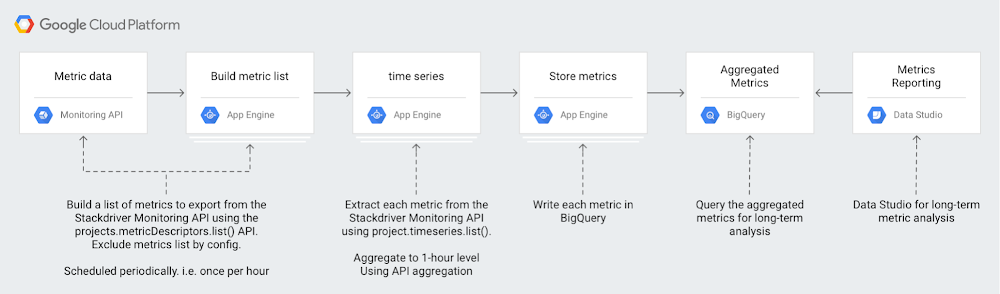
Our Stackdriver Monitoring tool works on Google Cloud Platform (GCP), Amazon Web Services (AWS) and even on-prem apps and services with partner tools like Blue Medora’s BindPlane. Monitoring keeps metrics for six weeks, because the operational value in monitoring metrics is often most important within a recent time window. For example, knowing the 99th percentile latency for your app may be useful for your DevOps team in the short term as they monitor applications on a day-to-day basis.However, there’s a lot of value in a longer-term analysis over quarters or years. That long-term analysis may reveal trends that might not be apparent with short-term analysis. Analyzing longer-term Monitoring metrics data may provide new insights to your DevOps, infrastructure and even business teams. For example, you might want to compare app performance metrics from Cyber Monday or other high-traffic events against metrics from the previous year so you can plan for the next high-traffic event. Or you might want to compare GCP service usage over a quarter or year to better forecast costs. There might also be app performance metrics that you want to view across months or years.With our new solution guide, you can understand the metrics involved in analyzing long-term trends. The guide also includes a serverless reference implementation for metric export to BigQuery.Creating a Stackdriver reference architecture for longer-term metrics analysisHere’s a look at how you can set up a workflow to get these longer-term metrics:Monitoring provides a time series list API method, which returns collected time series data. Using this API, you can download your monitoring data for external storage and analysis. For example, using the Monitoring API, you could download your time series and then store it in BigQuery for efficient analysis.Analyzing metrics over a larger time window means that you’ll have to make a design choice around data volumes. Either you include each individual data point and incur the time and cost processing of each one, or you aggregate metrics over a time period, which reduces the time and cost of processing at the expense of reduced metrics granularity.Monitoring provides a powerful aggregation capability in the form of aligners and reducers available in the Monitoring API. Using aligners and reducers, you can collapse time-series data to a single point or set of points for an alignment period. Selecting an appropriate alignment period depends on the specific use case. One hour provides a good trade-off between granularity and aggregation.Each of the Monitoring metrics have a metricKind and a valueType, which describe both the type of the metric values as well as what the values represent (i.e., DELTA or GAUGE values). These values determine which aligners and reducers may be used during metric aggregation.For example, using an ALIGN_SUM aligner, you can collapse your App Engine http/server/response_latencies metrics for each app in a given Stackdriver Workspace into a single latency metric per app per alignment period. If you don’t need to separate the metrics by their associated apps, you can use an ALIGN_SUM aligner combined with a REDUCE_PERCENTILE_99 reducer to collapse all of your App Engine latency metrics into a single value per alignment period, as shown here:For more considerations on metrics, metric types, and exporting to BigQuery for analysis, check out our solution guide.Be sure to let us know about other guides and tutorials you’d like to see using the “Send Feedback” button at the top of the solution page. And you can check out our full list of how-to solutions for all GCP products.
Quelle: Google Cloud Platform

Cloud Filestore powers high-performance storage for ClioSoft's design management platform

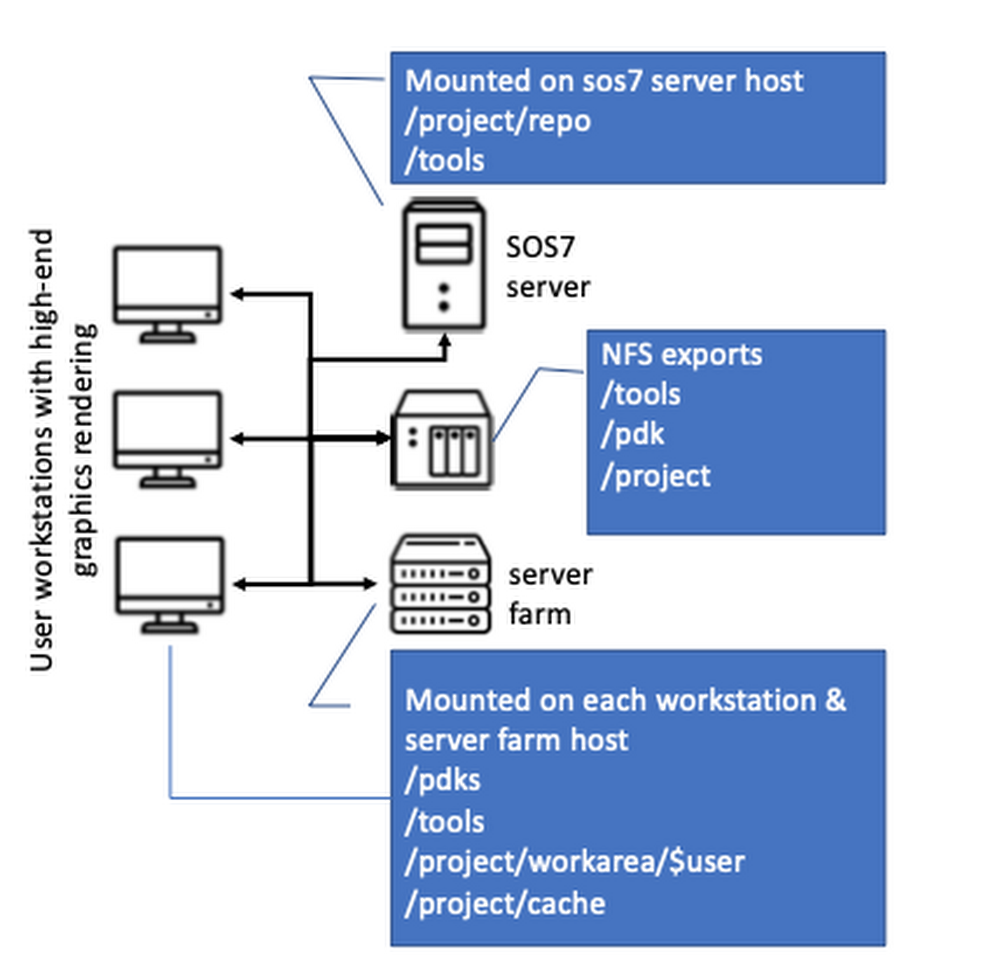
Editor’s note: As we see computing and data needs grow exponentially, we’re pleased to hear today from ClioSoft, which offers system-on-chip (SoC) design data and IP management solutions. Their platform is used widely in the semiconductor industry. Running ClioSoft’s SOS7 design management platform on Google Cloud Filestore is simple and can provide great performance.Along with hearing ClioSoft’s story, we’re also excited that Cloud Filestore is now generally available. Read on for details on how ClioSoft tested Cloud Filestore against typical on-premises performance for its customer needs. Learn more here about Cloud Filestore.Integrated circuits (ICs) powering today’s automotive, mobile and IoT applications are enormously powerful and complex. To develop an IC, design teams often undergo an extended engineering and testing process. They’re often faced with tight schedules to bring products to market and compete with consumer demands, and are borrowing the best practices of software design to speed development.However, IC design environments are notably different than software design environments because they rely heavily on shared files. A typical design engineer’s work area consists of large number of binary files, which tend to be rather large, often numbering in GB size. These files are often generated by electronic design automation (EDA) tools. Some of these files are generated only a few times during the life of the project, but used by almost all members of the project very often. In addition, there are usually third-party libraries and process design kits (PDKs) that the entire team relies on for practically each simulation or verification run. This setup requires a lot of high-performance storage to be accessible on several compute machines, and the productivity of teams designing integrated circuits can easily be impacted without enough high-performance storage.We know from what our customers tell us that optimization of storage resources is one of the top criterion in the design environment, since the design data size is so large. Our SOS7 design management platform creates shared smart cache areas where all design files not being modified are hosted. User access to these design files is provided by tool-managed Linux symbolic links in the user’s working directory. This is one key feature used by most of our customers to create links to the cache workspace, since it can help reduce up to 90% of the design team’s storage requirements.We’re always eager to optimize the user’s design environment, so we used Google’s Cloud Filestore, recently made generally available, to replicate a typical IC design environment in the cloud with high performance.Using a typical IC design environmentA typical design environment that we see design automation teams use successfully looks like this:The environment generally works this way:The high-performance NAS file server exports volumes using NFS protocolEach machine (servers and workstations) mounts the NAS-exported NFS volumesWorkstations rendering high-end graphics and the server access large data stored on the NFS volumes for typical activitiesDesign tools, such as layout editors, require rendering complex graphics displaying millions of polygons. The responsiveness of the toolset directly affects user experience. Another challenge of this on-premises setup is that shared NFS/NAS drives can easily be a bottleneck. Local drives offer strong performance, but the complex logistics involved in replicating a large amount of ever-changing data on several local drives means it’s not a practical solution for most customers.Setting this design environment up in the cloud brings the promise of high scalability, high availability, and reliability that is difficult (if not impossible) to achieve with an in-house design environment. The challenge, however, is how this complex design environment can be replicated and perform in the cloud.Using a cloud-based IC design environmentWe tried recreating a typical design environment using Google Cloud Platform (GCP), specifically Cloud Filestore and Compute Engine, to see if IaaS is viable. You can see how we set up the environment here:Setting up the GCP environmentWe set up Cloud Filestore and the Compute Engine instances using the web interface. We used readily available documentation to set up the environment in a couple of days, shown here:Once the Cloud Filestore instance was available, we simply needed to:1. Install nfs-utils> yum install nfs-utils2. Add the following line to /etc/fstab on the Compute Engine instances10.198.128.10:/us_central1_nas  /nfs_driv nfs defaults 0 03. Run the Unix mount command.> mount -aThe data shared on the Cloud Filestore instance was available on the Compute Engine instances, ready to use.We started our SOS primary and cache services and used the SOS client to create design workspaces on the Cloud Filestore instance. We were also able to create links-to-cache workspaces, which is a key requirement for our customers. A typical EDA environment with SOS design management was up and fully functional in a short time. We needed only a basic ISP-powered network and open-source tools like VNC for remote access.Cloud performance testingWe also ran a couple of test suites to simulate typical design management operations that a team would do during the course of a project. The SOS7 test suites 13K and 74K are a part of ClioSoft’s benchmarking that simulates typical customer workflows. Both these design suites represent design activity on an image sensor chip used to develop high-resolution, low-light devices.We ran these test suites against an on-premises network that we built to emulate the design environments at a typical ClioSoft customer.The following table shows some performance results, with our cloud design environment on GCP running up to 75% faster. Note that this isn’t an apples-to-apples comparison, since the results are highly dependent on the on-premises infrastructure and the GCP configuration.We noticed in benchmark testing that there was a positive effect on performance as the data moved from a local drive to a shared drive. In a typical customer environment, NAS/NFS shared drives are often the primary bottleneck affecting EDA tool performance. Tools perform much better if the on-premises environments use local disks instead of shared NFS/NAS filers. However, the complex logistics involved in replicating large amounts of quickly changing data on several local drives means it’s not a practical solution for most customers. The following table quantifies and compares performance degradation on a shared drive (NAS/Cloud Filestore) as compared to a local drive [direct-attached storage (DAS)].Performance degrades by almost 3x when an on-premises network uses shared NFS/NAS storage. The most notable discovery was that Cloud Filestore provides a near-local drive performance level while providing all the benefits of a shared drive.We found that using GCP with Cloud Filestore is a viable solution to replicate a typical IC design environment in the cloud. It brings high performance, high reliability and high availability to the design environment. The performance comparison between an on-premises network and GCP isn’t exactly one-to-one—the compute resources available in these environments are significantly different. However, the fact that there is virtually no difference between running these design tools on standard persistent disk and Cloud Filestore is a big discovery if you’re implementing an IC design environment.Find out more here about designing integrated circuits with ClioSoft SOS7, and learn more here about Cloud Filestore.Looking for the similarly named Cloud Firestore? Learn about that NoSQL database here.
Quelle: Google Cloud Platform

Deploy and run the Couchbase database on Kubernetes through the GCP Marketplace

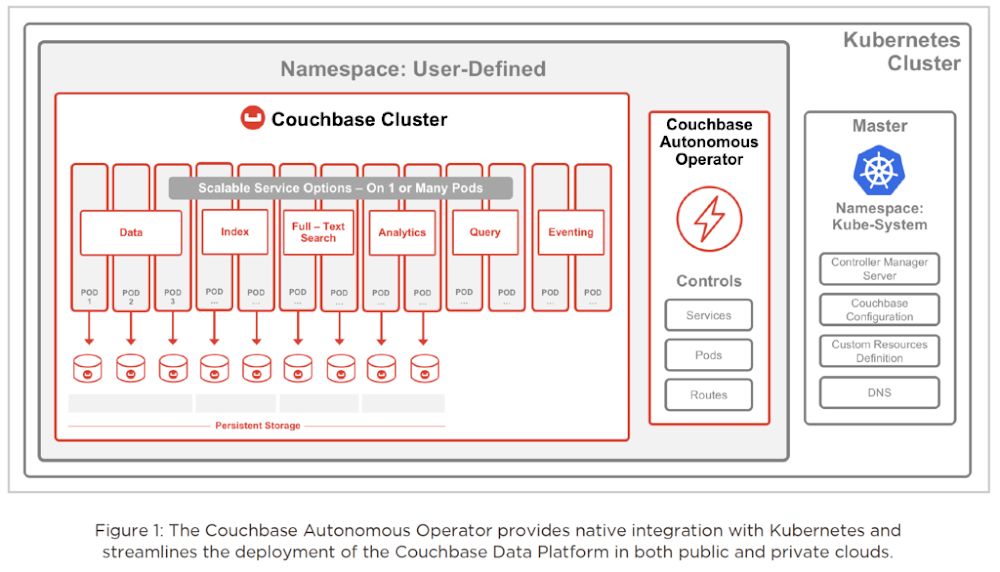
Editor’s note: Today we’re hearing from Couchbase, a database partner that’s built a NoSQL, open source-centric database that can run on Kubernetes. Read on for more about their architecture and how developers use their technology.Building and running modern web, mobile, and IoT applications has created a new set of technology requirements. Relational databases don’t work for these new requirements, because these apps need better agility, scalability, and performance than is possible when a database is tied to a single physical/VM instance. So we’ve seen many enterprises turning to NoSQL database technology, since it’s designed to manage unstructured and semi-structured data like web content, multimedia files, XML, and more.Couchbase Server is a scale-out NoSQL database that’s designed for containerized, multi-cloud/hybrid-cloud, microservices-based infrastructures. The core architecture is designed to simplify building modern applications with a flexible data model, a SQL-based query language, and a secure core database platform designed for high availability, scalability, and performance. We’ve seen developers build asset tracking, content management, file service and other apps on Couchbase because it lets them iterate fast, read and write JSON documents, get low-latency access to data, and support millions of concurrent users. Plus, using this type of NoSQL database means they can support global users at any time, and deploy into multiple data centers with an active-active configuration.Couchbase is the first NoSQL vendor to have a generally available, production-certified operator for Kubernetes platforms such as Google Kubernetes Engine (GKE). The Couchbase Autonomous Operator lets you more quickly adopt the Couchbase database in production to build microservices-based apps. From there, DevOps teams can focus on code, not infrastructure, and build better user experiences.   Using the Couchbase Autonomous OperatorManaging stateful applications such as Couchbase Server and other databases in containers is a challenge, since it requires application domain knowledge to correctly scale, upgrade, and reconfigure, while also protecting against data loss and unavailability. We decided to build this application-specific operational knowledge into our software that uses the Kubernetes abstractions to help run and manage the application correctly.The goal of the Couchbase Autonomous Operator is to fully self-manage one or more Couchbase deployments so that you don’t need to worry about the operational complexities of running Couchbase. Not only is the Couchbase Autonomous Operator designed to automatically administer the Couchbase cluster, it can also self-heal, self-manage and automatically upgrade the cluster according to Couchbase best practices. Developers end up with more time to spend on the app itself, and have full control over the database and data.  The Couchbase Autonomous Operator architecture consists of server pods, services, and volumes. When a Couchbase cluster gets deployed, the operator creates additional Kubernetes resources to facilitate its deployment. The resources originating from the Couchbase Autonomous Operator are labeled to make it easier to list and describe the resources belonging to a specific cluster. You can see here how the Couchbase Autonomous Operator works and integrates with Kubernetes.Getting started with Couchbase and GCPHere’s a look at more on using Couchbase:You can deploy Couchbase on GKE quickly through the GCP Marketplace for Kubernetes. Once you stand up a Couchbase cluster using Kubernetes, it’ll automatically be monitored and managed on top of GKE and GCP. With this support for Kubernetes and containers, you can now deploy applications more frequently and efficiently with faster load times. You can adopt this GKE and Couchbase microservices architecture for both stateful and stateless workloads, and run databases in containers along with the rest of your services in the same Kubernetes platform.We aim to make management of Couchbase clusters a thing of the past so that users can spend time building applications instead of managing their infrastructure.Kubernetes applications (like Couchbase Autonomous Operator) available in GCP Marketplace are the fastest way for GCP users to run end-user applications optimized for GKE. Visit GCP Marketplace today to set up a Couchbase cluster on GKE or take a test drive, or learn more about getting Couchbase up and running through the GCP Marketplace.
Quelle: Google Cloud Platform

Using advanced Kubernetes autoscaling with Vertical Pod Autoscaler and Node Auto Provisioning

Editor’s note: This is one of the many posts on unique differentiated capabilities in Google Kubernetes Engine (GKE). Find the first post here for details on GKE Advanced.Whether you run it on-premises or in the cloud, Kubernetes has emerged as the de facto tool for scheduling and orchestrating containers. But while Kubernetes excels at managing individual containers, you still need to manage both your workloads and the underlying infrastructure to make sure Kubernetes has sufficient resources to operate (but not too many resources). To do that, Kubernetes includes two mature autoscaling features: Horizontal Pod Autoscaler for scaling workloads running in pods, and Cluster Autoscaler to autoscale—you guessed it—your clusters. Here is how they relate to one another:GKE, our cloud-hosted managed service, also supports Horizontal Pod Autoscaler and Cluster Autoscaler. But unlike open-source Kubernetes, where cluster autoscaler works with monolithic clusters, GKE uses node pools for its cluster automation. Node pools are a subset of node instances within a cluster that all have the same configuration. This lets administrators provision multiple node pools of varying machine sizes within the same cluster that the Kubernetes scheduler then uses to schedule workloads. This approach lets GKE use the right size instances from the get-go to avoid creating nodes that are too small to run some pods, or too big and waste unused compute space.Although Horizontal Pod Autoscaler and Cluster Autoscaler are widely used on GKE, they don’t solve all the challenges that a DevOps administrator may face—pods that are over- or under-provisioned for CPU and RAM, and clusters that don’t have the appropriate nodes in a node pool with which to scale.For those scenarios, GKE includes two advanced features: Vertical Pod Autoscaler, which automatically adjusts a pod’s CPU and memory requests, and Node Auto Provisioning, a feature of Cluster Autoscaler that automatically adds new node pools in addition to managing their size on the user’s behalf. First introduced last summer in alpha, both of these features are now in beta and ready for you to try out as part of the GKE Advanced edition, introduced earlier this week. Once these features become generally available, they’ll be available only through GKE Advanced, available later this quarter.Vertical Pod Autoscaler and Node Auto Provisioning in actionTo better understand Vertical Pod Autoscaler and Node Auto Provisioning, let’s look at an example. Helen is a DevOps engineer in a medium-sized company. She’s responsible for deploying and managing workloads and infrastructure, and supports a team of around 100 developers who build and deploy around 50 various services for the company’s internet business.The team deploys each of the services several times a week across dev, staging and production environments. And even though they thoroughly test every single deployment before it hits production, the services are occasionally saturated or run out of memory.Helen and her team analyze the issues and realize that in many cases the applications go out of memory under a heavy load. This worries Helen. Why aren’t these problems caught during testing? She asks her team about how the resource requests are being estimated and assigned, but to her surprise, finds that no one really knows for sure how much CPU and RAM should be requested in the pod spec to guarantee the stability of workload. In most cases, an administrator set the memory request a long time ago and never changed it…until the application crashed, and they were forced to adjust it. Even then, adjusting the memory request isn’t always a systematic process—sometimes the admin regularly tests the app under heavy load, but more often they simply add some more memory. How much memory exactly? Nobody knows.In some ways, the Kubernetes CPU and RAM allocation model is a bit of a trap: Request too much and the underlying cluster is less efficient; request too little and you put the entire service at risk. Helen checks the GKE documentation and discovers Vertical Pod Autoscaler.Vertical Pod Autoscaler is inspired by a Google Borg service called AutoPilot. It does three things:1. It observes the service’s resource utilization for the deployment.2. It recommends resource requests.3. It automatically updates the pods’ resource requests, both for new pods as well as for current running pods.A functional schema of the GKE Vertical Pod AutoscalerBy turning on Vertical Pod Autoscaler, deployments won’t run out of memory and crash anymore, because every pod request is adjusted independently of what was set in the pod spec. Problem solved!Vertical Pod Autoscaler solves the problem of pods that are over- or under-provisioned, but what if it requests far more resources in the cluster? Helen returns to the GKE documentation, where she is relieved to learn that Cluster Autoscaler is notified ahead of an update and scales the cluster so that all re-deployed pods find enough space in the cluster. But what if none of the node pools has a machine type big enough to fit the adjusted pod? Cluster Autoscaler has a solution for this too: Node Auto Provisioning automatically provisions an appropriately sized node pool if it is needed.Putting GKE autoscaling to the testHelen decides to set up a simple workload to familiarize herself with Vertical Pod Autoscaling and Node Auto Provisioning. She creates a new cluster where both are enabled.Helen knows that by activating this functionality at cluster creation time, she is making sure that both features are available to that cluster—she won’t need to enable them later.Helen deploys a simple shell script that uses a predictable amount of CPU. She sets her script to use 1.3 CPU, but only sets cpu: “0.3” in the pod’s resource request.Here is the manifest:deployment.yamlAnd here is how she creates the deployment.Please note that at this point no Vertical Pod Autoscaler is active on the deployment. After a couple of minutes Helen checks what is happening with her deployment. Apparently both of the deployed pods went way above allotted CPU, consuming all of the processing power of their respective nodes—much like what happens with some of the company’s production deployments.Helen decides to explore what happens if she enables Vertical Pod Autoscaler. First, she enables it in recommendation mode, without it taking any action automatically. She constructs a vpa.yaml file and creates a Vertical Pod Autoscaler in “Off” mode.vpa.yamlCreate Vertical Pod Autoscaler:She waits a couple of minutes and then asks it for recommendations.After observing the workload for a short time, Vertical Pod Autoscaler provides some initial low-confidence recommendations for adjusting the pod spec, including the target as well as upper and lower bounds.Then, Helen decides to enable the automatic actuation mode, which applies the recommendation to the pod by re-creating it and automatically adjusting the pod request. This is only done when the value is below the lower bound of the recommendation and only if allowed by the pod’s disruption budget.vpa_auto.yamlNote: This could also have been done using kubectl edit vpa and changing updateMode to Auto on the fly.While Vertical Pod Autoscaler gathers data to generate its recommendations, Helen checks the pods’ status using filters to look just at the data she needs.To Helen’s surprise, the cluster that had been running only one-core machines is now running pods with 1168 mCPU.Using Node Auto Provisioning, Cluster Autoscaler created two high-CPU machines and automatically deployed pods there. Helen can’t wait to run this in production.Getting started with Vertical Pod Autoscaling and Node Auto ProvisioningManaging a Kubernetes cluster can be tricky. Luckily, if you use GKE, these sophisticated new tools can take the guesswork out of setting memory requests for nodes and sizing your clusters. To learn more about Vertical Pod Autoscaler and Node Auto Provisioning, check out the GKE documentation, and be sure to reach out to the team with questions and feedback.Have questions about GKE? Contact your Google customer representative for more information, and sign up for our upcoming webcast, Your Kubernetes, Your Way Through GKE.
Quelle: Google Cloud Platform