Cloud Run: Bringing serverless to containers

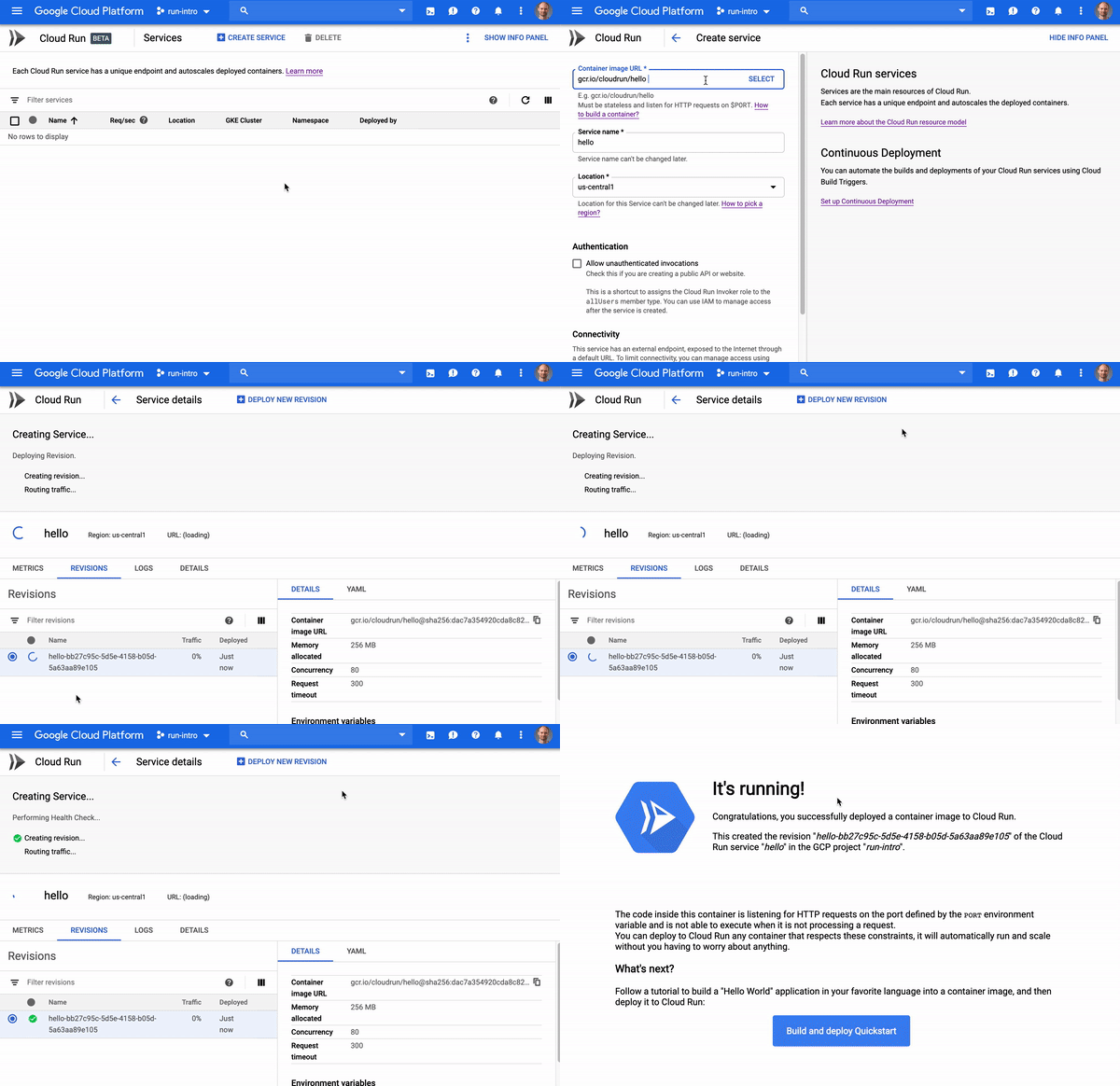
Developers love serverless. With serverless, you can focus on code, deploy it, and let the platform take care of the rest—all while only paying for exactly what you use. But traditional serverless solutions can limit what programming languages you can use, or require you to organize our code around functions.At Google Cloud Next 2019, we launched Cloud Run, a serverless compute platform that lets you run any stateless request-driven container on a fully managed environment. In other words, with Cloud Run, you can take an app—any stateless app—containerize it, and Cloud Run will provision it, scale it up and down, all the way to zero!Check out how easy it is to get started and deploy your first container to the fully managed version of Cloud Run:Cloud Run is unique among serverless platforms, and brings a number of benefits:Do less work with a fully managed solution: With Cloud Run, you can forget about provisioning or managing infrastructure—it does that for you. Cloud Run automatically and quickly scales up or down based on your incoming traffic, and even scales down to zero. In addition, each Cloud Run service gets a stable and secure HTTPS endpoint, and you can easily add your own custom domain for which we automatically provision an SSL certificate. And if you need an easy way to serve static content or cache responses, Cloud Run integrates with Firebase Hosting.Pay exactly for what you use: Cloud Run charges you for the resources you use only when your containers are processing requests or events, billed to the nearest 100 milliseconds.Serve web traffic, or process Pub/Sub events: Run publicly accessible web services or APIs, or securely push Pub/Sub events to private Cloud Run microservices.Leverage the power of containers: Containers have become an industry standard for packaging and deploying code, and let you write your code in your favorite language, with whatever framework or binary library that works for you. If you’re not familiar with containers, don’t be scared; Cloud Run includes official base images for all the most popular languages, and there are examples of Dockerfiles in the documentation.Enjoy the portability that comes with Knative: Cloud Run implements the Knative serving API, an open-source project to run serverless workloads on top of Kubernetes. That means you can deploy Cloud Run services anywhere Kubernetes runs. And if you need more control over your services (like access to GPU or more memory), you can also deploy these serverless containers in your own GKE cluster instead of using the fully managed environment.On a run since Google Cloud Next’19Since it launched in April, Cloud Run has gotten a terrific reception from developers. Early adopters tell us that deploying their favorite apps on Cloud Run “just works.””Cloud Run allows us to access, process and serve large amounts of imagery data stored in Google Cloud Storage, with the freedom to use our own custom toolchains and without having to worry about scaling the service to the real time load.” – Thomas Bonfort, R&D Earth Observation Software Engineer at Airbus, and Cloud Run alpha testerEarly Cloud Run alpha testers and then beta users have provided valuable feedback to help us shape and improve the product. Today, we are pleased to launch several new features to address your top requests:Cloud SQL supportWith one configuration change, you can now  securely and privately connect your Cloud Run services to Cloud SQL instances. Read more in the documentation.Metrics at a glanceAs Cloud Run developers, you have been able to benefit from out-of-the-box integration with Stackdriver Logging and Monitoring. But you do not always need the full power of Stackdriver tools. Starting today, the Cloud Run user interface features several key performance indicators, such as:Comparing the average number of requests per second in the Cloud Run service listObserving request counts, request latencies, CPU and Memory allocation in a dedicated tab of the Cloud Run service viewNew regionsInitially offered only in the U.S., we’ve also seen great adoption of Cloud Run among developers in other parts of the world. That’s why we are very happy to announce that we will start Cloud Run’s regional expansion within the next few weeks, starting by opening new regions in Europe and Asia.Learn moreTake our quickstart to deploy your first container to Cloud Run in seconds. For a deep dive on Cloud Run’s features and characteristics, check out my session at Google Cloud Next 2019:We can’t wait to see what you’ll build with Cloud Run!
Quelle: Google Cloud Platform
No comparison: How MoneySuperMarket is using Google Cloud to turn their data into competitive differentiators

When customers in the UK want to compare prices for things like car insurance, home insurance, credit cards, and loans, they increasingly turn to MoneySuperMarket. With 13 million active users across the UK, MoneySuperMarket has become the country’s go-to price comparison website, saving its customers an estimated £2 billion a year. Its parent company, Moneysupermarket Group, comprises other popular brands like MoneySavingExpert, TravelSupermarket, and Decision Tech, and is an established member of the FTSE 250 index.When customers use price comparison websites, they expect results that are fast and personalized to their unique needs. As a result, these price comparison sites can be complex to manage, with many moving parts that must work in unison. And with the breadth of MoneySuperMarket’s offerings, and the growing size of its business, it found that handling data became a bigger challenge.In 2014, with growing traffic numbers and increasing popularity, Moneysupermarket Group found that its on-premises data warehouse was limiting its ability to scale quickly. As a result, it shifted to the cloud to mitigate the costs of storage, but still kept hold of its existing on-premises analytics solution. But as its data needs continued to grow, Moneysupermarket Group realized it needed to shift its analytics to the Google Cloud as well for the flexibility, scalability and ease of use it offers.To make the change, Moneysupermarket Group used Cloud Data Transfer to extract its data to Cloud Storage buckets. From there, it used Google Kubernetes Engine (GKE) and Cloud Pub/Sub to orchestrate a process through containerized applications that cleans the data and loads it into BigQuery. Moneysupermarket Group also expanded its use of BigQuery as its cloud data warehouse, storing additional types of information such as events data from customer actions on touch points from different products and services,The flexibility of GKE allows Moneysupermarket Group to use it for several other projects, including machine learning (ML) and web-facing APIs—using Python and mostly XGBoost as the ML classifier in the container application code. For example, it uses ML to serve its personalized customer recommendations, and GKE forms the backbone of the ML model training and inference pipelines. Each task in the model training pipeline—data extraction, feature engineering, model training, and model evaluation—runs as containerized applications in GKE and is orchestrated with Cloud Composer. The ML pipeline solution is automated, so it’s fast, requires little manual intervention, and easily scales to build multiple models for millions of customers. Using containerized applications for each pipeline task allows data scientists to make frequent incremental improvements through continuous integration and continuous deployment (CI/CD) practices with less fear than when they had the on-prem analytics solutions.“With Google’s leadership in the Kubernetes ecosystem, Google Cloud delivers enterprise solutions, like Google Kubernetes Engine, based on their own learnings running services at scale,” says Harvinder Atwal, Head of Data Strategy and Advanced Analytics at Moneysupermarket Group. “This felt like the perfect fit for our data needs, as GKE features advanced networking, security, and operations support to reliably address our needs.”With its new analytics platform, MoneySuperMarket has benefited most from the speed of development and running big tasks. In Harvinder’s own words, the most notable change has been the deployment time for its machine learning pipelines. “We went from eleven hours down to about five minutes,” he says. That meant that the models could be updated every day instead of once a week, which, in turn, led to more relevant communications and offers, ultimately helping customers to save more money.More than80% of Google Cloud’s largest customers use GKE to run their workloads in production, and over 40% of GKE clusters are running stateful workloads. And the recent introduction of GKE Advanced offers enhanced features that make it ideal for large enterprises. To learn more, visit cloud.google.com/kubernetes-engine.
Quelle: Google Cloud Platform

Google Cloud networking in depth: Faster, more reliable connectivity with HA VPN and 100 Gbps Dedicated Interconnect

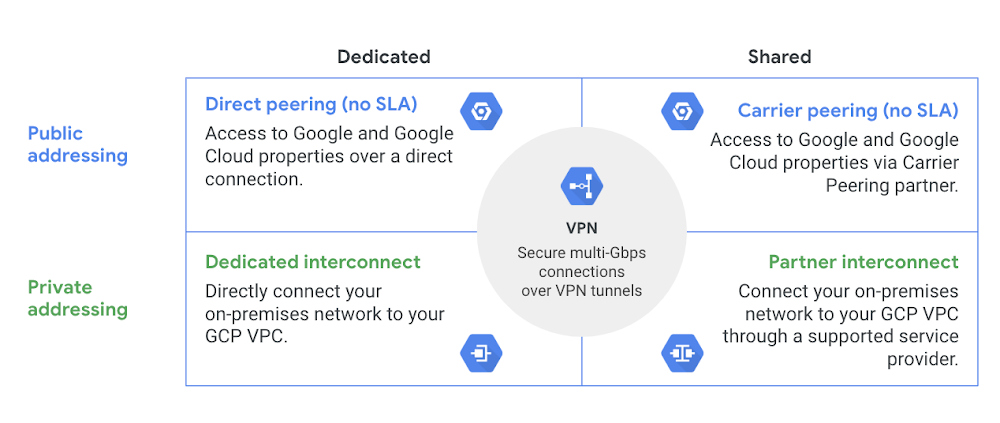
Editor’s note: Fresh off several additions to the Google Cloud networking stack at Next ‘19, here’s the latest installment in our blog series exploring the five pillars of the portfolio: ‘Connect,’ ‘Scale,’ ‘Secure,’ ‘Optimize’ and ‘Modernize.’ Today, we do a deep dive into our recent Cloud Interconnect and VPN announcements. Stay tuned in the coming weeks as we explore the Google Cloud networking pillars in depth.Regardless of your company’s size, budget, or specific cloud needs, Google Cloud has a solution for connecting your infrastructure to our cloud, whether it’s a high performance option such as Cloud Interconnect (Dedicated/Partner), Cloud VPN for lower bandwidth needs, or Direct/Carrier peering for easy access to G Suite.High Availability VPN with a 99.99% SLARegardless of which connectivity option you use, you probably also use Cloud VPN to securely connect your on-premises environment to Google Cloud Platform (GCP). At Next ‘19, we announced an advanced VPN option for customers with mission-critical connectivity requirements: High Availability (HA) VPN, now in beta. With HA VPN, enterprises can connect their on-premises deployment to a GCP Virtual Private Cloud (VPC) with an industry-leading SLA of 99.99% at general availability, plus simplified setup compared to creating redundant VPNs.With its 99.99% SLA, HA VPN adds a whole extra ‘nine’ of availability over our traditional Cloud VPN. But what does that mean in practice? The table below shows the maximum allowed monthly and annual downtimes for different SLA levels.In other words, with the 99.99% SLA offered by HA VPN, you get a significantly lower allowed downtime/unavailability—up to 4.5 minutes of monthly downtime or 53 minutes annually. This is currently the highest SLA and uptime guarantee of any public cloud provider.Technical architectureHA VPN includes a new high availability VPN gateway with two interfaces (interface 0, interface 1), each with its own external IP address. This architecture is designed to have no single point of failure at the VPN backend. Each region has two sets of IP blocks (shards) with totally independent network routing stacks. HA VPN uses separate IP pools per region, pre-allocated for each shard. Customers create two tunnels from the two interfaces to their on-prem VPN gateway, and HA VPN ensures these redundant tunnels are on different blocks – ensuring a resilient architecture.Deployment optionsYou can use HA VPN in two modes: Active/Active, in which both redundant tunnels carry traffic under normal operation, or Active/Passive, in which one tunnel actively carries traffic while the other one acts as a backup. Tunnels connected to the new gateways must use dynamic (BGP) routing, and you can configure these modes by changing route priorities (MED). To ensure there is no traffic loss in case of failure, we recommend that you deploy HA VPN in an Active/Passive setup, such that the passive tunnel can take over all traffic from the active tunnel during a failure. If you select an Active/Active configuration, you must make sure that the combined traffic for both tunnels is within the capacity of one tunnel to provide a consistent bandwidth experience during a failure.Compare HA VPN to the traditional approach of achieving high availability with classic VPN: by manually creating a redundant VPN. In addition to providing a higher SLA, HA VPN makes it easy to set up redundant VPNs that seamlessly and automatically fail over their traffic to the second tunnel in the event of a failure.Move data faster with 100 Gbps InterconnectAnother announcement we made at Next ‘19 was 100 Gbps Dedicated Interconnect, which enables and accelerates bandwidth-heavy applications with 10X the circuit bandwidth for your hybrid and multi-cloud deployments.Utilizing Google Cloud Storage for archiving or disaster recovery or performing massive data processing with BigQuery can require a lot of bandwidth. The following table illustrates the speed gains when upgrading from 10 Gbps to 100 Gbps. Depending on the size of the dataset, applications that were not possible at 10 Gbps (daily backup of 100 TB of data, estimated at 30 hours) become possible at 100 Gbps (three hours).Enable secure connectivity at high speedCloud Interconnect also lets you directly connect your on-prem networks to GCP’s network without traversing the public internet, thus increasing speed and security.With Dedicated Interconnect, you can meet with Google’s peering edge directly through your router in order to connect to GCP workloads using our large global private network. Dedicated Interconnect is available at either 10 Gbps or 100 Gbps, and you can configure multiple links as a Link Aggregation Group (LAG) for even higher bandwidth (lower bandwidth connections are available through partners for less bandwidth-intensive applications). This solution also allows you to extend your on-prem or datacenter networks to GCP using RFC1918 addresses, simplifying hybrid cloud deployments.For more information about Dedicated Interconnect, including connectivity requirements, 99.99% vs. 99.9% availability and a list of colocation facilities where you can meet Google, please see the Dedicated Interconnect Overview page.Let’s connectHA VPN and 100 Gbps Dedicated Interconnect are just the latest examples of how we’re working to give you the right options to connect your business to GCP. Let us know how you plan to use these new networking services and what capabilities you’d like in the future. You can learn more about GCP’s cloud networking portfolio online and reach us at gcp-networking@google.com.
Quelle: Google Cloud Platform

How Grasshopper uses BigQuery and Cloud Dataflow for their real-time financial data app

For the past year, we’ve been working with Grasshopper, a proprietary trading firm based in Singapore, to scale its custom-built data processing platform. Grasshopper’s technology powers their use of time-series data in financial markets, providing information to evaluate liquidity or liquidity risks in those markets. The firm uses Google Cloud Platform (GCP) extensively to store, process and analyze large volumes of real-time market and trading data globally. It specifically uses BigQuery and Cloud Dataflow to make near real-time trading decisions and develop trading strategies. Solace PubSub+ event brokers move events dynamically and in real time, to and from BigQuery via Cloud Dataflow.Grasshopper’s primary goal in adopting GCP was to improve and scale its quantitative research capabilities by creating a research infrastructure accessible to team members that doesn’t limit their work. The firm needed reliable, accurate and stable data processing pipelines.Grasshopper’s small team has to use technology strategically. Grasshopper designed Ahab, an Apache Beam-based Java application, as a high-performance data processing pipeline that uses real-time market data to calculate the value of the order book—a dynamic list of buy and sell orders that dictates stock pricing—from real-time market data received from multiple stock exchanges. The order book is the foundation for many trading and analytics applications. Ahab then ingests the end result to BigQuery, GCP’s fully managed data processing and analysis tool, utilizing the tool’s availability and scalability.Before Ahab, Grasshopper relied on a solution developed in-house on Cassandra. The operational burden to maintain this technology stack, add new features and scale fast enough to meet future needs was extremely difficult to manage, particularly without a dedicated team to handle both the required infrastructure and applications. Grasshopper shifted to GCP to design and build Ahab, allowing the firm’s data engineering team to focus on data science rather than infrastructure maintenance.Grasshopper’s quantitative analysts (known as quants) rely on the ability to process huge amounts of data in a precise and accurate way, to interact with rapidly changing financial markets. This allows for their trading research platforms to scale according to market conditions. For example, when markets are more volatile and produce more market data, the analysts have to be able to adjust accordingly. This solution allows the team to know that the data is reliable, correct and scalable, without having to worry about capacity or performance limitations.Grasshopper’s team built Ahab to meet several goals:To transport data from its on-premises environment to GCP;To persist the vast volumes of market data received into BigQuery in query-able form so that Grasshopper’s traders can analyze and transform the data based on their needs;To confirm the feasibility of using Apache Beam to calculate the order books in real time and store them on a daily basis from financial market data feeds; andUltimately, to allow traders to improve their probability of success when the strategies are deployed.Here’s an overview of how Ahab works to gather and process data:Gathering source data from financial marketsGrasshopper uses data sourced from its co-located environment, where the stock exchange allocates rack space so financial companies can connect to that platform in the most efficient, lowest-latency way. Grasshopper has been using Solace PubSub+ appliances at the co-located data centers for low-latency messaging in the trading platform. Solace PubSub+ software running in GCP natively bridges the on-premises Solace environment and the GCP project. Market data and other events are bridged from on-premises Solace appliances to Solace PubSub+ event brokers running in GCP as a lossless, compressed stream. Some event brokers are on-premises, while others are on GCP, creating a hybrid cloud event mesh and allowing orders published to the on-prem brokers to flow easily to the Solace cloud brokers. The SolaceIO connector consumes this market data stream and makes it available for further processing with Apache Beam running in Cloud Dataflow. The processed data can be ingested into Cloud Bigtable, BigQuery and other destinations, processing in a pub/sub manner.The financial market data arrives into Grasshopper’s environment in the form of deltas, which represent updates to an existing order book. Data needs to be processed in sequence for any given symbol, which requires using some advanced functions in Apache Beam, including keyed state and timers.This financial data comes with specific financial industry processing requirements:Data updates must be processed in the correct order and processing for each instrument is independent.If there is a gap in the deltas, a request must be sent to the data provider to provide a snapshot, which represents the whole state of an order book.Deltas must meanwhile be queued while Ahab waits for the snapshot response.Ahab also needs to produce its own regular snapshots so that clients can query the state of the order book at any time in the middle of the day without applying all deltas since the start-of-day snapshot. To do this, it needs to keep track of the book state.The data provider needs to be monitored so that connections to it and subscriptions to real-time streams of market data can be refreshed if necessary.How Grasshopper’s financial data pipeline worksThere are two important components to processing this financial data: reading data from the source and using stateful data processing.Reading data from the sourceGrasshopper uses SolaceIO, an Apache Beam read connector, as the messaging bus for market data publication and subscriptions. The team at Grasshopper uses Solace topics streaming into Solace queues to ensure that no deltas are lost and no gaps occur. Queues (and topics) provide guaranteed delivery semantics, such that if message consumers are slow or down, Solace stores the messages till the consumers are online, and delivers the messages to the available consumers. The SolaceIO code uses checkpoint marks to ensure that messages in the queues transition from Solace to Beam in a guaranteed delivery and fault-tolerant manner—with Solace waiting for message acknowledgements before deleting them. Replay is also supported when required.Using stateful data processingGrasshopper uses stateful processing to keep an order book’s state for the purpose of snapshot production. The firm uses timely processing to schedule snapshot production and to also check data provider availability. One of this project’s more challenging areas was retaining the state of the market financial instrument across time window boundaries.The keyed state API in Apache Beam let Grasshopper’s team store information for an instrument within a fixed window, also known as a keyed-window state. However, data for the instruments needs to propagate forward to the next window. Our Cloud Dataflow team worked closely with Grasshopper’s team to implement a workflow that let it have the fixed time windows flow into a global window and makes use of the timer API to ensure the Grasshopper team retained the necessary data order.The data processed with Apache Beam is written to BigQuery in day-partitioned tables, which can then be used for further analysis. Here’s a look at some sample data:Sample user acceptance testing data:For deployment and scheduling, Grasshopper uses Docker and Google Cloud Repositories to build, deploy and run the Cloud Dataflow jobs, using Nomad for job scheduling. The firm is also in the process of experimenting with Beam templates as an alternate deployment method.Tips for building fast data processing pipelinesThroughout the process of building the Ahab application, Grasshopper’s team learned some valuable lessons. Here are some tips:Increase throughput by dividing up topic subscriptions across more queues and more SolaceIO sources. Dataflow will also spin up more resources with its auto-scaling feature when needed.Use available tools to track the order book status. Since keyed state in Beam aligns to the “group by” key (in this case, the instrument), and window of time, Grasshopper uses the global window to keep track of the order book state. Employ panes to trigger incremental processing of deltas; use a bag state plus sorting to deal with out-of-order arrival of deltas within panes when in the global window.Rely on templates to separate pipeline graph construction and execution, simplifying deployment. Apache Beam’s ValueProvider isn’t an applicative functor; Grasshopper had to write its own implementation to combine multiple ValueProviders.Include all the data you need up front, as display data is set at pipeline construction time and cannot be deferred.Co-locate the Cloud Dataflow job coordinator and those teams working on the data pipeline in order to improve throughput, since watermark processing is centralized. Watermarks provide the foundation for enabling streaming systems to emit timely, correct results when processing data.Generate BigQuery schemas automatically with protocol buffers.  Use class variables with get-or-init to share connections across Apache Beam PTransform bundles and even across different instances in the same Java VM. Interesting annotations include DoFn.Setup, DoFn.StartBundle.Note that fusion, an optimization technique, can lead sources to fuse with downstream transforms, delaying checkpoint mark finalization. Try GroupByKey to prevent fusion.Use a counting source to trigger some pipeline setup work.These tools have helped Grasshopper researchers think big about their data possibilities. “Grasshopper researchers’ imaginations aren’t limited by what the infrastructure can do. We’ve resolved their data reliability, data accuracy and stability issues by using GCP,” says Tan T. Kiang, Grasshopper’s CTO. “Internal users can now all work with this data with the knowledge that it’s reliable and correct.”To learn more, check out this example of how to spin up a GCP environment with SolaceIO and Cloud Dataflow. Learn more about using GCP for data analytics.Thanks to additional contributions from: Guo Liang, Nan Li and Zhan Feng.
Quelle: Google Cloud Platform

Launching Kubernetes apps on GCP Marketplace, for GKE, Anthos and beyond

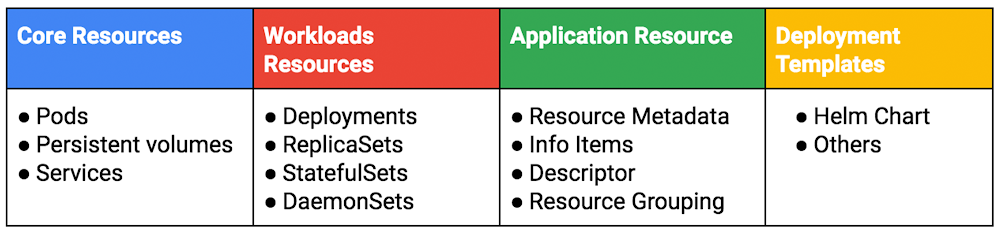
One aspect of digital transformation that gets a lot of attention is application modernization via containers. According to a recent Forrester Research study commissioned by Google1, 75% of enterprise app development leaders are containerizing more of their applications, helping to make developers more productive as they build custom apps and try to speed up release cycles.Whether you want to use commercial software or an open-source project, a great way to boost your app modernization efforts is to use Kubernetes applications—enterprise-ready, easy-to-deploy containerized applications that can run in any Kubernetes environment. We announced the general availability of Kubernetes applications on GCP Marketplace at Google Cloud Next ‘19, and today we are excited to share more details!Kubernetes applications: designed by listening to customersApplication development using containers and Kubernetes can be confusing. The feedback often sounds something like: “Can you make it easier for my developers to use and be productive on Kubernetes?” To make the experience better for new and experienced developers alike, we introduced  “application resource,” in GKE, making it easy to view and manage applications and their components. The deployment mechanism supports popular packaging formats, such as Helm charts, to create the enterprise-ready, easy-to-deploy offerings available on GCP Marketplace today.  Kubernetes applications are more than just container images. Standardizing on an application resource helps us treat a Kubernetes App as a single unit rather than individual core or workload resources. We went even further by supporting a deployer that understands these deployment templates. This means that we have now greatly reduced the complexity in debugging, monitoring and deploying Kubernetes-based apps.Modernize where you areApp development is never limited to just one environment, so we built Kubernetes apps to be as dynamic as your teams. For less complex projects, you can deploy to GKE Standard, and chose GKE Advanced when you need enterprise-grade container orchestration and a financially-backed SLA.Among enterprises, a common strategy is to containerize applications on-premises before moving them to the cloud. Kubernetes apps support this scenario when you run them on Anthos, which lets you build and manage modern hybrid applications across environments. The first wave of apps that supports Anthos is starting to appear in the GCP Marketplace, and we are continually adding more. To see an in-depth demo of how you can use Anthos-based Kubernetes apps to build cloud-native applications, please see our presentation from Next’19. Additionally, we’re adding to the number of Kubernetes apps that support Istio and Stackdriver, for the full, integrated Anthos experience.A strong open source and commercial ecosystemA robust ecosystem is essential to enterprise application development. We offer a wide range of solutions as Kubernetes applications, including security, databases, developer tools, monitoring and more. In addition, we have Google-packaged versions of popular open source solutions such as PostgreSQL and RabbitMQ as well as popular open-source operators such as AirFlow. We’re also the first public cloud to offer commercial Kubernetes apps from Aerospike, Aqua Security, Galactic Fog, Kasten, ManagedKube, Portworx, and Robin.io.We are excited to be able to reach customers that want to automate their software delivery using an easy CI/CD solution for modern cloud-native applications. With CloudBees Core, our Jenkins-based CI/CD Kubernetes application offering, they can now deploy on-prem or in the cloud from GCP Marketplace. Rob Davies, VP Engineering, CloudBeesGCP Marketplace for increased security and enterprise purchasingTo support enterprises that want to purchase Kubernetes apps, we are pleased to now support private pricing agreements between partners and customers, support for annual subscriptions (currently in beta), and like all GCP Marketplace offerings, one consolidated bill for GCP Marketplace solutions and GCP services.  In the aforementioned Forrester study, 62% of app dev leaders prefer to procure containerized applications from a cloud marketplace rather than from a vendor directly. When asked about what advantages they see from using a marketplace to support cloud software development tools, 45% cite increased security. We scan all solutions on GCP Marketplace, including Kubernetes apps, for security vulnerabilities before we list them. Additionally, 75% in the Forrester survey want to try solutions before they buy them, so we now support free trials for Kubernetes apps as well as virtual machine and SaaS offerings.Click to enlargeGet started todayWe’re excited to support your application modernization efforts, whether you’re starting on-prem or in the cloud. Kubernetes applications offer a simple, integrated way to incorporate open source and commercial offerings into your containerized environments. Get started today, and encourage your favorite partners to offer a Kubernetes app on GCP Marketplace.In addition, we have integrated our marketplace with GKE Connect, currently in alpha, letting you connect non-GKE, Kubernetes clusters running on-premises or in other clouds to your GCP project. With this, you can log in, view and interact with Kubernetes workloads running across all of your connected clusters. This helps our partners build once and lets customers run these apps anywhere, on-premises or in the cloud. Sign-up for the alpha program here.Come grow with usDo you want to join the rapidly growing ecosystem of partners and solutions that are powering containerized application development and Anthos? Kubernetes apps offer the unique opportunity to list your solution in GCP Marketplace, and enable your customers to deploy on-prem, on GCP, or even on other clouds. Visit this page for more information.1. Methodology: In this study, Forrester conducted an online survey of 466 companies in seven countries to evaluate the demand for procuring software development applications, tools, and services from cloud marketplaces.Source: A commissioned study conducted by Forrester Research on behalf of Google, November 2018.Base: 466 application development and delivery decision makers in IT and developer roles at global enterprises.
Quelle: Google Cloud Platform

Topping the tower: the Obstacle Tower Challenge AI Contest with Unity and Google Cloud

Ever since Marvin Minsky and several collaborators coined the term “artificial intelligence” in 1956, games have served as both a training ground and a benchmark for AI research. At the same time, in many cultures around the world, the ability to play certain games such as chess or Go has long been considered one of the hallmarks of human intelligence. And when computer science researchers started thinking about building systems that mimic human behavior, games emerged as a natural “playground” environment.Over the last decade, deep learning has driven a resurgence in AI research, and games have returned to the spotlight. Perhaps most significantly, in 2015 AlphaGo, an autonomous Go bot built by DeepMind (an Alphabet subsidiary) emerged as the best player in the world at the traditional board game Go. Since then, the DeepMind team has built bots that challenge top competitors at a variety of other games, including Starcraft.The competitionAs games have become a prominent arena for AI, Google Cloud and Unity decided to collaborate on a game-focused AI competition: the Obstacle Tower Challenge. Competitors create advanced AI agents in a game environment. The agents they create are AI programs that take as inputs the image data of the simulation, including obstacles, walls, and the main character’s avatar. They then provide the next action that the character takes in order to solve a puzzle or advance to the next level. The Unity engine runs the logic and graphics for the environment, which operates very much like a video game.Unity launched the first iteration of the Obstacle Tower Challenge in February, and the reception from the AI research community has been very positive. The competition has received more than 2,000 entries from several hundred teams around the world, including both established research institutions and collegiate student teams. The top batch of competitors, the highest scoring 50 teams, will receive an award sponsored by Google Cloud and advance to the second round.Completing the first round was a significant milestone, since teams had to overcome a fairly difficult hurdle, advancing past several levels of increased difficulty in the challenge. None of these levels were available to the researchers or their agents during training, so the agents had to learn complex behavior and generalize their behavior to handle previously unseen situations.The contest’s second round features a set of additional levels. These new three-dimensional environments incorporate brand new puzzles and graphical elements that force contestant research teams to develop more sophisticated machine learning models. New obstacles may stymie many of the agents that passed the levels from first phase.How Google Cloud can helpDeveloping complex game agents is a computationally demanding task, which is why we hope that the availability of Cloud credits will help participating teams. Google Cloud offers the same infrastructure that trained AlphaGo’s world-class machine learning models, to any developer around the world. In particular we recently announced the availability of Cloud TPU pods, for more information you can read this blog post.All of us at Google Cloud AI would like to congratulate the first batch of successful contestants of the Unity AI challenge, and we wish them the best of luck as they enter the second phase. We are excited to learn from the winning strategies.
Quelle: Google Cloud Platform

Google Cloud networking in depth: Understanding Network Service Tiers

Editor’s note:Today we continue to explore the updates to the Google Cloud networking portfolio that we made at Next ‘19. You can find other posts in the series here.With Network Service Tiers, now generally available, Google Cloud Platform (GCP) brings customization all the way to the underlying network, letting you optimize for performance or cost on a per workload basis. For excellent performance around the globe, you can choose Premium Tier, which continues to be our recommended tier of choice. Standard Tier delivers a lower-performance alternative appropriate for some cost-sensitive workloads.Premium TierWhen you choose Premium Tier, you benefit from the same rock-solid global network that powers Google Search, Gmail, YouTube, and other Google services, and that GCP customers such as The Home Depot, Spotify and Evernote use to power their services. Premium Tier takes advantage of Google’s well-connected, high-bandwidth, low latency, highly reliable global backbone network, consisting of over 100,000 miles of fiber and over 100 points of presence (POPs) across the globe. By this measure, Google’s network is the largest of any public cloud provider.This network is engineered and provisioned to ensure at least three independent paths (N+2 redundancy) between any two points, ensuring availability even in the case of a fiber cut or other unplanned outages.When you use the Premium Tier network, your traffic stays on the Google backbone for most of its journey, and is only handed off to the public internet close to the destination user. This maximizes the amount your traffic can benefit from Google’s private network. Compare this to “hot-potato” routing used by other cloud providers and in Standard Tier, which hands off traffic to the public internet early in its journey.On the ingress path, Global BGP announcements ensure that traffic from a client enters Google’s network as close to the client as possible. On the egress path, we use our Espresso mapping infrastructure to choose a peering location near the destination ISP while avoiding congestion on peering links, then encapsulate the response traffic with a label directing it to this peering connection. This sends outgoing packets along Google’s backbone for the bulk of their journey, and has them egress near the destination, ensuring a fast response path. In many cases, Google is directly connected to the client’s ISP, further helping traffic to avoid delays and congestion on third-party networks.Many GCP customers extensively use Global Load Balancing (HTTP(S) Load Balancing, SSL Proxy Load Balancing, and TCP Proxy Load Balancing) and Cloud CDN, two services available with Premium Tier. These customers benefit from Premium Tier’s use of dedicated global anycast IP addresses. Compared with using multiple addresses with DNS-based load balancing, dedicated anycast addresses mean that clients anywhere can connect to the same IP address, while still entering Google’s network as fast as possible and connecting to a load balancer at the edge of Google’s network where their traffic entered. This minimizes the network distance between the client and the frontline load balancer. That in turn means that any TCP retransmits, for example due to last-mile packet loss, only have to travel a short distance, even if your instances are located much further away. This improves throughput and minimizes latency for clients around the world. Further, if you also use Cloud CDN, you benefit from caching at these edge locations. Finally, a global anycast IP address enables you to seamlessly change or add regions for deploying application instances and  increase capacity as needed.Standard TierIn contrast, Standard Tier offers regional networking with performance comparable to that of other cloud providers. In Standard Tier, Google uses hot potato routing to ingress and egress traffic local to your instances. It also reduces costs by using the ISP transit rather than Google’s premium network to bring traffic to your regional  instances. Similarly, it egresses traffic from your instances locally, encapsulating it to transit ports near the instance and relying on transit networks to relay it to your clients. This reduces costs while delivering performance comparable to other clouds but lower than Premium Tier.Because Standard Tier networking is regional, instances behind a Standard Tier load balancer are limited to a single GCP region—you don’t get the benefits of global networking like when you choose Premium Tier. In addition, if you want to use multiple regions with Standard Tier, you need to use one IP address for each region and direct traffic to the appropriate region using another mechanism, such as DNS load balancing.Standard Tier networking is now available to all cloud customers in asia-northeast1, us-central1, us-east1, us-east4, us-west1, europe-west1, and europe-west3. It is additionally available with approval in asia-east1. For up-to-date information on where you can access Standard Tier, please visit this link.Performance comparisonFor an independent third-party assessment of the performance of Premium Tier vs. Standard Tier networking, we turned to Citrix ITM, an internet performance monitoring and optimization tools company. At time of publication, Citrix ITM found that Premium Tier has almost double the median throughput and 20% lower latency than Standard Tier in us-central1. You can view the live results on Citrix ITM dashboard under “Network Tiers”. Citrix ITM explains their testing methodology on their website.Source: https://www.cedexis.com/google-reports/Click here to learn more about Network Service Tiers and send us your feedback at gcp-networking@google.com.
Quelle: Google Cloud Platform

GKE Sandbox: Bring defense in depth to your pods

Editor’s note:This is one of several posts in a series on the unique capabilities you can find in Google Kubernetes Engine (GKE) Advanced.There’s a saying among security experts: containers do not contain. Security researchers have demonstrated vulnerabilities that allow an attacker to compromise a container and gain access to the shared host operating system (OS), also known as “container escape.” For applications that use untrusted code, container escape is a critical part of the threat profile.At Google Cloud Next ‘19 we announced GKE Sandbox in beta, a new feature in Google Kubernetes Engine (GKE) that increases the security and isolation of your containers by adding an extra layer between your containers and host OS. At general availability, GKE Sandbox will be available as part of the upcoming GKE Advanced, which offers enhanced features to help you build demanding production applications on top of our managed Kubernetes service.Let’s look at an example of what could happen with a container escape. Say you have a software as a service (SaaS) application that runs machine learning (ML) workloads for users. Imagine that an attacker uploads malicious code that generates a privilege escalation to the host OS, and from that host OS, the attacker accesses the model and data of the other ML workloads, when the model and data aren’t theirs.GKE Sandbox is based on gVisor, the open-source container sandbox runtime that we released last year. We originally created gVisor to defend against a host compromise when running arbitrary, untrusted code, while still integrating with our container-based infrastructure. And because we use gVisor to increase the security of Google’s own internal workloads, it continuously benefits from our expertise and experience running containers at scale in a security-first environment. We also use gVisor in Google Cloud Platform (GCP) services like the App Engine standard environment, Cloud Functions, Cloud ML Engine, and most recently Cloud Run.gVisor works by providing an independent operating system kernel to each container. Applications then interact with the virtualized environment provided by gVisor’s kernel rather than the host kernel. gVisor also manages and places restrictions on file and network operations, ensuring that there are two isolation layers between the containerized application and the host OS. By reducing and restricting the application’s interaction with the host kernel, attackers have a smaller attack surface with which to circumvent the isolating mechanism of the container.GKE Sandbox takes gVisor, abstracts the internals, and presents it as an easy-to-use service. When you create a pod, simply choose GKE Sandbox and continue to interact with your containers as you normally would—no need to learn a new set of controls or a new mental model.In addition to limiting potential attacks, GKE Sandbox helps teams running multi-tenant clusters, such as SaaS providers, who often execute unknown or untrusted code. There are many components to multi-tenancy, and technologies like GKE Sandbox take the first step toward delivering more secure multi-tenancy in GKE.How users are hardening containers with GKE SandboxData refinery creator Descartes Labs applies machine intelligence to massive data sets. “At Descartes Labs, we have a wide range of remote sensing data measuring the Earth and we wanted to enable our users to build unique custom models that deliver value to their organizations,” said Tim Kelton, Co-Founder and Head of SRE, Security, and Cloud Operations at Descartes Labs. “As a multi-tenant SaaS provider, we still wanted to leverage Kubernetes scheduling to achieve cost optimizations, but build additional security layers on top of users’ individual workloads. GKE Sandbox provides an additional layer of isolation that is quick to deploy, scales, and performs well on the ML workloads we execute for our users.”We also heard from early customer Shopify about how they’re using GKE Sandbox. “Shopify is always looking for more secure ways of running our merchants’ stores,” said Catherine Jones, Infrastructure Security Engineer at Shopify. “Hosting over 800,000 stores and running customer code (such as custom templates and third-party applications) requires substantial work to ensure that a vulnerability in an application cannot be exploited to affect other services running in the same cluster.”Jones and her team developed proof-of-concept trials to use GKE Sandbox and now plan on upgrading existing clusters and enabling it for all new clusters for developers. “GKE Sandbox’s userland kernel acts as a firewall between applications and the cluster node’s kernel, preventing a compromised application from exploiting other applications through it,” said Jones. “This will allow us to provide more security to our 600+ applications without impacting developers’ workflows or requiring our security team to maintain custom seccomp and apparmor profiles for each individual application. In addition, because GKE Sandbox is based on the open-source gVisor project, we can troubleshoot it more effectively and contribute code to support our use cases as need be.”Getting started with GKE SandboxWhen we say that running a cluster with GKE Sandbox is easy, we really mean it. The following command creates a node pool with GKE Sandbox enabled, which you can attach to your existing cluster.To run your application in GKE Sandbox, you just need to set runtimeClassName: gvisor in your Kubernetes pod spec. The following example creates a Kubernetes deployment to run on a node with GKE Sandbox enabled.For a more detailed explanation of GKE Sandbox, check out the documentation.Applications that are a great fit for GKE SandboxGKE Sandbox uses gVisor efficiently, but running in a sandbox can still have additional costs. Memory overhead is typically on the order of tens of megabytes, while CPU overhead depends more on the workload. Therefore GKE Sandbox is well-suited to run compute and memory-bound applications, such as:Microservices and functions: Microservices and functions built with third-party and open-source components often have varying levels of trust. GKE Sandbox enables additional defense in depth while preserving low spin-up times and high service density. gVisor itself can launch in less than 150ms and its memory footprint can be as low as 15MB.Data processing: Processing untrusted sensor inputs, complex media, or data formats may require using potentially vulnerable tools or parsers. Isolating these activities in sandboxed services can help to reduce the risk of exploitation. The CPU overhead of sandboxing data processing depends on how I/O intensive the service is, but is less than 5 percent for streaming disk I/O and compute-bound applications like FFmpeg. Other examples are MapReduce, ETL (Extract, Transform, Load), and media processing.CPU-based machine learning: Training and executing machine learning models frequently involves large quantities of data and complex workflows. Often the data or the model itself is from a third party. Typically, the CPU overhead of sandboxing compute-bound machine learning tasks is less than 10 percent.The above list is not exhaustive, and GKE Sandbox works with a wide variety of applications. Keep in mind that the extra validation for file system and network operations can increase your overhead. We recommend that you always test your specific use case and application with GKE Sandbox.Try GKE Sandbox todayTo get started using GKE Sandbox today, visit our feature page here. To learn more, check out our GKE Sandbox and gVisor sessions:“GKE Sandbox for Multi-Tenancy and Security (Cloud Next ’19)”“Sandboxing your containers with gVisor (Cloud Next ’18)”As GKE Sandbox gets closer to general availability, look for a free trial of GKE Advanced coming soon.
Quelle: Google Cloud Platform

What's new and next with Cloud Identity

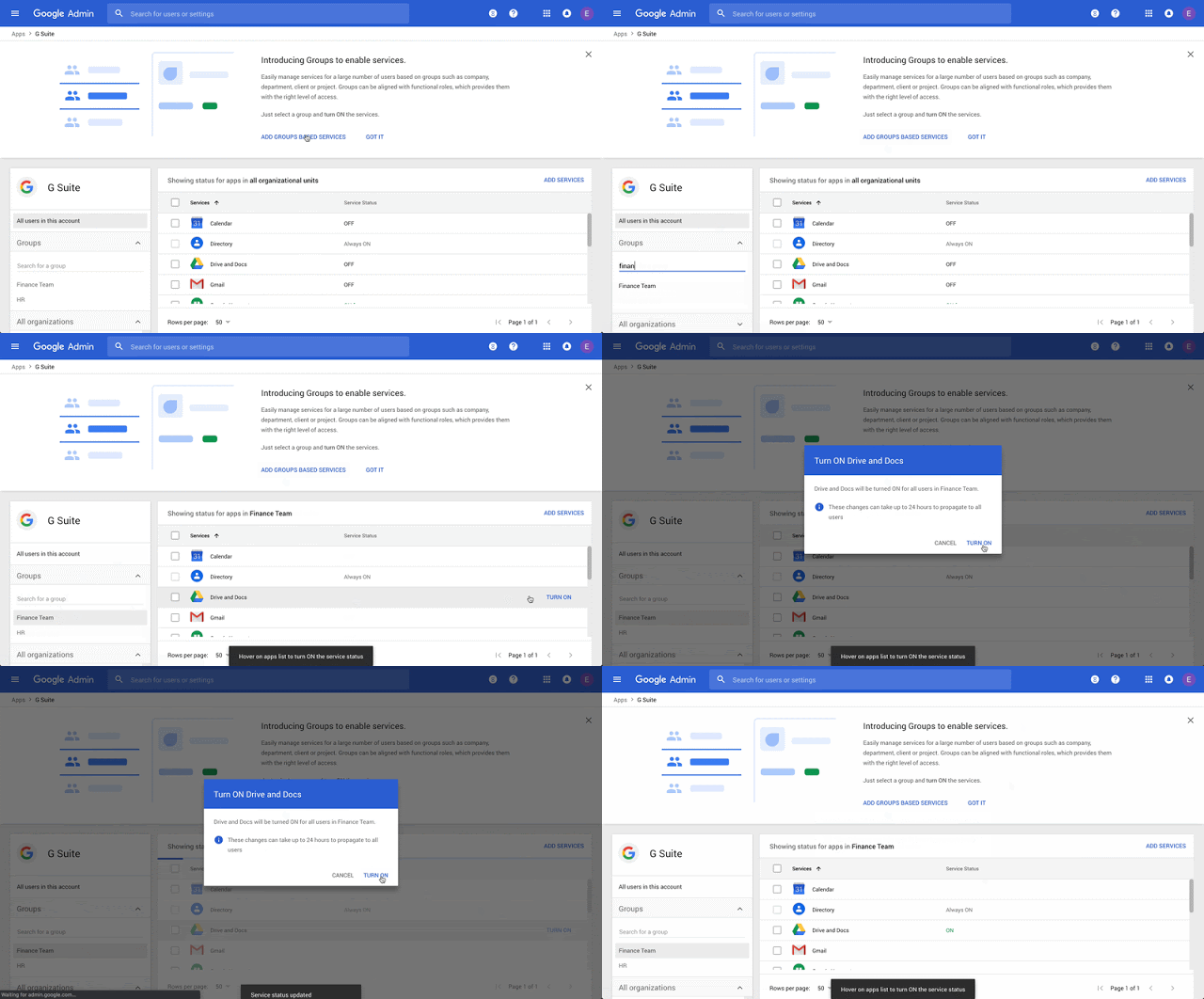
Over the past year, we’ve seen tremendous growth of Cloud Identity, Google Cloud’s unified identity, access, and device management solution, available to both our G Suite and Google Cloud Platform (GCP) customers. We released a number of exciting features, saw significant growth in the number of users and devices managed, and partnered with many customers on their digital transformation journeys, including Air Asia, Essence, Airbnb, and Health Channels. We were also recognized as a 2018 Gartner Peer Insights Customers’ Choice for Enterprise Mobility Management Suites (EMMs).Today, we’ll highlight a number of new and upcoming features in Cloud Identity and share how you can get started.Enhancing group policy management functionalityMany of our customers rely on group policy to grant access to G Suite. A few months ago, we added the ability to use Google Groups to control access to G Suite apps and services within your organization outside of the organizational unit (OU) level. This makes it possible to control G Suite access based on department, job function, project team, seniority, location, and more. We’ll soon launch group-based policy support for Drive, Docs, Chat, App Maker and YouTube, which will give IT additional flexibility when managing G Suite policies.Frequently, we see customers utilize Google Groups to control access to GCP projects and resources. In an effort to streamline security and access monitoring, they’ve told us they needed a way to view changes to groups using the same tools they use for other GCP audit logs. To address this, we are excited to announce the general availability of group audit logs in Google Cloud Audit Logs, allowing customers to manage all GCP-related activities in a single place, without the need to integrate with multiple APIs to get a complete audit inventory.Enabling BeyondCorp in your organizationMany attendees at Google Cloud Next ‘19 expressed interest in adopting Google’s BeyondCorp (zero trust) security model. At the event, we announced context-aware access for G Suite, which is a key component of BeyondCorp and allows IT to define and enforce granular access to apps and infrastructure based on a user’s identity, device state, and context of their request. This is an extension of the context-aware access capabilities we’ve previously built to protect GCP web apps and virtual machines (VMs). Context-aware access for G Suite can help increase your organization’s security posture while giving users an easy way to more securely access apps from virtually any device, anywhere.Essence, a global data and measurement-driven media agency, has already been using this capability to help secure access to G Suite:“Context-aware access is a natural expansion of the mobile device management (MDM) we’ve had in place on Android and iOS devices since 2014. It allows us to place manageable controls on how client G Suite data is accessed, and it does so in a way that does not inhibit the end user while ensuring security compliance.” – Colin McCarthy, VP Global IT, EssenceMulti-factor authentication (MFA) or 2-factor authentication (2FA) is a critical building block for BeyondCorp, and we consider security keys based on FIDO standards, such as Google’s Titan Security Key, to be the strongest, most phishing-resistant MFA method on the market today. At Google I/O, we announced that you can now use the security key that is built into your Android phone for MFA, so you can add this extra layer of protection for even more of your users. We also recently gave our customers the ability to block the use of SMS as an MFA method, giving IT additional control and strengthening user security.If you’re like a lot of organizations, you may already have security solutions that help you assess the security posture of your endpoints. In an effort to integrate with your existing solutions and meet you where you are, we recently announced BeyondCorp Alliance, a group of endpoint security and management partners with whom we are working to feed device posture data to our context-aware access engine. Initially, we are working with Check Point, Lookout, Palo Alto Networks, Symantec, and VMware, and we will make this capability available to joint customers in the coming months.Strengthening our device management capabilitiesOne of the key inputs into our context-aware access rule engine is device trust. Google manages over 55 million 30 day active devices across mobile and desktop platforms (including Cloud Identity and Chrome Enterprise), and we’re constantly working to enhance this functionality. To that end, we’re giving admins more control over their corporate data by integrating Cloud Identity and Drive File Stream, our service which streams data directly from the cloud to your Mac or PC. This will ensure users can securely access the files they need, whether they’re online or offline. This integration ensures corporate data is protected by controlling which devices can be used to access Drive File Stream, and with the ability to block or wipe the Drive cache with a few clicks, admins have more control over remediation activities.In addition, we have enhanced the capabilities of our platform by extending our agentless management capabilities, allowing administrators to manage and distribute Android apps without the installation of a device policy controller. This will allow IT to have an additional layer of security on their endpoints without negatively impacting the end user experience.Improving the single-sign on (SSO) and end-user experienceWhile we already support a large catalog of SAML and OpenID Connect (OIDC) apps for single sign-on (SSO), you may still need to use credential-based authentication for some apps. To address this, we’ll be adding support for password vaulted apps in the coming months. With this capability, Cloud Identity will support thousands of additional apps and have one of the largest SSO app catalogs, giving your employees one-click access to all the apps they need to be productive. As part of this work, we’ll also releasing a new, unified hub where employees can see and access all of their SSO apps. Dashboard will provide a user-friendly and efficient user experience, allowing your employees to quickly launch and access all of their apps.Partnering with HR providers for automated user lifecycle managementWe’ve also recently partnered with leading HRIS/HRMS providers such as ADP, BambooHR, Namely, and Ultimate Software, enabling you to sync employee information directly from your HR system with Cloud Identity and automatically provision and deprovision user accounts and access throughout the employee lifecycle.  Try it yourselfWe’ve made great progress with Cloud Identity for our G Suite and GCP customers over the past year, and we’re excited to continue working hard to deliver new features and functionality in the coming months. If you’re interested in learning more, please take a look at our solution pages for single sign-on, multi-factor authentication, and device management, and consider signing up for a free trial to test out the solution yourself.
Quelle: Google Cloud Platform

Querying the Stars with BigQuery GIS

Many organizations maintain large data warehouses full of analytics, sales numbers, performance metrics, and more. But nature gives us other massive datasets, including a night sky full of stars. While BigQuery GIS was explicitly designed to serve the needs of geospatial users here on Earth, its spherical coordinate systems and built-in transformation functions are equally well suited to another domain for spherical coordinates: astronomy.What makes BigQuery a great platform for analyzing astronomy datasets?BigQuery is intended for online analysis (OLAP), and optimized to work with massive datasets that are not transactional. That is true for most work with astronomy catalogs that are released every year or so, depending on the project.BigQuery supports queries on spherical geometry, using BigQuery GIS. Locating objects on the celestial sphere requires spherical geometry.BigQuery GIS can query astronomy data nearly as fast as more specialized database platforms, and may be faster when used to perform full table scans.And there’s no lack of astronomy data to explore. For example, catalog data organizes the observations of a telescope project into giant tables. Some of the larger catalog datasets comprise a billion or so objects with many observed features, and for some features, these datasets include observations that span over the hours or years. WISE and Gaia are satellite-based telescopes that provide us with high resolution image data. LSST, a major new ground-based telescope, will soon come online. It is mandated to release catalogs of observed objects over the 10 year life of the project. Later in this post, we’ll explore how to use BigQuery GIS with this kind of catalog data.  Understanding the celestial coordinate systemBut before we show you examples of how to query astronomy catalog data with BigQuery, let’s take a step back and discuss the broad set of functions implemented in BigQuery GIS to support your GIS needs.Look down for a secondConsider that the Earth is a sphere, and that you find yourself on the two-dimensional surface of our planet with latitude and longitude, easily obtained from a global positioning system (GPS) that locates you and guides you to where you want to go using “lat and long” coordinates.If you want to find out how long a trip is, remembering your high school geometry, you might think you can find the total distance using the Pythagorean theorem. In some cases, that might seem to work at first, but the farther you travel, your situation quickly becomes more complex. First, you need to convert your source and destination, lat and long, to Cartesian coordinates on a Euclidean plane, and convert angles to meters or miles. And worse, Euclidean distance is all about planar geometry, but surface or the earth is not flat (rather, it’s spherical), so Pythagoras’ theorem doesn’t work. The ancient Greek and Islamic mathematicians had most of the math worked out 1000 years ago, but that doesn’t make it any easier. The good news is that BigQuery GIS takes advantage of Google’s S2 Geometry library that can help you perform these calculations, so you can access all that above-mentioned messy geometry in much simpler Standard SQL. You can calculate the distance between points on earth, and get fancier still doing work with regions, polygons and so on. It’s very powerful, and pretty easy to use.Ad astraNow that you have an understanding of terrestrial geometry, let’s look back up to the stars! BigQuery GIS uses the same basic concepts to track celestial bodies as it does to track things on Earth. In other words, to locate a star in the sky, you assign a coordinate, like lat and long, that points you to exactly where you will find the star in space. But hold on, space is not a sphere! Space is literally a fully three-dimensional sort-of-infinite expanse of stars, galaxies, black holes, planets, quasars, pulsars, and nebulae. They’re all spread out, light years away, not anything like the surface of the earth where I am trying to get from my house to the nearest Google office using GPS coordinates.Here’s where it gets interesting: all the celestial objects I describe above are so distant that we can’t easily tell the difference between a closer object and a farther object. They might as well be points of light on a giant black sphere with the Earth at its center, which is kind of what it looks like at night when you look up at the sky. (Although we’re not here to discuss the history of astronomy, avid historians of science will recall that this is exactly the model the ancient Greeks—and up until quite recently all their intellectual descendents—used to describe the heavens. If you are interested, I recommend The Structure of Scientific Revolutions, by Thomas S Kuhn.)So, back to the celestial sphere. If the night sky and all the celestial bodies are indistinguishable from a giant sphere with the Earth at its center, my earlier proposal to assign a latitude and longitude to locate objects seems reasonable. In fact, astronomers do exactly that. They assign what they call the coordinates right ascension (ra) and declination (dec). These coordinates work exactly like latitude and longitude. Sometimes, right ascension is written in more historical notation using hours, minutes, and seconds.Let’s look at an example. Vega (a star famous from the movie Contact) can be found at RA 18h 36m 56s,  Dec +38° 47′ 1″. Fortunately, modern astronomical data typically uses degrees and decimal points to store coordinates, just like modern geographers do. In modern notation, Vega has the same declination (+39°) as the longitude (39° N) of Kansas City. This means once a day people in Kansas city can look straight up to see Vega (if it’s night time). This daily rotation clearly hints at the historical use of the 24 hour system for right ascension.As you can see, the celestial coordinate system is just like the geographic coordinate system, except in astronomy you are looking up and in geography you are looking down.At this point we have established (somewhat loosely) that a spherical coordinate system using ra and dec is a valid way to locate objects on the celestial sphere, just as we use lat and long to locate objects on the surface of our spherical of the earth. It’s also important to note the following:The celestial sphere is exactly spherical, by design, so any correction available to the GIS system due to the earth being somewhat flattened (ellipsoidal) should be disabled. Conveniently, BigQuery GIS defaults to use an exact sphere.The poles of the celestial sphere align with the geographic poles of the earth. The coordinates (ra, dec) remain fixed with respect to the positions of the stars.There are a wide variety of queries that an astronomer may need to perform. Here are some examples from LSST, or you can follow along below with an example on WISE data.  An example and a data setThe WISE data set contains a table of objects and the multi-epoch (or time-series) data for those objects. These are typically called “light curves.”  One interesting example is Beta Lyrae eclipsing binary AH Cep. Here’s the query to access the data for these light curves from the BigQuery AllWise dataset:This returns the data plotted below using Data Studio.For the purposes of benchmarking, we opted to demonstrate a realistic query, something an astronomer might be interested in doing. After initial tests with the raw tables as loaded, we applied four important optimizations:We partitioned the tablesWe clustered the data on the integer value Level 7 HTM spatial index key, a triangulation of the celestial sphereWe pre-calculated the location of objects using the POINT geometry typeWe used ST_CONTAINS instead of ST_WITHIN to restrict the region of space to reduce the size of the data setThe final query is below. We chose it to be representative of the nearest neighbor type of query expected in astronomical queries.The combination of these four optimizations reduces the median query time on the 17 terabyte (TB) table from 60 seconds down to 4. This puts BigQuery very close to the performance of database platforms optimized to quickly retrieve information related to a single astronomical source. Additionally, when it comes to full table scans, BigQuery may show significant advantages.Best of all, it’s still early days for BigQuery GIS and astronomy datasets. We are excited to bring more astronomy catalogs to the BigQuery public data sets. The WISE data set is only the first of several planned. To get started with BigQuery GIS, you can learn to analyze terrestrial data by checking out its documentation. If you’re interested in another example of using BigQuery to record natural phenomena, check out this excellent tutorial on using BigQuery GIS to plot a hurricane’s path. To explore how you might run analytics on your business’s terrestrial GIS data, have a look at this tutorial on bicycles in New York City. We can’t wait to hear what you discover in your geospatial (or astronomical) data.
Quelle: Google Cloud Platform