Research reveals how to make mobility work best for your business

It’s essential for businesses today to use technology to solve problems and become more efficient. Of course, this kind of digital transformation doesn’t happen overnight. There are lots of new tools to explore to help move your business forward. If you’re managing user devices, you know that finding the right balance of empowering users and protecting the business is essential.And according to research firm IDC, the mobility enabled by cloud-native tools and devices like Android is a key way businesses can address the challenges they face in a fast-paced tech world—namely security, compatibility, and device capabilities. Mobility generally, and Android in particular, has the potential to help teams collaborate across devices and work in new ways.IDC recently published new research, sponsored by Google, that describes how organizations can take advantage of business solutions, platform security, customizable hardware options, and user-friendly management and deployment capabilities to best equip their teams for success.In its series of whitepapers that make up the research, IDC identified the three most important considerations when choosing the right mobility solution: security, solution breadth, and a good experience for IT and end users. IDC also found that Android performed well in all of these categories.Flexibility and security for the cloud worker eraCloud workers—a growing workforce segment, made up of those who work an average of 4.6 hours a day in browser-based business apps across multiple devices—depend on the ability to work across devices and with colleagues and customers without tech barriers. With more data than ever generated and shared through cloud and other enterprise systems, these workers require real-time access to the right information.In its research, IDC found that Android is a strategic mobility platform that can address these needs, with our secure mobile OS, ecosystem of OEM and software partners, and underlying management capabilities. In addition, the research found that Chrome and G Suite also fit the bill for these business needs, and can create the path for a business to solve problems and work quickly at scale in new and innovative ways.Here’s a deeper look at each of the digital transformation pillars IDC researched.SecuritySecurity remains both a top concern and potential barrier to mobile deployments, according to this mobility research. Business IT teams face challenges with compliance, mitigating issues from lost and stolen devices, and combatting unauthorized access to sensitive data. Whether issuing devices or trusting employees to use their own in the workplace, security concerns are always there.In its report, IDC found that “The idea that a company’s most sensitive data and systems are a few finger-taps away is a concern for many IT security and risk professionals. This is why mobility in general comes up as a top security challenge, and makes IT decision-makers skittish about the technology.”Android’s layered defense strategies and continuous innovation help to keep business data secure and accessible whenever your team needs it. Backed by the expert teams at Google, security and privacy are a top priority for Android, enabling businesses to work seamlessly in the cloud.Android’s multilayered approach to security uses hardware and software protections, and is backed by the built-in malware defense of Google Play Protect. By being open, Android benefits from the shared knowledge of the wider security community, earning third-party validation for its robust enterprise security features.Solution breadthAlong with security challenges, business IT teams are also exploring which mobile devices to deploy to users, who need to connect easily and quickly to get work done without running into operating system or other compatibility issues. Device choice isn’t one-size-fits-all, and users’ needs vary. For mobile deployments to work, businesses have to be able to address the security, manageability and pricing challenges. Platform and ecosystem flexibility, including device choice, will power these users’ success.For enterprise success, a platform must offer a diverse range of mobile device types, price points and apps that address a variety of use cases. With the variety of Android device options, teams can build custom solutions on hardware that suits their needs.Many organizations are turning to Android Enterprise Recommended to choose devices and services with confidence. We validate devices and the enterprise mobility management and managed service providers to make sure they meet an elevated set of standards for enterprise users.IDC notes in its research that a rising use case for enterprise needs is dedicated mobile devices. These are fully managed by the enterprise, and used in customer settings like kiosks or digital signage, or for employees handling inventory management or logistics. Two-thirds of enterprises have dedicated devices in use, with Android growing fastest in the market. This is particularly the case with rugged devices, which are growing at five times the market rate of mobile devices generally, according to IDC.The diversity in device types and price points offered by Android give organizations flexibility, so you can match the appropriate device for each use case.IT and user experienceA major challenge that IT departments often face is striking the right balance between security and granting employees flexibility in how they use their devices. This tension is especially evident with mobile devices, as many workers want leeway when using personal devices for work.Android is uniquely positioned to strike this balance with our work profile capability, which separates personal and corporate data on a device. This ensures strong security safeguards and controls for company data and apps while giving users privacy for how they use personal apps on the device.Dive deeper into IDC insightsThis IDC research has plenty more detail on how enterprise mobility paired with cloud-enabled solutions can boost businesses in today’s competitive landscape. Explore the findings and learn more about how a mobile, connected workforce can deliver on digital transformation.
Quelle: Google Cloud Platform
Scale globally, get four nines availability with new Cloud Bigtable capabilities

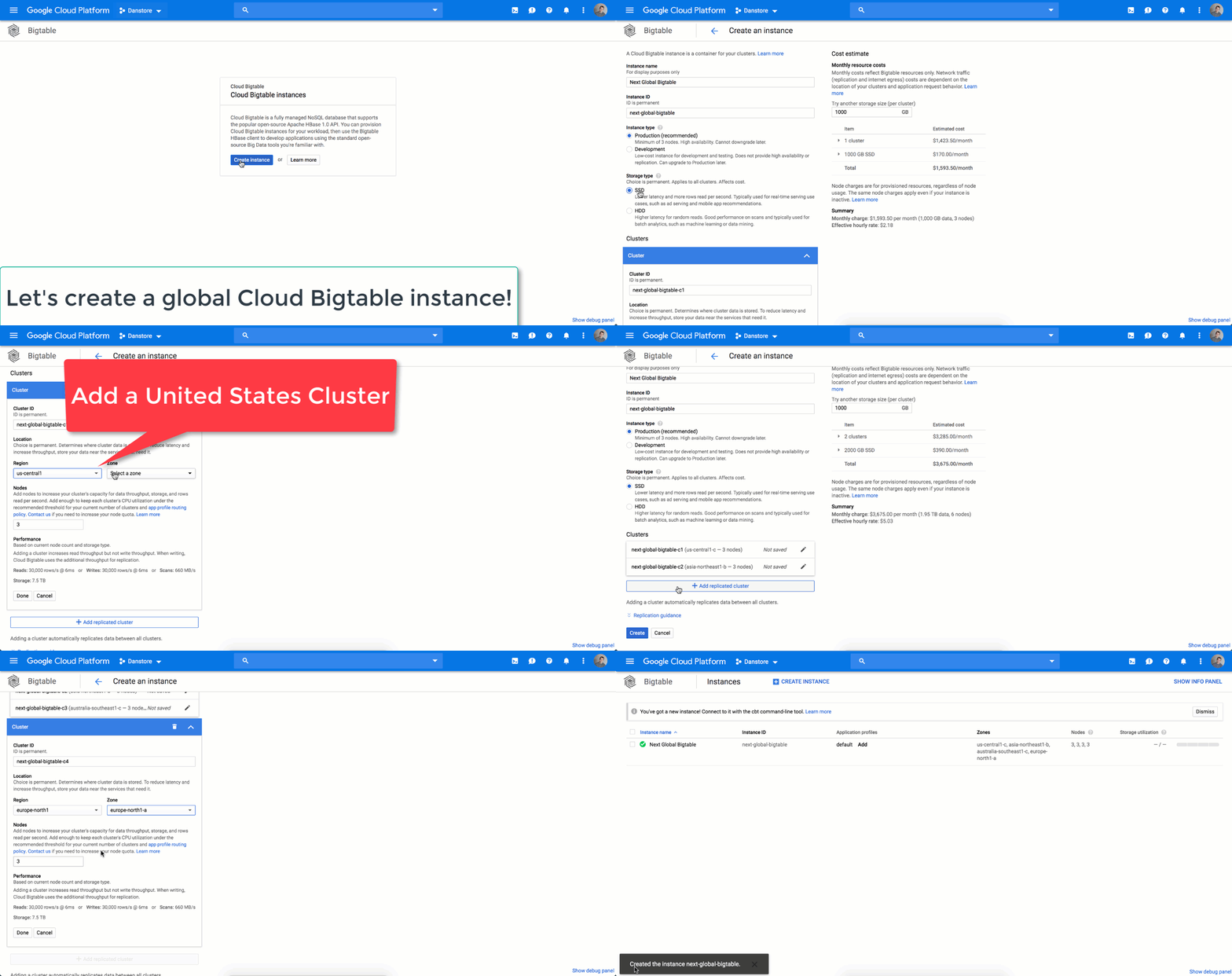
We’re very happy to announce that global replication is now generally available to all Cloud Bigtable users, following last month’s beta launch. This global, multi-region replication allows users to replicate data across up to four clusters worldwide, in any region in which Cloud Bigtable is available.Cloud Bigtable is a highly scalable, fully managed NoSQL database service for use cases from gigabytes to petabyte scale, where throughput, low-latency data access and reliability are critical. Replicated Cloud Bigtable instances can provide higher availability and resilience in the event of zonal failures. With this launch, we’ve also increased the SLA on availability for Cloud Bigtable instances to 99.99% with replication (using a multi-cluster routing policy) and 99.9% otherwise.We’ve heard some great insights from initial adopters since the beta launch. One of the key advantages of global replication is that you can better serve a global audience—reducing latency when serving data to your customers, no matter where they are in the world. Spotify serves music lovers across the world and they were keen to take advantage of this expanded replication capability.“Spotify is a global business with a global user base. Being able to provide a great audio experience to our users is a key priority for us,” said Niklas Gustavsson, chief architect at Spotify. “With Cloud Bigtable clusters in Asia, Europe, and the United States, we’re able to get low-latency data access all over the world, enabling Spotify to provide a seamless experience for our users. We’re also pleased with the continuous collaboration and deep engagement with Google’s product teams to accelerate both our businesses.”How multi-region replication worksIt’s super easy to get started. Add a cluster to your Cloud Bigtable instance at any time, and we’ll automatically replicate the data. Cloud Bigtable supports multi-primary replication, so every cluster accepts both reads and writes. Each cluster can also be scaled independently, allowing you to provision for exactly what you need in each zone or region.During Next ’19, the Cloud Bigtable and Cloud Networking teams shared how Cloud Bigtable takes advantage of Google’s extensive global network to make multi-region replication possible. You can check out the session recording for more details.Using Cloud Bigtable replication in productionExamples of workloads in financial services, advertising, and IoT show the wide variety of use cases that replication can help support.Availability is critical for many of our users, especially those in regulated industries like financial services and healthcare. Cloud Bigtable replication provides resilience in the event of zonal or regional failures, and can play a critical role in your disaster recovery strategy.Multi-region replication allows our AdTech users to locate their data close to their customers and to ad exchanges. This makes it easier to reduce end-to-end request latencies for ad bidding and personalization services, where custom advertisements and page content is served to website visitors in real time.Finally, customers use replication to separate data ingest from analysis. Cloud Bigtable replication allows you to collect data from geographically dispersed sources and perform centralized analysis in a separate cluster, without impacting data collection. This strategy can be particularly helpful for IoT workflows, fraud detection, and personalization.To get started with Cloud Bigtable replication, create an instance and configure one or more application profiles to use in your distributed application. Or, simply add a cluster to an existing instance and we’ll replicate your data automatically.And, we invite you to join the GCP Launch Announcements community, a customer-only forum where you’ll be the first to know when important GCP product updates and features are announced. Sign up here.
Quelle: Google Cloud Platform

A little light reading: New and interesting stories from around Google

There’s never a dull moment in the big world of Google, and we came across a few especially interesting stories in the past month for you tech lovers out there. Read on for the latest in new technology and new ideas.Neural networks help create kiss detection technologyThat’s right, “kiss detection” is an actual feature in the Pixel 3 Camera app in Photobooth mode, part of its improved selfie-taking capabilities. Photobooth mode is optimized for the front-facing camera, and developing this new detection mode required the use of two models: one for facial expressions and one to detect when people kiss. The team worked with photographers to identify key facial expressions that would trigger capture, then trained a neural network to classify those expressions. The new feature means the camera automatically takes a photo when the camera is steady and can tell that the subjects are kissing, resulting in better selfies.Build your own smart deviceOur brand-new Coral platform, designed to make AI hardware development easier, is now available through several global distributors. The Coral products include a dev board, USB accelerator, and camera, all powered by Google AI’s Edge TPU, a custom-designed ASIC chip that provides high-performance ML inferencing for low-power devices. For example, the Edge TPU chip can execute state-of-the-art mobile vision models such as MobileNet V2 at 100+ fps in a power-efficient manner. Last month, the new Environmental Sensor Board became available, so developers can bring sensor input into models. It has integrated light, temperature, humidity, and barometric sensors, and the ability to add more sensors via its four Grove connectors. There’s also an updated Edge TPU model compiler and new C++ API.Witnessing happy little cloud momentsHere’s a bird’s-eye view from a Google cloud architect who’s worked with lots of companies getting started with cloud, and his take on what makes users really happy when they start using Google Cloud Platform (GCP). Some are simple, like the concept of a project in GCP, which is a namespace that groups resources together and by default isn’t available to any other project. There are also network tags to make firewall rule creation easier, and some console features that users often love.Serverless and containers, better togetherServerless should really be called “service-ful,” says one interviewee on this GCP podcast about the new Cloud Run, since running serverless containers in the cloud lets you focus on code and building services, not infrastructure. Cloud Run lets you to run any language, binary, or code in a container in the cloud, and delivers the pay-per-use model serverless is known for. There are two versions: Cloud Run, the fully managed service for running serverless containers, and Cloud Run for GKE, which runs the compute inside your GKE cluster.Google Earth Timelapse shows the world go roundThe Google Earth team released some new updates last month to the Google Earth Timelapse, a video visualization of our planet’s surface from 1984 to 2018. If you haven’t checked this out yet, it’s now available to see on mobile devices and tablets. It’s a very cool look at how the Earth has changed, for example how Las Vegas has grown or how landslides have increased on one island. The visualization uses Google Earth Engine to analyze more than 15 million satellite images, and uses technology from Carnegie Mellon’s CREATE Lab to make the video interactively explorable. And for an extra dash of inspiration, see how a high school student is using Google Earth Engine at her NASA internship to monitor mangrove ecosystems.Let us know what you’ve been reading lately. Tell us your recommendations here.
Quelle: Google Cloud Platform

Sunny spells: How SunPower puts solar on your roof with AI Platform

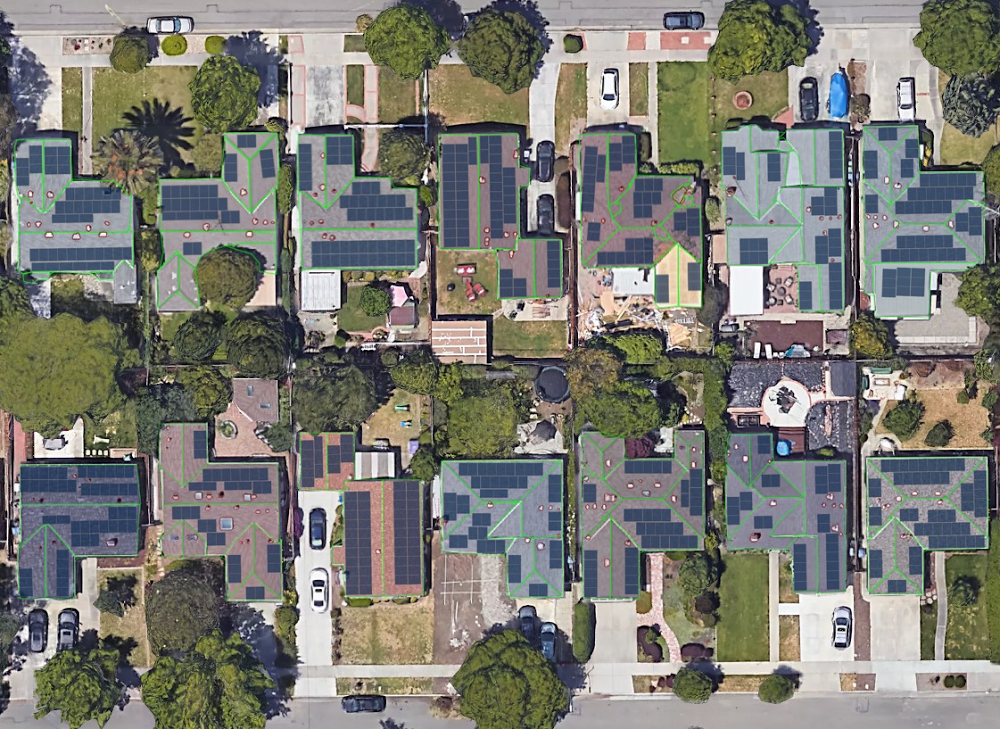
Editor’s Note: Today’s post comes from Nour Daouk, Product Manager at SunPower. She describes how SunPower uses AI Platform to provide users with useful models and proposals of solar panel layouts for their home, with only a street address for user input.Have you ever wondered what solar panels would look like on your roof? At SunPower, we’re helping homeowners create solar designs from the comfort of their home. Specifically, we use deep learning and high-resolution imagery as inputs to models that design and visualize solar power systems on residential roofs. Read on to learn how and why we built this technology for our customers, called SunPower Instant Design.Homeowners typically spend a significant amount of time online researching solar panels and running calculations to understand their potential savings and  the number of panels they need for their home. There are no quick answers because every roof is different and every house requires a customized design. With SunPower Instant Design, homeowners can create their own designs in seconds, which improves their buying experience, reduces barriers to going solar, and ultimately increases solar adoption.Instant Design’s 3D model of a roof with obstructions in red (left), satellite image with panel layout (middle), and input satellite image (right)How we helpDesigning a solar power system for a home is a process that relies on factors unique to each home. First, we model the roof in three dimensions to account for obstructions such as chimneys and vents. Second, we lay legally-mandated access walkways and place solar panels on the roof segments. Finally, we model the angle and exposure of sunlight hitting the roof to calculate the system’s potential energy production. With Instant Design, we replicate this same process by leveraging tools including machine learning and optimization. Below, we’ll explain how we used deep neural networks to obtain accurate three-dimensional models of residential roofs.The data: guiding the design with both color and depth imageryIt is probably possible to design a three-dimensional model of a roof with satellite imagery alone, but design accuracy improves greatly with the use of a height map. For Instant Design, we partnered with Google Project Sunroof for access to both satellite and digital surface model (DSM) data. We used our database of manually generated designs as a base for our labeled data, and projected those onto the RGB and depth channels for the training, validation, and test sets. We also generated augmentations—including rotation and translation—to reduce overfitting.  Roof segmentationTo reconstruct a roof, we model each roof segment with its corresponding pitch and azimuth in three dimensions. We began to identify roof segments by applying image processing and edge detection on both the satellite and depth data, but we quickly realized that semantic segmentation would yield much better results, as similar edges were detected successfully with that method in research literature.Image processing result (left), neural network-based result (middle) and input satellite image (right)After some experimentation, we chose to perform semantic segmentation, and then selected a version of a U-net that works well with our type of imagery at high speeds. The U-net architecture was a solid starting point, with a few tweaks for better results. For instance, we added batch normalization to each convolutional layer for regularization and selected the Wide Residual Network as our encoder for improved accuracy. We also created a domain-specific loss function to get the model to converge to meaningful outcomes.U-net diagram (click for source)What gets in the way: chimneys, vents, pipes, and skylightsIn an effort to avoid mistakenly placing panels on obstructions such as chimneys, vents, pipes, skylights, and previously-installed panels, our next step is to detect those obstructions as separate items on the roof. Our main challenge here was that we had to handle both the quantity and size of the obstructions, and address any imbalance in class representation. Indeed, there are more roof pixels than obstruction pixels in our images. Due to the difference in shape and scale of chosen classes we decided to use a separate model from the segmentation model to detect obstructions, although both models are similar in structure.Roof with detected obstructions outlined in redSpeed and scale via Cloud AI PlatformOnce we had built a satisfactory proof of concept, we quickly realized that we would need to iterate on our model in order to deliver an experience that was ready for homeowners. We needed to build a development pipeline that could quickly bring modeling ideas from conception to deployment, so we chose AI Platform to help us scale. Our initial training setup was on our own servers, and the training process was slow: training a new model took a week. In contrast, on AI Platform, we were able to train and test a new model in a single day. Moreover, we took full advantage of the ability to train multiple models simultaneously to conduct a vast hyperparameter search. For our prediction, we used NVIDIA V100 GPU-enabled virtual machines on GCP with nvidia-docker, which helped us achieve prediction times of around one second.ConclusionSunPower empowers homeowners to understand the amount of energy they can generate with solar, now with just a few clicks. Our team was able to start work on this exciting project due to advances in aerial imagery and machine learning. And AI Platform helped us focus on the core design problem, achieve our goals faster, and create designs quickly.We are changing how we offer solar power to homeowners by giving them immediate answers to their questions. While we have more work to do, we are optimistic that SunPower Instant Design will transform the solar industry when our first product featuring this technology launches this summer.To learn more about how SunPower is using the cloud, read this blog post from Google Cloud CEO Thomas Kurian.
Quelle: Google Cloud Platform

How SunPower is using Google Cloud to create a sustainable business

At Google, we have spent the past 20 years building and expanding our infrastructure to support billions of users and sustainability has been a key consideration throughout this journey. As our cloud business has taken off, we have continued to scale our operations to be the most sustainable cloud in the world. In 2017, we became the first company of our size to match 100% of our annual electricity consumption with purchases of new renewable energy. In fact, we have purchased over 3 gigawatts (GW) of renewables to-date, making us the largest corporate purchaser of renewable energy on the planet.Our commitment to be the most sustainable cloud provider makes our work with SunPower even more impactful. Working together, we want to make it easy for homeowners and businesses to positively impact our planet.SunPower makes the world’s most efficient solar panels which are distributed world-wide for residential and commercial customers. Since their beginning in 1985, they have installed over 10 GW of solar panels, which have cumulatively off-set about 40 million metric tons of carbon dioxide. To put that into perspective, that is the same amount of carbon dioxide nine million cars produce in a year.Even with this impressive progress, rooftop solar design can still be a complicated process:Potential solar buyers spend a significant amount of time online researching solar panels and understanding potential savings is challenging.Once engaged with a provider, the design is a manual, time-intensive process and relies on the identification and understanding of factors unique to each home. These include chimneys or vents, legally-mandated access walkways, and the amount of sunlight exposure for every part of the roof.At their current pace, SunPower’s solar designers would need over a century to create optimized systems and calculate cost savings for the 100 million future solar homes in the United States. By partnering with Google Cloud, SunPower significantly changed this timeline by developing Instant Design, a technology that allows homeowners and businesses to create their own design in seconds. This technology leverages Google Cloud in three important ways.First, Instant Design uses Google Project Sunroof for access to both satellite and digital surface (DSM) data. By using the 1 petabyte of Sunroof data and imagery around the world, along with SunPower’s database of manually generated designs as a base, Instant Design can easily develop a model through a quick process of training, validation, and analyzing test sets.Second, once SunPower built a satisfactory proof of concept, they leveraged Google Cloud’s AI Platform to iterate and improve upon their machine learning models and  quickly integrate them with their web application.Third, Google Cloud allows the SunPower team to choose the processing power that best fits their needs, and can easily combine technologies for optimal performance. SunPower is using a combination of CPUs, GPUs, and Cloud TPUs to put the “instant” in Instant Design.Our goal is to help SunPower empower their customers to make the transition to solar panels seamless. With the help of Google Cloud, homeowners can create their own design in seconds, which improves their buying experience, reduces barriers to going solar, and increases solar adoption on a larger scale.At our Google Cloud Next ‘19 conference last month, Jacob Wachman, vice president of Digital Product and Engineering at SunPower, explained how Instant Design’s use of Google Cloud reflects the best of machine learning by providing applications that can improve the human condition and the health of our environment (see video here). We’re honored that SunPower has partnered with us to develop a technology that can advance our larger goal of a more sustainable future. Instant Design rolls out this summer and we’re excited to continue our work with the SunPower team.More information on how SunPower is leveraging Google Cloud Platform can be found here. If you’re interested in how we are working with SunPower and other organizations across the globe to build a more sustainable future, check out cloud.google.com/sustainability.
Quelle: Google Cloud Platform

Deploying a production-grade Helm release on GKE with Terraform

Editor’s note:Today we hear from Gruntwork, a DevOps service provider specialized in cloud infrastructure automation, about how to automate Kubernetes deployments to GKE with HashiCorp Terraform.As more organizations look to capitalize on the advantages of Kubernetes, they increasingly use managed platforms like Google Kubernetes Engine (GKE), to offload the work of managing Kubernetes themselves. They manage and deploy workloads with tools like kubectl and Helm, the Kubernetes package manager that repeatably applies common templates, a.k.a., charts.Then there’s HashiCorp Terraform, an infrastructure management and deployment tool that allows you to programmatically configure infrastructure across a variety of providers, including Google Cloud. Terraform lets you deploy GKE clusters reliably and repeatedly, no matter your organization’s scale.Here at Gruntwork, we find that using Terraform can make it easier to adopt Kubernetes, both on GCP as well as other cloud environments. We worked with Google Cloud to build a series of open-source Terraform modules based on Google Cloud Platform (GCP) and Kubernetes best practices that allow you to work with GCP and Kubernetes in a reliable manner.To get a sense of what the Gruntwork GCP Modules do, first consider what you’d need to do to securely deploy a service on a GKE cluster using Helm:Prepare a GCP service account with minimal permissions instead of reusing the project-scoped Compute default service accountProvision a service-specific VPC network instead of the project default networkDeploy a GKE private cluster and disable insecure add-ons and legacy Kubernetes featuresAdd a node pool with autoscaling, auto repair and auto upgrade enabledConfigure kubectl to interact with the clusterCreate a TLS cert to communicate with the Helm server, TillerCreate a Tiller-specific namespace for TillerDeploy Tiller into the Tiller-specific namespaceOnly after you’ve done all that will you be able to deploy workloads to Kubernetes using Helm! In addition, to deploy your services using Helm, each of your developers also needs toDownload a Tiller client cert for HelmUse Helm to release a Helm chart with your serviceThat’s quite a daunting list just to release your first Helm chart on GKE and definitely not a problem that you want to solve from scratch. Our new GKE module automates these steps for you, allowing you can consistently apply all of these GCP and Kubernetes best practices using Terraform, with a single terraform apply!To learn more, we’ve included a full, working config in the module’s GitHub repo, and are showing snippets of config below. Alternatively, you can open it in Google Cloud Shell with the button below to try it out yourself.You can use the Cloud Console to verify that the cluster has been deployed correctly:Next, you can use kubergrunt (a collection of utility scripts compiled to a Go binary for use with Terraform) to deploy Helm’s server component, Tiller, into your cluster. This also releases a chart using Helm, allowing you to view your deployed service on the web.Finally, you can use Helm to securely release a chart and view its status.Once that’s finished, you can pull up the service address in the Cloud Console under “Services” and poll the /healthz path for a 200 response.The Gruntwork GCP modules make production-ready enterprise configuration of GKE clusters simple, allowing you to roll out clusters and workloads following best practices in minutes. The modules are available now; they’re published on the Terraform Module Registry, and are available licensed as Apache 2.0 on GitHub.Together with Google Cloud, we plan to continue to broaden the number of GCP services that you can provision with Terraform through our modules, providing Terraform users a familiar workflow across multiple cloud and on-premises environments and reducing the operational complexity of managing GCP infrastructure. If you have any specific feedback on use cases you’d like us to prioritize, please reach out to us at info@gruntwork.io.
Quelle: Google Cloud Platform

No deep learning experience needed: build a text classification model with Google Cloud AutoML Natural Language

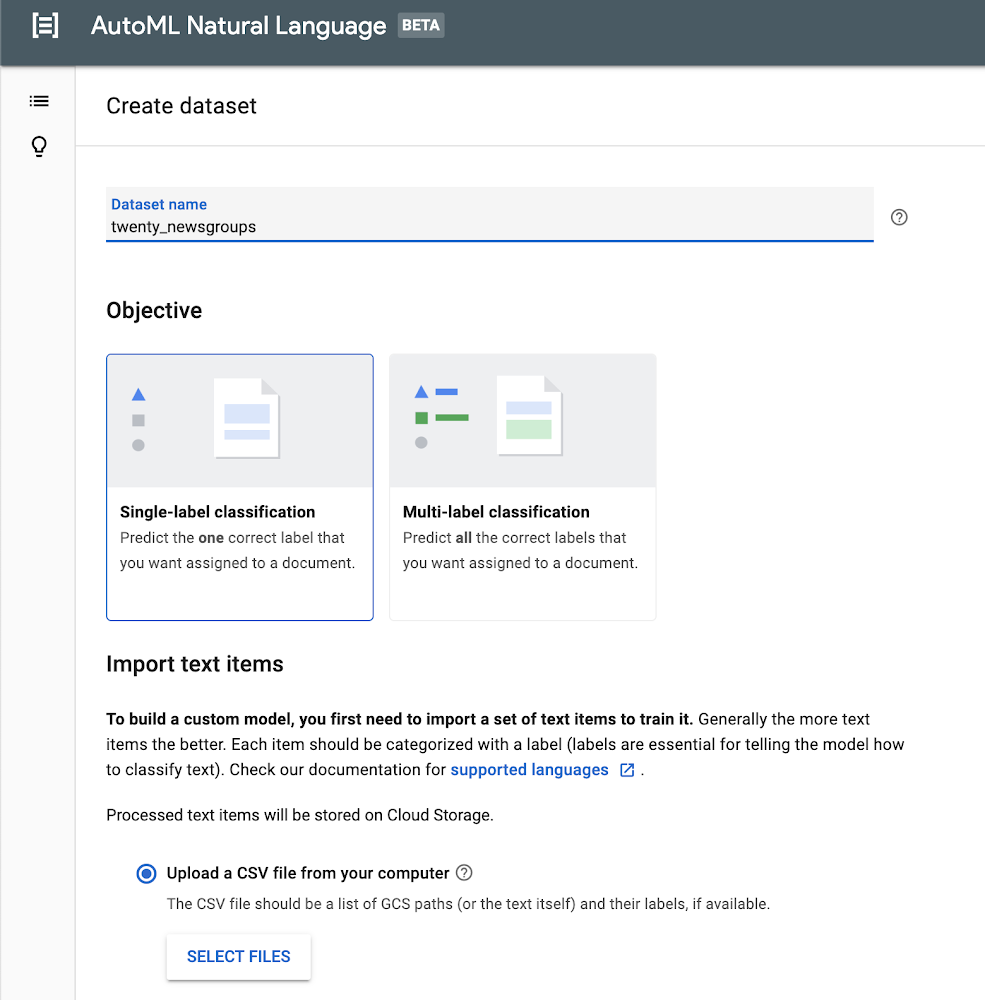
Modern organizations process greater volumes of text than ever before. Although certain tasks like legal annotation must be performed by experienced professionals with years of domain expertise, other processes require simpler types of sorting, processing, and analysis, with which machine learning can often lend a helping hand.Categorizing text content is a common machine learning task—typically called “content classification”—and it has all kinds of applications, from analyzing sentiment in a review of a consumer product on a retail site, to routing customer service inquiries to the right support agent. AutoML Natural Language helps developers and data scientists build custom content classification models without coding. Google Cloud’s Natural Language API helps you classify input text into a set of predefined categories. If those categories work for you, the API is a great place to start, but if you need custom categories, then building a model with AutoML Natural Language is very likely your best option.In this blog post, we’ll guide you through the entire process of using AutoML Natural Language. We’ll use the 20 Newsgroups dataset, which consists of about 20,000 posts, roughly evenly divided across 20 different newsgroups, and is frequently used for content classification and clustering tasks.As you’ll see, this can be a fun and tricky exercise, since the posts typically use casual language and don’t always stay on topic. Also, some of the newsgroups that we’ll use from the dataset overlap quite a bit; for example, two disparate groups cover PC and Mac hardware.Preparing your dataLet’s first start by downloading the data. I’ve included a link to a Jupyter notebook that will download the raw dataset, and then transform it into the CSV format expected by AutoML Natural Language. AutoML Natural Language looks for the text itself or a URL in the first column, and the label in the second column. In our example, we’re assigning one label to each sample, but AutoML Natural Language also supports multiple labels.To download the data, you can simply run the notebook in the hosted Google Colab environment, or you can find the source code on GitHub.Importing your dataWe are now ready to access the AutoML Natural Language UI. Let’s start by creating a new dataset by clicking the New Dataset button. Create a name like twenty_newsgroups and upload the CSV you downloaded in the earlier step.Training your modelIt will take several minutes for the endpoint to import your training text. Once complete, you’ll see a list of the text items and each accompanying label. You can drill down into the text items for specific labels on the left side.After you’ve loaded your data successfully, you can move on to the next stage by training your model. It will take several hours to return the optimal model, and you’ll receive notification emails about the status of the training.Evaluating your modelWhen the model training is complete, you’ll see a dashboard that displays a number of metrics. AutoML Natural Language generates these metrics comparing predictions against the actual labels in the test set. If these metrics are new to you, I’d recommend reading more about them in the Google Machine Learning Crash Course. In short, recall represents how well the model found instances of the correct label (minimizing false negatives). Precision represents how well it did at avoiding labeling instances incorrectly (minimizing false positives).The precision and recall metrics from this example are based on a score threshold of 0.5. You can try adjusting this threshold to see how it impacts your metrics. You can see that there is a tradeoff between precision and recall. If the confidence required to apply a label rises from 0.5 to 0.9, for example, precision will go up because your model will be less likely to mislabel a sample. On the other hand, recall will go down because any samples between 0.5 and 0.9 which were previously identified will not be labeled.Just below this paragraph, you’ll find a confusion matrix. This tool can help you more precisely evaluate the model’s accuracy at the label level. You’ll not only see how often the model identified each label correctly, but you’ll see which labels it mistakenly identified. You can drill down to see specific examples of false positives and negatives. This can prove to be very useful information, because you’ll know whether you need to add more training data to help your model better differentiate between labels that it frequently failed to predict.PredictionLet’s have some fun and try this on some example text. By moving to the Predict tab, you can paste or type some text and see how your newly trained model labels it. Let’s start with an easy example. I’ll take the first paragraph of a Google article about automotive trends, and paste it in. Woohoo! 100% accuracy.You can try some more examples yourself, entering text that might be a little tougher for the model to distinguish. You’ll also see how to invoke a prediction using the API at the bottom. For more details, the documentation provides examples in Python, Java, and Node.js.ConclusionOnce you’ve created a custom model that organizes content into categories, you can then use AutoML Natural Language’s robust evaluation tools to assess your model’s accuracy. These will help you refine your threshold and potentially add more data to shore up any weaknesses. Try it out for yourself!
Quelle: Google Cloud Platform

Tips and best practices for moving your VMs to Compute Engine

When you’re moving to the cloud, it’s important to remember that a migration is not just a single, giant step. It is a journey that involves many smaller steps. At Google Cloud Platform (GCP), we’ve developed guidance and best practices for migrating VMs to GCP that we’re sharing here. Note that for this guide and blog post, we’re focused specifically on migrating VMs to Google’s Compute Engine. Read on for more on the benefits of GCP and best practices for migrating.Why migrate to Compute Engine?As you probably know, all of the VMs you’re migrating require computing resources along with other services that make applications work, such as databases, messaging, and analytics. As you consider where to run these VMs, here are the primary benefits of running them on Compute Engine:Cost reduction. With sustained use discounts on Compute Engine VMs, costs can be significantly lower than managing hardware or virtual machines in a traditional data center. When migrating from a different cloud to GCP, you can take advantage of those same pricing advantages.Agility. Most customers see an immediate improvement in agility because you can create virtual machines almost instantly and don’t have to wait for resources to be acquired and provisioned. You can quickly spin up new applications, experiment with them, and turn them off as necessary.Reduced overhead. Data centers usually require many different vendors, each with their own relationship, billing model, and contracts. Moving to the cloud can significantly reduce that overhead. Your staff no longer have to deal with the management overhead of running a data center and can focus on what makes your business thrive.Once you’ve picked Compute Engine as your migration target, what are some other things you need to consider for your migration journey? We’ll outline some of them here.Calculating the costsBefore you move any VMs, you’ll want to calculate the cost of the move. This means evaluating the cost of what you are currently running in your data centers or existing cloud environments. You can learn about cost management and which partner can best meet your needs in GCP’s VM migration center.Assessing the VMs to migrateAfter you have evaluated the cost of the move, you can start looking at which VMs to migrate. In modern enterprises, there are many different kinds of applications running on VMs, and it usually doesn’t make sense to move all of them together at the same time to the cloud. Doing this well often requires a thorough assessment, which GCP currently offers at no cost.Designing the migrationWhen you have decided which VMs to move, you need to design your cloud environment before you move anything. The first step is to find out how your current environment compares to GCP. Then you can start planning what your environment should look like on GCP. Below are some of the steps to getting started down your migration path.Establishing governanceYou need to establish who in your company can have permission to create, access, modify, and destroy cloud resources. You must also determine how resources will be paid for. You can find guidance in the IAM best practices documentation.Creating a networkBefore you move any VMs, the network they migrate to must exist. Similar to permissions and accounts, it’s important to create this network in advance, because establishing procedures after applications are in flight can be difficult.Planning for operationsWhen you do have your VMs running in the cloud, you need to monitor them, retain logs, and operationally manage them, just as you would in any system. You must think about these operations when you’re doing your advanced planning to make sure there aren’t any surprises after migrating.Migrating VMs to the cloudFinally, you should migrate your first VMs. The first migration will serve as your template for future migrations. You will surely refine your process as you do further migrating, but it’s important to record everything you do in the first migration in particular.Velostrata, Google Cloud’s migration tool, gives users a way to migrate VMs to Google Cloud Platform quickly, safely, and at scale. Velostrata uses streaming technology to reduce migration time, provides right-sizing recommendations before you migrate to help you choose appropriate instance types, and provides built-in testing and rollback (when needed). Velostrata is also free to use for customers migrating to GCP.These tips offer a quick look at what you should think about before migrating VMs to the cloud. For much more detailed guidance, check out this guide to best practices for migrating VMs to GCP.
Quelle: Google Cloud Platform

Google Cloud networking in-depth: What’s new with Cloud DNS

Editor’s note:At Google Cloud Next ‘19 we announced several additions to our networking portfolio, including new features for Cloud DNS. This blog post will get you into deep dive on those additions. Now, read on to learn more.Google Cloud DNS is a scalable, reliable and managed authoritative Domain Name System (DNS) service that translates requests for domain names like www.google.com into IP addresses like 74.125.29.101. Running on the same high performing, low-latency and high availability infrastructure as Google, Cloud DNS is a cost-effective and easy way to make your applications and services available to your enterprise users.In the past couple of months, we’ve launched many Cloud DNS networking features to make it easier for you to deploy and connect services on your private GCP networks. Today, let’s dive deeper into what we announced and how these new features can help you easily publish and manage millions of DNS zones and records from a simple user interface.Private zones perform internal DNS resolution for your private GCP networksCloud DNS private zones (GA) provide an easy-to-manage internal DNS solution for your private GCP networks, eliminating the need to provision and manage additional software and resources. Since it restricts DNS queries for private zones to a private network, no one else can access your internal network information.Cloud DNS private zones offers flexibility in your configurations by allowing multiple zones to be attached to a single VPC network. Additionally, support for split horizons allows you to have a private zone share the same name as a public zone while resolving to different IP addresses in each zone.DNS peering allows one network to forward DNS requests to another networkWhen GCP networks are peered, they do not automatically share private DNS zones, DNS policies, or even internal DNS records. Cloud DNS peering, currently in beta, provides a second method for sharing DNS data. You can configure all or a portion of the DNS namespace to be sent from one VPC to another and, once there, it will respect the DNS policies or matching zones defined in the peered network.You can use DNS peering to connect multiple VPCs to your on-prem DNS service by setting up a hub and spoke model for your VPCs. Here, the hub VPC utilizes DNS forwarding to perform the hybrid connection, and the spoke VPCs uses DNS peering to connect to the hub VPC.Cloud DNS can now export query logs and monitoring metrics from private zones to StackdriverWith DNS logging and monitoring (beta), you can now view DNS logs for private zones in Stackdriver, and export them to any destination that Stackdriver Logging export supports. Logged queries can come from Compute Engine virtual machines, Google Kubernetes Engine containers in the same VPC network or peering zones, or they can come from on-premises clients via inbound DNS forwarding.Monitoring metrics report on the DNS response types and the number of each response seen. Together these logs and metrics can help debug your DNS configuration or support DNS security analysis tools, so you can identify threats within your private networks.Keeping up with Cloud DNSTogether, Cloud DNS private zones, peering, and logging improve the flexibility of your private cloud architecture, while providing you visibility into your private DNS traffic. Let us know how you plan to use these new networking services, and what capabilities you’d like to have in the future. You can learn more about GCP’s cloud networking portfolio online and reach us at gcp-networking@google.com.
Quelle: Google Cloud Platform

标题:宣布新增对谷歌云平台客户的语言支持 – 日语(全天候),韩语和中文

自从2012年谷歌云平台推出支持服务以来,我们得到了包括在没有本地语言支持选项的国家的全球范围内的广泛采用。随着我们的不断成长,我们知道与您说同一种语言并且在您需要的时侯能够提供及时的服务非常重要。我们一直在努力为全球客户构建新的语言功能,今天,我们宣布支持服务运营的三个新增项:中文(普通话)北京工作时间支持韩语首尔工作时间支持日语全天候支持中文(普通话)和韩语支持现在对黄金/生产环境和白金/企业支持套餐的客户开放。要使用韩语提交案件,请访问此处的韩语支持页面。要使用简体中文提交案件,请访问此处的简体中文支持页面。要使用繁体中文提交案件,请访问此处的繁体中文支持页面。韩语和中文(普通话)支持将于当地时间工作日上午9点至下午5点提供。日语全天候支持现已对我们的白金/企业客户开放。您现在可以随时与我们联系,每周7天,每天24小时,以解决您遇到的任何紧急问题。我们更新了技术支持服务指南,以反映上述变化。谷歌云平台非常重视以上市场的客户。我们期待您可以更多地与我们联系。
Quelle: Google Cloud Platform