Demonstrating our commitment to protecting user privacy and student data

Assessing third-party vendors for security risks and data privacy policies is a crucial responsibility of any higher education institution, and this can be a time-consuming and burdensome task for campus IT professionals. To help ease these challenges, the higher education information security community, EDUCAUSE, Internet2, and the Research & Education Networks Information Sharing & Analysis Center (REN-ISAC) created the Higher Education Cloud Vendor Assessment Toolkit (HECVAT). Today we’re demonstrating our core commitment to protecting user data, documenting our extensive platform security capabilities by completing this comprehensive security assessment for Google Cloud Platform (GCP) and G Suite.Google and a team of campuses recently completed the NET+ service validation to launch a NET+ GCP offering which provides Internet2 higher education members key enhancements to our standard GCP education terms. As part of that rigorous peer-driven review, four universities examined multiple components of GCP, including security, identity management, networking, accessibility, and legal terms, to validate its capabilities. By completing the HECVAT process, we’ve strengthened our support for EDUCAUSE, Internet2, the REN-ISAC, and the global research community.The HECVAT self-assessments for GCP and G Suite cover our existing certifications (from the ISO 27000 standards, for example) and compliance with industry standards and detail authentication, data encryption methods, disaster recovery plans, and more. By completing this rigorous self-survey, we’re demonstrating our commitment to transparency and documenting the strict security protocols built into our infrastructure.“The Higher Education Cloud Vendor Assessment Tool (HECVAT) was created by a Higher Education Information Security Council working group, in collaboration with campus participants, EDUCAUSE, Internet2, and REN-ISAC, to help institutions rapidly assess cloud services and reduce the resources needed for assessments,” said Nick Lewis, Program Manager for Security and Identity at Internet2. “Google’s adoption of HECVAT as part of the Internet2 NET+ Google Cloud Platform offering assures campuses of Google’s ongoing commitment to higher education’s unique security needs, advanced higher education information security, and supporting collaborative work.”You can find Google’s HECVAT self-assessments on REN-ISAC’s Cloud Broker Index. To learn more about how HECVAT works, read the recent blog, What’s Next for HECVAT, from EDUCAUSE.
Quelle: Google Cloud Platform

Thinking about cloud security? Join us for a new round of Google Cloud Security Talks

As more and more organizations migrate to the cloud, it’s vital to understand the resources at your disposal to protect your users, applications, and data. To help you navigate the latest thinking in cloud security, we hope you’ll join us for the Google Cloud Security Talks, a live online event on June 10.You’ll get a variety of expert insights on some of the most pressing cloud security topics, on Google Cloud and beyond, including:Security essentials in the cloudEnabling BeyondCorp in your organization todayProtecting yourself from bleeding edge phishing and malware attacksBest practices around shared securitySolving security use-cases in G SuiteA deep dive into Cloud Security Command CenterUnifying user, device, and app management With Cloud IdentityPreventing data exfiltration on GCPYou can view the full agenda and register for the event at no cost to you on our website. We hope you can join us!
Quelle: Google Cloud Platform

Scan BigQuery for sensitive data using Cloud DLP

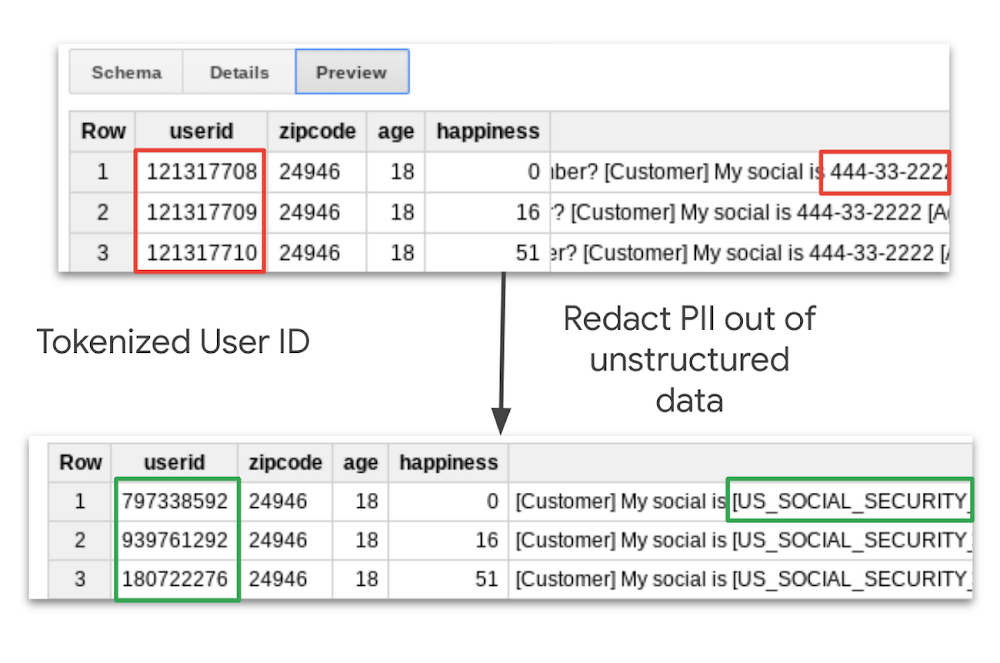
Preventing the exposure of sensitive data is critically important for many businesses—particularly those that operate in industries with substantial compliance needs, such as finance and healthcare. Cloud Data Loss Prevention (DLP) can help meet those needs and protect sensitive data through data discovery, classification, and redaction. But in some cases, you might need more awareness and quick access to Cloud DLP capabilities in the context of other GCP services such as BigQuery. Today, we’re making it easier to discover, and classify sensitive data in BigQuery with the Scan with DLP button. This new feature makes it possible to run DLP scans with just a few clicks, directly from the BigQuery UI.Cloud DLP in actionHere’s what you can do:Detect common sensitive data types such as credit card numbers or custom sensitive data types to highlight intellectual property or proprietary business information.Create triggers for automatic Cloud DLP scan scheduling.Publish Cloud DLP scan findings to BigQuery and Cloud Security Command Center for further analysis and reporting.De-identify and obfuscate sensitive data.Use the Cloud DLP UI (Beta) to create, manage, and trigger DLP scans across multiple GCP services, such as BigQuery, Cloud Storage, and Datastore.Scan a subset of your entire dataset using the sampling feature to keep your Cloud DLP costs under control.Today, BigQuery customers can start using Cloud DLP to scan for sensitive data with a few clicks, following these simple steps:1. Browse to a particular BigQuery table and choose Scan with DLP from the Export menu.2. Complete the Cloud DLP scan job creation with a click, or specify custom configurations such as information types to scan, sampling versus full scanning, post-scan actions, and more.3.Once a Cloud DLP scan is completed, you will receive an email with links to the scan details page where you can analyze findings and take further actions.You can also quickly scan your other cloud-based data repositories with the Data Loss Prevention (DLP) user interface, now available in beta. Through this new interface, you can run DLP scans with just a few clicks—no code required, and no hardware or VMs to manage. Get started today in the GCP console.To learn more, check out our Cloud DLP documentation.
Quelle: Google Cloud Platform

Cloud Scheduler, a fully managed cron job service from Google Cloud

At Google Cloud Next, we announced the general availability of Cloud Scheduler, a fully managed cron job service that allows any application to invoke batch, big data and cloud infrastructure operations. Since then, we have added an important new feature that allows you to trigger any service, running anywhere: on-prem, on Google Cloud or any third party datacenter.Invoke any service with Cloud SchedulerNow, you can securely invoke HTTP targets on a schedule to reach services running on Google Kubernetes Engine (GKE), Compute Engine, Cloud Run, Cloud Functions, or on on-prem systems or elsewhere with a public IP using industry-standard OAuth/OpenID Connect authentication.With Cloud Scheduler, you get the following benefits:Reliable delivery: Cloud Scheduler offers at-least-once delivery of a job to the target, guaranteeing that mission-critical jobs are invoked for execution.Secure Invocation: Use industry standard OAuth/OpenID Connect tokens to invoke your HTTP/S schedules in a secure fashion. (NEW)Fault-tolerant execution: Cloud Scheduler lets you automate your retries and execute a job in a fault-tolerant manner by deploying to different regions, so you eliminate the risk of single point of failure as seen in traditional cron services.Unified management experience: Cloud Scheduler lets you invoke your schedules through the UI, CLI or API and still have a single pane of glass management experience. It also supports the familiar Unix cron format to define your job schedules.Better yet, Cloud Scheduler does all this in a fully managed serverless fashion, with no need to provision the underlying infrastructure, or manually intervene since it automatically retries failed jobs. You also pay only for the operations you run—GCP takes care of all resource provisioning, replication and scaling required to operate Cloud Scheduler. As a developer you simply create your schedules and Cloud Scheduler handles the rest.How Cloud Scheduler worksTo schedule a job, you can use the Cloud Scheduler UI, CLI or API to invoke your favorite HTTP/S endpoint, Cloud Pub/Sub topic or App Engine application. Cloud Scheduler runs a job by sending an HTTP request or Cloud Pub/Sub message to a specified target destination on a recurring schedule. The target handler executes the job and returns a response. If the job succeeds, a success code (2xx for HTTP/App Engine and 0 for Pub/Sub) is returned to Cloud Scheduler. If a job fails, an error is sent back to Cloud Scheduler, which then retries the job until the maximum number of attempts is reached. Once the job has been scheduled, you can monitor it on the Cloud Scheduler UI and check the status of the job.Glue together an end-to-end solutionCloud Scheduler can be used to architect interesting solutions like wiring together a reporting system on a schedule using Cloud Functions, Compute Engine, Cloud Pub/Sub and Stackdriver. Here’s an example from Garrett Kutcha from Target at Cloud Next 2019.You can also use Cloud Scheduler to do things like schedule database updates and push notifications, trigger CI/CD pipelines, schedule tasks such as image uploads, and invoke cloud functions. Tightly integrated with most Google Cloud Platform (GCP) products, the sky’s the limit with Cloud Scheduler!Get started todayWith Cloud Scheduler, you now have a modern, serverless solution to your job scheduling needs. To try out Cloud Scheduler today, check out the quickstart guide. Then, create and configure your own schedules using the documentation or start a free trial on GCP!
Quelle: Google Cloud Platform

Build your own event-sourced system using Cloud Spanner

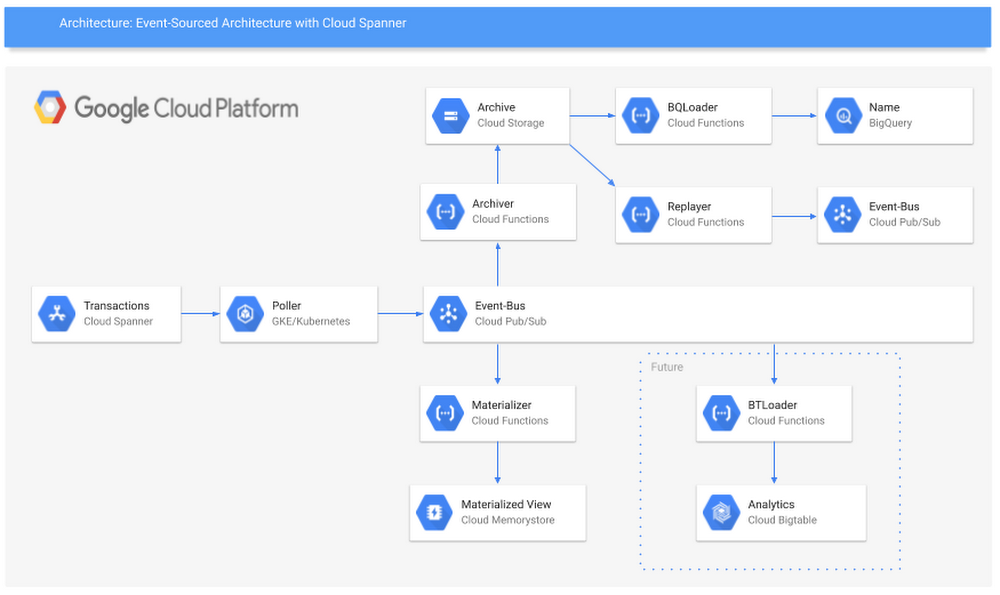
When you’re developing a set of apps or services that are coordinated by, or dependent on, an event, you can take an event-sourced approach to model that system in a thorough way. Event-sourced systems are great for solving a variety of very complex development problems, triggering a series of tasks based on an event, and creating an ordered list of events to process into audit logs. But there isn’t really an off-the-shelf solution for getting an event-sourced system up and running.With that in mind, we are pleased to announce a newly published guide to Deploying Event-Sourced Systems with Cloud Spanner, our strongly consistent, scalable database service that’s well-suited for this project. This guide walks you through the why and the how of bringing this event-sourced system into being, and how to tackle some key challenges, like keeping messages in order, creating a schema registry, and triggering workloads based on published events. Based on the feedback we got while talking through this guide with teammates and customers, we went one step further: We are pleased to announce working versions of the apps described in the guide, available in our Github repo, so you can easily introduce event-sourced development into your own environment.Getting started deploying event-sourced systemsIn the guide, you’ll find out how to make an event-sourced system that uses Cloud Spanner as the ingest sink, then automatically publishes each record to Cloud Pub/Sub. Cloud Spanner as a sink solves two key challenges of creating event-sourced systems: performing multi-region writes and adding global timestamps.Multi-region writes are necessary for systems that run in multiple places—think on-prem and cloud, east and west coast for disaster recovery, etc. Multi-region writes are also great for particular industries, like retailers that want to send events to a single system from each of their stores for things like inventory tracking, rewards updates, and real-time sales metrics.Cloud Spanner also has the benefit of TrueTime, letting you easily add a globally consistent timestamp for each of your events. This establishes a ground truth of the order of all your messages for all time. This means you can make downstream assumptions anchored in that ground truth, which solves all sorts of complexity for dependent systems and services.In the guide, we use Avro as a serialization format. The two key reasons for this are that the schema travels with the message, and BigQuery supports direct uploading of Avro records. So even if your events change over time, you can continue to process them using the same systems without having to maintain and update a secondary schema registry and versioning system. Plus, you get an efficient record format on the wire and for durable storage.Finally, we discuss storing each record in Cloud Storage for archiving and replay. With this strategy, you can create highly reliable long-term storage and your system of record in Cloud Storage, while also allowing your system to replay records from any timestamp in the past. This concept can build the foundation for a backup and restore pattern for Cloud Spanner, month-over-month analysis of events, and even end-of-month reports or audit trails.Here’s a look at the architecture described in the guide, and details about the services and how you can deploy them.Poller app: Polls Cloud Spanner, converts the record format to Avro, and publishes to Cloud Pub/Sub.Archiver: Gets events triggered by messages published to a Cloud Pub/Sub topic and writes those records to a global archive in Cloud Storage.BQLoader: Gets triggered by records written to Cloud Storage and loads those records into a corresponding BigQuery table.Janitor: Reads all entries written to the global archive at a fixed rate, then compresses them for long-term storage.Replayer: Reads the records in order from long-term storage, decompresses them, and loads them into a new Cloud Pub/Sub stream.Materializer: Filters records written to Cloud Pub/Sub, then loads them to a corresponding Redis (materialized view) database for easy query access.Building your own event-sourced systemIt can be a lot of work to build out each of these components, test them and then maintain them. The set of services we released in GitHub do just that. You can use these services out of the box, or clone the repo and use them as examples or starting points for more sophisticated, customized systems for your use cases. We encourage you to file bugs and to add feature requests for things you would like to see in our services. Here’s a bit more detail on each of the services:PollerThe core service, Spez, is a polling system for Cloud Spanner. Spez is intended to be deployed in a Kubernetes cluster (we suggest Google Kubernetes Engine, naturally), and is a long-running service. Spez will poll Cloud Spanner at a fixed interval, look for any newly written records, serialize them to Avro and then publish them to Cloud Pub/Sub. It will also populate the table name and the Cloud Spanner TrueTime timestamp as metadata on the Cloud Pub/Sub record. All the configurable bits are located in config maps and loaded into the service via environment variables.ArchiverThere is also a Cloud Function included in the repo that will be triggered by a record being written to Cloud Pub/Sub, then take that record and store it in Cloud Storage. It will also create a unique name for the record and populate the table name and TrueTime timestamp as metadata on the blob. This sets up the ability to order, filter and replay the records without having to download each record first.ReplayerWe’ve added a feature in Spez that allows you to replay records from a given timestamp to another timestamp. Replayer allows you to select replay to Cloud Pub/Sub, a Cloud Spanner table or a Spez queue. You can use this to back up and restore a Cloud Spanner table, fan out Cloud Pub/Sub ledgers, create analytics platforms, or run monthly audits. We’re very excited about this one!Spez queueSo, what is a Spez queue? Spez queues are Cloud Spanner-backed queues with a Java client listener that will trigger a function each time a record is added to the queue. Spez queues can guarantee exact ordering across the world (thanks to Cloud Spanner) as well as exactly-once delivery (as long as there is only one subscriber). Spez queues give you a high-performance, feature-rich alternative to Kafka of Cloud Pub/Sub as your event ledger or as a general coordination queue.We’re very excited to share these resources with you. To get started, read the guide and download the services.
Quelle: Google Cloud Platform

Testing Cloud Pub/Sub clients to maximize streaming performance

Cloud Pub/Sub, part of Google Cloud Platform (GCP), lets you ingest event streams from a wide variety of data sources, at nearly any scale, and allows horizontal application scaling without additional configuration. This model allows customers to sidestep complexities in operations, scaling, compliance, security, and more, leading to simpler pipelines for analytics and machine learning. However, Cloud Pub/Sub’s enablement of horizontal scaling adds the additional requirement to orchestrate multiple machines (instances or Cloud Pub/Sub clients). So to verify that Cloud Pub/Sub client libraries can handle high-throughput single-machine workloads, we must first understand the performance characteristics of a single, larger machine.With that in mind, we’ve developed an open-source load test framework, now available on GitHub. In this post, you’ll see single-machine application benchmarks showing how Cloud Pub/Sub can be expected to scale for various programming languages and scenarios. These details should also help you understand how a single Cloud Pub/Sub client is expected to scale using different client libraries, as well as how to tune the settings of these libraries to achieve maximum throughput. Note that the Cloud Pub/Sub service is designed to scale seamlessly with the traffic you send to it from one or more clients; the aggregate throughput of the Cloud Pub/Sub system is not being measured here.Here’s how we designed and tested this framework.Setting up the test parametersWe will publish and subscribe from single, distinct Compute Engine instances of various sizes running Ubuntu 16.04 LTS. The test creates a topic and publishes to it from a single machine as fast as it can. The test also creates a single subscription to that topic, and a different machine reads as many messages as possible from that subscription. We’ll run the primary tests with 1KB-sized messages, typical of real-world Cloud Pub/Sub usage. Tests will be run for a 10-minute burn-in period, followed by a 10-minute measurement period. The code we used for testing is publicly available on GitHub, and you can find results in their raw form here.Using vertical scalingAs the number of cores in the machine increases, the corresponding publisher throughput should be able to increase to process the higher number of events being generated. To do so, you’ll want to choose a strategy depending on the language’s ability for thread parallelism. For thread-parallelizable languages such as Java, Go, and C#, you can increase publisher throughput by having more threads generating load for a single publisher client. In the test, we set the number of threads to five times the number of physical cores. Because we are publishing in a tight loop, we used a rate limiter to prevent running out of memory or network resources (though this would probably not be needed for a normal workflow). We tuned the number of threads per core on the subscribe side on a per-language basis, and ran both Java and Go tests at the approximate optimum of eight threads/goroutines per core.For Python, Node, Ruby and PHP, which use a process parallelism approach, it’s best to use one publisher client per hardware core to enable maximum throughput. This is because GRPC, upon which the client libraries tested here are built, requires tricky initialization after all processes have been forked to operate properly.Getting the test resultsThe following are results from running the load test framework under various conditions in Go, Java, Node and Python, the four most popular languages used for Cloud Pub/Sub. These results should be representative of the best-case performance of similar languages when only minimal processing is done per message. C# performance should be similar to Java and Go, whereas Ruby and PHP would likely exhibit performance on par with Python.To achieve maximum publisher throughput, we set the batching settings to create the largest batches allowed by the service, the maximum of either 1,000 messages or 10MB per batch, whichever is smaller. Note that these may not be the optimal settings for all use cases. Larger batch settings and longer wait times can delay message persistence and increase per-message latency.In testing, we found that publisher throughput effectively scales with an increase in available machine cores. Compiled/JIT language throughput from Java, Go and Node is significantly better than that of Python. For high-throughput publish use cases such as basic data transfer, you should choose one of these languages. Note that Java performs the best among the three. You can see here how each performed:The subscriber throughput should also be able to scale to take full advantage of the available resources for handling messages. Similar to the publisher model, thread-parallel languages should use the parallelism options in the subscriber client to achieve optimal throughput. Subscriber flow control settings, by default, are set to 1,000 messages and 1GB outstanding for most languages. It’s best to relax those for the small message use case, since they will hit the 1,000 message limit with only 1MB of outstanding messages, limiting their throughput. For our load testing purposes, we used no message limit and a 100MB per worker thread size limit. Process parallel languages should use one worker per process, similar to the publisher case.Subscriber throughput is much higher in Java or Go than in Node or Python. For high-throughput subscribing use cases, the difference between Java and Go performance is negligible, and either would work well. You can see this in graph form here:Considering other scaling modesThere are other considerations when looking at how the system scales beyond just the number of allocated CPU cores. For example, the number of workers per CPU core has a great impact on the throughput of subscriber clients. High-throughput users should change parallelPullCount in Java and numGoroutines in Go from their default values, which are set to one to prevent small subscribers from running out of memory.The default client library settings, because they exist as a safety mechanism, are tuned away from high-throughput use cases. For both Java and Go, the performance peak in our tests occurred at around 128 workers on a 16-core machine, or eight workers per core. Here’s what that looked like:Message size can also have an effect on throughput. Cloud Pub/Sub can more efficiently process larger messages than a batch of small messages, since less work is required to package them for publishing or unpackage them for subscribing. This is important for data transfer use cases: If you have control over the size of your data blocks, larger sizes will yield higher throughput. You still should not expect to see large gains beyond 10KB message sizes using these settings. If you increase the thread parallelism settings, you may see higher throughput for larger message sizes.A few notes on these particular results: If you want to replicate these results, you’ll need to publish at higher throughputs. To do so, apply for an exemption to the standard limits in the Google Cloud Console limits menu. In addition, an outstanding Node.js memory bug prevented us from collecting throughput results from 9MB message sizes. Here’s a look at throughput results on 16-CPU machines:The Cloud Pub/Sub client libraries are set up to be useful out of the box for the vast majority of use cases. If you want to maximize throughput, you can easily modify the batching and flow control settings in Go, Java and C# to achieve throughput that vertically scales with machine size. There are language limitations on pursuing a shared memory threading model, so you should scale purely horizontally to more machines if that is feasible in order to reach maximum throughput while using Python or Node.js. It can be hard to get single client instances to scale beyond one core.Try Compute Engine for horizontal autoscaling for this purpose, or Cloud Functions to deploy clients in a fully managed way. Learn more about Cloud Pub/Sub here.
Quelle: Google Cloud Platform

Magazine Luiza: How we transformed our e-commerce platform with Apigee, Firebase, and GCP

Editors note:Today’s post comes from Andre Fatala, chief technology officer at Brazilian retailer Magazine Luiza. Apigee, Firebase, and Google Cloud Platform (GCP) have helped this 60-year-old company become one of the most successful e-commerce operations in Brazil.Founded in 1957, Magazine Luiza, or Magalu, is a technology and logistics company focused on the retail sector. In 2018 we posted 60% growth year over year in e-commerce sales, reaching 7 billion in Brazilian Real (nearly 2 billion in USD), with e-commerce contributing 35.7% of our total sales.From supply chain issues to economic fluctuations, the retail industry in Brazil is complex to say the least. But adopting mobile e-commerce presented us with an entirely new challenge—one that we had to respond to quickly to remain competitive. Brazilian e-commerce players, along with global internet giants, threatened to make inroads into a market in which we have held a leading position for decades. To help achieve our goals, we employed Google Cloud products like the Apigee API management platform, GCP, Firebase, and G Suite.In 2013 we had an e-commerce platform, and even a library of APIs, but those APIs were accessing an overstretched backend application built with 150,000 lines of code. Deployment of new APIs was slow, we were burdened with undesirable dependencies, and we faced scalability challenges as well as distributed responsibilities across siloed teams.Knowing we were under threat from competitors, our then-chief operating officer (and current CEO) Frederico Trajano put me in charge of a small team of developers. The team was walled off from IT governance processes and roadblocks from the greater organization, and given the keys to the company’s entire e-commerce operations. That’s around the time when we started using the Apigee API management platform. Apigee helped us to decouple our backend systems from the front end so it was easier and faster for my team to iterate on new apps while other teams maintained our legacy systems of record.  Our new approach accelerated mobile application development, and Firebase has played a big role in this. We started using Firebase soon after we learned about it at Google I/O in 2016. Firebase helped to reduce the complexity of building the apps that we need to reach our customers. We can quickly publish and test new features, and Firebase Crashlytics helps us keep our apps stable and users happy.Last year, after GCP launched its region here in Brazil, we began deploying workloads onto GCP. We were pleased with the latency of GCP—there just wasn’t any. The speed was notable and this is critical in e-commerce applications. We’d already been using Kubernetes for some time as it’s especially helpful with our multi-cloud strategy. Migrating all our data onto GCP was simple because we used Kubernetes along with our own open-source PaaS.Believing that we’d have better performance and stability to handle Black Friday traffic running on GCP, we made the decision to migrate 113 apps in less than 60 days before Black Friday. It was a move that paid off: 2018 was our biggest Black Friday ever, where we saw levels of API traffic that were dramatically higher than before. Apigee helped us with our execution, meeting customer demand throughout across our platforms, with visibility across all of our API and application activity.As a result of these successes, we now have plans to migrate our entire e-commerce platform onto GCP, and our big data team is moving away from our Hadoop environment to an architecture that uses GCP managed services.With this newfound ease and speed of spinning up new services and customer experiences and adjusting existing ones, everyone is able to work in small teams of five or six people that take care of segments of an application, whether its online checkout, physical store checkout, or order management. We work much more like a software company than a retail company now.Our approach, powered by Google Cloud technologies, supported us to expand our e-commerce strategy to third-party sellers and create a new digital marketplace. Other merchants can easily join this ecosystem via our API platform. Today, we support more than 3,300 sellers and offer 4.3 million SKUs (compared to our legacy sales and distribution system, which in 2016 supported 50,000 SKUs).Our goal has been to transform from a traditional retail company with a digital presence to a digital platform with a physical presence and a “human touch”—and now we’re much closer to that vision. People in Brazil enjoy the convenience of ordering from their computers or smartphones, but still appreciate coming into our stores to pick up their items. In fact, two-thirds of Brazilians buy this way. To make it even easier for our customers, we built 12 in-store apps that our salespeople use to make the once-slow sales process much faster—this helped us grow physical store sales 25.8% in 2018!Google Cloud has been a great partner for us. It’s no small feat to succeed in Brazil’s constantly evolving retail environment, but we feel like we’re on the right path.For more on Magazine Luiza, watch the Google Cloud Next ‘19 session “How Retailers Prepare for Black Friday on Google Cloud Platform.”
Quelle: Google Cloud Platform

ANZ accelerates its digital transformation with Google Cloud smart analytics

In addition to secure, always-on service from their financial services providers, consumers increasingly expect personalized insights as well. As a result, financial services institutions are now leveraging cloud technology solutions to help them bridge from isolated data to rich customer recommendations. In this highly regulated industry, adopting cloud technology while complying with legal and regulatory requirements can be challenging. At Google Cloud, we understand that reducing costs while managing risks comes first, and we’ve been working hard to deliver secure and reliable platform modernization solutions that enable financial institutions to embrace cloud technology, create personalized customer experiences and transform their businesses.One of my favorite examples of how we’re driving transformation for financial institutions is our work with Australia and New Zealand Banking Group (ANZ), a company that’s changing the way it draws insights from data to help its Institutional customers make better strategic business decisions. ANZ is Australia’s third largest bank by market capitalization, with its Institutional Banking division operating across 34 markets globally.Looking for ways to add value to institutional customer relationships, ANZ wanted a tool to help deliver meaningful data insights quickly—insights which would ultimately help customers make informed business decisions on issues like liquidity, risk, and cash management, or strategic calls like store locations, inventory, and market positioning. It made sense for ANZ to leverage Google Cloud’s data analytics capabilities to help achieve this in an efficient, safe and secure way.Following a successful proof-of-concept, ANZ used our best-in-class smart analytics and data science technology to analyze aggregated, de-identified data sets and deliver these powerful insights to customers.BigQuery allowed ANZ to gain access to insights much faster than ever before—reducing time for analyzing a single table from five days to 20 seconds.Google Cloud Composer orchestrated data movement and transformation, making it easier to manage dependencies and multiple layers of the data pipeline.Google Kubernetes Engine created a platform to provide customized data services and data visualization experiences for customers.ANZ is also driving productivity across its organization by leveraging our big data analytics capabilities for heavy computational queries. These capabilities to help bankers reimagine daily tasks and processes, automate and accelerate previously manual operations such as analyzing aggregated, de-identified credit card data—something that used to take days for ANZ Bank but now takes seconds, and give bankers meaningful business insights 250 times faster than before.“Google Cloud improves how we process and use data internally, providing the technology and expertise to help us draw out data insights quickly so we can better serve the needs of our institutional customers,” said ANZ’s Chief Data Officer, Emma Gray. “There’s a genuine sense of collaboration with Google in solving our unique challenges and positioning ANZ and our customers for success today and in the future.”I’d like to thank ANZ for partnering with us to make banking better for customers around the world. To learn more about how Google Cloud is helping financial services institutions deepen customer relationships, lower costs and manage risk with secure and reliable data solutions, visit our website.
Quelle: Google Cloud Platform

How Google Cloud securely enables modern end-user computing

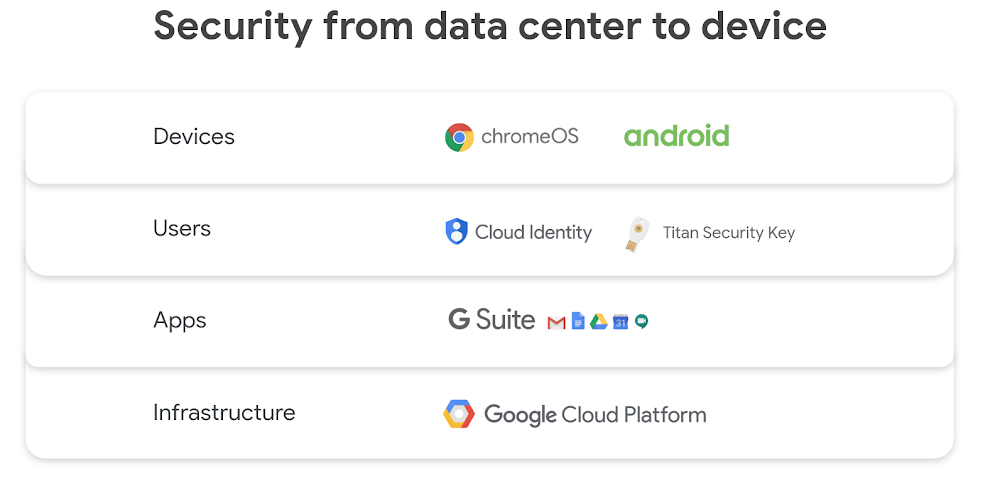
The era where the majority of employees work solely from a gleaming corporate headquarters is giving way to the era of the cloud-based mobile worker. Enabling your workforce to get work done from anywhere increases productivity, improves collaboration, and strengthens employee engagement. But it also can create security and compliance challenges.  At Google Cloud Next ‘19 in April, we delivered a presentation on how Google Cloud securely enables modern end-user computing. It’s a timely, essential topic given the reality we now operate in.Our ecosystem of end-user computing products is built on Google Cloud Platform (GCP). GCP delivers a foundation that prioritizes security by default, leverages purpose-built infrastructure, and offers powerful proprietary security controls. GCP allows users to integrate an extensive ecosystem of partner tools, and provides validation against some of the most rigorous global security standards such as the ISO 27000 series.In addition to this infrastructure foundation, our multilayered approach to end-user computing embeds security at the application, user, and device layers. Let’s take a look at the Google Cloud end-user computing stack:Application securityEnd users increasingly access apps through browsers, and Chrome Browser provides secure, trusted access to these cloud apps across platforms. We’re continuously working to improve the security of Chrome Browser, helping you safeguard customer and business data across your enterprise. For example, features such as Google Safe Browsing, regular security updates, sandboxing, and site isolation keep your enterprise and users one step ahead of potential threats.In addition, we take a proactive and intelligent approach to security with all of our G Suite apps, including Gmail, Docs, Drive, and more, automatically blocking many threats that confront your users and automating protection. G Suite gives admins a simple, streamlined way to protect users, manage devices, ensure compliance, and keep your data secure. Transparency is core to Google’s DNA, and we want to be clear that you—not Google—own your own data. We do not sell your data to third parties, there is no advertising in G Suite, and we never collect or use data from G Suite services for any advertising purposes.User securityIn the mobile enterprise, users expect to be able to work from anywhere, on any device, on any network. This new reality requires a new approach to user security.We developed BeyondCorp,  a “zero trust” enterprise security model to help ensure security in this mobile, cloud-based, perimeterless new world. BeyondCorp shifts controls from the network perimeter to individual users and devices, granting access based on identity, device state, and context. This gives IT more granular control and lets users work securely from any location, on any device.Implementing Cloud Identity, our unified identity, access, and device management solution, is a great step towards enabling BeyondCorp in your organization. Cloud Identity provides enhanced account security with multi-factor authentication and works seamlessly with FIDO security keys, including Google’s Titan Security Key, to provide an extra layer of protection. Additionally, now your Android phone is also a FIDO security key, providing a strong and convenient defense against phishing and account takeovers.Device securityGoogle offers a variety of Android and Chrome enterprise devices in multiple form factors and price points. Both Android and Chrome devices are secure by design and employ a defense-in-depth security model. Features like verified boot, application sandboxing, on-device encryption, and regular background security updates, help ensure rock-solid, always-on device security. For more details on our approach to Android and Chrome security, check out our recent blog post where we cover the findings from Gartner’s Mobile OSs and Device Security: A Comparison of Platforms report.Devices are only as secure as the software tools that users run on them.  Google Play Protect is the world’s most widely used anti-malware solution, with 50B apps verified daily and over 2 billion devices protected. With Managed Google Play, you can push, update, and remotely configure apps protected by Google Play Protect for your users on both Chrome and Android devices, protecting them from side-loading risks in third-party app stores.Security from the data center to the deviceWith interlocking defenses—from infrastructure, to application, to user, to device—our goal is to deliver a multilayered security solution that works up and down the enterprise end user computing tech stack, so your organization can be more mobile and more productive, without sacrificing security. If you’re interested in learning more, please watch our Next session and reach out to us to keep the conversation going.
Quelle: Google Cloud Platform

Uploading images directly to Cloud Storage by using Signed URL

As cloud grows in popularity, it has become common to deploy applications in the cloud and provide them to end users. At the same time, the trend of using serverless architecture means that an unspecified number of end users can seamlessly access resources in the cloud. If you’re offering services to users and serving them content, you’ll want to use a cloud architecture that can solve traditional problems intelligently, and reduce the cost of developing and hosting servers by taking advantage of the cloud.In this blog post, you’ll see how to implement a service hosted on Google Cloud Platform (GCP) that allows users to upload images into Cloud Storage using Signed URL, then serve that static content using managed services. This is particularly helpful if you’re running a social media company with constant image uploads, or hosting and managing consumer-generated media.Without using the cloud, it can be difficult to develop and manage a server that lets users upload image files, especially at high scale. You have to queue requests to the process responsible for uploading the files to control the flow rate, and you have to prevent the system from going down due to request overload. You also need to set appropriate resource limits for finite resources (such as RAM) of each server that’s involved.Furthermore, to allow uploading very large files to the server, it can be very costly to develop and host the server. And if the upload server is to be used by millions of users, it will require a lot of work to ensure its scalability and user experience.Let’s get started building an image upload feature to use with Cloud Storage. You can access the full set of source files that we’ve used on Github, here.Getting started building an image upload featureBefore diving into the GCP components needed to implement this service, let’s define our requirements:Use managed services as much as possibleEnable only authenticated users to upload filesValidate/filter the content uploaded by usersIn order to satisfy the above requirements, we devised the following architecture with GCP services:The key characteristic of this architecture is that it uses a serverless platform from file upload to delivery. This is the general workflow you’ll be setting up. Let’s detail each step shown in the diagram.1. Once App Engine receives a request from the user, App Engine generates a Signed URL that allows PUT requests to be executed only for a specific Cloud Storage bucket and object for authenticated users, using application domain logic.2. Next, the user can upload a file for a specific bucket and object accordingly.3. Once the user uploads the file to Cloud Storage, it triggers Cloud Functions as finalize event. Then Cloud Functions validates the uploaded file.4. After confirming that the file is in image format and appropriate size at step 3, annotate the image by posting to the Cloud Vision API to filter inappropriate content.5. Once the validations in steps 3 and 4 are complete, copy the image file from the Uploadable Bucket to the Distribution Bucket.6. The copied image file is now available to the public.Next, we will devise an actual implementation for the above steps.Generate Signed URL on App Engine standard runtimeCloud Storage provides the Signed URL feature to let individual end users perform specific actions. Signed URL makes it possible to generate temporary credentials valid only for a specific end user to securely upload a file. The Google Cloud official client library makes it easy to generate a Signed URL. Using this feature, you’ll prepare an API server to generate a Signed URL dynamically for specific end users. For our purposes, we’re implementing the API using App Engine Standard.Here’s how to generate a Signed URL:1. Create a new service account or prepare the service account for signing bytes in App Engine.2. Create a string necessary for the signature to generate a Signed URL (note that Content_MD5 and Canonicalized_Extension_Headers are omitted).    a. Choose PUT for Cloud Storage API that accepts file upload.    b.The value of Content-Type depends on the MIME type of the file being uploaded. This is determined by the API request from the end user.    c. Set Unix epoch time for expiration. After accepting the API request, set the shortest possible value of the future. We will set 15 minutes here.    d. Specify a bucket and an object as Canonicalized_Resource. The object key is dynamically generated so it doesn’t duplicate an existing one.3. Sign the string generated in step 2 with the secret key of the service account prepared in step 1.Check out the official documentation for more details on procedures. If you are using Golang to implement all of the above procedures, it will look like this:As mentioned in the code, there are two ways to sign the generated bytes to create the Signed URL.One way is to sign it yourself using the private key associated with the service account. This is suitable for use in environments such as Google Compute Engine and Google Kubernetes Engine (GKE). If you choose this option, you have to manage the private key yourself.The second way is to use the serviceAccounts.signBlob API, which is one of the Cloud Identity and Access Management (IAM) Service Account APIs. This lets you sign the bytes without managing the private key on the application runtime. Here we’re using the signBlob to avoid managing the private key.In addition, within Cloud Storage, you need to grant the following permissions to generate a Signed URL.storage.buckets.getstorage.objects.createstorage.objects.deleteIf you would like to use the signBlob API, you also have to grant your service account the Service Account Token Creator role.Uploading files using Signed URLNow, a user can upload files directly to Cloud Storage using Signed URLs dispatched in the above way. Here, we’ll use PUT Object, one of the Cloud Storage XML APIs, for the Signed URL that App Engine has generated.You can run this from a mobile application or front-end code of a web application. Here’s the sample file upload code:Using Bucket Lock with Signed URLAs you can see from the architecture diagram above, we’ve set up two Cloud Storage buckets: the upload destination (Uploadable Bucket) and the delivery source (Distribution Bucket).Although all the files will be copied to the Distribution Bucket after validation, these files will still reside in the Uploadable Bucket as well. However, these files will no longer be referred by any processing module. So it’s meaningless to keep the files copied to the Distribution Bucket still lying around in the Uploadable Bucket.In addition, end users can upload files any number of times in the Uploadable Bucket until the Signed URL is expired.To solve these two problems, use Object Lifecycle Management and Retention Policy.First, define the lifecycle to make sure there are no unnecessary objects left in the Uploadable Bucket. You only need to define the lifecycle conditions for the bucket and the behaviors that align with each condition. Here, let’s define the lifecycle of one day before deleting the object, which would look like this:Next, let’s make sure users can’t upload the file over and over again within the prescribed period of time. You can do this by defining a retention policy.A retention policy lets you specify the retention period for the bucket, and makes it impossible to overwrite or delete the object during that period. Use the same expiration date in the Signed URL and the retention policy period. You need to avoid conflict with the lifecycle setting, since the object will be deleted after one day. (Note that retention policies cannot be enabled for buckets with versioning enabled.)In order to create a bucket with these settings, execute the following command:Validate and copy the uploaded fileYou’ve so far seen how to generate a Signed URL to upload files directly to Cloud Storage. However, before making this available to users, more validation is necessary. You’ll want to verify the validity of the file uploaded by the authenticated user, and Signed URL and Cloud Storage alone can’t validate the content.To do this, we’ll implement the validation/copy process using Cloud Functions. To run Cloud Functions triggered by a specific event on GCP, use Background Functions, specifically to trigger the event of Cloud Storage. We use google.storage.object.finalize as the event of object creation.Next, how should we validate the uploaded file? Here are the requirements in order.1. Make sure that an object with the same object key as the uploaded file does not exist in Distribution Bucket.    a. If the object already exists, stop further processing.    b. This is a conditional branch that may occur because the execution of Cloud Functions guarantees at-least-once execution.2. Get Content-Type and the size from the metadata of the target object in the Uploadable Bucket.   a. Check that the size does not exceed the Cloud Storage size limit. If so, stop further processing.   b. The size limit should be determined based on the specification of your runtime (in this case, the Cloud Function is the runtime for validation).3. Read the target object in the Uploadable Bucket, and validate based on the Content-Type acquired in step 2.    a. There’s no guarantee that the Content-Type specified at the time of generating the Signed URL matches the content of the actually uploaded object, so verify that next.4. Post the target object in the Uploadable Bucket to the Vision API, and verify whether it contains violent content by using Safe Search Annotation.    a. If so, it will filter what may be violent, adult, medical and racy (likelihood over POSSIBLE).5. If the object passed validation, copy the object from the Uploadable Bucket to the Distribution Bucket.To create an implementation that meets the above requirements, use the Cloud Functions Go 1.11 runtime. The source code is as follows:To deploy UploadImage in the above source code to Cloud Functions, execute the following command:Don’t forget to turn on –retry. In case there’s a temporary error case, the background function should be made with retries taken into account. In addition, since Cloud Functions guarantees at-least-once execution, it is not idempotent in that the object in Distribution Bucket may be updated more than once. However, there are no side effects.Upload a file!Let’s actually upload a file using the system we’ve built, which uses managed services from uploading images to delivery. Testing is easy; just run the source code used to post the image in Signed URL earlier.After the background function finishes running, make sure that the object in the Uploadable Bucket is copied to the Distribution Bucket. You can also introduce push notifications to let the user know when the distribution starts, since these processes are performed asynchronously. Or, you can update the database referred by the original application if necessary. You can also do such processes on Cloud Functions, or notify your application that it is loosely coupled.You can also customize this system to create another file upload feature that fits your purpose. You may decide to use Signed Policy Document instead of Signed URL, such as if you want to set more detailed conditions or use a POST Object API. Furthermore, if you’re using Firebase, our mobile and web development tool, you can use Cloud Storage for Firebase instead of this feature because similar functionality can be easily implemented on Firebase.If you’d like to connect with Google Cloud experts, get in touch and learn more here.
Quelle: Google Cloud Platform