New Translate API capabilities can help localization experts and global enterprises

Whether they’re providing global content for e-commerce, news, or video streaming, many businesses need to share information across many languages, and increasingly they’re turning to automated machine translation to do it faster and more cost-effectively.As one of our longest-standing AI products, Google Cloud Translation has substantially evolved over the years to meet the increasing needs of developers and localization providers around the world. Last year we launched AutoML Translation to help businesses with limited machine learning expertise to build high-quality, production-ready custom translation models without writing a single line of code.But that only met part of the need for customization. While AutoML Translation offers full customization flexibility, companies using Translation API wanted to have more granular control on specific words and phrases, such as a list of location names or street names. Many businesses also told us they use both custom and pre-trained models in the same translation project for different languages, so we wanted to make it easier for them to move between models to run translation predictions.As a result of these learnings, we recently launched Translation API v3 to better serve the needs of our customers. Here’s a look at the enhanced features in Translation API v3.Define specific names and terms with a glossaryIf you need to maintain and control specific terms such as brand names in translated content, creating a glossary can help. Simply define your company-specific names and vocabulary in your source and target languages, then save the glossary file to your translation project. Those words and phrases will be included in your copy when you apply the glossary in your translation request.Welocalize, a global leader in multilingual content and data transformation solutions, is already using the glossary feature to increase accuracy, efficiency and fluency for their customers. “The new Google glossary feature will have a significant impact on our day-to-day business. We process hundreds of million words per year using machine translation in widely disparate enterprise client scenarios,” said Olga Beregovaya, their Vice President of Language Services. “The ease of customization and API consumption allows us to enforce broad terminology coverage for both clients with voluminous data in Google AutoML Translation and clients with sparse data in Google Cloud Translation API. Our initial benchmarking in five languages shows a preference for translation with glossary as much as 20% over the non-glossary.”              Select between custom and pre-trained modelsNow you can choose between Translation API’s traditional pre-trained models or use custom model translations so that you can streamline your workflow within the same client library.Streamline your localization process with batch translationsYou can now translate larger volumes of content in one translation request for text and HTML files stored on Google Cloud. This means you can use a single request to upload multiple files translated into multiple languages using multiple models.For example, if you wanted to translate an English product description on your website into Spanish, Japanese, and Russian, you could use your custom AutoML model for Spanish and a pre-trained model for Japanese and Russian. You would simply upload your English HTML file to your Cloud Storage bucket and send a batch request pointing to your Spanish AutoML model and pre-trained models for Japanese and Russian. Translation v3 will then output your HTML to Cloud Storage in Spanish, Russian, and Japanese in three separate files.Integrations with TMS/CATTechnology partners are starting to integrate these new features within their TMS systems as well.“Based on feedback from our clients using Google translation technology in CAT tools, the most sought after features are the ability to customize Google Cloud Translation output with glossary and to make translation faster via batch translation,” says Konstantin Savenkov, CEO of Intento. “Now both are available via our plugin to CAT Tools (SDL APPStore, MemoQ, and Matecat). Also, we may deliver Translation API v3 to enterprise TMS systems via our XLIFF-based connectors.” You can learn more in Intento’s recent blog post.Introducing the Translation API v3 free tierStarting with Translation API v3, businesses can take advantage of a free tier for the first 500,000 characters per month. Beyond that, the pricing remains on a simple and affordable per-character basis, so you only pay for what you use. You can learn more on our pricing page.How to get startedIf you’re already using Translation API v2, you can begin migrating your applications to v3 using this guide. For more information on Translation API v3, visit our website.
Quelle: Google Cloud Platform

Helping enterprises in India transform their businesses in the cloud

In the last year, there’s been an upward trend in cloud adoption in India. In fact, NASSCOM findsthat cloud spending in India is estimated to grow at 30% per annum to cross the US$7 billion mark by 2022.In my conversations with customers, discussions have evolved beyond cost savings and efficiencies. While those are still very relevant reasons for adopting cloud technologies, Indian enterprises are looking to Google Cloud to help them drive digital transformation, identify new revenue generating business models, reach previously untapped consumer markets, and build customer loyalty through greater insight and personalization.To help more enterprises in India take advantage of the cloud, today we’re kicking off our Google Cloud Summit in Mumbai and next week we take the show on the road to customers in New Delhi and Bangalore. More of a community gathering than a conference, our Cloud Summits are where conversations start, partnerships form and problems are solved; and where customers convene to learn from their peers and experts about how the cloud is transforming business. It’s also our opportunity to better understand the needs of Indian businesses, and to get inspired by our customers’ success stories. Here are a few highlights.Tata Steel: Mining data and maximizing its powerTata Steel is a great example of an established enterprise from a traditional industry that is modernizing and embracing cloud computing. With an ambition to be a leader in manufacturing in India and a digital-first organization by 2022, Tata Steel believes smart analytics is key to enhancing operational efficiency and gaining business advantage. To organize data from siloed systems across the organization and make it easily accessible to all employees, Tata Steel is using Cloud Search and plans to scale it to more than one million documents and 28 disparate enterprise content sources including enterprise resource planning (ERP) and SharePoint. In fact, Tata Steel is one of the first Indian enterprises to harness the power of Cloud Search to meet some of the most aggressive ingestion demands, with indexing durations reduced from weeks to seconds.They are also leveraging Google Cloud Platform (GCP) services like Google Cloud Storage and BigQuery to build their data lake and enterprise data warehouse so they can take advantage of advanced analytics and machine learning. Managed services such as AI Platform further enable Tata Steel to manage end-to-end AI/ML workflows within the GCP console. This complements their existing on-premise reporting and analytics tools, and brings data management to the forefront of everything they do—from forecasting market demand to predictive equipment maintenance.“Digital is not just a goal, it’s become a way of life. We are digitizing everything from the deployment of factory vehicles to improving material throughput to marketing and sales. As a result, we have petabytes of structured and unstructured data that is not only waiting to be mined, but that we can generate intelligence from to create opportunities across our multiple lines of business using GCP,” said Sarajit Jha, Chief Business Transformation & Digital Solutions at Tata Steel.Helping L&T Financial Services reach customers in rural communitiesIn rural communities, quick access to financial services can make a tremendous difference to livelihoods. L&T Financial Services provides farm-equipment finance, micro loans and two-wheeler finance to consumers across rural India backed by a strong digital and analytics platform. Their digital-loan approval app, which runs on GCP, makes it significantly faster and easier for people to apply for financial assistance to purchase important things such as farming equipment and two-wheelers. It also helps rural women entrepreneurs get quicker access to funds for their businesses through micro loans.L&T Financial found G Suite to be a far better collaborative tool to help staff work together efficiently. Employees can interact with each other in real time using Hangouts Meet, and the task of information sharing is more seamless and secure through Drive. BigQuery also helps L&T Financial Services generate behavior scorecards to track credit quality of its micro-loan customers.“Cloud is the technology that enables us to achieve scale and reach. Today there are countless data points available about rural consumers which enable us to personalize our products to serve them better. With access to faster compute power, we can also on-board consumers more efficiently. Our rural businesses have clocked a disbursement CAGR of 60% over the past three years.” said Sunil Prabhune, Chief Executive-Rural Finance, and Group Head-Digital, IT and Analytics, L&T Financial Services.Creating conversational connections for Digitate’s customersDigitate, a venture of TCS (Tata Consultancy Services), has integrated Dialogflow into its flagship brand ignio, an award-winning artificial intelligence platform for driving IT operations, workload operations and ERP operations for diverse enterprises. This integration is the next step in ignio’s product development journey, and will enable users to chat or talk with ignio to detect issues, triage problems, resolve them and even predict system behavior.“ignio combines its unique self-healing AIOps capabilities for enterprise IT and business operations with Dialogflow’s AI/ML-based, easy to use, natural and rich conversational capabilities to create an unparalleled, intuitive and feature-rich experience for our customers,” says Akhilesh Tripathi, Head of Digitate.Indian enterprises going G SuiteThe base of Indian enterprises that are making the switch to G Suite to streamline their productivity and collaboration also continues to grow. Sharechat, BookMyShow, Hero MotorCorp, DB Corp and Royal Enfield are now able to move faster within their organizations, using intelligent, cloud-based apps to transform the way they work.A hybrid and multi-cloud future in IndiaCustomers want and deserve choice and flexibility, and openness continues to be a major differentiator for Google Cloud. Since we announced Anthos, our hybrid, multi-cloud solution at Next ‘19, customer feedback has been overwhelmingly positive. That’s because Anthos embraces open standards, and lets customers run their applications, unmodified, on existing on-prem hardware investments or in the public cloud.IDC predicts that by 2023, 55% of India 500 organizations will have a multi-cloud management strategy that includes integrated tools across public and private clouds. (IDC FutureScape: Worldwide Cloud 2019 Predictions  — India Implications (# AP43922319). So when we hold our flagship Cloud Summits in India in 2020, I look forward to sharing more success stories of Indian enterprises that have taken the next step in their digital transformation journey.
Quelle: Google Cloud Platform

Competing with supercomputers: HPC in the cloud becomes reality

Migrating applications to the cloud usually requires significant planning, but some apps, such as data-intensive, tightly coupled high-performance computing (HPC) apps, pose a particular challenge. HPC data growth used to be bound by compute capabilities, but data now comes from many more sources, including sensors, cameras and instruments. That data growth is outpacing corresponding improvements in computer processing, network throughput, and storage performance. This spells trouble for the AI and ML algorithms that need to keep up and process this data to derive insights. This data growth means that many traditional HPC on-premises data centers have to start migrating at least some of the application load into the cloud.With all that in mind, Google Cloud and DDN have developed an in-cloud file system suitable for HPC: DDN’s EXAScaler, a parallel file system designed to handle high concurrency access patterns to shared data sets. Such I/O patterns are typical of tightly coupled HPC applications such as computational simulations in the areas of oil and gas explorations, astrophysics, national defense, and finance. DDN provides expertise in deploying data-at-scale solutions for the most challenging data-intensive applications, and Google provides expertise in delivering global-scale data center solutions.  EXAScaler is DDN’s branded Lustre product. Lustre is an open-source file system, with more than 15 years of demonstrated stability and performance in commercial and research environments at the largest scales. Lustre performs well, but tuning it for maximum efficiency can be challenging. Google and DDN recently used IO-500, the top HPC storage benchmark, to demonstrate the joint system’s ease of use.Competing in the HPC storage challengeIO-500 is an emerging HPC storage benchmark that seeks to capture the full picture of an HPC storage system by calculating a score based upon a wide range of storage characteristics, rather than capturing one narrow performance dimension (such as sequential read performance). Designed to give users realistic performance expectations and to help administrators select their next HPC storage system, the IO-500 competition releases two ranked lists per year: one in the U.S. in November at Supercomputing, the premiere HPC conference, and one in June at ISC, the European equivalent. We were excited to join this competition for the first time to show how easy it is to use this joint solution.Our top-performing configuration achieved #8 on the IO-500, and was limited solely by our allocated resources (next time we’ll request more). This success shows that anyone can now deploy a high-end storage system, not just those with a large budget and extensive expertise.The key benefits of using EXAScaler really came through during the benchmarking process itself:Fast deploymentThe entire Lustre file system, including the VMs and storage it used, was deployed in minutes and shut down immediately afterwards. This is in contrast with on-premises HPC deployments, where it can take weeks just to deploy the hardware alone.Resource efficiencyEXAScaler could generally saturate Google Cloud block storage IOPS and bandwidth limits, which is a testament to Lustre efficiency, EXAScaler tuning, and Google Cloud capabilities.Easy configurationWe submitted three separate configurations to evaluate the effect of changing the number of clients, storage servers, and metadata servers. Deploying each configuration required only a few changes in the deployment script. In fact, this flexibility made it harder to narrow down our configuration choices, since we were only limited by our allotted resources and our imagination of how many different ways Lustre can be deployed.Integrated monitoringWe found that combining client and storage server monitoring using Google Stackdriver with the native DDN EXAScaler monitoring tools allowed for quick diagnosis and resolution of performance bottlenecks. Further, these tools allowed us to identify opportunities to reduce the cost of the system (such as reducing the number of allocated storage server vCPUs).Predictable performanceWhile the IO-500 benchmark only requires the results of a single run, we found benchmark performance extremely consistent between runs.Finally, Lustre on Google Cloud is the only pay-as-you-go storage system on the list, and so the actual cost of the system is simply the per-second cost of running the benchmark (approximately one hour). It would be very interesting if the IO-500 included the cost of each system, as the balance between price and performance is in many cases more important for users than raw performance.IO-500 write bandwidth performance with three different configurationsTips for running HPC in the cloudBenchmarks can be a useful way to get to know the overall market and narrow down your HPC storage choices. However, it’s also important to know what to watch out for when you’re moving important workloads to cloud, particularly if your business relies on them.If you’re considering moving traditional HPC workloads to the cloud, first identify a set of applications to migrate and their sustained performance requirements to create economically efficient hybrid solutions. Executing HPC workloads in the cloud can simply be a lift and shift of HPC software, but it’s also a chance for you to tailor your infrastructure to the needs of the workload. Compute can be scaled up when it’s needed, and scaled down when it’s not. Workloads that need GPUs can provision them and those that do not can simply customize the compute and memory that is required. Storage can also be allocated when in use and either stopped or de-allocated when idle.The goal when you’re running HPC in the cloud should be to simply focus on what applications need, and leave the execution to Google Cloud. For example, one common storage deployment issue is that a single parallel file system is supposed to handle workloads with conflicting requirements such as high metadata/IOPS performance and high bandwidth. Optimizing for metadata/IOPS performance requires more expensive SSDs, which is unnecessary for workloads that simply need high bandwidth. Also, running both types of workloads at the same time can drastically increase the runtime of both due to the mixing of I/O requests. A better way is to customize a parallel file system for each workload type, which decreases overall workload runtime by reducing I/O contention and can even reduce cost by making better use of the provisioned storage devices.While Lustre is proven to scale in traditional on-premises HPC infrastructures, its ability to adapt and deliver the benefits of the cloud has so far not been demonstrated—which is why DDN focuses on adapting, deploying and running Lustre at extreme scales in the cloud. Lustre in the cloud should continue to deliver extreme scale and performance, but be easy to manage and not blow up your storage budget.Using Google Cloud and DDN together can create the right balance of compute and storage for each workload. For active hot data, the Lustre file system brings high performance. For inactive cold data, Google Cloud Storage can be used as an extreme scale archive that delivers high availability with multi-regional, dual-regional, and regional classes and low cost with standard, nearline, and coldline classes. Combining Lustre with Google Cloud storage means that hot data can be fast and cold data can be stored cheaply and brought to bear quickly when needed.Compute and store data differently in Google CloudIf you’re running HPC workloads on-prem, EXAScaler on Google Cloud can help model on-premises Lustre deployments in advance to ensure they are provisioned appropriately before the hardware is ordered and deployed. Due to the complexity of workloads, it can be hard to know the best economic blend of capacity, performance, bandwidth, IOPS, metadata and more before you deploy. Quickly prototyping different configurations quickly and cheaply can ensure a good experience from the start.What’s next for cloud HPCTry the Google Cloud and DDN Lustre solution from the GCP Marketplace. Keep an eye out for exciting new features as we upgrade to EXAScaler in the coming months.For more tips on running HPC apps in Google Cloud, watch our talk from Google Cloud Next ’19. You can also learn more about DDN’s other products for data migration to GCP and workload analysis to fine-tune your deployment.
Quelle: Google Cloud Platform

More choice, less complexity: New Compute Engine pricing options on tap

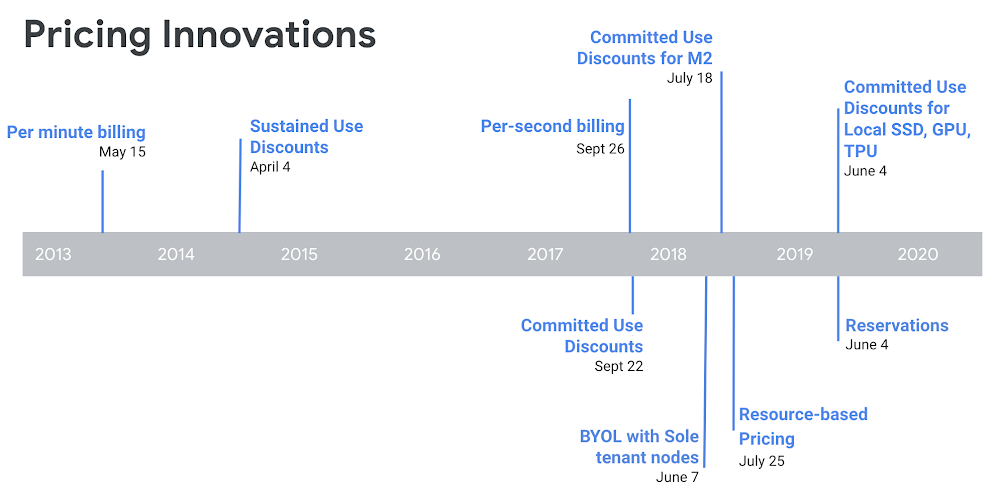
At Google Cloud, we believe cloud pricing should be simple, fair and transparent. You shouldn’t need an advanced degree in finance to get the most out of your cloud investment, and you definitely shouldn’t have to worry about your cloud provider covering up costs under layers of complexity.Today, we’re taking simple, fair and transparent pricing for our Compute Engine service even further with the following announcements:We are extending committed use discounts to support GPUs, Cloud TPU Pods, and local SSDs. Committed use discounts are ideal for predictable, steady-state usage. Now you can purchase a specific number of GPUs, TPU Pods or local SSD storage for up to 55% off on-demand prices. At the same time, you have total control over the instance types, families and zones to which you apply your committed use discounts. Committed use discounts are available in all Compute Engine regions and support our wide selection of GPUs, including NVIDIA Tesla K80, P4, P100, and V100 GPUs, as well as all available slice sizes of Cloud TPU v2 Pods and Cloud TPU v3 Pods.We now support capacity reservations for Compute Engine. Reservations allow you to reserve resources in a specific zone to use later. Reservations help ensure you have compute capacity available when and where you need it and are especially useful for anticipated spikes, say, during the holidays, when performing backup and disaster recovery, or for planned organic growth. You can create or delete a reservation at any time. Reservations consume resources just like normal VMs, so any existing discounts you may have (e.g., sustained use discounts and committed use discounts) apply automatically. Even as we add more functionality, getting the lowest billing remains simple and fair in Google Cloud.Committed to pricing innovationWe have been committed to delivering simple, fair and transparent pricing for Compute Engine since it first launched in 2013. We were the first to offer per-minute and per-second billing, and simple fixed pricing with preemptible VMs. We were also the first to let you pick exactly how much RAM and vCPUs you need with custom machine types. We introduced committed use discounts, which reward steady-state, predictable usage in a way that’s easy-to-use and accommodates a variety of applications. Most recently, we were the first to introduce resource-based pricing, which lets you see exactly what you’re paying for — from vCPUs and RAM to GPUs or premium OS licenses. We are still the only cloud provider to automatically lower the price of your compute resources when you use them for a significant portion of the month, even without a long-term commitment with our sustained use discounts.Get started todayWe will continue to introduce discounts and pricing options that are flexible and predictable—so you don’t have to get that advanced finance degree. We won’t make you choose from thousands of SKUs, or worse, hide costs in confusing and hard-to-use bundles. To learn more about how to lower your cloud costs and reserve compute resources, check out our committed use discount and capacity reservation pages.
Quelle: Google Cloud Platform

How Tieto's APIs give European banks a competitive edge

Editor’s note:Today we hear from Tieto, a leading Nordic software and services company serving customers through smart adoption of technology and data use. Tieto offers services to businesses, consumers, and citizens in the Nordics and beyond with a global team of 15,000 employees in almost 20 countries.Although we’re the largest system integrator in the Nordics, we also develop our own products, including our lending and leasing platform that we sell to retail banks across Europe. To compete with a burgeoning population of fintech startups, banks increasingly want to offer their customers a wide variety of customized services—whether their own or something provided by a third party. We want to make it easier for them to integrate with those third-party services and reap all the benefits. So it made sense for us to implement an API platform as a mid-layer between our platform and all the third-party integrations that a bank would want. We chose Google Cloud and the Apigee API management platform to make it easier for developers to find and consume the APIs that are available at our open banking API hub.Gaining a competitive edge with ApigeeWe chose Apigee for several reasons. Most importantly, we felt that Apigee offers better and more cost-effective service and support than other products we evaluated. On the technical side, the possibility of running both cloud and on-premises deployments gives us maximum flexibility for our customers, some of whom still run on-prem. We also really appreciated Apigee’s banking proxy with pre-developed API feeds.Our first API-based solution is what we refer to as an interim credit platform. This means that we originate or underwrite a loan, administer it, and, if that credit turns bad, we manage the non-performing loan. We handle the entire credit lifecycle from origination to administration to collections (if necessary). From the retail bank customer’s perspective, they log in to their own bank’s mobile or web application and apply for credit, pay, and manage their loans entirely from their bank’s front end. In fact, they are really interacting with the Tieto solution for the entire life of the credit relationship.We’re using the Apigee developer portal for our team of about 10 internal developers. We have  approximately 120 customers using between 20 and 50 APIs each, depending on individual needs for integrating with brokers, CRMs, ERPs, fraud detection systems, government reporting, and European open banking requirements. We like how Apigee works as a tool for monitoring traffic; it gives us visibility into things like the sales performance of individual brokers. And from a cybersecurity perspective, we are confident that the integrations we do through Apigee meet the highest security standards.Monetizing open banking APIsGoing forward, we want to help our bank customers monetize through the Apigee platform. We’re convinced that even though it’s early days for open APIs in the banking industry,  most of our customers want to these capabilities. For the most part, banks haven’t started to monetize their APIs yet, but we predict that they’ll want to do so very soon. For us to be positioned to support our customers as they move from open APIs towards monetization is key.We’ve had feedback from banks that have used other API platforms and have found that Apigee’s monetization capabilities are much more complete than what they’ve seen in other products. This becomes especially relevant when we talk about a common European model of multiple retail banks in one group that share a centralized IT function. With Apigee they are able to easily manage cost splits between the various banks in a group by looking at API calls, which isn’t always the case with competing API management platforms.In the next nine months the European open banking regulations are set to be enforced, and we are helping our customers meet this important deadline. Aside from satisfying the regulatory requirements, we are seeing a lot of innovative applications as people start realizing the possibilities of APIs and begin taking advantage of their capabilities.For instance, beyond meeting account information requirements, we expect to see true open banking happening on API platforms that will flow data from different endpoints, no matter where you’re accessing it from. If a customer is applying for a credit card, we’ll see his or her account information coming through from his or her bank, which would then flow to a credit agency for scoring, and so on. This means that the quality of the data will be much higher because it’s coming from already validated sources, rather than being self-entered by customers each time they make an application. With banking data being truly free and open, it’s going to be interesting to see how the market will develop.To learn more about Apigee, visit our website.
Quelle: Google Cloud Platform
Announcing Snowflake on Google Cloud Platform

The ability to make data-driven decision backed by accurate and timely information is a cornerstone of successful enterprises. But as the volume of business data increases, so do the challenges companies face finding insights from all that data. Enterprises need a way to store and analyze diverse data quickly and easily.Today, we’re announcing a strategic partnership with Snowflake, a cloud-based data warehouse provider to help businesses do exactly that. Customers can now use Snowflake alongside Google Cloud’s comprehensive set of advanced analytics and machine learning solutions to derive meaningful insights from various data sources. This announcement aligns with Google Cloud’s partner-first strategy, enabling partners to develop innovative solutions, creating new opportunities for our customers and expanding what’s possible in the cloud.In conversations with enterprise customers across industries, we frequently hear that data analytics, data warehouses, and AI are top of mind. Over the past few months, both Snowflake and Google Cloud Platform (GCP) have experienced a growing demand from customers to operationalize Snowflake on GCP for better performance and reliability. They also want to leverage other Google Cloud AI and data analytics solutions to get meaningful insights from their data. With this announcement, Snowflake customers will have the option to seamlessly and securely store data in Google Cloud Platform and get access to the performance, scalability and security of Google Cloud together with their analytics warehouse of choice.“As more and more organizations adopt a multi-cloud strategy, it’s become increasingly important for businesses to have a unified data source,” says Frank Slootman, CEO of Snowflake. “We’re excited to be working with Google Cloud to provide the flexibility and performance, that shared customers require to power their businesses ahead of the competition and into the future.”McKesson Corporation, a global leader in healthcare supply chain management and healthcare technology solutions will be the first customer to leverage Snowflake on Google Cloud. In doing so, McKesson will power the development of next-generation applications, enhanced analytics, machine learning and artificial intelligence (AI) technologies.Snowflake on Google Cloud will be available to customers through an early access program later in 2019, and general availability is expected by early 2020.
Quelle: Google Cloud Platform

Cloud Asset Inventory: Easier inventory management, security analysis and config monitoring

Cloud security, fleet management and operations tasks like troubleshooting, monitoring and auditing all require clarity and visibility into your Google Cloud Platform (GCP) resources, such as firewall rules, buckets, and VMs, and policies like IAM policies and org policies. But without a great inventory service, identifying resources and policies across hundreds or even thousands of projects is no trivial task. Last October, we announced Cloud Asset Inventory export service in beta to meet your inventory management and asset administration needs, and the Cloud Asset Inventory export service is now generally available.With the Cloud Asset Inventory export service, you can either export all your inventory at a given point of time, or export the full event change history of particular resources within a specific timeframe. You can then use that exported data to run analysis and answer common security, monitoring and troubleshooting questions like:“How has the IAM policy on my production project changed during the last 30 days?”“How many VMs in type n1-standard-64 are there in my org?”“Which GCS buckets are labelled ”internal” and “confidential” across my org?”“What did my firewalls look like three days ago under the folder ‘Development’?”Broad Institute has been using the exportAsset API to gain a comprehensive view of their GCP inventory. Here is what Lukas Karlsson, Cloud Architect and Developer Advocate from Broad Institute, has to say:”As an organization with a large number of cloud resources to track and manage, Cloud Asset Inventory has made it much easier to catalog our Google Cloud Platform resources. Instead of querying dozens of APIs to obtain a full picture of our environment, we can easily discover all the assets in a Project, Folder or an entire Organization with Cloud Asset Inventory” – Lukas Karlsson, Cloud Architect and Developer Advocate, Broad InstituteNew features in Cloud Asset InventorySince we launched the Cloud Asset Inventory beta, we’ve added several features based on your feedback.1. Increased resource coverageCloud Asset Inventory now supports resources from 15 GCP services and IAM policies. Some new resources onboarded including resources from CloudSQL, BigQuery, BigTable. Especially, we would like to call out that we now support Kubernetes resources within Google Kubernetes Engine (GKE) and Anthos. You can find the full list of supported GCP services and resource types here.2. Folder level exportWith GA, not only can you export a snapshot of your inventory from an org or a project, but also from a folder, helping you better understand your resources according to your org structure and resource hierarchy.3. Finer grained permission controlWe’ve added finer-grained IAM permission controls based on content type (resources vs IAM policies), allowing admins to better customize IAM roles when granting permissions.Providing asset data for other toolsCloud Asset Inventory is the source of assets for several Google Cloud and third-party tools. Cloud Security Command Center surfaces the resources and IAM policies from Cloud Asset Inventory to provide you the unified assets and security findings portal, while Forseti Security imports assets from Cloud Asset Inventory to keep track and monitor your environment.Using Cloud Asset InventoryYou can interact with Cloud Asset Inventory export service from APIs or the gcloud command line. For example, here’s how to use gcloud to find out what the Compute Engine VM instances under your production project looked like three days ago using gcloud:Then, if you want to audit how a firewall rule changed in the last seven days, you can use the batchGetAssetHistory API, or use the gcloud command example below:Export to BigQuery for more powerful analysisYou can also export data from Cloud Asset Inventory to BigQuery using this open source tool.Once in BigQuery, you can use complex SQL expressions to answer interesting questions like:- Are all resources that contain a user in their IAM policy?- What are all the external IP addresses currently assigned to me?- How many Cloud SQL and Compute Engine instances are currently running?Or you can import the asset inventory data to your own favorite BI tool for any analysis you need.Spotify’s inventory graph explorationWe are super excited to see all the cool stuff you will do with this asset data. For example, Spotify downloads the assets needed for their whole org, and then builds graphs to visualize the relationship between resources and the impact of IAM policies. Check our their blog for more details.Visibility and clarity into all your resources and policiesWith Cloud Asset Inventory, our goal is to make it easy for you to see the status of your Google Cloud resources, across various services and projects. We encourage you to try the new Cloud Asset Inventory export APIs. To get started, visit the documentation.
Quelle: Google Cloud Platform

Thinking big: Google Cloud databases named a Leader in The Forrester Wave Database-as-a-Service, Q2 2019

We’re pleased to announce that Google is a Leader in the Q2 2019 Forrester Database-as-a-Service Wave™, which we believe reflects the depth of our database technology and variety of options for enterprises. This Wave evaluated all of our managed database services: Cloud Spanner, Cloud Bigtable, Cloud Firestore, Cloud SQL, Cloud Memorystore, and BigQuery.  Along with building flexible, compatible, and scalable databases, we recently extended our database offerings to many open source-centric partners to provide tightly integrated services across management, billing and support.Forrester noted that “Google’s DBaaS offering has grown over the years, with large enterprises embracing various Google Cloud services…Enterprise customer references like the platform’s broad offerings to support large and complex applications, high performance, scale, ease of use, and automation.”Choosing the right database for the jobTo build a data platform that works for you and your company, it’s essential to have flexibility in the building blocks you choose. That’s true whether you’re migrating databases straight into the cloud, or re-architecting and modernizing your workloads. Database services from Google Cloud come in a range of options, roughly organized into those that offer compatibility and manageability and those that solve hard engineering problems—such as scalability, manageability, reliability, and flexibility—in unique ways. Here’s a look at Google Cloud’s database offerings.Relational databasesCloud Spanner is built specifically to offer scale insurance for relational workloads.Cloud SQL brings PostgreSQL and MySQL into the cloud with recently announced support for Microsoft SQL Server (coming soon).NoSQL/non-relational databasesCloud Bigtable serves global users up to petabyte scale with low latency. It’s used to help Spotify serve up music quickly and Precognitive scale to support real-time fraud detection workloads.  Cloud Firestore is a cloud-native serverless document database, designed to help store, sync, and query data for web, mobile, and IoT apps. Cloud Firestore customers choose itfor scalability and easier app dev.Cloud Memorystore is an in-memory data store service to build application caches with super-fast data access—especially useful if you’re migrating Redis-based workloads.Data warehousingBigQuery, our serverless data warehouse, is highly scalable with built-in machine learning. Here’s how one retail company uses BigQuery for fast analytics.Get all the details and download the Forrester Wave™Database-as-a-Service Q2 2019 report for more information.
Quelle: Google Cloud Platform

How IFG and Google Cloud AI bring structure to unstructured financial documents

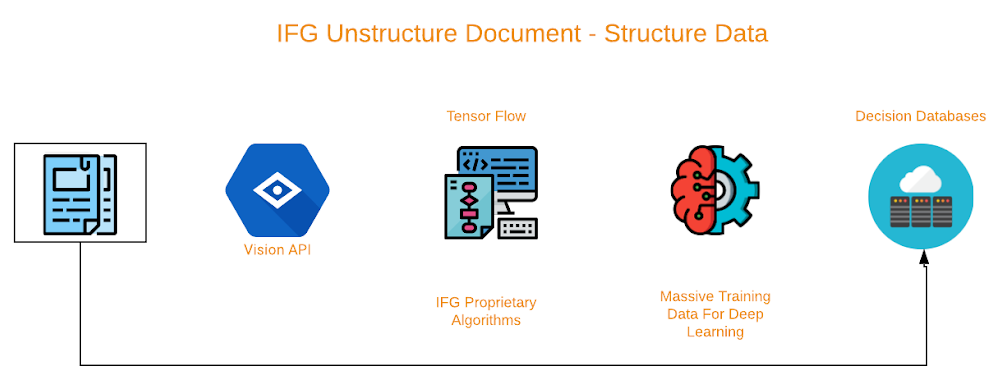
In the world of banking, commercial lenders often struggle to integrate the accounting systems of financial institutions with those of their clients. This integration allows financial service providers to instantly capture information regarding banking activity, balance sheets, income statements, accounts receivable, and accounts payable reports. Based on these, financial institutions can perform instant analysis, using decision engines to provide qualitative and quantitative provisions for credit limits and approval.Today’s commercial and consumer-lending solutions depend on third-party data in order to offer funding opportunities to businesses. These new integrations can facilitate tasks like originations, on-boarding, underwriting, structuring, servicing, collection, and compliance.However, borrowers are reluctant to grant third parties access to internal data, which creates a barrier for adoption. Hence, clients must often submit unstructured financial documents such as bank statements and audited or interim financial statements via drag-and-drop interfaces on a client portal. Many lenders use OCR or virtual printer technology in the background to extract data, but the results are still far from consistent. These processes still require manual intervention to achieve acceptable accuracy, which may cause additional inconsistency and provide an unsatisfactory outcome.To address these challenges, the data science team at Interface Financial Group (IFG) turned to Google Cloud. IFG partnered with Google Cloud to develop a better solution, using Document Understanding AI, which has become an increasingly invaluable tool to process unstructured invoices. It lets the data science team at IFG build classification tools that capture layout and textual properties for each field of significance, and identify specific fields on an invoice. With Google’s tools they can tune feature selection, threshold tuning, and model comparison, yielding 99% accuracy in early trials.Extracting invoices will benefit the fast growing e-invoicing industry and financiers such as trade finance, asset based lending and supply chain finance platforms, connecting buyers and suppliers in a synchronized ecosystem. This environment creates transparency, which is essential for regulators and tax authorities. Ecosystems would benefit from suppliers who submit financial documents in various formats via supplier’s portals—once the documents are converted and analyzed, the structured output can contribute to the organization’s data feed almost instantly. This blog post explains the high level approach for the document understanding project, and you can find more details in the whitepaper.What the project set out to achieveIFG’s invoice recognition project aims to build a tool that extracts all useful information from invoice scans regardless of their format. Most commercially available invoice recognition tools rely on invoices that have been directly rendered to PDF by software and that match one of a set of predefined templates. In contrast, the IFG project starts with images of invoices that could originate from scans or photographs of paper invoices or be directly generated from software. The machine learning models built into IFG’s invoice recognition system recognize, identify, and extract 26 fields of interest.How IFG built its invoice classification solutionThe first step in any invoice recognition project is to collect or acquire images. Many companies consider their supply chains—their suppliers’ resulting invoices—to be confidential. And others simply do not see a benefit to maintaining scans of their invoices, IFG found it challenging to locate a large publicly available repository of invoice images. However, they were able to identify a robust, public dataset of line-item data from invoices. With this data, they were able to synthetically generate a set of 25,011 invoices with different styles, formats, logos, and address formats. From there, they used 20% of the invoices to train its models and then validate the models on the remaining 80%.The synthetic dataset only covers a subset of the standard invoices that businesses use today, but because the core of the IFG system uses machine learning instead of templates, it was able to classify new types invoices, regardless of format. IFG restricted the numbers in its sample set to U.S. standards for grouping, and restricted the addresses in its dataset to portions of the U.S.The invoice recognition process IFG built consists of several distinct steps and relies on several third-party tools. The first step in processing an invoice is to translate the image into text using optical character recognition (OCR). IFG chose Cloud Document Understanding AI for this step. The APIs output text grouped into phrases and their bounding boxes as well as individual words and numbers and their bounding box.IFG’s collaboration with the Google machine learning APIs team helped contribute to a few essential features in Document Understanding AI, most of which involve processing tabular data. IFG’s invoice database thus became a source of data for the API, and should assist other customers in achieving reliable classification results as well. The ability to identify tables has the potential to solve a variety of issues identifying data in the details table included in most invoices.After preprocessing, the data is fed into several different neural networks that were designed and trained using TensorFlow—and IFG also used other, more traditional models in its pipeline using scikit-learn. The machine learning systems used are sequence to sequence, naive Bayes, and a decision tree algorithms. Each system has its own strengths and weaknesses, and each system is used to extract different subsets of the data IFG was interested in. Using this ensemble model allowed them to achieve higher accuracy than any individual model.Next, sequence to sequence (Seq2Seq) models use a recurrent neural network to map input sequences to output sequences of possibly different lengths. IFG implemented a character-level sequence to sequence model for invoice ID parsing, electing to parse the document at the character level because invoice numbers can be numeric, alphanumeric, or even include punctuation.IFG found that Seq2Seq performs very well at identifying invoice numbers. Because invoice numbers can consist of virtually arbitrary sequences of characters, IFG abandoned the tokenized input and focused on the text as a character string. When applied to the character stream, the Seq2Seq model matched invoice numbers with approximately 99% accuracy.Because the Seq2Seq model was unable to distinguish street abbreviations from state abbreviations, IFG added a naive Bayes model to its pipeline. This hybrid model is now able to distinguish state abbreviations from street abbreviations with approximately 97% accuracy.IFG used naive Bayes integrates n-grams to reconstruct the document and place the appropriate features in their appropriate fields at the end of the process. Even though an address is identified, it must be associated with either the payor or payee in the case of invoice recognition. What precedes the actual address is of utmost importance in this instance.Neither Seq2Seq nor naive Bayes models were able to use the bounding box information to distinguish nearly identical fields such as payor address and payee address, so IFG added a decision tree model to its pipeline in order to distinguish these two address types.Lastly, IFG used a Pandas data frame to compare the output to the test data, using cross-entropy as a loss function for both accuracy and validity. Accuracy was correlated to the number of epochs used in training. An optimum number of epochs was discovered during testing to reach 99% accuracy or higher element recognition in most invoices.ConclusionDocument Understanding AI performs exceptionally well when capturing raw data from an image. The collaboration between IFG and Google Cloud allowed the team to focus on training a high-accuracy machine learning model that processes a variety of business documents. Additionally, the team leaned on several industry-standard NLP libraries to help parse and clean the output of the APIs for use in the trained models. In the process, IFG found the sequence to sequence techniques provided it with enough flexibility to solve the document classification problem for a number of different markets. The full technical details are available in this whitepaper.Going forward, IFG plans to take advantage of the growing number of capabilities in Document Understanding AI—as well as its growing training set—to properly process tabular data. Once all necessary fields are recognized and captured to an acceptable level of accuracy, IFG will extend the invoice recognition project to other types of financial documents. IFG ultimately expects to be able to process any sort of structured or unstructured financial document from an image into a data feed with enough accuracy to eliminate the need for consistent human intervention in the process. You can find more details about Document Understanding AI here.AcknowledgementsRoss Biro, Chief Technology Officer; Michael Cave, Senior Data Scientist, The Interface Financial Group drove implementation for IFG. Shengyang Dai, Engineering Manager, Vision API, Google Cloud, provided guidance throughout the project.
Quelle: Google Cloud Platform

Demand more from your cloud provider. Use GKE Advanced

Editor’s note:This is one of the many posts on unique differentiated capabilities in Google Kubernetes Engine (GKE) Advanced. Find the first post here for details on GKE Advanced.Enterprise IT organizations and their clients are often bound by a service level agreement (SLA), a commitment to delivering services that are reliable and available. But what happens when those services depend on a third party like a public cloud provider? In that case, it’s important to choose a cloud provider that is contractually obligated to prioritize your availability.With Google Cloud Platform (GCP), we’ve designed our computing platform, application and network architecture for maximum reliability and uptime. For Google Kubernetes Engine (GKE), we manage and maintain the Kubernetes master components to ensure high availability of the control plane API, thus supporting the sustainability of customers’ business workloads.A few weeks ago, we introduced GKE Advanced, which offers features like advanced auto-scaling and enhanced security controls to address the needs of enterprises and large organizations. In addition, GKE Advanced offers a financially backed SLA. Based on your business needs and your configuration, the GKE Advanced SLA covers both regional clusters (HA) and zonal clusters, providing peace of mind for your mission-critical workloads.GKE Advanced’s enhanced SLA guarantees monthly uptime of 99.5% for your Kubernetes API server for zonal clusters and 99.95% for regional clusters. This translates to a monthly maximum downtime of ~3:40 hours for zonal clusters, or ~22 minutes for regional clusters. Our regional SLA is currently the highest SLA of all large hosted Kubernetes service providers.In the event we don’t meet that SLA, we credit a percentage of your monthly bill for the covered service that does not meet the SLA availability, which is applied to your future monthly bill. To ensure this high availability, the SLA applies to GKE stable releases only, and does not apply to Alpha/EAP/non-stable releases.When a service is interrupted, that can mean lost sales and productivity, employee overtime and recovery costs, and customer dissatisfaction—not to mention damage to your brand. With GKE Advanced, we share the responsibility and risk of ensuring GKE system uptime with you, to provide you peace of mind, allowing you to focus on your business, and support your business’s success. To learn more about what GKE Advanced brings to the table, follow along with this blog series.
Quelle: Google Cloud Platform