Are you up for the challenge? Get Google Cloud Certified in 3 months

There’s no doubt that cloud skills are in demand. Google Cloud skills are especially in high demand, with a 66.74% increase over the past year in job listings, which is why we rolled out four new certifications at the beginning of this year. So today we’re excited to announce that we are reaffirming our commitment to prepare millions of workers to thrive in a cloud-first world by launching the Google Cloud certification challenge, available in 25 countries (details at the bottom).By signing up for the certification challenge, you’ll get access to a series of free learning resources on Qwiklabs and Coursera to sharpen your cloud architecture knowledge. You’ll also receive additional tips and resources to help prepare you for the Google Cloud Certified Associate Cloud Engineer or Professional Cloud Architect exam. If you successfully certify within 12 weeks of starting the certification challenge, we’ll send you a $100 Google Store voucher to redeem toward the product of your choice.Why get Google Cloud certified?Cloud certifications are a great way for you to demonstrate your skills to the larger IT market. Not only does it validate your cloud skills and experience to recruiters, it demonstrates your value to your current employer. Getting certified can open up opportunities to progress within your company and could help in the next review of your compensation package. For example, the Google Cloud Professional Cloud Architect certification debuted at number one on the top-paying certifications list in the 2019 Global Knowledge survey.   Hear from the Google Cloud certified communityHere’s what a few community members had to say about the certification.   Sign up for the certification challenge todayVisit our certification challenge site to sign up, and start thinking about how you’ll spend that $100! We’ll be cheering you on.Qualifying countries for the certification challenge are: U.S., Canada, Puerto Rico, Australia, Hong Kong, Japan, New Zealand, Singapore, Taiwan, Austria, Belgium, Denmark, Finland, France, Germany, Ireland, Italy, South Korea, Netherlands, Norway, Portugal, Spain, Sweden, Switzerland, and the U.K.
Quelle: Google Cloud Platform

How to efficiently process both real-time and aggregate data with Dataflow

Pub/Sub, Dataflow and BigQuery is a common stack that enables analytic workloads over event data streams. But when choosing the right implementation, many businesses need to consider both real-time constraints and historical analysis over the whole dataset, resulting in trade-offs. But it doesn’t have to be this way.Imagine that we face a scenario where data can be conveniently divided into two categories: (1) actionable events that need to be delivered with stringent latency requirements, and (2) not-so-urgent data that can tolerate some delay. Should we opt for streaming inserts or go with load jobs? Is there a better solution? Spoiler alert: With a clever and simple pipeline design that combines these two worlds, we can meet all our requirements and provide significant cost savings.Where can this be applied?Before we continue, let’s examine some of the business use cases that can benefit from our approach.Fraud detection—Potential fraudulent activity can be flagged immediately while all other transactions are logged to be later used to derive insights or train ML models.Monitoring systems—Anomalies can be detected and instantly alerted while allowing for delay in data under normal conditions. Applications can range from earthquake detection to SRE dashboards.Customer service ticketing systems—Critical issues filed by customers can be prioritized while non-critical issues (like feature requests) can be delayed without impacting the customer experience.Online gaming health checks—By using a representative fraction of the incoming data for quick analysis, we can check that everything is in order while preserving the rest of the data for future deeper analysis or ML projects.In three of the scenarios above, incoming data is classified as either urgent (when there is a need for low latency data) or non-urgent. But this approach can also be applied in other ways. For example, let’s say you need early speculative results (like in the online gaming health check use case described above). By sampling all incoming events, we can get an early analysis while preserving the complete data set for deeper future analysis. In other words, this approach can be easily adapted to stream a representative sample of the data while the rest is completed afterwards with load jobs.Architecture conceptsWithin our Pub/Sub, Dataflow, and BigQuery stack, Dataflow provides simple ways to connect to Pub/Sub and BigQuery via the Apache Beam for Java SDK built-in IO connectors.In our pipeline, we will be reading the real-time events generated by a Pub/Sub topic with the PubsubIO connector. Once data has been processed, we will insert it into the BigQuery destination tables. The BigQueryIO connector provides two ways to insert our data: Load Jobs or Streaming Inserts.With Load Jobs, elements are buffered in Cloud Storage and each batch is written to BigQuery in a single atomic update. On the other hand, with Streaming Inserts, each record will be immediately appended to the BigQuery table and available to be queried within seconds.Choosing the right implementationWe can favor a play-it-safe design in which we stream all data directly into BigQuery. Streaming insert quotas are generous and it’s easy to be within them, but we will be paying for each inserted row, regardless of its urgency. In some of the previous examples, the fraction of high-priority events can be very low. Also, operations such as DML updates are disallowed (on a partition level) when a streaming buffer is attached to the table.Instead, we can leverage load jobs which are free. To satisfy the real-time view of the data, we’ll need to write data very frequently, which can lead us to exhaust the daily load jobs per table quota and hinder query performance, fragmenting the table into an excessive amount of files.An interesting solution is to combine both: use streaming inserts to send urgent events right away and load jobs that contain all events. Herein we develop and (briefly) explain this design choice.We read JSON-formatted messages from Cloud Pub/Sub with an attribute that manifests the event urgency. Events with an urgency factor equal or above the threshold will be stream-ingested into a BigQuery table using a side output. Depending on the urgency category of the event, it will be emitted to a different table. In the event that we need to query data from both tables, a simple UNION statement will suffice.We add a timestamp field to all elements when the row is created. We can retrieve actual processing time even if two events belong to the same batch and were inserted simultaneously.We’ll redirect each output to the corresponding table according to their tag. Changes are straightforward. Note that if we don’t specify the write method it will default to streaming inserts. For load jobs, we add Method.FILE_LOADS and the triggering frequency can be adjusted at will to better suit our use case.In the alternative case where there is not an explicit priority field, we can modify the example to sample the data and send some immediate representative results while the rest is completed afterwards. By using a random function instead of an urgency value, we can get a desired percentage of our data for real-time analysis. There may be some cases where another sampling strategy is preferred and for that you would need to implement your own logic.What are the benefits of this solution?Here are some of the advantages we’ve experienced taking this approach.Direct control on data availability—We can decide upfront which events will be streamed into our destination table.Easier-to-accommodate quotas—Since we are splitting data into streamed rows and batched loads, we can relax both rates.Cost expenditure—Load jobs are free of charge, so we would only pay for the important data that we choose to stream.Avoiding duplicate work—We process elements once and send them to the corresponding side output. BigQueryIO makes the changes for each insert method trivial.Sounds great, doesn’t it?Optimizing the pipeline furtherConsidering additional best practices in an upfront design phase can be the icing on the cake in terms of optimizing performance and cost:The amount of records written to the table can be huge and can drive up the amount of scanned data in queries over time. Using partitioned tables, our queries can target only the days we want to analyze, thus reducing the analytics cost.Another possible approach would be to have a table that hosts only high urgency events and another table that hosts all events no matter its urgency. In this case, even if it’s just a small fraction, we would be paying for extra storage. Again, we can resort to partitions and set a low TTL (partition expiration time) so that we don’t have to manually clean up the data.Depending on the nature of our data, we can also add clustering into the equation. In this instance, we can force a better collocation of data with a daily query that overwrites the “closed” partition (we don’t expect new data to arrive for that partition) as explained in this documentation.Wrapping upIn this post, we explored a mixed streaming and batch approach in Dataflow to get the best performance out of our data pipeline, taking into consideration project needs and the latest BigQuery features. We considered many factors, such as data availability requirements, code easiness, scalability and cost, and determined the optimal architecture for our use case.  To learn more, about Dataflow and data analytics on Google Cloud, visit our website.Acknowledgements: Guillem Xercavins and Alvaro Gomez, Big Data SMEs, and Berta Izquierdo, Big Data Team Lead, contributed to this post.
Quelle: Google Cloud Platform

Google Cloud named a leader in the Forrester Wave: Data Security Portfolio Vendors, Q2 2019 report

Today, we’re honored to share that Google Cloud was named a Leader in The Forrester Wave™: Data Security Portfolio Vendors, Q2 2019 report. The report evaluates a vendor’s portfolio of offerings specific to data security and includes both cloud and on-premise offerings. Of the 13 vendors evaluated, Google Cloud scored highest in the Strategy category.Making data security easier and scalable for enterprisesThe report notes that Google Cloud customers appreciate our ease of deployment and the scalability of our capabilities. This includes services like Cloud Data Loss Prevention (DLP) that help you discover, classify, and redact sensitive data across your organization. We also continue to work to provide easy-to-adopt ways for our customers to increase visibility into data use, sharing, and protection in their cloud environments. This includes Cloud Security Command Center for Google Cloud Platform (GCP) and Security Center for G Suite, products that help to surface actionable security insights.Security at the heart of Google CloudThe report recognizes that we put security at the center of our strategy at Google Cloud. We’ve written at length in the past about our belief that if you put security first, all else will follow. And we are explicit in our commitment to our Cloud customers: you own your data, and we put you in control.The report also recognizes Google’s strengths around access control granularity when it comes to supporting a “Zero Trust” approach via our BeyondCorp model and Context-Aware Access solutions.To learn more about how Forrester evaluates Google Cloud’s data security portfolio, you can download a complimentary copy of the report here.Google Cloud is a rated Leader by industry analyst firms in many areas. Learn more at our analyst reports page.
Quelle: Google Cloud Platform

On a quest: Learn GKE security and monitoring best practices

Whether you’re running Kubernetes yourself, using our Google Kubernetes Engine (GKE) managed service, or using Anthos, you need visibility into your environment, and you need to know how to secure it. To help you on your way, there are two new educational resources to teach you application observability and security best practices for using Kubernetes at scale.Fashioned as a series of self-paced labs, this learning content will guide you through the most common activities associated with monitoring and securing Kubernetes through a series of complementary hands-on exercises that we call quests.Quest for migration and observability best practicesFor migration and observability best practices, enroll in the Cloud Kubernetes Best Practice quest, which includes the following labs:GKE Migrating to Containers demonstrates containers’ central premise of isolation, restricting resources and portability.Monitoring with Stackdriver on Kubernetes Engine explores how to obtain useful deployment information from code by using Stackdriver’s extensive real-time tooling.Tracing with Stackdriver on Kubernetes Engine explores how to follow application trace events to find potential algorithm improvements.  Logging with Stackdriver on Kubernetes Engine presents common techniques for resource identification and export sink, including an overview of the powerful resource filter.Connect to Cloud SQL from an Application in Kubernetes Engine helps to bridge the divide between containers and non-containers, leveraging design patterns such as the sidecar or ambassador to connect to external resources via the Kubernetes API.On a quest for secure Kubernetes applicationsSimilarly, the Google Kubernetes Engine Security Best Practice quest provides actionable guidance on how to approach Kubernetes security, and includes the following labs:How to Use a Network Policy on GKE discusses the “principle of least privilege” as applied to Kubernetes network policy, illustrating how to achieve granular control over intra-cluster communication.Using Role-based Access Control in Kubernetes Engine shows you how to use RBAC to restrict things such as cluster state changes.Google Kubernetes Engine Security: Binary Authorization highlights a new GKE feature that helps to determine and enforce the provenance of container security.Securing Applications on Kubernetes Engine – Three Examples demonstrates how to use AppArmor to secure an Nginx web server; how to apply policies to unspecified resources using a Kubernetes Daemonset; and how to update pod metadata associated with a deployment with the Kubernetes API’s ServiceAccount, Role, and RoleMapping features.Kubernetes Engine Communication Through VPC Peering walks through the process to expose services between distinct clusters using VPC Peering.Hardening Default GKE Cluster Configurations explores mitigation security issues that can arise from running a cluster based on default settings.When working with infrastructure and application environments, sophisticated observability tools like Stackdriver provide a unified method of monitoring, tracing and logging. Likewise, securing an environment represents an ongoing challenge, but Google Cloud Platform offers a number of tools that help to reduce the complexity, and ensure that deployments follow generally accepted best practices.Ready to begin? Get started with Kubernetes best practice and the GKE Security Best Practice quests. On completion of the quest, you’ll be presented with a Qwiklabs digital badge that you can share on social media.
Quelle: Google Cloud Platform

AI Platform Notebooks now supports R in beta

At Next ‘19, we announced the beta availability of AI Platform Notebooks, our managed service that offers an integrated environment to create JupyterLab instances that come pre-installed with the latest data science and machine learning frameworks. Today, we’re excited to introduce support for R on AI Platform Notebooks. You can now spin up a web-based development environment with JupyterLab, IRkernel, xgboost, ggplot2, caret, rpy2 and other key R libraries pre-installed.The R language is a powerful tool for data science, and has been popular with data engineers, data scientists, and statisticians everywhere since its first release in 1992. It offers a sprawling collection of open source libraries that contain implementations of a huge variety of statistical techniques. For example, the Bioconductor library contains state of the art tools for analyzing genomic data. Likewise, with the forecast package you can carry out very sophisticated time series analysis using models like ARIMA, ARMA, AR, and exponential smoothing. Or, if you prefer building deep learning models, you could use TensorFlow for R.Users of R can now leverage AI Platform Notebooks to create instances that can be accessed via the web or via SSH. This means you can install the libraries you care about; and you can easily scale your notebook instances up or down.Getting started is easyYou can get started by navigating to the AI Platform and clicking on Notebooks. Then:1. Click on “New Instance” and select R 3.5.3 (the first option).2. Give your instance a name and hit “Create”.In a few seconds your Notebook instance will show up in the list of instances available to you.You can access the instance by clicking on “Open JupyterLab”.This brings up the JupyterLab Launcher. From here you can do these three things:1. Create a new Jupyter Notebook using IRKernel by clicking on the R button under Notebook.2. Bring up an iPython style console for R by clicking on the R button under Console.3. Open up a terminal by clicking on the terminal button under Other.For fun, let’s create a new R notebook and visualize the infamous ‘Iris’ dataset, which consists of the measurements of the size of various parts of an Iris labeled by the particular species of Iris. It’s a good dataset for trying out simple clustering algorithms.1. Create a new R notebook by clicking on the R button under Notebooks.2. In the first cell, type in:data(iris)head(iris)This will let you see the first 6 rows of the Iris data set.3. Next, let’s plot Petal.Length against Sepal.Length:library(‘ggplot2’)ggplot(iris, aes(x = Petal.Length, y = Sepal.Length, colour = Species)) +  geom_point() +  ggtitle(‘Iris Species by Petal and Sepal Length’)Install additional R packagesAs mentioned earlier, one of the reasons for R’s popularity is the sheer number of open source libraries available. One popular package hosting service is the Comprehensive R Archive Network (CRAN), with over 10,000 published libraries.You can easily install any of these libraries from the R console. For example, if you wanted to install the widely popular igraph—a package for doing network analysis—you could do so by opening up the R console and running the install.packages command:install.packages(“igraph”)Scale up and down as you needAI Platform Notebooks let you easily scale your Notebook instances up or down. To change the amount of memory and the number of CPUs available to your instance:1. Stop your instance by clicking on the check box next to the instance and clicking the Stop button. 2. Click on the Machine Type column and change the number of CPUs and amount of RAM available. 3. Review your changes and hit confirm.AI Platform Notebooks is just one of the many ways that Google Cloud supports R users. (For example, check out this blog post and learn about SparkR support on Cloud Dataproc.)To learn more, and get started with AI Platform Notebooks, check out the documentation here, or just dive in.
Quelle: Google Cloud Platform

7 best practices for running Cloud Dataproc in production

Data processing operations can happen a lot faster in the cloud, whether you’re migrating Hadoop-based ETL pipelines from on-premises data centers or building net-new cloud-native approaches for ingesting, processing, and analyzing large volumes of data.Cloud Dataproc, our managed cloud service for running Apache Spark and Apache Hadoop clusters, is a trusted open-source engine for running big data jobs in production. We know that troubleshooting quickly and accurately is important when you’re using Cloud Dataproc in production, so Google Cloud Platform (GCP) supports the Cloud Dataproc APIs, services, and images, and they’re included in GCP support too.Cloud Dataproc is one of the data analytics offerings Gartner named a Leader in the 2019 Gartner Magic Quadrant for Data Management Solutions for Analytics. We hear great things from our customers using Cloud Dataproc to run their production processes, whether it’s brand protection with 3PM, enhancing online retail experiences with zulily, or migrating a massive Hadoop environment at Pandora,We’ve put together the top seven best practices to help you develop highly reliant and stable production processes that use Cloud Dataproc. These will help you process data faster to get better insights and outcomes.Cloud Dataproc best practices1. Specify cluster image versions.Cloud Dataproc uses image versions to bundle operating system and big data components (including core and optional components) and GCP connectors into a single package that is deployed on a cluster.If you don’t specify an image version when creating a new cluster, Cloud Dataproc will default to the most recent stable image version. For production environments, we recommend that you always associate your cluster creation step with a specific minor Cloud Dataproc version, as shown in this example gcloud command:gcloud dataproc clusters create my-pinned-cluster –image-version 1.4-debian9This will ensure you know the exact OSS software versions that your production jobs use. While Cloud Dataproc also lets you specify a subminor version (i.e., 1.4.xx rather than 1.4) in most environments, it’s preferable to reference Cloud Dataproc minor versions only (as shown in the gcloud command). Sub-minor versions will be updated periodically for patches or fixes, so that lets new clusters automatically get security updates without breaking compatibility.New minor versions of Cloud Dataproc are made available in a preview, non-default mode before they become the default. This lets you test and validate your production jobs against new versions of Cloud Dataproc before making the version substitution. Learn more about Cloud Dataproc versioning.2. Know when to use custom images.If you have dependencies that must be shipped with the cluster, like native Python libraries that must be installed on all nodes, or specific security hardening software or virus protection software requirements for the image, you should create a custom image from the latest image in your target minor track. This allows those dependencies to be met each time. You should update the subminor within your track each time you rebuild the image.3. Use the Jobs API for submissions.The Cloud Dataproc Jobs API makes it possible to submit a job to an existing Cloud Dataproc cluster with a jobs.submit call over HTTP, using the gcloud command-line tool or the GCP Console itself. It also makes it easy to separate the permissions of who has access to submit jobs on a cluster and who has permissions to reach the cluster itself, without setting up gateway nodes or having to use something like Apache Livy.The Jobs API makes it easy to develop custom tooling to run production jobs. In production, you should strive for jobs that only depend on cluster-level dependencies at a fixed minor version (i.e., 1.3). Bundle dependencies with jobs as they are submitted. An uber jar submitted to Spark or MapReduce is one common way to do ths.4. Control the location of your initialization actions.Initialization actions let you provide your own customizations to Cloud Dataproc. We’ve taken some of the most commonly installed OSS components and made example installation scripts available in the dataproc-initializaton-actions GitHub repository.While these scripts provide an easy way to get started, when you’re running in a production environment you should always run these initialization actions from a location that you control. Typically, a first step is to copy the Google-provided script into your own Cloud Storage location.As of now, the actions are not snapshotted and updates are often made to the public repositories. If your production code simply references the Google version of the initialization actions, unexpected changes may leak into your production clusters.5. Keep an eye on Dataproc release notes.Cloud Dataproc releases new sub-minor image versions each week. To stay on top of all the latest changes, review the release notes that accompany each change to Cloud Dataproc. You can also add this URL into your favorite feed reader.6. Know how to investigate failures.Even with these practices in place, an error may still occur. When an error occurs because of something that happens within the cluster itself and not simply in a Cloud Dataproc API call, the first place to look will be your cluster’s staging bucket. Typically, you will be able to find the Cloud Storage location of your cluster’s staging bucket in the error message itself. It may look something like this:ERROR:(gcloud.dataproc.clusters.create) Operation [projects/YOUR_PROJECT_NAME/regions/YOUR_REGION/operations/ID] failed:Multiple Errors:- Initialization action failed. Failed action ‘gs://your_failed_action.sh’, see output in: gs://dataproc-BUCKETID-us-central1/google-cloud-dataproc-metainfo/CLUSTERID/cluster-d135-m/dataproc-initialization-script-0_outputWith this error message, you can often diagnose the error with a simple cat on the file to identify the cause of the error. For example, this:gsutil cat gs://dataproc-BUCKETID-us-central1/google-cloud-dataproc-metainfo/CLUSTERID/cluster-d135-m/dataproc-initialization-script-0_outputReturns this:+ readonly RANGER_VERSION=1.2.0+ err ‘Ranger admin password not set. Please use metadata flag – default-password’++ date +%Y-%m-%dT%H:%M:%S%z+ echo ‘[2019-05-13T22:05:27+0000]: Ranger admin password not set. Please use metadata flag – default-password'[2019-05-13T22:05:27+0000]: Ranger admin password not set. Please use metadata flag – default-password+ return 1…which shows that we had forgotten to set a metadata password property for our Apache Ranger initialization action.7. Research your support options.Google Cloud is here to support your production OSS workloads and help meet your business SLAs, with various tiers of support available. In addition, Google Cloud Consulting Services can help educate your team on best practices and provide guiding principles for your specific production deployments.To hear more tips about running Cloud Dataproc in a production environment, check out this presentation from Next ’19 with Cloud Dataproc user Dunnhumby.
Quelle: Google Cloud Platform

Last month today: GCP in May

There’s always something new to learn about cloud computing, and the top posts in May on the Google Cloud Platform (GCP) blog covered several essential topics: security, APIs, and containers, not to mention ML. Here’s what was popular.Learning cloud, one topic at a timeAPI design is a hot topic in our increasingly microservices-oriented world. This popular post describes how to design APIs using links, not keys, to represent relationships. Expressing relationships between APIs is a big factor in successful API design. While database keys are a common way to express API relationships, using web links is less complicated and requires less documentation. This post goes in-depth on how to expose URLs instead of database keys in your web APIs.  There’s also a lot to learn about Kubernetes as you’re getting up to speed on containers and microservices. Understanding how resources are allocated to containers is important, and this post covers how Kubernetes controls resources and how to use requests and limits accordingly in your environment. This can help avoid issues like nodes running out of memory or apps taking up excessive CPU resources.Power to the podsThis month also brought the beta release of our Cloud TPU Pods, which are machine learning (ML) accelerators that provide strong performance and are cost-effective. TPU Pods are based on our Google-designed custom silicon chips—Tensor Processing Units, or TPUs. The Cloud TPU Pods are multi-rack supercomputers that dramatically speed up the processing of ML workloads—from days or weeks on other systems to minutes or hours. You can train more capable ML models and iterate faster with these new units.Security, everywhereGoogle’s big developer conference, Google I/O, took place last month, and this post covered the show’s highlights. The Android phone’s built-in security key is now generally available on Android 7.0+ devices. This lets you use your Android phone as a FIDO standard security key to verify your sign-in to Google and Google Cloud services.,At Next ‘19, we announced Google Kubernetes Engine (GKE) Sandbox. This post covers more details about GKE Sandbox, now in beta, which can help prevent threats to your containers by adding an extra layer between containers and the host OS, lessening the likelihood of “container escape.”That’s a wrap for May! Stay tuned for all the latest news.
Quelle: Google Cloud Platform

How Ulta Beauty powers digital transformation with Google Cloud smart analytics

As I’ve shared in past blog posts, digital technology offers increasing flexibility and choice to consumers, the retail industry is dramatically shifting toward more tailored and personalized experiences for shoppers, and businesses are rethinking how they deliver value to customers. This couldn’t be more true for the beauty retailing industry where leading companies are turning to digital technology to create customized shopping experiences. I’m particularly excited to talk about Google Cloud’s work with Ulta Beauty, the largest beauty retailer in the United States with more than 1196 stores in all 50 states, and how the company is using our technology solutions to power personalization and redefine beauty retailing.Established in 1990, Ulta Beauty has had incredible success as a company, and as customers become more discerning and curious about their purchases, the company is finding new ways to meet their changing needs. Recently, leaders at Ulta Beauty recognized a huge opportunity to complement and enhance the shopping experience by helping beauty enthusiasts navigate through more than 500 brands and 25,000 products carried in their stores and online channel. They decided to leverage the data from Ulta Beauty’s successful Ultamate Rewards loyalty program to create and offer more unique and personalized user experiences.With more than 30 million members generating data through sales, transactions, product reviews, and social media engagement, Ulta Beauty’s Loyalty Program creates a comprehensive data set, and the company sought the right technology partner to help organize, analyze and transform that data into valuable insights for its customers. Ulta Beauty’s leaders knew they had an opportunity to leverage data analytics and machine learning to reach customers in new ways, enhance the guest experience, and continue to grow their active loyalty member base. After considering a number of cloud providers, they chose to expand their existing partnership with Google Cloud.“Google Cloud listened to our needs and worked in tandem with our engineering team to address our challenges,” said Michelle Pacynski,, vice president of digital innovation at Ulta Beauty. “The ease of working with the Google Cloud team and their breadth of experience made the decision a no-brainer, laying the foundation for a great partnership.”  In 2019, Ulta Beauty announced it was working with Google Cloud Platform to unify and organize its data, using:BigQuery to perform data analysis and generate dynamic content, personalized product recommendations, and event-based messages for customers.Cloud Storage to provide highly available, secure, resilient and cost-effective access to data across the entire enterprise.Compute Engine for the high-performance scalability needed to grow with customer demand while painlessly migrating existing applications to the cloud.Anthos to build a hybrid cloud foundation that allows their applications to take advantage of all this data, combining the power and flexibility of GKE with the ability to leverage their existing investment in secure infrastructure on-premises.Our partnership with Ulta Beauty has enabled increased engagement with customers in store and online, and the creation of new tools and capabilities, including a new Virtual Beauty Advisor tool to deliver tailored recommendations and help shoppers choose the right products, and a Customer Conversation Platform that’s enabling deeper connections with guests, ultimately driving customer loyalty.“It’s been a really efficient process so far due in part to the ease of working with the Google team,” said Michelle Pacynski, vice president of digital innovation at Ulta Beauty. “They’re experienced, approachable, and their can-do style makes for a great partnership. They listened to our needs and worked in tandem with our engineering team, figuring things out, and getting it done.”We look forward to continuing this great partnership with Ulta Beauty and helping to power the company’s digital transformation as it finds new ways to meet the unique needs of customers.To learn more about how Google Cloud is helping retail businesses win the hearts of customers with more flexible, secure and integrated big data solutions, visit our website.
Quelle: Google Cloud Platform

Save money by stopping and starting Compute Engine instances on schedule

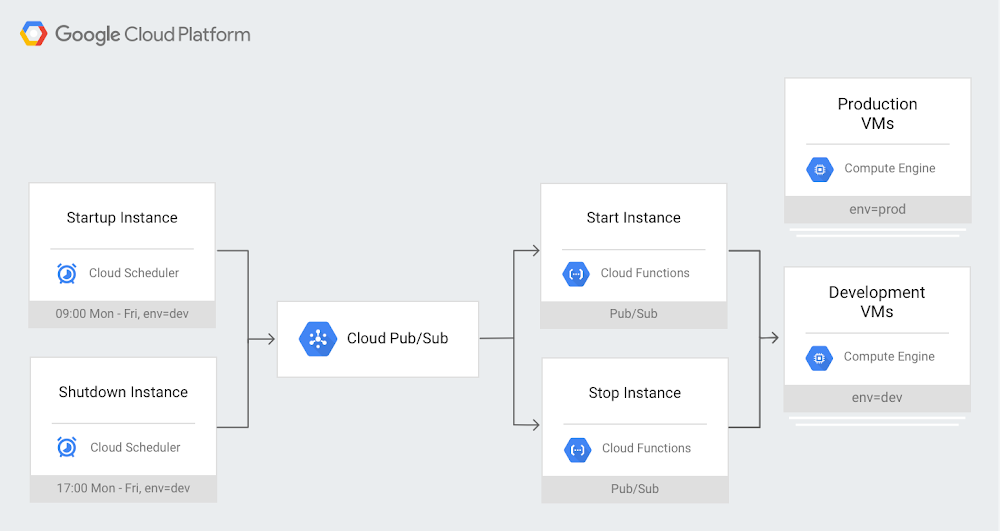
A key feature of running virtual machine instances (VMs) in the cloud is that you only pay for the compute resources you use. On Google Cloud Platform (GCP), Compute Engine VMs are charged per second. Production systems tend to run 24/7; however, some VMs, like those in development or test environments, are typically used only during business hours. Keeping them running in the middle of the night or on weekends serves no useful purpose, so turning them off saves money. But stopping and starting large groups of VMs by hand every day can be tedious and hard to encourage or enforce across an organization.Cloud Scheduler, GCP’s fully managed cron job scheduler, provides a straightforward solution for automatically stopping and starting VMs. By employing Cloud Scheduler with Cloud Pub/Sub to trigger Cloud Functions on schedule, you can stop and start groups of VMs identified with labels of your choice (created in Compute Engine). Here you can see an example schedule that stops all VMs labeled “dev” at 5pm and restarts them at 9am, while leaving VMs labeled “prod” untouched:Using this setup gives you a high degree of flexibility, since you can assign different schedules for different groups of VMs by creating multiple Cloud Scheduler cron jobs.This also helps give you more control over Compute Engine VMs, since the functions use a GCP service account to start and stop Compute Engine instances. Using Cloud Identity and Access Management (IAM), you can follow the principle of least privilege and limit the permissions granted to this service account to the minimum necessary.Since the shutdown is planned, the VMs will run shutdown scripts to ensure they’re in a clean state. Any attached disks with auto-delete turned off will retain their contents and be available again when the VM is restarted. Last but not least, if someone needs a development or test VM at odd hours, you can temporarily remove the label in advance or simply restart the VM if it has already stopped.For a sample implementation of this design pattern, check out Scheduling compute instances with Cloud Scheduler. For more about what else you can accomplish with Cloud Scheduler, check out Reliable task scheduling on Compute Engine with Cloud Scheduler.
Quelle: Google Cloud Platform

Google Cloud networking in depth: Cloud CDN

For more than a decade, Google has invested heavily in the infrastructure and software to build a network that offers a great experience to users all over the planet. At Google Cloud, we leverage these same core technologies and infrastructure as the foundation of Cloud CDN, which lets businesses deliver content to their users with industry-leading performance and throughput. Cloud CDN caches content in locations all over the world to stream video, serve images, download game updates, and other digital distribution use cases.In this blog post, we’ll discuss Cloud CDN’s architecture and key features that help you accelerate content delivery to users across the globe. We’ll conclude with some best practices and useful references.Cloud CDN infrastructureWe realized early on that we needed to build our own systems and infrastructure to keep up with traffic growth and delight our users. That’s when we started our investments in core infrastructure and technology innovations that we continue to this day.The Cloud for Google is intensely physical: we lay down actual fiber under land and sea to carry your data.Left: underground fiber optic cables being laid; Right: adding optical amplifiers aboard a ship before lowering a subsea fiber optic cableThe result of these investments is that Google Cloud operates on one of the best connected and fastest networks on the planet, reaching most of the Internet’s users through a direct connection between Google and their ISP.As part of Google Cloud, Cloud CDN caches your content in 96 locations around the world and hands it off to 134 network edge locations, placing your content close to your users, usually within one network hop through their ISP.A map of Google’s global network showing Google cables connecting various continents and sub-regions. When using Cloud CDN, traffic from your origin traverses this proprietary fiber network for delivery through the edge closest to the customerWhile the number of points of presence (PoPs) and cache locations are important, other factors also contribute to Cloud CDN’s high performance, high throughput, and low latency:Direct network connections with the vast majority of user-facing networks allow Cloud CDN to choose the optimal cache regardless of the location of the origin.Google’s proprietary fiber optic backbone carries network traffic uninterrupted by extra hops.Innovations such as QUIC, HTTP/2, and advanced congestion control protocols such as BBR, contribute to higher performance at the edge. This blog post outlines the benefits of these innovations on Google Cloud Platform to an app’s overall performance globally.To learn more about Cloud CDN’s performance, check out these benchmark reports from Citrix ITM. Cloud CDN architecture: caching, load balancing, and Google’s premium networkHTTP(S) Load Balancer is a distributed system that provides load balancing at the edge of our global infrastructure. Cloud CDN is integrated with the HTTP(S) Load Balancer at those edge locations.When your customers request content, they connect with Cloud CDN at the edge location closest to them. In the case of a cache hit, Cloud CDN serves it directly from the most proximal of the 96 aforementioned edge caches located in metros around the world. In the case of a cache miss, Cloud CDN requests the content from the GCP origin (either a storage bucket or a VM) over Google’s high performance backbone, and then delivers the content back to the customer through the same route. This “cold potato” routing runs on our Premium Network Service Tier, keeping the customer’s traffic on GCP fiber for the longest possible distance, for reduced latency and improved throughput.Cloud CDN featuresIn addition to running over Google’s premium fiber, Cloud CDN offers a wealth of advanced useability features.First of all, it’s incredibly easy to turn on Cloud CDN for a Google Cloud back-end service (either a storage bucket or a virtual machine). There are no complex DNS rules or distributions to configure—selecting a single checkbox (or making a single API call) employs all of Google’s distribution infrastructure in the service of caching and serving your content.In addition, Cloud CDN offers many features out of the box that make it a great option for global content delivery:Google premium network: using Cloud CDN automatically gives access to Google’s premium networkfor delivering content to end usersGlobal Anycast IP: Cloud CDN is accessed through a single global anycast IP, greatly simplifying DNS configurations. Additionally, utilizing Anycast IP distributes inbound requests and makes it hard for bad actors to concentrate their attacks on a single regional or zonal component, thus giving you more resilience to volumetric attacks.No-cost SSL termination: As an extension of the HTTP(S) Load Balancer, Cloud CDN offloads TLS termination from back-end applications. You can control how the load balancer negotiates TLS, providing up to 15 certificates per target proxy at no charge, and applying configurable SSL policies to restrict the TLS versions and cipher suites that the load balancer will negotiate. And load balancers can even use Google-managed TLS certificates, which entirely offloads the process of issuing and renewing certificates.Encryption in-transit: Cloud Load Balancer implicitly encrypts all transit to the back end. Also, you can attach your own certificate to create an SSL connection from Cloud HTTP(S) Load Balancer to the back-end service if you choose.Signed URLs: Cloud CDN can use a 128-bit AES key (provided by you, or generated by GCP) to produce signed URLs with an expiration date. Signed URLs give a client temporary access to a private resource without requiring additional authorization.Global Scale: Cloud CDN leverages the same high availability and scaling infrastructure used by other Google products to provide resiliency and scale without pre-warming. This allows you to ensure that your services and content remain available to legitimate customers even in the event of large scale demand.Logging and monitoring through Stackdriver: Cloud CDN logs each content request. You can then use this information to build dashboards that measure various metrics, cache hits, cache misses, etc. for a near-real-time view into your CDN usage.Configurable cache keys: You can configure inclusions/exclusions for various query parameters when computing the cache keys.Large object support and automatic content size optimization: Cloud CDN can cache objects ranging from 1 byte to 5 terabytes. It also automatically optimizes the underlying storage substrate based on the object size, using flash for smaller objects and HDD for larger objects, thus freeing you from having to tune this manually.IPV6 support: Cloud CDN supports IPV6 clients.Getting started with Cloud CDN Since Cloud CDN is an extension of HTTP(S) Load Balancer, setting up a CDN distribution involves creating a load balancer and attaching CDN caching functionality to one or more of the load-balanced back ends:Create a load balancer: Follow these instructions to set up a load balancer for a content bucket with a suitable front end (using an Anycast IP) and attach the appropriate SSL certificates and DNS entries as required.Activate CDN: Enable Cloud CDN on the back-end service/bucket created above using these instructions.And that’s it! Cloud CDN now caches any content with the appropriate caching headers, served through the Anycast IP (or any domain names mapped to that IP through DNS records).In addition, Cloud CDN’s documentation lists some best practices that can help you optimize its use for your content. Some things to consider are:Thoughtful use of invalidationsTuning the expiration date of time-sensitive contentUsing custom cache keys to improve the cache hit ratioUsing versioned URLs to update contentTo learn more about Cloud CDN, here are some helpful references:Presentation on Cloud CDN from Google Cloud Next ‘19Cloud CDN Product PageWe’d love your feedback on the above and more that you’d like to see—you can reach us at gcp-networking@google.com.
Quelle: Google Cloud Platform