How Penn State World Campus is leveraging AI to help their advisers provide better student services

Recently we spoke to Dawn Coder, director of academic advising and student disability services at Penn State World Campus, which was established in 1998 to provide accessible, quality education for online learners. It has since grown to have the second largest enrollment in the university, serving thirty thousand students all over the world. By building a virtual advising assistant to automate routine interactions, Coder and her department aim to serve more students more efficiently. Working with Google and Quantiphi, a Google Cloud Partner of the Year for Machine Learning, they plan to roll out the pilot program, their first using AI, in January 2020.How does Penn State World Campus support its students?Our goal is to help students graduate and pursue whatever their goals are. I supervise three key services here: academic advising for undergraduates, disability services and accommodations for undergraduate and graduate students, and military services for our veterans and students on active duty, as well as their spouses. Altogether our team has about sixty employees serving approximately 11,000 undergraduates who take classes online from anywhere in the world.Why turn to AI?Our strategic objectives include student retention and organizational optimization, so that’s where AI fits in. We want to make our organization as efficient as possible, make sure employees are not overworked and overwhelmed, and provide the best quality services for our students to set them up for success. Quantiphi is using Google Cloud AI tools like Dialogflow to build us a custom user interface that will take incoming emails from students and recognize keywords to sort those emails into categories, like requests for change of major, change of campus, re-enrollment, and deferment. For example, if a student emails us asking how to re-enroll to finish a degree, the virtual assistant can collect all the relevant information about that student for the adviser in seconds. It can even generate a boilerplate response that the adviser can customize. Our students are physically located all over the world; they can’t just stop by our office. This allows them to get answers quicker in a way that’s convenient for them.  Why choose Google?Security was an important factor because we’re working with student data. That was the biggest decision-maker. We also wanted to work with a company who believes education is important, especially higher education, because if you aren’t aligned with the goal of who we are, it’s really difficult to build a strong, positive relationship. I felt as though the representatives from Google and Quantiphi were focused on higher ed and really understood it. That was another decision-maker for our team.What benefits do you hope to see?Using this new interface will provide advisers with necessary student information in one place. Currently, academic advisers access many different screens in our student information system to gather all the student information needed to provide next steps. The AI-driven tool will centralize the process and all the data will be displayed in one place. With the time that is saved, an adviser will have more quality time to assist students with special circumstances, career planning, and schedule planning. We want to scale our services to serve more students as World Campus grows. During peak times of the semester, it can take our advisers longer than we would like to respond. If AI can help us reduce the time it takes to a few minutes, that will be a huge success.What’s next for this project?If the project is successful, our hope is to expand AI to other World Campus departments, like admissions or the registrar and bursar’s offices. Our biggest goal is always providing quality, accurate services to students in a timely manner—more in real time than having to wait a long time. My hope is that technology can make the process more intuitive so students can make more decisions on their own, knowing that the academic advisers are always there to advocate for them. There’s so much more to academic advising than just scheduling courses!During peak times of the semester, it can take our advisers longer than we would like to respond. If AI can help us reduce the time it takes to a few minutes, that will be a huge success. Dawn Coder director of academic advising and student disability services, Penn State World Campus
Quelle: Google Cloud Platform

A moving experience: How Kiwi.com built a travel platform with APIs

Editors note: Jurah Hrinik is product manager of Kiwi.com’s Tequila B2B platform. Read on to learn how this Czech Republic-based travel information provider automated on-boarding for partners and developers who build on its APIs.Our vision with Kiwi.com is to offer customers a way to buy travel insurance coverage, book a taxi from home to the train station, take a train to the airport, pick up a rental car, and drive to their destination all in one seamless customer experience. To do it, we’ve built a B2B platform, Tequila, which aims to be a one-stop travel booking shop for our partners, such as online travel agencies, airlines, brick-and-mortar agencies, and affiliated programs. Tequila enables access, via APIs, to all of our content and services—from schedule information aggregated from hundreds of airlines, to ticketing fulfillment. The Apigee platform sits as a layer between our internal systems and partners to manage the entire relationship, from signing up, to invoicing, to reporting, to accessing our APIs, and everything else our partners need from us.Using Apigee to power a B2B travel platformBefore we implemented API management, everything from partner onboarding to monitoring and reporting had to be done through manual processes. Whenever a partner had a specific request or change order, they had to contact their account managers, who brought it to our internal technical business development department. This team would contact the developers, who in turn had to add it to their backlog, then execute merge requests. It was complicated and time-consuming to get anything done.We envisioned Tequila as a platform for distributing solutions we build in house, as well as those built by partners. For example, a taxi company with its own APIs can connect via Tequila and offer its services to a broad ecosystem. Tequila integrates with Apigee, enabling customers or partners to try APIs from the portal without doing the coding. We don’t maintain a database of customers and users. We use Apigee for this. We create the companies, register developers, and use the Apigee platform to build applications on Tequila. Even though we went live only six months ago, we already have a lot of APIs built in Apigee, as well as some back-end services.We’re currently using seven main APIs, each with four to five endpoints, for our partners. These are exposed on the Apigee platform by implementing API proxies, which decouple the app-facing API from backend services. This allows us to make backend changes to services while enabling apps to make calls to the same API without interruption. We also have 13 management proxies, making a total of 20 proxies for the whole platform. Each proxy has a couple of endpoints, and we’re adding a new one every couple of weeks as we roll out new features. We’ve also been able to streamline a lot of processes for finance and customer support.Delivering against a tight development deadlineWe had a tight deadline for Tequila’s original launch, with just 10 weeks to build it in time for our CEO’s presentation at an important conference. This meant that we couldn’t satisfy every requirement by launch time; we needed to keep rebuilding pieces and improving functionality after that deadline. Regardless of the time pressure, Apigee enabled us to do everything we needed from an API perspective—especially from the security and discoverability standpoints—and without disrupting the user experience. It gave us some breathing room while we focused on building Tequila.Kiwi.com relies extensively on Google solutions and we use almost every Google Cloud product. Aside from all of our business users on G Suite and Drive, our development staff also uses GCP for logging, storage, data warehousing (via Big Query), and reporting. We’re now in the midst of assessing how we can use the GCP machine learning capabilities to further enhance our products. While we evaluated other API management platforms, in the end, we were only deciding between two solutions—Apigee or build it ourselves. No other solution on the market was robust enough to handle everything we wanted to do.Monetizing one-stop booking dataThe future growth of Kiwi.com is oriented around integrating the full spectrum of travel options into our  platform, in addition to the air travel we offer now. This means that customers will be able to book true door-to-door solutions, including public transport, auto rental, taxis, ferries, and insurance. The Apigee platform enables our partners to bring us these services in a more secure environment, with control over what we expose and how they can work with it. We’re also evaluating ways to derive revenue from our APIs with Apigee’s monetization capabilities.Tequila generates revenue via commissions using either an affiliate or booking-based model. In the future, we might offer our content to different types of partners or different markets, possibly via subscription—for instance, we get requests from newspapers that want to visualize airport traffic around the world, and from airports that want access to our reporting platform. These kinds of services are candidates for monetization.We envision more opportunities like this arising as we open up to new markets. Each day we get closer to our vision to connect travelers to all the information they need from the time they leave their home to the time they arrive at their destination. API management with Apigee is helping make that vision a reality.To learn more about Apigee, visit our website.
Quelle: Google Cloud Platform

App Engine second generation runtimes now get double the memory; plus Go 1.12 and PHP 7.3 now generally available

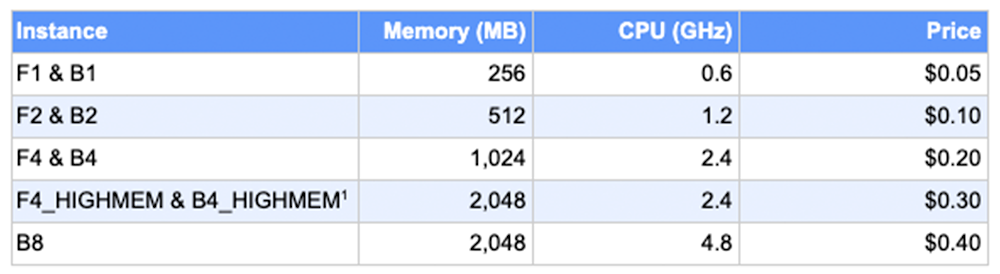
Last year, we announced App Engine second generation runtimes, which let you use any language library, have direct network access, and connect to Google Cloud VPC Networks, giving you a more idiomatic developer experience, support for native modules and faster execution. Today, we are excited to announce that all App Engine second generation runtime instances will receive double the memory. In addition, Go 1.12 and PHP 7.3 runtimes for App Engine standard are now generally available.Doubling the RAM for all App Engine second generation applications lets them more easily  load language libraries or scale vertically to increase concurrency via multiprocessing or multithreading. This increased memory limit is already available for all apps running second generation runtimes; you don’t need to take any action to receive the additional memory. This upgrade comes at no additional cost.Please refer to the table below for more information on memory associated with each instance class.1: F4_1G and B4_1G have been renamed to F4_HIGHMEM & B4_HIGHMEM for accuracy. The original _1G instance names will continue to work and will receive 2,048 MB of memory.In the past year, we’ve announced a number of second generation runtimes, including Node.js 10, PHP 7.2, Python 3.7, and Ruby 2.5 (alpha). Today we are announcing the general availability of two new runtimes: Go 1.12 and PHP 7.3.A1 Comms is one of the UK’s leading mobile phone and telecommunication providers, and is using PHP to as it transforms its business from brick-and-mortar to online retail:“Moving to second generation runtimes has saved us a lot of debugging time and helped us increase performance by at least 50%. The PHP 7.3 runtime is giving our developers the best of the bleeding edge for Laravel compatibility and speed, while still providing automatic security patching to meet our compliance requirements. It exceeds our expectations for reliability. The inclusion of native support for the OpenCensus module for Stackdriver Trace is also something we are excited about. .” – Sam Melrose,  System Engineer, A1 CommsAdditionally, second generation runtimes are interoperable with our recently released Cloud Run, a serverless compute offering that allows you to run any stateless container in a fully managed fashion or on top of an existing GKE cluster. You can take apps that were built on App Engine second generation runtimes and move them to Cloud Run, or vice-versa.Forget infrastructure and focus on your usersWhile there are a lot of new things to love about second generation runtimes, the core value for App Engine remains: the service allows developers and companies to focus on creating great software while taking advantage of Google Cloud’s world class operations and infrastructure to scale, monitor, and manage their applications.“App Engine has literally been a game changer for us. Since migrating to it, I’ve yet to have a board meeting where we need to discuss availability or capacity or any other reason for downtime. In fact, during Black Friday while some competitors’ websites slowed or went down, our response time actually improved.”  – Jonathan Liversided,  IT Director, A1 CommsApp Engine Second Generation runtimes are available for use immediately, so start building your app today.
Quelle: Google Cloud Platform

5 principles for cloud-native architecture—what it is and how to master it

At Google Cloud, we often throw around the term ‘cloud-native architecture’ as the desired end goal for applications that you migrate or build on Google Cloud Platform (GCP). But what exactly do we mean by cloud-native? More to the point, how do you go about designing such a system?At a high level, cloud-native architecture means adapting to the many new possibilities—but very different set of architectural constraints—offered by the cloud compared to traditional on-premises infrastructure. Consider the high level elements that we as software architects are trained to consider:The functional requirements of a system (what it should do, e.g ‘process orders in this format…’)The non-functional requirements (how it should perform e.g. ‘process at least 200 orders a minute’)Constraints (what is out-of-scope to change e.g. ‘orders must be updated on our existing mainframe system’).While the functional aspects don’t change too much, the cloud offers, and sometimes requires, very different ways to meet non-functional requirements, and imposes very different architectural constraints. If architects fail to adapt their approach to these different constraints, the systems they architect are often fragile, expensive, and hard to maintain. A well-architected cloud native system, on the other hand, should be largely self-healing, cost efficient, and easily updated and maintained through Continuous Integration/Continuous Delivery (CI/CD).The good news is that cloud is made of the same fabric of servers, disks and networks that makes up traditional infrastructure. This means that almost all of the principles of good architectural design still apply for cloud-native architecture. However, some of the fundamental assumptions about how that fabric performs change when you’re in the cloud. For instance, provisioning a replacement server can take weeks in traditional environments, whereas in the cloud, it takes seconds—your application architecture needs to take that into account.In this post we set out five principles of cloud-native architecture that will help to ensure your designs take full advantage of the cloud while avoiding the pitfalls of shoe-horning old approaches into a new platform.Principles for cloud-native architectureThe principle of architecting for the cloud, a.k.a. cloud-native architecture, focuses on how to optimize system architectures for the unique capabilities of the cloud. Traditional architecture tends to optimize for a fixed, high-cost infrastructure, which requires considerable manual effort to modify. Traditional architecture therefore focuses on the resilience and performance of a relatively small fixed number of components. In the cloud however, such a fixed infrastructure makes much less sense because cloud is charged based on usage (so you save money when you can reduce your footprint) and it’s also much easier to automate (so automatically scaling-up and down is much easier). Therefore, cloud-native architecture focuses on achieving resilience and scale though horizontal scaling, distributed processing, and automating the replacement of failed components. Let’s take a look.Principle 1: Design for automationAutomation has always been a best practice for software systems, but cloud makes it easier than ever to automate the infrastructure as well as components that sit above it. Although the upfront investment is often higher, favouring an automated solution will almost always pay off in the medium term in terms of effort, but also in terms of the resilience and performance of your system. Automated processes can repair, scale, deploy your system far faster than people can. As we discuss later on, architecture in the cloud is not a one-shot deal, and automation is no exception—as you find new ways that your system needs to take action, so you will find new things to automate.Some common areas for automating cloud-native systems are:Infrastructure: Automate the creation of the infrastructure, together with updates to it, using tools like Google Cloud Deployment Manager or TerraformContinuous Integration/Continuous Delivery: Automate the build, testing, and deployment of the packages that make up the system by using tools like Google Cloud Build, Jenkins and Spinnaker. Not only should you automate the deployment, you should strive to automate processes like canary testing and rollback.Scale up and scale down: Unless your system load almost never changes, you should automate the scale up of the system in response to increases in load, and scale down in response to sustained drops in load. By scaling up, you ensure your service remains available, and by scaling down you reduce costs. This makes clear sense for high-scale applications, like public websites, but also for smaller applications with irregular load, for instance internal applications that are very busy at certain periods, but barely used at others. For applications that sometimes receive almost no traffic, and for which you can tolerate some initial latency, you should even consider scaling to zero (removing all running instances, and restarting the application when it’s next needed).Monitoring and automated recovery: You should bake monitoring and logging into your cloud-native systems from inception. Logging and monitoring data streams can naturally be used for monitoring the health of the system, but can have many uses beyond this. For instance, they can give valuable insights into system usage and user behaviour (how many people are using the system, what parts they’re using, what their average latency is, etc). Secondly, they can be used in aggregate to give a measure of overall system health (e.g., a disk is nearly full again, but is it filling faster than usual? What is the relationship between disk usage and service uptake? etc). Lastly, they are an ideal point for attaching automation. Now when that disk fills up, instead of just logging an error, you can also automatically resize the disk to allow the system to keep functioning.Principle 2: Be smart with stateStoring of ‘state’, be that user data (e.g., the items in the users shopping cart, or their employee number) or system state (e.g., how many instances of a job are running, what version of code is running in production), is the hardest aspect of architecting a distributed, cloud-native architecture. You should therefore architect your system to be intentional about when, and how, you store state, and design components to be stateless wherever you can.Stateless components are easy to:Scale: To scale up, just add more copies. To scale down, instruct instances to terminate once they have completed their current task.Repair: To ‘repair’ a failed instance of a component, simply terminate it as gracefully as possible and spin up a replacement.Roll-back: If you have a bad deployment, stateless components are much easier to roll back, since you can terminate them and launch instances of the old version instead.Load-Balance across: When components are stateless, load balancing is much simpler since any instance can handle any request. Load balancing across stateful components is much harder, since the state of the user’s session typically resides on the instance, forcing that instance to handle all requests from a given user.Principle 3: Favor managed servicesCloud is more than just infrastructure. Most cloud providers offer a rich set of managed services, providing all sorts of functionality that relieve you of the headache of managing the backend software or infrastructure. However, many organizations are cautious about taking advantage of these services because they are concerned about being ‘locked in’ to a given provider. This is a valid concern, but managed services can often save the organization hugely in time and operational overhead.Broadly speaking, the decision of whether or not to adopt managed services comes down to portability vs. operational overhead, in terms of both money, but also skills. Crudely, the managed services that you might consider today fall into three broad categories:Managed open source or open source-compatible services: Services that are managed open source (for instance Cloud SQL) or offer an open-source compatible interface (for instance Cloud Bigtable). This should be an easy choice since there are a lot of benefits in using the managed service, and little risk.Managed services with high operational savings: Some services are not immediately compatible with open source, or have no immediate open source alternative, but are so much easier to consume than the alternatives, they are worth the risk. For instance, BigQuery is often adopted by organizations because it is so easy to operate.Everything else: Then there are the hard cases, where there is no easy migration path off of the service, and it presents a less obvious operational benefit. You’ll need to examine these on a case-by-case basis, considering things like the strategic significance of the service, the operational overhead of running it yourself, and the effort required to migrate away.However, practical experience has shown that most cloud-native architectures favor managed services; the potential risk of having to migrate off of them rarely outweighs the huge savings in time, effort, and operational risk of having the cloud provider manage the service, at scale, on your behalf.Principle 4: Practice defense in depthTraditional architectures place a lot of faith in perimeter security, crudely a hardened network perimeter with ‘trusted things’ inside and ‘untrusted things’ outside. Unfortunately, this approach has always been vulnerable to insider attacks, as well as external threats such as spear phishing. Moreover, the increasing pressure to provide flexible and mobile working has further undermined the network perimeter.Cloud-native architectures have their origins in internet-facing services, and so have always needed to deal with external attacks. Therefore they adopt an approach of defense-in-depth by applying authentication between each component, and by minimizing the trust between those components (even if they are ‘internal’). As a result, there is no ‘inside’ and ‘outside’.Cloud-native architectures should extend this idea beyond authentication to include things like rate limiting and script injection. Each component in a design should seek to protect itself from the other components. This not only makes the architecture very resilient, it also makes the resulting services easier to deploy in a cloud environment, where there may not be a trusted network between the service and its users.Principle 5: Always be architectingOne of the core characteristics of a cloud-native system is that it’s always evolving, and that’s equally true of the architecture. As a cloud-native architect, you should always seek to refine, simplify and improve the architecture of the system, as the needs of the organization change, the landscape of your IT systems change, and the capabilities of your cloud provider itself change. While this undoubtedly requires constant investment, the lessons of the past are clear: to evolve, grow, and respond, IT systems need to live and breath and change. Dead, ossifying IT systems rapidly bring the organization to a standstill, unable to respond to new threats and opportunities.The only constant is changeIn the animal kingdom, survival favors those individuals who adapt to their environment. This is not a linear journey from ‘bad’ to ‘best’ or from ‘primitive’ to ‘evolved’, rather everything is in constant flux. As the environment changes, pressure is applied to species to evolve and adapt. Similarly, cloud-native architectures do not replace traditional architectures, but they are better adapted to the very different environment of cloud. Cloud is increasingly the environment in which most of us find ourselves working, and failure to evolve and adapt, as many species can attest, is not a long term option.The principles described above are not a magic formula for creating a cloud-native architecture, but hopefully provide strong guidelines on how to get the most out of the cloud. As an added benefit, moving and adapting architectures for cloud gives you  the opportunity to improve and adapt them in other ways, and make them better able to adapt to the next environmental shift. Change can be hard, but as evolution has shown for billions of years, you don’t have to be the best to survive—you just need to be able to adapt.If you would like to learn more about the topics in this post, check out the following resources:To learn more about how Google runs systems in production, check out the resources at the Site Reliability Engineering pagesLearn more about Containers and Continuous Integration and Continuous Deployment, which are core technologies for building on the cloudAlmost all cloud architectures are based on a microservices architecture, check out Migrating a monolithic application to microservices on Google Kubernetes Engine for a great overview of microservices, as well as practical advice on migrating your existing applicationsChange is hard in any organisation, Changing the change rules at Google on the Google re:work site has some interesting insights on how Google approaches change
Quelle: Google Cloud Platform

Safaricom: Harnessing the power of APIs to transform lives in Africa

Editors note: Today we hear from Calestor Kizito Magero, Safaricom’s API product development manager of M-PESA, the company’s mobile payment platform. Learn how Safaricom, the largest telecommunications provider in Kenya, uses Apigee to simplify how it integrates its mobile services with partners.Safaricom holds the distinction of being the largest telecommunications services provider in Kenya, but we’re aiming for an even loftier goal: empowering Kenyans with tools for economic growth. From venture capital investments in local startups to our commitment to United Nations (UN) sustainability goals, we prioritize the mission of transforming lives in our country.A key part of this mission is M-PESA, our mobile payment solution. M-PESA enables money transfers and lending, and empowers Kenyans to manage their finances by transforming their mobile phones into a personal bank branch. Partners can integrate with the service via APIs that are exposed via the Apigee API management platform.Integrating with partners wasn’t always as fast and efficient as it is now, though. Our previous channel had proven tedious, expensive, and time consuming, and we dealt with a lot of customer complaints and dissatisfaction. We had to create separate network connections for each partner to maintain security for our customers.We couldn’t develop APIs on the gateway layer, meaning that development had to be done on our core services. To do testing, we had to send requests manually to developers, which wasn’t feasible when we reached a scale of more than 100 integrations. We knew that the continued success of M-PESA hinged on finding a faster, easier, and more secure way to expose our APIs and get them integrated with partners’ offerings. A key reason we chose Google Cloud’s Apigee API Platform was the ability it provides to securely expose any API, whether external or internal. We also appreciated the platform’s configurability. With Apigee, it became easier to develop and deploy APIs from start to finish in just a few hours, along with necessary error handling and logs. Off-the-shelf tools like Apigee Trace and the platform‘s proxy building capability make API management very easy, and we value its ability to scale with us as the number of APIs we offer grows. Our implementation partner Abacus Consulting played a key role in evaluating Apigee and helping Safaricom implement the platform.Deploying Apigee has enabled our partners to easily integrate our M-PESA mobile payment solution. This has opened up our ecosystem to 4,500 partners and counting, ranging from startups to large enterprises. We now feel confident in being able to privately and more securely expose our APIs, which now take as little as a week to develop and publish. We have also added a valuable commercial aspect to our digital strategy thanks to the monetization feature in Apigee, which is contributing 11% of our B2B and B2C revenue at the beginning of 2019.We have also added a valuable commercial aspect to our digital strategy thanks to the monetization feature in Apigee, which is contributing 11% of our B2B and B2C revenue at the beginning of 2019. We have a very vibrant developer community across the country, and with the growth and adoption of M-PESA our customers need to easily integrate and automate payment processes. The API management platform has opened up an easy way for developers to create and embed payments into their solutions, with the sandbox offering a test area where they can experiment with different ways of handling payments.This has created a buzz in the developer community, with many collaborative knowledge-sharing groups forming spontaneously. So far, we have on-boarded over 15,000 developers in our sandbox environment. We are exposing more than 80 APIs now and have over 15,000 apps currently in production or in the sandbox.Success stories are bubbling up from our ecosystem about how easy it has been to integrate with M-PESA and automate payments since the Apigee deployment. Self-onboarding means that customers do not have to depend on Safaricom support engineers to get access to our APIs and documentation. We have also been able to implement self-testing and customer go-live very easily and more securely.With Apigee’s help, Safaricom has gained a significant competitive edge in Africa by becoming the first mobile network operator in the region to expose APIs. We are planning to leverage Apigee capabilities to further enhance our offering by developing new API-based offerings in the Internet of Things (IoT) space. We are at the beginning of our API journey and we are excited by the potential that APIs unlocks to help us on our mission to transform lives through mobile communications.To learn more about API management on Google Cloud, visit our Apigee page.
Quelle: Google Cloud Platform

Predictive marketing analytics using BigQuery ML machine learning templates

Enterprises are collecting and generating more data than ever—to better understand their business landscape, their market, and their customers. As a result, data scientists and analysts increasingly need to build robust machine learning models that can forecast business trajectories and help leaders plan for the future. However, current machine learning tools make it difficult to quickly and easily create ML models, delaying time to insights.To address these challenges, we announced BigQuery ML, a capability inside BigQuery that allows data scientists and analysts to build and operationalize machine learning models in minutes on massive structured or semi-structured datasets. BigQuery ML democratizes predictive analytics so that users unfamiliar with programming languages like Python and Java can build machine learning models with basic SQL, and is generally available.To make it even easier for anyone to get started with BigQuery ML, we have open-sourced a repository of SQL templates for common machine learning use cases. The first of these, tailored specifically for marketing, were built in collaboration with SpringML, a premier Google Cloud Platform partner that helps customers successfully deploy BigQuery and BigQuery ML. Each template is tutorial-like in nature, and includes a sample dataset for Google Analytics 360 and CRM along with SQL code for the following steps of machine learning modeling: data aggregation and transformation (for feature and label creation), machine learning model creation, and surfacing predictions from the model on a dashboard. Here’s more on the three templates:Customer segmentation—By dividing a customer base into groups of individuals that are similar in specific ways, marketers can custom-tailor their content and media to unique audiences. With this template, users can implement a BigQuery ML k-means clustering model to build customer segmentations.Customer Lifetime Value (LTV) prediction—Many organizations need to identify and prioritize customer segments that are most valuable to the company. To do this, LTV can be an important metric that measures the total revenue reasonably expected from a customer. This template implements a BigQuery ML multiclass logistic regression model to predict the LTV of a customer to be high, medium, or low.Conversion or purchase prediction—There are many marketing use cases that can benefit from predicting the likelihood of a user converting, or making a purchase, for example ads retargeting, where the advertiser can bid higher for website visitors that have a higher purchase intent, or email campaigns, where emails are sent to a subset of customers based on their likelihood to click on content or purchase. This template implements a BigQuery ML binary logistic regression model to build conversion or purchase predictions.To start using these open-source SQL templates and more, visit our repository—the code is licensed under Apache v2. We will also be adding templates for more use cases in the future. And to learn more about applying BigQuery ML for marketing analytics, watch this Google Cloud OnAir webinar.
Quelle: Google Cloud Platform

Financial data delivery gets easier with cloud-native Crux Informatics

A vast majority of financial institutions are exploring cloud computing to see how they might serve investment processes and customers better, faster and more securely, and be able to plan for the future with modern infrastructure. Crux Informatics, a data delivery and operations company, built its infrastructure from the ground up with Google Cloud Platform (GCP), and hasn’t looked back. We’re pleased to partner with Crux Informatics to help scale the building of secure, efficient and high-quality data pipelines for the financial services industry.Since its inception, Crux has used its cloud platform and expert services to connect data users and suppliers in the capital markets so data can flow. Data suppliers are large data owners and distributors that gather and send raw financial data to banks and hedge funds—the data users—for them to make trading and other critical business decisions. These data suppliers provide a wide variety of data sets in multiple formats to users. Until recently, financial firms ingested and processed data in-house. As a result, their data analysts spent a significant amount of time and resources focusing on the repetitive tasks of extracting, cleaning and validating the data to prepare it for analysis.Crux eliminates the need for financial firms to build and maintain these complex data management infrastructures in-house by providing a solution that replaces the data supply chain ingestion process. Its cloud-based delivery and operations platform serves as an industry utility, so customers can reliably process the data they need, when they need it and where they need it. In turn, data users can access more data from their suppliers and build their own proprietary services, moving away from repetitive tasks to sophisticated data analysis that brings knowledge and insight to capital markets.Cloud benefits spread to the financial services industryFinancial institutions have uncompromising technology requirements regarding security, compliance and accuracy. With persistent and rapid change within financial services, it’s essential that technology keeps up the same pace. But maintaining massive repositories of data in-house makes it harder for financial firms to move quickly. Migrating legacy systems into a streamlined data supply chain on the cloud can also be very challenging. For Crux’s customers, their product brings a simpler way to ease into cloud use, rather than having to choose separate services.Crux uses a variety of GCP’s set of tools and services to help build its business faster and serve its customers better. The cloud-native approach that Crux has taken means that it can offer high resiliency by using multi-region storage buckets in Cloud Storage combined with GCP’s global network and ability to spin up high-availability clusters. Crux is able to detect and respond quickly to issues thanks to its comprehensive monitoring, logging, and tracing infrastructure that uses Stackdriver.High-performance data access and data processing are foundational aspects of the Crux offering, which is facilitated by Google Kubernetes Engine (GKE), BigQuery for data analytics and Istio for production monitoring. Security is also paramount for Crux, and GCP’s Shared VPC option gives the company a global IP space where firewall rules for multiple projects can be centrally managed by the infrastructure team.These GCP services have helped Crux grow and scale up quickly, and has led to many benefits for Crux’s customers. One financial institution had only been able to manually ingest 10 data sets a month from a specific supplier, limited by their in-house capacity and resources. With Crux and GCP, that user can now consume more than 50 data sets from the supplier immediately, as the data sets are processed and loaded for consumption.Crux plans more growth and development to serve even more clean, useful data to its customers. Learn more about Crux and about GCP for financial services.
Quelle: Google Cloud Platform

A little light reading: New, interesting and hands-on stories from around Google

There’s much more going on in the wide world of Google than cloud computing alone, so we’ve rounded up some recent favorite stories to share with you. Take a look at what’s happening in our developer community and in the AI lab, and find some projects to tackle for fun and skill-building.Build a machine learning model (in less than an hour)If you’re interested in AI and machine learning, but haven’t dived into the details yet, check out this session from Google I/O ‘19, where developer advocate Sara Robinson built an AI model from scratch on stage. The talk is intended for ML beginners, experts, and anyone in between. You’ll get a brief high-level overview of what ML is (essentially, matrix multiplication), and what types of Google products can help you add ML to your apps. The session will take you through coding, training, and deploying a model using a public BigQuery dataset of StackOverflow questions.Let your code fly freeThe Flutter framework offers a UI toolkit for developers to build web, mobile and desktop apps from a single code base. Flutter started with the goal of making iOS-Android cross-platform development easier, but the focus has expanded beyond mobile. This open-source project, developed at Google, now powers the Google Home Hub. Last month, the first technical preview of Flutter for web development arrived for early adopters to try it out, particularly for interactive content.  File under easy listening (and speaking)“Translatotron” may sound like a friendly traveling robot, but it’s actually an experimental speech-to-speech translation system that works differently from the systems developed over the past few decades. These systems usually translate the source speech to text, then translate it into the target language, then generate speech from that text into the target language. This works well, but Translatotron doesn’t divide the task into separate stages, which means it avoids compounding errors between recognition and translation, and does faster inference. It works by inputting and outputting spectrograms, using a trained neural vocoder for waveform translation and speaker encoder to maintain voice character. Check out the full post for details and audio clips demonstrating the system.See how huge image datasets come togetherLast month, Google AI engineers released Google-Landmarks-v2, a new landmark recognition dataset that follows up on last year’s Google-Landmarks. That one was the largest available at the time, but this one is even bigger, with more than 5 million images, twice that of the first version. To really advance research on instance-level recognition (recognizing specific instances of an object such as a landmark) and image retrieval, it’s important to have ever-larger datasets to add variety and train better systems. So this new dataset brings more diversity of images and greater challenges for technologists and tools. Creating the dataset involved crowdsourcing the labeling of landmarks within the photographer community, and using public institution photos. Make sure to check out the accompanying Kaggle competitions, one on image retrieval and one on image recognition.Make a do-it-yourself cloud at homeForget building a treehouse or hanging a flat-screen TV: Here’s a tutorial for you to build a smart home cloud to connect all your devices securely. The device cloud described here uses GCP components, including Firebase, to make a serverless setup to see when devices are offline, provision them to individual users, and more. You’ll get a look along the way into Cloud IoT Core for linking devices, plus Cloud Functions to move data between Cloud IoT Core and Firebase.That’s a wrap for this edition. Let us know what you’re reading!
Quelle: Google Cloud Platform

How our customers are using MongoDB Atlas on Google Cloud Platform

At Google Cloud, we see databases as the essential building blocks of a cloud infrastructure. Our partnership with MongoDB gives you the benefits of a modern database service in a cloud-native way. At Next ‘19, we announced our plans to integrate MongoDB Atlas into our platform, so you can access it from Google Cloud Platform (GCP) with a unified user experience along with the rest of our platform. We have since made significant enhancements to the experience for our customers though a number of integrations.Unified billing: We’re happy to announce that MongoDB Atlas is now available through the GCP Marketplace. You can now get a single bill for all GCP services as well as MongoDB Atlas, and you can use your GCP spending commitments toward Atlas.Integrations to better protect and manage your data: MongoDB Atlas now works with Cloud Key Management Service (KMS), which allows you to better manage sensitive data in MongoDB Atlas on GCP. Also, we now support Cloud Provider snapshots, so you can take fully managed on-demand snapshots.Scaling globally. With our recent Atlas launch in Zurich and Osaka, MongoDB Atlas is now supported in all 20 Google Cloud regions, so you can scale easily with lower-latency reads and writes for better user performance.We continue to work with MongoDB on a number of additional product integrations that we’ll make available in the future, all to keep striving to provide a first-class experience for MongoDB Atlas on GCP.How customers are using MongoDB Atlas on GCPMongoDB is already popular because of its usability, scalability, and performance, and this tight integration with GCP is really driven by our customers. More and more of our customers are choosing to run Atlas on GCP for a variety of needs, such as managing large-scale product catalogs of popular e-commerce websites, building great customer experiences by managing disparate pieces of data in a unified way, or building modern global web and mobile applications. Here are a few recent stories we’ve heard from users.Adding agility. Auto Trader UK, a popular site where consumers can buy and sell used cars, uses MongoDB and GCP to reduce complexity and stay nimble. “Auto Trader is constantly looking at ways in which to enhance our technology landscape, and MongoDB Atlas running on GCP has unlocked massive potential in our architecture through agility in scaling and resource management, seamless multi-region clusters, and premium monitoring as standard,” says Mohsin Patel, principal database engineer at Auto Trader UK. “We have also significantly reduced complexity, allowing our developers to focus on the innovation that drives our products rather than the infrastructure it sits on. The partnership between MongoDB and GCP to provide a single, unified platform in the Google ecosystem further solidifies our decision 12 months ago to make the leap onto Atlas within GCP.”Adding scalability. Australian company TEG uses MongoDB running on GCP to help power its busy website and mobile apps for its ticketing, live entertainment, and data analytics business. It recently launched TEG Marketplace, its secondary ticketing platform, powered by App Engine and backed by MongoDB Atlas clusters. That lets TEG scale to zero for cost effectiveness. TEG also uses MongoDB Stitch to feed transaction information into their MongoDB Atlas cluster, as well as database triggers to feed data in real time to downstream platforms that are used by partners and venues for insights into trends and ticket sales performance.Israeli cybersecurity startup Panorays migrated from MongoDB Community to MongoDB Atlas on GCP to automate and streamline operations, simplify management overhead and focus on innovation. MongoDB Atlas supports the company’s operations and UI for their SaaS security platform product,Another customer using MongoDB Atlas on GCP is Universe, part of Live Nation, a live entertainment ticket vendor and venue operator. Live Nation acquired Universe for its event ticketing and marketing platform.“At Universe, we made a decision to go all-in on Google Cloud, and having MongoDB Atlas available on GCP helped us tremendously,” says Josh Kelly, CTO at Universe. “As soon as we onboarded to Atlas, we started seeing value in it. The Performance Advisor tool helped us evaluate slow-running queries to optimize our indexes. We were very pleased with how simple it was to use, while being highly performant. MongoDB Atlas has been complementing our use of GCP technologies like Cloud Pub/Sub, Cloud Dataflow and BigQuery, which we use in tandem with Atlas to build a robust data pipeline.”Adding speed. Warehouse management software company Longbow has found value in using MongoDB Atlas running on GCP. “Customers choose Longbow to streamline operations by turning their supply chain data into a competitive advantage through real-time visibility and distribution data services provided by our Rebus platform,” says Alex Wakefield, CEO, Longbow Advantage and Rebus Data Services. “In order to offer disruptive technology like Rebus, we depend on disruptive infrastructure. MongoDB Atlas on GCP is SOC2 compliant and allows us to keep our team highly efficient and focused on developing the application instead of managing the back end. Additionally, Atlas and GCP gave us great responses that we weren’t getting from other cloud vendors.”Through this seamless MongoDB Atlas-Google Cloud partnership, we’re bringing customers value and the freedom of choice when it comes to building modern applications in the cloud. The feedback from our customers has driven us to invest even more in our partnership with MongoDB and provide a great product experience. You can find MongoDB Atlas on GCP in the Marketplace. Stay up to date on this week’s MongoDB World, and get in touch to learn more.
Quelle: Google Cloud Platform

5 cloud sessions from Google I/O '19, from basic to advanced

Our goal is to make Google Cloud the best place for developers, and Google I/O is one of our favorite ways to spend quality time with the developer community to better understand your needs and challenges. During I/O, we provided a number of breakout sessions aimed at supporting you as you build on Google Cloud, and these are all recorded so that anyone—not just I/O attendees—can learn more and uplevel their skills.Below are five of our favorite Google Cloud sessions from this year. We’ve ordered these from introductory to advanced, so you can move at your own pace. Start with the basics, then work up to expert topics like building your own machine learning model.1. Google Cloud Platform (GCP) EssentialsFrom compute to storage to databases, to say nothing of things like continuous integration tools, DevOps, and machine learning, Google Cloud provides so many options, but not everyone knows where to begin. This session gives you a complete overview of GCP and will leave you with an understanding of the tools available to meet your needs and how to get started.2. Code, Build, Run, and Observe with Google CloudCreating great backend services requires great tools and infrastructure, and our goal with GCP has always been to give developers the resources they need to build. This session offers an overview of GCP products that make it easy to code, build, run, and observe your applications and services with Google Cloud.3. Making the Right Decisions for Your Serverless ArchitectureChomping at the bit to build a complete end-to-end service entirely on serverless technologies? There are many things you might want to keep in mind as you’re building. This session explains the thought process and methodology we use inside Google, and introduces the constraints of working in environments without persistence.4. Train Custom Machine Learning Models with No Data Science ExpertiseWant to create high quality custom machine learning models but are not an ML expert? Cloud AutoML leverages Google’s state-of-the-art neural architecture search technology to help you do exactly that. Learn how to build and deploy with AutoML Tables, AutoML Video Intelligence, and AutoML Natural Language—and even see how AutoML would fare if it were to participate in data science competitions.5. Live Coding a Machine Learning Model from ScratchFar and away our most popular cloud session at this year’s I/O, developer advocate Sara Robinson takes you from an empty Colab notebook to using TensorFlow and Keras to code a model, then training, deploying to Cloud AI Platform for serving, and generating predictions. This is an excellent session for anyone interested in building a machine learning model using Jupyter notebook, and serving the model in production with ease.Want more? You can find recordings of all our Google Cloud sessions at I/O here.
Quelle: Google Cloud Platform





