How SRE teams are organized, and how to get started

At Google, Site Reliability Engineering (SRE) is our practice of continually defining reliability goals, measuring those goals, and working to improve our services as needed. We recently walked you through a guided tour of the SRE workbook. You can think of that guidance as what SRE teams generally do, paired with when the teams tend to perform these tasks given their maturity level. We believe that many companies can start and grow a new SRE team by following that guidance.Since then, we have heard that folks understand what SREs generally do at Google and understand which best practices should be implemented at various levels of SRE maturity. We have also heard from many of you how you’re defining your own levels of team maturity. But the next step—how the SRE teams are actually organized—has been largely undocumented, until now!In this post, we’ll cover how different implementations of SRE teams establish boundaries to achieve their goals. We describe six different implementations that we’ve experienced, and what we have observed to be their most important pros and cons. Keep in mind that your implementations of SRE can be different—this is not an exhaustive list. In recent years, we’ve seen all of these types of teams here in the Google SRE organization (i.e., a set of SRE teams) except for the “kitchen sink.” The order of implementations here is a fairly common path of evolution as SRE teams gain experience.Before you begin implementing SREBefore choosing any of the implementations discussed here, do a little prep work with your team. We recommend allocating some engineering time of multiple folks and finding at least one part-time advocate for SRE-related practices within your company. This type of initial, less formal setup has some pros and cons:ProsEasy to get started on an SRE journey without organizational change.Lets you test and adapt SRE practices to your environment at low cost.ConsTime management between day-to-day job demands vs. adoption of SRE practices.Recommended for: Organizations without the scale to justify dedicated SRE team staffing, and/or organizations experimenting with SRE practices before broader adoption.Types of SRE team implementations1. Kitchen Sink, a.k.a. “Everything SRE”This describes an SRE team where the scope of services or workflows covered is usually unbounded. It’s often the first (or only) SRE team in existence, and may grow organically, as it did when Google SRE first got started. We’ve since adopted a hybrid model, including the implementations listed below.ProsNo coverage gaps between SRE teams, given that only one team is in place.Easy to spot patterns and draw similarities between services and projects.SRE tends to act as a glue between disparate dev teams, creating solutions out of distinct pieces of software.ConsThere is usually a lack of an SRE team charter, or the charter states everything in the company as being possibly in scope, running the risk of overloading the team.As the company and system complexity grows, such a team tends to move from being able to have deep positive impact on everything to making a lot more shallow contributions. There are ways to mitigate this phenomenon without completely changing the implementation or starting another team (see tiers of service, below). Issues involving such a team may negatively impact your entire business.Recommended for: A company with just a couple of applications and user journeys, where adoption of SRE practices and demand for the role has outgrown what can be staffed without a dedicated SRE team, but where the scope remains small enough that multiple SRE teams cannot be justified.2. InfrastructureThese teams tend to focus on behind-the-scenes efforts that help make other teams’ jobs faster and easier. Common implementations include maintaining shared services (such as Kubernetes clusters) or maintaining common components (like CI/CD, monitoring, IAM or VPC configurations) built on top of a public cloud provider like Google Cloud Platform (GCP). This is different from SREs working on services related to products—i.e., customer-facing code written in house. ProsAllows product developers to use DevOps practices to maintain user-facing products without divergence in practice across the business. SREs can focus on providing a highly reliable infrastructure. They will often define production standards as code and work to smooth out any sharp edges to greatly simplify things for the product developers running their own services.ConsDepending on the scope of the infrastructure, issues involving such a team may negatively impact your entire business, similar to a Kitchen Sink implementation.Lack of direct contact with your company’s customers can lead to a focus on infrastructure improvements that are not necessarily tied to the customer experience.As the company and system complexity grows, you may be required to split the infrastructure teams, so the cons related to product/application teams apply (see below).Recommended for: Any company with several development teams, since you are likely to have to staff an infrastructure team (or consider doing so) to define common standards and practices. It is common for large companies to have both an infrastructure DevOps team and an SRE team. The DevOps team will focus on customizing FLOSS and writing their own software (think features) for the application teams, while the SRE team focuses on reliability.3. ToolsA tools-only SRE team tends to focus on building software to help their developer counterparts measure, maintain, and improve system reliability or any other aspect of SRE work, such as capacity planning. One can argue that tools are part of infrastructure, so the SRE team implementations are the same. It’s true that these two types of teams are fairly similar. In practice, tools teams tend to focus more on support and planning systems that have a reliability-oriented feature set, as opposed to shared back ends on the serving path that are normally associated with infrastructure teams. As a side effect, there’s often more direct feedback to infrastructure SRE teams; a tooling SRE team runs the risk of solving the wrong problems for the business, so it needs to work hard to stay aware of the practical problems of the teams tackling front-line reliability.The pros and cons of infrastructure and tools teams tend to be similar. Additionally, for tools teams:Cons:You need to make sure that a tools team doesn’t unintentionally turn into an infrastructure team, and vice versa. There’s a high risk of an increase of toil and overall workload. This is usually contained by establishing a team charter that’s been approved by your business leaders.Recommended for: Any company that needs highly specialized reliability-related tooling that’s not currently available as FLOSS or SaaS.4. Product/applicationIn this case, the SRE team works to improve reliability of a critical application or business area, but the reliability of ancillary services such as batch processors is the sole responsibility of a different team—usually developers covering both dev and ops functions.ProsProvides a clear focus for the team’s effort and allows a clear link from business priorities to where team effort is spent.ConsAs the company and system complexity grows, new product/application teams will be required. The product focus of each team can lead to duplication of base infrastructure or divergence of practices between teams, which is inefficient and limits knowledge sharing and mobility. Recommended for: As a second or nth team for companies that started with a Kitchen Sink, infrastructure, or tools team and have a key user-facing application with high reliability needs that justifies the relatively large expense of a dedicated set of SREs.5. EmbeddedThese SRE teams have SREs embedded with their developer counterparts, usually one per developer team in scope. Embedded SREs usually share an office with the developers, but the embedded arrangement can be remote. The work relationship between the embedded SRE(s) and developers tends to be project- or time-bounded. During embedded engagements, the SREs are usually very hands-on, performing work like changing code and configuration of the services in scope.ProsEnables focused SRE expertise to be directed to specific problems or teams.Allows side-by-side demonstration of SRE practices, which can be a very effective teaching method.ConsIt may result in lack of standardization between teams, and/or divergence in practice.SREs may not have the chance to spend much time with peers to mentor them.Recommended for: This implementation works well to either start an SRE function, or to scale another implementation further. When you have a project or team that needs SRE for a period of time, then this can be a good model. This type of team can also augment the impact of a tools or infrastructure team by driving adoption.6. ConsultingThis implementation is very similar to the embedded implementation described above. The difference is that consulting SRE teams tend to avoid changing customer code and configuration of the services in scope.Consulting SRE teams may write code and configuration in order to build and maintain tools for themselves or for their developer counterparts. If they are performing the latter, one could argue that they are acting as a hybrid of consulting and tools implementations.ProsIt can help with further scaling an existing SRE organization’s positive impact by being decoupled from directly changing code and configuration (see also influence on reliability standards and practices below).ConsConsultants may lack sufficient context to offer useful advice. A common risk for consulting SRE teams is being perceived as hands-off (i.e., little incurred risk), given that they typically don’t change code and configuration, even though they are capable of having indirect technical impact. Recommended for: We’d recommend waiting to staff a dedicated SRE team of consultants until your company or complexity is considered to be large, and when demands have outgrown what can be supported by existing SRE teams of other various implementations. Keep in mind that we recommend staffing one or a couple part-time consultants before you staff your first SRE team (see above).Common modifications of SRE team implementationsWe’ve seen two common modifiers to most of the implementations described above.1. Reliability standards and practicesAn SRE team may also act as a “reliability standards and practices” group for an entire company. The scope of standards and practices may vary, but usually covers how and when it’s acceptable to change production systems, incident management, error budgets, etc. In other words, while such an SRE team may not interact with every service or developer team directly, it’s often the team that establishes what’s acceptable elsewhere within their area of expertise. We’ve seen adoption of such standards and practices approached in two different ways:Influence relies on mostly organic adoption and showing teams how these standards and practices can help them achieve their goals.Mandates rely on organizational structure, processes, and hierarchy to drive adoption of reliability standards and practices.The effectiveness of mandates vary based on the organizational culture combined with the SRE team’s experience, seniority, and reputation. A mandated approach may be effective in an organization where strict processes are already expected and common in other areas, but is highly unlikely to succeed in an organization where individuals are given high levels of autonomy. In either case, a brand new team—even if composed of experienced individuals—is likely to have more difficulty establishing company-wide standards than a team with a history and reputation of achieving high reliability through strong practices.We’ve also observed software development to be an effective tool for balancing these approaches. In this case, the SRE team develops a zero-configuration approach, where one or more reliability standards and practices can be adopted with additional zero setup cost, if the service or target team happens to be using a predetermined system. Once they see the benefits (typically time savings) that they can achieve by using that system, development teams are influenced to adopt the practices through the provided tooling. As adoption of such a system grows, the approach can then shift to target improvements for SREs and set mandates through reliability-related conformance tests.2. Tiers of serviceRegardless of which SRE team model defines the scope of the team, any SRE team also has a decision to make about the depth of their engagement with the software and services within their area. This is particularly true when there are more development teams, applications, or infrastructure than can be fully supported by the SRE team. A common approach to addressing this challenge is to offer tiers of SRE engagement. Doing so expands the binary approach of “not in scope for us or not yet seen by SRE” and “fully supported by SRE” by adding at least one more tier in between those two options. A common characteristic of a binary approach is that “fully supported by SRE” generally means that a given service or workflow is jointly owned by SRE and developers, including on-call duties, after some onboarding process. Unfortunately, an SRE team, or any other team, tends to reach a limit in terms of how many services they can fully onboard. As the architecture variety and complexity of services increases, cognitive load and memory recall suffers.Here’s an example of a tiered approach to SRE:Tier 0: Sporadic consulting work, no dedicated SRE staffing.Tier 1: Project work, some dedicated SRE time.Tier 2: The service is onboarded (or onboarding) for on-call, and receives more dedicated SRE time.The implementation details of the tiers vary based on the actual SRE implementation itself. For example, consulting and embedded SRE teams aren’t generally expected to onboard services (as in go on call) at Tier 2, but may offer dedicated staffing (as opposed to shared staffing) in Tier 1. We recommend defining tiers of service in a document that’s been approved by SRE and developer leadership. This signoff is related to, but not the same, as documenting your team charter (mentioned above).There have been instances of a single SRE team adopting characteristics of multiple implementations other than adopting tiers of service. For instance, a single Kitchen Sink SRE team could also have two SRE consultants playing a dual role.Common SRE pathsYour SRE organization may follow the implementations in the order above. Another common path is to implement what’s described in “Before you begin,” then to staff a Kitchen Sink SRE team, but swap the order of Infrastructure with product/application when it is time to start a second SRE team. In this scenario, the result is two specialized product/application SRE teams. This makes sense when there is enough product/application breadth but little to no shared infrastructure between both teams, other than hosted solutions such as the ones provided by Google Cloud.A third common path is to move from “Before you begin” to an infrastructure (or even tools) team, skipping a Kitchen Sink and product/application phase. This approach makes the most sense when the application teams are able and willing to define and maintain SLOs.We highly recommend evaluating both “Reliability standards and practices” and “Tiers of service” as early in the SRE process as possible, but that may be feasible only after you’ve established your first SRE team.What should I do next?If you are just starting your SRE practice, we recommend reading Do you have an SRE team yet? How to start and assess your journey, and then assessing the SRE implementation that best suits your needs based on the information we shared above.If you have been leading one or more SRE teams, we recommend describing their implementation in generic terms (similar to how we’ve discussed team implementations above), evaluating the pros and cons based on your own experience, and making sure the SRE team’s goals and scope are defined through a team charter document. This exercise may help you avoid overload and premature reorganizations.If you’re a GCP customer and would like to request CRE involvement, contact your account manager to apply for this program. Of course, SRE is a methodology that will work with a variety of infrastructures, and using Google Cloud is not a prerequisite for pursuing this set of engineering practices. We wish you a happy SRE journey!Thanks to Adrian Hilton, Betsy Beyer, Christine Cignoli, Jamie Wilkinson, Shylaja Nukala among others for their contributions to this post.
Quelle: Google Cloud Platform
Take charge of your data: How tokenization makes data usable without sacrificing privacy

Privacy regulations place strict controls on how to examine and share sensitive data. At the same time, you can’t let your business come to a standstill. De-identification techniques can help you strike a balance between utility and privacy for your data. In previous “Take charge of your data” posts, we showed you how to gain visibility into your data using Cloud Data Loss Prevention (DLP) and how to protect sensitive data by incorporating data de-identification, obfuscation, and minimization techniques. In this post, we’ll dive a bit deeper into one of these de-identification techniques: tokenization.Tokenization substitutes sensitive data with surrogate values called tokens, which can then be used to represent the original (or raw) sensitive value. It is sometimes referred to as pseudonymization or surrogate replacement.  The concept of tokenization is widely used in industries like finance and healthcare to help reduce the risk of data in use, compliance scope, and minimize sensitive data being exposed to systems that do not need it. It’s important to understand how  tokenization can help protect sensitive data while allowing your business operations and analytical workflows to use the information they need. With Cloud DLP, customers can perform tokenization at scale with minimal setup and overhead.Understanding the problemFirst, let’s look at the following scenario: Casey works as a data scientist at a large financial company that services businesses and end users. Casey’s primary job is to analyze data and improve the user experience for people using the company’s vast portfolio of financial applications. In the normal course of doing business, the company collects sensitive and regulated data including personally identifiable information (PII) like Social Security numbers. In order to demonstrate the benefits of tokenization, let’s consider a task that Casey might do as part of her job: The company wants to determine what products they can build to help users improve their credit scores depending on their age range. In order to answer this question, Casey needs to join user information in the company’s banking app with customers’ credit score data received from a third party.Casey requests access to both the users table and the table filled with the third party’s credit score data.Let’s take a look at these tables. The first few rows of each appear as follows:At this point, it’s worth enumerating some of the risks involved with Casey getting access to this data.Email address and exact age is not required for the task at hand but are being disclosed because they are part of the user’s table.Social Security numbers are required for joining the tables, but they’re being disclosed in their raw form. While using this raw data will allow Casey to complete the job at hand, it exposes sensitive data which could be propagated into new systems. Now let’s try to tackle this privacy problem using de-identification and tokenization with Cloud DLP. Fixing the problem with tokenizationAs mentioned above, tokenization substitutes sensitive data with surrogate values called tokens. These tokens can then be used to represent surrogate values in multiple ways. For example, they can retain the format of the original data while revealing only a few characters. This can be useful in cases where you need to retain a record identifier or join data, but don’t want to reveal the sensitive underlying elements. This is sometimes referred to as preserving referential integrity, and can be used to strike a balance between utility and reducing risk when using the data. Continuing with our example, Casey can use this tokenized data to join the two data sources and perform analysis.Step 1: Joining tables on a token instead of raw SSNCloud DLP supports multiple cryptographic token formats that keep the referential integrity needed to join tables:Deterministic encryption: Replaces an input value with a cryptographic token. This encryption method is reversible, which helps to maintain referential integrity across your database and has no character-set limitations.Format Preserving Encryption (FPE): Creates a token of the same length and character set as the input. Similarly to deterministic encryption, it’s reversible. FPE is great for inputs with a well defined alphabet space—for example, an alphabet including only [0-9a-zA-Z]. Secure, key-based hashes: Creates a token based on a one-way hash generated using an encryption key. This encryption method is inherently irreversible. This may not be appropriate for use cases that need to reverse or de-tokenize data in another workflow.For Casey’s task, let’s use deterministic encryption in Cloud DLP to tokenize the Social Security Numbers in both tables. Note: To support your data’s privacy, DLP supports encryption keys which are wrapped using Cloud Key Management Service.Step 2: Masking or redacting unneeded raw PII values.For the business use case described above, we don’t need email addresses or exact age. Given that, one option is to use Cloud DLP’s value replacement and bucketing to transform values in a column. For example, the users_db table can be transformed to replace email address with the string “[email-address]” and replace exact age values with bucket ranges.Great, the datasets have been de-identified and tokenized! Casey can now join and analyze the dataTokenization for unstructured dataWhat we’ve described so far is tokenization of structured data. However, in a real-word scenario, it’s likely that unstructured data containing PII is present. For example, let’s consider the users_db table again and add a customer_support_notes column to the table. This column stores a user’s call log from when they last called the company’s automated customer support line.Cloud DLP can also detect and de-identify sensitive information in this unstructured data. In the example below we have configured Cloud DLP to tokenize the SSN to keep referential integrity and redacted other sensitive data. Referential integrity here would allow someone to see that the Social Security Number in the unstructured notes is the same as the Social Security Number in other parts of the data such as in the SSN column. This happens because the token is the same value for the same given input values:What we’ve just shown is how you can use leverage the power of Cloud DLP’s inspection engine along with its ability to transform and tokenize to help protect both structured and unstructured text.  Tokenization in actionOn Google Cloud Platform, you can tokenize data using Cloud DLP and a click-to-deploy Cloud Dataflow pipeline. This ready-to-use pipeline takes data from Cloud Storage, processes it and ingests it into BigQuery.To do this:Visit: https://console.cloud.google.com/dataflowClick on “Create job from template”Select “Data Masking/Tokenization using Cloud DLP from Cloud Storage to BigQuery”In short, tokenization using Cloud DLP can help you support privacy-sensitive use cases and adhere to data security policies within your organization. It can also help your business satisfy policy and regulatory requirements. For more about tokenization and Cloud DLP, watch our recent Cloud OnAir webinar, “Protecting sensitive datasets in Google Cloud Platform” to see a demo of tokenization with Cloud DLP in action. Then, to learn more, visit Cloud Data Loss Prevention for resources on getting started.
Quelle: Google Cloud Platform

Analyze BigQuery data with Kaggle Kernels notebooks

We’re happy to announce that Kaggle is now integrated into BigQuery, Google Cloud’s enterprise cloud data warehouse. This integration means that BigQuery users can execute super-fast SQL queries, train machine learning models in SQL, and analyze them using Kernels, Kaggle’s free hosted Jupyter notebooks environment.Using BigQuery and Kaggle Kernels together, you can use an intuitive development environment to query BigQuery data and do machine learning without having to move or download the data. Once your Google Cloud account is linked to a Kernels notebook or script, you can compose queries directly in the notebook using the BigQuery API Client library, run it against BigQuery, and do almost any kind of analysis from there with the data. For example, you can import the latest data science libraries like Matplotlib, scikit-learn, and XGBoost to visualize results or train state-of-the-art machine learning models. Even better, take advantage of Kernel’s generous free compute that includes GPUs, up to 16GB of RAM and nine hours of execution time. Check out Kaggle’s documentation to learn more about the functionality Kernels offers.With more than 3 million users, Kaggle is where the world’s largest online community of data scientists come together to explore, analyze, and share their data science work. You can quickly start coding by spinning up a Python or R Kernels notebook, or find inspiration by viewing more than 200,000 public Kernels written by others.For BigQuery users, the most distinctive benefit is that there is now a widely used Integrated Development Environment (IDE)—Kaggle Kernels—that can hold your querying and data analysis all in one place. This turns a data analyst’s fragmented workflow into a more seamless process instead of the previous way, where you would first query data in the query editor, then export the data elsewhere to complete analysis. In addition, Kaggle is a sharing platform that lets you easily make your Kernels public. Kaggle lets you disseminate your open-source work and also discuss data science with the world’s top-notch data scientist professionals.Getting started with Kaggle and BigQueryTo get started with BigQuery for the first time, enable your account under the BigQuery sandbox, which provides up to 10GB of free storage, 1 terabyte per month of query processing, and 10GB of BigQuery ML model creation queries. (Find more details on tier pricing in BigQuery’s documentation).To start analyzing your BigQuery datasets in Kernels, sign up for a Kaggle account. Once you’re signed in, click on “Kernels” in the top bar, followed by “New kernel” to immediately spin up your new IDE session. Kaggle offers Kernels in two types: scripts and notebooks. For this example, the notebooks option is selected.In the Kernels editor environment, link your BigQuery account to your Kaggle account by clicking “BigQuery” on the right-hand sidebar, then click “Link an account.” Once your account is linked, you can access your own BigQuery datasets using the BigQuery API Client library.Let’s try this out using the Ames Housing dataset that’s publicly available on Kaggle. This dataset contains 79 explanatory variables describing (almost) every aspect of residential homes in Ames, Iowa, as well as their final sales price. Let’s compose a query to gain some insights from the data. We want to find out what different home types there are in this dataset, as well as how many do or do not have central air conditioning installed. Here’s how the query looks:We quickly get a response showing that one-story homes are the most common home style in Ames and that, regardless of home style, most homes have central air conditioning. There are many more public datasets on Kaggle that you can explore in this way.Building ML models using SQL queriesAside from data analysis, BigQuery ML lets you create and evaluate machine learning models using SQL queries. With a few queries, any data scientist can build and evaluate regression models without extensive knowledge of machine learning frameworks or programming languages. Let’s create a linear model that aims to predict the final sales price of real estate in Ames. This model will train on a couple inputs—living area size, year built, overall condition, and overall quality. Here’s the model code:In just one query, we’ve created a SQL-based ML model inside Kernels. You could continue using Kernels to create more advanced queries for analysis and optimize your model for better results. You may even choose to publish your Kernel to share publicly with the Kaggle community and broader Internet after your analysis is complete. To see the rest of the workflow on obtaining training statistics and evaluating the model, visit the complete How to use BigQuery on Kaggle tutorial. This tutorial is publicly available as a Kernels notebook. You can also check out the Getting started with BigQuery ML Kernel that goes into greater depth on training and evaluating models.Learn more details on navigating the integration by visiting Kaggle’s documentation. Also, sign up for Kaggle’s new and updated SQL micro-course that teaches you all the basics of the SQL language using BigQuery. We hope you enjoy using this integration!
Quelle: Google Cloud Platform

Introducing Workload Identity: Better authentication for your GKE applications

An application has needs. Maybe it needs to connect to a data warehouse, or connect to a machine learning training set. No matter what your application needs to do, there’s a good chance it needs to connect to other services to get it done. If that app runs on Kubernetes, this kind of authentication has traditionally been a challenge, requiring workarounds and suboptimal solutions. Which is why today we’re excited to announce Workload Identity, the new—and now recommended—way for GKE applications to authenticate to and consume other Google Cloud services. Currently in beta, Workload Identity works by creating a relationship between Kubernetes service accounts and Cloud IAM service accounts, so you can use Kubernetes-native concepts to define which workloads run as which identities, and permit your workloads to automatically access other Google Cloud services—all without having to manage Kubernetes secrets or IAM service account keys!Authentication in GKE: an overviewTo better understand Workload Identity, let’s look at your various authentication options for apps running on GKE. Before Workload Identity, there were two primary methods for authenticating GKE workloads to Google Cloud APIs: Storing service account keys as Kubernetes secrets, or using the node’s IAM service account. Both of these approaches have drawbacks in terms of ease of management and security.Service account keys as secrets  A Cloud IAM service account is an identity that an application can use to make requests to Google APIs. As an application developer, you could generate individual IAM service accounts for each application, and then download and store the keys as a Kubernetes secret that you manually rotate. Not only is this process burdensome, but service account keys only expire every 10 years (or until you manually rotate them). In the case of a breach or compromise, an unaccounted-for key could mean prolonged access for an attacker. This potential blind spot, plus the management overhead of key inventory and rotation, makes using service account keys as secrets a less than ideal method for authenticating GKE workloads. Node’s IAM service accountSince every GKE node is a Compute Engine instance, applications running on GKE inherit the properties of the underlying Compute Engine VM, including its IAM service account. You could give your pod access to this account, and use this to authenticate to other Google Cloud services. However, container architectures are dense by design—this means that when you’re running Kubernetes, you might want one pod to have privileged access to a service, but every other pod on the node should not. The principle of least privilege makes this method of authenticating GKE workloads less than ideal.The new way: Workload IdentityThat’s why we introduced Workload Identity, a new way to help reduce the potential “blast radius” of a breach or compromise and management overhead, while helping you enforce the principle of least privilege across your environment. It does so by automating best practices for workload authentication, removing the need for workarounds and making it easy to follow recommended security best practices. By enforcing the principle of least privilege, your workloads only have the minimum permissions needed to perform their function. Because you don’t grant broad permissions (like when using the node service account), you reduce the scope of a potential compromise.Since Google manages the namespace service account credentials for you, the risk of accidental disclosure of credentials through human error is much lower. This also saves you the burden of manually rotating these credentials.Credentials actually issued to the Workload Identity are only valid for a short time, unlike the 10-year lived service account keys, reducing the blast radius in the event of a compromise.Workload Identity is project wide, so you can use it to grant permissions to new or existing clusters in your projects that share Kubernetes namespaces and Kubernetes service account names. For example, in the add-iam-policy-binding call below, any pod running under the Kubernetes namespace K8S_NAMESPACE and the Kubernetes service account KSA_NAME have permission to use the [GSA_NAME]@[PROJECT_NAME].iam.gserviceaccount.com IAM service account to access Google Cloud services.Getting started with Workload IdentityAfter enabling Workload Identity on your cluster, configuring a Kubernetes service account to access Google Cloud services through Workload Identity is a simple, two step process.When you enable Workload Identity on your cluster, your project receives an “Identity Namespace.” This is a new IAM primitive, used only for Workload Identity at this time. Workload Identity takes care of the intricacies of Identity Namespaces, though, so you don’t have to become an expert on it. (Although, if you’re interested in how Identity Namespaces works, check out our recent talk at Next ‘19.)Here’s how to use Workload Identity: 1) grant the Kubernetes service account permission to use the targeted IAM service account. Here’s a sample command:And then 2) update the IAM service account (referenced below as GSA_NAME) value for that Kubernetes namespace by using the `kubectl annotate` command. This lets the Kubernetes workload know which service account to use to access Google Cloud services. Anytime the workload uses the standard Google Client Libraries to access Google Cloud services, it will use that IAM service account.GKE authentication done rightMost GKE applications are not islands—they interact with a wide variety of other Google Cloud services. Now, with Workload Identity, you have an authentication mechanism that is more secure, while being easy to set up, use and manage. To get started with Workload Identity, follow the steps we published in the documentation. It walks through enabling Workload Identity on a new cluster or steps to migrate an existing cluster. You can also check out a recent talk from Next ‘19 on workload identity to learn more.
Quelle: Google Cloud Platform

Supporting FINMA-regulated customers in Switzerland

Security and compliance are top priorities for financial services institutions. At Google Cloud, we are driven to support our customers’ compliance efforts as they take advantage of our cloud services around the world. Core to our effort is obtaining third-party validation of our security and privacy practices and controls through regional and global certifications and standards. Today, we are pleased to announce that Google has obtained an ISAE (International Standard on Assurance Engagements) 3000 Type 1 Report for Google Cloud Platform (GCP), which addresses important regulatory requirements for financial services institutions in Switzerland. The ISAE 3000 Report, obtained after undergoing a rigorous third party audit, is routinely requested by our Swiss financial services customers to demonstrate that a service provider’s control framework specifically meets FINMA (the Swiss Financial Market Supervisory Authority) regulatory requirements. While cloud service providers are not regulated by FINMA, Google Cloud has obtained this report to help support our customers compliance efforts. Following the launch of our Zurich GCP region (europe-west6) a few months ago, this effort further demonstrates Google’s commitment to the Swiss market. We are passionate about driving innovation and digital transformation in Switzerland, and the assurances that the ISAE 3000 report provides can help financial services companies doing business in Switzerland take advantage of GCP compute, analytics, machine learning, security and other advanced features.While the ISAE 3000 Type 1 Report is most relevant for our Swiss customers, we are committed to helping organizations around the world with their compliance journey. For example, we also recently received TISAX (Trusted Information Security Assessment Exchange) certification, a cybersecurity framework developed in Germany for the automotive industry that has since become an important automotive industry standard in Europe. For more information on the report and our ongoing compliance efforts, visit our compliance page.
Quelle: Google Cloud Platform

Up, up and away: immersive machine learning at Google

Editor’s note: Today we’re hearing from team members from AirAsia, a Malaysia-based airline. They’re exploring how to apply machine learning (ML) to better serve their customers, and Bing Yuan, a data scientist, and Koh Jia Jun, a software engineer, along with colleagues, recently spent four weeks attending the Advanced Solution Lab (ASL) immersive training at Google. Here’s how their journey went.Machine learning is a buzzword that has made its way across industries around the world. When we got the opportunity to work with Google to attend the ASL training to learn about TensorFlow and deep learning, we weren’t quite sure what to expect. Both of us had some prior exposure to ML and Python, whether from undergrad courses or self-taught from Coursera and Kaggle. Both of us are data science enthusiasts and enjoy reading blog posts and watching videos to keep tabs on the up-and-coming technologies.After our four weeks of immersive learning, we can safely say the experience has made us better data scientists. More than ever, we feel more confident in our ability to materialize machine learning in the real world.Bing Yuan (left) and Koh Jia Jun (right) at Google ASLPrior to attending, we had a general understanding of the theoretical concepts of the common ML architectures and algorithms (linear and logistic regression, decision tree models, neural networks, and image and sequence models). A lot of this knowledge came from self-study, and we expected there’d be knowledge gaps here and there. Our group of seven AirAsia team members had varying levels of machine learning experience. The group consists of members from diverse technical backgrounds of data, analytics, software engineering, as well as aircraft engineering. For some of our colleagues, this would be the first time they were exposed to ML.In this post, we’ll share our experience of the day-to-day life of the ASL, and share how we are applying our skills and experience today at AirAsia.A day in the life at the ASLThe whole team, AirAsia and Google, after a full-day session of TensorFlow and MLClass begins at 9am, but we arrived early to have a hearty meal at the Google Singapore campus. The choice of foods is abundant, not to mention the fresh juice and coffee corners in the office.After fueling up, we started the day with the history of machine learning, then worked our way up to modern deep learning. We learned to appreciate the mathematical workings of neural networks and data processing best practices (data preparation and feature engineering are important, often underrated components for effective machine learning). Our instructors, both machine learning engineers at Google, infused our daily sessions with practical ML tips and tricks that they have learned.We took a break for lunch around 1pm. Lunch is a chatter session between students and instructors. The topics were wide-ranging each day, from food preferences and entertainment to technical topics like the promises of machine learning or working through hypothetical questions by thinking things out loud. And no, we never forgot to ask the million-dollar question: How is it done at Google? The lunch session is also a cultural exchange between the east and the west, since people came from different sides of the world. After lunch, energy waned a bit, but we were still going strong, picking up from where we left off during the morning. We usually wrapped up the session around 4 to 5 pm.Finally, after a full day of content, we had evening outings to experience Singapore. We went to Gardens by the Bay and enjoyed the music-coordinated light shows. We also went to the Singapore Flyer to get a bird’s-eye view of the country. These were more than fun times; the immersive four weeks turned out to be an amazing networking experience that brought our team (located across different functions within AirAsia) together. This has translated to better group dynamics and higher productivity back at home.Our group excursion to Sentosa Island on one SaturdayWe also focused on productionalizing machine learning systems. It’s one thing to build an accurate model, but the full value of ML comes from building and deploying machine learning at scale. Traditionally, it takes hours and days for developers to build infrastructure to support model deployment at scale, let alone managing these moving gears solely on prem. This leads to ever-increasing human efforts and added complexity, as well as fragility of the logics maintained, which are prone to breaking. Thus, it was invaluable to get hands-on experience and training with tools like Cloud Dataflow for stream and batch data processing and AI Platform to build and deploy large-scale machine learning models. The combination of these tools on Google Cloud Platform (GCP) allows data scientists to focus on building robust models without brooding about DevOps, translating to reduced points of failure and increased productivity.A whiteboarding session diving into the math of recurrent neural networks for sequence modeling. This type of model was very valuable for our energy forecasting solution during the open projects week. Whiteboarding helped tackle challenging topics.The first three weeks of the course were focused on learning and hands-on labs. Each session was highly interactive. There were a lot of questions and discussions going on throughout the sessions, so it was not a dull classroom lecture. We learned to use Google Cloud, specifically TensorFlow to train machine learning models at scale. Each lab took a bit of effort and tinkering to get it working. But we were in good hands as the awesome instructors were there to help get us unstuck. The final week we were let loose to build our open projects to deploy an ML model on Google Cloud. Putting our learning into practice with open projectsOur final presentation demoing our capstone projectFast forward to the final week of ASL, the open project week. The goal of the open project week is to build ML systems to solidify our skills so we can apply them back at home. Our goal was to develop a solution, build and train machine learning models, and deploy them on Google Cloud. We focused on forecasting and recommendation systems—both important topics for our firm.This is a week of intensive development, always with coffees on the table. Though there were no more lectures or labs, the learning didn’t stop. We worked side-by-side with our Google peers to create projects for different topics that are pertinent to our industry. Our cohort was split into two groups. In our case, we built an energy forecasting model and a recommendation system, both prototypes built on public datasets that we could use as a foundation when we got back to work. Recommendation systems have always been an interesting topic for us. It’s very interesting to gauge how an audience is clustered, how to calculate the similarity between each item to recommend, how to verify a model’s performance, etc. We first built our base model using content-based filtering to predict the movie rating given by a user using movie genres. Then, we moved to a more powerful method using collaborative filtering. Our group encountered several challenges in employing collaborative filtering, but we turned challenges into learning opportunities. We squeezed dry our instructors to help us deal with those challenges, like datasets that can’t fit into memory, how to represent sparse matrices in TensorFlow, pre-processing data in TensorFlow to extract keywords, and others.We did dry runs along the way to prepare for our final presentation on the last day. In attendance was our company’s CEO, our deputy group CEO, our head of software engineering, and our head of data science at AirAsia, as well as Googlers.Finally, after the final battle—er, presentation—we took part in a closing ceremony for graduation.Our entire cohort on graduation day, including other AirAsia team members.How we’re using our ASL experience We came a long way in a month. The newfound knowledge acquired from ASL has brought lasting, positive impacts on our day-to-day work. One of us (Bing Yuan) especially learned to appreciate the beauty of algorithms like batch normalization and different variants of gradient descent, to name a few. And we’re putting the valuable skills we learned into practice. With a reinforced understanding of ML through ASL, we’re now more confident than ever in our ability to materialize robust ML models into the real world and use them to generate value for the business. To name a few of the high-impact projects: We are using this knowledge to optimize and increase ancillary sales, and promote upselling and cross-selling of the AirAsia group of products. These products include more than our airline business and include hotel bookings, travel experiences, debit services (BigPay), cargo, and more.It’s one thing to learn about neural networks in theory, but we got significantly more value from learning to productionalize machine learning at scale with AI Platform. The ASL experience taught us common data science patterns and best practices. We learned about the common pitfalls (and how to avoid them).Furthermore, it’s impossible to quantify the value of the informal chats (often tangential and “off-topic”) with our instructors, which helped to solidify our understanding while provoking thoughts that challenge conventions. Aside from feeding our curious minds, these discussions helped us customize the training to our firm’s specific needs and business requirements. The student-instructor bond is the key to creating this uniquely effective learning experience. We’re excited to use what we learned. We’ll make full use of our newly acquired skills of end-to-end problem solving to supercharge marketing by increasing product uptake, upsell and cross-sell. We’re also working to optimize and reduce the money-burning segments of the business such as aircraft fuel consumption, unscheduled aircraft maintenance and preventable delays. The skills we’ve picked up from ASL will live on and continue to grow. Learn more about ASL.
Quelle: Google Cloud Platform

Scan your Cloud Storage buckets for sensitive data using Cloud DLP

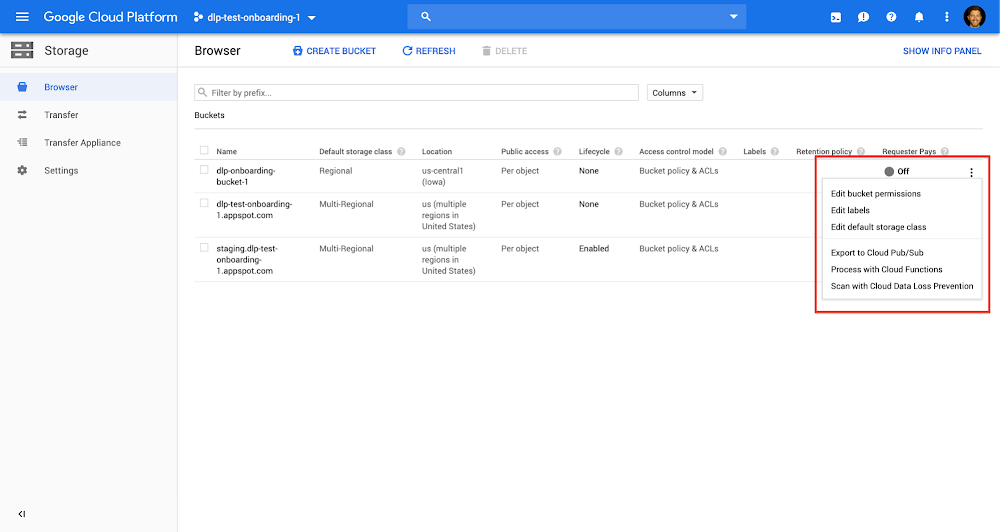
A critical mission for businesses worldwide is to prevent the exposure of sensitive data—especially in highly regulated industries such as finance and healthcare, where meeting compliance requirements is a top priority. We talked recently about scanning BigQuery, our data warehouse, using Cloud Data Loss Prevention (DLP) to protect sensitive data through data discovery, classification, and redaction. But using these capabilities is essential for other Google Cloud Platform (GCP) services you use to store data, such as Cloud Storage. We are delighted to announce that scanning with Cloud DLP is now available in beta directly from the Cloud Storage UI. This lets you scan Cloud Storage buckets, folders, and objects for sensitive data with a few clicks directly from the Cloud Storage interface.Using Cloud DLP for your Cloud Storage means you can identify where sensitive data is stored, then use tools to redact those sensitive identifiers. Cloud DLP uses more than 90 predefined detectors to identify patterns, formats, and checksums, and de-identification techniques like masking, secure hashing, and tokenization to redact sensitive data, all without replicating customer data.Cloud DLP scan on Cloud Storage supports text, binary and image files. Some common Cloud Storage use cases include content storage and serving; storage for general computing, analytics, and AI/ML; and storing data for backup, archival, and disaster recovery purposes, among others. Such data stored with Cloud Storage can include sensitive data such as credit card numbers, medical information, social security numbers, driver’s license numbers, addresses, full names and service account credentials—all of which need strong protection.Here are some key benefits you’ll see when using Cloud DLP with Cloud Storage:Detect common sensitive data types such as credit card numbers or custom sensitive data types to highlight intellectual property or company secrets.Deploy fully automated and scalable service that helps meet compliance requirements.Create triggers for automatic Cloud DLP scan scheduling.Publish Cloud DLP scan findings to BigQuery and Cloud Security Command Center for further analysis and reporting.De-identify and redact sensitive data.Getting started with Cloud DLP for Cloud Storage It’s straightforward to start scanning your Cloud Storage buckets with Cloud DLP, and you can set up this new scan job to be run regularly. Browse to Cloud Storage in the GCP console, then click on the three-dot menu icon to the right of a relevant bucket. Click on the “Scan with Data Loss Prevention” menu item:Complete the Cloud DLP scan creation by clicking the “Create” button or, optionally, specify custom configurations such as what info types to inspect for, what sampling options to use, what actions to take, and more, as shown here:Once Cloud DLP scans are completed, you’ll get emails with links to the “Scan details” page, where you can analyze findings and take further actions. From there, click on “View Findings in BigQuery” to analyze the results.Use simple SQL queries to aggregate DLP findings and export them:For more details, check out the Cloud DLP documentation and see how GCP customers are using Cloud DLP in their organizations today.
Quelle: Google Cloud Platform

5 frequently asked questions about Google Cloud Anthos

In April, we introduced Anthos, Google Cloud’s new hybrid and multi-cloud platform that lets you build and manage modern hybrid applications across environments. Powered by Kubernetes and other open-source technologies, Anthos is the only software-based hybrid platform available today that lets you run your applications unmodified on existing on-premises hardware investments or in the public cloud. And with a technology stack that simplifies everything from migration to security to platform operations, Anthos makes it easy to accelerate application development and delivery.Anthos’ arrival has generated a lot of inquiries from enterprises looking to move closer to the cloud. Here are five common questions about Anthos.1. How do I get started with Anthos?One of the biggest decisions companies make is whether to migrate or modernize their existing workloads. Because both processes are complicated, time-consuming, and labor-intensive, it may seem necessary to choose one or the other. If you are deploying onto Google Cloud Platform (GCP), you can get started with Anthos simply by creating a new GKE cluster with Istio enabled in your project. If deploying on-premises, download and install GKE On-Prem, and register it with your GCP account. Once registered, you can manage your GKE On-Prem clusters just like any existing GKE cluster, as well as incorporate your services as a part of an Istio service mesh to get observability and enforce security. In addition, with the upcoming beta of Migrate for Anthos, you can take VMs from on-prem environments, Compute Engine, or other clouds and automatically convert them into containers running in Google Kubernetes Engine (GKE). It migrates stateful workloads, and automatically transforms those workloads to run as containers in GKE pods. Once you’ve migrated and upgraded your applications into containers, you can modernize them further with added services such as service mesh, Stackdriver Logging and Monitoring, as well as other solutions for Kubernetes applications in GCP Marketplace.2. How does Anthos help secure my environment? Anthos seamlessly integrates security into each stage of the application lifecycle: from development, to build, and to run. Security best practices are implemented as default settings and configurations—disabling Kubernetes dashboards is one example1. We validate and test conformant Kubernetes versions, and provide patch management and incident response. Your application services are protected in a zero trust environment with authenticated and encrypted service-to-service communications using mTLS2. Anthos also delivers a single, centralized point for enforcing policy across the fleet, whether that’s on-prem or in the cloud. As a security admin, you can let developers develop, knowing your policies are enforced. You control access based on policies and roles, not machines, with centralized configuration management through Anthos Config Management, which continuously checks cluster state for divergence in policies like RBAC and resource quotas. Finally, with a shared responsibility model between you and Google Cloud, Anthos helps reduce the burden of managing patches and performing incident response. 3. How does Anthos work across multiple environments? Spanning multiple environments can add complexity in terms of resource management and consistency. Anthos provides a unified model for computing, networking, and even service management across clouds and data centers.Configuration as code is one approach to managing this complexity. Anthos provides configuration as code via Anthos Config Management, which deploys the Anthos Config Management Operator to your GKE or GKE On-Prem clusters, allowing you to monitor and apply any configuration changes detected in a Git repo.This real-time configuration management approach also provides central governance, reconciling desired state with the actual resources running across your on-prem and multi-cloud environment. Further, because it’s built on a consistent set of APIs based on open-source technologies (like Kubernetes, Istio, and Knative), developers and operators only have to learn one stack that applies to multiple cloud providers. Anthos enables increased observability, more metrics, and telemetry across your hybrid environment, including the ability to perform zero-downtime upgrades, deploy canary releases for services, and upgrade Kubernetes cluster versions.4. Can Anthos speed up application modernization?To remain competitive, enterprises need to move faster than ever to build new applications, generate business-differentiating value, and continue to innovate. But developers are busy and in short supply. With Anthos, you can take existing applications and deploy them anywhere—without changing a single line of code. From there, Anthos lets you define custom workflows for building, testing, and deploying across those multiple environments. Anthos also speeds up application modernization with Cloud Run on GKE (currently in beta), which automatically brings serverless benefits like scale up, scale down and eventing to your applications. Built on Knative, Cloud Run runs stateless HTTP containers on a fully managed environment or in your own GKE cluster.5. What other vendors support Anthos?We’ve developed a global partner network for Anthos to help you innovate faster, scale smarter, and stay secure. We’re expanding technology integrations with key partners, increasing the number of service partners, and doubling down on open source to make building on Google Cloud even more flexible and open. We’re working closely with more than 35 hardware, software, and system integration partners to ensure you see value from Anthos from the start. Cisco, VMware, Dell EMC, HPE, Intel, and Lenovo have committed to delivering Anthos on their own hyperconverged infrastructure, as well as with more than 20 enterprise software providers to integrate their offerings with Anthos’ unique capabilities. Have other questions that aren’t listed here? You can learn more by visiting the Anthos landing page, reading the documentation, or watching this Spotlight session from Google Cloud Next 19.1. Hardening your cluster’s security2. Encryption-in-transit
Quelle: Google Cloud Platform

Google Cloud networking in depth: three defense-in-depth principles for securing your environment

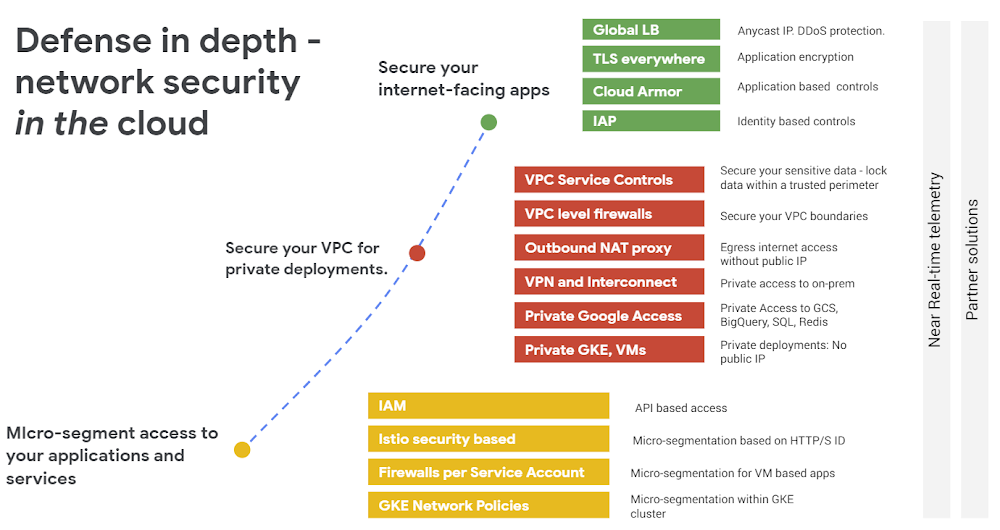
If you operate in the cloud, one of the biggest considerations is trust—trust in your provider, of course, but also confidence that you’ve configured your systems correctly. Google Cloud Platform (GCP) offers a robust set of network security controls that allow you to adopt a defense-in-depth security strategy to minimize risk and ensure safe and efficient operations while satisfying compliance requirements. In fact, Google Cloud was recently named a leader in the Forrester Wave™: Data Security Portfolio Vendors, Q2 2019 report. In addition to tools, there are three principles for defense-in-depth network security that you should follow to reduce risk and protect your resources and environment: Secure your internet-facing servicesSecure your VPC for private deploymentsMicro-segment access to your applications and servicesOverview of network security controls GCPMost GCP deployments consist of a mix of your own managed applications deployed in VMs or in containers, as well as some managed Google or third-party services consumed as software-as-a-service, for example Google Cloud Storage, or BigQuery for data analytics. GCP enables a defense-in-depth security strategy with a comprehensive portfolio of security controls, across all of these deployment models. It’s important to remember that the attack surface for your cloud deployment exponentially increases when it is exposed to and reachable from the internet. Therefore, the most basic network security principle is to close off access to your cloud resources from the internet, unless absolutely necessary. On GCP, you can use Cloud IAM and Organization policies to restrict access to GCP resources and services to authorized users and projects. However, in the event that a workload must be exposed to the internet, you should employ a defense-in-depth strategy to protect your environment. Let’s take a closer look at three network security controls to minimize risk and secure your resources.1. Secure your Internet-facing services If a service must be exposed to the internet, you can still limit access where possible and defend against DDoS and targeted attacks against your applications.Defend against DDoS attacks The prevalence, magnitude, and duration of DDoS attacks is increasing as malicious tools and tactics proliferate and get commoditized by a wider range of bad actors. You can mitigate the threat of DDoS by placing your services behind a Google Cloud HTTP(S) Load Balancer and deploying Google Cloud Armor. Together, they protect publicly exposed services against Layer 3 and Layer 4 volumetric DDoS attacks.Google Cloud Armor protects your applications at the edge of Google’s networkControl access to your applications and VMs Cloud Identity-Aware Proxy (IAP) is a first step towards implementing BeyondCorp, the security strategy we developed to control access to applications and VMs in a zero-trust environment. With Cloud IAP, you can permit access for authorized users to applications over the internet based on their identity and other contexts without requiring them to connect to a VPN.Enforce web application firewall (WAF) policies at the edge By deploying Google Cloud Armor security policies, you can block malicious or otherwise unwanted traffic at the edge of Google’s network, far upstream from your infrastructure. Use preconfigured WAF rules to protect against the most common application vulnerabilities like Cross-site Scripting (XSS) and SQL injection (SQLi). Configure custom rules to provide custom filtering of internet traffic across Layer 3 through Layer 7 attributes like IP (IPv4 & IPv6), geography (alpha), request headers (alpha), and cookies (alpha). Apply granular security policies Although Google Cloud Armor evaluates and enforces security policies at the edge of the network, you can configure those policies at varying levels of granularity based on the complexity of your deployment. You can configure uniform L7 filtering for all applications in a project, or deploy customized access controls on a per-application (backend service) basis. Policy and rule updates are possible through a REST API or CLI as well as the UI, and are propagated globally in near real time to respond to threats as they happen.Cloud Armor security policies can be applied at various levels of granularityTurn on real-time monitoring, logging, and alerting With Stackdriver Monitoring you can leverage pre-configured or custom dashboards to monitor network security policies in real time including allowed and denied traffic as well as the impact of rules in preview mode (passive logging). Logs of all decisions made and relevant data about the requests can be sent to Stackdriver Logging to be stored in Cloud Storage or BigQuery, or forwarded on to a downstream SIEM or log management solution to plug into existing security operations processes and help satisfy compliance needs.  2. Secure your VPC for private deployments As described in the previous section, you should keep your deployments as private as possible, to reduce their exposure to internet threat vectors. Google Cloud offers a set of solutions that let you deploy your workloads privately, while fulfilling critical user workflows: Deploy your VMs with only private IPs. You can reduce or eliminate your exposure to the internet by disabling the use of external IPs in VMs in specific projects, or even in your entire organization with an Org policy. Deploy GKE private clusters. If you use Google Kubernetes Engine (GKE), consider creating private clusters. Google Cloud still fully manages private clusters through a private connection to our managed cluster master.Serve your applications privately whenever possible. Use our Internal Load Balancer service to scale and serve your applications privately, for clients accessing applications and services within your Google Cloud VPC, or from an on-prem private connection like Cloud VPN or Cloud Interconnect. Access Google managed services privately. Google Cloud offers a variety of private access options for Google services, so that both clients hosted in GCP or in your on-prem data centers can access and privately consume services like Cloud Storage, BigQuery or Cloud SQL. Provide secure outbound internet connections with Cloud NAT. Your private VMs or your private GKE clusters may need to initiate egress connections to the internet, for example, to contact an external software repository for software upgrades. Cloud NAT allows you to configure such access in a controlled manner, reducing the access paths and the number of public IPs to only those configured in Cloud NAT. Mitigate exfiltration risks by preventing your data from moving outside the boundaries of a trusted perimeter. VPC Service Controls allows you to build a trusted private perimeter and ensure that data access is not allowed outside the boundaries of that perimeter. Similarly, the data can’t move outside of the perimeter boundaries, mitigating exfiltration risks.The figure below illustrates a service perimeter applied to a production project, which prevents the data in Cloud Storage buckets or BigQuery datasets from being accessed or exfiltrated outside of the project’s boundaries.3. Micro-segment access to your applications and services Even within a private boundary, you often need to granularly regulate communication between applications. Google Cloud provides a comprehensive set of tools to micro-segment those applications. Micro-segmentation for your VM-based applications. Within a given VPC, you can control the communication of your VM-based applications by setting up firewall rules. You can group your applications with tags or service accounts and then construct your firewall rules referencing tags or service accounts. While tags are metadata and very flexible, service accounts provide additional access controls, requiring a user to have permission to apply the service account to a VM. Micro-segmentation for your GKE based applications. Within a given GKE cluster, you can control communication between your container-based applications by setting up network policies. You can group your applications based on namespaces or labels.Defense-in-depth, the networking wayTo summarize, you can reduce your attack surface by making your deployments as private as possible. If you must expose your applications to the internet, enforce strict access controls and traffic filtering at the edge of the network while monitoring for anomalous behavior. Finally, enforce granular micro-segmentation even within the VPC perimeter using GCP’s distributed VPC firewalls and GKE network policies. By following these defense-in-depth strategies, you can reduce risk, meet compliance requirements, and help ensure the availability of your mission-critical applications and services. To get started, watch this NEXT ‘19 talk on Cloud Armor. You can learn more about GCP’s cloud network security portfolio online. Let us know how you plan to use these network security features, and what capabilities you’d like to have in the future by reaching out to us at gcp-networking@google.com.
Quelle: Google Cloud Platform

Turn it up to eleven: Java 11 runtime comes to App Engine

Yesterday, we announced new second-generation runtimes for Go 1.12 and PHP 7.3. In addition, App Engine standard instances now run with double the memory. Today, we’re happy to announce the availability of the new Java 11 second-generation runtime for App Engine standard in beta. Now, you can take advantage of the latest Long-Term-Support version of the Java programming language to develop and deploy your applications on our fully-managed serverless application platform.Based on technology from the gVisor container sandbox, second-generation runtimes let you write portable web apps and microservices that take advantage of App Engine’s unique auto-scaling, built-in security and pay-per-use billing model—without some of App Engine’s earlier runtime restrictions. Second generation-runtimes also let you build applications more idiomatically. You’re free to use whichever framework or library you need for your project—there are no limitations in terms of what classes you can use, for instance. You can even use native dependencies if needed. Beyond Java, you can also use alternative JVM (Java Virtual Machine) languages like Apache Groovy, Kotlin or Scala if you wish.In addition to more developer freedom, you also get all the benefits of a serverless approach. App Engine can transparently scale your app up to n and back down to 0, so your application can handle the load when it’s featured on primetime TV or goes viral on social networks. Likewise, it scales to zero if no traffic comes. Your bill will also be proportional to your usage, so if nobody uses your app, you won’t pay a dime (there is also a free tier available).App Engine second-generation runtimes also mean you don’t need to worry about security tasks like applying OS security patches and updates. Your code runs securely in a gVisor-based sandbox, and we update the underlying layers for you. No need to provision or manage servers yourself—just focus on your code and your ideas!What’s new?When you migrate to Java 11, you gain access to all the goodies of the most recent Java versions: you can now use advanced type inference with the new var keyword, create lists or maps easily and concisely with the new immutable collections, and simplify calling remote hosts thanks to the graduated HttpClient support. Last but not least, you can also use the JPMS module system introduced in Java 9.You’ll also find some changes in the Java 11 runtime. For example, the Java 11 runtime does not provide a Servlet-based runtime anymore. Instead, you need to bundle a server with your application in the form of an executable JAR. This means that you are free to choose whichever library or framework you want, be it based on the Servlet API or other networking stacks like the Netty library. In other words, feel free to use Spring Boot, Vert.x, SparkJava, Ktor, Helidon or Micronaut if you wish!Last but not least, second-generation runtimes don’t come with the built-in APIs like Datastore or memcache from the App Engine SDK. Instead, you can use the standalone services with their Google Cloud client libraries, or use other similar services of your choice. Be sure to look into our migration guide for more help on these moves.Getting startedTo deploy to App Engine Java 11, all you need is an app.yaml file where you specify runtime: java11, signifying that your application should use Java 11. That’s enough to tell App Engine to use the Java 11 runtime, regardless of whether you’re using an executable JAR, or a WAR file with a provided servlet-container. However, the new runtime also gives you more control on how your application starts: by specifying an extra entrypoint parameter in app.yaml, you can then customize the java command flags, like the -X memory settings.With Java 11, the java command now includes the ability to run single independent *.java files without compiling them with javac! For this short getting started section, we are going to use it to run the simplest hello world example with the JDK’s built-in HTTP server:Notice how our Main class uses the var keyword introduced in Java 10, and how we re-used the keyword again in the try-with-resources block, as Java 11 makes possible.Now it’s time to prepare our app.yaml file. First, specify the java11 runtime. In addition, entrypoint define the actual java command with which to we’ll be running to launch the server. The java command points at our single Java source file:Finally, don’t forget to deploy your application with the gcloud app deploy app.yaml command. Of course, you can also take advantage of dedicated Maven and Gradle plugins for your deployments.Try Java 11 on App Engine standard todayYou can write your App Engine applications with Java 11 today, thanks to the newly released runtime in beta. Please read the documentation to get started and learn more about it, have a look at the many samples that are available, and check out the migration guide on moving from Java 8 to 11. And don’t forget you can take advantage of the App Engine free tier while you experiment with our platform.
Quelle: Google Cloud Platform