Cloud Memorystore adds import-export and Redis 4.0

Cloud Memorystore for Redis provides a fully managed Redis service on Google Cloud Platform (GCP) that lets you build low-latency, highly scalable applications. This in-memory data store brings super-fast access to data, and is used for caching, session stores, rate limiting, job queues, fast ingest, messaging and more. Since the beta launch, one of the most requested features has been the ability to migrate data into Cloud Memorystore and back up instance data, in order to leverage fully managed Cloud Memorystore services. We are pleased to announce the availability of import-export in beta for Cloud Memorystore, which lets you import data into Cloud Memorystore instances using RDB (Redis Database Backup) snapshots, as well as back up data from existing Redis instances. The use of the RDB format allows seamless migration of your data in and out of Google Cloud.Along with import-export, we are also pleased to announce the general availability of support for Redis version 4.0.  How to use import-exportThe new import-export feature allows you to import and export data using the native Redis RDB format. Once you import the RDB file, it will be stored in a Google Cloud Storage bucket of your choosing, so you have control over where your files are located. To import data into Cloud Memorystore, start by backing up your existing instance data using BGSAVE, the native Redis command that will take an RDB snapshot. Once you have the RDB file, upload it into a regional Cloud Storage bucket. Once the file is available in a regional bucket, it is very easy to import the file into a Cloud Memorystore instance. To do this, in the GCP Console, navigate to the instance details page and select “Import,” then select the RDB file you want to bring in. Click on the “Import” button.Exporting data from an instance is similar; simply choose the Cloud Storage bucket where you want to store the RDB file being exported.  To learn more, check out the documentation. And take a look at this session from Next ‘19 to see a Cloud Memorystore for Redis demo:What’s next for Cloud MemorystoreWe are continuing to work on top requests from our customers. Stay tuned for new features, like updated Redis versions. Let us know what other features and capabilities you’d like to see with our Issue Tracker and by joining the Cloud Memorystore discussion group.
Quelle: Google Cloud Platform

How to serve deep learning models using TensorFlow 2.0 with Cloud Functions

Editor’s note: Today’s post comes from Rustem Feyzkhanov, a machine learning engineer at Instrumental. Rustem describes how Cloud Functions can be used as inference for deep learning models trained on TensorFlow 2.0, the advantages and disadvantages of using this approach, and how it is different from other ways of deploying the model.TensorFlow is an established framework for training and inference of deep learning models. Recent updates to version 2.0 offer a number of enhancements, including significant changes to eager execution. But one of the challenges with this new framework is deploying TensorFlow 2.0 deep learning models. Google Cloud Functions offer a convenient, scalable and economic way of running inference within Google Cloud infrastructure and allows you to run the most recent version of this framework.This post will explain how to run inference on Cloud Functions using TensorFlow 2.0.We’ll explain how to deploy a deep learning inference including:How to install and deploy Cloud FunctionsHow to store a modelHow to use the Cloud Functions API endpointThe components of our systemGoogle Cloud Platform (GCP) provides multiple ways for deploying inference in the cloud. Let’s  compare the following methods for deploying the model:Compute Engine cluster with TF servingCloud AI Platform PredictionsCloud FunctionsTensorFlow ServingTypically you might use a cluster as inference for the model. In this case, TF servingwould be a great way to organize inference on one or more VMs —then, all you need to do is add a load balancer on top of the cluster.  You can use the following products to deploy TF serving in AI Platform:Deep Learning VM imagesDeep Learning Containers This approach has the following advantages:Great response time as the model will be loaded in the memoryEconomy of scale, meaning cost per run will decrease significantly when you have a lot of requestsAI Platform PredictionsAI Platform provides an easy way to serve pre-trained models through AI Platform Predictions.  This has many advantages for inference when compared to the cluster approach:Codeless inference makes getting started easyScalable infrastructureNo management of infrastructure requiredSeparate storage for the model, which is very convenient for tracking versions of the model and for comparing their performanceNote: You can use Cloud Functions in combination with AI Platform Predictions (you can learn more in this post).Cloud FunctionsWhen comparing Deep Learning VMs and AI Platform Predictions, the full serverless approach provides the following advantages:Simple code for implementing the inference, which at the same time allows you to implement custom logic.Great scalability, which allows you to scale from 0 to 10k almost immediatelyCost structure which allows you only to pay for runs, meaning you don’t pay for idle servers.Ability to use custom versions of different frameworks (Tensorflow 2.0 or PyTorch)In summary, please take a look at this table:Since Google Cloud also provides some free invocations of Cloud Functions per month, this kind of setup would be perfect for a pet project or for a start-up that wants to get early customer feedback on a prototype. Also, it would be useful in cases where you have to process peak loads. The downside would be that in cases where the model is too big, the cold start could take some time and it would be very hard to achieve real-time performance. Also we need to keep in mind that serverless infrastructure doesn’t provide economy of scale, meaning the price of an individual run won’t go down when you have a large number of requests, so in these types of cases, it may be cheaper to use a cluster with TF serving as inference.As we can see, Compute Engine pricing per hour looks extremely attractive (with utilizing preemptible instances or commitment use, the price will be even lower), but the catch here is that cost of instance is per one second, with a minimum of one minute. Cloud Functions, on the other hand, have billing per 100ms without a minimum time period. This means Cloud Functions are great for short, inconsistent jobs, but if you need to handle a long, consistent stream of jobs, Compute Engine might be a better choice.Architecture OverviewOur system will be pretty simple. We will train the model locally and then upload it to Google Cloud. Cloud Functions will be invoked through an API request and will a download model and a test image from Cloud Storage.There are several things to consider when you design a system to use serverless infrastructure as an inference.First of all, keep in mind differences between cold invocation, when the function needs time to download and initialize the model, and warm invocation, when function uses a cached model. Increasing the ratio of warm invocations to cold invocations not only allows you to increase processing speed, it also decreases the cost of your inference. There are multiple ways you can increase the ratio. One way could be warming up functions so they will be warm when a high load comes in. Another way is to use Pub/Sub to normalize a load so that it will be processed by warm containers.Secondly, you can use batching to optimize the cost and speed of processing. Because a model can run on the whole batch instead of running separately on each image, batching allows you to decrease the difference between cold and warm invocation and improve overall speed.Finally, you can have some part of your model saved as part of your libraries. This allows you to save time downloading the model during cold invocation. You could also try to divide the model into layers and chain them together on separate functions. In this case, each function will send an intermediate activation layer down the chain and neither of the functions would need to download the model.CostIn the demo which we will deploy we use 2GB Cloud Function. Cold invocation takes 3.5s and warn invocation takes 0.5s. In terms of pricing we get 0.0001019$ per cold invocation and 0.0000149$ per warm invocation. It means that for 1$ we get ~10k cold invocations and ~65k warm invocations. With free tier provided by Google Cloud you would get for free ~20k cold invocations and ~140k warm invocations per month. Feel free to check the pricing for your use cases using pricing calculator.TensorFlow 2.0 exampleFirst, let’s install Tensorflow 2.0 beta on your computer. You can install it either on your system python or by creating a virtual environment:Let’s use fashion MNIST with TensorFlow 2.0b as an example. Here is how the code for training and exporting model weights would look like:Based on the example:The code will produce the following files:We will need to store the model separately from the code as there is a limit on local file size on the Cloud Functions. You can upload them to the Cloud Storage bucket along with the test image.Cloud FunctionsOne of the main upsides of Cloud Functions is that you don’t have to manually generate the package. You can just use a requirements.txt file and list all used libraries there. Also, remember to have the model as a global variable in your python code so it will be cached and reused in warm invocations of Cloud Functions.Therefore we will have two files:requirements.txtand main.pyDeployment through the command lineYou can easily deploy and run Cloud Functions using gcloud.The response would be:Deployment through the web consoleFirst, let’s start from the Cloud Functions dashboard. To create a new Cloud Function,  choose the “Create function” button. In the “Create function” window, set the function’s name (“tensorflow2demo”), allocated memory (2 GB in our case for the best performance), trigger (HTTP trigger in our case) and runtime (python 3.7).Next, set the main.py and requirements.txt files. You can just copy the code and libraries from the files at the repo. Finally, w push the “Create” button and initialize the creation of the function.Once the function is deployed, you can test it in the “Testing” section of theCloud Functions dashboard. You can also customize incoming events and see output as well as logs.As you can see, our pretrained model successfully classified image as trousers. If we run the functions one more time, we will see that it will run a lot faster because we saved the model to the cache and won’t need to reload it during warm invocation.ConclusionWith this post, you should now be able to create a TensorFlow 2.0 endpoint on GCloud Functions. Setting the project up is easy, and can save a lot of time when compared to the traditional approach of using a cluster of VMs. As you can see, Cloud Functions provide an easy way to start with contemporary frameworks and deploy pre-trained models in a matter of minutes. As a hobby, I port a lot of libraries to make the serverless friendly. Feel free to check my repos with other examples like headless chrome or pandas with numpy on Cloud Functions. They all have an MIT license, so feel free to modify and use them for your project.Learn more about Cloud Functions here, and consider starting a free trial.Acknowledgements: Gonzalo Gasca Meza, Developer Programs Engineer contributed to this post.
Quelle: Google Cloud Platform

Geolocation with BigQuery: De-identify 76 million IP addresses in 20 seconds

BigQuery is Google Cloud’s serverless data warehouse designed for scalability and fast performance. Using it lets you explore large datasets to find new and meaningful insights. To comply with current policies and regulations, you might need to de-identify the IP addresses of your users when analyzing datasets that contain personal data. For example, under GDPR, an IP address might be considered PII or personal data. We published our first approach to de-identifying IP addresses four years ago—GeoIP geolocation with Google BigQuery—and it’s time for an update that includes the best and latest BigQuery features, like using the latest SQL standards, dealing with nested data, and handling joins much faster. Replacing collected IP addresses with a coarse location is one method to help reduce risk—and BigQuery is ready to help. Let’s see how.How to de-identify IP address dataFor this example of how you can easily de-identify IP addresses, let’s use:76 million IP addresses collected by Wikipedia from anonymous editors between 2001 and 2010MaxMind’s Geolite2 free geolocation databaseBigQuery’s improved byte and networking functions NET.SAFE_IP_FROM_STRING(), NET.IP_NET_MASK()BigQuery’s new superpowers that deal with nested data, generate arrays, and run incredibly fast joinsThe new BigQuery Geo Viz tool that uses Google Maps APIs to chart geopoints around the world.Let’s go straight into the query. Use the code below to replace IP addresses with the generic location.Top countries editing WikipediaHere’s the list of countries where users are making edits to Wikipedia, followed by the query to use:Query complete (20.9 seconds elapsed, 1.14 GB processed)Top cities editing WikipediaThese are the top cities where users are making edits to Wikipedia, collected from 2001 to 2010, followed by the query to use:Exploring some new BigQuery featuresThese new queries are compliant with the latest SQL standards, enabling a few new tricks that we’ll review here.New MaxMind tables: Goodbye math, hello IP masksThe downloadable GeoLite2 tables are not based in ranges anymore. Now they use proper IP networks, like in “156.33.241.0/22″.Using BigQuery, we parsed these into binary IP addresses with integer masks. We also did some pre-processing of the GeoLite2 tables, combining the networks and locations into a single table, and adding the parsed network columns, as shown here:Geolocating one IP address out of millionsTo find one IP address within this table, like “103.230.141.7,” something like this might work:But that doesn’t work. We need to apply the correct mask:And that gets an answer: this IP address seems to live in Antarctica.Scaling upThat looked easy enough, but we need a few more steps to figure out the right mask and joins between the GeoLite2 table (more than 3 million rows) and a massive source of IP addresses.And that’s what the next line in the main query does:This is basically applying a CROSS JOIN with all the possible masks (numbers between 9 and 32) and using these to mask the source IP addresses. And then comes the really neat part: BigQuery manages to handle the correct JOIN in a massively fast way:BigQuery here picks up only one of the masked IPs—the one where the masked IP and the network with that given mask matches. If we dig deeper, we’ll find in the execution details tab that BigQuery did an “INNER HASH JOIN EACH WITH EACH ON”, which requires a lot of shuffling resources, while still not requiring a full CROSS JOIN between two massive tables.Go further with anonymizing dataThis is how BigQuery can help you to replace IP addresses with coarse locations and also provide aggregations of individual rows. This is just one technique that can help you reduce the risk of handling your data. GCP provides several other tools, including Cloud Data Loss Prevention (DLP), that can help you scan and de-identify data. You now have several options to explore and use datasets that let you comply with regulations. What interesting ways are you using de-identified data? Let us know. Find the latest MaxMind GeoLite2 table in BigQuery, thanks to our Google Cloud Public Datasets.
Quelle: Google Cloud Platform

Announcing HTTP targets for Cloud Tasks, with oAuth/OpenID connect authentication

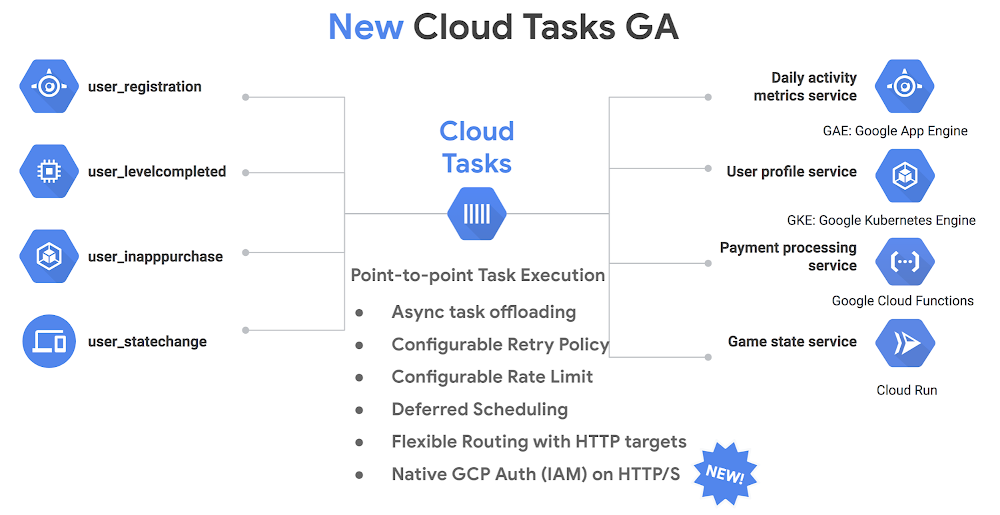
Microservices enable you to break up large monolithic applications into smaller chunks that are easy to build, maintain and upgrade. With a microservices architecture, individual services can now offload work to the background and be consumed later by another service. This gives users quicker response times as well as smoother interactions across a mesh of services. At Google Cloud Next 2019, we announced Cloud Tasks, a fully managed, asynchronous task execution service that lets you offload long-running asynchronous operations, facilitating point-to-point collaboration and interaction across these microservices. It is already generally available for App Engine targets (tasks that originate from App Engine) and today, we are announcing new HTTP targets in beta that securely reach Google Kubernetes Engine (GKE), Compute Engine, Cloud Run or on-prem systems using industry-standard OAuth/OpenID Connect authentication.With Cloud Tasks, you can offload long-running and background activities, decouple services from one another, and make your applications much more resilient to failures. At the same time, Cloud Tasks provides all the benefits of a distributed task queue: flexible routing, task offloading, loose coupling between services, rate limiting and enhanced system reliability:Flexible routing: You can dispatch tasks that can reach any target within Google Cloud Platform (GCP) and on on-prem systems using HTTP/S securely with OAuth/OpenID Connect authentication. (NEW)Task offloading: You can dispatch heavyweight and long running processes to a task queue, allowing your application to be more responsive to your users.Loose coupling: Services don’t talk to one another via direct request/response, but rather asynchronously, allowing them to scale independently.Rate limiting controls the rate at which tasks are dispatched to ensure the processing microservice doesn’t get overwhelmed.Higher reliability and resilience comes from the fact that your tasks are persisted in storage and retried automatically, making your infrastructure resilient to intermittent failures. Additionally, you can customize the maximum number of retry attempts, and the minimum wait time between attempts in order to meet the specific needs of your system.Finally, Cloud Tasks does all this in a fully managed serverless fashion, with no manual intervention needed from the developer or IT administrator. You also pay only for the operations you run; GCP takes care of all the provisioning of resources, replication and scaling required to operate Cloud Tasks. As a developer, simply add tasks to the queue and Cloud Tasks handles the rest. A1 Comms is one of the UK’s leading business-to-business communications providers and uses Cloud Tasks to simplify its application architecture:“Cloud Tasks allows us to focus on the core requirements of the application we’re developing, instead of other utility requirements. We’ve been using Cloud Tasks extensively, from handling high volumes of notifications between applications that reside on different platforms, to data ingestion/migration tasks and the delegation, trigger, or control of workloads. After using Cloud Tasks, our development velocity has been given a significant boost and our overall architecture simplified.”  – Jonathan Liversidge, IT Director, A1 CommsHow Cloud Tasks worksCloud Tasks operates in a push queue fashion, dispatching tasks to worker services via HTTP requests according to a routing configuration. The worker then attempts to process them. If a task fails, an HTTP error is sent back to Cloud Tasks which then pauses and retries to execute the task until a maximum number of attempts is reached. Once the task executes successfully, the worker sends a 2xx success status code to Cloud Tasks.Cloud Tasks handles all of the process management for the task, ensuring tasks are processed in a reliable manner and deleting tasks as they finish executing. Additionally, you can track the status of the tasks in the system through an intuitive UI, CLI or client libraries. Glue together an end-to-end solutionYou can use Cloud Tasks to architect interesting solutions, for example wiring together a deferred task processing system across microservices using products such as Cloud Run, Cloud Functions, GKE, App Engine, BigQuery and Stackdriver. Here’s an example from Braden Bassingthwaite from Vendasta at Cloud Next 2019.Get started todayYou can get started with Cloud Tasks today by using the quickstart guide. Create and configure your own Cloud Tasks queues using the documentation here or start your free trial on GCP!
Quelle: Google Cloud Platform

Goodbye Hadoop. Building a streaming data processing pipeline on Google Cloud

Editor’s note: Today we hear from Qubit, whose personalization technology helps leading brands in retail, travel, and online gaming curate their customers’ online experiences. Qubit recently moved its data ingestion platform from Hadoop and MapReduce, to a stack consisting of fully managed Google Cloud tools like Cloud Pub/Sub, Cloud Dataflow and BigQuery. Here’s their story.At Qubit, we firmly believe that the most effective way to increase customer loyalty and lifetime value is through personalization. Our customers use our data activation technology to personalize customer experiences and to help them get closer to their customers by using real-time data that we collect from browsers and mobile devices. Collecting e-commerce clickstream data to the tune of hundreds of thousands of events per second results in absolutely massive datasets. Traditional systems can take days to deliver insight from data at this scale. Relatively modern tools like Hadoop can help reduce this time tremendously— from days to hours. But to really get the most out of this data, and generate for example real-time recommendations, we needed to be able to get live insights as the data comes in. That means scaling the underlying compute, storage, and processing infrastructure quickly and transparently. We’ll walk you through how building a data collection pipeline using serverless architecture on Google Cloud let us do just that.Our data collection and processing infrastructure is built entirely on Google Cloud Platform (GCP) managed services (Cloud Dataflow, PubSub, and BigQuery). It streams, processes, and stores more than 120,000 events per second (during peak traffic) in BigQuery, with a very low end-to-end latency (sub-second). We then make that data, often hundreds of terabytes per day, available and actionable through an app that plugs into our ingestion infrastructure—all of this without ever provisioning a single VM. The pastIn our early days, we built most of our data processing infrastructure ourselves, from the ground up. It was split across two data centers with 300 machines deployed in each. We collected and stored the data in storage buckets, dumped it into Hadoop clusters and then waited for massive MapReduce jobs on the data to finish. This meant spinning up hundreds of machines overnight, which was a problem because many of our customers expected near real-time access in order to power experiences to their in-session visitors. And then there’s the sheer scale of our operation: at the end of two years, we had stored 4PB of data.Auto-scaling was pretty uncommon back then. And provisioning and scaling machines and capacity is tricky, to say the least, eating up valuable man-hours and causing a lot of pain. Scaling up to handle an influx of traffic, for instance during a big game or Black Friday, was an ordeal. Requesting additional machines for our pool had to be done at least two months in advance and it took another two weeks for our infrastructure team to provision them. Once the peak traffic period was over, the scaled up machines sat idle, incurring costs. A team of four full-time engineers needed to be on-hand to keep the system operational.In a second phase, we switched to stream processing on Apache Storm to overcome the latency inherent in batch processing. We started running Hive jobs on our datasets so that they could be accessible to our analytics layer and integrated business intelligence tools like Tableau and Looker. With the new streaming pipeline, it now took hours instead of days for the data to become available for analytics. But while this was an incredible improvement, it still wasn’t good enough to drive real-time personalization solutions like recommendations and social proof. This launched our venture into GCP.The presentFast forward to today, and our pipeline is built entirely on Google Cloud managed services, namely Cloud Dataflow as the data processing engine, and BigQuery as the data warehouse. Events flow through our pipeline in three stages: validation, enrichment, and ingestion. Every incoming event is first validated against our schema, enriched with metadata like geo location, currency conversion, etc, and finally written to partitioned tables in BigQuery. The data then flows through Cloud Pub/Sub topics between dataflows within a Protobuf envelope. Finally, an additional dataflow reads failed events emitted by the three main dataflows from a dead letter Pub/Sub topic and stores them in BigQuery for reporting and monitoring. All this happens in less than a few seconds.Getting to this point took quite a bit of experimentation, though. As an early adopter of Google Cloud, we were one of the first businesses to test Cloud Bigtable, and actually built Stash, our in-house key/value datastore, on top of it. In parallel, we had also been building a similar version with HBase, but the ease of use and deployment, manageability, and flexibility we experienced with Bigtable convinced us of the power of using serverless architecture, setting us on our journey to build our new infrastructure on managed services.As with many other Google Cloud services, we were fortunate to get early access to Cloud Dataflow, and started scoping out the idea of building a new streaming pipeline with it. It took our developers only a week to build a functional end-to-end prototype for the new pipeline. This ease of prototyping and validation cemented our decision to use it for a new streaming pipeline, since it allowed us to rapidly iterate ideas. We briefly experimented with building a hybrid platform, using GCP for the main data ingestion pipeline and using another popular cloud provider for data warehousing. However, we quickly settled on using BigQuery as our exclusive data warehouse. It scales effortlessly and on-demand, lets you run powerful analytical queries in familiar SQL, and supports streaming writes, making it a perfect fit for our use case. At the time of writing this article, our continuously growing data storage in BigQuery is at a 5PB mark and we run queries processing over 10PB of data every month. Our data storage architecture requires that the events be routed to different BigQuery datasets based on client identifiers baked into the events. This, however, was not supported by the early versions of the Dataflow SDK, so we wrote some custom code for the BigQuery streaming write transforms to connect our data pipeline to BigQuery. Routing data to multiple BigQuery tables has since been added as a feature in the new Beam SDKs.Within a couple of months, we had written a production-ready data pipeline and ingestion infrastructure. Along the way, we marveled at the ease of development, management, and maintainability that this serverless architecture offered, and observed some remarkable engineering and business-level optimizations. For example, we reduced our engineering operational cost by approximately half. We no longer needed to pay for idle machines, nor manually provision new ones as traffic increases, as everything is configured to autoscale based on incoming traffic. We now pay for what we use. We have dealt with massive traffic spikes (10-25X) during major retail and sporting events like Black Friday, Cyber Monday, Boxing Day etc, for three years in a row without any hiccups.Google’s fully managed services allow us to save on the massive engineering efforts required to scale and maintain our infrastructure, which is a huge win for our infrastructure team. Reduced management efforts mean our SREs have more time to build useful automation and deployment tools.It also means that our product teams can get proof-of concepts out the door faster, enabling them to validate ideas quickly, reject the ones that don’t work, and rapidly iterate over the successful ones. This serverless architecture has helped us build a federated data model fed by a central Cloud Pub/Sub firehose that serves all our teams internally, thus eliminating data silos. BigQuery serves as a single source of truth for all our teams and the data infrastructure that we built on Google Cloud powers our app and drives all our client-facing products. Wrap upOur partnership with Google is fundamental to our success—underpinning our own technology stack, it ensures that every customer interaction on web, mobile, or in-app is smarter, sharper, and more personal. Serverless architecture has helped us build a powerful ingestion infrastructure that forms the basis of our personalization platform. In upcoming posts, we’ll look into some tools we developed to work with the managed services, for example an open source tool to launch dataflows and our in-house Pub/Sub event router. We’ll also look at how we monitor our platform. Finally, we’ll deep dive into some of the personalization solutions that we built that leverage serverless architecture, like our recommendation engine. In the interim, feel free to reach out to us with comments and questions.
Quelle: Google Cloud Platform

First Tech Federal Credit Union: Partnering for innovation with APIs

Editor’s Note: Today we hear from Paul Benjamin, Director of Product Management at First Tech Federal Credit Union. This financial institution has set out to partner with a broad range of fintechs to offer new apps to its membership base, and APIs are key to making this happen.First Tech Federal Credit Union is the sixth largest credit union in the United States. Our membership base is about half a million people strong and we have an asset base upwards of $12 billion. We work with many of the world’s leading technology companies, and our membership is made up of their employees. This means our customers are tech savvy, interested in the latest fintech innovations, and definitely inclined to try new products and services—in fact, they’ve come to expect them.Our participation in an API-driven economy hinges on providing our members with new online and mobile offerings that combine a variety of financial services provided not only by us, but by an ecosystem of partners. These services might include account alerts, credit card account management controls, account aggregation, and loan financing. Sharpening our competitive edge and staying relevant requires us to step out of our traditional banking shell and explore mutually beneficial partnerships with fintechs and other companies in adjacent markets.Over the past few years we’ve seen how companies, not just in the financial sector but across all industries, have adopted API-driven models and how that has helped them fuel further growth. First Tech has had an API gateway to serve our internal technology needs but, given our need to enable ecosystem partnerships, we needed a more mature and sophisticated API management platform that could enable us to expose and manage public APIs. We hope to introduce new products and services as well as new channels around existing products and services. Google Cloud’s Apigee API Platform fit the bill for several reasons. The top two? Security and scalability. As a financial institution, securing our members’ data is always our top priority and we needed a proven product that gave us the tools to enforce our desired control and security policies. In terms of scalability, given that First Tech is a not-for-profit, community-based financial institution, we were looking for a solution that would allow us to scale as cost effectively as possible as we build out our API platform over the next five years. The growing range of partners we’ll be working with will leverage the same APIs. As a result, having a formal platform will enable consistency, security, and proper support for the partners that build on our APIs—and that, in turn, will have a direct impact on our ability to grow our membership base.We’re still early in our usage of our new API management platform, but the agility, speed, and control we’ve seen so far is impressive. Other Apigee features that are already proving to be key include monitoring, analytics, and reporting, as they let us not only track and analyze the services we offer, but ensure that we are able to respond and scale to meet the needs of our partners’ business models. As we delve further into our implementation, we look forward to exploring additional functionality, such as API rate limits and monetization. Once we get past the initial implementation phase, we want to enable more enhanced monitoring to gain valuable insights. We foresee using analytics to help us monitor activity and API security, but also to monitor associated infrastructure costs for serving these APIs. We’re viewing the Apigee partnership not as a one-off initiative but something that is foundational for our long-term vision.To learn more about API management on Google Cloud, visit our Apigee page.
Quelle: Google Cloud Platform

To run or not to run a database on Kubernetes: What to consider

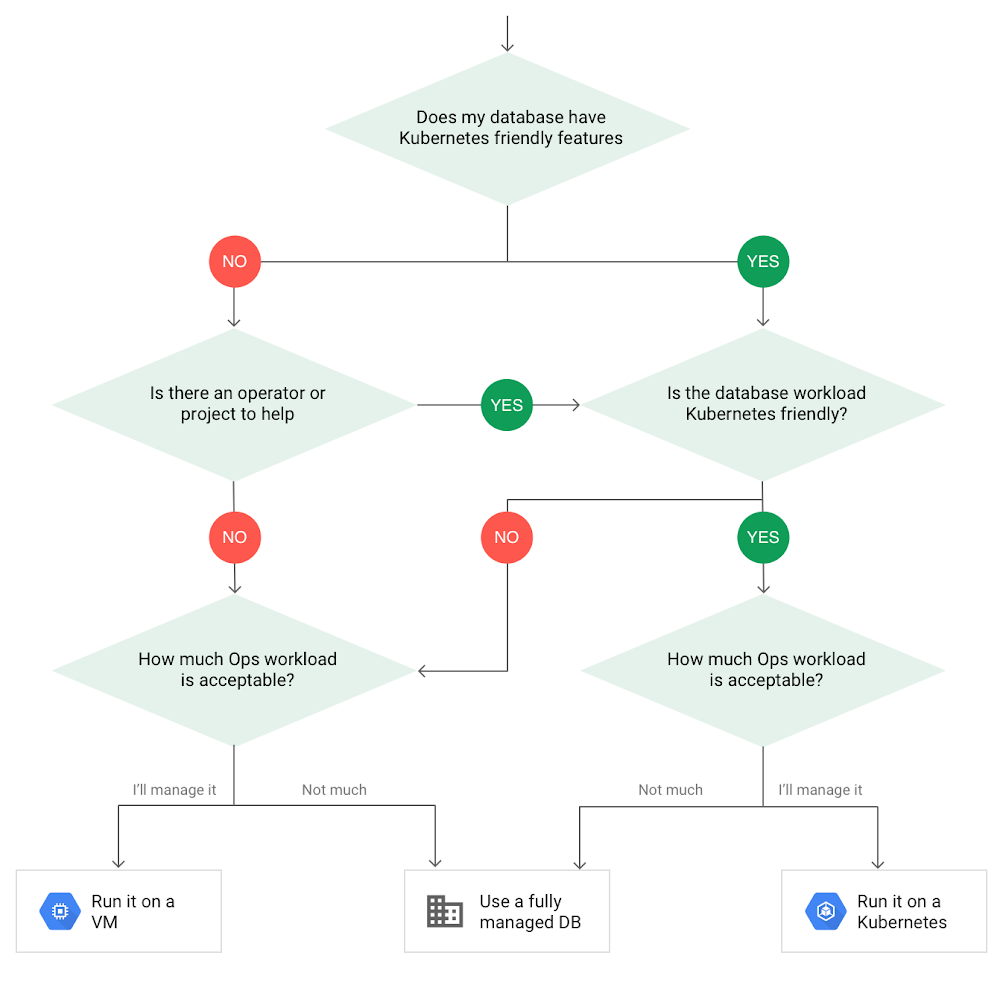
Today, more and more applications are being deployed in containers on Kubernetes—so much so that we’ve heard Kubernetes called the Linux of the cloud. Despite all that growth on the application layer, the data layer hasn’t gotten as much traction with containerization. That’s not surprising, since containerized workloads inherently have to be resilient to restarts, scale-out, virtualization, and other constraints. So handling things like state (the database), availability to other layers of the application, and redundancy for a database can have very specific requirements. That makes it challenging to run a database in a distributed environment. However, the data layer is getting more attention, since many developers want to treat data infrastructure the same as application stacks. Operators want to use the same tools for databases and applications, and get the same benefits as the application layer in the data layer: rapid spin-up and repeatability across environments. In this blog, we’ll explore when and what types of databases can be effectively run on Kubernetes.Before we dive into the considerations for running a database on Kubernetes, let’s briefly review our options for running databases on Google Cloud Platform (GCP) and what they’re best used for.Fully managed databases. This includes Cloud Spanner, Cloud Bigtable and Cloud SQL, among others. This is the low-ops choice, since Google Cloud handles many of the maintenance tasks, like backups, patching and scaling. As a developer or operator, you don’t need to mess with them. You just create a database, build your app, and let Google Cloud scale it for you. This also means you might not have access to the exact version of a database, extension, or the exact flavor of database that you want.Do-it-yourself on a VM. This might best be described as the full-ops option, where you take full responsibility for building your database, scaling it, managing reliability, setting up backups, and more. All of that can be a lot of work, but you have all the features and database flavors at your disposal.Run it on Kubernetes. Running a database on Kubernetes is closer to the full-ops option, but you do get some benefits in terms of the automation Kubernetes provides to keep the database application running. That said, it is important to remember that pods (the database application containers) are transient, so the likelihood of database application restarts or failovers is higher. Also, some of the more database-specific administrative tasks—backups, scaling, tuning, etc.—are different due to the added abstractions that come with containerization.Tips for running your database on KubernetesWhen choosing to go down the Kubernetes route, think about what database you will be running, and how well it will work given the trade-offs previously discussed. Since pods are mortal, the likelihood of failover events is higher than a traditionally hosted or fully managed database. It will be easier to run a database on Kubernetes if it includes concepts like sharding, failover elections and replication built into its DNA (for example, ElasticSearch, Cassandra, or MongoDB). Some open source projects provide custom resources and operators to help with managing the database.Next, consider the function that database is performing in the context of your application and business. Databases that are storing more transient and caching layers are better fits for Kubernetes. Data layers of that type typically have more resilience built into the applications, making for a better overall experience.  Finally, be sure you understand the replication modes available in the database. Asynchronous modes of replication leave room for data loss, because transactions might be committed to the primary database but not to the secondary database(s). So, be sure to understand whether you might incur data loss, and how much of that is acceptable in the context of your application.After evaluating all of those considerations, you’ll end up with a decision tree looking something like this:How to deploy a database on KubernetesNow, let’s dive into more details on how to deploy a database on Kubernetes using StatefulSets. With a StatefulSet, your data can be stored on persistent volumes, decoupling the database application from the persistent storage, so when a pod (such as the database application) is recreated, all the data is still there. Additionally, when a pod is recreated in a StatefulSet, it keeps the same name, so you have a consistent endpoint to connect to. Persistent data and consistent naming are two of the largest benefits of StatefulSets. You can check out the Kubernetes documentation for more details.If you need to run a database that doesn’t perfectly fit the model of a Kubernetes-friendly database (such as MySQL or PostgreSQL), consider using Kubernetes Operators or projects that wrap those database with additional features. Operators will help you spin up those databases and perform database maintenance tasks like backups and replication. For MySQL in particular, take a look at the Oracle MySQL Operator and Crunchy Data for PostgreSQL. Operators use custom resources and controllers to expose application-specific operations through the Kubernetes API. For example, to perform a backup using Crunchy Data, simply execute pgo backup [cluster_name]. To add a Postgres replica, use pgo scale cluster [cluster_name].There are some other projects out there that you might explore, such as Patroni for PostgreSQL. These projects use Operators, but go one step further. They’ve built many tools around their respective databases to aid their operation inside of Kubernetes. They may include additional features like sharding, leader election, and failover functionality needed to successfully deploy MySQL or PostgreSQL in Kubernetes.While running a database in Kubernetes is gaining traction, it is still far from an exact science. There is a lot of work being done in this area, so keep an eye out as technologies and tools evolve toward making running databases in Kubernetes much more the norm. When you’re ready to get started, check out GCP Marketplace for easy-to-deploy SaaS, VM, and containerized database solutions and operators that can be deployed to GCP or Kubernetes clusters anywhere.
Quelle: Google Cloud Platform

How Dutch telco KPN is making new connections with APIs

Editor’s note: Today’s post is by Anuschka Diderich, Platform Lead at KPN, a 130-year-old Dutch landline and mobile telecommunications services company. Read on to learn how KPN is connecting people using API-powered products and services.“I’ll connect you.”Those were the first words uttered over the line in 1881, when the first public telephone network in the Netherlands started operating. Though our name has changed since then, as a leading telco in The Netherlands, KPN has been making connections for over 130 years. One of our newest tools we’re using to do this is APIs.I’m responsible for the development of new platform business models, which is part of KPN’s Open Innovation Hub. A lot of our new development and initiatives start here, like the KPN API Store; successful projects in the hub grow into bigger things. Via the API Store, our APIs are offered to our existing B2B customers and also to prospects, including SMEs and large corporate customers. We take a marketplace approach to commercializing our APIs, offering homegrown KPN solutions along with third-party products; this is why we call it a store rather than a marketplace. Our partners range from startups to big companies, and our ecosystem keeps growing. We use the Apigee API management platform to power the KPN API Store.An API store for the telco industryAs a telco, communications APIs are obviously our core competency, and we offer quite a few contextual communications products. For example, we offer APIs for B2B call centers that enable them to add chat or SMS notifications to existing solutions, or move conversations from email to SMS and messaging apps. These are the building blocks that our customers use to create their own products and services.A good example: a software development company in the healthcare space developed a video consultation app for doctors. The app enables some types of appointments to happen outside of the hospital, freeing up precious time and resources for doctors, hospitals, and patients. The video API was developed by an ecosystem partner, acquired through the KPN store, and managed with Apigee, helping ensure that the high level of security and data protection required in healthcare is built into the app. The launch was so successful that now the app is being rolled out to 12 hospitals in the Netherlands.Another of our ecosystem partners, Contexta, is just out of the startup phase but already offering specialized speech-to-text functionality focused on the Dutch language. Clients integrate this service with APIs that improve quality control, training, regulation, and analytics in call centers. It is used to automatically identify which calls, based on keywords, need to be stored for a certain number of years to comply with Dutch regulatory requirements. Security and usabilityKPN has a dedicated team working with the Apigee platform across development, platform management, and monitoring. We took a soft launch approach to introduce the minimum viable product of the API Store, and then extended the portal’s functionality and started to build up a portfolio. We’ve been very satisfied with the speed to market that the platform gives us. Security is also an important consideration for KPN—it’s part of our value proposition to customers. During our evaluation, we put Apigee through rigorous testing so we would know the platform could meet our high security standards. We concluded that it offers us the right level of security, which helps us keep our promise to our customers. The developer portal that we’ve built on top of the Apigee platform targets two of our API Store’s target markets. One is of course developers, who like the convenience and usability of the portal. It’s easy to find APIs, test them in a sandbox environment, register, and start consuming them. But the second part of our strategy is focused on business owners, product owners, innovation managers, and product managers who want to extend their products’ functionality and who need APIs to do that. Setting the stage for innovationWith so many new APIs published every day, we appreciate that people only have to register once for the API Store and can then access multiple APIs. With the API Store, the documentation flow is standardized, there’s a single point of contact for support, and users only receive one invoice for all the APIs consumed.APIs provide endless possibilities for new products and services. Our API Store has enabled us to broaden our target market and create new revenue streams. We’ve been able to expand services like SMS that we already had internally. And we’ve also been able to combine services from KPN with those from third parties to create new functionality. All these APIs are available in the store, and we see clients starting to bundle them to create new products that KPN can help them to integrate.To learn more about API management with Apigee, visit our website.
Quelle: Google Cloud Platform

Last month today: GCP in June ‘19

As we bid farewell to June, we also say hello to a new partner and new product integrations, all with the goal of making Google Cloud Platform (GCP) ever more useful for your particular needs. Data analytics, in particular, continued to make leaps and bounds this month with new features and integrations. Here’s a look at last month’s top stories. Data analytics, better togetherIn June, we announced our intent to acquire Looker, a unified platform for business intelligence, data application, and embedded analytics. Looker extends our business analytics offering with two important capabilities—first, the ability to define business metrics once in a consistent way across data sources. Second, Looker also provides users with a powerful analytics platform that delivers applications for business intelligence and use-case specific solutions such as sales analytics, as well as a flexible, embedded analytics product to collaborate on business decisions. We look forward to sharing more once the deal closes. We also announced a partnership with data warehouse provider Snowflake, which will help users store and analyze data from a wide variety of sources. You’ll be able to use Snowflake along with our analytics and ML products, so you can store data in GCP, then analyze that data using Snowflake, with strong performance and reliability.Using BigQuery for blockchain, and integrated with KaggleThis post about building hybrid cloud/blockchain applications with Ethereum and GCP explains the use of BigQuery data inside of blockchain for applications like prediction marketplaces and transaction privacy. This post shows you how you can use smart contract platform Ethereum together with BigQuery through Chainlink middleware. This brings bidirectional operation between blockchain data and cloud services, adding efficiency and letting developers create new hybrid applications.Also new in BigQuery this month: Kaggle is now integrated into BigQuery, so you can perform SQL queries, train ML models and then analyze that data using the Kaggle Kernels environment. With Kaggle Kernels and BigQuery, you can link your Google Cloud account, then compose queries directly in the notebook. You can also explore public datasets in BigQuery, and build and evaluate ML regression models without a lot of experience needed. Give it a try using the BigQuery sandbox.Why cloud-native, and why it mattersThe concept of cloud-native architecture has become popular as cloud computing has matured, and this post describes why cloud-native is fundamentally different from on-premises architecture. You’ll get a look at the principles of designing for the cloud, with some tips on improvements you can take advantage of, like more automation, managed services, and defense in depth.School’s out, but certification is inWe announced a new Google Cloud certification challenge in June. Get certified within 12 weeks, and you’ll get a $100 Google Store voucher. It’s not too late to sign up; if you join the challenge, you can get access to Coursera and Qwiklabs resources for free. You can use those to study for either the Google Cloud Certified Associate Cloud Engineer or the Professional Cloud Architect exam. There are also a few new Qwiklab quests to help you learn more about Kubernetes, specifically security and monitoring. The first of these self-paced labs covers migration and observability for containers, whether you’re running Kubernetes, Google Kubernetes Engine (GKE), or Anthos. The second focuses on securing Kubernetes apps, with labs on role-based access control, binary authorization, and more.That’s a wrap for June. We’ll see you next month.
Quelle: Google Cloud Platform

Tips and tricks to get your Cloud Dataflow pipelines into production

As data processing pipelines become foundational for enterprise applications, it’s mission-critical to make sure that your production data pipelines are up and running, and that any updates cause minimum disruption to your user base. When your data pipelines are stable, internal users and customers can trust them, which allows your business to operate with confidence. That extra confidence often leads to better user satisfaction and requests for more features and enhancements for the things your pipelines process. We’ll describe here some of the best practices to take into consideration as you deploy, maintain and update your production Cloud Dataflow pipelines, which of course make use of the Apache Beam SDK. We’ll start with some tips on building pipelines in Cloud Dataflow, then get into how to maintain and manage your pipelines.Building easy-to-maintain data pipelines  The usual rules around good software development apply to your pipelines. Using composable transforms that encapsulate business logic creates pipelines that are easier to maintain, troubleshoot and develop with. Your SREs won’t be happy with the development team if there is an issue at 2am and they are trying to unpick what’s going on in that 50-stage pipeline built entirely with anonymous DoFns. Luckily, Apache Beam provides the fundamental building blocks to build easy-to-understand pipelines. Using composable PTransforms to build pipelinesPTransforms are a great way to encapsulate your business logic and make your pipelines easier to maintain, monitor, and understand. (The PTransform style guide is a great resource.) Below are some extra hints and tips to follow:Reuse transforms.Regardless of the size of your organization, you will often carry out many of the same transforms to a given dataset across many pipelines. Identify these transforms and create a library of them, treating them the same way you would a new API. Ensure they have a clear owner (ideally the data engineering team closest to that dataset)Ensure you have a clear way to understand and document how changes to those transforms will affect all pipelines that use them. Ensure these core transforms have well-documented characteristics across various lifecycle events, such as update/cancel/drain. By understanding the characteristics in the individual transforms, it will be easier to understand how your pipelines will behave as a whole during these lifecycle events.Use display name. Always use the name field to assign a useful, at-a-glance name to the transform. This field value is reflected in the Cloud Dataflow monitoring UI and can be incredibly useful to anyone looking at the pipeline. It is often possible to identify performance issues without having to look at the code using only the monitoring UI and well-named transforms. The diagram below shows part of a pipeline with reasonable display names in the Cloud Dataflow UI—you can see it’s pretty easy to follow the pipeline flow, making troubleshooting easier.Use the dead letter pattern. Ensure you have a consistent policy to deal with errors and issues across all of your transforms. Make heavy use of the dead letter pattern whenever possible. This pattern involves branching errors away from the main pipeline path into either a dead letter queue for manual intervention or a programmatic correction path. Remember versioning. Ensure that all transforms have versions and that all pipelines also have versions. If possible, keep this code in your source code repositories for a period that matches the retention policies for the data that flowed through these pipelines.Treat schema as code. Data schemas are heavily intertwined with any pipeline. Though it’s not always possible, try to keep your definitions of schemas as code in your source repository, distinct from your pipeline code. Ideally, the schema will be owned and maintained by the data owners, with your build systems triggering global searches when things break.  Use idempotency. When possible, ensure that most, if not all, mutations external to the pipeline are idempotent. For example, an update of a data row in a database within a DoFn is idempotent. Cloud Dataflow provides for exactly-once processing within the pipeline, with transparent retries within workers. But if you are creating non-idempotent side effects outside of the pipeline, these calls can occur more than once. It’s important to clearly document transforms and pipeline that have this type of effect. It’s also important to understand how this may vary across different lifecycle choices like update, cancel and drain. Testing your Cloud Dataflow pipelinesThere’s plenty of detail on the Apache Beam site to help with the general testing of your transforms and pipelines. Lifecycle testingYour end-to-end data pipeline testing should include lifecycle testing, particularly analyzing and testing all the different update/drain/cancel options. That’s true even if you intend to only use update in your streaming pipelines. This lifecycle testing will help you understand the interactions the pipeline will have with all data sinks and and side effects you can’t avoid. For example, you can see how it affects your data sink when partial windows are computed and added during a drain operation.You should also ensure you understand the interactions between the Cloud Dataflow lifecycle events and the lifecycle events of sources and sinks, like Cloud Pub/Sub. For example, you might see what interaction, if any, features like replayable or seekable would have with streaming unbounded sources. This also helps to understand the interaction with your sinks and sources if they have to go through a failover or recovery situation. Of special importance here is the interaction of such events with watermarks. Sending data with historic timestamps into a streaming pipeline will often result in those elements being treated as late data. This may be semantically correct in the context of the pipeline, but not what you intend in a recovery situation. Testing by cloning streaming production environments One of the nice things about streaming data sources like Cloud Pub/Sub is that you can easily attach extra subscriptions to a topic. This comes at an extra cost, but for any major updates, you should consider cloning the production environment and running through the various lifecycle events. To clone the Cloud Pub/Sub stream, you can simply create a new subscription against the production topic. You may also consider doing this activity on a regular cadence, such as after you have had a certain number of minor updates to your pipelines. The other option this brings is the ability to carry out A/B testing. This can be dependent on the pipeline and the update, but if the data you’re streaming can be split (for example, on entry to the topic) and the sinks can tolerate different versions of the transforms, then this gives you a great way to ensure everything goes smoothly in production. Setting up monitoring and alertsApache Beam allows a user to define custom metrics, and with the Cloud Dataflow runner, these custom metrics can be integrated with Google Stackdriver. We recommend that in addition to the standard metrics, you build custom metrics into your pipeline that reflect your organization’s service-level objectives (SLOs). You can then apply alerts to these metrics at various thresholds to take remediation action before your SLOs are violated. For example, in a pipeline that processes application clickstreams, seeing lots of errors of a specific type could indicate a failed application deployment. Set these to show up as metrics and set up alerts in Stackdriver for them. Following these good practices will help when you do have to debug a problematic pipeline. Check out the hints and tips outlined in the troubleshooting your pipeline Cloud Dataflow documentation for help with that process.  Pipeline deployment life cyclesHere’s what to consider when you’re establishing pipelines in Cloud Dataflow.Initial deploymentWhen deploying a pipeline, you can give it a unique name. This name will be used by the monitoring tools when you go to the Cloud Dataflow page (or anywhere else names are visible, like in the gsutil commands). It is also has to be unique within the project. This is a great safety feature, as it prevents two copies of the same pipeline from accidentally being started. You can ensure this by always having the –name parameter set on all pipelines. Get into the habit of doing this with your test and dev pipelines as well. Tips for improving for streaming pipeline lifecycleThere are some things you can do to build better data pipelines. Here are some tips.Create backups of your pipelinesSome sources, like Cloud Pub/Sub and Apache Kafka, let you replay a stream from a specific point in processing time. Specific mechanisms vary: For example, Apache Kafka supports reads from a logical offset, while Cloud Pub/Sub uses explicitly taken snapshots or wall-clock times. Your application must take the specifics of the replay mechanism into account to ensure you replay all the data you need and do not introduce unexpected duplication. This feature (when available) lets you create a backup of the stream data for reuse if required. One example would be a rollout of a new pipeline that has a subtle bug not caught in unit testing, end-to-end testing, or at the A/B testing phase. The ability to replay the stream in those ideally rare situations allows the downstream data to be corrected without doing a painful one-off data correction exercise. You can also use the Cloud Pub/Sub snapshot and seek features for this purpose. Create multiple replica pipelinesThis option is a pro tip from the Google SRE team. It is similar to the backup pipeline option. However, rather than creating the pipeline to be replayed in case of an issue, you spin up one or more pipelines to process the same data. If the primary pipeline update introduces an unexpected bug, then one of the replicas is used instead to read the production data. Update a running pipelineUpdate is a power feature of the Cloud Dataflow runner that allows you to update an existing pipeline in situ, with in-flight data processed within the new pipeline. This option is available in a lot of situations, though as you would expect, there are certain pipeline changes that will prevent the use of this feature. This is why it’s important to understand the behavior of various transforms and sinks during different lifecycle events as part of your standard SRE procedures and protocols.If it’s not possible to make the update, the compatibility check process will let you know during the update process. In that case, you should explore the Cloud Dataflow drain feature. The drain feature will stop pulling data from your sources and finish processing all data remaining in the pipeline. You may end up with incomplete window aggregations in your downstream sinks. This may not be an issue for your use case, but if it is you should have a protocol in place to ensure that when the new pipeline is started, the partial data is dealt with in a way that matches your business requirements. Note that a drain operation is not immediate, as Cloud Dataflow needs to process all the source data that was read. In some cases, it might take several hours until the time windows are complete. However, the upside of drain is that all data that was read from sources and acknowledged will be processed by the pipeline. If you want to terminate a pipeline immediately, you can use the cancel operation, which stops a pipeline almost immediately, but will result in all of the read and acknowledged data being dropped. Learn more about updating a pipeline, and find out more about CI/CD pipelines with Cloud Dataflow.
Quelle: Google Cloud Platform