Gartner names Google Cloud a leader in its IaaS Magic Quadrant

For the second consecutive year, Gartner has identified Google Cloud as a Leader in the 2019 Gartner Cloud Infrastructure as a Service Magic Quadrant. Enterprises rely on research firms like Gartner to help them evaluate and compare cloud providers, and we’re thrilled for the recognition.Here at Google Cloud, our goal is to be the easiest cloud for enterprises to do business with. We’ve committed to dramatically extending the size of our sales and support teams, and have made meaningful changes to our contracting and discounting practices. Further, we’re working closely with key ISVs and service providers to ensure that running enterprise workloads on Google Cloud Platform (GCP) is a seamless, satisfying experience. Customers also choose GCP for its differentiated technology. Here’s a sampling.High-performance global scale that’s highly reliableAt Google Cloud, we’ve worked hard to build infrastructure that organizations can count on, wherever they choose to deploy their workloads. In addition, Gartner calls out our innovative Customer Reliability Engineering team—engineers trained in Google’s rigorous Site Reliability Engineering (SRE) processes who teach customers how to run applications in a way that maximizes uptime, while still encouraging innovation. Leading data analytics and machine learningRunning applications is important, but you also need to make sense of the data they generate. Google Cloud has highly differentiated offerings in the realm of data analytics and machine learning. BigQuery, for instance, is our hyper-scalable, hosted serverless data warehouse that lets you query data with a familiar SQL-like interface, to meet all your enterprise data analytics needs. We’re also extending BigQuery with easy-to-use ML capabilities, so you can leverage the power of AI on existing data sets without having to hire a team of data science PhDs. Open source for the enterpriseMany Google Cloud IaaS offerings benefit from our innovation in the field of containers, networking and automation. While some customers choose GCP to build cloud-native applications, this year, we’ll bring open-source automation and scalability to the enterprise directly with Anthos, which takes the best of open source (Kubernetes, Istio, Knative) to help enterprises modernize any application, and run them wherever they see fit—in our cloud, on-premises, or even in third-party clouds. A cloud for the enterpriseEnterprises choose Google Cloud for all kinds of reasons. UPS uses Google Cloud data analytics and machine learning to help it optimize its package routing software, helping it deliver 21 million packages in 220 countries, every single day. Whirlpool uses G Suite to help its 92,000 employees around the world collaborate and innovate in real-time. McKesson chose Google Cloud as its preferred cloud provider, using our Cloud Healthcare API to enhance its applications, and to modernize its SAP environment. Learn more about what sets Google Cloud apart—and how you can use it to transform your business. You can also download a complimentary copy of the 2019 Gartner Infrastructure as a Service Magic Quadrant on our website.Gartner does not endorse any vendor, product or service depicted in its research publications, and does not advise technology users to select only those vendors with the highest ratings or other designation. Gartner research publications consist of the opinions of Gartner’s research organization and should not be construed as statements of fact. Gartner disclaims all warranties, expressed or implied, with respect to this research, including any warranties of merchantability or fitness for a particular purpose. Gartner Magic Quadrant for Cloud Infrastructure as a Service, Worldwide, Raj Bala, Bob Gill, Dennis Smith, David Wright, 16 July 2019.
Quelle: Google Cloud Platform
Keep calm and query on: Running your databases in GCP

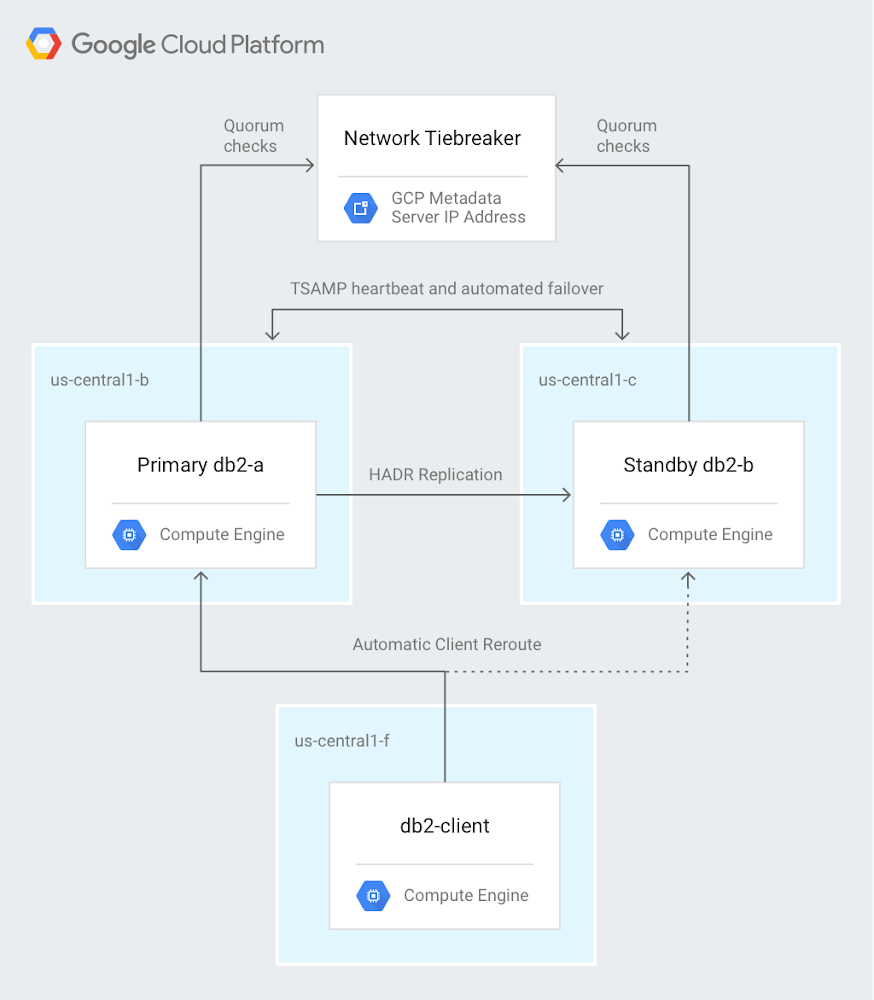
A fundamental piece of many applications is a database, and that’s true for many cloud-based solutions too. Running a database in the cloud is in many ways similar to running a database on-premises, but there are important differences—and advantages. Our team—database solutions architects here at Google Cloud—works to help you understand every aspect of databases in the cloud: deploying, migrating, and managing. We want to help you choose the right way to run your database on Google Cloud Platform (GCP).When you run a database on GCP, you can choose between managed services or running on infrastructure we manage for you. Managed services can remove some of the operational overhead required to operate a database, while running it yourself gives you full control over how your database is deployed. With both options, you get reliability, security, and elasticity built in, with the ability to get global connectivity using Google’s network.Our team works continually to help users understand every aspect of databases in the cloud: deploying, migrating, and managing. Here are some examples of our recent solutions for using cloud databases, from deployment to monitoring. Deploying IBM Db2The first step for cloud-based databases is, of course, to get your database up and running. IBM Db2 is a common enterprise database, so we recently published a comprehensive solution document that describes how to deploy IBM Db2 on GCP: Deploying highly available IBM Db2 11.1 on Compute Engine with automatic client reroute and a network tiebreaker. The solution starts with setting up Compute Engine instances (VMs) to run Db2. As you can tell from the title, it goes well beyond the basics of deployment—it walks you through how to create a highly available deployment in a cluster with transaction replication and automated failover, as shown here:And the solution doesn’t just stop when you’ve set everything up. The goal is high availability, so to make sure everything is working, author Ron Pantofaro shows you how to temporarily disable the primary cluster node. You can then verify that the database fails over properly and that the standby node takes over. Migrating an existing database to GCPIn many cases, you aren’t deploying a database from scratch. Instead, you want to migrate an existing database to GCP. Just migrating a database from one platform to another can have its challenges. But what if you also want to change from a NoSQL database to a relational one? In his solution Migrating from DynamoDB to Cloud Spanner, SA Sami Zuhuruddin recently tackled this interesting and challenging transition. He describes how to move your data from Amazon DynamoDB, which is a NoSQL database, to Cloud Spanner, which is a fully relational, fault-tolerant SQL database with transaction support. When you read Sami’s solution, you’ll see why you’ll want to follow his expert guidance for this task. The process goes through a number of intermediate steps that include Amazon S3, Google Cloud Storage, AWS Lambda, Cloud Pub/Sub, and Cloud Dataflow before arriving at Cloud Spanner. Sami explains the data model on both sides of the migration, including keys, data types, and indexes. You’ll see which user permissions you need in order to perform each step. The solution walks you through the entire process, including verification at the end. Here’s a look at the architecture involved:Backing up a databaseIt’s just as important in the cloud as it is on-premises to back up your databases. Two recent solutions discuss ways to do this.In Using Microsoft SQL Server backups for point-in-time recovery on Compute Engine, SA Ron Pantofaro turns his hand from deployment to backup and shows you how to configure backup for a SQL Server instance that’s running on Compute Engine. You’ll see how to back up both the data and the database logs to Cloud Storage. He also describes how to restore a backup in case you ever need to do that (though we hope not). This isn’t the end of the job, though. From there, you’ll see how to schedule your backups and how to prune backups that you no longer need.Of course, you might be using a different database. In Performing MySQL Hot Backups with Percona XtraBackup and Cloud Storage, the SA team shows a similar set of tasks—backing up, restoring, scheduling, and pruning—but for MySQL databases. Adding tracing to your GCP-based databaseOne of the benefits of running a database in GCP is that you can take advantage of services like Stackdriver to gather tracing information. In his community tutorial Client-side tracing of Cloud Memorystore for Redis workloads with OpenCensus, SA Karthi Thyagarajan discusses how to add tracing that lets you measure data-retrieval latency. This solution uses a data store consisting of Cloud Memorystore backed by Cloud Storage. As he says, this lets you “focus on the key aspects of client-side tracing without getting hung up on things like database deployments and related configuration.”You can download the Java client app that Karthi created has a Java client app that you can get from GitHub, which already contains the logic for reading from the data store and generating trace output. After you’ve got the data store set up, you run the client app to read data. You can see some of the benefits of the instrumentation you’ve set up—you go to the Stackdriver console and visually compare the latencies of cached and non-cached reads:More GCP database solutionsThis covers just a few of the database-oriented solutions that our Solutions Architects team has produced. To find out more, check out the databases and migration entries in the GCP Solutions Gallery.
Quelle: Google Cloud Platform

Configuring secure remote access for Compute Engine VMs?

System administrators are frequently asked to assess risk when moving their applications to the cloud. One common concern is the platform’s inherent presence on the internet, and how to properly secure cloud-based virtual machines and services that are now exposed. In Google Cloud, you can configure VMs and APIs so they’re not connected to the public internet but still accessible to system administrators. Here’s how.   Use Compute Engine’s No External IP Org policy The first thing you can do to protect VMs it to configure a policy that disallows VMs from obtaining an external IP. From the admin console, click Security and select Organization Policies.Note that this policy is not retroactive, so if you already have machines with external IP addresses, this policy does not remove them. Also be aware that while the default VPC has firewall rules to allow SSH / RDP, without an external IP, these are only accessible from the internal network.  Use Cloud Identity-Aware Proxy Next, you need to allow developers to access these machines. Traditionally, you configure a VPN client to connect to the VPC. In Google Cloud, there’s a better way: you can use Cloud Identity-Aware Proxy (IAP) to connect to the machines. To show you how, we’ll follow this guide. From the admin console, click Security then select Identity-Aware Proxy.If you haven’t used Cloud IAP before, you’ll need to configure the oAuth screen:Configure the consent screen to only allow internal users in your domain, and click Save.  Next, you need to define users who are allowed to use Cloud IAP to connect remotely. Add a user to the “IAP-secured Tunnel User” role on the resource you’d like to connect to.Then, connect to the machine via the ssh button in the web UI or gcloud.When using the web UI, notice the URL parameter useAdminProxy=true.Tip: If you don’t have gcloud installed locally, you can also use Cloud Shell:You should now be connected! You can verify that you don’t have internet connectivity by attempting to ping out. 8.8.8.8 (Google’s Honest DNS) is a good address to try this with.  Controlling access with VPC Service ControlsMost GCP developers will still want access to Google Cloud APIs. You can give them access to Google Cloud APIs while restricting them to resources that are present in the project by using VPC Service Controls.  First, enable private Google API access on the VPC network where your VM is located (in this example, US-West1.) Select the VPC network in the region where your virtual machines are located. Select the subnet, and click Edit. Enable Private Google access by selecting “Private Google Access” and click Save.Once you’ve enabled private access, gcloud commands from the VM will work.  Now use VPC Service Controls to define where you’d like those API requests to be allowed. Navigate to the ORG node for your domain and select VPC Service Controls from the Security tab. Select New Perimeter. Add your project and the APIs you’d like to protect to the “New VPC Service Perimeter” and click Save.Now that you’ve gone through all these steps, your VMs should be configured so they are only accessible via Identity-Aware Proxy, and only have access to the local network and Google APIs that are part of the project to which they belong.  As you can see, using Google Cloud tools like Cloud IAP and VPC Service Controls can help you insulate projects from the public internet, reducing risk and fears about moving apps and infrastructure to the cloud. To learn about more security capabilities and features, visit cloud.google.com/security.
Quelle: Google Cloud Platform

How Google Cloud helps RecruitMilitary connect more veterans to jobs

Editor’s note: Today’s post is by Mike Francomb, Senior Vice President of Technology, RecruitMiliary and a U.S. Army Veteran. RecruitMilitary is a wholly owned subsidiary of Bradley-Morris, Inc. (BMI), the largest military-focused recruiting company in the United States. RecruitMilitary uses Google Cloud Talent Solution to power its job search experience and connect more organizations with veteran talent.For seven years, I served in the U.S. Army as a Field Artillery Officer, Military Occupation Code 13A. My time in service included a deployment to Operation Desert Shield / Desert Storm with the 24th Infantry Division out of Fort Stewart, GA, and a variety of front line artillery leadership roles, serving as a logistics officer for my unit and as an instructor teaching new officers how to be professional artillerymen. My day-to-day entailed leading teams of highly trained soldiers and managing logistics and materials to help those soldiers perform at a high level in stressful, fast-paced environments. It was my job to ensure we were ready to handle any circumstance. The hardest part about transitioning out of the Army in May 1996 as a highly trained artillery veteran was the fact that, though I felt prepared for any challenge ahead, I wasn’t sure I was making the right choice. I made a common mistake of transitioning veterans, I jumped right into an entrepreneurial venture. Looking back, I wish I’d had access to resources that displayed career options that would help translate my skills for the corporate world, it would have helped me be better prepared and know what my options were. I wasn’t ready to jump from the Army into running a business, and it was a long two years. Though my first job out of the Army was challenging, it taught me that I loved the start-up environment, and I joined RecruitMilitary in October 1998 when it was five months old. For the past 21 years, I have been fortunate enough to play an important role in helping RecruitMilitary grow to what it is today, the industry leader in connecting military veterans with organizations.  RecruitMilitary connects organizations with veteran talent through over 30 products and services, all of which are fueled by our job board. Our job board, with over 1,400,000 members, is core to our business. In fact, if we don’t have an active and growing job board population, we don’t have the supply of veteran talent we need to deliver to our clients across our suite of services. With veteran unemployment at a 50-year low, it became increasingly challenging for RecruitMilitary to grow our veteran job seeker database and keep those veterans actively applying to client jobs. Being a data-driven company, we saw our existing search functionality was no longer producing the desired results for clients and began to receive client feedback about decreased candidate activity.It was clear to us that we needed to begin adopting machine learning and more advanced search capabilities into our products and operations. The HR Tech space is shifting that way fast, and we want to be at the forefront. As we researched paths to take and learned of Google’s operating philosophy leading with AI, and that they were developing a tool for veteran job search, it made a lot of sense to go with a leader.When Grow with Google announced its commitment to support veterans, we learned that we could add their military occupation code (MOS) translation feature to our job board through Cloud Talent Solution. This feature lets transitioning service members enter their military occupation codes (MOS, AFSC, NEC, or rating) directly into our search bar to see relevant civilian jobs available at client companies. We’re also using Cloud Talent Solution’s remote work functionality to provide an improved job search experience that allows our customers to make remote work opportunities in the U.S. more discoverable on their career sites. We’re excited about this feature, as it enhances our ability to deliver meaningful jobs to important members of our military community, military spouses, and veterans with limited mobility. The results of Cloud Talent Solution compared to our previous search are tremendous. Our job seekers are getting a much better experience, and to us that means more veterans are connected to jobs with our clients. We know this because our number of daily job applications has grown by 78 percent. And knowing that we now have a tool that’s going to learn and get better as more of our job seekers use it means that we will reap benefit for work done over time, and so will our clients and veterans who use our job board. That’s tremendous ROI to receive for a lean development staff. These are just a few of the types of tools I wish I’d had access to when I was considering my transition in 1996. With the help of technology and resources, like those from RecruitMilitary and Grow with Google, people in the military community, including veterans like myself, can prepare for and build meaningful careers.
Quelle: Google Cloud Platform

Announcing new GKE architecture specialization—now with one month free access

Today, IT organizations want to move fast, deploy software efficiently, and scale big. Kubernetes, containers, and Google Kubernetes Engine (GKE) can help you do that—and we can help you get started with learning these technologies with our newest training path, the Architecting with Google Kubernetes Engine Specialization.In this specialization, you’ll learn all about Kubernetes, the open-source, vendor-neutral system for orchestrating workloads that are packaged in containers. You’ll gain an understanding for how you can run Kubernetes, and deploy production solutions on it, usingGoogle Cloud Platform (GCP). We’ll also deep dive into our GKE managed service that gives you access to Google’s advanced load-balancing technologies, its worldwide network, and GCP’s range of data and machine-learning managed services. If you’re already familiar with working in a virtual-machine-based environment, this specialization will present familiar architecture principles, but in a GKE environment. You’ll also learn how to configure your GKE environment; build, schedule, load-balance, and monitor workloads; manage access control and security; and give your applications persistent storage. This specialization is delivered as a combination of lectures and hands-on labs to help you master your skills. When you finish each course, you will receive a certificate that you can share with your professional network and employers.The Architecting with GKE Specialization consists of four courses:GCP Fundamentals: Core Infrastructure – Learn about important concepts and terminologies for working with GCP. Architecting with GKE: Foundations – Master the foundations of architecting with GKE by reviewing the layout and principles of GCP, followed by an introduction to creating and managing software containers and to the architecture of Kubernetes. Architecting with GKE: Workloads – Learn about how to perform Kubernetes operations, create and manage deployments, use GKE networking tools; and how to give your Kubernetes workloads persistent storage. Architecting with GKE: Production – The last course covers Kubernetes and GKE security, logging and monitoring, and using GCP managed storage and database services from within GKE. Want to learn more? Join us July 26th at 9:00 am PST for a special webinar, Architecting with Google Kubernetes Engine: Get started on your Anthos journey. In this webinar you will learn how to enable a hybrid cloud strategy with Kubernetes and participate in a free hands-on lab on how to configure persistent storage for GKE. Just for attending the webinar, we’ll give you one month free access to the GKE Specialization. Register for the webinar today.
Quelle: Google Cloud Platform

Production debugging comes to Cloud Source Repositories

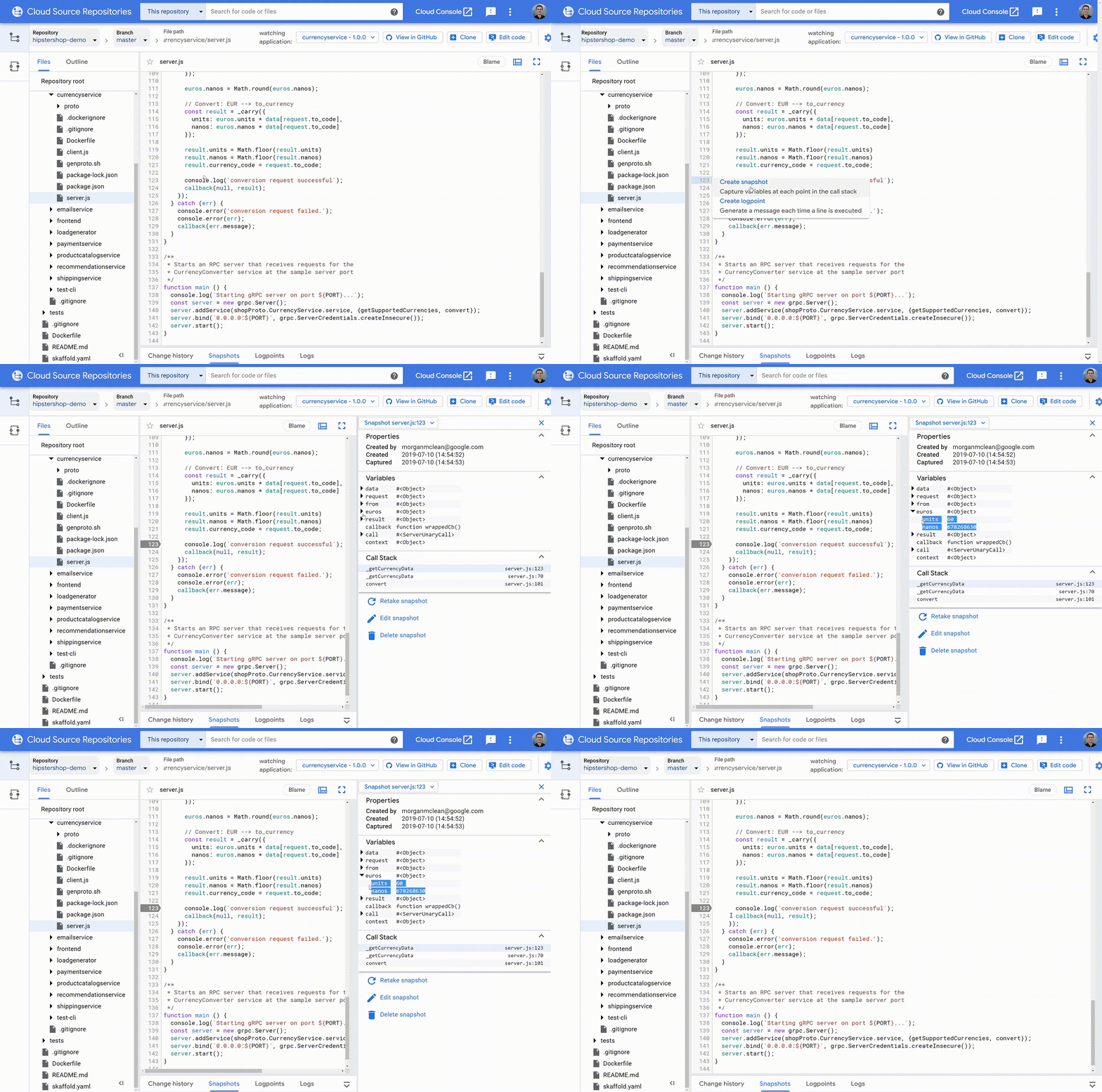
Google Cloud has some great tools for software developers. Cloud Source Repositories and Stackdriver Debugger are used daily by thousands of developers who value Cloud Source Repositories’ excellent code search and Debugger’s ability to quickly and safely find errors in production services.But Debugger isn’t a full-fledged code browser, and isn’t tightly integrated with all the most common developer environments. The good news is that these tools are coming together! Starting today, you can debug your production services directly in Cloud Source Repositories, for every service where Stackdriver Debugger is enabled.What’s new in Cloud Source RepositoriesThis integration brings two pieces of functionality to Cloud Source Repositories: support for snapshots, and logpoints.SnapshotsSnapshots are point-in-time images of your application’s local variables and stack that are triggered when a code condition is met. Think of snapshots as breakpoints that don’t halt execution. To create one, simply click on a line number as you would with a traditional debugger, and the snapshot will activate the next time that one of your instances executes the selected line. When this happens, you’ll see the local variables captured during the snapshot and the complete call stack—without halting the application or impacting its state and ongoing operations!You can navigate and view local variables in this snapshot from each frame in the stack, just as with any other debugger. You also have full access to conditions and expressions, and there are safeguards in place to protect against accidental changes to your application’s state.LogpointsLogpoints allow you to dynamically insert log statements into your running services without redeploying them. Each logpoint operates just like a log statement that you write into your code normally: you can add free text, reference variables, and set the conditions for the log to be saved. Logpoints are written to your standard output path, meaning that you can use them with any logging backend, not just Stackdriver Logging.Creating a logpoint is a lot like creating a snapshot: simply click on the line number of the line where you wish to set it, and you’re done.Upon adding a logpoint to your application, it’s pushed out to all instances of the selected service. Logpoints last for 24 hours or until the service is redeployed, whichever comes first. Logpoints have the same performance impact as any other log statement that exists normally in your source code.Getting startedTo use Cloud Source Repositories’ production debugging capabilities, you must first enable your Google Cloud Platform projects for Stackdriver Debugger. You can learn more about these setup steps in the Stackdriver Debugger documentation.Once this is complete, navigate to the source code you wish to debug in Cloud Source Repositories, then select ‘Debug application’. Today this works best with code stored in Cloud Source Repositories or that is mirrored from supported third-party sources including GitHub, Bitbucket, and GitLab. Once you’ve selected your application you can start placing snapshots and logpoints in your code by clicking on the line numbers in the left gutter.Production debugging done rightBeing able to debug code that’s running in production is a critical capability—and being able to do so from a full-featured code browser is even better! Now, through bringing production debugging to Cloud Source Repositories, you can track down hard-to-find problems deep in your code, while being able to do things like  continually sync code from a variety of different sources, cross-reference classes, look at blame layers, view change history, and search by class name, method name, etc. To learn more, check out this getting started guide. Russell Wolf, Product Manager, also contributed to this blog post.
Quelle: Google Cloud Platform

Blockchain.com, scaling and saving with Cloud Spanner

As cryptocurrencies have gotten more popular, we’ve seen the birth of thousands of new currencies and, in parallel, just as many platforms to use them on. One prominent example at the forefront of cryptocurrencies is Blockchain, which has helped 39 million cross-platform wallet users in 140 countries worldwide access the crypto ecosystem.Blockchain, a Google Cloud customer, was initially focused on creating tools to understand and use Bitcoin, but the company has since expanded to other cryptocurrencies like Ethereum, Bitcoin Cash, Stellar Lumens and the Paxos Standard. Now, millions of individuals rely on the Blockchain Wallet to secure and use the world’s leading cryptocurrencies.Needless to say, with the size and geographic sprawl of its user base, managing these datasets is no easy feat.Meeting user needs while growing fastSince the company’s inception, Blockchain has used Google Cloud Platform (GCP), adding services wherever the team saw opportunities to meet its evolving needs. While Blockchain maintains some of its own hardware and data centers, it wanted to evolve its approach to managing infrastructure to enhance the security, reliability, and accuracy of information platforms. Blockchain’s flagship products, Blockchain Wallet and Blockchain Explorer, require complicated calculations on hard-to-access data across the massive, decentralized ledgers that underpin cryptocurrency networks. Accessing that data requires complex domain knowledge, technical infrastructure, and development effort, not to mention time to process the entire data chain. This became a major undertaking that required significant in-house IT resources and overhead. To manage these challenges and enhance the user experience across all products and platforms, Blockchain began running infrastructure on Compute Engine instances. Blockchain also chose Cloud Spanner as its database service of choice because this database server could scale fast (with no downtime), and provide high-availability with low operational overhead. Cloud SQL, Stackdriver, and identity management products also make up Blockchain’s cloud infrastructure.Securing user financial dataWith millions of users across the globe relying on Blockchain for information about and access to their funds, it’s no surprise that one of its core values is “Sanctify Security.”“Security is our number one priority,” says Lewis Tuff, head of platform engineering at Blockchain. “Google Cloud goes above and beyond to help protect data, infrastructure, and services from external threats. GCP makes it easy to get the basics of security right. Cloud Identity Access Management (Cloud IAM) and VPC firewall allow Blockchain to lock down access to resources according to the least privilege principle and implement defense in depth within our environment. Leveraging Stackdriver’s logging and monitoring capability enable us to be alerted to any unusual activities in real time.”Blockchain also uses Google’s Cloud Identity-Aware Proxy (Cloud IAP) to control cloud app access through user identity verification and context awareness. It also uses Cloud Key Management Service (Cloud KMS), integrated with Cloud IAP, to manage cryptographic keys for a comprehensive approach.“So many companies would benefit from Cloud IAP,” Tuff adds. “It’s really easy to authenticate and activate applications based on G Suite accounts. That’s huge for us because we have a number of internal and back-office applications that can now be managed through granular, role-based access rights.”Scaling on demand to match large volumes of data When it came time for Blockchain to expand its Explorer offering to include the Ethereum network, it turned to Cloud Spanner, GCP’s strongly consistent, high-availability (up to 99.999% SLA) database service, to accelerate deployment and keep pace as data volumes grew rapidly, while maintaining reliability. Cloud Spanner’s on-demand scalability let Blockchain cut its operational overhead—the company has achieved savings of 30% by replacing its previous database layer with Cloud Spanner. With Cloud Spanner, Blockchain knew it could start small and not have to worry about growth of datasets as its service grew. One example of the scaling power the company has found using GCP is the import and export functionality, which allows them to perform a full restoration of the database in nine hours, instead of one week. That’s essential for the company’s rapid development work, and eliminates the need to ingest the whole chain from the genesis block in each environment.     “That kind of flexibility is really powerful,” says Tuff. “It means we can run our dataset through our environments very easily. We can add nodes as and when required, with high availability and strong consistency across a scalable, distributed database.”Moving forward, Blockchain’s team is strategically preparing for the future of an emerging market, using GCP services to help execute on initiatives across product and engineering.Building out with managed servicesIn addition to expanding its use of Cloud Spanner as a managed database, and Stackdriver Monitoring for logging metrics and analysis, Blockchain is building more microservices with GCP managed services. “It makes sense to see what we can do with GCP products, instead of spinning up our own VMs and managing the whole backup and failover strategy,” says Tuff.He added, “We’re a fast-moving company, so our relationship with Google Cloud has been invaluable. When we needed advice, the Cloud Spanner team talked through our ideas so we could build the right architecture. The team is experienced, knowledgeable, and dedicated to finding the right architecture for your use case. When you come to Google Cloud with a challenge, the team puts all its talent behind finding the best solution.”Learn more about Cloud Spanner, and about other Google Cloud databases here.
Quelle: Google Cloud Platform

How to integrate Dialogflow with Genesys PureCloud

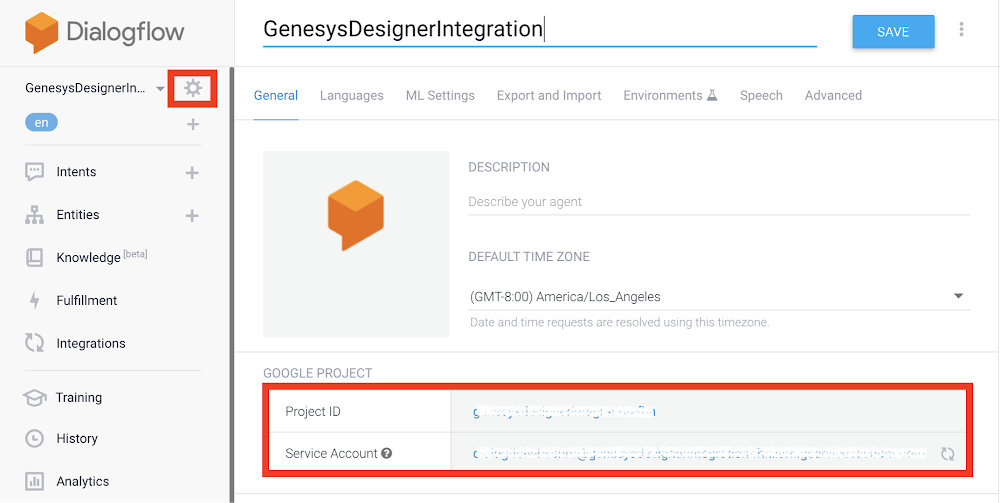
For many businesses, a contact center is their foundation for great customer experiences. Many businesses already use Genesys PureCloud, a suite of cloud services for enterprise-grade communications, collaboration, and contact center management for this purpose. We’ve also heard from businesses that they’d like to integrate natural language-powered virtual agents into their existing Genesys call flows, such as the kind offered by Contact Center AI, Google Cloud’s conversational AI technology designed specifically for contact centers.This article walks you step by step through how to integrate Dialogflow, a component of Contact Center AI and an end-to-end development suite for creating conversational interfaces, with Genesys PureCloud. With this integration, you can use Dialogflow to create virtual agents that can perform specific tasks, and which can be invoked within the Genesys call flow. This integration is an example that shows the power of AI to extend an existing telephony and contact center infrastructure.How to integrate Google Dialogflow with Genesys PureCloudIf you haven’t already, you’ll need to create a Google Cloud account here.In Dialogflow, navigate to Agent settings where you’ll find the Project ID and Service Account information. Click on the project ID to open the Google Cloud Console.Select IAM & admin, then IAM. Make sure the role assigned to the service account is “Dialogflow API Admin”. If it is set to “Dialogflow API Client”, change it to “Dialogflow API Admin”.In the pop-up, create the JSON key. It will download to your machine.From the JSON file, You will need the “private_key_id”, “private_key”, “client_email” and the “client_id” to enter in Genesys PureCloud. Here’s how the JSON key should look:Take “private_key_id”, “private_key”, “client_email” and the “client_id” and open Genesys PureCloud. Navigate to Integrations, then Google Dialogflow and open the Configuration tab to Configure Credentials obtained from the JSON file.That’s it! With this integration, you can now easily access the intents and entities from Dialogflow in the Genesys interface and use them to complement your contact center customer experiences. To learn more about Dialogflow, visit our website.
Quelle: Google Cloud Platform

Cloud TPU Pods break AI training records

Google Cloud’s AI-optimized infrastructure makes it possible for businesses to train state-of-the-art machine learning models faster, at greater scale, and at lower cost. These advantages enabled Google Cloud Platform (GCP) to set three new performance records in the latest round of the MLPerf benchmark competition, the industry-wide standard for measuring ML performance.All three record-setting results ran on Cloud TPU v3 Pods, the latest generation of supercomputers that Google has built specifically for machine learning. These results showcased the speed of Cloud TPU Pods— with each of the winning runs using less than two minutes of compute time.AI-optimized infrastructureWith these latest MLPerf benchmark results, Google Cloud is the first public cloud provider to outperform on-premise systems when running large-scale, industry-standard ML training workloads of Transformer, Single Shot Detector (SSD), and ResNet-50. In the Transformer and SSD categories, Cloud TPU v3 Pods trained models over 84% faster than the fastest on-premise systems in the MLPerf Closed Division.The Transformer model architecture is at the core of modern natural language processing (NLP)—for example, Transformer has enabled major improvements in machine translation, language modeling, and high-quality text generation. The SSD model architecture is widely used for object detection, which is a key part of computer vision applications including medical imaging, autonomous driving, and photo editing.To demonstrate the breadth of ML workloads that Cloud TPUs can accelerate today, we also submitted results in the NMT and Mask R-CNN categories. The NMT model represents a more traditional approach to neural machine translation, and Mask R-CNN is an image segmentation model.Scalable GCP provides customers the flexibility to select the right performance and price point for all of their large-scale AI workloads. The wide range of Cloud TPU Pod configurations, called slice sizes, used in the MLPerf benchmarks illustrates how Cloud TPU customers can choose the scale that best fits their needs. A Cloud TPU v3 Pod slice can include 16, 64, 128, 256, 512, or 1024 chips, and several of our open-source reference models featured in our Cloud TPU tutorials can run at all of these scales with minimal code changes.Get started todayOur growing Cloud TPU customer base is already seeing benefits from the scale and performance of Cloud TPU Pods. For example, Recursion Pharmaceuticals can now train in just 15 minutes on Cloud TPU Pods compared to 24 hours on their local GPU cluster.If cutting-edge deep learning workloads are a core part of your business, please contact a Google Cloud sales representative to request access to Cloud TPU Pods. Google Cloud customers can receive evaluation quota for Cloud TPU Pods in days instead of waiting months to build an on-premise cluster. Discounts are also available for one-year and three-year reservations of Cloud TPU Pod slices, offering businesses an even greater performance-per-dollar advantage.Only the beginningWe’re committed to making our AI platform—which includes the latest GPUs, Cloud TPUs, and advanced AI solutions—the best place to run machine learning workloads. Cloud TPUs will continue to grow in performance, scale, and flexibility, and we will continue to increase the breadth of our supported Cloud TPU workloads (source code available).To learn more about Cloud TPUs, please visit our Cloud TPU homepage and documentation. You can also try out a Cloud TPU for free, right in your browser, via this interactive Colab that applies a pre-trained Mask R-CNN image segmentation model to an image of your choice. You can find links to many other Cloud TPU Colabs and tutorials at the end of our recent beta announcement.1. MLPerf v0.6 Training Closed. Retrieved from www.mlperf.org 10 July 2019. MLPerf name and logo are trademarks. See www.mlperf.org for more information.2. MLPerf entries 0.6-6 vs. 0.6-28, 0.6-6 vs. 0.6-27, 0.6-6 vs. 0.6-30, 0.6-5 vs. 0.6-26, 0.6-3 vs. 0.6-23, respectively.3.  MLPerf entries 0.6-3, 0.6-4, 0.6-5, 0.6-6, respectively, normalized by entry 0.6-1
Quelle: Google Cloud Platform

Helping OpenText customers move Enterprise Information Management workloads to Google Cloud

Now more than ever, enterprises are looking to the cloud not just for security, scalability, and access to new technologies, but to drive real business value. For many businesses, the key to this transformation is prioritizing workloads in a few important areas, like ERP and databases. To help, Google Cloud has expanded its partnerships in these areas, developing new ways for customers to run them on the Google Cloud Platform (GCP).Increasingly, enterprise information management (EIM) solutions are joining this category of “priority workloads,” as businesses try to derive value from their structured and unstructured information. And that’s why today we’re excited to announce expansions to our partnership with OpenText to help more customers migrate their EIM workloads to Google Cloud.We began partnering with OpenText, a preferred partner for EIM, in 2018, and now our extended partnership spans multiple product and solutions areas, including Anthos for multi-cloud and hybrid deployments, disaster recovery services on GCP, G Suite, and AI and machine learning. In each of these areas, our shared goal is to help OpenText customers leverage the technology, scale and security of Google Cloud.Specifically, we are rolling out the following new integrations:OpenText has planned containerized versions of several EIM applications on GCP, including Content Server/xECM, Documentum, InfoArchive, and Archive Center. These will all leverage Anthos, our multi-cloud and hybrid offering, to deploy and manage containerized EIM application workloads in a multi-cloud environment.OpenText intends to use Google Cloud to enable multi-layered global disaster recovery services for customers with business-critical EIM workloads running in the cloud, on-premises, and in hybrid cloud architectures.OpenText plans to begin integrating its EIM solutions with G Suite to allow seamless collaboration across the two platforms.We’re working with OpenText to create purpose-built solutions for specific industries, including financial services, healthcare and media and communications, leveraging Google Cloud’s AI and ML services.Partnering with OpenText is particularly beneficial to customers who are moving SAP applications to the cloud as many run OpenText archiving and other integrated EIM applications to extend the value of their SAP solutions. Our collaboration and OpenText’s investment in managed services in the cloud means these customers can now migrate SAP systems, including their supporting OpenText EIM workloads, to GCP as fully validated and supported applications.These integrations announced today are just the beginning of our strategic partnership with OpenText. Many customers are increasingly interested in moving critical EIM workloads to Google Cloud and leveraging our reliable and performant infrastructure, AI and ML capabilities, expertise in containerization and our hybrid and multi-cloud solution, Anthos, so we are delighted that OpenText has named Google Cloud as its preferred cloud provider for the enterprise..We’re excited to bring these integrations to market jointly with OpenText, and we’re excited for a strong future of innovation together—all to the benefit of our mutual customers.
Quelle: Google Cloud Platform