Improving speech recognition for contact centers

Contact centers are critical to many businesses, and the right technologies play an important role in helping them provide outstanding customer care. Last July, we announced Contact Center AI to help businesses apply artificial intelligence to greatly improve the contact center experience. Today, we’re announcing a number of updates to the technologies that underpin the Contact Center AI solution—specifically Dialogflow and Cloud Speech-to-Text—that improve speech recognition accuracy by over 40% in some cases to better support customers and the agents that help them.These updates include:Auto Speech Adaptation in Dialogflow (beta)Speech recognition baseline model improvements for IVRs and phone-based virtual agents in Cloud Speech-to-TextRicher manual Speech Adaptation in Dialogflow and Cloud Speech-to-Text (beta)Endless streaming in Cloud Speech-to-Text (beta)MP3 file format support in Cloud Speech-to-TextImproving speech recognition in virtual agentsVirtual agents are a powerful tool for contact centers, providing a better user experience around the clock while reducing wait times. However, the automated speech recognition (ASR) that virtual agents require is much harder to do on noisy phone lines than in the lab. And even at high recognition-accuracy rates (~90%), ASR can sometimes still result in a frustrating customer experience, as you can see below.To help virtual agents quickly understand what customers need, and respond accurately, we’re introducing an exciting new feature in Dialogflow.Auto Speech Adaptation in Dialogflow BetaJust like knowing the context in a conversation makes it easier for people to understand one another, ASR improves when the underlying AI understands the context behind what a speaker is saying. We use the term speech adaptation to describe this learning process.In Dialogflow—our development suite for creating automated conversational experiences—knowing context can help virtual agents respond more accurately. Using the example in the animation above, if the Dialogflow agent knew the context was “ordering a burger” and that “cheese” is a common burger ingredient, it would probably understand that the user meant “cheese” and not “these”. Similarly, if the virtual agent knew that the term “mail” is a common term in the context of a product return, it wouldn’t confuse it with the words “male” or “nail”. To meet that goal, the new Auto Speech Adaptation feature in Dialogflow helps the virtual agent automatically understand context by taking all training phrases, entities, and other agent-specific information into account. In some cases, this feature can result in a 40% or more increase in accuracy on a relative basis.It’s easy to activate Auto Speech Adaptation: just click the “on” switch in the Dialogflow console (off by default), and you’re all set!Cloud Speech-to-Text baseline model improvements for IVRs and phone-based virtual agentsIn April 2018, we introduced pre-built models for improved transcription accuracy from phone calls and video. We followed that up last February by announcing the availability of those models to all customers, not just those who had opted in to our data logging program. Today, we’ve further optimized our phone model for the short utterances that are typical of interactions with phone-based virtual agents. The new model is now 15% more accurate for U.S. English on a relative basis beyond the improvements we previously announced. Applying speech adaptation can also provide additional improvements on top of that gain. We’re constantly adding more quality improvements to the roadmap—an automatic benefit to any IVR or phone-based virtual agent, without any code changes needed–and will share more about these updates in future blog posts.Improving transcription to better support human agentsAccurate transcriptions of customer conversations can help human agents better respond to customer requests, resulting in better customer care. These updates improve the quality of transcription accuracy to support human agents.Richer manual speech adaptation tuning in Cloud Speech-to-TextWhen using Cloud Speech-to-Text, developers use what are called SpeechContext parameters to provide additional contextual information that can make transcription more accurate. This tuning process can help improve recognition of phrases that are common in the specific use case involved. For example, a company’s customer service support line might want to better recognize the company’s product names. Today, we are announcing three updates, all currently in beta, that make SpeechContext even more helpful for manually tuning ASR to improve transcription accuracy. These new updates are available in both the Cloud Speech-to-Text and Dialogflow APIs.SpeechContext classes BetaClasses are pre-built entities reflecting popular/common concepts, which give Cloud Speech-to-Text the context it needs to more accurately recognize and transcribe speech input. Using classes lets developers tune ASR for a whole list of words at once, instead of adding them one by one.For example, let’s say there is an utterance that would normally result in the transcription, “It’s twelve fifty one”. Based on your use case, you could use a SpeechContext class to refine the transcription in a few different ways:A number of other classes are available to similarly provide context around digit sequences, addresses, numbers, and money denominations—you can see the full list here. SpeechContext boost BetaTuning speech recognition with tools like SpeechContext increases the likelihood of certain phrases getting captured—which will both reduce the number of false negatives (when a phrase was mentioned, but does not appear in the transcript), but can also potentially increase the number of false positives (when a phrase wasn’t mentioned, but appears in transcript). The new “boost” feature lets developers use the best speech adaptation strength for their use case.Example:SpeechContext expanded phrase limit BetaAs part of the tuning process, developers use “phrase hints” to increase the probability that commonly used words or phrases related to their business or vertical will be captured by ASR. The maximum number of phrase hints per API request has now been raised by 10x, from 500 to 5,000, which means that a company can now optimize transcription for thousands of jargon words (such as product names) that are uncommon in everyday language.  In addition to these new adaptation-related features, we’re announcing a couple of other highly requested enhancements that improve the product experience for everyone. Endless streaming Beta in Cloud Speech-to-TextSince we introduced Cloud Speech-to-Text nearly three years ago, long-running streaming has been one of our top user requests. Until now, Cloud Speech-to-Text only supported streaming audio in one-minute increments, which was problematic for long-running transcription use cases like meetings, live video, and phone calls. Today, the session time limit has been raised to 5 minutes. Additionally, the API now allows developers to start a new streaming session from where the previous one left off—effectively making live automatic transcription infinite in length, and unlocking a number of new use cases involving long-running audio.MP3 file format support Beta in Cloud Speech-to-TextCloud Speech-to-Text has supported seven file formats up until now (list here). Up until now, processing MP3 files required first expanding them into the LINEAR16 format, which requires maintaining additional infrastructure. Cloud Speech-to-Text now natively supports MP3 so there are no additional conversions needed. Woolworths’ use of conversational AI to improve the contact center experienceWoolworths is the largest retailer in Australia with over 100,000 employees, and has been serving customers since 1924. “In partnership with Google, we’ve been building a new virtual agent solution based on Dialogflow and Google Cloud AI. We’ve seen market-leading performance right from the start,” says Nick Eshkenazi, Chief Digital Technology Officer for Woolworths. “We were especially impressed with accuracy of long sentences, recognition of brand names, and even understanding of the format of complex entities, such as ‘150g’ for 150 grams. “Auto Speech Adaptation provided a significant improvement on top of that and allowed us to properly answer even more customer queries,” says Eshkenazi. “In the past, it used to take us months to create a high quality IVR experience. Now we can build very powerful experiences in weeks and make adjustments within minutes.”“For example, we recently wanted to inform customers about a network outage impacting our customer hub and were able to add messaging to our virtual agent quickly. The new solution provides our customers with instant responses to questions with zero wait time and helps them connect instantly with the right people when speaking to a live agent is needed.”Looking forwardWe’re excited to see how these improvements to speech recognition improve the customer experience for contact centers of all shapes and sizes—whether you’re working with one of our partners to deploy the Contact Center AI solution, or taking a DIY approach using our conversational AI suite. Learn more about both approaches via these links:Contact Center AI solutionsDialogflowCloud Speech-to-TextCloud Text-to-Speech
Quelle: Google Cloud Platform
IoT × AI : 家電製品の作動状況を機械学習でリアルタイム予測

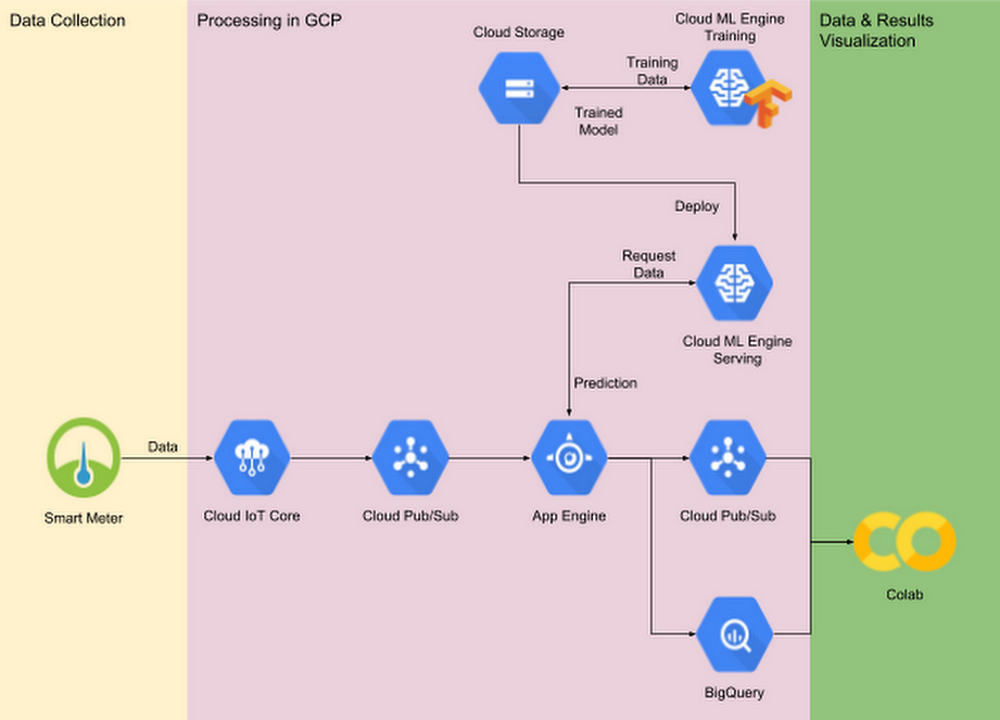
世界中でホーム オートメーションの人気が高まり、それにかかる電力のコストが上昇するにつれて、省エネルギーへの取り組みが多くの消費者にとって大きな関心事となっています。家庭用スマート メーターの登場により、世帯全体の消費電力を測定、記録することも今では可能になりました。さらに、スマート メーターのデータを機械学習モデルで分析すれば、個々の電化製品の挙動を正確に予測できます。それにより、たとえば冷蔵庫のドアが開いたままになっていると推測されるときや、非常識な時間帯にスプリンクラーが突然作動したときに、電力会社が契約者にメッセージを送るといったことも実現できるでしょう。この投稿では、家庭用電化製品(今回のデータセットでは、たとえば電気ケトルや洗濯機など)の作動状況をスマート メーターの測定データから正確に判定する方法とともに、LSTM(long short-term memory)モデルなどの新しい機械学習テクニックについてご紹介します。電化製品の作動状況がアルゴリズムで判定できるようになれば、それに対応したアプリケーションも作れるようになります。たとえば、次のようなものが考えられます。異常状態の検出 : 通常、家に誰もいなければテレビの電源は切れています。予期しない時間帯、あるいは異常な時間帯にテレビがオンになっていると、アプリケーションがユーザーにメッセージを送ります。習慣改善の提案 : 近隣家庭での電化製品の利用パターンを集計した形で示し、それを当該ユーザーの利用パターンと比較または参照できるようにするアプリケーションがあれば、電化製品の使い方を最適化できます。私たちは、Google Cloud Platform(GCP)を使用して、エンドツーエンドのデモ システムを開発しました。データ収集には Cloud IoT Core、機械学習モデルの構築には TensorFlow、モデルのトレーニングには Cloud Machine Learning Engine(Cloud ML Engine)、リアルタイムでのサービス提供と予測には Cloud Pub/Sub、App Engine、Cloud ML Engine を使用しています。本稿を読みながらご覧いただけるように、完全なソース ファイルはこちらの GitHub リポジトリから参照できます。デモ システムの概要IoT デバイスの人気の高まりと機械学習テクノロジーの発展により、新しいビジネス チャンスが生まれています。本稿では、スマート メーターが収集した総電力の測定値を最新の機械学習テクニックで処理し、家庭用電化製品(たとえば電気ケトルや洗濯機)の作動状況(電源オンかオフか)を推測する方法をご紹介します。GCP だけで開発したエンドツーエンドのデモ システムには次のものが含まれています。Cloud IoT Core と Cloud Pub/Sub によるデータの収集と取り込みCloud ML Engine でトレーニングされた機械学習モデルフロントエンドの App Engine と Cloud ML Engine を使用して提供される、同じ機械学習モデルBigQuery と Colab によるデータの可視化と調査図 1. デモ システムのアーキテクチャ下のアニメーションは、Cloud IoT Core を介して Colab に取り込まれた実際の消費電力データのリアルタイム モニタリングを示しています。図 2. リアルタイム モニタリングの様子IoT によって広がる機械学習の可能性データの取り込み機械学習モデルのトレーニングには十分な量の適切なデータが必要です。IoT の場合は、スマート IoT デバイスが収集したデータを遠く離れた中央のサーバーに安全かつ確実に送信するために、さまざまな課題を克服しなければなりません。特に、データのセキュリティや伝送の信頼性、ユース ケースに応じたタイムリー性などを考慮する必要があります。Cloud IoT Core は、世界中に分散した数百万のデバイスに簡単かつセキュアに接続して、それらのデバイスを管理するとともにデータを取り込むフルマネージド サービスです。デバイス マネージャとプロトコル ブリッジの 2 つが主要機能となります。デバイス マネージャは、デバイスを識別して認証し、その識別情報を保持することで、個々のデバイスを大まかな方法で設定、管理できるようにします。また、個々のデバイスの論理構成を保存し、デバイスの遠隔操作を行うことができます。たとえば、大量のスマート メーターのデータ サンプリング率を一斉に変更するようなことも可能です。プロトコル ブリッジは、接続しているすべてのデバイスを対象に自動でロード バランシングを行うエンドポイントを提供するとともに、MQTT や HTTP などの業界標準プロトコルを介したセキュアな接続をネイティブでサポートします。また、デバイスの遠隔測定データを Cloud Pub/Sub にパブリッシュすれば、後でその測定データを下流の分析システムに渡すことができます。私たちのデモ システムでは MQTT ブリッジを採用し、以下に示す MQTT 固有のロジックをコードに組み込んでいます。データの流れデータが Cloud Pub/Sub にパブリッシュされると、Cloud Pub/Sub は「プッシュ エンドポイント」(一般に、データを受け付けるゲートウェイ サービス)にメッセージを送ります。私たちのデモ システムの場合、Cloud Pub/Sub は、App Engine がホスティングするゲートウェイ サービスにデータをプッシュし、そこから Cloud ML Engine がホスティングする機械学習モデルにデータを転送して推論を実行させます。また、それとともに、未加工データと受け取った予測結果を BigQuery に格納し、後で(バッチ)分析できるようにします。私たちのサンプル コードはビジネス固有のさまざまなユース ケースに応用できますが、デモ システムでは未加工データと予測結果の可視化を行っています。コード リポジトリには、次の 2 つのノートブックが含まれています。EnergyDisaggregationDemo_Client.ipynb : このノートブックは、実際のデータセットから消費電力データを読み込むことで複数のスマート メーターをシミュレートし、読み込んだデータをサーバーに送信します。Cloud IoT Core 関連のコードは、すべてこのノートブックに含まれています。EnergyDisaggregationDemo_View.ipynb : このノートブックを使用すれば、指定したスマート メーターからの未加工の消費電力データと、モデルによる予測結果をほぼリアルタイムで表示できます。README ファイルと付属のノートブックで説明されているデプロイ方法に従えば、図 2 の表示を再現できるはずです。一方、ほかの方法でデータ分割パイプラインを作りたい場合は、Cloud Dataflow や Pub/Sub I/O を使用すれば、同様の機能を備えたアプリケーションを構築できます。データ処理と機械学習データセットの概要と調査結果エンドツーエンドのデモ システムを再現可能なものにするため、私たちは UK-DALE(UK Domestic Appliance-Level Electricity、こちら 1 からダウンロード可能)データセットを使用して、総電力の測定値を基に個々の電化製品のオン / オフを予測するモデルをトレーニングしました。UK-DALE は、5 世帯の世帯全体の電力消費と個々の電化製品の消費電力を 6 秒ごとに記録しています。デモ システムでは世帯 2 のデータを使っており、このデータセットには全部で 18 個の電化製品の消費電力が含まれています。データセットの粒度(サンプリング レート 0.166 Hz)を考慮すると、比較的消費電力の少ない電化製品の評価は困難なため、ラップトップやコンピュータ ディスプレイなどの消費電力についてはこのデモに含まれていません。後述のデータ調査結果に基づいて、18 個の電化製品のうち、ランニング マシン、洗濯機、食洗機、電子レンジ、トースター、電気ケトル、炊飯器、電気コンロの 8 個だけを調査対象とすることにしました。下の図 3 は、選択した 8 個の電化製品の消費電力ヒストグラムです。どの電化製品もほとんどの時間は電源オフになっているので、大半の測定値はゼロに近くなります。また図 4 は、選択した電化製品の消費電力の合計(app_sum)と世帯全体の消費電力(gross)との比較を示しています。デモ システムに対する入力は全体の消費電力量(青い曲線)だということに注意してください。これが最も手に入りやすく、家の外でも測定できる消費電力データなのです。図 3. 調査対象の電化製品とその電力需要のヒストグラム図 4. 世帯 2 のデータ サンプル(2013 年 7 月 4 日 : UTC)図 4 に示した世帯 2 のデータは 2013 年の 2 月下旬から 10 月上旬までのものですが、先頭と末尾の近辺には欠損値があるため、デモ システムでは 6 月から 9 月末までのデータを使用しています。表 1 は、選択した電化製品の実際の要約統計をまとめたものです。予想どおり、データは個々の電化製品のオン / オフ状態と個々の電化製品の消費電力規模によって極端にバランスの悪いものになっており、それが予測タスクを難しくする主要因になっています。表 1. 消費電力の要約統計データの前処理UK-DALE は個々の電化製品のオン / オフ状態を記録していないため、前処理において特に重要だったのは、各タイムスタンプにおける個々の電化製品のオン / オフ状態のラベル付けでした。電化製品の電源がほとんどの時間でオフになっており、ほとんどの測定値がゼロに近いことから、消費電力が測定値の標本平均よりも 1 標準偏差高いときは電源がオンであると見なすことにしました。データの前処理のコードはノートブックに含まれており、こちらから処理済みのデータをダウンロードすることもできます。前処理後のデータを CSV 形式にしているので、機械学習モデル トレーニングの入力パイプラインなどでは、TensorFlow の Dataset クラスが、データのロードと変換のための便利なツールとして機能します。たとえば、次のコードの 7 行目から 9 行目では指定された CSV ファイルからデータをロードし、11 行目から 13 行目ではデータを時系列シーケンスに変換しています。データの不均衡という問題については、大きいクラスをダウンサンプリングするか、小さいクラスをアップサンプリングすれば対処できます。私たちのデモでは、確率的ネガティブ ダウンサンプリングを提案しています。一定の確率としきい値に基づき、少なくとも 1 つの電化製品がオンになっているサブシーケンスは残すものの、すべての電化製品がオフになっているサブシーケンスはフィルタリングします。次のコードが示すように、フィルタリング ロジックは tf.data API と簡単に統合できます。最後に、『Data Input Pipeline Performance』ガイドのベスト プラクティスに従い、入力パイプラインからデータがロードされるのを漫然と待って GPU/TPU リソースを無駄にするようなことがないようにしましょう(トレーニング プロセスの高速化のために GPU/TPU が使用されている場合)。GPU/TPU を最大限に活用するには、次のコードに示すように、並列マッピングを使ってデータ変換とプリフェッチを並列化し、前処理とモデル トレーニングのステップが同時に実行されるようにします。機械学習モデル私たちは分類モデルとして LSTM ベースのネットワークを採用しています。RNN(再帰型ニューラル ネットワーク)と LSTM の基礎については『Understanding LSTM Networks』をご覧ください。図 5 は、私たちのモデル設計を図示したものです。長さ n の入力シーケンスが多階層の LSTM ネットワークに送られ、m 個のすべてのデバイスについて予測が行われます。LSTM セルへの入力のためにドロップアウト層を追加し、シーケンス全体の出力を完全接続層に送るようにしました。私たちはこのモデルを TensorFlow の Estimator として実装しています。図 5. LSTM ベース モデルのアーキテクチャ上記アーキテクチャの実装方法としては、TensorFlow ネイティブ API(tf.layers と tf.nn)と Keras API(tf.keras)の 2 つがあります。Keras は、TensorFlow のネイティブ API と比べて高レベルの API であり、使いやすさ、モジュール性、拡張性の 3 つの長所を兼ね備えたディープ ラーニング モデルのトレーニングと提供を可能にします。一方、tf.keras は TensorFlow による Keras API 仕様の実装です。次のコード例では、LSTM ベースの分類モデルを両方の方法で実装しています。比較してみてください。TensorFlow のネイティブ API を使用したモデルの実装 :Keras API を使用したモデルの実装 :トレーニングとハイパーパラメータ調整Cloud ML Engine は、トレーニングとハイパーパラメータ調整の両方をサポートしています。図 6 は、さまざまな組み合わせのハイパーパラメータを使って複数回試行したときの、電化製品全体の平均精度、再現率、F 値を示しています。ハイパーパラメータの調整により、モデルのパフォーマンスが大幅に向上しています。図 6. ハイパーパラメータ調整と学習曲線表 2 は、ハイパーパラメータ調整で最高のスコアを叩き出した 2 つの実験を選び、そのパフォーマンスをまとめたものです。表 2. スコアの高い 2 つの実験のハイパーパラメータ表 3 は、個々の電化製品における予測の精度と再現率を示しています。「データセットの概要と調査結果」の項で述べたように、電気コンロとランニング マシンについては、ピーク時の消費電力がほかのデバイスよりもかなり低かったため、予測が難しいことがわかります。表 3. 個々の電化製品における予測の精度と再現率まとめ以上、スマート メーターの測定データのみを基に電化製品の作動状況を正確に判断する方法を、機械学習を取り入れたエンドツーエンドのデモ システムを用いて解説しました。システム全体をサポートするため、Cloud IoT Core、Cloud Pub/Sub、Cloud ML Engine、App Engine、BigQuery などを組み合わせており、これらの GCP プロダクトはデータ収集 / 取り込み、機械学習モデルのトレーニング、リアルタイム予測など、デモの実装に必要な特定の問題を解決します。このシステムに興味のある方は、コードとデータの両方を入手して、ぜひお試しください。より能力の高い IoT デバイスと、急速に発展を遂げている機械学習が交わる領域では、もっと面白いアプリケーションがこれからもどんどん開発されていくと、私たちは楽観的に考えています。Google Cloud は、IoT のインフラストラクチャと機械学習トレーニングの両方を提供することで、新しくて能力の高いスマート IoT の可能性を追求し、現実のものにしていきます。* 1. Jack Kelly and William Knottenbelt. The UK-DALE dataset, domestic appliance-level electricity demand and whole-house demand from five UK homes. Scientific Data 2, Article number:150007, 2015, DOI:10.1038/sdata.2015.7.- By Yujin Tang, ML Strategic Cloud Engineer, Kunpei Sakai, Cloud DevOps and Infrastructure Engineer, Shixin Luo, Machine Learning Engineer and Yiliang Zhao, Machine Learning Engineer
Quelle: Google Cloud Platform

Google Cloud for Life Sciences: new products and new partners

Google Cloud helps enterprises manage, process, structure, and analyze all kinds of biomedical data through both products and partnerships. Imagine being able to make sense of the immense volume of genomic, transcriptomic, metabolomic, phenotypic, and other data generated in research and clinical labs by structuring all of it in the cloud to deliver patient insights across millions of samples.This week at Bio-IT World, we’re showcasing our progress toward this goal through new Google Cloud Platform products such as Variant Transforms, which helps organizations structure genomic variant data in BigQuery, as well as new partnerships that help teams achieve operational and scientific excellence through cloud computing. These partnerships include:BC Platforms, a world leader in genomic data management and analytics, is bringing GeneVision to GCP. GeneVision provides an end-to-end SaaS solution delivering on the promise of precision medicine, from raw genome data to actionable patient report.FireCloud from the Broad Institute is an open platform for secure and scalable analysis in the cloud. FireCloud uses Cromwell, a popular open source workflow engine also created by the Broad, to leverage the Google Genomics API Pipelines component to run secondary analysis pipelines at scale.Dell EMC is offering Dell EMC Isilon, a leading scale-out NAS platform, on Google Cloud Platform (GCP). Currently in early access, Isilon Cloud for GCP allows organizations to deploy dedicated Isilon infrastructure with secure and sub-millisecond latency network access to Compute Engine clusters. Dell EMC will provide 24×7 proactive monitoring and support of the environment, while customers will be able to maintain full access to all Isilon OneFS management interfaces.DNAstack is an advanced platform for genomics data storage, bioinformatics, and sharing in the cloud. DNAstack recently launched the Canadian Genomics Cloud, which provides a massively scalable platform compliant with Canadian federal and provincial regulations for data privacy and security, in Google Cloud’s brand new Montreal region.Elastifile delivers enterprise-grade, scalable NFS file services in the public cloud, on-premises, or across both environments. Teams like Silicon Therapeutics use Elastifile on Google Cloud to power advanced drug discovery with tools like SLURM, to handle heterogeneous datasets at speed.Komprise helps biomedical IT organizations manage data growth and cut costs through intelligent data management software. Komprise provides visibility across your current storage to identify cold or inactive data, and then transparently archive, replicate, and move that data to Google Cloud Storage. Moved data looks exactly the same as before, so users and applications face no disruption.OnRamp.Bio is the team behind the ROSALIND platform. ROSALIND is a biologist-friendly bioinformatics engine for the analysis and interpretation of genomic data sets, now running on Google Cloud Platform. ROSALIND provides push-button simplicity with interactive visualization for a deeper discovery of data, without all the complexity of hashing together open source tools via command line.PetaGene addresses IT challenges for genomic data. PetaSuite Cloud Edition enables organizations to easily cloud-enable their existing pipelines while delivering genomic compression to accelerate cloud transfers and reduce storage costs by up to 10x. For GCP customers, PetaSuite Cloud Edition enables customers to transparently run their pipelines directly to and from Google Cloud Storage as though they were local files, as well as from other public and private cloud storage.Sentieon implements the industry standard mathematical methods used in BWA/GATK/MuTect/Mutect2, with efficient computing algorithms and robust software implementation. The Sentieon tools are scalable, deployable, upgradable, software-only solutions that run affordably in Google Cloud. We’ve provided the documentation to enable you to try out Sentieon’s tools right from your GCP account.Seven Bridges offers hundreds of genomics tools, workflows, and datasets on the Google Cloud Platform in a secure managed environment. Their team can work with you to deploy complex workflows and develop the capabilities your organization needs to learn from your data faster.WuXi NextCODE is a genomics company enabling researchers and clinicians to use genomic data to improve global health by uncovering disease associated genomic markers in patients, families, cohorts and populations. WuXi NextCODE is bringing their genomics aware suite of capabilities to Google Cloud and is now available through the Google Cloud Launcher marketplace.If you aren’t familiar with our partners, we encourage you to visit us at booth #410 and meet them. They’ll be on hand to demonstrate their solutions. We’ve also set up a special website for the conference, where you can track our partners’ talks and demos, sign up for a one-on-one meeting with our executive team, and register for our reception on Tuesday night. We hope to see you there!
Quelle: Google Cloud Platform

Transform publicly available BigQuery data and Stackdriver logs into graph databases with Neo4j

Neo4j Enterprise, now available on Google Cloud PlatformThe Google Cloud Partner Engineering team is excited to announce the availability of Neo4j Enterprise VM solution and Test Drive on Google Cloud Launcher.Neo4j is very helpful whether your use case is better understanding NCAA Mascots or analyzing your GCP security posture with Stackdriver logs.  All of these use cases call for a high-performance graph database. Graph databases emphasize the importance of the relationship between data, and stores the connections as first-class citizens. Accessing nodes and relationships in a graph database makes for an efficient, constant-time operation and allows you to quickly traverse millions of connections quickly and efficiently.In today’s blog post, we will give a light introduction to working with Neo4j’s query language, Cypher, as well as demonstrate how to get started with Neo4j on Google Cloud. You will learn how to quickly turn your Google BigQuery data or your Google Cloud logs into a graph data model, which you can use to reveal insights by connecting data points.Let’s take Neo4j for a test drive.Neo4j with NCAA BigQuery public datasetsThe Neo4j Test Drive will orient you on the basics of Neo4j, and show you how to access BigQuery data using Cypher. There are also tutorials and getting started guides for learning more about the Neo4j graph database.Once you have either created or signed into your Orbitera account, you can deploy the Neo4j Enterprise test drive.Exporting the NCAA BigQuery dataWhile we wait for our Neo4j graph to deploy, we can log into BigQuery and start to prepare a dataset for consumption by Neo4j.Click here for the BigQuery Public Dataset page. (More background information can be found here.)From this screen, click on the blue arrow of the mascots table, then click “export table”.This will let you quickly and efficiently export the data associated with NCAA mascots into Google Cloud Storage as a CSV file.Populate the “Google Cloud Storage URI” field with a Cloud Storage bucket you created, or to which you have write access. Once you have exported the mascots data as CSV, switch back to the Google Cloud Console.Find the Cloud Storage browser under Storage>BrowserFind the file you exported from BigQuery; ours is called mascots.csv. Since this is already a public dataset and does not contain sensitive data, the easiest way to give Neo4j access to this file is simply to share it publicly.​Click the checkbox under “Share publicly”Connecting BigQuery data to the Neo4j test driveNow that our mascots data is accessible publicly, let’s return to our Neo4j test drive and on the trial status page, find the URL (url), username, and password.Once you are in the test drive browser check to make sure you can import the CSV mascots data: put the following code into the box at top, then press the play button on the right hand side.This query should return ten mascot results as text, as shown below.Connecting BigQuery data to the Neo4j test driveAs an example of how to turn our mascots data into a very simple graph, simply run the below code in the Cypher block. This loads the data from your public Cloud Storage bucket and sets up some simple relationships in a graph data structure.For each unique conceptual identity, we create a node. Each node will be given a label of either mascot, market, or the mascot’s taxonomic rank. A very basic relationship is also maintained between all of these elements with a relationship of either “location in” to associate the mascot and a market or an “is” relationship to indicate if the mascot is a certain biological classification. By using MERGE in Cypher, only one node is created for each unique value of things such as kingdoms, or phylums. In this way, we ensure that all the mascots of the same kingdom are linked to the same node.  For a deeper discussion on Neo4j data modeling, see the developer guide.When the query loading step is finished, you should see a return value of 274, the total number of records in the input file, which lets you know the query was successful.One of the best ways to improve Neo4j graph performance is to make sure that each node has as index, which can be done with the following code. Each index statement must run in separate code blocks.Exploring the NCAA mascot graph with CypherTo see what our NCAA mascot graph looks like, run the below Cypher query. This query builds a graph based on when a mascot node contains the name “Buckeye”.This query should return a graph similar to the following image.We can quickly see a mascot (node) containing Buckeye Nut {label} is located in [relationship] of the market(node) of Ohio State. {label}You can also see that each of the taxonomic ranks for a Buckeye also have an “IS” relationship. We could extend the complexity of this graph by creating relationships that maintain the hierarchy of the taxonomic rank but since we are just introducing the concept of converting BigQuery data to a graph, we will continue with this simple graph structure.Tigers and eagles and bulldogs, oh my!While the true power of Cypher is that it allows us to explore relationships within the data, it is also useful in providing the same type of aggregations on the data that SQL gives us. Use the below query to find the three most popular types of mascots in the NCAA. The query result should be a visualization that lets you quickly identify tigers, eagles, and bulldogs as the most common mascots in the NCAA. The visualization also lets us identify the various markets that are home to these mascots.Neo4j’s Browser displays the result in this graphical way because the return type of the query contained nodes and edges. If we wanted a more traditional tabular style result, we can modify the query to request only certain attributes, such as:We can now modify this query to find the three most popular mascots that are human as opposed to an animal.What do a Buckeye Nut and an Orange have in common?Because Neo4j is a graph database, we can use the taxonomy structure in the data to find the shortest paths between nodes, to give a sense of how biologically similar two different kinds of things are, or at least what attributes they share. All we need is to match two different nodes in the graph, and then ask for all of the shortest paths connecting them, like so:Here, the graph patterns are showing us that a buckeye nut and an orange share several classifications; they’re all plants, all Eukaryotes, and all in the Sapindales order, which are flowering plants.Completing our test driveAt this point, we’ve seen how easy it is to get started using Neo4j in a contained environment, how we can quickly convert a BigQuery public dataset into a graph structure, and how we can interrogate the graph using aggregation capabilities.Now the real fun of using a graph data starts! In Cypher, run::play startThis command will launch a card of Neo4j tutorials. Following those guides will let you understand the real power of having your data structured as a graph.In our next section, we will move from test driving Neo4j with our public datasets into a private implementation of Neo4j that we can use to better understand our GCP security posture.Using Neo4j to understand Google Cloud monitoring dataCloud infrastructure greatly increases the security posture of most enterprises, but it can also increase the sophistication of the configuration management databases (CMDB). We need tools  to understand the varied and ephemeral relationships of IT assets in the cloud. A graph database such as Neo4j can enable you to better understand your full cloud architecture by providing the ability to easily connect data relationships all the way from the Kubernetes microservices that collect the data to the rows in a BigQuery analysis where the data ends up in. For more on how Neo4j can help with similar use cases to this one, see the Manage and Monitor Your Complex Networks with Real-Time Insight white paper.In this section, we will use Stackdriver Logging to collect BigQuery logs and then export them into a Neo4j graph. For easy understanding, this graph will be limited to small subset of BigQuery logs but the real value of the relationships in Stackdriver data is once you expand your graph with logs across VMs, Kubernetes, various Google Cloud services and even AWS.Neo4j causal clusteringUnlike the NCAA public data, our stackdriver logs will most likely contain a lot of sensitive data we would not want to put on a test drive or expose publicly. The easiest way to obtain a fault tolerant Neo4j database in our private Google Cloud project is by using GCP Launcher’s Neo4j Enterprise deployment.Simply click this link and then click the “Launch on Compute Engine” button as shown below.Once you obtain a license from Neo4j and populate the configuration on the next page, a Neo4j cluster is deployed into your project that provides:A fault-tolerant platform for transaction processing that remains available even if there is a VM failureScale through read replicasCausal consistency, meaning a client application is guaranteed to read at least its own writes.You can read more about Neo4j’s Causal Clustering architecture here.Exporting Stackdriver metrics to the Neo4j virtual machineFrom within the Google Cloud Platform console, you can go to Stackdriver>Logging-Exports as show below to create an export of your Stackdriver logs. In a production environment, you might set up an export to send logs to a variety of services. The example shown is similar to the export technique used for the NCAA mascot data above. Logs are collected in Stackdriver, exported to BigQuery, then BigQuery is used to export a CSV into Cloud Storage. In this particular graph, we limited our output to the results of the following BigQuery standard SQL query:You can also export the logs directly from Stackdriver into Google Cloud Storage, creating JSON files. To import those JSON files, usually you’d install the APOC server extension for neo4j, but to keep things simple we’ll just use CSV for this example.Note An important distinction between my process for importing public data from Cloud Storage, as compared with importing log data from Cloud Storage, is that I do not make the log data publicly available. I copy the log files to a local file on the Neo4j VM running in my account. I do so via SSH connection to the instance, then I run the below command in a directory to which the Neo4j processing has access.The Neo4j Launcher deployment already provides the necessary read scopes for Google Cloud Storage to make this possible. However, you may still need to provide the service account of the Neo4j Compute Engine instancepermissions to your bucket.Stackdriver as a graphLet’s start off by converting this sample Stackdriver data into a graph:Even with this small subset of Stackdriver data, we can begin to see the value of having a Neo4j graph and Stackdriver working in tandem. Let’s take an example where we have used the Stackdriver Alerting feature’sbuilt in condition to detect an increase in logging byte count.When you create the below condition in Stackdriver, you can group the condition by both severity and the specific GCP project where the increase in logs is occurring.Once this configuration is setup, we can have Stackdriver alert me when a threshold of my choosing is crossed:This threshold setting will help notify us that a particular GCP project is experiencing an increase in error logs. However with just this alert, we may need additional information to help diagnose the problem.This is where having your Stackdriver logs in Neo4j can help. Although this alert tells us to look in a particular project for a increase in error logs, having the graph available makes it possible to quickly identify the root cause by looking at the relationships contained in those GCP project logs.Running the above query will give us the ERROR logs in a particular project but will also show the resource relationships associated with those logs, as well as any other type of node that has a relationship with our logs. The below image is the output result of the query:This single query makes it apparent that the error logs (nodes in blue) in the project are all attributed not only to a single resource of “BigQuery” but also to a specific node which contains the same method type and HTTP user agent header. This single node tells us that BigQuery query jobs coming from the Chrome browser are responsible for the increase in errors in the project and gives us a good place to start investigating the issue.To learn more about using Neo4j to model your network and IT infrastructure run the command::play https://guides.neo4j.com/gcloud-testdrive/network-management.htmlConclusionWe hope that this post helped you understand the  benefits of the Neo4j graph data model on Google Cloud Platform. In addition, we hope you were able to see how easy it is to load your own BigQuery and Stackdriver data into a Neo4j graph without any programming or sophisticated ETL work.To get started for free, check out the Test Drive on Google Cloud Launcher.
Quelle: Google Cloud Platform

Cloud ML Engine adds Cloud TPU support for training

Starting today, Cloud Machine Learning Engine (ML Engine) offers the option to accelerate training with Cloud TPUs as a beta feature. Getting started is easy, since Cloud TPU quota is now available to all GCP customers.Cloud ML Engine enables you to train and deploy machine learning models on datasets of many types and sizes, using the flexibility and production-readiness of TensorFlow. As a managed service, ML Engine handles the infrastructure, compute resources, and job scheduling on your behalf, allowing you to focus on data and modeling.In March 2017, we launched Cloud ML Engine to provide a managed TensorFlow service, with the ability to scale machine learning workloads using distributed training and GPU acceleration. Over the last year, we have continued to release new features and improvements including beta support for NVIDIA V100 GPUs, online prediction as a deployment capability, and improvements to the hyperparameter tuning feature.Today, we are adding support for Cloud TPUs, enabling you to train a variety of high-performance, open-source reference models with differentiated performance per dollar. Or, you can choose to accelerate your own models written with high-level TensorFlow APIs.Recently launched in beta, Cloud TPUs are a family of Google-designed hardware accelerators built from the ground up for machine learning. Cloud TPUs recently won the ImageNet Training Cost category of Stanford’s DAWNBench competition, and their performance and cost advantages were recently analyzed in detail.Getting started with Cloud TPU on ML EngineML Engine automatically handles provisioning and management of Cloud TPU nodes, so you can use TPUs just as easily as CPUs and GPUs. Additionally, you can use ML Engine’s hyperparameter tuning feature in your Cloud TPU jobs to optimize your hyperparameters—combining scale, performance, and algorithms to improve your models. Finally, the resulting models can be deployed with ML Engine to issue prediction requests, or submit batch prediction jobs.Read this guide to learn more about how you can use Cloud TPUs with ML Engine for training jobs.
Quelle: Google Cloud Platform

Securing cloud-connected devices with Cloud IoT and Microchip

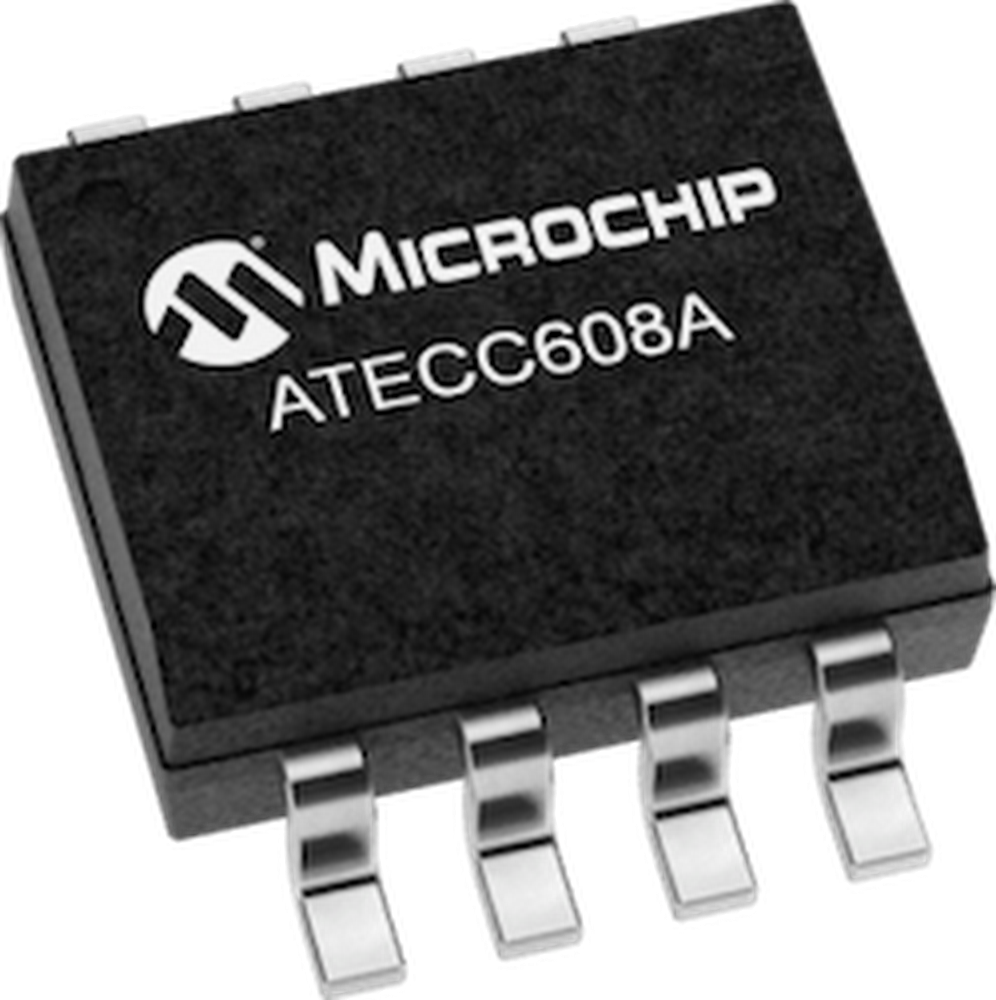
Maintaining the security of your products, devices, and live code is a perpetual necessity. Every year, researchers (and hackers!) unearth some new flaw. Occasionally, they prove to be especially worrisome, like the “Meltdown” and “Spectre” vulnerabilities discovered by Google’s Project Zero team at the end of 2017.Many companies believe they are too small or too inconsequential to ever be a target, but in the case of a distributed denial of service attacks (DDoS) for example, hacks will exploit random hosts (as many as possible) to hit a specific target. Regardless of who owns the site, the attacker will try to use all available local resources to do some damage. This can be compute and bandwidth resources, or exposing assets or personal information about users. The “Mirai” attack on IoT devices didn’t target anyone in particular, but aimed to take over connected devices in order to deploy them in rogue and massively distributed denial of service (DDoS) attacks.Security cannot be an afterthought. The best course of action from any company building connected devices is to apply a combination of strong identity, encryption, and access control. In the world of IoT, this process is not as simple as it sounds.Here we present the story of Acme, a hypothetical company planning to launch a new generation of connected devices.Acme has several work streams for its project: mechanical design, PCB design, supply chain, firmware development, network connectivity, cloud back-end, mobile and web applications, data processing and analytics, and support. Let’s look at what each of these workstreams demand in terms of security, starting with the application layer.Application layer securityAt this layer, where the backend and user applications are delivered, the security models are well understood—access controls via permissions, roles, strong passwords, encryption in transit and at rest, logging, and monitoring all provide a very good set of security measures. The main problem today is deciding how a company should best get its data into the cloud securely.Data encryptionEncryption starts with Transport Layer Security (TLS), which ensures that traffic between two parties is indecipherable to any potential eavesdropper. TLS is used very commonly for accessing websites—your bank’s site included—to ensure encryption of all transmitted data, keeping it safe from any prying eyes. Understandably, Acme wants to implement TLS for its devices as well as its services.There is a trick—when you connect to your bank, the TLS session is only authenticating the bank, not you or your machine. Once you have the TLS in place, you typically enter a username and password. That password can be changed and it is stored in your head (please, don’t keep a sticky note reminder below your keyboard). The fact that you have to use your head to put in the password is proof for the verifier that you are physically present at the other end of the connection. It’s says: “Here I am, and here is my password,” but your device is not a person. A device sending a password proves that it has the password, but not that it is actually the expected device trying to authenticate. It’s similar to someone stealing your sticky note with your password on it. To address this issue, Acme will install certificates on its devices.A certificate uses asymmetric cryptography, which implies a separation of roles. The party issuing the certificate (the Certificate Authority) guarantees the link between the physical device and the public key. Having the public key alone is insufficient. Furthermore, the verifier never gets anything of value (like the password) to be able to authenticate the entity (device). This is in fact a much higher level of security, but unfortunately it brings a level of complexity into the picture. The good news is that machines are good at both automating repetitive tasks and handling complexity.Device identityHow does Acme use certificates for its devices? It needs its own Certificate Authority (CA). Acme can buy a root certificate from a CA provider and create its Authority. The CA has a root certificate and private key that has to be closely guarded—in the digital era, this is the key to the kingdom. That key can be used to generate an intermediate CA with the purpose of signing others keys, for example, the connected devices. If the root key is compromised, the entire security chain is compromised. If an intermediary CA is compromised, it’s not good, but remediation steps can be taken, like revoking all certificates generated by that CA, and a new intermediary CA can be generated. Acme is aware of how difficult it is to protect the root key and decides to buy that service from a company specialized in that regard.Manufacturing securityNow that Acme and its engineering team have a CA, they can generate certificates for their devices. These are called “key pairs”—a set of private keys and corresponding public keys alongside a unique certificate for each device. These certificates need to be put on each device. This is where friction enters the process. Acme, after validating a final hardware design for its device, has found an ODM (Original Design Manufacturer) in China capable of producing them at a reasonable price.Acme asks the ODM that during the manufacturing, each device is flashed with its unique key pair and certificate. The ODM replies that this will be a custom flashing per device and will add dozens of cents to each product. Indeed, custom flashing is expensive. This increase wasn’t really planned for Acme, but security is too important and they decide to move forward with the extra cost.To get the certificates to the ODM, Acme has two choices: (1) Send a big file with all the keys and certificates to the ODM, or (2) Have an API that can be called during manufacturing, so the ODM can retrieve the certificates at the time of flashing. The ODM pushes back on the second option because their manufacturing plant is not connected to the internet for security purposes. Even if it were, each API call would drastically slow down the manufacturing process, and those calls would have to be extremely reliable so that there is no failure. The calls would have to be highly secure, even requiring a certificate based authentication between the manufacturing plant and the API endpoint. Furthermore, regulations in China do not allow fully encrypted tunnels in and out of the country. The only option seems to be to send a file.The risk of doing this is obvious. A file can be easily copied, which unfortunately happens frequently. Acme needs to trust the manufacturer to not set aside a few of those certificates, and to not release copies of the devices themselves that would be indistinguishable from the real ones. (Except for price, of course!) Every new batch will require a new file, and new opportunities for a copy to leak.AuthenticationLet’s assume for now that the ODM is trustworthy, which is in fact often the case. The device will have to use the certificate to authenticate itself with the cloud endpoint and establish the encrypted channel prior to operation. Just to say hello securely, the device first needs to open a secure pipe (over TLS), and then needs to use that pipe for the cloud and device to mutually authenticate each endpoint’s respective identity. This process requires both the device and the cloud endpoint to have the public key of the other party. Public keys of all devices connecting to the cloud endpoint will have to be uploaded to the cloud at one point or another before the authentication happens.To perform the mutual authentication, the device will have to store its private key, public key, a TLS stack with mutual authentication, a certificate with the public key of the endpoint to connect to in the Cloud to establish the first call to the cloud securely. All of a sudden, the memory requirements on the device becomes a problem. That minimum stack is in the order of a few hundred kilobytes. Acme didn’t plan on that much. The devices have simple command and control systems and a few sensors in it. The non-volatile storage capacity of the device is well under 100 kB and is insufficient. Acme will need to move to a more powerful architecture and add costs to the original design.Secure storage and secure bootWith more memory (and added costs), Acme is now looking for the best way to store the private key securely. Indeed, what use is a private key if someone can access the device firmware by physically hacking into it or remotely take control and retrieving the private key? Doing so will allow the attacker to copy the private key and start connecting to the cloud endpoint and access data it’s not supposed to.In case the device is compromised, the firmware of the device can be modified, which is exactly what Mirai does, and it can be used for other purposes than what it was intended for. Validating the firmware through a signature verification is critical to ensure what runs on the device is valid before it even boots the firmware. There is no way to prevent a modification of this signature if the validation is not in a separate memory location from the firmware itself.Rotating keysSimilarly to how a user changes their password from time to time to reduce the window of opportunity for an attacker to use a compromised password, devices need to be able to rotate their keys. That rotation is not as simple as getting a new key. Imagine the cloud system tells the device to change its keys. The cloud can generate a new pair, the device can download it securely using the old key. The cloud then invalidates the old public key for the device and replaces it with the new one. You have to hope that the device will be able to update its key pair at this stage, because if not, the user will end up with a brick. It is critical that several keys can be used simultaneously for a single device to enable a rotation of keys and enable reverting to a working state in case the process fails.Summary of the situationThe cost of securing the device has skyrocketed for Acme, as well as the complexity to implement and maintain a high level of security. Let’s summarize:Acme needs certificates and therefore a Certificate Authority that needs to be protected with the highest level of care.The cost of burning those keys in the device is a balance between dollar amounts (and finding an appropriate ODM), and the risk of credentials being compromised (copied) during manufacture.Acme will need to use TLS to secure the communication which now requires a bloated TLS stack on the device and a larger memory footprint than they anticipated. These resource demands increase  after you integrate Online Certificate Status Protocol (OCSP for the broker), which requires additional (memory-consuming) keys and (CPU-consuming) requests.Keys are extremely difficult, if not impossible to store securely in the firmware.Secure boot to stop the device from running a compromised firmware is impossible without a separate secure storage.Refreshing keys requires the ability from the cloud solution to store several identities in order to have a failsafe.At Google, we have given a hard look at this situation, and we believe we have come up with a solution that can serve companies like Acme very well. The main demonstration of this solution is through our partnership with Microchip.Step 1: Use a secure elementA secure element is a piece of hardware that can securely store key material. It usually comes with anti-tampering capabilities which will block all attempts to physically hack the device and retrieve the keys.All IoT devices should have a secure element. It is the only way to secure the storage of the private key. All secure elements will do that well, but some secure elements will do more. For example, the Microchip ATECC608A cryptographic coprocessor chip will not only store the private keys, it will also validate the firmware and offer a more secure boot process for the device.Microchip ATECC608AThe ATECC608A offers even more features. For example, the private key is generated by the secure element itself, not an external party (CA). The chip uses a random number generator to create the key, making it virtually impossible to derive. The private key never leaves the chip, ever. Using the private key, the chip will be able to generate a public key that can be signed by the chosen CA of the company.Microchip performs this signature in a dedicated secure facility in the US, where an isolated plant will store the customer’s intermediate CA keys in a highly secure server plugged into the manufacturing line. The key pairs and certificates are all generated in this line in a regulatory environment which allows auditing and a high level of encryption.Once the secure elements have each generated their key pairs, the corresponding public keys are sent to the customer’s Google Cloud account and stored securely in the Cloud IoT Core device manager. Because Cloud IoT Core can store up to 3 public keys per device, key rotation can be performed with failsafe without issues.All the customer has to do is provide an intermediary CA for a given batch of devices to Microchip, and they will return a roll of secure elements. These rolls can be sent to any manufacturer to be soldered onto the final PCB at high speed, with no customization, no risk of copy, and very low cost.Step 2: Using a JWT for authenticationUsing TLS is perfect for securing the communication between the device and the cloud, but the authentication stack is not ideal for IoT. The stack required for mutual authentication is large in size and has a downside: it needs to be aware of where the keys are stored. The TLS stack needs to know what secure element is used and how to communicate with it. An OpenSSL stack will assume the keys are stored in a file system and need to be modified to access the secure element. This requires development and testing that has to be done again at each update of the stack. With TLS 1.3 coming up, it is likely that this work will have to happen several times, which is a cost for the company. The company can use a TLS stack that is already compatible with the secure element, like WolfSSL, but there is a licensing cost involved that adds to the cost of the device.Google Cloud IoT is using a very common JWT (JSON Web Token) to authenticate the device instead of relying on the mutual authentication of a TLS stack.The device will establish a secure connection to the global cloud endpoint for Cloud IoT Core (mqtt.googleapis.com) using TLS, but instead of triggering the mutual authentication it will generate a very simple JWT, sign it with its private key and pass it as a password. The Microchip ATECC608 offers a simple interface to sign the device JWT securely without ever exposing the private key. The JWT is received by Google Cloud IoT, the public key for the device is retrieved and used to verify the JWT signature. If valid, the mutual authentication is effectively established. The JWT validation can be set by the customer but never exceeds 24 hours, making it very ephemeral.Secure flow with Microchip and Cloud IoT’s Device ManagerThere are several benefits to this approach:There is no dependency on the TLS stack used to perform the device authentication. Updating the TLS stack to 1.3 will be a breeze.The devices do not need to store their public key and certificate, which releases a significant portion of memory on the device.The device does not need to host a full TLS stack, which again releases memory for the application.The memory requirements are well under 50KB, which opens the door to using a much smaller MCU (microcontroller unit).With these two steps, the full complexity of handling certificates is removed and customers can focus on their product and customer experience.ConclusionSecurity is complex, and as we alluded to in the introduction, it cannot be an afterthought. Fortunately, with the use of the JWT authentication scheme, and the partnership with Microchip around the ATECC608, security is turned into a simple BOM item. Google and Microchip even agreed on a discounted price of around 50 cents. This means customers pay less than a dollar to not only bring increased security to the provisioning of identity, authentication, and encryption, but also to free up a large amount of space on the device, enabling smaller and cheaper MCUs to work in the final design.The chip can even be retrofitted into existing designs as a companion chip since the secure element communicates easily over I2C. We hope you’ll consider integrating the ATECC608 in every IoT design you are looking into.To learn more, take a look at the following links:Google Cloud IoT Core product pageMicrochip-Google partnership pageGoogle Cloud IoT Security webinarWe’ll also be presenting our work around IoT and security at Google Cloud’s NEXT 2018 event on July 24-26 in San Francisco. Here are a couple sessions you might be interested in:An overview of Cloud IoT CoreGoogle’s vision for Industrial IoTRegister here
Quelle: Google Cloud Platform

Introducing Spinnaker for Google Cloud Platform—continuous delivery made easy

Development teams want to adopt continuous integration (CI) and continuous delivery (CD), to identify and correct problems early in the development process, and to make the release process safe, low-risk, and quick. However, with CI/CD, developers often spend more time setting up and maintaining end-to-end pipelines and crafting deployment scripts than writing code.Spinnaker, developed jointly by Google and Netflix, is an open-source multi-cloud continuous delivery platform. Companies such as Box, Cisco, and Samsung use Spinnaker to create fast, safe, repeatable deployments. Today, we are excited to introduce the Spinnaker for Google Cloud Platform solution, which lets you install Spinnaker in Google Cloud Platform (GCP) with a couple of clicks, and start creating pipelines for continuous delivery.Spinnaker for GCP comes with built-in deployment best practices that can be leveraged whether teams’ resources (source code, artifacts, other build dependencies) are on-premises or in the cloud. Teams get the flexibility of building, testing, and deploying to Google-managed runtimes such as Google Kubernetes Engine (GKE), Google Compute Engine (GCE), or Google App Engine (GAE), as well as other clouds or on-prem deployment targets for hybrid and multi-cloud CD. Spinnaker for GCP integrates Spinnaker with other Google Cloud services, allowing you to extend your CI/CD pipeline and integrate security and compliance in the process. For instance, Cloud Build gives you the flexibility to create Docker containers or non-container artifacts.Likewise, integration with Container Registry vulnerability scanning helps to automatically scan images, and Binary Authorization ensures that you only deploy trusted container images. Then, for monitoring hybrid deployments, you can use Stackdriver to gain insights into visibility into the performance, uptime, and overall health of your application, and of Spinnaker itself.Google’s Chrome Ops Developer Experience team uses Spinnaker to deploy some of their services:”Getting a new Spinnaker instance up and running with Spinnaker for GCP was really simple,” says Ola Karlsson, SRE on the Chrome Ops Developer Experience team. “The solution takes care of the details of managing Spinnaker and still gives us the flexibility we need. We’re now using it to manage our production and test Spinnaker installations.” Spinnaker for GCP lets you add sample pipelines and applications to Spinnaker that demonstrate best practices for deployments to Kubernetes, VMs and more. DevOps teams can use these as starting points to provide “golden path” deployment pipelines tailored to their company’s requirements.“We want to make sure that the solution is great both for developers and DevOps or SRE teams,“ says Matt Duftler, Tech Lead for Google’s Spinnaker effort. “Developers want to get moving fast with the minimum of overhead. Platform teams can allow them to do that safely by encoding their recommended practice into Spinnaker, using Spinnaker for GCP to get up and running quickly and start onboard development teams.”The Spinnaker for GCP advantageThe availability of Spinnaker for GCP gives customers a fast and easy way to set up Spinnaker in a production-ready configuration, optimized for GCP. Some other benefits include: Secure installation: Spinnaker for GCP supports one-click HTTPS configuration with Cloud Identity Aware Proxy (IAP), letting you control who can access the Spinnaker installation.Automatic backups: The configuration of your Spinnaker installation is automatically backed up securely, for auditing and fast recovery.Integrated auditing and monitoring: Spinnaker for GCP integrates Spinnaker with Stackdriver for simplified monitoring, troubleshooting and auditing of changes and deployments.Simplified maintenance: Spinnaker for GCP includes many helpers to simplify and automate maintenance of your Spinnaker installations, including configuring Spinnaker to deploy to new GKE clusters and GCE or GAE in other GCP projects.Existing Spinnaker users can migrate to Spinnaker for GCP today if they’re already using Spinnaker’s Halyard tool to manage their Spinnaker installations.
Quelle: Google Cloud Platform

A dozen reasons why Cloud Run complies with the Twelve-Factor App methodology

With the recent release of Cloud Run, it’s now even easier to deploy serverless applications on Google Cloud Platform (GCP) that are automatically provisioned, scaled up, and scaled down. But in a serverless world, being able to ensure your service meets the twelve factors is paramount. The Twelve-Factor App denotes a paradigm that, when followed, should make it frictionless for you to scale, port, and maintain web-based software as a service. The more factors your environment has, the better.So, on a scale of 1 to 12, just how twelve-factor compatible is Cloud Run? Let’s take the factors, one by one. The Twelve FactorsI. CODEBASEOne codebase tracked in revision control, many deploysEach service you intend to deploy on Cloud Run should live in its own repository, whatever your choice of source control software. When you want to deploy your service, you need to build the container image, then deploy it. For building your container image, you can use a third-party container registry, or Cloud Build, GCP’s own build system. You can even supercharge your deployment story by integrating Build Triggers, so any time you, say, merge to master, your service builds, pushes, and deploys to production.You can also deploy an existing container image as long as it listens on a PORT, or find one of the many sporting a shiny Deploy on Cloud Run button. II. DEPENDENCIESExplicitly declare and isolate dependenciesSince Cloud Run is a Bring-Your-Own container environment, you can declare whatever you want in this container, and the container encapsulates the entire environment. Nothing escapes, so two containers won’t conflict with each other. When you need to declare dependencies, these can be captured using environment variables, keeping your service stateless.It is important to note that there are some limitations to what you can put into a Cloud Run container due to the environment sandboxing, and what ports can be used (which we’ll cover later in Section VII.)III. CONFIGStore config in the environmentYes, Cloud Run supports stored configuration in the environment by default. And it’s mandatory. You must listen for requests on PORT, otherwise your service will fail to start. To be truly stateless, your code goes in your container, and configurations are decoupled by way of environment variables. These can be declared when you create the service, in the Optional Settings. Don’t worry if you miss this setting when you declare your service. You can always edit it again by clicking “+ Deploy New Revision” when viewing your service, or by using the –update-env-vars flag in gcloud beta run deployEach revision you deploy is not editable, which means revisions are reproducible, as the configuration is frozen. To make changes you must deploy a new revision. For bonus points, consider using berglas, which leverages Cloud KMS and Cloud Storage to secure your environment variables. It works out of the box with Cloud Run (and the repo even comes with multiple language examples).IV. BACKING SERVICESTreat backing services as attached resourcesMuch like you would connect to any external database in a containerized environment, you can connect to a plethora of different hosts in the GCP universe.And since your service cannot have any internal state, to have any state you must use a backing service.V. BUILD, RELEASE, RUNStrictly separate build and run stagesHaving separate build and run stages is how you deploy in Cloud Run land! If you set up your Continuous Deployment back in Section I, then you’ve already automated that step. If you haven’t, building a new version of your Cloud Run service is as easy as building your container image: gcloud builds submit –tag gcr.io/YOUR_PROJECT/YOUR_IMAGE .to take advantage of Cloud Build, and deploying the built container image: gcloud beta run deploy –image gcr.io/YOUR_PROJECT/YOUR_IMAGE YOUR SERVICECloud Run creates a new revision of the service, ensures the container starts, and then re-routes traffic to this new revision for you. If for any reason your container image encounters an error, the service is still active with the old version, and no downtime occurs. You can also create continuous deployment by configuring Cloud Run automations using Cloud Build triggers, further streamlining your build, release, and run process. VI. PROCESSESExecute the app as one or more stateless processesEach Cloud Run service runs its own container, and each container should have one process. If you need multiple concurrent processes, separate those out into different services, and use a stateful backing service (Section IV) to communicate between them. VII. PORT BINDINGExport services via port bindingCloud Run follows the modern architecture best practices and each Service must expose themselves on a port number, specified by the PORT environment variable. This is the fundamental design of Cloud Run: any container you want, as long as it listens on port 8080.Cloud Run does support outbound gRPC and WebSockets, but does not currently work with these protocols inbound.VIII. CONCURRENCYScale out via the process modelConcurrency is a first-class factor in Cloud Run. You declare what the maximum number of concurrent requests your container can receive. If the incoming concurrent request count exceeds this number, Cloud Run will automatically scale by adding more container instances to handle all incoming requests. IX. DISPOSABILITYMaximize robustness with fast startup and graceful shutdownSince Cloud Run handles scaling for you, it’s in your best interest to ensure your services are the most efficient they can be. The faster they are to startup, the more seamless scaling can be. There are a number of tips around how to write effective services, so be sure to consider the size of your containers, the time they take to startup, and how gracefully they handle errors without terminating. X. DEV/PROD PARITYKeep development, staging, and production as similar as possibleA container-based development workflow means that your local machine can be the development environment, and Cloud Run can be your production environment! Even if you’re running on a non-Linux environment, a local Docker container should behave in the same way as the same container running elsewhere. It’s always a good idea to test your container locally when developing. Testing locally helps you achieve a more efficient iterative development strategy, allowing you to work more effectively. To ensure that you get the same port-binding behaviour as Cloud Run in production, make sure you run with a port flag: PORT=8080 && docker run -p 8080:${PORT} -e PORT=${PORT} gcr.io/[PROJECT_ID]/[IMAGE]When testing locally, consider if you’re using any GCP external services, and ensure you point Docker to the authentication credentials. Once you’ve confirmed your service is sound, you can deploy the same container to a staging environment, and after confirming it’s working as intended there, to a production environment. A GCP Project can host many services, so it’s recommended that your staging and production (or green and blue, or however you wish to call your isolated environments) are separate projects. This also ensures isolation between databases across environments. XI. LOGSTreat logs as event streamsCloud Run uses Stackdriver Logging out of the box. The “Logs” tab on your Cloud Run service view will show you what’s going on under the covers, including log aggregation across all dynamically created instances. Stackdriver Logging automatically captures stdout and stderr, and there may also be a native client for Logging in your preferred programming language. In addition, since logs are captured in Stackdriver Logging, you can then use the tools available for StackDriver logging to further work with your logs; for example, exporting to Big Query. XII. ADMIN PROCESSESRun admin/management tasks as one-off processesAdministration tasks are outside the scope of Cloud Run. If you need to do any project configuration, database administration, or other management changes, you can perform these tasks using the GCP Console, gcloud CLI, or Cloud Shell. A near-perfect score, as a matter of fact(or)With the exception of one factor being outside of scope, Cloud Run maps near perfectly with Twelve-Factor, which means it will map well to scalable, manageable infrastructure for your next serverless deployment.  To learn more about Cloud Run, check out this quickstart. 
Quelle: Google Cloud Platform

Introducing the What-If Tool for Cloud AI Platform models

Last year our TensorFlow teamannounced theWhat-If Tool, an interactive visual interface designed to help you visualize your datasets and better understand the output of your TensorFlow models. Today, we’re announcing a new integration with the What-If Tool to analyze your models deployed onAI Platform. In addition to TensorFlow models, you can also use the What-If Tool for your XGBoost and Scikit Learn models deployed on AI Platform.As AI models grow in complexity, understanding the inner workings of a model makes it possible to explain and interpret the outcomes driven by AI. As a result, AI explainability has become a critical requirement for most organizations in industries like financial services, healthcare, media and entertainment, and technology. With this integration, AI Platform users can develop a deeper understanding of how their models work under different scenarios, and build rich visualizations to explain model performance to business users and other stakeholders of AI within an enterprise.With just one method call, you can connect your AI Platform model to the What-If Tool:You can use this new integration from AI Platform Notebooks, Colab notebooks, or locally via Jupyter notebooks. In this post, we’ll walk you through an example using an XGBoost model deployed on AI Platform.Getting started: deploying a model to AI PlatformIn order to use this integration, you’ll need a model deployed on Cloud AI Platform. Once you’ve trained a model, you can deploy it to AI Platform using the gcloud CLI. If you don’t yet have a Cloud account, we’ve got one notebook that runs the What-if Tool on a public Cloud AI Platform model so you can easily try out the integration before you deploy your own.The XGBoost example we’ll be showing here is a binary classification model for predicting whether or not a mortgage application will be approved, trained on this public dataset. In order to deploy this model, we’ve exported it to a .bst model file (the format XGBoost uses) and uploaded this to a Cloud Storage bucket in our project. We can deploy it with this command (make sure to define the environment variables when you run this):Connecting your model to the What-If ToolOnce your model has been deployed, you can view its performance on a dataset in the What-If Tool by setting up a WitConfigBuilder object as shown in the code snippet above. Provide your test examples in the format expected by the model, whether that be a list of JSON dictionaries, JSON lists, or tf.Example protos. Your test examples should include the ground truth labels so you can explore how different features impact your model’s predictions. Point the tool at your model through your project name, model name, and model version, and optionally set the name of the feature in the dataset that the model is trying to predict. Additionally, if you want to compare the performance of two models on the same dataset, set the second model using the set_compare_ai_platform_model method. One of our demo notebooks shows you how to use this method to compare tf.keras and Scikit Learn models deployed on Cloud AI Platform.Understanding What-If Tool visualizationsClick here for a full walkthrough of the features of the What-If Tool.The initial view in the tool is the Datapoint Editor, which shows all examples in the provided dataset and their results from prediction through the model:Click on any example in the main panel to see its details in the left panel. You can change anything about the datapoint and run it again through the model to see how the changes affect prediction. The main panel can be organized into custom visualizations (confusion matrices, scatter plots, histograms, and more) using the dropdown menus at the top. Click the partial dependence plot option in the left panel to see how changing each feature individually for a datapoint causes the model results to change, or click the “Show nearest counterfactual datapoint” toggle to compare the selected datapoint to the most similar datapoint that the model predicted a different outcome for.The Performance + Fairness tab shows aggregate model results over the entire dataset:Additionally, you can slice your dataset by features and compare performance across those slices, identifying subsets of data on which your model performs best or worst, which can be very helpful for ML fairness investigations.Using What-If Tool from AI Platform NotebooksThe WitWidget comes pre-installed in all TensorFlow instances of AI Platform Notebooks.You can use it in exactly the same way as we’ve described above, by calling set_ai_platform_model to connect the What-If Tool to your deployed AI Platform models.Start buildingWant to start connecting your own AI Platform models to the What-If Tool? Check out these demos and resources:Demo notebooks: these work on Colab, Cloud AI Platform Notebooks, and Jupyter. If you’re running them from AI Platform Notebooks, it will work best if you use one of the TensorFlow instance types.XGBoost playground example: connect the What-If Tool to an XGBoost mortgage model already deployed on Cloud AI Platform. No Cloud account is required to run this notebook.End-to-end XGBoost example: train the XGBoost mortgage model described above on your own project, and use the What-If Tool to evaluate it.tf.keras and Scikit Learn model comparison: build tf.keras and Scikit Learn models trained on the UCI wine quality dataset and deploy them to Cloud AI Platform. Then use the What-If Tool to compare them.What-If Tool: For a detailed walkthrough of all the What-If Tool features, check out their guide or the documentation.We’re actively working on introducing more capabilities for model evaluation and understanding within the AI Platform to help you meaningfully interpret how your models make predictions, and build end user trust through model transparency. And if you use our new What-If Tool integration we’d love your feedback. Find us on Twitter at @SRobTweets and @bengiswex.
Quelle: Google Cloud Platform

Operate with confidence: Keeping your functions functioning with monitoring, logging and error reporting

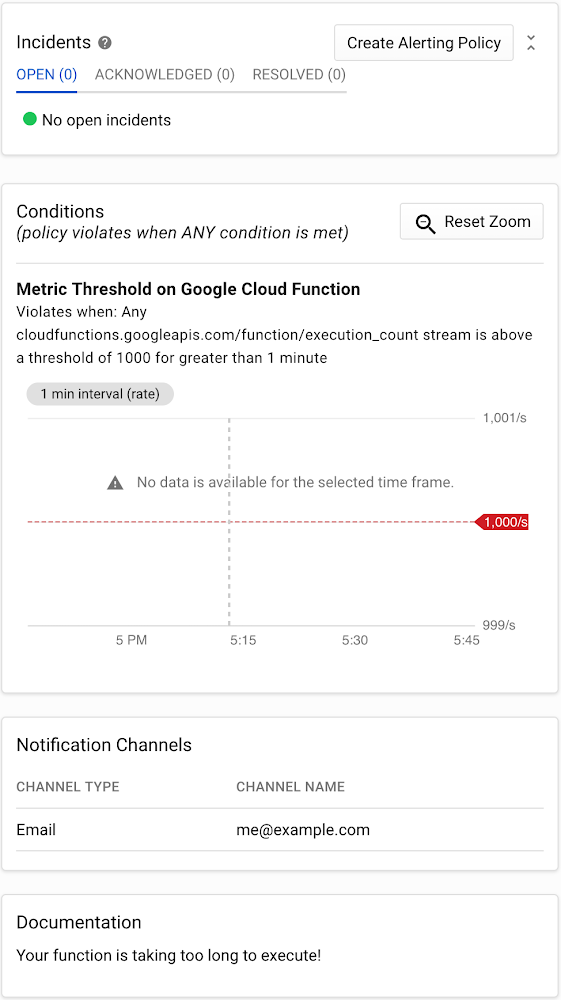
If you want to keep bugs from making it into production, it’s important to have a comprehensive testing plan that employs a variety of techniques. But no matter how complete your plan might be, tests are bound to miss bugs every now and then, which get pushed into production.In our previous post, Release with confidence: How testing and CI/CD can keep bugs out of production, we discussed ways to reduce bugs in a Cloud Functions production environment. In this post, we’ll show you how to find bugs that did slip through as quickly and painlessly as possible by answering two basic questions: if there is a problem in our code, and where in our codebase that problem occurred.  To do this, you have to monitor your functions and keep an eye out for unusual values in key metrics. Of course, not all unusual values are due to errors—but the occasional false alarm is almost always better than not getting an alert when something goes wrong. Then, once you have monitoring in place and are receiving alerts, examining function and error logs will help you further isolate where the bugs are happening, and why.  Stackdriver, Google Cloud’s provider-agnostic suite of monitoring, logging, and Application Performance Management (APM) tools, is a natural starting point for monitoring your Cloud Functions. Stackdriver Monitoring’s first-party integration with Cloud Functions makes it easy to set up a variety of metrics for Cloud Functions deployments.Stackdriver Monitoring is typically used along with a set of companion Stackdriver tools, including Logging, Error Reporting, and Trace. Stackdriver Logging and Error Reporting are natively integrated with Cloud Functions, and Stackdriver Trace is relatively simple to install.Monitoring: Is there a problem?Once you have a monitoring stack in place, it’s time to go bug hunting! When looking for bugs in production, the first thing you want to know is if there is a problem in your code. The best way to answer this question is to set up a monitoring and alerts policy with different types and levels of monitoring. Generally speaking, the more metrics you monitor, the better. Even if you don’t have  time to implement a comprehensive level of monitoring from the start, some is always better than none. Also, you don’t have to set up your monitoring all at once—start with the basics and build from there. Basic monitoringThe first level of monitoring is to set up alerts for when severe log entries, such as errors, become too frequent. A good rule of thumb is to consider errors that are greater than a certain percentage of function invocations. Of course, this percentage will depend on your use case. For stable mission-critical applications, you might send an alert if 0.5%, 0.1%, or even 0.01% of your invocations fail. For less critical and/or unstable applications, alert thresholds of 1% – 5% can help reduce the likelihood of receiving too many false alarms.Intermediate monitoringNext, you should set up alerts for when certain metrics exceed normal limits. Ideally this should be built on top of error monitoring, since different monitoring techniques catch different potential issues. Two metrics that are particularly useful are execution time and invocation count. As their names suggest, execution time measures the amount of time it takes your function to execute, and invocation count is the number of times a function is called during a certain time period. Once you’ve set up the triggers you want to monitor, you need to calibrate your alerts. That may take some time depending on your application. Your goal should be to find a range that avoids getting too many or too few alerts. It can be tempting to set relatively low alert thresholds, on the theory that it’s better to receive more alerts than fewer. This is generally true, but at extreme levels, you may find yourself getting too many alerts, leading you to ignore potential emergencies. The reverse is also true: If your metrics are too lax, you may not get an alarm at all and miss a significant issue.Generally, for both metrics, it’s ideal to set alert thresholds of about two-to-four times greater than your normal maximums and .25-.5 times your normal minimums. Advanced monitoringA step up from monitoring execution time and invocation count is to monitor your functions’ memory use, using Stackdriver HTTP/S uptime checks (for HTTP/S-triggered functions), and monitoring other components of your overall application (such as any Cloud Pub/Sub topics that trigger functions). Again, finding the sweet spot of when to get alerts is critical.An example Stackdriver alerting policy that emails you when your functions take too long to complete.Logging and error reporting: Where’s the broken code?Once you’re alerted to the fact that something is wrong in your production environment, the next step is to determine where it’s broken. For this step, we can take advantage of Stackdriver Logging and Error Reporting.Stackdriver Logging stores and indexes your function logs. Error Reporting aggregates and analyzes these logs in order to generate meaningful reports. Both features are relatively easy to use, and together they provide critical information that helps you quickly determine where errors are occurring.In our example above, the log shows an error: “Uninitialized email address.” By looking at the report for this error, we can find several important pieces of information:The name of the Cloud Function involved (onNewMessage)How many times the error  has occurredWhen the error started: It first occurred 13 days ago and was last seen six days ago.Data points like these make the process of pinpointing and fixing production errors much quicker, helping to reduce the impact of bugs in production.Bugs begoneTesting is rarely perfect. A solid monitoring system can provide an additional line of defense against bugs in production, and Stackdriver tools provide all the monitoring, logging, and error reporting you need for your Cloud Functions applications. Combined with the lessons from the first post of this series on testing and CI/CD, you can reduce the number of bugs that slip into your production environment, and minimize the damage caused by those that do find their way there.
Quelle: Google Cloud Platform