VMware Cloud Foundation comes to Google Cloud

Our enterprise customers repeatedly tell us how important it is to get their priority workloads running in the cloud. These priority workloads include several commonly utilized enterprise solutions, like those offered by SAP and Oracle, and virtualization solutions from VMware.Today, we’re excited to announce that Google Cloud will begin supporting VMware workloads. It’s another significant step as we strive to better serve our enterprise customers.Both Google Cloud and VMware believe that customers want to run workloads in the cloud that works best for them. At Google Cloud, we are committed to offering solutions that let our customers to do just that. Customers have asked us to provide broad support for VMware, and now with Google Cloud VMware Solution by CloudSimple, our customers will be able to run VMware vSphere-based workloads in GCP. This brings customers a wide breadth of choices for how to run their VMware workloads in a hybrid deployment, from modern containerized applications with Anthos to VM-based applications with VMware in GCP.“Our partnership with Google Cloud has always been about addressing customers’ needs, and we’re excited to extend the partnership to enable our mutual customers to run VMware workloads on VMware Cloud Foundation in Google Cloud Platform,” said Sanjay Poonen, chief operating officer, customer operations at VMware. “With VMware on Google Cloud Platform, customers will be able to leverage all of the familiarity and investment protection of VMware tools and training as they execute on their cloud strategies, and rapidly bring new services to market and operate them seamlessly and more securely across a hybrid cloud environment.”This new solution will leverage VMware software-defined data center (SDCC) technologies including VMware vSphere, NSX and vSAN software deployed on a platform administered by CloudSimple for GCP. This means customers will be able to migrate VMware workloads to a VMware SDDC running in GCP, benefiting from GCP strengths such as our performant, secure, global and scalable infrastructure and our leading data analytics, AI and ML capabilities. Users will have full, native access to the full VMware stack including vCenter, vSAN and NSX-T. Google Cloud will provide the first line of support, working closely with CloudSimple to help ensure customers receive a streamlined product support experience and that their business-critical applications are supported with the SLAs that enterprise customers need.This collaboration builds on a history of partnership with VMware. Over the course of our partnership, we’ve delivered integrated solutions including:Google Cloud integrations for VMware NSX Service Mesh and SD-WAN by VeloCloud that allow customers to easily deploy and gain visibility into their hybrid workloads—wherever they’re running.Google Cloud’s Anthos on VMware vSphere, including validations for vSAN, as the preferred hyperconverged infrastructure, to provide customers an innovative multi-cloud solution and providing Kubernetes users the ability to create and manage persistent storage volumes for stateful workloads on-premises.AGoogle Cloud plug-in for VMware vRealize Automation providing our customers with a seamless way to deploy, orchestrate and manage Google Cloud resources from within their vRealize Automation environment.We are committed to working closely with our partners to deliver the solutions and products customers need to solve business issues and innovate in new areas. In partnership with VMware, we are committed to making Google Cloud the best place to run VMware workloads.Google Cloud VMware Solution by CloudSimple will be available on the Google Cloud Marketplace later this year. Interested customers can sign up to receive updates here.
Quelle: Google Cloud Platform

A sound investment: How Monex is building a fintech ecosystem with APIs

Editor’s note:Today’s post comes from Daisuke Houki of Monex, Inc.., a Japanese online securities firm specializing in individual investors. Monex uses Apigee to improve security and speed when sharing its APIs with fintech partners.At Monex, our aim is to provide our investors with the best financial services and liberal access to capital markets. That means continually providing reliable and up-to-date services for our customers. But recently we’ve experienced issues updating our back-end system when installing new services or modifying existing ones. This led us to look into using an API, to save time and simplify the processes related to the development of new products and services. Using an API allows us to develop new investment services and smartphone apps more rapidly, reducing the time to market. These new opportunities encouraged us to publish our API for everyone in the fintech business that’s developing new apps—with the aim to create even more opportunities for the industry.Security and performance upgradesBefore we made our API available, our partner fintech firms relied on a method called “scraping” in order to display their customers’ portfolio balances in apps. Unfortunately, this method couldn’t provide the standard of performance and quality sought by fintech businesses. In essence, when we developed and published our API, we made a resource available that improves security and performance for our business partners, and also simplifies the creation of new services by FinTech businesses. By placing Monex at the center of this fintech ecosystem and increasing the use of our API, we hope to enable users to access a variety of third-party services directly from their Monex accounts.While we initially had a small development team of four members passionately working on the API program, continuing to develop and manage an on-premises API gateway was not the best way forward. That’s because even though  Monex API is compatible with OAuth 2.0, developing this compatibility from scratch would be time-consuming and expensive. Plus, operating an API gateway on premises would require significant manpower. To address this, we settled on the Apigee API management platform for development, publication, and management, to maximize functionality and reduce costs. This platform makes it simple to issue access tokens and its authentication mechanisms can use our existing back-end without the need for changes.Becoming a hub for FinTech appsWe also discovered that the Apigee monitoring and analysis functions are extremely effective for diagnosing errors in our back-end. For us, the greatest benefit of the Apigee platform is that we have achieved major reductions in development times by leaving the API service management to Apigee. With so many functions embedded into Apigee, our API and app development have accelerated. We have currently published about 15 APIs for internal and external developers to support a more effective display of share and investment portfolio balance data for the end user. We are also progressing with the internal development of products that use our API, while supporting partner app development within our company’s ecosystem. Going forward, we will continue our efforts to become an integrated hub for financial services that meet our customers’ needs, and to expand our ecosystem with participation from FinTech developers.To learn more about API management on Google Cloud, visit the Apigee page.
Quelle: Google Cloud Platform

Brick by brick: Learn GCP by setting up a kid-controllable Minecraft server

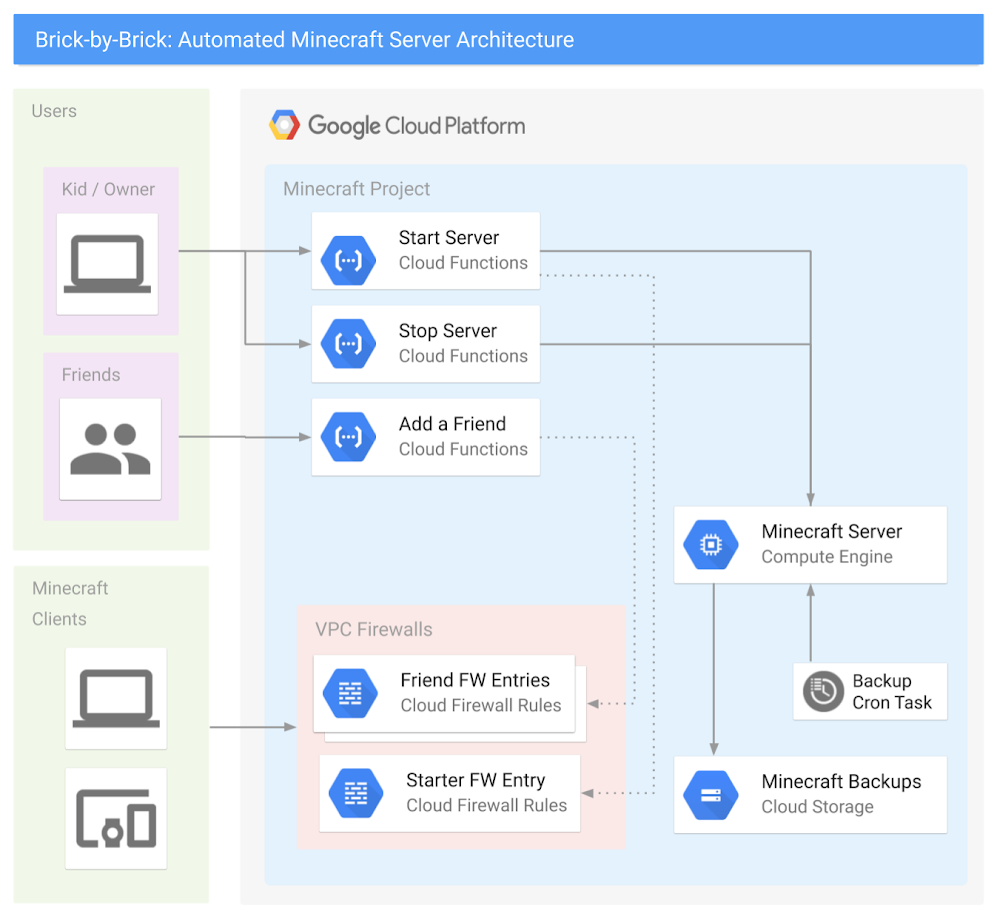
Learning a new cloud can be intimidating. In the past six years as a solution architect, I’ve had to learn AWS, Azure, and most recently Google Cloud Platform (GCP), and the incredible array of technologies, products, and vendors can make it seem like an impossible mountain to climb. Even moving between major cloud providers can be difficult due to subtle, but meaningful, differences in products, acronyms, and company cultures. Each time I learn a new cloud platform, I do it the same way: by hyper-over-engineering a Minecraft server for my kids. As a parent of two kids who are crazy about the block building game, I do my fair share of playing along with them, building castles, gathering resources, and defending my home from zombies. Behind the scenes, I also help my kids run servers, install mods, and generally tweak the game to their liking. And sometimes, a real-life creeper explodes, something happens to their laptop or to the game files, and we have to start all over. If you’ve ever experienced the pain of losing a Minecraft world with diamond armor, a house in the clouds, and a functional roller coaster…well then, you know true sadness!In this post, I’m going to show you how I used GCP to build a kid-controllable, cloud-ready Minecraft server—one that’s easy to set up and begin playing with friends, and automatically backs itself up. Best of all, it’s 100% controllable by elementary-school-aged children—so they don’t have to wake you on a Saturday morning to reboot the system. Spoiler Alert: the final product is awesome, and it was surprisingly easy to build! Needless to say, I’ve played a lot more Minecraft with my kids since building this solution.The final architecture looked something like this:Don’t be intimidated by all of those lines—in fact, here’s a simplified one you can show your kids:The plan to survive your first night, and hitting your requirementsCreating a basic Minecraft server on GCP is actually pretty straightforward: You create a virtual machineInstall the Minecraft server softwareConfigure some Minecraft software start-up scripts. The GCP Solutions Architects have published an awesome guide, Setting Up a Minecraft Server on Google Compute Engine, and built a Qwiklab that will walk you through the basic setup.  Please make sure you have read and completed this solution before you continue, as this post will expand upon it further.  **If you want to level-up your Minecraft server to be kid-controllable, there are three additional requirements that your server needs to meet:It should be easy for kids to turn the entire server on and off.It should be easy for kids to invite their friends to play.It should automatically back up game files to prevent disaster.Let’s look at these one by one.Requirement #1: Easy on and offAs a parent, you have enough distractions. If your kids must find you to turn on the server, that’s a problem. They don’t have to do that for smartphone apps, and they don’t have to do that for console games. You want them to be able to simply push the power button. You also don’t want to give them access to the Google Cloud Console, as getting them to understand IAM roles or on-demand billing would be a lot of work. Ideally, you want an event-driven action that executes code in a secure way. This sounds like a job for Google Cloud Functions!With Cloud Functions you can create two serverless functions: start-minecraft-server and stop-minecraft-server. Both of these functions can use HTTP triggers, so you can run them simply by opening a URL! Just bookmark the URLs on your kids’ browser, and they can run the function instantly—without being able to change the code. For example, the following node.js code, run via an HTTP trigger in Cloud Function, will start a server named “my-minecraft-server” in the us-west2-a zone. Under the hood, these functions have code blocks written in Node.js, although you could also rewrite them to use Python or Go.NOTE: To build the stop function, simply swap the startInstance() function with the stopInstance() function, and change the status.send response text. This code is intentionally very basic and designed to keep this example simple. Feel free to experiment and add features; that’s the entire point of this series!To break down the functionality:start-minecraft-server begins by starting the Minecraft server’s VM. Next, it records the requestor’s IPv4 address, and automatically creates a VPC Firewall rule to allow external access to the Minecraft server from there. This means that the person who starts the server automatically has access to connect to it. Then, it displays a few messages back to the browser window. Specifically, it gives a message that the server started successfully and that you’re spending real money to run it. It also returns the exact IP address and port of the Minecraft server. This lets your kids know what to type into their Minecraft client to join and play on the server.stop-minecraft-server is more straightforward. It simply tells the virtual machine to stop. Since the VM’s shutdown-script logic backs up the game files on shutdown, this is all you need to cleanly stop the server. You can also have it send a message back to the browser,  letting the kids know that the server is now shutting down. Requirement #2: Easily invite new friendsPlaying Minecraft is just more fun with friends. Ideally, it should be easy to let other players join the game, without granting access to the public. Whether it’s hackers, griefers, denial of service (DoS) attacks, or malicious code in general, there’s just too much risk involved in running a publicly accessible server. Firewalls exist for a reason, and we want to take advantage of them on GCP. You also need a way to automatically remove access permissions after a certain amount of time. If a friendship ends or a kid gets grounded, you don’t want to be in the business of regularly pruning firewall rules. The basic “add a friend” functionality is easy to build and use. First, you need to build a cloud function called add-a-friend, which is triggered by clicking on a URL. When this happens, it captures the user’s IPv4 address and creates a firewall rule in the VPC to allow access to the Minecraft server from that user’s IP. It then displays the IP address and port of the server back to the browser that friends can use to connect. Now, when your kids want to play with friends, they can simply start the server, share the add-a-friend URL with their friends, and start playing! The following gcloud commands will create the cloud function to add friends to the firewall.Requirement #3: Regular backupsFollowing the above tutorial not only gets the server up and running, but also sets up regular backups of the game-world files so you can recover from a crashed server. This works by configuring the server’s VM permissions to allow it to write to Cloud Storage, writing a simple bash script that executes the backup, and setting up crontab to run it regularly. As the parent, though, you are the CTO and CFO of your household, so you’ll want to lower costs and improve this backup solution with a few enhancements.To start, know that these backups are relatively small—just a few dozen megabytes for a medium-sized world—so it won’t be expensive to store them on Cloud Storage. However, you still want to be smart with your spending. Since you’ll only need these files in the event of a crash or emergency, they require very infrequent access. This is a perfect condition for two Cloud Storage features: Coldline storage and object lifecycle management. With coldline storage, you pay less to store data, but more to retrieve it, making it a perfect fit for our use case, disaster recovery. When setting up your Minecraft server, make the default storage class on your bucket “coldline” to lower your cost-per-GB. Cloud Storage lifecycle rules also allow you to set a limit on how long to keep data in a storage bucket. Since you’ll perform regular backups, and older backups have limited use, you don’t need a long retention period. In Cloud Storage, build a lifecycle rule to delete any files older than 90 days. 90 days adds another safety net: in the event you have to have a long-term “product outage” (i.e., your kid gets grounded or goes away to summer camp), you can still restore from a disaster. The following gcloud commands will create a new minecraft storage bucket named “my-project-minecraft-backup” using coldline storage and establishing a lifecycle policy to delete any files older than 90 days.What’s all this going to cost? GCP offers a wonderful suite of Always-Free products, and since you are the CTO and CFO of your household, you’ve taken advantage of many Always-Free products already, including GCS, Cloud Functions, and Pub/Sub to control your spending. At the scale you’ve set up with this guide, your costs should end up like the following: Compute EngineThe n1-standard-1 costs just under $0.05 /hour to run. Having a static IP address costs just over $7 /month.Cloud StorageYour Google Cloud Storage is covered by the GCP Free Tier. Cloud FunctionsYour Google Cloud Functions are covered by the GCP Free Tier. Thus, if your kids play Minecraft for an average of two hours per day, hosting your own Minecraft server will cost about $10/month. Whether you pay or they do depends on how generous you are feeling. What to build next At this point you’ve got all of the requirements met—awesome work! The server runs and automatically backs up the game data, can be turned on and off by a URL, and makes it easy to add friends to the game. But this barely scratches the surface of what you can do with GCP! Here is a not-so-short list of things you could do to increase the capability and lower the cost of your Minecraft server. Make it easier to connectRegister a domain with Google Cloud DNS and convert all IP connection information to DNS. Have the server register itself with the CNAME record as part of the startup script so you have a consistent URL for connecting to the game. See if you can expand this idea to the URLs for controlling the server and adding friends.Get smarter with your spendingSwitch your server to a Preemptible VM, create a custom machine image, and expand the startup script to grab the latest backup when the server turns on. Now you’ve cut your hourly server costs by about 80%.   Change the startup scripts to use an ephemeral IP address on the server, thus eliminating any cost for using a static IP address.Automatically clean up friends’ firewall entriesUse Google Cloud Pub/Sub and modify your serverless function to put all add-a-friend firewall entries into a Pub/Sub topic, and create another function that cleans them up every night. Make sure your kids don’t stay up playing! Set up a “curfew” script that automatically shuts off the server at a certain time, and prevents it from being started during those “you should be asleep” hours. Learn about monitoring, alerting, and logging upgradesUse Stackdriver logging to export the Minecraft server logs so you can troubleshoot any in-game problems in real-time.Use Stackdriver monitoring and alerting to:Send a parent a text message when your kids turn the server turns on or off.Monitor system CPU or server connections to tell when the server is idle, and automatically power it down. Your kids WILL forget to shut this server off. Bonus: have the server text your kids first, and only involve you after a certain amount of time. Explore some data science upgradesAnalyze the server logs to identify how often each of your kids or their friends play, and develop a chargeback report mapped to household chores! Export your logging data to BigQuery and generate reports on how much time the server runs, how many users are online and other basic metrics.Want more data? Install a server mod that exports detailed game data to a local log file, then export that to BigQuery and see if you can query how many blocks have been mined in the server by day. Go even farther and create a dashboard with Google Cloud DataLab that takes that information in real time and creates intelligence around the players. Play with containersMove the Minecraft Server to a Docker container running onGoogle Kubernetes Engine (GKE). Use persistent storage, or autoloading scripts to manage and launch the game. Discover what changes are needed to make all of the previous functionality work in the same way when using containers.   Wrapping upYou are now on your way to becoming the coolest parent ever—not to mention a GCP rockstar! Have fun with this project and see how many other tools and products you can link to your architecture to make your users, er, kids, happy. Plus, gain insight into your data, and maximize uptime while lowering costs.Now it’s time to go build!
Quelle: Google Cloud Platform
Understand GCP Organization resource hierarchies with Forseti Visualizer

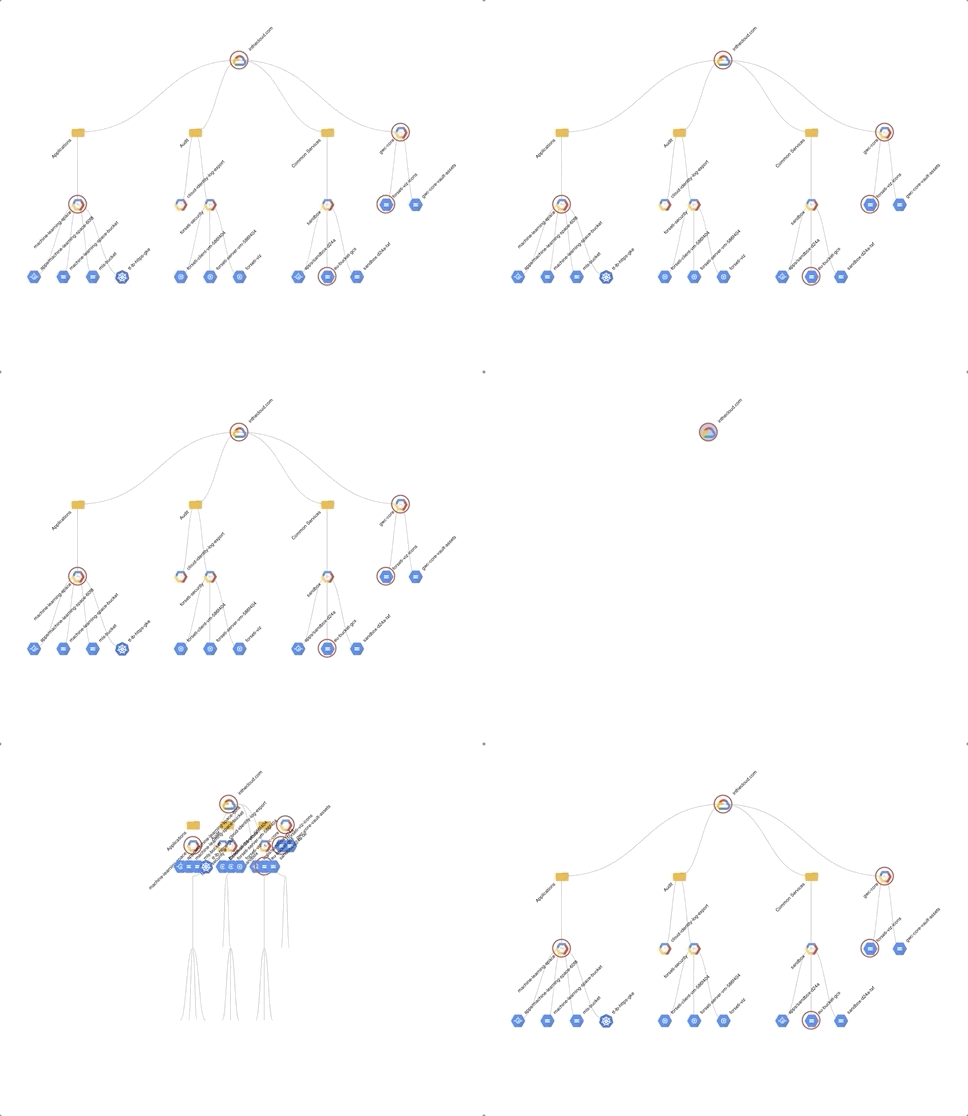
Google Cloud Platform (GCP) includes a powerful resource hierarchy that establishes who owns a specific resource, and through which you can apply access controls and organizational policies. But understanding the GCP resource hierarchy can be hard. For example, what does a GCP Organization “look” like? What networks exist within it? Do specific resources violate established security policies? To which service accounts and groups visualizing do you have access?To help answer those questions, as well as others, we recently open-sourcedForseti Visualizer, which lets you, er, visualize and interact with your GCP Organization. Built on top of the open-source Forseti Security, we also used our colleague Mike Zinni’s post, Visualizing GCP Architecture using Forseti 2.0 and D3.js, as inspiration.Forseti Visualizer does a number things:1. Dynamically renders your entire GCP Organization. Forseti Visualizer leverages Forseti Security’s Inventory via connectivity to CloudSQL / MySQL database, so it’s always up-to-date with the most recent inventory iteration.2. Finds all networks or a given set of resource types across an Organization. Again using Forseti Inventory, Visualizer tackles dynamic data processing and filtering of resources. Through a simple series of clicks on filtered resource types AND expanding the tree structure, we can quickly find all Networks.3. Finds violations. Using Forseti Scanner, Visualizer quickly shows you when a given resource is in violation of one of your Forseti policies.4. Displays access permissions. With the help of Forseti IAM Explain and Visualizer, you can quickly figure out whether or not you have access to a given resource—a question that’s otherwise difficult to answer, particularly if you have multiple projects. The future for Forseti VisualizerThese are powerful features in and of themselves, but we’re just getting started with Forseti Visualizer. Here’s a sampling of other extensions and features that could be useful:Visualization Scaling – Internal performance testing shows degradation when over 500 resources are open and rendered on the page. An extension to limit the total number of resources and dynamically render content while scrolling through the visualization would help prevent this.Visualization spacing for vertical / horizontal / wide-viewMultiple sub-visualizationsFull Forseti Explain functionalityMore detailed GCP resource metadataWhen it comes to Forseti Visualizer, the sky’s the limit. To get started with Forseti Visualizer, check the getting started pages. If you have feedback or suggestions on the visualization, interactivity, future features, reach out to me on our Forseti Slack channel.
Quelle: Google Cloud Platform

How to use BigQuery ML for anomaly detection

Editor’s note:Today’s post comes from Or Hiltch, co-founder and CTO at Skyline AI, an investment manager for commercial real estate. Or describes how BigQuery ML can be used to perform unsupervised anomaly detection.Anomaly detection is the process of identifying data or observations that deviate from the common behavior and patterns of our data, and is used for a variety of purposes, such as detecting bank fraud or defects in manufacturing. There are many approaches to anomaly detection and choosing the right method has a lot to do with the type of data we have. Since detecting anomalies is a fairly generic task, a number of different machine learning algorithms have been created to tailor the process to specific use cases.Here are a few common types:Detecting suspicious activity in a time series, for example a log file. Here, the dimension of time plays a huge role in the data analysis to determine what is considered a deviation from normal patterns. Detecting credit card fraud based on a feed of transactions in a labeled dataset of historical frauds. In this type of supervised learning problem, we can train a classifier to classify a transaction as anomalous or fraudulent given that we have a historical dataset of known transactions, authentic and fraudulent.Detecting a rare and unique combination of a real estate asset’s attributes — for instance, an apartment building from a certain vintage year and a rare unit mix. AtSkyline AI, we use these kinds of anomalies to capture interesting rent growth correlations and track down interesting properties for investment.When applying machine learning for anomaly detection, there are primarily three types of setups: supervised, semi-supervised and unsupervised. In our case, we did not have enough labeled data depicting known anomalies in advance, so we used unsupervised learning.In this post, we’ll demonstrate how to implement a simple unsupervised anomaly detection algorithm using BigQuery, without having to write a single line of code outside of BigQuery’s SQL.K-means clustering — Using unsupervised machine learning for anomaly detection One method of finding anomalies is by generating clusters in our data and analyzing those clusters. A clustering algorithm is an algorithm that, given n points over a numeric space, will find the best way to split them into k groups. The definition of the best way may vary by the type of algorithm, but in this post we’ll focus on what it means for K-Means clustering.If we organize the groups so that the “center of mass” in each group represents the “purest” characteristics of that group, the closer a data point is to that center would indicate whether it is more “standard” or “average” when compared to other points in the group . This allows us to analyze each group and ask ourselves, which points in the group are furthest away from the center of mass, and therefore, the most odd? In general, when clustering, we seek to:Minimize the maximum radius of a cluster. If our data contains a lot of logical differences, we want to capture these with as many clusters as possible.Maximize the average inter-cluster distance. We want our clusters to be different from each other. If our clusters don’t represent differences well enough, they are useless. Minimize the variance within each cluster. Within each cluster, we want the data points to be as similar to each other as possible — this is what makes them members of the same group.K-Means, an unsupervised learning algorithm, is one of the most popular clustering algorithms. If you’d like to learn more about the internals of how K-Means works, I would recommend walking throughthis great lab session.Anomaly detection using clusteringThe Iris DatasetThe Iris dataset is one of the “hello world” datasets for ML, consisting of 50 samples from each of three species of Iris (Iris setosa,Iris virginica andIris versicolor). Fourfeatures were measured from each sample: the length and the width of thesepals andpetals, in centimeters. Based on the combination of these four features, statistician and biologistRonald Fisher developed a linear discriminant model to distinguish the species from each other.In this tutorial, we’ll be detecting anomalies within the Iris dataset. We will find the rarest combinations of sepal and petal lengths and widths for the given species if Iris. The dataset can be obtainedhere.Creating the clusters with BigQuery MLBigQuery ML lets us create and execute machine learning models in BigQuery using standard SQL queries. It uses the output of SQL queries as input for a training process for machine learning algorithms, including k-means, and for generating predictions using those models, all within BigQuery. After loading theIris dataset into a table called public.iris_clusters, we can use the CREATE OR REPLACE MODEL statement to create a k-means model:You can find more information on how to tune the model, and more,here.Detecting anomalies in the clustersNow that we have our clusters ready using BigQuery, how do we detect anomalies? Recall that in k-means, the closer a data point is to the center of the cluster (the “center of mass”), the more “average” it is compared to other data points in the cluster. This center is called centroid. One approach we could take to find anomalies in the data is to find those data points which are furthest away from the centroid of their cluster. Getting the distances of each point from its centroidThe ML.PREDICT function of a k-means model in BigQuery returns an array containing each data point and its distance from the closest centroids. Using the UNNEST function we can flatten this array, taking only the minimum distance (the distance to the closest centroid):Setting a threshold for anomalies and grabbing the outliersAfter we prepared the Distances table, we are ready to find the outliers — the data points farthest away from their centroid in each cluster. To do this, we can use BigQuery’sApproximate Aggregate Functions to compute the 95th percentile. The 95th percentile tells you the value for which 95% of the data points are smaller and 5% are bigger. We will look for those 5% bigger ones:Putting It All TogetherUsing Distances and Threshold together, we finally detect the anomalies in one query:The above query produces the following resultset:Let’s check how rare some of these anomalies really are. For the species ofIris virginica, how rare is a sepal length of 7.7, sepal width of 2.6, petal length of 6.9 and petal width of 2.3? Let’s plot a histogram of the features for the species virginica. Note the green bars to represent the anomaly described above:While it’s hard to mentally imagine the rarity of a combination of a 4-dimensional array, it can be seen in the histograms that this sample is indeed quite rare. SummaryWe’ve seen how several features of BigQuery — BigQuery ML, Approximate Aggregate Function and Arrays, can converge into one simple and powerful anomaly detection application, with a wide variety of use cases, and all without requiring us to write a single line of non-SQL code outside of BigQuery. All of these features of BigQuery combined empower data analysts and engineers to use AI through existing SQL skills. You no longer need to export large amounts of data to spreadsheets or other applications, and in many cases, analysts no longer need to wait for limited resources from a data science team.To learn more about k-means clustering on BigQuery ML, read the documentation.
Quelle: Google Cloud Platform

Least privilege for Cloud Functions using Cloud IAM

Cloud Functions enables you to quickly build and deploy lightweight microservices and event-driven workloads at scale. Unfortunately when building these services, security is often an after-thought, resulting in data leaks, unauthorized access, privilege escalation, or worse.Fortunately, Cloud Functions makes it easy to secure your services by enabling you to build least privilege functions that minimize the surface area for an attack or data breach.What is least privilege?The principle of least privilege states that a resource should only have access to the exact resource(s) it needs in order to function. For example, if a service is performing an automated database backup, the service should be restricted to read-only permissions on exactly one database. Similarly, if a service is only responsible for encrypting data, it should not have permissions for decrypting data. Providing too few permissions prohibits the service from completing its task, but providing too many permissions can have rippling security ramifications.If an attacker is able to gain access to a service that doesn’t follow the principles of least privilege, they may be able to force the service to behave nefariously—for example access customer data, delete critical infrastructure, or steal confidential business intelligence.How do we achieve least privilege in Cloud Functions?By default, all Cloud Functions in a Google Cloud project share the same runtime service account. This service account is bound to the function, and is used to generate credentials for accessing Cloud APIs and services. This default service account has the Editor role, which includes all read permissions, plus permissions for actions that modify state, such as changing existing resources. This enables a seamless development experience, but may include overly broad permissions for your functions, since most functions only need to access a subset of resources.To practice the principle of least privilege in Cloud Functions, you can create and bind a unique service account to each function, granting the service account only the most minimal set of permissions required to execute the function.Calling GCP servicesConsider the following example function, which is triggered when a file is uploaded to a Cloud Storage bucket. The function reads the contents of the file, transforms it, and then writes the transformed file back to the same Cloud Storage bucket.Reviewing the Cloud Storage IAM permissions, this function needs the following permissions on the Cloud Storage bucket:storage.objects.getstorage.objects.createWe will use the ability to set a service account on an individual Cloud Function, giving each function its own service account with unique permissions. To do this:1. Create a new service account. The service account name must be unique within the project. For more information, please see the managing service accounts documentation.2. Grant the service account minimal IAM permissions. By default, service accounts have very minimal permissions. To use the service account with a function, we need to add bindings for the service account to the resources it needs to access.3. Deploy a function that uses the new service account. When deploying our function, we use the –service-account flag to specify that our function should run as our custom service account instead of the default account. Since the function executes as the service account, our function inherits the permissions granted to the service account.The Cloud Storage Object Admin role includes the following permissions:storage.objects.createstorage.objects.updatestorage.objects.deletestorage.objects.getstorage.objects.liststorage.objects.getIamPolicystorage.objects.setIamPolicyPermissions are very fine-grained access control rules. One or more permissions are usually combined to form a role. There are pre-built roles (like the Object Admin role above), and you also have the ability to generate custom roles with very specific sets of permissions.If you recall, our function only needs the create and get permissions, but the role we picked includes five additional permissions that are not needed. While we have gotten closer, we are still not fully practicing the principle of least privilege.There are no pre-built roles that includes only the two permissions we need, so we need to create a custom role in our project and grant that role to the service account on the bucket:1. Create a custom role with exactly the two permissions needed.2. Grant the service account access to the custom role on the bucket:3. Deploy the function bound to that service account:Calling other functionsIn addition to calling a Google Cloud service like Cloud Storage, you may want to a function to call (“invoke”) another function. The concept of least privilege also applies to restricting which functions or users can invoke your function. You can achieve this by using the Cloud IAM roles/cloudfunctions.invoker role. Set IAM policies on each function to enforce that only certain users, functions, or services can invoke the function.A good first step is to ensure that a function cannot be invoked by the public. For example, remove the special allUsers member from the roles/cloudfunctions.invoker role associated with the function:This makes your function private and restricts the ability to invoke the function unless the caller has cloudfunctions.invoker permissions. If a caller does not have this permission, the request is rejected, your function is not invoked and you avoid billing charges.Once a Cloud Function is private, you will need to add authentication when invoking it. Specifically, the caller needs a Google-signed identity token (a JSON Web Token) in the Authorization header of the outbound HTTP request. The audience (aud field) must be set to the URL of the function you are calling.One of the easiest ways to get such a token is by querying the compute metadata server:For example, suppose we have two functions – myFunction and otherFunction, where myFunction needs permission to invoke otherFunction. To accomplish this while also following the principle of least privilege we would:1. Create a new, dedicated service account:2. Grant the service account permissions to invoke otherFunction (this assumes that otherFunction is already running and deployed):3. Deploy myFunction bound to the service account which has permission to invoke otherFunction:Cloud Run and App Engine (when using IAP) can also perform similar validation.When calling other servicesIf you are calling a compute service that you control that does not have Cloud IAM policies restricting access (like a Compute Engine VM), you can follow the same steps to generate the token and then validate the Google-signed identity token yourself.Next stepsWe hope this post illustrates the importance of the principle of least privilege and provides concrete steps you can take to improve the security of your serverless functions. If you want to learn more about Cloud Functions security, you can watch Serverless Security made Simple from Cloud Next 2019. If you want to learn more about how Google Cloud is enabling organizations to improve their security, including adopting the principle of least privilege, sign up for the Policy Intelligence alpha.
Quelle: Google Cloud Platform

A little light reading: Transit trends, video datasets and more stories from around Google

At Google Cloud, we love to share how we’re shaping our cloud computing technology. Beyond the cloud blog, though, we know there are lots of fascinating stories from around Google. Here’s a reading list of stories that grabbed our attention recently.How stuffed is your bus? See transit trends from Google MapsThis post contains some fun graphics and data about the relative crowdedness of various bus and subway lines around the world (fun for us to look at, though perhaps not so much fun for those on the crowded subway cars). The trends are pulled from the aggregated, anonymized feedback data that Google Maps users can opt to give after they’ve used transit mode. One line of the Buenos Aires subway came in first for most crowded worldwide. You can also see breakdowns of the most crowded lines for certain cities.And take a look at how ML now helps predict transit delays For more on the topic of transportation trends, check out this blog post on how Google Maps now forecasts bus delays in hundreds of cities using machine learning. (Again, not pleasant for those waiting for the buses in question, but fascinating for ML enthusiasts.) Though some city transit agencies provide public delay data, not all do. This new prediction capability depends on an ML model that combines real-time car traffic forecasts with data on bus routes and stops. To build the model, teams extracted training data from sequences of bus positions over time, based on transit agency feeds, then aligned those to car traffic speeds on the bus’s path. Get a sense of scale with YouTube-8M SegmentsThe new YouTube-8M Segments is an extension of the large-scale YouTube-8M dataset, a video classification dataset with, you guessed it, more than 8 million videos. The dataset comes with precomputed audio and visual features from billions of video frames and audio segments. These new segments include human-verified labels at the five-second segment level within a set of the YouTube-8M videos. The idea behind the release is to speed up research into temporal localization—allowing better search within videos—with the aim of improving video tag predictions and enabling uses like capturing special video moments, for example. Human-labeled annotations provide a baseline to help researchers evaluate their algorithms more accurately without having to label every segment in a video. There’s an accompanying Kaggle competition challenge and ICCV workshop as well.Brush off your mail merge skillsThe use of mail merge—combining a data source with a master template document—has been around since the dawn of word processing. Mail merge can create customized copies of the master doc to include unique data records from the data source—for example, adding customer addresses to a form letter. With the launch of the Google Docs API, it’s now easy to do mail merge in the cloud and build custom mail merge apps.Automate all the things—even at homeIf you want your home technology to run as smoothly as your work technology, you’ve got a lot of interesting device options these days. This post covers some tips on connecting IoT devices to Google Assistant and using Actions to create routines and tasks. You’ll see how to control devices with voice commands as well as use a visual interface, and get some detail on the back-end integrations you can set up.What thought-provoking stories have you read lately? Let us know.
Quelle: Google Cloud Platform

Happy birthday Knative! Celebrating one year of portable serverless computing

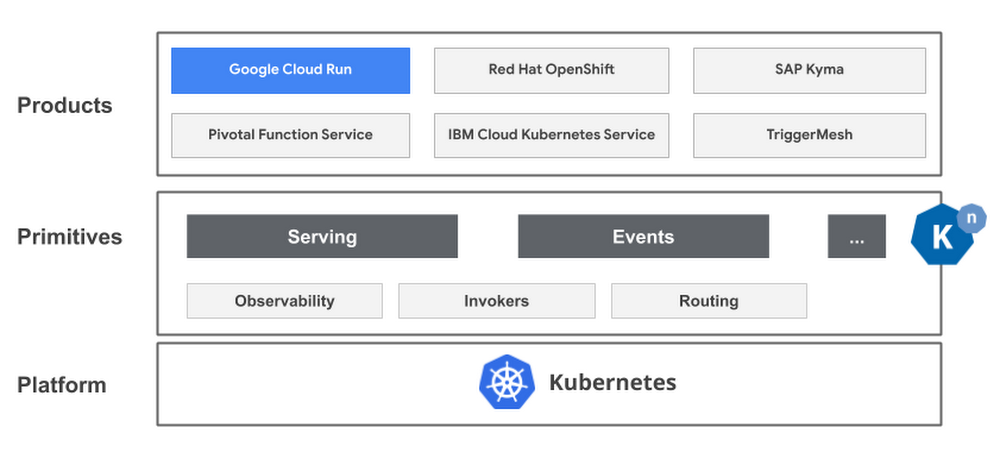
Today marks the one-year anniversary of Knative, an open-source project initiated by Google that helps developers build, deploy and manage modern serverless workloads. What started as a Google-led project now has a rich ecosystem with partners from around the world, and together, we’ve had an amazing year! Here are just a few notable stats and milestones that Knative has achieved this year:Seven releases since launchA thriving, growing ecosystem: over 3,700 pull requests from 400+ contributors associated with over 80 different companies, including industry leaders like IBM, Red Hat, SAP, TriggerMesh and Pivotal. Addition of non-Google contributors at the approver, lead, and steering committee level20% monthly growth in contributionsWith all this momentum for the project, we thought now would be a good time to reflect on why we initially created Knative, the project’s ecosystem, and how it relates to Google Cloud’s serverless vision.Why we created KnativeServerless computing provides developers with a number of benefits: the ability to run applications without having to worry about managing the underlying infrastructure, to execute code only when needed, to autoscale workloads from zero to N depending on traffic, and many more. But while traditional serverless offerings provide the velocity that developers love, they have a lack of flexibility. Serverless traditionally requires developers to use specific languages and proprietary tools. It also locks developers into a cloud provider and prevents them from being able to easily move their workloads to other platforms. In other words, most serverless offerings force developers to choose between the velocity and simple developer experience of serverless, and the flexibility and portability of containers. We asked ourselves, what if we could offer the best of both worlds?Kubernetes has become the de facto standard for running containers. Even with all that Kubernetes offers, many platform providers and operators were implementing their own platforms to solve common needs like building code, scaling workloads, and connecting services with events. Not only was this a duplicative effort for everyone, it lead to vendor lock in and proprietary systems for developers. And thus, Knative was born.What is Knative?Knative offers a set of components that standardize mundane but difficult tasks such as building applications from source code to container images, routing and managing traffic during deployment, auto-scaling of workloads, and binding running services to a growing ecosystem of event sources. Idiomatic developer experienceKnative provides an idiomatic developer experience: Developers can use any language or framework, such as Django, Ruby on Rails, Spring and many more; common development patterns such as GitOps, DockerOps, or ManualOps;  and easily plug into existing build and CI/CD toolchains.A growing Knative ecosystemWhen we first announced Knative, it included three main components: build, eventing, and serving, all of which have received significant investment and adoption from the community. Recently the build component has been spun out of Knative into a new project, Tekton. Tekton focuses on solving a much broader set of continuous integration use-cases than was Knative’s original intent. But perhaps the biggest indicator of Knative’s momentum is the increase in commercial Knative-based products on the market. Our own Cloud Run is based on Knative, and several members of the community also have products based on Knative, including IBM, Red Hat, SAP, TriggerMesh and Pivotal. “We are excited to be partnering with Google on the Knative project. Knative enables us to build new innovative managed services in the cloud, easily, without having to recreate the essential building blocks. Knative is a game-changer, finally making serverless workload portability  a reality.” – Sebastien Goasguen, Co-Founder, TriggerMesh“Red Hat has been working alongside the community and innovators like Google on Knative since its inception. By adding the Knative APIs to Red Hat OpenShift, our enterprise Kubernetes platform, developers have the ability to build portable serverless applications. We look forward to enabling more serverless workloads with Red Hat OpenShift Serverless based on Knative as the project nears general availability. This has the potential to improve the general ease of Kubernetes for developers, helping teams to run modern applications across hybrid architectures.” – William Markito Oliveira, senior principal product manager, Red Hat To learn more about Knative and the community look out for an upcoming interview with Evan Anderson, Google Cloud engineer, and a Knative technical lead on the SAP Customer Experience Labs podcast. Knative: the basis of Google Cloud RunAt Google Cloud Next 2019, we announced Cloud Run, our newest serverless compute platform that lets you run stateless request-driven containers without having to worry about the underlying infrastructure—no more configuration, provisioning, patching and managing servers. Cloud Run autoscales your application from zero to N depending on traffic and you only pay for the resources that you use. Cloud Run is available both as a fully managed offering and also as an add-on in Google Kubernetes Engine (GKE). We believe Cloud Run is the best way to use Knative. With Cloud Run, you choose how to run  your serverless workloads: fully managed on Google Cloud or on GKE. You can even choose to move your workloads on-premises running on your own Kubernetes cluster or to a third-party cloud. Knative makes it easy to start with Cloud Run and later move to Cloud Run on GKE, or start in your own Kubernetes cluster and migrate to Cloud Run in the future. Because it uses Knative as the underlying platform, you can move your workloads freely across platforms, while significantly reducing switching costs. Customers such as Percy.io use both Cloud Run and Cloud Run on GKE and love the fact they can leverage the same experience and UI wherever they need.“We first started running our workloads on Cloud Run as fully managed on Google Cloud, but then wanted to leverage some of the benefits of Google Kubernetes Engine (GKE), so we decided to move some services to Cloud Run on GKE. The fact we can seamlessly move from one platform to another by just changing the endpoint is amazing, and that they both have the same UI and interface makes it extremely easy to manage.” – David Jones, Director of Engineering, Percy.ioGet started with Knative today!Knative brings portability to your serverless workloads and the simple and easy developer experience to your Kubernetes platform. It is truly the best of both worlds. If you operate your own Kubernetes environment, check out Knative today. If you’re a developer, check out Cloud Run as an easy way to experience the benefits of Knative. Get started with your free trial on Google Cloud—we can’t wait to see what you will build.
Quelle: Google Cloud Platform

What’s happening in BigQuery: New persistent user-defined functions, increased concurrency limits, GIS and encryption functions, and more

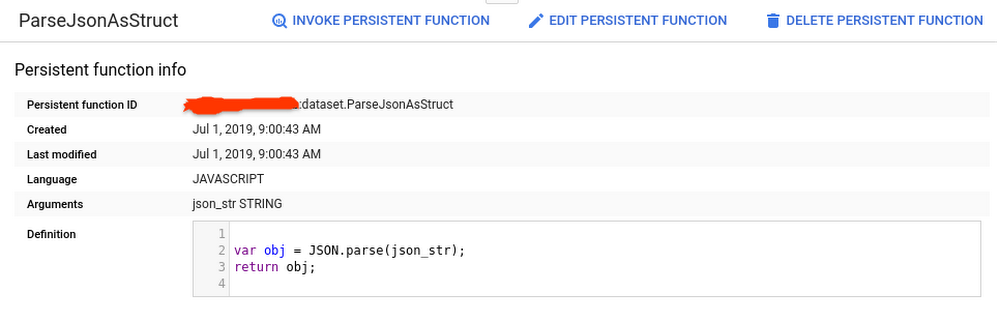
We’ve been busy this summer releasing new features for BigQuery, Google Cloud’s petabyte-scale data warehouse. BigQuery lets you ingest and analyze data quickly and with high availability, so you can find new insights, trends, and predictions to efficiently run your business. Recently added BigQuery features include new user-defined functions, faster reporting capabilities, increased concurrency limits, and new functions for encryption and GIS, all with the goal of helping you get more out of your data faster.  Read on to learn more about these new capabilities and get quick demos and tutorial links so you can try these features yourself.BigQuery persistent user-defined functions are now in betaThe new persistent user-defined functions (UDFs) in BigQuery let you create SQL and JavaScript functions that you can reuse across queries and share with others. Setting up these functions allows you to save time and automate for consistency and scalability. For example, if you have a custom function that handles date values a certain way, you can now create a shared UDF library, and anyone who has access to your dataset can invoke those date values in their queries. UDFs can be defined in SQL or JavaScript. Here’s an example:Creating a function to parse JSON into a SQL STRUCTIngesting and transforming semi-structured data from JSON objects into your SQL tables is a common engineering task. With BigQuery UDFs, you can now create a persistent Javascript UDF that does the parsing for you. Here, we’ll take a JSON string input and convert it into multiple fields in a SQL STRUCT. First we’ll define the function in this query:After executing the query, click the “Go to function” button in the BigQuery UI to see the function definition:You can now execute a separate query to call the UDF:And voila! Our JSON string is now a SQL STRUCT:Share your Persistent UDFs The benefit of persistent UDFs is that other project team members can now invoke your new function in their scripts without having to re-create it or import it first. Keep in mind that you will need to share the dataset that contains your UDFs in order for them to access it. Learn more:Documentation: CREATE FUNCTION statementMore examples: New in BigQuery—Persistent UDFs by Felipe HoffaConcurrent query limit has doubledTo help enterprises get insights faster, we’ve raised the concurrent rate limit for on-demand, interactive queries from 50 to 100 concurrent queries per project in BigQuery. This means you can run twice as many queries at the same time. As before, queries with results returned from the query cache, dry run queries, and queries ran inbatch mode do not count against this limit.You can monitor your team’s concurrent queries in Stackdriver and visualize them in Data Studio.Learn more:Documentation: Quotas and limitsBlog: Taking a practical approach to BigQuery monitoringTutorial: BigQuery monitoring with StackdriverTutorial: Visualize billing data with Data StudioBigQuery’s new user interface is now GAWe introduced the new BigQuery user interface (UI) last year to make it easier for you to uncover data insights and share them with teammates and colleagues in reports and charts. The BigQuery web UI is now generally available in the Google Cloud Platform (GCP) console. You can check out key features of the new UI in the quick demo below:Easily discover data by searching across tables, datasets, and projectsQuickly preview table metadata (size, last updated) and total rowsStart writing queries faster by clicking on columns to add.If you haven’t seen the new UI yet, try it out by clicking the blue button in the top right of your Google Cloud console window.Learn more:Documentation: BigQuery Web UILab: Using BigQuery in the GCP ConsoleBigQuery’s GIS functions are now GAWe’re continually working on adding new functionality to BigQuery so you can expand your data analysis to other data types. You might have noticed in the BigQuery Web UI demo that there’s now a field for hurricane latitude and longitude. These Geographic Information System (GIS) data types are now natively supported in BigQuery, as are the GIS functions to analyze, transform, and derive insights from GIS data. Here’s a look at using BigQuery GIS functions and this tutorial to plot the path of a hurricane:Applying GIS functions to geographic data (including lat/long, city, state, and zip code) lets analysts perform geographic operations within BigQuery. You can more easily answer common business questions like “Which store is closest for this customer?” “Will my package arrive on time?” or “Who should we mail a promotion coupon to?”You can also now cluster your tables using geography data type columns. The order of the specified clustered columns determines the sort order of the data. For our hurricane example, we clustered on `iso_time` to increase performance for common reads that want to track the hurricane path sorted by time. Learn more:Documentation: BigQuery GISDemo: BigQuery Public Dataset and GIS demo plotting U.S. lightning strikesTutorial: Plot the path of a hurricaneAEAD encryption functions are now available in Standard SQLBigQuery usesencryption at rest to help keep your data safe, and provides support for customer managed encryption keys (CMEKs), so you can encrypt tables with specific encryption keys you control. But in some cases, you may want to encrypt individual values within a table. AEAD (Authenticated Encryption with Associated Data) encryption functions, now available in BigQuery, allow you to create keysets that contain keys for encryption and decryption, use these keys to encrypt and decrypt individual values in a table, and rotate keys within a keyset.This can be particularly useful for applications of crypto-deletion or crypto-shredding. For example, say you want to keep data for all your customers in a common table. By encrypting each of your customers’ data using a different key, you can easily render that data unreadable by simply deleting the encryption key. If you’re not familiar with the concept of crypto-shredding, you’ve probably already used it without realizing it—it’s a common practice for things like factory-resetting a device and securely wiping its data. Now you can do the same type of data wipe on your structured datasets in BigQuery. Learn more:Understand crypto-deletion, crypto-shredding, and more: AEAD Encryption Concepts Documentation: AEAD Encryption Functions Documentation: AEAD.ENCRYPT() example codeCheck out a few more updates worth sharingOur Google Cloud engineering team is continually making improvements to BigQuery to accelerate time-to-value for our customers. Here are a few other recent highlights: You can now run scheduled queries at more frequent intervals. The minimum time interval for custom schedules has changed from three hours to 15 minutes. Faster schedules means fresher data for your reporting needs.The BigQuery Data Transfer Service now supports transferring data into BigQuery from Amazon S3. These Amazon S3 transfers are now in beta.Creating a new dataset? Want to make it easy for all to use? Add descriptive column labels within SQL using SQL DDL labels.Clean up your old BigQuery ML models with new SQL DDL statement support for DROP MODEL.In case you missed itFor more on all things BigQuery, check out these recent posts, videos and how-tos:Looker, Snowflake, and more on This Week in CloudPersistent UDF examples Uber Datasets now in BigQueryQuerying the night sky with BigQuery GISExperimenting with BigQuery sandboxAnalyze BigQuery data with Kaggle Kernels notebooksData Catalog hands-on guide: A mental modelTo keep up on what’s new with BigQuery, subscribe to our release notes and stay tuned to the blog for news and announcements And let us know how else we can help.
Quelle: Google Cloud Platform

GCP developer pro-tips: How to schedule a recurring Python script on GCP

So, you find yourself executing the same Python script each day. Maybe you’re executing a query in BigQuery and dumping the results in BigTable each morning to run an analysis. Or perhaps you need to update the data in a Pivot Table in Google Sheets to create a really pretty histogram to display your billing data. Regardless, no one likes doing the same thing every day if technology can do it for them. Behold the magic ofCloud Scheduler, Cloud Functions, and PubSub!Cloud Scheduler is a managed Google Cloud Platform (GCP) product that lets you specify a frequency in order to schedule a recurring job. In a nutshell, it is a lightweight managed task scheduler. This task can be an ad hoc batch job, big data processing job, infrastructure automation tooling—you name it. The nice part is that Cloud Scheduler handles all the heavy lifting for you: It retries in the event of failure and even lets you run something at 4 AM, so that you don’t need to wake up in the middle of the night to run a workload at otherwise off-peak timing. When setting up the job, you determine what exactly you will “trigger” at runtime. This can be a PubSub topic, HTTP endpoint, or an App Engine application. In this example, we will publish a message to a PubSub topic.Our PubSub topic exists purely to connect the two ends of our pipeline: It is an intermediary mechanism for connecting the Cloud Scheduler job and the Cloud Function, which holds the actual Python script that we will run. Essentially, the PubSub topic acts like a telephone line, providing the connection that allows the Cloud Scheduler job to talk, and the Cloud Function to listen. This is because the Cloud Scheduler job publishes a message to the topic. The Cloud Function subscribes to this topic. This means that it is alerted whenever a new message is published. When it is alerted, it then executes the Python script.The CodeSQLFor this example, I’ll show you a simple Python script that I want to run daily at 8 AM ET and 8 PM ET. The script is basic: it executes a SQL query in BigQuery to find popular Github repositories. We will specifically be looking for which owners created repositories with the most amount of forks and in which year they were created. We will use data from the public dataset bigquery-public-data:sample, which holds data about repositories created between 2007 and 2012. Our SQL query looks like this:PythonWe will soon paste this query in our github_query.sql file. This will be called in our main.py file, which calls a main function that executes the query in Python by using the Python Client Library for BigQuery.Step 1: Ensure that you have Python 3 and install and initialize the Cloud SDK. The following will walk you through how to create the GCP environment. If you wish to test it locally, ensure that you have followed the instructions for setting up Python 3 on GCP first.Step 2: Create a file called requirements.txt and copy and paste the following:Step 3: Create a file called github_query.sql and paste in the SQL query from above.Step 4: Create a file called config.py and edit with your values for the following variables. You may use an existing dataset for this or pick an ID of a new dataset that you will create, just remember the id as you will need it for granting permissions later on.Step 4:Create a file called main.py which references the previous two files.In order to deploy the function on GCP, you can run the following gcloud commands. This specifies using a runtime of Python 3.7, creating a PubSub topic with a name of your choosing, and specifying that this function is triggered whenever a new message is published to this topic. I have also set the timeout to the maximum that GCP offers of 540 seconds, or nine minutes.Make sure you first cd into the directory where the files are located before deploying, or else the following will not work.You specify the frequency of how often your Cloud Function will run in UNIX cron time when setting up Cloud Scheduler with the schedule flag. This means that it will publish a message to the PubSub topic every 12 hours in the UTC timezone, as seen below:where [JOB_NAME] is a unique name for a job, [SCHEDULE] is the frequency for the job in UNIX cron, such as “0 */12 * * *” to run every 12 hours, [TOPIC_NAME] is the name of the topic created in the step above when you deployed the Cloud Function, and [MESSAGE_BODY] is any string. An example command would be:Our Python code does not use the actual message This is a job that I run twice per day!“” published in the topic because we are just executing a query in BigQuery, but it is worth noting that you could retrieve this message and act on it, such as for logging purposes or otherwise.Grant permissionsFinally, open up the BigQuery UI and click ‘Create Dataset’ in the project that you referenced above.By creating the Cloud Function, you created a service account with the email in the format [PROJECT_ID]@appspot.gserviceaccount.com. Copy this email for the next step.Hover over the plus icon for this new dataset.Click “Share Dataset”.In the pop-up, enter the service account email. Give it permission “Can Edit”.Run the job:You can test the workflow above by running the project now, instead of waiting for the scheduled UNIX time. To do this:Open up the Cloud Scheduler page in the console.Click the ‘Run Now’ button.Open up BigQuery in the console.Under your output dataset, look for your [output_table_name], this will contain the data.To learn more, read our documentation on setting up Cloud Scheduler with PubSub trigger, and try it out using one of our BigQuery public datasets.
Quelle: Google Cloud Platform