Using Google Cloud Speech-to-Text to transcribe your Twilio calls in real-time

Developers have asked us how they can use Google Cloud’s Speech-to-Text to transcribe speech (especially phone audio) coming from Twilio, a leading cloud communications PaaS. We’re pleased to announce that it’s now easier than ever to integrate live call data with Google Cloud’s Speech-to-Text using Twilio’s Media Streams.The new TwiML <stream> command streams call audio to a websocket server. This makes it simple to move your call audio from your business phone system into an AI platform that can transcribe that data in real time and use it for use cases like helping contact center agents and admins, as well as store it for later analysis. When you combine this new functionality with Google Cloud’s Speech-to-Text abilities and other infrastructure and analytics tools like BigQuery, you can create an extremely scalable, reliable and accurate way of getting more value from your audio.ArchitectureThe overall architecture for creating this flow looks something like what you see below. Twilio creates and manages the inbound phone number. Their new Stream command takes the audio from an incoming phone call and sends it to a configured websocket which runs on a simple App Engine flexible environment. From there, sending the audio along as it comes to Cloud Speech-to-Text is not very challenging. Once a transcript is created, it’s stored in BigQuery where real-time analysis can be performed.Configuring your phone numberOnce you’ve bought a number in Twilio, you’ll need to configure your phone number to respond with TwiML, which stands for Twilio Markup Language. It’s a tag-based language much like HTML, which will pass off control via a webhook that expects TwiML that you provide.Next, navigate to your list phone numbers and choose your new number. On the number settings screen, scroll down to the Voice section. There is a field labelled “A Call Comes In”. Here, choose TwiML Bin from the drop down and press the plus button next to the field to create a new TwiML Bin.Creating a TwiML BinTwiML Bins are a serverless solution that can seamlessly host TwiML instructions. Using a TwiML Bin prevents you from needing to set up a webhook handler in your own web-hosted environment.Give your TwiML Bin a Friendly Name that you can remember later. In the Body field, enter the following code, replacing the url attribute of the <Stream> tag and the phone number contained in the body of the <Dial> tag.The <Stream> tag starts the audio stream asynchronously and then control moves onto the <Dial> verb. <Dial> will call that number. The audio stream will end when the call is completed.Save your TwiML Bin and make sure that you see your Friendly Name in the “A Call Comes In“ drop down next to TwiML Bin. Make sure to Save your phone number.Setup in Google CloudThis setup can either be done in an existing Google Cloud project or a new project. To set up a new project, follow the instructions here. Once you have the project selected that you want to work in, you’ll need to set up a few key things before getting started:Enable APIs for Google Speech-to-Text. You can do that by following the instructions here and searching for “Cloud Speech-to-Text API”.Create a service account for your App Engine flexible environment to utilize when accessing other Google Cloud services. You’ll need to download the private key as a JSON file as well.Add firewall rules to allow your App Engine flexible environment to accept incoming connections for the websocket. A command like the following should work from a gcloud enabled terminal:gcloud compute firewall-rules create default-allow-websockets-8080 –allow tcp:8080 –target-tags websocket –description “Allow websocket traffic on port 8080″App Engine flexible environment setupFor the App Engine application, we will be taking the sample code from Twilio’s repository to create a simple node.js websocket server. You can find the github page here with instructions on environment setup. Once the code is in your project folder, you’ll need to do a few more things to deploy your application:Place the service account JSON key you downloaded earlier, rename it to “google_creds.json”, and put it in the same directory as the node.js code.Create an app.yaml file that looks like the following:runtime: nodejsenv: flexmanual_scaling:  instances: 1network:  instance_tag: websocketOnce these two items are in order, you will be able to deploy your application with the command:gcloud app deployOnce deployed, you can tail the console logs with the command:gcloud app logs tail -s defaultVerifying your stream is workingCall your Twilio number, and you should immediately be connected with the number specified in your TwiML. You should see a websocket connection request made to the url specified in the <Stream>. Your websocket should immediately start receiving messages. If you are tailing the logs in the console, the application will log the intermediate messages as well as any final utterances detected by Google Cloud’s Speech-to-Text API.Writing transcriptions to BigQueryIn order to analyze the transcripts later, we can create a BigQuery table and modify the sample code from Twilio to write to that table. Instructions for creating a new BigQuery table can be found here. Given the way Google Speech-to-Text creates transcription results, a potential schema for the table might look like the following.Once a table like this exists, you can modify the Twilio sample code to also stream data to the BigQuery table using sample code found here.ConclusionTwilio’s new Stream function allows users to quickly make use of the real time audio that is moving through their phone systems. Paired with Google Cloud, that data can be transcribed in real time and passed on to numerous other applications. This ability to get high quality transcription in real time can benefit businesses—from helping contact center agents document and understand phone calls, to analyzing data from the transcripts of those calls. To learn more about Cloud Speech-to-Text, visit our website.
Quelle: Google Cloud Platform

What’s happening in BigQuery: Adding speed and flexibility with 10x streaming quota, Cloud SQL federation and more

We’ve been busy this summer releasing new features for BigQuery, Google Cloud’s petabyte-scale data warehouse. BigQuery lets you ingest and analyze data quickly and with high availability, so you can find new insights, trends, and predictions to efficiently run your business. Our Google Cloud engineering team is continually making improvements to BigQuery to accelerate your time to value. Recently added BigQuery features include a newly built back end with 10x the streaming quota, the ability to query live from Cloud SQL datasets, and the ability to run your existing TensorFlow models in BigQuery. These new features are designed to help you stream, analyze, and model more data faster, with more flexibility.Read on to learn more about these new capabilities and get quick demos and tutorial links so you can try these features yourself.10x BigQuery streaming quota, now in betaWe know your data needs to move faster than your business, so we’re always working on adding efficiency and speed. The BigQuery team has completely redesigned the streaming back end to increase the default Streaming API quota by a factor of 10, from 100,000 to 1,000,000 rows per second per project. The default quota for maximum bytes per second has also increased, from 100MB per table to 1GB per project and there are now no table-level limitations. This means you get greater capacity and better performance for your streaming workloads like IoT and more. There’s no change to the current streaming API. You can choose whether you’d like to use this new streaming back end by filling out this form. If you use the new back end, you won’t have to change your BigQuery API code, since the new back end uses the same BigQuery Streaming API. Note that this quota increase is only applicable if you don’t need the best effort deduplication that’s offered by the current streaming back end. This is done by not populating the insertId field for each row inserted when calling the streaming API.Check out this demo from Google Cloud Next ‘19 to see data stream 20 GB per second from simulated IoT sensors into BigQuery.Check out the documentation for more on Streaming data into BigQuery.Query Cloud SQL from BigQueryData can only create value for your business when you put it to work, and businesses need secure and easy-to-use methods to explore and manage data that is stored in multiple locations. Within Google Cloud, we use our database tools and services to power what we do, including offering new Qwiklabs and courses each month. Internally, we manage the roadmap of new releases with a Cloud SQL back end. We then have an hourly Cloud Composer job that pipes our Cloud SQL transactional data from Cloud SQL into BigQuery for reporting. Such periodic export carries considerable overhead and the drawback that reports reflect data that is an hour old. This is a common challenge for enterprise business intelligence teams who want quicker insights from their transactional systems. To avoid the overhead of periodic exports and increase the timeliness of your reports, we have expanded support for federated queries to include Cloud SQL. You can now query your Cloud SQL tables and views directly from BigQuery through a federated Cloud SQL connection (no more moving or copying data). Our curriculum dashboards now run on live data with one simple EXTERNAL_QUERY() instead of a complex hourly pipeline. This new connection feature supports both MySQL (second generation) and PostgreSQL instances in Cloud SQL. After the initial one-time setup, you can write a query with the new SQL function EXTERNAL_QUERY(). Here’s an example where we join existing customer data from BigQuery against the latest orders from our transactional system in Cloud SQL in one query:Note the cross database JOIN on rq.customer_id = c.customer_id. BigQuery actively connects to Cloud SQL to get the latest order data. Getting live data from Cloud SQL federated in BigQuery means you will always have the latest data for reporting. This can save teams time, bring the latest data faster, and open up analytics possibilities. We hear from customers that they are seeing the benefits of immediate querying, too.”Our data is spread across Cloud SQL and BigQuery. We had to maintain and monitor extract jobs to copy Cloud SQL data into BigQuery for analysis, and data was only as fresh as the last run,” says Zahi Karam, director of data science at Bluecore. “With Cloud SQL Federation, we can use BigQuery to run analysis across live data in both systems, ensuring that we’re always getting the freshest view of our data. Additionally, we can securely enable less technical analysts to query Cloud SQL via BigQuery without having to set up additional connections.”Take a look at the demo for more:Check out the documentation to learn more about Cloud SQL federated queries from BigQuery.BigQuery ML: Import TensorFlow models Machine learning can do lots of cool things for your business, but it needs to be easy and fast for users. For example, say your data science teams have created a couple of models and they need your help to make quick batch predictions on new data arriving in BigQuery. With new BigQuery ML Tensorflow prediction support, you can import and make batch predictions using your existing TensorFlow models on your BigQuery tables, using familiar BQML syntax. Here’s an example.First, we’ll import the model from our project bucket:Then we can quickly batch predictions with the familiar BigQuery ML syntax:Want to run batch predictions at regular intervals as new data comes in? Simply set up a scheduled query to pull the latest data and also make the prediction. And as we highlighted in a previous post, scheduled queries can run as frequently as every 15 minutes.Check out the BigQuery ML TensorFlow User Guide for more.Automatic re-clustering now available Efficiency is essential when you’re crunching through huge datasets. One key best practice for cost and performance optimization in BigQuery is table partitioning and clustering. As new data is added to your partitioned tables, it may get written into an active partition and need to be periodically re-clustered for better performance. Traditionally, other data warehouse processes like “VACUUM” and “automatic clustering” require setup and financing by the user. BigQuery now automatically re-clusters your data for you at no additional cost and with no action needed on your part.Check out our recent blog post Skip the maintenance, speed up queries with BigQuery’s clustering for a detailed walkthrough. And get more detail in the documentation: automatic re-clustering.UDF performance now fasterIf you perform a query using JavaScript UDFs, it’ll now take around a second less to execute, on average, due to speedier logic for initializing the JavaScript V8 Engine that BigQuery uses to compute UDFs. Don’t forget you can persist and share your custom UDFs with your team, as we highlighted in our last post. In case you missed itFor more on all things BigQuery, check out these recent posts, videos and how-tos:Skip the heavy lifting: Moving Redshift to BigQuery easilyIntroducing the BigQuery Terraform moduleClustering 4,000 Stack Overflow tags with BigQuery k-meansEfficient spatial matching in BigQueryLab series: BigQuery for data analysts GlideFinder: How we built a platform on Google Cloud that can monitor wildfiresMigrating Teradata and other data warehouses to BigQueryHow to use BigQuery ML for anomaly detectionBigQuery shared utilities GitHub library (scripts, UDFs)To keep up on what’s new with BigQuery, subscribe to our release notes and stay tuned to the blog for news and announcements And let us know how else we can help.
Quelle: Google Cloud Platform

With great compute power: Rendering ‘Spider-Man: Far From Home’ on Google Cloud

In Spider-Man: Far From Home, Spidey leaves the friendly confines of New York City and goes on a school trip to Venice, Prague, Berlin and London (but not Paris). While working on the visual effects (VFX) for the film, Luma Pictures also left the comfort of its on-premises Los Angeles data center, moving its render pipeline to Google Cloud, where the movie’s Air and Fire Elemental characters (a.k.a., Cyclone and Molten Man) were generated.Images provided by Luma Pictures.“This was remarkable,” said Michael Perdew, a VFX producer at Luma Pictures. Initially, Luma didn’t think the cloud would be a good fit for the latest Spider-Man. “The big technical challenge here was that both of these characters were simulations,” he said. Historically, simulations took too much CPU, bandwidth, and disk space to be rendered in a time- or cost-effective manner outside of a local compute farm. Syncing terabytes of cache data from on-premises to the cloud can take several hours if you have limited bandwidth. In addition, Luma hadn’t yet found a cloud-based file system that could support the massive compute clusters you need to render simulations.But this was a big job, and “we had to find a way to render more than our local farms could handle,” Perdew said. So they put their heads together and developed a workflow to make it work in the cloud. As it turned out, the cloud turned out to be the perfect place for this project—specifically for Cyclone. In Google Cloud, Luma leveraged Compute Engine custom images with 96-cores and 128 GB of RAM, and paired them with a high-performance ZFS file system. Using up to 15,000 vCPUs, Luma could render shots of the cloud monster in as little as 90 minutes—compared with the 7 or 8 hours it would take on their local render farm. Time saved rendering in the cloud more than made up for time spent syncing data to Google Cloud. “We came out way ahead, actually,” Perdew said.Images provided by Luma Pictures.Leveraging the cloud also pushed Luma to get savvy with their workflow. By breaking up the Cyclone simulations into pieces, they could work around the clock—and around the world—tapping into the speed of our global fiber network that moves data around the planet. When the L.A. team slept, VFX artists in Luma’s Melbourne, Australia office tweaked animations and simulation settings, and triggered syncs to the cloud, getting the updated scenes ready for the L.A.-based FX and lighting teams. When L.A. artists arrived in the office the next morning, they could start the simulation jobs in Google Cloud, receiving data to review by lunchtime. In the end, Luma completed about 330 shots for Spider-Man: Far From Home—with about a third created in the cloud. In addition to creating Cyclone and Molten Man, Luma designed Spider-Man’s Night Monkey suit, created an elaborate CG environment for the Liberec Square in the Molten Man Battle scene, and collaborated on destruction FX in Mysterio’s lair sequence.Images provided by Luma Pictures.Now that Luma’s work on Spider-Man is done, the studio is ramping up to take advantage of other GCP features. For example, its artists use an in-house proprietary tool called Rill that automates the process of seeing updated character animations through full simulations and render. This tool is currently deployed on an on-prem Kubernetes cluster, which they are exploring migrating—as well as other tools—to Google Kubernetes Engine (GKE) in the cloud. “Having more day-to-day services in the cloud will have all kinds of reliability benefits,” Perdew said, for example, protecting them against the power outages that occasionally happen in Luma’s Santa Monica office.Additionally, Luma will install a direct connection to the Google Cloud Los Angeles cloud region (which celebrated its one-year anniversary this summer) for future productions, more bandwidth, and reduced latency to Google Cloud. The team hopes this will open the door to all kinds of possibilities; for example, Perdew is excited to try out remote workstations. “The industry keeps on changing the type of computer you need per discipline to do good work,” he said. “Having the flexibility to upgrade and downgrade an individual artist on the fly…as a producer, that makes me giddy.” Here at Google Cloud, we’re also giddy to have helped bring Spider Man’s latest adventure to the big screen. But with great (compute) power comes great responsibility—we’re working diligently to make Google Cloud a great place to render your upcoming production. To learn more about Google Cloud in the media and entertainment industry, swing on over to our Rendering Solutions page.
Quelle: Google Cloud Platform

5 steps to improve your cloud security posture with Cloud Security Command Center

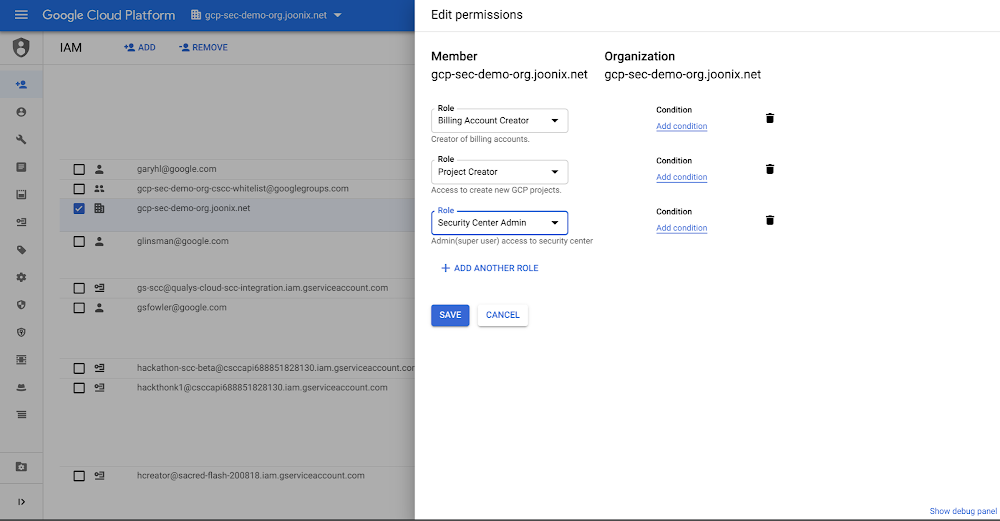
Editor’s note:This the first blog in our six part series on how to use Cloud Security Command Center. One of the great benefits of cloud-based services is how easy they are to deploy. However,  this ease of deployment can make it so your organization isn’t always aware of exactly what services you’re running. When you combine this with the increasing volume of cyber attacks, it becomes clear that you need to be able to see what resources you’re running, the vulnerabilities and threats present, and how to fix them before they can result in damage or loss. Cloud Security Command Center (Cloud SCC) helps you with all of these tasks by providing a centralized dashboard to help you prevent, detect, and respond to threats in your GCP environment. You can start improving your cloud security posture today in five steps. Step 1: Set up Cloud IAM permissions To use Cloud Security Command Center, someone in your organization needs to have the Security Center IAM role. This role provides access to Cloud SCC and ensures that users with the role assigned have the right level of permissions to complete their tasks.Step 2: Enable Cloud Security Command Center Cloud Security Command Center is not enabled by default, giving you the flexibility to choose where you want to use it. We recommend that you enable Cloud SCC for organizations running development, testing, and production workloads.To enable Cloud SCC, you’ll also need to turn on Asset Monitoring. This allows Cloud SCC to discover what GCP assets—our term for resources—you’re running in Google Cloud.Step 3: Turn on Security SourcesOnce you’ve enabled Cloud SCC, you can toggle on our built-in features and products to see the security state of your GCP assets. These features and products can surface information such as misconfigured identity and access management policies, leaked credentials, or what storage buckets contain sensitive and regulated data. We recommend that you turn on all our built-in capabilities and products to increase your visibility into misconfigurations, vulnerabilities, and threats in your environment.Step 4: View your security state by AssetsNow that you’ve turned on Cloud Security Command Center, Asset Monitoring, and Security Sources, you can see the security state of your GCP assets. Looking at your security state by project within Assets lets you see issues related to a specific project.You can also view your security state by asset type. This lets you see the state of your organization at a specific time, or check out which assets have changed, so you can look for  unauthorized modifications.Step 5: View your security state by FindingsFindings are what Cloud SCC has discovered about your assets or resources. You can filter your findings by type, the issue Cloud SCC discovered with your resource, or by source (the feature or product that found the issue). You can also filter findings based on time, so you can quickly gain insight into all the security issues surfaced at a particular time.Cloud SCC in actionTo learn more about how to get started with Cloud SCC, and see it in action, check out our video.
Quelle: Google Cloud Platform

Cloud Text-to-Speech expands its number of voices by nearly 70%, now covering 33 languages and variants

In February, we provided an update on how we’re expanding our support for new languages/variants and voices in Cloud Text-to-Speech. Today, we’re adding to that progress by announcing:Voices in 12 new languages or variants, including Czech, English (India), Filipino, Finnish, Greek, Hindi, Hungarian, Indonesian, Mandarin Chinese (China), Modern Standard Arabic, Norwegian (Nynorsk), and Vietnamese—bringing the list of total languages/variants available to 33. 76 new voices (now 187 in total) overall across all languages/variants, including 38 new WaveNet neural net-powered voices (now 95 in total). See the complete list here.Availability of at least one WaveNet voice in all 33 languages/variants.With these updates, Cloud Text-to-Speech developers can now reach millions more people across numerous countries with their applications—with many more languages to come. This enables a broad range of use cases, including Contact Center AI virtual agents, interacting with IoT devices in cars and the home, and audio-enablement of books and other text-based content.Google Cloud Text-to-Speech runs on Google’s Tensor Processing Units (TPUs)—custom silicon chips that we designed from the ground up to accelerate machine learning and AI workloads. Our unique compute infrastructure, together with DeepMind’s cutting-edge research, has allowed us to develop and deploy WaveNet voices much faster than is typical in the industry. Cloud Text-to-Speech launched a year and a half ago with 6 WaveNet voices in 1 language, and we now have 95 WaveNet voices in 33 languages.Among the major public cloud platforms, Cloud Text-to-Speech now offers the most languages/variants with “natural” (neural net-powered) voices, and the most voices overall:The WaveNet advantageWhen customers call into contact centers, use verbal commands with connected devices in cars or in their homes, or listen to audio conversions of text-based media, they increasingly expect a voice that sounds natural and human. Businesses that offer human-sounding voices offer the best experiences for their customers, and if that experience can also be provided in numerous languages and countries, that advantage becomes global. WaveNet in Cloud Text-to-Speech makes that advantage possible without the need for vast investments in developing your own AI-powered speech synthesis. Based on neural-net technology, WaveNet creates natural-sounding voices, closing the perceived quality gap between speech synthesis and human speech in US English by 70% per Mean Opinion Score. The practical impact is that for most listeners, a WaveNet voice makes human/computer interaction a smooth and familiar experience.The difference between a standard synthetic voice and a WaveNet one is pretty clear; just listen to some of the new voices for yourself:English (India):Standard Voice vs WaveNet VoiceHungarian: Standard Voice vs WaveNet VoiceVietnamese: Standard Voice vs WaveNet VoiceMandarin Chinese: Standard Voice vs WaveNet VoiceJapanese: Standard Voice vs WaveNet VoiceFor a demo using text of your choosing, test-drive the example UI we built using the Cloud Text-to-Speech API.Next stepsCloud Text-to-Speech is free to use up to the first million characters processed by the API, so it’s easy to get started by building a simple test/demo app using your own data. We look forward to seeing what you build!
Quelle: Google Cloud Platform

Data engineering lessons from Google AdSense: using streaming joins in a recommendation system

Google AdSense helps countless businesses make money from their content by placing  advertisements—and their recommendation system plays a huge role in this work. From the beginning, the team operated a batch-based data processing pipeline for the recommendation system, but like many Google Cloud customers we work with, they saw a lot of opportunity in migrating to a stream processing model which could enable AdSense publishers to receive real-time recommendations for their setup. As a result, in 2014, the AdSense publisher optimization team began exploring how to change their underlying data processing system. In this post, we will walk through the technical details of how the AdSense publisher optimizationdata engineering team made the switch, and what they learned. Although the AdSense team used FlumeJava, an internal Google tool, their lessons learned are directly applicable to Google Cloud customers since FlumeJava is the same technology Google Cloud customers know as Cloud Dataflow. Today, these technologies share the majority of their code base, and further unification of FlumeJava and Cloud Dataflow is part of ongoing engineering efforts. The original pipelinePrior to making the change in 2014, the team’s original pipeline would extract data from several repositories, carry out any data transformations required, and then join the various data points using a common key. These new denormalized rows of data would then be used to generate AdSense’s recommendations. Once the batch run had completed, the recommendations could be communicated to the publishers. As you might expect, the pipeline needed to process a large amount of data on every run, so running the pipeline frequently was not a practical option. That meant it wasn’t suited for publishing recommendations in real time. Moving to a streaming pipelineThe streaming pipeline that was developed went through several evolutions. In the first iteration, not every source of data was converted to be an unbounded (streaming) source, creating a pipeline that mixed bounded lookup data which was infrequently updated with the unbounded stream of data. Blending real time and historic data sources in a combination of batch and stream is an excellent first step in migrating your environment towards real-time, and in some cases will effectively address the incremental capabilities the use case called for. It is important to make use of technologies that can blend both batch and stream processing, enabling users to move different aspects of their workloads between stream and batch until they find the right blend of speed, comfort, and price.Initial version, unbounded data sourcesIn order to convert the primary sources of data from batch reads to streamed updates, the pipeline consumed the updates by connecting to a stream of change data capture (CDC) information coming from the data sources.Initial version, with bounded lookup data sourcesThe AdSense team found that some of the lookup data points were both small and infrequently updated. This allowed them to make use of a side input pattern to ensure the data was available wherever it was needed. (SideInputs are a feature that is available in Apache Beam SDK, which you can read more about in the Beam documentation.)  One interesting challenge of this architecture was that the pipeline didn’t make use of any temporal windowing functions, meaning the streams and the SideInput were are all running in a global window. This global window starts when the pipeline begins and doesn’t end until the pipeline is canceled. This raised the question, “How do you update its value?” To solve this problem, the team implemented a solution,a “Slowly-changing lookup cache” pattern, which is available today through Cloud Dataflow and Apache Beam. The side input created can be used as a lookup table for the elements flowing through the pipeline. Today’s pipeline, with an un-windowed joins patternToday, the recommendation pipeline no longer makes use of side inputs and treats all sources as streams to be joined in the same way. After all, the data sources are all just streams, even ones which change infrequently! As you can see in the diagram below, things are a lot simpler even though we have moved all sources to streaming!In the last section, we touched on the team’s requirement that the pipeline be able to do joins on data which isn’t bound by temporal windows. More specifically, if we have a key 1 and we have two data tuples <Data1,null> and <null, Data2>, we would want to store <Data1,null> until <null, Data2> arrives, and then emit <Data1,Data2>. In order to solve this problem, the team made use of per key state within a global window. The pattern essentially materlizes a projection of the data sources onto the pipeline. Specifically, the pipeline lifecycle is outlined in the diagram below:T 0 : On Pipeline Epoch, all data sources are read.T 1 .. T 3 : The sources send updates as a stream.T..X : To guard against the pipeline becoming out of sync with the source systems, there is a refresh cycle: All data is re-read from all sources periodically (once daily, for example) ; This is an easy-to-implement reconciliation process, allowing any eventual consistency issues which may have arisen to be flushed out. As data arrives, there is a read-modify-write call made to the state API. During this step, the timestamps of the data points are checked against the existing data points with only the latest data point being kept. It is important to note that order is not guaranteed for data arriving into the key state space. The latest values are then emitted forward.Garbage collectionThis pattern is capable of storing large volumes of data in a streaming pipeline. While there are many keys, each key will hold only a relatively small amount of data. However, it would be wasteful to keep all keys forever, particularly when the key may no longer receive any updates. For every key, an alarm is set that will carry out garbage collection if no updates have been seen for a predetermined time. In order to achieve this in Apache Beam, you can make use of a Timer object, setting a value for it in EventTime domain. ConclusionAdSense delivers recommendations to publishers in near real time using this pattern, helping AdSense users get more value from the service. The team is able to concentrate on adding business value in their core domain, with the internal FlumeJava team managing and maintaining the technology that the pipeline runs on. If you have a similar use case and wish to implement this pattern, you can do so via Google Cloud Dataflow  using the Apache Beam SDK and the State and Timer APIs. Follow these links to find out more about Google Cloud Dataflow and Apache Beam. Acknowledgments: Tyler Akidau, Technical Lead FlumeJava, Google Cloud Dataflow, also contributed to this post.
Quelle: Google Cloud Platform

BFloat16: The secret to high performance on Cloud TPUs

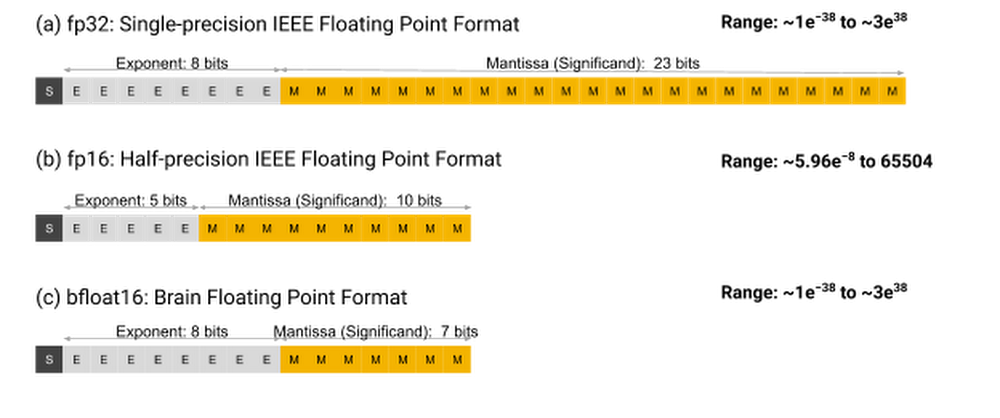
Machine learning workloads are computationally intensive and often run for hours or days. To help organizations significantly improve the running time of these workloads, Google developed custom processors called Tensor Processing Units, or TPUs, which make it possible to train and run cutting-edge deep neural networks at higher performance and lower cost. The second- and third-generation TPU chips are available to Google Cloud customers as Cloud TPUs. They deliver up to 420 teraflops per Cloud TPU device and more than 100 petaflops in a full Cloud TPU v3 Pod. Cloud TPUs achieve this high performance by uniting a well-established hardware architecture—the “systolic array”—with an innovative floating point format. This custom floating point format is called “Brain Floating Point Format,” or “bfloat16” for short. The name flows from “Google Brain”, which is an artificial intelligence research group at Google where the idea for this format was conceived. Bfloat16 is carefully used within systolic arrays to accelerate matrix multiplication operations on Cloud TPUs. More precisely, each multiply-accumulate operation in a matrix multiplication uses bfloat16 for the multiplication and 32-bit IEEE floating point for accumulation. In this post, we’ll examine the bfloat16 format in detail and discuss how Cloud TPUs use it transparently. Then we’ll take a detailed look at some of the benefits it provides, including higher performance, model portability, and better numerical stability for a wide variety of deep learning workloads.Bfloat16 semanticsBfloat16 is a custom 16-bit floating point format for machine learning that’s comprised of one sign bit, eight exponent bits, and seven mantissa bits. This is different from the industry-standard IEEE 16-bit floating point, which was not designed with deep learning applications in mind. Figure 1 diagrams out the internals of three floating point formats: (a) FP32: IEEE single-precision, (b) FP16: IEEE half-precision, and (c) bfloat16.Figure 1: Three floating-point formats. (Adapted from Training Performance slides presented at the 2018 TensorFlow Developer Summit.)As Figure 1 shows, bfloat16 has a greater dynamic range—i.e., number of exponent bits—than FP16. In fact, the dynamic range of bfloat16 is identical to that of FP32. We’ve trained a wide range of deep learning models, and in our experience, the bfloat16 format works as well as the FP32 format while delivering increased performance and reducing memory usage.Choosing bfloat16Our hardware teams chose bfloat16 for Cloud TPUs to improve hardware efficiency while maintaining the ability to train accurate deep learning models, all with minimal switching costs from FP32. The physical size of a hardware multiplier scales with the square of the mantissa width. With fewer mantissa bits than FP16, the bfloat16 multipliers are about half the size in silicon of a typical FP16 multiplier, and they are eight times smaller than an FP32 multiplier!Based on our years of experience training and deploying a wide variety of neural networks across Google’s products and services, we knew when we designed Cloud TPUs that neural networks are far more sensitive to the size of the exponent than that of the mantissa. To ensure identical behavior for underflows, overflows, and NaNs, bfloat16 has the same exponent size as FP32. However, bfloat16 handles denormals differently from FP32: it flushes them to zero. Unlike FP16, which typically requires special handling via techniques such as loss scaling [Mic 17], BF16 comes close to being a drop-in replacement for FP32 when training and running deep neural networks.Cloud TPU v2 and Cloud TPU v3 primarily use bfloat16 in the matrix multiplication unit (MXU),   a 128 x 128 systolic array. There are two MXUs per TPUv3 chip and multiple TPU chips per Cloud TPU system. Collectively,  these MXUs deliver the majority of the total system FLOPS. Each MXU takes inputs in FP32 format but then automatically converts them to bfloat16 before calculation. (A TPU can perform FP32 multiplications via multiple iterations of the MXU.) Inside the MXU, multiplications are performed in bfloat16 format, while accumulations are performed in full FP32 precision.Figure 2: An overview of TPU v2 and TPU v3 chips.Mixed-precision trainingDeep learning models are known to tolerate lower numerical precision [Suyog Gupta et al., 2015, Courbariaux et al., 2014]. For the overwhelming majority of computations within a deep neural network, it isn’t essential to compute, say, the 18th digit of each number; the network can accomplish a task with the same accuracy using a lower-precision approximation. Surprisingly, some models can even reach a higher accuracy with lower precision, which research usually attributes to regularization effects from the lower precision [Choi et al., 2018].When programming Cloud TPUs, the TPU software stack provides automatic format conversion: values are seamlessly converted between FP32 and bfloat16 by the XLA compiler, which is capable of optimizing model performance by automatically expanding the use of bfloat16 as far as possible without materially changing the math in the model. This allows ML practitioners to write models using the FP32 format by default and achieve some performance benefits without having to worry about any manual format conversions—no loss scaling or code changes required. While it is possible to observe the effects of bfloat16, this typically requires careful numerical analysis of the computation’s outputs. Model portabilityThanks to automatic format conversion in TPU hardware, the values of parameters and activations in a model can be stored in full 32-bit format. This means that model portability across hardware platforms is not a concern. Checkpoints obtained from a model trained on Cloud TPUs can be deployed on other hardware platforms (e.g. inference or fine-tuning on CPUs or GPUs) without extensive manual conversions.This serving tutorial demonstrates how to use TensorFlow Serving to serve a model from a saved checkpoint using the standard IEEE FP32 format. You can also deploy a TPU-trained model on hardware with lower precision arithmetic by using TensorFlow’s robust quantization toolchain.Achieving even more performance with bfloat16While automatic format conversion in TPUs lets model developers avoid thinking about numerical precision, further performance improvements can be achieved by manually representing values in bfloat16 format. There are two reasons for this:Storing values in bfloat16 format saves on-chip memory, making 8 GB of memory per core feel more like 16 GB, and 16 GB feel more like 32 GB. More extensive use of bfloat16 enables Cloud TPUs to train models that are deeper, wider, or have larger inputs. And since larger models often lead to a higher accuracy, this improves the ultimate quality of the products that depend on them. In addition, better compiler trade-offs between compute and memory saving can be achieved, resulting in performance improvements for large models. Some operations are memory-bandwidth-bound, which means the on-chip memory bandwidth determines how much time is spent computing the output. Storing operands and outputs of those ops in the bfloat16 format reduces the amount of data that must be transferred, improving speed.Choosing values to represent in bfloat16When it comes to representing values in bfloat16, you have a choice for each of: weights (parameters), activations, and gradients. Past research [Mic 17] suggested that representing all of these values at lower precision can reduce achieved accuracy, and recommended keeping weights at full-precision FP32. However, our experience shows that representing activations in bfloat16 is generally safe, though a small amount of special handling may be necessary in extreme cases. Some models are even more permissive, and in these cases representing both activations and weights in bfloat16 still leads to peak accuracy. We typically recommend keeping weights and gradients in FP32 but converting activations to bfloat16. We also advise ML practitioners to run an occasional baseline using FP32 for weights, gradients, and activations to ensure that the model behavior is comparable.Mixed precision API Using different precision levels for different types of values in a model can be time consuming for model developers. The TensorFlow team is working on a Mixed Precision API that will make it easier to use a variety of numeric precisions, including IEEE FP16 and other common floating point formats. Until that is ready, because bfloat16 is often a drop-in replacement for FP32, you can use the special bfloat16_scope() on Cloud TPUs today. Here’s an example from ResNet:Performance winsWe have optimized the majority of Cloud TPU reference models to use mixed precision training with bfloat16. Figure 3 shows the performance gains from this optimization, which range from 4% to 47%, with a geometric mean of 13.9%.Figure 3: Performance improvements from mixed precision training.ConclusionIn this blog, we laid out how the custom bfloat16 format available on Cloud TPUs can provide significant boosts in performance without having any noticeable impact on model accuracy. Support for mixed-precision training throughout the TPU software stack allows for seamless conversion between the formats, and can make these conversions transparent to the ML practitioner.To get started,we recommend getting some hands-on experience with one of the bfloat16-enabled reference models we have optimized for Cloud TPUs. After that, our performance guide, profiling tools guide, and troubleshooting guide provide in-depth technical information to help you create and optimize machine learning models on your own. Once you’re ready to request a Cloud TPU Pod or Cloud TPU Pod slice to scale up your ML workloads even further, please contact a Google Cloud sales representative.Acknowledgements: Dehao Chen, Software Engineer, TPUChiachen Chou, Software Engineer, TPUYuanzhong Xu, Software Engineer, TPUJonathan Hseu, Software Engineer, TPU
Quelle: Google Cloud Platform

Skip the maintenance, speed up queries with BigQuery's clustering

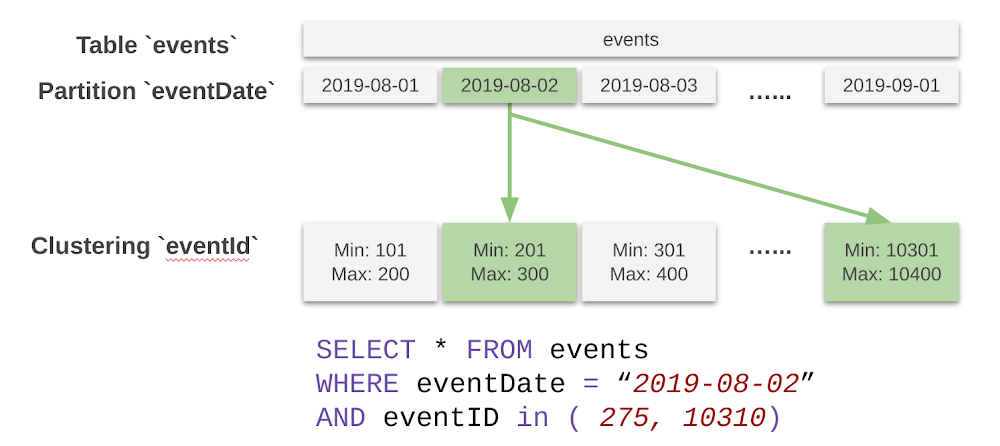
BigQuery is Google Cloud’s serverless data warehouse, automating much of the toil and complexity associated with setting up and managing an enterprise-grade data warehouse. If there’s a maintenance task to be done, BigQuery’s philosophy is to take care of it for our users autonomously. To get the most out of BigQuery, one of our key best practices is table partitioning and clustering. In this blog post, we’ll explain the internal workings of clustered tables in BigQuery. We’ll also cover automatic re-clustering, which fixes a classic data warehousing concern in a completely transparent way. It does this as a background process unique to BigQuery that continuously optimizes clustered tables for best performance. You’ll find partitioning and clustering vastly improve the cost and performance profiles of your workloads. In addition, automatic re-clustering seamlessly provides a practical benefit: making your clustered tables resilient to real-world demands such as continuous inserts. One less thing to worry about!How clustering works in BigQueryWithin a partitioned table, individual partitions behave as independent tables—one per partition. As such, the behavior of clustering for each partition of a partitioned table automatically extends to the clustering of non-partitioned tables.Clustering is supported on primitive non-repeated top-level columns, such as INT64, BOOL, NUMERIC, STRING, DATE, GEOGRAPHY, and TIMESTAMP.In general, there are two typical usage patterns for clustering within a data warehouse:Clustering on columns that have a very high number of distinct values, like userId or transactionId.Clustering on multiple columns that are frequently used together. When clustering by multiple columns, the order of columns you specify is important. The order of the specified columns determines the sort order of the data. You can filter by any prefix of the clustering columns and get the benefits of clustering, like regionId, shopId and productId together; or regionId and shopId; or just regionId.Data in a BigQuery table is stored in Capacitor format blocks. This means that table clustering defines a “weak” sort order on these blocks. In other words, BigQuery attempts to distribute the data such that the blocks store non-overlapping ranges of values for the clustering keys. BigQuery automatically determines the boundaries of these new blocks within each partition as it is written to a table. You can see below the layout of data in a table partitioned on the eventDate date column and clustered on the eventId clustering column:Partition and clustering pruning in BigQueryIn this query, BigQuery first applies the filter on the partitioning column to limit the blocks to only those in partition for “2019-08-02.” Additionally, since the table is clustered on eventID, blocks are organized so that there are non-overlapping ranges of values for eventID column. Among other things, BigQuery’s scalable metadata management system stores the range information of columns within each block. It uses this information to further limit the scan to blocks that have eventId between 201 and 300, as well as between 10301 and 10400. Clustering improves performance of aggregation queriesSince clustering implies sort order, rows with the same value for the clustering columns are stored in the same or nearby blocks. This allows BigQuery to optimize aggregation queries that group by the clustering columns. In order to compute aggregates, BigQuery first computes partial aggregates from each block. It then shuffles and merges these partial aggregates to compute the final aggregate. Since rows with same value for clustering columns are generally together, partial aggregations produced are significantly smaller in size, thus reducing the amount of intermediate data that needs to be shuffled. This improves aggregation query performance.Maintaining table clusteringData is typically written to a BigQuery table on a continuous basis using load, query, copy jobs or through the streaming API. As more data comes in, the newly inserted data may be written to blocks that have column value ranges that overlap with those of the currently active blocks in the table. To maintain the performance characteristics of a clustered table, BigQuery performs automatic re-clustering in the background to restore the sort property of the table. Remember, in a partitioned table, clustering is maintained for data within the scope of each partition. Traditionally, similar processes in data warehouses, such as VACUUM or automatic clustering, require some level of setup and administration. They also require the user to bear the cost of the process, since the processes use cluster time otherwise dedicated to valuable analytics. BigQuery’s automatic re-clustering is unique in two ways:This background operation does not use any of your resources, and is thus provided free to users.The system performs automatic re-clustering autonomously and transparently, with no action required from you.Automatic re-clustering: no cost, no setup, no maintenanceHow automatic re-clustering worksAutomatic re-clustering works in a manner similar to an LSM tree. In steady state, most of the data in a partition is in fully sorted blocks, referred to as the baseline. As new data is inserted into a partition, BigQuery may either perform a local sort for the new data or defer such sorting until there is sufficient data to require a write. Once there is sufficient amount of data, the system generates locally sorted blocks, called deltas. After the deltas have accumulated enough data, comparable in size to the size of the current baseline, BigQuery merges the baseline and deltas to generate a new baseline. While regenerating baselines is I/O- and CPU-intensive, you won’t notice it one bit.Automatic re-clustering automatically maintains clustered tables in BigQueryBigQuery attempts to merge deltas and baselines into a new baseline until the resulting baseline reaches 500GB. After this, as more deltas are created, they are merged into a new baseline without perturbing the previous baselines. This method avoids wasting time and resources rewriting baselines every time new data enters BigQuery.Learn more about using BigQueryIn addition to making auto re-clustering completely free and autonomous for our users, you don’t pay for ingest into BigQuery, and query capacity is not consumed one bit. We hear from customers that these two workloads combined can consume up to 30% of their processing resources that could otherwise be dedicated to business-critical analytics and data processing. BigQuery’s approach  means that these efficiencies directly translate to a more resilient data warehouse, providing faster queries and more savings.For more practical examples of the cost and performance impact of clustering, head over to Felipe Hoffa’s blog post on clustering. As always, you can try BigQuery with our free perpetual tier of 1TB of data processed and 10GB of data stored per month.
Quelle: Google Cloud Platform

Firebase Unity Solutions: Update game behavior without deploying with Remote Config

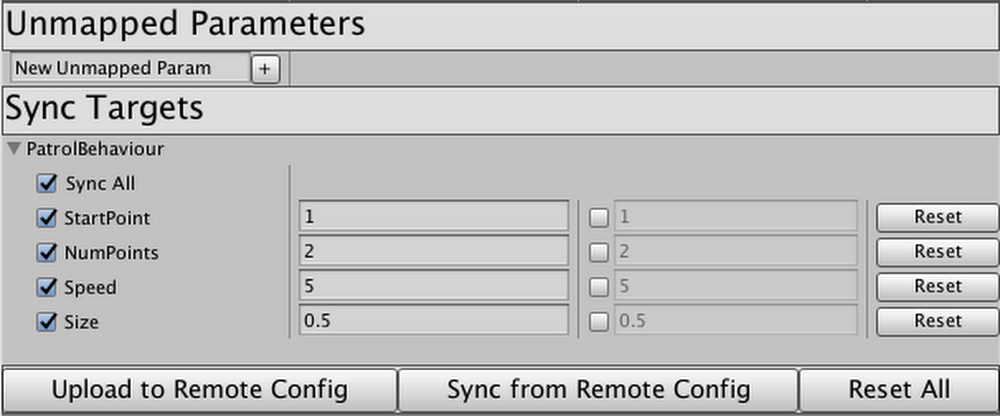
Last June we announced Firebase Unity Solutions, an open-source Github repository with sample projects and scripts to help you add cloud-based features to your games being built on Unity. Our debut project,Firebase_Leaderboard, utilized Firebase Realtime Database to create and manage a cross-platform high score leaderboard. Today, we’re introducing the second solution incorporating Firebase services into Unity: Auto-Sync with Remote Config.Auto-Sync uses Firebase’s Remote Config to allow Unity developers to modify their game’s behavior in real time, without requiring a fresh build and release cycle. This means you can tweak the behavior of entities in your game without waiting for builds to be processed through the app stores. In days past, making incremental changes to game behavior in real time required a good bit of setup. Firebase Remote Config is an outstanding tool for updating behavior without requiring a new publish cycle, but the Unity library requires hard-coding every single variable a developer wants to control.With this package, you can pop the provided Component onto any GameObject or Prefab, tweak how to identify the fields you want remote access to, and click “Upload to Remote Config.” When the game is live, you can modify those values right in a custom Unity Editor built using Remote Config Management REST API, click “Upload” again, and voilà: the live game updates right before your eyes!Think your platformer hero’s jump should be a little higher? Want your patrolling enemies to move a bit faster? How about modifying the density of powerups, ammo, or obstacles? Or disabling features in a marketplace until translations are ready, or toggling a promotion during a very specific time window? The possibilities are limitless; with Auto-Sync, this can all be done right from the Editor at a moment’s notice. No code push required.To learn more, visit theFirebase Unity Solutions repository on Github. You can incorporate the scripts into your project directly, or import the unitypackage file from the current-builds subdirectory to get started.
Quelle: Google Cloud Platform

Got microservices? Service mesh management might not be enough

A lot of enterprises are evolving their monolithic applications into microservices architectures. In this pattern, applications are composed of fine-grained services that communicate via APIs. Microservices promise, faster development, innovation, cloud scaling, better infrastructure optimization—and happier developers. No wonder this architecture gets so much attention. But that doesn’t mean implementing a microservices strategy is easy (If you’re in the middle of this process, you know it’s complicated). You’ve got lots of different departments working on lots of different projects, and all of them are at different places. How do companies get to a point where they can reap the benefits of microservices?In this post, we’ll explain why a successful microservices approach requires dedicated infrastructure for building and managing those services, how sharing access to services happens through APIs, and why APIs shared outside the domain of ownership need to be managed. We’ll also walk through how Istio, an open-source project that can help with microservices management, helps to control the potential chaos as microservices adoption spreads through an organization.APIs as communication contractCooperating services intercommunicate via APIs. Simply put, APIs are how software talks to software. The API defines the communication contract between a service provider and a service consumer. Whether you think of the provider and the consumer as “services,” or as “applications” is immaterial; the API defines how they make requests and receive responses. Sending and receiving JSON RESTfully over HTTP/1 seems to be the most common technical basis for an API, but APIs can also employ HTTP/2 or TCP, and may use gRPC, GraphQL, jsonRPC or other data and message representations. They’re all just APIs, and they may be more or less formally specified.When an application is “decomposed” into a set of services that intercommunicate via APIs, a new set of problems arises: how to manage all of those interdependent services and the communication between them. As the set of services or the number of instances grows, the service management problem grows, too.For example, one of the very first things to consider when building with microservices is the ability to secure traffic between the microservices. A common method for securing this communication is mutual transport layer security (mTLS), which enables both peers in an exchange to authenticate one another. Once authentication happens, this can be used to perform authorization decisions at the service that receives a request, based on the identity of the caller that’s been asserted with the TLS certificate. This important function is pretty basic and simple to do when you have two services, but it gets more and more difficult when the number of services grows. One might attempt to mitigate this with client libraries.But then there’s the reality that services are developed in various languages: Java, C#, Python, Golang, or Node.js. It gets very difficult to apply a variety of different policies if it requires independent implementations in a set of five distinct languages. The complications multiply, and it becomes obvious that we need a better model: some kind of management infrastructure to control the potential chaos.Enter the service mesh While the term “microservices architecture” refers to a general pattern, a service mesh is a particular realization of that pattern. A service mesh provides a transparent and language-independent way to flexibly and easily automate application network functions. (For more on service mesh, check out this blog series.)Simply put, services meshes were developed to solve the problems of connecting, securing, controlling, and observing a mesh of services. Service meshes handle service-to-service interactions including load balancing, service-to-service authentication, service discovery, routing, and policy enforcement. Istio is an open-source project that delivers a service mesh; it’s backed by Google, IBM, Red Hat, Lyft, Cisco, and others, and is being used in production by companies like eBay, Autotrader, Trulia, Continental, and HP.Istio aims to help connect, secure, control, and observe the services in the mesh.Connect Istio helps control the flow of traffic and API calls between services intelligently; services connect to their dependent services via names, and load automatically gets balanced across all of the available runtime instances of a target service. Retries, circuit breakers, canary releases—all are handled automatically and configured for the mesh.Secure Istio automatically secures communications between services through managed authentication, authorization, and encryption. Each service has an identity asserted by an X.509 certificate that is automatically provisioned and used to implement two-way (mutual) Transport Level Security (TLS) for authorization and encryption of all API exchanges. Control Istio applies policies (for example, routing, rate limits, quotas) and enforces them across services. Inbound and outbound communications are controlled—even requests that go to external systems.Observe Istio ensures visibility with automatic tracing and operational logging of services.The goal of using a service mesh like Istio with your microservices system is better security, more reliability, lower cost, scale, and better resiliency within a set of closely intercommunicating systems.  A look at services in a meshSuppose an application is a custom inventory management system for a retailer, composed of several cooperating, related services:Policies defined in the service mesh might dictate that the pricing service can make outbound calls only to its data store, while the product service can call the location and inventory and pricing services, but not anything else.  If the team uses Kubernetes as the underlying platform for these services, Kubernetes ensures that unhealthy instances of these services get stopped and new instances get started. The service mesh ensures that the new instances are governed by the same set of policies.Sharing APIs with consumers outside the meshService meshes generally focus on the problem of managing and controlling the intercommunication among all the disparate services that comprise the application. Surely, it’s possible to define an Istio gateway to accept inbound requests. But that’s not enough; there’s a need to manage the requests into the mesh from service consumers, and to manage outbound requests—perhaps to a SaaS CRM system or another externally managed service.Back to our example: the product service needs to accept inbound requests from clients, such as an app running on hundreds of thousands of mobile phones. But the product service might want to modify its behavior based on the identity of the user making the call. The app on the mobile phone uses the “Product API”—the communication contract exposed by the product service—to send in requests. The product service might also need to connect to a Salesforce system.Regarding inbound requests arriving from systems that are significantly separated from the services in the mesh, how should those requests be secured, controlled, and managed? (Examples of “significantly separated” could include requests from third-party apps or even from different business units or teams within the same company. The requirements for these separated systems are quite different from those for inter-service communication). For an external or mobile client, we cannot rely solely on a TLS certificate to assert the identity of the inbound request. While app producers can provision client certificates into mobile apps, in many cases the client has no certificate to use for transport-level security. Clients may use a different form of identity assertion, relying on message-level security and signing, such as a self-signed JWT.Often the system would also like to authenticate the identity of a human user. Within the service mesh, the service identity is the only identity, but requests arriving from a mobile app, kiosk, or web app should carry user identity as well. This generally isn’t done with an X.509 certificate, but rather with a token (think OAuth) that asserts identity information about the user.Rate limits for external consumers will be different, and may depend on the status of the developer of the consumer app (or “client”). For example, client apps built by partners might get greater rights and higher transaction allowances. These limits are often used for business purposes or may be in place to protect an entire system rather than an individual service.It may be desirable to modify or filter the original API requests and responses depending on the client’s use case, or the user’s identity. For example, a lightweight client might want a compressed data format in lieu of JSON. Or a client might want a filtered view of the JSON, with some of the fields returned and some omitted.These different requirements apply to externally-developed apps, and in general to any client or service consumer that is significantly separated from the target services. Verification and throttling of requests coming from a client built by a developer on the service-development team is less useful; if the client app (or consuming service) is misbehaving, the API publishing team can notify their internal partners, and that client app development team just gets to work and fixes it. But calls arriving from a client built by an external partner need more verification. It’s not practical to engage on a 1:1 basis with developers of external apps. More strict enforcement is necessary here; that’s where API management come in.API management enables the sharing of APIsSharing a microservice means exposing it as an API for use by a developer outside the team that built the service. Microservice APIs that are shared outside of a small team need to be managed. An API management infrastructure, such as Google Cloud’s Apigee API management platform, helps address the different requirements for requests that are sent from external systems. Apigee also supports Istio as an API gateway or enforcement point. API management enables you to:Share APIs by publishing them and making them available to developers outside the core app team. These external developers need to gain authorization to access the APIs and understand how to use the APIs to build their own apps and clients. The core app team wants a way to distinguish clients built by different developers, and even distinguish between clients built by the same developer. This is all enabled by a developer portal, and the ability for developers to self-register and self-provision credentials for the APIs.Productize by treating APIs as “digital products.” This means: collecting related APIs into a coherent, consumable unit, to enable publishing and sharing. grouping complementary APIs that may have disparate origins into a single unit and normalizing security requirements on those APIs (rate limits, security credentials, message signing, and so on). modernizing APIs by transforming SOAP to JSON, implementing caching, or wrapping validation logic around “bare” or naive internal APIs. potentially monetizing APIs directly, charging developers for inbound traffic.Report on usage trends, traffic splits, latency and user experience. This enables the API product team to feed insights back into the API’s design, to iterate on the API-as-digital-product—and maximize business value. This capability is built on an analytics subsystem that scales.Comparing API management to service managementServices management and API management are different. A typical large, information-driven enterprise will deliver thousands of services, and will share hundreds of those via APIs to outsiders. Service management and API management satisfy the needs in these different spheres:A mature enterprise might aspire to the following goals:All services will be managed; they’ll have consolidated logging, tracing, mTLS, and retry policies applied and enforced. Access to services is via loosely governed APIs.All APIs shared outside their original ownership domain will be managed. Developers external to the team can view them, request access to them, and gain credentials. And access from apps built by external developers will be more strictly governed and throttled. Analytics data will help inform modifications to shared APIs.  But there are some logical parallels between the capabilities in service meshes like Istio and API management platforms like Apigee. Both Istio and Apigee:Enable policy enforcement for requests (rate limiting, quotas, and token verification)Can perform request routing based on data in the requestCollect logging information for observabilityUse a communication proxy to implement these controlsHowever, these two systems are targeted to different needs. Services management is intended for services built by a more or less closely related development team. This includes some aspects of managing the communication among those services, for example, mutual-TLS enforcement and automatic certificate provisioning, or rate limiting, or routing.On the other hand, API management is intended primarily to manage sharing of APIs outside of a core team. An outsider might be a member of the team across the hall, a developer in a different division of your company, or a developer at a different company. In any case there is significant separation between the API consumer and the API provider, which demands a greater degree of management of the API. While technically there are parallels, the requirements are different enough that, especially as the number of services under management grows, and as the number of APIs shared beyond their publishing teams grows, companies will want dedicated infrastructure to manage each.How HP manages microservicesHP Inc., which sells a wide range of printing solutions to consumers and enterprises, builds a variety of core services that are shared across business units at the company, including identity management and content management. The decision to move to a microservices architecture was driven in large part by the need to move faster, says Galo Gimenez-Palop, distinguished technologist and platform architect at HP. Large teams working on applications from different functional areas created the need for lots of synchronization—and lots of meetings. “We had these continuous integration pipelines that would take hours. And because there were so many dependencies, there were manual gates to decide if something was moving or not moving forward,” Gimenez-Palop tells us.So it’s no surprise that HP was attracted to the increased development velocity promised by a microservices architecture. Adopting microservices (alongside Kubernetes container orchestration, which accelerated teams building and deploying applications) would enable smaller development teams working on smaller code bases, with services going into production independently to reduce reliance on other teams—“you build it, you run it,” as Gimenez-Palop puts it. Yet moving from monolithic applications to a more distributed microservices architecture posed several challenges—especially as the number of microservices grew. The stumbling blocks mounted, Gimenez-Palop says: from orchestration difficulties, to challenges in discovering services, to breakages resulting from modifying services that depend on other services, to “policy sprawl,” to issues with ensuring that new versions of services integrate with other services.“How do you know which is the other version of the other service and when the other team changes the version of the service?” Gimenez-Palop asks. “Integration testing became really, really difficult because now, when you release one of the services, you need to do the integration testing with a bunch of other testing other services.”“As soon as you start to do microservices, you will find that it’s very easy to get in a complicated mess,” he adds.Istio proved to be the solution for HP. It simplified the complexities of microservices communications by providing a standardized way to connect, secure, monitor, and manage microservices. As a vital plane for service-to-service control and reliability, Istio handles application-layer load balancing, routing, and service authentication.Sharing microservices-based core services with other business units within HP is done by exposing them as APIs with other teams in the organization or with external partners and developers.But when microservices are exposed as APIs, they require API management, which makes it easier to extend the value of microservices both within the enterprise and to external developers. HP uses the Apigee platform for this purpose, gaining security, visibility, and control along the way.“We can have written contracts with the consumers of our APIs, we can have visibility into how those consumers are using the APIs of different services,” Gimenez-Palop says. “We can have policies like authorization, authentication, and payload inspection, all centralized in a single location.”Learn more by watching the Google Cloud NEXT ‘19 session:Can I use services management alone?As services become more prevalent and more fine-grained within an enterprise, formal service management via dedicated service mesh infrastructure will become a requirement.But is a service mesh alone enough? Sometimes. In the case where all of the inter-cooperating services are built and managed under the same ownership domain (a company’s director of engineering, for example), and access to the services is rarely shared with outsiders (other teams) via exposed APIs, a service mesh such as Istio will likely satisfy the requirements. Clients to the services are all in-house and don’t have significant separation from the services themselves.If services expose an externally consumable API that outsiders can see and use, then API management (as Gimenez-Palop says above) becomes a natural complement to service management. Better togetherMicroservices continues to be a big idea. A successful microservices approach requires tooling and infrastructure for building and managing those services. Sharing access to services happens through APIs, and APIs shared outside the domain of ownership need to be managed. Drawing the line between what is inside the domain of ownership and what is outside, and therefore which API calls need less management and which need more, is a judgment call.  Service meshes and API management are complementary and are used to solve distinct problems around services and APIs. While they both use communication proxies, and while there are parallels in function, the differences in domain set them apart, and most companies will see significant benefits from using them together.For more, watch Dino and Greg’s popular presentation at Google Cloud NEXT ‘19, “APIs, Microservices, and the Service Mesh.”
Quelle: Google Cloud Platform